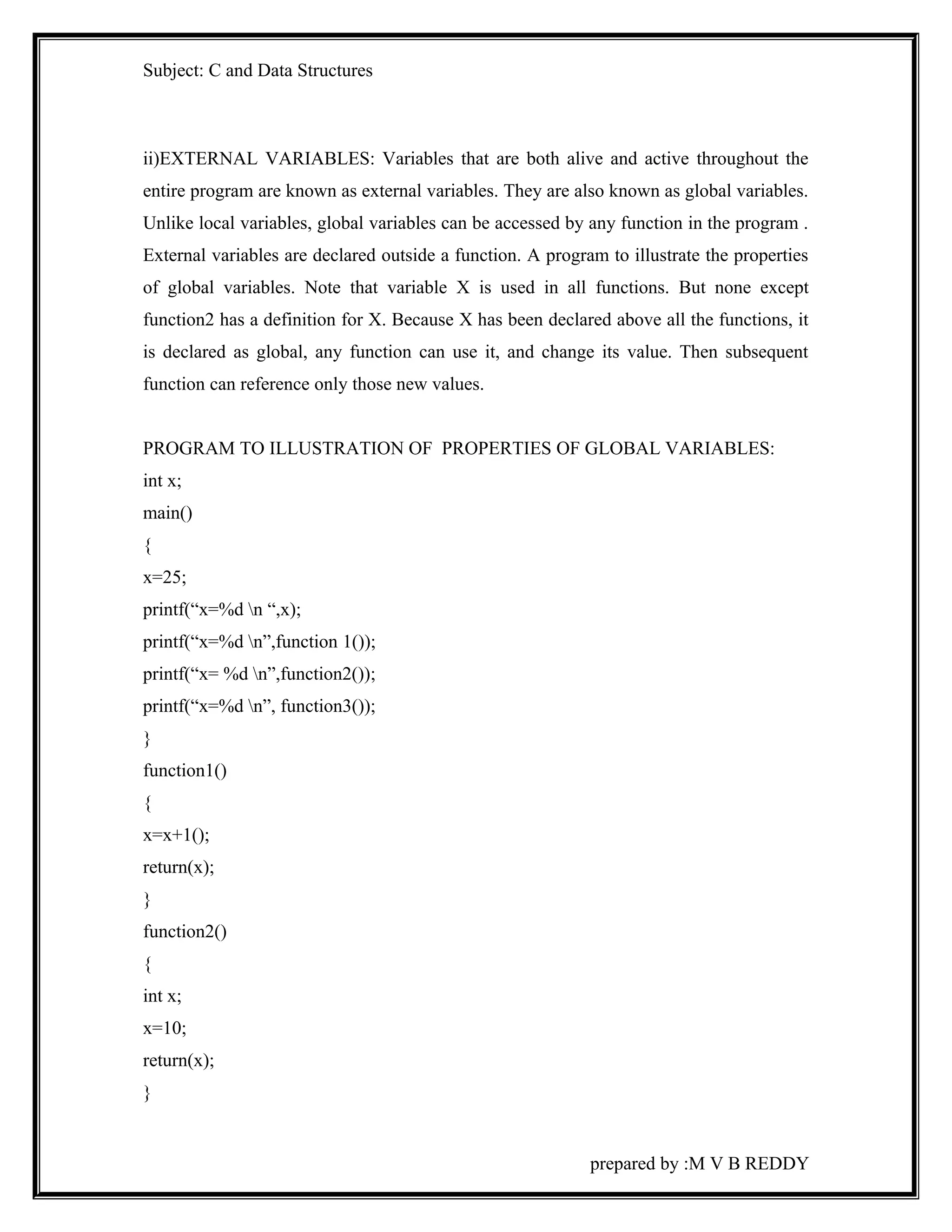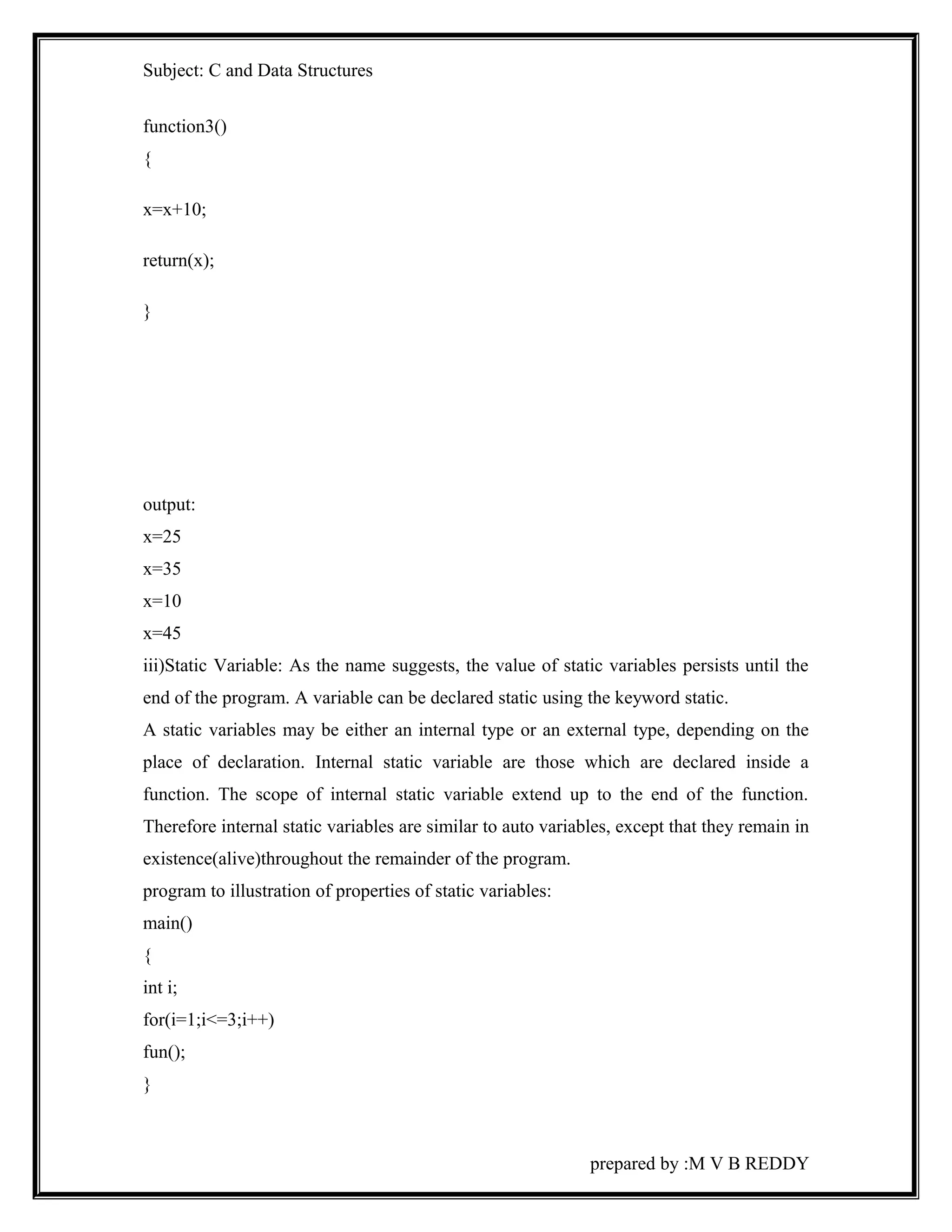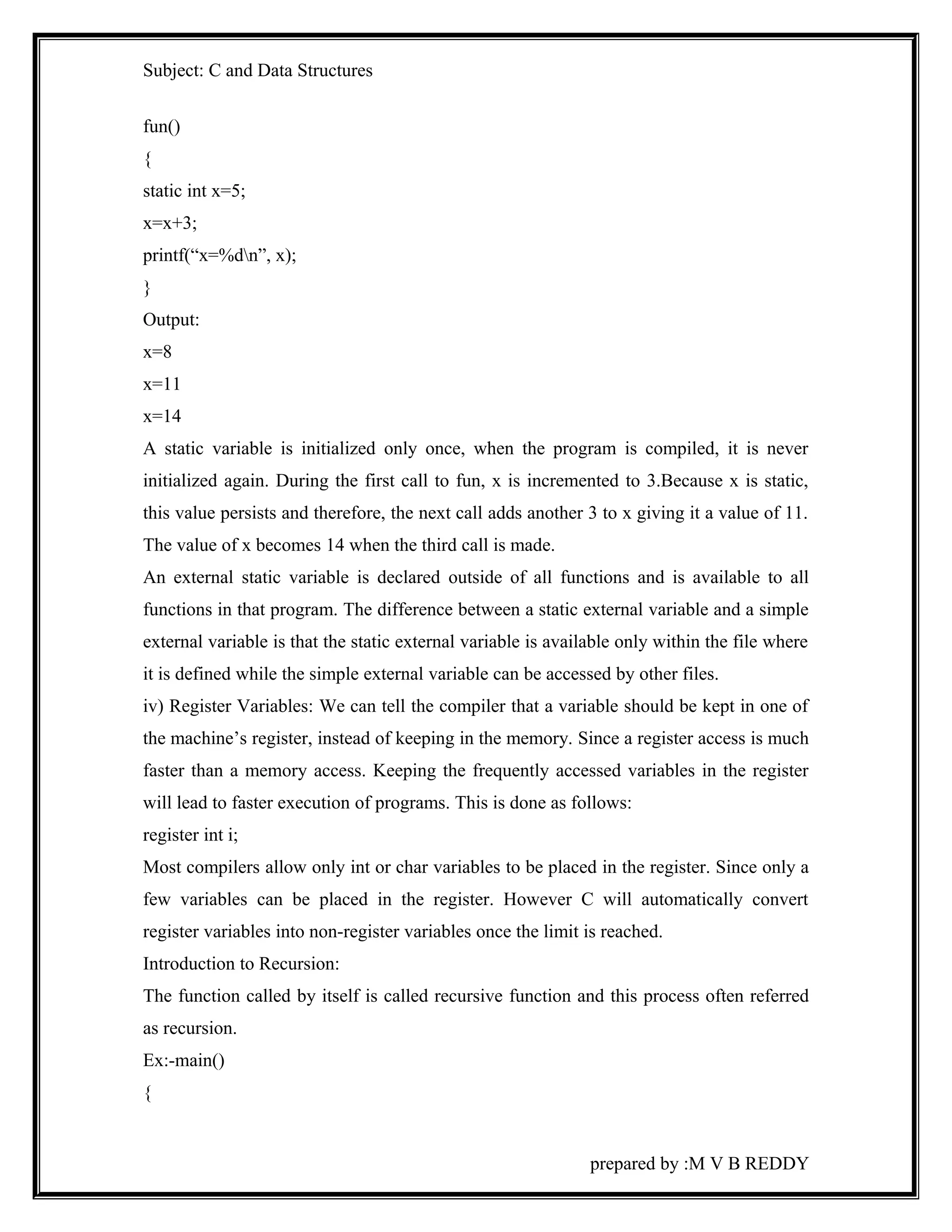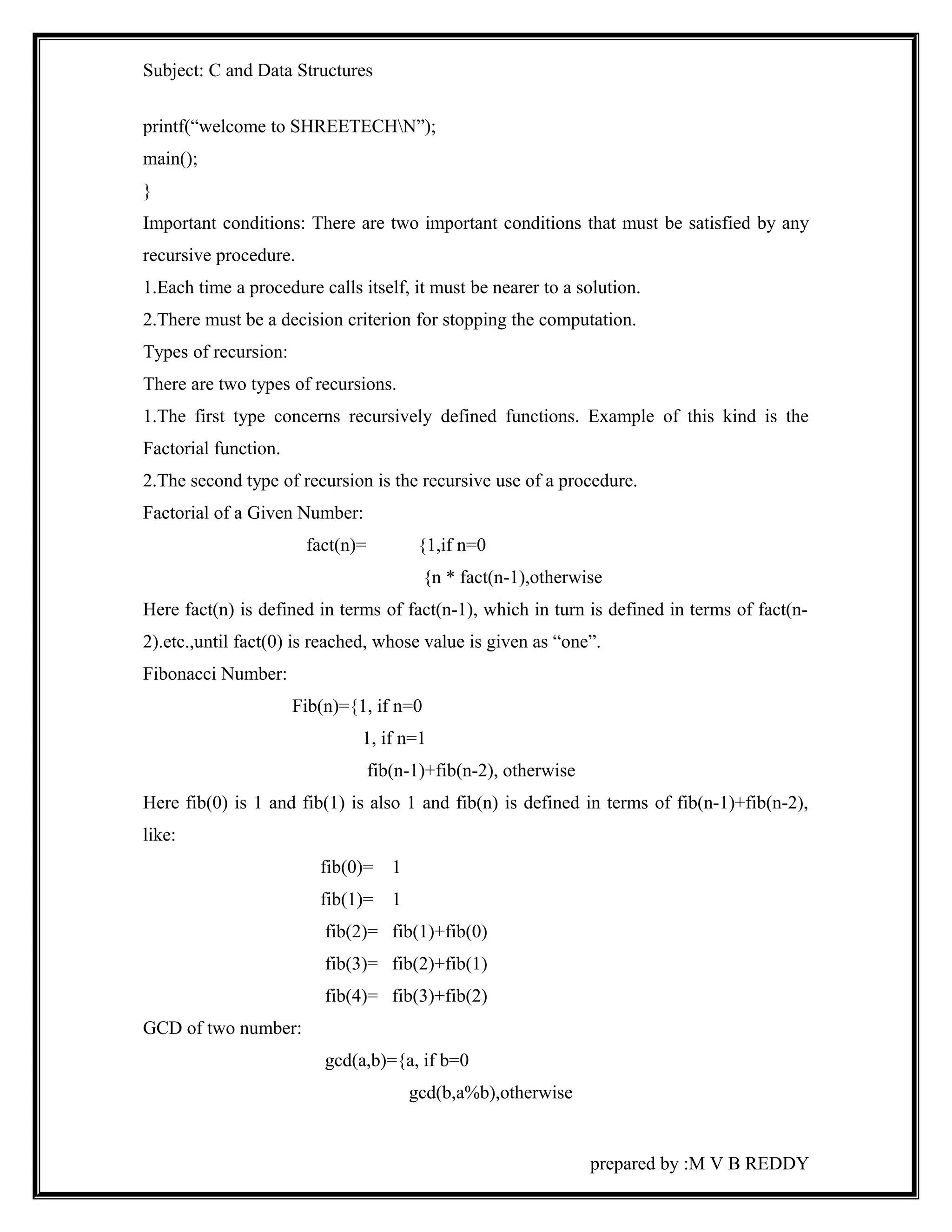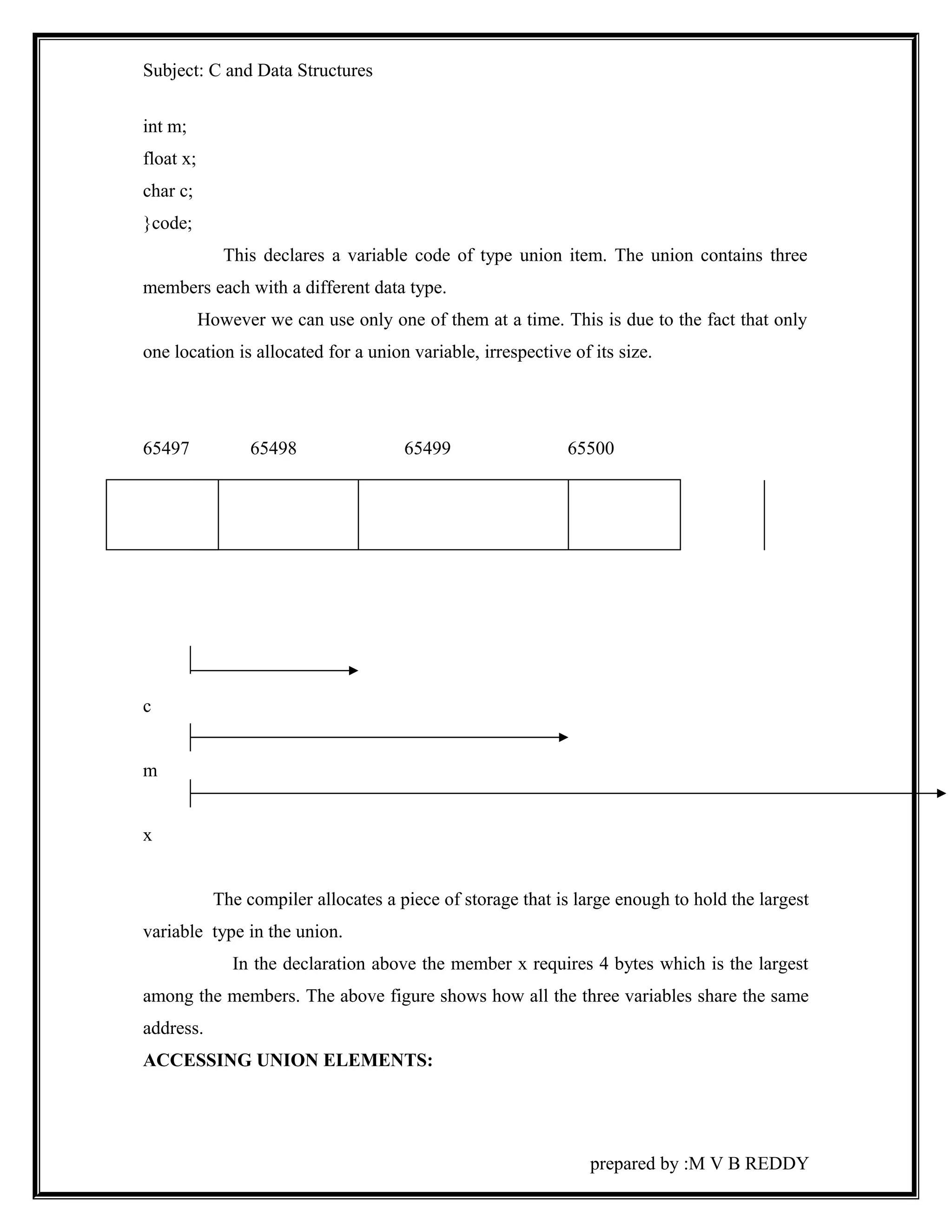
Subject: C and Data Structures 
C LANGUAGE CONTENTS 
CHAPTER - I 
 Basic structure of C program 
 C tokens 
 Data types and sizes 
 Declaration of variables 
 Assigning values 
 Operators 
 Type conversions, 
 Expressions and evaluation 
 Input-Output statements 
CHAPTER - II 
 If and switch statement, 
 While 
 Do-While 
 For statement 
.CHAPTER – III 
 One dimensional & two dimensional arrays 
 Strings and String handling functions 
 Functions, Recursive functions, Storage classes, and Scope rules 
CHAPTER - IV 
 Pointers, Pointers and Arrays, Pointers and function arguments, 
 Pointers to functions. 
 Structures 
 Unions 
CHAPTER – V 
 Console & File I/O 
prepared by :M V B REDDY
Subject: C and Data Structures 
UNIT-I 
Introduction 
Now a days computers are playing very vital role in each and 
every field of problem solving. The communication medium between a computer and a 
human being is a typical 'language' i.e.. Humans are able to communicate with the 
computer system in some form of language. There are basically three types of languages 
viz.. Machine Understandable Language. Assembly Level Language and High Level 
Language. There are number of high level languages developed in the past three decades 
like FORTRAN, Pascal and Basic, C Language etc. Clearly, no other language has had 
so much of influence in the computing as 'C'-language. Evolution of 'C'- as a 
programming language has made application development very easy. 
ALGORITHM 
An algorithm is a method of representing the step-by-step procedure for solving a 
problem. An algorithm is useful for finding the right answer to a problem or to a difficult 
problem by breaking the problem into simple cases. 
An algorithm must possess the following properties: 
i) Finiteness : An algorithm should terminate in a finite number of steps. 
ii) Definiteness : Each step of the algorithm must be precisely stated. 
iii) Effectiveness : Each step must be effective, in the sense that it should be easily 
convertible into program statement and can be performed exactly in a finite amount 
of time. 
iv) Generality : The algorithm should be complete in itself so that it can be used to 
solve all problems of a given type for any input data. 
v) Input/Output : Each algorithm must take zero, one or more quantities as input data 
and yield one or more output values. 
Flow chart 
prepared by :M V B REDDY
Subject: C and Data Structures 
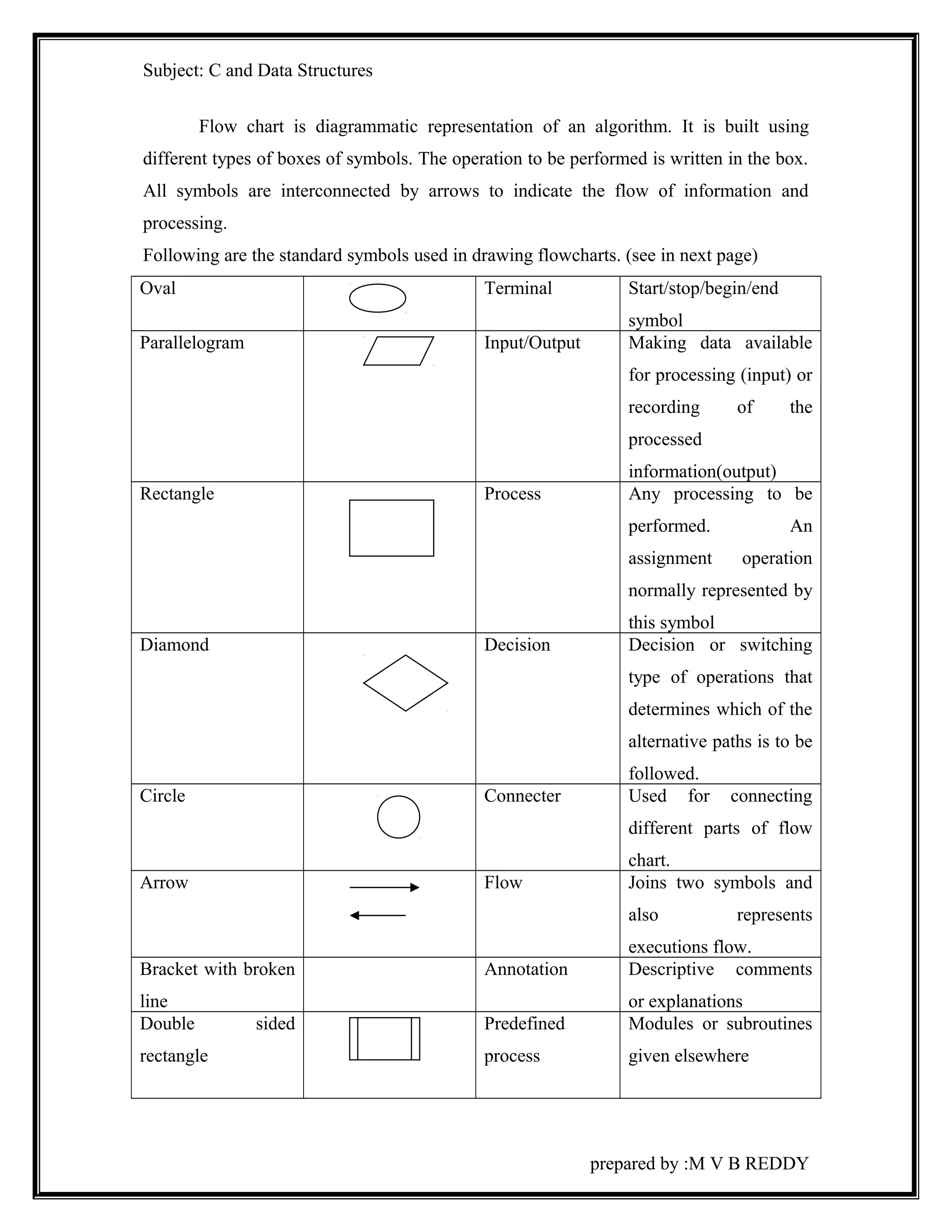
Flow chart is diagrammatic representation of an algorithm. It is built using 
different types of boxes of symbols. The operation to be performed is written in the box. 
All symbols are interconnected by arrows to indicate the flow of information and 
processing. 
Following are the standard symbols used in drawing flowcharts. (see in next page) 
Oval Terminal Start/stop/begin/end 
symbol 
Parallelogram Input/Output Making data available 
for processing (input) or 
recording of the 
processed 
information(output) 
Rectangle Process Any processing to be 
performed. An 
assignment operation 
normally represented by 
this symbol 
Diamond Decision Decision or switching 
type of operations that 
determines which of the 
alternative paths is to be 
followed. 
Circle Connecter Used for connecting 
different parts of flow 
chart. 
Arrow Flow Joins two symbols and 
also represents 
executions flow. 
Bracket with broken 
line 
Annotation Descriptive comments 
or explanations 
Double sided 
rectangle 
Predefined 
process 
Modules or subroutines 
given elsewhere 
prepared by :M V B REDDY
Subject: C and Data Structures 
Introduction to C: 
C is a programming language developed at AT& T’s Bell Laboratories of USA in 
1972.It was designed and written by Dennis Ritchie. C has the features of both BASIC 
and PASCAL. As a middle language, C allows the manipulation of bits, bytes and 
addresses the basic elements with which computer functions. 
Importance of C 
1) It is a robust language, whose rich set of built-in functions and operators can 
be used to write any complex program. 
2) Programs written in C are efficient and fast. This is due to its variety of data 
types and powerful operators. 
3) C’s code is very portable, in the sense that it is easy to adapt software written 
for one type of computer or operating system to another type. 
4) C has very small key words (only 32). Its strength lies in its built-in 
functions. These built-in functions can be used for developing programs. 
5) C language is well suited for structured programming, thus requiring the user 
to think of a problem in terms of functions (or) blocks. A proper collection of 
these functions would make a complete program. This modular structure 
makes program debugging, testing and maintenance easier. 
6) Another important feature of C is its ability to extend itself. 
Basically a C program is a collection of functions that are supported by 
the C library. We can add our own functions to the C library. With the 
availability of a large number of functions, the programming task becomes 
simple. 
prepared by :M V B REDDY
Subject: C and Data Structures 
Simple ‘C’ Program: 
Before discussing any features of C, we shall look at some sample C program 
and analyze and understand how they work. 
Ex 1: C program to print a message. 
main() 
{ 
Printf(“welcome to GITAM”) 
} 
Explanation: 
i) main(): 
i) The ‘main()’ is a special function used by the C system to tell the computer 
where 
the program starts. 
ii) Every program must have exactly one main function. 
iii) Opening brace ‘{‘ and closing brace ‘}’ are the delimiters of any function. 
iv) All the statements between these two braces are called as function body. 
v) The lines beginning with /* and ending with */ are known as comment lines. 
These lines are not executable statements and therefore anything between /* and */ is 
ignored by the compiler. 
ii) printf() function: 
printf is a predefined, standard C function for printing output. ‘Predefined’ means 
that it is a function that has already been written and compiled, and linked together with 
our program at the time of linking. 
The printf function causes everything between the starting and the ending 
quotation marks to be printed out. In the above example, the out put will be 
welcome to RGMCET 
prepared by :M V B REDDY
Subject: C and Data Structures 
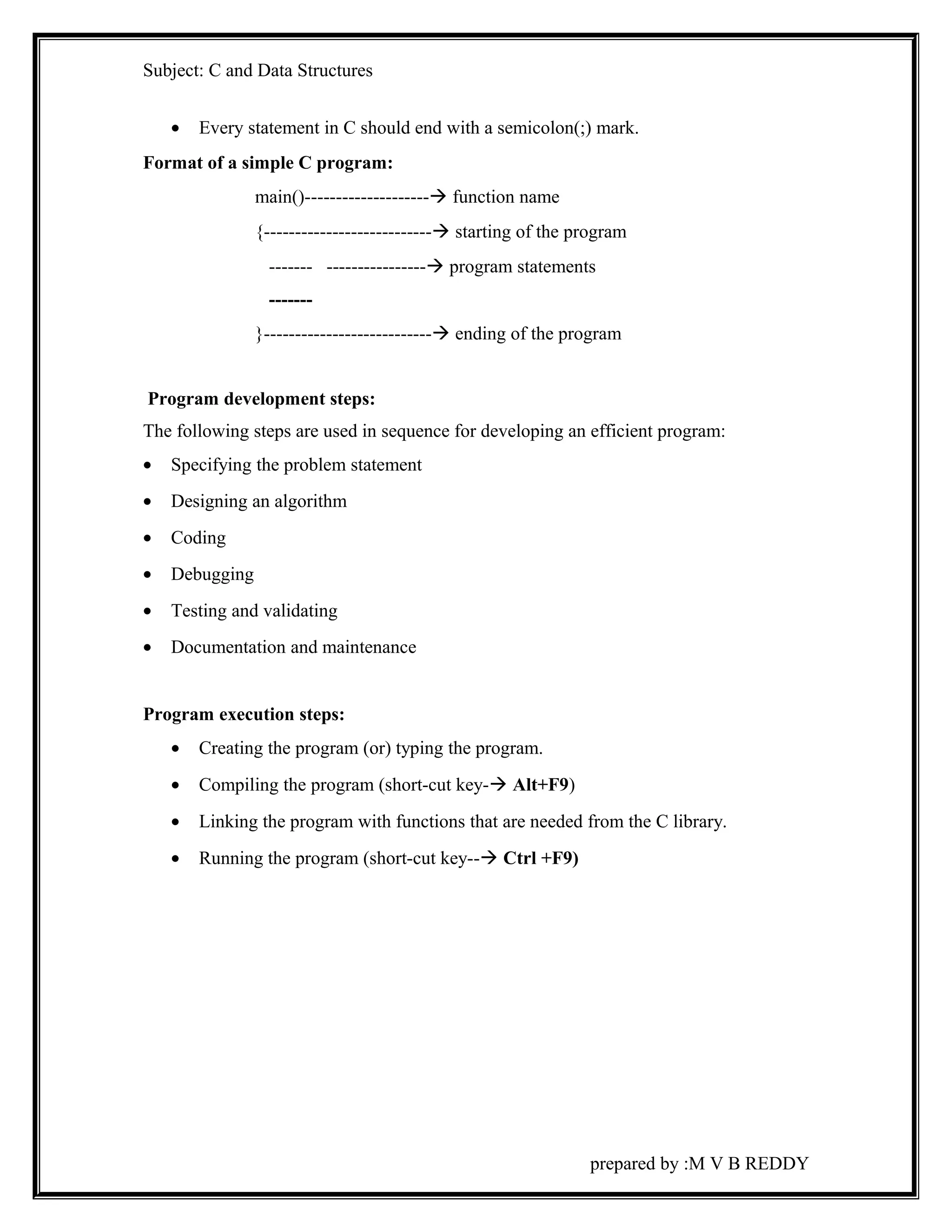
· Every statement in C should end with a semicolon(;) mark. 
Format of a simple C program: 
main()-------------------- function name 
{--------------------------- starting of the program 
------- ---------------- program statements 
------- 
}--------------------------- ending of the program 
Program development steps: 
The following steps are used in sequence for developing an efficient program: 
· Specifying the problem statement 
· Designing an algorithm 
· Coding 
· Debugging 
· Testing and validating 
· Documentation and maintenance 
Program execution steps: 
· Creating the program (or) typing the program. 
· Compiling the program (short-cut key- Alt+F9) 
· Linking the program with functions that are needed from the C library. 
· Running the program (short-cut key-- Ctrl +F9) 
prepared by :M V B REDDY
Subject: C and Data Structures 
‘C’ LANGUAGE OBJECTIVES 
C is a general purpose structured programming language that is powerful, 
efficient and compact. C combines the features of high level language. Programming in 
C has recently become more interesting. 
C language provides the various operators to evaluate various 
expressions. C also provides decision making and branching statements. It also 
introduces us the concepts of arrays, structures, pointers and strings. Also provides how 
to mange files. Also gives the idea of data structures in which the topics stacks, queues, 
linked lists, sorting and searching are involved. 
prepared by :M V B REDDY
Subject: C and Data Structures 
Program development steps: 
There are two broad categories of programmer, the successful and not so-successful. 
The second category people to their keyboards and begin coding i.e. the 
actual writing of instructions. It is the mark of professional and successful programmers 
that this is one of the last stages they undertake. There are many more important steps to 
consider first. 
1. Understand the problem: 
Unless the problem is clearly understood. You cannot even begin to solve it. 
This seems like a truism until you appreciate that a program specification seldom gives 
all the fact required by the programmer. The professional programmer is a pessimist, 
because from past experience there is always some importance information which is 
omitted. This needs to be identified first. 
2. Examine the data: 
Programs are written to work on data. Unless one knows exactly how the data 
is organized, what it ‘looks’ like, etc., the program which processes it cannot be written. 
This fact becomes clearer the more one writes programs, but it is a fact all too frequently 
overlooked by the novice. 
3. Plan the output: 
The output should be planned next. Not only does this help to ensure that 
nothing is omitted from the program, but helps to get a clear picture of what the program 
is trying to achieve and whether the programmer does understand the problem. 
4. Designing the solution (Designing the algorithm) : 
There are many ways of beginning solution, so much so that entire books are 
devoted this subject alone. Computer scientists frequently say that programming is like 
any engineering task in that the program has to be designed and constructed in much the 
same way as any engineering project. A motorway is not built by starting at point A and 
steadfastly pushing on to point X. rather, months are spent in planning; charts designed; 
sub tasks identified as well as those which cannot begin until others have been 
completed; broad designs are developed and later more detailed designs constructed. It is 
only after a long planning period and most effective order of the subtasks is agreed upon 
prepared by :M V B REDDY
Subject: C and Data Structures 
that the construction crews actually begin work. Programming requires this same pains 
taking processes, with the end result standing or falling by the amount of care and 
attention invested in the planning stage. 
5. Selecting test data: 
How can one ensure that once a program is eventually working the results it 
produces are ‘correct’? The answer is simple commonsense. Try the program out on 
some data to which the answers have been worked out in advance. If they match, the 
program should be all right. Selecting effective test data is a serious exercise and the 
more significant the program, the more care needs to the taken in the selection. 
6. The actual coding (Implementation): 
At this stage, one can begin to code the detailed program designs into program 
instructions of a given language. If all the previous steps have been completed with due 
diligence, this coding should be almost ‘automatic’. The chances are high that a fairly 
successful program will result first time around. Although it may still contain bugs, these 
should be fewer and relatively easy to identify and correct. 
7. Testing: 
The program can be tested with the test data, results checked and any errors 
amended. When all is correct the program can be released and set to work on live data. 
prepared by :M V B REDDY
Subject: C and Data Structures 
History & Evolution of ‘C’ & Basic structure of C program: 
Computer languages are classified into generations. Machine language, assembly 
language and high level languages are called the first, second and third generation 
languages respectively. 
That high level languages were designed precisely to address these problems 
provided high level control structures, input/output facilities, hardware independents and 
so on. 
The development of a self contained set of instructions which enable a 
computer to perform a specific task is programming. There are a variety of programming 
languages such BASIC, COBAL, FORTRAN, PASCAL. As computers gain more 
power for less money very sophisticated high level languages are developed, making 
programming a creative non specialist task. And one such language developed was ‘C’. 
‘C’ seems a strange name for a programming language, but is one of the most popular 
computer languages today. ‘C’ was originally developed in the 1970’s by Dennis Ritchie 
at Bell telephone laboratories INC. ‘C’ was an offspring of the BCPL (Basic Combined 
Programming Language) called B. 
The C language is often described as a middle level language, because it 
combines the best features of high level languages with the control and flexibility of 
assembly language. 
Features and applications of C languages: 
1. ‘C’ is general purpose structured programming language. 
2. ‘C’ is powerful, efficient, compact and flexible. 
3. ‘C’ is highly portable. 
4. ‘C’ is a robust language whose rich set of built in function and operators can be 
used to write any program. 
5. ‘C’ is a well suited for writing systems software as well as application 
programming. 
6. ‘C’ has the ability to extend itself. We can continuously add our own functions to 
the existing ‘C’ library functions. 
prepared by :M V B REDDY
Subject: C and Data Structures 
7. ‘C’ programs can be run on any of the different computer with little or no 
alteration. 
8. ‘C’ is widely available commercial ‘C’ compilers are available on most personal 
computers, mini and main frames. 
9. ‘C’ language allows reference to a memory location with the help of pointer 
which holds the address of the memory location. 
10. ‘C’ language allows dynamic allocation of memory i.e. a program can request the 
operating system to allocate/release memory. 
11. ‘C’ language allows manipulations of data at the lowest level i.e. bit level 
manipulation. This feature is extensively useful in writing system software 
programs. 
12. ‘C’ is a case sensitive language. 
Basic structure of C program: 
A ‘C’ program can be viewed as a group of building blocks called functions. A 
function is a sub-routine that may include one or more statements designed to perform a 
specific task. To write a ‘C’ program we first create functions and then put them 
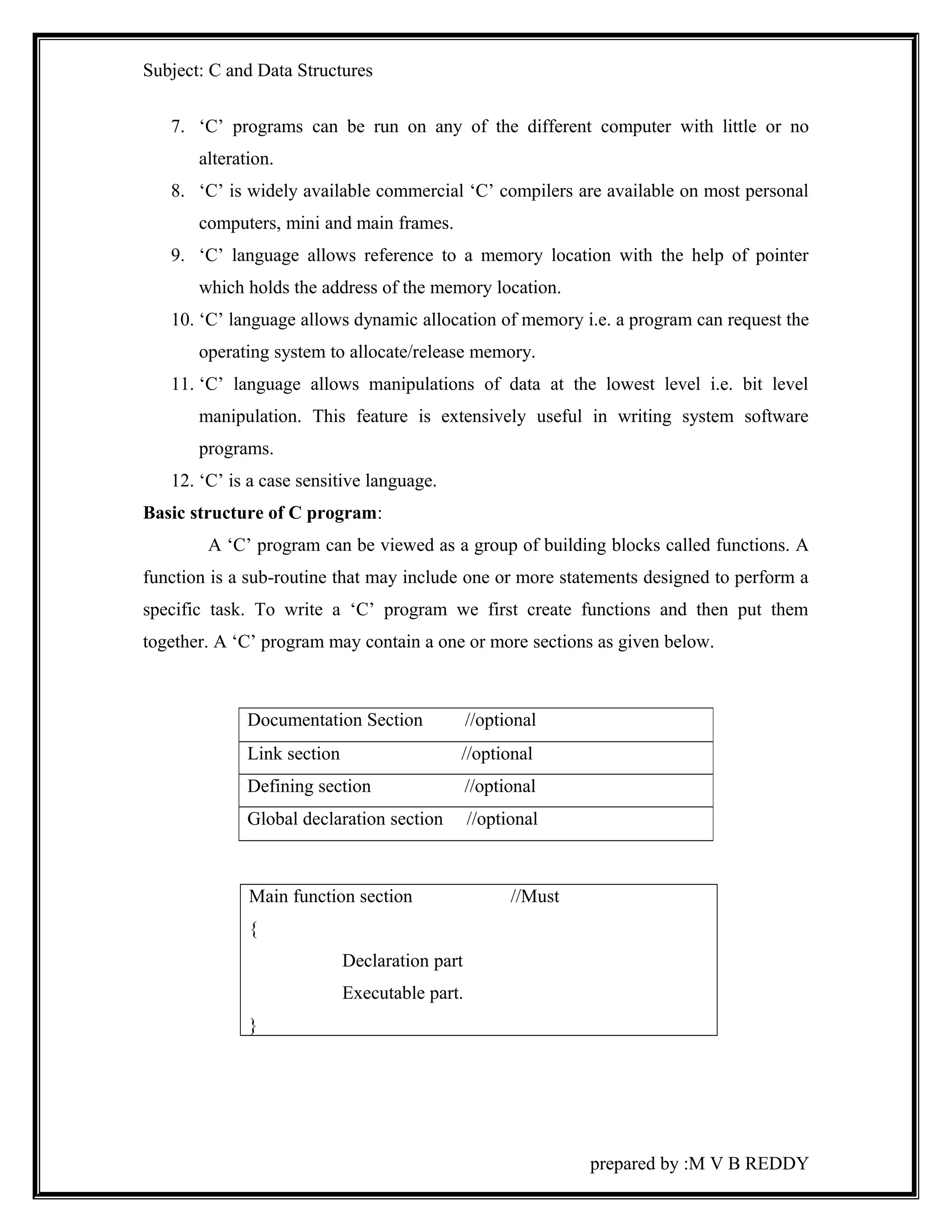
together. A ‘C’ program may contain a one or more sections as given below. 
Main function section //Must 
{ 
Declaration part 
Executable part. 
} 
prepared by :M V B REDDY 
Documentation Section //optional 
Link section //optional 
Defining section //optional 
Global declaration section //optional
Subject: C and Data Structures 
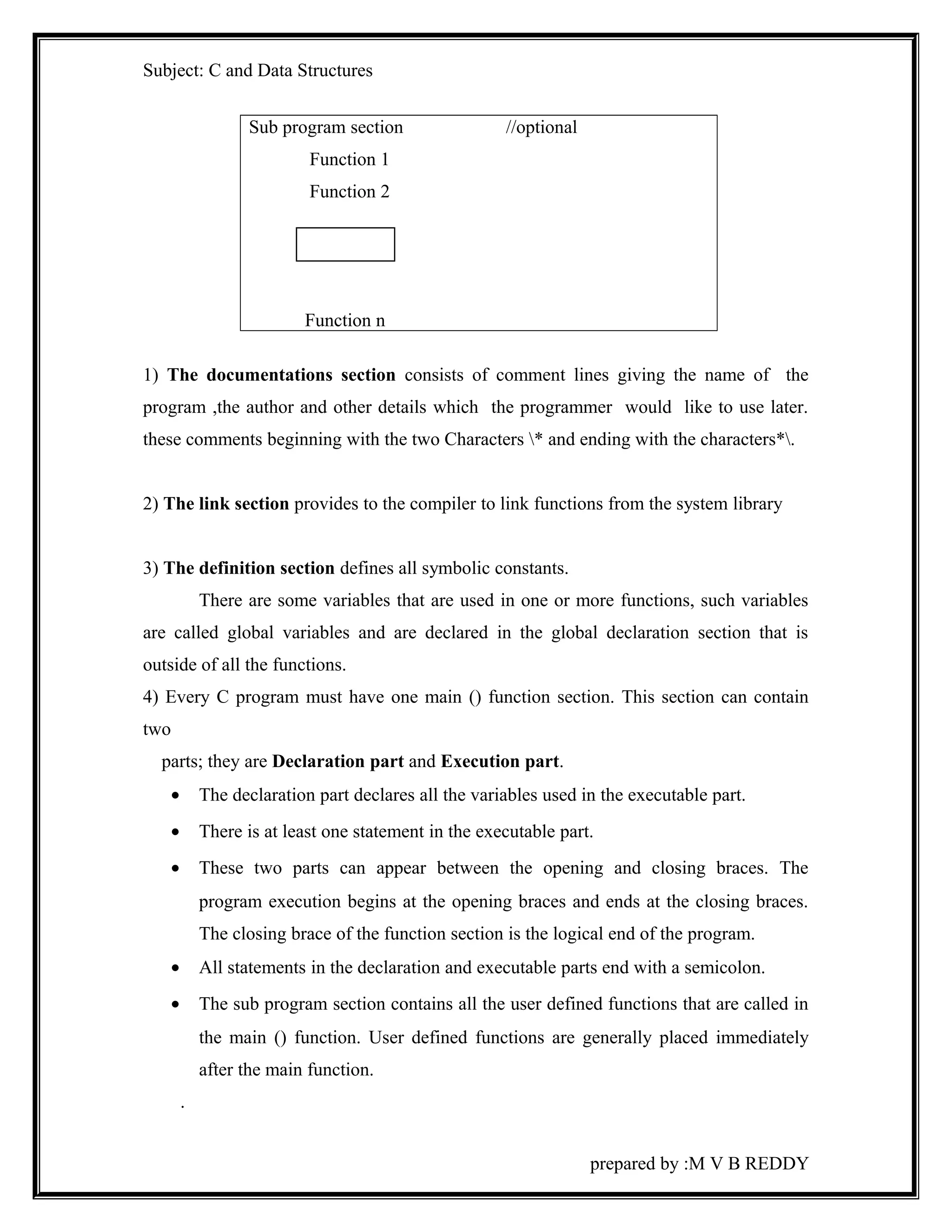
Sub program section //optional 
Function 1 
Function 2 
Function n 
1) The documentations section consists of comment lines giving the name of the 
program ,the author and other details which the programmer would like to use later. 
these comments beginning with the two Characters * and ending with the characters*. 
2) The link section provides to the compiler to link functions from the system library 
3) The definition section defines all symbolic constants. 
There are some variables that are used in one or more functions, such variables 
are called global variables and are declared in the global declaration section that is 
outside of all the functions. 
4) Every C program must have one main () function section. This section can contain 
two 
parts; they are Declaration part and Execution part. 
· The declaration part declares all the variables used in the executable part. 
· There is at least one statement in the executable part. 
· These two parts can appear between the opening and closing braces. The 
program execution begins at the opening braces and ends at the closing braces. 
The closing brace of the function section is the logical end of the program. 
· All statements in the declaration and executable parts end with a semicolon. 
· The sub program section contains all the user defined functions that are called in 
the main () function. User defined functions are generally placed immediately 
after the main function. 
. 
prepared by :M V B REDDY
Subject: C and Data Structures 
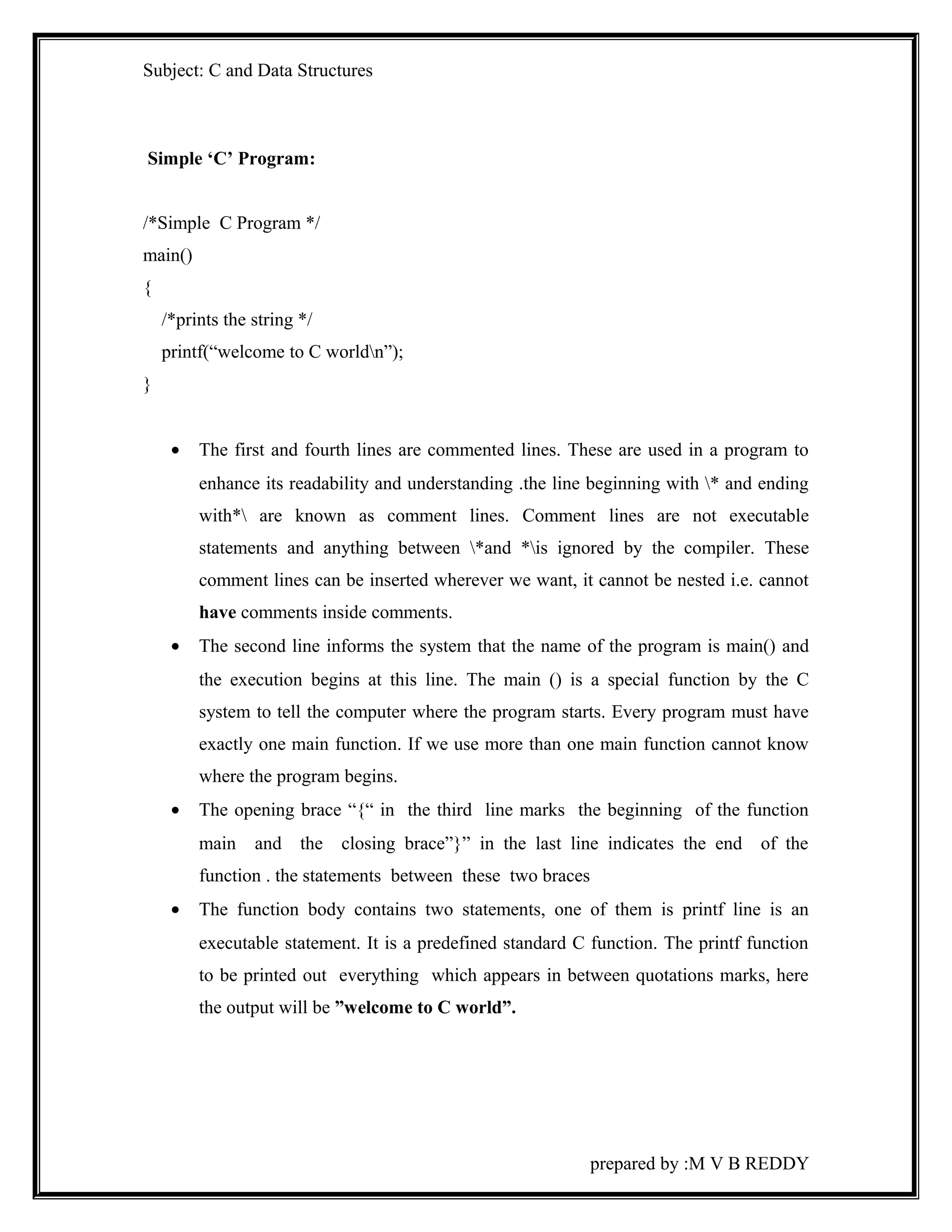
Simple ‘C’ Program: 
/*Simple C Program */ 
main() 
{ 
/*prints the string */ 
printf(“welcome to C worldn”); 
} 
· The first and fourth lines are commented lines. These are used in a program to 
enhance its readability and understanding .the line beginning with * and ending 
with* are known as comment lines. Comment lines are not executable 
statements and anything between *and *is ignored by the compiler. These 
comment lines can be inserted wherever we want, it cannot be nested i.e. cannot 
have comments inside comments. 
· The second line informs the system that the name of the program is main() and 
the execution begins at this line. The main () is a special function by the C 
system to tell the computer where the program starts. Every program must have 
exactly one main function. If we use more than one main function cannot know 
where the program begins. 
· The opening brace “{“ in the third line marks the beginning of the function 
main and the closing brace”}” in the last line indicates the end of the 
function . the statements between these two braces 
· The function body contains two statements, one of them is printf line is an 
executable statement. It is a predefined standard C function. The printf function 
to be printed out everything which appears in between quotations marks, here 
the output will be ”welcome to C world”. 
prepared by :M V B REDDY
Subject: C and Data Structures 
Executing a ‘C’ program under MS-DOS system: 
Source code: 
 The text of a program called the source code is a sequence of statements. To be 
executed by the machine. 
 These source code is usually stored in files with extension C 
 Before a program is a made to run, it must be translated by the compiler to give. 
OBJ files and then linked by the compiler to give. EXE file. 
Executable code: The extension for executable codes is .EXE. A ’C’ program with an 
Extension .EXE can be run in DOS prompt mode. 
C Tokens 
The smallest individual units are called tokens. C programs are written using 
these tokens and the syntax of the language. The C has six types of tokens as shown 
below: 
1. key word 
2. identifiers 
3. constants 
4. operators 
5. strings 
Character set: 
The characters that can be used to form the words, numbers and expressions 
depend upon the computer on which the program is run. The characters in C are grouped 
into four categories. 
1. letters 
2. digits 
3. special characters 
4. white spaces 
prepared by :M V B REDDY
Subject: C and Data Structures 
With these characters are combined to form data types, constants, variables and 
key words 
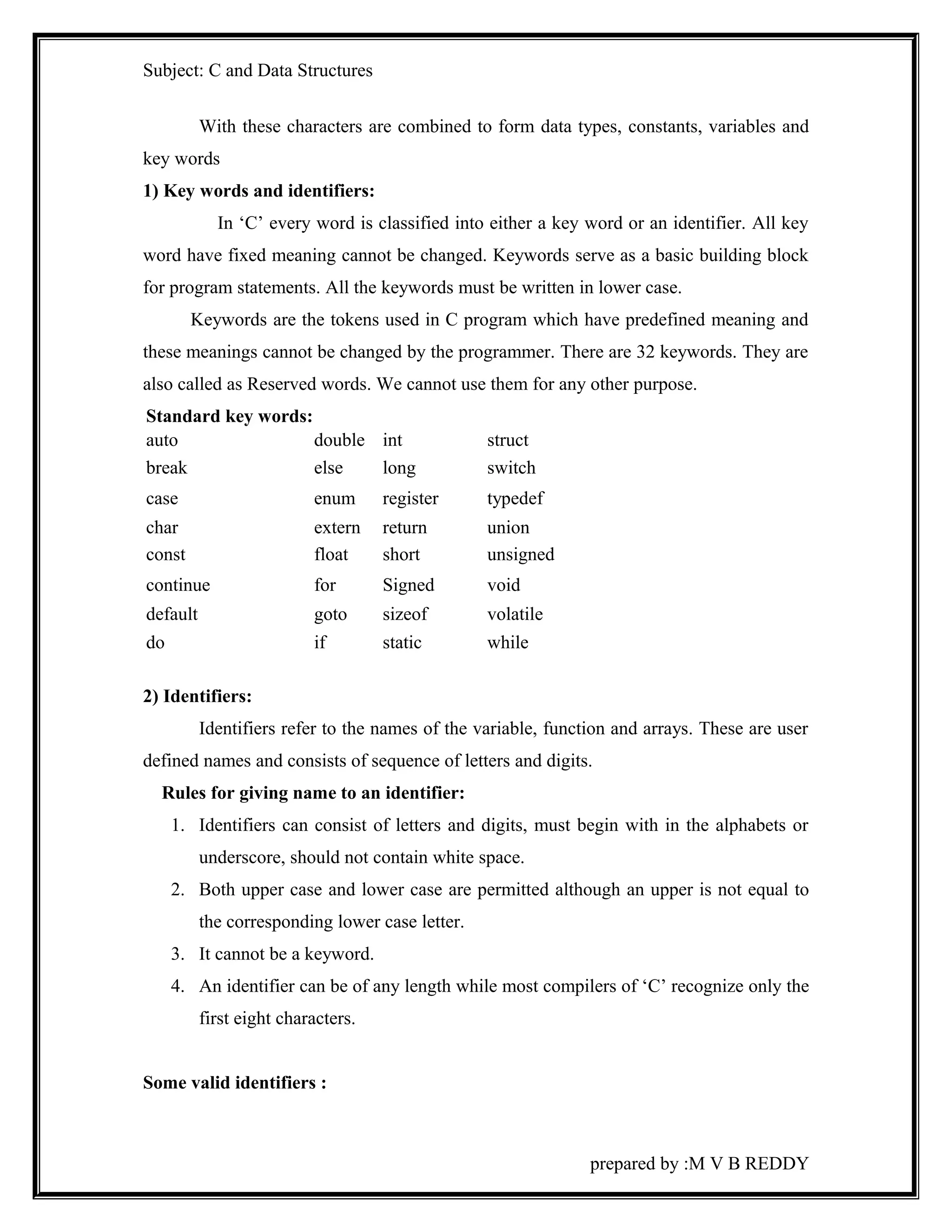
1) Key words and identifiers: 
In ‘C’ every word is classified into either a key word or an identifier. All key 
word have fixed meaning cannot be changed. Keywords serve as a basic building block 
for program statements. All the keywords must be written in lower case. 
Keywords are the tokens used in C program which have predefined meaning and 
these meanings cannot be changed by the programmer. There are 32 keywords. They are 
also called as Reserved words. We cannot use them for any other purpose. 
Standard key words: 
auto double int struct 
break else long switch 
case enum register typedef 
char extern return union 
const float short unsigned 
continue for Signed void 
default goto sizeof volatile 
do if static while 
2) Identifiers: 
Identifiers refer to the names of the variable, function and arrays. These are user 
defined names and consists of sequence of letters and digits. 
Rules for giving name to an identifier: 
1. Identifiers can consist of letters and digits, must begin with in the alphabets or 
underscore, should not contain white space. 
2. Both upper case and lower case are permitted although an upper is not equal to 
the corresponding lower case letter. 
3. It cannot be a keyword. 
4. An identifier can be of any length while most compilers of ‘C’ recognize only the 
first eight characters. 
Some valid identifiers : 
prepared by :M V B REDDY
Subject: C and Data Structures 
max 
ist_of_ words. 
a123 sum etc. 
Invalid identifiers : 
12 abc 
Maxi mum { there is a space between Maxi and mum} 
etc. 
3) Constants and variables: 
The alphabets, numbers and special symbols are properly combines to form a 
constants and variables. Let us see what are constants and variables in C. 
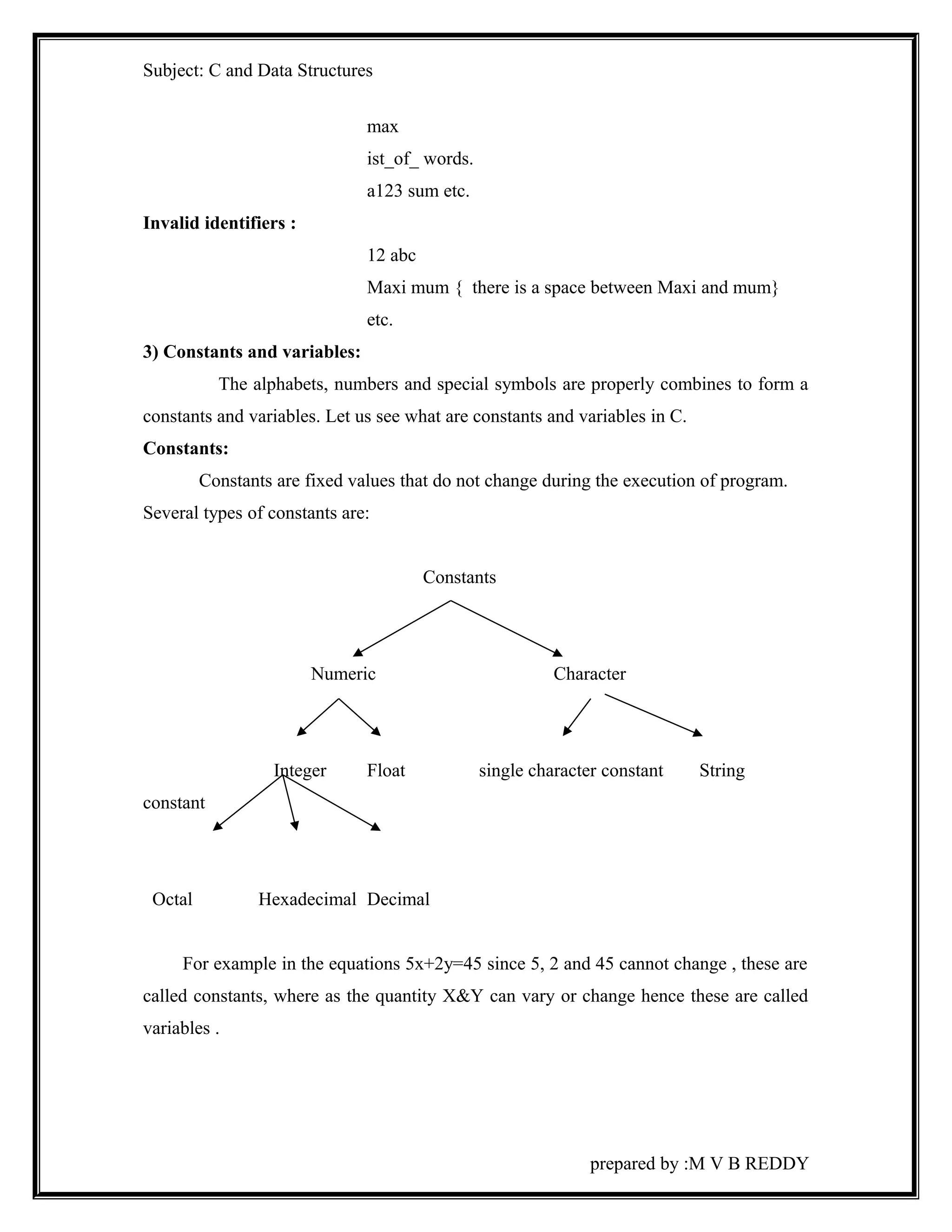
Constants: 
Constants are fixed values that do not change during the execution of program. 
Several types of constants are: 
Constants 
Numeric Character 
Integer Float single character constant String 
constant 
Octal Hexadecimal Decimal 
For example in the equations 5x+2y=45 since 5, 2 and 45 cannot change , these are 
called constants, where as the quantity X&Y can vary or change hence these are called 
variables . 
prepared by :M V B REDDY
Subject: C and Data Structures 
Numeric constants: 
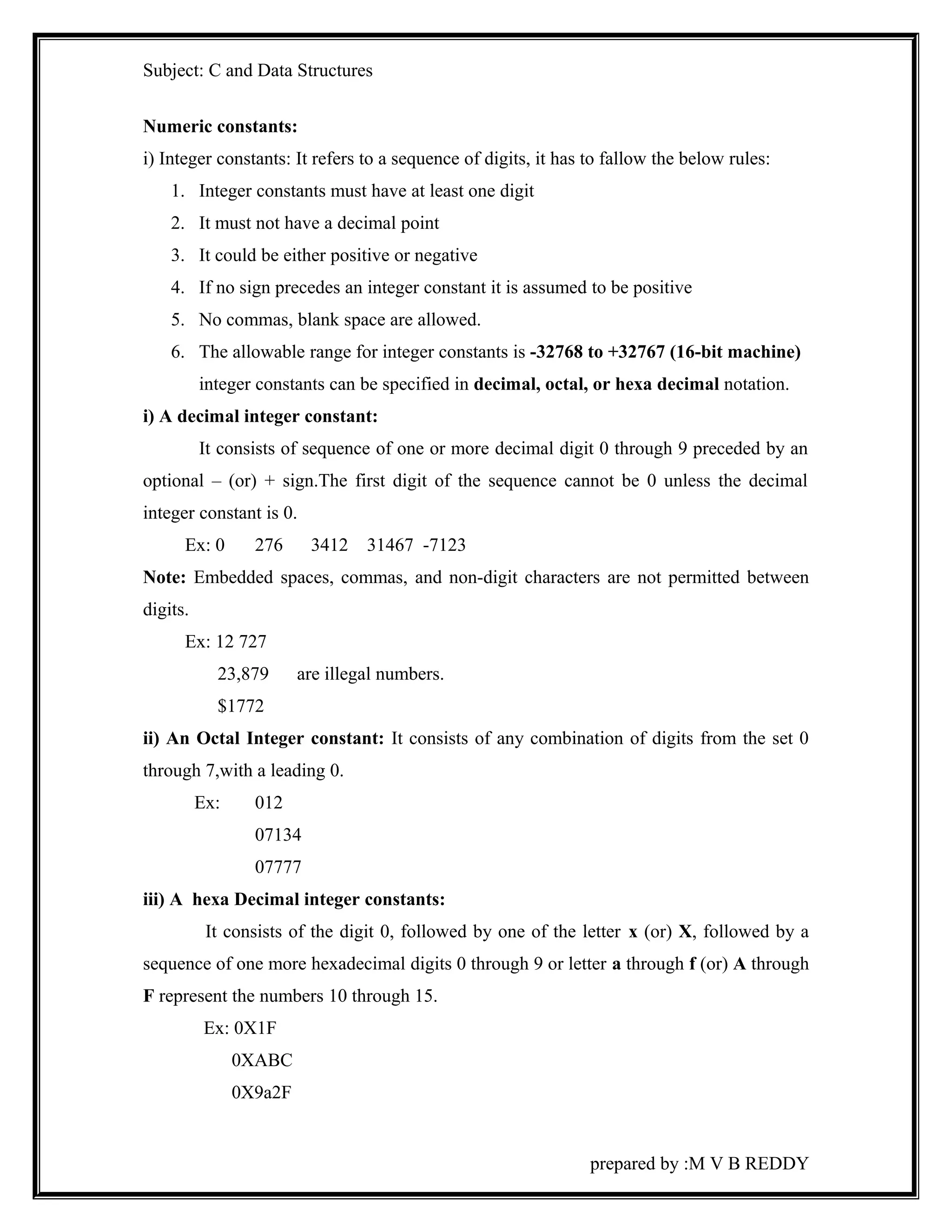
i) Integer constants: It refers to a sequence of digits, it has to fallow the below rules: 
1. Integer constants must have at least one digit 
2. It must not have a decimal point 
3. It could be either positive or negative 
4. If no sign precedes an integer constant it is assumed to be positive 
5. No commas, blank space are allowed. 
6. The allowable range for integer constants is -32768 to +32767 (16-bit machine) 
integer constants can be specified in decimal, octal, or hexa decimal notation. 
i) A decimal integer constant: 
It consists of sequence of one or more decimal digit 0 through 9 preceded by an 
optional – (or) + sign.The first digit of the sequence cannot be 0 unless the decimal 
integer constant is 0. 
Ex: 0 276 3412 31467 -7123 
Note: Embedded spaces, commas, and non-digit characters are not permitted between 
digits. 
Ex: 12 727 
23,879 are illegal numbers. 
$1772 
ii) An Octal Integer constant: It consists of any combination of digits from the set 0 
through 7,with a leading 0. 
Ex: 012 
07134 
07777 
iii) A hexa Decimal integer constants: 
It consists of the digit 0, followed by one of the letter x (or) X, followed by a 
sequence of one more hexadecimal digits 0 through 9 or letter a through f (or) A through 
F represent the numbers 10 through 15. 
Ex: 0X1F 
0XABC 
0X9a2F 
prepared by :M V B REDDY
Subject: C and Data Structures 
0XFFFF 
Note: we rarely use octal and hexa decimal numbers in programming. 
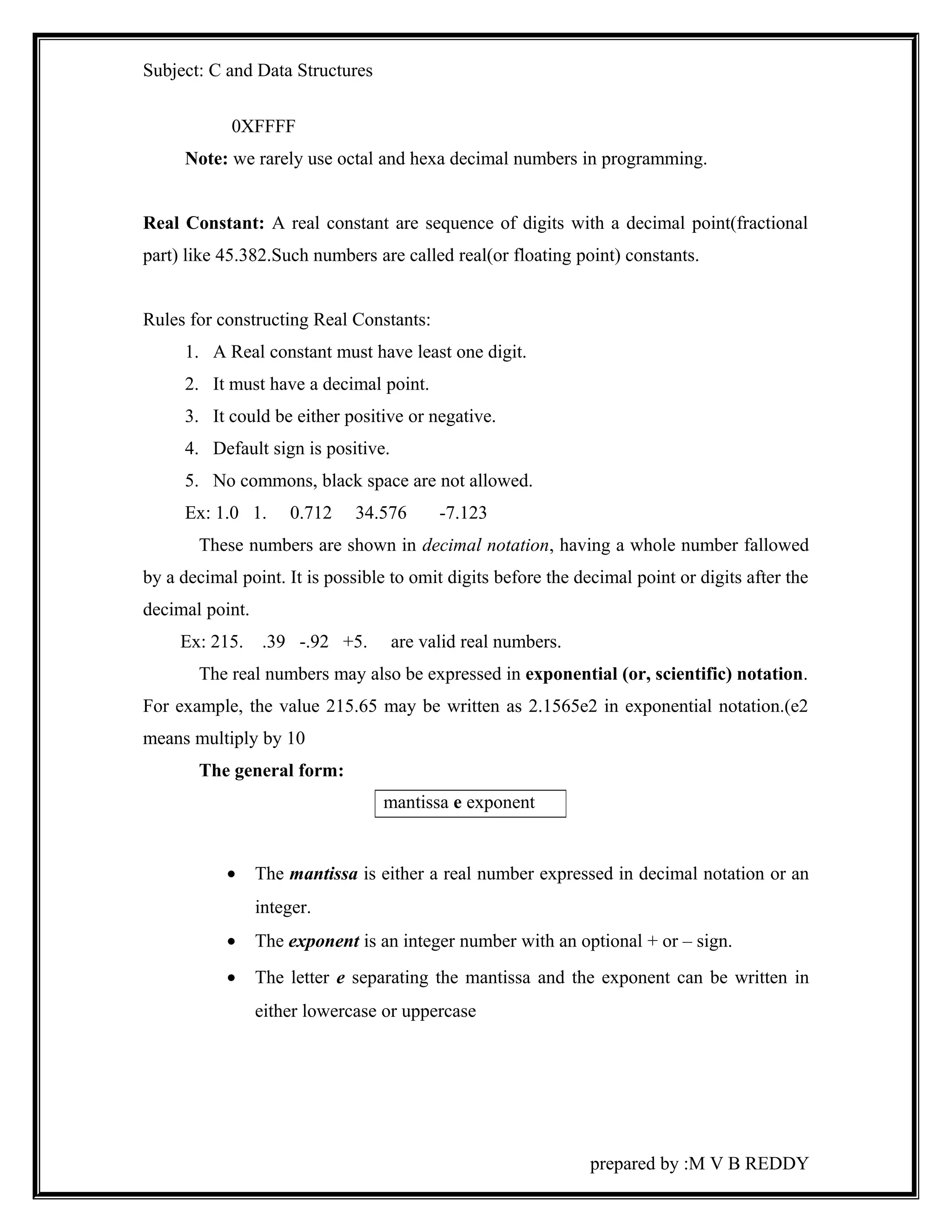
Real Constant: A real constant are sequence of digits with a decimal point(fractional 
part) like 45.382.Such numbers are called real(or floating point) constants. 
Rules for constructing Real Constants: 
1. A Real constant must have least one digit. 
2. It must have a decimal point. 
3. It could be either positive or negative. 
4. Default sign is positive. 
5. No commons, black space are not allowed. 
Ex: 1.0 1. 0.712 34.576 -7.123 
These numbers are shown in decimal notation, having a whole number fallowed 
by a decimal point. It is possible to omit digits before the decimal point or digits after the 
decimal point. 
Ex: 215. .39 -.92 +5. are valid real numbers. 
The real numbers may also be expressed in exponential (or, scientific) notation. 
For example, the value 215.65 may be written as 2.1565e2 in exponential notation.(e2 
means multiply by 10 
The general form: 
· The mantissa is either a real number expressed in decimal notation or an 
integer. 
· The exponent is an integer number with an optional + or – sign. 
· The letter e separating the mantissa and the exponent can be written in 
either lowercase or uppercase 
prepared by :M V B REDDY 
mantissa e exponent
Subject: C and Data Structures 
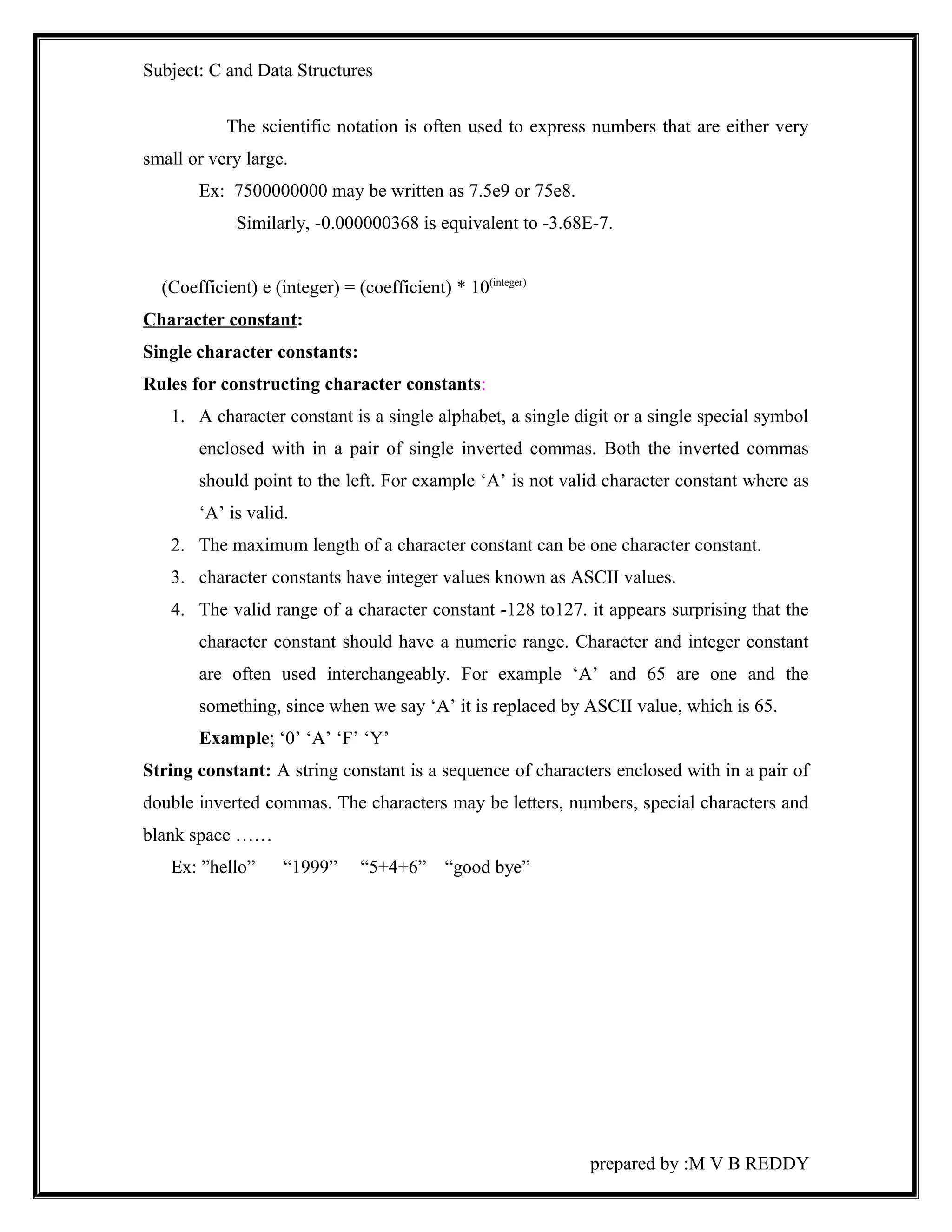
The scientific notation is often used to express numbers that are either very 
small or very large. 
Ex: 7500000000 may be written as 7.5e9 or 75e8. 
Similarly, -0.000000368 is equivalent to -3.68E-7. 
(Coefficient) e (integer) = (coefficient) * 10(integer) 
Character constant: 
Single character constants: 
Rules for constructing character constants: 
1. A character constant is a single alphabet, a single digit or a single special symbol 
enclosed with in a pair of single inverted commas. Both the inverted commas 
should point to the left. For example ‘A’ is not valid character constant where as 
‘A’ is valid. 
2. The maximum length of a character constant can be one character constant. 
3. character constants have integer values known as ASCII values. 
4. The valid range of a character constant -128 to127. it appears surprising that the 
character constant should have a numeric range. Character and integer constant 
are often used interchangeably. For example ‘A’ and 65 are one and the 
something, since when we say ‘A’ it is replaced by ASCII value, which is 65. 
Example; ‘0’ ‘A’ ‘F’ ‘Y’ 
String constant: A string constant is a sequence of characters enclosed with in a pair of 
double inverted commas. The characters may be letters, numbers, special characters and 
blank space …… 
Ex: ”hello” “1999” “5+4+6” “good bye” 
prepared by :M V B REDDY
Subject: C and Data Structures 
Backslash character constants: 
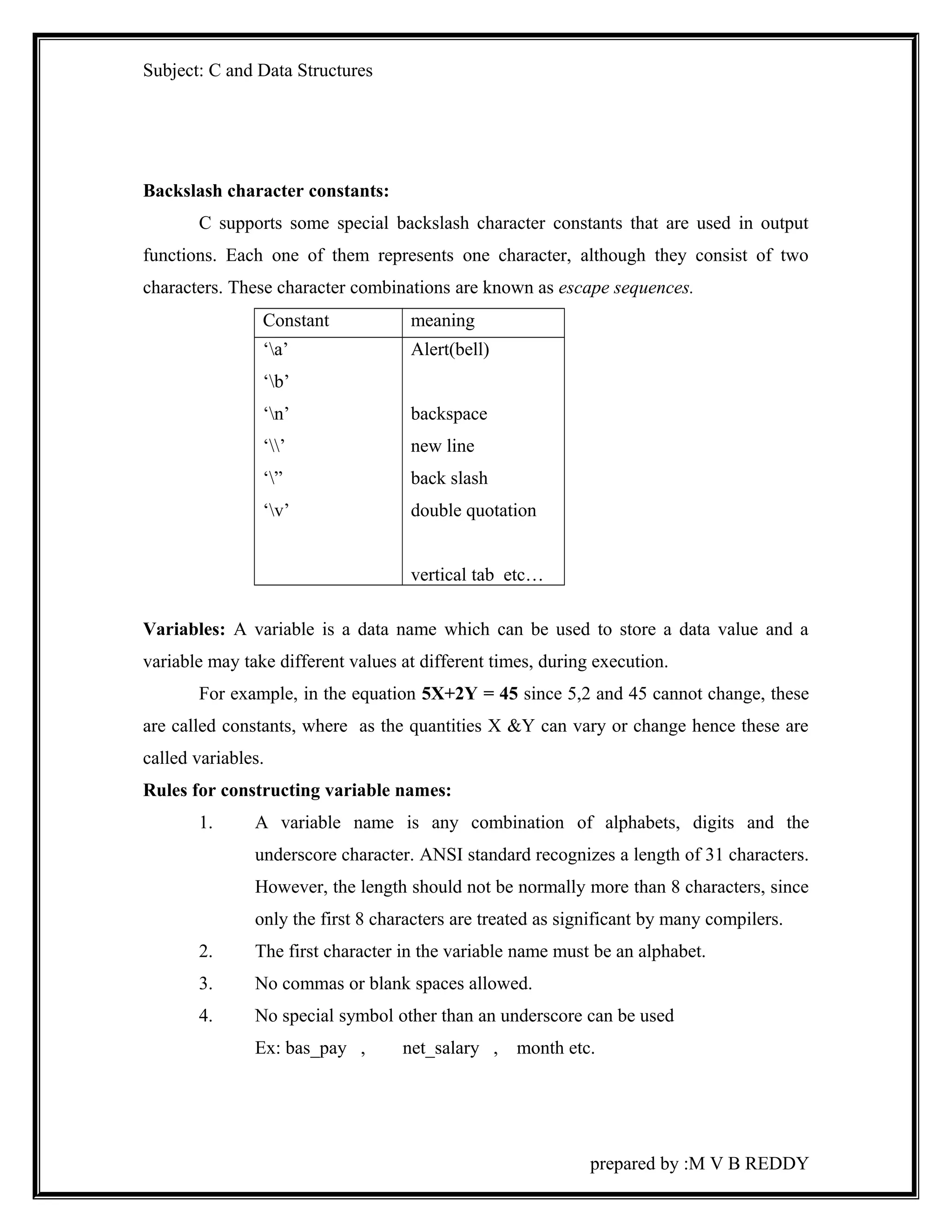
C supports some special backslash character constants that are used in output 
functions. Each one of them represents one character, although they consist of two 
characters. These character combinations are known as escape sequences. 
Constant meaning 
‘a’ 
‘b’ 
‘n’ 
‘’ 
‘” 
‘v’ 
Alert(bell) 
backspace 
new line 
back slash 
double quotation 
vertical tab etc… 
Variables: A variable is a data name which can be used to store a data value and a 
variable may take different values at different times, during execution. 
For example, in the equation 5X+2Y = 45 since 5,2 and 45 cannot change, these 
are called constants, where as the quantities X &Y can vary or change hence these are 
called variables. 
Rules for constructing variable names: 
1. A variable name is any combination of alphabets, digits and the 
underscore character. ANSI standard recognizes a length of 31 characters. 
However, the length should not be normally more than 8 characters, since 
only the first 8 characters are treated as significant by many compilers. 
2. The first character in the variable name must be an alphabet. 
3. No commas or blank spaces allowed. 
4. No special symbol other than an underscore can be used 
Ex: bas_pay , net_salary , month etc. 
prepared by :M V B REDDY
Subject: C and Data Structures 
5. Uppercase and lowercase are significant. That is, the variable Amount is 
not the same as amount or AMOUNT. 
6. Variables name should not be a keyword. 
Data types: 
Each data type has predetermined memory requirement and an associated range 
of legal values. Every programming language has its own data types. Storage 
representations and machine instructions to handle constants differ from machine to 
machine. 
ANSI C supports four classes of data types. 
1. primary (or fundamental) data types 
2. user defined data types 
3. derived data types 
4. Empty data set. 
1. Primary data types: 
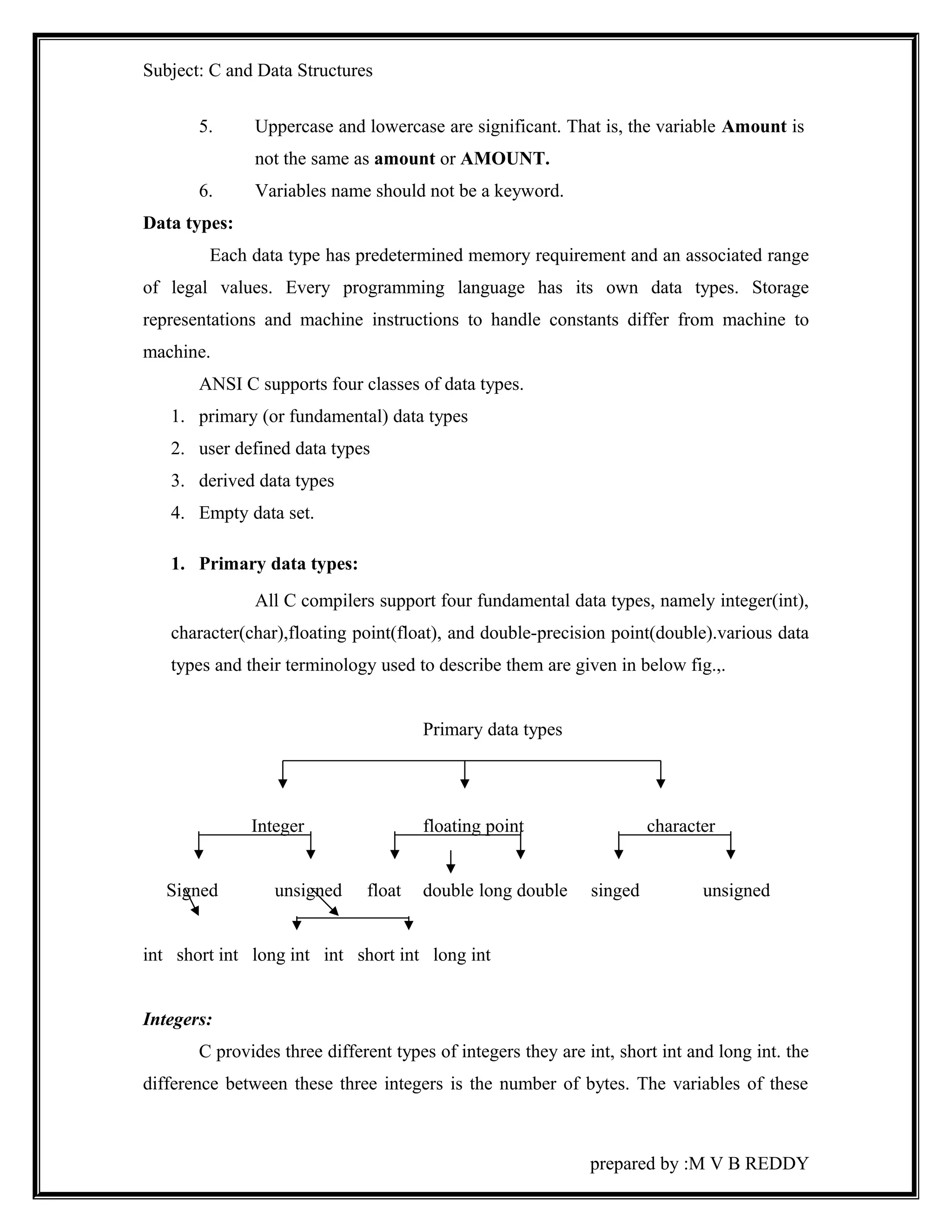
All C compilers support four fundamental data types, namely integer(int), 
character(char),floating point(float), and double-precision point(double).various data 
types and their terminology used to describe them are given in below fig.,. 
Primary data types 
Integer floating point character 
Signed unsigned float double long double singed unsigned 
int short int long int int short int long int 
Integers: 
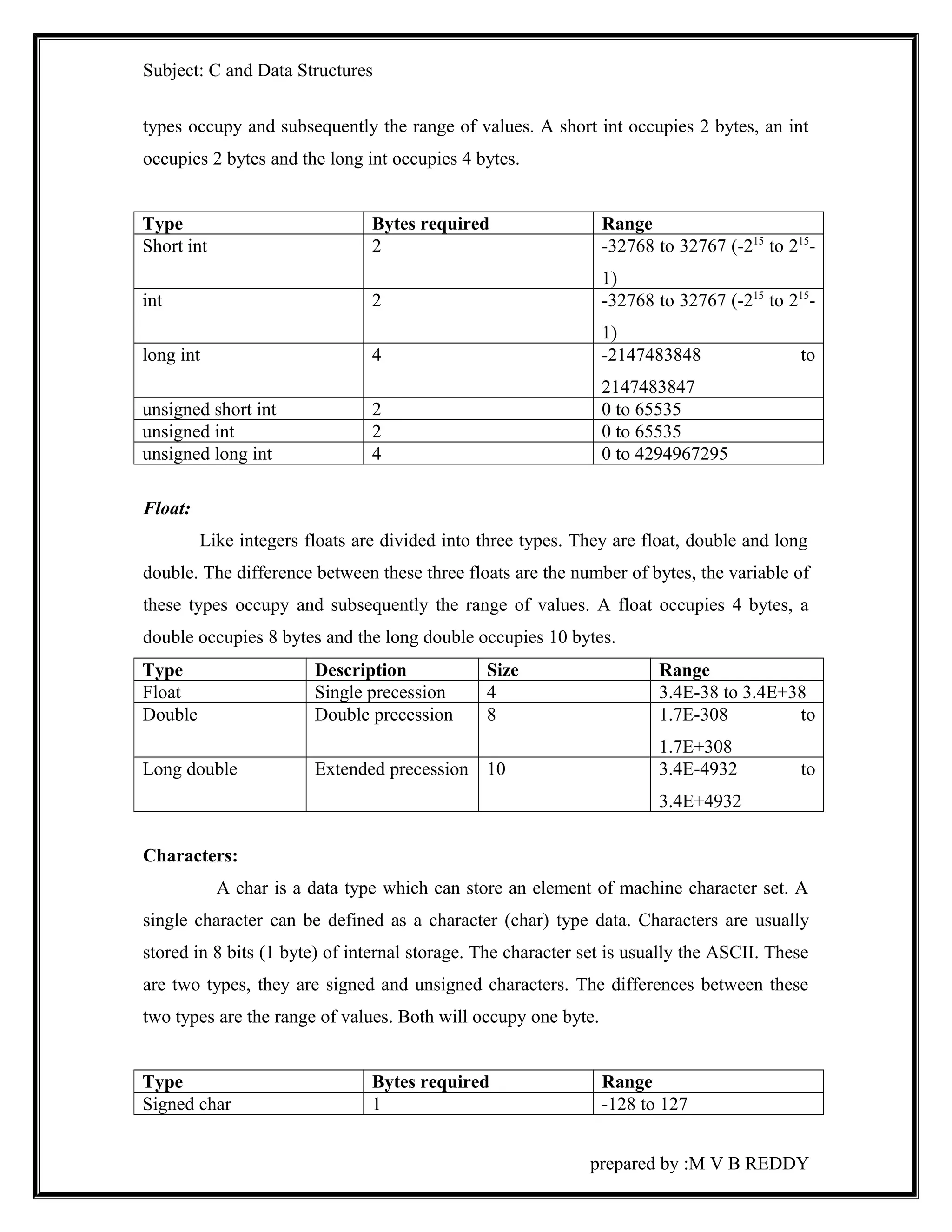
C provides three different types of integers they are int, short int and long int. the 
difference between these three integers is the number of bytes. The variables of these 
prepared by :M V B REDDY
Subject: C and Data Structures 
types occupy and subsequently the range of values. A short int occupies 2 bytes, an int 
occupies 2 bytes and the long int occupies 4 bytes. 
Type Bytes required Range 
Short int 2 -32768 to 32767 (-215 to 215- 
1) 
int 2 -32768 to 32767 (-215 to 215- 
1) 
long int 4 -2147483848 to 
2147483847 
unsigned short int 2 0 to 65535 
unsigned int 2 0 to 65535 
unsigned long int 4 0 to 4294967295 
Float: 
Like integers floats are divided into three types. They are float, double and long 
double. The difference between these three floats are the number of bytes, the variable of 
these types occupy and subsequently the range of values. A float occupies 4 bytes, a 
double occupies 8 bytes and the long double occupies 10 bytes. 
Type Description Size Range 
Float Single precession 4 3.4E-38 to 3.4E+38 
Double Double precession 8 1.7E-308 to 
1.7E+308 
Long double Extended precession 10 3.4E-4932 to 
3.4E+4932 
Characters: 
A char is a data type which can store an element of machine character set. A 
single character can be defined as a character (char) type data. Characters are usually 
stored in 8 bits (1 byte) of internal storage. The character set is usually the ASCII. These 
are two types, they are signed and unsigned characters. The differences between these 
two types are the range of values. Both will occupy one byte. 
Type Bytes required Range 
Signed char 1 -128 to 127 
prepared by :M V B REDDY
Subject: C and Data Structures 
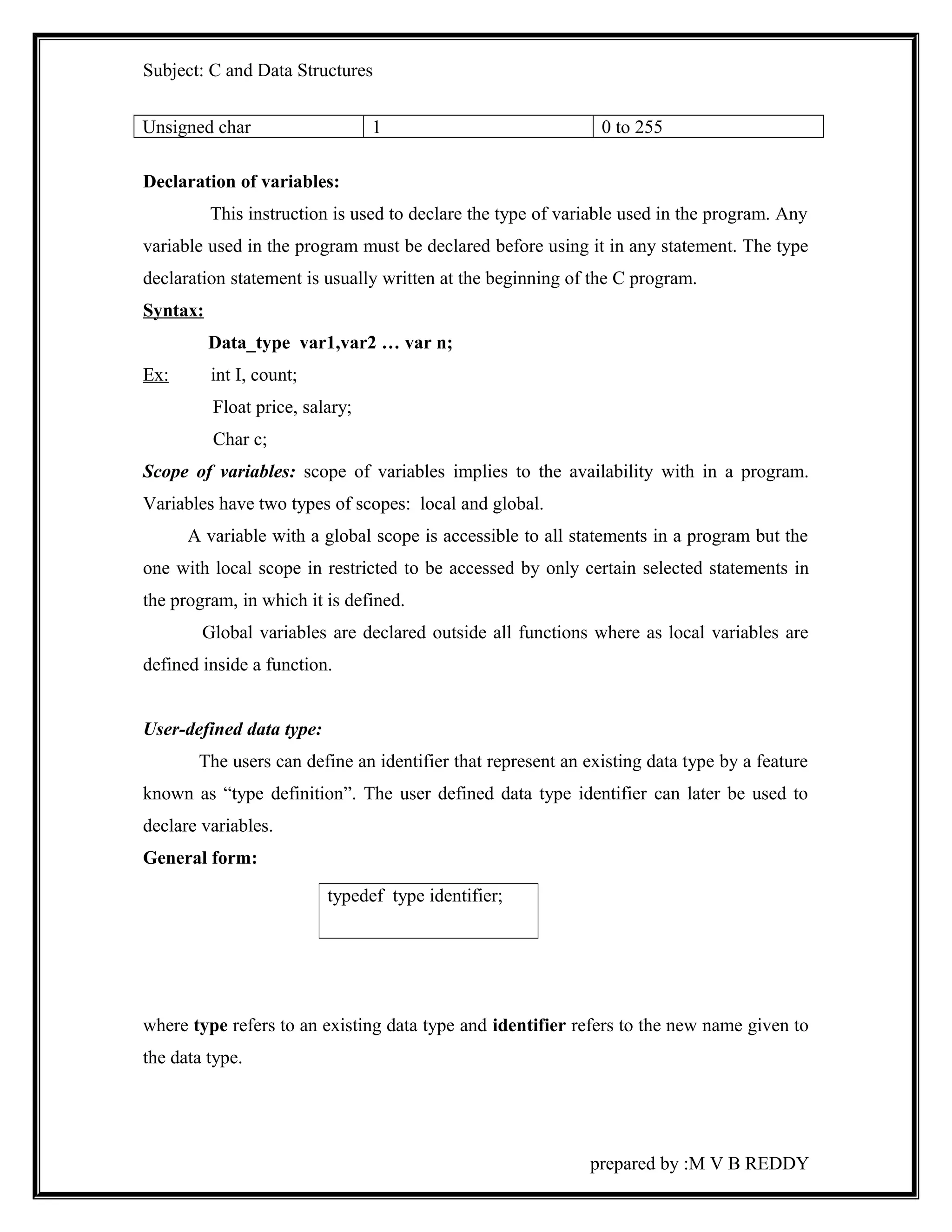
Unsigned char 1 0 to 255 
Declaration of variables: 
This instruction is used to declare the type of variable used in the program. Any 
variable used in the program must be declared before using it in any statement. The type 
declaration statement is usually written at the beginning of the C program. 
Syntax: 
Data_type var1,var2 … var n; 
Ex: int I, count; 
Float price, salary; 
Char c; 
Scope of variables: scope of variables implies to the availability with in a program. 
Variables have two types of scopes: local and global. 
A variable with a global scope is accessible to all statements in a program but the 
one with local scope in restricted to be accessed by only certain selected statements in 
the program, in which it is defined. 
Global variables are declared outside all functions where as local variables are 
defined inside a function. 
User-defined data type: 
The users can define an identifier that represent an existing data type by a feature 
known as “type definition”. The user defined data type identifier can later be used to 
declare variables. 
General form: 
where type refers to an existing data type and identifier refers to the new name given to 
the data type. 
prepared by :M V B REDDY 
typedef type identifier;
Subject: C and Data Structures 
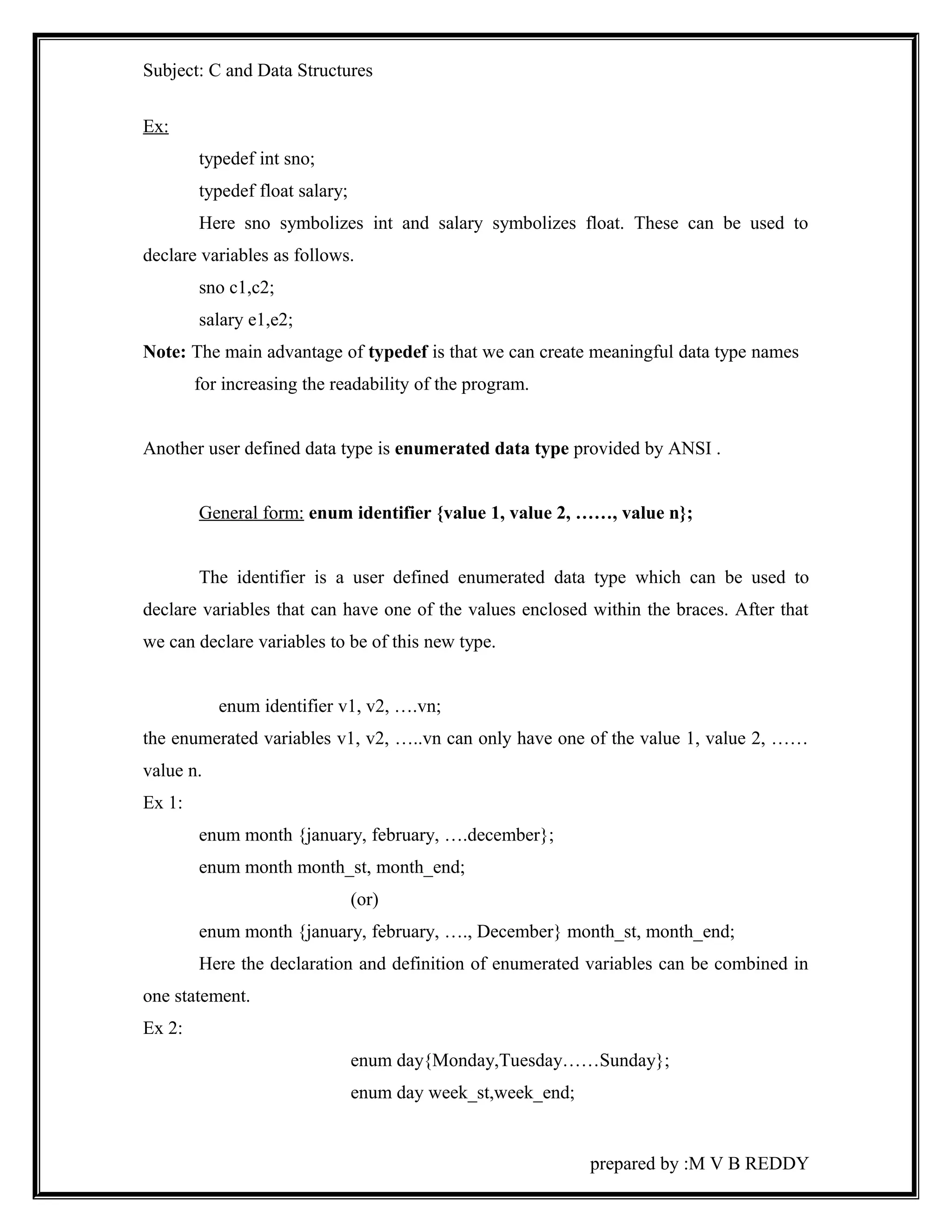
Ex: 
typedef int sno; 
typedef float salary; 
Here sno symbolizes int and salary symbolizes float. These can be used to 
declare variables as follows. 
sno c1,c2; 
salary e1,e2; 
Note: The main advantage of typedef is that we can create meaningful data type names 
for increasing the readability of the program. 
Another user defined data type is enumerated data type provided by ANSI . 
General form: enum identifier {value 1, value 2, ……, value n}; 
The identifier is a user defined enumerated data type which can be used to 
declare variables that can have one of the values enclosed within the braces. After that 
we can declare variables to be of this new type. 
enum identifier v1, v2, ….vn; 
the enumerated variables v1, v2, …..vn can only have one of the value 1, value 2, …… 
value n. 
Ex 1: 
enum month {january, february, ….december}; 
enum month month_st, month_end; 
(or) 
enum month {january, february, …., December} month_st, month_end; 
Here the declaration and definition of enumerated variables can be combined in 
one statement. 
Ex 2: 
enum day{Monday,Tuesday……Sunday}; 
enum day week_st,week_end; 
prepared by :M V B REDDY
Subject: C and Data Structures 
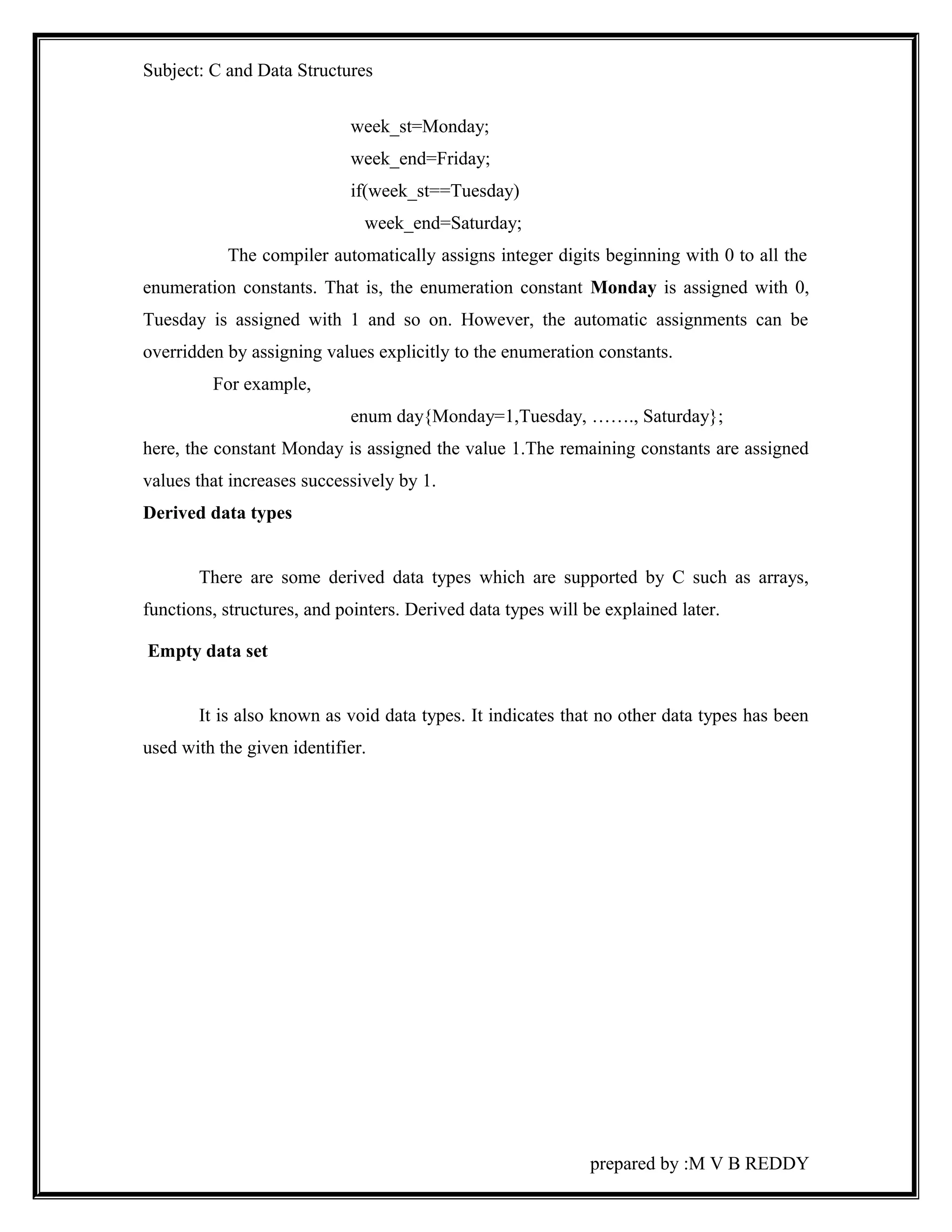
week_st=Monday; 
week_end=Friday; 
if(week_st==Tuesday) 
week_end=Saturday; 
The compiler automatically assigns integer digits beginning with 0 to all the 
enumeration constants. That is, the enumeration constant Monday is assigned with 0, 
Tuesday is assigned with 1 and so on. However, the automatic assignments can be 
overridden by assigning values explicitly to the enumeration constants. 
For example, 
enum day{Monday=1,Tuesday, ……., Saturday}; 
here, the constant Monday is assigned the value 1.The remaining constants are assigned 
values that increases successively by 1. 
Derived data types 
There are some derived data types which are supported by C such as arrays, 
functions, structures, and pointers. Derived data types will be explained later. 
Empty data set 
It is also known as void data types. It indicates that no other data types has been 
used with the given identifier. 
prepared by :M V B REDDY
Subject: C and Data Structures 
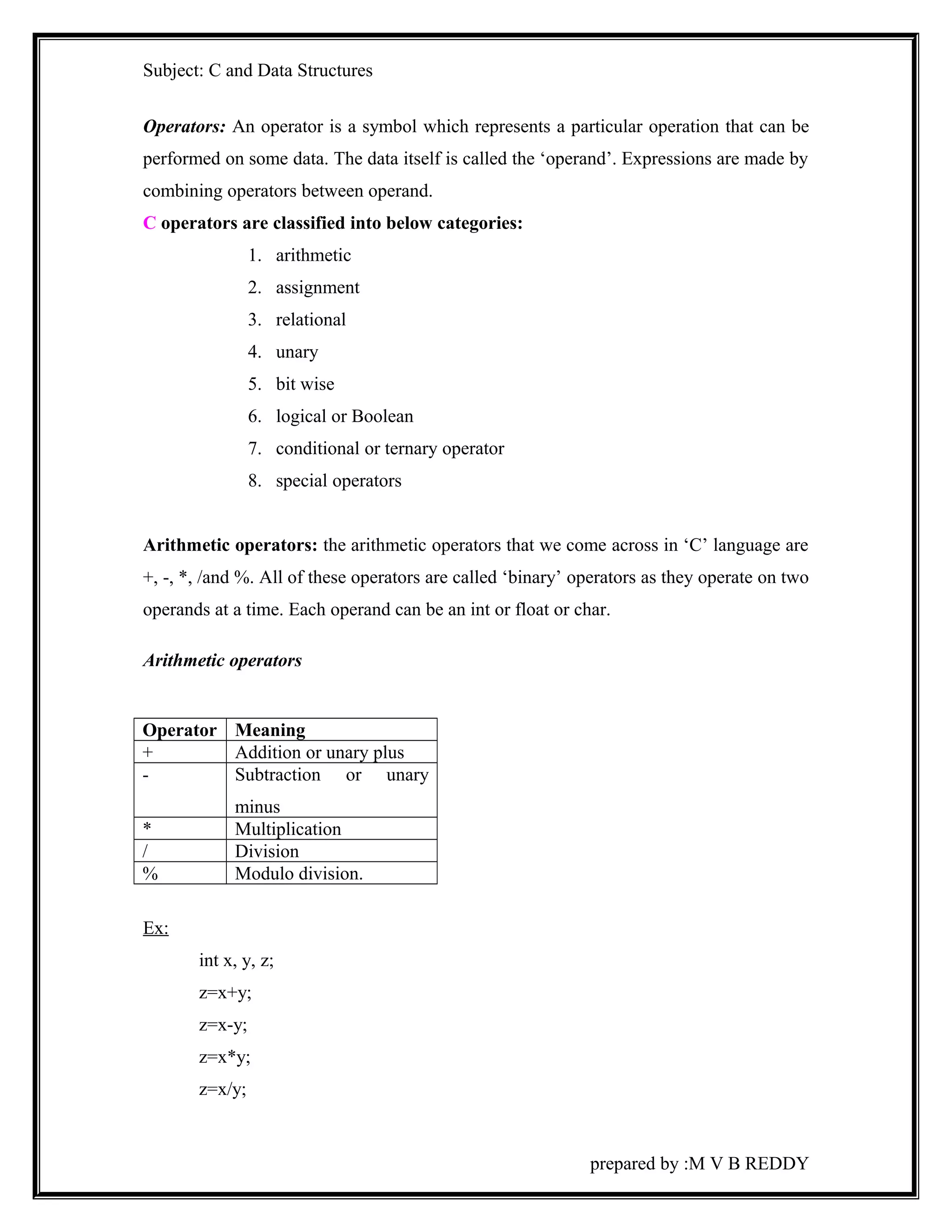
Operators: An operator is a symbol which represents a particular operation that can be 
performed on some data. The data itself is called the ‘operand’. Expressions are made by 
combining operators between operand. 
C operators are classified into below categories: 
1. arithmetic 
2. assignment 
3. relational 
4. unary 
5. bit wise 
6. logical or Boolean 
7. conditional or ternary operator 
8. special operators 
Arithmetic operators: the arithmetic operators that we come across in ‘C’ language are 
+, -, *, /and %. All of these operators are called ‘binary’ operators as they operate on two 
operands at a time. Each operand can be an int or float or char. 
Arithmetic operators 
Operator Meaning 
+ Addition or unary plus 
- Subtraction or unary 
minus 
* Multiplication 
/ Division 
% Modulo division. 
Ex: 
int x, y, z; 
z=x+y; 
z=x-y; 
z=x*y; 
z=x/y; 
prepared by :M V B REDDY
Subject: C and Data Structures 
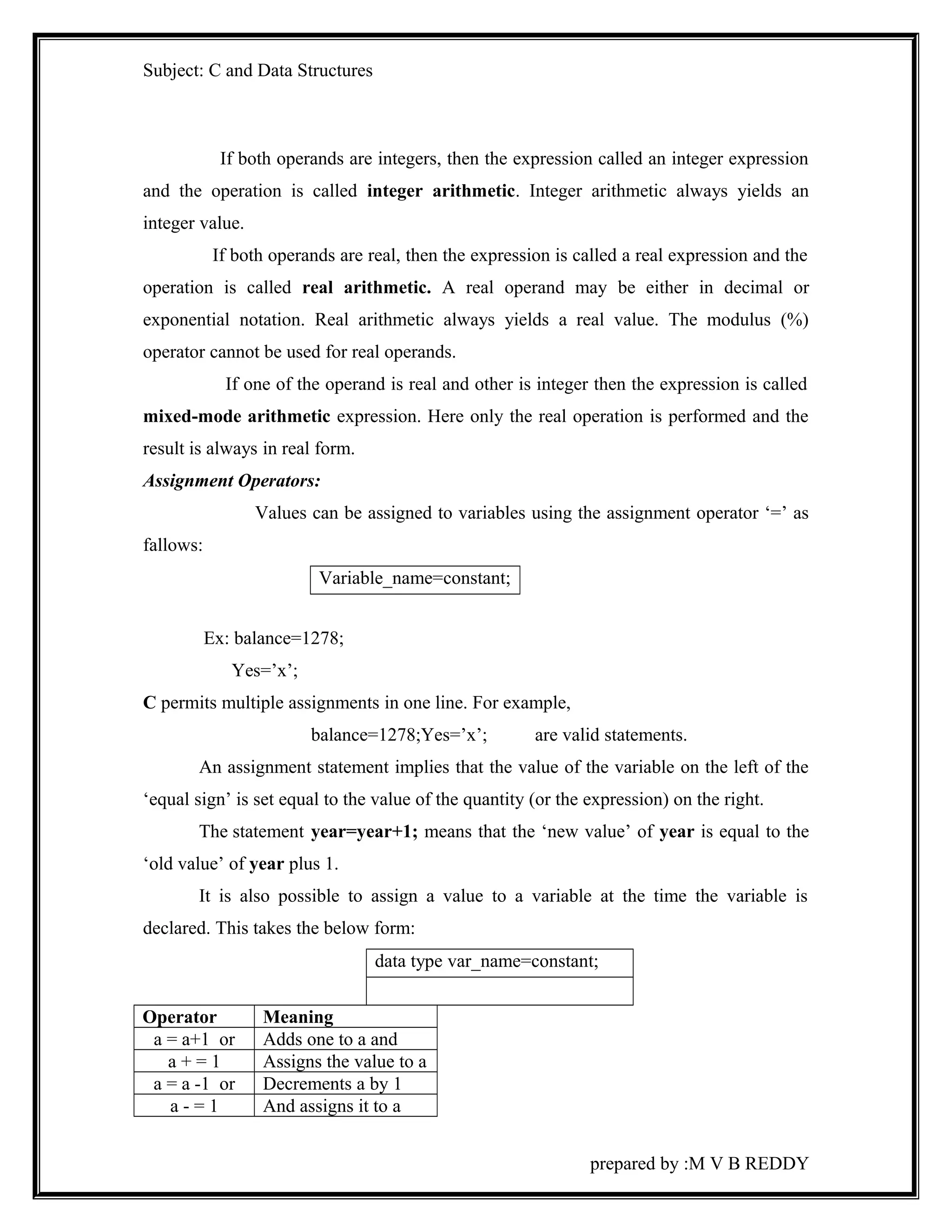
If both operands are integers, then the expression called an integer expression 
and the operation is called integer arithmetic. Integer arithmetic always yields an 
integer value. 
If both operands are real, then the expression is called a real expression and the 
operation is called real arithmetic. A real operand may be either in decimal or 
exponential notation. Real arithmetic always yields a real value. The modulus (%) 
operator cannot be used for real operands. 
If one of the operand is real and other is integer then the expression is called 
mixed-mode arithmetic expression. Here only the real operation is performed and the 
result is always in real form. 
Assignment Operators: 
Values can be assigned to variables using the assignment operator ‘=’ as 
fallows: 
Variable_name=constant; 
Ex: balance=1278; 
Yes=’x’; 
C permits multiple assignments in one line. For example, 
balance=1278;Yes=’x’; are valid statements. 
An assignment statement implies that the value of the variable on the left of the 
‘equal sign’ is set equal to the value of the quantity (or the expression) on the right. 
The statement year=year+1; means that the ‘new value’ of year is equal to the 
‘old value’ of year plus 1. 
It is also possible to assign a value to a variable at the time the variable is 
declared. This takes the below form: 
data type var_name=constant; 
Operator Meaning 
a = a+1 or Adds one to a and 
a + = 1 Assigns the value to a 
a = a -1 or Decrements a by 1 
a - = 1 And assigns it to a 
prepared by :M V B REDDY
Subject: C and Data Structures 
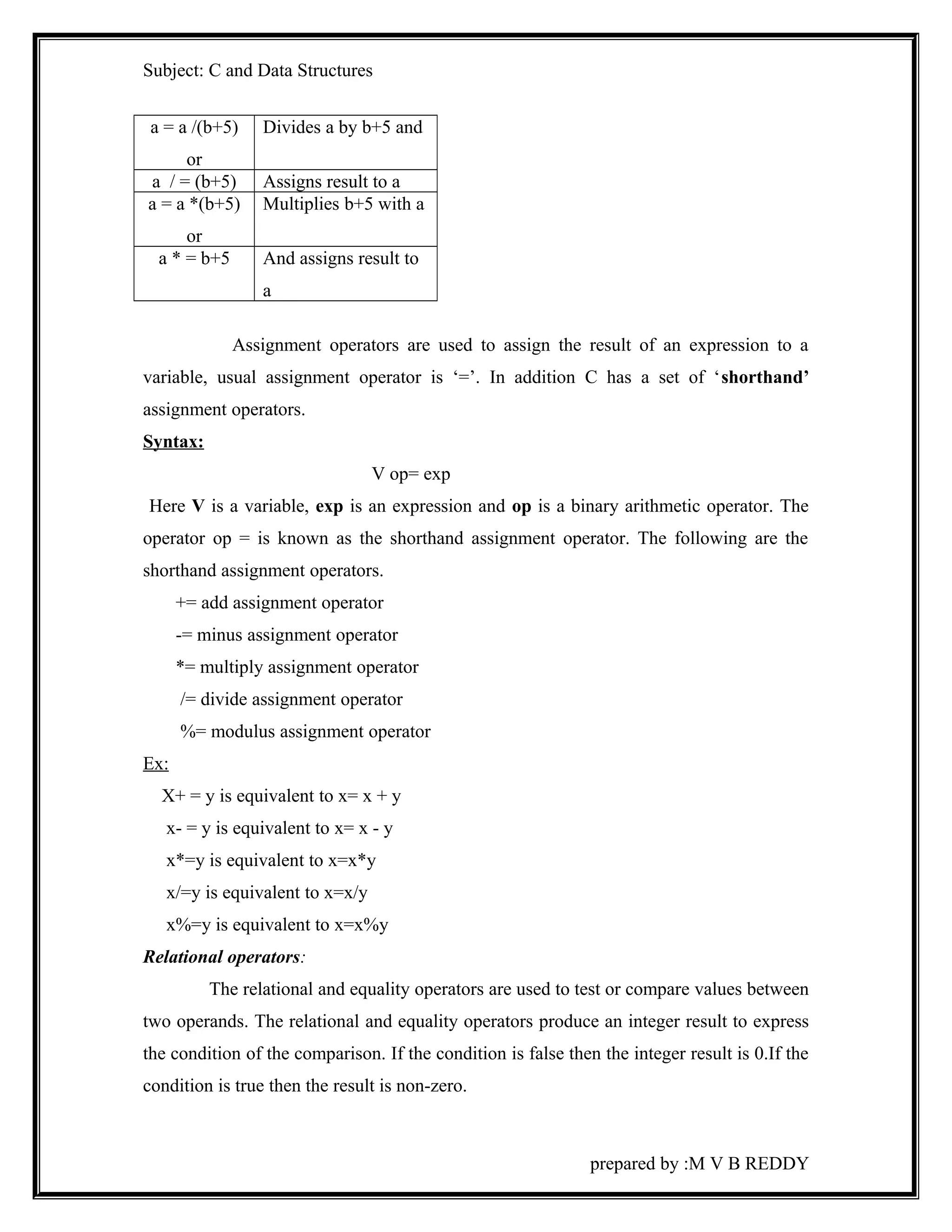
a = a /(b+5) 
or 
Divides a by b+5 and 
a / = (b+5) Assigns result to a 
a = a *(b+5) 
or 
Multiplies b+5 with a 
a * = b+5 And assigns result to 
a 
Assignment operators are used to assign the result of an expression to a 
variable, usual assignment operator is ‘=’. In addition C has a set of ‘shorthand’ 
assignment operators. 
Syntax: 
V op= exp 
Here V is a variable, exp is an expression and op is a binary arithmetic operator. The 
operator op = is known as the shorthand assignment operator. The following are the 
shorthand assignment operators. 
+= add assignment operator 
-= minus assignment operator 
*= multiply assignment operator 
/= divide assignment operator 
%= modulus assignment operator 
Ex: 
X+ = y is equivalent to x= x + y 
x- = y is equivalent to x= x - y 
x*=y is equivalent to x=x*y 
x/=y is equivalent to x=x/y 
x%=y is equivalent to x=x%y 
Relational operators: 
The relational and equality operators are used to test or compare values between 
two operands. The relational and equality operators produce an integer result to express 
the condition of the comparison. If the condition is false then the integer result is 0.If the 
condition is true then the result is non-zero. 
prepared by :M V B REDDY
Subject: C and Data Structures 
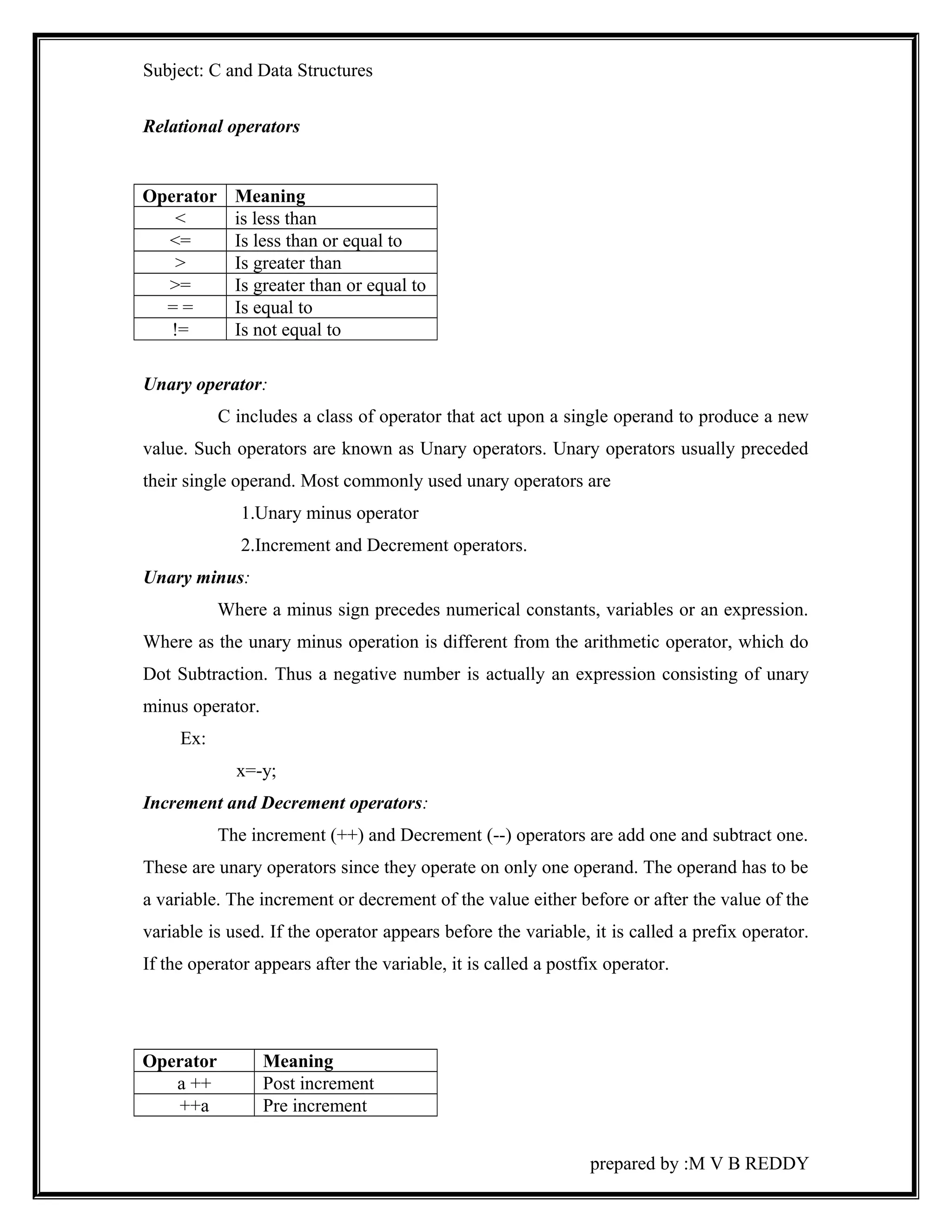
Relational operators 
Operator Meaning 
< is less than 
<= Is less than or equal to 
> Is greater than 
>= Is greater than or equal to 
= = Is equal to 
!= Is not equal to 
Unary operator: 
C includes a class of operator that act upon a single operand to produce a new 
value. Such operators are known as Unary operators. Unary operators usually preceded 
their single operand. Most commonly used unary operators are 
1.Unary minus operator 
2.Increment and Decrement operators. 
Unary minus: 
Where a minus sign precedes numerical constants, variables or an expression. 
Where as the unary minus operation is different from the arithmetic operator, which do 
Dot Subtraction. Thus a negative number is actually an expression consisting of unary 
minus operator. 
Ex: 
x=-y; 
Increment and Decrement operators: 
The increment (++) and Decrement (--) operators are add one and subtract one. 
These are unary operators since they operate on only one operand. The operand has to be 
a variable. The increment or decrement of the value either before or after the value of the 
variable is used. If the operator appears before the variable, it is called a prefix operator. 
If the operator appears after the variable, it is called a postfix operator. 
Operator Meaning 
a ++ Post increment 
++a Pre increment 
prepared by :M V B REDDY
Subject: C and Data Structures 
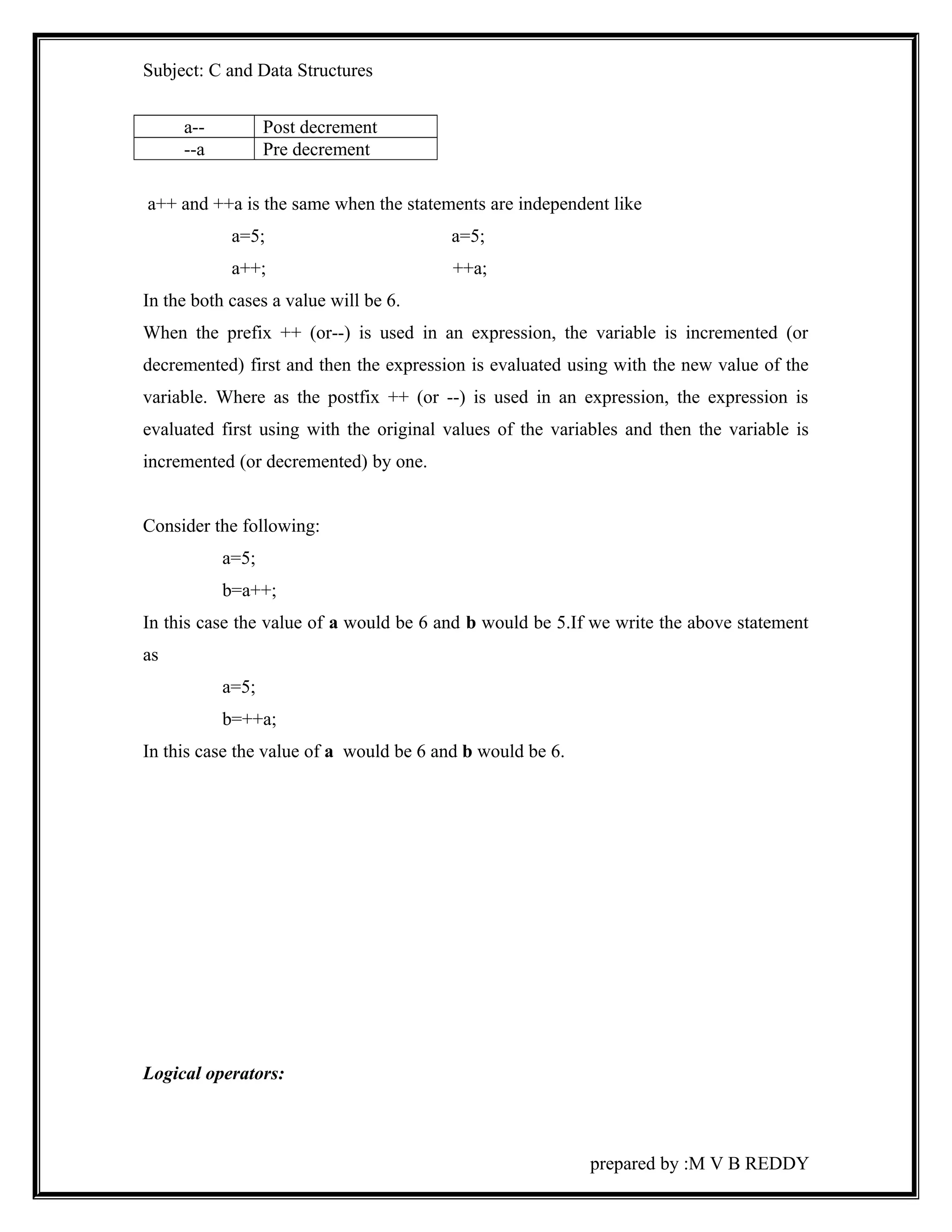
a-- Post decrement 
--a Pre decrement 
a++ and ++a is the same when the statements are independent like 
a=5; a=5; 
a++; ++a; 
In the both cases a value will be 6. 
When the prefix ++ (or--) is used in an expression, the variable is incremented (or 
decremented) first and then the expression is evaluated using with the new value of the 
variable. Where as the postfix ++ (or --) is used in an expression, the expression is 
evaluated first using with the original values of the variables and then the variable is 
incremented (or decremented) by one. 
Consider the following: 
a=5; 
b=a++; 
In this case the value of a would be 6 and b would be 5.If we write the above statement 
as 
a=5; 
b=++a; 
In this case the value of a would be 6 and b would be 6. 
Logical operators: 
prepared by :M V B REDDY
Subject: C and Data Structures 
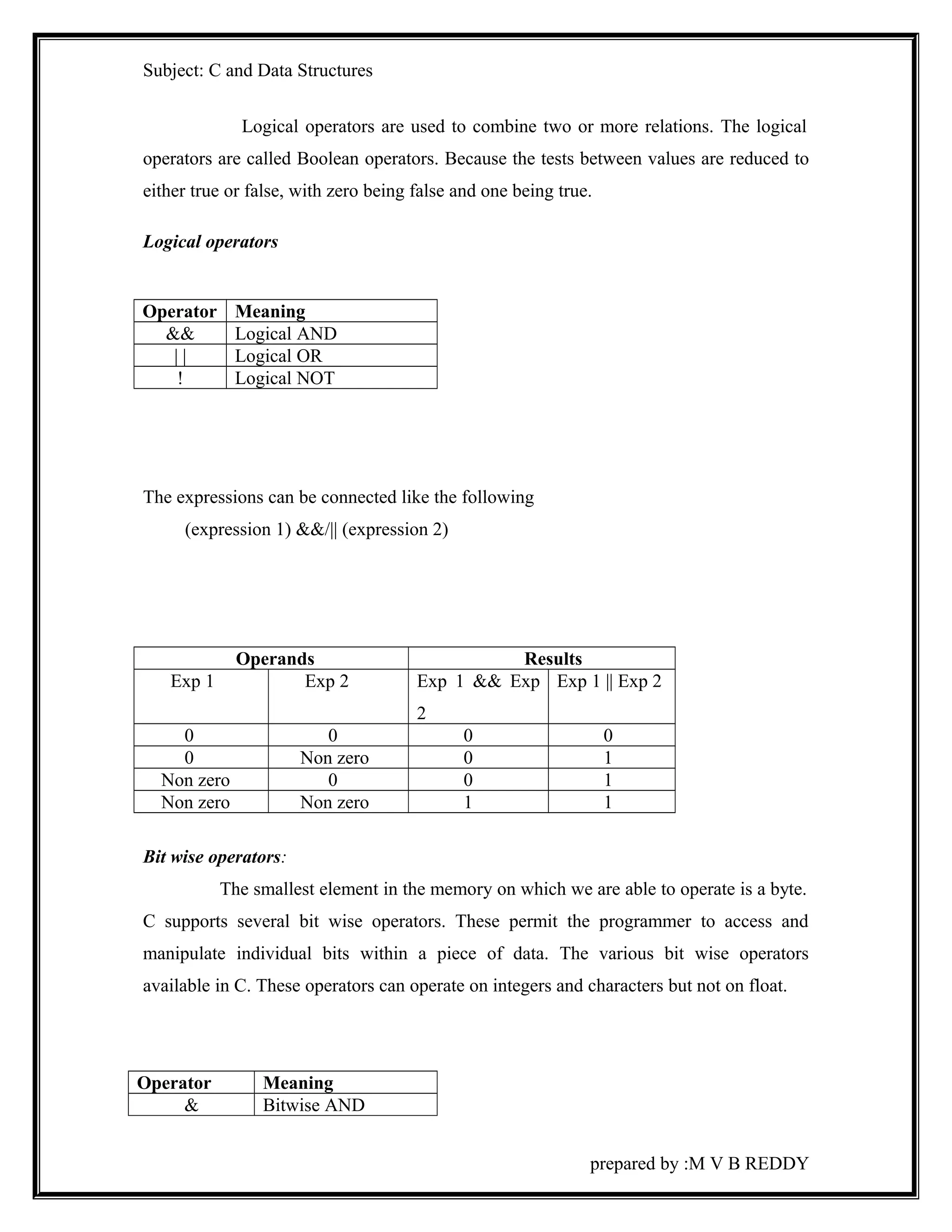
Logical operators are used to combine two or more relations. The logical 
operators are called Boolean operators. Because the tests between values are reduced to 
either true or false, with zero being false and one being true. 
Logical operators 
Operator Meaning 
&& Logical AND 
| | Logical OR 
! Logical NOT 
The expressions can be connected like the following 
(expression 1) &&/|| (expression 2) 
Operands Results 
Exp 1 Exp 2 Exp 1 && Exp 
2 
Exp 1 || Exp 2 
0 0 0 0 
0 Non zero 0 1 
Non zero 0 0 1 
Non zero Non zero 1 1 
Bit wise operators: 
The smallest element in the memory on which we are able to operate is a byte. 
C supports several bit wise operators. These permit the programmer to access and 
manipulate individual bits within a piece of data. The various bit wise operators 
available in C. These operators can operate on integers and characters but not on float. 
Operator Meaning 
& Bitwise AND 
prepared by :M V B REDDY
Subject: C and Data Structures 
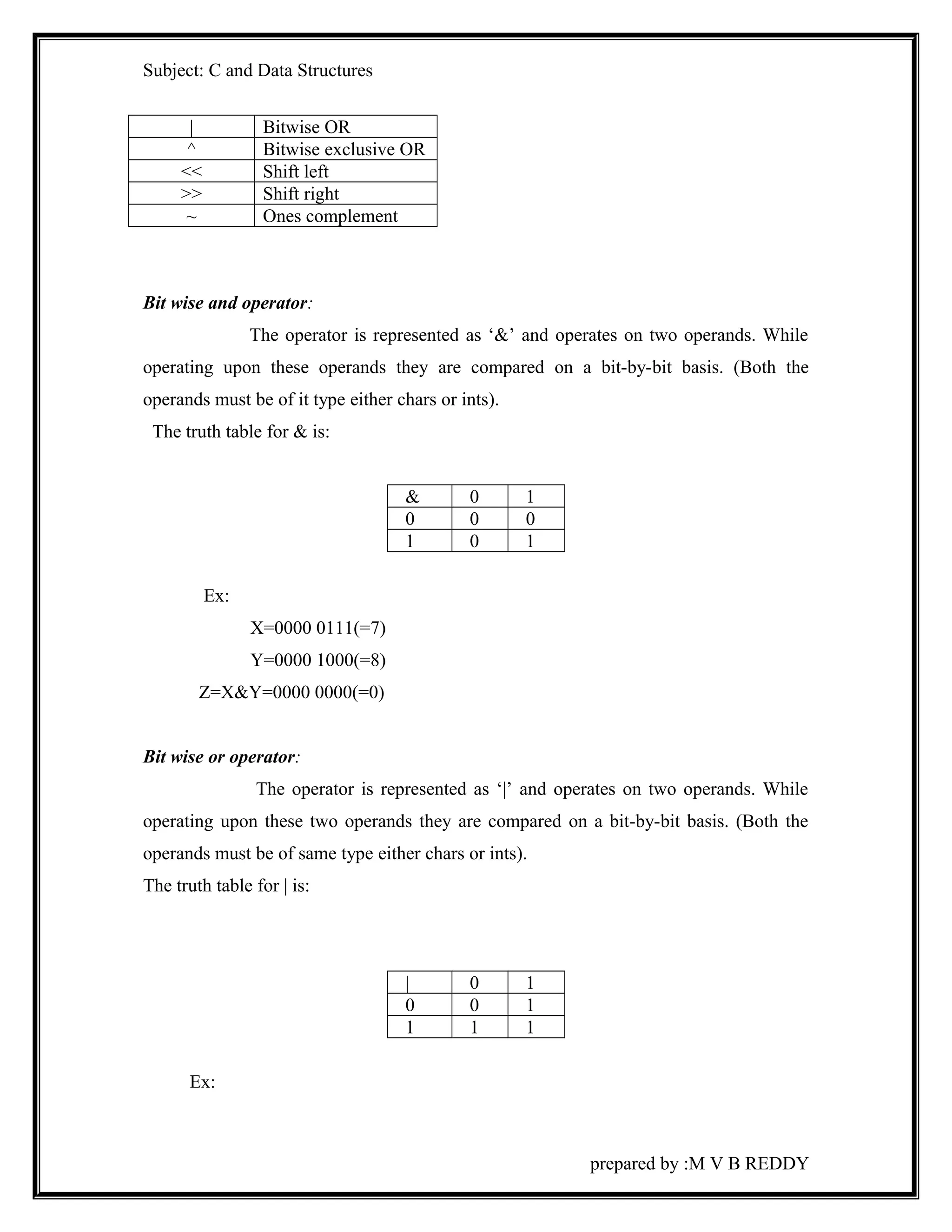
| Bitwise OR 
^ Bitwise exclusive OR 
<< Shift left 
>> Shift right 
~ Ones complement 
Bit wise and operator: 
The operator is represented as ‘&’ and operates on two operands. While 
operating upon these operands they are compared on a bit-by-bit basis. (Both the 
operands must be of it type either chars or ints). 
The truth table for & is: 
& 0 1 
0 0 0 
1 0 1 
Ex: 
X=0000 0111(=7) 
Y=0000 1000(=8) 
Z=X&Y=0000 0000(=0) 
Bit wise or operator: 
The operator is represented as ‘|’ and operates on two operands. While 
operating upon these two operands they are compared on a bit-by-bit basis. (Both the 
operands must be of same type either chars or ints). 
The truth table for | is: 
| 0 1 
0 0 1 
1 1 1 
Ex: 
prepared by :M V B REDDY
Subject: C and Data Structures 
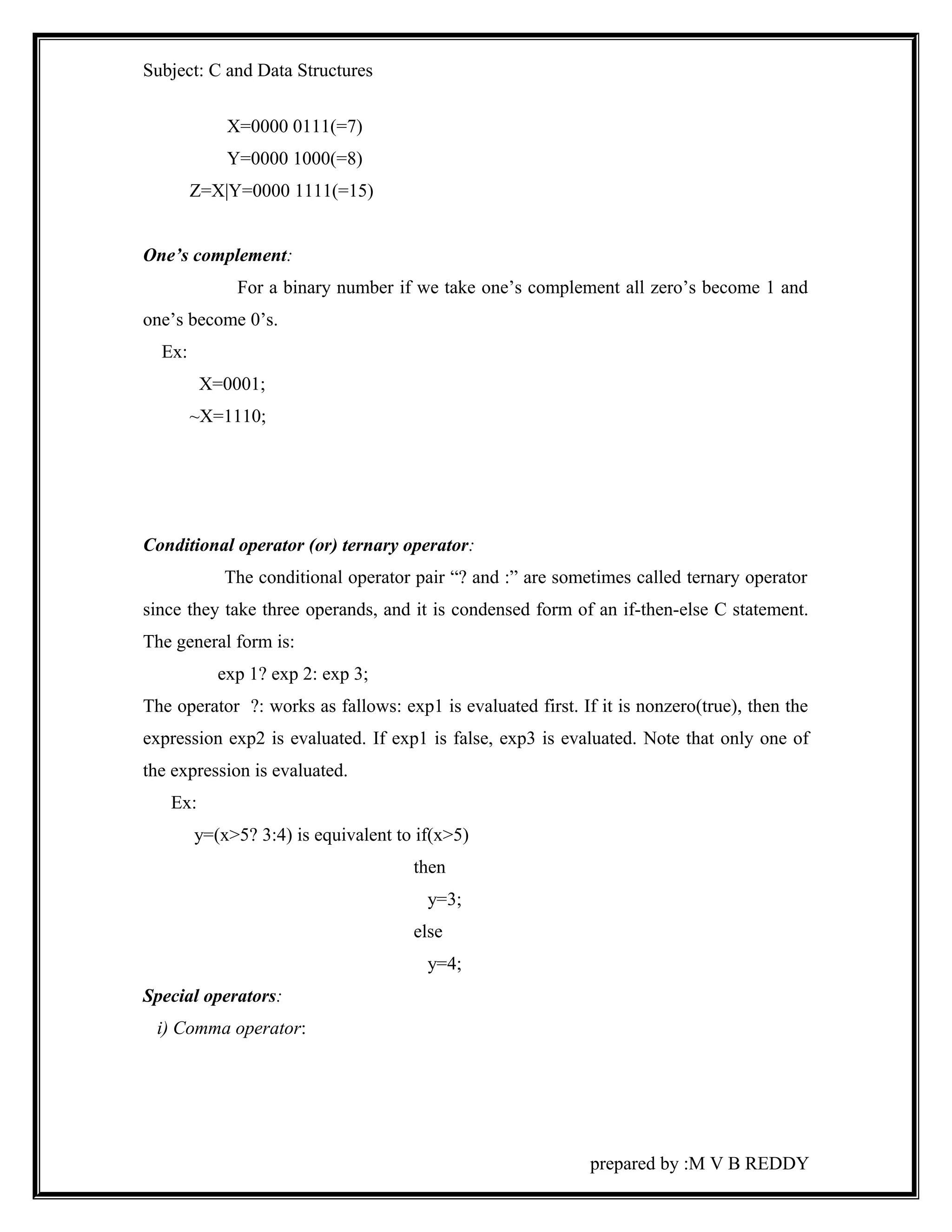
X=0000 0111(=7) 
Y=0000 1000(=8) 
Z=X|Y=0000 1111(=15) 
One’s complement: 
For a binary number if we take one’s complement all zero’s become 1 and 
one’s become 0’s. 
Ex: 
X=0001; 
~X=1110; 
Conditional operator (or) ternary operator: 
The conditional operator pair “? and :” are sometimes called ternary operator 
since they take three operands, and it is condensed form of an if-then-else C statement. 
The general form is: 
exp 1? exp 2: exp 3; 
The operator ?: works as fallows: exp1 is evaluated first. If it is nonzero(true), then the 
expression exp2 is evaluated. If exp1 is false, exp3 is evaluated. Note that only one of 
the expression is evaluated. 
Ex: 
y=(x>5? 3:4) is equivalent to if(x>5) 
then 
y=3; 
else 
y=4; 
Special operators: 
i) Comma operator: 
prepared by :M V B REDDY
Subject: C and Data Structures 
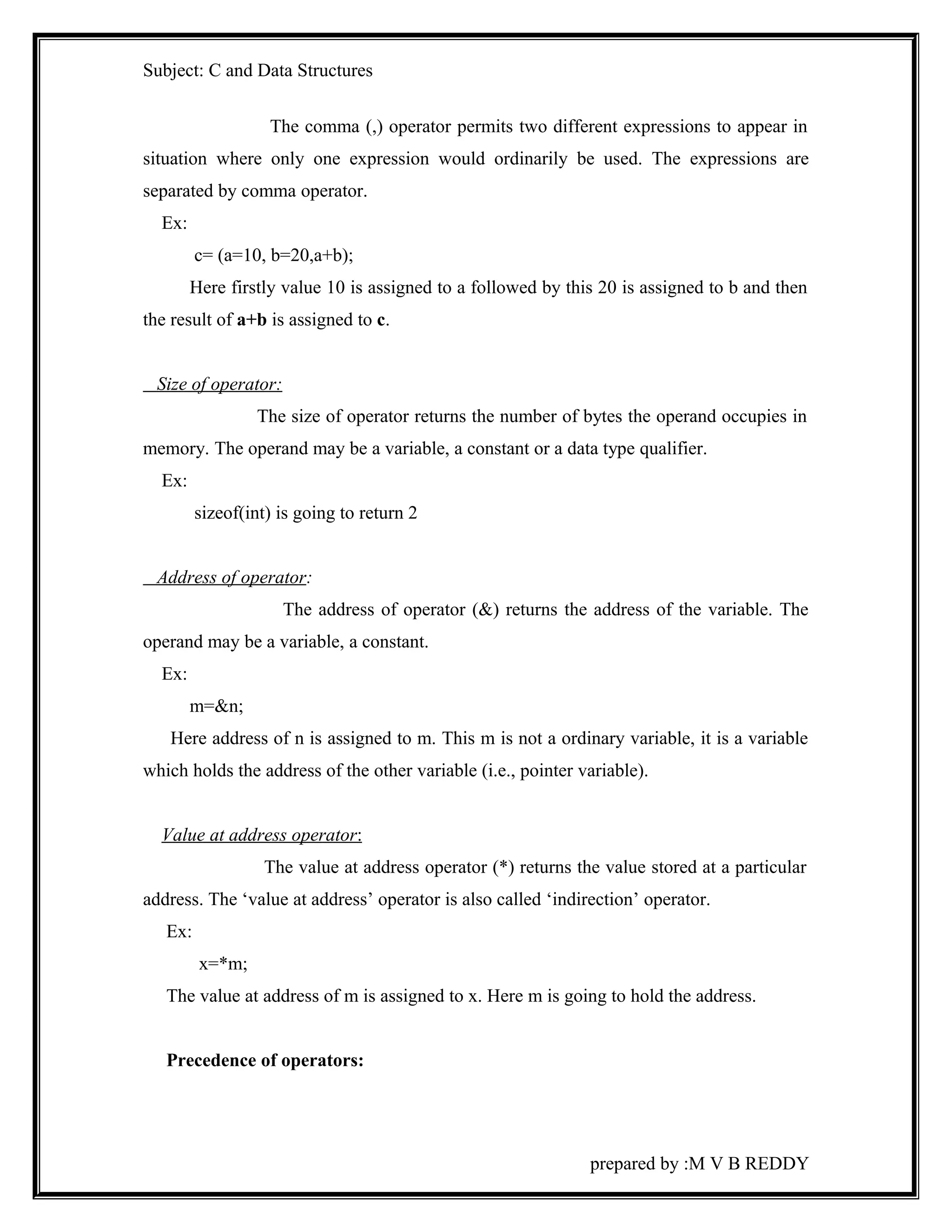
The comma (,) operator permits two different expressions to appear in 
situation where only one expression would ordinarily be used. The expressions are 
separated by comma operator. 
Ex: 
c= (a=10, b=20,a+b); 
Here firstly value 10 is assigned to a followed by this 20 is assigned to b and then 
the result of a+b is assigned to c. 
Size of operator: 
The size of operator returns the number of bytes the operand occupies in 
memory. The operand may be a variable, a constant or a data type qualifier. 
Ex: 
sizeof(int) is going to return 2 
Address of operator: 
The address of operator (&) returns the address of the variable. The 
operand may be a variable, a constant. 
Ex: 
m=&n; 
Here address of n is assigned to m. This m is not a ordinary variable, it is a variable 
which holds the address of the other variable (i.e., pointer variable). 
Value at address operator : 
The value at address operator (*) returns the value stored at a particular 
address. The ‘value at address’ operator is also called ‘indirection’ operator. 
Ex: 
x=*m; 
The value at address of m is assigned to x. Here m is going to hold the address. 
Precedence of operators: 
prepared by :M V B REDDY
Subject: C and Data Structures 
While executing an arithmetic statements which has two or more 
operators, we may have some problem about how exactly does it get executed. To 
answer these questions one has to understand the precedence of operators. The order of 
priority in which the operations are performed in an expression is called precedence. The 
precedence of all operators is shown below. 
Description Operator Rank Associativity 
Function expression ( ) 1 Left to Right 
Array expression [ ] 
Unary plus + 2 Right to left 
Unary minus - 
Increment/Decrement ++/-- 
Logical negation ! 
One’s complement ~ 
Pointer reference * 
Address of & 
Size of an object Sizeof 
Type cast (conversion) (type) 
Multiplication * 3 Left to Right 
Division / 
Modulus % 
Addition + 4 Left to Right 
Subtraction - 
Left shift << 5 Left to Right 
Right shift >> 
Less than < 6 Left to Right 
Less than or equal to <= 
Greater than > 
Greater than or equal 
>= 
to to 
Equality == 7 Left to Right 
Not equal to ! = 
Bit wise AND & 8 Left to Right 
Bit wise XOR ^ 9 Left to Right 
Bit wise OR | 10 Left to Right 
Logical AND && 11 Left to Right 
Logical OR || 12 Left to Right 
Conditional ? : 13 Right to Left 
Assignment = 14 Right to Left 
*= /= %= 
+= -= &= 
prepared by :M V B REDDY
Subject: C and Data Structures 
^= |= | 
<<= >>= 
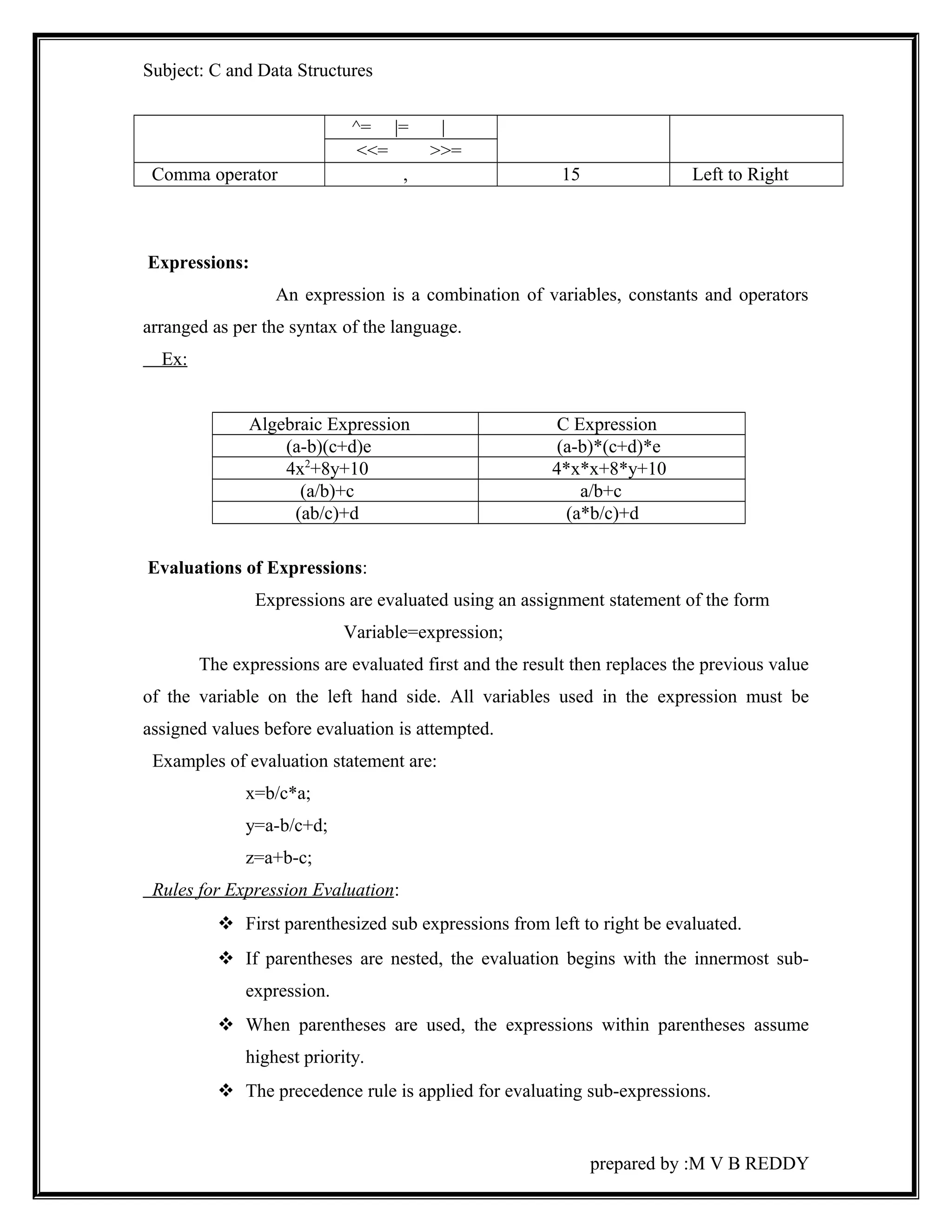
Comma operator , 15 Left to Right 
Expressions: 
An expression is a combination of variables, constants and operators 
arranged as per the syntax of the language. 
Ex: 
Algebraic Expression C Expression 
(a-b)(c+d)e (a-b)*(c+d)*e 
4x2+8y+10 4*x*x+8*y+10 
(a/b)+c a/b+c 
(ab/c)+d (a*b/c)+d 
Evaluations of Expressions: 
Expressions are evaluated using an assignment statement of the form 
Variable=expression; 
The expressions are evaluated first and the result then replaces the previous value 
of the variable on the left hand side. All variables used in the expression must be 
assigned values before evaluation is attempted. 
Examples of evaluation statement are: 
x=b/c*a; 
y=a-b/c+d; 
z=a+b-c; 
Rules for Expression Evaluation : 
 First parenthesized sub expressions from left to right be evaluated. 
 If parentheses are nested, the evaluation begins with the innermost sub-expression. 
 When parentheses are used, the expressions within parentheses assume 
highest priority. 
 The precedence rule is applied for evaluating sub-expressions. 
prepared by :M V B REDDY
Subject: C and Data Structures 
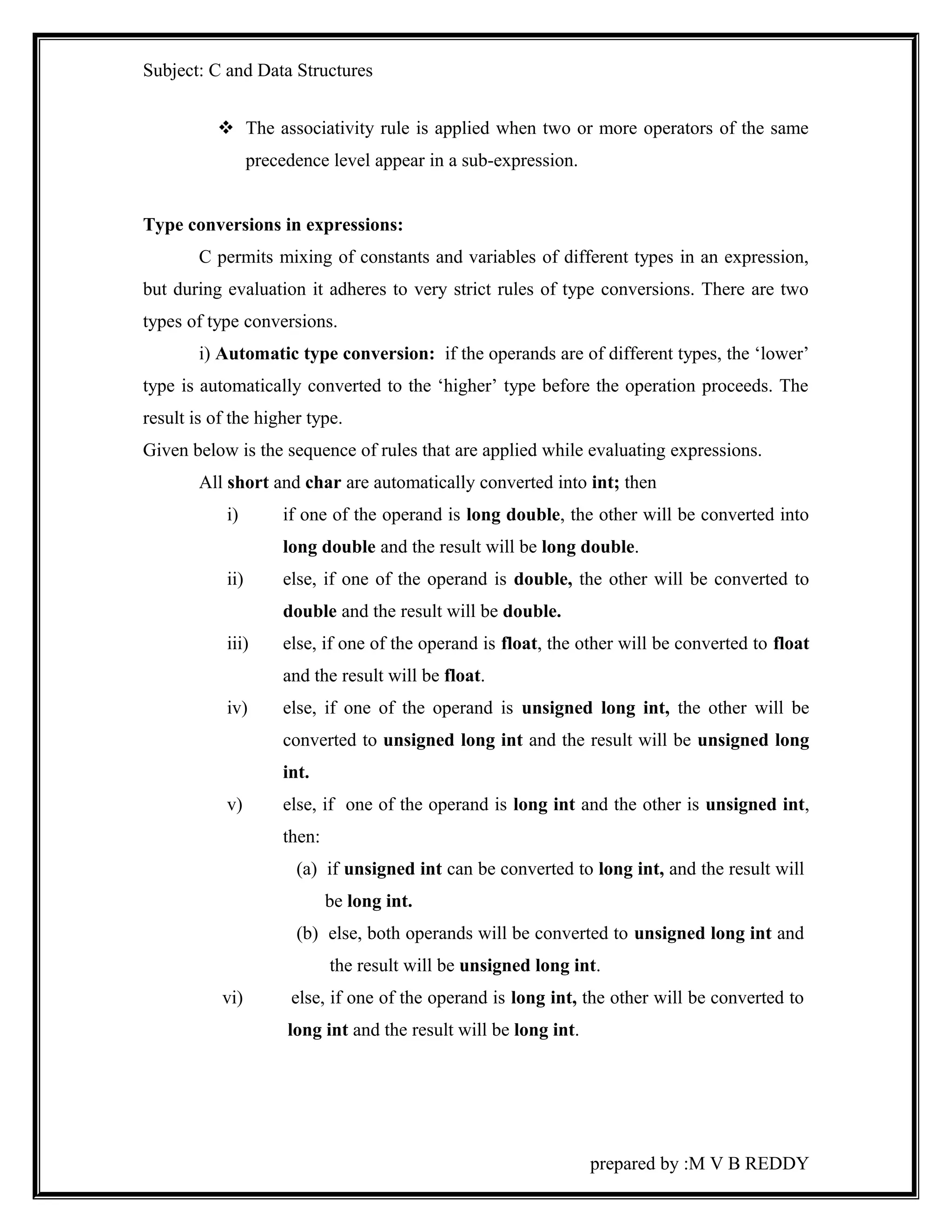
 The associativity rule is applied when two or more operators of the same 
precedence level appear in a sub-expression. 
Type conversions in expressions: 
C permits mixing of constants and variables of different types in an expression, 
but during evaluation it adheres to very strict rules of type conversions. There are two 
types of type conversions. 
i) Automatic type conversion: if the operands are of different types, the ‘lower’ 
type is automatically converted to the ‘higher’ type before the operation proceeds. The 
result is of the higher type. 
Given below is the sequence of rules that are applied while evaluating expressions. 
All short and char are automatically converted into int; then 
i) if one of the operand is long double, the other will be converted into 
long double and the result will be long double. 
ii) else, if one of the operand is double, the other will be converted to 
double and the result will be double. 
iii) else, if one of the operand is float, the other will be converted to float 
and the result will be float. 
iv) else, if one of the operand is unsigned long int, the other will be 
converted to unsigned long int and the result will be unsigned long 
int. 
v) else, if one of the operand is long int and the other is unsigned int, 
then: 
(a) if unsigned int can be converted to long int, and the result will 
be long int. 
(b) else, both operands will be converted to unsigned long int and 
the result will be unsigned long int. 
vi) else, if one of the operand is long int, the other will be converted to 
long int and the result will be long int. 
prepared by :M V B REDDY
Subject: C and Data Structures 
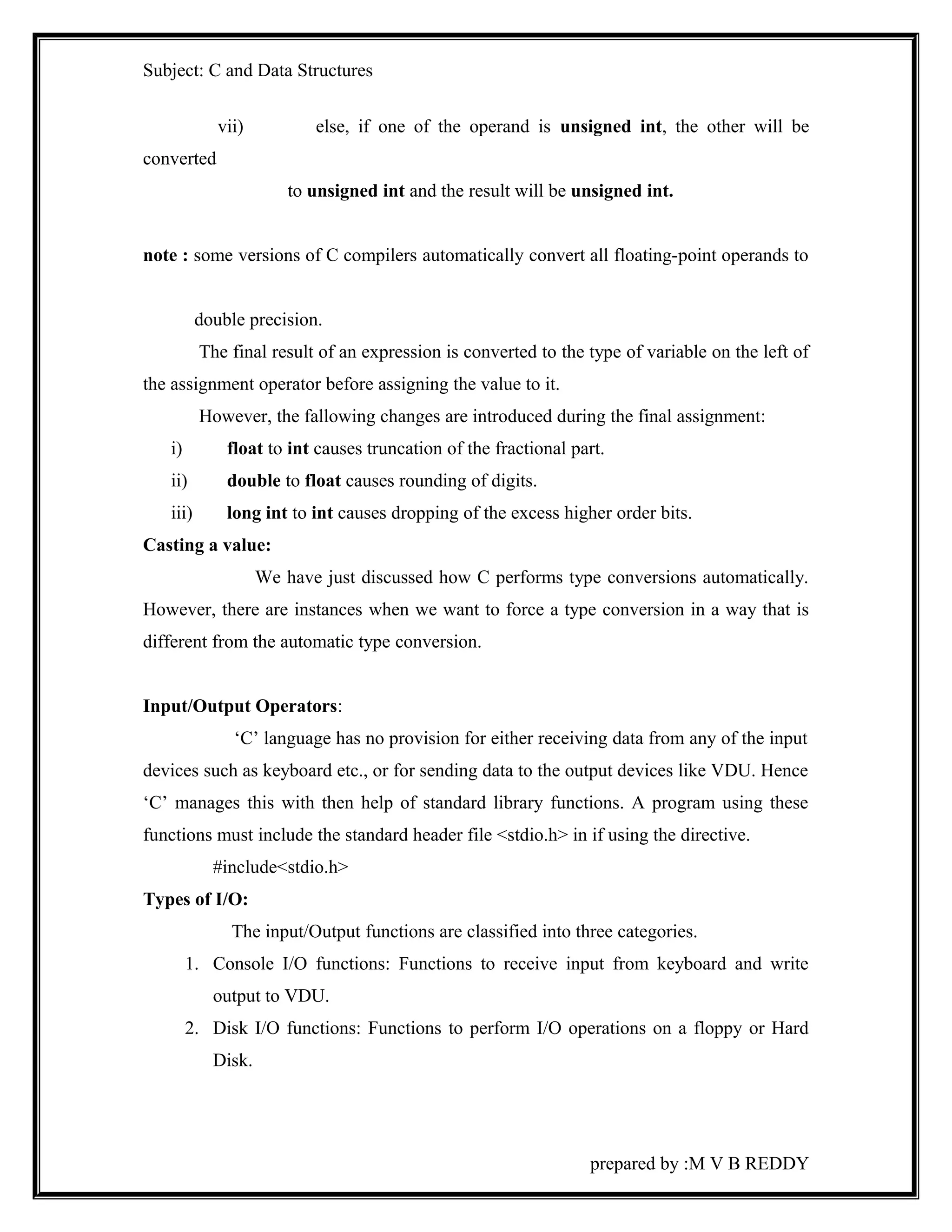
vii) else, if one of the operand is unsigned int, the other will be 
converted 
to unsigned int and the result will be unsigned int. 
note : some versions of C compilers automatically convert all floating-point operands to 
double precision. 
The final result of an expression is converted to the type of variable on the left of 
the assignment operator before assigning the value to it. 
However, the fallowing changes are introduced during the final assignment: 
i) float to int causes truncation of the fractional part. 
ii) double to float causes rounding of digits. 
iii) long int to int causes dropping of the excess higher order bits. 
Casting a value: 
We have just discussed how C performs type conversions automatically. 
However, there are instances when we want to force a type conversion in a way that is 
different from the automatic type conversion. 
Input/Output Operators: 
‘C’ language has no provision for either receiving data from any of the input 
devices such as keyboard etc., or for sending data to the output devices like VDU. Hence 
‘C’ manages this with then help of standard library functions. A program using these 
functions must include the standard header file <stdio.h> in if using the directive. 
#include<stdio.h> 
Types of I/O: 
The input/Output functions are classified into three categories. 
1. Console I/O functions: Functions to receive input from keyboard and write 
output to VDU. 
2. Disk I/O functions: Functions to perform I/O operations on a floppy or Hard 
Disk. 
prepared by :M V B REDDY
Subject: C and Data Structures 
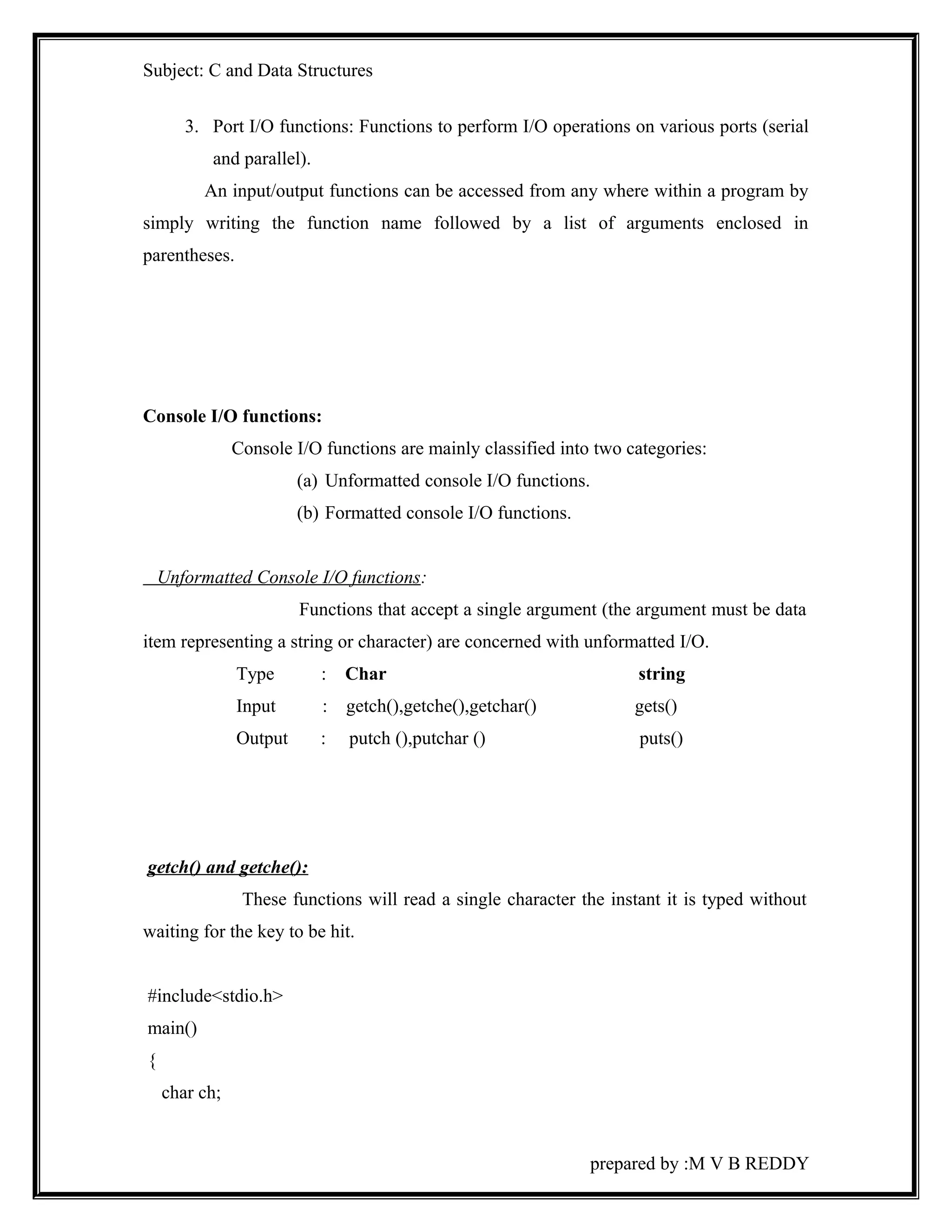
3. Port I/O functions: Functions to perform I/O operations on various ports (serial 
and parallel). 
An input/output functions can be accessed from any where within a program by 
simply writing the function name followed by a list of arguments enclosed in 
parentheses. 
Console I/O functions: 
Console I/O functions are mainly classified into two categories: 
(a) Unformatted console I/O functions. 
(b) Formatted console I/O functions. 
Unformatted Console I/O functions: 
Functions that accept a single argument (the argument must be data 
item representing a string or character) are concerned with unformatted I/O. 
Type : Char string 
Input : getch(),getche(),getchar() gets() 
Output : putch (),putchar () puts() 
getch() and getche(): 
These functions will read a single character the instant it is typed without 
waiting for the key to be hit. 
#include<stdio.h> 
main() 
{ 
char ch; 
prepared by :M V B REDDY
Subject: C and Data Structures 
printf(“Hit any key!:”); 
getch(); /*character input with echo*/ 
printf(“Hit any key!:”); 
getche (); /*character will be echoed on the screen*/ 
} 
getchar (); 
It is very similar to the getche () and getch () functions echoing the character you 
type on the screen, but requires enter key to hit following the character you typed. 
putchar () and putch (): 
These functions is used to write a character one at a tome to the terminal. 
#include<stdio.h> 
main() 
{ 
char ch; 
printf(“Hit any key!:”); 
ch=getchar(); 
putch(ch); 
} 
gets() & puts(): 
gets() receives a string which is an array of characters from the keyboard, puts() 
function works exactly opposite to gets() function i.e., prints the string on console. 
#include<stdio.h> 
main() 
{ 
char name[100]; 
puts(“Enter a string”); 
prepared by :M V B REDDY
Subject: C and Data Structures 
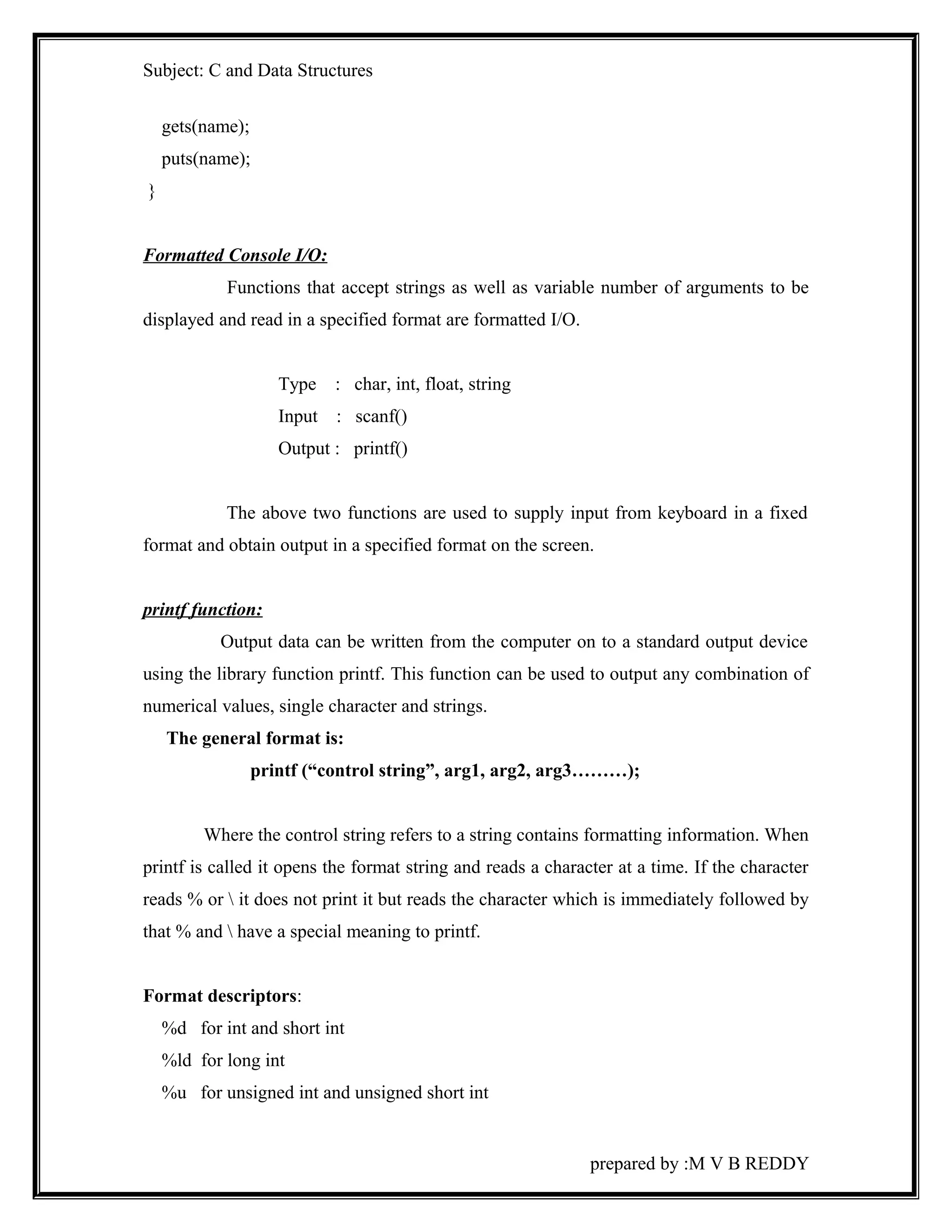
gets(name); 
puts(name); 
} 
Formatted Console I/O: 
Functions that accept strings as well as variable number of arguments to be 
displayed and read in a specified format are formatted I/O. 
Type : char, int, float, string 
Input : scanf() 
Output : printf() 
The above two functions are used to supply input from keyboard in a fixed 
format and obtain output in a specified format on the screen. 
printf function: 
Output data can be written from the computer on to a standard output device 
using the library function printf. This function can be used to output any combination of 
numerical values, single character and strings. 
The general format is: 
printf (“control string”, arg1, arg2, arg3………); 
Where the control string refers to a string contains formatting information. When 
printf is called it opens the format string and reads a character at a time. If the character 
reads % or  it does not print it but reads the character which is immediately followed by 
that % and  have a special meaning to printf. 
Format descriptors: 
%d for int and short int 
%ld for long int 
%u for unsigned int and unsigned short int 
prepared by :M V B REDDY
Subject: C and Data Structures 
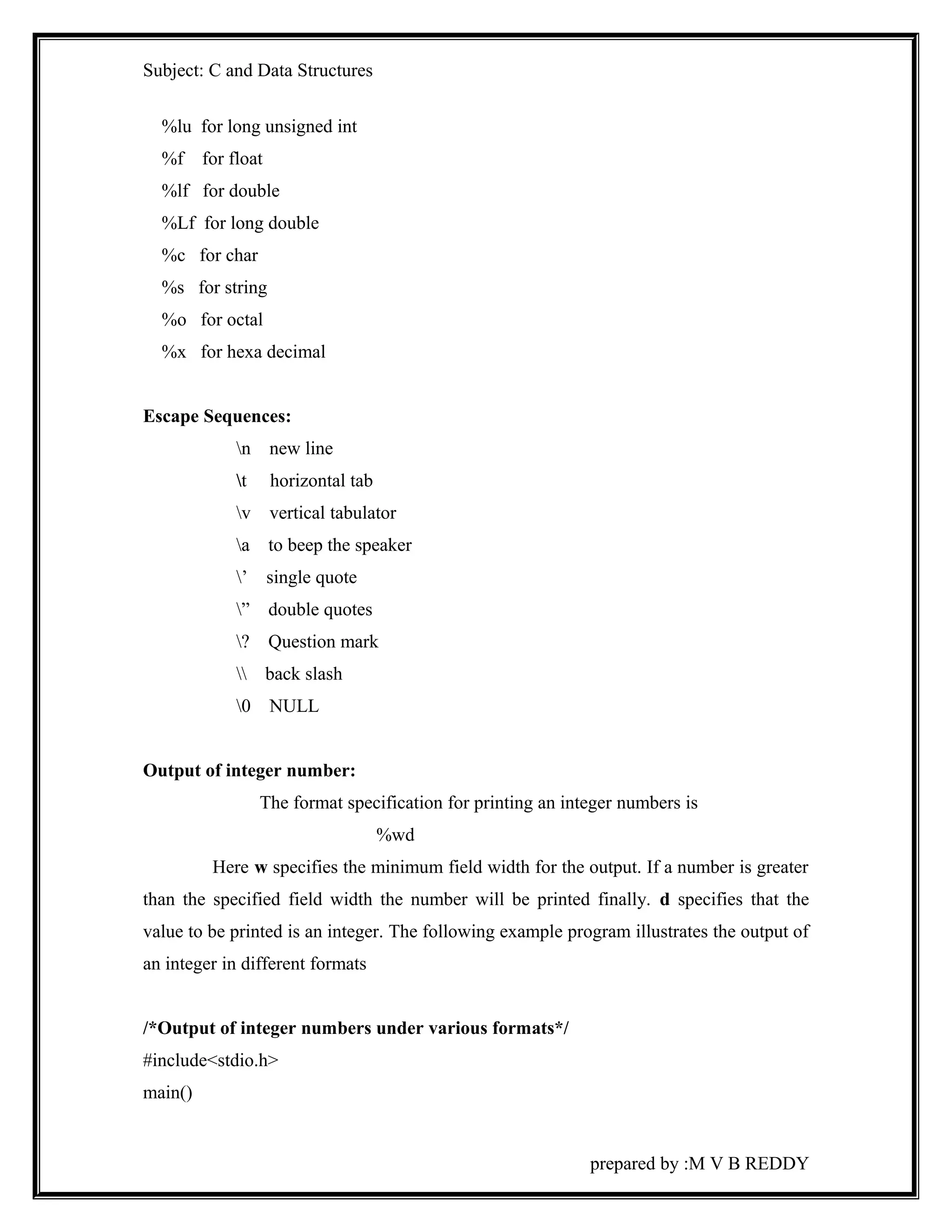
%lu for long unsigned int 
%f for float 
%lf for double 
%Lf for long double 
%c for char 
%s for string 
%o for octal 
%x for hexa decimal 
Escape Sequences: 
n new line 
t horizontal tab 
v vertical tabulator 
a to beep the speaker 
’ single quote 
” double quotes 
? Question mark 
 back slash 
0 NULL 
Output of integer number: 
The format specification for printing an integer numbers is 
%wd 
Here w specifies the minimum field width for the output. If a number is greater 
than the specified field width the number will be printed finally. d specifies that the 
value to be printed is an integer. The following example program illustrates the output of 
an integer in different formats 
/*Output of integer numbers under various formats*/ 
#include<stdio.h> 
main() 
prepared by :M V B REDDY
Subject: C and Data Structures 
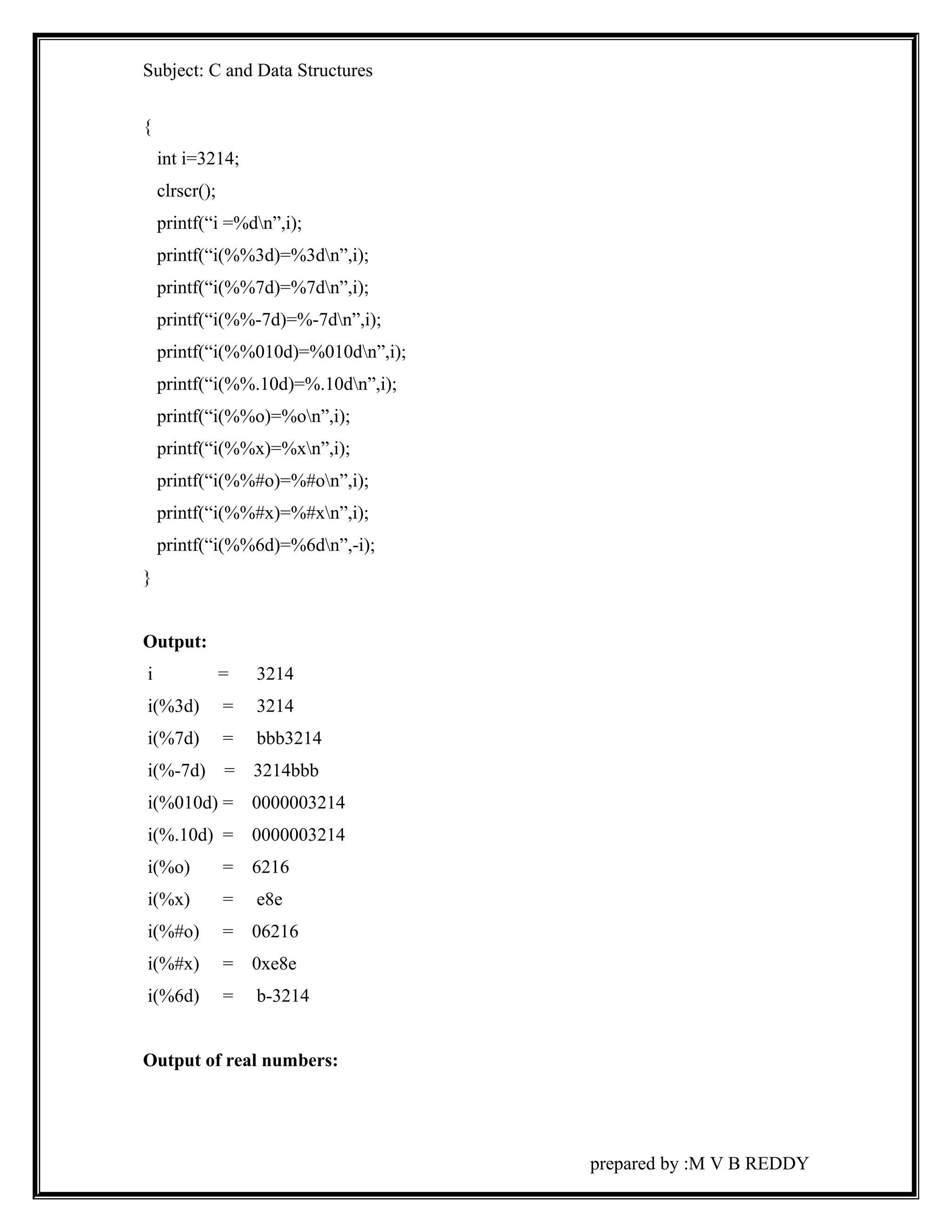
{ 
int i=3214; 
clrscr(); 
printf(“i =%dn”,i); 
printf(“i(%%3d)=%3dn”,i); 
printf(“i(%%7d)=%7dn”,i); 
printf(“i(%%-7d)=%-7dn”,i); 
printf(“i(%%010d)=%010dn”,i); 
printf(“i(%%.10d)=%.10dn”,i); 
printf(“i(%%o)=%on”,i); 
printf(“i(%%x)=%xn”,i); 
printf(“i(%%#o)=%#on”,i); 
printf(“i(%%#x)=%#xn”,i); 
printf(“i(%%6d)=%6dn”,-i); 
} 
Output: 
i = 3214 
i(%3d) = 3214 
i(%7d) = bbb3214 
i(%-7d) = 3214bbb 
i(%010d) = 0000003214 
i(%.10d) = 0000003214 
i(%o) = 6216 
i(%x) = e8e 
i(%#o) = 06216 
i(%#x) = 0xe8e 
i(%6d) = b-3214 
Output of real numbers: 
prepared by :M V B REDDY
Subject: C and Data Structures 
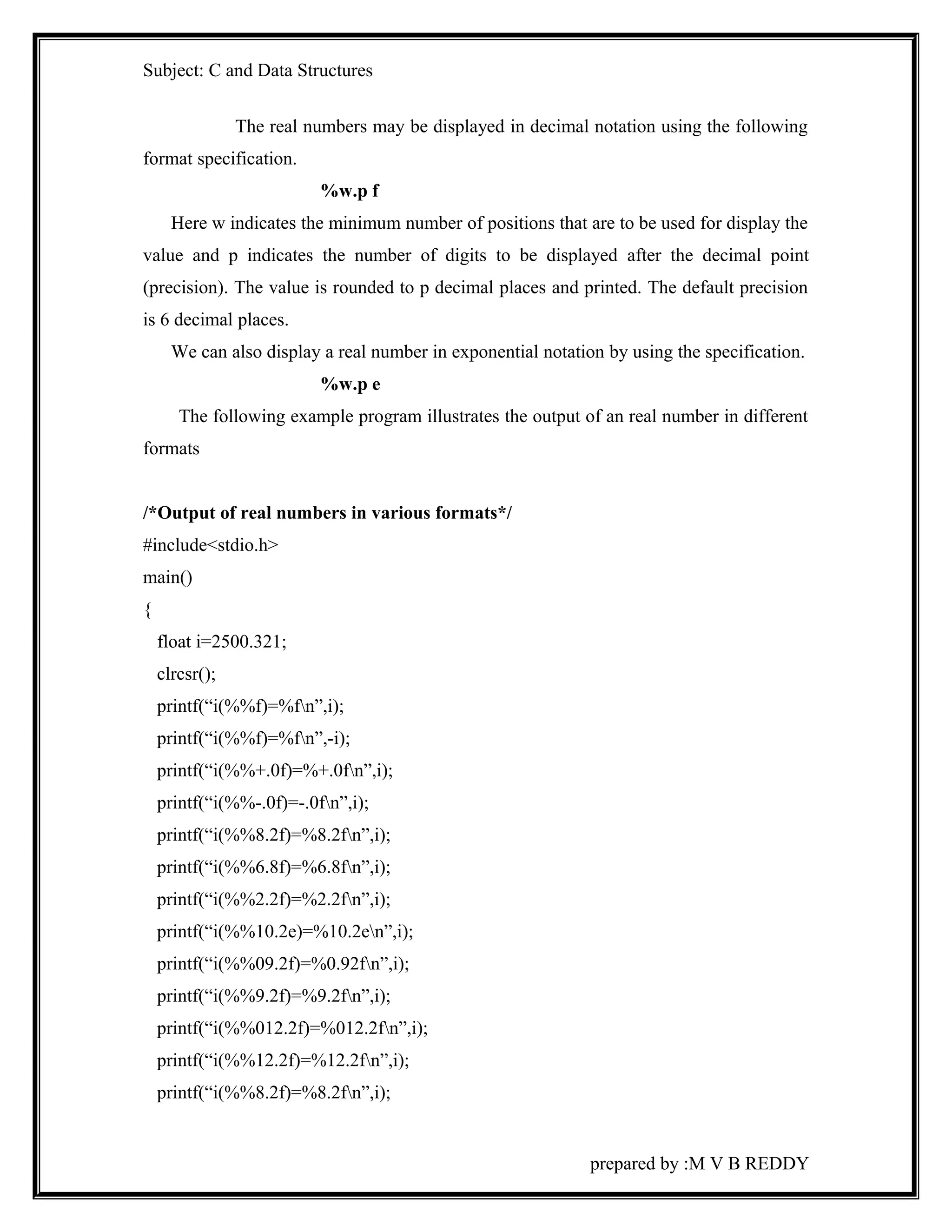
The real numbers may be displayed in decimal notation using the following 
format specification. 
%w.p f 
Here w indicates the minimum number of positions that are to be used for display the 
value and p indicates the number of digits to be displayed after the decimal point 
(precision). The value is rounded to p decimal places and printed. The default precision 
is 6 decimal places. 
We can also display a real number in exponential notation by using the specification. 
%w.p e 
The following example program illustrates the output of an real number in different 
formats 
/*Output of real numbers in various formats*/ 
#include<stdio.h> 
main() 
{ 
float i=2500.321; 
clrcsr(); 
printf(“i(%%f)=%fn”,i); 
printf(“i(%%f)=%fn”,-i); 
printf(“i(%%+.0f)=%+.0fn”,i); 
printf(“i(%%-.0f)=-.0fn”,i); 
printf(“i(%%8.2f)=%8.2fn”,i); 
printf(“i(%%6.8f)=%6.8fn”,i); 
printf(“i(%%2.2f)=%2.2fn”,i); 
printf(“i(%%10.2e)=%10.2en”,i); 
printf(“i(%%09.2f)=%0.92fn”,i); 
printf(“i(%%9.2f)=%9.2fn”,i); 
printf(“i(%%012.2f)=%012.2fn”,i); 
printf(“i(%%12.2f)=%12.2fn”,i); 
printf(“i(%%8.2f)=%8.2fn”,i); 
prepared by :M V B REDDY
Subject: C and Data Structures 
printf(“i(%%#10.0f)=%#10.0fn”,i); 
printf(“i(%%e)=%en”,i); 
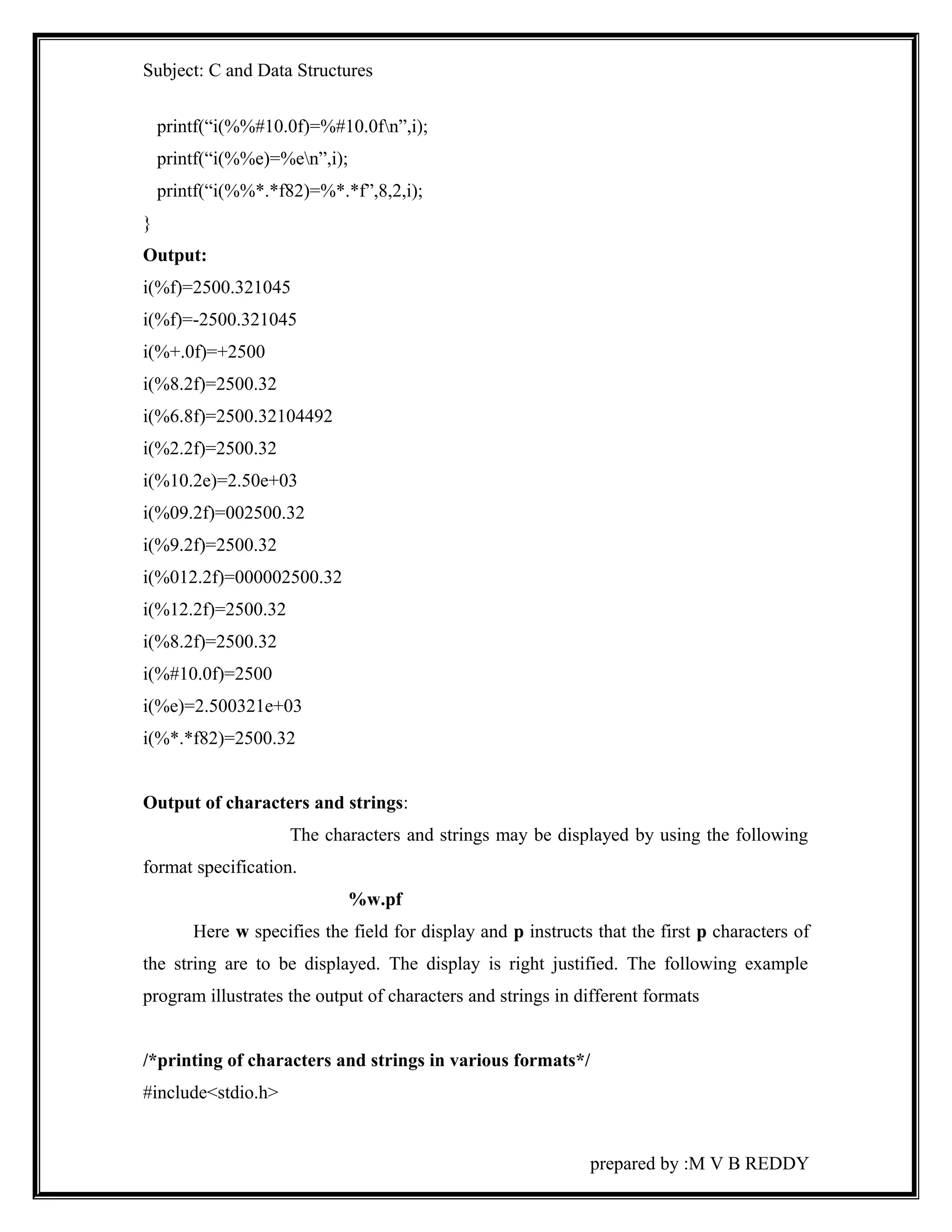
printf(“i(%%*.*f82)=%*.*f”,8,2,i); 
} 
Output: 
i(%f)=2500.321045 
i(%f)=-2500.321045 
i(%+.0f)=+2500 
i(%8.2f)=2500.32 
i(%6.8f)=2500.32104492 
i(%2.2f)=2500.32 
i(%10.2e)=2.50e+03 
i(%09.2f)=002500.32 
i(%9.2f)=2500.32 
i(%012.2f)=000002500.32 
i(%12.2f)=2500.32 
i(%8.2f)=2500.32 
i(%#10.0f)=2500 
i(%e)=2.500321e+03 
i(%*.*f82)=2500.32 
Output of characters and strings: 
The characters and strings may be displayed by using the following 
format specification. 
%w.pf 
Here w specifies the field for display and p instructs that the first p characters of 
the string are to be displayed. The display is right justified. The following example 
program illustrates the output of characters and strings in different formats 
/*printing of characters and strings in various formats*/ 
#include<stdio.h> 
prepared by :M V B REDDY
Subject: C and Data Structures 
main() 
{ 
charname[50]=”SHREETECH Computers”,ch=’S’; 
clrscr(); 
printf(“ch=%cn”,ch); 
printf(“ch=%3cn”,ch); 
printf(“ch=%6cn”,ch); 
printf(“name=%sn”,name); 
printf(“name=%15sn”,name); 
printf(“name=%*sn”,2,name); 
printf(“name=%20.10sn”,name); 
printf(“name=%-20.10sn”,name); 
printf(“name==.5sn”,name); 
} 
Output: 
ch=S 
ch=bbS 
ch=bbbbbS 
name=SHREETECH Computers 
name=bbbbbbbbbbSHREETECH 
name=SHREETECHbbbbbbbbbb 
name=SHREE 
Scanf function: 
This function can be used to read any combination of numerical values, single 
character and string. 
The general format is: 
scanf(“control string”,arg1,arg2,arg3,………..); 
prepared by :M V B REDDY
Subject: C and Data Structures 
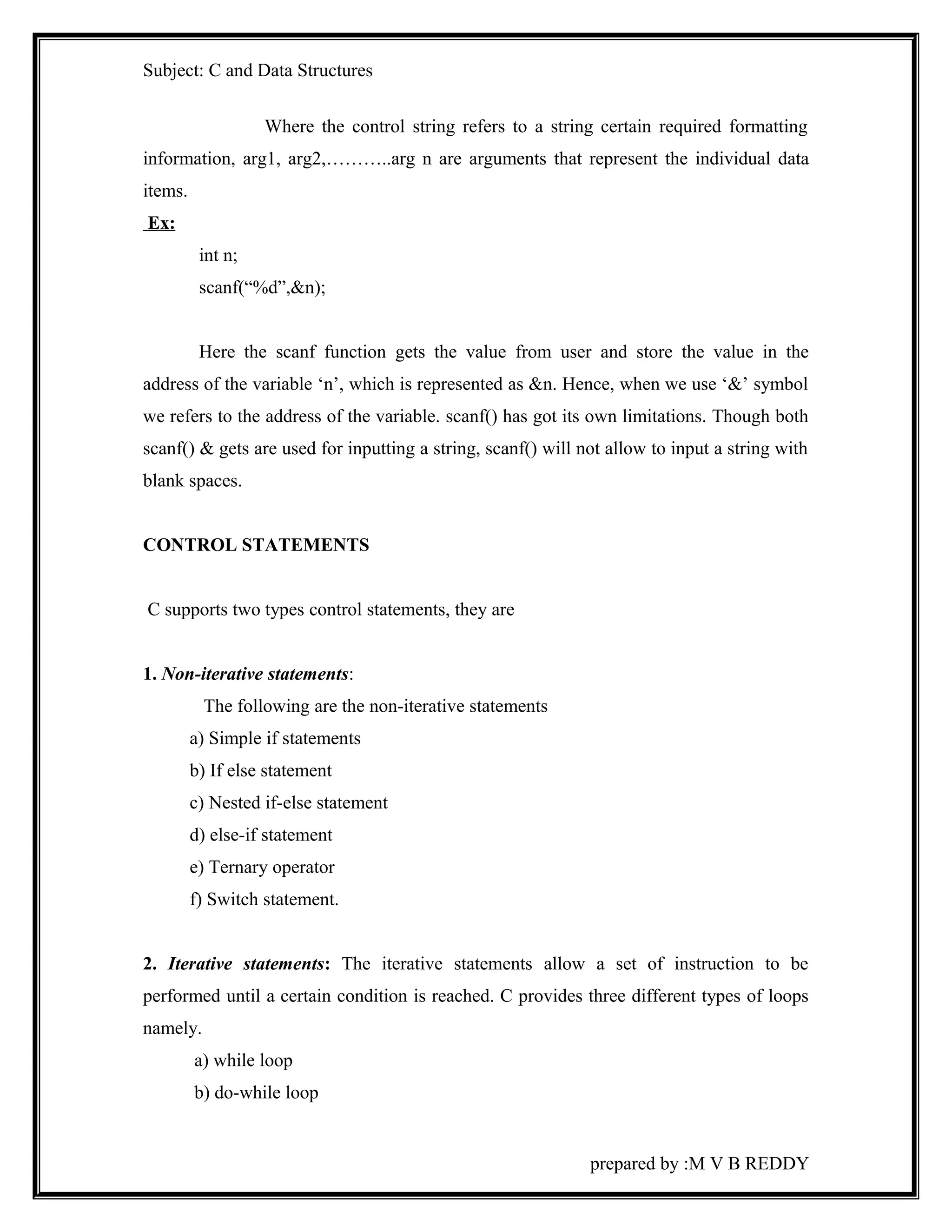
Where the control string refers to a string certain required formatting 
information, arg1, arg2,………..arg n are arguments that represent the individual data 
items. 
Ex: 
int n; 
scanf(“%d”,&n); 
Here the scanf function gets the value from user and store the value in the 
address of the variable ‘n’, which is represented as &n. Hence, when we use ‘&’ symbol 
we refers to the address of the variable. scanf() has got its own limitations. Though both 
scanf() & gets are used for inputting a string, scanf() will not allow to input a string with 
blank spaces. 
CONTROL STATEMENTS 
C supports two types control statements, they are 
1. Non-iterative statements: 
The following are the non-iterative statements 
a) Simple if statements 
b) If else statement 
c) Nested if-else statement 
d) else-if statement 
e) Ternary operator 
f) Switch statement. 
2. Iterative statements: The iterative statements allow a set of instruction to be 
performed until a certain condition is reached. C provides three different types of loops 
namely. 
a) while loop 
b) do-while loop 
prepared by :M V B REDDY
Subject: C and Data Structures 
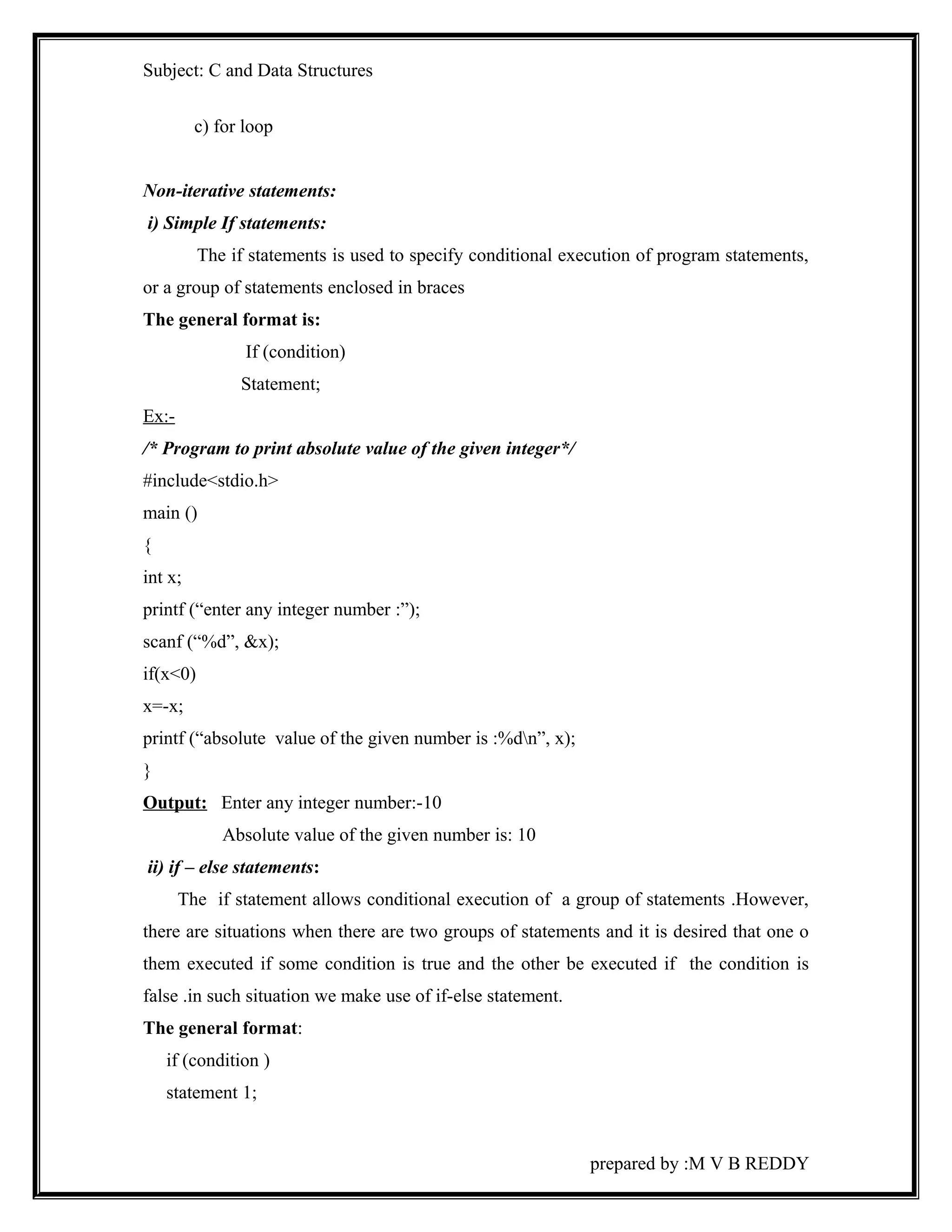
c) for loop 
Non-iterative statements: 
i) Simple If statements: 
The if statements is used to specify conditional execution of program statements, 
or a group of statements enclosed in braces 
The general format is: 
If (condition) 
Statement; 
Ex:- 
/* Program to print absolute value of the given integer*/ 
#include<stdio.h> 
main () 
{ 
int x; 
printf (“enter any integer number :”); 
scanf (“%d”, &x); 
if(x<0) 
x=-x; 
printf (“absolute value of the given number is :%dn”, x); 
} 
Output: Enter any integer number:-10 
Absolute value of the given number is: 10 
ii) if – else statements: 
The if statement allows conditional execution of a group of statements .However, 
there are situations when there are two groups of statements and it is desired that one o 
them executed if some condition is true and the other be executed if the condition is 
false .in such situation we make use of if-else statement. 
The general format: 
if (condition ) 
statement 1; 
prepared by :M V B REDDY
Subject: C and Data Structures 
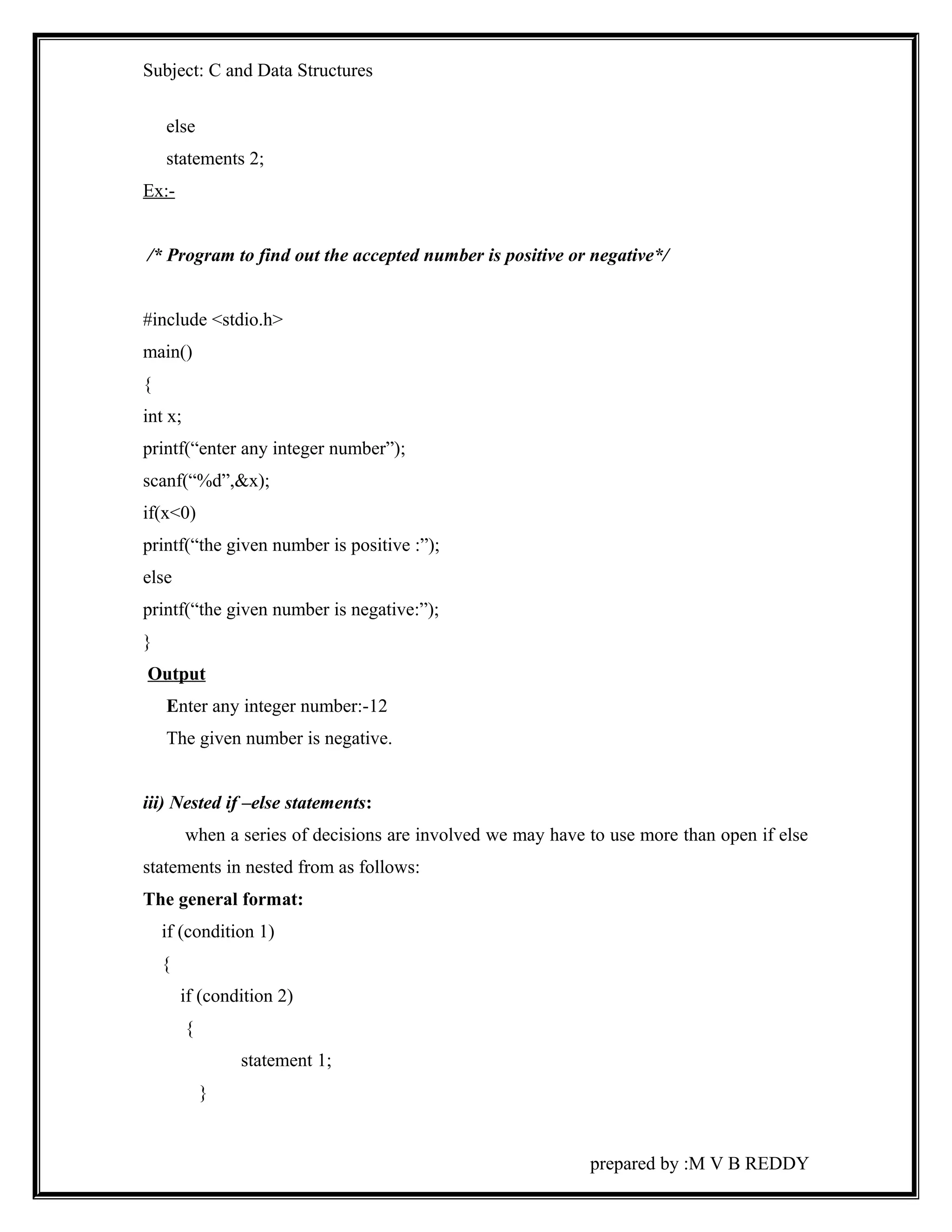
else 
statements 2; 
Ex:- 
/* Program to find out the accepted number is positive or negative*/ 
#include <stdio.h> 
main() 
{ 
int x; 
printf(“enter any integer number”); 
scanf(“%d”,&x); 
if(x<0) 
printf(“the given number is positive :”); 
else 
printf(“the given number is negative:”); 
} 
Output 
Enter any integer number:-12 
The given number is negative. 
iii) Nested if –else statements: 
when a series of decisions are involved we may have to use more than open if else 
statements in nested from as follows: 
The general format: 
if (condition 1) 
{ 
if (condition 2) 
{ 
statement 1; 
} 
prepared by :M V B REDDY
Subject: C and Data Structures 
else 
{ 
statement 2; 
} 
} 
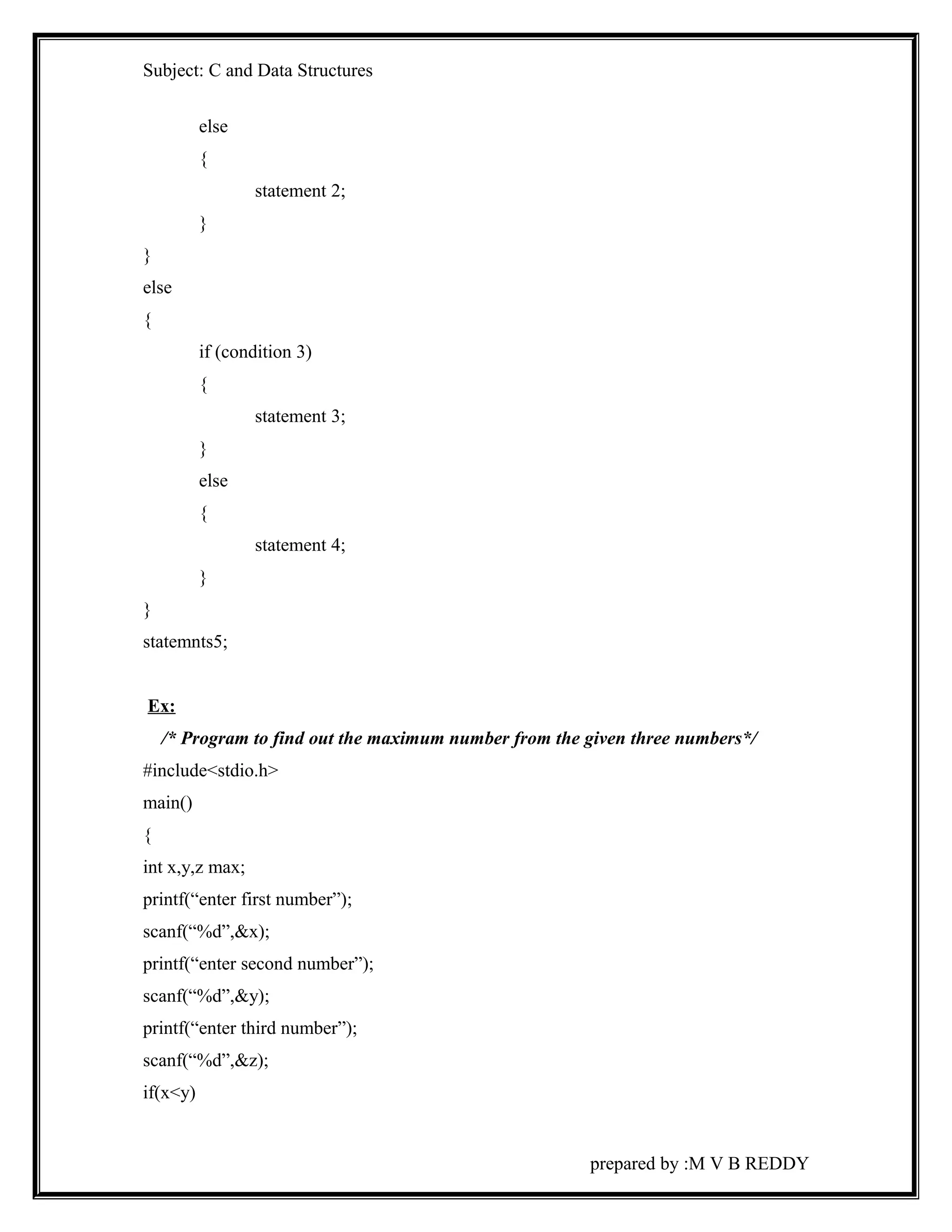
else 
{ 
if (condition 3) 
{ 
statement 3; 
} 
else 
{ 
statement 4; 
} 
} 
statemnts5; 
Ex: 
/* Program to find out the maximum number from the given three numbers*/ 
#include<stdio.h> 
main() 
{ 
int x,y,z max; 
printf(“enter first number”); 
scanf(“%d”,&x); 
printf(“enter second number”); 
scanf(“%d”,&y); 
printf(“enter third number”); 
scanf(“%d”,&z); 
if(x<y) 
prepared by :M V B REDDY
Subject: C and Data Structures 
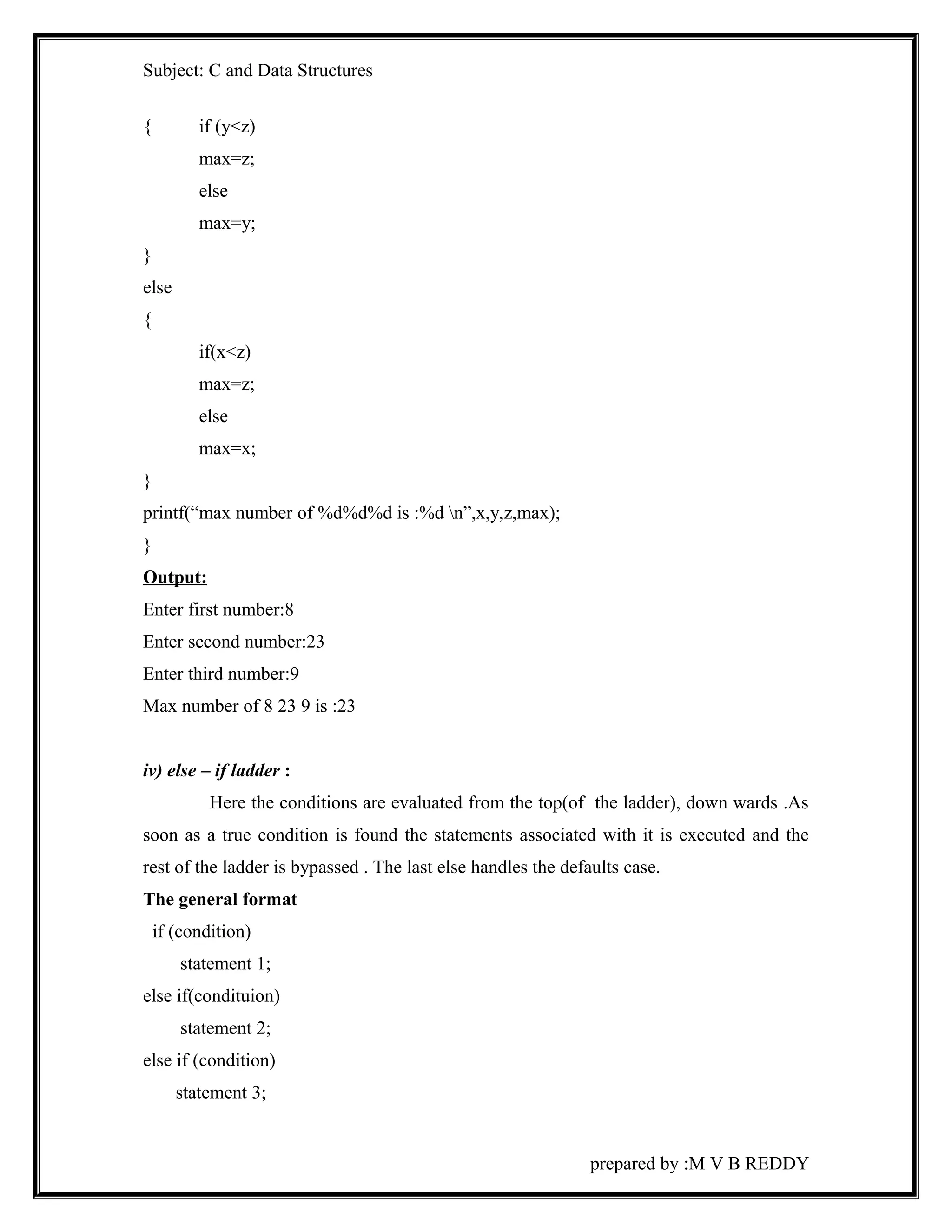
{ if (y<z) 
max=z; 
else 
max=y; 
} 
else 
{ 
if(x<z) 
max=z; 
else 
max=x; 
} 
printf(“max number of %d%d%d is :%d n”,x,y,z,max); 
} 
Output: 
Enter first number:8 
Enter second number:23 
Enter third number:9 
Max number of 8 23 9 is :23 
iv) else – if ladder : 
Here the conditions are evaluated from the top(of the ladder), down wards .As 
soon as a true condition is found the statements associated with it is executed and the 
rest of the ladder is bypassed . The last else handles the defaults case. 
The general format 
if (condition) 
statement 1; 
else if(condituion) 
statement 2; 
else if (condition) 
statement 3; 
prepared by :M V B REDDY
Subject: C and Data Structures 
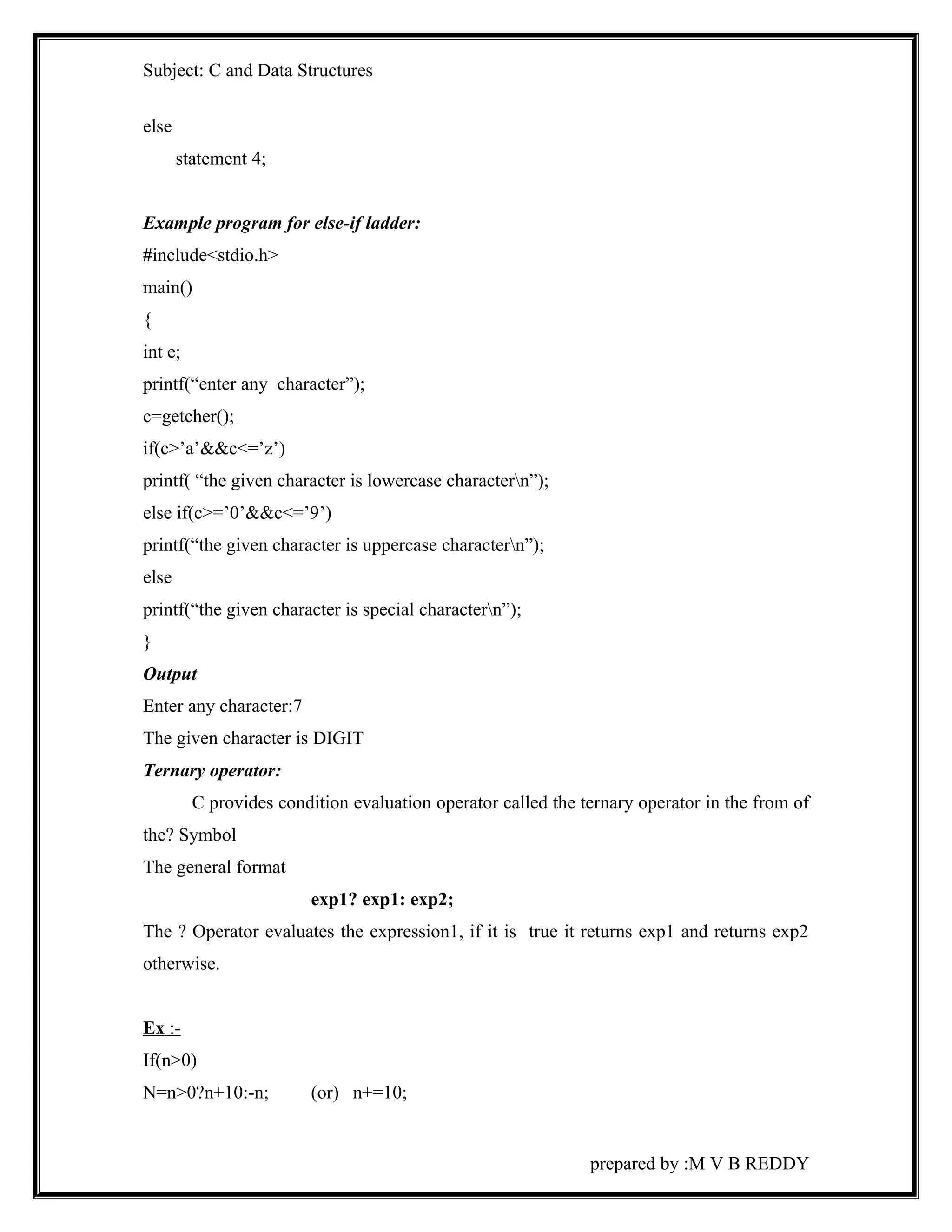
else 
statement 4; 
Example program for else-if ladder: 
#include<stdio.h> 
main() 
{ 
int e; 
printf(“enter any character”); 
c=getcher(); 
if(c>’a’&&c<=’z’) 
printf( “the given character is lowercase charactern”); 
else if(c>=’0’&&c<=’9’) 
printf(“the given character is uppercase charactern”); 
else 
printf(“the given character is special charactern”); 
} 
Output 
Enter any character:7 
The given character is DIGIT 
Ternary operator: 
C provides condition evaluation operator called the ternary operator in the from of 
the? Symbol 
The general format 
exp1? exp1: exp2; 
The ? Operator evaluates the expression1, if it is true it returns exp1 and returns exp2 
otherwise. 
Ex :- 
If(n>0) 
N=n>0?n+10:-n; (or) n+=10; 
prepared by :M V B REDDY
Subject: C and Data Structures 
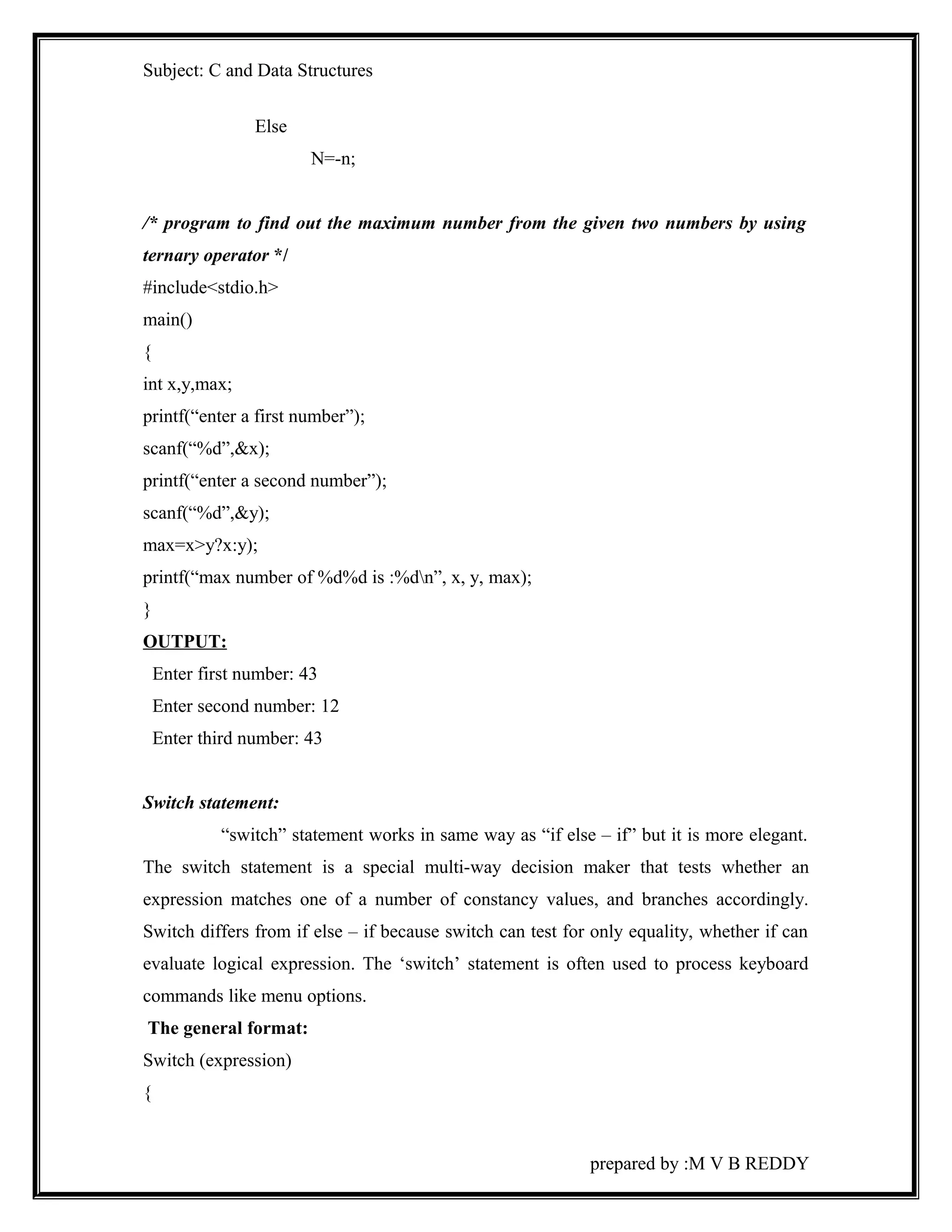
Else 
N=-n; 
/* program to find out the maximum number from the given two numbers by using 
ternary operator */ 
#include<stdio.h> 
main() 
{ 
int x,y,max; 
printf(“enter a first number”); 
scanf(“%d”,&x); 
printf(“enter a second number”); 
scanf(“%d”,&y); 
max=x>y?x:y); 
printf(“max number of %d%d is :%dn”, x, y, max); 
} 
OUTPUT: 
Enter first number: 43 
Enter second number: 12 
Enter third number: 43 
Switch statement: 
“switch” statement works in same way as “if else – if” but it is more elegant. 
The switch statement is a special multi-way decision maker that tests whether an 
expression matches one of a number of constancy values, and branches accordingly. 
Switch differs from if else – if because switch can test for only equality, whether if can 
evaluate logical expression. The ‘switch’ statement is often used to process keyboard 
commands like menu options. 
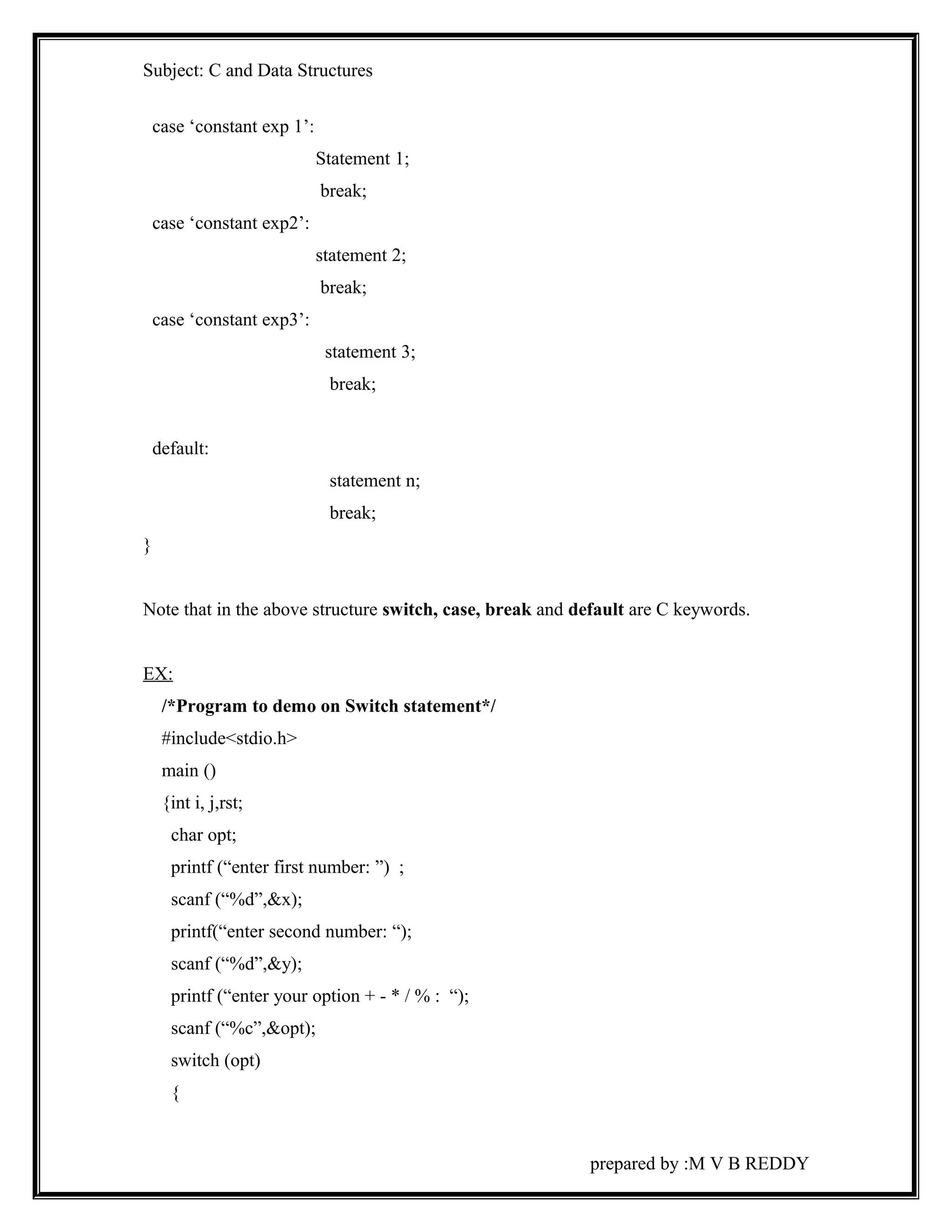
The general format: 
Switch (expression) 
{ 
prepared by :M V B REDDY
Subject: C and Data Structures 
case ‘constant exp 1’: 
Statement 1; 
break; 
case ‘constant exp2’: 
statement 2; 
break; 
case ‘constant exp3’: 
statement 3; 
break; 
default: 
statement n; 
break; 
} 
Note that in the above structure switch, case, break and default are C keywords. 
EX: 
/*Program to demo on Switch statement*/ 
#include<stdio.h> 
main () 
{int i, j,rst; 
char opt; 
printf (“enter first number: ”) ; 
scanf (“%d”,&x); 
printf(“enter second number: “); 
scanf (“%d”,&y); 
printf (“enter your option + - * / % : “); 
scanf (“%c”,&opt); 
switch (opt) 
{ 
prepared by :M V B REDDY
Subject: C and Data Structures 
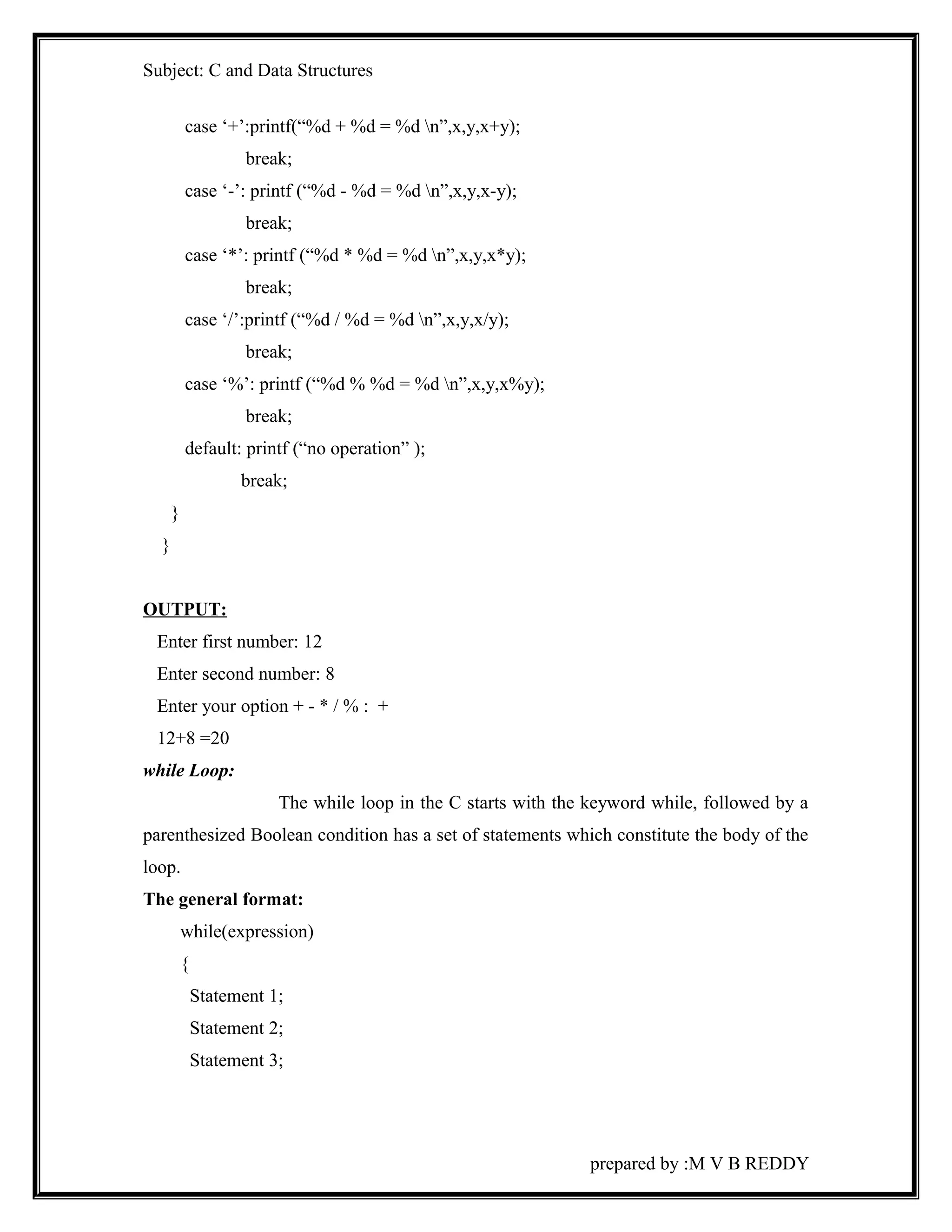
case ‘+’:printf(“%d + %d = %d n”,x,y,x+y); 
break; 
case ‘-’: printf (“%d - %d = %d n”,x,y,x-y); 
break; 
case ‘*’: printf (“%d * %d = %d n”,x,y,x*y); 
break; 
case ‘/’:printf (“%d / %d = %d n”,x,y,x/y); 
break; 
case ‘%’: printf (“%d % %d = %d n”,x,y,x%y); 
break; 
default: printf (“no operation” ); 
break; 
} 
} 
OUTPUT: 
Enter first number: 12 
Enter second number: 8 
Enter your option + - * / % : + 
12+8 =20 
while Loop: 
The while loop in the C starts with the keyword while, followed by a 
parenthesized Boolean condition has a set of statements which constitute the body of the 
loop. 
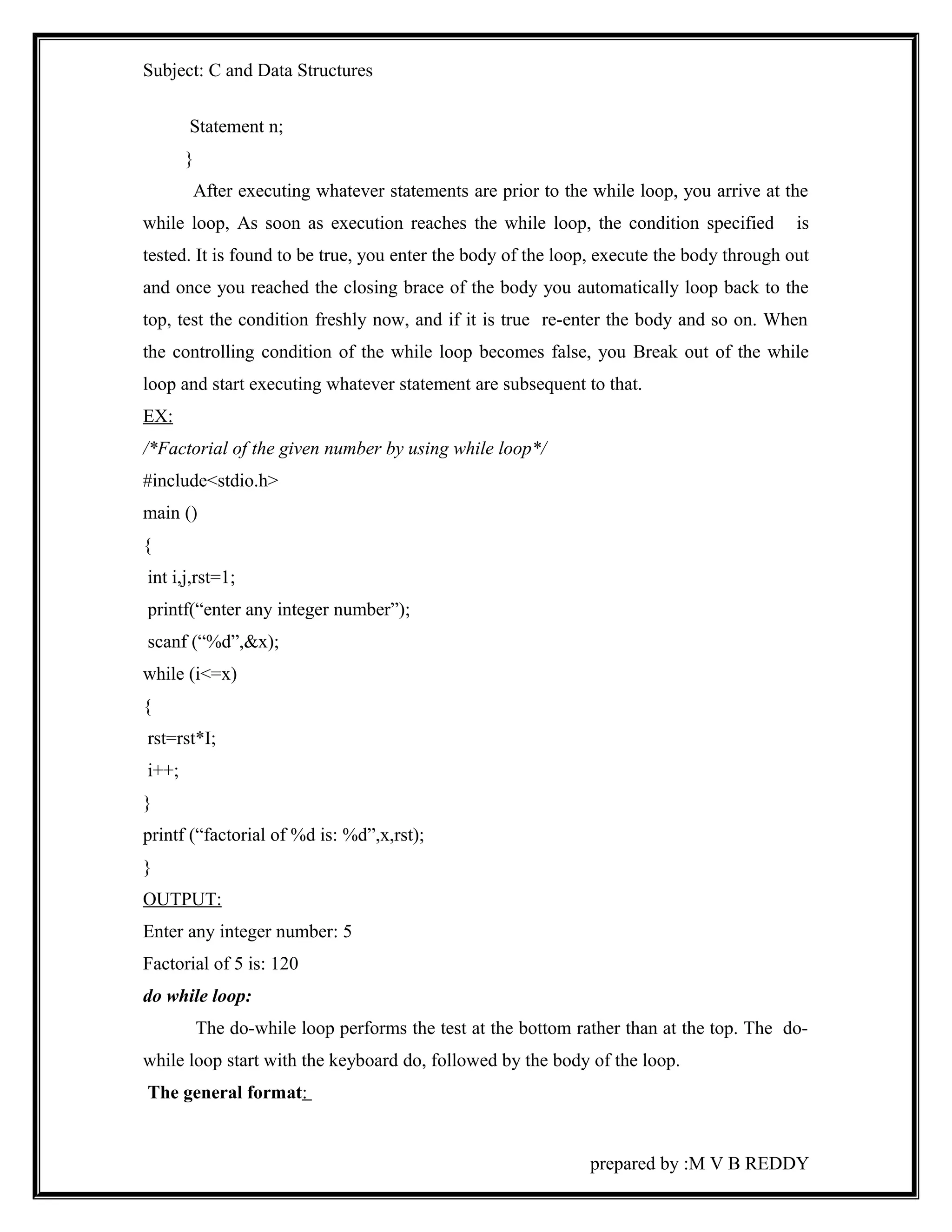
The general format: 
while(expression) 
{ 
Statement 1; 
Statement 2; 
Statement 3; 
prepared by :M V B REDDY
Subject: C and Data Structures 
Statement n; 
} 
After executing whatever statements are prior to the while loop, you arrive at the 
while loop, As soon as execution reaches the while loop, the condition specified is 
tested. It is found to be true, you enter the body of the loop, execute the body through out 
and once you reached the closing brace of the body you automatically loop back to the 
top, test the condition freshly now, and if it is true re-enter the body and so on. When 
the controlling condition of the while loop becomes false, you Break out of the while 
loop and start executing whatever statement are subsequent to that. 
EX: 
/*Factorial of the given number by using while loop*/ 
#include<stdio.h> 
main () 
{ 
int i,j,rst=1; 
printf(“enter any integer number”); 
scanf (“%d”,&x); 
while (i<=x) 
{ 
rst=rst*I; 
i++; 
} 
printf (“factorial of %d is: %d”,x,rst); 
} 
OUTPUT: 
Enter any integer number: 5 
Factorial of 5 is: 120 
do while loop: 
The do-while loop performs the test at the bottom rather than at the top. The do-while 
loop start with the keyboard do, followed by the body of the loop. 
The general format: 
prepared by :M V B REDDY
Subject: C and Data Structures 
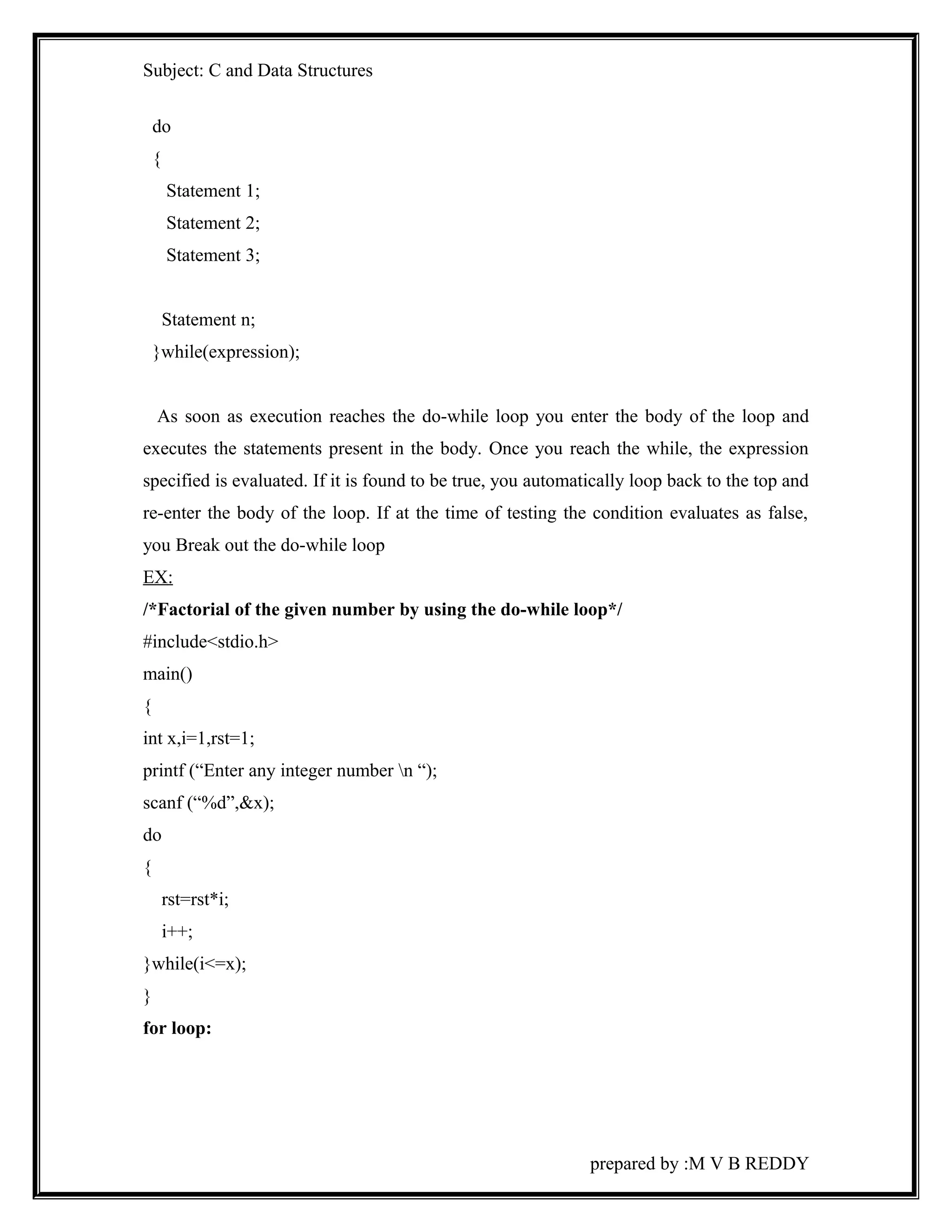
do 
{ 
Statement 1; 
Statement 2; 
Statement 3; 
Statement n; 
}while(expression); 
As soon as execution reaches the do-while loop you enter the body of the loop and 
executes the statements present in the body. Once you reach the while, the expression 
specified is evaluated. If it is found to be true, you automatically loop back to the top and 
re-enter the body of the loop. If at the time of testing the condition evaluates as false, 
you Break out the do-while loop 
EX: 
/*Factorial of the given number by using the do-while loop*/ 
#include<stdio.h> 
main() 
{ 
int x,i=1,rst=1; 
printf (“Enter any integer number n “); 
scanf (“%d”,&x); 
do 
{ 
rst=rst*i; 
i++; 
}while(i<=x); 
} 
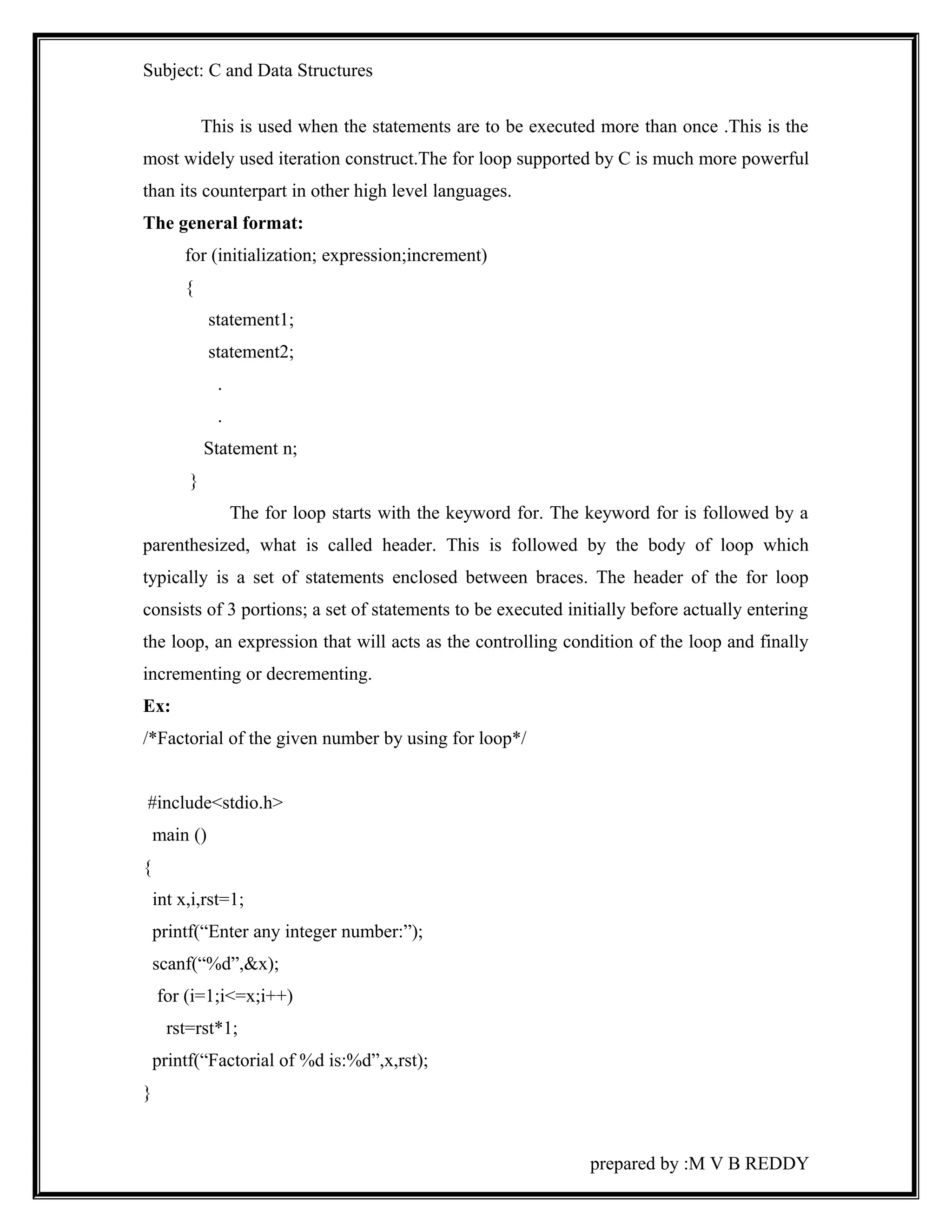
for loop: 
prepared by :M V B REDDY
Subject: C and Data Structures 
This is used when the statements are to be executed more than once .This is the 
most widely used iteration construct.The for loop supported by C is much more powerful 
than its counterpart in other high level languages. 
The general format: 
for (initialization; expression;increment) 
{ 
statement1; 
statement2; 
. 
. 
Statement n; 
} 
The for loop starts with the keyword for. The keyword for is followed by a 
parenthesized, what is called header. This is followed by the body of loop which 
typically is a set of statements enclosed between braces. The header of the for loop 
consists of 3 portions; a set of statements to be executed initially before actually entering 
the loop, an expression that will acts as the controlling condition of the loop and finally 
incrementing or decrementing. 
Ex: 
/*Factorial of the given number by using for loop*/ 
#include<stdio.h> 
main () 
{ 
int x,i,rst=1; 
printf(“Enter any integer number:”); 
scanf(“%d”,&x); 
for (i=1;i<=x;i++) 
rst=rst*1; 
printf(“Factorial of %d is:%d”,x,rst); 
} 
prepared by :M V B REDDY
Subject: C and Data Structures 
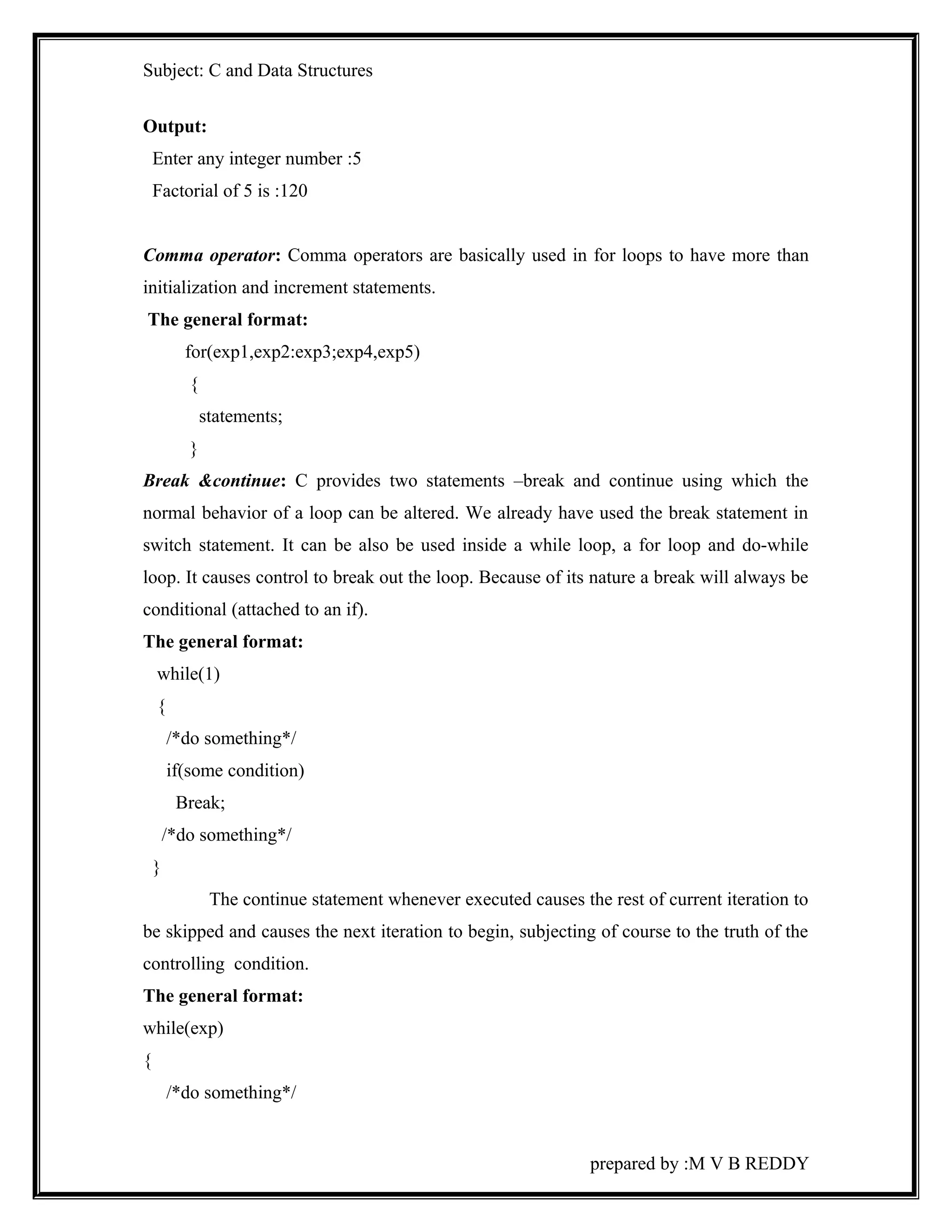
Output: 
Enter any integer number :5 
Factorial of 5 is :120 
Comma operator: Comma operators are basically used in for loops to have more than 
initialization and increment statements. 
The general format: 
for(exp1,exp2:exp3;exp4,exp5) 
{ 
statements; 
} 
Break &continue: C provides two statements –break and continue using which the 
normal behavior of a loop can be altered. We already have used the break statement in 
switch statement. It can be also be used inside a while loop, a for loop and do-while 
loop. It causes control to break out the loop. Because of its nature a break will always be 
conditional (attached to an if). 
The general format: 
while(1) 
{ 
/*do something*/ 
if(some condition) 
Break; 
/*do something*/ 
} 
The continue statement whenever executed causes the rest of current iteration to 
be skipped and causes the next iteration to begin, subjecting of course to the truth of the 
controlling condition. 
The general format: 
while(exp) 
{ 
/*do something*/ 
prepared by :M V B REDDY
Subject: C and Data Structures 
if(some condition) 
continue; 
/* do something*/ 
} 
exit(): 
Exit() is a standard library function used to terminate the program execution. 
The general format: 
exit(argument); 
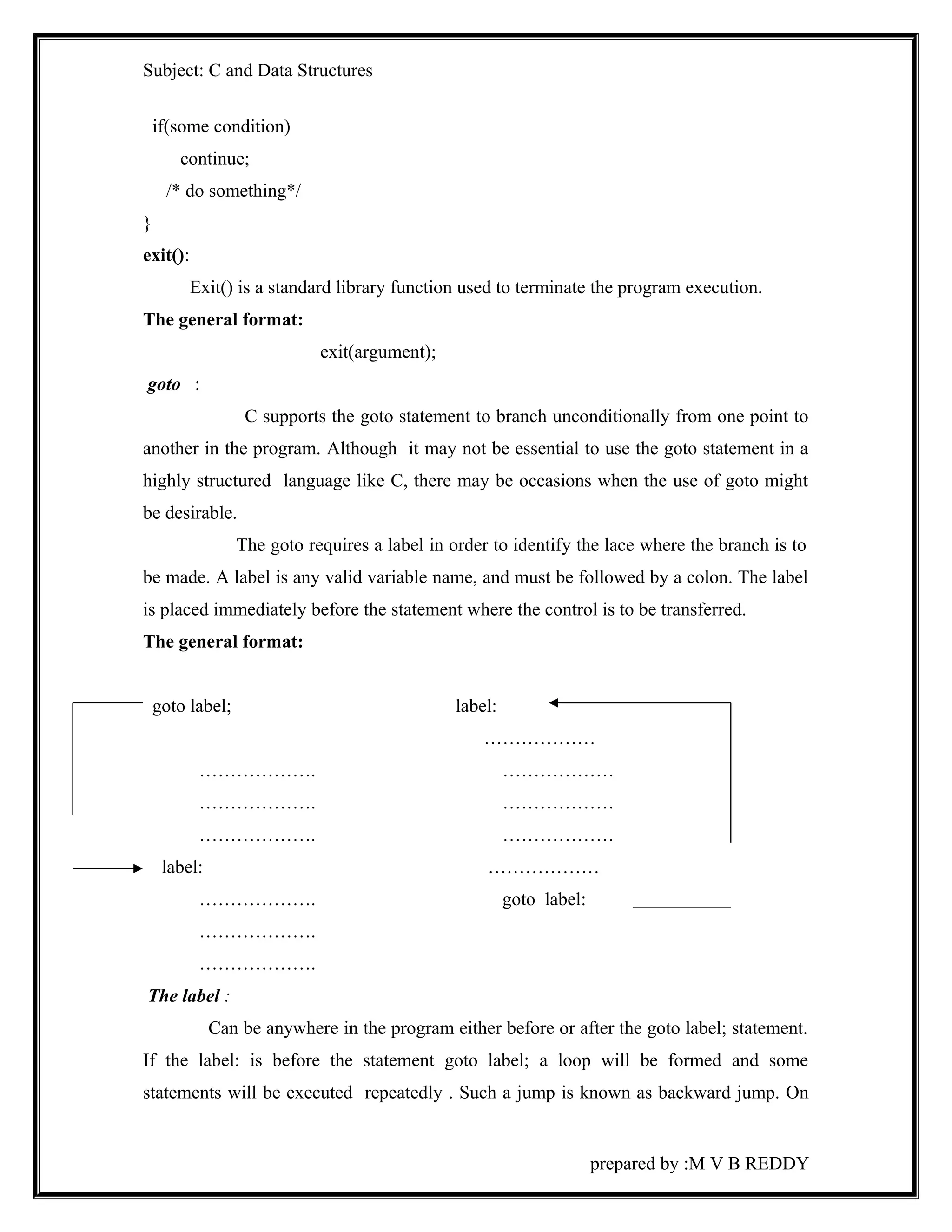
goto : 
C supports the goto statement to branch unconditionally from one point to 
another in the program. Although it may not be essential to use the goto statement in a 
highly structured language like C, there may be occasions when the use of goto might 
be desirable. 
The goto requires a label in order to identify the lace where the branch is to 
be made. A label is any valid variable name, and must be followed by a colon. The label 
is placed immediately before the statement where the control is to be transferred. 
The general format: 
goto label; label: 
……………… 
………………. ……………… 
………………. ……………… 
………………. ……………… 
label: ……………… 
………………. goto label: 
………………. 
………………. 
The label : 
Can be anywhere in the program either before or after the goto label; statement. 
If the label: is before the statement goto label; a loop will be formed and some 
statements will be executed repeatedly . Such a jump is known as backward jump. On 
prepared by :M V B REDDY
Subject: C and Data Structures 
the other hand if the label: is placed after the goto label; some statements will b skipped 
and the jump is known n as a forward jump. 
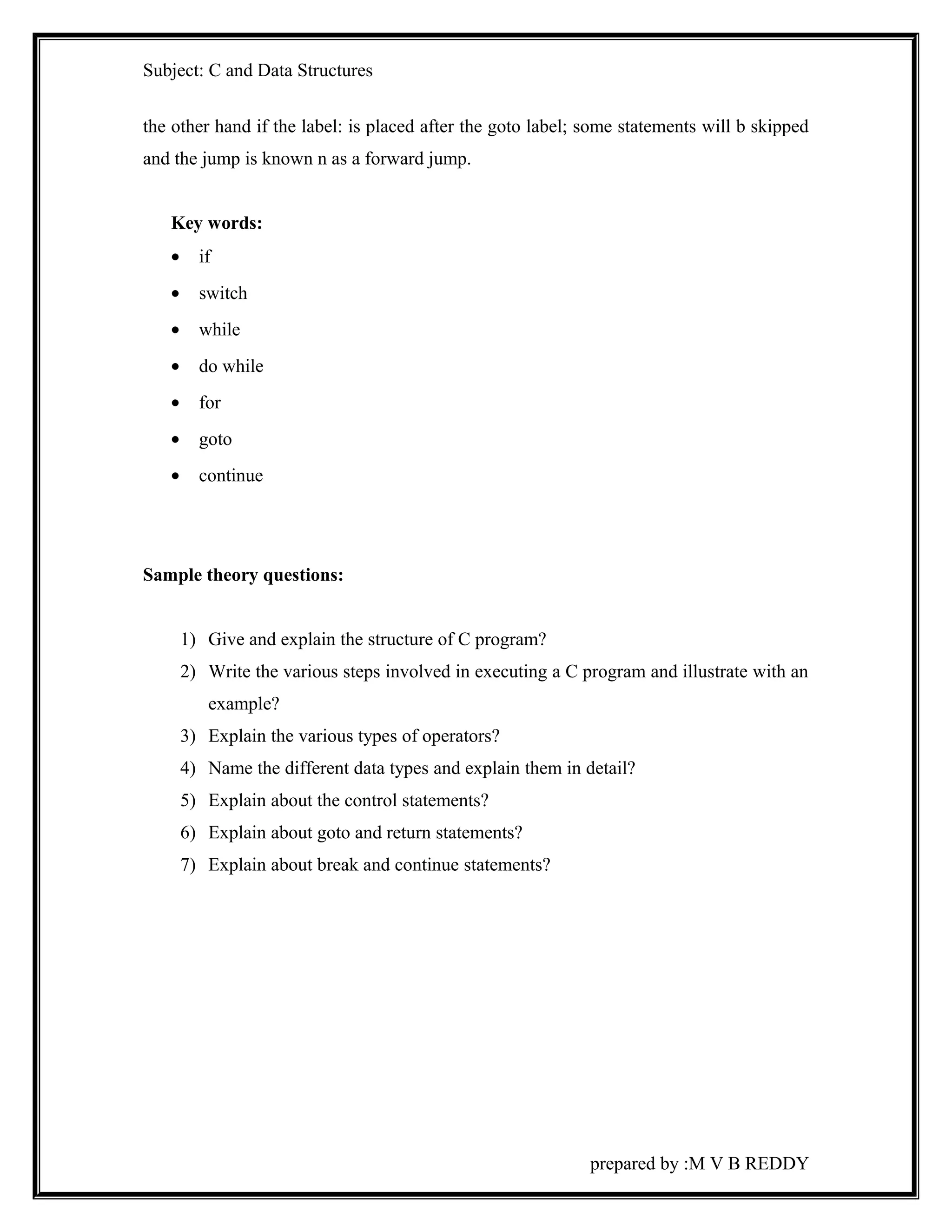
Key words: 
· if 
· switch 
· while 
· do while 
· for 
· goto 
· continue 
Sample theory questions: 
1) Give and explain the structure of C program? 
2) Write the various steps involved in executing a C program and illustrate with an 
example? 
3) Explain the various types of operators? 
4) Name the different data types and explain them in detail? 
5) Explain about the control statements? 
6) Explain about goto and return statements? 
7) Explain about break and continue statements? 
prepared by :M V B REDDY
Subject: C and Data Structures 
Sample objective questions: 
1) Flowchart is a pictorial representation of an algorithm. 
2) Oval . symbol is used to indicate halt. 
3) The process of detecting the errors in the program is called as Debugging. 
4) A block is enclosed with a pair of { } 
5) Symbol for 1’s compliment operator is ^ 
6) Number of operands in an expression involving unary operator is One. 
7) Identify equality operator [ b ] 
A) = B) = = C) eq D) : = 
8) Identify logical operator [a ] 
A) ! B) != C)~ D) == 
9) Identify relational operator [ a] 
A) < B) && C) || D) None 
10)While statement is called as Entry controlled loop. 
Summary: 
The basics of C language are exposed in this unit. We now studied about 
various operators and studied about the formatted functions and aware of decision 
making, looping statements. 
prepared by :M V B REDDY
Subject: C and Data Structures 
UNIT-II 
Objective: 
C programming language allows working with collection of data elements of same 
data type called as an array. The elements of an array are stored sequentially in the 
memory. This unit introduces arrays and describes array declaration, accessing array 
elements, entering data, initializing arrays and multi-dimensional arrays. In C strings are 
stored as an array of characters. This unit also covers a brief description of strings and 
string handling functions, user defined function and recursive functions. 
C provides storage classes such as auto, extern, register and static. In this unit we 
will discuss the concepts of functions and storage classes and also the C preprocessor, 
header files. 
prepared by :M V B REDDY
Subject: C and Data Structures 
ARRAYS & STRINGS 
Introduction: 
Arrays are homogeneous data type, and a group of homogeneous data items that 
shared a common name. The ability to use a single name to represent a collection of 
items and to refer to an item by specifying the item number enables us to develop 
concise and efficient programs. 
A particular value is indicated by writing a number called index number or 
subscript in brackets after the array name. 
Array properties: 
· The type of an array is the data type of its elements 
· The location of an array is location of its first element 
· The length of an array is the number of data elements in the array 
· The size of an array is the length of the array times the size of an 
element. 
Array whose element are specified by one subscript are called single 
subscripted or single dimensional array. Analogous array whose elements are 
specified by two and three subscripts are called two-dimensional or double 
subscripted and three-dimensional or triple-subscripted arrays respectively. 
One-dimensional array: 
A list of items can be given one variable name using only one subscript and 
such a variable is called a single-subscript and such a variable is called a single-subscripted 
variable or a one-dimensional array. 
If we want to represent a set of five numbers, say (45, 65, 10, 93, 50) an array 
variable marks. We may declare the variable marks as follows 
int marks[5]; 
The value to array elements is assigned and stored as follows 
marks [0]=45 
prepared by :M V B REDDY
Subject: C and Data Structures 
marks [1]=65 
marks [2] = 10 
marks [3] =93 
marks [4] = 40 
Array declaration: 
In c an array variable is declared by specifying first the base type of the array , 
then the name of the array variable, and then the number of elements the array will 
have should be specified between a pair square brackets ([]). Note that these values 
cannot be a variable and has to be an integral constant. 
EX: 
int marks [100]; 
float salary [1000]; 
Array initialization: 
Elements of an array can be assigned initial values by following the array 
definition with a list of initializes enclosed in braces and separated by comma. 
EX: 
int marks [5] = {65, 98, 62, 48, 57}; 
Defines the array marks to contain five integer elements and initializes marks [0] 
to 65, marks [1] to 98, marks [2] to 62, marks [3] to 48 and marks [4] to 57. 
If the number of initializes is less than the number of element in the array, the 
remaining elements are set zero. 
EX: 
int m [5] = {3, 4, 8}; 
int m [5]= {3, 4, 8, 0, 0}; is equivalent to 
If initializes have been provided for an array, it is not necessary to explicitly 
specify the array length, in which case the length is derived from the initializers. 
A character array may be initialized by a string constant, resulting in the first 
element of the array being set to the first character in the string, the second element to 
the second character, and so on. The array also receives the terminating ‘0’ in the string 
constant. 
prepared by :M V B REDDY
Subject: C and Data Structures 
Ex: 
char name [10] =”COMPUTERS”; 
char name[10] ={‘c’,’o’,’m’,’p’,’t’,’e’,’r’,’s’,’0’}; 
Two-Dimensional arrays: 
Till now we discussed the array of variables that can store a list of values. 
There will be a situation where we need to store values. In that situation we will go 
for two-dimensional arrays 
Array Declaration: 
The two-dimensional array can be declared by specifying first the base type of 
the array, then the name of the array variable, and then the number of rows and 
column elements the array will have should be specified between a pair square 
brackets ([] []). Note that this value cannot be a variable and has to be an integer 
constant. 
GENERAL FORMAT: 
Array initialization: 
Elements of an array can be assigned initial values by following the array 
definition with a list of initializes enclosed in braces and separated by comma. 
EX: 
int marks [2] [3] = {65, 98, 62, 48, 57, 40}; 
Defines the array marks to contain six integer elements and initializes marks [0] [3] 
to 62, marks [1] [1] to 48, marks [1] [2] to 57 and marks [1] [3] to 40. 
Strings: 
A string as an array of characters. Any constant string defined between double 
quotation marks. 
Ex: “SHREETECH computers” 
Declaration And Initialization: 
A string variable is any valid C variable name and is always declared as an array. 
General Format: 
prepared by :M V B REDDY
Subject: C and Data Structures 
char variable_name[size] 
The size determines the number of characters in string name. 
Ex: 
char city [25]; 
char name [50]; 
When a compiler assigns a character string to a character array, it 
automatically supplies a NULL character ‘0’ at the end of the string. Therefore the 
size should be equal to maximum number of characters in the string plus one. 
Character array may be initializes when they are declared. 
Static char name [10] = “SHEREETECH” 
Reading as String: 
The input function scanf() can be used with %s format specification to read a 
string. 
EX: 
char city[20]; 
scanf(“%s”,city); 
Printing a String: 
The print function printf () can be used with %s format specification to print a 
string. 
EX: 
char city[20]; 
scanf(“%s”,city); 
printf (“%s”,city); 
String Operations: 
1. Reading and writing of strings 
2. concatenating of strings 
3. copying one string into another 
4. Comparing Strings. 
5. Extracting a portion of a string. 
prepared by :M V B REDDY
Subject: C and Data Structures 
6. Converting the string from lowercase to uppercase. 
String Handling Functions: 
‘C’ provides string handling functions to perform the above specified operations. 
The following are the string handling functions. 
i) strcpy (): It is used to copy one string into another string 
Syntax: strcpy (str1, str2) 
ii) strcmp (): It is used to compare two strings character by character and returns -1 
or 0 or 1. 
Syntax: strcmp (str1, str2) 
If the ASCII value of the character of the first string is less than the second 
string it returns –ve. If both strings are equal it returns 0. If the ASCII value of the 
character of the first string is greater than a second string then it returns +ve. 
iii) strcat (): It is used to concatenate two strings that is it appends one string to 
other string 
Syntax: strcat (str1, str2) 
Here string str2 is appended to the end of the string str1. 
iv)strlen (): It is used to count the number of characters in the string. 
Syntax: strlen (str1); 
v)strlwr (): It is used to convert any upper case letters into the its equivalent lower 
case letters. 
Syntax: strlwr (str1) 
vi) strupr (): It is used to convert any lower case letters into the equivalent upper 
case 
letters. 
Syntax: strupr (str1) 
prepared by :M V B REDDY
Subject: C and Data Structures 
FUNCTIONS: 
‘C’ programs are compound of a set of functions. The functions are 
normally used to divide a large program into smaller programs which are easier to 
handle. Each functions normally performs a specific task. Every program must 
certain one function named as main where the program always begins execution. The 
main program may call other functions with in it may call still other functions 
.When a function is called program execution is transferred to the first statement on 
the called function. The function is completed when it executes the last statement in 
the function or it executes a written function statement after a function returns to the 
calling function. Execution continues with the evaluation of the expression in which 
the call was made. A value can be written when a function completes and that 
written value can be used as an operand on an expression. 
USER DEFINED FUNCTIONS: We have used functions on every program that 
we have discussed so far they are main,printf and scanf etc.. 
C functions can be classified into two categories namely library functions and 
user defined functions. Main is an example of user defined function ,printf, 
scanf,sqrtetc.. belongs to the category of library functions. The main difference 
between these categories is that library functions are not required to be written by us 
where as a user defined functions has to be developed by the user at the time of 
writing a program. However a userdefined can later becomes a part of the “c” 
program library. 
ADVANTAGES: 
1.To facilitates topdown modular programming as shown fig. In this programming 
style, the high level logic of the over all problem is solved first while the details of 
the each lower level function or addressed later. 
prepared by :M V B REDDY
Subject: C and Data Structures 
2.The length of the source program is reduced by using functions at appropriate 
places. This factor is particularly critical with microcomputers where memory space 
is limited. 
3.As mentioned earlier, it is easy to locate and isolate a faulty function for further 
investigations. 
4.A function may be used by many other programs. This means that a c programmer 
can build on what other have already done, instead of starting over, from scratch. 
GENERAL FORM OF C FUNCTIONS: 
type function_name(parameters declaration) 
{ 
local variable declaration; 
statement 1; 
statement 2; 
statement 3; 
. 
. 
statement n; 
return(expression); 
} 
PARAMETER PASSING: 
prepared by :M V B REDDY 
Main program 
Function 1 Function 2 Function 3 Function 4
Subject: C and Data Structures 
Parameters are nothing but input information given to a function. By passing parameters the 
caller can ask the function to process a set of values. Parameter passing allows you to run 
generalized and reusable functions. What ever the parameters the caller passes are called the 
actual parameters and what ever parameters the function is return to receive are called the formal 
parameters. The actual parameters are copied to the formal parameters. 
RETURN VALUES AND THEIR TYPES: 
A function may or may not send back any value to the calling function. If it does, it is done 
through the RETURN statement. While it is possible to pass to the called function any number of 
values, the called function can only return one value per call. The return statement can be any one 
of the following forms. 
return; 
(or) 
return(expression); 
The first plain return does not return any value, it acts much as the closing brace of the function, 
when return is encountered the control is immediately passed back to the calling function. 
VOID FUNCTION: A function need not have a type. If you do not care to return a value from a 
function at all, you may specify the return as void. A void function doesn’t return any value and 
cannot return any value. 
LOCAL VARIABLES: A variable declared inside a function called a local variables. This name 
derives from the fact that a variable declared inside a function can be used only inside that 
function. 
GLOBAL VARIABLES: The variables you declare in the global variable section are called 
Global variables or external variables. While the local variable can be used inside the function in 
which it is declared. A global variable variable can be used any where in the program. 
BLOCK VARIABLES: The variable declared inside any block such variables are called block 
variables. 
GLOBAL vs LOCAL VARIABLES: 
1. Local variables can be used only inside the function of the block in which they are declared. On 
the other hand global variables are used through out the program. 
prepared by :M V B REDDY
Subject: C and Data Structures 
2. All global variables, in the absence of explicit initialization, are automatically 
initialized to zero. A global int variables starts up with the value 0, a global float gets 
initialized to 0.0, a global char holds the ASCII null byte and the global pointer points to 
NULL. Local variable do not get initialized to any specific value when you do not 
provide any value. Thus a local variable starts up with an unknown value, which may be 
different each time. 
3. Global variables get initialized only once, typically just before the program starts 
executing. But local variables get initialized each time the function or block containing 
their declaration is entered. 
4. The initial that you supplied for a global variable must be a constant, where as a local 
variable can contain variable in its initializer. 
5. A local variables loses its value the movement the function/block containing it is 
exited. So you cannot expect a local variable to retain the value deposited in it the 
previous time the function/block was entered. Global variables retain there values 
through the program’s execution. 
SCOPE OF VARIABLES: 
The scope of local variables is limited to the functions in which they are 
declared, or in other words these variables are inaccessible outside of the function .Like 
wise the scope of the block variables is limited to the block in which they are declared. 
Global have a scope that spans the entire source program, which is why they can be used 
in any function. 
TYPES OF FUNCTIONS: 
A function depending on whether arguments are present are not are whether a 
value is returned or not, may belong to one of the following 
1. Functions with no arguments and no return values. 
prepared by :M V B REDDY
Subject: C and Data Structures 
2. Function with argument and no return values. 
3. Function with arguments and return values. 
/* FUNCTIONS WITH NO ARGUMENTS AND NO RETURN VALUES */ 
#include<stdio.h> 
main ( ) 
{ 
printline ( ); 
power ( ); 
printline ( ); 
} 
printline ( ) 
{ 
int i; 
for (i=0; i<=50; i++) 
printf (“_”); 
printf (“n”); 
power ( ); 
{ 
int x,y,i,r; 
printf(“enter the base value:”); 
scanf(“%d”,&x); 
printf(“enter the power value”); 
scanf(“%d”,&y); 
r=1; 
for(i=0;i<y;i++); 
r=r*x; 
printf(“%d power%d is:%dn”,x,y,r); 
prepared by :M V B REDDY
Subject: C and Data Structures 
} 
/* Functions with arguments and no return values*/ 
#include<stdio.h> 
main( ) 
{ 
char c; 
int x,y; 
printf(“enter any character”); 
c=getchar( ); 
printline(c); 
printf(“the base value”); 
scanf(“%d”,&x); 
printf(“enter the power value:”); 
scanf(“%d”,&y); 
power(x,y); 
printline(c); 
} 
printline(ch); 
char ch; 
{ 
int i; 
for(i=0;i<=50;i++) 
Printf(“%c”,ch); 
Printf(“n”); 
} 
power(a,b); 
int a,b; 
{ 
int i,r; 
prepared by :M V B REDDY
Subject: C and Data Structures 
r=1; 
for(i=0;i<b;i++); 
r=r*a; 
printf(“ %d power %d is:%dn”,a,b,r); 
} 
FUNCTION WITH ARGUMENTS AND RETURN VALUES: 
/* FUNCTION WITH ARGUMENTS AND RETURN VALUES*/ 
#include <stdio.h> 
main() 
{ 
char c; 
int x,y; 
printf(“enter any character”); 
c=getchar(); 
println(c); 
printf(“enter the base value”); 
scanf(“%d”,&x); 
printf(“enter the power value”); 
scanf(“%d”,&y); 
printf(“%d power %d is: %d n “,x,y,power(x,y)); 
printline(c); 
} 
printline(ch); 
char ch; 
{ 
int i; 
for(i=0;i<=50;i++) 
printf(“%c”,ch); 
prepared by :M V B REDDY
Subject: C and Data Structures 
printf(“n”); 
} 
power(a,b); 
int a,b; 
{ 
int i,r; 
r=1; 
for(i=0;i<b;i++) 
r=r*a; 
return(r); 
} 
STORAGE CLASSES: 
To define a variable in C one needs to mention not only its but also its storage 
class. In other words , not only do all variables have a data type, they also have a storage 
class. 
If we do not specify the storage class of a variable in its declaration , the 
compiler will resume a storage class dependent on the context in which the variable is 
used. Thus C has got certain default storage classes. 
The variables may also be categorized, depending on the place of their 
declaration , as INTERNAL (local) or EXTERNAL (global). Internal variables are 
within a particular function, while external variables are declared outside of any 
function. 
From C compiler point of view, a variable name identifies some physical location 
within the computer where the strings of bits representing the variables value stored . 
There are some basically two kinds of locations in a computer where such a value may 
be kept: memory and CPU register. It is the variables storage class which determines it 
which of these two locations the value is stored. 
prepared by :M V B REDDY
Subject: C and Data Structures 
Moreover, a variables storage class tells us: 
 Where the variable would be stored. 
 What will be the initial value of the variable , if the initial value is not 
specifically assigned( i.e. the default initial value) 
 What is the scope of the variable i.e in which function the value of the variable 
would be available. 
 What is the life of the variable, i.e. how long would the variable exist. 
` 
TYPES OF STORAGE CLASSES: 
a) Automatic storage class. 
b) Register storage class. 
c) Static storage class. 
d) External storage class. 
i) AUTOMATIC VARIABLES: Automatic variables are declared inside a 
function in which they are used they are to be utilized. They are created when 
the function is called and destroyed automatically when they are declared. 
Because of this property, automatic variables are also referred to as local or 
internal variables. 
main() 
{ 
int n; 
_________ 
_________ 
} 
We may also use the key word auto to declare automatic variables explicitly. 
main() 
{ 
prepared by :M V B REDDY
Subject: C and Data Structures 
auto int n; 
_________ 
_________ 
} 
One important feature of automatic variables is that their value changed accidentally by 
what happens in some other functions in the program. This assures that we may declare 
and use the same name variable name in different functions in the same program without 
causing any confusion to the compiler. 
PROGRAM TO ILLUSTRATION OF WORKING OF AUTO VARIABLES: 
main() 
{ 
int m=1000; 
function2(); 
printf(“%d n”,m); 
} 
function1() 
{ 
int m=10; 
printf(“ %dn”,m); 
} 
function2() 
{ 
int m=100; 
function1(); 
printf(“%dn”,m); 
} 
Output: 
10 
100 
1000 
prepared by :M V B REDDY
Subject: C and Data Structures 
ii)EXTERNAL VARIABLES: Variables that are both alive and active throughout the 
entire program are known as external variables. They are also known as global variables. 
Unlike local variables, global variables can be accessed by any function in the program . 
External variables are declared outside a function. A program to illustrate the properties 
of global variables. Note that variable X is used in all functions. But none except 
function2 has a definition for X. Because X has been declared above all the functions, it 
is declared as global, any function can use it, and change its value. Then subsequent 
function can reference only those new values. 
PROGRAM TO ILLUSTRATION OF PROPERTIES OF GLOBAL VARIABLES: 
int x; 
main() 
{ 
x=25; 
printf(“x=%d n “,x); 
printf(“x=%d n”,function 1()); 
printf(“x= %d n”,function2()); 
printf(“x=%d n”, function3()); 
} 
function1() 
{ 
x=x+1(); 
return(x); 
} 
function2() 
{ 
int x; 
x=10; 
return(x); 
} 
prepared by :M V B REDDY
Subject: C and Data Structures 
function3() 
{ 
x=x+10; 
return(x); 
} 
output: 
x=25 
x=35 
x=10 
x=45 
iii)Static Variable: As the name suggests, the value of static variables persists until the 
end of the program. A variable can be declared static using the keyword static. 
A static variables may be either an internal type or an external type, depending on the 
place of declaration. Internal static variable are those which are declared inside a 
function. The scope of internal static variable extend up to the end of the function. 
Therefore internal static variables are similar to auto variables, except that they remain in 
existence(alive)throughout the remainder of the program. 
program to illustration of properties of static variables: 
main() 
{ 
int i; 
for(i=1;i<=3;i++) 
fun(); 
} 
prepared by :M V B REDDY
Subject: C and Data Structures 
fun() 
{ 
static int x=5; 
x=x+3; 
printf(“x=%dn”, x); 
} 
Output: 
x=8 
x=11 
x=14 
A static variable is initialized only once, when the program is compiled, it is never 
initialized again. During the first call to fun, x is incremented to 3.Because x is static, 
this value persists and therefore, the next call adds another 3 to x giving it a value of 11. 
The value of x becomes 14 when the third call is made. 
An external static variable is declared outside of all functions and is available to all 
functions in that program. The difference between a static external variable and a simple 
external variable is that the static external variable is available only within the file where 
it is defined while the simple external variable can be accessed by other files. 
iv) Register Variables: We can tell the compiler that a variable should be kept in one of 
the machine’s register, instead of keeping in the memory. Since a register access is much 
faster than a memory access. Keeping the frequently accessed variables in the register 
will lead to faster execution of programs. This is done as follows: 
register int i; 
Most compilers allow only int or char variables to be placed in the register. Since only a 
few variables can be placed in the register. However C will automatically convert 
register variables into non-register variables once the limit is reached. 
Introduction to Recursion: 
The function called by itself is called recursive function and this process often referred 
as recursion. 
Ex:-main() 
{ 
prepared by :M V B REDDY
Subject: C and Data Structures 
printf(“welcome to SHREETECHN”); 
main(); 
} 
Important conditions: There are two important conditions that must be satisfied by any 
recursive procedure. 
1.Each time a procedure calls itself, it must be nearer to a solution. 
2.There must be a decision criterion for stopping the computation. 
Types of recursion: 
There are two types of recursions. 
1.The first type concerns recursively defined functions. Example of this kind is the 
Factorial function. 
2.The second type of recursion is the recursive use of a procedure. 
Factorial of a Given Number: 
fact(n)= {1,if n=0 
{n * fact(n-1),otherwise 
Here fact(n) is defined in terms of fact(n-1), which in turn is defined in terms of fact(n- 
2).etc.,until fact(0) is reached, whose value is given as “one”. 
Fibonacci Number: 
Fib(n)={1, if n=0 
1, if n=1 
fib(n-1)+fib(n-2), otherwise 
Here fib(0) is 1 and fib(1) is also 1 and fib(n) is defined in terms of fib(n-1)+fib(n-2), 
like: 
fib(0)= 1 
fib(1)= 1 
fib(2)= fib(1)+fib(0) 
fib(3)= fib(2)+fib(1) 
fib(4)= fib(3)+fib(2) 
GCD of two number: 
gcd(a,b)={a, if b=0 
gcd(b,a%b),otherwise 
prepared by :M V B REDDY
Subject: C and Data Structures 
Key points: 
· Array index starts from 0. 
· Function that returns no value the type of function is treated as void. 
· Every string must be terminated with a null character 
· The size of string must be the total number of characters plus null character. 
Key words: 
· Array 
· String 
· Actual parameter 
· Formal parameter 
· Function 
· Recursive Function 
· Storage class 
Sample theory questions: 
1) Write about arrays? How arrays can be initialized and declared? Illustrate with 
examples? 
2) Explain the various operations performed on string and explain the various string 
handling functions? 
3) What is meant by function? Explain the types of functions? 
4) Explain recursive functions with an example? 
5) Explain the storage classes in C and also explain the scope rules in detail? 
Sample Objective questions: 
prepared by :M V B REDDY
Subject: C and Data Structures 
1) Array is used to represent a list of data items of same data type. 
2) One dimensional array is known as Vector 
3) Array subscripts in C always start with 0 
4) The value within the [] in an array declaration specifies the Size of an array 
5) Strcpy is used to copy a string into another. 
6) When two strings are equal then strcmp() return 0. 
7) The default return data type in function is int 
8) Register storage class may help in faster execution. 
9) External variables declaration uses the keyword Extern 
10) The typedef statement is used to create a new data type. 
prepared by :M V B REDDY
Subject: C and Data Structures 
POINTERS IN ‘C’ 
Objective: 
One of the powerful features of C is its ability to access the memory variables 
by their memory addresses. A pointer data type is mainly used to hold memory address. 
Pointers are useful to work with memory addresses, to pass values as arguments to 
functions, to allocate memory dynamically and to effectively represent complex data 
structures. Since arrays store data sequentially in memory, pointers allow a convenient 
and powerful manipulation of array elements. This unit introduces pointers and covers 
the basic features to work with pointers. 
Introduction: 
A pointer is a derived data type in C, it is built from one of the fundamental data 
types available in C. Pointers contain memory address as their values. Pointers are 
one of the most distinct and exciting features of C language. It has added power and 
flexibility to the language. Pointers are used frequently in C. 
Need of pointers: 
· Basically arrays are static. It means that the maximum possible size of the array 
has to be declared before it’s use (i.e., at compile time). It is not always possible 
to guess the maximum size of an array, because for some applications we need 
the size of an array to be changed during the program execution. This can be 
achieved by using the pointers. Pointers allows memory allocation and de-allocation 
dynamically. 
· Pointers are used for establishing links between data elements or objects for 
some complex data structures such as stacks, queues, linked lists, binary trees 
and graphs. 
Benefits to the programmers with pointers: 
prepared by :M V B REDDY
Subject: C and Data Structures 
 Pointers are more efficient in handling arrays and data tables. 
 Pointers can be used to written multiple values from a function via 
function arguments. 
 Pointers permit reference to functions and there by facilitating passing of 
functions as arguments to other functions. 
 The use of pointer arrays to character string results in saving of data storage 
space in memory. 
 Pointers allow C to support dynamic memory management. 
 Pointers provide an efficient tool for manipulating dynamic data structures such 
as structures, linked lists, queues, stacks and trees. 
 Pointers reduce length and complexity of programs. 
 They increase the execution speed and reduce the program execution time. 
 With the help of pointers, variables can be swapped without physically moving 
them. 
Pointers: 
definition: 
A pointer is a variable which contains the address of another variable. 
Note: both pointer variable data types are same. 
Declaration: 
data-type *Pointer_ Name: 
Here the * tells that variable Pointer _Name is pointer type variable. i.e. it holds the 
address of another variable specified by the data-type. Pointer_ Name needs a memory 
location .Pointer_ Name points to a variable of type data_ Type. 
Consider the following declaration. 
int n =20; 
This declaration tells the C compiler to: 
1. Reserve space in memory to hold the integer value. 
2. Associate the name with this memory location. 
3. Store the value 20 at this location. 
prepared by :M V B REDDY
Subject: C and Data Structures 
We may represent n’s location in the memory by the following memory 
map: 
n Location Name 
Value at Location 
2000 Location Address 
/*PROGRAM TO PRINT ADDRESS AND THE VALUE OF A VARIABLE BY 
USING ‘&’ AND ‘*’ OPERATORS */ 
#include< stdio.h> 
main () 
{ 
int n=20; 
printf (“address of n is: %u n “, &n); 
printf (“value of n is: %d n”, n); 
printf (“value of n is: %d”,*(&n)); 
} 
OUTPUT: 
Address of n is: 2000 
Value of n is: 20 
Value of n is: 20 
In the first printf ( ) statement ‘&’ is used it is C’s address of operator. 
The expression &n returns the address of the variable n, which in this it are 2000. The 
third printf ( ) statement we used other pointer operator ‘*’ called ‘value at address’ 
operator. It returns the value stored at a particular address. The ‘value at address’ 
prepared by :M V B REDDY 
20
Subject: C and Data Structures 
operator is also called as‘indirection’ operator. The above program says the value of 
*(&n) is same as n. 
POINTER EXPRESSIONS: 
In the above example &n returns the address of n, if we desire this address can be 
collected in a variable by saying 
m=&n; 
But remember that m is not an ordinary variable like any other integer variable. It is a 
variable which contains the address of another variable (n in this case). The following 
memory map would illustrate the contents of n and m. 
n m 
20 65498 
65498 65500 
As you can see n’s value is 20 and m’s value is n’s address. Here we can’t use 
m in a program with out declaring it. And since m is a variable which contains the 
address of n, it is declared as 
Int * m; 
This declaration tells compiler that m will be used to store the address of an 
integer value. In other words m points to an integer. 
/* PROGRAM TO PRINT ADDRESS AND THE VALUE OF A VARIABLE BY 
USING & AND * OPERATORS */ 
#include<stdio.h> 
main () 
{ 
int n=20; 
prepared by :M V B REDDY
Subject: C and Data Structures 
int *m; 
m=&n; 
clrscr ( ); 
printf (“address of n is: %u n”, &n); 
printf (“address of n m is:” %un”, m); 
printf (“address of m is: %un”, &m); 
printf (“value of m is: %u n”, m); 
printf (“value of n is: %dn “, n); 
printf (“value of n is: %dn”,*(&n)); 
printf (“value of n is: %d”,*m); 
} 
OUTPUT: 
Address of n is: 65498 
Address of m is: 65500 
Value of m is: 65498 
Value of n is: 20 
Value of n is: 20 
Value of n is: 20 
The concept of pointer can be further extended. Pointer we know is a variable which 
contains address of another variable. Now this variable itself could be another pointer. 
Thus we have a pointer which contains another pointer’s address. 
/* PROGRAM TO PRINT ADDRESS AND THE VALUE OF A VARIABLE BY 
USING & *AND **OPERATORS */ 
#include<stdio.h> 
main () 
{ 
int n=20; 
prepared by :M V B REDDY
Subject: C and Data Structures 
int *m; 
int **p; 
m=&n; 
p=&m; 
clrscr ( ); 
printf (“address of n is: %u n “, &n); 
printf (“address of n is: %u n”, m); 
printf (“address of n is: %u n”, *p)’ 
printf ( “address of m is :%u n”, &m); 
printf (“address of m is: %u n”, p); 
printf (“address of p is: %u n” &p); 
printf (“value of m is: %u n”, m); 
printf (“value of p is: %u n”, p); 
printf (“value of n is: %d n”, n); 
printf (“value of n is: %d n”,*(&n)); 
printf (“value of n is %dn “, *m); 
printf (“value of n is: %d n”, **p); 
} 
output: 
address of n is: 65496 
address of m is: 65496 
address of m is: 65498 
address of p is: 65500 
value of m is: 65496 
value of p is: 65498 
value of n is: 20 
value of n is: 20 
value of n is: 20 
value of n is: 20 
prepared by :M V B REDDY
Subject: C and Data Structures 
The Following memory map would help you in tracing out how the program prints 
the above output 
n m p 
20 65496 65498 
65496 65498 65500 
SENDING THE VALUES OF ARGUMENTS (Call by Value): 
In this method the value of each argument in the calling function is copied into 
corresponding formal arguments of the called function. With this method changes made 
to the formal arguments in the called function have no effect on the values of the actual 
arguments in the calling function. 
/*PROGRAM TO ILLUSTRATE THE “CALL BY VALUE” */ 
#include<stdio.h> 
main () 
{ 
int x, y; 
printf (“enter the first value i. e x is :”); 
scanf (“%d”, &x); 
printf (“enter the second value i.e. y is:”); 
scanf (“%d”, &y); 
swap(x, y); 
printf (“in the main program:n”); 
prepared by :M V B REDDY
Subject: C and Data Structures 
printf (“x =%dn”, x); 
printf (“y=%dn”, y); 
} 
swap (int a, int b) 
{ 
int t; 
printf (“in the swap function:n “); 
printf (“x=a=%dn “, a); 
printf (“y =b=%dn”, b); 
t=a; 
a=b; 
b=t; 
printf (“after interchanging:n”); 
printf (“x=a=%dn”, a); 
printf (“y=b=%dn”, b); 
} 
output: 
enter first value i.e. x: 43 
enter second value i.e. y: 94 
x=a=43 
y=b=94 
after interchanging: 
x=a=94 
y=b=43 
in the main program: 
x=43 
y=94 
SENDING THE ADDRESS OF THE ARGUMENTS (Call by Reference): 
In this method the address of the actual arguments in the calling function are 
copied into formal arguments of the called function. This means that using the formal 
prepared by :M V B REDDY
Subject: C and Data Structures 
arguments in the called function we can make changes in the actual arguments of the 
calling function. 
/* PROGRAM ILLUSTRATE THE “CALL BY REFERENCE” */ 
#include<stdio.h> 
main () 
{ 
int x, y; 
printf (“enter the first value i.e. x is :”); 
scanf (“%d”, &x); 
printf (“enter the second value i.e. y is :”); 
scanf (“%d”, &y); 
swap(x, y); 
printf (“in the main program:n”); 
printf (“x =%dn”, x); 
printf (“y=%dn”, y); 
} 
swap (int *a, int *b) 
{ 
int t; 
printf (“in the swap function:n “); 
printf (“x=a=%dn “,*a); 
printf (“y =b=%dn”,*b); 
t=*a; 
*a=*b; 
*b=t; 
printf (“after interchanging: n”); 
printf (“x=a=%dn”,*a); 
printf (“y=b=%dn”,*b); 
} 
output: 
prepared by :M V B REDDY
Subject: C and Data Structures 
enter first value i.e. x: 33 
enter second value i.e. y: 64 
x=a=33 
y=b=64 
after interchanging: 
x=a=64 
y=b=33 
in the main program: 
x=64 
y=33 
PASSING ARRAY ELEMENTS TO A FUNCTION: Array elements can be passed to 
a function by calling the function: 
1. By value i.e. by passing values of array elements to the function. 
2. by reference i.e. passing addresses of array elements to the function 
/*PROGRAM TO THE ACCEPT A STATIC ARRAY AND PRINT IT BY CALL 
BY VALUE*/ 
#include<stdio.h> 
main () 
{ 
int i; 
int a [5] = {33, 44, 55, 66, 77} 
for (i=0; i<5; i++) 
write (a[i]) 
} 
write (int n) 
{ 
printf (“%dn”, n); 
} 
prepared by :M V B REDDY
Subject: C and Data Structures 
/*PROGRAM TO ACCEPT A STATIC AND PRINT IT BY CALL BY 
REFERENCE */ 
#include<stdio.h> 
main ( ) 
{ 
int i; 
int a[5]={33, 44, 55, 66, 77} 
for (i=0; i<5; i++) 
write (&a[i]) 
} 
write (int *n) 
{ 
printf (“%dn”, n); 
} 
POINTER ARITHMETIC: 
/* PROGRAM TO PERFORM POINTER ARITHMETIC */ 
#include<stdio.h> 
main ( ) 
{ 
int i=5,*i1; 
float j=5.8,*j1; 
char k=’z’,*k1; 
printf (“value of i=%dn”, i); 
printf (“value of j=%fn”, j); 
printf (“value of k=%cn”, k); 
i1=&i; 
j1=&j 
k1=&k; 
prepared by :M V B REDDY
Subject: C and Data Structures 
printf (“the original value of i1 =%un”, i1); 
printf (“the original value of j1=%un”, j1); 
printf (“the original value of k1=%un”, k1); 
i1++; 
j1++; 
k1++; 
printf (“new value in i1=%un”, i1); 
printf (“new value in j1=%un”j1); 
printf (“new value in k1=%un”, k1); 
} 
Suppose i, j, k are stored in memory at address 65490, 65492 &65497 the output 
would be 
Value of i= 5 
Value of j= 5.800000 
Value of k= z 
The original value of i1=65490 
The original value of j1=65492 
The original value of k1=65497 
New value in i1=65492 
New value in j1= 65496 
New value in k1= 65498 
Observe last three lines of the output 65492 is original value in i1 plus 2, 65496 is 
original value in j1 plus 4 & 65498 is original value in k1 plus 1. This so happens 
because every time a pointer is incremented its points to the immediately next location 
of this type. That is why; when the integer pointer i1 is incremented it points to an 
address two locations after current location, since an int is always two bits long. 
Similarly j1 points to an address four locations after current location and k1 point’s one 
location after the current location. 
The following operation do not work on pointers 
1. Addition of two pointers. 
prepared by :M V B REDDY
Subject: C and Data Structures 
2. Multiplying a pointer with a number. 
3. Dividing a pointer with a number. 
POINTERS AND ARRAYS: 
1. Array elements are always stored in contagious memory locations. 
2. A pointer when incremented always points to an immediately next location of its 
type. 
EX1: 
#include<stdio.h> 
main () 
{ 
int a [] = {32, 43, 54, 65, 78},i; 
for (i=0; i<5; i++) 
{ 
printf (“address=%u”, &a[i]); 
printf (“element= %d n”, a[i]); 
} 
} 
ex2: 
#include<stdio.h> 
main () 
{ 
int a [] = {32, 43, 54, 65, 78}, i, *j; 
j=&a [0]; 
for (i=0;i<5;i++) 
{ 
printf (“address = %u”, j); 
printf (“element = %d n”,*j); 
j++; 
} 
} 
prepared by :M V B REDDY
Subject: C and Data Structures 
In the second ex program instead printing address of any location we are stored base 
address i.e. a [0] stored in pointer j. 
PASSING AN ENTIRE ARRAY TO A FUNCTION: 
Let us now see how to pass the entire array to a function rather individual elements. 
Consider the following ex: 
#include<stdio.h> 
main (_) 
{ 
int a [] =p {32, 43, 54, 65, 78}; 
display (&a [0], 5); 
} 
display (int *i, int x) 
{ 
int j; 
for (j=0; j<5;j++) 
{ 
printf (“address=%u”, i); 
printf (“element=%dn”,*i); 
i++; 
} 
} 
Here the display ( ) function is needed to print the array elements. Note that 
address of the zeroth element is being passed to the display ( ). 
ACCESSING ARRAY ELEMENTS IN DIFFERENT WAYS: 
Consider an array num contains {12, 23, 34, 45, 56} elements. 
Here we can access the ith element from the array by following notations: 
Num [i], * (num + i),*(i+ num), i[num] 
EX: 
/*ACCESSING ARRAY ELEMENTS IN DIFFERENT WAYS: */ 
#include<stdio.h> 
prepared by :M V B REDDY
Subject: C and Data Structures 
main ( ) 
{ 
int num [] = {12, 23, 34, 45, 56}; 
int i; 
for (i=0;i<5;i++) 
{ 
printf (“address=%u”, &num[i]); 
printf (“element=%d”, num[i]); 
printf (“%d”, *(num + i)); 
printf (“%d”,*(i+ num)); 
printf (“%dn” i[num]); 
} 
} 
OUTPUT: 
Address=65490 Element=12 12 12 12 
Address= 65492 Element =23 23 23 23 
Address=65494 Element=34 34 34 34 
Address=65496 Element=45 45 45 45 
Address=65498 Element=56 56 56 56 
Program to accept a string and print it by using pointers. 
/* PROGRAM TO PRINT THE GIVEN STRING */ 
#include<stdio.h> 
main ( ) 
{ 
char city [100]; 
int i, l; 
printf (“enter any city name :”); 
scanf (“%s”, city); 
prepared by :M V B REDDY
Subject: C and Data Structures 
printf (the given string is :”); 
printf (“city”); 
} 
printf(char *city) 
{ 
while (*city! =’0’) 
{ 
printf (“%c”,*city); 
city++; 
} 
} 
OUTPUT: 
Enter any city name: Hyderabad 
The given string is: Hyderabad 
Program to calculate the length of the given string by using pointers. 
/* PROGRAM TO CALCULATE THE LENGTH OF THE GIVEN STRING */ 
#include<stdio.h> 
main () 
{ 
char city [100]; 
int i, l; 
printf (“enter any city name:” ); 
scanf (“%s”, city); 
l=len (city); 
printf (“the length of the given string is: %d n”, l); 
} 
len (char*city) 
prepared by :M V B REDDY
Subject: C and Data Structures 
{ 
int l1=0; 
while (*city! =’0’) 
{ 
l1++; 
city++; 
} 
return (l1); 
} 
OUTPUT: 
Enter any city name: Bangalore 
The length of the given string is: 9 
Structure pointers:- 
The way we can have a pointer pointing to an int, or a pointer pointing to a char , 
similarly we can have a pointer pointing to the struct. Such pointers are known as 
‘structure pointers’. 
/*EXAMPLE PROGRAM ON STRUCTURE POINTERS*/ 
#include <stdio.h> 
main() 
{ 
Struct book 
{ 
char title[25]; 
char author[25]; 
int no; 
prepared by :M V B REDDY
Subject: C and Data Structures 
}; 
struct book b={“SHREETECH C Notes”,”srinivas”,102}; 
struct book *ptr; 
ptr=&b; 
printf(“%s %s %dn”,b.tittle,b.author,b.no); 
printf(“%s %s %dn”, ptr->tittle,ptr->author,ptr->no); 
} 
Run1: 
SHREETECH C Notes Srinivas 102 
The first printf() is as usual.The second printf() however is peculiar.We cannot use 
ptr.tittle,ptr.author and ptr.no because ptr is not a structure variable but a pointer to a 
structure, and the dot operator requires a structure variable on its left.In such cases C 
provides an operator -> called an arrow operator to refers the structure elements. 
Example program to passing address of a structure variable 
/*EXAMPLE PROGRAM ON PASSING ADDRESS OF A STRUCTURE 
VARIABLE */ 
#include<stdio.h> 
main() 
{ char title[25]; 
char author[25]; 
int no; 
}; 
struct book b={“SHREETECH C Notes”,”srinivas”,102}; 
clrscr(); 
display(&b); 
} 
display(b) 
Struct book *B; 
prepared by :M V B REDDY
Subject: C and Data Structures 
{ 
Printf(%s %s %dn”,b->tittle,b->author,b->no); 
} 
OUTPUT: 
prepared by :M V B REDDY
Subject: C and Data Structures 
SHREETECH C notes srinivas 102 
DYNAMIC MEMORY ALLOCATION: 
Consider an array int m [100]; 
Such a declaration would typically be used 100 student’s marks are to be stored 
in memory. The moment we make declaration 200 bytes are reserved in memory for 
storing 100 integers in it. How ever it may so happens that when we actually run the 
program we might be interested in string only 30 students’ marks, which would 
result in wastage of memory. 
Other way round there always exists a possibility that when you run the program 
you need to store more than 100 students’ marks, in this case the array would fall 
short in size. Moreover there is no way to increase or decrease the array size during 
execution, this is done by malloc () and calloc (). 
/* PROGRAM TO EXPLAIN THE DYNAMIC MEMORY ALLOCATION */ 
# include <stdio.h> 
main () 
{ 
int n, i, sum=0, avg,*marks; 
clrscr (); 
printf (“enter how many students are there: “); 
scanf (“%d”, &n); 
marks= (int *) malloc (n*2); 
if (marks==null) 
prepared by :M V B REDDY
Subject: C and Data Structures 
{ 
printf (“memory allocation unsuccessfuln”); 
exit (); 
} 
for (i=0; i<n;i++) 
{ 
printf (“enter marks [%d]=”,i); 
scanf (“%d”,(marks +i)); 
sum+=*(marks+i); 
} 
printf (“the students marks are: n”); 
for (i=0;i<n;i++) 
printf (“marks [%d]=%dn”,i,*(marks+i)); 
avg=sum/n; 
printf (“sum of all student marks is: %dn”, sum); 
printf (“average marks is: %d n”, avg); 
} 
prepared by :M V B REDDY
Subject: C and Data Structures 
Here we first ask for the no of students whose marks are to be entered and then 
allocate only as much memory as is really required to these marks not byte more , 
not a byte a less.The allocation job is done by malloc() function.if it returns NULL 
the memory allocation is not at done. If it is successful it returns the address of 
memory. 
This address we collected is an integer pointer marks. The expression (int*) is used to 
typecast being returned as the address is an integer. This typecasting is necessary for 
malloc(),by default it returns a pointer to a void. 
The calloc() function works exactly similar to the malloc(). 
EX: 
int *marks; 
marks=(int*)calloc(10,2); 
Here 2 indicates that we wish to allocate memory for sorting integers,since an integer is 
a 2 byte entry. And 10 indicates that we want to reserve space for storing 10 integers. 
Another minor difference between malloc() and calloc() is that by default the memory is 
allocated by malloc() contains garbage values, where as that allocates by calloc() 
contains all zeros.while using these function to include the file’alloc.h’ at the beginning 
of the program. 
Points to remember: 
· Pointers contains garbage until it is initialized. 
· Abundance of C operators is another cause of confusion leads to errors. 
· If we define an array in function, with auto class, we cannot pass the address of 
that array back to the main for subsequent work. 
prepared by :M V B REDDY
Subject: C and Data Structures 
· A very common error is to use the address operator(&)d the indirection 
operator(*) certain places. The compiler may not warn you of such mistakes. 
Key words: 
· Address operator 
· Indirection operator 
· Call by reference 
Sample theory questions: 
1) How to use pointers as arguments in a function? Explain through an example? 
2) Write a C program to find factorial of a given number using pointers? 
3) What is a pointer? List out reasons for using pointers? 
4) Explain the process of declaring and initializing pointers? 
Sample objective questions: 
1) Pointers are supported in [ d ] 
A) Fortran B) Pascal C) C D) Both B& C 
2) Pointer variable may be assigned [ c ] 
A) An address value represented in octal. 
B) An address value represented in hexadecimal. 
C) The address of another variable. 
D) None. 
3) A pointer value refers to [ c] 
A) An integer constant. 
B) Float value. 
prepared by :M V B REDDY
Subject: C and Data Structures 
C) Any valid address in memory. 
D) None. 
4) Identify the invalid pointer operator [ c] 
A) & B) * C) >> D) None. 
5) Identify the invalid expression [ d ] 
A) &275 
B) &a+b 
C) &(a*b) 
D) All of the above. 
prepared by :M V B REDDY
Subject: C and Data Structures 
UNIT-IV 
Objective: 
Structures provide a way to organize related data. Unlike arrays, structures 
allow organization of collection of variables. With different data types structures are 
very useful in creating data structures. Unions also provide a way to organize related 
data, but only one item within the union can be used at any time. The structures and 
unions in C are dealt in this unit. 
INTRODUCTION: 
We have seen arrays can be used to represent a group of data items that belong to the 
same type, such as int or float. However we cannot use an array if we want to represent a 
collection of data items of different types using the single name. C supports the constructed 
data type known as structures, a mechanism for packing data of different types. The concept of 
a structure is analogous to that of a record in many other languages. 
EX: 
Time Seconds(int),Minutes(int),Hours(float) 
Date Day (int),Month(string),Year(int) 
Book Author(string),Title(string),Price(float) 
Address Name(string),Doornumber(string),Street(string),City(string) 
Structures help to organize complex data in a more meaningful way. It is a 
powerful concept that we may often need to use in our program design. 
prepared by :M V B REDDY
Subject: C and Data Structures 
STRUCTURES DEFINITION: 
A structure in C is heterogeneous compound data type, similar to the records of 
data base and PASCAL. It is collection of logically related data items grouped together 
under a single name called structure tag. The data items that make up a structure are 
known as its members, components, or fields and can be of different type. 
THE GENERAL FORMAT: 
struct tag 
{ 
type var1; 
type var2; 
type var3; 
. 
. 
. 
. 
. 
type varn; 
}; 
Ex: struct book_bank 
{ 
char title[25]; 
char author[20]; 
int pages; 
float price; 
}; 
Ex: struct book_bank 
{ 
char title[25]; 
char author[20]; 
prepared by :M V B REDDY
Subject: C and Data Structures 
int pages; 
float price; 
}book1,book2,book3; 
ACCESSING STRUCTURE ELEMENTS: 
The members of structure themselves are not variable.They should be linked 
to the structure variable in order to make them meaningful members .The link between a 
member and a variable are established using a number operator “.” which is also known 
as dot operator or period operator. For example , book2.price is the variable 
representing the price of book2 and can be treated like any other ordinary variables. 
/* DEFINE A STRUCTURE TYPE, STRUCT PERSONAL, THAT WOULD 
CONTAIN PERSON NAME, DATE OF JOINING AND SALARY, USING 
THIS STRUCTURE, WRITE A PROGRAM TO READ THIS INFORMATION 
FOR ONE PERSON FROM THE KEYBOARD AND PRINT THE SAME ON 
THE SCREEN */ 
#include<stdio.h> 
struct personal 
{ 
char name[20]; 
int day; 
char month; 
int year; 
float salary; 
main() 
{ 
struct personal person; 
clrscr(); 
printf(“ Enter a person details:nn”); 
printf(“ Enter person name : “); 
prepared by :M V B REDDY
Subject: C and Data Structures 
scanf(“%s”,person.name); 
printf(“Enter a person joining day : “); 
scanf(“%d”,&person.day); 
printf(“Enter a person joining month: “); 
scanf(“%d”,&person.month); 
printf(“Enter a person joining year: “); 
scanf(“%d”,&person.year); 
printf(“Enter a person salary: “); 
scanf(“%d”,&person.salary); 
printf(“nn person’s name is : %sn”,person.name); 
printf(“nn person’s joining day is : %sn”,person.day); 
printf(“nn person’s joining month is : %sn”,person.month); 
printf(“nn person’s joining year is : %sn”,person.year); 
printf(“nn person’s salary is : %sn”,person.salary); 
} 
OUTPUT: 
Enter a person details: 
Enter a person name : Srinivas 
Enter a person joining day: 9 
Enter a person joining month: November 
Enter a person salary: 5260.97 
Enter a person joining year: 1997 
Person’s name is : Srinivas 
Person’s joining day is :9 
Person’s joining month is : November 
Person’s joining year is : 1997 
Person’s salary is :5260.970215 
STRUCTURE INITIALIZATION: 
Like other data types a structure variable can be initialized. However a structure 
must be declared as static. 
prepared by :M V B REDDY
Subject: C and Data Structures 
main() 
{ 
static struct 
{ 
int age; 
float height; 
} 
student={20,180,75}; 
……………… 
……………… 
……………… 
} 
This assigns the value 20 to student.age and 180.75 to student.height. 
Suppose you want to initialize more than one structure variable: 
main() 
{ 
struct st_record 
{ 
int age; 
float height; 
}; 
static struct st_record student1={20,180,75}; 
static struct st_record student2={22,177,25}; 
………………….. 
………………….. 
} 
Another method is to initialize a structure variable outside the function 
struct st_record 
{ 
int age; 
prepared by :M V B REDDY
Subject: C and Data Structures 
float height; 
}student1={20,180,75}; 
main() 
{ 
static struct st_record student2={22,177,25}; 
……….. 
……….. 
COMPARISION OF STRUCTURE VARIABLE: 
Two variables of the same structure type can be compared the same way as ordinary 
variables. 
/*PROGRAM YO ILLUSTRATE THE COMPARISION OF STRUCTURE VARIABLES*/ 
#include<stdio.h> 
struct class 
{ 
int no; 
char name[20]; 
float per; 
}; 
main() 
{ 
int x; 
static struct class stu1={111,”Ramu”,72.50}; 
static struct class stu2={222,”Reddy”,67.00}; 
struct class stu3; 
stu3=stu2; 
if(stu2.no==stu3.no&&stu2.per==stu3.per) 
printf(“n student2 and student3 are samen”); 
else 
printf(“n student2 and student3 are differentn”); 
} 
prepared by :M V B REDDY
Subject: C and Data Structures 
ARRAYS OF STRUCTURES: 
We may declare an array as structures , each element of the array 
representing a structure variable. For example 
struct class student[100]; 
Defines an array called ‘student’ that consists of 100 elements. Each element is 
defined to be of the type struct class. Consider the following declaration 
struct marks 
{ 
int eng; 
int tel; 
int sci; 
}; 
main() 
{ 
static struct marks student[3]={45,76,87},{78,68,79},{34,23,14}; 
……………. 
……………. 
} 
/*WRITE A PROGRAM TO CALCULATE THE SUBJECT-WISE AND STUDENT-WISE 
TOTALS AND STORE AS A PART OF THE STRUCTURE*/ 
#include<stdio.h> 
struct marks 
{ 
int tot; 
int eng; 
int tel; 
int sci; 
prepared by :M V B REDDY
Subject: C and Data Structures 
}; 
main() 
{ 
int i; 
static struct marks student[3]={{45,67,81,0},{75,53,69,0},{57,36,71,0}; 
static struct marks t; 
for(i=0;i<3,i++) 
{ 
student[i].tot=student[i].eng+student[i].tel+student[i].sci; 
t.eng=t.eng+student[i].eng; 
t.tel=t.tel+student[i].tel; 
t.sci=t.sci+student[i].sci; 
t.tot=t.tot+student[i].tot; 
} 
printf(“ STUDENT TOTAL nn”); 
for(i=0;i<3;i++) 
{ 
printf(“ stu[%d] : %dn”,i+1,stu[i].tot); 
printf(“ SUBJECT TOTALnn”); 
printf(“English : %dn Telugu : %dn Science : %dn”,t.eng,t.tel,t.sci); 
printf(“n Grand total : %dn”,t.tot); 
} 
ARRAYS WITHIN STRUCTURES: 
C permits the use of array as structure member. We can use single or multi-dimensional 
array of type int or float. 
struct marks 
{ 
int no; 
int sub[5]; 
float fee; 
}stu[10]; 
prepared by :M V B REDDY
Subject: C and Data Structures 
STRUCTURES WITHIN STRUCTURES: 
Structures within structures means nesting of structures . 
struct employee 
{ 
char name[30]; 
int age; 
struct 
{ 
int day; 
char month[20]; 
int year; 
}j_date; 
float sal; 
} 
UNIONS: 
Unions are a concept borrowed from structures and therefore follow the same 
syntax as structures . However there is major distinction between them in terms of 
storage. In structures each member has its own storage location, whereas all the 
members of a union use the same location. It can handle only one member at a time. 
General format: 
union name 
{ 
type var1; 
type var2; 
. 
. 
. 
}; 
Ex: 
union item 
{ 
prepared by :M V B REDDY
Subject: C and Data Structures 
int m; 
float x; 
char c; 
}code; 
This declares a variable code of type union item. The union contains three 
members each with a different data type. 
However we can use only one of them at a time. This is due to the fact that only 
one location is allocated for a union variable, irrespective of its size. 
65497 65498 65499 65500 
c 
m 
x 
The compiler allocates a piece of storage that is large enough to hold the largest 
variable type in the union. 
In the declaration above the member x requires 4 bytes which is the largest 
among the members. The above figure shows how all the three variables share the same 
address. 
ACCESSING UNION ELEMENTS: 
prepared by :M V B REDDY
Subject: C and Data Structures 
To access a union member we can use the same syntax that we used in the 
structure members. 
Ex: 
code.m; 
code.x; 
Pointers to remember: 
· Struct is a key word which shows the start of a structure. 
· A structure can be passed to as a single variable to function. 
· A union can also be stored as a member of the structure. 
· Pointers can also store the address of heterogeneous types of elements i.e., 
structures. 
Key words: 
· Self referential structure. 
· Structure. 
· Union. 
· Typedef. 
Sample theory questions: 
1) Distinguish between structure and union/ 
2) When an array of structures is used? Declare a variable as array of structure as 
initialize it? 
3) Write about passing of structures as arguments to functions? 
prepared by :M V B REDDY
Subject: C and Data Structures 
Sample objective questions: 
1) A bit field is of type integer. 
2) C provides a facility for user defined new data type using typedef. 
3) Structure is a derived data type derived. 
4) Keyword used to represent a structure data type is Structure. 
5) Structure is a data type in which each element that has different Data type. 
6) The member variable of structure are accessed by using dot operator. 
7) Union holds one object at a time. 
UNIT-V 
Objective: 
Files handles large amounts of data as before it became cumbersome and time 
consuming to handle large volumes of data through terminals. The entire data is lost 
when either the program is terminated or the computer is turned off. Thus the files drives 
away all of those limitations of using ordinary data. Hence here in this unit we will learn 
about the handling of files. 
INTRODUCTION: 
Till now we have been using the functions such that scanf and printf to read 
and print data. There are console Oriented I/O functions which always use the terminals 
(Key board and monitor) as the target place. This works fine as long as the data is small. 
However many real life problems involves large volume of data and in such situations 
the console oriented I/O operations pose two major problems. 
1. It becomes cumbersome and time consuming to handle large volume of data 
through terminal. 
2. The entire data is lost when the program is terminated or the computer is turned 
off. 
It is therefore necessary to have amore flexible approach where data can be 
stored on the disk and read whenever necessary, without destroying the data. This 
prepared by :M V B REDDY
Subject: C and Data Structures 
method employs the concept of file to store data. A file is a place on the disk where a 
group of related data is stored. Like most other language C supports a number of 
functions that have the ability to perform basic file operations. 
FILE OPERATIONS: 
1. Naming a file 
2. Opening a file 
3. Reading data from a file 
4. Writing data to the file 
5. Closing a file 
There are two distinct ways to perform the file operations in C. The first one is 
known as the low level I/O and uses UNIX system calls. The second method is referred 
to as the high level I/O operations and uses functions in C’s standard I/O library. 
DEFINING AND OPENING A FILE: 
If we want to store data in a file in the secondary memory, we must specify 
certain things about the file, to the operating system. They include 
1. Filename 
2. Data structure 
3. Purpose 
Filename is a string of characters that make up a valid filename. Data structure 
of a file is defined as FILE in the library of standard I/O function definition. Therefore 
all files should be declared as type before they are used. FILE is a defined data type. 
When we open a file we must specify what we want to do with the file. For 
example we may write data to the file or read the already existing data. 
THE GENERAL FORMATE FOR DECLARING AND OPENING A FILE: 
FILE *fp; 
fp = fopen(“filename”,mode); 
The first statement declares the variable fp as a pointer to the data type FILE. The 
second statement opens the file, named file name and assigns an identifier to the FILE 
type pointer fp. This pointer which contains all the information about the file is 
subsequently used as a communication link between the system and the program. 
prepared by :M V B REDDY
Subject: C and Data Structures 
The second statement also specifies the purpose of opening this file. The mode does 
this job. Mode can be one of the following 
r opening the file for reading only. 
w opening the file for writing only 
a opening the file for appending (or adding) data to it. 
Both the filename and mode are specified as string. They should be enclosed in 
double quotation marks. 
When trying to open the file of the following things may happen, 
1. When the mode is writing a file with the specified name is created if the file does 
not exist. The contents are deleted if the file already exist 
2. When the purpose is appending the file is opened with the current contents safe. 
A file with the specified name is created if the file does not exist. 
3. If the purpose is reading and if it exists then the file is opened with the current 
contents safe. Otherwise an error occurs. 
Many recent compilers include additional modes of operations they are: 
r+ The existing file is opened to the beginning for both reading & writing. 
w+ same as w except both for reading & writing. 
a+ Same as a except both for reading & writing. 
CLOSING A FILE: A file must be closed as soon as all operations on it have been 
completed. We have to close a file is when we want to reopen the same file in a different 
mode. The I/O library supports the functions to do this 
fclose (file_pointer) 
EX: FILE *x1,*x2; 
x1 = fopen(“salary”,r); 
x2 = fopen(“employee”,w); 
……… 
……….. 
……….. 
fclose (x1); 
fclose (x2); 
prepared by :M V B REDDY
Subject: C and Data Structures 
All files are closed automatically whenever a program terminates. However 
closing a file as soon as you are done with it is good programming habit. 
INPUT/OUTPUT OPERATIONS ON FILES: 
The getc and putc functions: the simplest file i/o functions are getc and 
putc.these are analogous to getchar and putchar functions and handle one character at a 
time. Assume that a file is opened with mode W and file pointer fp then the statement is 
Putc(c, fp); 
Writes the character contained in the character variable c to the file associated 
with file pointer,fp. 
. 
similarly getc is used to read a character from a file that has been opened in read mode, 
the statement is 
C= getc(fp); 
The file pointer moves by one character position for every operation of getc or 
putc. The getc will return an end-of-file marker EOF, when end of the file has been 
reached. Therefore the reading should be terminated when EOF is encountered. 
EX: 
/*write a program to read data form the keyboard , write it to a file called INPUT , 
again reqad the same data form the INPUT file and display it on the screen*/ 
#include<stdio.h> 
main ( ) 
{ 
file *f1; 
char c; 
clrscr ( ); 
printf (“data into nn”); 
f1=fopen (“input”,”w”); 
while ((c=getchar ()! =eof) 
putc(c, f1); 
fclose (f1); 
printf (“n data outputnn”); 
prepared by :M V B REDDY
Subject: C and Data Structures 
f1=fopen (“input”,”r”); 
while ((c=getc (f1))! =eof) 
printf (“%c”, c); 
fclose (f1); 
THE GETW AND PUTW FUNCTIONS: 
The getw and putw are integer oriented functions. they are similar the getc and putc 
functions, are used to read and write integer values. These functions would be useful 
when we deal with only integer data. The general form is 
Putw (integer, fp); 
Getw (fp); 
EX: 
/*A file name DATA contains a series of integer numbers. Code a program to read 
these numbers and then write all the odd numbers to the file to be called ODD and 
all even numbers to a file to be called EVEN.*/ 
#include<stdio.h> 
main ( ) 
{ 
file *f1,*f2,*f3; 
int num, i; 
clrscr ( ); 
printf (“contents of data file:n”); 
f1=fopen (“data”,”w”); 
for (i=1;i<=30;i ++) 
{ 
scanf (“%d”, &num); 
if (num==-1) 
break; 
prepared by :M V B REDDY
Subject: C and Data Structures 
putw (num, f1); 
} 
fclose (f1); 
f1=fopen (“data”,”r”); 
f2=fopen (“odd”,”w”); 
f3=fopen (“even”,”w”); 
while (num==getw (f1))! =eof) 
{ 
if (num%2= =0) 
putw (num, f3); 
else 
putw (num, f2); 
} 
fclose (f1); 
fclose (f2); 
fclose (f3); 
f2=fopen (“odd”,”r”); 
f3=fopen (“even”,”r”); 
printf (“nn contents oof odd file:nn”); 
while ((num=getw (f2))! =eof) 
printf (“%4d”, num); 
printf (“nncontents of even file:nn”); 
while ((num=getw (f3))! =eof) 
printf (“%4d”, num); 
fclose (f2); 
fclose (f3); 
} 
THE FPRINTF AND FSCANF FUNCTIONS: 
So far we have seen functions which can handle only one character or integer 
at a time. Most of the compilers support two other functions namely fprintf and fscanf 
functions that can handle a group of mixed data simultaneously. 
prepared by :M V B REDDY
Subject: C and Data Structures 
The functions fprintf and fscanf perform I/O operations that are identical to the 
familiar printf and scanf functions .The first argument of these function is a filepointer 
which specifies file to be used. 
THE GENERAL FORM OF PRINTF IS: 
fprintf (fp,”control string”, list); 
The list may include variables, constants and strings. 
EX: 
THE GENERAL FORM OF FSCANF IS: 
fscanf (f1,”%d%f”, &age, &sal); 
EX:/*WRITE A PROGRAM TO OPEN A FILE NAMED “INVENTORY” AND STORE 
IT THE FOLLOWING DATA*/ 
Item name number price quantity 
IV 111 25000.75 15 
VCP 113 42000.00 3 
VCR 123 50000.35 10 
Extend the program to read this data from the file INVENTORY and display the 
inventory table with the value of each item. 
*/ 
#include<stdio.h> 
main ( ) 
{ 
file *fp; 
int num, qty, i; 
float price, value; 
char item [10], filename [20]; 
printf (“enter the name”); 
scanf (“%s”, filename); 
fp=fopen (filename,”w”); 
prepared by :M V B REDDY
Subject: C and Data Structures 
printf (“input inventory data”); 
printf (“itemname number price quantity”); 
for (i=1; i<=3; i ++) 
fscanf (stdin.”%s%d%f%d”, item, &num, &price, &qty); 
fclose (fp); 
fprintf (stdout,”n”); 
fp=fopen (filename,”r”); 
printf (“itemname number price quantity value”); 
for (i=1; i< =3; i++) 
{ 
fscanf (fp,”%s%d%f%d”, item, &num, &price, &qty); 
value=price*qty; 
fprintf (stdout,”%s %d %f %d %fn”, item, num, price, qty, value); 
} 
fclose (fp); 
} 
Key points to remember: 
· We should not read beyond the end of the file mark. 
· We should not try to use a file that has not been opened. 
· We should not perform a operation on a file, when the file is opened for another 
type of operation. 
Sample theory questions: 
1) Describe the use of getc and putc functions? 
2) What are the common uses of rewind and ftell functions? 
3) Distinguish between the following functions? 
a) getc and getn. 
b) printf and fprintf. 
prepared by :M V B REDDY
Subject: C and Data Structures 
c) feof and ferror. 
4) Write a program to copy the content of one file into another? 
Sample objective questions: 
1) fopen() is the function name that creates a new file for use. 
2) fopen() is the function name that opens an existing file for use. 
3) getc() is the function that reads a character from the file. 
4) fscanf() reads a set of values from a file. 
5) ftell() function gives the current position in the file. 
prepared by :M V B REDDY
Subject: C and Data Structures 
UNIT-VI 
Objective: 
This unit is designed to know how to program efficiently. There are no. of 
ways to write programs; they must run correctly and efficiently; be easy to read and 
understand; be easy to debug and; be easy to modify. 
DATA STRUCTURES 
INTRODUCTION:- 
Data structure is representation of the logical relationship existing between individual 
elements f data. In other words, a data structure is a way of organizing all data items that 
considers not only the elements stored but also their relationship to each other. 
Classification of data structures: 
1. Primitive 
2. Non-Primitive 
Stacks 
A stack is a non primitive linear data structure. It is an ordered test in which addition of 
new data items and deletion of already existing data item is done from only one end, 
known as top of stack. As all insertions and deletions is done from one end (i.e., from 
top of the stack), the element that is added last is deleted first. That is the reason why 
stack is also called as last in first out (LIFO) type of list. 
prepared by :M V B REDDY
Subject: C and Data Structures 
Operations on stack 
Push: 
Process of adding a new element to the top of stack is called PUSH operation. Pushing 
an element in the stack invoke adding of element, as the new element will be inserted at 
the top after every push operation the top is incremented by one. When the array is full, 
the new element can be accommodated, it is called stack-full condition. This condition is 
called as stack overflow. 
Pop: 
The process of deleting an element from the top of stack is called Pop operation. After 
every pop operation the stack is decremented by one. If these is no element on the stack 
and the pop is performed then this will result into stack underflow condition. 
Stack Terminology: 
MAXSIZE 
Top of the stack 
Stack empty or underflow 
Stack full or overflow 
Algorithms for push and pop: 
1. ALGORITHM FOR INSERTING AN ITEM INTO STACK: 
push(stack[MAXSIZE], item) 
Let stack[MAXSIZE] is an array for implementing 
a. check for stack overflow 
if top=MAXSIZE-1 then print overflow and exit 
b. set top=top+1 
c. set stack[top]=item 
d. exit. 
prepared by :M V B REDDY
Subject: C and Data Structures 
2. ALGORITHM FOR DELETING ITEM FROM STACK. 
a. if top<0 then print stack underflow and exit. 
Else set item=stack[top] 
b. decrement stack top. Set top=top-1 
c. return deleted item from stack 
d. exit. 
Infix, Prefix and Postfix notations: 
In general, simple arithmetic expressions can be represented in three ways, they are 
Infix, Prefix, Postfix 
EX: 
Infix - A+B 
Postfix- AB+ (reverse polish) 
Prefix - +AB (polish) 
Infix - operator is in between two operands 
Prefix - operator is before the two operands 
Postfix- operator is after the two operands 
Ex: 
A+(B*C) 
Infix to prefix 
A+(B*C) => +A*BC 
Infix to postfix 
A+(B*C) => ABC*+ 
Infix operator precedence: 
prepared by :M V B REDDY
Subject: C and Data Structures 
1. Parenthesis 
2. exponent (R to L) 
3. * & ? (L to R) 
4. +,_ (L to R) 
Infix prefix postfix 
(A+B)*(C/D) *+AB/CD AB+CD/*( 
A+(B*C)/D +/A*BCD ABC*D/+ 
Evaluation of postfix 
1. Expression is scanned from left to right 
2. If number is encountered, push onto stack. 
3. If an operator is encountered apply it to the top two operands on stack. After it is 
pushed onto the stack. 
4. Above steps are repeated until the end of an expression 
EX: 
256+*2^4/ 
Scanned symbol Stack contents 
2 2 
5 2, 5 
6 2,5,6 
+ 2,5,6 
* 2,11 
2 22 
^ 22,2 
4 484,4 
/ 121 
prepared by :M V B REDDY
Subject: C and Data Structures 
Conversion of infix to postfix: 
1. Input is scanned from left to right 
2. When left parenthesis is encountered, it is pushed onto stack. 
3. When right parenthesis is encountered, pop the stack & append symbol to o/p till 
left parenthesis is encountered. The left parenthesis is popped but not put to o/p 
when an operator is encountered. 
4. Repeat pop stack & add popped operator to o/p if it satisfies two conditions. 
i. The stack top operator is same as higher precedence than 
operator just encountered. 
ii. Stack is not empty. 
iii. Repeat above process until end of i/p. 
iv. Finally pop stack & add to o/p string till stack is empty 
QUEUES: 
A queue is an ordered collection of data such that data structure which holds collection 
of items to be processed on first in first out basis 
Representing a Queue: 
One of the most common ways to implement a queue is using an array. Tqo variables are 
used, rear and front. 
Front- We can delete from this end 
Rear- We can insert from this end. 
The rules for manipulating these variables are simple. 
1. Each time an item is added to queue, we increment rear. 
2. Each time an item is deleted, we increment front. 
3. When front== rear queue is empty. 
4. The no. of items in queue is called size of the array. 
prepared by :M V B REDDY
Subject: C and Data Structures 
If the no. of items in the queue is zero, an attempt to remove the operation produce 
underflow error. 
Procedure for insertion into a Queue: 
Procedure queue insert(Q, max,front, rear,item) 
1. If rear>=max, then print queue overflow return 
2. rear=rear+1 
3. Q[rear]=item 
4. if front=0-, then front<-1 
5. return 
Deletion from queue: 
Procedure queuedelete(Q, front, rear) 
1. if front = 0, then print queue underflow return 
2. k<-Q[front] 
3. if front==rear 
begin 
front<-0 
rear<-0 
end 
else 
front<-front+1 
4. return k. 
Points to remember: 
· Queue is called as FIFO structure .In contrast, a stack is called as LIFO 
structure. 
prepared by :M V B REDDY
Subject: C and Data Structures 
· A pop operation in the case of stack is destructive i.e once an item is 
popped ,it is no longer available. 
· Arrays and lists are called as linear data structures . 
· In prefix notation the operators are placed before the operands. 
Keywords: 
· Stack 
· Queue 
· Overflow 
· Underflow 
· Infix 
· Postfix 
· Prefix 
Sample Objective Questions: 
1. If Front=rear then queue contains only one item. 
2. Queue is empty when rear<front. 
3. In Queue the end from which item is deleted is called as front. 
4. Queue follows FIFO mechanism. 
5. The no. of elements in the queue will be equal to rear-(front-1). 
6. The stack uses a single pointer to keep trace of information on stack. The pointer 
is called as top of the stack. 
7. LIFO mechanism is followed by stack. 
Sample theory Questions: 
1. Define data Structure? 
prepared by :M V B REDDY
Subject: C and Data Structures 
2. Explain stacks & queues & also their applications? 
3. What are the advantages of circular Queue? 
4. Convert the given infix expression to postfix 
A/B**C+D*E-A*C. 
prepared by :M V B REDDY

C AND DATASTRUCTURES PREPARED BY M V B REDDY

  • 1.
    Subject: C andData Structures C LANGUAGE CONTENTS CHAPTER - I  Basic structure of C program  C tokens  Data types and sizes  Declaration of variables  Assigning values  Operators  Type conversions,  Expressions and evaluation  Input-Output statements CHAPTER - II  If and switch statement,  While  Do-While  For statement .CHAPTER – III  One dimensional & two dimensional arrays  Strings and String handling functions  Functions, Recursive functions, Storage classes, and Scope rules CHAPTER - IV  Pointers, Pointers and Arrays, Pointers and function arguments,  Pointers to functions.  Structures  Unions CHAPTER – V  Console & File I/O prepared by :M V B REDDY
  • 2.
    Subject: C andData Structures UNIT-I Introduction Now a days computers are playing very vital role in each and every field of problem solving. The communication medium between a computer and a human being is a typical 'language' i.e.. Humans are able to communicate with the computer system in some form of language. There are basically three types of languages viz.. Machine Understandable Language. Assembly Level Language and High Level Language. There are number of high level languages developed in the past three decades like FORTRAN, Pascal and Basic, C Language etc. Clearly, no other language has had so much of influence in the computing as 'C'-language. Evolution of 'C'- as a programming language has made application development very easy. ALGORITHM An algorithm is a method of representing the step-by-step procedure for solving a problem. An algorithm is useful for finding the right answer to a problem or to a difficult problem by breaking the problem into simple cases. An algorithm must possess the following properties: i) Finiteness : An algorithm should terminate in a finite number of steps. ii) Definiteness : Each step of the algorithm must be precisely stated. iii) Effectiveness : Each step must be effective, in the sense that it should be easily convertible into program statement and can be performed exactly in a finite amount of time. iv) Generality : The algorithm should be complete in itself so that it can be used to solve all problems of a given type for any input data. v) Input/Output : Each algorithm must take zero, one or more quantities as input data and yield one or more output values. Flow chart prepared by :M V B REDDY
  • 3.
    Subject: C andData Structures Flow chart is diagrammatic representation of an algorithm. It is built using different types of boxes of symbols. The operation to be performed is written in the box. All symbols are interconnected by arrows to indicate the flow of information and processing. Following are the standard symbols used in drawing flowcharts. (see in next page) Oval Terminal Start/stop/begin/end symbol Parallelogram Input/Output Making data available for processing (input) or recording of the processed information(output) Rectangle Process Any processing to be performed. An assignment operation normally represented by this symbol Diamond Decision Decision or switching type of operations that determines which of the alternative paths is to be followed. Circle Connecter Used for connecting different parts of flow chart. Arrow Flow Joins two symbols and also represents executions flow. Bracket with broken line Annotation Descriptive comments or explanations Double sided rectangle Predefined process Modules or subroutines given elsewhere prepared by :M V B REDDY
  • 4.
    Subject: C andData Structures Introduction to C: C is a programming language developed at AT& T’s Bell Laboratories of USA in 1972.It was designed and written by Dennis Ritchie. C has the features of both BASIC and PASCAL. As a middle language, C allows the manipulation of bits, bytes and addresses the basic elements with which computer functions. Importance of C 1) It is a robust language, whose rich set of built-in functions and operators can be used to write any complex program. 2) Programs written in C are efficient and fast. This is due to its variety of data types and powerful operators. 3) C’s code is very portable, in the sense that it is easy to adapt software written for one type of computer or operating system to another type. 4) C has very small key words (only 32). Its strength lies in its built-in functions. These built-in functions can be used for developing programs. 5) C language is well suited for structured programming, thus requiring the user to think of a problem in terms of functions (or) blocks. A proper collection of these functions would make a complete program. This modular structure makes program debugging, testing and maintenance easier. 6) Another important feature of C is its ability to extend itself. Basically a C program is a collection of functions that are supported by the C library. We can add our own functions to the C library. With the availability of a large number of functions, the programming task becomes simple. prepared by :M V B REDDY
  • 5.
    Subject: C andData Structures Simple ‘C’ Program: Before discussing any features of C, we shall look at some sample C program and analyze and understand how they work. Ex 1: C program to print a message. main() { Printf(“welcome to GITAM”) } Explanation: i) main(): i) The ‘main()’ is a special function used by the C system to tell the computer where the program starts. ii) Every program must have exactly one main function. iii) Opening brace ‘{‘ and closing brace ‘}’ are the delimiters of any function. iv) All the statements between these two braces are called as function body. v) The lines beginning with /* and ending with */ are known as comment lines. These lines are not executable statements and therefore anything between /* and */ is ignored by the compiler. ii) printf() function: printf is a predefined, standard C function for printing output. ‘Predefined’ means that it is a function that has already been written and compiled, and linked together with our program at the time of linking. The printf function causes everything between the starting and the ending quotation marks to be printed out. In the above example, the out put will be welcome to RGMCET prepared by :M V B REDDY
  • 6.
    Subject: C andData Structures · Every statement in C should end with a semicolon(;) mark. Format of a simple C program: main()-------------------- function name {--------------------------- starting of the program ------- ---------------- program statements ------- }--------------------------- ending of the program Program development steps: The following steps are used in sequence for developing an efficient program: · Specifying the problem statement · Designing an algorithm · Coding · Debugging · Testing and validating · Documentation and maintenance Program execution steps: · Creating the program (or) typing the program. · Compiling the program (short-cut key- Alt+F9) · Linking the program with functions that are needed from the C library. · Running the program (short-cut key-- Ctrl +F9) prepared by :M V B REDDY
  • 7.
    Subject: C andData Structures ‘C’ LANGUAGE OBJECTIVES C is a general purpose structured programming language that is powerful, efficient and compact. C combines the features of high level language. Programming in C has recently become more interesting. C language provides the various operators to evaluate various expressions. C also provides decision making and branching statements. It also introduces us the concepts of arrays, structures, pointers and strings. Also provides how to mange files. Also gives the idea of data structures in which the topics stacks, queues, linked lists, sorting and searching are involved. prepared by :M V B REDDY
  • 8.
    Subject: C andData Structures Program development steps: There are two broad categories of programmer, the successful and not so-successful. The second category people to their keyboards and begin coding i.e. the actual writing of instructions. It is the mark of professional and successful programmers that this is one of the last stages they undertake. There are many more important steps to consider first. 1. Understand the problem: Unless the problem is clearly understood. You cannot even begin to solve it. This seems like a truism until you appreciate that a program specification seldom gives all the fact required by the programmer. The professional programmer is a pessimist, because from past experience there is always some importance information which is omitted. This needs to be identified first. 2. Examine the data: Programs are written to work on data. Unless one knows exactly how the data is organized, what it ‘looks’ like, etc., the program which processes it cannot be written. This fact becomes clearer the more one writes programs, but it is a fact all too frequently overlooked by the novice. 3. Plan the output: The output should be planned next. Not only does this help to ensure that nothing is omitted from the program, but helps to get a clear picture of what the program is trying to achieve and whether the programmer does understand the problem. 4. Designing the solution (Designing the algorithm) : There are many ways of beginning solution, so much so that entire books are devoted this subject alone. Computer scientists frequently say that programming is like any engineering task in that the program has to be designed and constructed in much the same way as any engineering project. A motorway is not built by starting at point A and steadfastly pushing on to point X. rather, months are spent in planning; charts designed; sub tasks identified as well as those which cannot begin until others have been completed; broad designs are developed and later more detailed designs constructed. It is only after a long planning period and most effective order of the subtasks is agreed upon prepared by :M V B REDDY
  • 9.
    Subject: C andData Structures that the construction crews actually begin work. Programming requires this same pains taking processes, with the end result standing or falling by the amount of care and attention invested in the planning stage. 5. Selecting test data: How can one ensure that once a program is eventually working the results it produces are ‘correct’? The answer is simple commonsense. Try the program out on some data to which the answers have been worked out in advance. If they match, the program should be all right. Selecting effective test data is a serious exercise and the more significant the program, the more care needs to the taken in the selection. 6. The actual coding (Implementation): At this stage, one can begin to code the detailed program designs into program instructions of a given language. If all the previous steps have been completed with due diligence, this coding should be almost ‘automatic’. The chances are high that a fairly successful program will result first time around. Although it may still contain bugs, these should be fewer and relatively easy to identify and correct. 7. Testing: The program can be tested with the test data, results checked and any errors amended. When all is correct the program can be released and set to work on live data. prepared by :M V B REDDY
  • 10.
    Subject: C andData Structures History & Evolution of ‘C’ & Basic structure of C program: Computer languages are classified into generations. Machine language, assembly language and high level languages are called the first, second and third generation languages respectively. That high level languages were designed precisely to address these problems provided high level control structures, input/output facilities, hardware independents and so on. The development of a self contained set of instructions which enable a computer to perform a specific task is programming. There are a variety of programming languages such BASIC, COBAL, FORTRAN, PASCAL. As computers gain more power for less money very sophisticated high level languages are developed, making programming a creative non specialist task. And one such language developed was ‘C’. ‘C’ seems a strange name for a programming language, but is one of the most popular computer languages today. ‘C’ was originally developed in the 1970’s by Dennis Ritchie at Bell telephone laboratories INC. ‘C’ was an offspring of the BCPL (Basic Combined Programming Language) called B. The C language is often described as a middle level language, because it combines the best features of high level languages with the control and flexibility of assembly language. Features and applications of C languages: 1. ‘C’ is general purpose structured programming language. 2. ‘C’ is powerful, efficient, compact and flexible. 3. ‘C’ is highly portable. 4. ‘C’ is a robust language whose rich set of built in function and operators can be used to write any program. 5. ‘C’ is a well suited for writing systems software as well as application programming. 6. ‘C’ has the ability to extend itself. We can continuously add our own functions to the existing ‘C’ library functions. prepared by :M V B REDDY
  • 11.
    Subject: C andData Structures 7. ‘C’ programs can be run on any of the different computer with little or no alteration. 8. ‘C’ is widely available commercial ‘C’ compilers are available on most personal computers, mini and main frames. 9. ‘C’ language allows reference to a memory location with the help of pointer which holds the address of the memory location. 10. ‘C’ language allows dynamic allocation of memory i.e. a program can request the operating system to allocate/release memory. 11. ‘C’ language allows manipulations of data at the lowest level i.e. bit level manipulation. This feature is extensively useful in writing system software programs. 12. ‘C’ is a case sensitive language. Basic structure of C program: A ‘C’ program can be viewed as a group of building blocks called functions. A function is a sub-routine that may include one or more statements designed to perform a specific task. To write a ‘C’ program we first create functions and then put them together. A ‘C’ program may contain a one or more sections as given below. Main function section //Must { Declaration part Executable part. } prepared by :M V B REDDY Documentation Section //optional Link section //optional Defining section //optional Global declaration section //optional
  • 12.
    Subject: C andData Structures Sub program section //optional Function 1 Function 2 Function n 1) The documentations section consists of comment lines giving the name of the program ,the author and other details which the programmer would like to use later. these comments beginning with the two Characters * and ending with the characters*. 2) The link section provides to the compiler to link functions from the system library 3) The definition section defines all symbolic constants. There are some variables that are used in one or more functions, such variables are called global variables and are declared in the global declaration section that is outside of all the functions. 4) Every C program must have one main () function section. This section can contain two parts; they are Declaration part and Execution part. · The declaration part declares all the variables used in the executable part. · There is at least one statement in the executable part. · These two parts can appear between the opening and closing braces. The program execution begins at the opening braces and ends at the closing braces. The closing brace of the function section is the logical end of the program. · All statements in the declaration and executable parts end with a semicolon. · The sub program section contains all the user defined functions that are called in the main () function. User defined functions are generally placed immediately after the main function. . prepared by :M V B REDDY
  • 13.
    Subject: C andData Structures Simple ‘C’ Program: /*Simple C Program */ main() { /*prints the string */ printf(“welcome to C worldn”); } · The first and fourth lines are commented lines. These are used in a program to enhance its readability and understanding .the line beginning with * and ending with* are known as comment lines. Comment lines are not executable statements and anything between *and *is ignored by the compiler. These comment lines can be inserted wherever we want, it cannot be nested i.e. cannot have comments inside comments. · The second line informs the system that the name of the program is main() and the execution begins at this line. The main () is a special function by the C system to tell the computer where the program starts. Every program must have exactly one main function. If we use more than one main function cannot know where the program begins. · The opening brace “{“ in the third line marks the beginning of the function main and the closing brace”}” in the last line indicates the end of the function . the statements between these two braces · The function body contains two statements, one of them is printf line is an executable statement. It is a predefined standard C function. The printf function to be printed out everything which appears in between quotations marks, here the output will be ”welcome to C world”. prepared by :M V B REDDY
  • 14.
    Subject: C andData Structures Executing a ‘C’ program under MS-DOS system: Source code:  The text of a program called the source code is a sequence of statements. To be executed by the machine.  These source code is usually stored in files with extension C  Before a program is a made to run, it must be translated by the compiler to give. OBJ files and then linked by the compiler to give. EXE file. Executable code: The extension for executable codes is .EXE. A ’C’ program with an Extension .EXE can be run in DOS prompt mode. C Tokens The smallest individual units are called tokens. C programs are written using these tokens and the syntax of the language. The C has six types of tokens as shown below: 1. key word 2. identifiers 3. constants 4. operators 5. strings Character set: The characters that can be used to form the words, numbers and expressions depend upon the computer on which the program is run. The characters in C are grouped into four categories. 1. letters 2. digits 3. special characters 4. white spaces prepared by :M V B REDDY
  • 15.
    Subject: C andData Structures With these characters are combined to form data types, constants, variables and key words 1) Key words and identifiers: In ‘C’ every word is classified into either a key word or an identifier. All key word have fixed meaning cannot be changed. Keywords serve as a basic building block for program statements. All the keywords must be written in lower case. Keywords are the tokens used in C program which have predefined meaning and these meanings cannot be changed by the programmer. There are 32 keywords. They are also called as Reserved words. We cannot use them for any other purpose. Standard key words: auto double int struct break else long switch case enum register typedef char extern return union const float short unsigned continue for Signed void default goto sizeof volatile do if static while 2) Identifiers: Identifiers refer to the names of the variable, function and arrays. These are user defined names and consists of sequence of letters and digits. Rules for giving name to an identifier: 1. Identifiers can consist of letters and digits, must begin with in the alphabets or underscore, should not contain white space. 2. Both upper case and lower case are permitted although an upper is not equal to the corresponding lower case letter. 3. It cannot be a keyword. 4. An identifier can be of any length while most compilers of ‘C’ recognize only the first eight characters. Some valid identifiers : prepared by :M V B REDDY
  • 16.
    Subject: C andData Structures max ist_of_ words. a123 sum etc. Invalid identifiers : 12 abc Maxi mum { there is a space between Maxi and mum} etc. 3) Constants and variables: The alphabets, numbers and special symbols are properly combines to form a constants and variables. Let us see what are constants and variables in C. Constants: Constants are fixed values that do not change during the execution of program. Several types of constants are: Constants Numeric Character Integer Float single character constant String constant Octal Hexadecimal Decimal For example in the equations 5x+2y=45 since 5, 2 and 45 cannot change , these are called constants, where as the quantity X&Y can vary or change hence these are called variables . prepared by :M V B REDDY
  • 17.
    Subject: C andData Structures Numeric constants: i) Integer constants: It refers to a sequence of digits, it has to fallow the below rules: 1. Integer constants must have at least one digit 2. It must not have a decimal point 3. It could be either positive or negative 4. If no sign precedes an integer constant it is assumed to be positive 5. No commas, blank space are allowed. 6. The allowable range for integer constants is -32768 to +32767 (16-bit machine) integer constants can be specified in decimal, octal, or hexa decimal notation. i) A decimal integer constant: It consists of sequence of one or more decimal digit 0 through 9 preceded by an optional – (or) + sign.The first digit of the sequence cannot be 0 unless the decimal integer constant is 0. Ex: 0 276 3412 31467 -7123 Note: Embedded spaces, commas, and non-digit characters are not permitted between digits. Ex: 12 727 23,879 are illegal numbers. $1772 ii) An Octal Integer constant: It consists of any combination of digits from the set 0 through 7,with a leading 0. Ex: 012 07134 07777 iii) A hexa Decimal integer constants: It consists of the digit 0, followed by one of the letter x (or) X, followed by a sequence of one more hexadecimal digits 0 through 9 or letter a through f (or) A through F represent the numbers 10 through 15. Ex: 0X1F 0XABC 0X9a2F prepared by :M V B REDDY
  • 18.
    Subject: C andData Structures 0XFFFF Note: we rarely use octal and hexa decimal numbers in programming. Real Constant: A real constant are sequence of digits with a decimal point(fractional part) like 45.382.Such numbers are called real(or floating point) constants. Rules for constructing Real Constants: 1. A Real constant must have least one digit. 2. It must have a decimal point. 3. It could be either positive or negative. 4. Default sign is positive. 5. No commons, black space are not allowed. Ex: 1.0 1. 0.712 34.576 -7.123 These numbers are shown in decimal notation, having a whole number fallowed by a decimal point. It is possible to omit digits before the decimal point or digits after the decimal point. Ex: 215. .39 -.92 +5. are valid real numbers. The real numbers may also be expressed in exponential (or, scientific) notation. For example, the value 215.65 may be written as 2.1565e2 in exponential notation.(e2 means multiply by 10 The general form: · The mantissa is either a real number expressed in decimal notation or an integer. · The exponent is an integer number with an optional + or – sign. · The letter e separating the mantissa and the exponent can be written in either lowercase or uppercase prepared by :M V B REDDY mantissa e exponent
  • 19.
    Subject: C andData Structures The scientific notation is often used to express numbers that are either very small or very large. Ex: 7500000000 may be written as 7.5e9 or 75e8. Similarly, -0.000000368 is equivalent to -3.68E-7. (Coefficient) e (integer) = (coefficient) * 10(integer) Character constant: Single character constants: Rules for constructing character constants: 1. A character constant is a single alphabet, a single digit or a single special symbol enclosed with in a pair of single inverted commas. Both the inverted commas should point to the left. For example ‘A’ is not valid character constant where as ‘A’ is valid. 2. The maximum length of a character constant can be one character constant. 3. character constants have integer values known as ASCII values. 4. The valid range of a character constant -128 to127. it appears surprising that the character constant should have a numeric range. Character and integer constant are often used interchangeably. For example ‘A’ and 65 are one and the something, since when we say ‘A’ it is replaced by ASCII value, which is 65. Example; ‘0’ ‘A’ ‘F’ ‘Y’ String constant: A string constant is a sequence of characters enclosed with in a pair of double inverted commas. The characters may be letters, numbers, special characters and blank space …… Ex: ”hello” “1999” “5+4+6” “good bye” prepared by :M V B REDDY
  • 20.
    Subject: C andData Structures Backslash character constants: C supports some special backslash character constants that are used in output functions. Each one of them represents one character, although they consist of two characters. These character combinations are known as escape sequences. Constant meaning ‘a’ ‘b’ ‘n’ ‘’ ‘” ‘v’ Alert(bell) backspace new line back slash double quotation vertical tab etc… Variables: A variable is a data name which can be used to store a data value and a variable may take different values at different times, during execution. For example, in the equation 5X+2Y = 45 since 5,2 and 45 cannot change, these are called constants, where as the quantities X &Y can vary or change hence these are called variables. Rules for constructing variable names: 1. A variable name is any combination of alphabets, digits and the underscore character. ANSI standard recognizes a length of 31 characters. However, the length should not be normally more than 8 characters, since only the first 8 characters are treated as significant by many compilers. 2. The first character in the variable name must be an alphabet. 3. No commas or blank spaces allowed. 4. No special symbol other than an underscore can be used Ex: bas_pay , net_salary , month etc. prepared by :M V B REDDY
  • 21.
    Subject: C andData Structures 5. Uppercase and lowercase are significant. That is, the variable Amount is not the same as amount or AMOUNT. 6. Variables name should not be a keyword. Data types: Each data type has predetermined memory requirement and an associated range of legal values. Every programming language has its own data types. Storage representations and machine instructions to handle constants differ from machine to machine. ANSI C supports four classes of data types. 1. primary (or fundamental) data types 2. user defined data types 3. derived data types 4. Empty data set. 1. Primary data types: All C compilers support four fundamental data types, namely integer(int), character(char),floating point(float), and double-precision point(double).various data types and their terminology used to describe them are given in below fig.,. Primary data types Integer floating point character Signed unsigned float double long double singed unsigned int short int long int int short int long int Integers: C provides three different types of integers they are int, short int and long int. the difference between these three integers is the number of bytes. The variables of these prepared by :M V B REDDY
  • 22.
    Subject: C andData Structures types occupy and subsequently the range of values. A short int occupies 2 bytes, an int occupies 2 bytes and the long int occupies 4 bytes. Type Bytes required Range Short int 2 -32768 to 32767 (-215 to 215- 1) int 2 -32768 to 32767 (-215 to 215- 1) long int 4 -2147483848 to 2147483847 unsigned short int 2 0 to 65535 unsigned int 2 0 to 65535 unsigned long int 4 0 to 4294967295 Float: Like integers floats are divided into three types. They are float, double and long double. The difference between these three floats are the number of bytes, the variable of these types occupy and subsequently the range of values. A float occupies 4 bytes, a double occupies 8 bytes and the long double occupies 10 bytes. Type Description Size Range Float Single precession 4 3.4E-38 to 3.4E+38 Double Double precession 8 1.7E-308 to 1.7E+308 Long double Extended precession 10 3.4E-4932 to 3.4E+4932 Characters: A char is a data type which can store an element of machine character set. A single character can be defined as a character (char) type data. Characters are usually stored in 8 bits (1 byte) of internal storage. The character set is usually the ASCII. These are two types, they are signed and unsigned characters. The differences between these two types are the range of values. Both will occupy one byte. Type Bytes required Range Signed char 1 -128 to 127 prepared by :M V B REDDY
  • 23.
    Subject: C andData Structures Unsigned char 1 0 to 255 Declaration of variables: This instruction is used to declare the type of variable used in the program. Any variable used in the program must be declared before using it in any statement. The type declaration statement is usually written at the beginning of the C program. Syntax: Data_type var1,var2 … var n; Ex: int I, count; Float price, salary; Char c; Scope of variables: scope of variables implies to the availability with in a program. Variables have two types of scopes: local and global. A variable with a global scope is accessible to all statements in a program but the one with local scope in restricted to be accessed by only certain selected statements in the program, in which it is defined. Global variables are declared outside all functions where as local variables are defined inside a function. User-defined data type: The users can define an identifier that represent an existing data type by a feature known as “type definition”. The user defined data type identifier can later be used to declare variables. General form: where type refers to an existing data type and identifier refers to the new name given to the data type. prepared by :M V B REDDY typedef type identifier;
  • 24.
    Subject: C andData Structures Ex: typedef int sno; typedef float salary; Here sno symbolizes int and salary symbolizes float. These can be used to declare variables as follows. sno c1,c2; salary e1,e2; Note: The main advantage of typedef is that we can create meaningful data type names for increasing the readability of the program. Another user defined data type is enumerated data type provided by ANSI . General form: enum identifier {value 1, value 2, ……, value n}; The identifier is a user defined enumerated data type which can be used to declare variables that can have one of the values enclosed within the braces. After that we can declare variables to be of this new type. enum identifier v1, v2, ….vn; the enumerated variables v1, v2, …..vn can only have one of the value 1, value 2, …… value n. Ex 1: enum month {january, february, ….december}; enum month month_st, month_end; (or) enum month {january, february, …., December} month_st, month_end; Here the declaration and definition of enumerated variables can be combined in one statement. Ex 2: enum day{Monday,Tuesday……Sunday}; enum day week_st,week_end; prepared by :M V B REDDY
  • 25.
    Subject: C andData Structures week_st=Monday; week_end=Friday; if(week_st==Tuesday) week_end=Saturday; The compiler automatically assigns integer digits beginning with 0 to all the enumeration constants. That is, the enumeration constant Monday is assigned with 0, Tuesday is assigned with 1 and so on. However, the automatic assignments can be overridden by assigning values explicitly to the enumeration constants. For example, enum day{Monday=1,Tuesday, ……., Saturday}; here, the constant Monday is assigned the value 1.The remaining constants are assigned values that increases successively by 1. Derived data types There are some derived data types which are supported by C such as arrays, functions, structures, and pointers. Derived data types will be explained later. Empty data set It is also known as void data types. It indicates that no other data types has been used with the given identifier. prepared by :M V B REDDY
  • 26.
    Subject: C andData Structures Operators: An operator is a symbol which represents a particular operation that can be performed on some data. The data itself is called the ‘operand’. Expressions are made by combining operators between operand. C operators are classified into below categories: 1. arithmetic 2. assignment 3. relational 4. unary 5. bit wise 6. logical or Boolean 7. conditional or ternary operator 8. special operators Arithmetic operators: the arithmetic operators that we come across in ‘C’ language are +, -, *, /and %. All of these operators are called ‘binary’ operators as they operate on two operands at a time. Each operand can be an int or float or char. Arithmetic operators Operator Meaning + Addition or unary plus - Subtraction or unary minus * Multiplication / Division % Modulo division. Ex: int x, y, z; z=x+y; z=x-y; z=x*y; z=x/y; prepared by :M V B REDDY
  • 27.
    Subject: C andData Structures If both operands are integers, then the expression called an integer expression and the operation is called integer arithmetic. Integer arithmetic always yields an integer value. If both operands are real, then the expression is called a real expression and the operation is called real arithmetic. A real operand may be either in decimal or exponential notation. Real arithmetic always yields a real value. The modulus (%) operator cannot be used for real operands. If one of the operand is real and other is integer then the expression is called mixed-mode arithmetic expression. Here only the real operation is performed and the result is always in real form. Assignment Operators: Values can be assigned to variables using the assignment operator ‘=’ as fallows: Variable_name=constant; Ex: balance=1278; Yes=’x’; C permits multiple assignments in one line. For example, balance=1278;Yes=’x’; are valid statements. An assignment statement implies that the value of the variable on the left of the ‘equal sign’ is set equal to the value of the quantity (or the expression) on the right. The statement year=year+1; means that the ‘new value’ of year is equal to the ‘old value’ of year plus 1. It is also possible to assign a value to a variable at the time the variable is declared. This takes the below form: data type var_name=constant; Operator Meaning a = a+1 or Adds one to a and a + = 1 Assigns the value to a a = a -1 or Decrements a by 1 a - = 1 And assigns it to a prepared by :M V B REDDY
  • 28.
    Subject: C andData Structures a = a /(b+5) or Divides a by b+5 and a / = (b+5) Assigns result to a a = a *(b+5) or Multiplies b+5 with a a * = b+5 And assigns result to a Assignment operators are used to assign the result of an expression to a variable, usual assignment operator is ‘=’. In addition C has a set of ‘shorthand’ assignment operators. Syntax: V op= exp Here V is a variable, exp is an expression and op is a binary arithmetic operator. The operator op = is known as the shorthand assignment operator. The following are the shorthand assignment operators. += add assignment operator -= minus assignment operator *= multiply assignment operator /= divide assignment operator %= modulus assignment operator Ex: X+ = y is equivalent to x= x + y x- = y is equivalent to x= x - y x*=y is equivalent to x=x*y x/=y is equivalent to x=x/y x%=y is equivalent to x=x%y Relational operators: The relational and equality operators are used to test or compare values between two operands. The relational and equality operators produce an integer result to express the condition of the comparison. If the condition is false then the integer result is 0.If the condition is true then the result is non-zero. prepared by :M V B REDDY
  • 29.
    Subject: C andData Structures Relational operators Operator Meaning < is less than <= Is less than or equal to > Is greater than >= Is greater than or equal to = = Is equal to != Is not equal to Unary operator: C includes a class of operator that act upon a single operand to produce a new value. Such operators are known as Unary operators. Unary operators usually preceded their single operand. Most commonly used unary operators are 1.Unary minus operator 2.Increment and Decrement operators. Unary minus: Where a minus sign precedes numerical constants, variables or an expression. Where as the unary minus operation is different from the arithmetic operator, which do Dot Subtraction. Thus a negative number is actually an expression consisting of unary minus operator. Ex: x=-y; Increment and Decrement operators: The increment (++) and Decrement (--) operators are add one and subtract one. These are unary operators since they operate on only one operand. The operand has to be a variable. The increment or decrement of the value either before or after the value of the variable is used. If the operator appears before the variable, it is called a prefix operator. If the operator appears after the variable, it is called a postfix operator. Operator Meaning a ++ Post increment ++a Pre increment prepared by :M V B REDDY
  • 30.
    Subject: C andData Structures a-- Post decrement --a Pre decrement a++ and ++a is the same when the statements are independent like a=5; a=5; a++; ++a; In the both cases a value will be 6. When the prefix ++ (or--) is used in an expression, the variable is incremented (or decremented) first and then the expression is evaluated using with the new value of the variable. Where as the postfix ++ (or --) is used in an expression, the expression is evaluated first using with the original values of the variables and then the variable is incremented (or decremented) by one. Consider the following: a=5; b=a++; In this case the value of a would be 6 and b would be 5.If we write the above statement as a=5; b=++a; In this case the value of a would be 6 and b would be 6. Logical operators: prepared by :M V B REDDY
  • 31.
    Subject: C andData Structures Logical operators are used to combine two or more relations. The logical operators are called Boolean operators. Because the tests between values are reduced to either true or false, with zero being false and one being true. Logical operators Operator Meaning && Logical AND | | Logical OR ! Logical NOT The expressions can be connected like the following (expression 1) &&/|| (expression 2) Operands Results Exp 1 Exp 2 Exp 1 && Exp 2 Exp 1 || Exp 2 0 0 0 0 0 Non zero 0 1 Non zero 0 0 1 Non zero Non zero 1 1 Bit wise operators: The smallest element in the memory on which we are able to operate is a byte. C supports several bit wise operators. These permit the programmer to access and manipulate individual bits within a piece of data. The various bit wise operators available in C. These operators can operate on integers and characters but not on float. Operator Meaning & Bitwise AND prepared by :M V B REDDY
  • 32.
    Subject: C andData Structures | Bitwise OR ^ Bitwise exclusive OR << Shift left >> Shift right ~ Ones complement Bit wise and operator: The operator is represented as ‘&’ and operates on two operands. While operating upon these operands they are compared on a bit-by-bit basis. (Both the operands must be of it type either chars or ints). The truth table for & is: & 0 1 0 0 0 1 0 1 Ex: X=0000 0111(=7) Y=0000 1000(=8) Z=X&Y=0000 0000(=0) Bit wise or operator: The operator is represented as ‘|’ and operates on two operands. While operating upon these two operands they are compared on a bit-by-bit basis. (Both the operands must be of same type either chars or ints). The truth table for | is: | 0 1 0 0 1 1 1 1 Ex: prepared by :M V B REDDY
  • 33.
    Subject: C andData Structures X=0000 0111(=7) Y=0000 1000(=8) Z=X|Y=0000 1111(=15) One’s complement: For a binary number if we take one’s complement all zero’s become 1 and one’s become 0’s. Ex: X=0001; ~X=1110; Conditional operator (or) ternary operator: The conditional operator pair “? and :” are sometimes called ternary operator since they take three operands, and it is condensed form of an if-then-else C statement. The general form is: exp 1? exp 2: exp 3; The operator ?: works as fallows: exp1 is evaluated first. If it is nonzero(true), then the expression exp2 is evaluated. If exp1 is false, exp3 is evaluated. Note that only one of the expression is evaluated. Ex: y=(x>5? 3:4) is equivalent to if(x>5) then y=3; else y=4; Special operators: i) Comma operator: prepared by :M V B REDDY
  • 34.
    Subject: C andData Structures The comma (,) operator permits two different expressions to appear in situation where only one expression would ordinarily be used. The expressions are separated by comma operator. Ex: c= (a=10, b=20,a+b); Here firstly value 10 is assigned to a followed by this 20 is assigned to b and then the result of a+b is assigned to c. Size of operator: The size of operator returns the number of bytes the operand occupies in memory. The operand may be a variable, a constant or a data type qualifier. Ex: sizeof(int) is going to return 2 Address of operator: The address of operator (&) returns the address of the variable. The operand may be a variable, a constant. Ex: m=&n; Here address of n is assigned to m. This m is not a ordinary variable, it is a variable which holds the address of the other variable (i.e., pointer variable). Value at address operator : The value at address operator (*) returns the value stored at a particular address. The ‘value at address’ operator is also called ‘indirection’ operator. Ex: x=*m; The value at address of m is assigned to x. Here m is going to hold the address. Precedence of operators: prepared by :M V B REDDY
  • 35.
    Subject: C andData Structures While executing an arithmetic statements which has two or more operators, we may have some problem about how exactly does it get executed. To answer these questions one has to understand the precedence of operators. The order of priority in which the operations are performed in an expression is called precedence. The precedence of all operators is shown below. Description Operator Rank Associativity Function expression ( ) 1 Left to Right Array expression [ ] Unary plus + 2 Right to left Unary minus - Increment/Decrement ++/-- Logical negation ! One’s complement ~ Pointer reference * Address of & Size of an object Sizeof Type cast (conversion) (type) Multiplication * 3 Left to Right Division / Modulus % Addition + 4 Left to Right Subtraction - Left shift << 5 Left to Right Right shift >> Less than < 6 Left to Right Less than or equal to <= Greater than > Greater than or equal >= to to Equality == 7 Left to Right Not equal to ! = Bit wise AND & 8 Left to Right Bit wise XOR ^ 9 Left to Right Bit wise OR | 10 Left to Right Logical AND && 11 Left to Right Logical OR || 12 Left to Right Conditional ? : 13 Right to Left Assignment = 14 Right to Left *= /= %= += -= &= prepared by :M V B REDDY
  • 36.
    Subject: C andData Structures ^= |= | <<= >>= Comma operator , 15 Left to Right Expressions: An expression is a combination of variables, constants and operators arranged as per the syntax of the language. Ex: Algebraic Expression C Expression (a-b)(c+d)e (a-b)*(c+d)*e 4x2+8y+10 4*x*x+8*y+10 (a/b)+c a/b+c (ab/c)+d (a*b/c)+d Evaluations of Expressions: Expressions are evaluated using an assignment statement of the form Variable=expression; The expressions are evaluated first and the result then replaces the previous value of the variable on the left hand side. All variables used in the expression must be assigned values before evaluation is attempted. Examples of evaluation statement are: x=b/c*a; y=a-b/c+d; z=a+b-c; Rules for Expression Evaluation :  First parenthesized sub expressions from left to right be evaluated.  If parentheses are nested, the evaluation begins with the innermost sub-expression.  When parentheses are used, the expressions within parentheses assume highest priority.  The precedence rule is applied for evaluating sub-expressions. prepared by :M V B REDDY
  • 37.
    Subject: C andData Structures  The associativity rule is applied when two or more operators of the same precedence level appear in a sub-expression. Type conversions in expressions: C permits mixing of constants and variables of different types in an expression, but during evaluation it adheres to very strict rules of type conversions. There are two types of type conversions. i) Automatic type conversion: if the operands are of different types, the ‘lower’ type is automatically converted to the ‘higher’ type before the operation proceeds. The result is of the higher type. Given below is the sequence of rules that are applied while evaluating expressions. All short and char are automatically converted into int; then i) if one of the operand is long double, the other will be converted into long double and the result will be long double. ii) else, if one of the operand is double, the other will be converted to double and the result will be double. iii) else, if one of the operand is float, the other will be converted to float and the result will be float. iv) else, if one of the operand is unsigned long int, the other will be converted to unsigned long int and the result will be unsigned long int. v) else, if one of the operand is long int and the other is unsigned int, then: (a) if unsigned int can be converted to long int, and the result will be long int. (b) else, both operands will be converted to unsigned long int and the result will be unsigned long int. vi) else, if one of the operand is long int, the other will be converted to long int and the result will be long int. prepared by :M V B REDDY
  • 38.
    Subject: C andData Structures vii) else, if one of the operand is unsigned int, the other will be converted to unsigned int and the result will be unsigned int. note : some versions of C compilers automatically convert all floating-point operands to double precision. The final result of an expression is converted to the type of variable on the left of the assignment operator before assigning the value to it. However, the fallowing changes are introduced during the final assignment: i) float to int causes truncation of the fractional part. ii) double to float causes rounding of digits. iii) long int to int causes dropping of the excess higher order bits. Casting a value: We have just discussed how C performs type conversions automatically. However, there are instances when we want to force a type conversion in a way that is different from the automatic type conversion. Input/Output Operators: ‘C’ language has no provision for either receiving data from any of the input devices such as keyboard etc., or for sending data to the output devices like VDU. Hence ‘C’ manages this with then help of standard library functions. A program using these functions must include the standard header file <stdio.h> in if using the directive. #include<stdio.h> Types of I/O: The input/Output functions are classified into three categories. 1. Console I/O functions: Functions to receive input from keyboard and write output to VDU. 2. Disk I/O functions: Functions to perform I/O operations on a floppy or Hard Disk. prepared by :M V B REDDY
  • 39.
    Subject: C andData Structures 3. Port I/O functions: Functions to perform I/O operations on various ports (serial and parallel). An input/output functions can be accessed from any where within a program by simply writing the function name followed by a list of arguments enclosed in parentheses. Console I/O functions: Console I/O functions are mainly classified into two categories: (a) Unformatted console I/O functions. (b) Formatted console I/O functions. Unformatted Console I/O functions: Functions that accept a single argument (the argument must be data item representing a string or character) are concerned with unformatted I/O. Type : Char string Input : getch(),getche(),getchar() gets() Output : putch (),putchar () puts() getch() and getche(): These functions will read a single character the instant it is typed without waiting for the key to be hit. #include<stdio.h> main() { char ch; prepared by :M V B REDDY
  • 40.
    Subject: C andData Structures printf(“Hit any key!:”); getch(); /*character input with echo*/ printf(“Hit any key!:”); getche (); /*character will be echoed on the screen*/ } getchar (); It is very similar to the getche () and getch () functions echoing the character you type on the screen, but requires enter key to hit following the character you typed. putchar () and putch (): These functions is used to write a character one at a tome to the terminal. #include<stdio.h> main() { char ch; printf(“Hit any key!:”); ch=getchar(); putch(ch); } gets() & puts(): gets() receives a string which is an array of characters from the keyboard, puts() function works exactly opposite to gets() function i.e., prints the string on console. #include<stdio.h> main() { char name[100]; puts(“Enter a string”); prepared by :M V B REDDY
  • 41.
    Subject: C andData Structures gets(name); puts(name); } Formatted Console I/O: Functions that accept strings as well as variable number of arguments to be displayed and read in a specified format are formatted I/O. Type : char, int, float, string Input : scanf() Output : printf() The above two functions are used to supply input from keyboard in a fixed format and obtain output in a specified format on the screen. printf function: Output data can be written from the computer on to a standard output device using the library function printf. This function can be used to output any combination of numerical values, single character and strings. The general format is: printf (“control string”, arg1, arg2, arg3………); Where the control string refers to a string contains formatting information. When printf is called it opens the format string and reads a character at a time. If the character reads % or it does not print it but reads the character which is immediately followed by that % and have a special meaning to printf. Format descriptors: %d for int and short int %ld for long int %u for unsigned int and unsigned short int prepared by :M V B REDDY
  • 42.
    Subject: C andData Structures %lu for long unsigned int %f for float %lf for double %Lf for long double %c for char %s for string %o for octal %x for hexa decimal Escape Sequences: n new line t horizontal tab v vertical tabulator a to beep the speaker ’ single quote ” double quotes ? Question mark back slash 0 NULL Output of integer number: The format specification for printing an integer numbers is %wd Here w specifies the minimum field width for the output. If a number is greater than the specified field width the number will be printed finally. d specifies that the value to be printed is an integer. The following example program illustrates the output of an integer in different formats /*Output of integer numbers under various formats*/ #include<stdio.h> main() prepared by :M V B REDDY
  • 43.
    Subject: C andData Structures { int i=3214; clrscr(); printf(“i =%dn”,i); printf(“i(%%3d)=%3dn”,i); printf(“i(%%7d)=%7dn”,i); printf(“i(%%-7d)=%-7dn”,i); printf(“i(%%010d)=%010dn”,i); printf(“i(%%.10d)=%.10dn”,i); printf(“i(%%o)=%on”,i); printf(“i(%%x)=%xn”,i); printf(“i(%%#o)=%#on”,i); printf(“i(%%#x)=%#xn”,i); printf(“i(%%6d)=%6dn”,-i); } Output: i = 3214 i(%3d) = 3214 i(%7d) = bbb3214 i(%-7d) = 3214bbb i(%010d) = 0000003214 i(%.10d) = 0000003214 i(%o) = 6216 i(%x) = e8e i(%#o) = 06216 i(%#x) = 0xe8e i(%6d) = b-3214 Output of real numbers: prepared by :M V B REDDY
  • 44.
    Subject: C andData Structures The real numbers may be displayed in decimal notation using the following format specification. %w.p f Here w indicates the minimum number of positions that are to be used for display the value and p indicates the number of digits to be displayed after the decimal point (precision). The value is rounded to p decimal places and printed. The default precision is 6 decimal places. We can also display a real number in exponential notation by using the specification. %w.p e The following example program illustrates the output of an real number in different formats /*Output of real numbers in various formats*/ #include<stdio.h> main() { float i=2500.321; clrcsr(); printf(“i(%%f)=%fn”,i); printf(“i(%%f)=%fn”,-i); printf(“i(%%+.0f)=%+.0fn”,i); printf(“i(%%-.0f)=-.0fn”,i); printf(“i(%%8.2f)=%8.2fn”,i); printf(“i(%%6.8f)=%6.8fn”,i); printf(“i(%%2.2f)=%2.2fn”,i); printf(“i(%%10.2e)=%10.2en”,i); printf(“i(%%09.2f)=%0.92fn”,i); printf(“i(%%9.2f)=%9.2fn”,i); printf(“i(%%012.2f)=%012.2fn”,i); printf(“i(%%12.2f)=%12.2fn”,i); printf(“i(%%8.2f)=%8.2fn”,i); prepared by :M V B REDDY
  • 45.
    Subject: C andData Structures printf(“i(%%#10.0f)=%#10.0fn”,i); printf(“i(%%e)=%en”,i); printf(“i(%%*.*f82)=%*.*f”,8,2,i); } Output: i(%f)=2500.321045 i(%f)=-2500.321045 i(%+.0f)=+2500 i(%8.2f)=2500.32 i(%6.8f)=2500.32104492 i(%2.2f)=2500.32 i(%10.2e)=2.50e+03 i(%09.2f)=002500.32 i(%9.2f)=2500.32 i(%012.2f)=000002500.32 i(%12.2f)=2500.32 i(%8.2f)=2500.32 i(%#10.0f)=2500 i(%e)=2.500321e+03 i(%*.*f82)=2500.32 Output of characters and strings: The characters and strings may be displayed by using the following format specification. %w.pf Here w specifies the field for display and p instructs that the first p characters of the string are to be displayed. The display is right justified. The following example program illustrates the output of characters and strings in different formats /*printing of characters and strings in various formats*/ #include<stdio.h> prepared by :M V B REDDY
  • 46.
    Subject: C andData Structures main() { charname[50]=”SHREETECH Computers”,ch=’S’; clrscr(); printf(“ch=%cn”,ch); printf(“ch=%3cn”,ch); printf(“ch=%6cn”,ch); printf(“name=%sn”,name); printf(“name=%15sn”,name); printf(“name=%*sn”,2,name); printf(“name=%20.10sn”,name); printf(“name=%-20.10sn”,name); printf(“name==.5sn”,name); } Output: ch=S ch=bbS ch=bbbbbS name=SHREETECH Computers name=SHREETECH Computers name=SHREETECH Computers name=bbbbbbbbbbSHREETECH name=SHREETECHbbbbbbbbbb name=SHREE Scanf function: This function can be used to read any combination of numerical values, single character and string. The general format is: scanf(“control string”,arg1,arg2,arg3,………..); prepared by :M V B REDDY
  • 47.
    Subject: C andData Structures Where the control string refers to a string certain required formatting information, arg1, arg2,………..arg n are arguments that represent the individual data items. Ex: int n; scanf(“%d”,&n); Here the scanf function gets the value from user and store the value in the address of the variable ‘n’, which is represented as &n. Hence, when we use ‘&’ symbol we refers to the address of the variable. scanf() has got its own limitations. Though both scanf() & gets are used for inputting a string, scanf() will not allow to input a string with blank spaces. CONTROL STATEMENTS C supports two types control statements, they are 1. Non-iterative statements: The following are the non-iterative statements a) Simple if statements b) If else statement c) Nested if-else statement d) else-if statement e) Ternary operator f) Switch statement. 2. Iterative statements: The iterative statements allow a set of instruction to be performed until a certain condition is reached. C provides three different types of loops namely. a) while loop b) do-while loop prepared by :M V B REDDY
  • 48.
    Subject: C andData Structures c) for loop Non-iterative statements: i) Simple If statements: The if statements is used to specify conditional execution of program statements, or a group of statements enclosed in braces The general format is: If (condition) Statement; Ex:- /* Program to print absolute value of the given integer*/ #include<stdio.h> main () { int x; printf (“enter any integer number :”); scanf (“%d”, &x); if(x<0) x=-x; printf (“absolute value of the given number is :%dn”, x); } Output: Enter any integer number:-10 Absolute value of the given number is: 10 ii) if – else statements: The if statement allows conditional execution of a group of statements .However, there are situations when there are two groups of statements and it is desired that one o them executed if some condition is true and the other be executed if the condition is false .in such situation we make use of if-else statement. The general format: if (condition ) statement 1; prepared by :M V B REDDY
  • 49.
    Subject: C andData Structures else statements 2; Ex:- /* Program to find out the accepted number is positive or negative*/ #include <stdio.h> main() { int x; printf(“enter any integer number”); scanf(“%d”,&x); if(x<0) printf(“the given number is positive :”); else printf(“the given number is negative:”); } Output Enter any integer number:-12 The given number is negative. iii) Nested if –else statements: when a series of decisions are involved we may have to use more than open if else statements in nested from as follows: The general format: if (condition 1) { if (condition 2) { statement 1; } prepared by :M V B REDDY
  • 50.
    Subject: C andData Structures else { statement 2; } } else { if (condition 3) { statement 3; } else { statement 4; } } statemnts5; Ex: /* Program to find out the maximum number from the given three numbers*/ #include<stdio.h> main() { int x,y,z max; printf(“enter first number”); scanf(“%d”,&x); printf(“enter second number”); scanf(“%d”,&y); printf(“enter third number”); scanf(“%d”,&z); if(x<y) prepared by :M V B REDDY
  • 51.
    Subject: C andData Structures { if (y<z) max=z; else max=y; } else { if(x<z) max=z; else max=x; } printf(“max number of %d%d%d is :%d n”,x,y,z,max); } Output: Enter first number:8 Enter second number:23 Enter third number:9 Max number of 8 23 9 is :23 iv) else – if ladder : Here the conditions are evaluated from the top(of the ladder), down wards .As soon as a true condition is found the statements associated with it is executed and the rest of the ladder is bypassed . The last else handles the defaults case. The general format if (condition) statement 1; else if(condituion) statement 2; else if (condition) statement 3; prepared by :M V B REDDY
  • 52.
    Subject: C andData Structures else statement 4; Example program for else-if ladder: #include<stdio.h> main() { int e; printf(“enter any character”); c=getcher(); if(c>’a’&&c<=’z’) printf( “the given character is lowercase charactern”); else if(c>=’0’&&c<=’9’) printf(“the given character is uppercase charactern”); else printf(“the given character is special charactern”); } Output Enter any character:7 The given character is DIGIT Ternary operator: C provides condition evaluation operator called the ternary operator in the from of the? Symbol The general format exp1? exp1: exp2; The ? Operator evaluates the expression1, if it is true it returns exp1 and returns exp2 otherwise. Ex :- If(n>0) N=n>0?n+10:-n; (or) n+=10; prepared by :M V B REDDY
  • 53.
    Subject: C andData Structures Else N=-n; /* program to find out the maximum number from the given two numbers by using ternary operator */ #include<stdio.h> main() { int x,y,max; printf(“enter a first number”); scanf(“%d”,&x); printf(“enter a second number”); scanf(“%d”,&y); max=x>y?x:y); printf(“max number of %d%d is :%dn”, x, y, max); } OUTPUT: Enter first number: 43 Enter second number: 12 Enter third number: 43 Switch statement: “switch” statement works in same way as “if else – if” but it is more elegant. The switch statement is a special multi-way decision maker that tests whether an expression matches one of a number of constancy values, and branches accordingly. Switch differs from if else – if because switch can test for only equality, whether if can evaluate logical expression. The ‘switch’ statement is often used to process keyboard commands like menu options. The general format: Switch (expression) { prepared by :M V B REDDY
  • 54.
    Subject: C andData Structures case ‘constant exp 1’: Statement 1; break; case ‘constant exp2’: statement 2; break; case ‘constant exp3’: statement 3; break; default: statement n; break; } Note that in the above structure switch, case, break and default are C keywords. EX: /*Program to demo on Switch statement*/ #include<stdio.h> main () {int i, j,rst; char opt; printf (“enter first number: ”) ; scanf (“%d”,&x); printf(“enter second number: “); scanf (“%d”,&y); printf (“enter your option + - * / % : “); scanf (“%c”,&opt); switch (opt) { prepared by :M V B REDDY
  • 55.
    Subject: C andData Structures case ‘+’:printf(“%d + %d = %d n”,x,y,x+y); break; case ‘-’: printf (“%d - %d = %d n”,x,y,x-y); break; case ‘*’: printf (“%d * %d = %d n”,x,y,x*y); break; case ‘/’:printf (“%d / %d = %d n”,x,y,x/y); break; case ‘%’: printf (“%d % %d = %d n”,x,y,x%y); break; default: printf (“no operation” ); break; } } OUTPUT: Enter first number: 12 Enter second number: 8 Enter your option + - * / % : + 12+8 =20 while Loop: The while loop in the C starts with the keyword while, followed by a parenthesized Boolean condition has a set of statements which constitute the body of the loop. The general format: while(expression) { Statement 1; Statement 2; Statement 3; prepared by :M V B REDDY
  • 56.
    Subject: C andData Structures Statement n; } After executing whatever statements are prior to the while loop, you arrive at the while loop, As soon as execution reaches the while loop, the condition specified is tested. It is found to be true, you enter the body of the loop, execute the body through out and once you reached the closing brace of the body you automatically loop back to the top, test the condition freshly now, and if it is true re-enter the body and so on. When the controlling condition of the while loop becomes false, you Break out of the while loop and start executing whatever statement are subsequent to that. EX: /*Factorial of the given number by using while loop*/ #include<stdio.h> main () { int i,j,rst=1; printf(“enter any integer number”); scanf (“%d”,&x); while (i<=x) { rst=rst*I; i++; } printf (“factorial of %d is: %d”,x,rst); } OUTPUT: Enter any integer number: 5 Factorial of 5 is: 120 do while loop: The do-while loop performs the test at the bottom rather than at the top. The do-while loop start with the keyboard do, followed by the body of the loop. The general format: prepared by :M V B REDDY
  • 57.
    Subject: C andData Structures do { Statement 1; Statement 2; Statement 3; Statement n; }while(expression); As soon as execution reaches the do-while loop you enter the body of the loop and executes the statements present in the body. Once you reach the while, the expression specified is evaluated. If it is found to be true, you automatically loop back to the top and re-enter the body of the loop. If at the time of testing the condition evaluates as false, you Break out the do-while loop EX: /*Factorial of the given number by using the do-while loop*/ #include<stdio.h> main() { int x,i=1,rst=1; printf (“Enter any integer number n “); scanf (“%d”,&x); do { rst=rst*i; i++; }while(i<=x); } for loop: prepared by :M V B REDDY
  • 58.
    Subject: C andData Structures This is used when the statements are to be executed more than once .This is the most widely used iteration construct.The for loop supported by C is much more powerful than its counterpart in other high level languages. The general format: for (initialization; expression;increment) { statement1; statement2; . . Statement n; } The for loop starts with the keyword for. The keyword for is followed by a parenthesized, what is called header. This is followed by the body of loop which typically is a set of statements enclosed between braces. The header of the for loop consists of 3 portions; a set of statements to be executed initially before actually entering the loop, an expression that will acts as the controlling condition of the loop and finally incrementing or decrementing. Ex: /*Factorial of the given number by using for loop*/ #include<stdio.h> main () { int x,i,rst=1; printf(“Enter any integer number:”); scanf(“%d”,&x); for (i=1;i<=x;i++) rst=rst*1; printf(“Factorial of %d is:%d”,x,rst); } prepared by :M V B REDDY
  • 59.
    Subject: C andData Structures Output: Enter any integer number :5 Factorial of 5 is :120 Comma operator: Comma operators are basically used in for loops to have more than initialization and increment statements. The general format: for(exp1,exp2:exp3;exp4,exp5) { statements; } Break &continue: C provides two statements –break and continue using which the normal behavior of a loop can be altered. We already have used the break statement in switch statement. It can be also be used inside a while loop, a for loop and do-while loop. It causes control to break out the loop. Because of its nature a break will always be conditional (attached to an if). The general format: while(1) { /*do something*/ if(some condition) Break; /*do something*/ } The continue statement whenever executed causes the rest of current iteration to be skipped and causes the next iteration to begin, subjecting of course to the truth of the controlling condition. The general format: while(exp) { /*do something*/ prepared by :M V B REDDY
  • 60.
    Subject: C andData Structures if(some condition) continue; /* do something*/ } exit(): Exit() is a standard library function used to terminate the program execution. The general format: exit(argument); goto : C supports the goto statement to branch unconditionally from one point to another in the program. Although it may not be essential to use the goto statement in a highly structured language like C, there may be occasions when the use of goto might be desirable. The goto requires a label in order to identify the lace where the branch is to be made. A label is any valid variable name, and must be followed by a colon. The label is placed immediately before the statement where the control is to be transferred. The general format: goto label; label: ……………… ………………. ……………… ………………. ……………… ………………. ……………… label: ……………… ………………. goto label: ………………. ………………. The label : Can be anywhere in the program either before or after the goto label; statement. If the label: is before the statement goto label; a loop will be formed and some statements will be executed repeatedly . Such a jump is known as backward jump. On prepared by :M V B REDDY
  • 61.
    Subject: C andData Structures the other hand if the label: is placed after the goto label; some statements will b skipped and the jump is known n as a forward jump. Key words: · if · switch · while · do while · for · goto · continue Sample theory questions: 1) Give and explain the structure of C program? 2) Write the various steps involved in executing a C program and illustrate with an example? 3) Explain the various types of operators? 4) Name the different data types and explain them in detail? 5) Explain about the control statements? 6) Explain about goto and return statements? 7) Explain about break and continue statements? prepared by :M V B REDDY
  • 62.
    Subject: C andData Structures Sample objective questions: 1) Flowchart is a pictorial representation of an algorithm. 2) Oval . symbol is used to indicate halt. 3) The process of detecting the errors in the program is called as Debugging. 4) A block is enclosed with a pair of { } 5) Symbol for 1’s compliment operator is ^ 6) Number of operands in an expression involving unary operator is One. 7) Identify equality operator [ b ] A) = B) = = C) eq D) : = 8) Identify logical operator [a ] A) ! B) != C)~ D) == 9) Identify relational operator [ a] A) < B) && C) || D) None 10)While statement is called as Entry controlled loop. Summary: The basics of C language are exposed in this unit. We now studied about various operators and studied about the formatted functions and aware of decision making, looping statements. prepared by :M V B REDDY
  • 63.
    Subject: C andData Structures UNIT-II Objective: C programming language allows working with collection of data elements of same data type called as an array. The elements of an array are stored sequentially in the memory. This unit introduces arrays and describes array declaration, accessing array elements, entering data, initializing arrays and multi-dimensional arrays. In C strings are stored as an array of characters. This unit also covers a brief description of strings and string handling functions, user defined function and recursive functions. C provides storage classes such as auto, extern, register and static. In this unit we will discuss the concepts of functions and storage classes and also the C preprocessor, header files. prepared by :M V B REDDY
  • 64.
    Subject: C andData Structures ARRAYS & STRINGS Introduction: Arrays are homogeneous data type, and a group of homogeneous data items that shared a common name. The ability to use a single name to represent a collection of items and to refer to an item by specifying the item number enables us to develop concise and efficient programs. A particular value is indicated by writing a number called index number or subscript in brackets after the array name. Array properties: · The type of an array is the data type of its elements · The location of an array is location of its first element · The length of an array is the number of data elements in the array · The size of an array is the length of the array times the size of an element. Array whose element are specified by one subscript are called single subscripted or single dimensional array. Analogous array whose elements are specified by two and three subscripts are called two-dimensional or double subscripted and three-dimensional or triple-subscripted arrays respectively. One-dimensional array: A list of items can be given one variable name using only one subscript and such a variable is called a single-subscript and such a variable is called a single-subscripted variable or a one-dimensional array. If we want to represent a set of five numbers, say (45, 65, 10, 93, 50) an array variable marks. We may declare the variable marks as follows int marks[5]; The value to array elements is assigned and stored as follows marks [0]=45 prepared by :M V B REDDY
  • 65.
    Subject: C andData Structures marks [1]=65 marks [2] = 10 marks [3] =93 marks [4] = 40 Array declaration: In c an array variable is declared by specifying first the base type of the array , then the name of the array variable, and then the number of elements the array will have should be specified between a pair square brackets ([]). Note that these values cannot be a variable and has to be an integral constant. EX: int marks [100]; float salary [1000]; Array initialization: Elements of an array can be assigned initial values by following the array definition with a list of initializes enclosed in braces and separated by comma. EX: int marks [5] = {65, 98, 62, 48, 57}; Defines the array marks to contain five integer elements and initializes marks [0] to 65, marks [1] to 98, marks [2] to 62, marks [3] to 48 and marks [4] to 57. If the number of initializes is less than the number of element in the array, the remaining elements are set zero. EX: int m [5] = {3, 4, 8}; int m [5]= {3, 4, 8, 0, 0}; is equivalent to If initializes have been provided for an array, it is not necessary to explicitly specify the array length, in which case the length is derived from the initializers. A character array may be initialized by a string constant, resulting in the first element of the array being set to the first character in the string, the second element to the second character, and so on. The array also receives the terminating ‘0’ in the string constant. prepared by :M V B REDDY
  • 66.
    Subject: C andData Structures Ex: char name [10] =”COMPUTERS”; char name[10] ={‘c’,’o’,’m’,’p’,’t’,’e’,’r’,’s’,’0’}; Two-Dimensional arrays: Till now we discussed the array of variables that can store a list of values. There will be a situation where we need to store values. In that situation we will go for two-dimensional arrays Array Declaration: The two-dimensional array can be declared by specifying first the base type of the array, then the name of the array variable, and then the number of rows and column elements the array will have should be specified between a pair square brackets ([] []). Note that this value cannot be a variable and has to be an integer constant. GENERAL FORMAT: Array initialization: Elements of an array can be assigned initial values by following the array definition with a list of initializes enclosed in braces and separated by comma. EX: int marks [2] [3] = {65, 98, 62, 48, 57, 40}; Defines the array marks to contain six integer elements and initializes marks [0] [3] to 62, marks [1] [1] to 48, marks [1] [2] to 57 and marks [1] [3] to 40. Strings: A string as an array of characters. Any constant string defined between double quotation marks. Ex: “SHREETECH computers” Declaration And Initialization: A string variable is any valid C variable name and is always declared as an array. General Format: prepared by :M V B REDDY
  • 67.
    Subject: C andData Structures char variable_name[size] The size determines the number of characters in string name. Ex: char city [25]; char name [50]; When a compiler assigns a character string to a character array, it automatically supplies a NULL character ‘0’ at the end of the string. Therefore the size should be equal to maximum number of characters in the string plus one. Character array may be initializes when they are declared. Static char name [10] = “SHEREETECH” Reading as String: The input function scanf() can be used with %s format specification to read a string. EX: char city[20]; scanf(“%s”,city); Printing a String: The print function printf () can be used with %s format specification to print a string. EX: char city[20]; scanf(“%s”,city); printf (“%s”,city); String Operations: 1. Reading and writing of strings 2. concatenating of strings 3. copying one string into another 4. Comparing Strings. 5. Extracting a portion of a string. prepared by :M V B REDDY
  • 68.
    Subject: C andData Structures 6. Converting the string from lowercase to uppercase. String Handling Functions: ‘C’ provides string handling functions to perform the above specified operations. The following are the string handling functions. i) strcpy (): It is used to copy one string into another string Syntax: strcpy (str1, str2) ii) strcmp (): It is used to compare two strings character by character and returns -1 or 0 or 1. Syntax: strcmp (str1, str2) If the ASCII value of the character of the first string is less than the second string it returns –ve. If both strings are equal it returns 0. If the ASCII value of the character of the first string is greater than a second string then it returns +ve. iii) strcat (): It is used to concatenate two strings that is it appends one string to other string Syntax: strcat (str1, str2) Here string str2 is appended to the end of the string str1. iv)strlen (): It is used to count the number of characters in the string. Syntax: strlen (str1); v)strlwr (): It is used to convert any upper case letters into the its equivalent lower case letters. Syntax: strlwr (str1) vi) strupr (): It is used to convert any lower case letters into the equivalent upper case letters. Syntax: strupr (str1) prepared by :M V B REDDY
  • 69.
    Subject: C andData Structures FUNCTIONS: ‘C’ programs are compound of a set of functions. The functions are normally used to divide a large program into smaller programs which are easier to handle. Each functions normally performs a specific task. Every program must certain one function named as main where the program always begins execution. The main program may call other functions with in it may call still other functions .When a function is called program execution is transferred to the first statement on the called function. The function is completed when it executes the last statement in the function or it executes a written function statement after a function returns to the calling function. Execution continues with the evaluation of the expression in which the call was made. A value can be written when a function completes and that written value can be used as an operand on an expression. USER DEFINED FUNCTIONS: We have used functions on every program that we have discussed so far they are main,printf and scanf etc.. C functions can be classified into two categories namely library functions and user defined functions. Main is an example of user defined function ,printf, scanf,sqrtetc.. belongs to the category of library functions. The main difference between these categories is that library functions are not required to be written by us where as a user defined functions has to be developed by the user at the time of writing a program. However a userdefined can later becomes a part of the “c” program library. ADVANTAGES: 1.To facilitates topdown modular programming as shown fig. In this programming style, the high level logic of the over all problem is solved first while the details of the each lower level function or addressed later. prepared by :M V B REDDY
  • 70.
    Subject: C andData Structures 2.The length of the source program is reduced by using functions at appropriate places. This factor is particularly critical with microcomputers where memory space is limited. 3.As mentioned earlier, it is easy to locate and isolate a faulty function for further investigations. 4.A function may be used by many other programs. This means that a c programmer can build on what other have already done, instead of starting over, from scratch. GENERAL FORM OF C FUNCTIONS: type function_name(parameters declaration) { local variable declaration; statement 1; statement 2; statement 3; . . statement n; return(expression); } PARAMETER PASSING: prepared by :M V B REDDY Main program Function 1 Function 2 Function 3 Function 4
  • 71.
    Subject: C andData Structures Parameters are nothing but input information given to a function. By passing parameters the caller can ask the function to process a set of values. Parameter passing allows you to run generalized and reusable functions. What ever the parameters the caller passes are called the actual parameters and what ever parameters the function is return to receive are called the formal parameters. The actual parameters are copied to the formal parameters. RETURN VALUES AND THEIR TYPES: A function may or may not send back any value to the calling function. If it does, it is done through the RETURN statement. While it is possible to pass to the called function any number of values, the called function can only return one value per call. The return statement can be any one of the following forms. return; (or) return(expression); The first plain return does not return any value, it acts much as the closing brace of the function, when return is encountered the control is immediately passed back to the calling function. VOID FUNCTION: A function need not have a type. If you do not care to return a value from a function at all, you may specify the return as void. A void function doesn’t return any value and cannot return any value. LOCAL VARIABLES: A variable declared inside a function called a local variables. This name derives from the fact that a variable declared inside a function can be used only inside that function. GLOBAL VARIABLES: The variables you declare in the global variable section are called Global variables or external variables. While the local variable can be used inside the function in which it is declared. A global variable variable can be used any where in the program. BLOCK VARIABLES: The variable declared inside any block such variables are called block variables. GLOBAL vs LOCAL VARIABLES: 1. Local variables can be used only inside the function of the block in which they are declared. On the other hand global variables are used through out the program. prepared by :M V B REDDY
  • 72.
    Subject: C andData Structures 2. All global variables, in the absence of explicit initialization, are automatically initialized to zero. A global int variables starts up with the value 0, a global float gets initialized to 0.0, a global char holds the ASCII null byte and the global pointer points to NULL. Local variable do not get initialized to any specific value when you do not provide any value. Thus a local variable starts up with an unknown value, which may be different each time. 3. Global variables get initialized only once, typically just before the program starts executing. But local variables get initialized each time the function or block containing their declaration is entered. 4. The initial that you supplied for a global variable must be a constant, where as a local variable can contain variable in its initializer. 5. A local variables loses its value the movement the function/block containing it is exited. So you cannot expect a local variable to retain the value deposited in it the previous time the function/block was entered. Global variables retain there values through the program’s execution. SCOPE OF VARIABLES: The scope of local variables is limited to the functions in which they are declared, or in other words these variables are inaccessible outside of the function .Like wise the scope of the block variables is limited to the block in which they are declared. Global have a scope that spans the entire source program, which is why they can be used in any function. TYPES OF FUNCTIONS: A function depending on whether arguments are present are not are whether a value is returned or not, may belong to one of the following 1. Functions with no arguments and no return values. prepared by :M V B REDDY
  • 73.
    Subject: C andData Structures 2. Function with argument and no return values. 3. Function with arguments and return values. /* FUNCTIONS WITH NO ARGUMENTS AND NO RETURN VALUES */ #include<stdio.h> main ( ) { printline ( ); power ( ); printline ( ); } printline ( ) { int i; for (i=0; i<=50; i++) printf (“_”); printf (“n”); power ( ); { int x,y,i,r; printf(“enter the base value:”); scanf(“%d”,&x); printf(“enter the power value”); scanf(“%d”,&y); r=1; for(i=0;i<y;i++); r=r*x; printf(“%d power%d is:%dn”,x,y,r); prepared by :M V B REDDY
  • 74.
    Subject: C andData Structures } /* Functions with arguments and no return values*/ #include<stdio.h> main( ) { char c; int x,y; printf(“enter any character”); c=getchar( ); printline(c); printf(“the base value”); scanf(“%d”,&x); printf(“enter the power value:”); scanf(“%d”,&y); power(x,y); printline(c); } printline(ch); char ch; { int i; for(i=0;i<=50;i++) Printf(“%c”,ch); Printf(“n”); } power(a,b); int a,b; { int i,r; prepared by :M V B REDDY
  • 75.
    Subject: C andData Structures r=1; for(i=0;i<b;i++); r=r*a; printf(“ %d power %d is:%dn”,a,b,r); } FUNCTION WITH ARGUMENTS AND RETURN VALUES: /* FUNCTION WITH ARGUMENTS AND RETURN VALUES*/ #include <stdio.h> main() { char c; int x,y; printf(“enter any character”); c=getchar(); println(c); printf(“enter the base value”); scanf(“%d”,&x); printf(“enter the power value”); scanf(“%d”,&y); printf(“%d power %d is: %d n “,x,y,power(x,y)); printline(c); } printline(ch); char ch; { int i; for(i=0;i<=50;i++) printf(“%c”,ch); prepared by :M V B REDDY
  • 76.
    Subject: C andData Structures printf(“n”); } power(a,b); int a,b; { int i,r; r=1; for(i=0;i<b;i++) r=r*a; return(r); } STORAGE CLASSES: To define a variable in C one needs to mention not only its but also its storage class. In other words , not only do all variables have a data type, they also have a storage class. If we do not specify the storage class of a variable in its declaration , the compiler will resume a storage class dependent on the context in which the variable is used. Thus C has got certain default storage classes. The variables may also be categorized, depending on the place of their declaration , as INTERNAL (local) or EXTERNAL (global). Internal variables are within a particular function, while external variables are declared outside of any function. From C compiler point of view, a variable name identifies some physical location within the computer where the strings of bits representing the variables value stored . There are some basically two kinds of locations in a computer where such a value may be kept: memory and CPU register. It is the variables storage class which determines it which of these two locations the value is stored. prepared by :M V B REDDY
  • 77.
    Subject: C andData Structures Moreover, a variables storage class tells us:  Where the variable would be stored.  What will be the initial value of the variable , if the initial value is not specifically assigned( i.e. the default initial value)  What is the scope of the variable i.e in which function the value of the variable would be available.  What is the life of the variable, i.e. how long would the variable exist. ` TYPES OF STORAGE CLASSES: a) Automatic storage class. b) Register storage class. c) Static storage class. d) External storage class. i) AUTOMATIC VARIABLES: Automatic variables are declared inside a function in which they are used they are to be utilized. They are created when the function is called and destroyed automatically when they are declared. Because of this property, automatic variables are also referred to as local or internal variables. main() { int n; _________ _________ } We may also use the key word auto to declare automatic variables explicitly. main() { prepared by :M V B REDDY
  • 78.
    Subject: C andData Structures auto int n; _________ _________ } One important feature of automatic variables is that their value changed accidentally by what happens in some other functions in the program. This assures that we may declare and use the same name variable name in different functions in the same program without causing any confusion to the compiler. PROGRAM TO ILLUSTRATION OF WORKING OF AUTO VARIABLES: main() { int m=1000; function2(); printf(“%d n”,m); } function1() { int m=10; printf(“ %dn”,m); } function2() { int m=100; function1(); printf(“%dn”,m); } Output: 10 100 1000 prepared by :M V B REDDY
  • 79.
    Subject: C andData Structures ii)EXTERNAL VARIABLES: Variables that are both alive and active throughout the entire program are known as external variables. They are also known as global variables. Unlike local variables, global variables can be accessed by any function in the program . External variables are declared outside a function. A program to illustrate the properties of global variables. Note that variable X is used in all functions. But none except function2 has a definition for X. Because X has been declared above all the functions, it is declared as global, any function can use it, and change its value. Then subsequent function can reference only those new values. PROGRAM TO ILLUSTRATION OF PROPERTIES OF GLOBAL VARIABLES: int x; main() { x=25; printf(“x=%d n “,x); printf(“x=%d n”,function 1()); printf(“x= %d n”,function2()); printf(“x=%d n”, function3()); } function1() { x=x+1(); return(x); } function2() { int x; x=10; return(x); } prepared by :M V B REDDY
  • 80.
    Subject: C andData Structures function3() { x=x+10; return(x); } output: x=25 x=35 x=10 x=45 iii)Static Variable: As the name suggests, the value of static variables persists until the end of the program. A variable can be declared static using the keyword static. A static variables may be either an internal type or an external type, depending on the place of declaration. Internal static variable are those which are declared inside a function. The scope of internal static variable extend up to the end of the function. Therefore internal static variables are similar to auto variables, except that they remain in existence(alive)throughout the remainder of the program. program to illustration of properties of static variables: main() { int i; for(i=1;i<=3;i++) fun(); } prepared by :M V B REDDY
  • 81.
    Subject: C andData Structures fun() { static int x=5; x=x+3; printf(“x=%dn”, x); } Output: x=8 x=11 x=14 A static variable is initialized only once, when the program is compiled, it is never initialized again. During the first call to fun, x is incremented to 3.Because x is static, this value persists and therefore, the next call adds another 3 to x giving it a value of 11. The value of x becomes 14 when the third call is made. An external static variable is declared outside of all functions and is available to all functions in that program. The difference between a static external variable and a simple external variable is that the static external variable is available only within the file where it is defined while the simple external variable can be accessed by other files. iv) Register Variables: We can tell the compiler that a variable should be kept in one of the machine’s register, instead of keeping in the memory. Since a register access is much faster than a memory access. Keeping the frequently accessed variables in the register will lead to faster execution of programs. This is done as follows: register int i; Most compilers allow only int or char variables to be placed in the register. Since only a few variables can be placed in the register. However C will automatically convert register variables into non-register variables once the limit is reached. Introduction to Recursion: The function called by itself is called recursive function and this process often referred as recursion. Ex:-main() { prepared by :M V B REDDY
  • 82.
    Subject: C andData Structures printf(“welcome to SHREETECHN”); main(); } Important conditions: There are two important conditions that must be satisfied by any recursive procedure. 1.Each time a procedure calls itself, it must be nearer to a solution. 2.There must be a decision criterion for stopping the computation. Types of recursion: There are two types of recursions. 1.The first type concerns recursively defined functions. Example of this kind is the Factorial function. 2.The second type of recursion is the recursive use of a procedure. Factorial of a Given Number: fact(n)= {1,if n=0 {n * fact(n-1),otherwise Here fact(n) is defined in terms of fact(n-1), which in turn is defined in terms of fact(n- 2).etc.,until fact(0) is reached, whose value is given as “one”. Fibonacci Number: Fib(n)={1, if n=0 1, if n=1 fib(n-1)+fib(n-2), otherwise Here fib(0) is 1 and fib(1) is also 1 and fib(n) is defined in terms of fib(n-1)+fib(n-2), like: fib(0)= 1 fib(1)= 1 fib(2)= fib(1)+fib(0) fib(3)= fib(2)+fib(1) fib(4)= fib(3)+fib(2) GCD of two number: gcd(a,b)={a, if b=0 gcd(b,a%b),otherwise prepared by :M V B REDDY
  • 83.
    Subject: C andData Structures Key points: · Array index starts from 0. · Function that returns no value the type of function is treated as void. · Every string must be terminated with a null character · The size of string must be the total number of characters plus null character. Key words: · Array · String · Actual parameter · Formal parameter · Function · Recursive Function · Storage class Sample theory questions: 1) Write about arrays? How arrays can be initialized and declared? Illustrate with examples? 2) Explain the various operations performed on string and explain the various string handling functions? 3) What is meant by function? Explain the types of functions? 4) Explain recursive functions with an example? 5) Explain the storage classes in C and also explain the scope rules in detail? Sample Objective questions: prepared by :M V B REDDY
  • 84.
    Subject: C andData Structures 1) Array is used to represent a list of data items of same data type. 2) One dimensional array is known as Vector 3) Array subscripts in C always start with 0 4) The value within the [] in an array declaration specifies the Size of an array 5) Strcpy is used to copy a string into another. 6) When two strings are equal then strcmp() return 0. 7) The default return data type in function is int 8) Register storage class may help in faster execution. 9) External variables declaration uses the keyword Extern 10) The typedef statement is used to create a new data type. prepared by :M V B REDDY
  • 85.
    Subject: C andData Structures POINTERS IN ‘C’ Objective: One of the powerful features of C is its ability to access the memory variables by their memory addresses. A pointer data type is mainly used to hold memory address. Pointers are useful to work with memory addresses, to pass values as arguments to functions, to allocate memory dynamically and to effectively represent complex data structures. Since arrays store data sequentially in memory, pointers allow a convenient and powerful manipulation of array elements. This unit introduces pointers and covers the basic features to work with pointers. Introduction: A pointer is a derived data type in C, it is built from one of the fundamental data types available in C. Pointers contain memory address as their values. Pointers are one of the most distinct and exciting features of C language. It has added power and flexibility to the language. Pointers are used frequently in C. Need of pointers: · Basically arrays are static. It means that the maximum possible size of the array has to be declared before it’s use (i.e., at compile time). It is not always possible to guess the maximum size of an array, because for some applications we need the size of an array to be changed during the program execution. This can be achieved by using the pointers. Pointers allows memory allocation and de-allocation dynamically. · Pointers are used for establishing links between data elements or objects for some complex data structures such as stacks, queues, linked lists, binary trees and graphs. Benefits to the programmers with pointers: prepared by :M V B REDDY
  • 86.
    Subject: C andData Structures  Pointers are more efficient in handling arrays and data tables.  Pointers can be used to written multiple values from a function via function arguments.  Pointers permit reference to functions and there by facilitating passing of functions as arguments to other functions.  The use of pointer arrays to character string results in saving of data storage space in memory.  Pointers allow C to support dynamic memory management.  Pointers provide an efficient tool for manipulating dynamic data structures such as structures, linked lists, queues, stacks and trees.  Pointers reduce length and complexity of programs.  They increase the execution speed and reduce the program execution time.  With the help of pointers, variables can be swapped without physically moving them. Pointers: definition: A pointer is a variable which contains the address of another variable. Note: both pointer variable data types are same. Declaration: data-type *Pointer_ Name: Here the * tells that variable Pointer _Name is pointer type variable. i.e. it holds the address of another variable specified by the data-type. Pointer_ Name needs a memory location .Pointer_ Name points to a variable of type data_ Type. Consider the following declaration. int n =20; This declaration tells the C compiler to: 1. Reserve space in memory to hold the integer value. 2. Associate the name with this memory location. 3. Store the value 20 at this location. prepared by :M V B REDDY
  • 87.
    Subject: C andData Structures We may represent n’s location in the memory by the following memory map: n Location Name Value at Location 2000 Location Address /*PROGRAM TO PRINT ADDRESS AND THE VALUE OF A VARIABLE BY USING ‘&’ AND ‘*’ OPERATORS */ #include< stdio.h> main () { int n=20; printf (“address of n is: %u n “, &n); printf (“value of n is: %d n”, n); printf (“value of n is: %d”,*(&n)); } OUTPUT: Address of n is: 2000 Value of n is: 20 Value of n is: 20 In the first printf ( ) statement ‘&’ is used it is C’s address of operator. The expression &n returns the address of the variable n, which in this it are 2000. The third printf ( ) statement we used other pointer operator ‘*’ called ‘value at address’ operator. It returns the value stored at a particular address. The ‘value at address’ prepared by :M V B REDDY 20
  • 88.
    Subject: C andData Structures operator is also called as‘indirection’ operator. The above program says the value of *(&n) is same as n. POINTER EXPRESSIONS: In the above example &n returns the address of n, if we desire this address can be collected in a variable by saying m=&n; But remember that m is not an ordinary variable like any other integer variable. It is a variable which contains the address of another variable (n in this case). The following memory map would illustrate the contents of n and m. n m 20 65498 65498 65500 As you can see n’s value is 20 and m’s value is n’s address. Here we can’t use m in a program with out declaring it. And since m is a variable which contains the address of n, it is declared as Int * m; This declaration tells compiler that m will be used to store the address of an integer value. In other words m points to an integer. /* PROGRAM TO PRINT ADDRESS AND THE VALUE OF A VARIABLE BY USING & AND * OPERATORS */ #include<stdio.h> main () { int n=20; prepared by :M V B REDDY
  • 89.
    Subject: C andData Structures int *m; m=&n; clrscr ( ); printf (“address of n is: %u n”, &n); printf (“address of n m is:” %un”, m); printf (“address of m is: %un”, &m); printf (“value of m is: %u n”, m); printf (“value of n is: %dn “, n); printf (“value of n is: %dn”,*(&n)); printf (“value of n is: %d”,*m); } OUTPUT: Address of n is: 65498 Address of n is: 65498 Address of m is: 65500 Value of m is: 65498 Value of n is: 20 Value of n is: 20 Value of n is: 20 The concept of pointer can be further extended. Pointer we know is a variable which contains address of another variable. Now this variable itself could be another pointer. Thus we have a pointer which contains another pointer’s address. /* PROGRAM TO PRINT ADDRESS AND THE VALUE OF A VARIABLE BY USING & *AND **OPERATORS */ #include<stdio.h> main () { int n=20; prepared by :M V B REDDY
  • 90.
    Subject: C andData Structures int *m; int **p; m=&n; p=&m; clrscr ( ); printf (“address of n is: %u n “, &n); printf (“address of n is: %u n”, m); printf (“address of n is: %u n”, *p)’ printf ( “address of m is :%u n”, &m); printf (“address of m is: %u n”, p); printf (“address of p is: %u n” &p); printf (“value of m is: %u n”, m); printf (“value of p is: %u n”, p); printf (“value of n is: %d n”, n); printf (“value of n is: %d n”,*(&n)); printf (“value of n is %dn “, *m); printf (“value of n is: %d n”, **p); } output: address of n is: 65496 address of n is: 65496 address of n is: 65496 address of m is: 65496 address of m is: 65498 address of p is: 65500 value of m is: 65496 value of p is: 65498 value of n is: 20 value of n is: 20 value of n is: 20 value of n is: 20 prepared by :M V B REDDY
  • 91.
    Subject: C andData Structures The Following memory map would help you in tracing out how the program prints the above output n m p 20 65496 65498 65496 65498 65500 SENDING THE VALUES OF ARGUMENTS (Call by Value): In this method the value of each argument in the calling function is copied into corresponding formal arguments of the called function. With this method changes made to the formal arguments in the called function have no effect on the values of the actual arguments in the calling function. /*PROGRAM TO ILLUSTRATE THE “CALL BY VALUE” */ #include<stdio.h> main () { int x, y; printf (“enter the first value i. e x is :”); scanf (“%d”, &x); printf (“enter the second value i.e. y is:”); scanf (“%d”, &y); swap(x, y); printf (“in the main program:n”); prepared by :M V B REDDY
  • 92.
    Subject: C andData Structures printf (“x =%dn”, x); printf (“y=%dn”, y); } swap (int a, int b) { int t; printf (“in the swap function:n “); printf (“x=a=%dn “, a); printf (“y =b=%dn”, b); t=a; a=b; b=t; printf (“after interchanging:n”); printf (“x=a=%dn”, a); printf (“y=b=%dn”, b); } output: enter first value i.e. x: 43 enter second value i.e. y: 94 x=a=43 y=b=94 after interchanging: x=a=94 y=b=43 in the main program: x=43 y=94 SENDING THE ADDRESS OF THE ARGUMENTS (Call by Reference): In this method the address of the actual arguments in the calling function are copied into formal arguments of the called function. This means that using the formal prepared by :M V B REDDY
  • 93.
    Subject: C andData Structures arguments in the called function we can make changes in the actual arguments of the calling function. /* PROGRAM ILLUSTRATE THE “CALL BY REFERENCE” */ #include<stdio.h> main () { int x, y; printf (“enter the first value i.e. x is :”); scanf (“%d”, &x); printf (“enter the second value i.e. y is :”); scanf (“%d”, &y); swap(x, y); printf (“in the main program:n”); printf (“x =%dn”, x); printf (“y=%dn”, y); } swap (int *a, int *b) { int t; printf (“in the swap function:n “); printf (“x=a=%dn “,*a); printf (“y =b=%dn”,*b); t=*a; *a=*b; *b=t; printf (“after interchanging: n”); printf (“x=a=%dn”,*a); printf (“y=b=%dn”,*b); } output: prepared by :M V B REDDY
  • 94.
    Subject: C andData Structures enter first value i.e. x: 33 enter second value i.e. y: 64 x=a=33 y=b=64 after interchanging: x=a=64 y=b=33 in the main program: x=64 y=33 PASSING ARRAY ELEMENTS TO A FUNCTION: Array elements can be passed to a function by calling the function: 1. By value i.e. by passing values of array elements to the function. 2. by reference i.e. passing addresses of array elements to the function /*PROGRAM TO THE ACCEPT A STATIC ARRAY AND PRINT IT BY CALL BY VALUE*/ #include<stdio.h> main () { int i; int a [5] = {33, 44, 55, 66, 77} for (i=0; i<5; i++) write (a[i]) } write (int n) { printf (“%dn”, n); } prepared by :M V B REDDY
  • 95.
    Subject: C andData Structures /*PROGRAM TO ACCEPT A STATIC AND PRINT IT BY CALL BY REFERENCE */ #include<stdio.h> main ( ) { int i; int a[5]={33, 44, 55, 66, 77} for (i=0; i<5; i++) write (&a[i]) } write (int *n) { printf (“%dn”, n); } POINTER ARITHMETIC: /* PROGRAM TO PERFORM POINTER ARITHMETIC */ #include<stdio.h> main ( ) { int i=5,*i1; float j=5.8,*j1; char k=’z’,*k1; printf (“value of i=%dn”, i); printf (“value of j=%fn”, j); printf (“value of k=%cn”, k); i1=&i; j1=&j k1=&k; prepared by :M V B REDDY
  • 96.
    Subject: C andData Structures printf (“the original value of i1 =%un”, i1); printf (“the original value of j1=%un”, j1); printf (“the original value of k1=%un”, k1); i1++; j1++; k1++; printf (“new value in i1=%un”, i1); printf (“new value in j1=%un”j1); printf (“new value in k1=%un”, k1); } Suppose i, j, k are stored in memory at address 65490, 65492 &65497 the output would be Value of i= 5 Value of j= 5.800000 Value of k= z The original value of i1=65490 The original value of j1=65492 The original value of k1=65497 New value in i1=65492 New value in j1= 65496 New value in k1= 65498 Observe last three lines of the output 65492 is original value in i1 plus 2, 65496 is original value in j1 plus 4 & 65498 is original value in k1 plus 1. This so happens because every time a pointer is incremented its points to the immediately next location of this type. That is why; when the integer pointer i1 is incremented it points to an address two locations after current location, since an int is always two bits long. Similarly j1 points to an address four locations after current location and k1 point’s one location after the current location. The following operation do not work on pointers 1. Addition of two pointers. prepared by :M V B REDDY
  • 97.
    Subject: C andData Structures 2. Multiplying a pointer with a number. 3. Dividing a pointer with a number. POINTERS AND ARRAYS: 1. Array elements are always stored in contagious memory locations. 2. A pointer when incremented always points to an immediately next location of its type. EX1: #include<stdio.h> main () { int a [] = {32, 43, 54, 65, 78},i; for (i=0; i<5; i++) { printf (“address=%u”, &a[i]); printf (“element= %d n”, a[i]); } } ex2: #include<stdio.h> main () { int a [] = {32, 43, 54, 65, 78}, i, *j; j=&a [0]; for (i=0;i<5;i++) { printf (“address = %u”, j); printf (“element = %d n”,*j); j++; } } prepared by :M V B REDDY
  • 98.
    Subject: C andData Structures In the second ex program instead printing address of any location we are stored base address i.e. a [0] stored in pointer j. PASSING AN ENTIRE ARRAY TO A FUNCTION: Let us now see how to pass the entire array to a function rather individual elements. Consider the following ex: #include<stdio.h> main (_) { int a [] =p {32, 43, 54, 65, 78}; display (&a [0], 5); } display (int *i, int x) { int j; for (j=0; j<5;j++) { printf (“address=%u”, i); printf (“element=%dn”,*i); i++; } } Here the display ( ) function is needed to print the array elements. Note that address of the zeroth element is being passed to the display ( ). ACCESSING ARRAY ELEMENTS IN DIFFERENT WAYS: Consider an array num contains {12, 23, 34, 45, 56} elements. Here we can access the ith element from the array by following notations: Num [i], * (num + i),*(i+ num), i[num] EX: /*ACCESSING ARRAY ELEMENTS IN DIFFERENT WAYS: */ #include<stdio.h> prepared by :M V B REDDY
  • 99.
    Subject: C andData Structures main ( ) { int num [] = {12, 23, 34, 45, 56}; int i; for (i=0;i<5;i++) { printf (“address=%u”, &num[i]); printf (“element=%d”, num[i]); printf (“%d”, *(num + i)); printf (“%d”,*(i+ num)); printf (“%dn” i[num]); } } OUTPUT: Address=65490 Element=12 12 12 12 Address= 65492 Element =23 23 23 23 Address=65494 Element=34 34 34 34 Address=65496 Element=45 45 45 45 Address=65498 Element=56 56 56 56 Program to accept a string and print it by using pointers. /* PROGRAM TO PRINT THE GIVEN STRING */ #include<stdio.h> main ( ) { char city [100]; int i, l; printf (“enter any city name :”); scanf (“%s”, city); prepared by :M V B REDDY
  • 100.
    Subject: C andData Structures printf (the given string is :”); printf (“city”); } printf(char *city) { while (*city! =’0’) { printf (“%c”,*city); city++; } } OUTPUT: Enter any city name: Hyderabad The given string is: Hyderabad Program to calculate the length of the given string by using pointers. /* PROGRAM TO CALCULATE THE LENGTH OF THE GIVEN STRING */ #include<stdio.h> main () { char city [100]; int i, l; printf (“enter any city name:” ); scanf (“%s”, city); l=len (city); printf (“the length of the given string is: %d n”, l); } len (char*city) prepared by :M V B REDDY
  • 101.
    Subject: C andData Structures { int l1=0; while (*city! =’0’) { l1++; city++; } return (l1); } OUTPUT: Enter any city name: Bangalore The length of the given string is: 9 Structure pointers:- The way we can have a pointer pointing to an int, or a pointer pointing to a char , similarly we can have a pointer pointing to the struct. Such pointers are known as ‘structure pointers’. /*EXAMPLE PROGRAM ON STRUCTURE POINTERS*/ #include <stdio.h> main() { Struct book { char title[25]; char author[25]; int no; prepared by :M V B REDDY
  • 102.
    Subject: C andData Structures }; struct book b={“SHREETECH C Notes”,”srinivas”,102}; struct book *ptr; ptr=&b; printf(“%s %s %dn”,b.tittle,b.author,b.no); printf(“%s %s %dn”, ptr->tittle,ptr->author,ptr->no); } Run1: SHREETECH C Notes Srinivas 102 SHREETECH C Notes Srinivas 102 The first printf() is as usual.The second printf() however is peculiar.We cannot use ptr.tittle,ptr.author and ptr.no because ptr is not a structure variable but a pointer to a structure, and the dot operator requires a structure variable on its left.In such cases C provides an operator -> called an arrow operator to refers the structure elements. Example program to passing address of a structure variable /*EXAMPLE PROGRAM ON PASSING ADDRESS OF A STRUCTURE VARIABLE */ #include<stdio.h> main() { char title[25]; char author[25]; int no; }; struct book b={“SHREETECH C Notes”,”srinivas”,102}; clrscr(); display(&b); } display(b) Struct book *B; prepared by :M V B REDDY
  • 103.
    Subject: C andData Structures { Printf(%s %s %dn”,b->tittle,b->author,b->no); } OUTPUT: prepared by :M V B REDDY
  • 104.
    Subject: C andData Structures SHREETECH C notes srinivas 102 DYNAMIC MEMORY ALLOCATION: Consider an array int m [100]; Such a declaration would typically be used 100 student’s marks are to be stored in memory. The moment we make declaration 200 bytes are reserved in memory for storing 100 integers in it. How ever it may so happens that when we actually run the program we might be interested in string only 30 students’ marks, which would result in wastage of memory. Other way round there always exists a possibility that when you run the program you need to store more than 100 students’ marks, in this case the array would fall short in size. Moreover there is no way to increase or decrease the array size during execution, this is done by malloc () and calloc (). /* PROGRAM TO EXPLAIN THE DYNAMIC MEMORY ALLOCATION */ # include <stdio.h> main () { int n, i, sum=0, avg,*marks; clrscr (); printf (“enter how many students are there: “); scanf (“%d”, &n); marks= (int *) malloc (n*2); if (marks==null) prepared by :M V B REDDY
  • 105.
    Subject: C andData Structures { printf (“memory allocation unsuccessfuln”); exit (); } for (i=0; i<n;i++) { printf (“enter marks [%d]=”,i); scanf (“%d”,(marks +i)); sum+=*(marks+i); } printf (“the students marks are: n”); for (i=0;i<n;i++) printf (“marks [%d]=%dn”,i,*(marks+i)); avg=sum/n; printf (“sum of all student marks is: %dn”, sum); printf (“average marks is: %d n”, avg); } prepared by :M V B REDDY
  • 106.
    Subject: C andData Structures Here we first ask for the no of students whose marks are to be entered and then allocate only as much memory as is really required to these marks not byte more , not a byte a less.The allocation job is done by malloc() function.if it returns NULL the memory allocation is not at done. If it is successful it returns the address of memory. This address we collected is an integer pointer marks. The expression (int*) is used to typecast being returned as the address is an integer. This typecasting is necessary for malloc(),by default it returns a pointer to a void. The calloc() function works exactly similar to the malloc(). EX: int *marks; marks=(int*)calloc(10,2); Here 2 indicates that we wish to allocate memory for sorting integers,since an integer is a 2 byte entry. And 10 indicates that we want to reserve space for storing 10 integers. Another minor difference between malloc() and calloc() is that by default the memory is allocated by malloc() contains garbage values, where as that allocates by calloc() contains all zeros.while using these function to include the file’alloc.h’ at the beginning of the program. Points to remember: · Pointers contains garbage until it is initialized. · Abundance of C operators is another cause of confusion leads to errors. · If we define an array in function, with auto class, we cannot pass the address of that array back to the main for subsequent work. prepared by :M V B REDDY
  • 107.
    Subject: C andData Structures · A very common error is to use the address operator(&)d the indirection operator(*) certain places. The compiler may not warn you of such mistakes. Key words: · Address operator · Indirection operator · Call by reference Sample theory questions: 1) How to use pointers as arguments in a function? Explain through an example? 2) Write a C program to find factorial of a given number using pointers? 3) What is a pointer? List out reasons for using pointers? 4) Explain the process of declaring and initializing pointers? Sample objective questions: 1) Pointers are supported in [ d ] A) Fortran B) Pascal C) C D) Both B& C 2) Pointer variable may be assigned [ c ] A) An address value represented in octal. B) An address value represented in hexadecimal. C) The address of another variable. D) None. 3) A pointer value refers to [ c] A) An integer constant. B) Float value. prepared by :M V B REDDY
  • 108.
    Subject: C andData Structures C) Any valid address in memory. D) None. 4) Identify the invalid pointer operator [ c] A) & B) * C) >> D) None. 5) Identify the invalid expression [ d ] A) &275 B) &a+b C) &(a*b) D) All of the above. prepared by :M V B REDDY
  • 109.
    Subject: C andData Structures UNIT-IV Objective: Structures provide a way to organize related data. Unlike arrays, structures allow organization of collection of variables. With different data types structures are very useful in creating data structures. Unions also provide a way to organize related data, but only one item within the union can be used at any time. The structures and unions in C are dealt in this unit. INTRODUCTION: We have seen arrays can be used to represent a group of data items that belong to the same type, such as int or float. However we cannot use an array if we want to represent a collection of data items of different types using the single name. C supports the constructed data type known as structures, a mechanism for packing data of different types. The concept of a structure is analogous to that of a record in many other languages. EX: Time Seconds(int),Minutes(int),Hours(float) Date Day (int),Month(string),Year(int) Book Author(string),Title(string),Price(float) Address Name(string),Doornumber(string),Street(string),City(string) Structures help to organize complex data in a more meaningful way. It is a powerful concept that we may often need to use in our program design. prepared by :M V B REDDY
  • 110.
    Subject: C andData Structures STRUCTURES DEFINITION: A structure in C is heterogeneous compound data type, similar to the records of data base and PASCAL. It is collection of logically related data items grouped together under a single name called structure tag. The data items that make up a structure are known as its members, components, or fields and can be of different type. THE GENERAL FORMAT: struct tag { type var1; type var2; type var3; . . . . . type varn; }; Ex: struct book_bank { char title[25]; char author[20]; int pages; float price; }; Ex: struct book_bank { char title[25]; char author[20]; prepared by :M V B REDDY
  • 111.
    Subject: C andData Structures int pages; float price; }book1,book2,book3; ACCESSING STRUCTURE ELEMENTS: The members of structure themselves are not variable.They should be linked to the structure variable in order to make them meaningful members .The link between a member and a variable are established using a number operator “.” which is also known as dot operator or period operator. For example , book2.price is the variable representing the price of book2 and can be treated like any other ordinary variables. /* DEFINE A STRUCTURE TYPE, STRUCT PERSONAL, THAT WOULD CONTAIN PERSON NAME, DATE OF JOINING AND SALARY, USING THIS STRUCTURE, WRITE A PROGRAM TO READ THIS INFORMATION FOR ONE PERSON FROM THE KEYBOARD AND PRINT THE SAME ON THE SCREEN */ #include<stdio.h> struct personal { char name[20]; int day; char month; int year; float salary; main() { struct personal person; clrscr(); printf(“ Enter a person details:nn”); printf(“ Enter person name : “); prepared by :M V B REDDY
  • 112.
    Subject: C andData Structures scanf(“%s”,person.name); printf(“Enter a person joining day : “); scanf(“%d”,&person.day); printf(“Enter a person joining month: “); scanf(“%d”,&person.month); printf(“Enter a person joining year: “); scanf(“%d”,&person.year); printf(“Enter a person salary: “); scanf(“%d”,&person.salary); printf(“nn person’s name is : %sn”,person.name); printf(“nn person’s joining day is : %sn”,person.day); printf(“nn person’s joining month is : %sn”,person.month); printf(“nn person’s joining year is : %sn”,person.year); printf(“nn person’s salary is : %sn”,person.salary); } OUTPUT: Enter a person details: Enter a person name : Srinivas Enter a person joining day: 9 Enter a person joining month: November Enter a person salary: 5260.97 Enter a person joining year: 1997 Person’s name is : Srinivas Person’s joining day is :9 Person’s joining month is : November Person’s joining year is : 1997 Person’s salary is :5260.970215 STRUCTURE INITIALIZATION: Like other data types a structure variable can be initialized. However a structure must be declared as static. prepared by :M V B REDDY
  • 113.
    Subject: C andData Structures main() { static struct { int age; float height; } student={20,180,75}; ……………… ……………… ……………… } This assigns the value 20 to student.age and 180.75 to student.height. Suppose you want to initialize more than one structure variable: main() { struct st_record { int age; float height; }; static struct st_record student1={20,180,75}; static struct st_record student2={22,177,25}; ………………….. ………………….. } Another method is to initialize a structure variable outside the function struct st_record { int age; prepared by :M V B REDDY
  • 114.
    Subject: C andData Structures float height; }student1={20,180,75}; main() { static struct st_record student2={22,177,25}; ……….. ……….. COMPARISION OF STRUCTURE VARIABLE: Two variables of the same structure type can be compared the same way as ordinary variables. /*PROGRAM YO ILLUSTRATE THE COMPARISION OF STRUCTURE VARIABLES*/ #include<stdio.h> struct class { int no; char name[20]; float per; }; main() { int x; static struct class stu1={111,”Ramu”,72.50}; static struct class stu2={222,”Reddy”,67.00}; struct class stu3; stu3=stu2; if(stu2.no==stu3.no&&stu2.per==stu3.per) printf(“n student2 and student3 are samen”); else printf(“n student2 and student3 are differentn”); } prepared by :M V B REDDY
  • 115.
    Subject: C andData Structures ARRAYS OF STRUCTURES: We may declare an array as structures , each element of the array representing a structure variable. For example struct class student[100]; Defines an array called ‘student’ that consists of 100 elements. Each element is defined to be of the type struct class. Consider the following declaration struct marks { int eng; int tel; int sci; }; main() { static struct marks student[3]={45,76,87},{78,68,79},{34,23,14}; ……………. ……………. } /*WRITE A PROGRAM TO CALCULATE THE SUBJECT-WISE AND STUDENT-WISE TOTALS AND STORE AS A PART OF THE STRUCTURE*/ #include<stdio.h> struct marks { int tot; int eng; int tel; int sci; prepared by :M V B REDDY
  • 116.
    Subject: C andData Structures }; main() { int i; static struct marks student[3]={{45,67,81,0},{75,53,69,0},{57,36,71,0}; static struct marks t; for(i=0;i<3,i++) { student[i].tot=student[i].eng+student[i].tel+student[i].sci; t.eng=t.eng+student[i].eng; t.tel=t.tel+student[i].tel; t.sci=t.sci+student[i].sci; t.tot=t.tot+student[i].tot; } printf(“ STUDENT TOTAL nn”); for(i=0;i<3;i++) { printf(“ stu[%d] : %dn”,i+1,stu[i].tot); printf(“ SUBJECT TOTALnn”); printf(“English : %dn Telugu : %dn Science : %dn”,t.eng,t.tel,t.sci); printf(“n Grand total : %dn”,t.tot); } ARRAYS WITHIN STRUCTURES: C permits the use of array as structure member. We can use single or multi-dimensional array of type int or float. struct marks { int no; int sub[5]; float fee; }stu[10]; prepared by :M V B REDDY
  • 117.
    Subject: C andData Structures STRUCTURES WITHIN STRUCTURES: Structures within structures means nesting of structures . struct employee { char name[30]; int age; struct { int day; char month[20]; int year; }j_date; float sal; } UNIONS: Unions are a concept borrowed from structures and therefore follow the same syntax as structures . However there is major distinction between them in terms of storage. In structures each member has its own storage location, whereas all the members of a union use the same location. It can handle only one member at a time. General format: union name { type var1; type var2; . . . }; Ex: union item { prepared by :M V B REDDY
  • 118.
    Subject: C andData Structures int m; float x; char c; }code; This declares a variable code of type union item. The union contains three members each with a different data type. However we can use only one of them at a time. This is due to the fact that only one location is allocated for a union variable, irrespective of its size. 65497 65498 65499 65500 c m x The compiler allocates a piece of storage that is large enough to hold the largest variable type in the union. In the declaration above the member x requires 4 bytes which is the largest among the members. The above figure shows how all the three variables share the same address. ACCESSING UNION ELEMENTS: prepared by :M V B REDDY
  • 119.
    Subject: C andData Structures To access a union member we can use the same syntax that we used in the structure members. Ex: code.m; code.x; Pointers to remember: · Struct is a key word which shows the start of a structure. · A structure can be passed to as a single variable to function. · A union can also be stored as a member of the structure. · Pointers can also store the address of heterogeneous types of elements i.e., structures. Key words: · Self referential structure. · Structure. · Union. · Typedef. Sample theory questions: 1) Distinguish between structure and union/ 2) When an array of structures is used? Declare a variable as array of structure as initialize it? 3) Write about passing of structures as arguments to functions? prepared by :M V B REDDY
  • 120.
    Subject: C andData Structures Sample objective questions: 1) A bit field is of type integer. 2) C provides a facility for user defined new data type using typedef. 3) Structure is a derived data type derived. 4) Keyword used to represent a structure data type is Structure. 5) Structure is a data type in which each element that has different Data type. 6) The member variable of structure are accessed by using dot operator. 7) Union holds one object at a time. UNIT-V Objective: Files handles large amounts of data as before it became cumbersome and time consuming to handle large volumes of data through terminals. The entire data is lost when either the program is terminated or the computer is turned off. Thus the files drives away all of those limitations of using ordinary data. Hence here in this unit we will learn about the handling of files. INTRODUCTION: Till now we have been using the functions such that scanf and printf to read and print data. There are console Oriented I/O functions which always use the terminals (Key board and monitor) as the target place. This works fine as long as the data is small. However many real life problems involves large volume of data and in such situations the console oriented I/O operations pose two major problems. 1. It becomes cumbersome and time consuming to handle large volume of data through terminal. 2. The entire data is lost when the program is terminated or the computer is turned off. It is therefore necessary to have amore flexible approach where data can be stored on the disk and read whenever necessary, without destroying the data. This prepared by :M V B REDDY
  • 121.
    Subject: C andData Structures method employs the concept of file to store data. A file is a place on the disk where a group of related data is stored. Like most other language C supports a number of functions that have the ability to perform basic file operations. FILE OPERATIONS: 1. Naming a file 2. Opening a file 3. Reading data from a file 4. Writing data to the file 5. Closing a file There are two distinct ways to perform the file operations in C. The first one is known as the low level I/O and uses UNIX system calls. The second method is referred to as the high level I/O operations and uses functions in C’s standard I/O library. DEFINING AND OPENING A FILE: If we want to store data in a file in the secondary memory, we must specify certain things about the file, to the operating system. They include 1. Filename 2. Data structure 3. Purpose Filename is a string of characters that make up a valid filename. Data structure of a file is defined as FILE in the library of standard I/O function definition. Therefore all files should be declared as type before they are used. FILE is a defined data type. When we open a file we must specify what we want to do with the file. For example we may write data to the file or read the already existing data. THE GENERAL FORMATE FOR DECLARING AND OPENING A FILE: FILE *fp; fp = fopen(“filename”,mode); The first statement declares the variable fp as a pointer to the data type FILE. The second statement opens the file, named file name and assigns an identifier to the FILE type pointer fp. This pointer which contains all the information about the file is subsequently used as a communication link between the system and the program. prepared by :M V B REDDY
  • 122.
    Subject: C andData Structures The second statement also specifies the purpose of opening this file. The mode does this job. Mode can be one of the following r opening the file for reading only. w opening the file for writing only a opening the file for appending (or adding) data to it. Both the filename and mode are specified as string. They should be enclosed in double quotation marks. When trying to open the file of the following things may happen, 1. When the mode is writing a file with the specified name is created if the file does not exist. The contents are deleted if the file already exist 2. When the purpose is appending the file is opened with the current contents safe. A file with the specified name is created if the file does not exist. 3. If the purpose is reading and if it exists then the file is opened with the current contents safe. Otherwise an error occurs. Many recent compilers include additional modes of operations they are: r+ The existing file is opened to the beginning for both reading & writing. w+ same as w except both for reading & writing. a+ Same as a except both for reading & writing. CLOSING A FILE: A file must be closed as soon as all operations on it have been completed. We have to close a file is when we want to reopen the same file in a different mode. The I/O library supports the functions to do this fclose (file_pointer) EX: FILE *x1,*x2; x1 = fopen(“salary”,r); x2 = fopen(“employee”,w); ……… ……….. ……….. fclose (x1); fclose (x2); prepared by :M V B REDDY
  • 123.
    Subject: C andData Structures All files are closed automatically whenever a program terminates. However closing a file as soon as you are done with it is good programming habit. INPUT/OUTPUT OPERATIONS ON FILES: The getc and putc functions: the simplest file i/o functions are getc and putc.these are analogous to getchar and putchar functions and handle one character at a time. Assume that a file is opened with mode W and file pointer fp then the statement is Putc(c, fp); Writes the character contained in the character variable c to the file associated with file pointer,fp. . similarly getc is used to read a character from a file that has been opened in read mode, the statement is C= getc(fp); The file pointer moves by one character position for every operation of getc or putc. The getc will return an end-of-file marker EOF, when end of the file has been reached. Therefore the reading should be terminated when EOF is encountered. EX: /*write a program to read data form the keyboard , write it to a file called INPUT , again reqad the same data form the INPUT file and display it on the screen*/ #include<stdio.h> main ( ) { file *f1; char c; clrscr ( ); printf (“data into nn”); f1=fopen (“input”,”w”); while ((c=getchar ()! =eof) putc(c, f1); fclose (f1); printf (“n data outputnn”); prepared by :M V B REDDY
  • 124.
    Subject: C andData Structures f1=fopen (“input”,”r”); while ((c=getc (f1))! =eof) printf (“%c”, c); fclose (f1); THE GETW AND PUTW FUNCTIONS: The getw and putw are integer oriented functions. they are similar the getc and putc functions, are used to read and write integer values. These functions would be useful when we deal with only integer data. The general form is Putw (integer, fp); Getw (fp); EX: /*A file name DATA contains a series of integer numbers. Code a program to read these numbers and then write all the odd numbers to the file to be called ODD and all even numbers to a file to be called EVEN.*/ #include<stdio.h> main ( ) { file *f1,*f2,*f3; int num, i; clrscr ( ); printf (“contents of data file:n”); f1=fopen (“data”,”w”); for (i=1;i<=30;i ++) { scanf (“%d”, &num); if (num==-1) break; prepared by :M V B REDDY
  • 125.
    Subject: C andData Structures putw (num, f1); } fclose (f1); f1=fopen (“data”,”r”); f2=fopen (“odd”,”w”); f3=fopen (“even”,”w”); while (num==getw (f1))! =eof) { if (num%2= =0) putw (num, f3); else putw (num, f2); } fclose (f1); fclose (f2); fclose (f3); f2=fopen (“odd”,”r”); f3=fopen (“even”,”r”); printf (“nn contents oof odd file:nn”); while ((num=getw (f2))! =eof) printf (“%4d”, num); printf (“nncontents of even file:nn”); while ((num=getw (f3))! =eof) printf (“%4d”, num); fclose (f2); fclose (f3); } THE FPRINTF AND FSCANF FUNCTIONS: So far we have seen functions which can handle only one character or integer at a time. Most of the compilers support two other functions namely fprintf and fscanf functions that can handle a group of mixed data simultaneously. prepared by :M V B REDDY
  • 126.
    Subject: C andData Structures The functions fprintf and fscanf perform I/O operations that are identical to the familiar printf and scanf functions .The first argument of these function is a filepointer which specifies file to be used. THE GENERAL FORM OF PRINTF IS: fprintf (fp,”control string”, list); The list may include variables, constants and strings. EX: THE GENERAL FORM OF FSCANF IS: fscanf (f1,”%d%f”, &age, &sal); EX:/*WRITE A PROGRAM TO OPEN A FILE NAMED “INVENTORY” AND STORE IT THE FOLLOWING DATA*/ Item name number price quantity IV 111 25000.75 15 VCP 113 42000.00 3 VCR 123 50000.35 10 Extend the program to read this data from the file INVENTORY and display the inventory table with the value of each item. */ #include<stdio.h> main ( ) { file *fp; int num, qty, i; float price, value; char item [10], filename [20]; printf (“enter the name”); scanf (“%s”, filename); fp=fopen (filename,”w”); prepared by :M V B REDDY
  • 127.
    Subject: C andData Structures printf (“input inventory data”); printf (“itemname number price quantity”); for (i=1; i<=3; i ++) fscanf (stdin.”%s%d%f%d”, item, &num, &price, &qty); fclose (fp); fprintf (stdout,”n”); fp=fopen (filename,”r”); printf (“itemname number price quantity value”); for (i=1; i< =3; i++) { fscanf (fp,”%s%d%f%d”, item, &num, &price, &qty); value=price*qty; fprintf (stdout,”%s %d %f %d %fn”, item, num, price, qty, value); } fclose (fp); } Key points to remember: · We should not read beyond the end of the file mark. · We should not try to use a file that has not been opened. · We should not perform a operation on a file, when the file is opened for another type of operation. Sample theory questions: 1) Describe the use of getc and putc functions? 2) What are the common uses of rewind and ftell functions? 3) Distinguish between the following functions? a) getc and getn. b) printf and fprintf. prepared by :M V B REDDY
  • 128.
    Subject: C andData Structures c) feof and ferror. 4) Write a program to copy the content of one file into another? Sample objective questions: 1) fopen() is the function name that creates a new file for use. 2) fopen() is the function name that opens an existing file for use. 3) getc() is the function that reads a character from the file. 4) fscanf() reads a set of values from a file. 5) ftell() function gives the current position in the file. prepared by :M V B REDDY
  • 129.
    Subject: C andData Structures UNIT-VI Objective: This unit is designed to know how to program efficiently. There are no. of ways to write programs; they must run correctly and efficiently; be easy to read and understand; be easy to debug and; be easy to modify. DATA STRUCTURES INTRODUCTION:- Data structure is representation of the logical relationship existing between individual elements f data. In other words, a data structure is a way of organizing all data items that considers not only the elements stored but also their relationship to each other. Classification of data structures: 1. Primitive 2. Non-Primitive Stacks A stack is a non primitive linear data structure. It is an ordered test in which addition of new data items and deletion of already existing data item is done from only one end, known as top of stack. As all insertions and deletions is done from one end (i.e., from top of the stack), the element that is added last is deleted first. That is the reason why stack is also called as last in first out (LIFO) type of list. prepared by :M V B REDDY
  • 130.
    Subject: C andData Structures Operations on stack Push: Process of adding a new element to the top of stack is called PUSH operation. Pushing an element in the stack invoke adding of element, as the new element will be inserted at the top after every push operation the top is incremented by one. When the array is full, the new element can be accommodated, it is called stack-full condition. This condition is called as stack overflow. Pop: The process of deleting an element from the top of stack is called Pop operation. After every pop operation the stack is decremented by one. If these is no element on the stack and the pop is performed then this will result into stack underflow condition. Stack Terminology: MAXSIZE Top of the stack Stack empty or underflow Stack full or overflow Algorithms for push and pop: 1. ALGORITHM FOR INSERTING AN ITEM INTO STACK: push(stack[MAXSIZE], item) Let stack[MAXSIZE] is an array for implementing a. check for stack overflow if top=MAXSIZE-1 then print overflow and exit b. set top=top+1 c. set stack[top]=item d. exit. prepared by :M V B REDDY
  • 131.
    Subject: C andData Structures 2. ALGORITHM FOR DELETING ITEM FROM STACK. a. if top<0 then print stack underflow and exit. Else set item=stack[top] b. decrement stack top. Set top=top-1 c. return deleted item from stack d. exit. Infix, Prefix and Postfix notations: In general, simple arithmetic expressions can be represented in three ways, they are Infix, Prefix, Postfix EX: Infix - A+B Postfix- AB+ (reverse polish) Prefix - +AB (polish) Infix - operator is in between two operands Prefix - operator is before the two operands Postfix- operator is after the two operands Ex: A+(B*C) Infix to prefix A+(B*C) => +A*BC Infix to postfix A+(B*C) => ABC*+ Infix operator precedence: prepared by :M V B REDDY
  • 132.
    Subject: C andData Structures 1. Parenthesis 2. exponent (R to L) 3. * & ? (L to R) 4. +,_ (L to R) Infix prefix postfix (A+B)*(C/D) *+AB/CD AB+CD/*( A+(B*C)/D +/A*BCD ABC*D/+ Evaluation of postfix 1. Expression is scanned from left to right 2. If number is encountered, push onto stack. 3. If an operator is encountered apply it to the top two operands on stack. After it is pushed onto the stack. 4. Above steps are repeated until the end of an expression EX: 256+*2^4/ Scanned symbol Stack contents 2 2 5 2, 5 6 2,5,6 + 2,5,6 * 2,11 2 22 ^ 22,2 4 484,4 / 121 prepared by :M V B REDDY
  • 133.
    Subject: C andData Structures Conversion of infix to postfix: 1. Input is scanned from left to right 2. When left parenthesis is encountered, it is pushed onto stack. 3. When right parenthesis is encountered, pop the stack & append symbol to o/p till left parenthesis is encountered. The left parenthesis is popped but not put to o/p when an operator is encountered. 4. Repeat pop stack & add popped operator to o/p if it satisfies two conditions. i. The stack top operator is same as higher precedence than operator just encountered. ii. Stack is not empty. iii. Repeat above process until end of i/p. iv. Finally pop stack & add to o/p string till stack is empty QUEUES: A queue is an ordered collection of data such that data structure which holds collection of items to be processed on first in first out basis Representing a Queue: One of the most common ways to implement a queue is using an array. Tqo variables are used, rear and front. Front- We can delete from this end Rear- We can insert from this end. The rules for manipulating these variables are simple. 1. Each time an item is added to queue, we increment rear. 2. Each time an item is deleted, we increment front. 3. When front== rear queue is empty. 4. The no. of items in queue is called size of the array. prepared by :M V B REDDY
  • 134.
    Subject: C andData Structures If the no. of items in the queue is zero, an attempt to remove the operation produce underflow error. Procedure for insertion into a Queue: Procedure queue insert(Q, max,front, rear,item) 1. If rear>=max, then print queue overflow return 2. rear=rear+1 3. Q[rear]=item 4. if front=0-, then front<-1 5. return Deletion from queue: Procedure queuedelete(Q, front, rear) 1. if front = 0, then print queue underflow return 2. k<-Q[front] 3. if front==rear begin front<-0 rear<-0 end else front<-front+1 4. return k. Points to remember: · Queue is called as FIFO structure .In contrast, a stack is called as LIFO structure. prepared by :M V B REDDY
  • 135.
    Subject: C andData Structures · A pop operation in the case of stack is destructive i.e once an item is popped ,it is no longer available. · Arrays and lists are called as linear data structures . · In prefix notation the operators are placed before the operands. Keywords: · Stack · Queue · Overflow · Underflow · Infix · Postfix · Prefix Sample Objective Questions: 1. If Front=rear then queue contains only one item. 2. Queue is empty when rear<front. 3. In Queue the end from which item is deleted is called as front. 4. Queue follows FIFO mechanism. 5. The no. of elements in the queue will be equal to rear-(front-1). 6. The stack uses a single pointer to keep trace of information on stack. The pointer is called as top of the stack. 7. LIFO mechanism is followed by stack. Sample theory Questions: 1. Define data Structure? prepared by :M V B REDDY
  • 136.
    Subject: C andData Structures 2. Explain stacks & queues & also their applications? 3. What are the advantages of circular Queue? 4. Convert the given infix expression to postfix A/B**C+D*E-A*C. prepared by :M V B REDDY