

Version 1.0
Building CLI for Geeks
By Dakshika Jayathilaka
dakshika@apache.org
dakshika@wso2.com
Overview
A command-line interface or command language interpreter (CLI), also known as
Command-line user interface,
Console user interface,
Character user interface (CUI),
is a means of interacting with a computer program where the user (or client) issues commands to the program in
the form of successive lines of text (command lines).(Wiki)
Real Geeks
hate GUIs
Efficient
Fast
Flexible
Pros
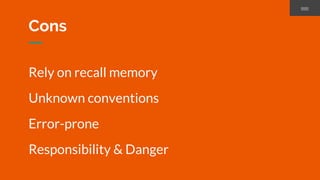
Rely on recall memory
Unknown conventions
Error-prone
Responsibility & Danger
Cons
Source: https://i.ytimg.com/vi/C4RsUtz8LGI/maxresdefault.jpg
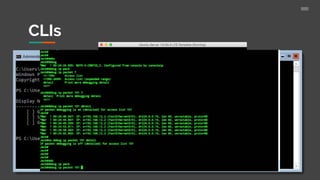
CLIs
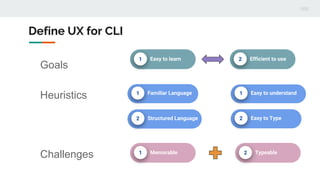
Define UX for CLI
1 Easy to learn 2 Efficient to use
Goals
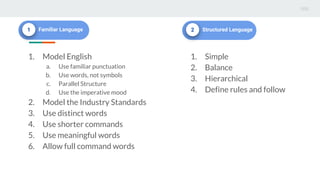
Heuristics 1 Familiar Language
2 Structured Language
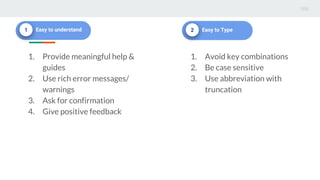
1 Easy to understand
2 Easy to Type
Challenges 1 Memorable 2 Typeable
UX
1 Memorable 2 Typeable
1. Model English
a. Use familiar punctuation
b. Use words, not symbols
c. Parallel Structure
d. Use the imperative mood
2. Model the Industry Standards
3. Use distinct words
4. Use shorter commands
5. Use meaningful words
6. Allow full command words
1 Familiar Language 2 Structured Language
1. Simple
2. Balance
3. Hierarchical
4. Define rules and follow
1 Easy to understand
1. Provide meaningful help &
guides
2. Use rich error messages/
warnings
3. Ask for confirmation
4. Give positive feedback
2 Easy to Type
1. Avoid key combinations
2. Be case sensitive
3. Use abbreviation with
truncation
To make Memorable
1 Familiar Language 2 Structured Language
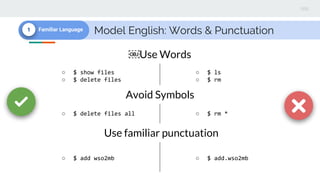
Model English: Words & Punctuation1 Familiar Language
○ $ show files
○ $ delete files
○ $ ls
○ $ rm
Use Words
Avoid Symbols
○ $ delete files all ○ $ rm *
Use familiar punctuation
○ $ add wso2mb ○ $ add.wso2mb
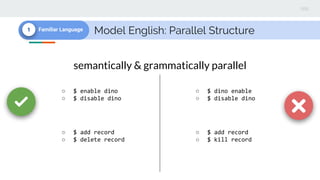
Model English: Parallel Structure1 Familiar Language
○ $ enable dino
○ $ disable dino
○ $ dino enable
○ $ disable dino
semantically & grammatically parallel
○ $ add record
○ $ delete record
○ $ add record
○ $ kill record
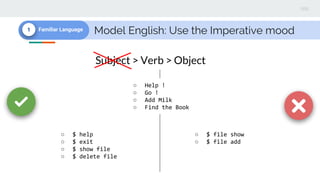
Model English: Use the Imperative mood1 Familiar Language
○ Help !
○ Go !
○ Add Milk
○ Find the Book
Subject > Verb > Object
○ $ help
○ $ exit
○ $ show file
○ $ delete file
○ $ file show
○ $ file add
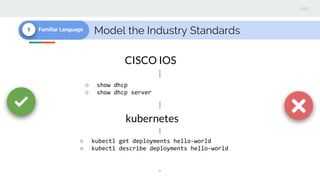
Model the Industry Standards1 Familiar Language
○ show dhcp
○ show dhcp server
CISCO IOS
○ kubectl get deployments hello-world
○ kubectl describe deployments hello-world
kubernetes
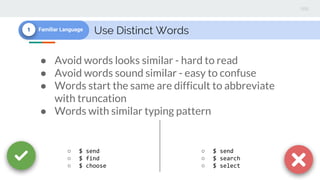
Use Distinct Words1 Familiar Language
● Avoid words looks similar - hard to read
● Avoid words sound similar - easy to confuse
● Words start the same are difficult to abbreviate
with truncation
● Words with similar typing pattern
○ $ send
○ $ find
○ $ choose
○ $ send
○ $ search
○ $ select
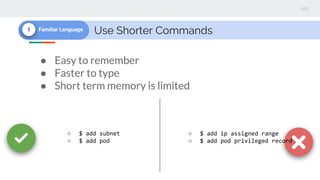
Use Shorter Commands1 Familiar Language
● Easy to remember
● Faster to type
● Short term memory is limited
○ $ add subnet
○ $ add pod
○ $ add ip assigned range
○ $ add pod privileged record
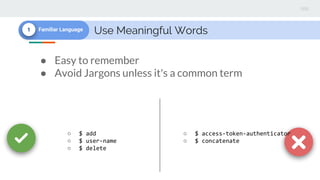
Use Meaningful Words1 Familiar Language
● Easy to remember
● Avoid Jargons unless it's a common term
○ $ add
○ $ user-name
○ $ delete
○ $ access-token-authenticator
○ $ concatenate
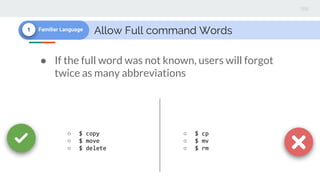
Allow Full command Words1 Familiar Language
● If the full word was not known, users will forgot
twice as many abbreviations
○ $ copy
○ $ move
○ $ delete
○ $ cp
○ $ mv
○ $ rm
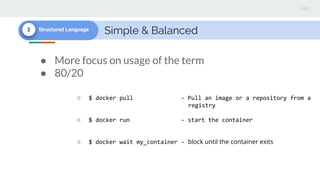
Simple & Balanced2 Structured Language
● More focus on usage of the term
● 80/20
○ $ docker pull - Pull an image or a repository from a
registry
○ $ docker run - start the container
○ $ docker wait my_container - block until the container exits
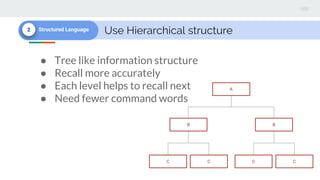
Use Hierarchical structure2 Structured Language
● Tree like information structure
● Recall more accurately
● Each level helps to recall next
● Need fewer command words
A
B B
CCCC
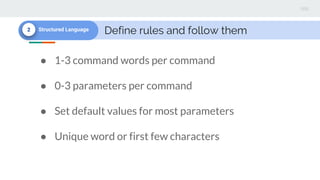
Define rules and follow them2 Structured Language
● 1-3 command words per command
● 0-3 parameters per command
● Set default values for most parameters
● Unique word or first few characters
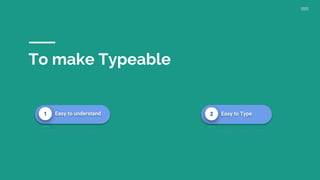
To make Typeable
1 Easy to understand 2 Easy to Type
Use rich error messages/ warnings1 Easy to understand
$ git stats
Did you mean this?
status
$ git bisect
usage: git bisect
[help|start|bad|good|new
|old|terms|skip|next|res
et|visualize|replay|log|
run]
○ $ git stats
Invalid Command
$ git bisect
Parameter invalid or
missing
Give feedback and Ask for Confirmation1 Easy to understand
$ add user dakshika
$ delete user dakshika
$ add user dakshika
dakshika has been
added to the system
$ delete user dakshika
Are you sure want to
delete “dakshika” [y/n] ?
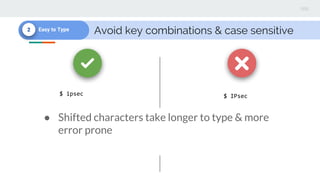
Avoid key combinations & case sensitive2 Easy to Type
$ IPsec$ ipsec
● Shifted characters take longer to type & more
error prone
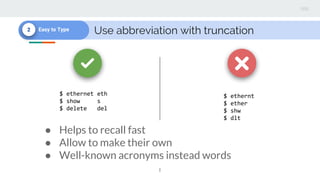
Use abbreviation with truncation2 Easy to Type
$ ethernt
$ ether
$ shw
$ dlt
$ ethernet eth
$ show s
$ delete del
● Helps to recall fast
● Allow to make their own
● Well-known acronyms instead words
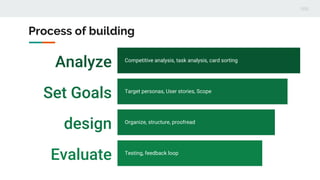
Analyze Competitive analysis, task analysis, card sorting
Set Goals Target personas, User stories, Scope
design Organize, structure, proofread
Evaluate Testing, feedback loop
Process of building
Few more...
● Think about the security
● Test on different setups / OS /
environments
● Allow developers to customize
1. Command Language Design with Howard Kiewe 2013
2. Guidelines for Command Line Interface Design Mark Kampe
3. How we find the right words: designing for the command line
(https://puppet.com/blog/how-we-find-right-words-designing-command-line)
Resources
Thank you.

Building User experience for CLI(Command Line Interface)

  • 1.
    Version 1.0 Building CLIfor Geeks By Dakshika Jayathilaka dakshika@apache.org dakshika@wso2.com
  • 2.
    Overview A command-line interfaceor command language interpreter (CLI), also known as Command-line user interface, Console user interface, Character user interface (CUI), is a means of interacting with a computer program where the user (or client) issues commands to the program in the form of successive lines of text (command lines).(Wiki)
  • 3.
  • 4.
  • 6.
    Rely on recallmemory Unknown conventions Error-prone Responsibility & Danger Cons
  • 7.
  • 8.
  • 9.
    Define UX forCLI 1 Easy to learn 2 Efficient to use Goals Heuristics 1 Familiar Language 2 Structured Language 1 Easy to understand 2 Easy to Type Challenges 1 Memorable 2 Typeable
  • 10.
  • 11.
    1. Model English a.Use familiar punctuation b. Use words, not symbols c. Parallel Structure d. Use the imperative mood 2. Model the Industry Standards 3. Use distinct words 4. Use shorter commands 5. Use meaningful words 6. Allow full command words 1 Familiar Language 2 Structured Language 1. Simple 2. Balance 3. Hierarchical 4. Define rules and follow
  • 12.
    1 Easy tounderstand 1. Provide meaningful help & guides 2. Use rich error messages/ warnings 3. Ask for confirmation 4. Give positive feedback 2 Easy to Type 1. Avoid key combinations 2. Be case sensitive 3. Use abbreviation with truncation
  • 13.
    To make Memorable 1Familiar Language 2 Structured Language
  • 14.
    Model English: Words& Punctuation1 Familiar Language ○ $ show files ○ $ delete files ○ $ ls ○ $ rm Use Words Avoid Symbols ○ $ delete files all ○ $ rm * Use familiar punctuation ○ $ add wso2mb ○ $ add.wso2mb
  • 15.
    Model English: ParallelStructure1 Familiar Language ○ $ enable dino ○ $ disable dino ○ $ dino enable ○ $ disable dino semantically & grammatically parallel ○ $ add record ○ $ delete record ○ $ add record ○ $ kill record
  • 16.
    Model English: Usethe Imperative mood1 Familiar Language ○ Help ! ○ Go ! ○ Add Milk ○ Find the Book Subject > Verb > Object ○ $ help ○ $ exit ○ $ show file ○ $ delete file ○ $ file show ○ $ file add
  • 17.
    Model the IndustryStandards1 Familiar Language ○ show dhcp ○ show dhcp server CISCO IOS ○ kubectl get deployments hello-world ○ kubectl describe deployments hello-world kubernetes
  • 18.
    Use Distinct Words1Familiar Language ● Avoid words looks similar - hard to read ● Avoid words sound similar - easy to confuse ● Words start the same are difficult to abbreviate with truncation ● Words with similar typing pattern ○ $ send ○ $ find ○ $ choose ○ $ send ○ $ search ○ $ select
  • 19.
    Use Shorter Commands1Familiar Language ● Easy to remember ● Faster to type ● Short term memory is limited ○ $ add subnet ○ $ add pod ○ $ add ip assigned range ○ $ add pod privileged record
  • 20.
    Use Meaningful Words1Familiar Language ● Easy to remember ● Avoid Jargons unless it's a common term ○ $ add ○ $ user-name ○ $ delete ○ $ access-token-authenticator ○ $ concatenate
  • 21.
    Allow Full commandWords1 Familiar Language ● If the full word was not known, users will forgot twice as many abbreviations ○ $ copy ○ $ move ○ $ delete ○ $ cp ○ $ mv ○ $ rm
  • 22.
    Simple & Balanced2Structured Language ● More focus on usage of the term ● 80/20 ○ $ docker pull - Pull an image or a repository from a registry ○ $ docker run - start the container ○ $ docker wait my_container - block until the container exits
  • 23.
    Use Hierarchical structure2Structured Language ● Tree like information structure ● Recall more accurately ● Each level helps to recall next ● Need fewer command words A B B CCCC
  • 24.
    Define rules andfollow them2 Structured Language ● 1-3 command words per command ● 0-3 parameters per command ● Set default values for most parameters ● Unique word or first few characters
  • 25.
    To make Typeable 1Easy to understand 2 Easy to Type
  • 26.
    Use rich errormessages/ warnings1 Easy to understand $ git stats Did you mean this? status $ git bisect usage: git bisect [help|start|bad|good|new |old|terms|skip|next|res et|visualize|replay|log| run] ○ $ git stats Invalid Command $ git bisect Parameter invalid or missing
  • 27.
    Give feedback andAsk for Confirmation1 Easy to understand $ add user dakshika $ delete user dakshika $ add user dakshika dakshika has been added to the system $ delete user dakshika Are you sure want to delete “dakshika” [y/n] ?
  • 28.
    Avoid key combinations& case sensitive2 Easy to Type $ IPsec$ ipsec ● Shifted characters take longer to type & more error prone
  • 29.
    Use abbreviation withtruncation2 Easy to Type $ ethernt $ ether $ shw $ dlt $ ethernet eth $ show s $ delete del ● Helps to recall fast ● Allow to make their own ● Well-known acronyms instead words
  • 30.
    Analyze Competitive analysis,task analysis, card sorting Set Goals Target personas, User stories, Scope design Organize, structure, proofread Evaluate Testing, feedback loop Process of building
  • 31.
    Few more... ● Thinkabout the security ● Test on different setups / OS / environments ● Allow developers to customize
  • 33.
    1. Command LanguageDesign with Howard Kiewe 2013 2. Guidelines for Command Line Interface Design Mark Kampe 3. How we find the right words: designing for the command line (https://puppet.com/blog/how-we-find-right-words-designing-command-line) Resources
  • 34.