Building a Simple, Responsive
Website with ExpressionEngine
Nick Benson
Senior Front-end Developer, PressEnter
What We’ll Cover…
• Introduction to Templates & Channels
• TwinCities-EE.com Project Overview
• Building a Blog
• Creating RSS Feeds
• Managing Pages
• Metadata Management
• Including Tweets
• Responsive Requirements
Getting Started: Templates
• Templates are what produce the HTML/CSS/RSS
code that is served by ExpressionEngine
• Templates are organized within template groups
• They can be accessed directly via a URL:
example.com/[template group]/[template name]
• They can be embedded within other templates:
{embed=“site/header”}
<h1>Hello World!</h1>
{embed=“site/footer”}
Getting Started: Templates
• Create a template group called “site” to
contain templates that are used across the
site, for things like the header and footer.
• Most projects start with something like this:
– Index (the site’s homepage)
– Page (for “static” pages, like “About Us”)
– Header
– Footer
– Aside
Getting Started: Channels
• Content in ExpressionEngine is organized into
channels (e.g. Presidents)
• Each bit of content is stored within a channel
entry (e.g. Abraham Lincoln)
• Different channel fields can be assigned to a
channel (e.g. birthday, favorite type of hat)
• Fields have different types (e.g. date, text)
• There are loads and loads of add-ons for
different field types (e.g. tags, lists, map
coordinates)
Template + Channel Example
This Template will display all of the channel
entries in our hypothetical presidents channel:
{exp:channel:entries channel=“presidents”}
<h2>{title}</h2>
<h3>Fun Facts</h3>
<ul>
<li>Born in {birthday format=“%y”}</li>
<li>Enjoyed wearing {favorite_hat}</li>
</ul>
{/exp:channel:entries}
Project: TwinCities-EE.com
The Twin Cities ExpressionEngine User Group
needed a website to publish news, event
announcements / summaries, and other
group information in a geek friendly format.
Users are technically savvy and like things like
RSS and iCalendar feeds.
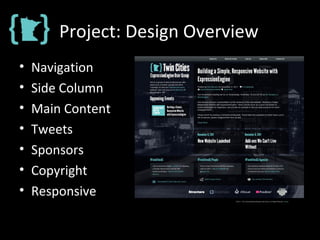
Project: Design Overview
• Navigation
• Side Column
• Main Content
• Tweets
• Sponsors
• Copyright
• Responsive
Blog: Requirements
• Blog will be used to…
– Share Organizational News
– Announce / Summarize Events
• Features
– Tags, Categories, Author Profiles
– Generate RSS & iCalendar Feeds
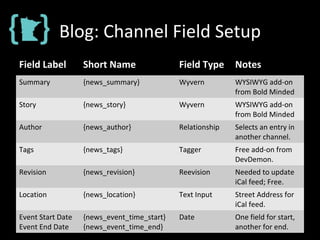
Blog: Channel Field Setup
Field Label Short Name Field Type Notes
Summary {news_summary} Wyvern WYSIWYG add-on
from Bold Minded
Story {news_story} Wyvern WYSIWYG add-on
from Bold Minded
Author {news_author} Relationship Selects an entry in
another channel.
Tags {news_tags} Tagger Free add-on from
DevDemon.
Revision {news_revision} Reevision Needed to update
iCal feed; Free.
Location {news_location} Text Input Street Address for
iCal feed.
Event Start Date
Event End Date
{news_event_time_start}
{news_event_time_end}
Date One field for start,
another for end.
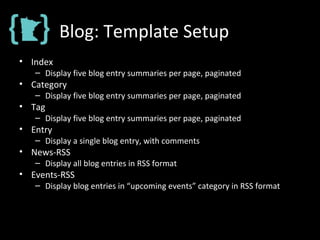
Blog: Template Setup
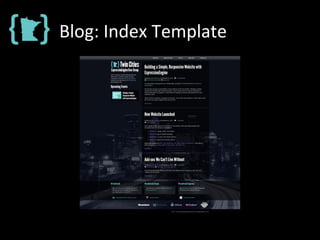
• Index
– Display five blog entry summaries per page, paginated
• Category
– Display five blog entry summaries per page, paginated
• Tag
– Display five blog entry summaries per page, paginated
• Entry
– Display a single blog entry, with comments
• News-RSS
– Display all blog entries in RSS format
• Events-RSS
– Display blog entries in “upcoming events” category in RSS format
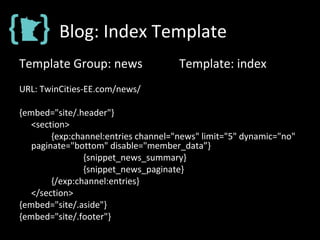
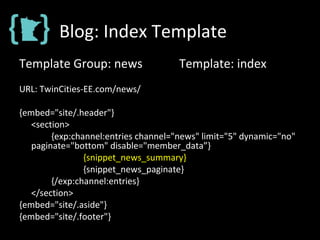
Blog: Index Template
Template Group: news Template: index
URL: TwinCities-EE.com/news/
{embed="site/.header"}
<section>
{exp:channel:entries channel="news" limit="5" dynamic="no"
paginate="bottom" disable="member_data”}
{snippet_news_summary}
{snippet_news_paginate}
{/exp:channel:entries}
</section>
{embed="site/.aside"}
{embed="site/.footer"}
Blog: Index Template
Template Group: news Template: index
URL: TwinCities-EE.com/news/
{embed="site/.header"}
<section>
{exp:channel:entries channel="news" limit="5" dynamic="no"
paginate="bottom" disable="member_data”}
{snippet_news_summary}
{snippet_news_paginate}
{/exp:channel:entries}
</section>
{embed="site/.aside"}
{embed="site/.footer"}
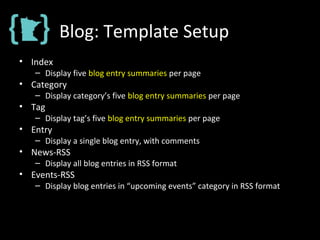
Blog: Template Setup
• Index
– Display five blog entry summaries per page
• Category
– Display category’s five blog entry summaries per page
• Tag
– Display tag’s five blog entry summaries per page
• Entry
– Display a single blog entry, with comments
• News-RSS
– Display all blog entries in RSS format
• Events-RSS
– Display blog entries in “upcoming events” category in RSS format
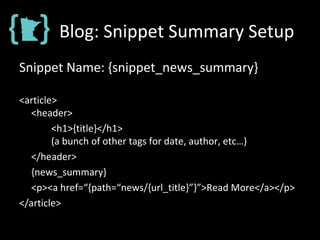
Blog: Snippet Summary Setup
Snippet Name: {snippet_news_summary}
<article>
<header>
<h1>{title}</h1>
(a bunch of other tags for date, author, etc…)
</header>
{news_summary}
<p><a href=“{path=“news/{url_title}”}”>Read More</a></p>
</article>
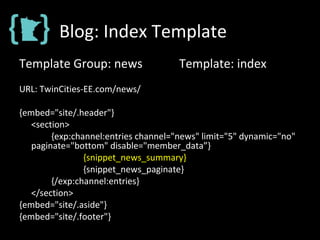
Blog: Index Template
Template Group: news Template: index
URL: TwinCities-EE.com/news/
{embed="site/.header"}
<section>
{exp:channel:entries channel="news" limit="5" dynamic="no"
paginate="bottom" disable="member_data”}
{snippet_news_summary}
{snippet_news_paginate}
{/exp:channel:entries}
</section>
{embed="site/.aside"}
{embed="site/.footer"}
Blog: Index Template
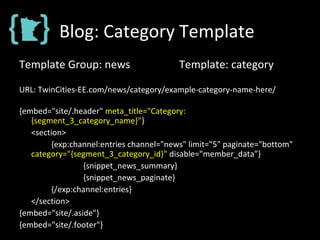
Blog: Category Template
Template Group: news Template: category
URL: TwinCities-EE.com/news/category/example-category-name-here/
{embed="site/.header" meta_title="Category:
{segment_3_category_name}"}
<section>
{exp:channel:entries channel="news" limit="5" paginate="bottom"
category="{segment_3_category_id}" disable="member_data”}
{snippet_news_summary}
{snippet_news_paginate}
{/exp:channel:entries}
</section>
{embed="site/.aside"}
{embed="site/.footer"}
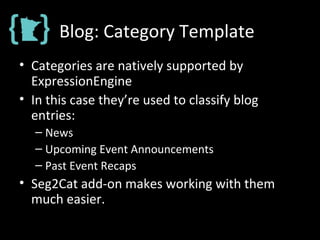
Blog: Category Template
• Categories are natively supported by
ExpressionEngine
• In this case they’re used to classify blog
entries:
– News
– Upcoming Event Announcements
– Past Event Recaps
• Seg2Cat add-on makes working with them
much easier.
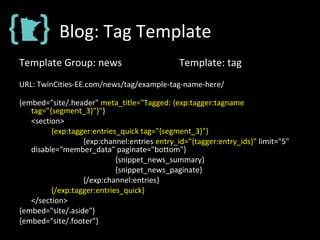
Blog: Tag Template
Template Group: news Template: tag
URL: TwinCities-EE.com/news/tag/example-tag-name-here/
{embed="site/.header" meta_title="Tagged: {exp:tagger:tagname
tag="{segment_3}"}"}
<section>
{exp:tagger:entries_quick tag="{segment_3}"}
{exp:channel:entries entry_id="{tagger:entry_ids}" limit="5"
disable="member_data" paginate="bottom"}
{snippet_news_summary}
{snippet_news_paginate}
{/exp:channel:entries}
{/exp:tagger:entries_quick}
</section>
{embed="site/.aside"}
{embed="site/.footer"}
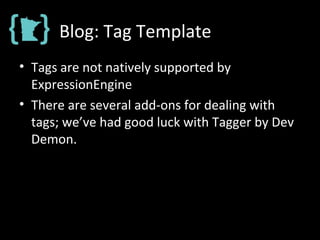
Blog: Tag Template
• Tags are not natively supported by
ExpressionEngine
• There are several add-ons for dealing with
tags; we’ve had good luck with Tagger by Dev
Demon.
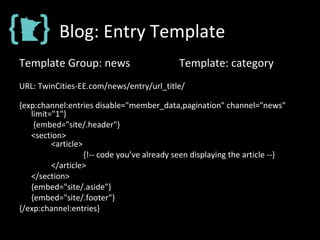
Blog: Entry Template
Template Group: news Template: category
URL: TwinCities-EE.com/news/entry/url_title/
{exp:channel:entries disable="member_data,pagination" channel="news"
limit="1"}
{embed="site/.header"}
<section>
<article>
{!-- code you’ve already seen displaying the article --}
</article>
</section>
{embed="site/.aside"}
{embed="site/.footer"}
{/exp:channel:entries}
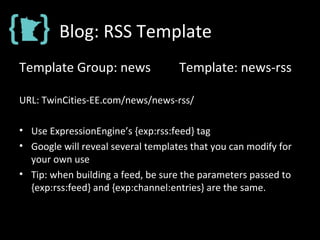
Blog: RSS Template
Template Group: news Template: news-rss
URL: TwinCities-EE.com/news/news-rss/
• Use ExpressionEngine’s {exp:rss:feed} tag
• Google will reveal several templates that you can modify for
your own use
• Tip: when building a feed, be sure the parameters passed to
{exp:rss:feed} and {exp:channel:entries} are the same.
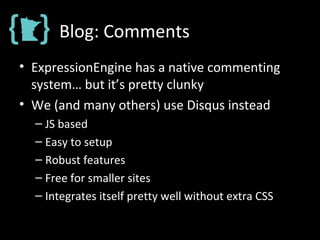
Blog: Comments
• ExpressionEngine has a native commenting
system… but it’s pretty clunky
• We (and many others) use Disqus instead
– JS based
– Easy to setup
– Robust features
– Free for smaller sites
– Integrates itself pretty well without extra CSS
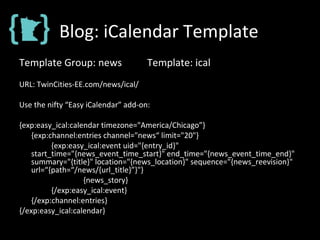
Blog: iCalendar Template
Template Group: news Template: ical
URL: TwinCities-EE.com/news/ical/
Use the nifty “Easy iCalendar” add-on:
{exp:easy_ical:calendar timezone="America/Chicago”}
{exp:channel:entries channel="news“ limit="20"}
{exp:easy_ical:event uid="{entry_id}"
start_time="{news_event_time_start}" end_time="{news_event_time_end}"
summary="{title}" location="{news_location}" sequence="{news_reevision}"
url=“{path=“/news/{url_title}”}"}
{news_story}
{/exp:easy_ical:event}
{/exp:channel:entries}
{/exp:easy_ical:calendar}
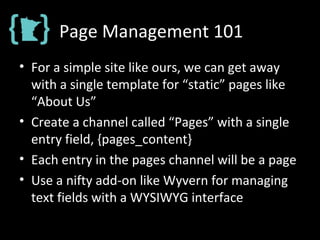
Page Management 101
• For a simple site like ours, we can get away
with a single template for “static” pages like
“About Us”
• Create a channel called “Pages” with a single
entry field, {pages_content}
• Each entry in the pages channel will be a page
• Use a nifty add-on like Wyvern for managing
text fields with a WYSIWYG interface
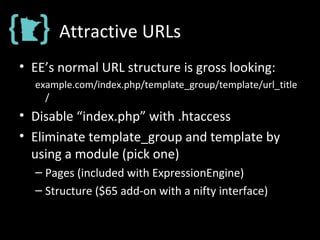
Attractive URLs
• EE’s normal URL structure is gross looking:
example.com/index.php/template_group/template/url_title
/
• Disable “index.php” with .htaccess
• Eliminate template_group and template by
using a module (pick one)
– Pages (included with ExpressionEngine)
– Structure ($65 add-on with a nifty interface)
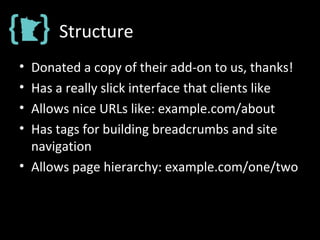
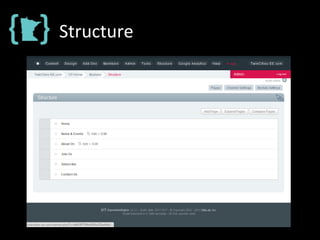
Structure
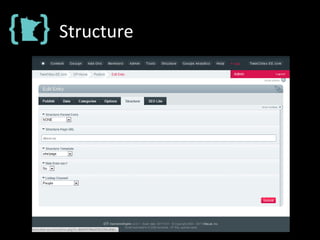
• Donated a copy of their add-on to us, thanks!
• Has a really slick interface that clients like
• Allows nice URLs like: example.com/about
• Has tags for building breadcrumbs and site
navigation
• Allows page hierarchy: example.com/one/two
Structure
Structure
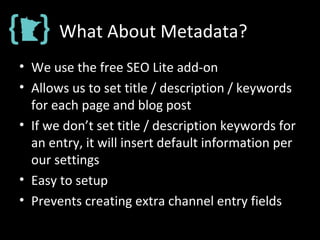
What About Metadata?
• We use the free SEO Lite add-on
• Allows us to set title / description / keywords
for each page and blog post
• If we don’t set title / description keywords for
an entry, it will insert default information per
our settings
• Easy to setup
• Prevents creating extra channel entry fields
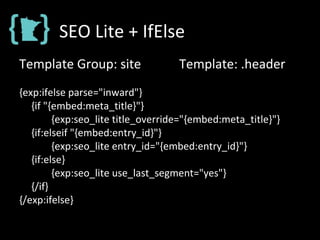
SEO Lite + IfElse
Template Group: site Template: .header
{exp:ifelse parse="inward"}
{if "{embed:meta_title}"}
{exp:seo_lite title_override="{embed:meta_title}"}
{if:elseif "{embed:entry_id}"}
{exp:seo_lite entry_id="{embed:entry_id}"}
{if:else}
{exp:seo_lite use_last_segment="yes"}
{/if}
{/exp:ifelse}
Twitter Feeds
• ExpressionEngine has an official, first party
add-on for including tweets within a
template…
• … it doesn’t support twitter lists or multiple
users though…
• …and neither do any of the other add-ons I
investigated
Twitter Feeds
• Twitter offers an advanced search feature that
can retrieve tweets in RSS form that match
several criteria (multiple users, etc.)
• The AJW Feed Parser add-on can display
content from an RSS feed in a template
• The Tweetify add-on will turn URLs,
#hashtags, and @usernames into anchors
RSS + AJW Feed Parser +
Tweetify
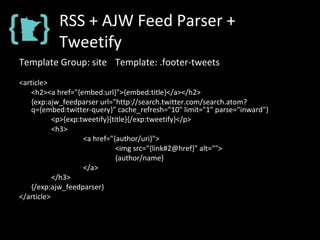
Template Group: site Template: .footer-tweets
<article>
<h2><a href="{embed:url}">{embed:title}</a></h2>
{exp:ajw_feedparser url="http://search.twitter.com/search.atom?
q={embed:twitter-query}" cache_refresh="10" limit="1" parse="inward"}
<p>{exp:tweetify}{title}{/exp:tweetify}</p>
<h3>
<a href="{author/uri}">
<img src="{link#2@href}" alt="">
{author/name}
</a>
</h3>
{/exp:ajw_feedparser}
</article>
Make it Speedy
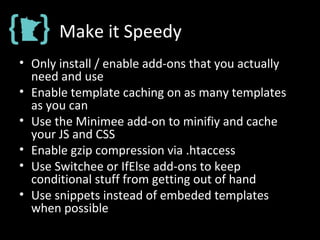
• Only install / enable add-ons that you actually
need and use
• Enable template caching on as many templates
as you can
• Use the Minimee add-on to minifiy and cache
your JS and CSS
• Enable gzip compression via .htaccess
• Use Switchee or IfElse add-ons to keep
conditional stuff from getting out of hand
• Use snippets instead of embeded templates
when possible
Make it Responsive
• Media Queries!
• Include css3-mediaqueries.js if lte IE 8
• Keep the aside markup in a separate template
(not within header or footer)
– Displayed above content on mobile homepage
– Displayed below content on mobile secondary
pages
Thank You!
Nick Benson
Senior Front-end Developer, PressEnter

Building a Simple, Responsive Website with ExpressionEngine

  • 1.
    Building a Simple,Responsive Website with ExpressionEngine Nick Benson Senior Front-end Developer, PressEnter
  • 2.
    What We’ll Cover… •Introduction to Templates & Channels • TwinCities-EE.com Project Overview • Building a Blog • Creating RSS Feeds • Managing Pages • Metadata Management • Including Tweets • Responsive Requirements
  • 3.
    Getting Started: Templates •Templates are what produce the HTML/CSS/RSS code that is served by ExpressionEngine • Templates are organized within template groups • They can be accessed directly via a URL: example.com/[template group]/[template name] • They can be embedded within other templates: {embed=“site/header”} <h1>Hello World!</h1> {embed=“site/footer”}
  • 4.
    Getting Started: Templates •Create a template group called “site” to contain templates that are used across the site, for things like the header and footer. • Most projects start with something like this: – Index (the site’s homepage) – Page (for “static” pages, like “About Us”) – Header – Footer – Aside
  • 5.
    Getting Started: Channels •Content in ExpressionEngine is organized into channels (e.g. Presidents) • Each bit of content is stored within a channel entry (e.g. Abraham Lincoln) • Different channel fields can be assigned to a channel (e.g. birthday, favorite type of hat) • Fields have different types (e.g. date, text) • There are loads and loads of add-ons for different field types (e.g. tags, lists, map coordinates)
  • 6.
    Template + ChannelExample This Template will display all of the channel entries in our hypothetical presidents channel: {exp:channel:entries channel=“presidents”} <h2>{title}</h2> <h3>Fun Facts</h3> <ul> <li>Born in {birthday format=“%y”}</li> <li>Enjoyed wearing {favorite_hat}</li> </ul> {/exp:channel:entries}
  • 7.
    Project: TwinCities-EE.com The TwinCities ExpressionEngine User Group needed a website to publish news, event announcements / summaries, and other group information in a geek friendly format. Users are technically savvy and like things like RSS and iCalendar feeds.
  • 8.
    Project: Design Overview •Navigation • Side Column • Main Content • Tweets • Sponsors • Copyright • Responsive
  • 9.
    Blog: Requirements • Blogwill be used to… – Share Organizational News – Announce / Summarize Events • Features – Tags, Categories, Author Profiles – Generate RSS & iCalendar Feeds
  • 10.
    Blog: Channel FieldSetup Field Label Short Name Field Type Notes Summary {news_summary} Wyvern WYSIWYG add-on from Bold Minded Story {news_story} Wyvern WYSIWYG add-on from Bold Minded Author {news_author} Relationship Selects an entry in another channel. Tags {news_tags} Tagger Free add-on from DevDemon. Revision {news_revision} Reevision Needed to update iCal feed; Free. Location {news_location} Text Input Street Address for iCal feed. Event Start Date Event End Date {news_event_time_start} {news_event_time_end} Date One field for start, another for end.
  • 11.
    Blog: Template Setup •Index – Display five blog entry summaries per page, paginated • Category – Display five blog entry summaries per page, paginated • Tag – Display five blog entry summaries per page, paginated • Entry – Display a single blog entry, with comments • News-RSS – Display all blog entries in RSS format • Events-RSS – Display blog entries in “upcoming events” category in RSS format
  • 12.
    Blog: Index Template TemplateGroup: news Template: index URL: TwinCities-EE.com/news/ {embed="site/.header"} <section> {exp:channel:entries channel="news" limit="5" dynamic="no" paginate="bottom" disable="member_data”} {snippet_news_summary} {snippet_news_paginate} {/exp:channel:entries} </section> {embed="site/.aside"} {embed="site/.footer"}
  • 13.
    Blog: Index Template TemplateGroup: news Template: index URL: TwinCities-EE.com/news/ {embed="site/.header"} <section> {exp:channel:entries channel="news" limit="5" dynamic="no" paginate="bottom" disable="member_data”} {snippet_news_summary} {snippet_news_paginate} {/exp:channel:entries} </section> {embed="site/.aside"} {embed="site/.footer"}
  • 14.
    Blog: Template Setup •Index – Display five blog entry summaries per page • Category – Display category’s five blog entry summaries per page • Tag – Display tag’s five blog entry summaries per page • Entry – Display a single blog entry, with comments • News-RSS – Display all blog entries in RSS format • Events-RSS – Display blog entries in “upcoming events” category in RSS format
  • 15.
    Blog: Snippet SummarySetup Snippet Name: {snippet_news_summary} <article> <header> <h1>{title}</h1> (a bunch of other tags for date, author, etc…) </header> {news_summary} <p><a href=“{path=“news/{url_title}”}”>Read More</a></p> </article>
  • 16.
    Blog: Index Template TemplateGroup: news Template: index URL: TwinCities-EE.com/news/ {embed="site/.header"} <section> {exp:channel:entries channel="news" limit="5" dynamic="no" paginate="bottom" disable="member_data”} {snippet_news_summary} {snippet_news_paginate} {/exp:channel:entries} </section> {embed="site/.aside"} {embed="site/.footer"}
  • 17.
  • 18.
    Blog: Category Template TemplateGroup: news Template: category URL: TwinCities-EE.com/news/category/example-category-name-here/ {embed="site/.header" meta_title="Category: {segment_3_category_name}"} <section> {exp:channel:entries channel="news" limit="5" paginate="bottom" category="{segment_3_category_id}" disable="member_data”} {snippet_news_summary} {snippet_news_paginate} {/exp:channel:entries} </section> {embed="site/.aside"} {embed="site/.footer"}
  • 19.
    Blog: Category Template •Categories are natively supported by ExpressionEngine • In this case they’re used to classify blog entries: – News – Upcoming Event Announcements – Past Event Recaps • Seg2Cat add-on makes working with them much easier.
  • 20.
    Blog: Tag Template TemplateGroup: news Template: tag URL: TwinCities-EE.com/news/tag/example-tag-name-here/ {embed="site/.header" meta_title="Tagged: {exp:tagger:tagname tag="{segment_3}"}"} <section> {exp:tagger:entries_quick tag="{segment_3}"} {exp:channel:entries entry_id="{tagger:entry_ids}" limit="5" disable="member_data" paginate="bottom"} {snippet_news_summary} {snippet_news_paginate} {/exp:channel:entries} {/exp:tagger:entries_quick} </section> {embed="site/.aside"} {embed="site/.footer"}
  • 21.
    Blog: Tag Template •Tags are not natively supported by ExpressionEngine • There are several add-ons for dealing with tags; we’ve had good luck with Tagger by Dev Demon.
  • 22.
    Blog: Entry Template TemplateGroup: news Template: category URL: TwinCities-EE.com/news/entry/url_title/ {exp:channel:entries disable="member_data,pagination" channel="news" limit="1"} {embed="site/.header"} <section> <article> {!-- code you’ve already seen displaying the article --} </article> </section> {embed="site/.aside"} {embed="site/.footer"} {/exp:channel:entries}
  • 23.
    Blog: RSS Template TemplateGroup: news Template: news-rss URL: TwinCities-EE.com/news/news-rss/ • Use ExpressionEngine’s {exp:rss:feed} tag • Google will reveal several templates that you can modify for your own use • Tip: when building a feed, be sure the parameters passed to {exp:rss:feed} and {exp:channel:entries} are the same.
  • 24.
    Blog: Comments • ExpressionEnginehas a native commenting system… but it’s pretty clunky • We (and many others) use Disqus instead – JS based – Easy to setup – Robust features – Free for smaller sites – Integrates itself pretty well without extra CSS
  • 25.
    Blog: iCalendar Template TemplateGroup: news Template: ical URL: TwinCities-EE.com/news/ical/ Use the nifty “Easy iCalendar” add-on: {exp:easy_ical:calendar timezone="America/Chicago”} {exp:channel:entries channel="news“ limit="20"} {exp:easy_ical:event uid="{entry_id}" start_time="{news_event_time_start}" end_time="{news_event_time_end}" summary="{title}" location="{news_location}" sequence="{news_reevision}" url=“{path=“/news/{url_title}”}"} {news_story} {/exp:easy_ical:event} {/exp:channel:entries} {/exp:easy_ical:calendar}
  • 26.
    Page Management 101 •For a simple site like ours, we can get away with a single template for “static” pages like “About Us” • Create a channel called “Pages” with a single entry field, {pages_content} • Each entry in the pages channel will be a page • Use a nifty add-on like Wyvern for managing text fields with a WYSIWYG interface
  • 27.
    Attractive URLs • EE’snormal URL structure is gross looking: example.com/index.php/template_group/template/url_title / • Disable “index.php” with .htaccess • Eliminate template_group and template by using a module (pick one) – Pages (included with ExpressionEngine) – Structure ($65 add-on with a nifty interface)
  • 28.
    Structure • Donated acopy of their add-on to us, thanks! • Has a really slick interface that clients like • Allows nice URLs like: example.com/about • Has tags for building breadcrumbs and site navigation • Allows page hierarchy: example.com/one/two
  • 29.
  • 30.
  • 31.
    What About Metadata? •We use the free SEO Lite add-on • Allows us to set title / description / keywords for each page and blog post • If we don’t set title / description keywords for an entry, it will insert default information per our settings • Easy to setup • Prevents creating extra channel entry fields
  • 32.
    SEO Lite +IfElse Template Group: site Template: .header {exp:ifelse parse="inward"} {if "{embed:meta_title}"} {exp:seo_lite title_override="{embed:meta_title}"} {if:elseif "{embed:entry_id}"} {exp:seo_lite entry_id="{embed:entry_id}"} {if:else} {exp:seo_lite use_last_segment="yes"} {/if} {/exp:ifelse}
  • 33.
    Twitter Feeds • ExpressionEnginehas an official, first party add-on for including tweets within a template… • … it doesn’t support twitter lists or multiple users though… • …and neither do any of the other add-ons I investigated
  • 34.
    Twitter Feeds • Twitteroffers an advanced search feature that can retrieve tweets in RSS form that match several criteria (multiple users, etc.) • The AJW Feed Parser add-on can display content from an RSS feed in a template • The Tweetify add-on will turn URLs, #hashtags, and @usernames into anchors
  • 35.
    RSS + AJWFeed Parser + Tweetify Template Group: site Template: .footer-tweets <article> <h2><a href="{embed:url}">{embed:title}</a></h2> {exp:ajw_feedparser url="http://search.twitter.com/search.atom? q={embed:twitter-query}" cache_refresh="10" limit="1" parse="inward"} <p>{exp:tweetify}{title}{/exp:tweetify}</p> <h3> <a href="{author/uri}"> <img src="{link#2@href}" alt=""> {author/name} </a> </h3> {/exp:ajw_feedparser} </article>
  • 36.
    Make it Speedy •Only install / enable add-ons that you actually need and use • Enable template caching on as many templates as you can • Use the Minimee add-on to minifiy and cache your JS and CSS • Enable gzip compression via .htaccess • Use Switchee or IfElse add-ons to keep conditional stuff from getting out of hand • Use snippets instead of embeded templates when possible
  • 37.
    Make it Responsive •Media Queries! • Include css3-mediaqueries.js if lte IE 8 • Keep the aside markup in a separate template (not within header or footer) – Displayed above content on mobile homepage – Displayed below content on mobile secondary pages
  • 38.
    Thank You! Nick Benson SeniorFront-end Developer, PressEnter