BRANCHING MODELS _
DRUPAL DAY PORTUGAL 2020 _
13/11/2020_
2
1. About me
2. Small introduction about the best known GIT
Branching models / workflows.
3. Share experiences and opinions among all
participants
Agenda
3
3. GIT BRANCHING MODELS
1. Agenda
2. About me
4
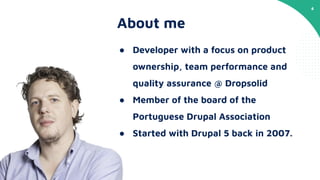
About me
● Developer with a focus on product
ownership, team performance and
quality assurance @ Dropsolid
● Member of the board of the
Portuguese Drupal Association
● Started with Drupal 5 back in 2007.
5
4. LET’S SHARE
2. About me
3. Git branching models
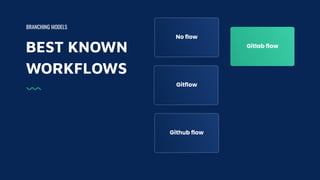
BEST KNOWN
WORKFLOWS
BRANCHING MODELS
Gitlab flow
No flow
Gitflow
Github flow
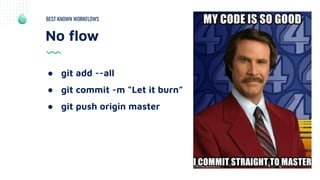
No flow
BEST KNOWN WORKFLOWS
● git add --all
● git commit -m “Let it burn”
● git push origin master
BEST KNOWN
WORKFLOWS
BRANCHING MODELS
Gitlab flow
No flow
Gitflow
Github flow
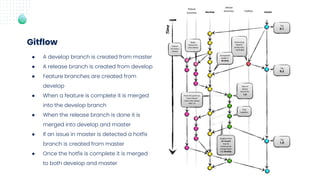
● A develop branch is created from master
● A release branch is created from develop
● Feature branches are created from
develop
● When a feature is complete it is merged
into the develop branch
● When the release branch is done it is
merged into develop and master
● If an issue in master is detected a hotfix
branch is created from master
● Once the hotfix is complete it is merged
to both develop and master
Gitflow
BEST KNOWN
WORKFLOWS
BRANCHING MODELS
Gitlab flow
No flow
Gitflow
Github flow
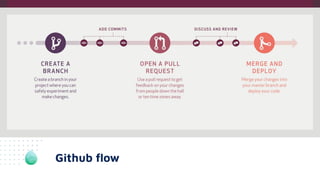
Github flow
BEST KNOWN
WORKFLOWS
BRANCHING MODELS
Gitlab flow
No flow
Gitflow
Github flow
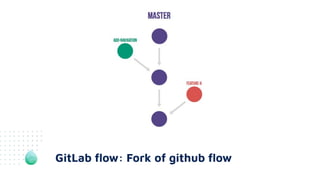
GitLab flow: Fork of github flow
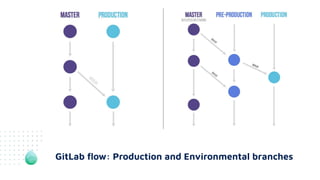
GitLab flow: Production and Environmental branches
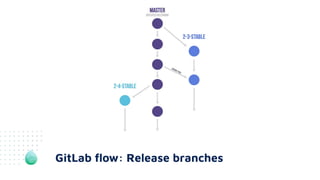
GitLab flow: Release branches
16
5. SOURCES AND USEFUL INFORMATION
3. Git branching models
4. Let’s share
17
Which is the best git workflow?
TOPIC
A Git Workflow is a recipe or recommendation for how to use Git to
accomplish work in a consistent and productive manner.
18
Merging vs Rebasing
TOPIC
Merging is a safe option that preserves the entire history of your
repository, while rebasing creates a linear history by moving your
feature branch onto the tip of master .
19
Tagging
TOPIC
Tags are ref's that point to specific points in Git history. Tagging is
generally used to capture a point in history that is used for a
marked version release (i.e. v1.0.1). A tag is like a branch that
doesn’t change.
20
Merge/Pull request
TOPIC
A Merge Request (MR) is a request to merge one branch into
another.
Use merge requests to visualize and collaborate on proposed
changes to source code.
21
Integration branches
TOPIC
The integration branch is where you bring multiple features
together for testing, before the final push onto master.
22
Environment branches
TOPIC
ENV Branching is based on the environments the application
deploys to.
23
Release branches
TOPIC
A release branch is just a branch in the version control system on
which the code destined for this release can be isolated from
mainline development.
24
Cherry picking
TOPIC
Cherry picking is the act of picking a commit from a branch and
applying it to another.
25
Merge conflicts
TOPIC
Merging and conflicts are a common part of the Git experience.
26
6. END
4. Let’s share
5. Sources and useful information
27
Sources and useful information.
● https://medium.com/@devmrin/learn-complete-gitflow-workflow-basics-how-to-f
rom-start-to-finish-8756ad5b7394
● https://nvie.com/posts/a-successful-git-branching-model/
● https://medium.com/@patrickporto/4-branching-workflows-for-git-30d0aaee7bf
● https://www.atlassian.com/git/tutorials/merging-vs-rebasing
● https://producingoss.com/en/release-branches.html
● https://www.atlassian.com/git/tutorials/inspecting-a-repository/git-tag#:~:text=T
ags%20are%20ref's%20that%20point,no%20further%20history%20of%20commits.
● https://www.atlassian.com/git/tutorials/using-branches/merge-conflicts
● https://stackoverflow.com/questions/4428722/what-is-the-purpose-of-an-integra
tion-branch#:~:text=The%20integration%20branch%20is%20where,concerns%20i
s%20a%20good%20thing.
● https://medium.com/@ahecimo/selecting-the-right-git-workflow-f77081eef5c2
● https://www.wearefine.com/news/insights/env-branching-with-git
28
End

BRANCHING MODELS (workshop)

  • 1.
    BRANCHING MODELS _ DRUPALDAY PORTUGAL 2020 _ 13/11/2020_
  • 2.
    2 1. About me 2.Small introduction about the best known GIT Branching models / workflows. 3. Share experiences and opinions among all participants Agenda
  • 3.
    3 3. GIT BRANCHINGMODELS 1. Agenda 2. About me
  • 4.
    4 About me ● Developerwith a focus on product ownership, team performance and quality assurance @ Dropsolid ● Member of the board of the Portuguese Drupal Association ● Started with Drupal 5 back in 2007.
  • 5.
    5 4. LET’S SHARE 2.About me 3. Git branching models
  • 6.
    BEST KNOWN WORKFLOWS BRANCHING MODELS Gitlabflow No flow Gitflow Github flow
  • 7.
    No flow BEST KNOWNWORKFLOWS ● git add --all ● git commit -m “Let it burn” ● git push origin master
  • 8.
    BEST KNOWN WORKFLOWS BRANCHING MODELS Gitlabflow No flow Gitflow Github flow
  • 9.
    ● A developbranch is created from master ● A release branch is created from develop ● Feature branches are created from develop ● When a feature is complete it is merged into the develop branch ● When the release branch is done it is merged into develop and master ● If an issue in master is detected a hotfix branch is created from master ● Once the hotfix is complete it is merged to both develop and master Gitflow
  • 10.
    BEST KNOWN WORKFLOWS BRANCHING MODELS Gitlabflow No flow Gitflow Github flow
  • 11.
  • 12.
    BEST KNOWN WORKFLOWS BRANCHING MODELS Gitlabflow No flow Gitflow Github flow
  • 13.
    GitLab flow: Forkof github flow
  • 14.
    GitLab flow: Productionand Environmental branches
  • 15.
  • 16.
    16 5. SOURCES ANDUSEFUL INFORMATION 3. Git branching models 4. Let’s share
  • 17.
    17 Which is thebest git workflow? TOPIC A Git Workflow is a recipe or recommendation for how to use Git to accomplish work in a consistent and productive manner.
  • 18.
    18 Merging vs Rebasing TOPIC Mergingis a safe option that preserves the entire history of your repository, while rebasing creates a linear history by moving your feature branch onto the tip of master .
  • 19.
    19 Tagging TOPIC Tags are ref'sthat point to specific points in Git history. Tagging is generally used to capture a point in history that is used for a marked version release (i.e. v1.0.1). A tag is like a branch that doesn’t change.
  • 20.
    20 Merge/Pull request TOPIC A MergeRequest (MR) is a request to merge one branch into another. Use merge requests to visualize and collaborate on proposed changes to source code.
  • 21.
    21 Integration branches TOPIC The integrationbranch is where you bring multiple features together for testing, before the final push onto master.
  • 22.
    22 Environment branches TOPIC ENV Branchingis based on the environments the application deploys to.
  • 23.
    23 Release branches TOPIC A releasebranch is just a branch in the version control system on which the code destined for this release can be isolated from mainline development.
  • 24.
    24 Cherry picking TOPIC Cherry pickingis the act of picking a commit from a branch and applying it to another.
  • 25.
    25 Merge conflicts TOPIC Merging andconflicts are a common part of the Git experience.
  • 26.
    26 6. END 4. Let’sshare 5. Sources and useful information
  • 27.
    27 Sources and usefulinformation. ● https://medium.com/@devmrin/learn-complete-gitflow-workflow-basics-how-to-f rom-start-to-finish-8756ad5b7394 ● https://nvie.com/posts/a-successful-git-branching-model/ ● https://medium.com/@patrickporto/4-branching-workflows-for-git-30d0aaee7bf ● https://www.atlassian.com/git/tutorials/merging-vs-rebasing ● https://producingoss.com/en/release-branches.html ● https://www.atlassian.com/git/tutorials/inspecting-a-repository/git-tag#:~:text=T ags%20are%20ref's%20that%20point,no%20further%20history%20of%20commits. ● https://www.atlassian.com/git/tutorials/using-branches/merge-conflicts ● https://stackoverflow.com/questions/4428722/what-is-the-purpose-of-an-integra tion-branch#:~:text=The%20integration%20branch%20is%20where,concerns%20i s%20a%20good%20thing. ● https://medium.com/@ahecimo/selecting-the-right-git-workflow-f77081eef5c2 ● https://www.wearefine.com/news/insights/env-branching-with-git
  • 28.