Download free for 30 days
Sign in
Upload
Language (EN)
Support
Business
Mobile
Social Media
Marketing
Technology
Art & Photos
Career
Design
Education
Presentations & Public Speaking
Government & Nonprofit
Healthcare
Internet
Law
Leadership & Management
Automotive
Engineering
Software
Recruiting & HR
Retail
Sales
Services
Science
Small Business & Entrepreneurship
Food
Environment
Economy & Finance
Data & Analytics
Investor Relations
Sports
Spiritual
News & Politics
Travel
Self Improvement
Real Estate
Entertainment & Humor
Health & Medicine
Devices & Hardware
Lifestyle
Change Language
Language
English
Español
Português
Français
Deutsche
Cancel
Save
EN
TN
Uploaded by
Toshiki NOGUCHI
PPTX, PDF
39,474 views
Python/Bottle for Kubo Semi 2014
bottle with python/gurobi for beginners
Education
◦
Read more
2
Save
Share
Embed
Embed presentation
Download
Downloaded 12 times
1
/ 13
2
/ 13
3
/ 13
4
/ 13
5
/ 13
6
/ 13
7
/ 13
8
/ 13
9
/ 13
10
/ 13
11
/ 13
12
/ 13
13
/ 13
More Related Content
PDF
Teclab3
by
Eikichi Yamaguchi
PPTX
カスタムモジュールでブロックを作成してみた例
by
iPride Co., Ltd.
PDF
丸の内MongoDB勉強会#20LT 2.8のストレージエンジン動かしてみました
by
Ryuji Tamagawa
PDF
Shibuya Perl Mongers#12 No Sql Couch Db
by
Makoto Ohnami
PDF
Google Gears データベースの基礎
by
webos-goodies
PDF
Tide - SmalltalkでSPA
by
Masashi Umezawa
KEY
Ll xcode
by
Net Kanayan
PDF
テキストデータをマイクロソフトアクセスに取り込む方法【データ分析塾ab001】
by
Noriyuki Taniguchi
Teclab3
by
Eikichi Yamaguchi
カスタムモジュールでブロックを作成してみた例
by
iPride Co., Ltd.
丸の内MongoDB勉強会#20LT 2.8のストレージエンジン動かしてみました
by
Ryuji Tamagawa
Shibuya Perl Mongers#12 No Sql Couch Db
by
Makoto Ohnami
Google Gears データベースの基礎
by
webos-goodies
Tide - SmalltalkでSPA
by
Masashi Umezawa
Ll xcode
by
Net Kanayan
テキストデータをマイクロソフトアクセスに取り込む方法【データ分析塾ab001】
by
Noriyuki Taniguchi
What's hot
PDF
Symfony2からdoctrine mongo db odmを使ってみる
by
Koji Iwazaki
PDF
Web講座 第6回
by
nanametown
PDF
elasticsearchソースコードを読みはじめてみた
by
furandon_pig
PDF
NanoStrand
by
Masashi Umezawa
PPTX
Active Directoryデータのプロパティ出力(Output Properties)
by
Michio Koyama
PDF
Gitpractice2
by
mmm110
Symfony2からdoctrine mongo db odmを使ってみる
by
Koji Iwazaki
Web講座 第6回
by
nanametown
elasticsearchソースコードを読みはじめてみた
by
furandon_pig
NanoStrand
by
Masashi Umezawa
Active Directoryデータのプロパティ出力(Output Properties)
by
Michio Koyama
Gitpractice2
by
mmm110
Python/Bottle for Kubo Semi 2014
1.
いまさらながらbottle 主にcookieの説明
2.
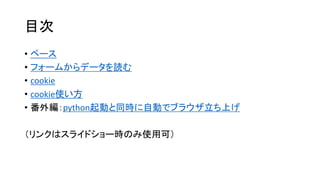
目次 • ベース
• フォームからデータを読む • cookie • cookie使い方 • 番外編:python起動と同時に自動でブラウザ立ち上げ (リンクはスライドショー時のみ使用可)
3.
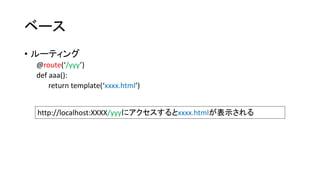
ベース • ルーティング
@route(‘/yyy’) def aaa(): return template(‘xxxx.html’) http://localhost:XXXX/yyyにアクセスするとxxxx.htmlが表示される
4.
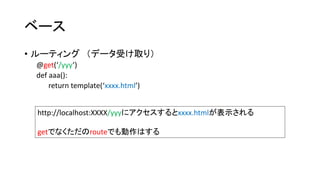
ベース • ルーティング(データ受け取り)
@get(‘/yyy’) def aaa(): return template(‘xxxx.html’) http://localhost:XXXX/yyyにアクセスするとxxxx.htmlが表示される getでなくただのrouteでも動作はする
5.
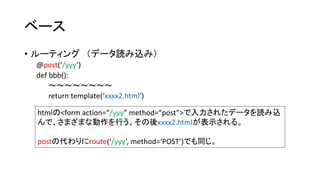
ベース • ルーティング(データ読み込み)
@post(‘/yyy’) def bbb(): ~~~~~~~~ return template(‘xxxx2.html’) htmlの<form action=“/yyy” method=“post”>で入力されたデータを読み込 んで、さまざまな動作を行う。その後xxxx2.htmlが表示される。 postの代わりにroute(‘/yyy’, method=‘POST’)でも同じ。
6.
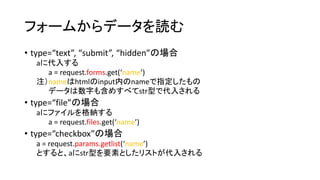
フォームからデータを読む • type=“text”,
“submit”, “hidden”の場合 aに代入する a = request.forms.get(‘name’) 注)nameはhtmlのinput内のnameで指定したもの データは数字も含めすべてstr型で代入される • type=“file”の場合 aにファイルを格納する a = request.files.get(‘name’) • type=“checkbox”の場合 a = request.params.getlist(‘name’) とすると、aにstr型を要素としたリストが代入される
7.
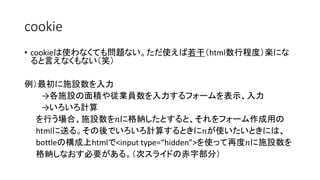
cookie • cookieは使わなくても問題ない。ただ使えば若干(html数行程度)楽にな
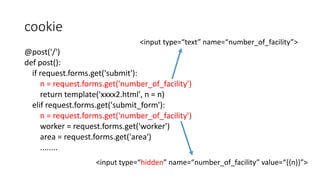
ると言えなくもない(笑) 例)最初に施設数を入力 →各施設の面積や従業員数を入力するフォームを表示、入力 →いろいろ計算 を行う場合、施設数を푛に格納したとすると、それをフォーム作成用の htmlに送る。その後でいろいろ計算するときに푛が使いたいときには、 bottleの構成上htmlで<input type=“hidden”>を使って再度푛に施設数を 格納しなおす必要がある。(次スライドの赤字部分)
8.
cookie @post('/') def
post(): if request.forms.get('submit'): <input type=“text” name=“number_of_facility”> n = request.forms.get('number_of_facility') return template('xxxx2.html', n = n) elif request.forms.get('submit_form'): n = request.forms.get('number_of_facility') worker = request.forms.get('worker') area = request.forms.get('area') ........ <input type=“hidden” name=“number_of_facility” value=“{{n}}”>
9.
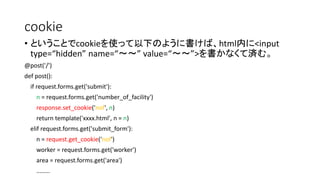
cookie • ということでcookieを使って以下のように書けば、html内に<input
type=“hidden” name=“~~” value=“~~”>を書かなくて済む。 @post('/') def post(): if request.forms.get('submit'): n = request.forms.get('number_of_facility') response.set_cookie('nof', n) return template('xxxx.html', n = n) elif request.forms.get('submit_form'): n = request.get_cookie('nof') worker = request.forms.get('worker') area = request.forms.get('area') ........
10.
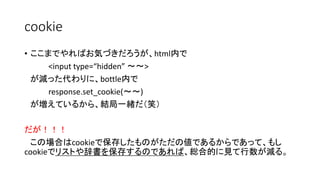
cookie • ここまでやればお気づきだろうが、html内で
<input type=“hidden” ~~> が減った代わりに、bottle内で response.set_cookie(~~) が増えているから、結局一緒だ(笑) だが!!! この場合はcookieで保存したものがただの値であるからであって、もし cookieでリストや辞書を保存するのであれば、総合的に見て行数が減る。
11.
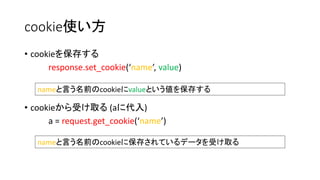
cookie使い方 • cookieを保存する
response.set_cookie(‘name’, value) nameと言う名前のcookieにvalueという値を保存する • cookieから受け取る(aに代入) a = request.get_cookie(‘name’) nameと言う名前のcookieに保存されているデータを受け取る
12.
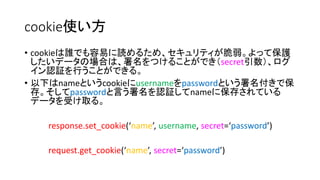
cookie使い方 • cookieは誰でも容易に読めるため、セキュリティが脆弱。よって保護
したいデータの場合は、署名をつけることができ(secret引数)、ログ イン認証を行うことができる。 • 以下はnameというcookieにusernameをpasswordという署名付きで保 存。そしてpasswordと言う署名を認証してnameに保存されている データを受け取る。 response.set_cookie(‘name’, username, secret=‘password’) request.get_cookie(‘name’, secret=‘password’)
13.
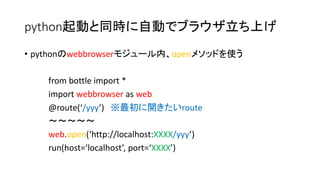
python起動と同時に自動でブラウザ立ち上げ • pythonのwebbrowserモジュール内、openメソッドを使う
from bottle import * import webbrowser as web @route(‘/yyy’) ※最初に開きたいroute ~~~~~ web.open(‘http://localhost:XXXX/yyy’) run(host=‘localhost’, port=‘XXXX’)
Download