Noah Zoschke
noah@convox.com
@nzoschke
SF Microservices Meetup
2/23/2017
Bootstrapping Microservices
Microservices often
mean more things to
worry about.
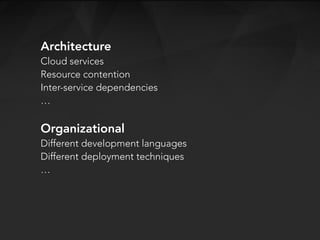
Architecture
Cloud services
Resource contention
Inter-service dependencies
…
Organizational
Different development languages
Different deployment techniques
…
But there is a simple
formula to avoid
many problems.
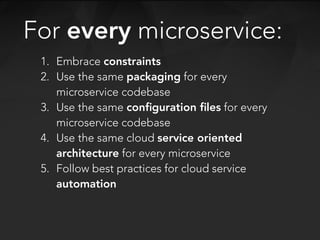
1. Embrace constraints
2. Use the same packaging for every
microservice codebase
3. Use the same configuration files for every
microservice codebase
4. Use the same cloud service oriented
architecture for every microservice
5. Follow best practices for cloud service
automation
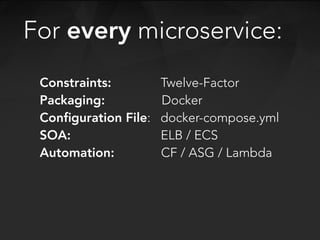
For every microservice:
Constraints: Twelve-Factor
Packaging: Docker
Configuration File: docker-compose.yml
SOA: ELB / ECS
Automation: CF / ASG / Lambda
For every microservice:
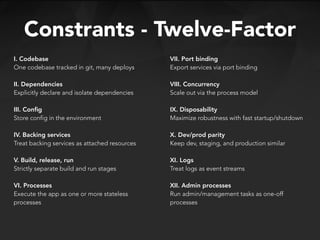
I. Codebase
One codebase tracked in git, many deploys
II. Dependencies
Explicitly declare and isolate dependencies
III. Config
Store config in the environment
IV. Backing services
Treat backing services as attached resources
V. Build, release, run
Strictly separate build and run stages
VI. Processes
Execute the app as one or more stateless
processes
Constrants - Twelve-Factor
VII. Port binding
Export services via port binding
VIII. Concurrency
Scale out via the process model
IX. Disposability
Maximize robustness with fast startup/shutdown
X. Dev/prod parity
Keep dev, staging, and production similar
XI. Logs
Treat logs as event streams
XII. Admin processes
Run admin/management tasks as one-off
processes
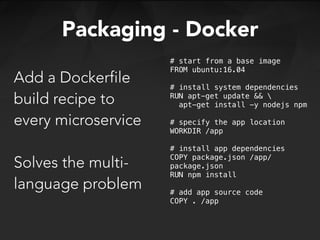
Add a Dockerfile
build recipe to
every microservice
Solves the multi-
language problem
Packaging - Docker
# start from a base image
FROM ubuntu:16.04
# install system dependencies
RUN apt-get update && 
apt-get install -y nodejs npm
# specify the app location
WORKDIR /app
# install app dependencies
COPY package.json /app/
package.json
RUN npm install
# add app source code
COPY . /app
Add a docker-
compose.yml
config recipe to
every codebase
Defines the SOA
for an app
Config - Docker Compose
version: '2'
services:
web:
build: .
command: ["bin/web"]
environment:
- REDIS_URL
- NODE_ENV=development
labels:
- convox.port.443.protocol=https
links:
- redis
ports:
- 80:8000
- 443:8000
worker:
build: .
command: ["bin/worker"]
environment:
- NODE_ENV=development
- REDIS_URL
links:
- redis
redis:
image: convox/redis
ports:
- 6379
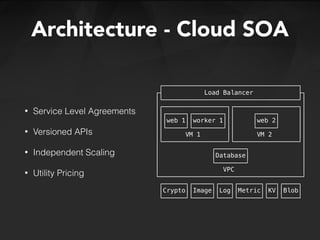
Architecture - Cloud SOA
• Service Level Agreements
• Versioned APIs
• Independent Scaling
• Utility Pricing
┌────────────────────────────────────┐
┌┤ Load Balancer ├┐
│└────────────────────────────────────┘│
│┌─────────────────┐┌─────────────────┐│
││┌─────┐┌────────┐││ ┌─────┐ ││
│││web 1││worker 1│││ │web 2│ ││
││└─────┘└────────┘││ └─────┘ ││
││ VM 1 ││ VM 2 ││
│└─────────────────┘└─────────────────┘│
│ ┌────────┐ │
│ │Database│ │
│ └────────┘ │
│ VPC │
└──────────────────────────────────────┘
┌──────┐┌─────┐┌───┐┌──────┐┌──┐┌────┐
│Crypto││Image││Log││Metric││KV││Blob│
└──────┘└─────┘└───┘└──────┘└──┘└────┘
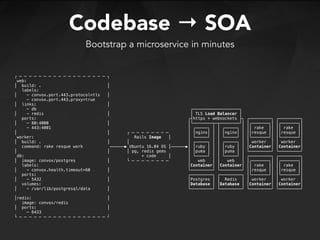
Codebase → SOA
Bootstrap a microservice in minutes
┌ ─ ─ ─ ─ ─ ─ ─ ─ ─ ─ ─ ─ ─ ─ ─ ─ ─ ─ ┐
web:
│ build: . │
labels:
│ - convox.port.443.protocol=tls │
- convox.port.443.proxy=true
│ links: │
- db ┌───────────────────┐
│ - redis │ │ TLS Load Balancer │
ports: ┌┤https + websockets ├┐ ┌─────────┐ ┌─────────┐
│ - 80:4000 │ │└────────┬─┬────────┘│ │┌───────┐│ │┌───────┐│
- 443:4001 │ ┌─────┐ │ │ ┌─────┐ │ ││ rake ││ ││ rake ││
│ │ ┌ ─ ─ ─ ─ ─ ─ ─ ─ │ │nginx│ │ │ │nginx│ │ ││resque ││ ││resque ││
worker: Rails Image │ │ └─────┘ │ │ └─────┘ │ │└───────┘│ │└───────┘│
│ build: . │ │ │ ┌─────┐ │ │ ┌─────┐ │ │ worker │ │ worker │
command: rake resque work ──────▶ Ubuntu 16.04 OS │──────▶│ │ruby │ │ │ │ruby │ │ │Container│ │Container│
│ │ │ pg, redis gems │ │puma │ │ │ │puma │ │ └─────────┘ └─────────┘
db: + code │ │ └─────┘ │ │ └─────┘ │ ┌─────────┐ ┌─────────┐
│ image: convox/postgres │ └ ─ ─ ─ ─ ─ ─ ─ ─ │ web │ │ web │ │┌───────┐│ │┌───────┐│
labels: │Container│ │Container│ ││ rake ││ ││ rake ││
│ - convox.health.timeout=60 │ └─────────┘ └─────────┘ ││resque ││ ││resque ││
ports: ┌─────────┐ ┌─────────┐ │└───────┘│ │└───────┘│
│ - 5432 │ │Postgres │ │ Redis │ │ worker │ │ worker │
volumes: │Database │ │Database │ │Container│ │Container│
│ - /var/lib/postgresql/data │ └─────────┘ └─────────┘ └─────────┘ └─────────┘
│redis: │
image: convox/redis
│ ports: │
- 6433
└ ─ ─ ─ ─ ─ ─ ─ ─ ─ ─ ─ ─ ─ ─ ─ ─ ─ ─ ┘
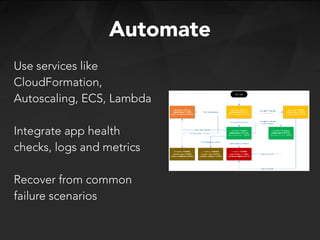
Automate
Use services like
CloudFormation,
Autoscaling, ECS, Lambda
Integrate app health
checks, logs and metrics
Recover from common
failure scenarios
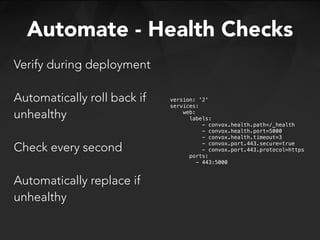
Automate - Health Checks
Verify during deployment
Automatically roll back if
unhealthy
Check every second
Automatically replace if
unhealthy
version: '2'
services:
web:
labels:
- convox.health.path=/_health
- convox.health.port=5000
- convox.health.timeout=3
- convox.port.443.secure=true
- convox.port.443.protocol=https
ports:
- 443:5000
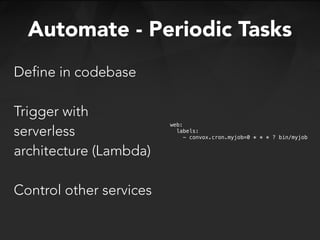
Automate - Periodic Tasks
Define in codebase
Trigger with
serverless
architecture (Lambda)
Control other services
web:
labels:
- convox.cron.myjob=0 * * * ? bin/myjob
Microservice Composition
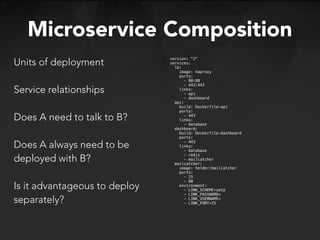
Units of deployment


Service relationships
Does A need to talk to B?
Does A always need to be
deployed with B?
Is it advantageous to deploy
separately?
version: "2"
services:
lb:
image: haproxy
ports:
- 80:80
- 443:443
links:
- api
- dashboard
api:
build: Dockerfile-api
ports:
- 443
links:
- database
dashboard:
build: Dockerfile-dashboard
ports:
- 443
links:
- database
- redis
- mailcatcher
mailcatcher:
image: helder/mailcatcher
ports:
- 25
- 80
environment:
- LINK_SCHEME=smtp
- LINK_PASSWORD=
- LINK_USERNAME=
- LINK_PORT=25
Microservice Discovery
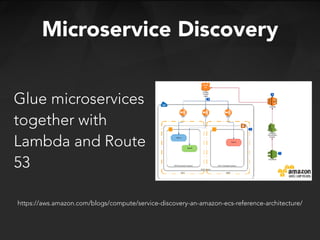
Glue microservices
together with
Lambda and Route
53
https://aws.amazon.com/blogs/compute/service-discovery-an-amazon-ecs-reference-architecture/
Embraces constraints
Uses Docker for packaging
Uses docker-compose for configuration
Runs on a reliable AWS architecture
Automates common failures
When every microservice:
There’s little to worry about
except code.
Noah Zoschke
noah@convox.com
@nzoschke
SF Microservices Meetup
2/23/2016
Thanks!

Bootstrapping Microservices

  • 1.
    Noah Zoschke noah@convox.com @nzoschke SF MicroservicesMeetup 2/23/2017 Bootstrapping Microservices
  • 2.
    Microservices often mean morethings to worry about.
  • 3.
    Architecture Cloud services Resource contention Inter-servicedependencies … Organizational Different development languages Different deployment techniques …
  • 4.
    But there isa simple formula to avoid many problems.
  • 5.
    1. Embrace constraints 2.Use the same packaging for every microservice codebase 3. Use the same configuration files for every microservice codebase 4. Use the same cloud service oriented architecture for every microservice 5. Follow best practices for cloud service automation For every microservice:
  • 6.
    Constraints: Twelve-Factor Packaging: Docker ConfigurationFile: docker-compose.yml SOA: ELB / ECS Automation: CF / ASG / Lambda For every microservice:
  • 7.
    I. Codebase One codebasetracked in git, many deploys II. Dependencies Explicitly declare and isolate dependencies III. Config Store config in the environment IV. Backing services Treat backing services as attached resources V. Build, release, run Strictly separate build and run stages VI. Processes Execute the app as one or more stateless processes Constrants - Twelve-Factor VII. Port binding Export services via port binding VIII. Concurrency Scale out via the process model IX. Disposability Maximize robustness with fast startup/shutdown X. Dev/prod parity Keep dev, staging, and production similar XI. Logs Treat logs as event streams XII. Admin processes Run admin/management tasks as one-off processes
  • 8.
    Add a Dockerfile buildrecipe to every microservice Solves the multi- language problem Packaging - Docker # start from a base image FROM ubuntu:16.04 # install system dependencies RUN apt-get update && apt-get install -y nodejs npm # specify the app location WORKDIR /app # install app dependencies COPY package.json /app/ package.json RUN npm install # add app source code COPY . /app
  • 9.
    Add a docker- compose.yml configrecipe to every codebase Defines the SOA for an app Config - Docker Compose version: '2' services: web: build: . command: ["bin/web"] environment: - REDIS_URL - NODE_ENV=development labels: - convox.port.443.protocol=https links: - redis ports: - 80:8000 - 443:8000 worker: build: . command: ["bin/worker"] environment: - NODE_ENV=development - REDIS_URL links: - redis redis: image: convox/redis ports: - 6379
  • 10.
    Architecture - CloudSOA • Service Level Agreements • Versioned APIs • Independent Scaling • Utility Pricing ┌────────────────────────────────────┐ ┌┤ Load Balancer ├┐ │└────────────────────────────────────┘│ │┌─────────────────┐┌─────────────────┐│ ││┌─────┐┌────────┐││ ┌─────┐ ││ │││web 1││worker 1│││ │web 2│ ││ ││└─────┘└────────┘││ └─────┘ ││ ││ VM 1 ││ VM 2 ││ │└─────────────────┘└─────────────────┘│ │ ┌────────┐ │ │ │Database│ │ │ └────────┘ │ │ VPC │ └──────────────────────────────────────┘ ┌──────┐┌─────┐┌───┐┌──────┐┌──┐┌────┐ │Crypto││Image││Log││Metric││KV││Blob│ └──────┘└─────┘└───┘└──────┘└──┘└────┘
  • 11.
    Codebase → SOA Bootstrapa microservice in minutes ┌ ─ ─ ─ ─ ─ ─ ─ ─ ─ ─ ─ ─ ─ ─ ─ ─ ─ ─ ┐ web: │ build: . │ labels: │ - convox.port.443.protocol=tls │ - convox.port.443.proxy=true │ links: │ - db ┌───────────────────┐ │ - redis │ │ TLS Load Balancer │ ports: ┌┤https + websockets ├┐ ┌─────────┐ ┌─────────┐ │ - 80:4000 │ │└────────┬─┬────────┘│ │┌───────┐│ │┌───────┐│ - 443:4001 │ ┌─────┐ │ │ ┌─────┐ │ ││ rake ││ ││ rake ││ │ │ ┌ ─ ─ ─ ─ ─ ─ ─ ─ │ │nginx│ │ │ │nginx│ │ ││resque ││ ││resque ││ worker: Rails Image │ │ └─────┘ │ │ └─────┘ │ │└───────┘│ │└───────┘│ │ build: . │ │ │ ┌─────┐ │ │ ┌─────┐ │ │ worker │ │ worker │ command: rake resque work ──────▶ Ubuntu 16.04 OS │──────▶│ │ruby │ │ │ │ruby │ │ │Container│ │Container│ │ │ │ pg, redis gems │ │puma │ │ │ │puma │ │ └─────────┘ └─────────┘ db: + code │ │ └─────┘ │ │ └─────┘ │ ┌─────────┐ ┌─────────┐ │ image: convox/postgres │ └ ─ ─ ─ ─ ─ ─ ─ ─ │ web │ │ web │ │┌───────┐│ │┌───────┐│ labels: │Container│ │Container│ ││ rake ││ ││ rake ││ │ - convox.health.timeout=60 │ └─────────┘ └─────────┘ ││resque ││ ││resque ││ ports: ┌─────────┐ ┌─────────┐ │└───────┘│ │└───────┘│ │ - 5432 │ │Postgres │ │ Redis │ │ worker │ │ worker │ volumes: │Database │ │Database │ │Container│ │Container│ │ - /var/lib/postgresql/data │ └─────────┘ └─────────┘ └─────────┘ └─────────┘ │redis: │ image: convox/redis │ ports: │ - 6433 └ ─ ─ ─ ─ ─ ─ ─ ─ ─ ─ ─ ─ ─ ─ ─ ─ ─ ─ ┘
  • 12.
    Automate Use services like CloudFormation, Autoscaling,ECS, Lambda Integrate app health checks, logs and metrics Recover from common failure scenarios
  • 13.
    Automate - HealthChecks Verify during deployment Automatically roll back if unhealthy Check every second Automatically replace if unhealthy version: '2' services: web: labels: - convox.health.path=/_health - convox.health.port=5000 - convox.health.timeout=3 - convox.port.443.secure=true - convox.port.443.protocol=https ports: - 443:5000
  • 14.
    Automate - PeriodicTasks Define in codebase Trigger with serverless architecture (Lambda) Control other services web: labels: - convox.cron.myjob=0 * * * ? bin/myjob
  • 15.
    Microservice Composition Units ofdeployment 
 Service relationships Does A need to talk to B? Does A always need to be deployed with B? Is it advantageous to deploy separately? version: "2" services: lb: image: haproxy ports: - 80:80 - 443:443 links: - api - dashboard api: build: Dockerfile-api ports: - 443 links: - database dashboard: build: Dockerfile-dashboard ports: - 443 links: - database - redis - mailcatcher mailcatcher: image: helder/mailcatcher ports: - 25 - 80 environment: - LINK_SCHEME=smtp - LINK_PASSWORD= - LINK_USERNAME= - LINK_PORT=25
  • 16.
    Microservice Discovery Glue microservices togetherwith Lambda and Route 53 https://aws.amazon.com/blogs/compute/service-discovery-an-amazon-ecs-reference-architecture/
  • 17.
    Embraces constraints Uses Dockerfor packaging Uses docker-compose for configuration Runs on a reliable AWS architecture Automates common failures When every microservice: There’s little to worry about except code.
  • 18.