Slide 1.1
Analysing quantitative data
Slide 1.2
Quantitative data analysis
Key points
Data must be analysed to produce information
Computer software analysis is normally used for this
process (Microsoft Excel, SPSS etc.)
Present, explore, describe & examine relationships
Slide 1.3
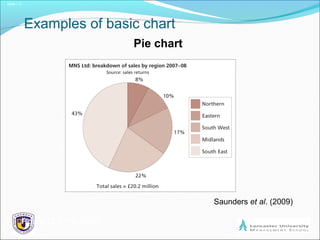
Examples of basic chart
Pie chart
Saunders et al. (2009)
Figure 12.8 Pie chart
Slide 1.4
More advanced work requires Statistical analysis
Establishing the statistical relationship between two
variables (e.g. If I am in this group I am have a %
probability of doing X).
If you need to do this then see:
http://www.statsoff.com/textbook
http://oli.web.cmu.edu/openlearning/forstudents
/freecourses/statistics
Slide 1.5
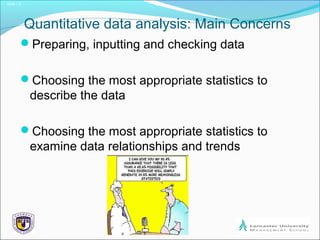
Quantitative data analysis: Main Concerns
Preparing, inputting and checking data
Choosing the most appropriate statistics to
describe the data
Choosing the most appropriate statistics to
examine data relationships and trends
Slide 1.6
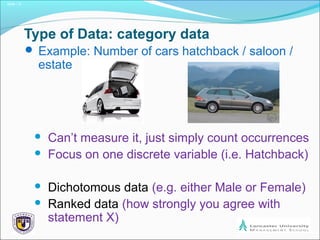
Type of Data: category data
 Example: Number of cars hatchback / saloon /
estate
 Can’t measure it, just simply count occurrences
 Focus on one discrete variable (i.e. Hatchback)
 Dichotomous data (e.g. either Male or Female)
 Ranked data (how strongly you agree with
statement X)
Slide 1.7
Type of Data: numerical data
 Example: temperature in Celsius
 Quantifiable data that can be measured
 Interval data e.g. Degrees Celsius [zero
degrees is not actually ZERO]
 Ratio (calculate the difference) data e.g.
Profits up 34% for a year
Slide 1.8
Type of Data: continuous data
 Example: height of students
 Can be any value [within a range]
Slide 1.9
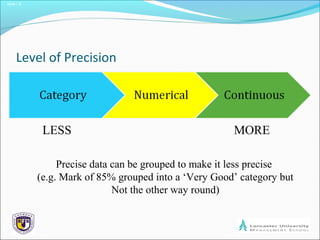
Level of Precision
LESS MORE
Precise data can be grouped to make it less precise
(e.g. Mark of 85% grouped into a ‘Very Good’ category but
Not the other way round)
Slide 1.10
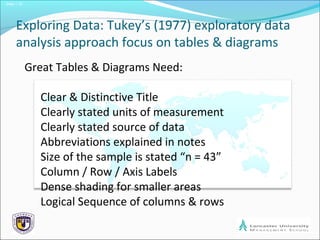
Exploring Data: Tukey’s (1977) exploratory data
analysis approach focus on tables & diagrams
Great Tables & Diagrams Need:
Clear & Distinctive Title
Clearly stated units of measurement
Clearly stated source of data
Abbreviations explained in notes
Size of the sample is stated “n = 43”
Column / Row / Axis Labels
Dense shading for smaller areas
Logical Sequence of columns & rows
Slide 1.11
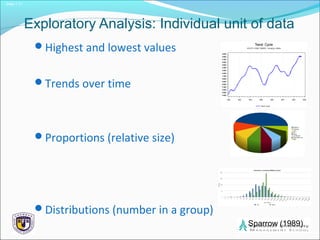
Exploratory Analysis: Individual unit of data
Highest and lowest values
Trends over time
Proportions (relative size)
Distributions (number in a group)
Sparrow (1989)
Slide 1.12
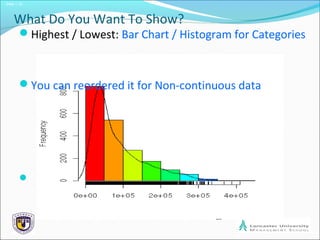
What Do You Want To Show?
Highest / Lowest: Bar Chart / Histogram for Categories
You can reordered it for Non-continuous data

Slide 1.13
What Do You Want To Show?
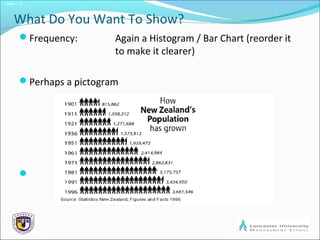
Frequency: Again a Histogram / Bar Chart (reorder it
to make it clearer)
Perhaps a pictogram

Slide 1.14
What Do You Want To Show?
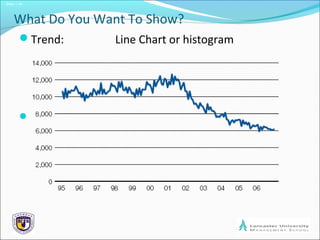
Trend: Line Chart or histogram

Slide 1.15
What Do You Want To Show?
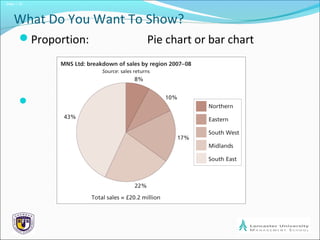
Proportion: Pie chart or bar chart

Slide 1.16
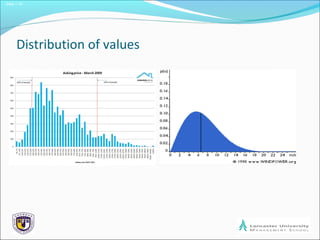
Distribution of values
Slide 1.17
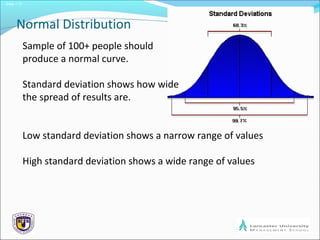
Normal Distribution
Sample of 100+ people should
produce a normal curve.
Standard deviation shows how wide
the spread of results are.
Low standard deviation shows a narrow range of values
High standard deviation shows a wide range of values
Slide 1.18
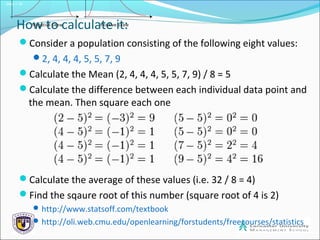
How to calculate it:
Consider a population consisting of the following eight values:
2, 4, 4, 4, 5, 5, 7, 9
Calculate the Mean (2, 4, 4, 4, 5, 5, 7, 9) / 8 = 5
Calculate the difference between each individual data point and
the mean. Then square each one
Calculate the average of these values (i.e. 32 / 8 = 4)
Find the sqaure root of this number (square root of 4 is 2)
http://www.statsoff.com/textbook
http://oli.web.cmu.edu/openlearning/forstudents/freecourses/statistics
Slide 1.19
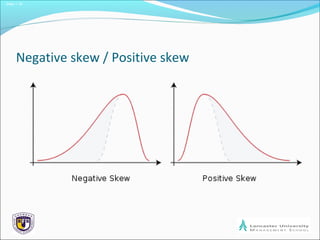
Negative skew / Positive skew
Slide 1.20
What to do with your distribution?
Try to understand what is the story behind the data:
Is the data ‘unrepresentative’?
Are the categories the wrong width?
Is there something going on we did not know
about at the start?
Slide 1.21
Comparing variables to show
Totals
Proportions and totals
Distribution of values
Relationship between cases for variables
Slide 1.22
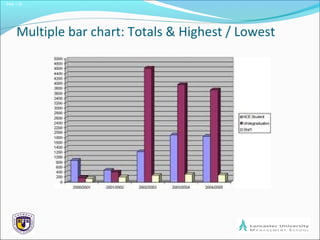
Multiple bar chart: Totals & Highest / Lowest
Slide 1.23
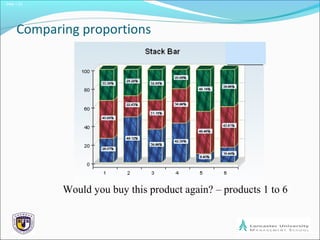
Comparing proportions
Would you buy this product again? – products 1 to 6
Slide 1.24
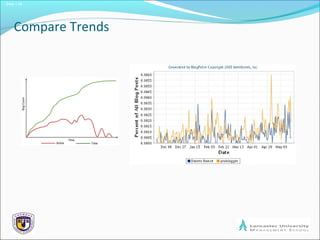
Compare Trends
Slide 1.25
A final word of caution
GI-GO
Garbage In – Garbage Out

Bj research session 9 analysing quantitative

  • 1.
  • 2.
    Slide 1.2 Quantitative dataanalysis Key points Data must be analysed to produce information Computer software analysis is normally used for this process (Microsoft Excel, SPSS etc.) Present, explore, describe & examine relationships
  • 3.
    Slide 1.3 Examples ofbasic chart Pie chart Saunders et al. (2009) Figure 12.8 Pie chart
  • 4.
    Slide 1.4 More advancedwork requires Statistical analysis Establishing the statistical relationship between two variables (e.g. If I am in this group I am have a % probability of doing X). If you need to do this then see: http://www.statsoff.com/textbook http://oli.web.cmu.edu/openlearning/forstudents /freecourses/statistics
  • 5.
    Slide 1.5 Quantitative dataanalysis: Main Concerns Preparing, inputting and checking data Choosing the most appropriate statistics to describe the data Choosing the most appropriate statistics to examine data relationships and trends
  • 6.
    Slide 1.6 Type ofData: category data  Example: Number of cars hatchback / saloon / estate  Can’t measure it, just simply count occurrences  Focus on one discrete variable (i.e. Hatchback)  Dichotomous data (e.g. either Male or Female)  Ranked data (how strongly you agree with statement X)
  • 7.
    Slide 1.7 Type ofData: numerical data  Example: temperature in Celsius  Quantifiable data that can be measured  Interval data e.g. Degrees Celsius [zero degrees is not actually ZERO]  Ratio (calculate the difference) data e.g. Profits up 34% for a year
  • 8.
    Slide 1.8 Type ofData: continuous data  Example: height of students  Can be any value [within a range]
  • 9.
    Slide 1.9 Level ofPrecision LESS MORE Precise data can be grouped to make it less precise (e.g. Mark of 85% grouped into a ‘Very Good’ category but Not the other way round)
  • 10.
    Slide 1.10 Exploring Data:Tukey’s (1977) exploratory data analysis approach focus on tables & diagrams Great Tables & Diagrams Need: Clear & Distinctive Title Clearly stated units of measurement Clearly stated source of data Abbreviations explained in notes Size of the sample is stated “n = 43” Column / Row / Axis Labels Dense shading for smaller areas Logical Sequence of columns & rows
  • 11.
    Slide 1.11 Exploratory Analysis:Individual unit of data Highest and lowest values Trends over time Proportions (relative size) Distributions (number in a group) Sparrow (1989)
  • 12.
    Slide 1.12 What DoYou Want To Show? Highest / Lowest: Bar Chart / Histogram for Categories You can reordered it for Non-continuous data 
  • 13.
    Slide 1.13 What DoYou Want To Show? Frequency: Again a Histogram / Bar Chart (reorder it to make it clearer) Perhaps a pictogram 
  • 14.
    Slide 1.14 What DoYou Want To Show? Trend: Line Chart or histogram 
  • 15.
    Slide 1.15 What DoYou Want To Show? Proportion: Pie chart or bar chart 
  • 16.
  • 17.
    Slide 1.17 Normal Distribution Sampleof 100+ people should produce a normal curve. Standard deviation shows how wide the spread of results are. Low standard deviation shows a narrow range of values High standard deviation shows a wide range of values
  • 18.
    Slide 1.18 How tocalculate it: Consider a population consisting of the following eight values: 2, 4, 4, 4, 5, 5, 7, 9 Calculate the Mean (2, 4, 4, 4, 5, 5, 7, 9) / 8 = 5 Calculate the difference between each individual data point and the mean. Then square each one Calculate the average of these values (i.e. 32 / 8 = 4) Find the sqaure root of this number (square root of 4 is 2) http://www.statsoff.com/textbook http://oli.web.cmu.edu/openlearning/forstudents/freecourses/statistics
  • 19.
    Slide 1.19 Negative skew/ Positive skew
  • 20.
    Slide 1.20 What todo with your distribution? Try to understand what is the story behind the data: Is the data ‘unrepresentative’? Are the categories the wrong width? Is there something going on we did not know about at the start?
  • 21.
    Slide 1.21 Comparing variablesto show Totals Proportions and totals Distribution of values Relationship between cases for variables
  • 22.
    Slide 1.22 Multiple barchart: Totals & Highest / Lowest
  • 23.
    Slide 1.23 Comparing proportions Wouldyou buy this product again? – products 1 to 6
  • 24.
  • 25.
    Slide 1.25 A finalword of caution GI-GO Garbage In – Garbage Out