Using bCisive to create a document taxonomy  A canned example: DISCLAIMER: This is not an Australian Taxation Office (ATO) publication, ATO Tax Tables are available to the public, via the ATO website on  http://www.ato.gov.au/  and are used for illustration purposes only. Definition:  taxonomy  tax·on·o·my (tāk-sŏn'ə-mē) n.   The classification of information in an ordered system that indicates natural relationships.
Begin with the overall label for the group of documents Use the  Expore  tab to browse the web, or local intranet, to locate the group of documents
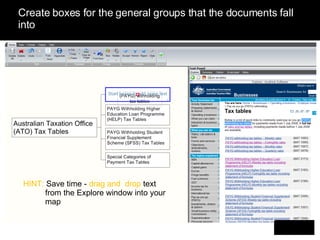
Create boxes for the general groups that the documents fall into HINT:  Save time -  drag and  drop  text from the Explore window into your map
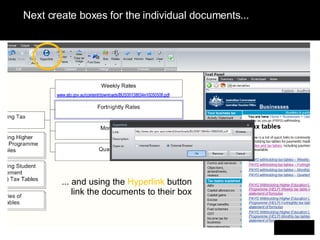
Next create boxes for the individual documents... ... and using the  Hyperlink  button link the documents to their box
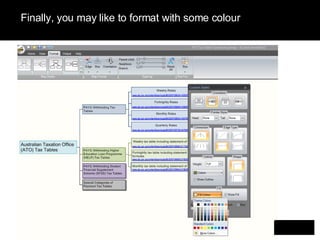
Finally, you may like to format with some colour
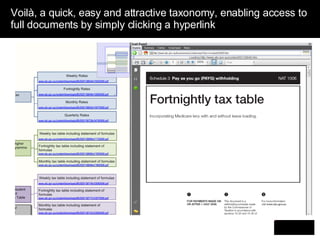
Voilà, a quick, easy and attractive taxonomy, enabling access to full documents by simply clicking a hyperlink .
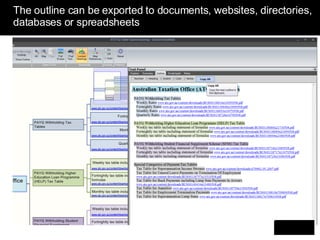
The outline can be exported to documents, websites, directories, databases or spreadsheets
The benefits of developing a bCisive taxonomy Improved quality Provides a basis for accurate and consistent subject metadata. Helps improve the efficiency (and reduce cost) of application integration, website design and knowledge management initiatives. Easier navigation, more efficient search Easier for users to navigate through large volumes of information. Increases the opportunities for the serendipitous discovery of  information. Improved information sharing Provides a shared language and repository for different parts of an organisation. Reduces time spent on duplication and reinvention, by making the existing intellectual capital resources more visible and accessible. .
The benefits continued A better user experience Helps users visualise the multidimensional space in which they are searching, and enhances their ability to take advantage of the  underlying taxonomy. Interoperability and integration Helps to link up various applications, processes and knowledge bases to improve competitiveness and flexibility. Design and management Supports the rapid design, test and refinement of taxonomies.
Contact To download and explore bCisive yourself  click here   Or for more information please contact: Katherine Brandenberger Corporate Software Manager Austhink Software Pty Ltd Email:  [email_address] Level 9, 255 Bourke St, Melbourne Vic 3000 Direct: +61 3 8317 1002 ext. 109 | Fax: +61 3 9663 9720 Skype: katherine.brandenberger LinkedIn:  http://www.linkedin.com/in/katherinebrandenberger   www.bcisive.austhink.com                

bCisive Tax Taxonomy

  • 1.
    Using bCisive tocreate a document taxonomy A canned example: DISCLAIMER: This is not an Australian Taxation Office (ATO) publication, ATO Tax Tables are available to the public, via the ATO website on http://www.ato.gov.au/ and are used for illustration purposes only. Definition: taxonomy tax·on·o·my (tāk-sŏn'ə-mē) n. The classification of information in an ordered system that indicates natural relationships.
  • 2.
    Begin with theoverall label for the group of documents Use the Expore tab to browse the web, or local intranet, to locate the group of documents
  • 3.
    Create boxes forthe general groups that the documents fall into HINT: Save time - drag and drop text from the Explore window into your map
  • 4.
    Next create boxesfor the individual documents... ... and using the Hyperlink button link the documents to their box
  • 5.
    Finally, you maylike to format with some colour
  • 6.
    Voilà, a quick,easy and attractive taxonomy, enabling access to full documents by simply clicking a hyperlink .
  • 7.
    The outline canbe exported to documents, websites, directories, databases or spreadsheets
  • 8.
    The benefits ofdeveloping a bCisive taxonomy Improved quality Provides a basis for accurate and consistent subject metadata. Helps improve the efficiency (and reduce cost) of application integration, website design and knowledge management initiatives. Easier navigation, more efficient search Easier for users to navigate through large volumes of information. Increases the opportunities for the serendipitous discovery of information. Improved information sharing Provides a shared language and repository for different parts of an organisation. Reduces time spent on duplication and reinvention, by making the existing intellectual capital resources more visible and accessible. .
  • 9.
    The benefits continuedA better user experience Helps users visualise the multidimensional space in which they are searching, and enhances their ability to take advantage of the underlying taxonomy. Interoperability and integration Helps to link up various applications, processes and knowledge bases to improve competitiveness and flexibility. Design and management Supports the rapid design, test and refinement of taxonomies.
  • 10.
    Contact To downloadand explore bCisive yourself click here Or for more information please contact: Katherine Brandenberger Corporate Software Manager Austhink Software Pty Ltd Email: [email_address] Level 9, 255 Bourke St, Melbourne Vic 3000 Direct: +61 3 8317 1002 ext. 109 | Fax: +61 3 9663 9720 Skype: katherine.brandenberger LinkedIn: http://www.linkedin.com/in/katherinebrandenberger www.bcisive.austhink.com