Prep by: BilisaSh.
1
What is a Network?
• A network is a collection of two or more
computers, printers, and other devices that are
connected together to share resources and
exchange information.
Think of it like a road system connecting cities:
• The computers and devices are the cities.
• The cables or Wi-Fi are the roads.
• The data being shared (emails, files, videos) is
the traffic.
2.
Prep by: BilisaSh.
2
Networking
• The primary goal of a network is to enable sharing.
▫ Share Hardware: Multiple users can use one printer.
▫ Share Files: You can access documents from a central
server.
▫ Share an Internet Connection: Everyone in an office or
home can use the same internet line.
▫ Communicate: Send emails and instant messages.
• What is Networking?
Networking is the entire field of practice, technology, and
concepts involved in creating, managing, securing,
and using a network.
3.
Prep by: BilisaSh.
3
It involves:
• Designing the layout (network topology).
• Installing the physical equipment (routers, switches,
cables).
• Configuring the software and addresses (IP addresses,
security).
• Troubleshooting problems when they occur.
• Network (Noun): The social circle of friends you have.
• Networking (Verb): The act of going out, meeting
people, building relationships, and maintaining those
connections.
4.
Prep by: BilisaSh.
4
Cont’
•Network: the system of
connected devices.
•Networking: the act of
building and managing that
system.
5.
Prep by: BilisaSh.
5
Advantages of Networking
• The core benefits that justify creating a network.
• Resource Sharing: Share expensive devices
like high-quality printers.
• Improved Communication: Email, instant
messaging, and video conferencing.
• Data Centralization: Store files on a central
server for easier backup, security, and
collaboration.
• Cost Savings: Reduce expenses through shared
resources.
6.
Prep by: BilisaSh.
6
Types of Network by Geographical Coverage
1. PAN (Personal Area Network)
• Coverage: Very small area, typically within a
10-meter range (a person's immediate
workspace).
• Description: A network for connecting devices
centered around an individual person.
• Technology: Bluetooth, Infrared, USB.
• Example: Connecting a wireless mouse,
keyboard, and headphones to a single laptop.
7.
Prep by: BilisaSh.
7
2. LAN (Local Area Network)
• Coverage: A limited geographic area, like a
single building, office, home, or campus.
• Description: Connects devices within a close
proximity. It is privately owned and managed.
• Technology: Ethernet cables, Wi-Fi.
• Example: A home Wi-Fi network, or the
network in a school computer lab connecting all
PCs to a central printer.
8.
Prep by: BilisaSh.
8
3. CAN (Campus Area Network)
• Coverage: A collection of interconnected LANs
within a university campus, corporate campus,
or military base.
• Description: Larger than a single LAN but
smaller than a MAN.
• Example: A university network connecting the
library, engineering building, and dormitories.
9.
Prep by: BilisaSh.
9
4. MAN (Metropolitan Area Network)
• Coverage: A city or a large campus.
• Description: Spans a metropolitan area,
connecting multiple LANs or buildings.
• Technology: Microwave links, fiber-optic
cables.
• Example: A city-wide network connecting all
branches of a bank, or the cable TV network for a
city.
10.
Prep by: BilisaSh.
10
5. WAN (Wide Area Network)
• Coverage: A country, a continent, or the entire
globe.
• Description: Connects networks over vast
geographical distances. The most famous WAN is
the Internet.
• Technology: Leased telecommunication lines,
satellites.
• Example: A multinational corporation connecting
its office in New York with its offices in London
and Tokyo.
11.
Prep by: BilisaSh.
11
Visual Summary:
From Smallest to Largest
• PAN (You and your devices) → LAN (Your
house or office) → CAN (Your entire campus)
→ MAN (Your city) → WAN (The entire world)
12.
Prep by: BilisaSh.
12
Category by Functional Relationship
1. Client-Server Network
• Description: A centralized network architecture where
specific, powerful computers called servers provide
services and resources to less powerful computers
called clients.
• Roles:
▫ Server: A dedicated computer that manages and
provides shared resources like files, databases, email, or
network traffic. It is typically more powerful and runs a
network operating system (e.g., Windows Server, Linux).
▫ Client: A standard user's computer that requests and
uses the services provided by the server. (e.g., a desktop
PC, laptop).
13.
Prep by: BilisaSh.
13
Key Characteristics:
▫ Centralized Management: Security,
backups, and user accounts are managed from
the server.
▫ Scalable: Easy to add more clients by
upgrading server capacity.
▫ High Performance: Servers are optimized
for handling multiple requests.
14.
Prep by: BilisaSh.
14
2. Peer-to-Peer (P2P) Network
• Description: A decentralized network
architecture where all computers (called peers)
have equal status. There is no central server;
each computer can act as both a client and a
server.
• Roles:
▫ Peer: Each computer can share its own
resources (files, printers) and access shared
resources on other peers.
15.
Prep by: BilisaSh.
15
Key Characteristics:
▫ Decentralized Management: No single
computer has control over the network.
▫ Easy to Set Up: Inexpensive and simple to
create, often using built-in OS features.
▫ Less Secure: Security is managed individually
on each computer, making it harder to enforce
policies.
▫ Not Scalable: Performance degrades as more
peers are added. Suitable for small networks
(e.g., under 10 computers).
16.
Prep by: BilisaSh.
16
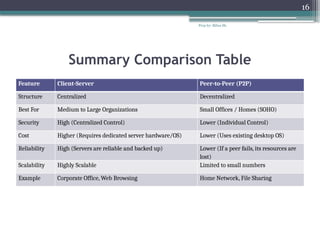
Summary Comparison Table
Feature Client-Server Peer-to-Peer (P2P)
Structure Centralized Decentralized
Best For Medium to Large Organizations Small Offices / Homes (SOHO)
Security High (Centralized Control) Lower (Individual Control)
Cost Higher (Requires dedicated server hardware/OS) Lower (Uses existing desktop OS)
Reliability High (Servers are reliable and backed up) Lower (If a peer fails, its resources are
lost)
Scalability Highly Scalable Limited to small numbers
Example Corporate Office, Web Browsing Home Network, File Sharing
17.
Prep by: BilisaSh.
17
Network Topology
What is Network Topology?
• Network Topology refers to the physical or
logical layout of how devices (nodes) and
connections (links) are arranged on a network.
• It defines the structure and the data flow path
between these devices.
18.
Prep by: BilisaSh.
18
Common Types of Network Topology
1. Bus Topology
Description: All devices are connected to a single central
cable (called the backbone or bus).
How it Works: Data sent by one device travels along the
backbone and is seen by all other devices, but only the
intended recipient accepts it.
Advantages:
• Easy to set up and extend.
• Requires less cable than other topologies.
Disadvantages:
• If the main cable fails, the whole network goes down.
• Performance degrades as more devices are added.
19.
Prep by: BilisaSh.
19
2. Star Topology
Description: All devices are connected to a central
networking device, such as a switch or hub.
How it Works: All data traffic passes through the central
device, which manages and directs the traffic.
Advantages:
• Easy to install and manage.
• Failure of one device does not affect the others.
• Easy to add or remove devices.
Disadvantages:
• If the central hub fails, the entire network goes down.
• Requires more cable than bus topology.
20.
Prep by: BilisaSh.
20
3. Ring Topology
Description: Each device is connected to exactly two
other devices, forming a circular loop.
How it Works: Data travels in one direction
(unidirectional) around the ring from device to device. A
"token" is often used to control transmission rights.
Advantages:
• Data packets travel at high speeds.
• Easier to troubleshoot than bus topology.
Disadvantages:
• Failure of one device can disrupt the entire network.
• Adding or removing devices can be disruptive.
21.
Prep by: BilisaSh.
21
4. Mesh Topology
Description: Devices are interconnected, with multiple paths between them.
• Types:
▫ Full Mesh: Every device is directly connected to every other device.
▫ Partial Mesh: Some devices are connected to all others, but some are
only connected to those they exchange the most data with.
Advantages:
• Highly reliable; failure of one link does not affect the entire network.
• Extremely reliable and fault-tolerant. If one path fails, another can be used.
• Provides multiple paths for data transmission.
Disadvantages:
• Expensive due to the amount of cabling and network ports required.
• Complex to set up and manage.
Example: The Internet backbone is a partial mesh network.
22.
Prep by: BilisaSh.
22
5. Hybrid Topology
Description: A combination of two or more different topologies.
How it Works: Inherits the advantages and disadvantages of
the topologies it combines
Advantages:.
• Flexible and scalable.
• Can be designed to meet specific needs of a network.
Disadvantages:
• Complexity can lead to higher costs.
• Challenges in management and maintenance.
• Example: A star-bus topology
23.
Prep by: BilisaSh.
23
Network Transmission Media
Network Transmission Media refers to the physical
pathways or channels through which data is transmitted
from one device to another in a network.
Network transmission media can be broadly categorized
into two main types:
Guided (Wired) and
Unguided (Wireless) media.
1. Guided (Wired) Transmission Media
These use a physical path (cable) to transmit signals
between devices.
24.
Prep by: BilisaSh.
24
A. Twisted Pair Cable
-Pairs of insulated copper wires twisted together to reduce
electromagnetic interference.
Types:
▫ UTP (Unshielded Twisted Pair): Most common;
used in Ethernet networks; inexpensive but
susceptible to interference.
▫ STP (Shielded Twisted Pair): Has additional
shielding for better interference protection; more
expensive.
Connector: RJ-45
Common Use: LAN connections, telephone lines.
25.
Prep by: BilisaSh.
25
B. Coaxial Cable
• Central copper conductor surrounded by insulation,
metallic shield, and plastic jacket.
• Better shielding than twisted pair; longer distance
capability.
• Connector: BNC, F-type
• Common Use: Cable TV, older Ethernet networks.
26.
Prep by: BilisaSh.
26
C. Fiber-Optic Cable
• Uses glass or plastic fibers to transmit data as light pulses.
• Features:
▫ Very high bandwidth and speed
▫ Secure data transmission
▫ Long distance capability
• Types:
▫ Single-mode: For long distances; uses laser light.
▫ Multimode: For shorter distances; uses LED light.
• Connector: SC, ST, LC
• Common Use: Network backbones, long-distance
communications.
27.
Prep by: BilisaSh.
27
2. Unguided (Wireless) Transmission Media
• These use electromagnetic waves through air or space
without physical cables.
A. Radio Waves
• Frequency Range: 3 kHz to 300 GHz
• Types:
▫ Wi-Fi (Wireless Fidelity): 2.4 GHz and 5 GHz
bands
▫ Bluetooth: Short-range personal area networks
▫ Cellular Networks: 3G, 4G, 5G mobile
communications
28.
Prep by: BilisaSh.
28
B. Microwaves
• Frequency Range: 300 MHz to 300 GHz
-High bandwidth; affected by weather.
• Types:
▫ Terrestrial Microwave
▫ Satellite Microwave
29.
Prep by: BilisaSh.
29
C. Infrared
• Frequency Range: 300 GHz to 400 THz
• Characteristics:
▫ Short-range communication
▫ Line-of-sight required
▫ Cannot penetrate walls
• Common Use: Remote controls, short-range
device communication.
Prep by: BilisaSh.
31
Networking Devices
• Router: Connects different networks together efficiently.
• Switch: Connects devices within a network.
• Hub: Simple device broadcasting data everywhere.
• Access Point: Extends wireless network coverage
effectively.
• Modem: Converts signals for internet connectivity.
• Firewall: Protects networks from unauthorized access.
• NIC: Enables devices to connect networks.
• Repeater: Amplifies signals to extend distance.
• Bridge: Connects multiple network segments seamlessly.
• Gateway: Translates between different network protocols.
32.
Prep by: BilisaSh.
32
IP Terminology
The addressing system for devices on a network.
• IP Address: A unique logical address for a device.
▫ Type: IPv4 (e.g., 192.168.1.10)
and IPv6 (e.g., 2001:db8::1).
• Gateway: The router's address on your network. The "door"
to the outside world.
▫ Example: 192.168.1.1 is a common gateway address for
home routers.
• DNS (Domain Name System): Translates human-friendly
names to IP addresses.
▫ Example: When you type www.google.com, DNS finds its
IP address (142.251.32.206).
33.
Prep by: BilisaSh.
33
Subnet Masks
A 32-bit number that separates an IP address into Network ID and Host ID.
To break a large network into smaller, manageable sub-networks.
• Common Types & Examples:
• Class C Mask: 255.255.255.0 (or /24 in CIDR notation)
▫ Binary: 11111111.11111111.11111111.00000000
▫ Example: For IP 192.168.1.50:
Network ID: 192.168.1.0 (the first three octets)
Host ID: 50 (the last octet)
• Class B Mask: 255.255.0.0 (or /16)
▫ Example: For IP 172.16.35.10:
Network ID: 172.16.0.0
Host ID: 35.10