Premier pas avec Docker 2019/10/08
#BBL
Premier pas avec Docker
BBL : CONECS
2019/10/08
Premier pas avec Docker 2019/10/08
#BBL
Abstract
Premiers pas avec Docker
Il s’agit dans un premier temps de présenter Docker,
ses cas d’usage et quelques bonnes pratiques
d’utilisation.
Le but est de présenter Docker, son mode de
fonctionnement et son écosystème. Ce qu’il peut
apporter et les pièges à éviter
To Do
Français English
Premier pas avec Docker 2019/10/08
#BBL
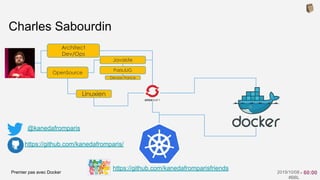
@kanedafromparis
Charles Sabourdin
Javaiste
Linuxien
Devoxx France
ParisJUG
OpenSource
Architect
Dev/Ops
https://github.com/kanedafromparis/
https://github.com/kanedafromparisfriends
- 60:00
Premier pas avec Docker 2019/10/08
#BBL
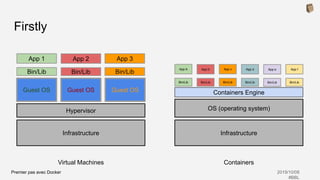
Firstly
InfrastructureInfrastructure
Hypervisor OS (operating system)
Guest OS Guest OS Guest OS
Bin/Lib
App 1
Bin/Lib
App 2
Bin/Lib
App 3
App A
Bin/Lib
App b
Bin/Lib
App c
Containers Engine
ContainersVirtual Machines
Bin/Lib
App d
Bin/Lib
App e
Bin/Lib
App f
Bin/Lib
Premier pas avec Docker 2019/10/08
#BBL
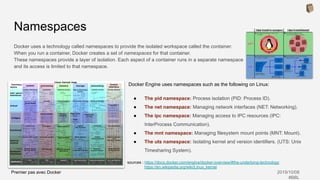
Docker Engine uses namespaces such as the following on Linux:
● The pid namespace: Process isolation (PID: Process ID).
● The net namespace: Managing network interfaces (NET: Networking).
● The ipc namespace: Managing access to IPC resources (IPC:
InterProcess Communication).
● The mnt namespace: Managing filesystem mount points (MNT: Mount).
● The uts namespace: Isolating kernel and version identifiers. (UTS: Unix
Timesharing System).
Namespaces
Docker uses a technology called namespaces to provide the isolated workspace called the container.
When you run a container, Docker creates a set of namespaces for that container.
These namespaces provide a layer of isolation. Each aspect of a container runs in a separate namespace
and its access is limited to that namespace.
sources : https://docs.docker.com/engine/docker-overview/#the-underlying-technology
https://en.wikipedia.org/wiki/Linux_kernel
Premier pas avec Docker 2019/10/08
#BBL
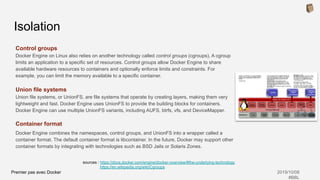
Control groups
Docker Engine on Linux also relies on another technology called control groups (cgroups). A cgroup
limits an application to a specific set of resources. Control groups allow Docker Engine to share
available hardware resources to containers and optionally enforce limits and constraints. For
example, you can limit the memory available to a specific container.
Union file systems
Union file systems, or UnionFS, are file systems that operate by creating layers, making them very
lightweight and fast. Docker Engine uses UnionFS to provide the building blocks for containers.
Docker Engine can use multiple UnionFS variants, including AUFS, btrfs, vfs, and DeviceMapper.
Container format
Docker Engine combines the namespaces, control groups, and UnionFS into a wrapper called a
container format. The default container format is libcontainer. In the future, Docker may support other
container formats by integrating with technologies such as BSD Jails or Solaris Zones.
Isolation
sources : https://docs.docker.com/engine/docker-overview/#the-underlying-technology
https://en.wikipedia.org/wiki/Cgroups
Premier pas avec Docker 2019/10/08
#BBL
sources : https://docs.docker.com/engine/docker-overview/#the-underlying-technology
https://docs.docker.com/ee/ucp/user-access/cli/
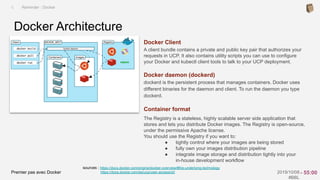
Docker Client
A client bundle contains a private and public key pair that authorizes your
requests in UCP. It also contains utility scripts you can use to configure
your Docker and kubectl client tools to talk to your UCP deployment.
Docker daemon (dockerd)
dockerd is the persistent process that manages containers. Docker uses
different binaries for the daemon and client. To run the daemon you type
dockerd.
Container format
The Registry is a stateless, highly scalable server side application that
stores and lets you distribute Docker images. The Registry is open-source,
under the permissive Apache license.
You should use the Registry if you want to:
● tightly control where your images are being stored
● fully own your images distribution pipeline
● integrate image storage and distribution tightly into your
in-house development workflow
Docker Architecture
I. Reminder : Docker
- 55:00
Premier pas avec Docker 2019/10/08
#BBL
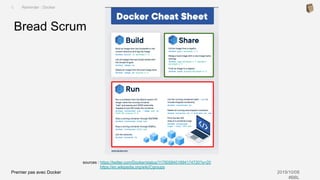
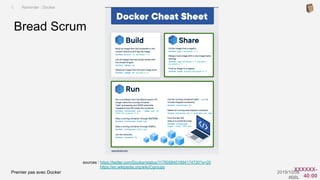
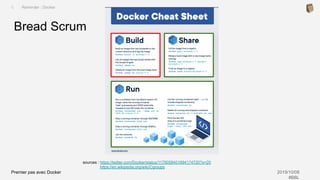
Bread Scrum
I. Reminder : Docker
sources : https://twitter.com/Docker/status/1179058401894174720?s=20
https://en.wikipedia.org/wiki/Cgroups
Premier pas avec Docker 2019/10/08
#BBL
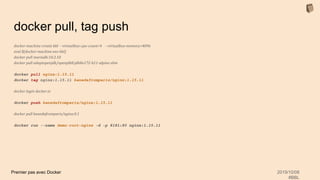
docker pull, tag push
docker-machine create bbl --virtualbox-cpu-count=4 --virtualbox-memory=4096
eval $(docker-machine env bbl)
docker pull mariadb:10.3.10
docker pull adoptopenjdk/openjdk8:jdk8u172-b11-alpine-slim
docker pull nginx:1.15.11
docker tag nginx:1.15.11 kanedafromparis/nginx:1.15.11
docker login docker.io
docker push kanedafromparis/nginx:1.15.11
docker pull kanedafromparis/nginx:0.1
docker run --name demo-root-nginx -d -p 8181:80 nginx:1.15.11
Premier pas avec Docker 2019/10/08
#BBL
docker run, exec
docker-machine create bbl --virtualbox-cpu-count=4 --virtualbox-memory=4096
eval $(docker-machine env bbl)
docker run --name demo-root-nginx -d -p 8181:80 nginx:1.15.11
open http://$(docker-machine ip dx19):$(docker inspect demo-root-nginx | 
jq -r '.[0].NetworkSettings.Ports."80/tcp"[0].HostPort')
docker-machine ssh bbl
ps auxf | grep -C 2 "nginx"
docker exec -it demo-root-nginx /bin/bash
cat /run/nginx.pid
ls -l /proc | grep ng
docker stop demo-root-nginx
docker rm demo-root-nginx -f
Premier pas avec Docker 2019/10/08
#BBL
Bread Scrum
I. Reminder : Docker
sources : https://twitter.com/Docker/status/1179058401894174720?s=20
https://en.wikipedia.org/wiki/Cgroups
Premier pas avec Docker 2019/10/08
#BBL
sources : https://docs.docker.com/machine/overview/
I. Reminder : Docker
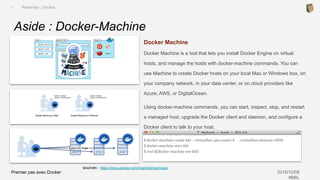
Aside : Docker-Machine
Docker Machine
Docker Machine is a tool that lets you install Docker Engine on virtual
hosts, and manage the hosts with docker-machine commands. You can
use Machine to create Docker hosts on your local Mac or Windows box, on
your company network, in your data center, or on cloud providers like
Azure, AWS, or DigitalOcean.
Using docker-machine commands, you can start, inspect, stop, and restart
a managed host, upgrade the Docker client and daemon, and configure a
Docker client to talk to your host.
$ docker-machine create bbl --virtualbox-cpu-count=4 --virtualbox-memory=4096
$ docker-machine start bbl
$ eval $(docker-machine env bbl)
Premier pas avec Docker 2019/10/08
#BBL
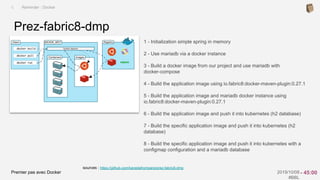
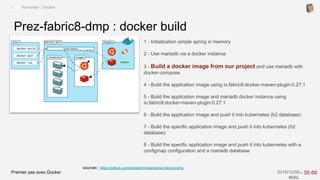
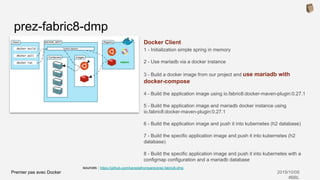
sources : https://github.com/kanedafromparis/prez-fabric8-dmp
1 - Initialization simple spring in memory
2 - Use mariadb via a docker instance
3 - Build a docker image from our project and use mariadb with
docker-compose
4 - Build the application image using io.fabric8:docker-maven-plugin:0.27.1
5 - Build the application image and mariadb docker instance using
io.fabric8:docker-maven-plugin:0.27.1
6 - Build the application image and push it into kubernetes (h2 database)
7 - Build the specific application image and push it into kubernetes (h2
database)
8 - Build the specific application image and push it into kubernetes with a
configmap configuration and a mariadb database
Prez-fabric8-dmp
I. Reminder : Docker
- 45:00
Premier pas avec Docker 2019/10/08
#BBL
Aside : mvn package
git clone https://github.com/kanedafromparis/prez-fabric8-dmp
cd prez-fabric8-dmp
git checkout 010-Initialization
export JAVA_HOME=`/usr/libexec/java_home -v 1.8.0_141`
mvn clean package
mvn spring-boot:run
Premier pas avec Docker 2019/10/08
#BBL
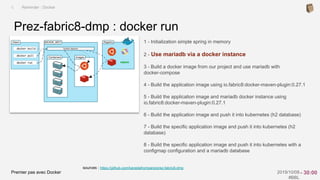
sources : https://github.com/kanedafromparis/prez-fabric8-dmp
1 - Initialization simple spring in memory
2 - Use mariadb via a docker instance
3 - Build a docker image from our project and use mariadb with
docker-compose
4 - Build the application image using io.fabric8:docker-maven-plugin:0.27.1
5 - Build the application image and mariadb docker instance using
io.fabric8:docker-maven-plugin:0.27.1
6 - Build the application image and push it into kubernetes (h2 database)
7 - Build the specific application image and push it into kubernetes (h2
database)
8 - Build the specific application image and push it into kubernetes with a
configmap configuration and a mariadb database
Prez-fabric8-dmp : docker run
I. Reminder : Docker
- 30:00
Premier pas avec Docker 2019/10/08
#BBL
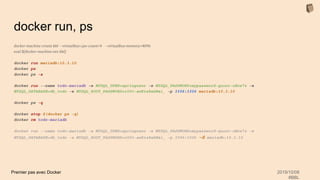
docker run, ps
docker-machine create bbl --virtualbox-cpu-count=4 --virtualbox-memory=4096
eval $(docker-machine env bbl)
docker run mariadb:10.3.10
docker ps
docker ps -a
docker run --name todo-mariadb -e MYSQL_USER=springuser -e MYSQL_PASSWORD=mypassword-quoor-uHoe7z -e
MYSQL_DATABASE=db_todo -e MYSQL_ROOT_PASSWORD=r00t-aeKie8ahWai_ -p 3306:3306 mariadb:10.3.10
docker ps -q
docker stop $(docker ps -q)
docker rm todo-mariadb
docker run --name todo-mariadb -e MYSQL_USER=springuser -e MYSQL_PASSWORD=mypassword-quoor-uHoe7z -e
MYSQL_DATABASE=db_todo -e MYSQL_ROOT_PASSWORD=r00t-aeKie8ahWai_ -p 3306:3306 -d mariadb:10.3.10
Premier pas avec Docker 2019/10/08
#BBL
docker exec (--name)
docker-machine create bbl --virtualbox-cpu-count=4 --virtualbox-memory=4096
eval $(docker-machine env bbl)
docker run -e MYSQL_USER=springuser -e MYSQL_PASSWORD=mypassword-quoor-uHoe7z -e
MYSQL_DATABASE=db_todo -e MYSQL_ROOT_PASSWORD=r00t-aeKie8ahWai_ -p 3306:3306 -d mariadb:10.3.10
docker exec -it 616ebd281296 bash
mysql -u $MYSQL_USER -p$MYSQL_PASSWORD
show databases;
use db_todo;
show tables;
select * from todo_item;
# mvn spring-boot:run
-Dspring.config.location=$(pwd)/src/main/resources/application.mariadb.properties
watch -n 2 bash src/main/bash/showtables.sh
sources : https://github.com/kanedafromparis/prez-fabric8-dmp/blob/020-UseMariadbDockerInstance/
src/main/bash/showtables.sh
Premier pas avec Docker 2019/10/08
#BBL
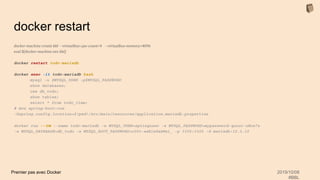
docker restart
docker-machine create bbl --virtualbox-cpu-count=4 --virtualbox-memory=4096
eval $(docker-machine env bbl)
docker restart todo-mariadb
docker exec -it todo-mariadb bash
mysql -u $MYSQL_USER -p$MYSQL_PASSWORD
show databases;
use db_todo;
show tables;
select * from todo_item;
# mvn spring-boot:run
-Dspring.config.location=$(pwd)/src/main/resources/application.mariadb.properties
docker run --rm --name todo-mariadb -e MYSQL_USER=springuser -e MYSQL_PASSWORD=mypassword-quoor-uHoe7z
-e MYSQL_DATABASE=db_todo -e MYSQL_ROOT_PASSWORD=r00t-aeKie8ahWai_ -p 3306:3306 -d mariadb:10.3.10
Premier pas avec Docker 2019/10/08
#BBL
Bread Scrum
I. Reminder : Docker
sources : https://twitter.com/Docker/status/1179058401894174720?s=20
https://en.wikipedia.org/wiki/Cgroups
XXXXXX-
40:00
Premier pas avec Docker 2019/10/08
#BBL
docker log
docker-machine create bbl --virtualbox-cpu-count=4 --virtualbox-memory=4096
eval $(docker-machine env bbl)
docker run -d kanedafromparis/logversion:1.0
docker logs laughing_xxxxxx
docker logs laughing_xxxxxx -f
docker logs --tail 20 laughing_xxxxxx
docker rm $(docker ps -q)
docker rm $(docker ps -q -a)
Premier pas avec Docker 2019/10/08
#BBL
docker inspect
docker-machine create bbl --virtualbox-cpu-count=4 --virtualbox-memory=4096
eval $(docker-machine env bbl)
docker run -d kanedafromparis/logversion:1.0
docker inspect 4e653286d191 | jq .[0].Config.Labels
docker ps --filter label=artifactId=logversion
docker rm $(docker ps -q)
docker rm $(docker ps -q -a)
Premier pas avec Docker 2019/10/08
#BBL
sources : https://docs.docker.com/storage/volumes/
https://hub.docker.com/_/mariadb
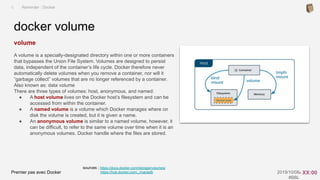
volume
A volume is a specially-designated directory within one or more containers
that bypasses the Union File System. Volumes are designed to persist
data, independent of the container’s life cycle. Docker therefore never
automatically delete volumes when you remove a container, nor will it
“garbage collect” volumes that are no longer referenced by a container.
Also known as: data volume
There are three types of volumes: host, anonymous, and named:
● A host volume lives on the Docker host’s filesystem and can be
accessed from within the container.
● A named volume is a volume which Docker manages where on
disk the volume is created, but it is given a name.
● An anonymous volume is similar to a named volume, however, it
can be difficult, to refer to the same volume over time when it is an
anonymous volumes. Docker handle where the files are stored.
docker volume
I. Reminder : Docker
- XX:00
Premier pas avec Docker 2019/10/08
#BBL
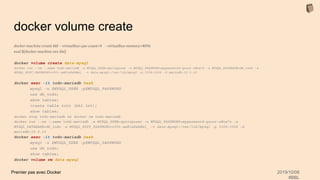
docker volume create
docker-machine create bbl --virtualbox-cpu-count=4 --virtualbox-memory=4096
eval $(docker-machine env bbl)
docker volume create data-mysql
docker run --rm --name todo-mariadb -e MYSQL_USER=springuser -e MYSQL_PASSWORD=mypassword-quoor-uHoe7z -e MYSQL_DATABASE=db_todo -e
MYSQL_ROOT_PASSWORD=r00t-aeKie8ahWai_ -v data-mysql:/var/lib/mysql -p 3306:3306 -d mariadb:10.3.10
docker exec -it todo-mariadb bash
mysql -u $MYSQL_USER -p$MYSQL_PASSWORD
use db_todo;
show tables;
create table toto (bbl int);
show tables;
docker stop todo-mariadb && docker rm todo-mariadb
docker run --rm --name todo-mariadb -e MYSQL_USER=springuser -e MYSQL_PASSWORD=mypassword-quoor-uHoe7z -e
MYSQL_DATABASE=db_todo -e MYSQL_ROOT_PASSWORD=r00t-aeKie8ahWai_ -v data-mysql:/var/lib/mysql -p 3306:3306 -d
mariadb:10.3.10
docker exec -it todo-mariadb bash
mysql -u $MYSQL_USER -p$MYSQL_PASSWORD
use db_todo;
show tables;
docker volume rm data-mysql
Premier pas avec Docker 2019/10/08
#BBL
Bread Scrum
I. Reminder : Docker
sources : https://twitter.com/Docker/status/1179058401894174720?s=20
https://en.wikipedia.org/wiki/Cgroups
Premier pas avec Docker 2019/10/08
#BBL
sources : https://github.com/kanedafromparis/prez-fabric8-dmp
1 - Initialization simple spring in memory
2 - Use mariadb via a docker instance
3 - Build a docker image from our project and use mariadb with
docker-compose
4 - Build the application image using io.fabric8:docker-maven-plugin:0.27.1
5 - Build the application image and mariadb docker instance using
io.fabric8:docker-maven-plugin:0.27.1
6 - Build the application image and push it into kubernetes (h2 database)
7 - Build the specific application image and push it into kubernetes (h2
database)
8 - Build the specific application image and push it into kubernetes with a
configmap configuration and a mariadb database
Prez-fabric8-dmp : docker build
I. Reminder : Docker
- 30:00
Premier pas avec Docker 2019/10/08
#BBL
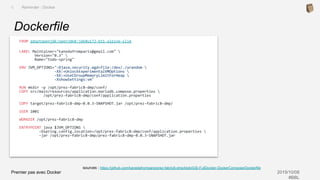
sources : https://github.com/kanedafromparis/prez-fabric8-dmp/blob/030-FullDocker-DockerCompose/Dockerfile
Dockerfile
I. Reminder : Docker
FROM adoptopenjdk/openjdk8:jdk8u172-b11-alpine-slim
LABEL Maintainer="kanedafromparis@gmail.com" 
Version="0.3" 
Name="todo-spring"
ENV JVM_OPTIONS="-Djava.security.egd=file:/dev/./urandom 
-XX:+UnlockExperimentalVMOptions 
-XX:+UseCGroupMemoryLimitForHeap 
-XshowSettings:vm"
RUN mkdir -p /opt/prez-fabric8-dmp/conf/
COPY src/main/resources/application.mariadb.compose.properties 
/opt/prez-fabric8-dmp/conf/application.properties
COPY target/prez-fabric8-dmp-0.0.3-SNAPSHOT.jar /opt/prez-fabric8-dmp/
USER 1001
WORKDIR /opt/prez-fabric8-dmp
ENTRYPOINT java $JVM_OPTIONS 
-Dspring.config.location=/opt/prez-fabric8-dmp/conf/application.properties 
-jar /opt/prez-fabric8-dmp/prez-fabric8-dmp-0.0.3-SNAPSHOT.jar
Premier pas avec Docker 2019/10/08
#BBL
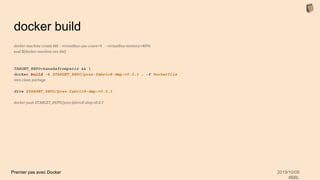
docker build
docker-machine create bbl --virtualbox-cpu-count=4 --virtualbox-memory=4096
eval $(docker-machine env bbl)
TARGET_REPO=kanedafromparis && 
docker build -t $TARGET_REPO/prez-fabric8-dmp:v0.0.3 . -f Dockerfile
mvn clean package
dive $TARGET_REPO/prez-fabric8-dmp:v0.0.3
docker push $TARGET_REPO/prez-fabric8-dmp:v0.0.3
Premier pas avec Docker 2019/10/08
#BBL
sources : https://docs.docker.com/develop/develop-images/multistage-build/
Dockerbuild from image
I. Reminder : Docker
FROM golang:1.7.3 AS builder
WORKDIR /go/src/github.com/alexellis/href-counter/
RUN go get -d -v golang.org/x/net/html
COPY app.go .
RUN CGO_ENABLED=0 GOOS=linux go build -a -installsuffix cgo -o app .
FROM alpine:latest
RUN apk --no-cache add ca-certificates
WORKDIR /root/
COPY --from=builder /go/src/github.com/alexellis/href-counter/app .
CMD ["./app"]
Premier pas avec Docker 2019/10/08
#BBL
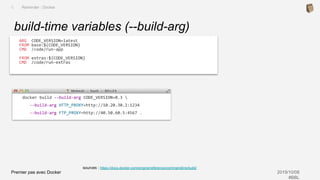
sources : https://docs.docker.com/engine/reference/commandline/build/
build-time variables (--build-arg)
I. Reminder : Docker
ARG CODE_VERSION=latest
FROM base:${CODE_VERSION}
CMD /code/run-app
FROM extras:${CODE_VERSION}
CMD /code/run-extras
docker build --build-arg CODE_VERSION=0.3 
--build-arg HTTP_PROXY=http://10.20.30.2:1234
--build-arg FTP_PROXY=http://40.50.60.5:4567 .
Premier pas avec Docker 2019/10/08
#BBL
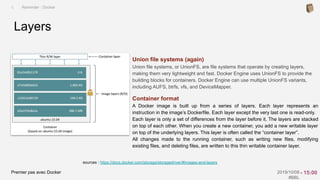
Union file systems (again)
Union file systems, or UnionFS, are file systems that operate by creating layers,
making them very lightweight and fast. Docker Engine uses UnionFS to provide the
building blocks for containers. Docker Engine can use multiple UnionFS variants,
including AUFS, btrfs, vfs, and DeviceMapper.
Container format
A Docker image is built up from a series of layers. Each layer represents an
instruction in the image’s Dockerfile. Each layer except the very last one is read-only.
Each layer is only a set of differences from the layer before it. The layers are stacked
on top of each other. When you create a new container, you add a new writable layer
on top of the underlying layers. This layer is often called the “container layer”.
All changes made to the running container, such as writing new files, modifying
existing files, and deleting files, are written to this thin writable container layer.
Layers
I. Reminder : Docker
sources : https://docs.docker.com/storage/storagedriver/#images-and-layers
- 15:00
Premier pas avec Docker 2019/10/08
#BBL
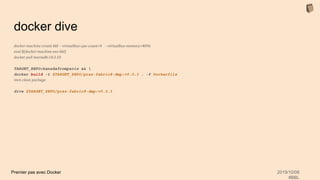
docker dive
docker-machine create bbl --virtualbox-cpu-count=4 --virtualbox-memory=4096
eval $(docker-machine env bbl)
docker pull mariadb:10.3.10
TARGET_REPO=kanedafromparis && 
docker build -t $TARGET_REPO/prez-fabric8-dmp:v0.0.3 . -f Dockerfile
mvn clean package
dive $TARGET_REPO/prez-fabric8-dmp:v0.0.3
Premier pas avec Docker 2019/10/08
#BBL
- 10:00
Premier pas avec Docker 2019/10/08
#BBL
sources : https://github.com/kanedafromparis/prez-fabric8-dmp
Docker Client
1 - Initialization simple spring in memory
2 - Use mariadb via a docker instance
3 - Build a docker image from our project and use mariadb with
docker-compose
4 - Build the application image using io.fabric8:docker-maven-plugin:0.27.1
5 - Build the application image and mariadb docker instance using
io.fabric8:docker-maven-plugin:0.27.1
6 - Build the application image and push it into kubernetes (h2 database)
7 - Build the specific application image and push it into kubernetes (h2
database)
8 - Build the specific application image and push it into kubernetes with a
configmap configuration and a mariadb database
prez-fabric8-dmp
Premier pas avec Docker 2019/10/08
#BBL
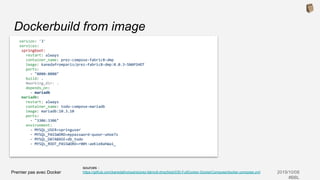
sources :
https://github.com/kanedafromparis/prez-fabric8-dmp/blob/030-FullDocker-DockerCompose/docker-compose.yml
Dockerbuild from image
version: '3'
services:
springboot:
restart: always
container_name: prez-compose-fabric8-dmp
image: kanedafromparis/prez-fabric8-dmp:0.0.3-SNAPSHOT
ports:
- "8080:8080"
build: .
#working_dir: .
depends_on:
- mariadb
mariadb:
restart: always
container_name: todo-compose-mariadb
image: mariadb:10.3.10
ports:
- "3306:3306"
environment:
- MYSQL_USER=springuser
- MYSQL_PASSWORD=mypassword-quoor-uHoe7z
- MYSQL_DATABASE=db_todo
- MYSQL_ROOT_PASSWORD=r00t-aeKie8ahWai_
Premier pas avec Docker 2019/10/08
#BBL
Docker compose
docker-machine create dx19 --virtualbox-cpu-count=4 --virtualbox-memory=4096
eval $(docker-machine env dx19)
docker-compose build
docker-compose up
open http://$(docker-machine ip bbl):8080
Premier pas avec Docker 2019/10/08
#BBL
Thank you
● Questions ?
- 00:00
Premier pas avec Docker 2019/10/08
#BBL
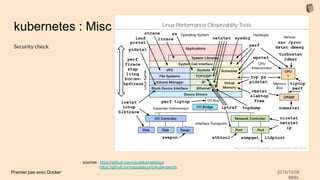
kubernetes : Misc
Security check
sources : https://github.com/nicolaka/netshoot
https://github.com/aquasecurity/kube-bench

BBL Premiers pas avec Docker

  • 1.
    Premier pas avecDocker 2019/10/08 #BBL Premier pas avec Docker BBL : CONECS 2019/10/08
  • 2.
    Premier pas avecDocker 2019/10/08 #BBL Abstract Premiers pas avec Docker Il s’agit dans un premier temps de présenter Docker, ses cas d’usage et quelques bonnes pratiques d’utilisation. Le but est de présenter Docker, son mode de fonctionnement et son écosystème. Ce qu’il peut apporter et les pièges à éviter To Do Français English
  • 3.
    Premier pas avecDocker 2019/10/08 #BBL @kanedafromparis Charles Sabourdin Javaiste Linuxien Devoxx France ParisJUG OpenSource Architect Dev/Ops https://github.com/kanedafromparis/ https://github.com/kanedafromparisfriends - 60:00
  • 4.
    Premier pas avecDocker 2019/10/08 #BBL Firstly InfrastructureInfrastructure Hypervisor OS (operating system) Guest OS Guest OS Guest OS Bin/Lib App 1 Bin/Lib App 2 Bin/Lib App 3 App A Bin/Lib App b Bin/Lib App c Containers Engine ContainersVirtual Machines Bin/Lib App d Bin/Lib App e Bin/Lib App f Bin/Lib
  • 5.
    Premier pas avecDocker 2019/10/08 #BBL Docker Engine uses namespaces such as the following on Linux: ● The pid namespace: Process isolation (PID: Process ID). ● The net namespace: Managing network interfaces (NET: Networking). ● The ipc namespace: Managing access to IPC resources (IPC: InterProcess Communication). ● The mnt namespace: Managing filesystem mount points (MNT: Mount). ● The uts namespace: Isolating kernel and version identifiers. (UTS: Unix Timesharing System). Namespaces Docker uses a technology called namespaces to provide the isolated workspace called the container. When you run a container, Docker creates a set of namespaces for that container. These namespaces provide a layer of isolation. Each aspect of a container runs in a separate namespace and its access is limited to that namespace. sources : https://docs.docker.com/engine/docker-overview/#the-underlying-technology https://en.wikipedia.org/wiki/Linux_kernel
  • 6.
    Premier pas avecDocker 2019/10/08 #BBL Control groups Docker Engine on Linux also relies on another technology called control groups (cgroups). A cgroup limits an application to a specific set of resources. Control groups allow Docker Engine to share available hardware resources to containers and optionally enforce limits and constraints. For example, you can limit the memory available to a specific container. Union file systems Union file systems, or UnionFS, are file systems that operate by creating layers, making them very lightweight and fast. Docker Engine uses UnionFS to provide the building blocks for containers. Docker Engine can use multiple UnionFS variants, including AUFS, btrfs, vfs, and DeviceMapper. Container format Docker Engine combines the namespaces, control groups, and UnionFS into a wrapper called a container format. The default container format is libcontainer. In the future, Docker may support other container formats by integrating with technologies such as BSD Jails or Solaris Zones. Isolation sources : https://docs.docker.com/engine/docker-overview/#the-underlying-technology https://en.wikipedia.org/wiki/Cgroups
  • 7.
    Premier pas avecDocker 2019/10/08 #BBL sources : https://docs.docker.com/engine/docker-overview/#the-underlying-technology https://docs.docker.com/ee/ucp/user-access/cli/ Docker Client A client bundle contains a private and public key pair that authorizes your requests in UCP. It also contains utility scripts you can use to configure your Docker and kubectl client tools to talk to your UCP deployment. Docker daemon (dockerd) dockerd is the persistent process that manages containers. Docker uses different binaries for the daemon and client. To run the daemon you type dockerd. Container format The Registry is a stateless, highly scalable server side application that stores and lets you distribute Docker images. The Registry is open-source, under the permissive Apache license. You should use the Registry if you want to: ● tightly control where your images are being stored ● fully own your images distribution pipeline ● integrate image storage and distribution tightly into your in-house development workflow Docker Architecture I. Reminder : Docker - 55:00
  • 8.
    Premier pas avecDocker 2019/10/08 #BBL Bread Scrum I. Reminder : Docker sources : https://twitter.com/Docker/status/1179058401894174720?s=20 https://en.wikipedia.org/wiki/Cgroups
  • 9.
    Premier pas avecDocker 2019/10/08 #BBL docker pull, tag push docker-machine create bbl --virtualbox-cpu-count=4 --virtualbox-memory=4096 eval $(docker-machine env bbl) docker pull mariadb:10.3.10 docker pull adoptopenjdk/openjdk8:jdk8u172-b11-alpine-slim docker pull nginx:1.15.11 docker tag nginx:1.15.11 kanedafromparis/nginx:1.15.11 docker login docker.io docker push kanedafromparis/nginx:1.15.11 docker pull kanedafromparis/nginx:0.1 docker run --name demo-root-nginx -d -p 8181:80 nginx:1.15.11
  • 10.
    Premier pas avecDocker 2019/10/08 #BBL docker run, exec docker-machine create bbl --virtualbox-cpu-count=4 --virtualbox-memory=4096 eval $(docker-machine env bbl) docker run --name demo-root-nginx -d -p 8181:80 nginx:1.15.11 open http://$(docker-machine ip dx19):$(docker inspect demo-root-nginx | jq -r '.[0].NetworkSettings.Ports."80/tcp"[0].HostPort') docker-machine ssh bbl ps auxf | grep -C 2 "nginx" docker exec -it demo-root-nginx /bin/bash cat /run/nginx.pid ls -l /proc | grep ng docker stop demo-root-nginx docker rm demo-root-nginx -f
  • 11.
    Premier pas avecDocker 2019/10/08 #BBL Bread Scrum I. Reminder : Docker sources : https://twitter.com/Docker/status/1179058401894174720?s=20 https://en.wikipedia.org/wiki/Cgroups
  • 12.
    Premier pas avecDocker 2019/10/08 #BBL sources : https://docs.docker.com/machine/overview/ I. Reminder : Docker Aside : Docker-Machine Docker Machine Docker Machine is a tool that lets you install Docker Engine on virtual hosts, and manage the hosts with docker-machine commands. You can use Machine to create Docker hosts on your local Mac or Windows box, on your company network, in your data center, or on cloud providers like Azure, AWS, or DigitalOcean. Using docker-machine commands, you can start, inspect, stop, and restart a managed host, upgrade the Docker client and daemon, and configure a Docker client to talk to your host. $ docker-machine create bbl --virtualbox-cpu-count=4 --virtualbox-memory=4096 $ docker-machine start bbl $ eval $(docker-machine env bbl)
  • 13.
    Premier pas avecDocker 2019/10/08 #BBL sources : https://github.com/kanedafromparis/prez-fabric8-dmp 1 - Initialization simple spring in memory 2 - Use mariadb via a docker instance 3 - Build a docker image from our project and use mariadb with docker-compose 4 - Build the application image using io.fabric8:docker-maven-plugin:0.27.1 5 - Build the application image and mariadb docker instance using io.fabric8:docker-maven-plugin:0.27.1 6 - Build the application image and push it into kubernetes (h2 database) 7 - Build the specific application image and push it into kubernetes (h2 database) 8 - Build the specific application image and push it into kubernetes with a configmap configuration and a mariadb database Prez-fabric8-dmp I. Reminder : Docker - 45:00
  • 14.
    Premier pas avecDocker 2019/10/08 #BBL Aside : mvn package git clone https://github.com/kanedafromparis/prez-fabric8-dmp cd prez-fabric8-dmp git checkout 010-Initialization export JAVA_HOME=`/usr/libexec/java_home -v 1.8.0_141` mvn clean package mvn spring-boot:run
  • 15.
    Premier pas avecDocker 2019/10/08 #BBL sources : https://github.com/kanedafromparis/prez-fabric8-dmp 1 - Initialization simple spring in memory 2 - Use mariadb via a docker instance 3 - Build a docker image from our project and use mariadb with docker-compose 4 - Build the application image using io.fabric8:docker-maven-plugin:0.27.1 5 - Build the application image and mariadb docker instance using io.fabric8:docker-maven-plugin:0.27.1 6 - Build the application image and push it into kubernetes (h2 database) 7 - Build the specific application image and push it into kubernetes (h2 database) 8 - Build the specific application image and push it into kubernetes with a configmap configuration and a mariadb database Prez-fabric8-dmp : docker run I. Reminder : Docker - 30:00
  • 16.
    Premier pas avecDocker 2019/10/08 #BBL docker run, ps docker-machine create bbl --virtualbox-cpu-count=4 --virtualbox-memory=4096 eval $(docker-machine env bbl) docker run mariadb:10.3.10 docker ps docker ps -a docker run --name todo-mariadb -e MYSQL_USER=springuser -e MYSQL_PASSWORD=mypassword-quoor-uHoe7z -e MYSQL_DATABASE=db_todo -e MYSQL_ROOT_PASSWORD=r00t-aeKie8ahWai_ -p 3306:3306 mariadb:10.3.10 docker ps -q docker stop $(docker ps -q) docker rm todo-mariadb docker run --name todo-mariadb -e MYSQL_USER=springuser -e MYSQL_PASSWORD=mypassword-quoor-uHoe7z -e MYSQL_DATABASE=db_todo -e MYSQL_ROOT_PASSWORD=r00t-aeKie8ahWai_ -p 3306:3306 -d mariadb:10.3.10
  • 17.
    Premier pas avecDocker 2019/10/08 #BBL docker exec (--name) docker-machine create bbl --virtualbox-cpu-count=4 --virtualbox-memory=4096 eval $(docker-machine env bbl) docker run -e MYSQL_USER=springuser -e MYSQL_PASSWORD=mypassword-quoor-uHoe7z -e MYSQL_DATABASE=db_todo -e MYSQL_ROOT_PASSWORD=r00t-aeKie8ahWai_ -p 3306:3306 -d mariadb:10.3.10 docker exec -it 616ebd281296 bash mysql -u $MYSQL_USER -p$MYSQL_PASSWORD show databases; use db_todo; show tables; select * from todo_item; # mvn spring-boot:run -Dspring.config.location=$(pwd)/src/main/resources/application.mariadb.properties watch -n 2 bash src/main/bash/showtables.sh sources : https://github.com/kanedafromparis/prez-fabric8-dmp/blob/020-UseMariadbDockerInstance/ src/main/bash/showtables.sh
  • 18.
    Premier pas avecDocker 2019/10/08 #BBL docker restart docker-machine create bbl --virtualbox-cpu-count=4 --virtualbox-memory=4096 eval $(docker-machine env bbl) docker restart todo-mariadb docker exec -it todo-mariadb bash mysql -u $MYSQL_USER -p$MYSQL_PASSWORD show databases; use db_todo; show tables; select * from todo_item; # mvn spring-boot:run -Dspring.config.location=$(pwd)/src/main/resources/application.mariadb.properties docker run --rm --name todo-mariadb -e MYSQL_USER=springuser -e MYSQL_PASSWORD=mypassword-quoor-uHoe7z -e MYSQL_DATABASE=db_todo -e MYSQL_ROOT_PASSWORD=r00t-aeKie8ahWai_ -p 3306:3306 -d mariadb:10.3.10
  • 19.
    Premier pas avecDocker 2019/10/08 #BBL Bread Scrum I. Reminder : Docker sources : https://twitter.com/Docker/status/1179058401894174720?s=20 https://en.wikipedia.org/wiki/Cgroups XXXXXX- 40:00
  • 20.
    Premier pas avecDocker 2019/10/08 #BBL docker log docker-machine create bbl --virtualbox-cpu-count=4 --virtualbox-memory=4096 eval $(docker-machine env bbl) docker run -d kanedafromparis/logversion:1.0 docker logs laughing_xxxxxx docker logs laughing_xxxxxx -f docker logs --tail 20 laughing_xxxxxx docker rm $(docker ps -q) docker rm $(docker ps -q -a)
  • 21.
    Premier pas avecDocker 2019/10/08 #BBL docker inspect docker-machine create bbl --virtualbox-cpu-count=4 --virtualbox-memory=4096 eval $(docker-machine env bbl) docker run -d kanedafromparis/logversion:1.0 docker inspect 4e653286d191 | jq .[0].Config.Labels docker ps --filter label=artifactId=logversion docker rm $(docker ps -q) docker rm $(docker ps -q -a)
  • 22.
    Premier pas avecDocker 2019/10/08 #BBL sources : https://docs.docker.com/storage/volumes/ https://hub.docker.com/_/mariadb volume A volume is a specially-designated directory within one or more containers that bypasses the Union File System. Volumes are designed to persist data, independent of the container’s life cycle. Docker therefore never automatically delete volumes when you remove a container, nor will it “garbage collect” volumes that are no longer referenced by a container. Also known as: data volume There are three types of volumes: host, anonymous, and named: ● A host volume lives on the Docker host’s filesystem and can be accessed from within the container. ● A named volume is a volume which Docker manages where on disk the volume is created, but it is given a name. ● An anonymous volume is similar to a named volume, however, it can be difficult, to refer to the same volume over time when it is an anonymous volumes. Docker handle where the files are stored. docker volume I. Reminder : Docker - XX:00
  • 23.
    Premier pas avecDocker 2019/10/08 #BBL docker volume create docker-machine create bbl --virtualbox-cpu-count=4 --virtualbox-memory=4096 eval $(docker-machine env bbl) docker volume create data-mysql docker run --rm --name todo-mariadb -e MYSQL_USER=springuser -e MYSQL_PASSWORD=mypassword-quoor-uHoe7z -e MYSQL_DATABASE=db_todo -e MYSQL_ROOT_PASSWORD=r00t-aeKie8ahWai_ -v data-mysql:/var/lib/mysql -p 3306:3306 -d mariadb:10.3.10 docker exec -it todo-mariadb bash mysql -u $MYSQL_USER -p$MYSQL_PASSWORD use db_todo; show tables; create table toto (bbl int); show tables; docker stop todo-mariadb && docker rm todo-mariadb docker run --rm --name todo-mariadb -e MYSQL_USER=springuser -e MYSQL_PASSWORD=mypassword-quoor-uHoe7z -e MYSQL_DATABASE=db_todo -e MYSQL_ROOT_PASSWORD=r00t-aeKie8ahWai_ -v data-mysql:/var/lib/mysql -p 3306:3306 -d mariadb:10.3.10 docker exec -it todo-mariadb bash mysql -u $MYSQL_USER -p$MYSQL_PASSWORD use db_todo; show tables; docker volume rm data-mysql
  • 24.
    Premier pas avecDocker 2019/10/08 #BBL Bread Scrum I. Reminder : Docker sources : https://twitter.com/Docker/status/1179058401894174720?s=20 https://en.wikipedia.org/wiki/Cgroups
  • 25.
    Premier pas avecDocker 2019/10/08 #BBL sources : https://github.com/kanedafromparis/prez-fabric8-dmp 1 - Initialization simple spring in memory 2 - Use mariadb via a docker instance 3 - Build a docker image from our project and use mariadb with docker-compose 4 - Build the application image using io.fabric8:docker-maven-plugin:0.27.1 5 - Build the application image and mariadb docker instance using io.fabric8:docker-maven-plugin:0.27.1 6 - Build the application image and push it into kubernetes (h2 database) 7 - Build the specific application image and push it into kubernetes (h2 database) 8 - Build the specific application image and push it into kubernetes with a configmap configuration and a mariadb database Prez-fabric8-dmp : docker build I. Reminder : Docker - 30:00
  • 26.
    Premier pas avecDocker 2019/10/08 #BBL sources : https://github.com/kanedafromparis/prez-fabric8-dmp/blob/030-FullDocker-DockerCompose/Dockerfile Dockerfile I. Reminder : Docker FROM adoptopenjdk/openjdk8:jdk8u172-b11-alpine-slim LABEL Maintainer="kanedafromparis@gmail.com" Version="0.3" Name="todo-spring" ENV JVM_OPTIONS="-Djava.security.egd=file:/dev/./urandom -XX:+UnlockExperimentalVMOptions -XX:+UseCGroupMemoryLimitForHeap -XshowSettings:vm" RUN mkdir -p /opt/prez-fabric8-dmp/conf/ COPY src/main/resources/application.mariadb.compose.properties /opt/prez-fabric8-dmp/conf/application.properties COPY target/prez-fabric8-dmp-0.0.3-SNAPSHOT.jar /opt/prez-fabric8-dmp/ USER 1001 WORKDIR /opt/prez-fabric8-dmp ENTRYPOINT java $JVM_OPTIONS -Dspring.config.location=/opt/prez-fabric8-dmp/conf/application.properties -jar /opt/prez-fabric8-dmp/prez-fabric8-dmp-0.0.3-SNAPSHOT.jar
  • 27.
    Premier pas avecDocker 2019/10/08 #BBL docker build docker-machine create bbl --virtualbox-cpu-count=4 --virtualbox-memory=4096 eval $(docker-machine env bbl) TARGET_REPO=kanedafromparis && docker build -t $TARGET_REPO/prez-fabric8-dmp:v0.0.3 . -f Dockerfile mvn clean package dive $TARGET_REPO/prez-fabric8-dmp:v0.0.3 docker push $TARGET_REPO/prez-fabric8-dmp:v0.0.3
  • 28.
    Premier pas avecDocker 2019/10/08 #BBL sources : https://docs.docker.com/develop/develop-images/multistage-build/ Dockerbuild from image I. Reminder : Docker FROM golang:1.7.3 AS builder WORKDIR /go/src/github.com/alexellis/href-counter/ RUN go get -d -v golang.org/x/net/html COPY app.go . RUN CGO_ENABLED=0 GOOS=linux go build -a -installsuffix cgo -o app . FROM alpine:latest RUN apk --no-cache add ca-certificates WORKDIR /root/ COPY --from=builder /go/src/github.com/alexellis/href-counter/app . CMD ["./app"]
  • 29.
    Premier pas avecDocker 2019/10/08 #BBL sources : https://docs.docker.com/engine/reference/commandline/build/ build-time variables (--build-arg) I. Reminder : Docker ARG CODE_VERSION=latest FROM base:${CODE_VERSION} CMD /code/run-app FROM extras:${CODE_VERSION} CMD /code/run-extras docker build --build-arg CODE_VERSION=0.3 --build-arg HTTP_PROXY=http://10.20.30.2:1234 --build-arg FTP_PROXY=http://40.50.60.5:4567 .
  • 30.
    Premier pas avecDocker 2019/10/08 #BBL Union file systems (again) Union file systems, or UnionFS, are file systems that operate by creating layers, making them very lightweight and fast. Docker Engine uses UnionFS to provide the building blocks for containers. Docker Engine can use multiple UnionFS variants, including AUFS, btrfs, vfs, and DeviceMapper. Container format A Docker image is built up from a series of layers. Each layer represents an instruction in the image’s Dockerfile. Each layer except the very last one is read-only. Each layer is only a set of differences from the layer before it. The layers are stacked on top of each other. When you create a new container, you add a new writable layer on top of the underlying layers. This layer is often called the “container layer”. All changes made to the running container, such as writing new files, modifying existing files, and deleting files, are written to this thin writable container layer. Layers I. Reminder : Docker sources : https://docs.docker.com/storage/storagedriver/#images-and-layers - 15:00
  • 31.
    Premier pas avecDocker 2019/10/08 #BBL docker dive docker-machine create bbl --virtualbox-cpu-count=4 --virtualbox-memory=4096 eval $(docker-machine env bbl) docker pull mariadb:10.3.10 TARGET_REPO=kanedafromparis && docker build -t $TARGET_REPO/prez-fabric8-dmp:v0.0.3 . -f Dockerfile mvn clean package dive $TARGET_REPO/prez-fabric8-dmp:v0.0.3
  • 32.
    Premier pas avecDocker 2019/10/08 #BBL - 10:00
  • 33.
    Premier pas avecDocker 2019/10/08 #BBL sources : https://github.com/kanedafromparis/prez-fabric8-dmp Docker Client 1 - Initialization simple spring in memory 2 - Use mariadb via a docker instance 3 - Build a docker image from our project and use mariadb with docker-compose 4 - Build the application image using io.fabric8:docker-maven-plugin:0.27.1 5 - Build the application image and mariadb docker instance using io.fabric8:docker-maven-plugin:0.27.1 6 - Build the application image and push it into kubernetes (h2 database) 7 - Build the specific application image and push it into kubernetes (h2 database) 8 - Build the specific application image and push it into kubernetes with a configmap configuration and a mariadb database prez-fabric8-dmp
  • 34.
    Premier pas avecDocker 2019/10/08 #BBL sources : https://github.com/kanedafromparis/prez-fabric8-dmp/blob/030-FullDocker-DockerCompose/docker-compose.yml Dockerbuild from image version: '3' services: springboot: restart: always container_name: prez-compose-fabric8-dmp image: kanedafromparis/prez-fabric8-dmp:0.0.3-SNAPSHOT ports: - "8080:8080" build: . #working_dir: . depends_on: - mariadb mariadb: restart: always container_name: todo-compose-mariadb image: mariadb:10.3.10 ports: - "3306:3306" environment: - MYSQL_USER=springuser - MYSQL_PASSWORD=mypassword-quoor-uHoe7z - MYSQL_DATABASE=db_todo - MYSQL_ROOT_PASSWORD=r00t-aeKie8ahWai_
  • 35.
    Premier pas avecDocker 2019/10/08 #BBL Docker compose docker-machine create dx19 --virtualbox-cpu-count=4 --virtualbox-memory=4096 eval $(docker-machine env dx19) docker-compose build docker-compose up open http://$(docker-machine ip bbl):8080
  • 36.
    Premier pas avecDocker 2019/10/08 #BBL Thank you ● Questions ? - 00:00
  • 37.
    Premier pas avecDocker 2019/10/08 #BBL kubernetes : Misc Security check sources : https://github.com/nicolaka/netshoot https://github.com/aquasecurity/kube-bench