Basic Video Conferencing Knowledge
V2.0 2017-09-04
Agenda
What is VC and Why ?
Components & Ecosystem of VCS
Main Players of VC
Basic Product Terminology
What is Video Conferencing System(VCS)?
Communicatio
n Network
New York Beijing
Three elements of VC
• Different locations(Branches)
• Communication Network
• Acquisition and Restoration of Audio&Video
VCS:Video Conferencing
System
Name:Video Conferencing System
Also:TV Phone Conferencing System
Definition:A video conference offer live, visual connection
between two or more people residing in different locations for the
purpose of images, text, video and audio communication.
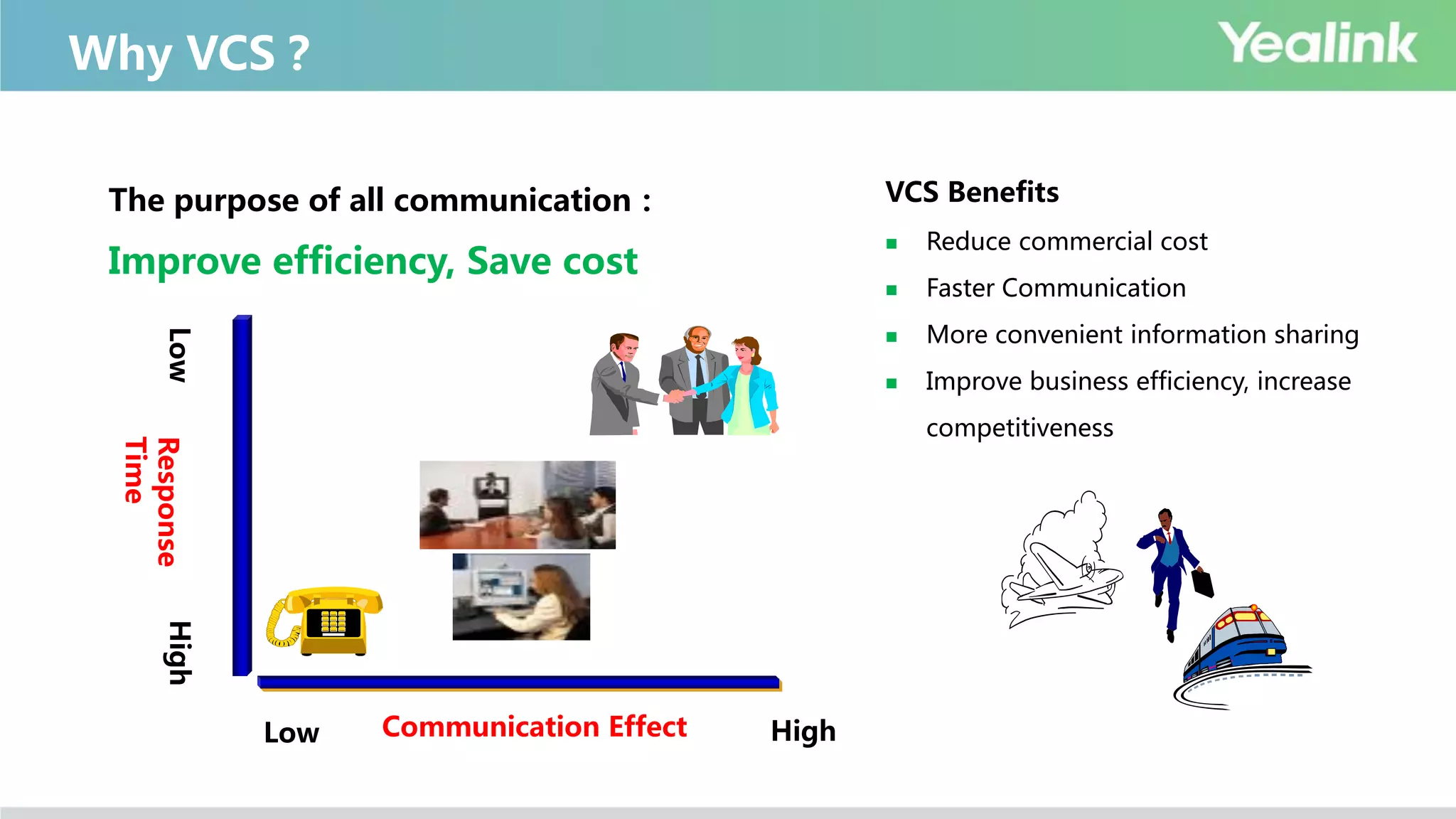
Why VCS?
Low High
HighLow
Communication Effect
Response
Time
The purpose of all communication:
Improve efficiency, Save cost
VCS Benefits
 Reduce commercial cost
 Faster Communication
 More convenient information sharing
 Improve business efficiency, increase
competitiveness
VCS Uses
Business Management
Operating Decision
Financial Management
CRM
SCM
Stock Management
Office Automation
Publicity
Business Training
Aftersales Training
Aftersales Support
Remote Business
Remote Negotiation
Remote Recruitment
Remote Communication
Others…
Administrative Conference
Remote Court
Remote Education
Remote Medical Treatment
Remote Finance
Emergency Communication
Remote production scheduling
Government Office Informatization
★ Applicable to various group activities in various fields!
 Internal:Administrative conferences/collaborations between branches
 External:Communicate with customer/partner/supplier etc.
VCS Scenarios– Traditional
Small Meeting
Room Leader Office
Auditorium/Large
Meeting Room
Medium Meeting
Room
VCS Scenarios– Newly
Desktop Mobile
Development of VC
Analog Digital IP
ISDN Internet
Visual SD HD
FHD
UHD
1080p
1920x1080
4K
CIF
(352x288)
4CIF
(720x576)
720p
1280x720
Components & Ecosystem of VCS
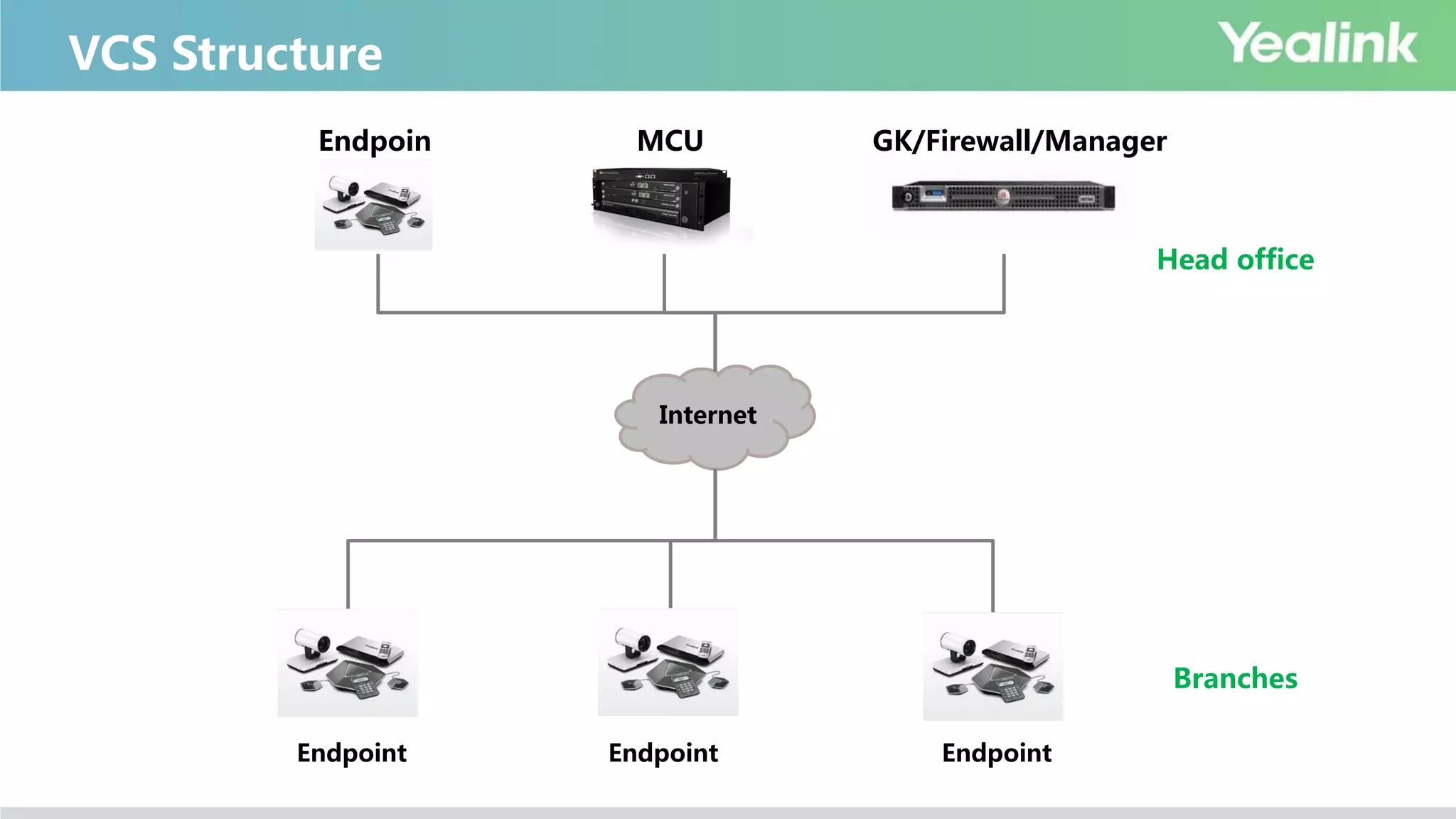
VCS Structure
Internet
Branches
Head office
Endpoin
t
MCU GK/Firewall/Manager
Endpoint Endpoint Endpoint
Endpoint
Multi-codec Endpoints with built-in MCU
Single-codec Endpoints
Immersive Telepresence Telepresence product,the top end
Desktop Desktop all-in-one/VP/PC software
Mobile Android/iOS App
Infrastructure
(Different Servers)
MCU
Independent MCU product for large scale
conference for mixing the videos from all
participants
Gatekeeper
Gatekeeper, like SIP Server
used for H.323 register and calling routing
NAT Transversal Used for branches firewall traversal
Manager Meeting management, Devices management
Introduction of VCS Components
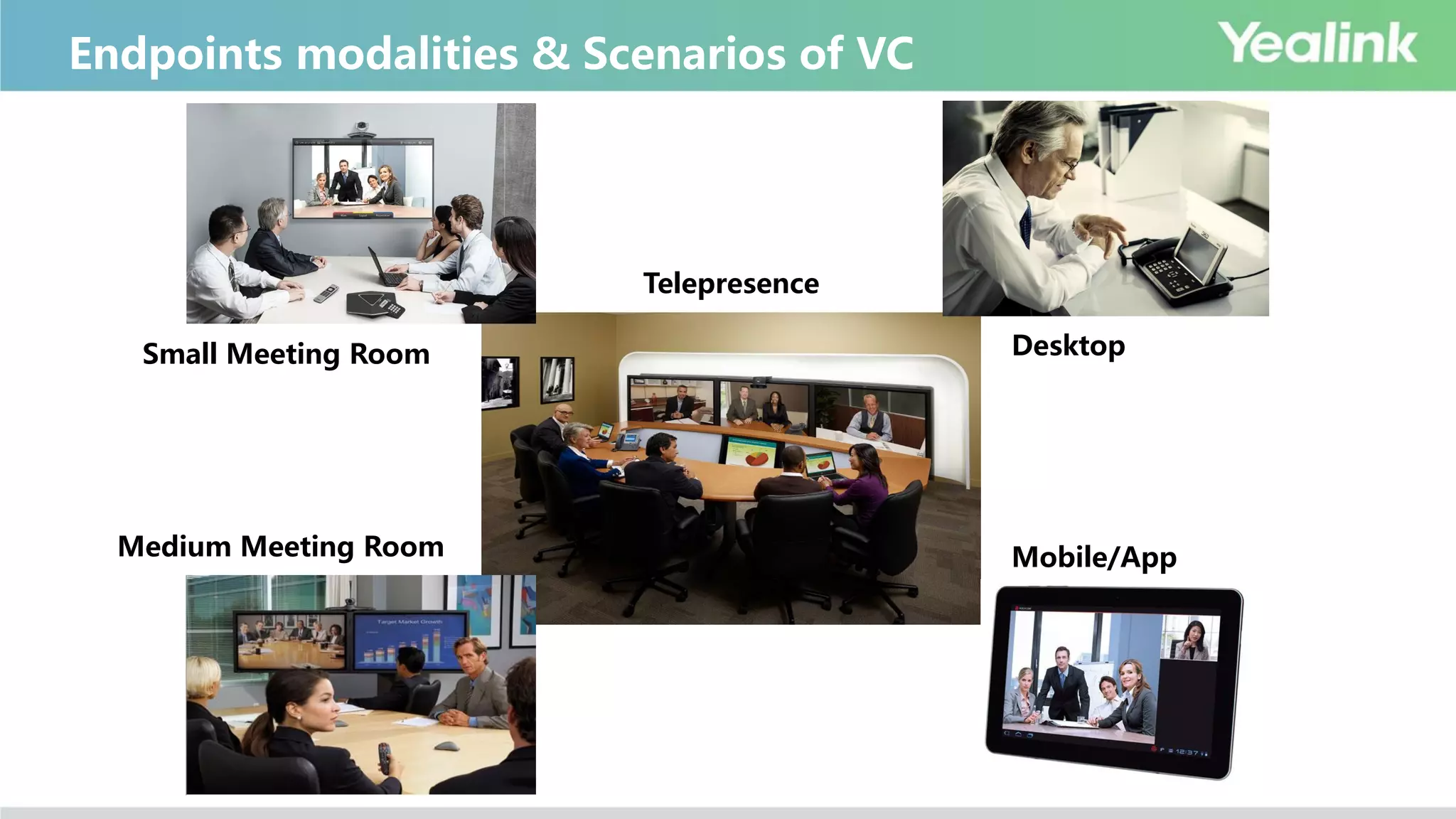
视频会议终端产品形态及应用场景Telepresence
Mobile/AppMedium Meeting Room
Small Meeting Room Desktop
Endpoints modalities & Scenarios of VC
VC Classification
Hardware VCS Software VCS Cloud VCS
Advantage Disadvantage
Hardware VCS Great experience, stable Expensive, poor expansibility
Software VCS Cheap Poor experience, unstable
Cloud VCS
Charge by service, less investment at first time
Low maintenance cost
Good expansibility
Highly rely on SP network condition
Security concerns
Many uncontrollable factors, no safe
sense
Main Players of VC
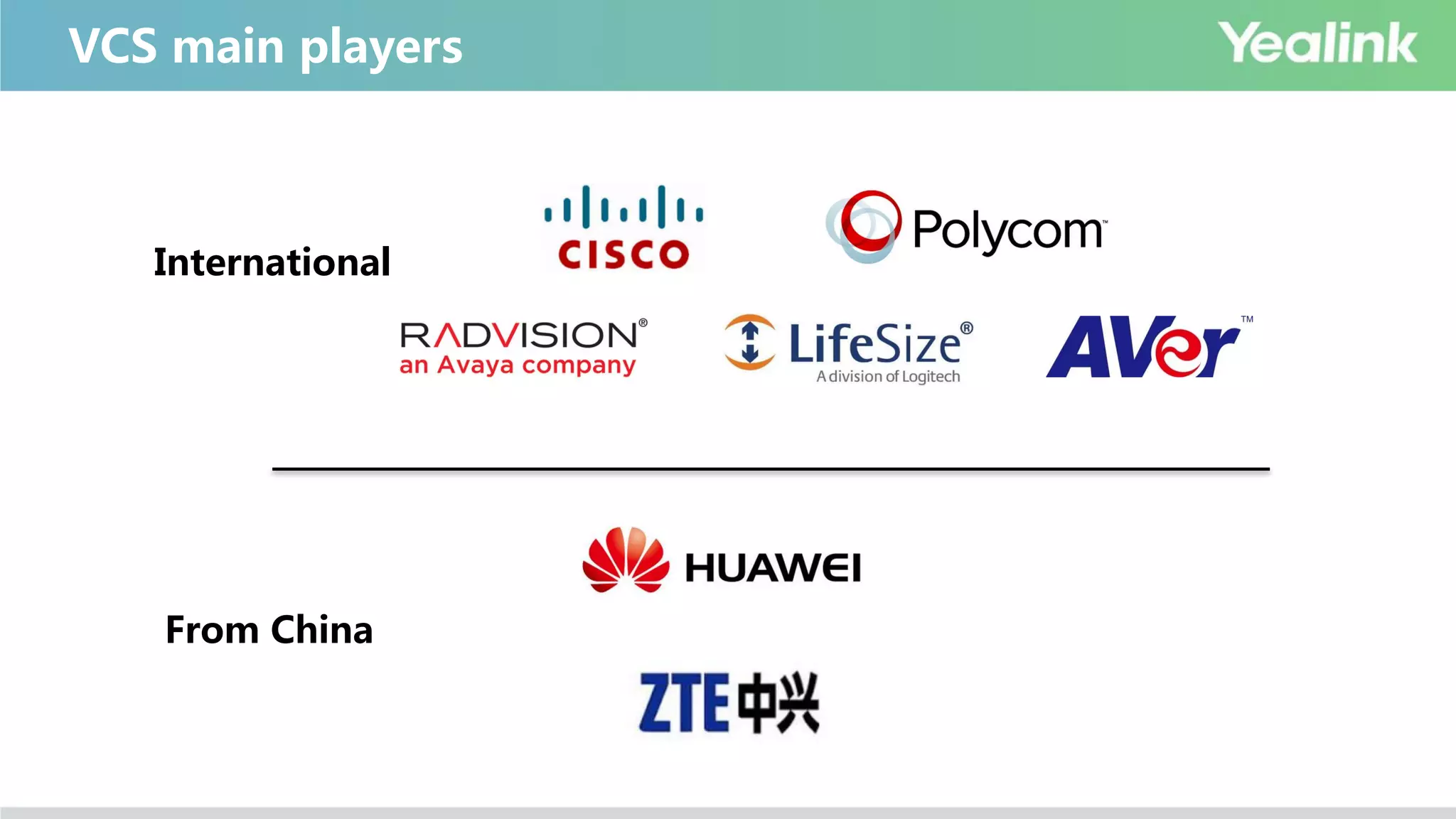
VCS main players
International
From China
 Cisco
 Cisco 2009 purchased Tandberg with 3.4 B $;
 Polycom
 In 1998,Polycom purchased ViaVideo
 In 2003,ViaVideo ex-owner established Lifesize
 In 2009,Logitech purchased Lifesize with 40.5 M $
 In 2011, Polycom purchased HP Halo Telepresence system
 Radvision
 In 2012,Avaya purchased Radvision with 10 M $
 Vidyo Boss comes from Radvision
 Others
 In 2013,Clearone purchased VCON to enter VCS market
History of VCS main players
VCS Other Players
Hardware VCS Polycom, Cisco, Lifesize, Radvision, Aver, ClearOne
Software VCS Pexip, Mind…
Cloud VCS Service Provider Lifesize, Bluejeans, Vidtel, Zoom..
Web VCS Service Provider WebEx
Ecosystem
Display Devices
Audio system
Large Screen LCD TV Projector Joint Screen
TV Cart
Gooseneck microphone system Audio output system
Installation& Project
Basic Product Terminology
Full HD Camera
Camera
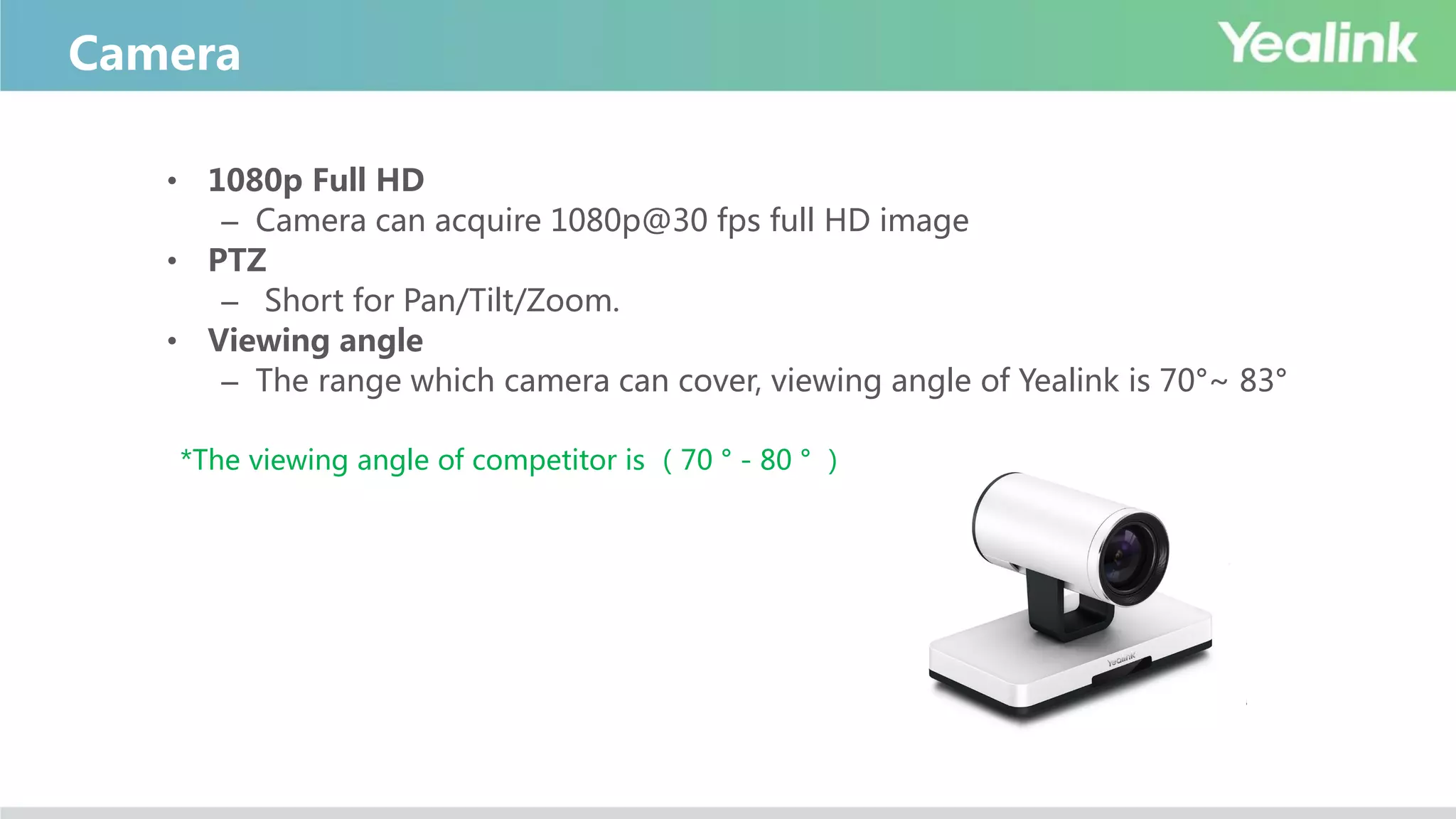
• 1080p Full HD
– Camera can acquire 1080p@30 fps full HD image
• PTZ
– Short for Pan/Tilt/Zoom.
• Viewing angle
– The range which camera can cover, viewing angle of Yealink is 70°~ 83°
*The viewing angle of competitor is (70 ° - 80 ° )
Camera - Zoom
• Optical Zoom
– Zoom include optical zoom and digital zoom.
– Optical Zoom: Optical zoom changes the magnification of images with the actual optical
glass before the image reach the imaging sensor. The optical zoom ratio of a digital camera
measures how much the lens can actually zoom in to make subjects appear closer.
– Digital Zoom: Digital zoom is a part of digital cameras, and camcorders, which helps to crop
the entire image, and then digitally enlarge the size of the viewfinder of the portion that is
needed to zoom in on.
*Yealink 12X
Aver 16X
Cisco 4-14X,high-end product with 20X
Lifesize 10X
Polycom 12X
Resolution
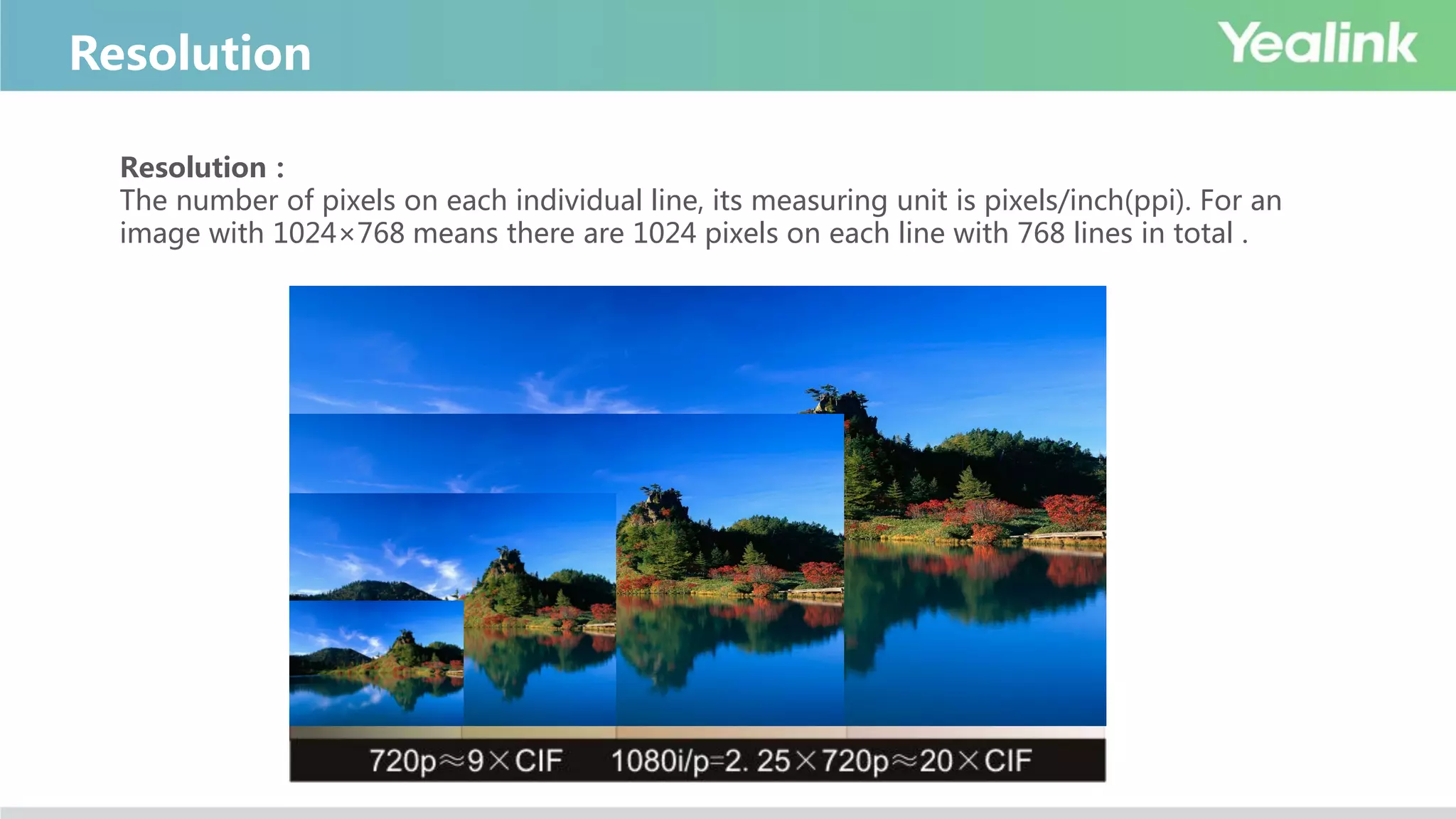
Resolution:
The number of pixels on each individual line, its measuring unit is pixels/inch(ppi). For an
image with 1024×768 means there are 1024 pixels on each line with 768 lines in total .
Frame Rate
Frame rate:
Used to measure the number of frames per second. The measuring unit is Frames per Second,
short in FPS or Hz. Current mainstream is 30fps,the future trend is 60fps
Film:24fps
TV(PAL):25fps
TV(NTSC):29.97fps
CRT Monitor:60Hz-85Hz
LCD Monitor:60Hz
3D Monitor: 120Hz
• Frame rate:
The number of images transported per second
• Common frame rate
– 15f/S (image “jump”)
– 25f/S(image is fluent and matches with domestic light frequency)
– 30f/S( image is fluent )
– 60f/S(improve interaction and realistic sense obviously)
– Higher frame rate brings higher fluency
• Common frame rate + resolution
– 1080p 30fps
– 720p 30fps
– 720p 60fps
Frame rate
• High Resolution Camera
• High Resolution CODEC
• High Quality Network[660Kbps+]
• High Resolution Monitor
– The image resolution should be 720p above
Four elements of HD VC
Audio Specification
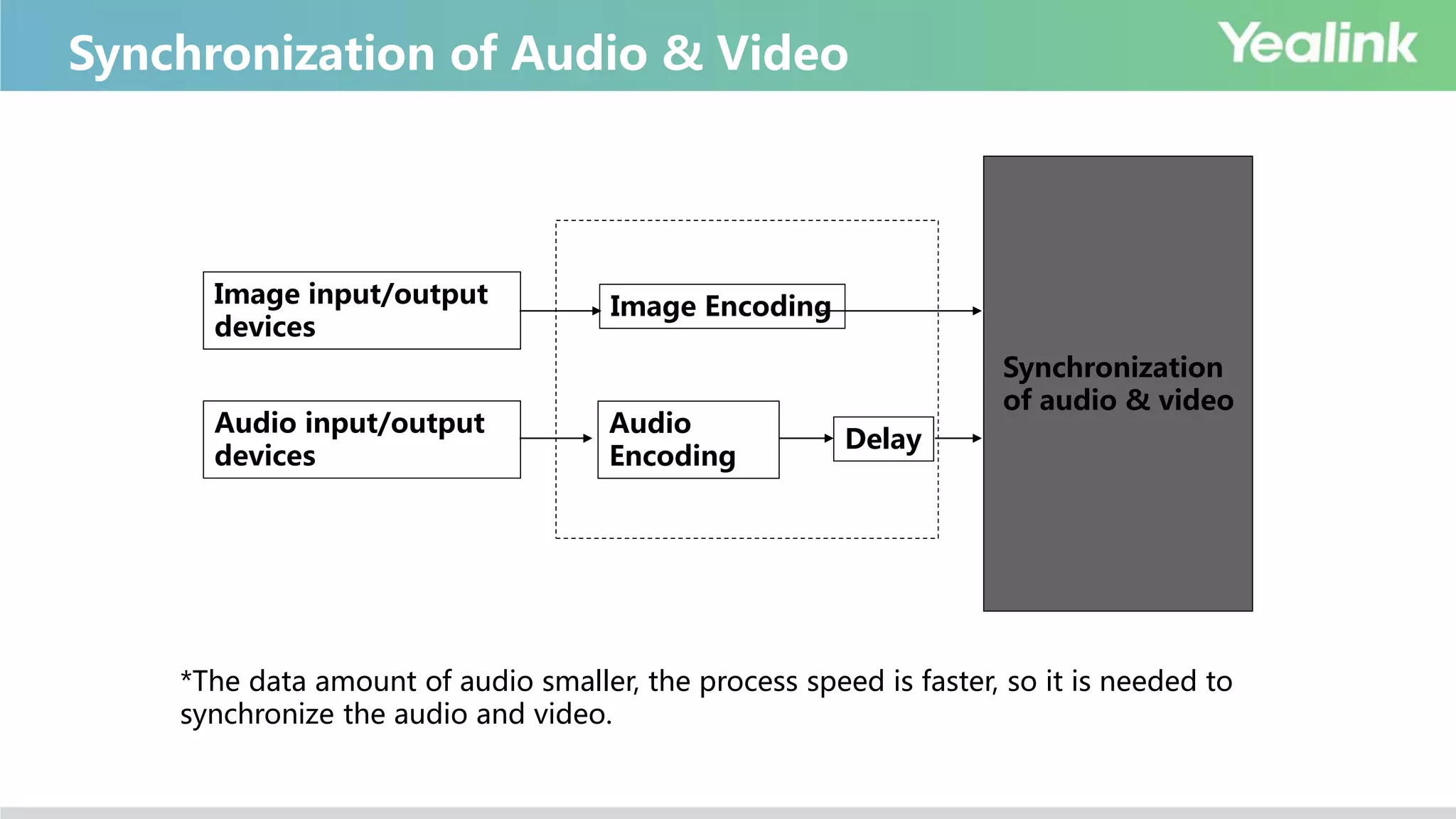
Synchronization of Audio & Video
Image input/output
devices
Audio input/output
devices
Image Encoding
Audio
Encoding
Delay
Synchronization
of audio & video
*The data amount of audio smaller, the process speed is faster, so it is needed to
synchronize the audio and video.
Sound from far side
Acoustic echo
Echo Elimination
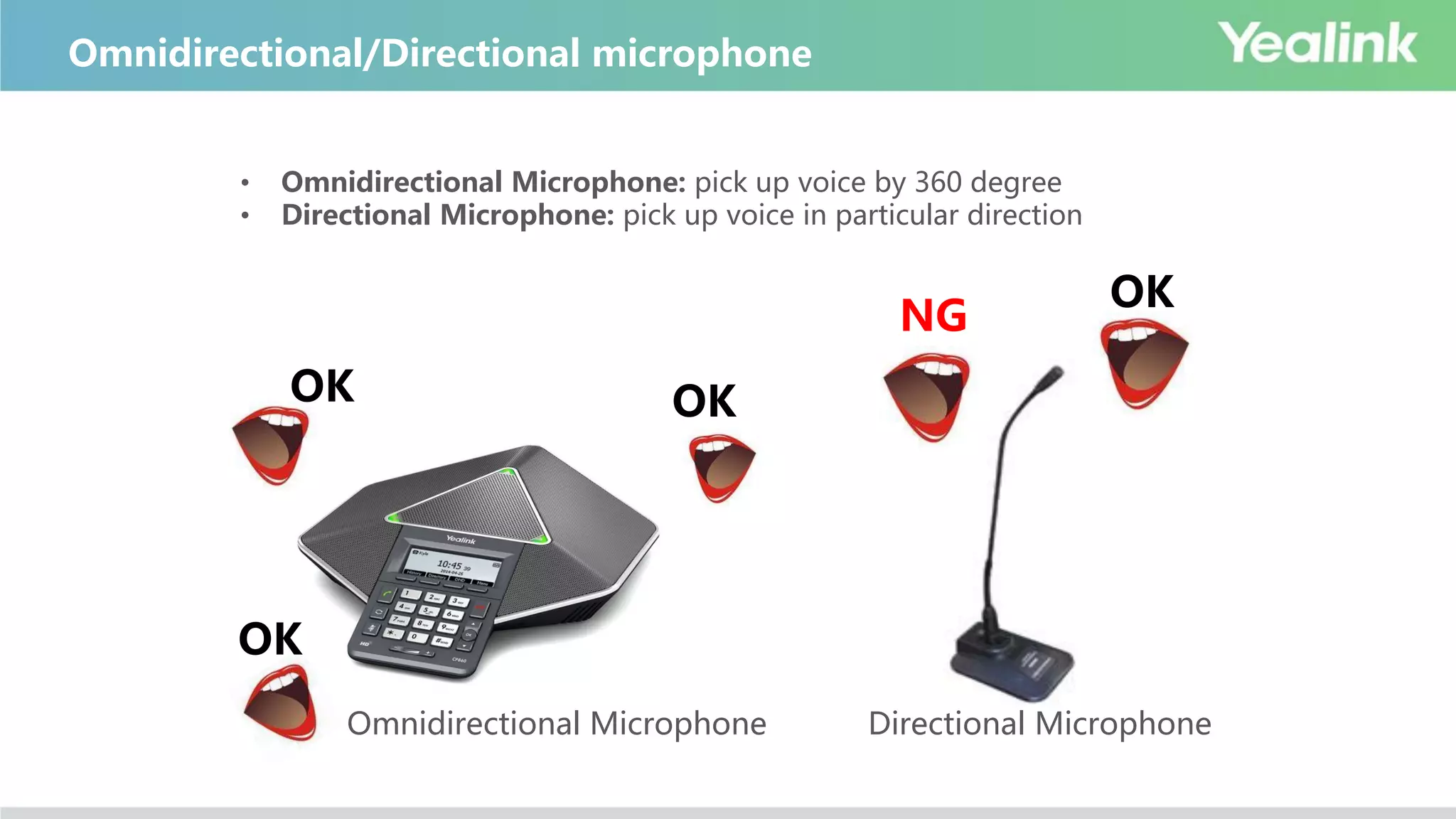
Omnidirectional/Directional microphone
• Omnidirectional Microphone: pick up voice by 360 degree
• Directional Microphone: pick up voice in particular direction
Omnidirectional Microphone Directional Microphone
OK OK
OK
OK
NG
System Functions & Characteristic
Dual-Stream(H.239, BFCP)
• Dual-Stream:
Dual-video transfer technology, which allows to deliver two media
streams(camera video and content sharing) in a video conference. The two
media streams share uplink bandwidth.
• Content Sharing:
The content stream(document ,video) sent from sending endpoint like PC
P+C:
People + Content (layout cannot be changed).
Mix video and content into one video which only occupies
one call bandwidth.
Mixed Stream
Dual-Display
• Dual-display:
Connected with two display devices, one for local image, the other for remote
image, or one for people image, the other for content sharing, which provide
better video conference experience and improve efficiency.
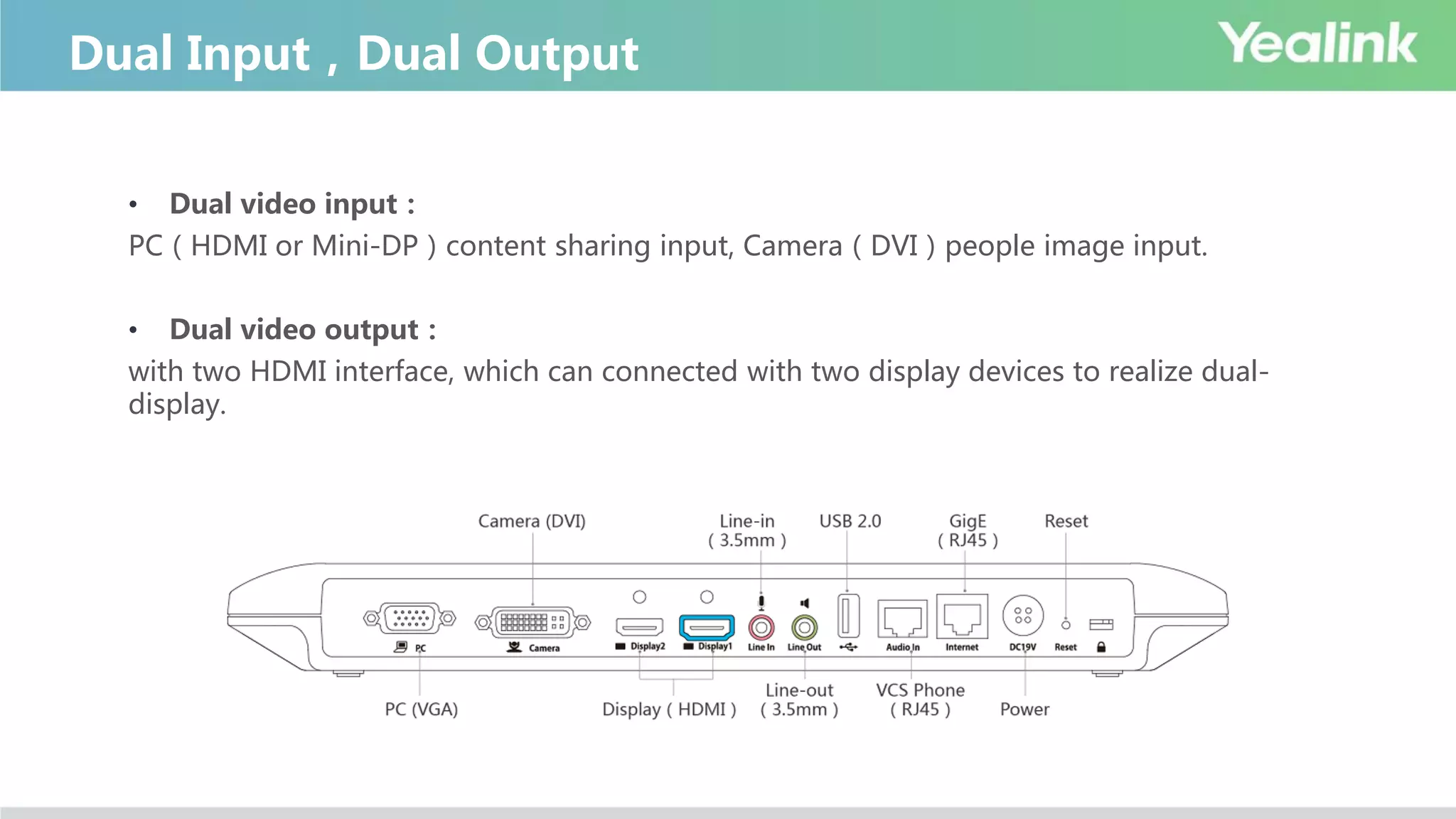
Dual Input,Dual Output
• Dual video input:
PC(HDMI or Mini-DP)content sharing input, Camera(DVI)people image input.
• Dual video output:
with two HDMI interface, which can connected with two display devices to realize dual-
display.
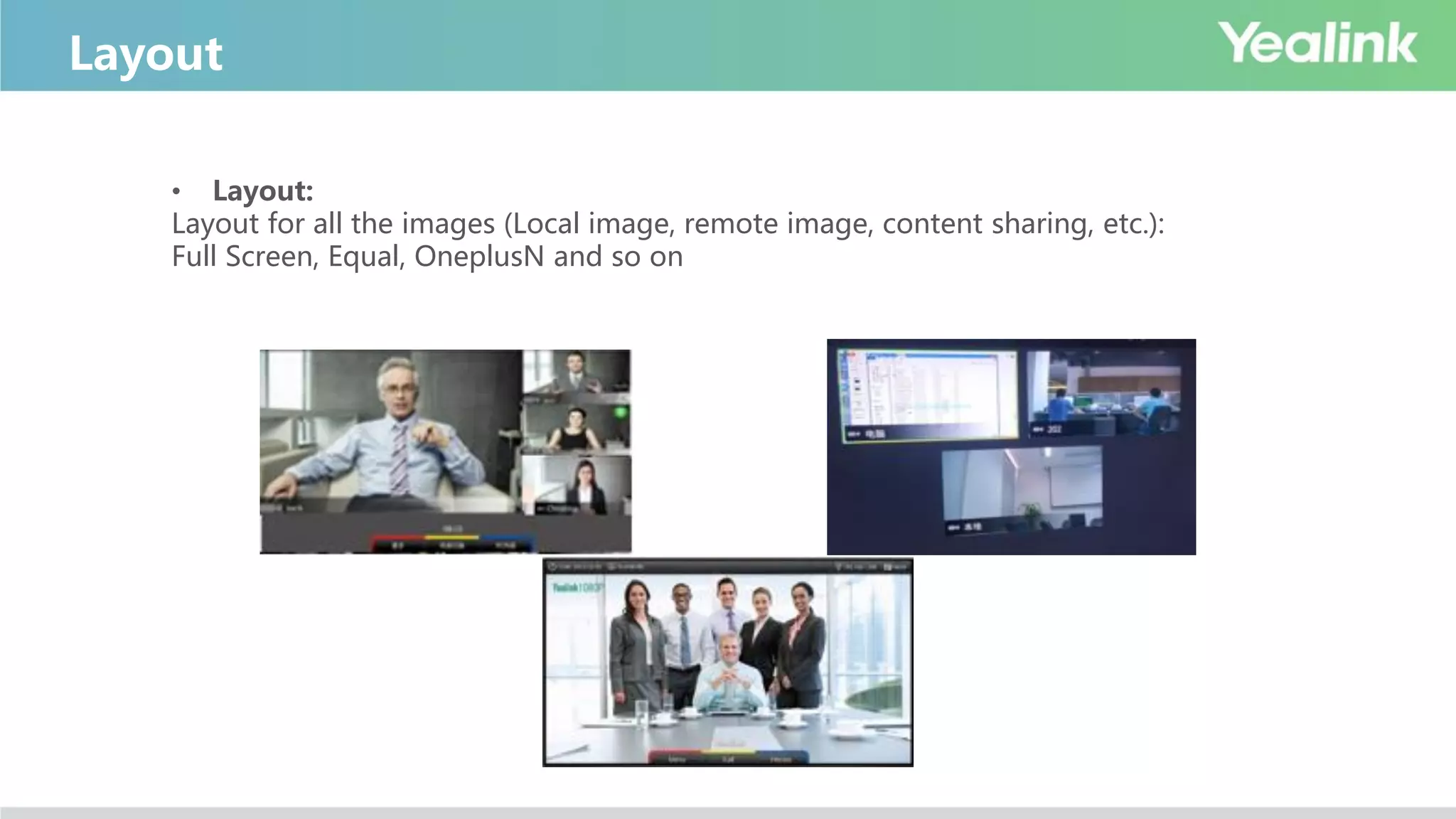
Layout
• Layout:
Layout for all the images (Local image, remote image, content sharing, etc.):
Full Screen, Equal, OneplusN and so on
Standard Communication Protocol
EachCompany
’
sdedicatednetwork
H.320 H.323
1960’
SIP
2004
The current mainstream is H.323,the next mainstream may be SIP!
19961990
Protocol Developing Trends
Protocol
Framework
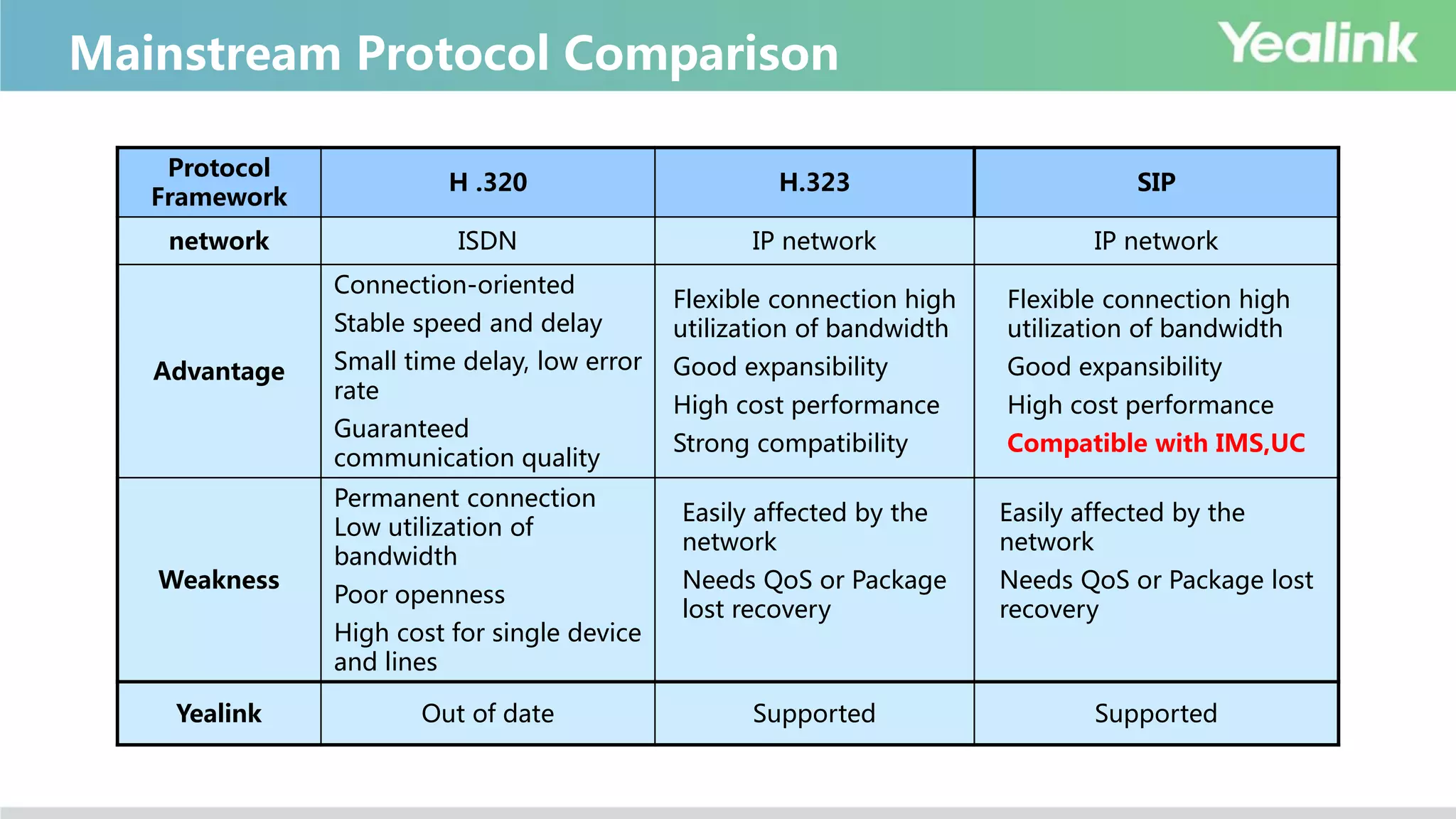
H .320 H.323 SIP
network ISDN IP network IP network
Advantage
Connection-oriented
Stable speed and delay
Small time delay, low error
rate
Guaranteed
communication quality
Flexible connection high
utilization of bandwidth
Good expansibility
High cost performance
Strong compatibility
Flexible connection high
utilization of bandwidth
Good expansibility
High cost performance
Compatible with IMS,UC
Weakness
Permanent connection
Low utilization of
bandwidth
Poor openness
High cost for single device
and lines
Easily affected by the
network
Needs QoS or Package
lost recovery
Easily affected by the
network
Needs QoS or Package lost
recovery
Yealink Out of date Supported Supported
Mainstream Protocol Comparison
• Audio Protocol:
G.711/G.722/G.728/G.722.1C/G.729/Opus
• Video Protocol:
H.261/H.263/H.264/H.264 HP/H.265
• Far End Camera Control(FECC):
H.224/H.281
• Other protocols:
Dual-Stream:H.239 Encryption:H.235
Common Codec
Video Standards & Network Adaptability
Package Loss Reason
Package Loss Reason
 Main reason is network congestion
 Network devices faulty:the problem caused by the switch faulty,
network cable loose, etc., which should be solved by client’s network
administrator instead of us.
Solution for Package Lost
Solutions(3 ways)
1. Package loss prevention
2. Package loss Recovery
3. Package loss avoid
Dynamic bandwidth adaptability
• 30% video package loss resistance
• Higher priority for content sharing and audio: Ensure the bandwidth the content
sharing and audio in priority
• Calling bandwidth adaptability, protocol adaptability, video & audio adaptability
Network Adaptability
basic video conferencing knowledge(for sales presales-technical)

basic video conferencing knowledge(for sales presales-technical)

  • 1.
    Basic Video ConferencingKnowledge V2.0 2017-09-04
  • 2.
    Agenda What is VCand Why ? Components & Ecosystem of VCS Main Players of VC Basic Product Terminology
  • 3.
    What is VideoConferencing System(VCS)? Communicatio n Network New York Beijing Three elements of VC • Different locations(Branches) • Communication Network • Acquisition and Restoration of Audio&Video VCS:Video Conferencing System Name:Video Conferencing System Also:TV Phone Conferencing System Definition:A video conference offer live, visual connection between two or more people residing in different locations for the purpose of images, text, video and audio communication.
  • 4.
    Why VCS? Low High HighLow CommunicationEffect Response Time The purpose of all communication: Improve efficiency, Save cost VCS Benefits  Reduce commercial cost  Faster Communication  More convenient information sharing  Improve business efficiency, increase competitiveness
  • 5.
    VCS Uses Business Management OperatingDecision Financial Management CRM SCM Stock Management Office Automation Publicity Business Training Aftersales Training Aftersales Support Remote Business Remote Negotiation Remote Recruitment Remote Communication Others… Administrative Conference Remote Court Remote Education Remote Medical Treatment Remote Finance Emergency Communication Remote production scheduling Government Office Informatization ★ Applicable to various group activities in various fields!  Internal:Administrative conferences/collaborations between branches  External:Communicate with customer/partner/supplier etc.
  • 6.
    VCS Scenarios– Traditional SmallMeeting Room Leader Office Auditorium/Large Meeting Room Medium Meeting Room
  • 7.
  • 8.
    Development of VC AnalogDigital IP ISDN Internet Visual SD HD FHD UHD 1080p 1920x1080 4K CIF (352x288) 4CIF (720x576) 720p 1280x720
  • 9.
  • 10.
    VCS Structure Internet Branches Head office Endpoin t MCUGK/Firewall/Manager Endpoint Endpoint Endpoint
  • 11.
    Endpoint Multi-codec Endpoints withbuilt-in MCU Single-codec Endpoints Immersive Telepresence Telepresence product,the top end Desktop Desktop all-in-one/VP/PC software Mobile Android/iOS App Infrastructure (Different Servers) MCU Independent MCU product for large scale conference for mixing the videos from all participants Gatekeeper Gatekeeper, like SIP Server used for H.323 register and calling routing NAT Transversal Used for branches firewall traversal Manager Meeting management, Devices management Introduction of VCS Components
  • 12.
  • 13.
    VC Classification Hardware VCSSoftware VCS Cloud VCS Advantage Disadvantage Hardware VCS Great experience, stable Expensive, poor expansibility Software VCS Cheap Poor experience, unstable Cloud VCS Charge by service, less investment at first time Low maintenance cost Good expansibility Highly rely on SP network condition Security concerns Many uncontrollable factors, no safe sense
  • 14.
  • 15.
  • 16.
     Cisco  Cisco2009 purchased Tandberg with 3.4 B $;  Polycom  In 1998,Polycom purchased ViaVideo  In 2003,ViaVideo ex-owner established Lifesize  In 2009,Logitech purchased Lifesize with 40.5 M $  In 2011, Polycom purchased HP Halo Telepresence system  Radvision  In 2012,Avaya purchased Radvision with 10 M $  Vidyo Boss comes from Radvision  Others  In 2013,Clearone purchased VCON to enter VCS market History of VCS main players
  • 17.
    VCS Other Players HardwareVCS Polycom, Cisco, Lifesize, Radvision, Aver, ClearOne Software VCS Pexip, Mind… Cloud VCS Service Provider Lifesize, Bluejeans, Vidtel, Zoom.. Web VCS Service Provider WebEx
  • 18.
    Ecosystem Display Devices Audio system LargeScreen LCD TV Projector Joint Screen TV Cart Gooseneck microphone system Audio output system Installation& Project
  • 19.
  • 20.
  • 21.
    Camera • 1080p FullHD – Camera can acquire 1080p@30 fps full HD image • PTZ – Short for Pan/Tilt/Zoom. • Viewing angle – The range which camera can cover, viewing angle of Yealink is 70°~ 83° *The viewing angle of competitor is (70 ° - 80 ° )
  • 22.
    Camera - Zoom •Optical Zoom – Zoom include optical zoom and digital zoom. – Optical Zoom: Optical zoom changes the magnification of images with the actual optical glass before the image reach the imaging sensor. The optical zoom ratio of a digital camera measures how much the lens can actually zoom in to make subjects appear closer. – Digital Zoom: Digital zoom is a part of digital cameras, and camcorders, which helps to crop the entire image, and then digitally enlarge the size of the viewfinder of the portion that is needed to zoom in on. *Yealink 12X Aver 16X Cisco 4-14X,high-end product with 20X Lifesize 10X Polycom 12X
  • 23.
    Resolution Resolution: The number ofpixels on each individual line, its measuring unit is pixels/inch(ppi). For an image with 1024×768 means there are 1024 pixels on each line with 768 lines in total .
  • 24.
    Frame Rate Frame rate: Usedto measure the number of frames per second. The measuring unit is Frames per Second, short in FPS or Hz. Current mainstream is 30fps,the future trend is 60fps Film:24fps TV(PAL):25fps TV(NTSC):29.97fps CRT Monitor:60Hz-85Hz LCD Monitor:60Hz 3D Monitor: 120Hz
  • 25.
    • Frame rate: Thenumber of images transported per second • Common frame rate – 15f/S (image “jump”) – 25f/S(image is fluent and matches with domestic light frequency) – 30f/S( image is fluent ) – 60f/S(improve interaction and realistic sense obviously) – Higher frame rate brings higher fluency • Common frame rate + resolution – 1080p 30fps – 720p 30fps – 720p 60fps Frame rate
  • 26.
    • High ResolutionCamera • High Resolution CODEC • High Quality Network[660Kbps+] • High Resolution Monitor – The image resolution should be 720p above Four elements of HD VC
  • 27.
  • 28.
    Synchronization of Audio& Video Image input/output devices Audio input/output devices Image Encoding Audio Encoding Delay Synchronization of audio & video *The data amount of audio smaller, the process speed is faster, so it is needed to synchronize the audio and video.
  • 29.
    Sound from farside Acoustic echo Echo Elimination
  • 30.
    Omnidirectional/Directional microphone • OmnidirectionalMicrophone: pick up voice by 360 degree • Directional Microphone: pick up voice in particular direction Omnidirectional Microphone Directional Microphone OK OK OK OK NG
  • 31.
    System Functions &Characteristic
  • 32.
    Dual-Stream(H.239, BFCP) • Dual-Stream: Dual-videotransfer technology, which allows to deliver two media streams(camera video and content sharing) in a video conference. The two media streams share uplink bandwidth. • Content Sharing: The content stream(document ,video) sent from sending endpoint like PC
  • 33.
    P+C: People + Content(layout cannot be changed). Mix video and content into one video which only occupies one call bandwidth. Mixed Stream
  • 34.
    Dual-Display • Dual-display: Connected withtwo display devices, one for local image, the other for remote image, or one for people image, the other for content sharing, which provide better video conference experience and improve efficiency.
  • 35.
    Dual Input,Dual Output •Dual video input: PC(HDMI or Mini-DP)content sharing input, Camera(DVI)people image input. • Dual video output: with two HDMI interface, which can connected with two display devices to realize dual- display.
  • 36.
    Layout • Layout: Layout forall the images (Local image, remote image, content sharing, etc.): Full Screen, Equal, OneplusN and so on
  • 37.
  • 38.
    EachCompany ’ sdedicatednetwork H.320 H.323 1960’ SIP 2004 The currentmainstream is H.323,the next mainstream may be SIP! 19961990 Protocol Developing Trends
  • 39.
    Protocol Framework H .320 H.323SIP network ISDN IP network IP network Advantage Connection-oriented Stable speed and delay Small time delay, low error rate Guaranteed communication quality Flexible connection high utilization of bandwidth Good expansibility High cost performance Strong compatibility Flexible connection high utilization of bandwidth Good expansibility High cost performance Compatible with IMS,UC Weakness Permanent connection Low utilization of bandwidth Poor openness High cost for single device and lines Easily affected by the network Needs QoS or Package lost recovery Easily affected by the network Needs QoS or Package lost recovery Yealink Out of date Supported Supported Mainstream Protocol Comparison
  • 40.
    • Audio Protocol: G.711/G.722/G.728/G.722.1C/G.729/Opus •Video Protocol: H.261/H.263/H.264/H.264 HP/H.265 • Far End Camera Control(FECC): H.224/H.281 • Other protocols: Dual-Stream:H.239 Encryption:H.235 Common Codec
  • 41.
    Video Standards &Network Adaptability
  • 42.
    Package Loss Reason PackageLoss Reason  Main reason is network congestion  Network devices faulty:the problem caused by the switch faulty, network cable loose, etc., which should be solved by client’s network administrator instead of us.
  • 43.
    Solution for PackageLost Solutions(3 ways) 1. Package loss prevention 2. Package loss Recovery 3. Package loss avoid
  • 44.
    Dynamic bandwidth adaptability •30% video package loss resistance • Higher priority for content sharing and audio: Ensure the bandwidth the content sharing and audio in priority • Calling bandwidth adaptability, protocol adaptability, video & audio adaptability Network Adaptability