AVK INTERNATIONAL RESIDENTIAL
SENIORSECONDARY SCHOOL,
SANKARANKOVIL.
PROJECT WORK 2025-2026
NAME :
CLASS : XII
SUBJECT : Computer Science (New)
Exam No. :
REG. No. :
TABLE OF CONTENTS
Certificate
Acknowledgement
Abstract
List of Abbreviation
Introduction
List of modules
Header files and their purpose
About MySQL Database
Coding
Output
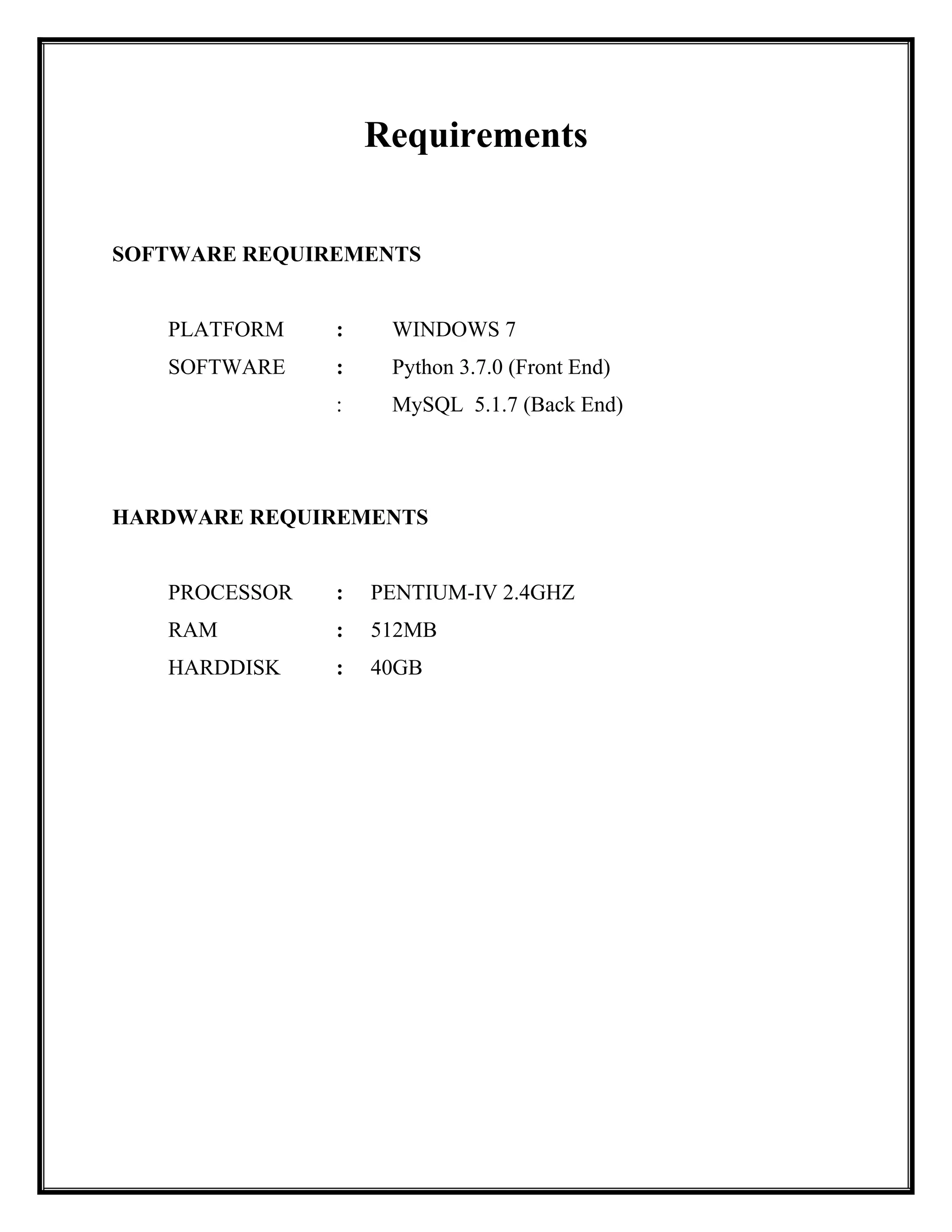
Requirements
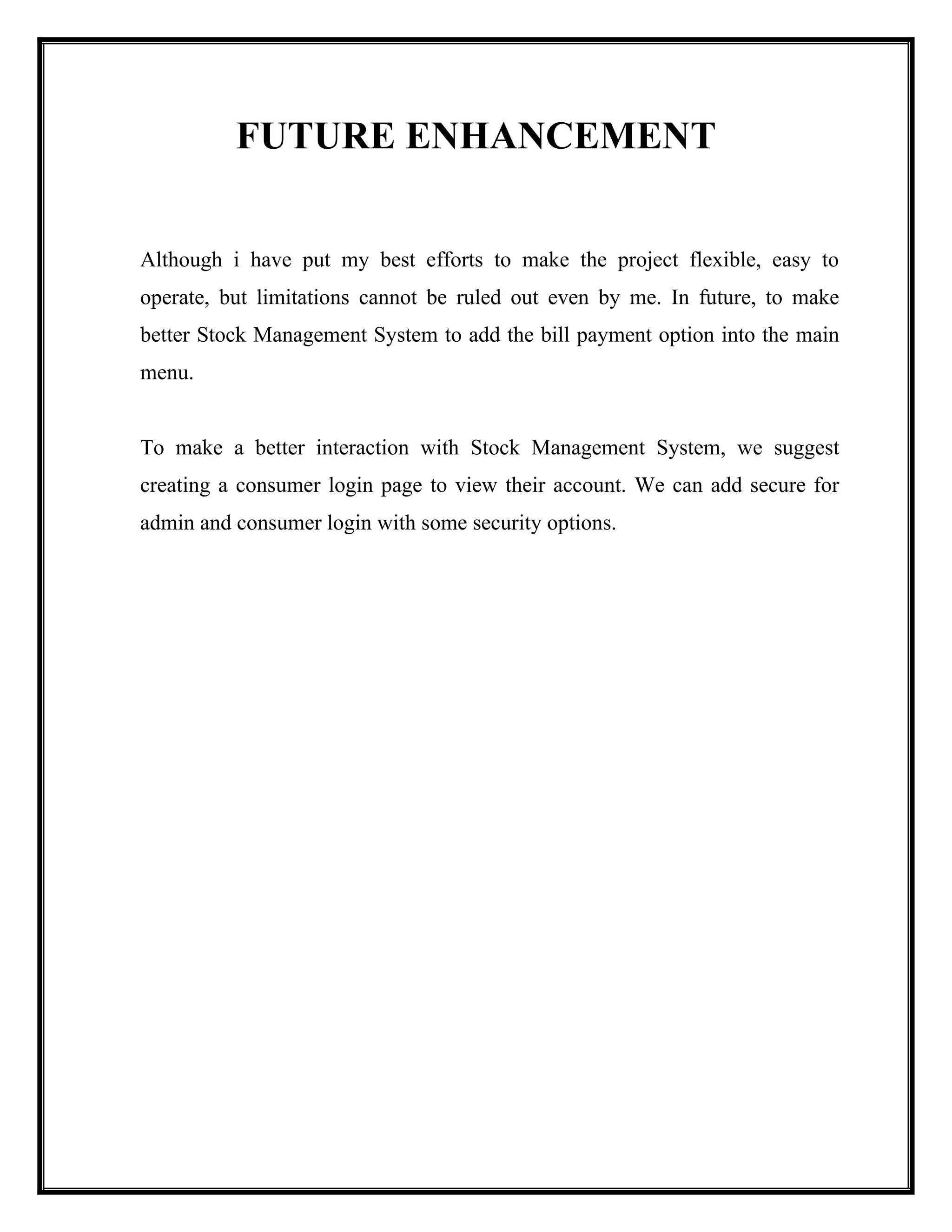
Future Enhancement
Bibliography
4.
AVK INTERNATIONAL RESIDENTIALSENIOR
SECONDARY SCHOOL,
#188, RAJAPALAYAMMAIN ROAD,
SANKARANKOVIL, TENKASI DISTRICT-627753.
Certified to the Bonafide Project work done in Computer
Science by ___________________________________________
Registration number ______________________ Standard XII of
Group ________________ during the year 2025-2026
Signature of Subject Teacher Signature of the Principal
School Seal
Submitted for the practical examination held on___________
INTERNAL EXAMINER EXTERNAL EXAMINER
5.
I feel greatpleasure to acknowledge all those involved in the process of my
education. In the first place, I would like to record my deep and sincere gratitude to
God then to my Parents and then to our Chairman Dr.S.Ayyadurai Pandian who
have provided us this opportunity, next my whole hearted gratitude to our beloved
Principal Dr.B.Sekar Kumar and next my sincere thanks to our teacher
Mr.S.PonMuthuRaj for his supervision, advice, guidance and crucial contribution,
which made them a backbone of this project.
Their understanding, encouraging and personal guidance have provided a good
basis for the present project. Their involvement with their originality has triggered
and nourished our intellectual maturity that we will benefit from, for a long time to
come. I extend my acknowledgement to my project mates, who directly or
indirectly involved in carrying out the project work.
6.
ABSTRACT
The Bank AccountManagement System (BMS) is an application for
maintaining a person's account in a bank. In this project I tried to
show the working of a banking account system and cover the basic
functionality of a Bank Account Management System. To develop a
project for solving financial applications of a customer in banking
environment in order to nurture the needs of an end banking user by
providing various ways to perform banking tasks. Also to enable the
user’s workspace to have additional functionalities which are not
provided under a conventional banking project. The Bank Account
Management System undertaken as a project is based on relevant
technologies. The main aim of this project is to develop software
for Bank Account Management System. This project has been
developed to carry out the processes easily and quickly, which is not
possible with the manuals systems, which are overcome by this
software. This project is developed using PHP, HTML language
and MYSQL use for database connection. Creating and managing
requirements is a challenge of IT, systems and product development
projects or indeed for any activity where you have to manage a
contractual relationship.
7.
List of Abbreviation
BMSBank Management System
API Application Program Interface
DBMS Database Management System
HTML Hypertext Markup Language
DML Data Manipulation Language
DDL Data Definition Language
PHP Hypertext Preprocessor.
DCL Data Control Language
IT Information technology
CLR Common Language Runtime
SSMSE SQL Server Management Studio Express
SQL Structured Query Language
8.
INTRODUCTION
The project entitled“Bank management system” is acomputerized
telecommunications device that provides the customers of a financial
institution with access to financial transactions in a public space without
the need for a human clerk or bank taller (manpower). Thousands of
bank performs millions of transactions every day and thousands of users
used banking system in day to day life. As we know that if number of
users increases us need more banks and more staff it means increasing
manual work also we put more amount of money in bank it is more risky
and not much secure. If we developed advanced computerized based
banking system so there is no need to open more branches as well the
manpower is reduce and maximum information are stored automatically
in banking server. Banking system requires authenticity and validity if a
system provides these basic logics that mean we can developed a new
system that authenticate and validate the user and user can do any type
of virtual transaction any time anywhere in minimum amount of time.
One of the most authentic codes i.e. the customer account number for
recognition of any person. It always appear on and credit, withdraw,
money transferring, linking adhaar with account and changing the
account location in one branch to another branch in same bank. Day to
day life banking system is most useful and important thing in
economical world and which is very useful to develop country as well as
economic power.
Transaction: in banking transaction is the execution of a program that
performs an administrative or real time function, often by accessing
shared data sources, usually on behalf of a banking users who have an
account in the respective bank. This transaction executed by the program
and it automatic do the transactions with balance and it check all
9.
conditions are satisfiedor not in respective proses. This is the more
secure and automatic process which do all the transaction with accuracy
of calculation. In our project we also provide the facility to link aadhar
with account number and we also provide the facility to change location
of account with branch that mean the user can change the branch which
is convenient for it. They will also change or update data like address,
mobile number using online banking system.
LIST OF MODULES
There are five types of modules namely,
Add Account
Modify Account
o Modify Customer Name
o Modify Customer Address
o Modify Customer Phone No.
o Modify Customer Email Id
Close Account
Transaction Menu
o Deposit Amount
o Withdraw Amount
Search Menu
o Search by Account No.
10.
o Search byAadhar No.
o Search by Phone No.
o Search by Email Id
o Search by Name
Report Menu
o Daily Report
o Monthly Report
o Account Details
Close application
1. Add Account:
2. Modify Account:
3. Close Account:
4. Transaction Menu:
5. Search Menu:
6. Report Menu:
11.
7. Close Application:
HEADERFILES
&
THEIR PURPOSE
S.No. Header File Purpose
1. import
mysql.connector
The connect() constructor creates a
connection to the MySQL server and returns
a MySQLConnection object.
2. import date
This can be imported to work with the date
as well as time.
Introduction:
MySQL is afreely available open source Relational Database Management System
(RDBMS) that uses Structured Query Language (SQL). MySQL is faster, more reliable, and
cheaper -- or, simply put, better -- than any other database system (including commercial systems
such as Oracle and DB2).
Features of MySQL
The following list shows the most important properties of MySQL. We will use some
terminology from the relational database.
Relational Database System
Client/Server Architecture
SQL compatibility
User interface
Full-text search
Platform independence
Speed - Very fast database program
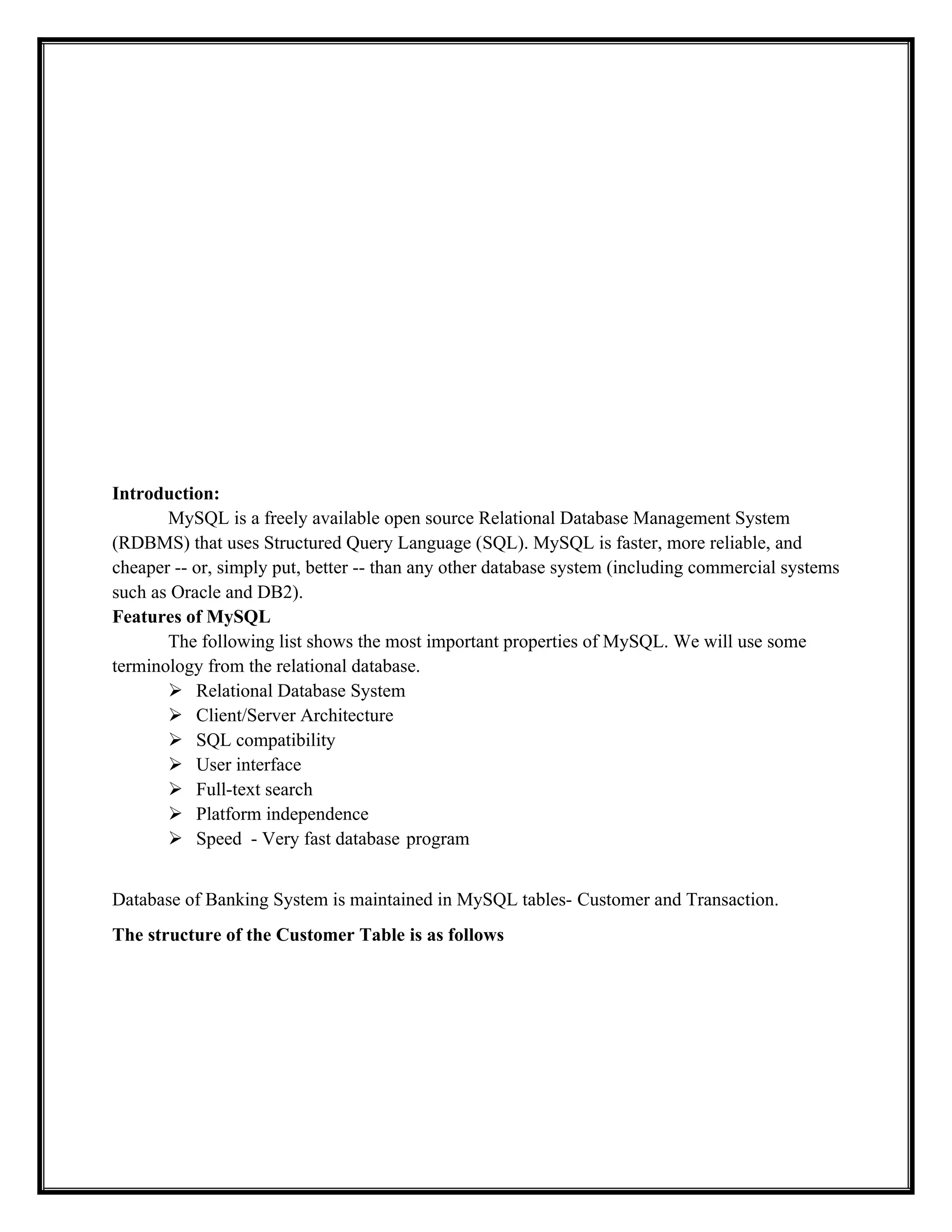
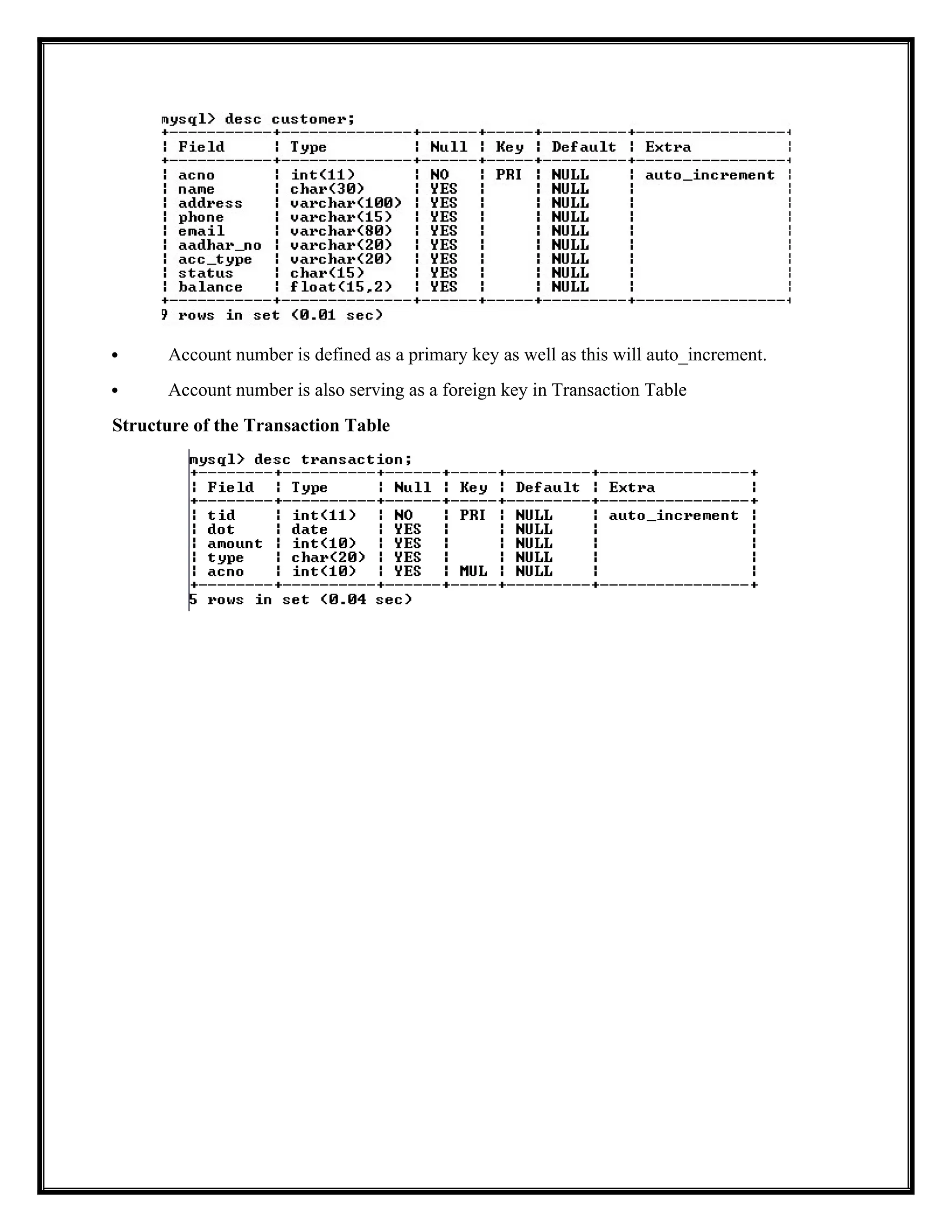
Database of Banking System is maintained in MySQL tables- Customer and Transaction.
The structure of the Customer Table is as follows
14.
Account numberis defined as a primary key as well as this will auto_increment.
Account number is also serving as a foreign key in Transaction Table
Structure of the Transaction Table
15.
CODING
import mysql.connector
from datetimeimport date
def clear():
for _ in range(5):
print()
def account_status(acno):
conn = mysql.connector.connect(host='localhost',user='root',
password='root@123',database='avkschool')
cursor = conn.cursor()
sql ="select status,balance from customer where acno ='"+acno+"'"
result = cursor.execute(sql)
16.
result = cursor.fetchone()
conn.close()
returnresult
def deposit_amount():
conn = mysql.connector.connect(host='localhost',user='root',
password='root@123',database='avkschool')
cursor = conn.cursor()
clear()
acno = input('Enter account No :')
amount = input('Enter amount :')
today = date.today()
result = account_status(acno)
if result [0]== 'active':
sql1 ="update customer set balance = balance+"+amount + ' where acno = '+acno+'
and status="active";'
sql2 = 'insert into transaction(amount,type,acno,dot) values(' + amount
+',"deposit",'+acno+',"'+str(today)+'");'
cursor.execute(sql2)
cursor.execute(sql1)
conn.commit()
#print(sql1)
#print(sql2)
print('nnamount deposited')
else:
print('nnClosed or Suspended Account....')
wait= input('nnn Press any key to continue....')
conn.close()
def withdraw_amount():
conn = mysql.connector.connect(host='localhost',user='root',
password='root@123',database='avkschool')
cursor = conn.cursor()
clear()
acno = input('Enter account No :')
amount = input('Enter amount :')
today = date.today()
result = account_status(acno)
17.
if result[0] =='active' and int(result[1])>=int(amount):
sql1 = "update customer set balance = balance-" + amount + ' where acno = '+acno+'
and status="active";'
sql2 = 'insert into transaction(amount,type,acno,dot) values(' + amount +
',"withdraw",'+acno+',"'+str(today)+'");'
cursor.execute(sql2)
cursor.execute(sql1)
conn.commit()
#print(sql1)
#print(sql2)
print('nnamount Withdrawn')
else:
print('nnClosed or Suspended Account.Or Insufficient amount')
wait = input('nnn Press any key to continue....')
conn.close()
def transaction_menu():
while True:
clear()
print(' Trasaction Menu')
print("n1. Deposit Amount")
print('n2. WithDraw Amount')
print('n3. Back to Main Menu')
print('nn')
choice = int(input('Enter your choice ...: '))
if choice == 1:
deposit_amount()
if choice == 2:
withdraw_amount()
if choice == 3:
break
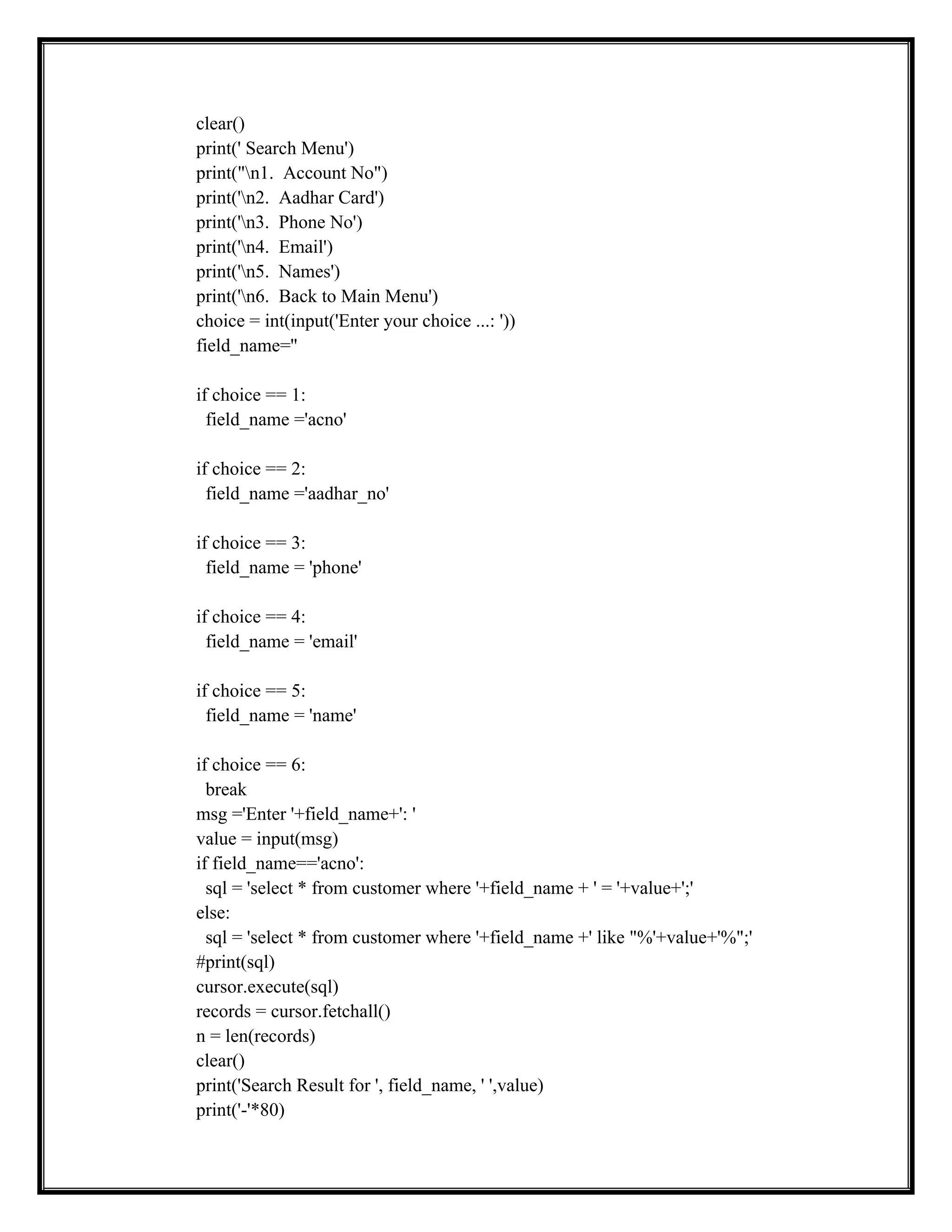
def search_menu():
conn = mysql.connector.connect(host='localhost',user='root',
password='root@123',database='avkschool')
cursor = conn.cursor()
while True:
18.
clear()
print(' Search Menu')
print("n1.Account No")
print('n2. Aadhar Card')
print('n3. Phone No')
print('n4. Email')
print('n5. Names')
print('n6. Back to Main Menu')
choice = int(input('Enter your choice ...: '))
field_name=''
if choice == 1:
field_name ='acno'
if choice == 2:
field_name ='aadhar_no'
if choice == 3:
field_name = 'phone'
if choice == 4:
field_name = 'email'
if choice == 5:
field_name = 'name'
if choice == 6:
break
msg ='Enter '+field_name+': '
value = input(msg)
if field_name=='acno':
sql = 'select * from customer where '+field_name + ' = '+value+';'
else:
sql = 'select * from customer where '+field_name +' like "%'+value+'%";'
#print(sql)
cursor.execute(sql)
records = cursor.fetchall()
n = len(records)
clear()
print('Search Result for ', field_name, ' ',value)
print('-'*80)
19.
print("Acc. No.tNametAddresstPhone No.tMailIdttAadhar No.tAcc. Type
tStatustBalance")
print("="*80)
for record in records:
print(record[0],"t", record[1],"t", record[2],"t", record[3],"t",record[4],"t",
record[5],"t", record[6],"t", record[7],"t", record[8])
if(n <= 0):
print(field_name, ' ', value, ' does not exist')
wait = input('nnn Press any key to continue....')
conn.close()
wait=input('nnn Press any key to continue....')
def daily_report():
clear()
conn = mysql.connector.connect(host='localhost',user='root',
password='root@123',database='avkschool')
today = date.today()
cursor = conn.cursor()
sql = 'select tid,dot,amount,type,acno from transaction t where dot="'+ str(today)+'";'
cursor.execute(sql)
records = cursor.fetchall()
clear()
print('Daily Report :',today)
print('-'*120)
print("Trans. IdtDate of TranstamounttType of TranstAcc No.")
print("="*120)
for record in records:
print(record[0], "tt",record[1], "t",record[2], "t",record[3], "t",record[4])
print('-'*120)
conn.close()
wait = input('nnn Press any key to continue....')
def monthly_report():
clear()
conn = mysql.connector.connect(host='localhost',user='root',
password='root@123',database='avkschool')
20.
today = date.today()
cursor= conn.cursor()
sql = 'select tid,dot,amount,type,acno from transaction t where month(dot)="' +
str(today).split('-')[1]+'";'
cursor.execute(sql)
records = cursor.fetchall()
clear()
print(sql)
print('Monthly Report :', str(today).split('-')[1], '-,', str(today).split('-')[0])
print('-'*120)
print("Trans. IdtDate of TranstamounttType of TranstAcc No.")
print("="*120)
for record in records:
print(record[0],"tt", record[1],"t", record[2], "t",record[3],"t", record[4])
print('-'*120)
conn.close()
wait = input('nnn Press any key to continue....')
def account_details():
clear()
acno = input('Enter account no :')
conn = mysql.connector.connect(host='localhost',user='root',
password='root@123',database='avkschool')
cursor = conn.cursor()
sql ='select * from customer where acno ='+acno+';'
sql1 = 'select tid,dot,amount,type from transaction t where t.acno='+acno+';'
cursor.execute(sql)
result = cursor.fetchone()
clear()
print('Account Details')
print('-'*120)
print('Account No :',result[0])
print('Customer Name :',result[1])
print('Address :',result[2])
print('Phone NO :',result[3])
print('Email ID :',result[4])
print('Aadhar No :',result[5])
print('Account Type :',result[6])
print('Account Status :',result[7])
print('Current Balance :',result[8])
21.
print('-'*120)
cursor.execute(sql1)
results = cursor.fetchall()
forresult in results:
print(result[0], result[1], result[2], result[3])
conn.close()
wait=input('nnnPress any key to continue.....')
def report_menu():
while True:
clear()
print(' Report Menu')
print("n1. Daily Report")
print('n2. Monthly Report')
print('n3. Account Details')
print('n4. Back to Main Menu')
choice = int(input('Enter your choice ...: '))
if choice == 1:
daily_report()
if choice == 2:
monthly_report()
if choice == 3:
account_details()
if choice == 4:
break
def add_account():
conn = mysql.connector.connect(host='localhost',user='root',
password='root@123',database='avkschool')
cursor = conn.cursor()
name = input('Enter Name :')
addr = input('Enter address ')
phone = input('Enter Phone no :')
email = input('Enter Email :')
aadhar = input('Enter AAdhar no :')
actype = input('Account Type (saving/current ) :')
balance = input('Enter opening balance :')
22.
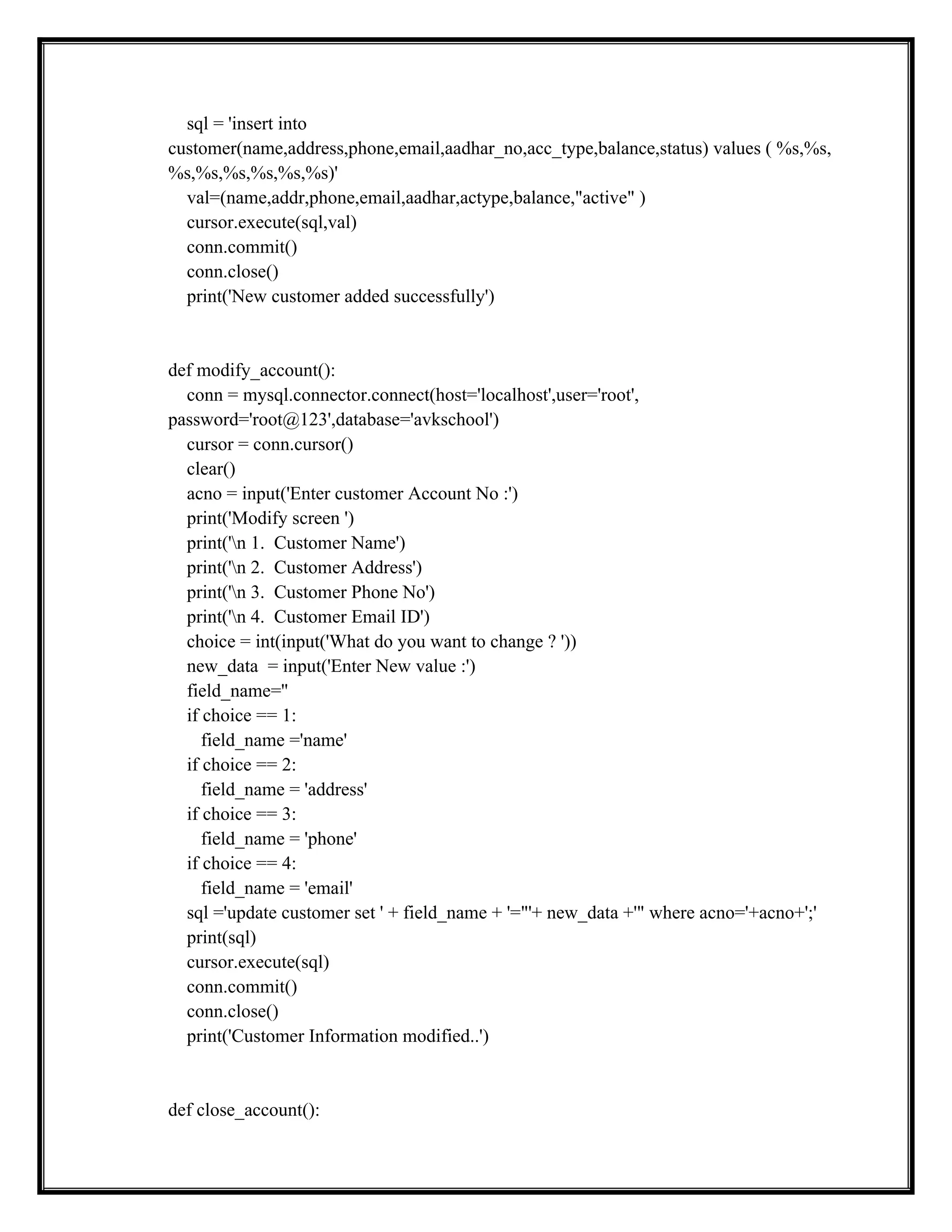
sql = 'insertinto
customer(name,address,phone,email,aadhar_no,acc_type,balance,status) values ( %s,%s,
%s,%s,%s,%s,%s,%s)'
val=(name,addr,phone,email,aadhar,actype,balance,"active" )
cursor.execute(sql,val)
conn.commit()
conn.close()
print('New customer added successfully')
def modify_account():
conn = mysql.connector.connect(host='localhost',user='root',
password='root@123',database='avkschool')
cursor = conn.cursor()
clear()
acno = input('Enter customer Account No :')
print('Modify screen ')
print('n 1. Customer Name')
print('n 2. Customer Address')
print('n 3. Customer Phone No')
print('n 4. Customer Email ID')
choice = int(input('What do you want to change ? '))
new_data = input('Enter New value :')
field_name=''
if choice == 1:
field_name ='name'
if choice == 2:
field_name = 'address'
if choice == 3:
field_name = 'phone'
if choice == 4:
field_name = 'email'
sql ='update customer set ' + field_name + '="'+ new_data +'" where acno='+acno+';'
print(sql)
cursor.execute(sql)
conn.commit()
conn.close()
print('Customer Information modified..')
def close_account():
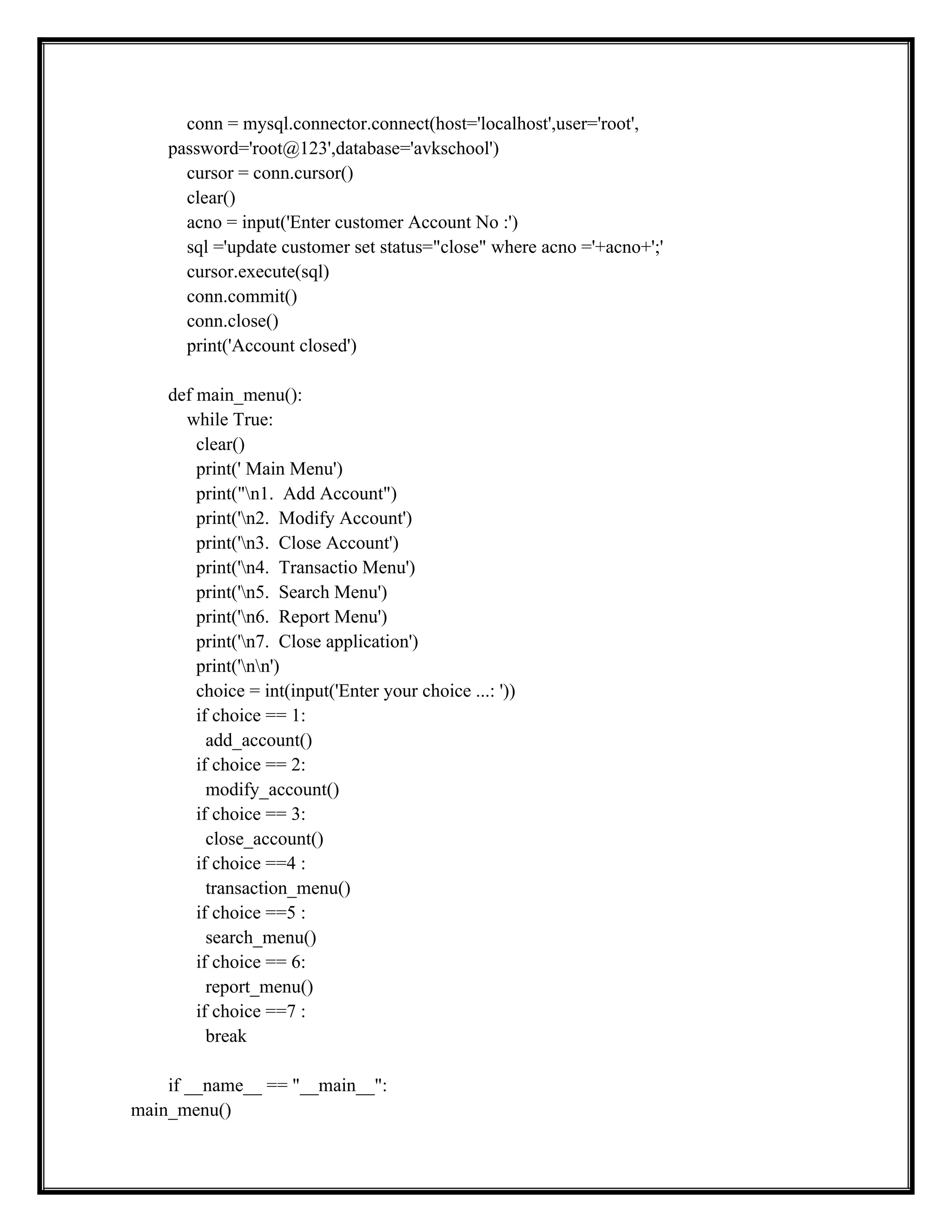
23.
conn = mysql.connector.connect(host='localhost',user='root',
password='root@123',database='avkschool')
cursor= conn.cursor()
clear()
acno = input('Enter customer Account No :')
sql ='update customer set status="close" where acno ='+acno+';'
cursor.execute(sql)
conn.commit()
conn.close()
print('Account closed')
def main_menu():
while True:
clear()
print(' Main Menu')
print("n1. Add Account")
print('n2. Modify Account')
print('n3. Close Account')
print('n4. Transactio Menu')
print('n5. Search Menu')
print('n6. Report Menu')
print('n7. Close application')
print('nn')
choice = int(input('Enter your choice ...: '))
if choice == 1:
add_account()
if choice == 2:
modify_account()
if choice == 3:
close_account()
if choice ==4 :
transaction_menu()
if choice ==5 :
search_menu()
if choice == 6:
report_menu()
if choice ==7 :
break
if __name__ == "__main__":
main_menu()
FUTURE ENHANCEMENT
Although ihave put my best efforts to make the project flexible, easy to
operate, but limitations cannot be ruled out even by me. In future, to make
better Stock Management System to add the bill payment option into the main
menu.
To make a better interaction with Stock Management System, we suggest
creating a consumer login page to view their account. We can add secure for
admin and consumer login with some security options.





![result = cursor.fetchone()
conn.close()
return result
def deposit_amount():
conn = mysql.connector.connect(host='localhost',user='root',
password='root@123',database='avkschool')
cursor = conn.cursor()
clear()
acno = input('Enter account No :')
amount = input('Enter amount :')
today = date.today()
result = account_status(acno)
if result [0]== 'active':
sql1 ="update customer set balance = balance+"+amount + ' where acno = '+acno+'
and status="active";'
sql2 = 'insert into transaction(amount,type,acno,dot) values(' + amount
+',"deposit",'+acno+',"'+str(today)+'");'
cursor.execute(sql2)
cursor.execute(sql1)
conn.commit()
#print(sql1)
#print(sql2)
print('nnamount deposited')
else:
print('nnClosed or Suspended Account....')
wait= input('nnn Press any key to continue....')
conn.close()
def withdraw_amount():
conn = mysql.connector.connect(host='localhost',user='root',
password='root@123',database='avkschool')
cursor = conn.cursor()
clear()
acno = input('Enter account No :')
amount = input('Enter amount :')
today = date.today()
result = account_status(acno)](https://image.slidesharecdn.com/bankmanagementsystem-model-251124132552-b9febe74/75/BankManagementSystem-Model-doc-and-business-16-2048.jpg)
![if result[0] == 'active' and int(result[1])>=int(amount):
sql1 = "update customer set balance = balance-" + amount + ' where acno = '+acno+'
and status="active";'
sql2 = 'insert into transaction(amount,type,acno,dot) values(' + amount +
',"withdraw",'+acno+',"'+str(today)+'");'
cursor.execute(sql2)
cursor.execute(sql1)
conn.commit()
#print(sql1)
#print(sql2)
print('nnamount Withdrawn')
else:
print('nnClosed or Suspended Account.Or Insufficient amount')
wait = input('nnn Press any key to continue....')
conn.close()
def transaction_menu():
while True:
clear()
print(' Trasaction Menu')
print("n1. Deposit Amount")
print('n2. WithDraw Amount')
print('n3. Back to Main Menu')
print('nn')
choice = int(input('Enter your choice ...: '))
if choice == 1:
deposit_amount()
if choice == 2:
withdraw_amount()
if choice == 3:
break
def search_menu():
conn = mysql.connector.connect(host='localhost',user='root',
password='root@123',database='avkschool')
cursor = conn.cursor()
while True:](https://image.slidesharecdn.com/bankmanagementsystem-model-251124132552-b9febe74/75/BankManagementSystem-Model-doc-and-business-17-2048.jpg)
![print("Acc. No.tNametAddresstPhone No.tMail IdttAadhar No.tAcc. Type
tStatustBalance")
print("="*80)
for record in records:
print(record[0],"t", record[1],"t", record[2],"t", record[3],"t",record[4],"t",
record[5],"t", record[6],"t", record[7],"t", record[8])
if(n <= 0):
print(field_name, ' ', value, ' does not exist')
wait = input('nnn Press any key to continue....')
conn.close()
wait=input('nnn Press any key to continue....')
def daily_report():
clear()
conn = mysql.connector.connect(host='localhost',user='root',
password='root@123',database='avkschool')
today = date.today()
cursor = conn.cursor()
sql = 'select tid,dot,amount,type,acno from transaction t where dot="'+ str(today)+'";'
cursor.execute(sql)
records = cursor.fetchall()
clear()
print('Daily Report :',today)
print('-'*120)
print("Trans. IdtDate of TranstamounttType of TranstAcc No.")
print("="*120)
for record in records:
print(record[0], "tt",record[1], "t",record[2], "t",record[3], "t",record[4])
print('-'*120)
conn.close()
wait = input('nnn Press any key to continue....')
def monthly_report():
clear()
conn = mysql.connector.connect(host='localhost',user='root',
password='root@123',database='avkschool')](https://image.slidesharecdn.com/bankmanagementsystem-model-251124132552-b9febe74/75/BankManagementSystem-Model-doc-and-business-19-2048.jpg)
![today = date.today()
cursor = conn.cursor()
sql = 'select tid,dot,amount,type,acno from transaction t where month(dot)="' +
str(today).split('-')[1]+'";'
cursor.execute(sql)
records = cursor.fetchall()
clear()
print(sql)
print('Monthly Report :', str(today).split('-')[1], '-,', str(today).split('-')[0])
print('-'*120)
print("Trans. IdtDate of TranstamounttType of TranstAcc No.")
print("="*120)
for record in records:
print(record[0],"tt", record[1],"t", record[2], "t",record[3],"t", record[4])
print('-'*120)
conn.close()
wait = input('nnn Press any key to continue....')
def account_details():
clear()
acno = input('Enter account no :')
conn = mysql.connector.connect(host='localhost',user='root',
password='root@123',database='avkschool')
cursor = conn.cursor()
sql ='select * from customer where acno ='+acno+';'
sql1 = 'select tid,dot,amount,type from transaction t where t.acno='+acno+';'
cursor.execute(sql)
result = cursor.fetchone()
clear()
print('Account Details')
print('-'*120)
print('Account No :',result[0])
print('Customer Name :',result[1])
print('Address :',result[2])
print('Phone NO :',result[3])
print('Email ID :',result[4])
print('Aadhar No :',result[5])
print('Account Type :',result[6])
print('Account Status :',result[7])
print('Current Balance :',result[8])](https://image.slidesharecdn.com/bankmanagementsystem-model-251124132552-b9febe74/75/BankManagementSystem-Model-doc-and-business-20-2048.jpg)
![print('-'*120)
cursor.execute(sql1)
results = cursor.fetchall()
for result in results:
print(result[0], result[1], result[2], result[3])
conn.close()
wait=input('nnnPress any key to continue.....')
def report_menu():
while True:
clear()
print(' Report Menu')
print("n1. Daily Report")
print('n2. Monthly Report')
print('n3. Account Details')
print('n4. Back to Main Menu')
choice = int(input('Enter your choice ...: '))
if choice == 1:
daily_report()
if choice == 2:
monthly_report()
if choice == 3:
account_details()
if choice == 4:
break
def add_account():
conn = mysql.connector.connect(host='localhost',user='root',
password='root@123',database='avkschool')
cursor = conn.cursor()
name = input('Enter Name :')
addr = input('Enter address ')
phone = input('Enter Phone no :')
email = input('Enter Email :')
aadhar = input('Enter AAdhar no :')
actype = input('Account Type (saving/current ) :')
balance = input('Enter opening balance :')](https://image.slidesharecdn.com/bankmanagementsystem-model-251124132552-b9febe74/75/BankManagementSystem-Model-doc-and-business-21-2048.jpg)