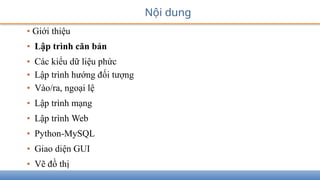
Nội dung
• Giớithiệu
• Lập trình căn bản
• Các kiểu dữ liệu phức
• Lập trình hướng đối tượng
• Vào/ra, ngoại lệ
• Lập trình mạng
• Lập trình Web
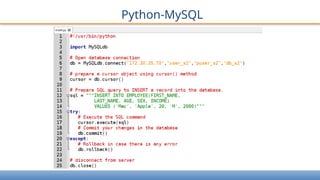
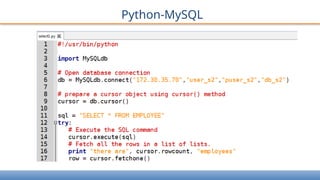
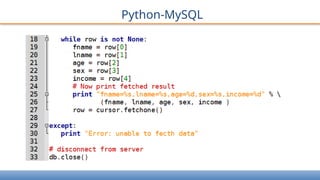
• Python-MySQL
• Giao diện GUI
• Vẽ đồ thị
3.
Giới thiệu Python
•Python là ngôn ngữ lập trình cấp cao, tương tác, thông dịch, hướng đối
tượng
• Do Guido van Rossum đề xuất từ 1985 - 1990
• Mã nguồn Python: giấy phép GNU General Public License (GPL)
• Python sẵn dùng trên Unix, Linux, Mac OS, Windows
• Top 5 ngôn ngữ lập trình phổ biến
• Được sử dụng bởi các tổ chức tập đoàn như Wikipedia, Google, Yahoo!,
CERN
4.
Giới thiệu Python
•Dễ học (Easy-to-learn)
• Dễ đọc (Easy-to-read)
• Dễ bảo trì (Easy-to-maintain)
• Thư viện chuẩn (standard library): tương thích UNIX, Linux, Windows và
Mac
• Chế độ tương tác: thực thi, kiểm tra, gỡ rối
• Khả chuyển (Portable): phần cứng, hệ điều hành
• Khả năng mở rộng (Extendable): thêm mô-đun
• Kết nối với các hệ quản trị CSDL
• Lập trình giao diện đồ họa GUI
• Quy mô chương trình (Scalable)
5.
Giới thiệu Python
6
•Python được sử dụng trong giảng dạy,
• Tính toán khoa học,
• Công nghệ sinh-tin học,
• Phát triển ứng dụng Web,
• Lập trình ứng dụng mạng, nghiên cứu an ninh mạng,
• Kỹ thuật đồ họa, xử lý ảnh và thị giác máy tính,
• Máy học và khai thác dữ liệu, xử lý ngôn ngữ tự nhiên, trí tuệ nhân tạo
• Lập trình nhúng,
• Quản trị hệ thống,
• Lập trình trò chơi, v.v.
6.
• Giới thiệu
•Lập trình căn bản
• Các kiểu dữ liệu phức
• Lập trình hướng đối tượng
• Vào/ra, ngoại lệ
• Lập trình mạng
• Lập trình Web
• Python-MySQL
• Giao diện GUI
• Vẽ đồ thị
Nội dung
7.
Trình thông dịchPython
[nghi@localhost ~]$ python
Python 2.7.5 (default, Apr 10 2015, 08:09:05)
[GCC 4.8.3 20140911 (Red Hat 4.8.3-7)] on linux2
Type "help", "copyright", "credits" or "license" for more
information.
>>> print 'Hello World!'
Hello World!
>>> I
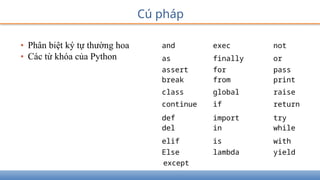
Cú pháp
• Phânbiệt ký tự thường hoa
• Các từ khóa của Python
and exec not
as finally or
assert for pass
break from print
class global raise
continue if return
def import try
del in while
elif is with
Else lambda yield
except
10.
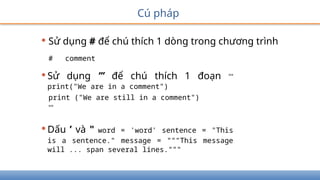
Cú pháp
• Sửdụng # để chú thích 1 dòng trong chương trình
# comment
•Sử dụng ’’’ để chú thích 1 đoạn '''
print("We are in a comment")
print ("We are still in a comment")
'''
•Dấu ’ và " word = 'word' sentence = "This
is a sentence." message = """This message
will ... span several lines."""
11.
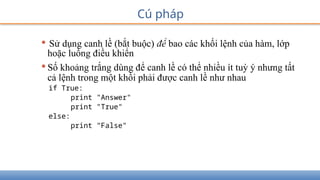
Cú pháp
• Sửdụng canh lề (bắt buộc) để bao các khối lệnh của hàm, lớp
hoặc luồng điều khiển
•Số khoảng trắng dùng để canh lề có thể nhiều ít tuỳ ý nhưng tất
cả lệnh trong một khối phải được canh lề như nhau
if True:
print "Answer"
print "True"
else:
print "False"
12.
Cú pháp
• Lệnhđược viết trên nhiều dòng sử dụng ký tự total = item_one
+
item_two +
item_three
•Lệnh được bao bằng các cặp dấu ngoặc: [], {}, () không cần phải sử
dụng ký tự để tiếp tục dòng
days = ['Monday', 'Tuesday', 'Wednesday',
'Thursday', 'Friday']
• Dấu ; để cách nhiều lệnh trên dòng
import sys; x = 'foo'; sys.stdout.write(x + 'n')
13.
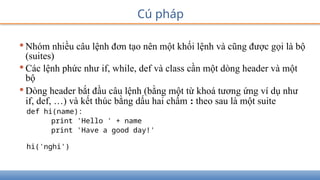
•Nhóm nhiều câulệnh đơn tạo nên một khối lệnh và cũng được gọi là bộ
(suites)
•Các lệnh phức như if, while, def và class cần một dòng header và một
bộ
•Dòng header bắt đầu câu lệnh (bằng một từ khoá tương ứng ví dụ như
if, def, …) và kết thúc bằng dấu hai chấm : theo sau là một suite
def hi(name):
print 'Hello ' + name
print 'Have a good day!'
hi('nghi')
Cú pháp
14.
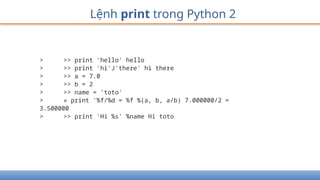
Lệnh print trongPython 2
> >> print 'hello' hello
> >> print 'hi'J'there' hi there
> >> a = 7.0
> >> b = 2
> >> name = 'toto'
> » print '%f/%d = %f %(a, b, a/b) 7.000000/2 =
3.500000
> >> print 'Hi %s' %name Hi toto
15.
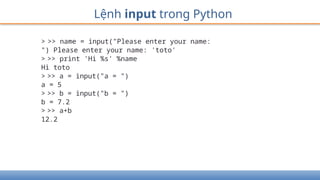
Lệnh input trongPython
> >> name = input("Please enter your name:
") Please enter your name: 'toto'
> >> print 'Hi %s' %name
Hi toto
> >> a = input("a = ")
a = 5
> >> b = input("b = ")
b = 7.2
> >> a+b
12.2
16.
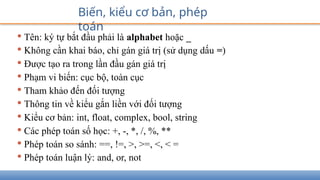
• Tên: kýtự bắt đầu phải là alphabet hoặc _
• Không cần khai báo, chỉ gán giá trị (sử dụng dấu =)
• Được tạo ra trong lần đầu gán giá trị
• Phạm vi biến: cục bộ, toàn cục
• Tham khảo đến đối tượng
• Thông tin về kiểu gắn liền với đối tượng
• Kiểu cơ bản: int, float, complex, bool, string
• Các phép toán số học: +, -, *, /, %, **
• Phép toán so sánh: ==, !=, >, >=, <, < =
• Phép toán luận lý: and, or, not
Biến, kiểu cơ bản, phép
toán
17.
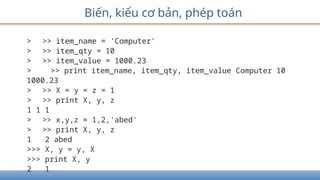
Biến, kiểu cơbản, phép toán
> >> item_name = 'Computer'
> >> item_qty = 10
> >> item_value = 1000.23
> >> print item_name, item_qty, item_value Computer 10
1000.23
> >> X = y = z = 1
> >> print X, y, z
1 1 1
> >> x,y,z = 1,2,'abed'
> >> print X, y, z
1 2 abed
>>> X, y = y, X
>>> print X, y
2 1
18.
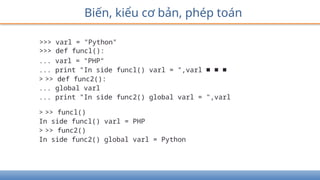
Biến, kiểu cơbản, phép toán
>>> varl = "Python"
>>> def funcl():
... varl = "PHP"
... print "In side funcl() varl = ",varl ■ ■ ■
> >> def func2():
... global varl
... print "In side func2() global varl = ",varl
> >> funcl()
In side funcl() varl = PHP
> >> func2()
In side func2() global varl = Python
19.
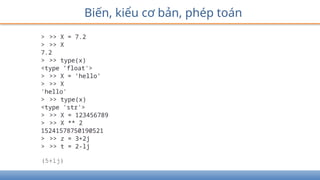
Biến, kiểu cơbản, phép toán
> >> X = 7.2
> >> X
7.2
> >> type(x)
<type ’float'>
> >> X = ’hello’
> >> X
'hello'
> >> type(x)
<type 'str'>
> >> X = 123456789
> >> X ** 2
15241578750190521
> >> z = 3+2j
> >> t = 2-lj
(5+lj)
Biến, kiểu cơbản, phép toán
> >> s = 'Hello World!'
> >> type(s)
<type 'str'>
> >> len(s)
12
> >> print s
Hello World!
> >> print s[0]
H
> >> print s[-l] Ị
> >> print s[2:5]
110
> >> print s[2:] llo
World!
> >> print s * 2
Hello World!Hello World!
> >> name = 'Ben ' +
str(10)
> >> print name
Ben 10
22.
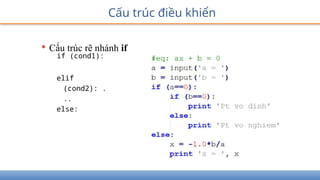
Cấu trúc điềukhiển
• Cấu trúc rẽ nhánh if
if (cond1):
elif
(cond2): .
..
else:
23.
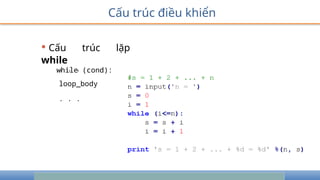
Cấu trúc điềukhiển
• Cấu trúc lặp
while
while (cond):
. . .
loop_body
. . .
24.
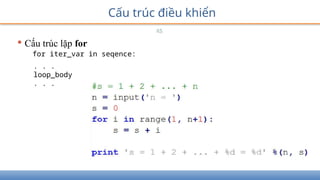
Cấu trúc điềukhiển
25
• Cấu trúc lặp for
for iter_var in seqence:
. . .
loop_body
. . .
25.
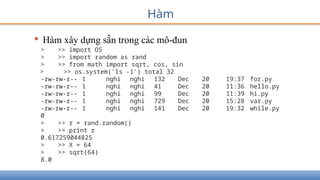
Hàm
• Hàm xâydựng sẵn trong các mô-đun
> >> import OS
> >> import random as rand
> >> from math import sqrt, cos, sin
> >> os.system('Is -1') total 32
-rw-rw-r-- 1 nghi nghi 132 Dec 20 19:37 for.py
-rw-rw-r-- 1 nghi nghi 41 Dec 20 11:36 hello.py
-rw-rw-r-- 1 nghi nghi 99 Dec 20 11:39 hi.py
-rw-rw-r-- 1 nghi nghi 729 Dec 20 15:28 var.py
-rw-rw-r-- 1 nghi nghi 141 Dec 20 19:32 while.py
0
> >> r = rand.random()
> >> print r
0.617259044825
> >> X = 64
> >> sqrt(64)
8.0
26.
Hàm
•Hàm do lậptrình viên định nghĩa
def function_name ([parameters]):
. . .
body_of_the_function
. . .
return ...
• Tham số tùy chọn, có thể đặt giá trị mặc định
• Hàm có thể hoặc không trả về kết quả hoặc
• Đệ quy
27.
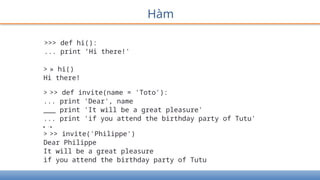
>>> def hi():
...print ’Hi there!'
> » hi()
Hi there!
> >> def invite(name = 'Toto'):
... print 'Dear', name
___ print 'It will be a great pleasure'
... print 'if you attend the birthday party of Tutu'
■ I ■
> >> invite('Philippe')
Dear Philippe
It will be a great pleasure
if you attend the birthday party of Tutu
Hàm
28.
Hàm
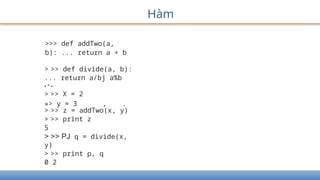
>>> def addTwo(a,
b):... return a + b
> >> def divide(a, b):
... return a/bj a%b
• * •
> >> X = 2
»> y = 3 , .
> >> z = addTwo(x, y)
> >> print z
5
> >> PJ q = divide(x,
y)
> >> print p, q
0 2
29.
Hàm
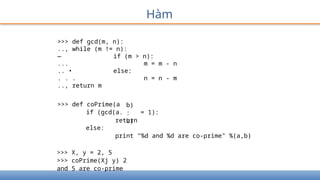
>>> def gcd(m,n):
.., while (m != n):
— if (m > n):
... m = m - n
.. • else:
. . . n = n - m
.., return m
>>> def coPrime(a
if (gcd(a.
b)
:
b)
= 1):
return
else:
print "%d and %d are co-prime" %(a,b)
>>> X, y = 2, 5
>>> coPrime(Xj y) 2
and 5 are co-prime
Nội dung
• Giớithiệu
• Lập trình căn bản
• Các kiểu dữ liệu phức
• Lập trình hướng đối tượng
• Vào/ra, ngoại lệ
• Lập trình mạng
• Lập trình Web
• Python-MySQL
• Giao diện GUI
• Vẽ đồ thị
32.
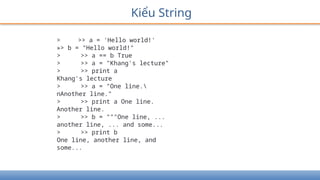
Kiểu String
> >>a = 'Hello world!'
»> b = "Hello world!"
> >> a == b True
> >> a = "Khang's lecture"
> >> print a
Khang's lecture
> >> a = "One line.
nAnother line."
> >> print a One line.
Another line.
> >> b = """One line, ...
another line, ... and some...
> >> print b
One line, another line, and
some...
Kiểu String
> >>a = "Part 1"
> >> b = "and part 2"
> >> a + ' ' + b 'Part 1 and part 2'
> >> s = a * 2
> >> print s
Part IPart 1
> >> s[0]
'P'
> >> s[0:4]
'Part'
> >> s[5:]
'IPart 1'
> >> s[-l] '1'
> >> s[6:-l]
'Part '
35.
Kiểu String
> >>print s
Part IPart 1
> >> len(s)
12
> >> 'p' in s
False
> >> 'P' in s
True
> >> 'Part' in s
True
> >> s[0] = 'B'
Traceback (most recent call last):
File ”<stdin>' line 1, in <module>
TypeError: 'str' object does not support item
assignment
> >> s = 'B' + s[l:]
> >> print s
Bart IPart 1
36.
Kiểu String
> >>s = 'a strings with stuff
> >> s.count('st') 2
> >> s.find('Stu')
15
> >> s.split(' ')
['a', 'string/, 'with', 'stuff']
> >> three = '3'
> >> three.isdigito True
> >> supper = s.upper()
> >> supper
'A STRING, WITH STUFF'
> >> s.rjust(30)
' a string, with stuff
> >> "newlinesnnn".strip()
'newlines'
37.
> >> r
[1,2.0, 3, 5]
> >> type(r)
<type 'list ’ >
> >> r[l]
2.0
> >> r[-l]
5
> >> r[l:3] [2.0, 3]
> >> w = r + [10, 19]
> >> w
[1, 2.0, 3, 5, 10, 19]
> >> t = [0.0] * 10
> >> t
[0.0, 0.0, 0.0, 0.0, 0.0, 0.0, 0.0, 0.0, 0.0, 0.0]
Kiểu List: Ordered collection of objects
Kiểu List
> >>r = [1, 2.0, 3, 5]
> >> r.append('thing')
> >> r
[1, 2.0, 3, 5, 'thing']
> >> r.append(['another', 'list'])
> >> r
[1, 2.0, 3, 5, 'thing', ['another',
'list']]
> >> r = [1, 2.0, 3, 5]
> >> r.extend(['item', 'another'])
> >> r
[1, 2.0, 3, 5, 'item', 'another']
> >> k = r.popO
> >> k
' another'
> >> r
[1, 2.0, 3, 5, 'item']
40.
Kiểu List
> >>r = [2, 5, -1, 0, 20]
> >> r.sort()
> >> r
[-1, 0, 2, 5, 20]
> >> w = ['apa', '1', '2',
'1234']
> >> w.sort()
> >> w
['1', ’1234', '2', ’apa']
> >> w.reverse()
> >> w
['apa', '2', '1234', '1']
> >> V = w[: ]
> >> V.reverse()
> >> V
['1', '1234', '2', 'apa']
> >> w
['apa', '2', '1234', '1']
41.
Kiểu List
> >>s = 'biovitrum'
> >> w = list(s)
> >> w
['b 'i 'o', 'v 'i
> >> w.reverse()
> >> w
['m', 'u 'r', 't 'i
> >> r = ''.join(w)
> >> r 'murtivoib'
> >> d = '-'.join(w)
> >> d
'm-u-r-t-i-v-o-i-b'
> >> s = 'a few words'
> >> w = s.split()
> >> w
['a', 'few', 'words']
> >> ' I '.join(w) 'a
I few I words'
't 'r', 'u 'm']
'V', 'o', 'i', 'b']
42.
Kiểu List
> >>a = [1, 3,
2]
> >> b = a
> >> c = b[0:2]
> >> d = b[:]
> >> b.sort()
> >> a
[1, 2, 3]
43.
Kiểu Tuples (asList, except immutable)
> >> t = (1, 3,
2)
> >> t[l]
3
> >> (a, b, c) =
t
> >> a
1
> >> b
3
> >> a, b, c
(1, 3' 2)
> >> a, b = b, a
> >> 3j b
> >> r = list(t)
> >> r
[1, 3, 2]
> >> tuple(r)
(1, 3, 2)
Kiểu Dictionary
> >>h = {'key': 12, 'nyckel': 'word'}
> >> g = h.copyO
> >> del h['key']
> >> h
{'nyckel': 'word'}
> >> g
{'nyckel': 'word', 'key': 12}
> >> h['Per'] = 'Johansson'
> >> h
{'nyckel': 'word', 'Per': 'Johansson'}
> >> h.update(g)
> >> h
{'nyckel': 'word', 'key': 12, 'Per':
'Johansson'}
47.
• Giới thiệu
•Lập trình căn bản
• Các kiểu dữ liệu phức
• Lập trình hướng đối tượng
• Vào/ra, ngoại lệ
• Lập trình mạng
• Lập trình Web
• Python-MySQL
• Giao diện GUI
• Vẽ đồ thị
Nội dung
48.
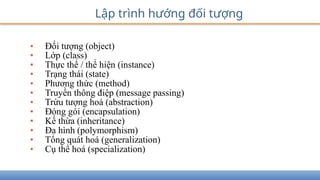
• Đối tượng(object)
• Lớp (class)
• Thực thể / thể hiện (instance)
• Trạng thái (state)
• Phương thức (method)
• Truyền thông điệp (message passing)
• Trừu tượng hoá (abstraction)
• Đóng gói (encapsulation)
• Kế thừa (inheritance)
• Đa hình (polymorphism)
• Tổng quát hoá (generalization)
• Cụ thể hoá (specialization)
Lập trình hướng đối tượng
49.
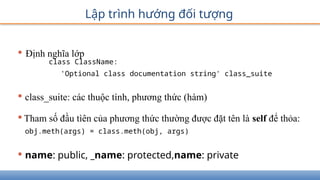
Lập trình hướngđối tượng
• Định nghĩa lớp
class ClassName:
'Optional class documentation string' class_suite
• class_suite: các thuộc tính, phương thức (hàm)
•Tham số đầu tìên của phương thức thường được đặt tên là self để thỏa:
obj.meth(args) = class.meth(obj, args)
• name: public, _name: protected,name: private
50.
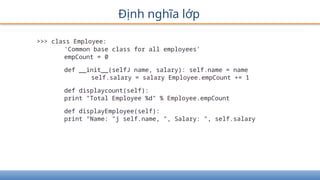
Định nghĩa lớp
>>>class Employee:
'Common base class for all employees'
empCount = 0
def __init__(selfJ name, salary): self.name = name
self.salary = salary Employee.empCount += 1
def displaycount(self):
print "Total Employee %d" % Employee.empCount
def displayEmployee(self):
print "Name: "j self.name, ", Salary: ", self.salary
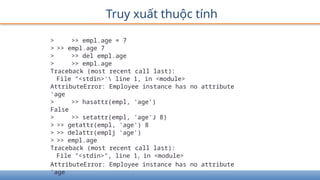
Truy xuất thuộctính
> >> empl.age = 7
> >> empl.age 7
> >> del empl.age
> >> empl.age
Traceback (most recent call last):
File "<stdin>' line 1, in <module>
AttributeError: Employee instance has no attribute
'age
> >> hasattr(empl, 'age')
False
> >> setattr(empl, 'age'J 8)
> >> getattr(empl, 'age') 8
> >> delattr(emplj 'age')
> >> empl.age
Traceback (most recent call last):
File "<stdin>", line 1? in <module>
AttributeError: Employee instance has no attribute
'age
53.
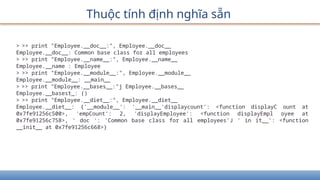
Thuộc tính địnhnghĩa sẵn
> >> print "Employee.__doc__:", Employee.__doc__
Employee.__doc__: Common base class for all employees
> >> print "Employee.__name__:", Employee.__name__
Employee.__name : Employee
> >> print "Employee.__module__:", Employee.__module__
Employee.__module__: __main__
> >> print "Employee.__bases__:"j Employee.__bases__
Employee.__basest_: ()
> >> print "Employee.__diet__:", Employee.__diet__
Employee.__diet__: {'__module__': '__main__'displaycount': <function displayC ount at
0x7fe91256c500>, 'empCount': 2, 'displayEmployee': <function displayEmpl oyee at
0x7fe91256c758>, ' doc ': 'Common base class for all employees'J ' in it__': <function
__init__ at 0x7fe91256c668>}
54.
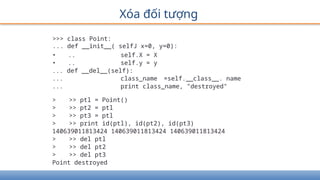
Xóa đối tượng
>>>class Point:
... def __init__( selfJ x=0, y=0):
• .. self.X = X
• .. self.y = y
... def __del__(self):
... class_name =self.__class__. name
... print class_name, "destroyed"
> >> ptl = Point()
> >> pt2 = ptl
> >> pt3 = ptl
> >> print id(ptl), id(pt2), id(pt3)
140639011813424 140639011813424 140639011813424
> >> del ptl
> >> del pt2
> >> del pt3
Point destroyed
55.
• Định nghĩalớp kế thừa
class SubClassName (ParentClass1[, ParentClass2, ...]):
'Optional class documentation string' class_suite
• Hàm issubclass(sub, sup), isinstance(obj, Class),
• Hàm super()
Kế thừa
56.
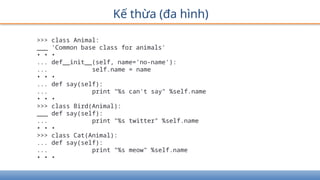
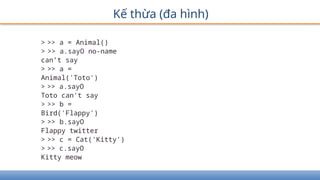
Kế thừa (đahình)
>>> class Animal:
___ 'Common base class for animals'
• • •
... def__init__(self, name='no-name'):
... self.name = name
• • •
... def say(self):
... print "%s can't say" %self.name
• • •
>>> class Bird(Animal):
___ def say(self):
... print "%s twitter" %self.name
• • •
>>> class Cat(Animal):
... def say(self):
... print "%s meow" %self.name
• • •
57.
Kế thừa (đahình)
> >> a = Animal()
> >> a.sayO no-name
can’t say
> >> a =
Animal('Toto')
> >> a.sayO
Toto can't say
> >> b =
Bird('Flappy')
> >> b.sayO
Flappy twitter
> >> c = Cat('Kitty')
> >> c.sayO
Kitty meow
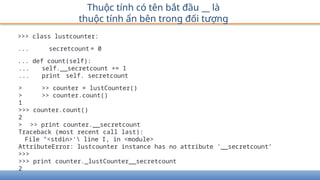
>>> class lustcounter:
...secretcount = 0
... def count(self):
... self.__secretcount += 1
... print self. secretcount
> >> counter = lustCounter()
> >> counter.count()
1
>>> counter.count()
2
> >> print counter.__secretcount
Traceback (most recent call last):
File "<stdin>' line I, in <module>
AttributeError: lustcounter instance has no attribute '__secretcount’
>>>
>>> print counter._lustCounter__secretcount
2
Thuộc tính có tên bắt đầu __ là
thuộc tính ẩn bên trong đối tượng
62.
Nội dung
• Giớithiệu
• Lập trình căn bản
• Các kiểu dữ liệu phức
• Lập trình hướng đối tượng
• Vào/ra, ngoại lệ
• Lập trình mạng
• Lập trình Web
• Python-MySQL
• Giao diện GUI
• Vẽ đồ thị
63.
Vào/ra
• Lệnh print,raw_input, input
> >> print "Python is really a great language/', "isn't
it?" Python is really a great language, isn't it?
> >> str = raw_input("Enter your input: ")
Enter your input: Nguyen Van A
> >> print "Received input is : ", str
Received input is : Nguyen Van A
> >> str = input("Enter your input: ")
Enter your input: [x*5 for X in range(2,10,2)]
> >> print "Received input is : ", str
Received input is : [10, 20, 30, 40]
64.
Vào/ra tập tin
Hàm
file_obj= open(file_name [, access_mode][, buffering])
file_obj.close()
file_obj.write(string);
file_obj.read([count]);
file_obj.tell()
file_obj.seek(offset[, from])
import os
os.rename(current_file_name, new_file_name)
os.remove(file_name)
os.mkdir("newdir")
os.chdir("newdir")
os.getcwd()
os.rmdir('dirname')
65.
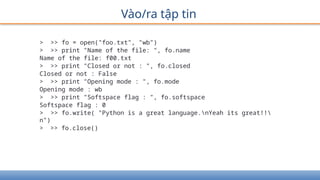
Vào/ra tập tin
>>> fo = open("foo.txt", "wb")
> >> print "Name of the file: ", fo.name
Name of the file: f00.txt
> >> print "Closed or not : ", fo.closed
Closed or not : False
> >> print "Opening mode : ", fo.mode
Opening mode : wb
> >> print "Softspace flag : ", fo.softspace
Softspace flag : 0
> >> fo.write( "Python is a great language.nYeah its great!!
n")
> >> fo.close()
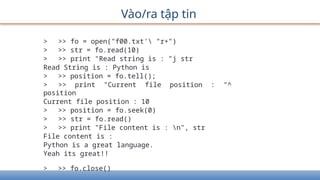
66.
Vào/ra tập tin
>>> fo = open("f00.txt' "r+")
> >> str = fo.read(10)
> >> print "Read string is : "j str
Read String is : Python is
> >> position = fo.tell();
> >> print "Current file position : "^
position
Current file position : 10
> >> position = fo.seek(0)
> >> str = fo.read()
> >> print "File content is : n", str
File content is :
Python is a great language.
Yeah its great!!
> >> fo.close()
67.
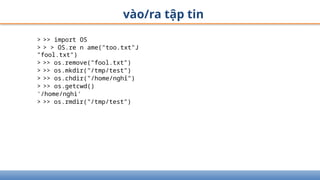
vào/ra tập tin
>>> import OS
> > > OS.re n ame("too.txt"J
"fool.txt")
> >> os.remove("fool.txt")
> >> os.mkdir("/tmp/test")
> >> os.chdir("/home/nghỉ")
> >> os.getcwd()
'/home/nghi'
> >> os.rmdir("/tmp/test")
68.
Ngoại lệ
• Lệnh
assertExpression[, Arguments]
raise [Exception [, args [, traceback]]]
try:
You do your operations here;
except ExceptionI:
If there is ExceptionI, then execute this block.
except ExceptionII:
If there is ExceptionII, then execute this block. else:
If there is no exception then execute this block. finally:
This would always be executed.
69.
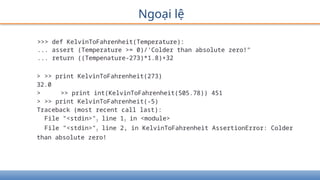
Ngoại lệ
>>> defKelvinToFahrenheit(Temperature):
... assert (Temperature >= 0)/'Colder than absolute zero!"
... return ((Tempenature-273)*1.8)+32
> >> print KelvinToFahrenheit(273)
32.0
> >> print int(KelvinToFahrenheit(505.78)) 451
> >> print KelvinToFahrenheit(-5)
Traceback (most recent call last):
File "<stdin>"? line 1? in <module>
File "<stdin>"? line 2, in KelvinToFahrenheit AssertionError: Colder
than absolute zero!
70.
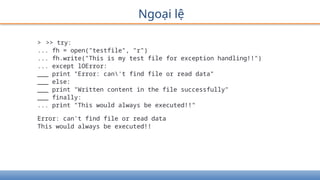
Ngoại lệ
> >>try:
... fh = open("testfile", "r")
... fh.write("This is my test file for exception handling!!")
... except lOError:
___ print "Error: can't find file or read data"
___ else:
___ print "Written content in the file successfully"
___ finally:
... print "This would always be executed!!"
Error: can't find file or read data
This would always be executed!!
71.
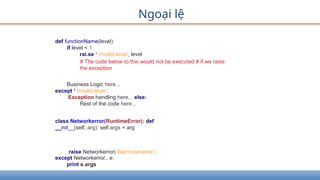
Ngoại lệ
def functionName(level):
iflevel < 1:
rai.se 1
Invalid level r level
# The code below to this would not be executed # if we raise
the exception
Business Logic here...
except 1
Invalid level :
Exception handling here... else:
Rest of the code here...
class Networkerror(RuntimeError): def
__init__(self, arg): self.args = arg
raise Networkerror( Bad hostname1
)
except Networkerror,. e:
print e.args
72.
Nội dung
• Giớithiệu
• Lập trình căn bản
• Các kiểu dữ liệu phức
• Lập trình hướng đối tượng
• Vào/ra, ngoại lệ
• Lập trình mạng
• Lập trình Web
• Python-MySQL
• Giao diện GUI
• Vẽ đồ thị
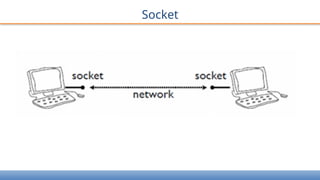
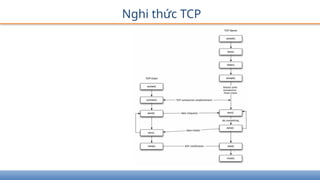
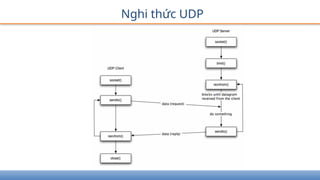
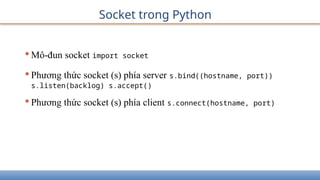
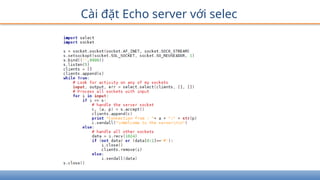
Socket trong Python
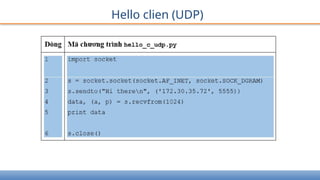
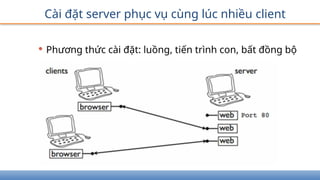
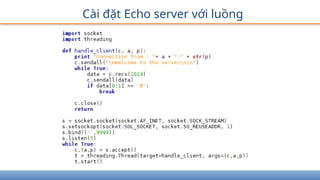
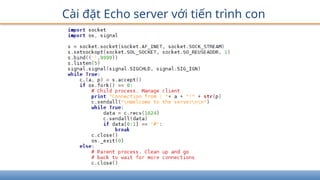
•Mô-đunsocket import socket
•Phương thức socket (s) phía server s.bind((hostname, port))
s.listen(backlog) s.accept()
•Phương thức socket (s) phía client s.connect(hostname, port)
77.
Socket trong Python
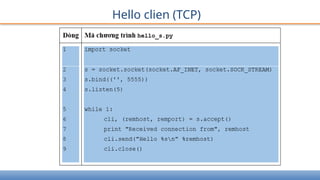
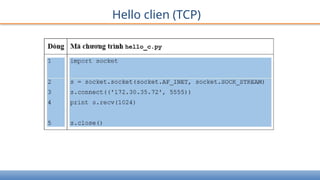
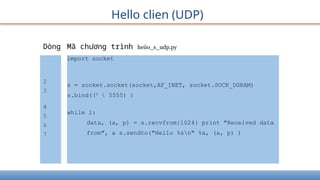
•Phương thức socket (s) chung
s.recv(buflen[, flags])
s.s end(data[, flags])
s.recvfrom(buflen[, flags])
s.s endto(data[,flags], (addr,
port))
s.close()
socket.gethostname()
socket.gethostbyname(hostname)
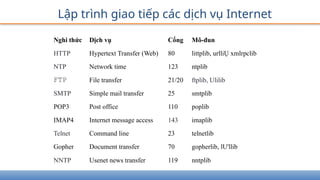
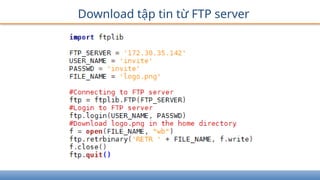
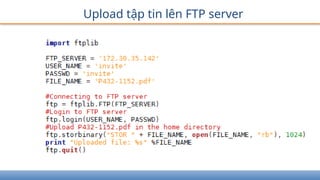
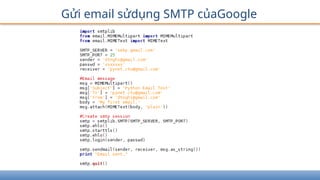
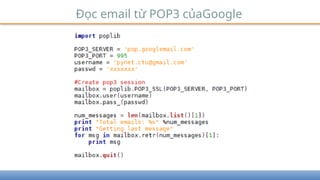
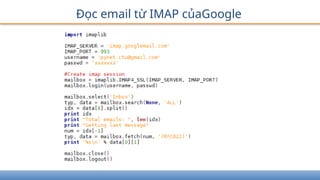
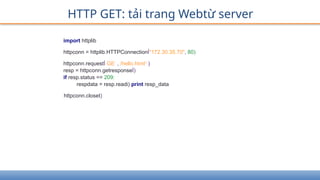
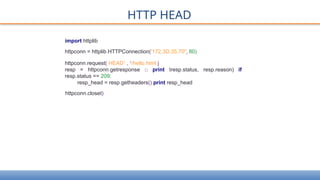
Lập trình giaotiếp các dịch vụ Internet
Nghi thức Dịch vụ Cổng Mô-đun
HTTP Hypertext Transfer (Web) 80 littplib, urlliỤ xmlrpclib
NTP Network time 123 ntplib
FTP File transfer 21/20 ftplib, Ulilib
SMTP Simple mail transfer 25 smtplib
POP3 Post office 110 poplib
IMAP4 Internet message access 143 imaplib
Telnet Command line 23 telnetlib
Gopher Document transfer 70 gopherlib, lU'llib
NNTP Usenet news transfer 119 nntplib
87.
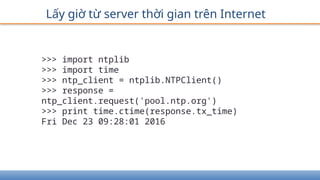
Lấy giờ từserver thời gian trên Internet
>>> import ntplib
>>> import time
>>> ntp_client = ntplib.NTPClient()
>>> response =
ntp_client.request('pool.ntp.org')
>>> print time.ctime(response.tx_time)
Fri Dec 23 09:28:01 2016
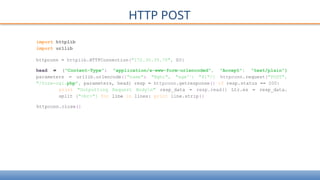
HTTP POST
import httplib
importurllib
httpconn = httplib.HTTPConnection("172.30.35.70", E0}
head = {"Content-Type": "application/x-www-form-urlencoded", "Accept": "text/plain"}
parameters = urllib.urlencode({"name": "Nghi", "age'1
: "41"/} httpconn.request("POST",
"/form-cgi.php", parameters, head} resp = httpconn.getresponse(} if resp.status == 200:
print "Outputting Request Bodyn" resp_data = resp.read(} Ltr.es = resp_data.
split ("<br>"} for line in lines: print line.strip(}
httpconn.close(}
97.
Nội dung
• Giớithiệu
• Lập trình căn bản
• Các kiểu dữ liệu phức
• Lập trình hướng đối tượng
• Vào/ra, ngoại lệ
• Lập trình mạng
• Lập trình Web
• Python-MySQL
• Giao diện GUI
• Vẽ đồ thị
98.
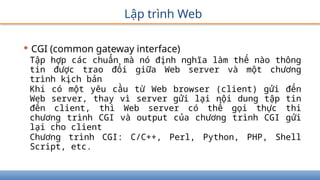
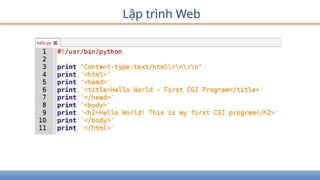
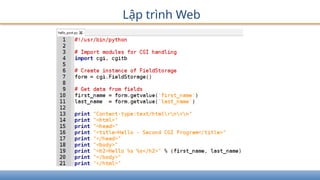
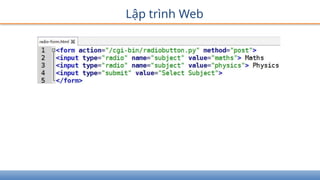
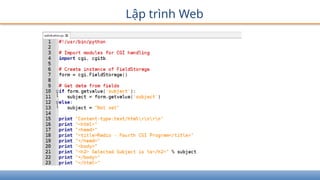
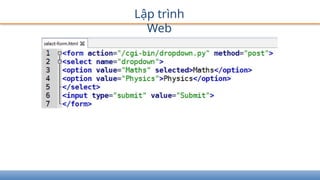
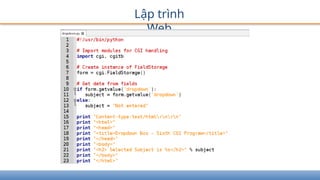
Lập trình Web
•CGI (common gateway interface)
Tập hợp các chuẩn mà nó định nghĩa làm thế nào thông
tin được trao đổi giữa Web server và một chương
trình kịch bản
Khi có một yêu cầu từ Web browser (client) gửi đến
Web server, thay vì server gửi lại nội dung tập tin
đến client, thì Web server có thể gọi thực thi
chương trình CGI và output của chương trình CGI gửi
lại cho client
Chương trình CGI: C/C++, Perl, Python, PHP, Shell
Script, etc.
Nội dung
• Giớithiệu
• Lập trình căn bản
• Các kiểu dữ liệu phức
• Lập trình hướng đối tượng
• Vào/ra, ngoại lệ
• Lập trình mạng
• Lập trình Web
• Python-MySQL
• Giao diện GUI
• Vẽ đồ thị
107.
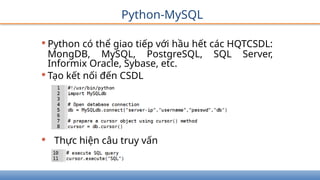
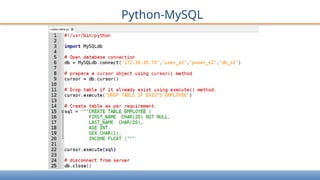
Python-MySQL
•Python có thểgiao tiếp với hầu hết các HQTCSDL:
MongDB, MySQL, PostgreSQL, SQL Server,
Informix Oracle, Sybase, etc.
•Tạo kết nối đến CSDL
• Thực hiện câu truy vấn
Nội dung
• Giớithiệu
• Lập trình căn bản
• Các kiểu dữ liệu phức
• Lập trình hướng đối
tượng
• Vào/ra, ngoại lệ
• Lập trình mạng
• Lập trình Web
• Python-MySQL
• Giao diện GUI
• Vẽ đồ thị
113.
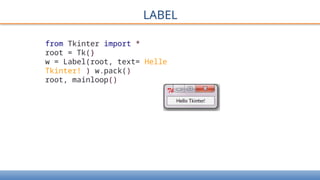
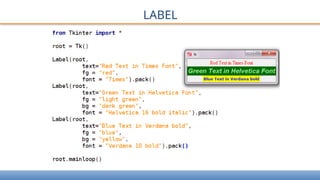
LABEL
from Tkinter import*
root = Tk(}
w = Label(root, text= Helle
Tkinter! ) w.pack()
root, mainloop()
Nội dung
• Giớithiệu
• Lập trình căn bản
• Các kiểu dữ liệu phức
• Lập trình hướng đối
tượng
• Vào/ra, ngoại lệ
• Lập trình mạng
• Lập trình Web
• Python-MySQL
• Giao diện GUI
• Vẽ đồ thị
124.
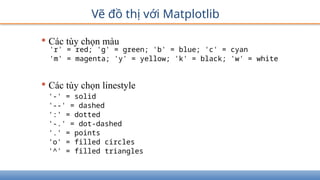
Vẽ đồ thịvới Matplotlib
• Ví dụ đơn giản
from matplotlib import pyplot as
plt
plt.plot([1,2,3],[4,5,1])
plt.show()
Vẽ đồ thịvới Matplotlib
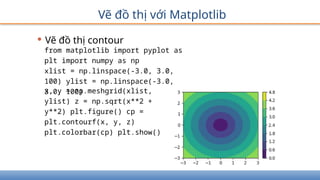
• Vẽ đồ thị contour
from matplotlib import pyplot as
plt import numpy as np
xlist = np.linspace(-3.0, 3.0,
100) ylist = np.linspace(-3.0,
3.0, 100)
x, y = np.meshgrid(xlist,
ylist) z = np.sqrt(x**2 +
y**2) plt.figure() cp =
plt.contourf(x, y, z)
plt.colorbar(cp) plt.show()
135.
Vẽ đồ thịvới Matplotlib
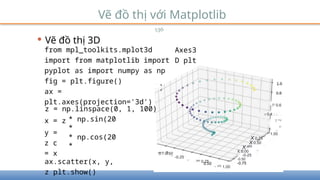
• Vẽ đồ thị 3D
136
from mpl_toolkits.mplot3d
import from matplotlib import
pyplot as import numpy as np
fig = plt.figure()
ax =
plt.axes(projection='3d')
Axes3
D plt
z = np.linspace(0, 1, 100)
x = z
y =
z c
= x
* np.sin(20
*
* np.cos(20
*
ax.scatter(x, y,
z plt.show()
0'7-0 50
-0.25
000
0.25
075
1.00
P 0.6
r 0.4 LJ . .
T °'2
00
1.00
X 0.75
X 0.50
X 025
X 0.00
-0-25
-0.50
-0.75
136.
Vẽ đồ thịvới Matplotlib
• Vẽ đồ thị chuyển động
from matplotlib import animation
from matplotlib import pyplot as plt
import numpy as np
fig, ax = plt.subplots()
ax.set_xlim(0, 2)
ax.set_ylim(-2, 2)
x = np.linspace(0, 2, 1000)
y = np.zeros_like(x)
line, = ax.plot(x, y, lw=2)
# initialization function: plot the background of each frame def
init():
line.set_data([], [])
137.
Vẽ đồ thịvới Matplotlib
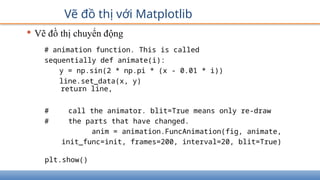
# animation function. This is called
sequentially def animate(i):
y = np.sin(2 * np.pi * (x - 0.01 * i))
line.set_data(x, y)
return line,
# call the animator. blit=True means only re-draw
# the parts that have changed.
anim = animation.FuncAnimation(fig, animate,
init_func=init, frames=200, interval=20, blit=True)
plt.show()
• Vẽ đồ thị chuyển động
138.
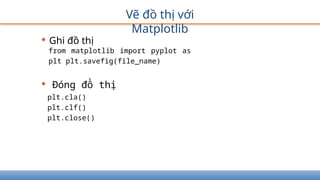
• Ghi đồthị
Vẽ đồ thị với
Matplotlib
from matplotlib import pyplot as
plt plt.savefig(file_name)
• Đóng đồ thị
plt.cla()
plt.clf()
plt.close()

![Trình thông dịch Python
[nghi@localhost ~]$ python
Python 2.7.5 (default, Apr 10 2015, 08:09:05)
[GCC 4.8.3 20140911 (Red Hat 4.8.3-7)] on linux2
Type "help", "copyright", "credits" or "license" for more
information.
>>> print 'Hello World!'
Hello World!
>>> I](https://image.slidesharecdn.com/baigiangmonpython-251003033517-548b7e46/85/Bai-giang-mon-Python-cho-truwong-trinh-dai-hoc-7-320.jpg)
![Thực thi chương trình Python
• Soạn thảo chương trình: PyCharm, Geany,
notepad++, Nano, Gedit, v.v.
• Chương trình
hello.py
#!/usr/bin/python
print 'Hello World!'
• Thực thi hello.py
[nghi@localhost bg]$ python hello.py
Hello World!](https://image.slidesharecdn.com/baigiangmonpython-251003033517-548b7e46/85/Bai-giang-mon-Python-cho-truwong-trinh-dai-hoc-8-320.jpg)
![Cú pháp
• Lệnh được viết trên nhiều dòng sử dụng ký tự total = item_one
+
item_two +
item_three
•Lệnh được bao bằng các cặp dấu ngoặc: [], {}, () không cần phải sử
dụng ký tự để tiếp tục dòng
days = ['Monday', 'Tuesday', 'Wednesday',
'Thursday', 'Friday']
• Dấu ; để cách nhiều lệnh trên dòng
import sys; x = 'foo'; sys.stdout.write(x + 'n')](https://image.slidesharecdn.com/baigiangmonpython-251003033517-548b7e46/85/Bai-giang-mon-Python-cho-truwong-trinh-dai-hoc-12-320.jpg)
![Biến, kiểu cơ bản, phép toán
> >> s = 'Hello World!'
> >> type(s)
<type 'str'>
> >> len(s)
12
> >> print s
Hello World!
> >> print s[0]
H
> >> print s[-l] Ị
> >> print s[2:5]
110
> >> print s[2:] llo
World!
> >> print s * 2
Hello World!Hello World!
> >> name = 'Ben ' +
str(10)
> >> print name
Ben 10](https://image.slidesharecdn.com/baigiangmonpython-251003033517-548b7e46/85/Bai-giang-mon-Python-cho-truwong-trinh-dai-hoc-21-320.jpg)
![Hàm
•Hàm do lập trình viên định nghĩa
def function_name ([parameters]):
. . .
body_of_the_function
. . .
return ...
• Tham số tùy chọn, có thể đặt giá trị mặc định
• Hàm có thể hoặc không trả về kết quả hoặc
• Đệ quy](https://image.slidesharecdn.com/baigiangmonpython-251003033517-548b7e46/85/Bai-giang-mon-Python-cho-truwong-trinh-dai-hoc-26-320.jpg)
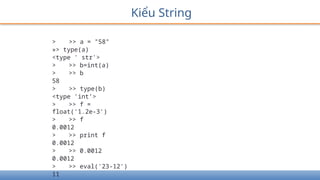
![Kiểu String
> >> a = "Part 1"
> >> b = "and part 2"
> >> a + ' ' + b 'Part 1 and part 2'
> >> s = a * 2
> >> print s
Part IPart 1
> >> s[0]
'P'
> >> s[0:4]
'Part'
> >> s[5:]
'IPart 1'
> >> s[-l] '1'
> >> s[6:-l]
'Part '](https://image.slidesharecdn.com/baigiangmonpython-251003033517-548b7e46/85/Bai-giang-mon-Python-cho-truwong-trinh-dai-hoc-34-320.jpg)
![Kiểu String
> >> print s
Part IPart 1
> >> len(s)
12
> >> 'p' in s
False
> >> 'P' in s
True
> >> 'Part' in s
True
> >> s[0] = 'B'
Traceback (most recent call last):
File ”<stdin>' line 1, in <module>
TypeError: 'str' object does not support item
assignment
> >> s = 'B' + s[l:]
> >> print s
Bart IPart 1](https://image.slidesharecdn.com/baigiangmonpython-251003033517-548b7e46/85/Bai-giang-mon-Python-cho-truwong-trinh-dai-hoc-35-320.jpg)
![Kiểu String
> >> s = 'a strings with stuff
> >> s.count('st') 2
> >> s.find('Stu')
15
> >> s.split(' ')
['a', 'string/, 'with', 'stuff']
> >> three = '3'
> >> three.isdigito True
> >> supper = s.upper()
> >> supper
'A STRING, WITH STUFF'
> >> s.rjust(30)
' a string, with stuff
> >> "newlinesnnn".strip()
'newlines'](https://image.slidesharecdn.com/baigiangmonpython-251003033517-548b7e46/85/Bai-giang-mon-Python-cho-truwong-trinh-dai-hoc-36-320.jpg)
![> >> r
[1, 2.0, 3, 5]
> >> type(r)
<type 'list ’ >
> >> r[l]
2.0
> >> r[-l]
5
> >> r[l:3] [2.0, 3]
> >> w = r + [10, 19]
> >> w
[1, 2.0, 3, 5, 10, 19]
> >> t = [0.0] * 10
> >> t
[0.0, 0.0, 0.0, 0.0, 0.0, 0.0, 0.0, 0.0, 0.0, 0.0]
Kiểu List: Ordered collection of objects](https://image.slidesharecdn.com/baigiangmonpython-251003033517-548b7e46/85/Bai-giang-mon-Python-cho-truwong-trinh-dai-hoc-37-320.jpg)
![Kiểu List
> >> r = [1, 2.0, 3, 5]
> >> r[3] = ’word'
> >> r
[1, 2.0, 3, 'word']
> >> r[0] = [9, 8]
> >> r
[[9, 8], 2.0, 3, ’word']
> >> r[0:3] = [1, 2, 5, 6]
> >> r
[1, 2, 5, 6, 'word']
> >> r[l:3] = []
> >> r
[1, 6, 'word']
> >> len(r)
3
> >> 6 in r
True
> >> r.index(6)
1](https://image.slidesharecdn.com/baigiangmonpython-251003033517-548b7e46/85/Bai-giang-mon-Python-cho-truwong-trinh-dai-hoc-38-320.jpg)
![Kiểu List
> >> r = [1, 2.0, 3, 5]
> >> r.append('thing')
> >> r
[1, 2.0, 3, 5, 'thing']
> >> r.append(['another', 'list'])
> >> r
[1, 2.0, 3, 5, 'thing', ['another',
'list']]
> >> r = [1, 2.0, 3, 5]
> >> r.extend(['item', 'another'])
> >> r
[1, 2.0, 3, 5, 'item', 'another']
> >> k = r.popO
> >> k
' another'
> >> r
[1, 2.0, 3, 5, 'item']](https://image.slidesharecdn.com/baigiangmonpython-251003033517-548b7e46/85/Bai-giang-mon-Python-cho-truwong-trinh-dai-hoc-39-320.jpg)
![Kiểu List
> >> r = [2, 5, -1, 0, 20]
> >> r.sort()
> >> r
[-1, 0, 2, 5, 20]
> >> w = ['apa', '1', '2',
'1234']
> >> w.sort()
> >> w
['1', ’1234', '2', ’apa']
> >> w.reverse()
> >> w
['apa', '2', '1234', '1']
> >> V = w[: ]
> >> V.reverse()
> >> V
['1', '1234', '2', 'apa']
> >> w
['apa', '2', '1234', '1']](https://image.slidesharecdn.com/baigiangmonpython-251003033517-548b7e46/85/Bai-giang-mon-Python-cho-truwong-trinh-dai-hoc-40-320.jpg)
![Kiểu List
> >> s = 'biovitrum'
> >> w = list(s)
> >> w
['b 'i 'o', 'v 'i
> >> w.reverse()
> >> w
['m', 'u 'r', 't 'i
> >> r = ''.join(w)
> >> r 'murtivoib'
> >> d = '-'.join(w)
> >> d
'm-u-r-t-i-v-o-i-b'
> >> s = 'a few words'
> >> w = s.split()
> >> w
['a', 'few', 'words']
> >> ' I '.join(w) 'a
I few I words'
't 'r', 'u 'm']
'V', 'o', 'i', 'b']](https://image.slidesharecdn.com/baigiangmonpython-251003033517-548b7e46/85/Bai-giang-mon-Python-cho-truwong-trinh-dai-hoc-41-320.jpg)
![Kiểu List
> >> a = [1, 3,
2]
> >> b = a
> >> c = b[0:2]
> >> d = b[:]
> >> b.sort()
> >> a
[1, 2, 3]](https://image.slidesharecdn.com/baigiangmonpython-251003033517-548b7e46/85/Bai-giang-mon-Python-cho-truwong-trinh-dai-hoc-42-320.jpg)
![Kiểu Tuples (as List, except immutable)
> >> t = (1, 3,
2)
> >> t[l]
3
> >> (a, b, c) =
t
> >> a
1
> >> b
3
> >> a, b, c
(1, 3' 2)
> >> a, b = b, a
> >> 3j b
> >> r = list(t)
> >> r
[1, 3, 2]
> >> tuple(r)
(1, 3, 2)](https://image.slidesharecdn.com/baigiangmonpython-251003033517-548b7e46/85/Bai-giang-mon-Python-cho-truwong-trinh-dai-hoc-43-320.jpg)
![Kiểu Dictionary
An unordered collection of key/value
pairs
> >> h = {'key': 12, 'nyckel': 'word'}
> >> h['key']
12
> >> h.has_key('nyckel')
True
> >> h['Per'] = 'Kraulis'
> >> h
{'nyckel': 'word', 'Per': 'Kraulis', 'key': 12}
> >> {'nyckel': 'word', 'Per': 'Kraulis', 'key': 12}
{'nyckel': 'word', 'key': 12, 'Per': 'Kraulis'}
>» h['Per'] = 'Johansson1
> >> h
{'nyckel': 'word', 'Per': 'Johansson', 'key': 12}
> >> h = {'key': 12, 'nyckel': 'word'}
> >> del h['key']
> >> h
{'nyckel': 'word'}](https://image.slidesharecdn.com/baigiangmonpython-251003033517-548b7e46/85/Bai-giang-mon-Python-cho-truwong-trinh-dai-hoc-44-320.jpg)
![Kiểu Dictionary
> >> h = {'key': 12, 'nyckel':
'word'}
> >> 'Per' in h
False
»> h['Per']
Traceback (most recent call last):
File "<stdin>", line 1, in
<module>
KeyError: 'Per'
>>> h.get('Per', 'unknown')
'unknown'
>>> h.get('key', 'unknown')
12
>>> h.keys()
['nyckel, key']
>>> h.values()
['word', 12]
>>> len(h)](https://image.slidesharecdn.com/baigiangmonpython-251003033517-548b7e46/85/Bai-giang-mon-Python-cho-truwong-trinh-dai-hoc-45-320.jpg)
![Kiểu Dictionary
> >> h = {'key': 12, 'nyckel': 'word'}
> >> g = h.copyO
> >> del h['key']
> >> h
{'nyckel': 'word'}
> >> g
{'nyckel': 'word', 'key': 12}
> >> h['Per'] = 'Johansson'
> >> h
{'nyckel': 'word', 'Per': 'Johansson'}
> >> h.update(g)
> >> h
{'nyckel': 'word', 'key': 12, 'Per':
'Johansson'}](https://image.slidesharecdn.com/baigiangmonpython-251003033517-548b7e46/85/Bai-giang-mon-Python-cho-truwong-trinh-dai-hoc-46-320.jpg)
![• Định nghĩa lớp kế thừa
class SubClassName (ParentClass1[, ParentClass2, ...]):
'Optional class documentation string' class_suite
• Hàm issubclass(sub, sup), isinstance(obj, Class),
• Hàm super()
Kế thừa](https://image.slidesharecdn.com/baigiangmonpython-251003033517-548b7e46/85/Bai-giang-mon-Python-cho-truwong-trinh-dai-hoc-55-320.jpg)
![Vào/ra
• Lệnh print, raw_input, input
> >> print "Python is really a great language/', "isn't
it?" Python is really a great language, isn't it?
> >> str = raw_input("Enter your input: ")
Enter your input: Nguyen Van A
> >> print "Received input is : ", str
Received input is : Nguyen Van A
> >> str = input("Enter your input: ")
Enter your input: [x*5 for X in range(2,10,2)]
> >> print "Received input is : ", str
Received input is : [10, 20, 30, 40]](https://image.slidesharecdn.com/baigiangmonpython-251003033517-548b7e46/85/Bai-giang-mon-Python-cho-truwong-trinh-dai-hoc-63-320.jpg)
![Vào/ra tập tin
Hàm
file_obj = open(file_name [, access_mode][, buffering])
file_obj.close()
file_obj.write(string);
file_obj.read([count]);
file_obj.tell()
file_obj.seek(offset[, from])
import os
os.rename(current_file_name, new_file_name)
os.remove(file_name)
os.mkdir("newdir")
os.chdir("newdir")
os.getcwd()
os.rmdir('dirname')](https://image.slidesharecdn.com/baigiangmonpython-251003033517-548b7e46/85/Bai-giang-mon-Python-cho-truwong-trinh-dai-hoc-64-320.jpg)
![Ngoại lệ
• Lệnh
assert Expression[, Arguments]
raise [Exception [, args [, traceback]]]
try:
You do your operations here;
except ExceptionI:
If there is ExceptionI, then execute this block.
except ExceptionII:
If there is ExceptionII, then execute this block. else:
If there is no exception then execute this block. finally:
This would always be executed.](https://image.slidesharecdn.com/baigiangmonpython-251003033517-548b7e46/85/Bai-giang-mon-Python-cho-truwong-trinh-dai-hoc-68-320.jpg)
![Socket trong Python
• Phương thức socket (s) chung
s.recv(buflen[, flags])
s.s end(data[, flags])
s.recvfrom(buflen[, flags])
s.s endto(data[,flags], (addr,
port))
s.close()
socket.gethostname()
socket.gethostbyname(hostname)](https://image.slidesharecdn.com/baigiangmonpython-251003033517-548b7e46/85/Bai-giang-mon-Python-cho-truwong-trinh-dai-hoc-77-320.jpg)
![Vẽ đồ thị với Matplotlib
• Ví dụ đơn giản
from matplotlib import pyplot as
plt
plt.plot([1,2,3],[4,5,1])
plt.show()](https://image.slidesharecdn.com/baigiangmonpython-251003033517-548b7e46/85/Bai-giang-mon-Python-cho-truwong-trinh-dai-hoc-124-320.jpg)
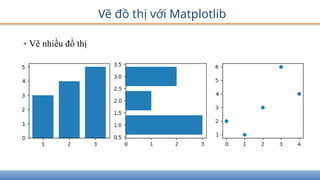
![Vẽ đồ thị với Matplotlib
• Vẽ nhiều đồ thị
import matplotlib.pyplot as
plt
fig = plt.figure()
ax1 = fig.add_subplot(131)
ax2 = fig.add_subplot(132)
ax3 = fig.add_subplot(133)
ax1.bar([1,2,3],[3,4,5])
ax2.barh([1,2,3],[3,1,2])
ax3.scatter([0,1,2,3,4],[2,1,3,6,4])
plt.show()](https://image.slidesharecdn.com/baigiangmonpython-251003033517-548b7e46/85/Bai-giang-mon-Python-cho-truwong-trinh-dai-hoc-129-320.jpg)
![Vẽ đồ thị với Matplotlib
import matplotlib.pyplot as plt
labels = 'Python', 'C++', 'Ruby', 'Java'
sizes = [215, 130, 245, 210]
colors =
['gold','yellowgreen','lightcoral','lightskyblue']
explode = (0.1, 0, 0, 0) # explode 1st slice
plt.pie(sizes, explode=explode, labels=labels,
colors=colors, autopct='%1.1f%%', shadow=True,
startangle=140)
plt.axis('equal’)
plt.show()
•Vẽ đồ thị pie](https://image.slidesharecdn.com/baigiangmonpython-251003033517-548b7e46/85/Bai-giang-mon-Python-cho-truwong-trinh-dai-hoc-132-320.jpg)
![Vẽ đồ thị với Matplotlib
• Vẽ đồ thị boxplot
import matplotlib.pyplot as plt value1 =
[82,76,24,40,67,62,75,78,
71,32,98,89,78,67,72,82,87,66,56,52]
value2=[62,5,91,25,36,32,96,95,3,
90,95,32,27,55,100,15,71,11,37,21]
value3=[23,89,12,78,72,89,25,69,68,
86,19,49,15,16,16,75,65,31,25,52]
value4=[59,73,70,16,81,61,88,98,
10,87,29,72,16,23,72,88,78,99,75,30]
box_plot_data=[value1,value2,value3,value4]
plt.boxplot(box_plot_data,patch_artist=True
labels=['course1','course2','course3','course4'
])
plt.show()](https://image.slidesharecdn.com/baigiangmonpython-251003033517-548b7e46/85/Bai-giang-mon-Python-cho-truwong-trinh-dai-hoc-133-320.jpg)
![Vẽ đồ thị với Matplotlib
• Vẽ đồ thị chuyển động
from matplotlib import animation
from matplotlib import pyplot as plt
import numpy as np
fig, ax = plt.subplots()
ax.set_xlim(0, 2)
ax.set_ylim(-2, 2)
x = np.linspace(0, 2, 1000)
y = np.zeros_like(x)
line, = ax.plot(x, y, lw=2)
# initialization function: plot the background of each frame def
init():
line.set_data([], [])](https://image.slidesharecdn.com/baigiangmonpython-251003033517-548b7e46/85/Bai-giang-mon-Python-cho-truwong-trinh-dai-hoc-136-320.jpg)