BSCI v3.0—2-1
Khái niệm về Cloud
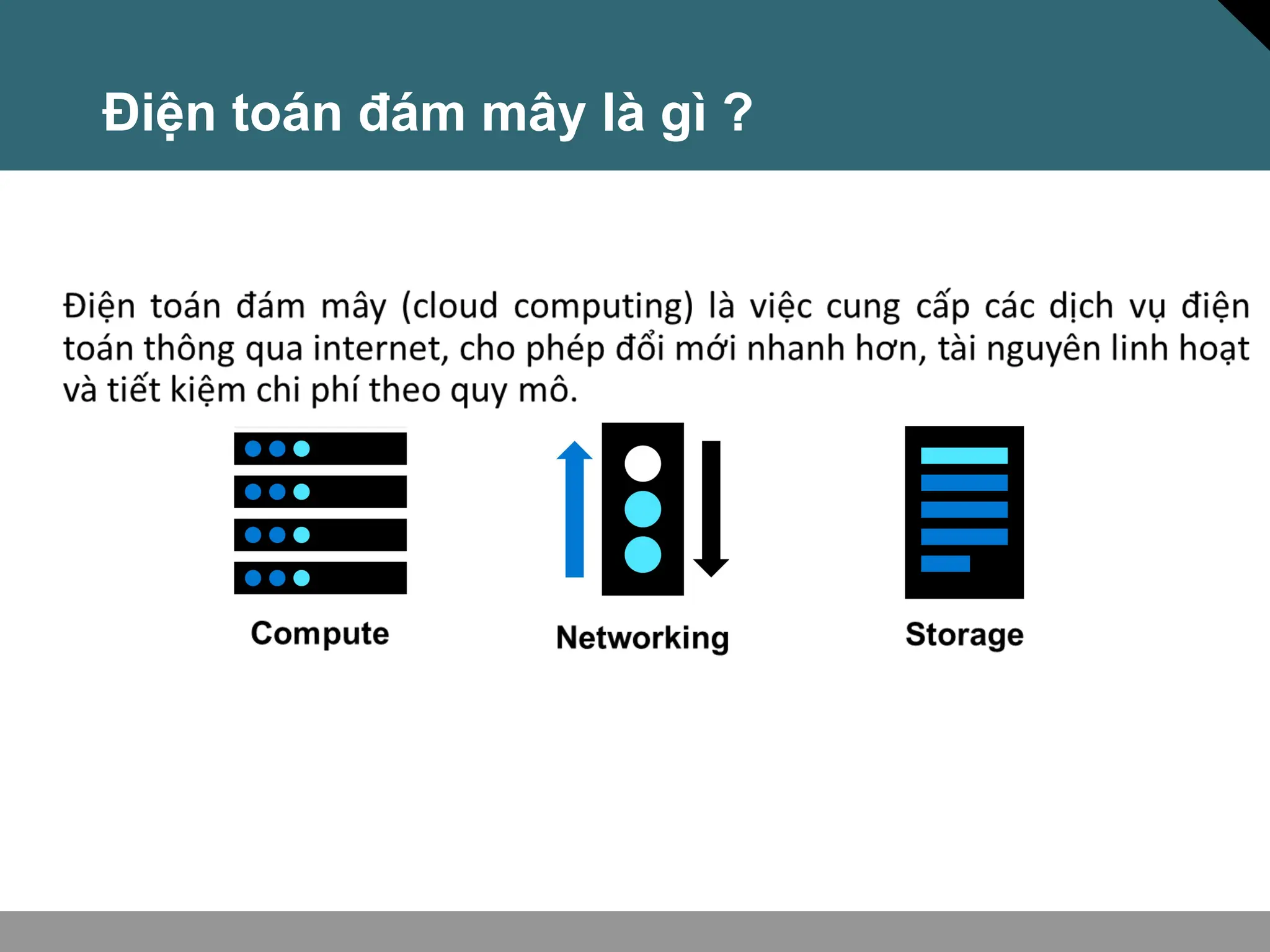
Điện toán đám mây là gì ?
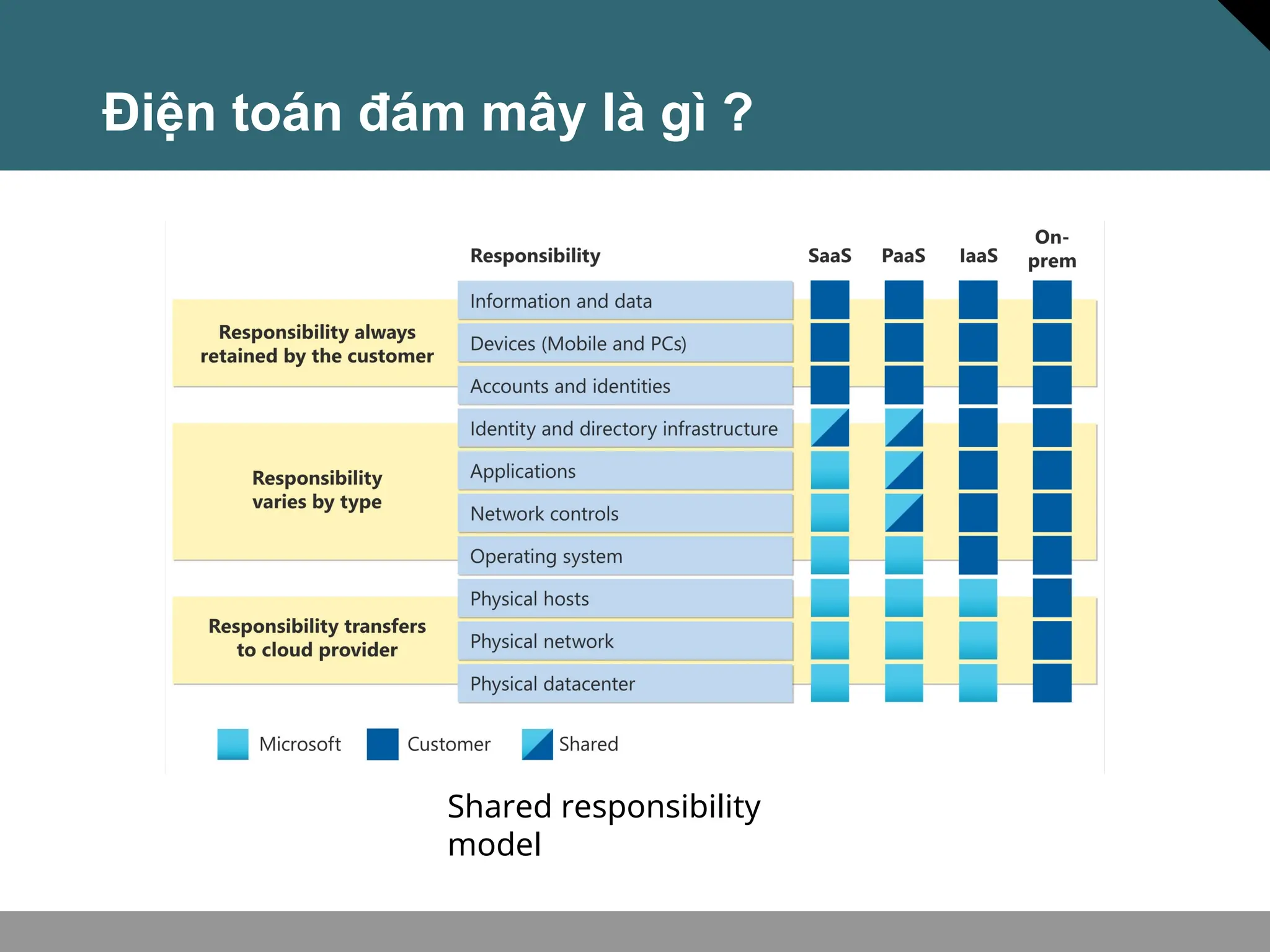
Shared responsibility
model
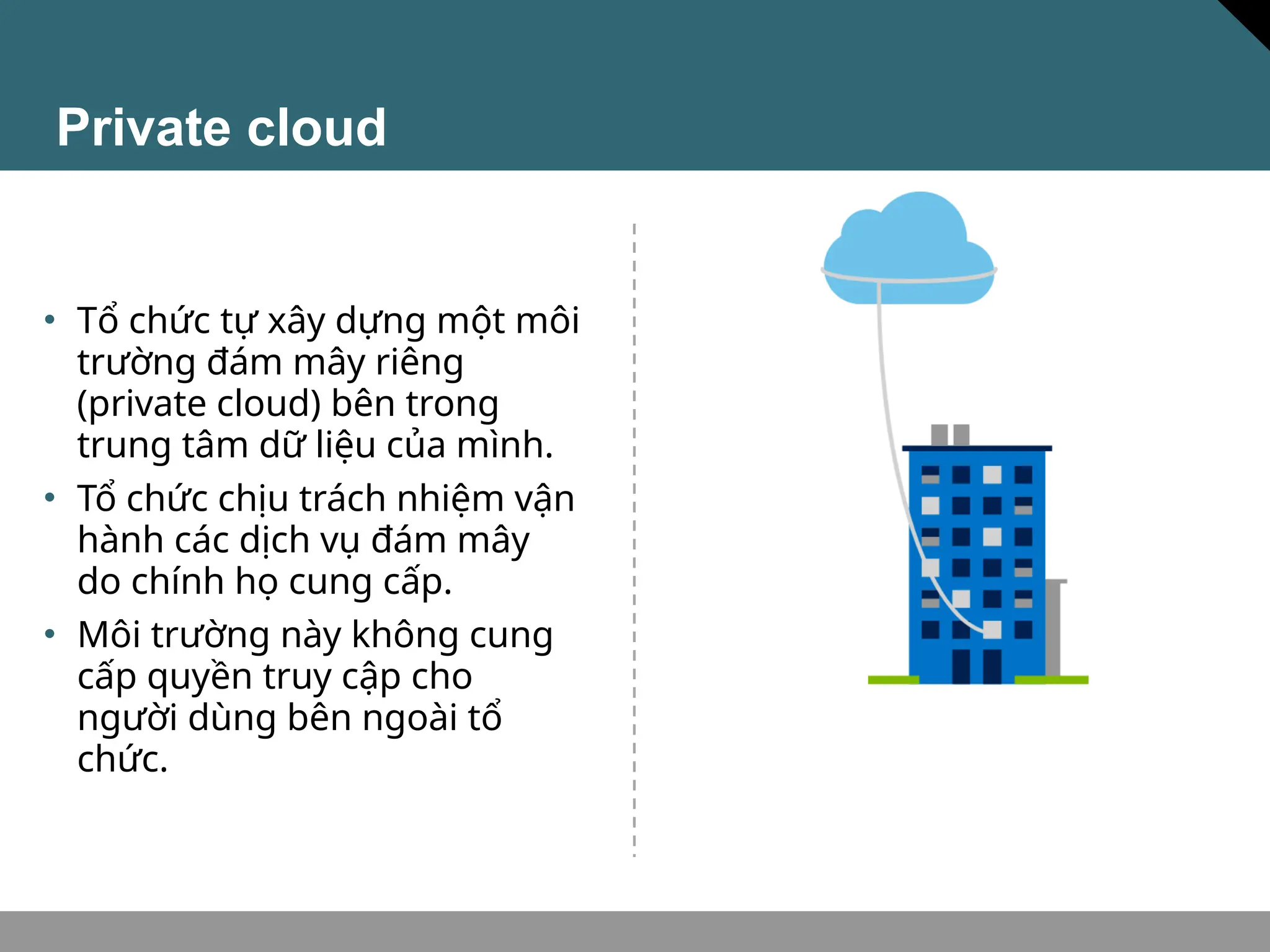
Private cloud
• Tổ chức tự xây dựng một môi
trường đám mây riêng
(private cloud) bên trong
trung tâm dữ liệu của mình.
• Tổ chức chịu trách nhiệm vận
hành các dịch vụ đám mây
do chính họ cung cấp.
• Môi trường này không cung
cấp quyền truy cập cho
người dùng bên ngoài tổ
chức.
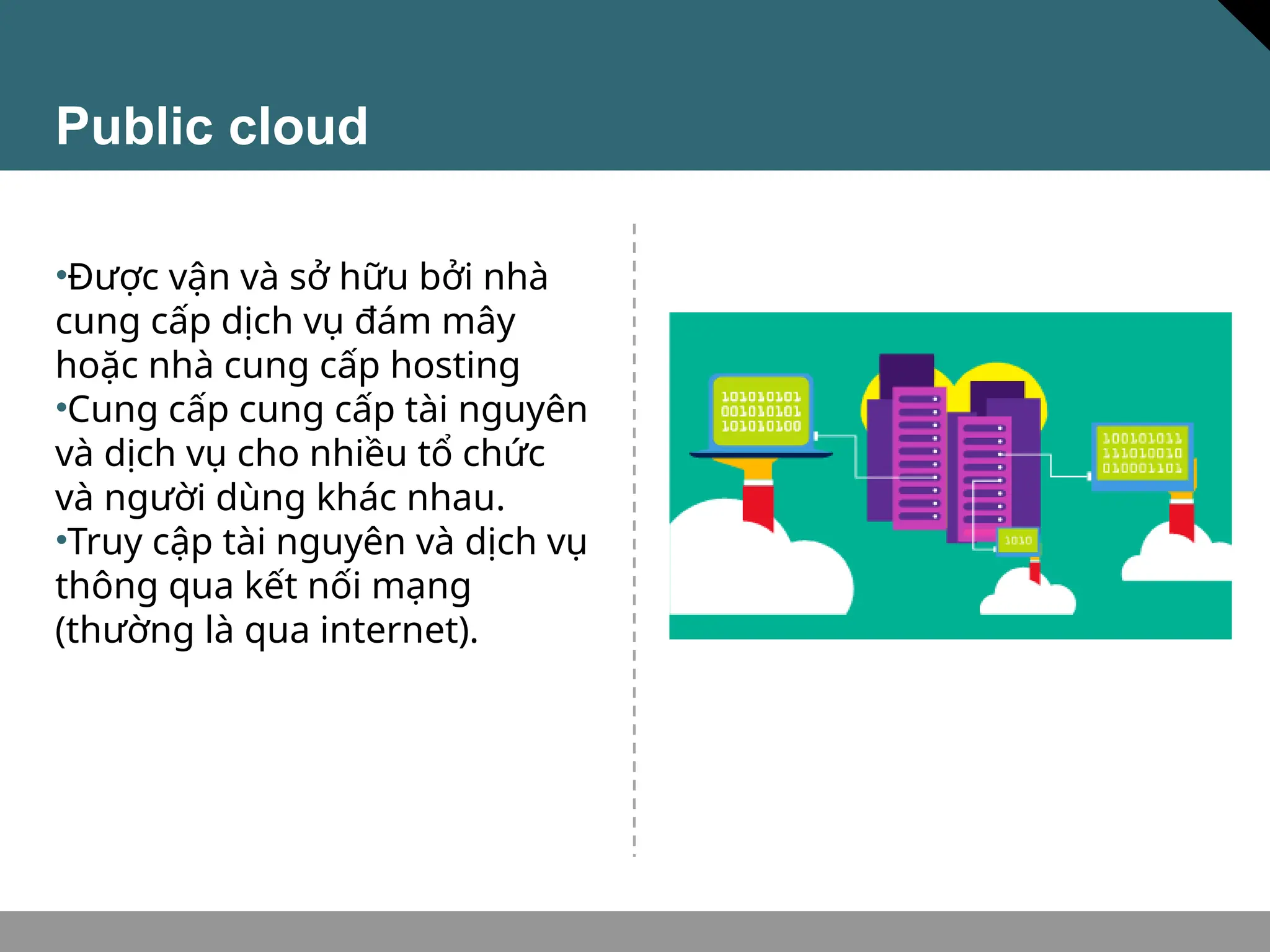
Public cloud
•Được vận và sở hữu bởi nhà
cung cấp dịch vụ đám mây
hoặc nhà cung cấp hosting
•Cung cấp cung cấp tài nguyên
và dịch vụ cho nhiều tổ chức
và người dùng khác nhau.
•Truy cập tài nguyên và dịch vụ
thông qua kết nối mạng
(thường là qua internet).
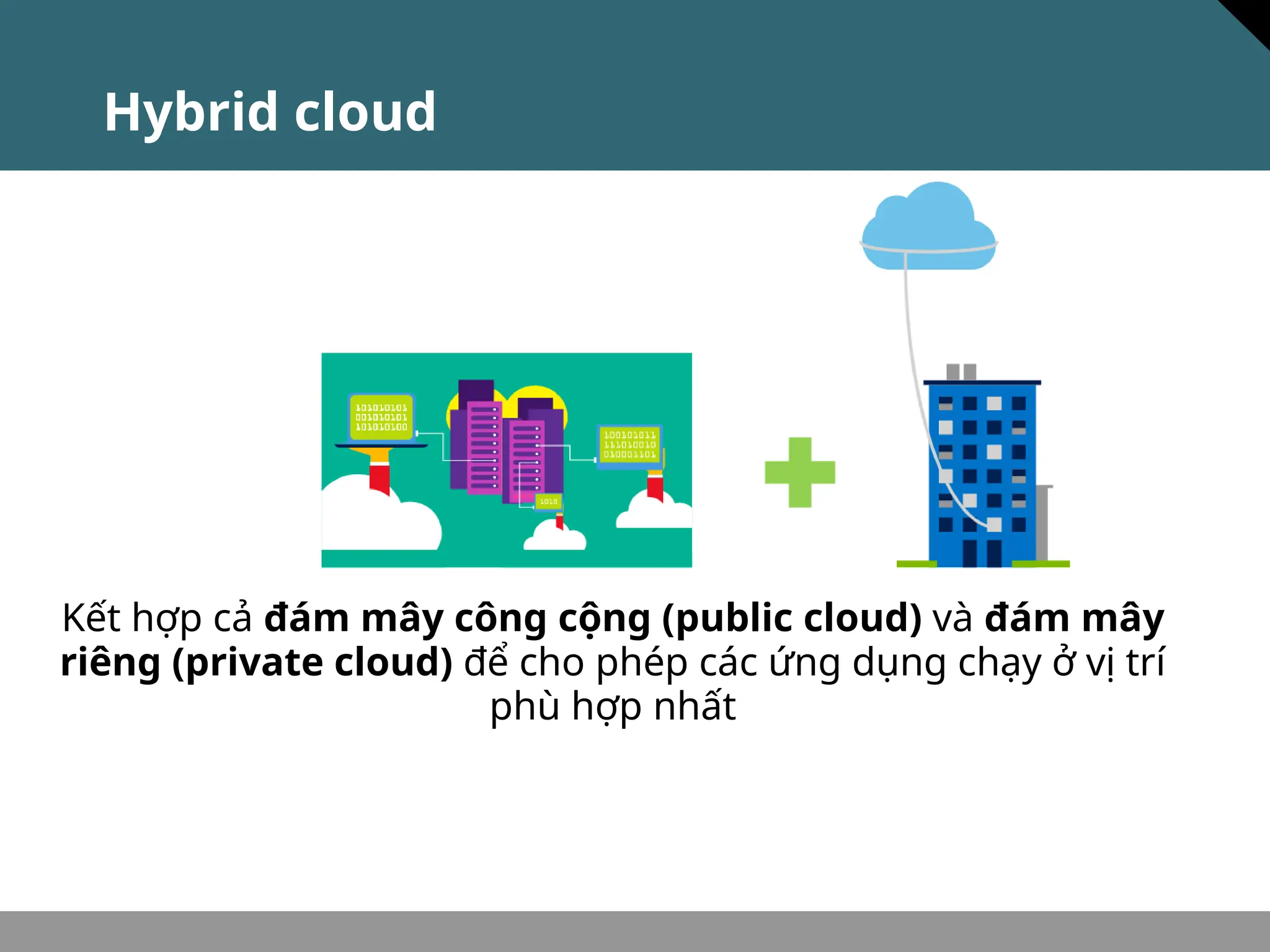
Hybrid cloud
Kết hợp cả đám mây công cộng (public cloud) và đám mây
riêng (private cloud) để cho phép các ứng dụng chạy ở vị trí
phù hợp nhất
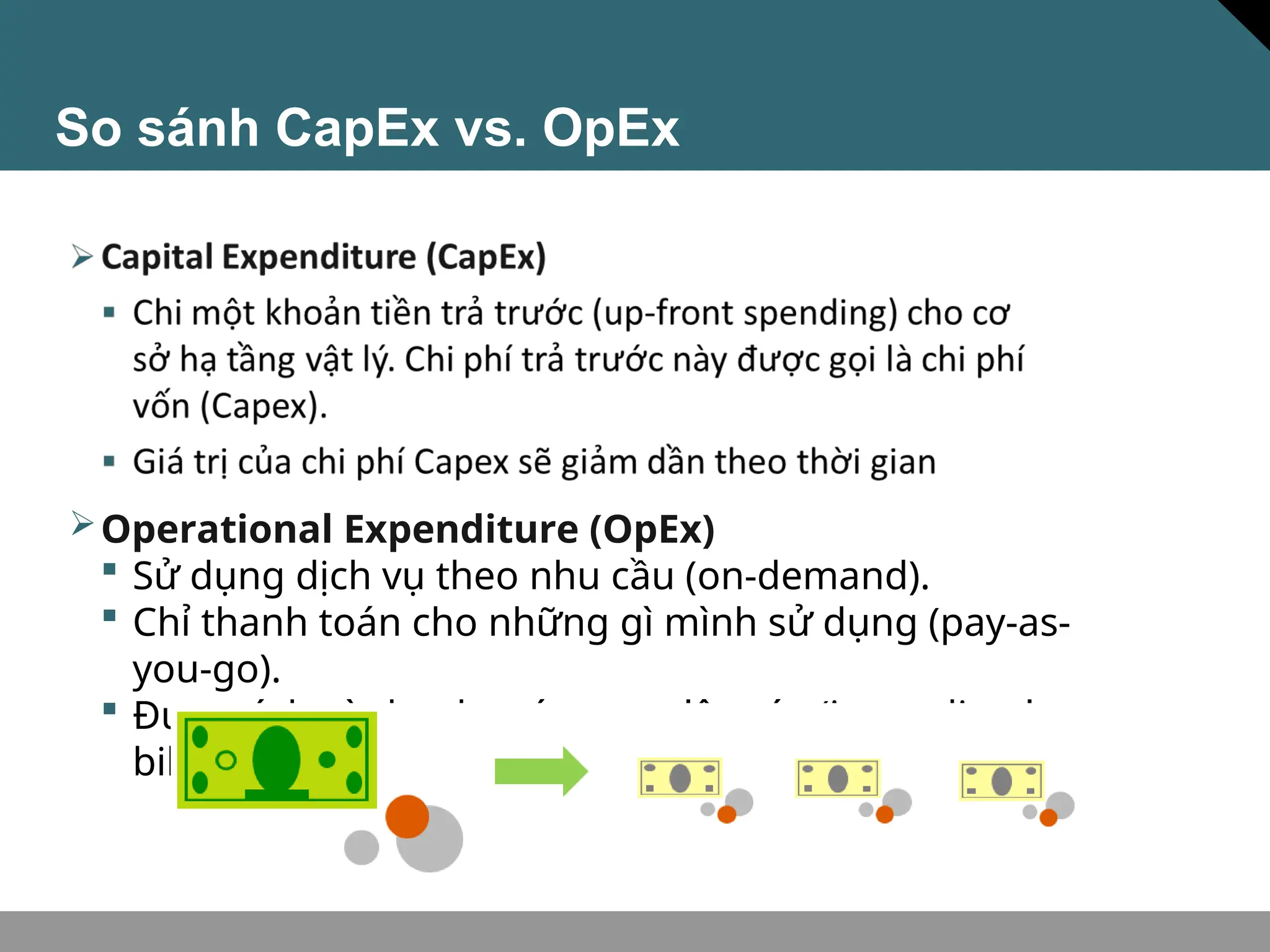
So sánh CapEx vs. OpEx
Operational Expenditure (OpEx)
 Sử dụng dịch vụ theo nhu cầu (on-demand).
 Chỉ thanh toán cho những gì mình sử dụng (pay-as-
you-go).
 Được tính và thanh toán ngay lập tức (immediately
billed).
Consumption-based model
Nhà cung cấp dịch vụ đám mây áp dụng mô hình tính theo
mức sử dụng (consumption-based model). Điều này nghĩa là
người dùng cuối chỉ trả tiền cho tài nguyên họ dùng. Dùng gì
trả tiền đó.
•Dự đoán chi phí tốt hơn (Giá của từng tài nguyên và dịch vụ
được cung cấp).
•Thanh toán dựa trên sử dụng thực tế.
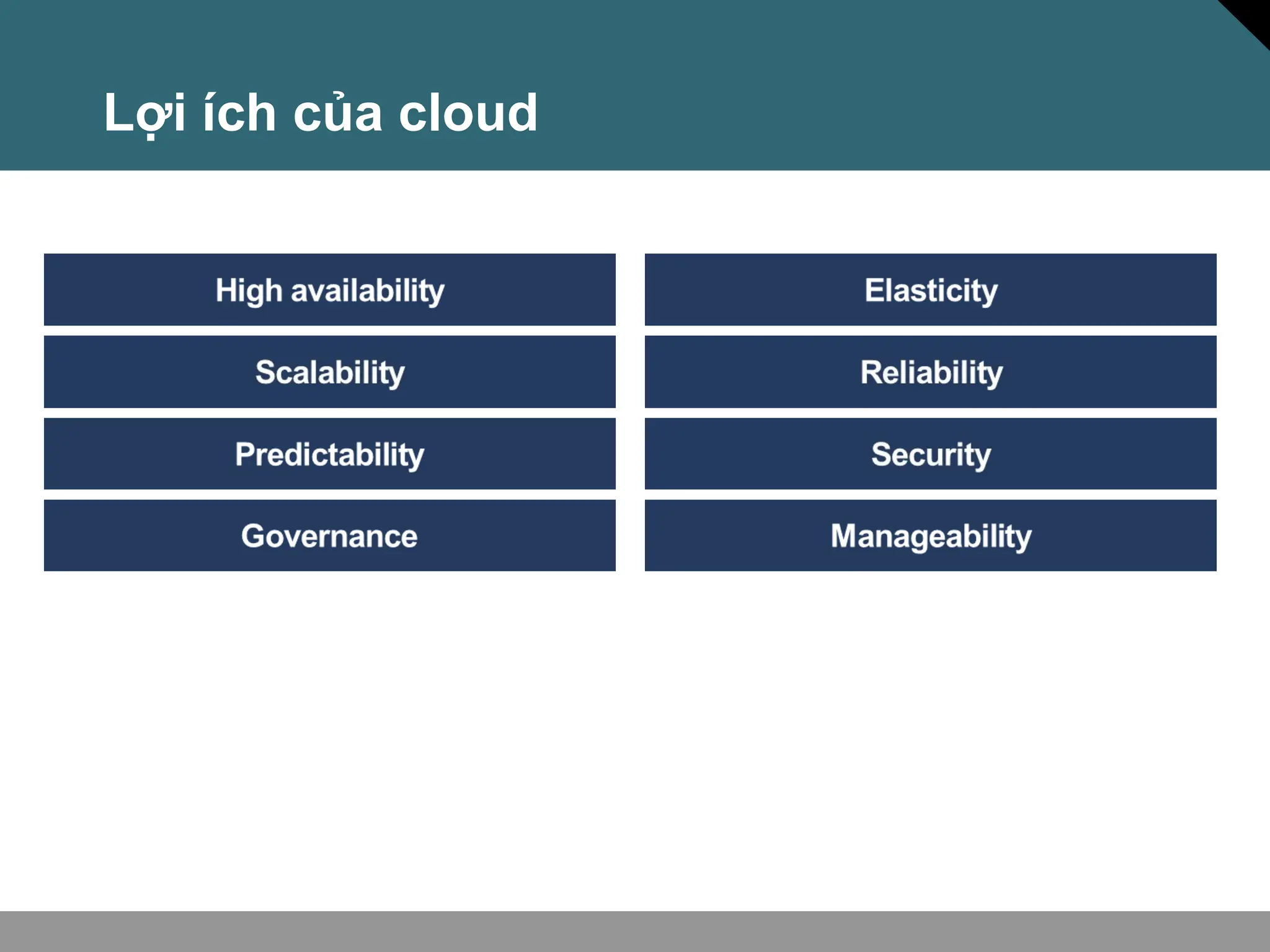
Lợi ích của cloud
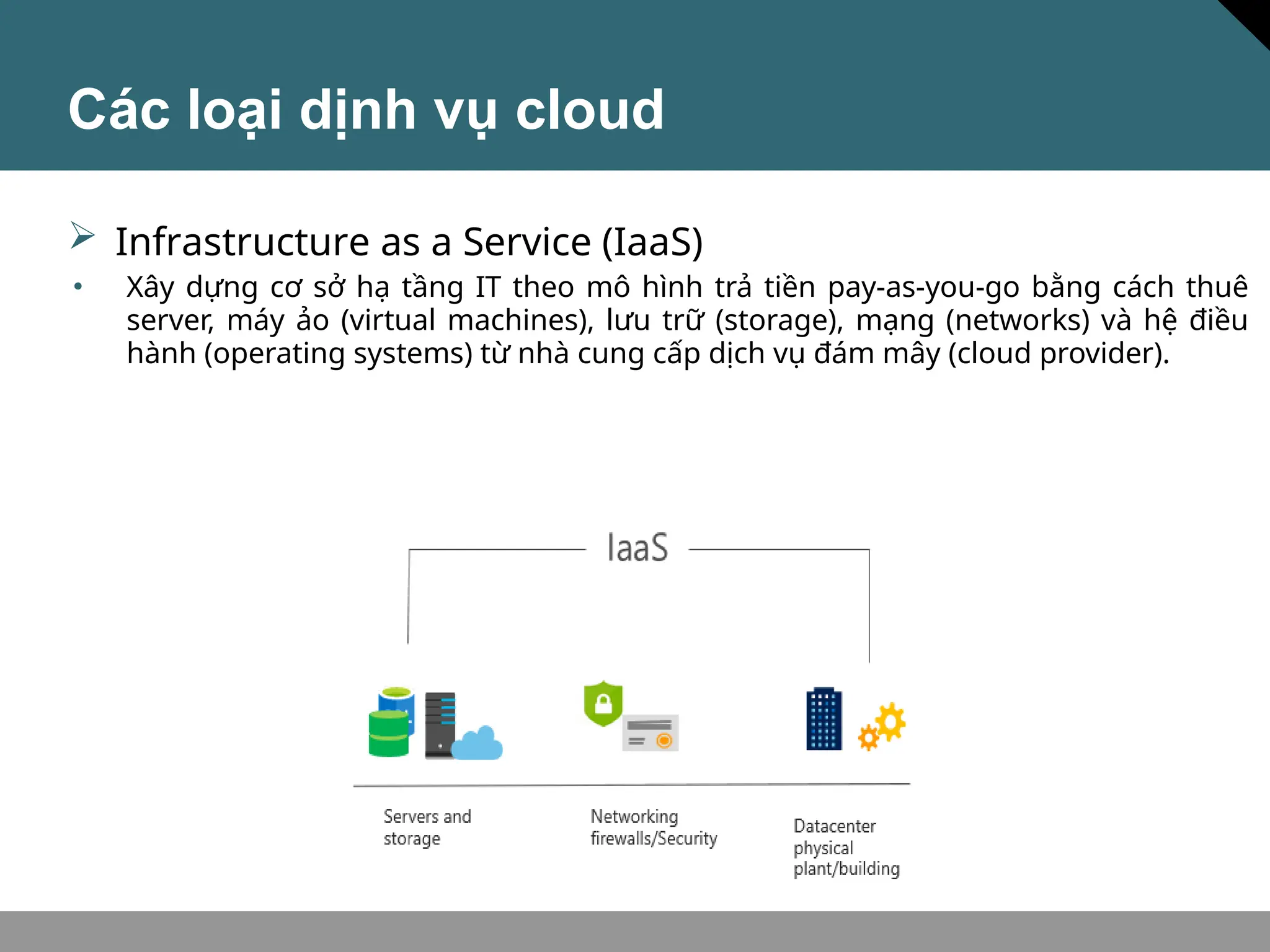
Các loại dịnh vụ cloud
• Xây dựng cơ sở hạ tầng IT theo mô hình trả tiền pay-as-you-go bằng cách thuê
server, máy ảo (virtual machines), lưu trữ (storage), mạng (networks) và hệ điều
hành (operating systems) từ nhà cung cấp dịch vụ đám mây (cloud provider).
 Infrastructure as a Service (IaaS)
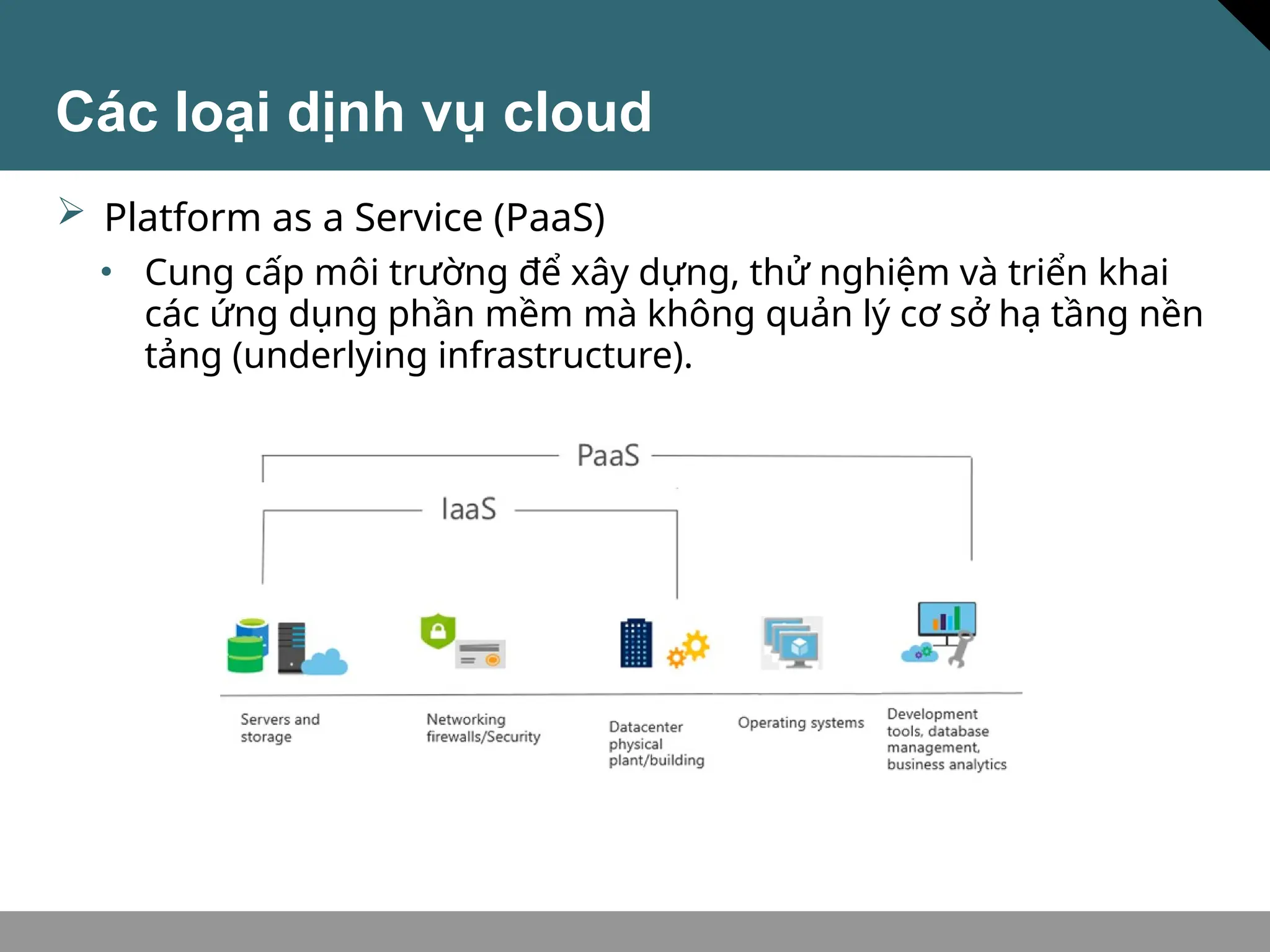
Các loại dịnh vụ cloud
• Cung cấp môi trường để xây dựng, thử nghiệm và triển khai
các ứng dụng phần mềm mà không quản lý cơ sở hạ tầng nền
tảng (underlying infrastructure).
 Platform as a Service (PaaS)
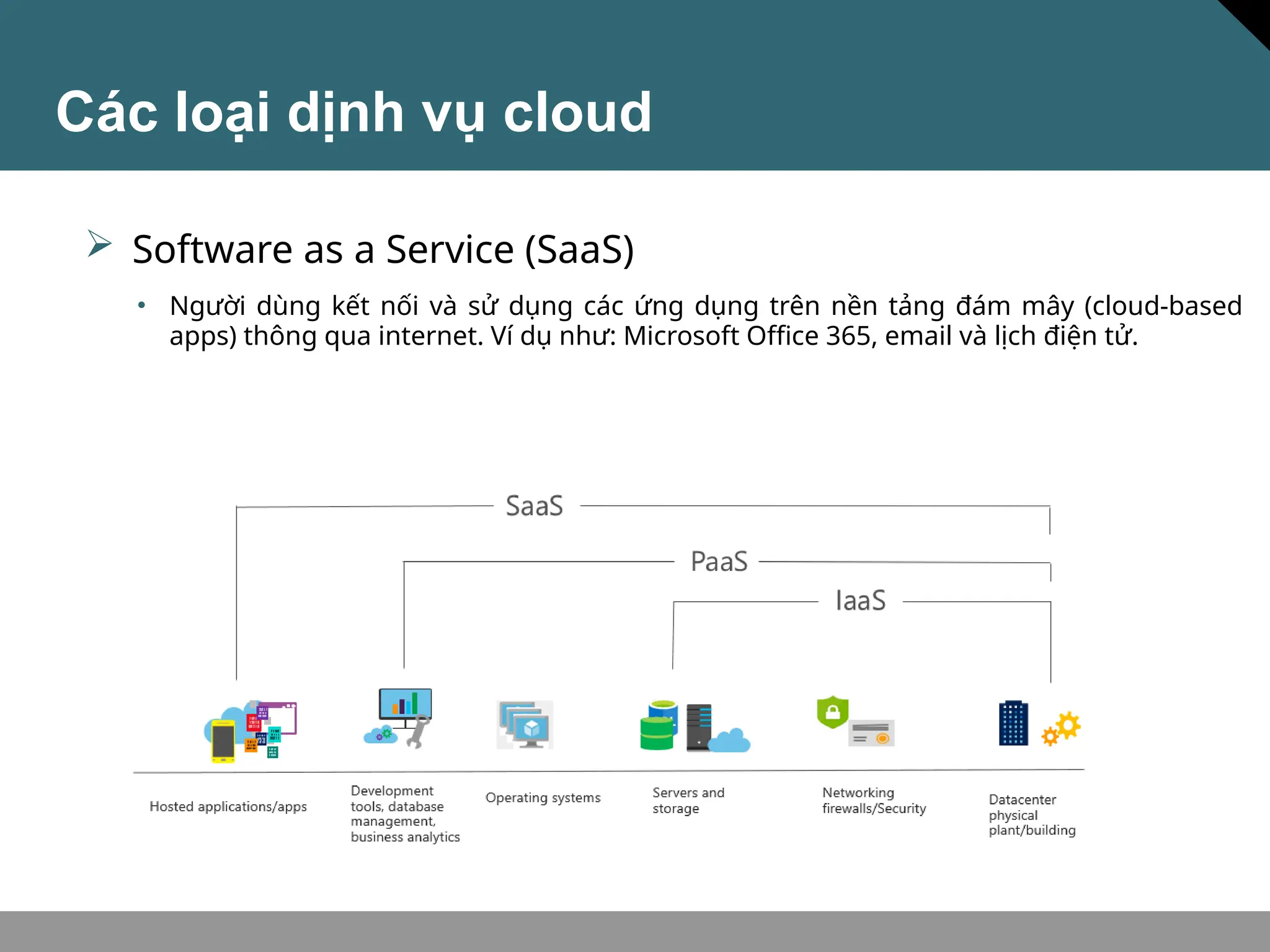
 Software as a Service (SaaS)
• Người dùng kết nối và sử dụng các ứng dụng trên nền tảng đám mây (cloud-based
apps) thông qua internet. Ví dụ như: Microsoft Office 365, email và lịch điện tử.
Các loại dịnh vụ cloud
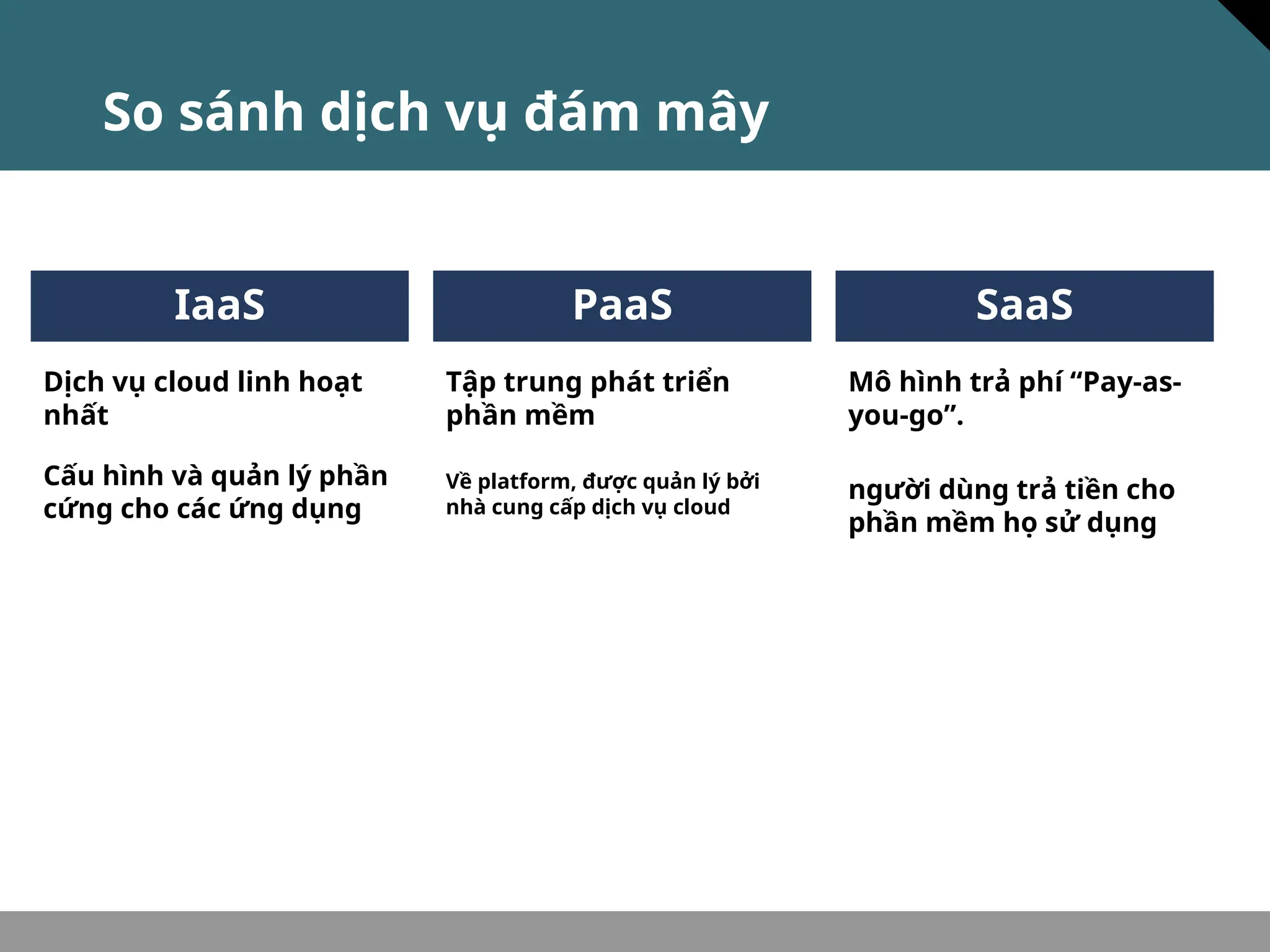
So sánh dịch vụ đám mây
Cấu hình và quản lý phần
cứng cho các ứng dụng
IaaS
Dịch vụ cloud linh hoạt
nhất
PaaS
Tập trung phát triển
phần mềm
Về platform, được quản lý bởi
nhà cung cấp dịch vụ cloud
Mô hình trả phí “Pay-as-
you-go”.
SaaS
người dùng trả tiền cho
phần mềm họ sử dụng
BSCI v3.0—2-14
Kiến trúc của Azure
Regions
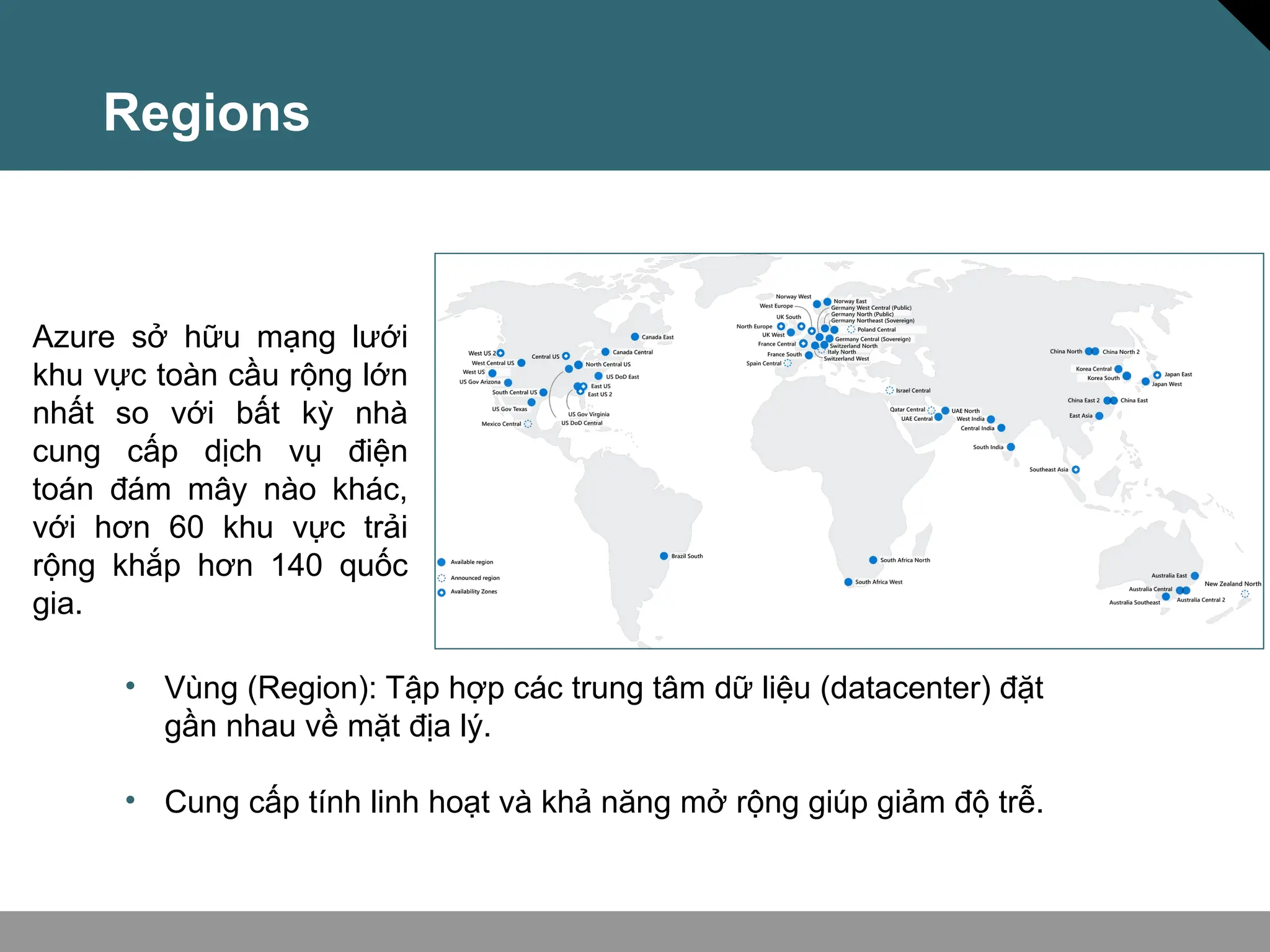
Azure sở hữu mạng lưới
khu vực toàn cầu rộng lớn
nhất so với bất kỳ nhà
cung cấp dịch vụ điện
toán đám mây nào khác,
với hơn 60 khu vực trải
rộng khắp hơn 140 quốc
gia.
• Vùng (Region): Tập hợp các trung tâm dữ liệu (datacenter) đặt
gần nhau về mặt địa lý.
• Cung cấp tính linh hoạt và khả năng mở rộng giúp giảm độ trễ.
Availability zones
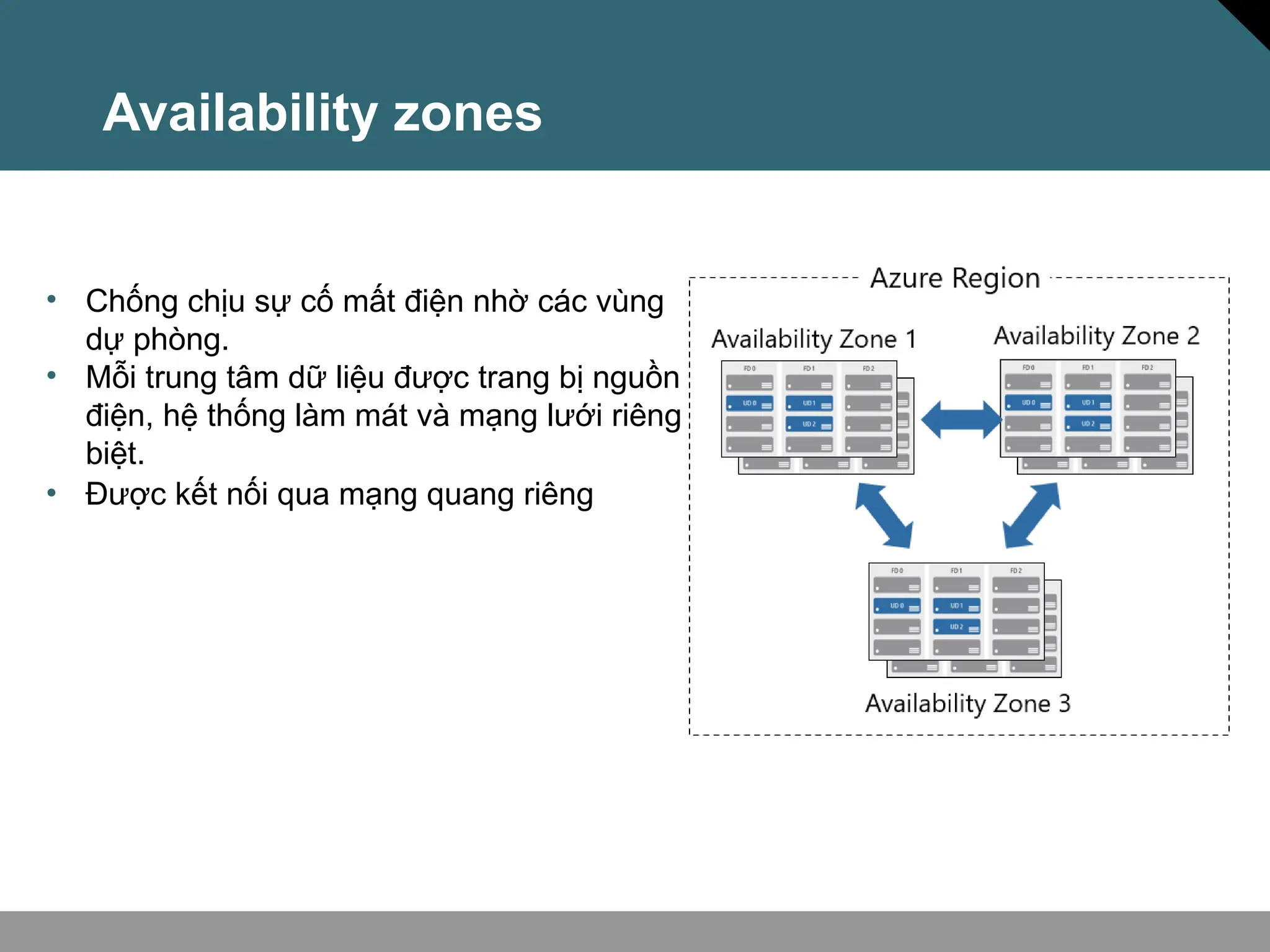
• Chống chịu sự cố mất điện nhờ các vùng
dự phòng.
• Mỗi trung tâm dữ liệu được trang bị nguồn
điện, hệ thống làm mát và mạng lưới riêng
biệt.
• Được kết nối qua mạng quang riêng
Region Pairs
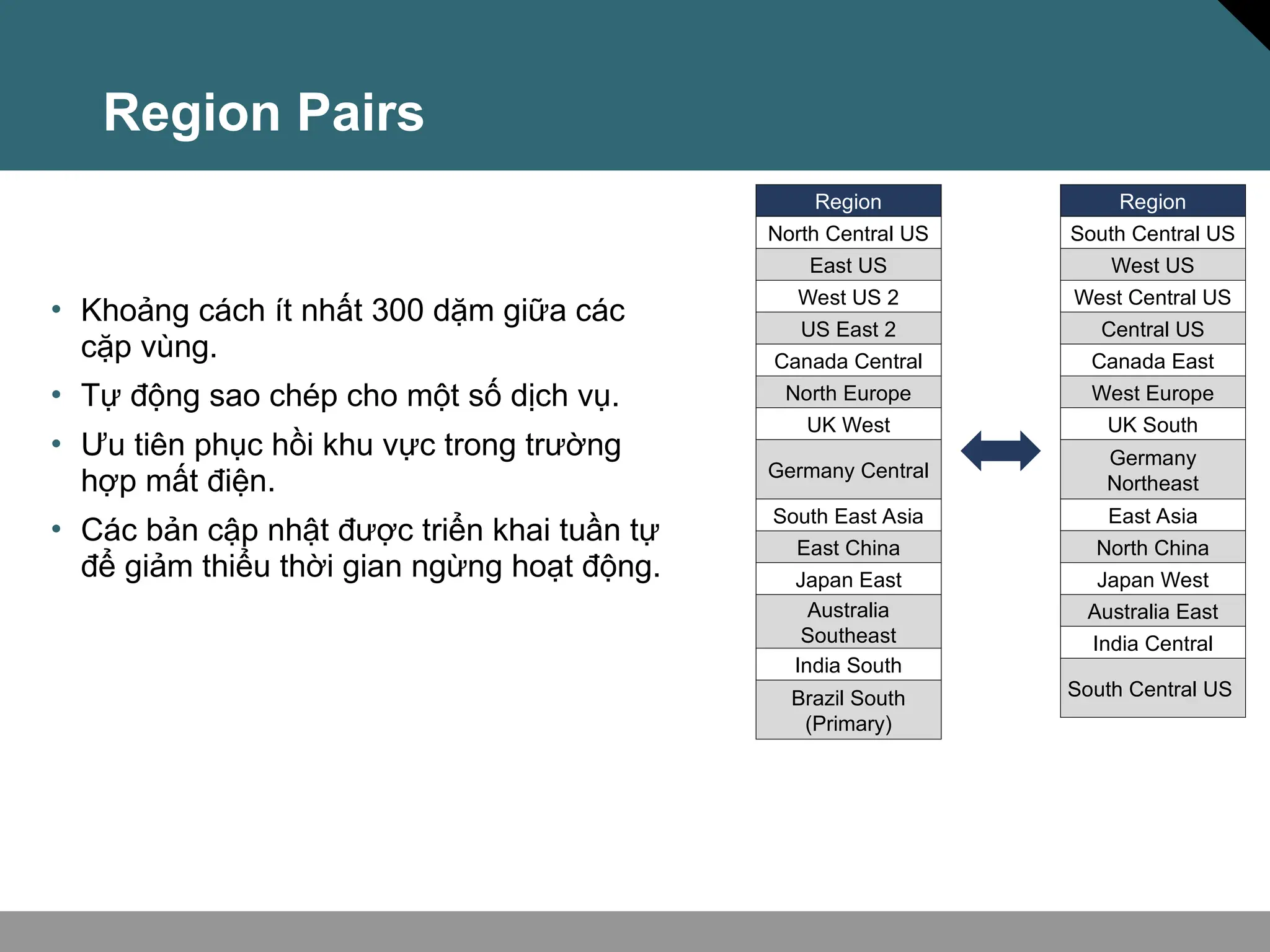
• Khoảng cách ít nhất 300 dặm giữa các
cặp vùng.
• Tự động sao chép cho một số dịch vụ.
• Ưu tiên phục hồi khu vực trong trường
hợp mất điện.
• Các bản cập nhật được triển khai tuần tự
để giảm thiểu thời gian ngừng hoạt động.
Region
North Central US​
East US​
West US 2​
US East 2​
Canada Central​
North Europe​
UK West​
Germany Central​
South East Asia​
East China​
Japan East​
Australia
Southeast​
India South​
Brazil South
(Primary)​
Region
South Central US​
West US​
West Central US​
Central US​
Canada East​
West Europe​
UK South​
Germany
Northeast​
East Asia​
North China​
Japan West​
Australia East​
India Central​
South Central US ​
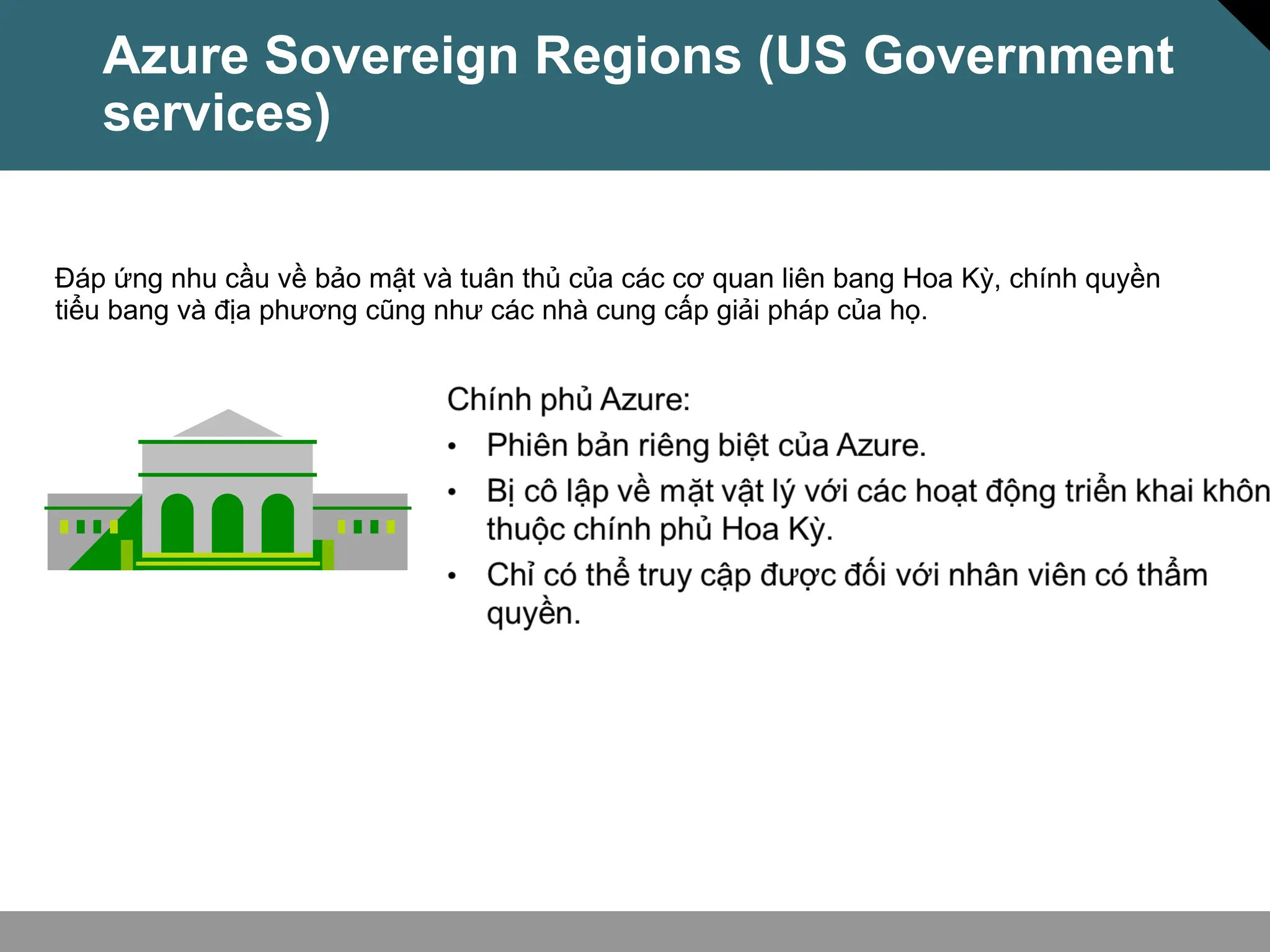
Azure Sovereign Regions (US Government
services)
Đáp ứng nhu cầu về bảo mật và tuân thủ của các cơ quan liên bang Hoa Kỳ, chính quyền
tiểu bang và địa phương cũng như các nhà cung cấp giải pháp của họ.
Microsoft là nhà cung cấp dịch vụ đám mây công cộng nước ngoài đầu tiên của
Trung Quốc, tuân thủ các quy định của chính phủ.
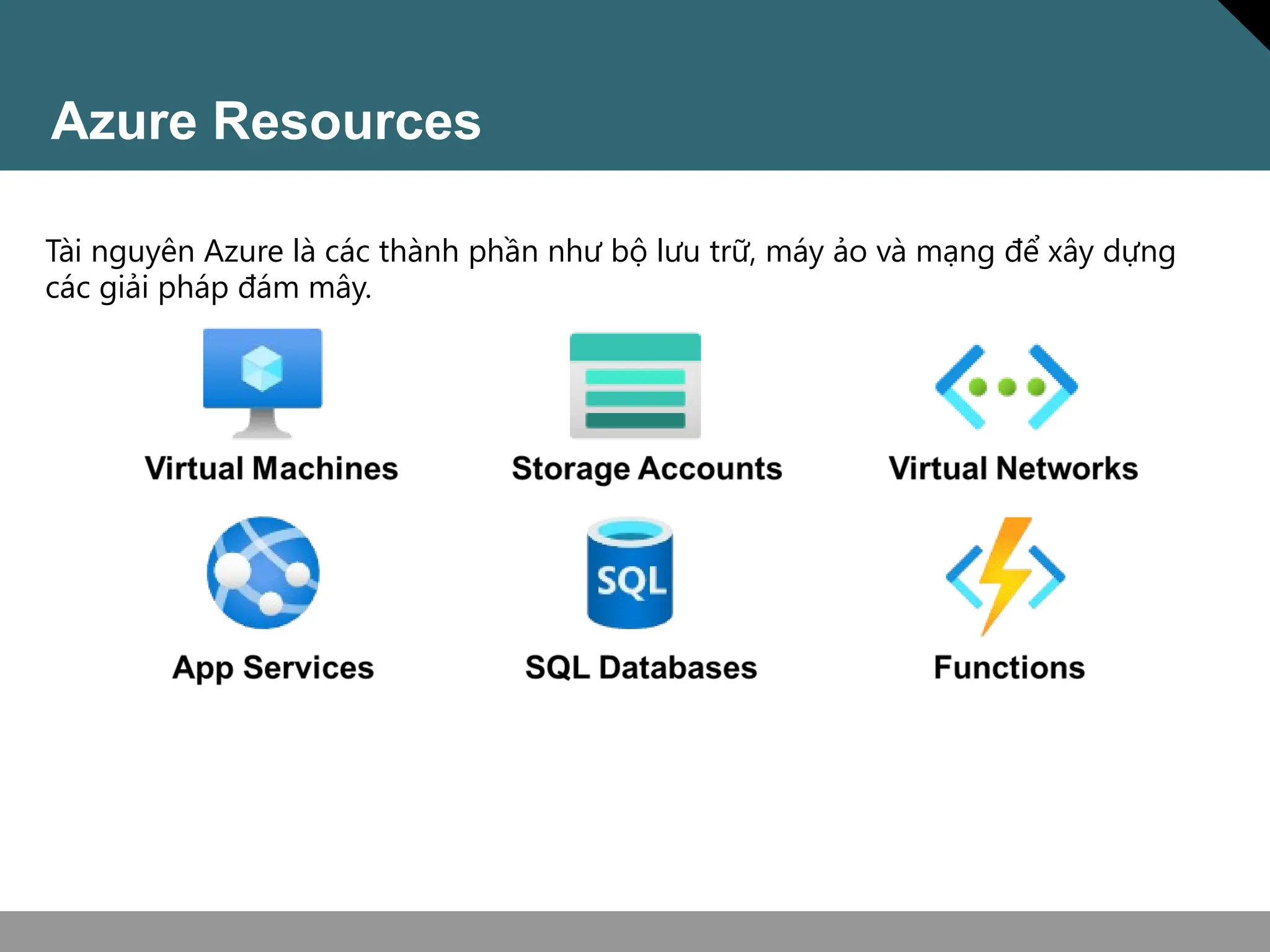
Azure Resources
Tài nguyên Azure là các thành phần như bộ lưu trữ, máy ảo và mạng để xây dựng
các giải pháp đám mây.
Resource groups
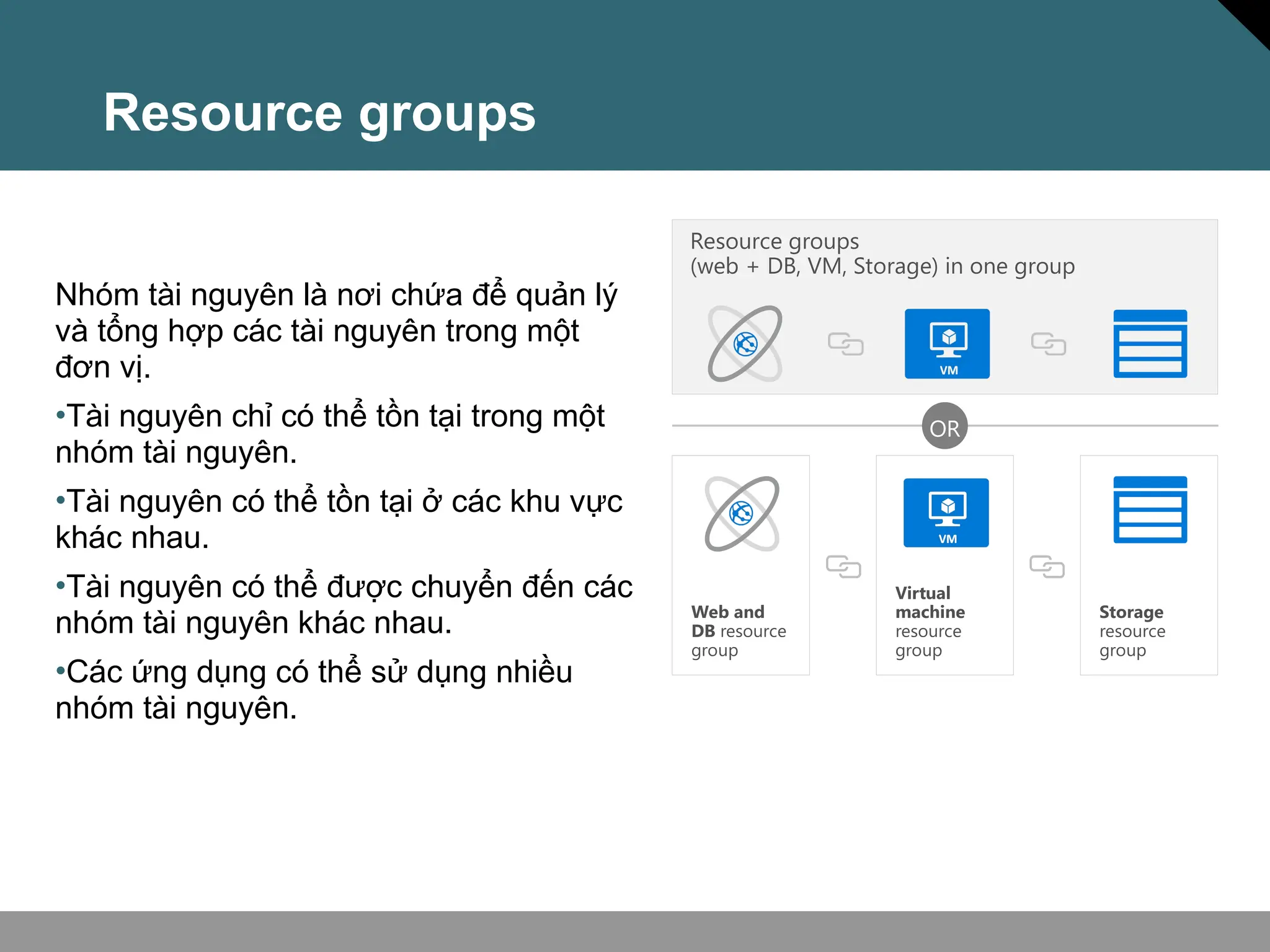
Nhóm tài nguyên là nơi chứa để quản lý
và tổng hợp các tài nguyên trong một
đơn vị.
•Tài nguyên chỉ có thể tồn tại trong một
nhóm tài nguyên.
•Tài nguyên có thể tồn tại ở các khu vực
khác nhau.
•Tài nguyên có thể được chuyển đến các
nhóm tài nguyên khác nhau.
•Các ứng dụng có thể sử dụng nhiều
nhóm tài nguyên.
OR
Resource groups
(web + DB, VM, Storage) in one group
Storage
resource
group
Virtual
machine
resource
group
Web and
DB resource
group
Azure Subscriptions
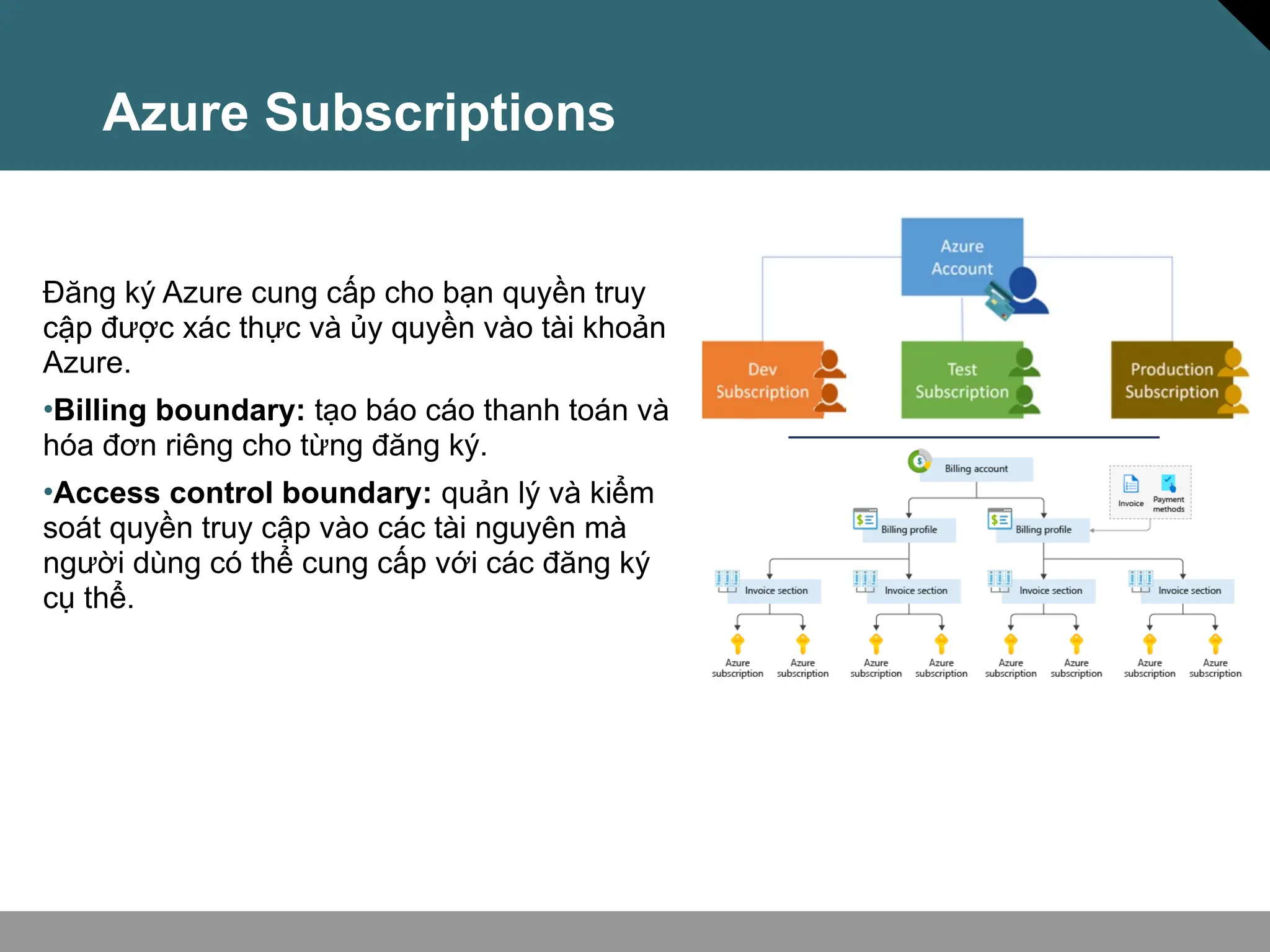
Đăng ký Azure cung cấp cho bạn quyền truy
cập được xác thực và ủy quyền vào tài khoản
Azure.
•Billing boundary: tạo báo cáo thanh toán và
hóa đơn riêng cho từng đăng ký.
•Access control boundary: quản lý và kiểm
soát quyền truy cập vào các tài nguyên mà
người dùng có thể cung cấp với các đăng ký
cụ thể.
Management Groups
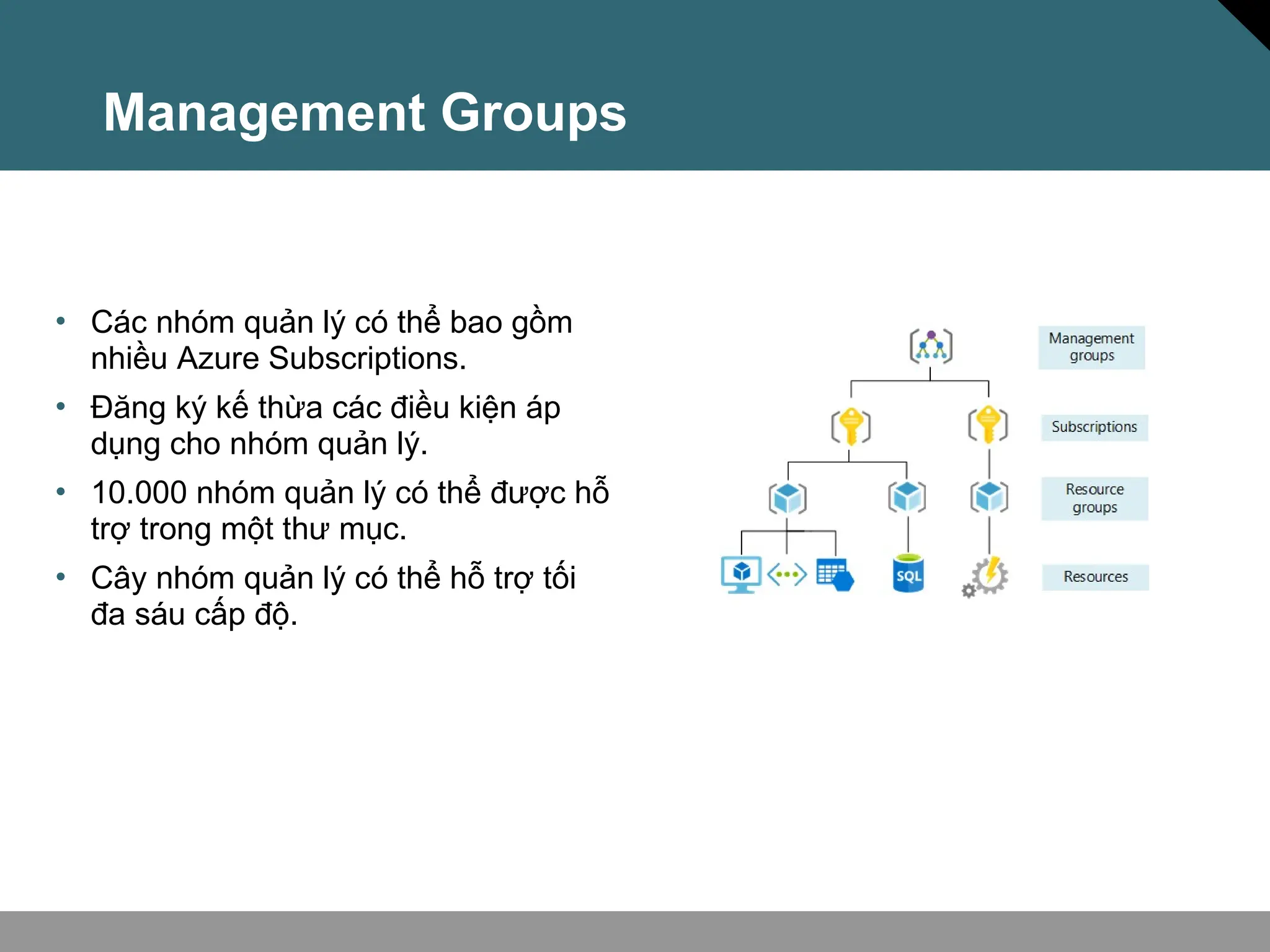
• Các nhóm quản lý có thể bao gồm
nhiều Azure Subscriptions.
• Đăng ký kế thừa các điều kiện áp
dụng cho nhóm quản lý.
• 10.000 nhóm quản lý có thể được hỗ
trợ trong một thư mục.
• Cây nhóm quản lý có thể hỗ trợ tối
đa sáu cấp độ.

Azure cơ bản Azure cơ bản Azure cơ bản Azure cơ bản

  • 1.
  • 2.
    Điện toán đámmây là gì ?
  • 3.
    Điện toán đámmây là gì ? Shared responsibility model
  • 4.
    Private cloud • Tổchức tự xây dựng một môi trường đám mây riêng (private cloud) bên trong trung tâm dữ liệu của mình. • Tổ chức chịu trách nhiệm vận hành các dịch vụ đám mây do chính họ cung cấp. • Môi trường này không cung cấp quyền truy cập cho người dùng bên ngoài tổ chức.
  • 5.
    Public cloud •Được vậnvà sở hữu bởi nhà cung cấp dịch vụ đám mây hoặc nhà cung cấp hosting •Cung cấp cung cấp tài nguyên và dịch vụ cho nhiều tổ chức và người dùng khác nhau. •Truy cập tài nguyên và dịch vụ thông qua kết nối mạng (thường là qua internet).
  • 6.
    Hybrid cloud Kết hợpcả đám mây công cộng (public cloud) và đám mây riêng (private cloud) để cho phép các ứng dụng chạy ở vị trí phù hợp nhất
  • 7.
    So sánh CapExvs. OpEx Operational Expenditure (OpEx)  Sử dụng dịch vụ theo nhu cầu (on-demand).  Chỉ thanh toán cho những gì mình sử dụng (pay-as- you-go).  Được tính và thanh toán ngay lập tức (immediately billed).
  • 8.
    Consumption-based model Nhà cungcấp dịch vụ đám mây áp dụng mô hình tính theo mức sử dụng (consumption-based model). Điều này nghĩa là người dùng cuối chỉ trả tiền cho tài nguyên họ dùng. Dùng gì trả tiền đó. •Dự đoán chi phí tốt hơn (Giá của từng tài nguyên và dịch vụ được cung cấp). •Thanh toán dựa trên sử dụng thực tế.
  • 9.
  • 10.
    Các loại dịnhvụ cloud • Xây dựng cơ sở hạ tầng IT theo mô hình trả tiền pay-as-you-go bằng cách thuê server, máy ảo (virtual machines), lưu trữ (storage), mạng (networks) và hệ điều hành (operating systems) từ nhà cung cấp dịch vụ đám mây (cloud provider).  Infrastructure as a Service (IaaS)
  • 11.
    Các loại dịnhvụ cloud • Cung cấp môi trường để xây dựng, thử nghiệm và triển khai các ứng dụng phần mềm mà không quản lý cơ sở hạ tầng nền tảng (underlying infrastructure).  Platform as a Service (PaaS)
  • 12.
     Software asa Service (SaaS) • Người dùng kết nối và sử dụng các ứng dụng trên nền tảng đám mây (cloud-based apps) thông qua internet. Ví dụ như: Microsoft Office 365, email và lịch điện tử. Các loại dịnh vụ cloud
  • 13.
    So sánh dịchvụ đám mây Cấu hình và quản lý phần cứng cho các ứng dụng IaaS Dịch vụ cloud linh hoạt nhất PaaS Tập trung phát triển phần mềm Về platform, được quản lý bởi nhà cung cấp dịch vụ cloud Mô hình trả phí “Pay-as- you-go”. SaaS người dùng trả tiền cho phần mềm họ sử dụng
  • 14.
  • 15.
    Regions Azure sở hữumạng lưới khu vực toàn cầu rộng lớn nhất so với bất kỳ nhà cung cấp dịch vụ điện toán đám mây nào khác, với hơn 60 khu vực trải rộng khắp hơn 140 quốc gia. • Vùng (Region): Tập hợp các trung tâm dữ liệu (datacenter) đặt gần nhau về mặt địa lý. • Cung cấp tính linh hoạt và khả năng mở rộng giúp giảm độ trễ.
  • 16.
    Availability zones • Chốngchịu sự cố mất điện nhờ các vùng dự phòng. • Mỗi trung tâm dữ liệu được trang bị nguồn điện, hệ thống làm mát và mạng lưới riêng biệt. • Được kết nối qua mạng quang riêng
  • 17.
    Region Pairs • Khoảngcách ít nhất 300 dặm giữa các cặp vùng. • Tự động sao chép cho một số dịch vụ. • Ưu tiên phục hồi khu vực trong trường hợp mất điện. • Các bản cập nhật được triển khai tuần tự để giảm thiểu thời gian ngừng hoạt động. Region North Central US​ East US​ West US 2​ US East 2​ Canada Central​ North Europe​ UK West​ Germany Central​ South East Asia​ East China​ Japan East​ Australia Southeast​ India South​ Brazil South (Primary)​ Region South Central US​ West US​ West Central US​ Central US​ Canada East​ West Europe​ UK South​ Germany Northeast​ East Asia​ North China​ Japan West​ Australia East​ India Central​ South Central US ​
  • 18.
    Azure Sovereign Regions(US Government services) Đáp ứng nhu cầu về bảo mật và tuân thủ của các cơ quan liên bang Hoa Kỳ, chính quyền tiểu bang và địa phương cũng như các nhà cung cấp giải pháp của họ.
  • 19.
    Microsoft là nhàcung cấp dịch vụ đám mây công cộng nước ngoài đầu tiên của Trung Quốc, tuân thủ các quy định của chính phủ.
  • 20.
    Azure Resources Tài nguyênAzure là các thành phần như bộ lưu trữ, máy ảo và mạng để xây dựng các giải pháp đám mây.
  • 21.
    Resource groups Nhóm tàinguyên là nơi chứa để quản lý và tổng hợp các tài nguyên trong một đơn vị. •Tài nguyên chỉ có thể tồn tại trong một nhóm tài nguyên. •Tài nguyên có thể tồn tại ở các khu vực khác nhau. •Tài nguyên có thể được chuyển đến các nhóm tài nguyên khác nhau. •Các ứng dụng có thể sử dụng nhiều nhóm tài nguyên. OR Resource groups (web + DB, VM, Storage) in one group Storage resource group Virtual machine resource group Web and DB resource group
  • 22.
    Azure Subscriptions Đăng kýAzure cung cấp cho bạn quyền truy cập được xác thực và ủy quyền vào tài khoản Azure. •Billing boundary: tạo báo cáo thanh toán và hóa đơn riêng cho từng đăng ký. •Access control boundary: quản lý và kiểm soát quyền truy cập vào các tài nguyên mà người dùng có thể cung cấp với các đăng ký cụ thể.
  • 23.
    Management Groups • Cácnhóm quản lý có thể bao gồm nhiều Azure Subscriptions. • Đăng ký kế thừa các điều kiện áp dụng cho nhóm quản lý. • 10.000 nhóm quản lý có thể được hỗ trợ trong một thư mục. • Cây nhóm quản lý có thể hỗ trợ tối đa sáu cấp độ.

Editor's Notes

  • #2 https://docs.microsoft.com/learn/modules/describe-cloud-compute/3-what-cloud-compute Cloud Computing is: A model for enabling on-demand access to a shared pool of configurable computing resources – servers, network, storage, applications, and services Ubiquitous, convenient, on-demand network access Rapidly provisioned and released with minimal management effort or service provider interaction Definitions found at: NIST definition - https://csrc.nist.gov/publications/detail/sp/800-145/final
  • #3 https://docs.microsoft.com/learn/modules/describe-cloud-compute/4-describe-shared-responsibility-model IaaS, PaaS, and SaaS have dedicated topics, coming up.
  • #4 https://docs.microsoft.com/learn/modules/describe-cloud-compute/5-define-cloud-models Owned and operated by the organization that uses cloud resources. Organizations create a cloud environment in their datacenter. Self-service access to compute resources provided to users within the organization. Organization is responsible for operating the services they provide.
  • #5 https://docs.microsoft.com/learn/modules/describe-cloud-compute/5-define-cloud-models What are public, private, and hybrid clouds? - https://azure.microsoft.com/en-us/overview/what-are-private-public-hybrid-clouds/
  • #6 https://docs.microsoft.com/learn/modules/describe-cloud-compute/5-define-cloud-models Hybrid cloud models have the following characteristics: Resource location. Specific resources run or are used in a public cloud, and others run or are used in a private cloud. Cost and efficiency. Hybrid cloud models allow an organization to leverage some of the benefits of cost, efficiency, and scale that are available with a public cloud model. Control. Organizations retain management control in private clouds. Skills. Technical skills are still required to maintain the private cloud and ensure both cloud models can operate together.
  • #7 https://docs.microsoft.com/learn/modules/describe-cloud-compute/6-describe-consumption-based-model Capital Expenditure (CapEx) Spend on physical infrastructure upfront. Deduct the expense from your tax bill. High upfront cost, but the value of your 6investment reduces over time. Operational Expenditure (OpEx) Spend on services or products as needed. Get billed immediately. Deduct the expense from your tax bill in the same year. No upfront cost, pay-as-you use.
  • #8 https://docs.microsoft.com/learn/modules/describe-cloud-compute/6-describe-consumption-based-model This consumption-based model brings with it many benefits, including: No upfront costs. No need to purchase and manage costly infrastructure that they may or may not use to its fullest. The ability to pay for additional resources when they are needed. The ability to stop paying for resources that are no longer needed.
  • #9 https://docs.microsoft.com/learn/modules/describe-benefits-use-cloud-services/2-high-availability-scalability-cloud https://docs.microsoft.com/learn/modules/describe-benefits-use-cloud-services/3-reliability-predictability-cloud https://docs.microsoft.com/learn/modules/describe-benefits-use-cloud-services/4-security-governance-cloud https://docs.microsoft.com/learn/modules/describe-benefits-use-cloud-services/5-manageability-cloud
  • #10 https://docs.microsoft.com/learn/modules/describe-cloud-service-types/2-describe-infrastructure-service For more information on IaaS, visit https://azure.microsoft.com/en-us/overview/what-is-iaas/ Most basic cloud computing services category. Build pay-as-you-go IT infrastructure by renting servers, virtual machines, storage, networks, and operating systems from a cloud provider. Instant computing infrastructure, provisioned and managed over the internet.
  • #11 https://docs.microsoft.com/learn/modules/describe-cloud-service-types/3-describe-platform-service For more information on PaaS, see https://azure.microsoft.com/en-us/overview/what-is-paas/ Provides environment for building, testing, and deploying software applications. Helps create applications quickly, without focusing on managing underlying infrastructure.
  • #12 https://docs.microsoft.com/learn/modules/describe-cloud-service-types/4-describe-software-service Common usage scenarios: Examples of Microsoft SaaS services include Microsoft Office 365, Skype, and Microsoft Dynamics CRM Online. For more information on SaaS, see https://azure.microsoft.com/en-us/overview/what-is-saas/
  • #15 https://docs.microsoft.com/en-us/learn/modules/describe-core-architectural-components-of-azure/5-describe-azure-physical-infrastructure A region represents a collection of datacenters. Provide flexibility and scale. Preserve data residency. Select regions close to your users. Be aware of region deployment availability. There are global services that are region independent. A list of regions and their locations is available at https://azure.microsoft.com/en-us/global-infrastructure/locations/ Learn and SkillPipe content order note: Slides 6-10 https://docs.microsoft.com/en-us/learn/modules/azure-architecture-fundamentals/regions-availability-zones
  • #16 https://docs.microsoft.com/learn/modules/describe-core-architectural-components-of-azure/5-describe-azure-physical-infrastructure Physically separate locations within an Azure region. Takes availability sets to the next level Includes one or more datacenters, equipped with independent power, cooling, and networking. Acts as an isolation boundary. If one availability zone goes down, the other continues working. More details about Availability Zones in Azure are available at https://docs.microsoft.com/en-us/azure/availability-zones/az-overview
  • #17 https://docs.microsoft.com/learn/modules/describe-core-architectural-components-of-azure/5-describe-azure-physical-infrastructure Each Azure region is paired with another region. Azure prefers at least 300 miles of separation between datacenters in a regional pair. Some services provide automatic replication to the paired region. In an outage, recovery of one region is prioritized out of every pair. Azure system updates are rolled out to paired regions sequentially (not at the same time). List of geographies, regions, region-pairs, and other details -https://azure.microsoft.com/en-us/global-infrastructure/geographies/ A full list of region pairs is available at https://docs.microsoft.com/en-us/azure/best-practices-availability-paired-regions#what-are-paired-regions
  • #18 https://docs.microsoft.com/learn/modules/describe-core-architectural-components-of-azure/5-describe-azure-physical-infrastructure Azure Government - https://azure.microsoft.com/en-us/global-infrastructure/government/
  • #19 https://docs.microsoft.com/learn/modules/describe-core-architectural-components-of-azure/5-describe-azure-physical-infrastructure Azure China 21Vianet - https://docs.microsoft.com/en-us/azure/china/
  • #20 https://docs.microsoft.com/learn/modules/describe-core-architectural-components-of-azure/6-describe-azure-management-infrastructure
  • #21 https://docs.microsoft.com/learn/modules/describe-core-architectural-components-of-azure/6-describe-azure-management-infrastructure Containers for multiple resources that share the same life cycle. Aggregates resources into a single manageable unit. Every Azure resource must exist in one (and only one) resource group. Secure at the resource group (or resource) level - using role-based access control (RBAC).
  • #22 https://docs.microsoft.com/learn/modules/describe-core-architectural-components-of-azure/6-describe-azure-management-infrastructure An account can have one subscription or multiple subscriptions. Azure subscription offers - https://azure.microsoft.com/en-us/support/legal/offer-details/
  • #23 https://docs.microsoft.com/learn/modules/describe-core-architectural-components-of-azure/6-describe-azure-management-infrastructure Management groups can include multiple Azure subscriptions. Subscriptions inherit conditions applied to the management group. 10,000 management groups can be supported in a single directory. A management group tree can support up to six levels of depth. Management groups - https://docs.microsoft.com/en-us/azure/governance/management-groups/