AZ-104
Microsoft Azure
Administrator
AZ-104
Changes
28th July 2022
 Course Highlights
 Very detailed course, cover from basic to great details.
 Learn by doing approach
 Always updated with latest syllabus
 No shortcuts
 Approach:
 PPT/ concepts/ scenarios/ problems/ challenges/ solutions
 Learn by doing – lots of demos
 Prerequisite
 No prior certification required
 Recommended: 6+ months of hands-on experience
 Course Goal:
 Prepare you for AZ-104 certification
 Prepare you for a Azure Administrator job role
 Prepare you to have a solid foundation of Azure Cloud Computing
 What includes?
 30+ hrs. of content, 100% syllabus covered
 Practice test, quizzes, notes, Imp links etc.
 PPT, Demo resources and other study material
 Full lifetime access
 Certificate of course completion
 30-days Money-Back Guarantee
 Note:
 Captions are auto generated.
 Look at preview lessons before you purchase
AZ- 104 Exam
Info
Everything you need to know
 Exam Name: AZ-104: Microsoft Azure Administrator

 Exam official page:
 https://docs.microsoft.com/en-us/certifications/azure-administrator/
Cost: 165 USD (India: 4800 INR - Price based on the country in which the exam is proctored)
₹

 Level: Associate (not an easy exam)
 We’ll start from scratch and will cover everything you need to know to clear exam
Exam duration: 180 minutes
 No of Questions: 45-65 questions
 Question types:
 Multiple choice, and Multiple response
 Drop down
 Drag & Drop
 Case studies
 Passing Score: 700/1000 (No negative marking)
 Language: English, Japanese, Chinese (Simplified), Korean, Spanish, German, French, Indonesian
(Indonesia), Arabic (Saudi Arabia), Chinese (Traditional), Italian, Portuguese (Brazil), Russian
 Retirement date: 1 year
Exam Info
Udemy
Tips
Udemy Tips
 Adjust your speed
 Transcript/Caption
 Video Quality
 Rating/Reviews is very important
 Udemy platform related issues - Please contact them directly
 Udemy account
 Billing
 Site issues
 Mobile app issues
 Certificate of completion
 Please contact Udemy support directly.
Why we
need?
Cloud
Computing
Why we need Cloud
Computing?
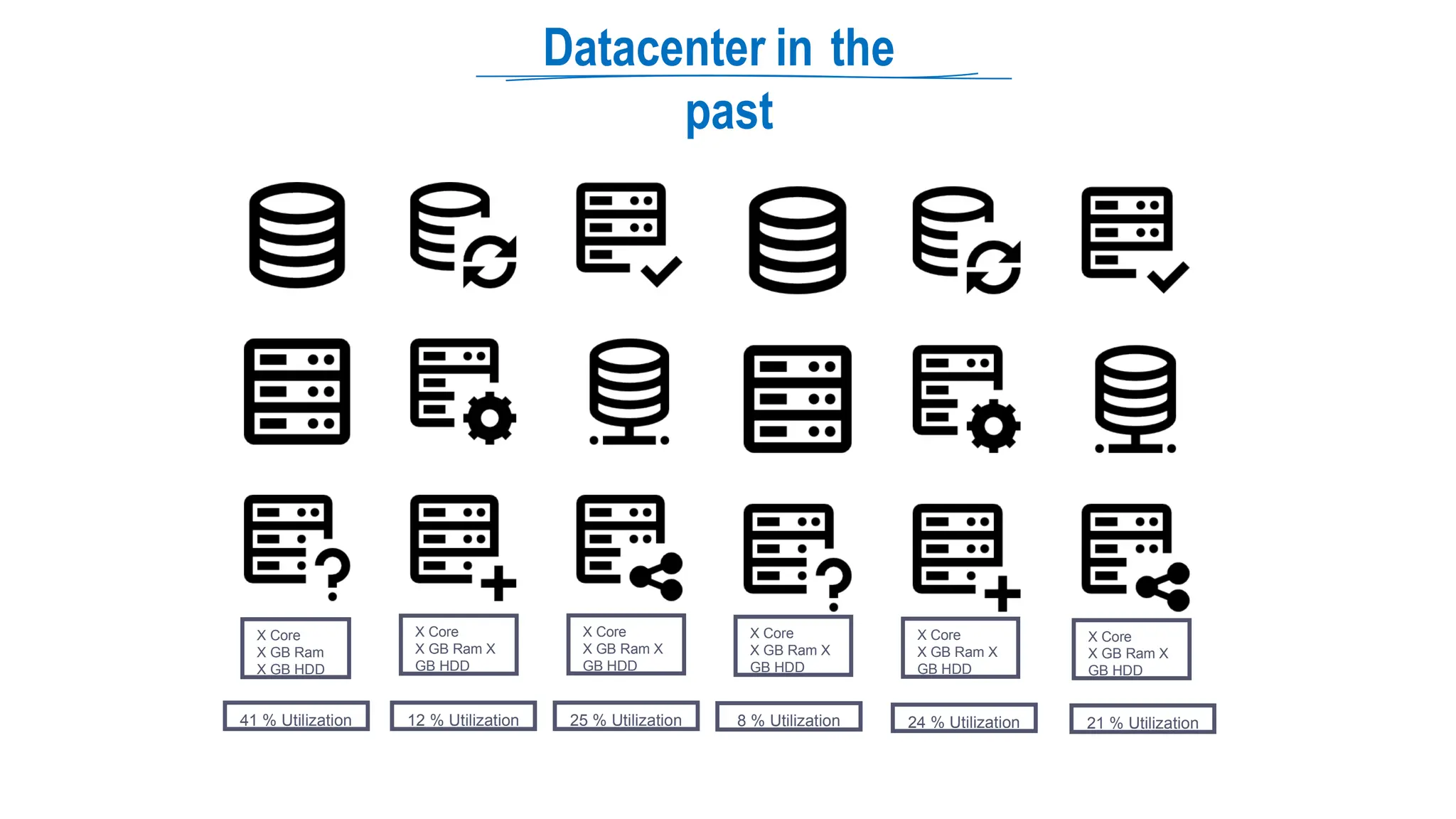
Datacenter in the
past
X Core
X GB Ram
X GB HDD
X Core
X GB Ram X
GB HDD
X Core
X GB Ram X
GB HDD
X Core
X GB Ram X
GB HDD
X Core
X GB Ram X
GB HDD
X Core
X GB Ram X
GB HDD
12 % Utilization 24 % Utilization
8 % Utilization
25 % Utilization 21 % Utilization
41 % Utilization
Virtualization
Virtual Machine Virtual Machine Virtual Machine
Application Application Application
Operating System Operating System Operating System
Hardware (CPU, Memory, Disk) Hardware (CPU, Memory, Disk) Hardware (CPU, Memory, Disk)
Hypervisor
Hardware (CPU, Memory, Disk)
Virtualization
⮚ High upfront cost
⮚ Monthly expense even if not using
⮚ Difficult to Scaling
⮚ Maintenance
Introduction Cloud
Computing
⮚ Pay only what you use
⮚ No Maintenance
⮚ Scaling – Expand storage or compute
power
⮚ Pay only what you use
⮚ No plant maintenance
⮚ Scaling
Cloud
Computing
What is Cloud
Computing
⮚ Cloud computing means Internet based Computing
⮚ Renting IT Resources
⮚ So, In simple terms, Cloud computing is on-demand
resources delivered to you over the internet.
⮚ Cloud Providers – Microsoft, AWS, Google
⮚ Example – Gmail, Netflix, Dropbox
⮚ Same resources shared by multiple clients
Cloud Infrastructure: Shared Resources
Set
Budget
⮚ FREE Subscription
⮚ Azure won't charge you for your free subscription.
⮚ Your FREE subscription and services are disabled once your credit runs out.
⮚ You must upgrade to continue using Azure services.
⮚ Paid subscription - VERY IMPORTANT
⮚
⮚
DELETE RESOURCES AFTER YOUR
USE/DEMO
EVEN IF I DON’T TO TELL YOU AFTER
DEMO
⮚ Set Alert - notify you when your spending reaches or exceeds the amount defined in the alert condition of the budget.
2
Set Budget and Delete
Resources
Benefits of the cloud
computing
New Startup
 Launching a new professional social network
 At launch, the focus will be on the United States.
 If the launch is a success, the company intends to expand globally.
Traditional Data Center
Challenges
 Large up-front investment
 Forecast Infrastructure needs
 Took 5 months to setup there server
 Suddenly become popular
 lot of users, experiencing latency
 Scaling will need further few months of effort
 Security and Compliance burden
 Less Load during off season
 Now, difficult to scale down
 Maintenance cost still going on
 Plan to Expand Globally
 Same challenges again
23
Cloud
Computing
Benfits
Traditional Data Center Challenges
 Large up-front investment
 Forecast Infrastructure needs
 Took 5 months to setup there server
 Suddenly become popular
 lot of users, experiencing latency
 Scaling will need further few months of effort
 Security and Compliance burden
 Less Load during off season
 Now, difficult to scale down
 Maintenance cost still going on
 Plan to Expand Globally
 Same challenges again
Advantages of Cloud Computing
 Trade capital expense for variable expense
 No Initial investment
 Pay only for how much you use – do not own hardware
 Stop guessing capacity
 You can access as much or as little capacity as you need,
and scale up or down in minutes.
 Increase speed and agility
 New IT resources are only a click away
 Reduce resource deployment time from weeks to
minutes.
 Benefit from massive economies of scale
 AWS can aggregate usage from hundreds of thousands of
customers, they can lower pay-per-use prices.
 Stop spending money running and maintaining data centers
 Go global in minutes: In just a few clicks, you can easily deploy
your application to multiple regions worldwide.
24
Computing
Models
Categories of cloud services - SaaS vs PaaS
vs IaaS
SaaS vs PaaS vs
LaaS
SaaS vs PaaS vs
LaaS
SaaS vs PaaS vs
LaaS
SaaS vs PaaS vs
LaaS
Deployment
Models
Types of Cloud Computing - Public, Private and
Hybrid
Cloud
Deployment
Models
Hybrid Cloud
Private Cloud
Public Cloud
VS. VS.
Public Cloud
⮚ Cloud resources are those that are owned
and managed by a third-party cloud service
provider and are provided through the
Internet.
⮚ Advantages
⮚ No Maintenance
⮚ Near unlimited scalability
⮚ High reliability
⮚ Disadvantages
⮚ Less control
⮚ Use case scenario
⮚ Deploy website quickly
⮚ Focus on development
Private Cloud Hybrid Cloud
⮚ Cloud services that are utilized by a
particular organization and are not
accessible to the general public.
⮚ Advantages
⮚ No Legal obligation
⮚ Control
⮚ Strict security and compliance
⮚ Disadvantages
⮚ Infrastructure cost
⮚ Difficult to elasticity
⮚ IT Skills
⮚ Use case scenario
⮚ Government policy requires
specific data to be kept in-
country
⮚ Combination of public and private
cloud with automation and
orchestration between the two
⮚ Advantages: Use your own equipment
to meet security, compliance, or legacy
scenarios
⮚ Disadvantages
⮚ Expensive
⮚ Complicated
⮚ Use case scenario
⮚ Medical data can’t expose to
public.
⮚ Application runs on old
hardware.
Cloud Pricing
Models
Factors that affect
cost
Cloud
Pricing
Models
Traditional Data Center Cost
 Upfront Hardware cost
 Building, electricity, cooling, Internet
 Employees to maintain infrastructure
 Software/Application licenses
 And so on…
Cloud Computing Cost

 Can we save money?
 Yes, but It’s not straight forward
Bill could depends on multiple metrics for each service
 Example: “Storage Service” pricing depends on:
 Volume of data stored per month.
 Quantity and types of operations performed
 Data transfer costs.
 Data redundancy/backups
 Example “VM” Pricing depends on:

 Overall CPU time
 Time spent with a public IP address
 Incoming (ingress) and outgoing (egress) network traffic in and
out of the VM
Disk size and amount of disk read and disk write operations
34
Cloud
Pricing
Models
Always FREE
 Virtual Network
 Azure Policy
 Azure Active Directory
 Azure Migrate
 Azure Open Datasets
 Azure Lighthouse
 Azure Private Link
 Azure Data Catalog
 Azure Service Fabric
35
Cloud
Pricing
Models
Pay: Time
 Charge based on time you use a particular service
 Other imp parameters like performance tiers and other configurations
 Examples:
 Virtual Machine
 App Services
 SQL Database
 Load Balancer
36
Cloud
Pricing
Models
Pay: GB
 Database Storage
 Storage Service
 Network traffic (between regions)
37
Cloud
Pricing
Models
Pay: Operations
 Charges based on number of operation
 Example: Cost per million operation
 Storage services (read, write or delete operations)
 Cosmos DB
38
Cloud
Pricing
Models
Pay: Execution
 Serverless offerings
 Charges only when you use, per execution
 Azure Function
 Serverless Database
 Logic Apps
39
Cloud
Pricing
Models
Pay: Other metrics
 Example: Azure Active Directory Premium tier
 Charge based on number of user licenses
40
Cloud
Pricing
Models
Other Parameters
 Regions/Locations

 How you purchase service
 Through an Enterprise Agreement
 Directly from the web
 Through a Cloud Solution Provider
Support options
 Programs and offers
 And so on….
41
Azure Global
Infrastructure
Data Centers, Regions, Region pairs
Regio
ns
⮚ Region, which is a physical location
around the world where we cluster data
centers.
⮚ Azure has more global regions than any
other cloud provider.
⮚ Better scalability and redundancy
⮚ Preserve data residency
⮚ Low Latency
⮚ Global Footprint
⮚ High Availability
⮚ How to choose region?
⮚ Compliance
⮚ Proximity
⮚ Available services
⮚ Pricing
Azure region
pairs
⮚ Each Azure region is always paired with another region within the same
geography
⮚ Data centers are usually 300+ miles apart
⮚ Automatic replication and failover for some azure services.
⮚ Additional advantages of region pairs:
⮚ If an extensive Azure outage occurs, one region out of every pair is
prioritized to make sure at least one is restored as quickly as
possible for applications hosted in that region pair.
⮚ Planned Azure updates are rolled out to paired regions one
region at a time to minimize downtime and risk of application outage.
⮚ Data continues to reside within the same geography as its pair.
Azure Global
Infrastructure
Availability Zones
Regio
ns
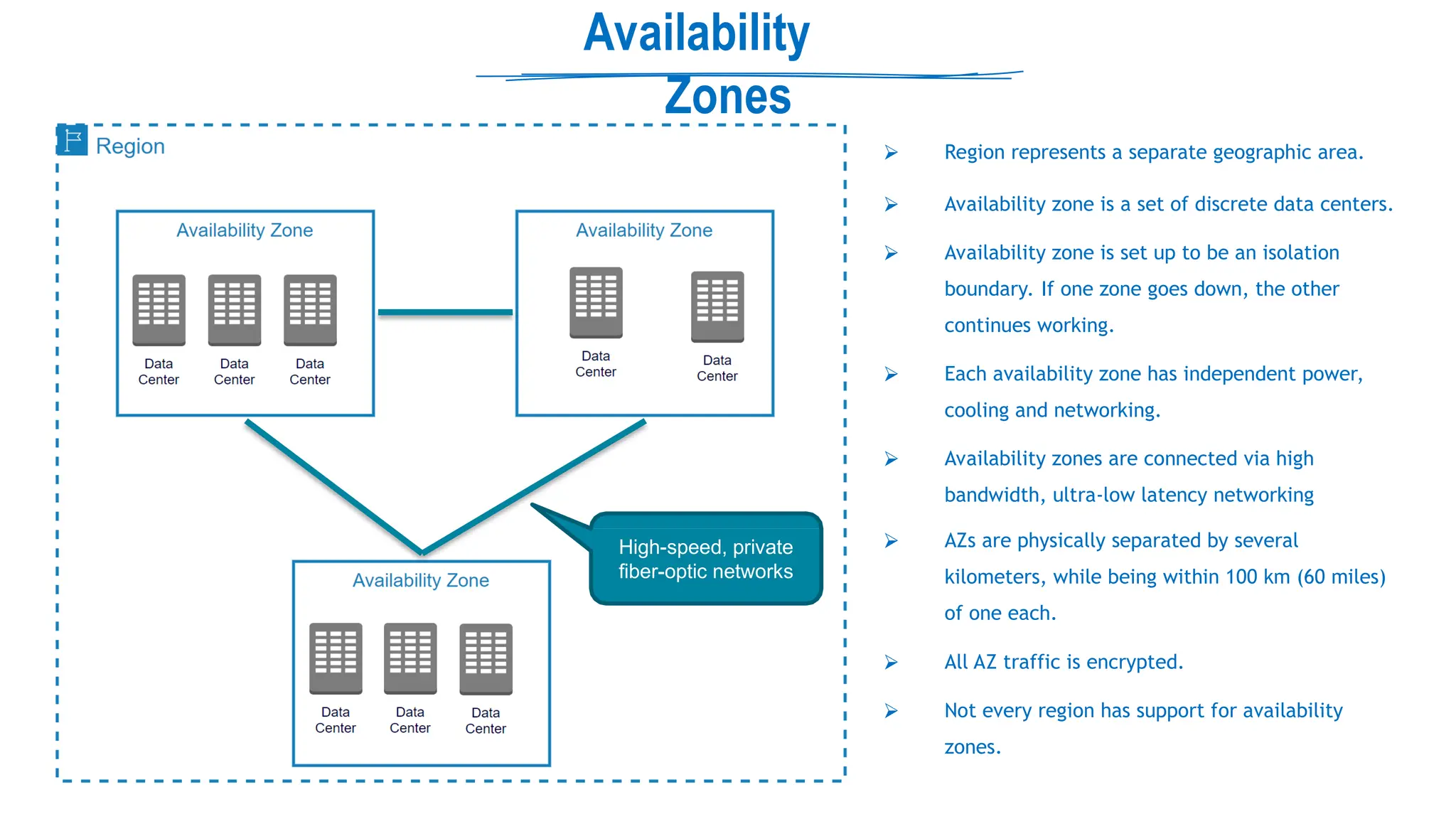
Availability
Zones
High-speed, private
fiber-optic networks
⮚ Region represents a separate geographic area.
⮚ Availability zone is a set of discrete data centers.
⮚ Availability zone is set up to be an isolation
boundary. If one zone goes down, the other
continues working.
⮚ Each availability zone has independent power,
cooling and networking.
⮚ Availability zones are connected via high
bandwidth, ultra-low latency networking
⮚ AZs are physically separated by several
kilometers, while being within 100 km (60 miles)
of one each.
⮚ All AZ traffic is encrypted.
⮚ Not every region has support for availability
zones.
Resource
Groups
Logical container for resources
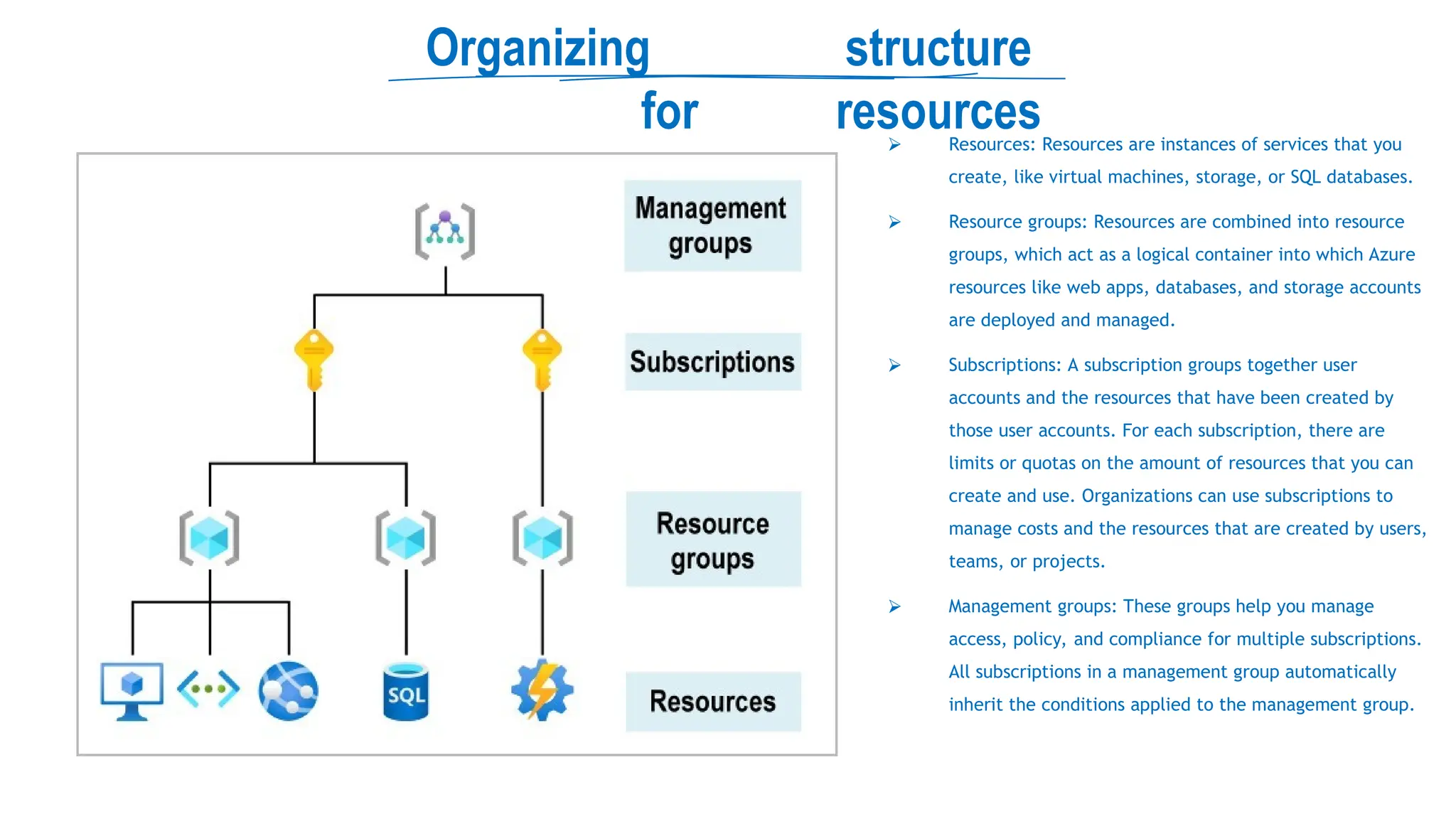
Organizing structure
for resources
⮚ Resources: Resources are instances of services that you
create, like virtual machines, storage, or SQL databases.
⮚ Resource groups: Resources are combined into resource
groups, which act as a logical container into which Azure
resources like web apps, databases, and storage accounts
are deployed and managed.
⮚ Subscriptions: A subscription groups together user
accounts and the resources that have been created by
those user accounts. For each subscription, there are
limits or quotas on the amount of resources that you can
create and use. Organizations can use subscriptions to
manage costs and the resources that are created by users,
teams, or projects.
⮚ Management groups: These groups help you manage
access, policy, and compliance for multiple subscriptions.
All subscriptions in a management group automatically
inherit the conditions applied to the management group.
Resource
Groups
⮚ Resources: are anything you create in an Azure subscription like VMs, Azure Application Gateway instances, and Azure Cosmos DB instances.
⮚ Resource group is a logical container which help manage and organize your Azure resources.
⮚ For example similar usage, type, or location
⮚ Each resource can exist in only one resource group.
⮚ You can move a resource from one resource group to another group.
⮚ Resource groups can't be nested.
⮚ The resources in a resource group can be located in different regions than the resource group.
⮚ Resource group created at location – to store metadata.
⮚ A resource group can be used to scope access control for administrative actions. To manage a resource group, you can assign Azure
Policies, Azure roles, or resource locks.
⮚ You can apply locks to a resource group or subscription to prevent deletion or make contained resources read-only. You can also apply locks
directly to a resource.
⮚ You can apply tags to a resource group. The resources in the resource group don't inherit those tags.
⮚ Life cycle: When you delete a resource group, all resources in the resource group are also deleted.
⮚ To create a resource group, you can use the portal, PowerShell, Azure CLI, or an ARM template.
Azure Resource
Manager
Deployment and management service
for Azure
Azure Resource
Manager (ARM)
⮚ Atomate resource deployments (create, update, and delete) using templates.
⮚ ARM template is a JSON file that defines what you want to deploy to Azure.
⮚ Integrates with Azure portal, PowerShell, CLI, and REST API to perform
deployment and management tasks.
⮚ Easy way to deploy multiple resource instances or reliably redeploy resources.
⮚ ARM template can be used to deploy the resources consistently and repeatedly.
⮚ Define the dependencies between resources so they're deployed in the correct
order.
Subscriptio
n
How you are billed for resource
usage
Subscriptions
⮚ Using Azure requires an Azure subscription.
⮚ An Azure subscription is a logical unit of Azure services that links to an Azure account. It also allows you to provision resources.
⮚ A subscription provides you with authenticated and authorized access to Azure products and services.
⮚ Azure generates separate billing reports and invoices for each subscription
⮚ Two types of subscription boundaries
⮚ Billing boundary
⮚ Access control boundary
⮚ You can create separate subscription based on:
⮚ Environment: development and testing, security, or to isolate data for compliance reasons
⮚ Organizational structures: IT, HR, Admin and so on
⮚ Billing: manage and track costs based on your needs, for example – Production, Test and Dev
⮚ Different types of Subscription:
⮚
⮚
⮚
⮚ FREE: An email address and a credit card are required to sign up for a free trial subscription that provides $200 credit for the first 30 days
and 12 months of restricted access.
Pay-Per-Use: Charges monthly based on Cloud resource use.
Enterprise: A single Enterprise agreement is established for large subscription purchases, including savings for new licenses and Software
Assurance.
Student: This membership includes $100 for 12 months and may be activated without a credit card.
Ref: https://docs.microsoft.com/en-us/learn/modules/azure-architecture-fundamentals/management-groups-
Management
Groups
Organize multiple subscriptions as a single
management entity
Management
groups
⮚ Management groups let you organize multiple subscriptions as a
single management entity to facilitate easier management.
⮚ You can create managements groups in a hierarchical structure with
the top level of the hierarchy at the tenant level and containing all
subscriptions in that tenant.
⮚ Any conditions applied to a management group apply to all
subscriptions contained in that management group object.
⮚ Each management group and subscription can support only one
parent.
⮚ Each management group can have many children.
⮚ The root management group can't be moved or deleted, unlike
other management groups.
Azure Active
Directory
Microsoft's cloud-based identity and access management
service
Azure Active
Directory
User
Azure Active Directory
Identity and access
management service
Source: https://docs.microsoft.com/
Azure Active
Directory
Azure Active Directory
⮚ Helps your employees sign in and access resources
⮚ User information such as name, Id, email, password and address is stored in Azure AD by organizations.
⮚ Identity: user or applications (require authentication via secret keys or certificates).
⮚ Every day, Azure AD manages over 1.2 billion identities, according to Microsoft.
⮚ Tenant
Tenant is automatically created when your organization signs up for a Microsoft cloud service subscription.
The term Tenant means a single instance of Azure AD representing a single organization.
⮚ Represents an organization
⮚
⮚
⮚ The terms Tenant and Directory are often used interchangeably.
Source: https://docs.microsoft.com/
Windows Server AD (AD
DS) vs Azure AD
⮚ Windows Server AD: Provides an identity and access management service
that's managed by your own organization in on-premises environment.
Source: https://docs.microsoft.com/
⮚ Azure Active Directory: cloud-based service
⮚ Communication Protocols: Azure AD is HTTP/HTTPS based, it does not use
Kerberos authentication.
⮚ Authentication - SAML, WS-Federation, and OpenID Connect
⮚ Authorization - OAuth
⮚ Azure AD Connect synchronizes user identities between on-
premises Active Directory and Azure AD.
⮚ Azure AD provides extra features
User
Accounts
Azure Active Directory
Company/tenant A
Azure Active Directory
Company/tenant B
⮚ Cloud Identities
⮚ Users exists only in Azure AD
⮚ Local/your AAD or external AAD
⮚ Guest Identities (External Identities)
⮚ B2B collaboration
⮚ Directory-synchronized (Hybrid identities)
Source: https://docs.microsoft.com/
Azure B2B – External
Users
Source: https://docs.microsoft.com/
Azure B2C (business-to-
customer)
It is built on the same technology as Azure AD but for a different purpose.
⮚ Azure AD B2C is a separate service from Azure Active Directory (Azure AD).
⮚
⮚ It allows businesses to build customer facing applications, and then allow anyone to sign up into those applications with no restrictions on user
account.
Source: https://docs.microsoft.com/
Azure AD Roles vs
RBAC Roles
User
Azure Active Directory
Scope is at the tenant level.
Azure AD administrator roles
⮚Manage access to Azure Active Directory
resources.
⮚
⮚
Examples:
 Creating users/Groups/Roles
 Managing Password
 Billing/Payment Info
RBAC Roles
Manage access to Azure resources.
Scope can be specified at multiple levels (management group,
subscription, resource group, resource).
 Create Database
 Create/manage/delete VM and other resources
Source: https://docs.microsoft.com/
Administrative
Units
User Administrator
Azure Active Directory
Azure AD administrator
roles scope is at the tenant
level.
Source: https://docs.microsoft.com/
Administrative
Units
User administrator
Azure Active Directory
Office A
Admin A
Office B
Admin B
Office C
Admin C
Source: https://docs.microsoft.com/
Administrative
Units
Org
User administrator
Azure Active Directory
usera1 usera2 userb1 userb2 userc1
grpOfficeB
Administrative Unit - Office A
Admin A User
administrator
Source: https://docs.microsoft.com/
Azure AD Device
Management
⮚ Azure AD – Identity and access management service.
⮚ Identity – users, groups, applications or devices.
⮚ Make sure devices are secure, compliant and not vulnerable.
⮚ Capabilities: SSO, Conditional access
Source: https://docs.microsoft.com/
Azure AD Device
settings
⮚ Azure AD registration
Local user account to login in to device, corporate account to access resources
Limited management
Windows 10 or newer, iOS, Android, and macOS
⮚ User-owned devices (BYOD)
⮚
⮚
⮚
⮚ Example: A user in your organization wants to access your benefits enrollment tool from their home PC.
⮚ Azure AD join
Corporate user account
Full Intune management
Windows 11 and Windows 10 devices, Windows Server 2019 Virtual Machines running in Azure
⮚ Corporate-owned devices
⮚
⮚
⮚
⮚ Example: workers who work from home or are in remote branch offices with limited on-premises infrastructure.
⮚ Hybrid Azure AD join
Joined to on-premises AD and Azure AD requiring organizational account to sign in to the device
⮚ Suitable for hybrid organizations with existing on-premises AD infrastructure
⮚
⮚ Gives you all the benefits of being cloud enabled, with still having full access to your on-prem infrastructure.
Source: https://docs.microsoft.com/
Multifactor
authentication
⮚ Two processes that enable secure authentication: Azure AD Multi-Factor Authentication and Conditional Access.
⮚ Multifactor authentication provides additional security for your identities by requiring two or more elements to fully authenticate.
⮚ Something the user knows: This might be an email address and password.
⮚ Something the user has: This might be a code that's sent to the user's mobile phone.
⮚ Something the user is: This is typically some sort of biometric property, such as a fingerprint or face scan that's used on many
mobile devices.
⮚ Recommended for administrative accounts
Conditional
Access
⮚ Azure Active Directory uses Conditional Access to grant (or deny) resource access based on identity signals.
⮚ Who the user is (Administrator or normal user)
⮚ Where the user is (usual or unexpected location?)
⮚ What device the user is requesting access from (is this a new device?)
⮚ Based on signals AAD can decide to allow, deny, or require MFA access.
⮚ Multi-authentication only if sign-in signals are unusual (like unexpected location)
⮚ Need an Azure AD Premium P1 or P2 license
Source: Microsoft
Single sign-on
(SSO)
⮚ Problem statement - Why we need it?
⮚ Users had to create individual identity and password for each application
⮚ Difficult to remember credentials, and it’s unsecure
⮚ When a user leaves an organization, finding all those identities and disabling
them can be difficult.
⮚ Single sign-on allows users to sign in once and access multiple resources and
applications from multiple providers.
⮚ With SSO, you need to remember only one ID and one password.
⮚ As users change roles or leave an organization, access is tied to a single identity and
so it is easy to manage.
Source: Microsoft
Azure
RBAC
Role-based access control
Role-based
access control
⮚ Azure RBAC is system that allows control over who has access to which
Azure resources, and what those people can do with those resources.
⮚ Consists of three elements
⮚ Who has access to Azure resources?
⮚ Security principal - An identity that gets the permissions.
It could be a user, group, or a service principal.
⮚ What they can do with those resources?
⮚ Role definition - A collection of permissions.
⮚ What is the Scope of access?
⮚ A way to constrain where those permissions are applicable.
⮚ You can assign multiple Azure roles to a user account
⮚ You can create your own custom Azure roles to assign custom permissions
⮚ You can assign roles using the Azure portal, Azure CLI, Azure PowerShell,
Azure SDKs, or REST APIs.
Source: https://docs.microsoft.com/
Role-based
access control
Reader – Only view
Contributor – Read + Manage (update/delete) Owner – Read + Manage + Grant
User Access Administrator – Manage user access
Deny Assignments
Similar to windows deny files permission
Blocks users from performing specific actions even if a role assignments
allows it
Can only be created using Azure Blue Prints or managed apps
Source: https://docs.microsoft.com/
Subscriptio
n
How you are billed for resource
usage
Subscriptions
⮚ Using Azure requires an Azure subscription.
⮚ An Azure subscription is a logical unit of Azure services that links to an Azure account. It also allows you to provision resources.
⮚ A subscription provides you with authenticated and authorized access to Azure products and services.
⮚ Azure generates separate billing reports and invoices for each subscription
⮚ Two types of subscription boundaries
⮚ Billing boundary
⮚ Access control boundary
⮚ You can create separate subscription based on:
⮚ Environment: development and testing, security, or to isolate data for compliance reasons
⮚ Organizational structures: IT, HR, Admin and so on
⮚ Billing: manage and track costs based on your needs, for example – Production, Test and Dev
⮚ Different types of Subscription:
⮚
⮚
⮚
⮚ FREE: An email address and a credit card are required to sign up for a free trial subscription that provides $200 credit for the first 30 days
and 12 months of restricted access.
Pay-Per-Use: Charges monthly based on Cloud resource use.
Enterprise: A single Enterprise agreement is established for large subscription purchases, including savings for new licenses and Software
Assurance.
Student: This membership includes $100 for 12 months and may be activated without a credit card.
Ref: https://docs.microsoft.com/en-us/learn/modules/azure-architecture-fundamentals/management-groups-
Trust Relation between AAD/Tenant
and Subscription
⮚ An Azure subscription has a trust relationship with Azure Active Directory (Azure AD).
⮚ A subscription trusts Azure AD to authenticate users, services, and devices.
⮚ Multiple subscriptions can trust the same Azure AD directory. Each subscription can only trust a single directory.
MoveResources between RG
and Subscription
Azure
Tags
⮚ Azure tags are the name-value pairs that help to organize the Azure resources in the Azure portal.
⮚ Azure Tags are simply labels that you can attach to your Azure resources.
⮚ You can use tags to easily group and classify resources and assets in Azure.
⮚ For example, explore of the costs generated by resources having the same tag applied.
⮚ Tagging is a primary way to understand the data in any cost or billing reporting.
⮚ Resources don’t inherit any Azure tags applied at the Resource Group level.
⮚ It’s a fundamental part of any well-manage environment. It’s also the first step in establishing proper governance of any
environment.
⮚ Azure Policy can be used to enforce tagging rules and conventions.
⮚ For example, you can require that certain tags be added to new resources as they are provisioned.
Azure
POlicy
⮚ Azure Policy can help you control or restrict or audit your resources.
⮚ Enforce rules on Azure resources configurations to make sure they remain compliant with corporate standards.
⮚ You can apply individual policy or group of policy (initiatives).
⮚ Two imp tasks
⮚ Prevent noncompliant resources from being created
⮚ Highlights existing resources that aren't compliant with the policies.
⮚ Examples:
⮚ Allows only a certain SKU size for the virtual machines (VMs) to be provisioned.
⮚ Mandatory tags to be created while provisioning resources
⮚ MFA should be enabled on accounts with write permissions on your subscription
⮚ Assign policy within a specific scope (management group, a single subscription, or a resource group.)
⮚ Policy assignments are inherited by all child resources within that scope
⮚ You can exclude specific child resources you need to be exempt from the policy assignment
⮚ You can review the noncompliant policy results and take any action that's needed.
Management
groups
⮚ Management groups let you organize multiple subscriptions as a
single management entity to facilitate easier management.
⮚ You can create managements groups in a hierarchical structure with
the top level of the hierarchy at the tenant level and containing all
subscriptions in that tenant.
⮚ Any conditions applied to a management group apply to all
subscriptions contained in that management group object.
⮚ Each management group and subscription can support only one
parent.
⮚ Each management group can have many children.
⮚ The root management group can't be moved or deleted, unlike
other management groups.
Cost
Management
⮚ This is a built-in service that gives you a breakdown of the usage and cost of your Azure
resources.
⮚ This allows you to see what is costing you money and how it compares against your budget.
⮚ You use Cost Management + Billing features to:
Download cost and usage data that was used to generate your monthly invoice
⮚ Conduct billing administrative tasks such as paying your bill
⮚ Manage billing access to costs
⮚
⮚
⮚
⮚
Proactively apply data analysis to your costs
Set spending thresholds
Identify opportunities for workload changes that can optimize your spending
Source: Microsoft
Azure Storage
Service
Fast, reliable, and private connection to Azure
Azure StorageService
⮚ Diff types of data and requirements
⮚ Relational, non-relational/No-SQL, datasheets, images, videos, backups
⮚ Storage, access, security, availability, latency, processing, backup
⮚ Diff types of Data Service
⮚ Azure Blobs: Text and binary data
⮚ Azure Files: Managed file shares (SMB Protocol)
⮚ Azure Queues: Messaging
⮚ Azure Tables: NoSQL store
⮚ Features
⮚ Durable and highly available – redundancy across datacenters or regions
⮚ Secure – all data encrypted by default
⮚ Scalable – massively scalable
⮚ Managed - Azure handles hardware maintenance, updates, and critical issues for you.
⮚ Accessible - accessible from anywhere in the world over HTTP or HTTPS.
⮚ Clients libraries are available in all languages
⮚ Support scripting in PowerShell or Azure CLI
Azure Storage Data
Redundancy
Protect your data from hardware failures, network or power outage, and
natural disasters
Azure Data
Redundancy
⮚ Protect your data from hardware failures, network or power outages, and massive natural disasters.
⮚ Even in the event of a failure, redundancy ensures your storage account's availability and durability.
⮚ Tradeoffs between lower costs and higher availability
⮚ Redundancy in the primary region
⮚ Locally redundant storage (LRS) – Three synchronous copies in same data center
⮚ Zone-redundant storage (ZRS) – Three synchronous copies in three availability zones (AZs)
⮚ Redundancy in a secondary region
⮚ Geo-redundant storage (GRS) – LRS + Asynchronous copy to secondary region ()
⮚ Geo-zone-redundant storage (GZRS)
⮚ With GRS or GZRS, the data in the secondary region isn't available for read or write access unless there is a failover to the
secondary region.
⮚ For read access to the secondary region, configure your storage account to use
⮚ Read-access geo-redundant storage (RA-GRS)
⮚ Read-access geo-zone-redundant storage (RA-GZRS).
Azure Storage
Redundancy
⮚
⮚ Locally redundant storage (LRS) – Three synchronous copies in same data center
⮚ Zone-redundant storage (ZRS) – Three synchronous copies in three availability zones (AZs)
⮚ Geo-redundant storage (GRS) - LRS + Asynchronous copy to secondary region (three more copies using LRS) – Read only access
⮚ Read-access geo-redundant storage (RA-GRS) – Read Access on GRS
Geo-zone-redundant storage (GZRS) – ZRS + Asynchronous copy to secondary region (three more copies using LRS) – Read only access
⮚ Read-access geo-zone-redundant storage (RA-GZRS) – Read Access on GZRS
Azure Blob
Storage
Binary Large Object
Blob
Storage
⮚ Blob - Binary Large Object
⮚ Any type or format
⮚ Text, Images, audio, video, excel, backup files
⮚ Use cases:
⮚ Storing files for shared access
⮚ Video and audio streaming
⮚ Storing data for analysis (Data Lake Gen2)
⮚ Writing to the log file
⮚ Storing data for disaster recovery, backup, and archiving
⮚ Flat structure
⮚ Provides a unique namespace in Azure for your data.
⮚ http://mystorageaccount.blob.core.windows.net
Three types of Blob
Storage
⮚ Block Blobs:
⮚ For large objects that doesn't use random read and write operations, files that are
read from beginning to end
⮚ Such as media files or image files for websites.
⮚ Page Blobs:
⮚ Optimized for random read and write operations.
⮚ Provide durable disks for Azure Virtual Machines (Azure VMs)
⮚ Append Blobs:
⮚ Optimized for append operations. e. g. Logs
⮚ When you modify an append blob, blocks are added to the end of the blob only
⮚ Updating or deleting of existing blocks is not supported
⮚ For example, you might write all of your trace logging to the same append blob for an
application running on multiple VMs
Storage Access Tiers
Organize your data based on attributes like frequency of access and planned
retention period.
Storage Access
Tiers
⮚ Data stored in the cloud can be different based on how it's generated, processed, and accessed over its lifetime.
⮚ Pricing
Types of operations performed
Number of operations performed
Data transfer cost, if any
⮚ The volume of data stored/month
⮚
⮚
⮚
⮚ The selected data redundancy option
⮚ Organize your data based on attributes like frequency of access and planned retention period.
⮚ Blob access tiers
Cool access tier
⮚ Hot access tier
⮚
⮚ Archive access tier
Hot
Cool
Archive
Storage Access
Tiers
⮚ Hot
⮚
⮚
⮚ Frequently accessed data
⮚Example - images for your website Low
latency
Higher access cost
⮚ Cool
⮚ Infrequent accessed data
⮚ Example - invoices for your customers
⮚ High latency
⮚ Lower cost
⮚ Stored for at least 30 days
⮚ Archive
⮚ Rarely accessed data
⮚ Example - long-term backups
⮚ Highest access times and access cost
⮚ Latency in hours
⮚ Stored for at least 180 days
⮚ Use Case: Business policy mandated Data Archiving, long term retention like healthcare data
Hot Cool Archive
Fast Access
Higher Cost
Slow Access
Lower Cost
Note: You cannot change performance tier after account creation
95
Standard
⮚Backed by magnetic drives
⮚Support – All storage account
⮚Optimized for high capacity and high throughput
⮚Provides the lowest cost per GB.
⮚Best for applications that require bulk storage or
where data is accessed infrequently.
⮚ Example: Backup and DR datasets, media, pictures,
videos.
Premium
⮚Backed by solid state drives (SSD)
⮚Good for virtual machines and workloads that need low latency
and high I/O performance
⮚ Examples: transactional databases, big data analysis,
IOT, AI or ML
⮚ Block Blob: Best for high transaction rates or low
storage latency
⮚ File Shares: Best for enterprise or high performance
applications that need to scale
⮚ Page blobs: Best for random read and write operations
Performance
Tiers
Azure Table
Storage
A NoSQL key-value store
Azure Table Storage
Items are referred to as rows, and fields are known as columns
All rows in a table must have a key
No concept of relationships, stored procedures, secondary indexes, or foreign keys
Data will usually be denormalized
To help ensure fast access, Azure Table Storage splits a table into partitions
Support very large volume of Data
Consider Cosmos DB for new development
⮚ NoSQL key-value Storage
⮚
⮚
⮚
⮚
⮚
⮚
⮚
⮚
Advantages
⮚ It's simpler to scale
⮚ A table can hold semi-structured data
⮚ No complex relationships
⮚ Data insertion and retrieval is fast
⮚ Good to use for:
⮚
⮚ Storing TBs of structured data capable of serving web scale applications
⮚ Storing datasets that don't require complex joins, foreign keys, or stored procedures, and
that can be denormalized for fast access.
Capturing event logging and performance monitoring data.
Azure Queue
Storage
Message queuing service to store large numbers of
messages.
Azure QueueStorage
Access messages via authenticated calls using HTTP or HTTPS.
May contain millions of messages, up to the total capacity limit of a storage account.
⮚ Store large numbers of messages.
⮚
⮚
⮚ Queues are commonly used to create a backlog of work to process asynchronously.
Azure File Storage
Simple, secure, and serverless enterprise-grade cloud
file shares
Azure File Storage
On-premises shared storage
Challenges
On-Premises
⮚ Limited Amount of Storage
⮚ Maintenance (hardware and OS)
⮚ Schedule Backups
⮚ Security
⮚ Difficult to share files across Datacenters
On-Premises
Azure
Azure File Storage
⮚ Enables you to create files shares in the cloud, and access these file shares from anywhere with an
internet connection
⮚ Mounted concurrently by cloud or on-premises deployments.
⮚ Accessible from Windows, Linux, and macOS clients.
⮚ Accessible Server Message Block (SMB) protocol or Network File System (NFS) protocol
⮚ Azure Files ensures the data is encrypted at rest, and the SMB protocol ensures the data is encrypted in
transit.
⮚ Use Cases
⮚ Replace or supplement on-premises file servers
⮚ Share application settings
⮚ Dev/Test/Debug
⮚ Key Benefits
⮚
⮚
⮚ Shared access: Replace on-premises file shares with Azure file shares without application
compatibility issues
Fully managed: Azure will manage hardware or an OS
Resiliency: you don’t have to deal with local power and network issues.
On-Premises
Disk Storage
High-performance, highly durable block storage for Azure Virtual
Machines
Azure Disk Storage
⮚ VM uses disks as a place to store an operating system, applications, and data in Azure.
⮚ One virtual machine can have one OS disk and multiple Data disk but one data disk can only be link with one VM.
⮚ Both the OS disk and the data disk are virtual hard disks (VHDs) stored in an Azure storage account.
⮚ The VHDs used in Azure is .vhd files stored as page blobs in a standard or premium storage account in Azure.
⮚
⮚ Unmanaged disks: We can create a storage account and specify it when we create the disk.
⮚ Not recommended, previous unmanaged disks should migrate to managed disk
Managed disk
⮚ Azure creates and manages storage accounts in the background.
⮚ We don't have to worry about scalability issues.
⮚ Azure creates and manages the disk for us based on the size and performance tier we specify.
⮚ Managed Disk types:
⮚ Standard HDD: Backup, non-critical, infrequent access
⮚ Standard SSD: lightly used production applications or dev/test environments
⮚ Premium SSD disks: Super fast and high performance, very low latency, recommended for production and performance sensitive workloads
⮚ Ultra disks (SSD): for most demanding IO-intensive workloads such as SAP HANA, top tier databases (for example, SQL, Oracle), and other
transaction-heavy workloads
Data StorageAuthorization
⮚ Anonymous
⮚ Public access, no authorization is required
⮚ Use Case: Website, online documentation
⮚ Only for Blob
⮚ Shared Key authorization
⮚ Data can be accessed using access keys
⮚ Shared Access Signatures (SAS)
⮚ Provide limited delegated access
⮚ Constraints: time interval, permissions
⮚ Azure Active Directory
⮚ Role-based access control - Fine-grained access can be provided to users, groups, or applications
Shared Access Keys
Authorization
⮚ Two default access keys are generated with every storage account
⮚ Whoever has these keys, can access entire storage account
⮚ Make sure they're safe by not storing or hard coding them in your application code.
⮚ Store these on key vault
⮚ If keys compromised, you can regenerate keys
⮚ Recommendation: periodically rotate the keys
⮚ Consider Azure AD instead
Stored access
policies
⮚ A stored access policy is a set of constraints that can be used by multiple shared access signatures.
⮚ Contains permission and time interval
⮚ Only work with service level shared access signature
Azure AD
Authorization
⮚ Azure storage can use Azure AD to authorize requests
⮚ Storage Account level or service level (currently Blob and Queue only)
⮚ Use Role-based access control (RBAC)
⮚ User, group or service principle
⮚ Microsoft recommended approach.
⮚ Benefit: No longer need to store credentials within application config files
⮚ More secure, easy to implement and manage
⮚ Similar to IIS application pool identity approach
Storage Access Tiers
Organize your data based on attributes like frequency of access and planned
retention period.
Storage Access
Tiers
⮚ Data stored in the cloud can be different based on how it's generated, processed, and accessed over its lifetime.
⮚ Pricing
Types of operations performed
Number of operations performed
Data transfer cost, if any
⮚ The volume of data stored/month
⮚
⮚
⮚
⮚ The selected data redundancy option
⮚ Organize your data based on attributes like frequency of access and planned retention period.
⮚ Blob access tiers
Cool access tier
⮚ Hot access tier
⮚
⮚ Archive access tier
Hot
Cool
Archive
Storage Access
Tiers
⮚ Hot
⮚
⮚
⮚ Frequently accessed data
⮚Example - images for your website Low
latency
Higher access cost
⮚ Cool
⮚ Infrequent accessed data
⮚ Example - invoices for your customers
⮚ High latency
⮚ Lower cost
⮚ Stored for at least 30 days
⮚ Archive
⮚ Rarely accessed data
⮚ Example - long-term backups
⮚ Highest access times and access cost
⮚ Latency in hours
⮚ Stored for at least 180 days
⮚ Use Case: Business policy mandated Data Archiving, long term retention like healthcare data
Hot Cool Archive
Fast Access
Higher Cost
Slow Access
Lower Cost
Bloblifecycle
management
⮚ Transition blobs to a cooler storage tier (hot to cool, hot to archive, or cool to archive) to optimize for performance and cost.
⮚ General Purpose V2 and blob stored
⮚ Generally take 24 hours to deploy
Hot Cool Archive
Fast Access
Higher Cost
Slow Access
Lower Cost
Blob object
replication
⮚ Copy data from source to destination storage account
⮚ A replication policy includes one or more rules that specify a source container and a destination container and indicate which block blobs in the source
container will be replicated.
⮚ What exactly copy?
⮚ All versions Blob
⮚ Blob’s metadata
⮚ Blob’s properties
⮚ NOT – snapshots are not copied
⮚ Both the source and destination accounts should have:
⮚ Versioning enable
⮚ Either from Hot and Cool tier
⮚ Scenarios
⮚ Minimize read request latency
⮚ Process data at single location and replicate results across multiple regions so that users in regions only access the results instead of entire dataset.
⮚ Consider Cost while replicating
Blob object
replication
⮚ Source Storage
⮚ Location – East US
⮚ Enable Versioning and change feed
⮚ Create Replication Rules at source
⮚ Destination Storage
⮚ Location - India
⮚ Enable Versioning
Asynchronous replication
Azure File Share Performance
Tier
Performance
Tier
Max Size Access Tiers Replication
Options
General Purpose V2 Standard 5 TB default
(up to 100 TB on request)
Hot, Cool,
Transaction Optimized
LRS, GRS, ZRS,
GZRS
File Storage Premium 100 TB default N/A LRS, ZRS
Azure File Access
Tier
⮚ Different Access tiers have different costs for storage and access to data.
⮚ Hot
 Optimized for general purpose file sharing scenarios
 Organization file shares and using with Azure File Sync.
 Storage cost – Higher
 Cost to access - Lower
⮚ Cool
 Cost-efficient storage
 Optimized for online archive storage scenarios.
 Storage Cost – Lower
 Cost to access – Higher
⮚ Transaction optimized
 For transaction-heavy workloads that don't need the lower latency that might be offered with
premium file shares, but has consistency.

 Highest cost from a storage standpoint.
 Lowest cost per transaction compared to the hot and cool tier.
Great fit for applications that require file storage or for back-end storage for your applications.
⮚ Access tier can be change for specific file shares as needed
Hot
Cool
Transaction
optimized
Azure File
Sync
⮚ Replication occurs between Windows servers in your data centers and Azure.
⮚ Provide local caching for your users. You can have as many caches as you want.
⮚ By default, all files are tied to Azure Files, but with Cloud Tiering enabled, only frequently accessed files are cached locally on the server.
⮚ You can access your data locally using SMB, NFS, or FTPS on Windows Server.
⮚ Advantages
⮚ Lift and shift
⮚ Backup and Disaster Recovery
⮚ File Archiving
Source: https://docs.microsoft.com/
Azure File Sync
Implementation
Azure File Share
Azure Window Server
Storage Sync Services (Azure File Sync)
(same region as storage account)
Sync Group
Azure File Sync agent Azure File Sync agent
Defines the sync
topology for a set of
files.
Endpoints within a
sync group are kept
in sync with each
other.
Cloud
Endpoint
Server
Endpoint
Server
Endpoint
A server endpoint
represents a specific
location on a
registered server,
such as a folder on a
server volume.
Server Endpoint:
C:FolderA
Server Endpoint:
C:FolderA
Azure Window Server
Server Endpoint:
C:FolderB
A cloud endpoint is an
Azure file share that is
part of a sync group.
Azure file share can be
a member of only one
sync group.
Allows Windows
Server to sync with an
Azure file share.
Import andexport service
⮚ Move small amount of data – Internet
⮚ AzCopy
⮚ Azure Storage Explorer
⮚ Move large amount of data (TBs) between on-premises and Azure storage securely.
⮚ Scenarios
 Migrating data to the cloud
 Backup
 Data recovery
⮚ Issues
 Network is slow
 Getting more network bandwidth is cost-prohibitive
 Solution
 Ship disk drive physically
 Disk drive – you can use your own or ones provided by Microsoft.
 Own - Solid-state drives (SSDs) or Hard disk drives (HDDs)
 Microsoft – Azure Data Box
 Import large amounts of data to Azure Blob storage and Azure Files by shipping disk drives to an Azure datacenter.
 Export large amounts of data from Azure Blob storage to disk drives and ship to your on-premises sites.
On-Premises Servers Azure Storage
Import
jobs
⮚ Note: Import large amounts of data to Azure Blob storage and Azure Files
⮚ Prepare disks

 Use WAImportExport tool to copy the data to disk/drive
Generate journal files
 Journal file stores basic information such as drive serial number, encryption key, and storage account details.
 Use BitLocker to encrypt the drive
⮚ Create import job
 Refer Azure Storage Account
 Specify the shipping and receiving address
⮚ Ship the disks to the destination that you specified when creating the import job
⮚ Update the job by providing the shipment tracking number.
Source: https://docs.microsoft.com/
Export
jobs
⮚ Export large amounts of data from Azure Blob storage
⮚ Identify the data and number of disks using WAImportExport tool
⮚ Create Export Job
 Specify Azure Storage account -> Blobs
 Return address
⮚ Ship the disk
 Ship the disk to the Azure region hosting the storage account
 Update the job by providing the shipment tracking number
⮚ Azure datacenter tasks
 Receive and copy the data
 Encrypt the data using Bitlocker
 Ship them back
⮚ Your tasks
 Bitlocker keys will be available on Azure portal.
 Unlock and verify drive with WAImportExport unlock command
 Copy data to your on-premises storage
Source: https://docs.microsoft.com/
Import/Export Tool
(WAImportExport)
⮚ Command line tool, downloadable from Microsoft
⮚ Need 64-bit windows only, no Linux or MacOS support
⮚
Source: https://docs.microsoft.com/
What it does?
⮚ Determine number of drives needed for export job
⮚ Data copy
⮚ Encryption or decryption of drive with BitLocker
⮚ Creation of journal files needed for import jobs
⮚ Two versions
⮚ Version 1 is for import/export for Azure Blob storage
⮚ Version 2 is for import of Azure Files
⮚ The Azure Import/Export Tool prepares and repairs drives for the Microsoft Azure Import/Export service.
 Before Import job – copy data to hard drives


 After import job - repair any blobs that were corrupted, were missing, or conflicted with other blobs.
Before an export job – Identify the number of drives needed for export jobs.
After an export job - you can use this tool to repair any corrupted or missing files on the drives.
Azure Data
Box
⮚ Microsoft provides you a piece of hardware in three different sizes developed
specifically for import and export tasks.
⮚ You can order the Data Box device via the Azure portal to import or export data from
Azure.
⮚ Ideally suited to transfer data sizes larger than 40 TBs
⮚ Scenarios: Onetime migration, Initial bulk transfer, Disaster recovery, Migrate back to on-
premises or to another cloud service provider
Source: https://docs.microsoft.com/
AzCopy
Available to download and install on Windows, Linux, and Mac
⮚ Command-line utility
⮚
⮚ Use it to copy data to/from Microsoft Azure Blob and File storage
⮚ you can copy data between a file system and a storage account, or between storage accounts.
⮚ AzCopy is preinstalled in Azure Cloud Shell, so you can use it there if you can't run it locally.
⮚
Simple commands
⮚ List of available commands: azcopy –help
⮚ Basic syntax for AzCopy commands: azcopy copy [source] [destination] [flags]
⮚ azcopy copy "C:localpath" "https://account.blob.core.windows.net/mycontainer1/?sv=2018-03-
28&ss=bjqt&srt=sco&sp=rwddgcup&se=2019-05-01T05:01:17Z&st=2019-04-
30T21:01:17Z&spr=https&sig=MGCXiyEzbtttkr3ewJIh2AR8KrghSy1DGM9ovN734bQF4%3D" --recursive=true
⮚ Authentication options
On-Premises Servers Azure File/Blob
Storage
Azure File/Blob
Storage
AzCopy
Source: https://docs.microsoft.com/
AzCopy
Move
VMs
⮚ You can move VMs and related resources to different resource group or subscriptions.
⮚ Why you need to move?
⮚ If you created a VM in a personal subscription and want to move it to your company's subscription to continue
working.
⮚ Do not need to stop the VM in order to move it and it should continue to run during the move.
⮚ The move creates new resource IDs. After moving the VM, update your tools and scripts to use the new resource IDs.
⮚ When switching subscriptions, all v-net resources must be moved.
⮚ It is not possible to move VM scale sets with standard load balancers and standard Public IP.
⮚
⮚ Virtual machines that use a key vault for disk encryption can't be moved.
⮚ You can disable the encryption and then move
Prior to moving, restore points on VMs configured with Azure backup must be deleted.
Source: https://docs.microsoft.com/
Redeploy Virtual
Machines
⮚
⮚ Redeploying a Azure virtual machine (VM) may help troubleshoot Remote Desktop (RDP) or application access issues.
⮚ Cannot connect via RDP or SSH
⮚ If you are not able to access applications on VMs
Steps: Power off VM, move to a new node, and then power back on
⮚ Retain all configuration options and resources.
⮚ All data saved on the temporary disks will be lost.
⮚ The virtual network interface's dynamic IP addresses will be updated.
⮚ Use Azure PowerShell or Azure portal.
Source: https://docs.microsoft.com/
Disk Storage
High-performance, highly durable block storage for Azure Virtual
Machines
Disk
Storage
⮚
⮚
⮚ VM uses disks as a place to store an operating system, applications, and data in Azure.
⮚ These are like physical disk in an on-premises server but, virtualized.
Types of Disks
⮚ Standard hard disk drives (HDD) - Backup, non-critical, infrequent access
⮚ Standard solid-state drives (SSD) - Web servers, lightly used enterprise applications and dev/test
⮚ Premium solid-state drives (SSD) - Production and performance sensitive workloads
⮚ Ultra disks - IO-intensive and other transaction-heavy workloads.
One virtual machine can have one OS disk and multiple Data disk
⮚ One data disk can only be link with one VM
⮚ Both the OS disk and the data disk are virtual hard disks (VHDs) stored in an Azure storage account.
Source: https://docs.microsoft.com/
Disk
Storage
⮚ Benefits
⮚ Highly available (three replicas)– 99.999% availability
⮚ Scalable – 50,000 VM disks
⮚ Granular access control - Use RBAC to assign specific permissions for a managed disk to one or more users.
⮚ Integration with availability sets and Availability Zones, Backups and so on
⮚ Security
⮚ Private links – allow you to generate SAS token
⮚ Encryption
⮚ Server-side encryption – data encryption-at-rest, default
⮚ Azure Disk encryption - encrypt the OS and Data disks
⮚ Disk Roles
⮚ OS Disk – Pre-installed OS, contain boot volume
⮚ Data Disk – Store application data
⮚ Temporary Disk
⮚ Short-term storage for applications and processes
⮚ May be lost during a maintenance or redeploy.
⮚ Successful reboot will persist data.
Source: https://docs.microsoft.com/
Latency vs IOPSvs
Throughput
⮚ Latency is a time taken to respond to an I/O request
⮚ IOPS is a unit of measurement for the number of read and write operations performed per second.
⮚ Number of read write operations mostly useful for OLTP transactions used in Azure for DBs like
SQL Server.
⮚ Latency is proportional to IOPS
⮚ Throughput refers to the quantity of data read or written per second.
⮚ Measured in MB per second
⮚ Mainly a unit for high data transfer applications like big data Hadoop, Kafka streaming
Source: https://docs.microsoft.com/
Disk
Types
⮚ You can change an ultra disk's performance parameters without having to restart your virtual machines.
⮚ Ultra disks can't be used as OS disks, they can only be created as empty data disks. Ultra disks also can't be used with some features and functionality,
including disk snapshots, disk export, changing disk type, VM images, availability sets, Azure Dedicated Hosts, or Azure disk encryption.
Source: https://docs.microsoft.com/
Snapsh
ot
⮚ A snapshot is a full, read-only copy of a virtual hard disk (VHD).
⮚ You can take a snapshot of both operating system (OS) or data disk VHDs.
⮚ Use Case:
⮚ Point-in-time backup
⮚ Restore or rebuild a VM
⮚ Troubleshoot virtual machine (VM) issues
Disk Snapshot
Source: https://docs.microsoft.com/
Azure Shared
Disks
⮚ Allow you to attach a managed disk to multiple virtual machines (VMs)
simultaneously.
⮚ Only ultra disks, premium SSDs, and standard SSDs can enable shared disks
⮚ Shared managed disks do not come with a fully managed file system accessible
through SMB/NFS.
⮚ Use a cluster manager like Windows Server Failover Cluster (WSFC) or Pacemaker
to handle cluster node communication and write locking.
Shared Disk
Source: https://docs.microsoft.com/
Managed vs Unmanaged
Disk
⮚
⮚
⮚ Managed Disks
⮚ Managed by Azure
⮚ High availability, secure
⮚ Azure create storage account behind the scene Un-managed
Disks
⮚ Not Managed by Azure
⮚ You create storage account
⮚ Full control over data
⮚ You have to take care of encryption, data recovery plans etc.
You cannot create both managed and unmanaged disks on a VM
Azure Storage
Managed by Azure
Managed Disk
Azure Storage
Managed by You
Source: https://docs.microsoft.com/
Un-managed Disk
VirtualMachine
Networking
⮚ Virtual Network (VNet) enables Azure resources to securely communicate
with each other
Source: https://docs.microsoft.com/
⮚
⮚ Subnets:
⮚ Divide a network into two or more networks
⮚ A subnet is a range of IP addresses in the virtual network.
⮚ For organization and security.
⮚ No security boundary b/w subnets by default Network Interface Card
(NIC)
⮚ Interconnection between a virtual machine and a virtual network.
⮚ IMP: Each NIC attached to a VM must exist in the same location and
subscription as the VM.
VirtualMachine
Networking
⮚ Network security group (NSG)
⮚ Allow or deny network traffic to subnets, NICs, or both.
⮚ NSGs can be associated with either subnets or individual NICs connected to
a subnet.
⮚ When an NSG is associated with a subnet, the ACL rules apply to all the
VMs in that subnet. Traffic to an individual NIC can be restricted by
associating an NSG directly to a NIC.
⮚ IP addresses
⮚ Enable Azure resources to communicate to Internet and public-facing
Azure services.
⮚ Can be dynamic (Default) or static.
⮚ Reserve a static IP address if you need a fixed IP address that won't change
— for example, if you need to add the IP address to a safe list.
⮚ IMP: Deallocating your virtual machine releases your dynamic public IP
Source: https://docs.microsoft.com/
VirtualMachine
Networking
⮚ A load balancer balance or distribute incoming Internet traffic to multiple VMs
⮚ Public Load Balancers are used to load balance internet traffic to your
VMs.
⮚ Internal load balancers are used to load balance traffic inside a virtual
network.
⮚ Azure Bastion
⮚ Provide secure management connectivity to virtual machines in a virtual
network.
⮚ Enables connections without exposing a public IP on the VM.
Source: https://docs.microsoft.com/
Types of Disk
Encryption
Azure Page Blob
Store .vhd file
Physical Host Server OS
Disk
Temp Cache
⮚
Source: https://docs.microsoft.com/
⮚ Server-Side Encryption - encrypts your disks at the storage account level, at rest.
⮚ Default, always enabled, can’t turn off.
Azure Disk Encryption - encrypts your disks at the VM OS level.
⮚ Use BitLocker for Windows VMs and DM-Crypt for Linux VMs.
⮚ Data encrypt during transit
⮚ Encryption at host – Also encrypt your temporary disk and cache at host.
⮚ Does not use your VM's CPU and doesn't impact your VM's performance.
⮚ Truly end-to-end encryption
SSE
ADE
EAH
Server-Side Encryption
(SSE)
⮚ Data at rest encryption.
d is FIPS
suance,
⮚ Protect the data on OS and data disks. Temporary disks are not encrypted.
⮚ Does not impact the performance of managed disks.
⮚ Use 256-bit AES encryption, one of the strongest block ciphers available, an
140-2 compliant.
⮚ Encryption keys are managed through:
⮚ Platform Managed Keys (PMK) – Default, Microsoft manages (key is rotation,
and backup)
⮚ Customer Managed Keys (CMK) – Customer manages, and is responsible
⮚ Key store in Azure Key Vault or customer controlled hardware.
Server-side
Encryption
Source: https://docs.microsoft.com/
Azure Disk Encryption
(ADE)
⮚ Encrypted the disk at the operating system level.
⮚
⮚ leverage Windows or Linux native encryption capabilities
⮚ Windows with BitLocker
⮚ Linux with DM-Crypt
Temporary disk and OS/data disk caches are also encrypted
⮚ Requires an Azure Key Vault to control and manage disk encryption keys
and secrets
⮚ Key vault and VMs must reside in the same Location and subscription
⮚ ADE can only be paired with SSE with PMK
ADE
Source: https://docs.microsoft.com/
Encryption at
host
⮚ End-to-end encryption between the disk as rest and when the disk is
allocated to and ran on a host.
⮚ Eliminate the need for Azure Disk Encryption (ADE)
⮚ Encryption at host does not use your VM's CPU and doesn't impact your VM's
performance.
⮚ Whatever is used to encrypt the disk encryption set at rest (PMK or CMK) will
be used to encrypt the in transit data from the disk to the host. Also same
PMK or CMK used to encrypt the cache disk.
⮚ The temp disk will always be encrypted by a PMK
⮚ Prerequisite: must enable the feature for your subscription
Encryption at
Host
Source: https://docs.microsoft.com/
Server-Side
Encryption
Source: https://docs.microsoft.com/
Connect to Linux VM
using SSH
⮚ SSH is an encrypted connection protocol that allows secure sign-ins over unsecured connections.
⮚ SSH is the default connection protocol for Linux VMs hosted in Azure.
Source: https://docs.microsoft.com/
⮚
⮚ SSH Keys - Secure and preferred method of connecting to a VM using SSH is by using a public-private key pair
⮚ Public key is placed on your Linux VM, or any other service that you wish to use with public-key cryptography.
⮚ Private key remains on your local system. Protect this private key. Do not share it.
As soon as you connect with an SSH client to your Linux VM, it verifies that you have the private key on your PC. The client gets
access to the VM if it has the private key.
Azure
Bastion
⮚ Protects your virtual machines from exposing RDP/SSH ports to the outside
world, while still providing secure access using RDP/SSH.
⮚ No Public IP address required on the Azure VM
⮚ Fully managed platform PaaS service from Azure
Source: https://docs.microsoft.com/
Availability
sets
Provides High availability and Business continuity for
applications
▪ Availability Sets make use of two key concepts - Fault Domains, and Update Domains.
▪ Update domains define the group of virtual machines that are going to be
patched/maintained/rebooted at same time.
▪ Fault domains define the group of virtual machines that share a common power
source and network switch.
▪ It saves from rackwide failure, or a rackwide maintenance window that can take
down all VMs hosted on this single point of failure.
▪ Availability sets are free to use! You only pay for the virtual machines being created.
▪ It does not protect your application from operating system or application- specific
failures, it does limit the impact of potential physical hardware failures, network
outages, or power interruptions.
Availability
Sets
Source: https://docs.microsoft.com/
▪ Prevent a single point of failure and from being upgraded at the same time
▪ VMs placed in an availability set should perform an identical set of functionalities and
have the same software installed.
▪ For all Virtual Machines that have two or more instances deployed in the same
Availability Set, we guarantee you will have Virtual Machine Connectivity to at least
one instance at least 99.95% of the time.
▪ VM can only be added to an Availability Set when it is created.
▪Else, delete and recreate VM
Availability Sets
- SLA
Source: https://docs.microsoft.com/
Availability
Zones
High availability for your mission-critical applications
and data
Availability
Zones
High-speed, private
fiber-optic networks
▪
Source: https://docs.microsoft.com/
Each Availability Zone has a distinct power
source, network, and cooling.
▪ If one zone is compromised, then replicated apps and
data are instantly available in another zone.
▪ It’s your responsibility to sync applications
between different VMs.
“For all Virtual Machines that have two or more instances deployed
across two or more Availability Zones in the same Azure region, we
guarantee you will have Virtual Machine Connectivity to at least one
instance at least 99.99% of the time.”
VM in Availability
Zones - SLA
Source: https://docs.microsoft.com/
Virtual Machines Scale
Sets
Manage and scale up to thousands of Linux and
Windows VMs
▪ Create and manage a group of load balanced VMs.
▪ Allows your application to automatically scale as resource demand changes
▪ The number of VM instances can automatically increase or decrease in response to demand or a
defined schedule.
▪ All VM instances are created from the same base OS image and configuration.
▪ VM size, disk configuration, and application installs should match across all VMs.
▪ Provides high availability and application resiliency
▪Can use availability zones or availability sets
There is no cost for the scale set itself, you only pay for each VM instance that you create.
▪
VirtualMachines
Scale Sets
https://docs.microsoft.com/en-us/azure/virtual-machine-scale-sets/overview
Azure Resource Manager
(ARM)
Deployment and management service for Azure
Azure Resource
Manager
Source: Microsoft
Azure Resource
Manager
⮚ Deployment and management service for Azure
⮚ All Azure resource activities are routed via ARM.
⮚ Describe the resources in a declarative JSON format
⮚ ARM template is verified before any code is executed to ensure that the resources will be created and connected correctly
⮚ Automatic Rollback in case of failure
⮚ The template then orchestrates the creation of those resources in parallel
⮚ Templates can even execute PowerShell and Bash scripts before or after the resource has been set up
⮚ Creates all dependencies in the correct order
⮚ Save previous scripts for version control
⮚ ARM templates define your application's infrastructure requirements for a repeatable deployment that is done in a consistent manner
⮚ Why not PowerShell or CLI?
⮚ No validation step in these tools
⮚ If a script encounters an error, the dependency resources can't be rolled back easily
⮚ Deployments happen serially
⮚ You have to figure out dependencies
Source: Microsoft
▪ Schema: defines the location of the JSON file that describes the version of the template language.
Content version: Version of the template. Use this value to document significant changes in your template. apiprofile:
an API version that serves as a collection of API versions for resource types.
▪
▪
▪ Parameters: Values that are provided when deployment is executed to customize resource deployment.
▪ Variables: Values used in templates as JSON fragments to simplify template language expressions.
▪ Functions: User-defined functions that are available within the template.
▪ Resources: Resource types that are deployed or updated in a resource group or subscription.
▪ Outputs: Values that are returned after deployment.
ARM Template
Structure
Required
Source: https://docs.microsoft.com/

 Automate the repetitive work of post-deployment configuration and tasks on Azure VMs.
 Software installation, anti-virus protection, or a configuration script inside
Managed with Azure CLI, PowerShell, Azure Resource Manager templates, and the Azure portal.
 Bundled with a new VM deployment or run against any existing system.
Virtualmachines
extensions
Source: https://docs.microsoft.com/
▪ The Custom Script Extension downloads and runs scripts on Azure virtual machines (VMs).
This extension is useful for post-deployment configuration, software installation, or any other configuration or management task.
▪Example: Install IIS on Windows server, or Apache on a Linux server with a web app
You can download scripts from Azure Storage or GitHub, or provide them to the Azure portal at extension runtime.
You can add extensions in the new or existing instance as well
Can integrates with Azure Resource Manager templates. Script only runs once, schedule a task to run again Removing the extension does not undo
what the script did
You can also run it by using the Azure CLI, PowerShell, the Azure portal, or the Azure Virtual Machines REST API. Considerations
▪
▪
▪
▪
▪
▪
▪
▪
▪ Timeout. Custom Script extensions have 90 minutes to run.
Dependencies. If your extension requires networking or storage access, make sure that content is available. Failure events. Be sure to account for any errors that might
occur when running your script.
▪For example, running out of disk space, or security and access restrictions. What will the script do if there is an error?
Sensitive data. Your extension may need sensitive information such as credentials, storage account names, and storage account access keys. How will you protect/encrypt
this information?
Reboot: It's best to avoid including reboots in the script because the extension will stop working after the reboot. As a result, if you have any other commands that require
the extension to run after the reboot, they will not run.
▪If you need rebook, look for other solutions like Desired state configuration, chef or puppet
▪
▪
▪
▪
Custom Script
Extensions
Source: https://docs.microsoft.com/
 Image: This is a copy of the full VM (include OS and data disks)
 After you build and customize a virtual machine, you can save the new image as a set of VHDs.
 You can put this new image in to Azure compute gallery.
 Two types of Images
 Specialized VM images: copy of a live virtual machine
 Copy of the configured operating system, software, user accounts, databases, connection
information, and other data for your system.
 Use as a backup of your system at a particular point in time, you can restore your virtual
machine from this image a
 New VM created out of image will have same host name, user accounts, and other settings
 Generalized VM Images: No information retained.
 Original VM is unusable after you perform the process
 Tools for preparing a virtual machine for generalization –
 For Windows, use the Microsoft System Preparation (Sysprep) tool.
 For Linux, use the Windows Azure Linux Agent (waagent) tool.
VM
Images
Source: https://docs.microsoft.com/
Azure App
Service
enables you to build and host web apps, background jobs, mobile back-ends, and
RESTful APIs
⮚ Enables you to host and manage your web applications
⮚ Platform as a service (PaaS) environment
⮚ Focus on the business value and logic
⮚ Azure handles the infrastructure
⮚ Automatic scaling and high availability
⮚ Programming language of your choice
⮚ Supports Windows and Linux
⮚ Automated deployments from GitHub or Azure DevOps
⮚ Pay only for compute resources your app uses
⮚ App Service plan determines how much hardware is devoted to
your application
Azure App Service
⮚ Web apps
⮚ Full support for hosting websites and web applications
⮚ Language: ASP.NET, ASP.NET Core, Java, Ruby, Node.js, PHP, or Python.
⮚ Operating System: Windows or Linux
⮚ Web apps for containers can host your existing container images.
⮚ API apps
⮚ Build REST-based web APIs
⮚ Choice of language and framework
⮚ Can be consumed from any HTTP- or HTTPS-based client.
⮚ WebJobs
⮚ Run a program (.exe, Java, PHP, Python, or Node.js)
⮚ Run a script (.cmd, .bat, PowerShell, or Bash)
⮚ Can be scheduled or run by a trigger
⮚ Often used to run background tasks as part of your application logic.
⮚ Mobile apps
⮚ Quickly build a back end for iOS and Android apps
⮚ Store mobile app data in a cloud-based SQL database.
⮚ Authenticate customers against common social providers, such as MSA, Google, Twitter, and Facebook.
⮚ Send push notifications.
⮚ Execute custom back-end logic in C# or Node.js.
Types of app services
Source: https://docs.microsoft.com/
⮚ App configuration, file content and database connected to your app
⮚ Can backup manually or scheduled
⮚ Can perform partial and full backups
⮚ Backups are visible on the containers page of storage account
⮚ Must have standard premium or isolated app service plan
⮚ Must have an azure storage account and container in same subscription account
⮚ Backups max out at 10GB of app and database content
⮚ Backups of TLS enabled Azure Database for MySQL and PostgreSQL are not supported.
App Service Backup
Source: https://docs.microsoft.com/
 lets you easily create app backups manually or on a schedule.
 Can restore the app by overwriting the existing app or restoring to another app.
 Backup files store in storage account in same subscription.
 What gets backed up: App configuration, file content and database connected to your app
 Must have standard premium or isolated app service plan
 Backups can be up to 10 GB of app and database content.
 Backups of TLS enabled Azure Database for MySQL and PostgreSQL are not supported.
 Partial backups are supported. Partial backups allow you choose exactly which files you want to back up.
 Using a firewall enabled storage account as the destination for your backups is not supported.
App Service
Backup
Source: https://docs.microsoft.com/
 You can test and validate changes in staging deployment slot before pushing them to
production slot.
 After validation, you can simply swap staging and production slot.
 There is no downtime in this swap. No requests are lost due to traffic redirection.
 If rollback required, simply swap again.
 When pre-swap validation is not required, Auto Swap can be configured to automate the whole
workflow.
Deployment
Settings
Source: https://docs.microsoft.com/
Deployment
Settings
Source: https://docs.microsoft.com/
 Deployment slots are live apps with their own hostnames.
 App content and configurations elements can be swapped between two deployment slots.
 Stage deployment slots allow you to test changes before deploying to production.
 Pre-warming a slot before deploying an app ensures that all instances of the slot are ready to go. Deploying your
app without downtime. No requests are lost due to traffic redirection.
 When pre-swap validation is not required, Auto Swap can be configured to automate the whole workflow.
 After a swap, the previously staged app is now the production app. To restore your “last known good site” if the
changes swapped into production do not meet your expectations, simply perform the same swap.
 Automated swapping simplifies Azure DevOps scenarios that require no cold starts or downtime for app users.
When auto swap from a source slot to production is enabled, App Service automatically swaps the app into
production after it has warmed up in the source slot. Web apps on Linux don't support auto swap yet.
Security– App
Service
Source: https://docs.microsoft.com/
Containers
Wrap up an application into its own
isolated package
Containers
⮚ Problem Statement 1: I can’t share project with others because of dependencies on OS, framework, libraries and so on.
⮚ Problem Statement 2: Need different machines to run three different Python-based applications that use of a different version of
Python
⮚ Solution: The simple solution is to create a container of your project in which you mention all the dependencies to run the project.
Thus your project can be run universally on any computer having container runtime installed.
⮚ Containers are a way to wrap up an application into its own isolated package.
⮚ In a nut shell, Container is the modern era solution for transferring your projects to friends, family, colleagues, clients etc without
worrying about their system configuration to run the project.
⮚ Imp Features:
⮚ Portability: Deploy to diff environment
⮚ Consistency: will behave same each time
⮚ No maintenance related to infrastructure
⮚ Deployment and maintenance are efficient
⮚ Auto scaling
Apps
DLLs/ Libs
Container
Source: https://docs.microsoft.com/
ACI vs
AKS
Azure Container Instances (ACI) vs Azure Kubernetes
Services
Hosting Options
for Containers
Local Workstation
Source: https://docs.microsoft.com/
On-premises Servers VMs in Azure
Azure Container Instances (ACI) Azure Kubernetes Services (AKS) Azure App Services
ACIvs AKS
Azure Container Instances (ACI)
Source: https://docs.microsoft.com/
⮚ ACI is a service that lets you deploy containers on Azure without having to
maintain or patch the environment.
⮚ Basic web applications, DevTest scenarios, and batch processing are all
supported by ACI.
⮚ When you just need to run a few containers, it's a perfect option.
⮚ Limited scalability and low availability
⮚ Managed environment
⮚ Only pay for containers
⮚ Deployment is easy.
⮚ Alternatively, For more complex container designs where you require additional control over
the health and performance of your containers, you may utilize Azure Kubernetes Service
(AKS).
⮚ You can coordinate the deployment, update, and management operations for all of your
containers using AKS.
⮚ If you need to operate tens, hundreds, or even thousands of containers, the AKS Open source
project could be a good fit.
⮚ It's one tool in a class of tools called container orchestrators
Azure KubernetesServices
(AKS)
⮚ Azure's container management system
⮚ Scale your application to meet demands by adding and removing
container instances
⮚ Monitor the deployed containers and resolving any issues that may
come
⮚ Groups of containers are called Pods
⮚ Virtual machines are called Nodes
⮚ Azure Container Registry pull
Source: https://docs.microsoft.com/
Virtual Machine vs
Containers
VirtualMachinevs
Containers
⮚ Virtual machine contains a full copy of an operating system
⮚ Virtual machine virtualizes the underlying hardware, meaning the CPU, memory, and storage
⮚ Containers, on the other hand, virtualize the operating system.
⮚ Containers smaller in size than a virtual machine and quicker to spin up because you're only waiting for the app to launch, not the
operating system.
Docker & Azure Container
Registry
Docker is an open source containerization platform
Azure Container
Registry
⮚ An image is a read-only template with instructions on how to create the container.
⮚ Container is the runnable instance of the image.
⮚ A container registry is a service that stores and distributes container images.
⮚ Docker Hub is a public container registry on the web that serves as a general catalog of images.
⮚ Azure offers a similar service called Azure Container Registry, which gives customers complete control over their images, integrated authentication
with Azure AD, and more.
Image Base Image
Container Registry
Docker Hub
Azure
Container
Registry
What is
Docker?
⮚ A Docker container is a standard that describes the format of containers and provides a runtime for Docker containers.
⮚ Docker is an open source project that automates the deployment of containers that can run in the cloud or on-premises.
⮚ Docker is also a company that promotes and evolves the technology, and they work in collaboration with cloud vendors like Microsoft.
⮚ The result from adopting docker, or container, is that application can be deployed or undeployed faster, start and stop faster, change to
another “image” faster, process and do many things faster.
⮚ Apps run the same, regardless of where they’re run
⮚ Any machine
⮚ No compatibility issues
⮚ Predictable behavior
⮚ Works with any language, any OS, any technology
Source: https://docs.microsoft.com/
Benefits of Azure Container
instance(ACI)
Quick starting time - in seconds.
Bill-per second - only pay while the container is running
Highly secure - isolates your program like it would in a VM.
Custom sizes - define specific CPU cores and RAM.
Persistent storage - Azure file shares may be mounted straight to a container.
Linux and Windows - same API may schedule Linux and Windows containers.
Azure Container Instances (ACI)
Source: https://docs.microsoft.com/
Custom
Images -
ACR
Source: https://docs.microsoft.com/
Docker
terminology
 Container.
 Container is an instance of a Docker image
 Represents single application, process, or service.
 Includes: application executable code, the runtime environment (such as .NET Core), system tools, settings.
 Can create multiple instances of a container from the same image
 Container image
 Refers to a package with all the dependencies and information required to create a container.
 Dependencies include frameworks and the deployment and execution configuration that a container runtime uses.
 Usually, an image derives from multiple base images that are layers stacked on top of each other to form the container's file system.
 An image is immutable once it has been created.
 Build
 Build refers to the action of building a container image based on the information and context provided by the Dockerfile.
 The build also includes any other files that are needed.
 Pull - Refers to the process of downloading a container image from a container registry.
 Push - Refers to the process of uploading a container image to a container registry.
 Dockerfile
 Dockerfile refers to a text file that contains instructions on how to build a Docker image.
 The Dockerfile is like a batch script.
 The first line identifies the base image. The rest of the file includes the build actions.
Source: https://docs.microsoft.com/
Container
groups
Source: https://docs.microsoft.com/
Container
groups
 Container group is a collection of containers that get scheduled on the same host
machine.
 Containers in a container group share a lifecycle, resources, local network, and
storage volumes.
 Similar in concept to a pod in Kubernetes.
 Multi-container groups currently support only Linux containers.
 Two common ways to deploy a multi-container group:
 ARM Template – Also deploy additional Azure service resources (for
example, an Azure Files share)
 YAML file – only container instance, concise & recommended.
 Resource allocation
Source: https://docs.microsoft.com/
Container
groups
 Modify property in container – redeploy the group
 All containers will be restarted
 Will stay on same host system.
 Modify property that requires container deletion
 OS type - Linux distribution
 CPU, memory or GPU
 Restart policy
 Network profile
Source: https://docs.microsoft.com/
What is
Kubernetes
open-source container orchestration system
Containers
⮚ Efficient use of hardware
⮚ Secure to run multiple instances simultaneously on the same host without affecting each other
⮚ Can scale out by deploying more instances.
Source: https://docs.microsoft.com/
Container
management
⮚ Challenges:
⮚ Configuring and maintaining load balancing
⮚ Network connectivity
⮚ Orchestrating the deployment process
⮚ To make the management process easier, it's common to use a container
management platform, such as Kubernetes.
⮚ Container management is the process of organizing, adding, removing, or
updating a significant number of containers.
Source: https://docs.microsoft.com/
What is container
orchestration?
Source: https://docs.microsoft.com/
Kubernetes
⮚ Kubernetes abstracts away complex container management tasks, and provides you with declarative configuration to orchestrate
containers in different computing environments.
⮚ Benefits
⮚ Self-healing of containers. An example would be restarting containers that fail or replacing containers.
⮚ Scaling deployed container count up or down dynamically, based on demand
⮚ Automating rolling updates and rollbacks of containers.
⮚ Managing storage.
⮚ Managing network traffic.
⮚ Storing and managing sensitive information, such as usernames and passwords.
Source: https://docs.microsoft.com/
Kubernetes
architecture
open-source container orchestration system
Computer
cluster
⮚ Master Node/ Control Planes – that controls and manages the whole Kubernetes system
⮚ Worker Node – that run the actual applications that you deploy.
⮚ Both the control planes and node instances can be physical devices, virtual machines, or instances in the cloud.
Source: https://docs.microsoft.com/
Kubernetesarchitecture
⮚ API server is like the front end to the control plane in your Kubernetes cluster.
 All the communication between the components in Kubernetes is done through this API.
⮚ Scheduler is the component that's responsible for the assignment of workloads across all nodes.
 The scheduler monitors the cluster for newly created containers, and assigns them to nodes.
⮚ etcd - key-value store
 Stores the current state and the desired state of all objects within your cluster.
⮚ Controllers track the state of objects in the cluster.
 If the object's current state is not the desired state, the controller will intervene.
Source: https://docs.microsoft.com/
Kubernetesarchitecture
⮚ Kubelet - monitors work requests from the API server
 makes sure that the requested unit of work is running and healthy

 kube-proxy - handle routing and load balancing of traffic
 responsible for local cluster networking
Container runtime - runtime is responsible for fetching, starting, and stopping container images.
Source: https://docs.microsoft.com/
KubernetesObjects
⮚ kubectl is a command line interface for running commands against Kubernetes clusters.
⮚ Example : “kubectl get nodes” -> get the list of nodes running in your Kubernetes cluster
⮚ Kubernetes pods
⮚ Represents a single instance of an app running in Kubernetes
⮚ A single pod can hold a group of one or more containers.
⮚ A pod includes information about the shared storage and network configuration, and a specification about how
to run its packaged containers.
⮚ All container running within a pod will share the Node’s network with any other containers in the same pod
⮚ Containers within a pod can share files through volumes, attached to the containers
⮚ A pod has a explicit life cycle, and will always remain on the Node in which it was started.
Source: https://docs.microsoft.com/
Azure Kubernetes Service
(AKS)
Deploy and scale containers on managed Kubernetes
Source: https://docs.microsoft.com/
Why we need Azure KubernetesService
(AKS)
Challenges with Kubernetes
⮚You're responsible for finding the best solution for deployment, scaling, load balancing, logging, and monitoring.
⮚Need to understand concepts, such as microservices architecture.
⮚Kubernetes doesn't provide middleware, data-processing frameworks, databases, caches, or cluster storage systems.
⮚You're responsible for maintaining your Kubernetes environment.
⮚ Manually install the master and worker nodes
⮚ Need to consider high availability of the master, adding additional worker nodes, pathing, upgrades etc.
⮚ For example, you need to manage OS upgrades and the Kubernetes installation and upgrades.
⮚ You also manage the hardware configuration of the host machines, such as networking, memory, and storage.
Azure KubernetesService
(AKS)
 Reduce these challenges by providing a hosted Kubernetes environment.
 Simplify the deployment and management of containerized apps in Azure.
 With AKS, you get the benefits of open-source Kubernetes without the complexity or operational
overhead of running your own custom Kubernetes cluster.
 Microsoft manages the master node
 Microsoft Azure enterprise features are available to you.
 By offloading much of the responsibility for managing a Kubernetes cluster to Azure, it reduces the
complexity and operational overhead.
 Takes care of important tasks for you, such as health monitoring and maintenance.
Source: https://docs.microsoft.com/
Benefits of Azure KubernetesService
(AKS)
Kubernetes version updates and patching are automated.
Cluster scaling is simple. Hosted control plane that self-heals
(masters)
Cost-cutting
Source: https://docs.microsoft.com/
AKSterminology
⮚ Pools are groups of nodes with identical configurations.
⮚ Nodes are individual virtual machines running containerized applications.
⮚ Pods are a single instance of an application. A pod can contain multiple containers.
⮚ Container is a lightweight and portable executable image that contains software and
all of its dependencies.
⮚ Deployment has one or more identical pods managed by Kubernetes.
⮚ Manifest is the YAML file describing a deployment.
Source: https://docs.microsoft.com/
Storagein AKS
⮚ Kubernetes typically treats individual pods as ephemeral, disposable resources.
⮚ Multiple pods may need to:
⮚ Share the same data volumes.
⮚ Reattach data volumes if the pod is rescheduled on a different node.
⮚ Volume
⮚ A volume represents a way to store, retrieve, and persist data across pods and through the application lifecycle.
⮚ You can manually create data volumes to be assigned to pods directly, or have Kubernetes automatically create them.
Source: https://docs.microsoft.com/
Storagein AKS
⮚ Kubernetes typically treats individual pods as ephemeral, disposable resources.
⮚ Multiple pods may need to:
⮚ Share the same data volumes.
⮚ Reattach data volumes if the pod is rescheduled on a different node.
Source: https://docs.microsoft.com/
Storagein AKS
⮚ Volume
⮚ Represents a way to store, retrieve, and persist data across pods and through the application lifecycle.
⮚ Can be created manually or have Kubernetes automatically create them.
⮚ Persistent volumes
⮚ Storage resource created and managed by the Kubernetes API
⮚ Can exist beyond the lifetime of an individual pod.
⮚ Azure Disks or Azure Files
⮚ Can be statically created by a cluster administrator, or dynamically created by the Kubernetes API server.
⮚ Storage classes
⮚ Define different tiers of storage, such as Premium and Standard
⮚ Defines the reclaimPolicy
⮚ Persistent volume claims
⮚ A user's request for storage is called a PersistentVolumeClaim.
⮚ Requests storage of a particular StorageClass, access mode, and size
⮚ It looks like a pod. Node resources are consumed by pods, and PersistentVolume resources are consumed by PersistentVolumeClaims.
⮚ Pods have the ability to request specific resource levels (CPU and Memory).
⮚ Claims can specify a specific size and mode of access (for example, once read/write or many times read-only).
Source: https://docs.microsoft.com/
Scaling in
AKS
⮚ Scaling – as workload increase/decrease, you may need to increase/decrease infrastructure in terms of
pods and nodes
⮚ Manually scale
⮚ Scale Pods
⮚ Scale Nodes
⮚ Horizontal pod autoscaler (HPA)
⮚ Monitor the resource demand and automatically scale the number of replicas
⮚ Define the minimum and maximum number of replicas that can run
⮚ Define the metric to monitor like CPU usage
⮚ Cluster autoscaler
⮚ Adjusts the number of nodes based on the requested compute resources in the node pool
⮚ Scale out events – increase number of nodes because of node pool resource constraints
⮚ Scale in events – decreases the number of nodes because node pool has more compute resources
than are required
Source: https://docs.microsoft.com/
Learning
Objectives
 Virtual Network (VNet) and Subnets
 VPN Gateway and Vnet Peering
 Load Balancer and Application Gateway
 Content Delivery Network (CDN)
 ExpressRoute
 ExpressRoute vs VPN Gateway
 In this module, you'll learn about the different Azure networking options and the scenarios in which each is appropriate.
Source: https://docs.microsoft.com/
Azure networking
services
IP Address - IPv4 vs
IPv6
IP Address - IPv4 vs IPv6
⮚ A numeric address
⮚ It’s an identifier for a computer or device on a network
⮚ Every device has to have an IP address for communication
purposes.
⮚ 2 types: IPv4 vs IPv6
Home Address
Source: https://docs.microsoft.com/
IP: 66.94.29.03
IP: 76.54.23.13 Internet
IP Address- IPv4
⮚ 32 bit numeric address written as four numbers separated by
periods.
⮚Example: 66.94.234.03
⮚Each group of number separated by periods is called an octet.
⮚ Number range in each octet is 0 to 255
⮚ This address version can produce over 4 billion unique addresses
Home Address
Source: https://docs.microsoft.com/
IP: 66.94.29.03
IP: 76.54.23.13 Internet
IP Address- IPv4
⮚ Computers and network don’t read IP addresses in this numeric format.
⮚ They only understand binary format (1s and 0s)
66.94.29.03
01000010 . 01011110 . 00011101 . 00000011
Source: https://docs.microsoft.com/
128 64 32 16 8 4 2 1
8 Bit Octet Chart
IP Address– IPv6
⮚ 128 bit long new generation of IP addresses
⮚ IPv6 address is represented as eight groups of four hexadecimal digits
⮚ Each group representing 16 bits[a]
⮚ The groups are separated by colons (:).
⮚ An example of an IPv6 address is:
⮚ 2001:0db8:85a3:0000:0000:8a2e:0370:7334
⮚ Can produce 340 undecillion addresses
⮚ 340,282,366,920,938,463,463,374,607,431,768,211,456)
⮚ about 3.4×1038 (340 trillion trillion trillion) unique IPv6 addresses.
Source: https://docs.microsoft.com/
Public vs Private IP
Address
Public vs Private IP
Address
Public IP address for each device?
⮚More Expensive
⮚Unnecessary
⮚Waste of Public IP addresses
192.168.0.1
192.168.0.2
Router
12.234.56.13
192.168.0.3
192.168.0.4
Home Network
IP: 76.54.23.13
Source: https://docs.microsoft.com/
Global Internet
Public vs Private IP
Address
⮚ Public IP address
⮚ Public IP address are registered on the internet
⮚ Public IP address is Unique – no duplicate anywhere in the world
⮚ Assigned to your network router by your internet service provider (ISP)
⮚ Private IP
⮚ Private IP addresses are not publicly registered on the internet
⮚ You can’t access internet using a private IP address
⮚ Use internally – inside home, business etc.
⮚ Non-unique. Can be used on other private networks
⮚ DHCP is a service used in routers to assign private Ips
⮚ NAT (network address translation) is what translates a set of IP
addresses to another set of IP addresses
Router
12.234.56.13
Source: https://docs.microsoft.com/
192.168.0.1
192.168.0.2
192.168.0.3
192.168.0.4
Private IP Address
⮚ Private IP address ranges can be used without registration in any number of private networks.
⮚ For setting up private networks, three IP address ranges have been reserved by internet Assigned Numbers
Authority (IANA)
⮚ Class A – for large organization
⮚ Class B – Medium size organization
⮚ Class C – home or small business
Source: https://docs.microsoft.com/
Public vs Private IP Address
Public IP address
⮚ Unique
⮚ Public registered on the internet
⮚ Used externally
⮚ Assigned by ISP
⮚ Not free
⮚ Not secure
Private IP Address
⮚ Non-unique. Can be used on other private networks
⮚ Not publicly registered
⮚ Used internally
⮚ Assigned by a router (DHCP service)
⮚ FREE
⮚ More secure
Source: https://docs.microsoft.com/
Virtual Network (VNet) and
Subnets
Provision private networks, optionally connect to on-premises datacenters
Need forAzure Virtual
Network
Corporate on-premises network
Source: https://docs.microsoft.com/
⮚ In a corporate on-premises data center network:
⮚ Nobody on the internet see the data exchange between the
application and the database?
⮚ Nobody on the internet can directly connect to your
database
⮚ You must first establish a connection to your corporate
network before gaining access to your apps or databases.
⮚ Corporate networks offer a secure internal network that
safeguards your resources, data, and communications from
unauthorized access.
⮚ How can you build your own private cloud network?
⮚ Azure Virtual Network
Azure Virtual
Network
⮚ Your own isolated network in Azure.
⮚ Region can have multiple VNets but each VNet belong to same Region
⮚ Within a VNet, network traffic is isolated (not visible) from network traffic in all other Azure VNet.
⮚ You maintain complete control over all traffic entering and leaving a VNet.
⮚ IP Address is a address of resource which ensures the traffic gets to the right server on the internet
⮚ Every resource gets its own unique IP Address on that Vnet within the address space.
⮚ Scaling – You can add more VNets or more addresses on existing VNet.
VNet CIDR Range:
10.0.0.0/16
VNet
Source: https://docs.microsoft.com/
VNet
Need for VNet
Subnets
⮚ Each kind of resource has distinct access requirements.
⮚ Elastic Load Balancers that are publicly available are accessible through the internet (public resources)
⮚ Databases and App Server instances should be inaccessible from the internet.
⮚ Only apps running inside your VNet should be able to access them (private resources).
⮚ How do you partition public and private resources inside a VNet?
VNet CIDR Range:
10.0.0.0/16
VNet
Source: https://docs.microsoft.com/
VNet
VNet
Subnets
⮚ Organize and group resources on subnets
⮚ Separate public and private resources into distinct subnets
⮚ Resources in a public subnet CAN be accessed from internet
⮚ Resources in a private subnet CANNOT be accessed from internet, but resources in a public subnet can connect with resources in a private
subnet.
⮚ We can use network security groups to secure individual subnets
Source: https://docs.microsoft.com/
VNet Peering
⮚ Connect VNets from same or different regions (Global VNet
peering)
⮚ Allows for secure communication between VNets that are
linked.
⮚ Low Latency: Resources between diff VNets are connected
using high bandwidth connections.
⮚ Assemble them as though they were members of the same
network
⮚ Must not have CIDRs that overlap (IP address range)
Subnet Mask and
CIDR
defines the range of IP addresses that can be used
within a network
IPv4 Address
⮚ IP address is a logical address that is used to uniquely identify a device on an network
What is the binary 10000011 in decimal?
Source: https://docs.microsoft.com/
Subnet Mask
⮚ In IP address = Network address + Host Address
⮚ 192.168.0.0
⮚ The Subnet Mask specifies which part of the IP address corresponds to the network and which part
corresponds to the host, by masking the network portion of the IP address.
192.168.0.1
192.168.0.2
Router
12.234.56.13
192.168.0.3
192.168.0.4
Home – Network Address
Global Internet
Source: https://docs.microsoft.com/
SubnetMask and CIDR
Notation
⮚ Classless inter domain routing (Slash notation)
⮚ It’s a shorter way to write a subnet mask.
⮚ “Slash” notation tells you how many bits are associated
with Subnet Mask.
Source: https://docs.microsoft.com/
Network Interface Card
(NIC)
NIC connects VM to the VNet
NetworkInterface Card
(NIC)
⮚ A network interface card (NIC) is a piece of hardware that allows a computer to
connect to a network.
⮚ Network Interface Card (NIC) also called:
⮚ Network Interface Controller
⮚ Network Adapter
⮚ LAN Adapter
⮚ Can be:
⮚ Wired
⮚ Wireless
⮚ A network interface enables an Azure Virtual Machine to communicate with
internet, Azure, and on-premises resources.
⮚ When you create VM using portal, one NIC with default setting created.
⮚ IP address and NSG rules are attach with NIC
⮚ You can create more than one NIC and attach to VM.
Source: https://docs.microsoft.com/
User-defined Routes
(UDR)
Route and Control the flow of traffic within Azure networks
System
Route
⮚ Routing: Process of finding/selecting a path for a traffic in one or across
multiple networks
⮚ Azure routing is setup by default
⮚ Azure uses system routes to direct network traffic between virtual machines, on-
premises networks, and the Internet.
⮚ Information about the system routes is recorded in a route table.
⮚ Routing tables are associated to subnets
⮚ A route table contains a set of rules, called routes, that specifies how packets
should be routed in a virtual network.
Source: https://docs.microsoft.com/
User-defined
network routes
⮚ Network Virtual appliance (NVA) – this is simply a specified optimized virtual machine for certain tasks.
⮚ UDRs designed to override Azure default routing or add new routes
⮚ Managed via Azure Route Table resource
⮚ UDRs control network traffic by defining routes that specify the next hop (destination) of the traffic flow.
⮚ The hop can be a virtual network gateway, virtual network, internet, or virtual appliance.
⮚ Can be associated with more than one VNet subnets
Source: https://docs.microsoft.com/
Virtual Network
Peering
Connects two virtual networks in one region or across
regions
VNet
Peering
VNet A VNet B VNet C
⮚ Virtual networks are isolated with each other and have strong communication boundary.
⮚ Azure network peering can connect two virtual networks located in the same region or across regions.
Source: https://docs.microsoft.com/
Peering
Peering
VNet
Peering
⮚ Regional VNet peering connects Azure virtual networks in the same region.
⮚ Global VNet peering connects Azure virtual networks in different regions.
⮚ The virtual networks can't have overlapping IP addresses.
⮚ After peering, VMs across diff VNets can communicate using private IPs.
⮚ Benefits:
⮚ Private. Network traffic between peered virtual networks is private. Traffic between the virtual networks is kept on the Microsoft
backbone network. No public Internet, gateways, or encryption is required in the communication between the virtual networks.
⮚ Performance. A low-latency, high-bandwidth connection between resources in different virtual networks.
⮚ Seamless. The ability to transfer data across Azure subscriptions, deployment models, and across Azure regions.
⮚ No disruption. No downtime to resources in either virtual network when creating the peering, or after the peering is created.
⮚ Use case: database failover, disaster recovery, or cross-region data replication
Source: https://docs.microsoft.com/
Demo: VNet
Peering
VNet A
10.0.0.0/16
VNet B
10.1.0.0/16
Subnet-A 10.0.0.0/24
Private IP
Subnet-B 10.1.0.0/24
Private IP
Peering
Source: https://docs.microsoft.com/
VPN Gateway and Vnet
Peering
Connecting your infrastructure to the cloud
VPN (Virtual private
network)
⮚ Connect two or more trusted private networks to one another over securely an untrusted network (typically the public internet).
⮚ Traffic is encrypted while traveling over the untrusted network to prevent eavesdropping or other attacks.
west-coast office east-coast office
Tunnel
Source: https://docs.microsoft.com/
VPN
gateways
⮚ Can connect Azure virtual network with On-premises network
⮚ All transferred data is encrypted in a private tunnel as it crosses the internet.
⮚ Azure VPN Gateway instances are deployed in Azure Virtual Network
⮚ Site-to-Site connection - Connect on-premises datacenters to virtual networks
⮚ Point-to-Site connection - Connect individual devices to virtual network
⮚ Multi-site connection – Connect more than one on-premises network to virtual network
⮚ Network-to-Network connection - Connect virtual networks to other virtual networks
⮚ We can also use “Network peering”
On-Premises
Azure Virtual Network
VPN Gateway Tunnel
Source: https://docs.microsoft.com/
Network
Connections
VPN Gateway Tunnel VPN Gateway
Network Peering
East US VNet
Source: https://docs.microsoft.com/
West US VNet
East US VNet West US VNet
VPN Gatewayvs Vnet
Peering
⮚ Vnet Peering
⮚ Connect VNets from same or different regions (Global VNet peering)
⮚ Allows for secure communication between VNets that are linked.
⮚ Low Latency: Resources between diff VNets are connected using high bandwidth connections.
⮚ Which is best for you?
⮚ VNet Peering provides a low latency, high bandwidth connection useful in scenarios such as cross-region data replication and database
failover scenarios. Since traffic is completely private and remains on the Microsoft backbone, customers with strict data policies prefer to
use VNet Peering as public internet is not involved. Since there is no gateway in the path, there are no extra hops, ensuring low latency
connections.
⮚ VPN Gateways provide a limited bandwidth connection and is useful in scenarios where encryption is needed, but bandwidth restrictions
are tolerable. In these scenarios, customers are also not as latency-sensitive.
Source: https://docs.microsoft.com/
Service Chaining
Enables you to direct traffic from one virtual network to a virtual appliance or gateway in
a peered network through user-defined routes.
VNet Peering is
nontransitive
⮚ VNet Peering is nontransitive
⮚ Limit – 500 VNets peering per virtual network
⮚ Configure user-defined routes and service chaining to provide the transitivity
⮚ Implement a multi-level hub and spoke architecture.
VNet A
VNet B
VNet C
Peering
Peering
Source: https://docs.microsoft.com/
Hubandspoke
architecture
⮚ Hub virtual network can host infrastructure components like the network virtual appliance or VPN gateway.
⮚ All the spoke virtual networks can then peer with the hub virtual network.
⮚ Traffic can flow through network virtual appliances or VPN gateways in the hub virtual network.
Hub
VNet
Source: https://docs.microsoft.com/
Spoke
VNet A
Spoke VNet B
Spoke
VNet C
Spoke
VNet D
NVA
VPN Gateway
Hubandspoke
architecture
Source: https://docs.microsoft.com/
DNS
Domain Name
System
Domain Name
System (DNS)
Server
20.11.310.65
Web Browser
Domain Name System (DNS) translates (or resolve) a human-readable domain names, for
example: www.wideworldimports.com, into a known IP address.
Source: Microsoft Docs
1. Where is Microsoft.com
2. IP Address:
20.11.310.65
Microsoft.com
3. HTTP Request
4. HTTP Response
Domain Name
System (DNS)
Server
20.11.310.65
Web Browser
1. Where is Microsoft.com
2. IP Address:
20.11.310.65
Microsoft.com
3. HTTP Request
4. HTTP Response
Source: Redgate
Azure
DNS
Domain Name System
Azure
DNS
• Can NOT buy Domain Name
• Manage DNS Server
 DNS server is also known as a DNS name server, or just a name server.
 DNS uses a global directory hosted on servers around the world.
 Microsoft is part of that network that provides a DNS service through Azure DNS.
Install DNS Server
Source: Microsoft Docs
Azure DNS
Internet-facing DNS domains
Azure Private DNS
Internal facing
• Buy Domain Name (cloudgita.com)
• Manage DNS Server
Demo: Configure
DNS Server
Web Server (IIS)
Public IP Address
(Subnet-web)
Cloudhungry.com = Public IP address (web
Server)
VNet-DNS
Azure-provided DNS servers.
Example: mylabel.Location.cloudapp.azure.com.
Source: Microsoft Docs
Demo: Azure DNS Zone
Web Server (IIS)
Public IP Address
(Subnet-web)
Cloudhungry.com = Public IP address (web
Server)
VNet-DNS
Source: Microsoft Docs
Azure-provided DNS servers.
Example: mylabel.Location.cloudapp.azure.com.
Azure
DNS
⮚ Hosting service for DNS domains that provides name resolution by using
Microsoft Azure infrastructure.
⮚ Domains can be hosted in Azure DNS for record management.
⮚ Billing = no of DNS zones + number of DNS queries received
⮚ Advantages:
⮚ DNS domains in Azure DNS are hosted on Azure's global network of DNS name
servers.
⮚ Each DNS query is answered by the closest available DNS server to provide
fast performance and high availability for your domain.
⮚ Can be managed using Portal, PowerShell or CLI
Demo: Azure Internal
Domain name
Vm-test
(Subnet-test)
VNet-DNS
vm-web (IIS)
Private IP Address
(Subnet-web)
Azure-provided default DNS name.
Example: srv-name.internal.cloudapp.net
Source: Microsoft Docs
Demo: Host internal
private DNS server
Vm-test
(Subnet-test)
VNet-DNS
vm-web (IIS)
Private IP Address
(Subnet-web)
vm-dns
(Subnet-dns)
DNS Server
 Install DNS Server (Active Directory Domain Services)
 Promote the server to a domain controller
 Specify a root domain name – CloudGita.com
 Change VNet default DNS server to custom DNS Server we just created.
 Customize Azure provided domain names in vm-dns machine
DNS Server -> Default
Azure-provided default DNS name.
Example: srv-name.internal.cloudapp.net
Source: Microsoft Docs
Demo: Azure
Private DNS
Vm-test
(Subnet-test)
VNet-DNS
vm-web (IIS)
Private IP Address
(Subnet-web)
vm-dns
(Subnet-dns)
DNS Server
Azure Private DNS
Internal facing
Replace
Source: Microsoft Docs
 Create Resource -> Private DNS Zone
 Link with virtual network (vnet-dns)
 Enable auto-registration
DNS Server -> Default
Azure-provided default DNS name.
Example: srv-name.internal.cloudapp.net
Azure Private DNS
⮚ Azure Private DNS provides a reliable and secure DNS service for your virtual
network. Azure
⮚ Private DNS manages and resolves domain names in the virtual network without the
need to configure a custom DNS solution.
⮚ By using private DNS zones, you can use your own custom domain name instead of
the Azure-provided names during deployment.
⮚ A private zone can be linked to one or more virtual networks by the use of virtual
⮚ networks links
⮚ Auto-registration – This allows VM’s to be automatically registered in the private
DNS zone
Network SecurityGroup
⮚ NSG can filter incoming and outgoing traffic.
⮚ NSG can contain set of security rules which can allow or deny traffic
⮚ NSGs is like internal firewall inside your Virtual network
⮚ Remember Azure firewall is an external firewall, outside your virtual
network
⮚ NSG is a basic network filtering and does not have features like
FQDN and threat intelligence.
⮚ NSG can be associated to one or multiple subnets or network interface (NIC)
⮚ You can’t link NSG with VNet.
⮚ OSI Layer 4 (5 properties or tuples)
⮚ Source and Destination IP address
⮚ Source and Destination port number
⮚ Protocol
⮚ Priority – lower number, higher priority
NIC
Source: https://docs.microsoft.com/
Network SecurityGroup
Source: https://docs.microsoft.com/
Application
Security Group
⮚ Application security group allows you to group virtual machines and define NSG rules on that group.
⮚ Don’t need a manual maintenance of explicit IP addresses.
⮚ ASGs introduce the ability to deploy multiple applications within the same subnet and also isolate traffic based on ASGs.
⮚ If the VM is running more than one workloads, we can simply assign multiple ASGs.
Source: https://docs.microsoft.com/
Application
Security Group
VM-Back Subnet - back
VM-front Subnet - front
ASG - Front ASG - Back
Vnet-asg
Source: https://docs.microsoft.com/
Network SecurityGroup
⮚ NSG can filter incoming and outgoing traffic.
⮚ NSG can contain set of security rules which can allow or deny traffic
⮚ NSGs is like internal firewall inside your Virtual network
⮚ Remember Azure firewall is an external firewall, outside your virtual
network
⮚ NSG is a basic network filtering and does not have features like
FQDN and threat intelligence.
⮚ NSG can be associated to one or multiple subnets or network interface (NIC)
⮚ You can’t link NSG with VNet.
⮚ OSI Layer 4 (5 properties or tuples)
⮚ Source and Destination IP address
⮚ Source and Destination port number
⮚ Protocol
⮚ Priority – lower number, higher priority
NIC
Source: https://docs.microsoft.com/
Azure
Firewall
⮚ Managed, network security service that protects your Azure Virtual Network
resources.
⮚ Highly available and unrestricted scalable.
⮚ Fully integrated with Azure Monitor for logging and analytics.
⮚ Just like with NSGs, your Azure Firewall rules can apply inbound and outbound
access.
⮚ Azure Firewall goes from OSI layer 3 all the way up to layer 7
⮚ NSG operates at OSI layer 4
⮚ Firewall can also deal with DNS names, as well as ports, protocols, and
IP addresses.
⮚ Azure Firewall can function in a hybrid cloud
⮚ All traffic that's going from your Azure infrastructure to on-premises has to
go through the Azure Firewall
⮚ The Azure firewall uses a statically assigned public IP address.
Source: https://docs.microsoft.com/
Azure Firewall
Manager
⮚ Azure Firewall Manager
⮚ Centrally manage Azure Firewalls across multiple subscriptions.
⮚ Rule sets can be shared across multiple Azure Firewall instances.
⮚ Can integrate with third-party services, like iboss, Zscaler, and Check
Point, to provide additional firewall or enterprise class firewall
functionality
⮚ Can also integrate with the virtual WAN concept.
Source: https://docs.microsoft.com/
Demo: Azure Firewall
AzureFirewallSubnet
Public IP
Private IP
demo-vm
Private IP
Subnet - default
vnet-firewall
Source: https://docs.microsoft.com/
Azure Firewall
Rules
⮚ By default, Azure Firewall blocks all traffic, unless you enable it.
⮚ You create Rules
⮚ Rule collection: zero or more Rules. They are of type NAT, Network or Applications. All rules in collection must be of same type.
⮚ Rule Collection Group: zero or more Rule collection. Multiple collection types can be in one group.
⮚ With Firewall Policy, rules are organized inside Rule Collections and Rule Collection Groups.
⮚ There are three types of rule collections:
⮚ Application rules:
⮚ Configure fully qualified domain names (FQDNs) that can be accessed from a subnet.
⮚ For example, specify the Windows Update network traffic through the firewall.
⮚ Network rules:
⮚ Similar like NSG
⮚ Non-HTTP/S traffic must have a network rule to pass through the firewall.
⮚ If resources one subnet must communicate with another, you would configure a network rule from source to destination.
⮚ DNAT rules:
⮚ Destination Network Address Translation (DNAT)
⮚ Translate and filter inbound traffic to your subnets.
⮚ Translate your firewall public IP and port to a private IP and port.
Source: https://docs.microsoft.com/
Azure Firewall
Features
⮚ High availability: Azure Firewall does not require any additional settings or services. It is fully managed and has a very good uptime.
⮚ Availability zones: Based on your needs, a firewall can be made available across various availability zones or restricted to specific zones.
There is no extra charge for this, however data transfer rates may vary based on the zones.
⮚ Scalability: The firewall can be scaled to meet the changing needs of the network.
⮚ Traffic filtering rules: Rules for allowing or disallowing connections can be established based on IP addresses, ports, and other factors.
Azure Firewall can differentiate between packets from various connections and apply rules to accept or deny them.
⮚ FQDN tags: Tags for fully qualified domain names (FQDNs) can be assigned to trustworthy sources that need to pass across the firewall.
Based on this, rules may be built to allow traffic from qualifying domains to pass through.
⮚ Service tags: These are labels for Azure Key Vault, Container Registry, and other services that represent a range of IP addresses. These are
handled by Microsoft and cannot be modified. These may be used to create filtering rules in the firewall.
Source: https://docs.microsoft.com/
Azure Firewall
Features
⮚ Threat intelligence: Microsoft maintains a threat intelligence field that contains a list of harmful sources and domains. Azure Firewall can
utilize this information to block connections or notify users.
⮚ Multiple public IP addresses: Azure Firewall allows you to add up to 250 IP addresses.
⮚ Azure Monitor logging: Azure Monitor and Azure Firewall are tightly connected. As a result, all occurrences are logged, and these logs may be
preserved or broadcast to event hubs, among other things.
⮚ Web categories: Administrators can grant or refuse access to certain websites based on which category they fall into. This can include
social networking sites, gaming sites, and other types of websites.
⮚ Certifications: All of the following certifications are available for Azure Firewall: Payment Card Industry (PCI), Service Organization Controls
(SOC), International Organization for Standardization (ISO), and ICSA Labs.
Source: https://docs.microsoft.com/
Firewallvs
NSG
⮚ Azure Firewall is a fully stateful, centralized network
firewall as-a-service, which provides network- and
application-level protection across different subscriptions
and virtual networks.
⮚ Support application FQDN tags
⮚ Can mask the source and destination network addresses
⮚ Threat Intelligence
⮚ Can analyze and filter L3-L7 application traffic
⮚ Robust and Fully managed service
⮚ Network security groups provide distributed
network layer traffic filtering to limit traffic to
resources within virtual networks in each
subscription.
⮚ Missing
⮚ Missing
⮚ Missing
⮚ Missing
⮚ Basic firewall
Source: https://docs.microsoft.com/
Azure Load
Balancer
Deliver high availability and network performance to
your apps
Load
Balancer
Source: https://docs.microsoft.com/
Load
Balancer
Load Balancer
Uses IP address / port
Source: https://docs.microsoft.com/
Backend Pool
HTTP Request
⮚ Distribute incoming traffic to backend resources
⮚ Provides:
 High Availability
 Scalable performance
Load Balancer
Components
⮚ Frontend configuration – IP address of your Azure Load Balancer. It's the
point of contact for clients.
⮚ Backend pool – Group of virtual machines that is serving incoming traffic.
⮚ Adding or removing VMs from the backend pool reconfigures the load
balancer without additional operations.
⮚ Load-balancing rules determine how traffic is distributed to the backend
pool.
⮚ Health probes ensure the resources in the backend are healthy.
⮚ Health probe dynamically adds or removes VMs from the load
balancer rotation based on their response to health checks.
⮚ When a probe fails to respond, the load balancer stops sending new
connections to the unhealthy instances.
Source: https://docs.microsoft.com/
Demo: Basic Load
Balancer Implementation
Source: https://docs.microsoft.com/
Load Balancer –
Public vs Internal
⮚ Two types of load balancers: Public and Internal
⮚ A public load balancer maps the public IP address and port
number of incoming traffic to the private IP address and
port number of the VM.
⮚ An internal load balancer directs traffic to resources that
are inside a virtual network or that use a VPN to access
Azure infrastructure.
Source: https://docs.microsoft.com/
Load balancer SKUs
(stock keeping unit)
Basic Standard
Cost Free Cost per hour
Backend pool Size Supports up to 300 instances Support up to 1000 instances
Backend pool endpoints Only VMs in single availability set or
scale set
Any VM in single Vnet.
VM Public IP type Basic SKU Public IP or No Public IP Standard SKU Public IP or No Public IP
NSG Rules Open by default. Network security group
optional.
Closed to inbound flows unless allowed
by a network security group.
Health Probe TCP, HTTP TCP, HTTP, HTTPS
Availability Zones No Support Support
SLA Not available 99.99%
Use
Azure LB SKU can’t be changed after cre
Dev/Test
ation (not mutable)
Production
Source: https://docs.microsoft.com/
⮚
Load Balancer
distribution modes
Source: https://docs.microsoft.com/
Demo: Load Balancer-
NAT Rules
⮚ An inbound NAT rule forwards incoming traffic sent to frontend IP address and port combination.
⮚ The traffic is sent to a specific virtual machine or instance in the backend pool.
Source: https://docs.microsoft.com/
Load
Balancer
Load Balancer
Uses IP address / port
Backend Pool A
HTTP Request
Backend Pool B
Source: https://docs.microsoft.com/
Load Balancer –
Outbound rule
Source: https://docs.microsoft.com/
Application
Gateway
Provides HTTP based load balancing.
Application
Gateway
⮚ Azure Application Gateway is a web traffic load balancer that enables you to manage traffic to your web applications.
⮚ OSI layer-7 (Application layer) load balancer.
⮚ HTTP and HTTPS traffic only
⮚ Traditional Load Balancer –> Layer 4 – TCP and UDP ( source/destination IP/port and protocol)
⮚ Routing rules based on HTTP request parameters:
⮚ URL path (web address)
⮚ Host headers (request data)
⮚ Can be configured public facing, internal or combination of both.
⮚ You can only assign Static IP address to application gateway.
⮚ Needs a separate empty subnet to install application gateway components
URL Path-based
routing
Multiple site routing
Web application
firewall
⮚ Web application firewall
⮚ Checks each request for many common threats
⮚ Based on the Open Web Application Security Project (OWASP)
⮚ SQL-injection, Cross-site scripting, Command injection, HTTP request smuggling, HTTP response splitting, Remote file
inclusion, Bots, crawlers, and scanners, and HTTP protocol violations and anomalies.
Application Gateway
Components Settings for backend traffic: port,
stickiness, probe, timeout
Demo: URL Path-
basedrouting
demo-AppGateway
BackendPoolDefault
HTTP Request
BackendPoolImages
BackendPoolVideos
IP-address/images/test.htm
Source: https://docs.microsoft.com/
Demo: Multiple
site routing
demo-AppGateway
BackendPoolDefault
HTTP Request
BackendPoolImages
BackendPoolVideos
Cloudhungry.com
Source: https://docs.microsoft.com/
Multiple site routing
Application
Gateway Features
⮚ Round robin load balancing
⮚ Cookie-based session affinity: Session stickiness ensures client requests in the same session are routed to the same back-end server.
⮚ Session stickiness is critical for e-commerce apps, since you don't want a transaction disturbed by a load balancer.
⮚ Web application firewall
⮚ Checks each request for many common threats
⮚ Based on the Open Web Application Security Project (OWASP)
⮚ SQL-injection, Cross-site scripting, Command injection, HTTP request smuggling, HTTP response splitting, Remote file
inclusion, Bots, crawlers, and scanners, and HTTP protocol violations and anomalies.
⮚ Application Gateway routing
⮚ Path-based routing
⮚ Multiple-site routing
⮚ Support Secure Socket Layer (SSL/TLS termination)
⮚ Thus communication to backend servers is unencrypted.
⮚ This functionality reduces web server encryption and decryption burden/costs.
Application
Gateway Features
⮚ Redirection: Redirection can be used to another site, or from HTTP to HTTPS.
⮚ Rewrite HTTP headers: Rewriting these HTTP headers helps you add security-related header fields or Removing response header fields
that can reveal sensitive information.
⮚ Custom error pages: Application Gateway allows you to create custom error pages instead of displaying default error pages. You can use your
own branding and layout using a custom error page.
⮚ Autoscaling: can scale up or down based on changing traffic load patterns. Autoscaling also removes the requirement to choose a
deployment size or instance count during provisioning.
⮚ Connection draining: Connection draining helps you achieve graceful removal of backend pool members during planned service updates.
Once enabled, Application Gateway ensures all deregistering instances of a backend pool don't receive any new request while allowing existing
requests to complete within a configured time limit.
⮚ Support Websocket and HTTP/2 traffic: There's no user-configurable setting to selectively enable or disable WebSocket support.
⮚ Zone redundancy: A Standard_v2 Application Gateway can extent multiple Availability Zones, offering better fault resiliency and removing the
need to provision separate Application Gateways in each zone.
Application Gateway vs
Load Balancer
Azure Application Gateway
⮚ OSI Layer 7 (Application Layer)
⮚ HTTP/HTTPS and WebSockets
⮚ Load Balancing – Round Robin or based on URL
(path or domain name)
⮚ Deployed in Vnet within reserved subnet
⮚ Web Application Firewall (WAF)
⮚ SSL/TLS offload
Azure Load Balancer
⮚ OSI Layer 4 (Transport Layer)
⮚ Any (TCP/UDP) workload
⮚ Load Balancing mode – 5 tuple
⮚ No such requirement
⮚ Missing
⮚ Missing
VNet
connectivity
VPN (Virtual private
network)
⮚ A secure, encrypted connection over an unsecure/untrusted network (public internet)
⮚ Traffic is encrypted while traveling over the untrusted network to prevent attacks.
west-coast office east-coast office
Tunnel
Source: https://docs.microsoft.com/
Virtual Network
connectivity
User Machine
On-Premises Site
Azure Vnet – Region A Azure Vnet Region -B
point-to-site VPN
site-to-site VPN
vnet-vnet VPN
Peering
Express Route
⮚ VPN Connections
Source: https://docs.microsoft.com/
⮚ Over Internet
⮚ Use tunnel
⮚ Encrypted, secure
⮚ Slow
⮚ Peering
⮚ Use Microsoft backbone
⮚ High bandwidth connection
⮚ low latency
⮚ Secure
⮚ Express Route
⮚ Private Wired Connection
⮚ Secure
⮚ Complex
⮚ Only for Large
organizations or mission critical
workload
Virtual
WAN
Source: https://docs.microsoft.com/
VPN Gateway
Connecting your infrastructure to the
cloud
VirtualNetworkGateway
⮚ There are two types of Virtual Network Gateway
⮚ VPN Gateway
⮚ ExpressRoute
⮚ VPN Gateway sends encrypted traffic between an Azure VNet and an on-premises location over the public Internet.
⮚ Can also use to connect diff VNets using encrypted tunnel.
⮚ Each virtual network can have only one VPN gateway.
⮚ However, you can create multiple connections to the same VPN gateway.
On-Premises
Azure Virtual Network
VPN Gateway Tunnel
Source: https://docs.microsoft.com/
VPN
Gateway
⮚ How it works?
⮚ We have to deploy “Gateway subnet”
⮚ A virtual network gateway consists of two or more VMs automatically configured
and deployed to the gateway subnet.
⮚ The gateway VMs contain routing tables and run specific gateway services.
⮚ This behind the scene infrastructure managed automatically by Azure and do not
require administrative attention.
⮚ Gateway SKUs : number of tunnels, max bandwidth, throughputs, features, and SLAs
⮚ Pricing: Hourly compute cost + egress data transfer
⮚ Types of Azure VPN Gateway you can choose from:
⮚ Policy based - Static routing
⮚ Only 1 tunnel
⮚ Only S2S connection
⮚ Support for IKEv1 only
⮚ Generally use for compatibility with legacy on-premises VPN devices
⮚ Route based - Dynamic routing
⮚ Multiple tunnels
⮚ Supports IKEv2
point-to-site VPN
Azure VNet
Local /User Machine
Source: https://docs.microsoft.com/
Default
Subnet
Gateway
Subnet
VPN Gatewaydesign
Site-to-Site VPN
Source: https://docs.microsoft.com/
Multi-site connection
Point-to-Site VPN
VNet-to-VNet connections
VPN gateway– High
Availability
• Azure VPN gateway consists of two instances
• For any planned maintenance or unplanned
disruption that happens to the active instance,
the standby instance would take over
(failover) automatically, and resume the
connections.
• switch over will cause a brief interruption
Active/active
• Both instances of the gateway VMs will be
active and establish connection.
• If planned maintenance or unplanned event
happens to one gateway instance, the traffic will
be switched over to the other active tunnel
automatically.
Source: https://docs.microsoft.com/
Active/standby
Point-to-site VPN
connection
⮚ Use to connect a single computer to an Azure virtual network.
⮚ Commonly used by remote workers with portable computers. vm-central
GatewaySubnet 10.0.1.0/24
vnet-central 10.0.0.0/16
point-to-site VPN
Source: https://docs.microsoft.com/
VNet-to-VNet VPN
Connection
⮚ Both connectivity types use a VPN gateway to provide a secure tunnel using IPsec/IKE
⮚ Vnets can be in the:
⮚ Same or different regions
⮚ Same or different subscriptions (have to use powershell or CLI)
⮚ Local Network gateways are automatically created and populated
⮚ If you update the address space for one VNet, the other VNet automatically knows to route to the updated address space
⮚ VNet-to-VNet traffic within the same region is free for both directions
⮚ Cross region VNet-to-VNet egress traffic is charged with the outbound inter-VNet data transfer rates
Source: https://docs.microsoft.com/
Site-to-Site (S2S) VPN
connection
⮚ Allows you to connect one network to another network with traffic between the two networks passing across an encrypted VPN tunnel.
⮚ Used to connect:
⮚ On-premises sites to Azure VNet
⮚ Azure VNet to VNet
⮚ Protocols: Internet protocol security (IPSec), internet key exchange (IKE, IKEv2)
⮚ Scenarios
⮚ Capacity on-demand: Your on-premises datacenter may be expanded without new equipment.
⮚ Migration: migrate resources/data to Azure
⮚ Disaster recovery
⮚ There should not be duplicate address range between two networks
⮚ Multi-Site VPN Connection: More than one networks connect with VPN Gateway
Source: https://docs.microsoft.com/
VNet
Peering
⮚ Connect two Azure VNet
⮚ Traffic route through the Microsoft backbone infrastructure
⮚ Azure supports:
⮚ VNet peering: same Azure region
⮚ Global VNet peering: across different Azure regions
⮚ Benefits:
⮚ Low latency, high bandwidth connection
⮚ Secure because using Azure internal networks (not internet like VPN)
⮚ Can transfer data across Azure subscription and regions
⮚ Faster and easier to setup
⮚ No public IP required
⮚ Cannot use overlapping address range
⮚ Peering relationship is not transitive. Source: https://docs.microsoft.com/
VPN Gatewayvs Vnet
Peering
VPN Gateway Tunnel VPN Gateway
Network Peering
East US VNet
Source: https://docs.microsoft.com/
West US VNet
East US VNet West US VNet
⮚ Which is best for you?
⮚ VNet Peering provides a low latency, high bandwidth connection useful in scenarios such as cross-region data replication and database
failover scenarios. Since traffic is completely private and remains on the Microsoft backbone, customers with strict data policies prefer to
use VNet Peering as public internet is not involved. Since there is no gateway in the path, there are no extra hops, ensuring low latency
connections.
⮚ VPN Gateways provide a limited bandwidth connection and is useful in scenarios where encryption is needed, but bandwidth restrictions
are tolerable. In these scenarios, customers are also not as latency-sensitive.
vnet-west
10.1.0.0/16
Point-to-site VPN
vnet-central
10.0.0.0/16
vnet-east-001
10.2.0.0/16
vm-west
vm-central
vm-east-001
vnet-north
10.3.0.0/16
vm-north
site-to-site VPN
vnet-vnet VPN
Peering
Local Laptop/User Machine
10.4.0.0/16
vnet-east-002
10.5.0.0/16
vm-east-002
Peering
vnet-west
10.5.0.0/16
vm-west-003
vnet-vnet VPN
On-Premises
Software
Router
Azure Virtual
WAN
Simple, unified, global connectivity and security
vnet-west
10.1.0.0/16
Point-to-site VPN
vnet-central
10.0.0.0/16
vnet-east-001
10.2.0.0/16
vm-west
vm-central
vm-east-001
vnet-north
10.3.0.0/16
vm-north
site-to-site VPN
vnet-vnet VPN
Peering
Local Laptop/User Machine
10.4.0.0/16
vnet-east-002
10.5.0.0/16
vm-east-002
Peering
Hub-Spoke vs Mesh
Hub-Spoke Topology
Mesh Topology
vnet-west
10.1.0.0/16
Point-to-site VPN
vnet-east-001
10.2.0.0/16
vm-west
vm-east-001
vnet-north
10.3.0.0/16
vm-north
site-to-site VPN
vnet-vnet VPN
Peering
Local Laptop/User Machine
10.4.0.0/16
vnet-east-002
10.5.0.0/16
vm-east-002
Peering
Virtual WAN Hub
Virtual
WAN
Source: https://docs.microsoft.com/
Virtual
WAN
⮚ WAN stands for “wide area network”
⮚ Azure Virtual WAN - > software-defined WAN sometimes called SD-WAN.
⮚ Microsoft-managed, transitive, VNet hub-and-spoke architecture.
⮚ Virtual WAN like an umbrella which includes lots of services:
⮚ VNet peering
⮚ All Azure VPN types - point-to-site, site-to-site, vnet-to-vnet VPN
connections
⮚ Azure ExpressRoute
⮚ Azure Firewall
⮚ Connectivity, security, monitoring and routing features like user-defined
routing (UDRs), and route tables..
⮚ With Virtual WAN you have a single management interface for these services.
Source: https://docs.microsoft.com/
Virtual WAN global
transit
⮚ Global transit network architecture will connect cloud and on-premises network endpoints across regions.
⮚ Hubs are automatically interconnected via hub-to-hub links
⮚ Using Azure Global Network's hub-to-hub connection, traffic from a cloud-connected branch in one region can reach another branch or VNet in
a different region.
⮚ Customers can transit traffic globally through the Microsoft Backbone without using AT&T, British Telecom, or others.
Source: https://docs.microsoft.com/
Any-to-any
connectivity
Source: https://docs.microsoft.com/
ExpressRoute
Fast, reliable, and private connection to
Azure
Virtual
WAN
Source: https://docs.microsoft.com/
vnet-west
10.1.0.0/16
Point-to-site VPN
vnet-central
10.0.0.0/16
vnet-east-001
10.2.0.0/16
vm-west
vm-central
vm-east-001
vnet-north
10.3.0.0/16
vm-north
site-to-site VPN
vnet-vnet VPN
Peering
vm-east-002
Peering
vnet-east-002
10.5.0.0/16
Local Laptop/User Machine
10.4.0.0/16
vnet-west
10.1.0.0/16
Point-to-site VPN
vnet-east-001
10.2.0.0/16
vm-west
vm-east-001
vnet-north
10.3.0.0/16
vm-north
site-to-site VPN
vnet-vnet VPN
Peering
vm-east-002
Peering
vnet-east-002
10.5.0.0/16
Local Laptop/User Machine
10.4.0.0/16
Virtual WAN Hub
ExpressRou
te
On-Premises
Azure Virtual Network
ExpressRoute
• Data travel over the Internet
• Data is Encrypted
• Slow connection, Latency, use for light traffic
• Use a private, dedicated connection
• Data do not go over the public Internet
• Data is not Encrypted
• high bandwidth, Low Latency, faster connection, for high
ExpressRoute
⮚ Create private connections between Azure datacenters and infrastructure on your on-premises
⮚ Offer more reliability, faster speeds, and lower latencies
⮚ The setup and configuration for ExpressRoute is more complex, and will require collaboration with the connectivity provider.
⮚ Large-scale, mission-critical workloads requiring scalability and resilience are suitable for this architecture.
On-Premises
Azure Virtual Network
ExpressRoute
Source: https://docs.microsoft.com/
ExpressRoute vs VPN
Gateway
⮚ ExpressRoute:
⮚ Suitable for requirement for a high speeds, low-latency connection and high level of
availability/resiliency.
⮚ Suitable for mission critical workload.
⮚ Access to all Azure services.
⮚ Doesn’t suit smaller satellite offices that have a lower connectivity requirement.
⮚ VPN Gateway:
⮚ Suitable for prototyping, development, test, labs, and small production workloads.
⮚ Suitable for the small organization.
⮚ VPN isn’t designed to handle high data volumes.
Source: https://docs.microsoft.com/
ExpressRoute
Architecture
⮚ An ExpressRoute circuit represents a logical connection between your on-premises infrastructure and Microsoft cloud services through a connectivity
provider
⮚ To get the high availability SLA, connect at least two routers to your on-premises corporate network and Microsoft Edge.
⮚ ExpressRoute Peering
⮚ Private peering domain: Azure virtual networks, connect to compute services, namely virtual machines (IaaS) and cloud services (PaaS)
⮚ Microsoft peering: Microsoft 365, Dynamic 365, Azure public services (Public IPs)
Source: https://docs.microsoft.com/
ExpressRoute
connectivity models
⮚ Cloud Exchange co-location: use this to order virtual cross-connections to the Azure cloud through the co-location provider’s Ethernet
exchange. You need to bring your own routers to your service provider's datacenter and coming into the Microsoft Edge.
⮚ Point-to-Point Ethernet connection: connect on-premises data centers to the Azure cloud through individual point-to-point links.
⮚ Any-to-Any connection: designed for integrating an on-premises WAN with the Azure cloud. The connection to the Azure cloud looks just like
any other branch office.
⮚ Direct from ExpressRoute site: You can connect to Microsoft's worldwide network at a peering site. This enables Active/Active scaling at
100 Gbps or 10 Gbps.
Source: https://docs.microsoft.com/
Network Watcher
Network performance monitoring and diagnostics
solution
Network
Watcher
⮚ Set of monitoring tools.
⮚ Focused on troubleshooting Azure Virtual Network issues
⮚ Designed for network health of IaaS products which includes Virtual Machines, Virtual Networks, Application Gateways, Load
balancers, etc.
⮚ Not work for PaaS monitoring or Web analytics.
⮚ Three major sets of capabilities
⮚ Monitoring
⮚ Diagnostics
⮚ Metrics & Logging
⮚ Monitor, diagnose and solve issues related to performance, connectivity, security, etc
⮚ VNet traffic filtering problems
⮚ Network routing problems
⮚ Hybrid cloud connectivity issues related to Gateway or Express Route
⮚ Every region has a unique Network Watcher instance.
⮚ The hidden NetworkWatcherRG resource group contains Network Watcher resources.
Source: https://docs.microsoft.com/
Connection
Troubleshoot
▧ The connection troubleshoot capability enables you to test a point in time connection between a VM and
another VM, an FQDN, a URI, or an IPv4 address.
VM, FQDN, URI, IP
• NSGs
• Firewalls
• UDR
Source: https://docs.microsoft.com/
Connection
Monitor
 Connection monitor capability monitors communication at a regular interval and informs you of reachability, latency, and network
topology changes between the VM and the endpoint.
 Potential reasons are a DNS name resolution problem, the CPU, memory, or firewall within the operating system of a VM, or the hop
type of a custom route, or security rule for the VM or subnet of the outbound connection.
 Provides the minimum, average, and maximum latency observed over time.
 Can send you alerts
Web Server VM DB VM
Source: https://docs.microsoft.com/
Connection
Monitor
Source: https://docs.microsoft.com/
IP
Flow
 IP Flow Verify Purpose: Checks if a packet is allowed or denied to or from a virtual machine.
 For example, confirming if a security rule is blocking ingress or egress traffic to or from a virtual machine.
 Based on 5-tuple - specify a source and destination IPv4 address, port, protocol (TCP or UDP), and traffic direction (inbound or
outbound).
 IP flow verify tests the communication and reports success or failure.
 IP flow verify tells you which security rule allowed or denied the communication if the connection fails.
Source: https://docs.microsoft.com/
VPN
Troubleshoot
 VPN diagnostics diagnoses the gateway's health and availability.
 VPN diagnostics tells you why the gateway or connection isn't working so you can fix it.
Source: https://docs.microsoft.com/
Packet
Capture
 Track traffic to and from a virtual machine.
 Helps to diagnose network anomalies both reactively and proactively.
Source: https://docs.microsoft.com/
NetworkMonitoring
Logs
 NSG flow logs record source and destination IP addresses, ports, protocols, and whether traffic was allowed or denied.
 Traffic analytics can analyze logs and provide rich visualizations
Source: https://docs.microsoft.com/
NetworkMonitoring
Logs
 NSG flow logs record source and destination IP addresses, ports, protocols, and whether traffic was allowed or denied.
 Traffic analytics can analyze logs and provide rich visualizations
 Traffic analytics provides the following information:
 Most-communicating hosts
 Most-communicating application protocols
 Most-conversing host pairs
 Allowed and blocked traffic
 Inbound and outbound traffic
 Open internet ports
 Most-blocking rules
 Traffic distribution per Azure datacenter, virtual network, subnets, or rogue network
Source: https://docs.microsoft.com/
Network Watcher
Tools
⮚ Monitoring
⮚ Topology view shows you the resources in your virtual network and the relationships between them.
⮚ Connection Monitor allows you to monitor connectivity and latency between a VM and another network resource.
⮚ Network performance monitor allows you to monitor connectivity and latencies across hybrid network architectures,
Expressroute circuits, and service/application endpoints.
⮚ Diagnostics
⮚ IP Flow Verify allows you to detect traffic filtering issues at a VM level.
⮚ Next Hop helps you verify traffic routes and detect routing issues.
⮚ Connection Troubleshoot enables a one-time connectivity and latency check between a VM and another network
resource.
⮚ Packet Capture enables you to capture all traffic on a VM in your virtual network.
⮚ VPN Troubleshoot runs multiple diagnostics checks on your VPN gateways and connections to help debug issues.
⮚ Logging
⮚ NSG Flow Logs allows you to log all traffic in your Network Security Groups (NSGs)
⮚ Traffic Analytics processes your NSG Flow Log data enabling you to visualize, query, analyze, and understand your
network traffic.
Source: https://docs.microsoft.com/
Azure Monitor
Full observability into your applications, infrastructure,
and network
Azure
Monitor
⮚ Collect, Analyze, Visualize and take actions based on matric and logging data
⮚ Collect data from Cloud and On-premises infrastructure
Source: Microsoft
Azure Monitor – Key
Capabilities
Source: Microsoft
Azure Monitor –
Metrics
lightweight and capable of supporting near-real-time scenarios.
⮚ Collect numeric data at regular intervals in to time-series database.
⮚
⮚ What you can do with them?
Be proactively notified with an alert when a value crosses a threshold.
⮚ Analyze them interactively by using Metrics Explorer.
⮚
⮚ Visualize them in a workbook or dashboard.
⮚ Azure resources Overview page displays Azure Monitor data for many resources.
⮚ Metrics can be accessed from the Azure Portal, the Monitor REST and.Net APIs, and analysis tools like Log Analytics and Event Hubs.
Source: Microsoft
Azure Monitor
Logs
⮚ Resource Logs
⮚ Layer: Azure Resources
⮚ Provide insight into operations that were performed within an Azure resource (the data
plane).
⮚ Examples: for SQL Server: Error, Timeout, Deadlock.
⮚ The content of resource logs varies by the Azure service and resource type.
⮚ Activity Log
⮚ Layer: Azure Subscription
⮚ Provides insight into the operations on each Azure resource in the subscription from
the outside (the management plane)
⮚ Also included Service Health events
⮚ Use the Activity log to determine the what, who, and when for any write operations
⮚ Azure Activity Directory Logs:
⮚ Contain the history of sign-in activity and audit trail of changes made in Azure AD for a
particular tenant.
Source: Microsoft
Azure Monitor –
Resource Logs
⮚ Provide insight into operations that were performed within an Azure resource (the data plane).
⮚
Source: Microsoft
Azure resources generate logs automatically, but NOT collected without a diagnostic setting.
⮚Without storing logs, you cannot even view them.
⮚Diagnostic setting destinations
Azure Event Hubs: Optimized for telemetry data, great when you are building event pipelines, forward outside of Azure
Azure Storage: cheaper, long term retention, archival store, compliance purpose.
⮚ Log Analytics workspace: Like a Datawarehouse, data repository, for more complex querying and alerting.
⮚
⮚
⮚ Partner solution: Specialized integrations between Azure Monitor and other non-Microsoft monitoring platforms.
Log content varies by Azure service and resource type.
⮚ Resource, Event Hub, and Azure Storage must be in the same region.
⮚
⮚ Resource log tables vary by collection type.
Resource-specific: Data is written to individual tables for each category of the resource.
⮚ Azure diagnostics: All data is written to the AzureDiagnostics table.
⮚
⮚ All Azure services will eventually migrate to the resource-specific mode.
⮚ Resource logs were previously referred to as diagnostic logs.
Azure Monitor –
Activity log
⮚ Provides insight into subscription-level events.
⮚ Includes information like when a resource is modified or property change at the service level
⮚Example: Virtual machine is started/stopped or Size changed or tier changed
⮚Activity Log events are stored for 90 days. To store this data for longer periods, export it to Storage Account, Log Analytics or Event Hubs.
⮚
Activity logs you send to a Log Analytics workspace are stored in a table called AzureActivity.
Source: Microsoft
Azure Monitor –
Alerts
They allow you to identify and address issues before the users of your system notice them.
⮚ Alerts proactively notify you when Azure Monitor data indicates that there may be a problem with your infrastructure or appli cation.
⮚
⮚ You create an alert rule by combining:
The signal or telemetry from the resource
⮚ The resource(s) to be monitored.
⮚
⮚ Conditions
⮚ Once an alert is triggered, the alert is made up of:
⮚ Action Group: can trigger notifications or an automated workflow to let users know that an alert has been triggered.
⮚ Various alerts may use the same or different action groups based on user needs.
Alert Condition: set by system (Fired, resolved)
⮚ Alert Processing Rule: You can add or suppress action groups, apply filters, or schedule alert processing rules.
⮚
⮚ Alert State: set by the user
Acknowledged: An administrator has reviewed the alert and started working on it.
⮚ New: The issue has been detected and has not yet been reviewed.
⮚
⮚ Closed: The issue has been resolved. After an alert has been closed, you can reopen it by changing it to another state.
Source: Microsoft
Azure Monitor –
Alerts Types
There are four types of alerts:
⮚Metric alerts
 evaluates conditions on the resource metrics at regular intervals
 NOT Free, charged based on the number of time-series that are monitored.
⮚Log alerts
 monitors a resource by using a Log Analytics query
 NOT Free
⮚Activity log alerts
 monitors a resource by checking the activity logs
 FREE
⮚Smart detection alerts
 Smart Detection monitors the data received from your app, and in particular the failure rates.
 It uses machine learning algorithms to predict the normal failure rate.
 App Insights alerts you in near real time if your web app experiences an abnormal rise in the rate of failed requests.
Source: Microsoft
Log Analytics (Azure
Monitor Logs)
Source: docs.microsoft.com
Helps you collect and analyze data generated by resources in your cloud and on-premises environments.
Logs are handled not meaningless strings of text, but instead organized in well defined schemas, helps analyze the data properly and efficiently.
Workspace can handle terabytes of data per day.
Log Management: example RBAC, retention, policies and more
⮚ A separate Azure resource which act like a container for logs.
⮚
⮚
⮚
⮚
⮚ Log Exploration: including non-azure resources (example on-premises vm)
Azure Application
Insights
⮚ Provides application performance management (APM) and monitoring for live web apps.
⮚ Azure Monitor vs Application Insight
⮚ Azure Monitor metrics, alerts and logs - > Azure Infrastructure (performance and troubleshooting and optimization)
⮚ Application Insights -> Business Application performance
⮚ Developers and DevOps professionals can use Application Insights to:
Help diagnose issues by using powerful analytics tools.
See what users actually do with apps.
⮚ Automatically detect performance anomalies.
⮚
⮚
⮚ Help continuously improve app performance and usability.
⮚ Application Insights:
Works for apps hosted on-premises, hybrid, or on any public cloud.
Integrates with DevOps processes.
Has connection points to many development tools.
⮚ Supports a wide variety of platforms, including .NET, Node.js, Java, and Python.
⮚
⮚
⮚
⮚ Can monitor and analyze telemetry from mobile apps by integrating with Visual Studio App Center.
Source: Microsoft
How Application
Insights works
Small Instrument Package (SDK)
⮚ Install a small instrumentation package (SDK) in your application or enable Application Insights using the Application Insights Agent when supported.
⮚
Source: Microsoft
The instrumentation monitors your app and directs the telemetry data to an Azure Application Insights
What Application Insights
monitors?
⮚ Request rates, response times, and failure rates - Find out which pages are most popular, at what times of day, and where your users are. See which pages
perform best. If your response times and failure rates go high when there are more requests, then perhaps you have a resourcing problem.
⮚ Dependency rates, response times, and failure rates - Find out whether external services are slowing you down.
⮚ Exceptions - Analyze the aggregated statistics, or pick specific instances and drill into the stack trace and related requests. Both server and browser exceptions
are reported.
⮚ Page views and load performance - reported by your users' browsers.
⮚ AJAX calls from web pages - rates, response times, and failure rates.
⮚ User and session counts.
⮚ Performance counters from your Windows or Linux server machines, such as CPU, memory, and network usage.
⮚ Host diagnostics from Docker or Azure.
⮚ Diagnostic trace logs from your app - so that you can correlate trace events with requests.
⮚ Custom events and metrics that you write yourself in the client or server code, to track business events such as items sold or games won.
Source: Microsoft
Backupvs Disaster
Recovery
⮚
Source: Microsoft
⮚
⮚ Disaster Recovery: After a catastrophic failure, you must run your sites, servers, or applications in Azure secondary datacenter.
⮚ Azure Site Recovery: replicates the data in almost real time and allows for a failover.
Backup: When your data is corrupted or lost and you need to restore it to original copy.
⮚ Azure Backup Service: maintain copies of stateful data that allow you to go back in time.
⮚ Granular data protection and restoration, you can restore only few corrupted files.
RTO vs RPO
⮚ Recovery Time Objective (RTO): The time it takes to complete a recovery or restore.
⮚ Recovery Point Objective (RPO): The amount of acceptable data loss if a recovery is needed.
Azure Backup
Service
⮚ Allows you to back up Azure virtual machines, on-premises servers, Azure file shares, and SQL Server or SAP HANA running on Azure VMs, and other application
workloads.
⮚ Azure Backup uses a Recovery Services vault to manage and store the backup data.
⮚ Recovery Services vault is a storage object in Azure
Provide a central place for organizing and managing your backup continuity and disaster recovery strategy
Use for both Azure Backup and Azure Site Recovery.
Handles management tasks like reporting, site replication, backup, and restore.
Can be used for on-premises workloads in addition to workloads in AWS
⮚ Designed for backup and recovery of Azure Resources.
⮚
⮚
⮚
⮚
⮚ Recovery service vault and source VM should be in same location
Source: Microsoft
Snapshot
Consistency
Source: Microsoft
Snapshot
Consistency
Source: Microsoft
Azure
Backup
Source: Microsoft
Azure Backup
features
⮚ Zero-infrastructure backup: Azure Backup eliminates the need to deploy and manage overhead of backup infrastructure or storage.
⮚ Long-term retention
⮚ Security: Azure Backup protects data in transit and at rest.
⮚ Azure role-based access control: RBAC lets you segregate team duties and give users only the access they need.
⮚ Encryption of backups: Microsoft-managed keys encrypt backup data. You can also encrypt backed-up data using customer-managed keys in Azure
Key Vault.
⮚ Soft delete: Soft delete keeps backup data for 14 days after deleting an item. This protects backups from accidental or malicious deletion ,
preventing data loss.
⮚ High availability: Azure Backup offers three types of replication:
⮚ Locally redundant storage (LRS): Provides basic protection against server rack and drive failures. Non-critical situations are best.
⮚ Geo-redundant storage (GRS): Provides failover in a secondary region. It's great for backups.
⮚ Zone-redundant storage (ZRS): Provides datacenter-level failure protection. High availability is recommended.
⮚ Centralized monitoring and management: Azure Backup's Recovery Services vault includes built-in monitoring and alerting. These capabilities are
available without additional management infrastructure.
Source: Microsoft
Backup
Methods
⮚ Azure VM backup
⮚ Azure Backup service directly backs up Azure virtual machines (VMs).
⮚ Azure Backup adds a backup extension (VMSnapshot extension) to the Azure VM agent.
⮚ This method backs up the entire VM. If you want to back up specific files and folders on the VM, install and use the MARS age nt alongside
the extension.
⮚ MARS (Microsoft Azure Recovery Services)
⮚ You can back up specific files and folders
⮚ You can backup both Azure VM or on-premises Windows Server machines by running the MARS agent.
⮚ DPM/MABS (Data Protection Manager/Azure Backup Server)
⮚ On-premises machines can be backed up to DPM or Azure Backup Server (MABS). The backup server can be backed up to Azure Recovery
Services.
⮚ You can back up Azure VMs to the MABS that's running in Azure, and you can then back up the MABS to a Recovery Services
vault.
Source: Microsoft
MARS
agent
⮚ The MARS agent uses VSS to take a point-in-time snapshot of the volumes
selected for backup.
⮚ The MARS agent captures the snapshot using Windows system write.
⮚ The agent doesn't capture app-consistent snapshots because it doesn't use
application VSS writers.
⮚ Backup scenarios
⮚ Files and Folders: Selectively protect Windows files and folders.
⮚ Volume Level: Protect an entire Windows volume of your machine.
⮚ System Level: Protect an entire Windows system state
Source: Microsoft
MARS (Microsoft Azure Recove r y
Services) agent
Source: Microsoft
Azure VM backup
options
⮚ Azure VM backup by using VM extension
⮚ Directly backup Azure VMs. Azure Backup adds a backup extension to the Azure VM agent. This extension backs up VMs.
⮚ This method backs up the entire VM. If you want to back up specific files and folders on the VM, install and use the MARS age nt alongside
the extension.
⮚ Azure VM backup by using MARS agent
⮚ You can back up specific files and folders on the Azure VM or on-premises Windows Server machines by running the MARS agent.
⮚ Azure VM with DPM/MABS
⮚ On-premises machines can be backed up to DPM or Azure Backup Server (MABS). The backup server can be backed up to Azure
Recovery Services.
⮚ You can back up Azure VMs to the MABS that's running in Azure, and you can then back up the MABS to a Recovery Services vault.
Source: Microsoft
Back up to DPM/
MABS
⮚ You install the DPM or MABS protection agent on machines to protect. You then add the machines to a DPM protection group.
⮚ DPM/MABS protects backups, shares, files, and folders. You can also protect bare metal and specific apps with app-aware backup.
⮚ The DPM/MABS disks are backed up to the vault by the MARS agent that's running on the DPM/MABS server.
Source: Microsoft
Backup
Report
⮚ Help you get rich insights on your backups across your entire backup estate.
⮚ Allocating and forecasting of cloud storage consumed.
⮚ Auditing of backups and restores.
⮚ Azure Backup leverages Azure Monitor logs and Azure workbooks for reporting.
⮚ Supported for Azure VMs, SQL in Azure VMs, SAP HANA in Azure VMs, Microsoft Azure Recovery Services (MARS) agent, Microsoft Azure Backup
Server (MABS), and System Center Data Protection Manager (DPM).
⮚ Can be viewed across all backup items, vaults, subscriptions, and regions as long as their data is being sent to a Log Analytics workspace that the
user has access to.
Source: Microsoft
BackupReport-
Summary
Source: Microsoft
BackupReport - Backup
Items
Source: Microsoft
BackupReport-
Usage
Source: Microsoft
BackupReport-
Jobs
Source: Microsoft
BackupReport-
Policies
Source: Microsoft
Azure Site
Recovery
Source: Microsoft Docs
⮚ Ensure business continuity and disaster recovery (BCDR)
⮚ Site Recovery replicates workloads running on physical and virtual
machines (VMs) from a primary site to a secondary location.
⮚
⮚ When an outage occurs at your primary site, you fail over to a secondary
location, and access apps from there.
⮚ After the primary location is running again, you can fail back to it.
Helps ensure business continuity by keeping business apps and workloads running
during outages.
⮚ You can replicate:
VMware VMs to Azure
⮚ Azure VMs from a primary region to a secondary region.
⮚
⮚ On-premises VMs and physical servers to Azure, or to a
secondary on-premises datacenter.
Planned failovers for expected outages with zero-data loss.
⮚ Replication frequency as low as 30 seconds for Hyper-V
⮚
⮚ Unplanned failovers with minimal data loss, depending on replication
frequency
VNet
Replication
VNet
West US East US
EnableReplication
Process (ASR)
⮚ Target resource group may be in any region except the source VMs’.
⮚ The Site Recovery Mobility service extension is automatically installed on
the VM.
⮚ The extension registers the VM with Site Recovery.
⮚ Continuous replication begins for the VM. Disk writes are immediately
transferred to the cache storage account in the source location.
⮚ Site Recovery processes the data in the cache, and sends it to the target
storage account, or to the replica managed disks.
⮚ After the data is processed, crash-consistent recovery points are generated
every five minutes.
⮚ App-consistent recovery points are generated according to the setting
specified in the replication policy.
Source: Microsoft
Consistency
Crash-consistent
⮚ Captures data that was on the disk when the snapshot was
taken. It doesn't include anything in memory.
⮚ Doesn't guarantee data consistency for the operating system,
or for apps on the VM.
App-consistent
 App-consistent recovery points are created from app-consistent
snapshots.
 contain all the information in a crash-consistent snapshot, plus all
the data in memory and transactions in progress.
Source: Microsoft
Failover
process
⮚ When you initiate a failover, the VMs are created
in the target resource group, target virtual network, target
subnet, and in the target availability set.
⮚ During a failover, you can use any recovery point.
Source: Microsoft
Azure Portal
One stop shop – Single portal, single login for all your
Azure assets
Azure
Portal
⮚ Web-based user interface to almost all Azure features.
⮚ See all your services, create new ones, configure them, and see reports
⮚ Single login for all user assets When Portal is preferred?
⮚ Occasionally management and administrative tasks can be performed via the Azure portal.
⮚ A visual interface for reporting makes sense if you're just learning Azure and only need to set up and manage resources
occasionally.
When Portal is not preferred?
⮚ The routine setup, teardown, and maintenance of a single resource or multiple connected resources.
⮚ Use scripts - Powershell or CLI
PowerShell
⮚ PowerShell can be used to manage tasks from the command line and automate tasks across multiple platforms.
⮚ Cross-platform task automation scripting language
⮚ Initially designed for system administrators
⮚ Can perform every possible management task
⮚ Windows PowerShell, which was previously a Windows-only component, became open-source and cross-platform on August
18, 2016, with the release of PowerShell Core.
⮚ PowerShell accepts and returns .NET objects. (Unlike most shells that only accept and return text)
⮚ Extensible through modules
⮚ Deploy and Manage almost any technology:
⮚ Runs on Windows, Linux, and macOS
⮚ Microsoft: Azure, Windows, Exchange, SQL etc.
⮚ Third-party: AWS, VMWare, Google Cloud etc.
⮚ Exam Perspective:
⮚ You don’t have to write scripts
⮚ Code will be given either in question or options, you have to select the right one
Cmdlet
(PowerShell
COmmand)
⮚ Commands for PowerShell are known as cmdlets (pronounced command-lets)
⮚ Cmdlets can be executed independently or combined into a script file
⮚ PowerShell uses a Verb-Noun name pair to name cmdlets.
⮚ Verb identifies the action that the cmdlet performs
⮚ Noun identifies the resource on which the cmdlet performs its action
⮚ Examples:
⮚ Get-Command -> retrieves a list of all commands installed on your machine.
⮚ Set-Date
⮚ Sort-Object
⮚ Start-Process
⮚ Stop-AzureVM
⮚ Write-Error
⮚ Get-Verb command to list all verbs
⮚ Cmdlets are collected into PowerShell modules
⮚ Modules can be loaded on demand
⮚ Get-Module –ListAvailable command to list all modules
Azure
PowerShell
⮚ Azure PowerShell is a set of cmdlets for managing Azure resources directly from PowerShell.
⮚ Azure PowerShell is available on Linux, macOS or Windows platforms.
⮚ Common Scenarios: Day to day operations:
⮚ Automation of repetitive tasks
⮚ Scheduling
⮚ Deployments
⮚ Routine setup, teardown, and maintenance of a single resource or multiple connected resources.
⮚ Two Module:
⮚ AzureRM (Azure Resource Management - old)
⮚ Az -> (Renamed, new, recommended)
⮚ Az PowerShell module is a wrapper module
⮚ Az.Network for Azure networking services
⮚ Az.AKS for Azure Kubernetes Service.
PowerShell vs
CLI
PowerShell vs CLI
⮚Primary difference is the syntax
⮚Windows administrators can prefer PowerShell.
⮚Linux administrators can prefer Azure CLI, similar to Bash scripting. PowerShell
CLI
PowerShell vs
CLI
CLI
⮚ az vm create
⮚ az vm list
⮚ az resize
⮚ az sql db copy
⮚ az sql db create
⮚ az sql db delete
⮚ az network vnet create
⮚ az network vnet delete
⮚ az network vnet list
⮚ az network vnet peering create
⮚ az network vnet peering delete
⮚ az network vnet peering list
PowerShell
⮚ Get-AzVM
⮚ New-AzVM
⮚ Remove-AzVM
⮚ Get-AzSqlDatabase
⮚ New-AzSqlDatabase
⮚ Remove-AzSqlServer
⮚ Get-AzVirtualNetwork
⮚ New-AzVirtualNetwork
⮚ Remove-AzVirtualNetwork
⮚ Set-AzVirtualNetworkPeering
⮚ Get-AzVirtualNetworkPeering
⮚ Remove-AzVirtualNetworkPeering
Command-Line
Interface (CLI)
⮚ Azure Command-Line Interface (CLI) is a cross-platform command-line tool to manage Azure resources.
⮚ You can install the Azure CLI locally on Linux, Mac, or Windows computers.
⮚ Or use from Azure Cloud Shell Or run from inside a Docker container.
Azure PowerShell
command-line tools that enable you to create and manage Azure
resources.
PowerShell vs CLI vs
Cloud Shell
⮚ PowerShell can execute commands called Cmdlets
⮚ Commands call the Azure Rest API
⮚ Can perform every possible management task in Azure
⮚
⮚ Cmdlets can be executed independently or combined into a script file
⮚ Script makes the process repeatable and automatable
The routine setup, teardown, and maintenance of a single resource or multiple connected resources.
⮚ Available for Windows, Linux, and Mac
⮚ PowerShell can work with other platform as well
PowerShell vs CLI
⮚ Primary difference is the syntax
⮚ Windows administrators can prefer PowerShell.
⮚ Linux administrators can prefer Azure CLI, similar to Bash scripting.
PowerShell
CLI
Azure Cloud
Shell
⮚ An interactive shell that runs in the browser for free (Access from Azure Portal)
⮚ Pre-installed and configured Azure tools like interpreters or modules.
⮚ Language support for Node.js, .Net and python
⮚ Supports both PowerShell and CLI (bash)
⮚ Dedicated storage to persist between sessions
⮚ Integrated file editor
When PowerShell or CLI are not
preferred?
⮚ The deployment of an entire infrastructure, which might contain dozens or hundreds of resources, from imperative code.
⮚ A validation step ensures that all resources can be created in the proper order based on dependencies, in parallel, and idempotent.
⮚ ARM template – Azure Resource Manager
Azure Resource Manager
(ARM)
Deployment and management service for Azure
Azure Resource
Manager
Source: Microsoft
Azure Resource
Manager
⮚ Deployment and management service for Azure
⮚ All Azure resource activities are routed via ARM.
⮚ Describe the resources in a declarative JSON format
⮚ ARM template is verified before any code is executed to ensure that the resources will be created and connected correctly
⮚ Automatic Rollback in case of failure
⮚ The template then orchestrates the creation of those resources in parallel
⮚ Templates can even execute PowerShell and Bash scripts before or after the resource has been set up
⮚ Creates all dependencies in the correct order
⮚ Save previous scripts for version control
⮚ ARM templates define your application's infrastructure requirements for a repeatable deployment that is done in a consistent manner
⮚ Why not PowerShell or CLI?
⮚ No validation step in these tools
⮚ If a script encounters an error, the dependency resources can't be rolled back easily
⮚ Deployments happen serially
⮚ You have to figure out dependencies
Source: Microsoft

az-104 Microsoft Azure Administrator Associate

  • 1.
  • 2.
  • 4.
     Course Highlights Very detailed course, cover from basic to great details.  Learn by doing approach  Always updated with latest syllabus  No shortcuts  Approach:  PPT/ concepts/ scenarios/ problems/ challenges/ solutions  Learn by doing – lots of demos  Prerequisite  No prior certification required  Recommended: 6+ months of hands-on experience
  • 5.
     Course Goal: Prepare you for AZ-104 certification  Prepare you for a Azure Administrator job role  Prepare you to have a solid foundation of Azure Cloud Computing  What includes?  30+ hrs. of content, 100% syllabus covered  Practice test, quizzes, notes, Imp links etc.  PPT, Demo resources and other study material  Full lifetime access  Certificate of course completion  30-days Money-Back Guarantee  Note:  Captions are auto generated.  Look at preview lessons before you purchase
  • 8.
  • 9.
     Exam Name:AZ-104: Microsoft Azure Administrator   Exam official page:  https://docs.microsoft.com/en-us/certifications/azure-administrator/ Cost: 165 USD (India: 4800 INR - Price based on the country in which the exam is proctored) ₹   Level: Associate (not an easy exam)  We’ll start from scratch and will cover everything you need to know to clear exam Exam duration: 180 minutes  No of Questions: 45-65 questions  Question types:  Multiple choice, and Multiple response  Drop down  Drag & Drop  Case studies  Passing Score: 700/1000 (No negative marking)  Language: English, Japanese, Chinese (Simplified), Korean, Spanish, German, French, Indonesian (Indonesia), Arabic (Saudi Arabia), Chinese (Traditional), Italian, Portuguese (Brazil), Russian  Retirement date: 1 year Exam Info
  • 10.
  • 11.
    Udemy Tips  Adjustyour speed  Transcript/Caption  Video Quality  Rating/Reviews is very important  Udemy platform related issues - Please contact them directly  Udemy account  Billing  Site issues  Mobile app issues  Certificate of completion  Please contact Udemy support directly.
  • 12.
  • 13.
    Why we needCloud Computing?
  • 14.
    Datacenter in the past XCore X GB Ram X GB HDD X Core X GB Ram X GB HDD X Core X GB Ram X GB HDD X Core X GB Ram X GB HDD X Core X GB Ram X GB HDD X Core X GB Ram X GB HDD 12 % Utilization 24 % Utilization 8 % Utilization 25 % Utilization 21 % Utilization 41 % Utilization
  • 15.
    Virtualization Virtual Machine VirtualMachine Virtual Machine Application Application Application Operating System Operating System Operating System Hardware (CPU, Memory, Disk) Hardware (CPU, Memory, Disk) Hardware (CPU, Memory, Disk) Hypervisor Hardware (CPU, Memory, Disk) Virtualization ⮚ High upfront cost ⮚ Monthly expense even if not using ⮚ Difficult to Scaling ⮚ Maintenance
  • 16.
    Introduction Cloud Computing ⮚ Payonly what you use ⮚ No Maintenance ⮚ Scaling – Expand storage or compute power ⮚ Pay only what you use ⮚ No plant maintenance ⮚ Scaling
  • 17.
  • 18.
    What is Cloud Computing ⮚Cloud computing means Internet based Computing ⮚ Renting IT Resources ⮚ So, In simple terms, Cloud computing is on-demand resources delivered to you over the internet. ⮚ Cloud Providers – Microsoft, AWS, Google ⮚ Example – Gmail, Netflix, Dropbox ⮚ Same resources shared by multiple clients Cloud Infrastructure: Shared Resources
  • 19.
  • 20.
    ⮚ FREE Subscription ⮚Azure won't charge you for your free subscription. ⮚ Your FREE subscription and services are disabled once your credit runs out. ⮚ You must upgrade to continue using Azure services. ⮚ Paid subscription - VERY IMPORTANT ⮚ ⮚ DELETE RESOURCES AFTER YOUR USE/DEMO EVEN IF I DON’T TO TELL YOU AFTER DEMO ⮚ Set Alert - notify you when your spending reaches or exceeds the amount defined in the alert condition of the budget. 2 Set Budget and Delete Resources
  • 21.
    Benefits of thecloud computing
  • 22.
    New Startup  Launchinga new professional social network  At launch, the focus will be on the United States.  If the launch is a success, the company intends to expand globally.
  • 23.
    Traditional Data Center Challenges Large up-front investment  Forecast Infrastructure needs  Took 5 months to setup there server  Suddenly become popular  lot of users, experiencing latency  Scaling will need further few months of effort  Security and Compliance burden  Less Load during off season  Now, difficult to scale down  Maintenance cost still going on  Plan to Expand Globally  Same challenges again 23
  • 24.
    Cloud Computing Benfits Traditional Data CenterChallenges  Large up-front investment  Forecast Infrastructure needs  Took 5 months to setup there server  Suddenly become popular  lot of users, experiencing latency  Scaling will need further few months of effort  Security and Compliance burden  Less Load during off season  Now, difficult to scale down  Maintenance cost still going on  Plan to Expand Globally  Same challenges again Advantages of Cloud Computing  Trade capital expense for variable expense  No Initial investment  Pay only for how much you use – do not own hardware  Stop guessing capacity  You can access as much or as little capacity as you need, and scale up or down in minutes.  Increase speed and agility  New IT resources are only a click away  Reduce resource deployment time from weeks to minutes.  Benefit from massive economies of scale  AWS can aggregate usage from hundreds of thousands of customers, they can lower pay-per-use prices.  Stop spending money running and maintaining data centers  Go global in minutes: In just a few clicks, you can easily deploy your application to multiple regions worldwide. 24
  • 25.
    Computing Models Categories of cloudservices - SaaS vs PaaS vs IaaS
  • 26.
    SaaS vs PaaSvs LaaS
  • 27.
    SaaS vs PaaSvs LaaS
  • 28.
    SaaS vs PaaSvs LaaS
  • 29.
    SaaS vs PaaSvs LaaS
  • 30.
    Deployment Models Types of CloudComputing - Public, Private and Hybrid
  • 31.
  • 32.
    Public Cloud ⮚ Cloudresources are those that are owned and managed by a third-party cloud service provider and are provided through the Internet. ⮚ Advantages ⮚ No Maintenance ⮚ Near unlimited scalability ⮚ High reliability ⮚ Disadvantages ⮚ Less control ⮚ Use case scenario ⮚ Deploy website quickly ⮚ Focus on development Private Cloud Hybrid Cloud ⮚ Cloud services that are utilized by a particular organization and are not accessible to the general public. ⮚ Advantages ⮚ No Legal obligation ⮚ Control ⮚ Strict security and compliance ⮚ Disadvantages ⮚ Infrastructure cost ⮚ Difficult to elasticity ⮚ IT Skills ⮚ Use case scenario ⮚ Government policy requires specific data to be kept in- country ⮚ Combination of public and private cloud with automation and orchestration between the two ⮚ Advantages: Use your own equipment to meet security, compliance, or legacy scenarios ⮚ Disadvantages ⮚ Expensive ⮚ Complicated ⮚ Use case scenario ⮚ Medical data can’t expose to public. ⮚ Application runs on old hardware.
  • 33.
  • 34.
    Cloud Pricing Models Traditional Data CenterCost  Upfront Hardware cost  Building, electricity, cooling, Internet  Employees to maintain infrastructure  Software/Application licenses  And so on… Cloud Computing Cost   Can we save money?  Yes, but It’s not straight forward Bill could depends on multiple metrics for each service  Example: “Storage Service” pricing depends on:  Volume of data stored per month.  Quantity and types of operations performed  Data transfer costs.  Data redundancy/backups  Example “VM” Pricing depends on:   Overall CPU time  Time spent with a public IP address  Incoming (ingress) and outgoing (egress) network traffic in and out of the VM Disk size and amount of disk read and disk write operations 34
  • 35.
    Cloud Pricing Models Always FREE  VirtualNetwork  Azure Policy  Azure Active Directory  Azure Migrate  Azure Open Datasets  Azure Lighthouse  Azure Private Link  Azure Data Catalog  Azure Service Fabric 35
  • 36.
    Cloud Pricing Models Pay: Time  Chargebased on time you use a particular service  Other imp parameters like performance tiers and other configurations  Examples:  Virtual Machine  App Services  SQL Database  Load Balancer 36
  • 37.
    Cloud Pricing Models Pay: GB  DatabaseStorage  Storage Service  Network traffic (between regions) 37
  • 38.
    Cloud Pricing Models Pay: Operations  Chargesbased on number of operation  Example: Cost per million operation  Storage services (read, write or delete operations)  Cosmos DB 38
  • 39.
    Cloud Pricing Models Pay: Execution  Serverlessofferings  Charges only when you use, per execution  Azure Function  Serverless Database  Logic Apps 39
  • 40.
    Cloud Pricing Models Pay: Other metrics Example: Azure Active Directory Premium tier  Charge based on number of user licenses 40
  • 41.
    Cloud Pricing Models Other Parameters  Regions/Locations  How you purchase service  Through an Enterprise Agreement  Directly from the web  Through a Cloud Solution Provider Support options  Programs and offers  And so on…. 41
  • 42.
  • 43.
    Regio ns ⮚ Region, whichis a physical location around the world where we cluster data centers. ⮚ Azure has more global regions than any other cloud provider. ⮚ Better scalability and redundancy ⮚ Preserve data residency ⮚ Low Latency ⮚ Global Footprint ⮚ High Availability ⮚ How to choose region? ⮚ Compliance ⮚ Proximity ⮚ Available services ⮚ Pricing
  • 44.
    Azure region pairs ⮚ EachAzure region is always paired with another region within the same geography ⮚ Data centers are usually 300+ miles apart ⮚ Automatic replication and failover for some azure services. ⮚ Additional advantages of region pairs: ⮚ If an extensive Azure outage occurs, one region out of every pair is prioritized to make sure at least one is restored as quickly as possible for applications hosted in that region pair. ⮚ Planned Azure updates are rolled out to paired regions one region at a time to minimize downtime and risk of application outage. ⮚ Data continues to reside within the same geography as its pair.
  • 45.
  • 46.
  • 47.
    Availability Zones High-speed, private fiber-optic networks ⮚Region represents a separate geographic area. ⮚ Availability zone is a set of discrete data centers. ⮚ Availability zone is set up to be an isolation boundary. If one zone goes down, the other continues working. ⮚ Each availability zone has independent power, cooling and networking. ⮚ Availability zones are connected via high bandwidth, ultra-low latency networking ⮚ AZs are physically separated by several kilometers, while being within 100 km (60 miles) of one each. ⮚ All AZ traffic is encrypted. ⮚ Not every region has support for availability zones.
  • 48.
  • 49.
    Organizing structure for resources ⮚Resources: Resources are instances of services that you create, like virtual machines, storage, or SQL databases. ⮚ Resource groups: Resources are combined into resource groups, which act as a logical container into which Azure resources like web apps, databases, and storage accounts are deployed and managed. ⮚ Subscriptions: A subscription groups together user accounts and the resources that have been created by those user accounts. For each subscription, there are limits or quotas on the amount of resources that you can create and use. Organizations can use subscriptions to manage costs and the resources that are created by users, teams, or projects. ⮚ Management groups: These groups help you manage access, policy, and compliance for multiple subscriptions. All subscriptions in a management group automatically inherit the conditions applied to the management group.
  • 50.
    Resource Groups ⮚ Resources: areanything you create in an Azure subscription like VMs, Azure Application Gateway instances, and Azure Cosmos DB instances. ⮚ Resource group is a logical container which help manage and organize your Azure resources. ⮚ For example similar usage, type, or location ⮚ Each resource can exist in only one resource group. ⮚ You can move a resource from one resource group to another group. ⮚ Resource groups can't be nested. ⮚ The resources in a resource group can be located in different regions than the resource group. ⮚ Resource group created at location – to store metadata. ⮚ A resource group can be used to scope access control for administrative actions. To manage a resource group, you can assign Azure Policies, Azure roles, or resource locks. ⮚ You can apply locks to a resource group or subscription to prevent deletion or make contained resources read-only. You can also apply locks directly to a resource. ⮚ You can apply tags to a resource group. The resources in the resource group don't inherit those tags. ⮚ Life cycle: When you delete a resource group, all resources in the resource group are also deleted. ⮚ To create a resource group, you can use the portal, PowerShell, Azure CLI, or an ARM template.
  • 51.
    Azure Resource Manager Deployment andmanagement service for Azure
  • 52.
    Azure Resource Manager (ARM) ⮚Atomate resource deployments (create, update, and delete) using templates. ⮚ ARM template is a JSON file that defines what you want to deploy to Azure. ⮚ Integrates with Azure portal, PowerShell, CLI, and REST API to perform deployment and management tasks. ⮚ Easy way to deploy multiple resource instances or reliably redeploy resources. ⮚ ARM template can be used to deploy the resources consistently and repeatedly. ⮚ Define the dependencies between resources so they're deployed in the correct order.
  • 53.
    Subscriptio n How you arebilled for resource usage
  • 54.
    Subscriptions ⮚ Using Azurerequires an Azure subscription. ⮚ An Azure subscription is a logical unit of Azure services that links to an Azure account. It also allows you to provision resources. ⮚ A subscription provides you with authenticated and authorized access to Azure products and services. ⮚ Azure generates separate billing reports and invoices for each subscription ⮚ Two types of subscription boundaries ⮚ Billing boundary ⮚ Access control boundary ⮚ You can create separate subscription based on: ⮚ Environment: development and testing, security, or to isolate data for compliance reasons ⮚ Organizational structures: IT, HR, Admin and so on ⮚ Billing: manage and track costs based on your needs, for example – Production, Test and Dev ⮚ Different types of Subscription: ⮚ ⮚ ⮚ ⮚ FREE: An email address and a credit card are required to sign up for a free trial subscription that provides $200 credit for the first 30 days and 12 months of restricted access. Pay-Per-Use: Charges monthly based on Cloud resource use. Enterprise: A single Enterprise agreement is established for large subscription purchases, including savings for new licenses and Software Assurance. Student: This membership includes $100 for 12 months and may be activated without a credit card. Ref: https://docs.microsoft.com/en-us/learn/modules/azure-architecture-fundamentals/management-groups-
  • 55.
  • 56.
    Management groups ⮚ Management groupslet you organize multiple subscriptions as a single management entity to facilitate easier management. ⮚ You can create managements groups in a hierarchical structure with the top level of the hierarchy at the tenant level and containing all subscriptions in that tenant. ⮚ Any conditions applied to a management group apply to all subscriptions contained in that management group object. ⮚ Each management group and subscription can support only one parent. ⮚ Each management group can have many children. ⮚ The root management group can't be moved or deleted, unlike other management groups.
  • 57.
    Azure Active Directory Microsoft's cloud-basedidentity and access management service
  • 58.
    Azure Active Directory User Azure ActiveDirectory Identity and access management service Source: https://docs.microsoft.com/
  • 59.
    Azure Active Directory Azure ActiveDirectory ⮚ Helps your employees sign in and access resources ⮚ User information such as name, Id, email, password and address is stored in Azure AD by organizations. ⮚ Identity: user or applications (require authentication via secret keys or certificates). ⮚ Every day, Azure AD manages over 1.2 billion identities, according to Microsoft. ⮚ Tenant Tenant is automatically created when your organization signs up for a Microsoft cloud service subscription. The term Tenant means a single instance of Azure AD representing a single organization. ⮚ Represents an organization ⮚ ⮚ ⮚ The terms Tenant and Directory are often used interchangeably. Source: https://docs.microsoft.com/
  • 60.
    Windows Server AD(AD DS) vs Azure AD ⮚ Windows Server AD: Provides an identity and access management service that's managed by your own organization in on-premises environment. Source: https://docs.microsoft.com/ ⮚ Azure Active Directory: cloud-based service ⮚ Communication Protocols: Azure AD is HTTP/HTTPS based, it does not use Kerberos authentication. ⮚ Authentication - SAML, WS-Federation, and OpenID Connect ⮚ Authorization - OAuth ⮚ Azure AD Connect synchronizes user identities between on- premises Active Directory and Azure AD. ⮚ Azure AD provides extra features
  • 61.
    User Accounts Azure Active Directory Company/tenantA Azure Active Directory Company/tenant B ⮚ Cloud Identities ⮚ Users exists only in Azure AD ⮚ Local/your AAD or external AAD ⮚ Guest Identities (External Identities) ⮚ B2B collaboration ⮚ Directory-synchronized (Hybrid identities) Source: https://docs.microsoft.com/
  • 62.
    Azure B2B –External Users Source: https://docs.microsoft.com/
  • 63.
    Azure B2C (business-to- customer) Itis built on the same technology as Azure AD but for a different purpose. ⮚ Azure AD B2C is a separate service from Azure Active Directory (Azure AD). ⮚ ⮚ It allows businesses to build customer facing applications, and then allow anyone to sign up into those applications with no restrictions on user account. Source: https://docs.microsoft.com/
  • 64.
    Azure AD Rolesvs RBAC Roles User Azure Active Directory Scope is at the tenant level. Azure AD administrator roles ⮚Manage access to Azure Active Directory resources. ⮚ ⮚ Examples:  Creating users/Groups/Roles  Managing Password  Billing/Payment Info RBAC Roles Manage access to Azure resources. Scope can be specified at multiple levels (management group, subscription, resource group, resource).  Create Database  Create/manage/delete VM and other resources Source: https://docs.microsoft.com/
  • 65.
    Administrative Units User Administrator Azure ActiveDirectory Azure AD administrator roles scope is at the tenant level. Source: https://docs.microsoft.com/
  • 66.
    Administrative Units User administrator Azure ActiveDirectory Office A Admin A Office B Admin B Office C Admin C Source: https://docs.microsoft.com/
  • 67.
    Administrative Units Org User administrator Azure ActiveDirectory usera1 usera2 userb1 userb2 userc1 grpOfficeB Administrative Unit - Office A Admin A User administrator Source: https://docs.microsoft.com/
  • 68.
    Azure AD Device Management ⮚Azure AD – Identity and access management service. ⮚ Identity – users, groups, applications or devices. ⮚ Make sure devices are secure, compliant and not vulnerable. ⮚ Capabilities: SSO, Conditional access Source: https://docs.microsoft.com/
  • 69.
    Azure AD Device settings ⮚Azure AD registration Local user account to login in to device, corporate account to access resources Limited management Windows 10 or newer, iOS, Android, and macOS ⮚ User-owned devices (BYOD) ⮚ ⮚ ⮚ ⮚ Example: A user in your organization wants to access your benefits enrollment tool from their home PC. ⮚ Azure AD join Corporate user account Full Intune management Windows 11 and Windows 10 devices, Windows Server 2019 Virtual Machines running in Azure ⮚ Corporate-owned devices ⮚ ⮚ ⮚ ⮚ Example: workers who work from home or are in remote branch offices with limited on-premises infrastructure. ⮚ Hybrid Azure AD join Joined to on-premises AD and Azure AD requiring organizational account to sign in to the device ⮚ Suitable for hybrid organizations with existing on-premises AD infrastructure ⮚ ⮚ Gives you all the benefits of being cloud enabled, with still having full access to your on-prem infrastructure. Source: https://docs.microsoft.com/
  • 70.
    Multifactor authentication ⮚ Two processesthat enable secure authentication: Azure AD Multi-Factor Authentication and Conditional Access. ⮚ Multifactor authentication provides additional security for your identities by requiring two or more elements to fully authenticate. ⮚ Something the user knows: This might be an email address and password. ⮚ Something the user has: This might be a code that's sent to the user's mobile phone. ⮚ Something the user is: This is typically some sort of biometric property, such as a fingerprint or face scan that's used on many mobile devices. ⮚ Recommended for administrative accounts
  • 71.
    Conditional Access ⮚ Azure ActiveDirectory uses Conditional Access to grant (or deny) resource access based on identity signals. ⮚ Who the user is (Administrator or normal user) ⮚ Where the user is (usual or unexpected location?) ⮚ What device the user is requesting access from (is this a new device?) ⮚ Based on signals AAD can decide to allow, deny, or require MFA access. ⮚ Multi-authentication only if sign-in signals are unusual (like unexpected location) ⮚ Need an Azure AD Premium P1 or P2 license Source: Microsoft
  • 72.
    Single sign-on (SSO) ⮚ Problemstatement - Why we need it? ⮚ Users had to create individual identity and password for each application ⮚ Difficult to remember credentials, and it’s unsecure ⮚ When a user leaves an organization, finding all those identities and disabling them can be difficult. ⮚ Single sign-on allows users to sign in once and access multiple resources and applications from multiple providers. ⮚ With SSO, you need to remember only one ID and one password. ⮚ As users change roles or leave an organization, access is tied to a single identity and so it is easy to manage. Source: Microsoft
  • 73.
  • 74.
    Role-based access control ⮚ AzureRBAC is system that allows control over who has access to which Azure resources, and what those people can do with those resources. ⮚ Consists of three elements ⮚ Who has access to Azure resources? ⮚ Security principal - An identity that gets the permissions. It could be a user, group, or a service principal. ⮚ What they can do with those resources? ⮚ Role definition - A collection of permissions. ⮚ What is the Scope of access? ⮚ A way to constrain where those permissions are applicable. ⮚ You can assign multiple Azure roles to a user account ⮚ You can create your own custom Azure roles to assign custom permissions ⮚ You can assign roles using the Azure portal, Azure CLI, Azure PowerShell, Azure SDKs, or REST APIs. Source: https://docs.microsoft.com/
  • 75.
    Role-based access control Reader –Only view Contributor – Read + Manage (update/delete) Owner – Read + Manage + Grant User Access Administrator – Manage user access Deny Assignments Similar to windows deny files permission Blocks users from performing specific actions even if a role assignments allows it Can only be created using Azure Blue Prints or managed apps Source: https://docs.microsoft.com/
  • 76.
    Subscriptio n How you arebilled for resource usage
  • 77.
    Subscriptions ⮚ Using Azurerequires an Azure subscription. ⮚ An Azure subscription is a logical unit of Azure services that links to an Azure account. It also allows you to provision resources. ⮚ A subscription provides you with authenticated and authorized access to Azure products and services. ⮚ Azure generates separate billing reports and invoices for each subscription ⮚ Two types of subscription boundaries ⮚ Billing boundary ⮚ Access control boundary ⮚ You can create separate subscription based on: ⮚ Environment: development and testing, security, or to isolate data for compliance reasons ⮚ Organizational structures: IT, HR, Admin and so on ⮚ Billing: manage and track costs based on your needs, for example – Production, Test and Dev ⮚ Different types of Subscription: ⮚ ⮚ ⮚ ⮚ FREE: An email address and a credit card are required to sign up for a free trial subscription that provides $200 credit for the first 30 days and 12 months of restricted access. Pay-Per-Use: Charges monthly based on Cloud resource use. Enterprise: A single Enterprise agreement is established for large subscription purchases, including savings for new licenses and Software Assurance. Student: This membership includes $100 for 12 months and may be activated without a credit card. Ref: https://docs.microsoft.com/en-us/learn/modules/azure-architecture-fundamentals/management-groups-
  • 78.
    Trust Relation betweenAAD/Tenant and Subscription ⮚ An Azure subscription has a trust relationship with Azure Active Directory (Azure AD). ⮚ A subscription trusts Azure AD to authenticate users, services, and devices. ⮚ Multiple subscriptions can trust the same Azure AD directory. Each subscription can only trust a single directory.
  • 79.
  • 80.
    Azure Tags ⮚ Azure tagsare the name-value pairs that help to organize the Azure resources in the Azure portal. ⮚ Azure Tags are simply labels that you can attach to your Azure resources. ⮚ You can use tags to easily group and classify resources and assets in Azure. ⮚ For example, explore of the costs generated by resources having the same tag applied. ⮚ Tagging is a primary way to understand the data in any cost or billing reporting. ⮚ Resources don’t inherit any Azure tags applied at the Resource Group level. ⮚ It’s a fundamental part of any well-manage environment. It’s also the first step in establishing proper governance of any environment. ⮚ Azure Policy can be used to enforce tagging rules and conventions. ⮚ For example, you can require that certain tags be added to new resources as they are provisioned.
  • 81.
    Azure POlicy ⮚ Azure Policycan help you control or restrict or audit your resources. ⮚ Enforce rules on Azure resources configurations to make sure they remain compliant with corporate standards. ⮚ You can apply individual policy or group of policy (initiatives). ⮚ Two imp tasks ⮚ Prevent noncompliant resources from being created ⮚ Highlights existing resources that aren't compliant with the policies. ⮚ Examples: ⮚ Allows only a certain SKU size for the virtual machines (VMs) to be provisioned. ⮚ Mandatory tags to be created while provisioning resources ⮚ MFA should be enabled on accounts with write permissions on your subscription ⮚ Assign policy within a specific scope (management group, a single subscription, or a resource group.) ⮚ Policy assignments are inherited by all child resources within that scope ⮚ You can exclude specific child resources you need to be exempt from the policy assignment ⮚ You can review the noncompliant policy results and take any action that's needed.
  • 82.
    Management groups ⮚ Management groupslet you organize multiple subscriptions as a single management entity to facilitate easier management. ⮚ You can create managements groups in a hierarchical structure with the top level of the hierarchy at the tenant level and containing all subscriptions in that tenant. ⮚ Any conditions applied to a management group apply to all subscriptions contained in that management group object. ⮚ Each management group and subscription can support only one parent. ⮚ Each management group can have many children. ⮚ The root management group can't be moved or deleted, unlike other management groups.
  • 83.
    Cost Management ⮚ This isa built-in service that gives you a breakdown of the usage and cost of your Azure resources. ⮚ This allows you to see what is costing you money and how it compares against your budget. ⮚ You use Cost Management + Billing features to: Download cost and usage data that was used to generate your monthly invoice ⮚ Conduct billing administrative tasks such as paying your bill ⮚ Manage billing access to costs ⮚ ⮚ ⮚ ⮚ Proactively apply data analysis to your costs Set spending thresholds Identify opportunities for workload changes that can optimize your spending Source: Microsoft
  • 84.
    Azure Storage Service Fast, reliable,and private connection to Azure
  • 85.
    Azure StorageService ⮚ Difftypes of data and requirements ⮚ Relational, non-relational/No-SQL, datasheets, images, videos, backups ⮚ Storage, access, security, availability, latency, processing, backup ⮚ Diff types of Data Service ⮚ Azure Blobs: Text and binary data ⮚ Azure Files: Managed file shares (SMB Protocol) ⮚ Azure Queues: Messaging ⮚ Azure Tables: NoSQL store ⮚ Features ⮚ Durable and highly available – redundancy across datacenters or regions ⮚ Secure – all data encrypted by default ⮚ Scalable – massively scalable ⮚ Managed - Azure handles hardware maintenance, updates, and critical issues for you. ⮚ Accessible - accessible from anywhere in the world over HTTP or HTTPS. ⮚ Clients libraries are available in all languages ⮚ Support scripting in PowerShell or Azure CLI
  • 86.
    Azure Storage Data Redundancy Protectyour data from hardware failures, network or power outage, and natural disasters
  • 87.
    Azure Data Redundancy ⮚ Protectyour data from hardware failures, network or power outages, and massive natural disasters. ⮚ Even in the event of a failure, redundancy ensures your storage account's availability and durability. ⮚ Tradeoffs between lower costs and higher availability ⮚ Redundancy in the primary region ⮚ Locally redundant storage (LRS) – Three synchronous copies in same data center ⮚ Zone-redundant storage (ZRS) – Three synchronous copies in three availability zones (AZs) ⮚ Redundancy in a secondary region ⮚ Geo-redundant storage (GRS) – LRS + Asynchronous copy to secondary region () ⮚ Geo-zone-redundant storage (GZRS) ⮚ With GRS or GZRS, the data in the secondary region isn't available for read or write access unless there is a failover to the secondary region. ⮚ For read access to the secondary region, configure your storage account to use ⮚ Read-access geo-redundant storage (RA-GRS) ⮚ Read-access geo-zone-redundant storage (RA-GZRS).
  • 88.
    Azure Storage Redundancy ⮚ ⮚ Locallyredundant storage (LRS) – Three synchronous copies in same data center ⮚ Zone-redundant storage (ZRS) – Three synchronous copies in three availability zones (AZs) ⮚ Geo-redundant storage (GRS) - LRS + Asynchronous copy to secondary region (three more copies using LRS) – Read only access ⮚ Read-access geo-redundant storage (RA-GRS) – Read Access on GRS Geo-zone-redundant storage (GZRS) – ZRS + Asynchronous copy to secondary region (three more copies using LRS) – Read only access ⮚ Read-access geo-zone-redundant storage (RA-GZRS) – Read Access on GZRS
  • 89.
  • 90.
    Blob Storage ⮚ Blob -Binary Large Object ⮚ Any type or format ⮚ Text, Images, audio, video, excel, backup files ⮚ Use cases: ⮚ Storing files for shared access ⮚ Video and audio streaming ⮚ Storing data for analysis (Data Lake Gen2) ⮚ Writing to the log file ⮚ Storing data for disaster recovery, backup, and archiving ⮚ Flat structure ⮚ Provides a unique namespace in Azure for your data. ⮚ http://mystorageaccount.blob.core.windows.net
  • 91.
    Three types ofBlob Storage ⮚ Block Blobs: ⮚ For large objects that doesn't use random read and write operations, files that are read from beginning to end ⮚ Such as media files or image files for websites. ⮚ Page Blobs: ⮚ Optimized for random read and write operations. ⮚ Provide durable disks for Azure Virtual Machines (Azure VMs) ⮚ Append Blobs: ⮚ Optimized for append operations. e. g. Logs ⮚ When you modify an append blob, blocks are added to the end of the blob only ⮚ Updating or deleting of existing blocks is not supported ⮚ For example, you might write all of your trace logging to the same append blob for an application running on multiple VMs
  • 92.
    Storage Access Tiers Organizeyour data based on attributes like frequency of access and planned retention period.
  • 93.
    Storage Access Tiers ⮚ Datastored in the cloud can be different based on how it's generated, processed, and accessed over its lifetime. ⮚ Pricing Types of operations performed Number of operations performed Data transfer cost, if any ⮚ The volume of data stored/month ⮚ ⮚ ⮚ ⮚ The selected data redundancy option ⮚ Organize your data based on attributes like frequency of access and planned retention period. ⮚ Blob access tiers Cool access tier ⮚ Hot access tier ⮚ ⮚ Archive access tier Hot Cool Archive
  • 94.
    Storage Access Tiers ⮚ Hot ⮚ ⮚ ⮚Frequently accessed data ⮚Example - images for your website Low latency Higher access cost ⮚ Cool ⮚ Infrequent accessed data ⮚ Example - invoices for your customers ⮚ High latency ⮚ Lower cost ⮚ Stored for at least 30 days ⮚ Archive ⮚ Rarely accessed data ⮚ Example - long-term backups ⮚ Highest access times and access cost ⮚ Latency in hours ⮚ Stored for at least 180 days ⮚ Use Case: Business policy mandated Data Archiving, long term retention like healthcare data Hot Cool Archive Fast Access Higher Cost Slow Access Lower Cost
  • 95.
    Note: You cannotchange performance tier after account creation 95 Standard ⮚Backed by magnetic drives ⮚Support – All storage account ⮚Optimized for high capacity and high throughput ⮚Provides the lowest cost per GB. ⮚Best for applications that require bulk storage or where data is accessed infrequently. ⮚ Example: Backup and DR datasets, media, pictures, videos. Premium ⮚Backed by solid state drives (SSD) ⮚Good for virtual machines and workloads that need low latency and high I/O performance ⮚ Examples: transactional databases, big data analysis, IOT, AI or ML ⮚ Block Blob: Best for high transaction rates or low storage latency ⮚ File Shares: Best for enterprise or high performance applications that need to scale ⮚ Page blobs: Best for random read and write operations Performance Tiers
  • 96.
  • 97.
    Azure Table Storage Itemsare referred to as rows, and fields are known as columns All rows in a table must have a key No concept of relationships, stored procedures, secondary indexes, or foreign keys Data will usually be denormalized To help ensure fast access, Azure Table Storage splits a table into partitions Support very large volume of Data Consider Cosmos DB for new development ⮚ NoSQL key-value Storage ⮚ ⮚ ⮚ ⮚ ⮚ ⮚ ⮚ ⮚ Advantages ⮚ It's simpler to scale ⮚ A table can hold semi-structured data ⮚ No complex relationships ⮚ Data insertion and retrieval is fast ⮚ Good to use for: ⮚ ⮚ Storing TBs of structured data capable of serving web scale applications ⮚ Storing datasets that don't require complex joins, foreign keys, or stored procedures, and that can be denormalized for fast access. Capturing event logging and performance monitoring data.
  • 98.
    Azure Queue Storage Message queuingservice to store large numbers of messages.
  • 99.
    Azure QueueStorage Access messagesvia authenticated calls using HTTP or HTTPS. May contain millions of messages, up to the total capacity limit of a storage account. ⮚ Store large numbers of messages. ⮚ ⮚ ⮚ Queues are commonly used to create a backlog of work to process asynchronously.
  • 100.
    Azure File Storage Simple,secure, and serverless enterprise-grade cloud file shares
  • 101.
    Azure File Storage On-premisesshared storage Challenges On-Premises ⮚ Limited Amount of Storage ⮚ Maintenance (hardware and OS) ⮚ Schedule Backups ⮚ Security ⮚ Difficult to share files across Datacenters On-Premises Azure
  • 102.
    Azure File Storage ⮚Enables you to create files shares in the cloud, and access these file shares from anywhere with an internet connection ⮚ Mounted concurrently by cloud or on-premises deployments. ⮚ Accessible from Windows, Linux, and macOS clients. ⮚ Accessible Server Message Block (SMB) protocol or Network File System (NFS) protocol ⮚ Azure Files ensures the data is encrypted at rest, and the SMB protocol ensures the data is encrypted in transit. ⮚ Use Cases ⮚ Replace or supplement on-premises file servers ⮚ Share application settings ⮚ Dev/Test/Debug ⮚ Key Benefits ⮚ ⮚ ⮚ Shared access: Replace on-premises file shares with Azure file shares without application compatibility issues Fully managed: Azure will manage hardware or an OS Resiliency: you don’t have to deal with local power and network issues. On-Premises
  • 103.
    Disk Storage High-performance, highlydurable block storage for Azure Virtual Machines
  • 104.
    Azure Disk Storage ⮚VM uses disks as a place to store an operating system, applications, and data in Azure. ⮚ One virtual machine can have one OS disk and multiple Data disk but one data disk can only be link with one VM. ⮚ Both the OS disk and the data disk are virtual hard disks (VHDs) stored in an Azure storage account. ⮚ The VHDs used in Azure is .vhd files stored as page blobs in a standard or premium storage account in Azure. ⮚ ⮚ Unmanaged disks: We can create a storage account and specify it when we create the disk. ⮚ Not recommended, previous unmanaged disks should migrate to managed disk Managed disk ⮚ Azure creates and manages storage accounts in the background. ⮚ We don't have to worry about scalability issues. ⮚ Azure creates and manages the disk for us based on the size and performance tier we specify. ⮚ Managed Disk types: ⮚ Standard HDD: Backup, non-critical, infrequent access ⮚ Standard SSD: lightly used production applications or dev/test environments ⮚ Premium SSD disks: Super fast and high performance, very low latency, recommended for production and performance sensitive workloads ⮚ Ultra disks (SSD): for most demanding IO-intensive workloads such as SAP HANA, top tier databases (for example, SQL, Oracle), and other transaction-heavy workloads
  • 105.
    Data StorageAuthorization ⮚ Anonymous ⮚Public access, no authorization is required ⮚ Use Case: Website, online documentation ⮚ Only for Blob ⮚ Shared Key authorization ⮚ Data can be accessed using access keys ⮚ Shared Access Signatures (SAS) ⮚ Provide limited delegated access ⮚ Constraints: time interval, permissions ⮚ Azure Active Directory ⮚ Role-based access control - Fine-grained access can be provided to users, groups, or applications
  • 106.
    Shared Access Keys Authorization ⮚Two default access keys are generated with every storage account ⮚ Whoever has these keys, can access entire storage account ⮚ Make sure they're safe by not storing or hard coding them in your application code. ⮚ Store these on key vault ⮚ If keys compromised, you can regenerate keys ⮚ Recommendation: periodically rotate the keys ⮚ Consider Azure AD instead
  • 107.
    Stored access policies ⮚ Astored access policy is a set of constraints that can be used by multiple shared access signatures. ⮚ Contains permission and time interval ⮚ Only work with service level shared access signature
  • 108.
    Azure AD Authorization ⮚ Azurestorage can use Azure AD to authorize requests ⮚ Storage Account level or service level (currently Blob and Queue only) ⮚ Use Role-based access control (RBAC) ⮚ User, group or service principle ⮚ Microsoft recommended approach. ⮚ Benefit: No longer need to store credentials within application config files ⮚ More secure, easy to implement and manage ⮚ Similar to IIS application pool identity approach
  • 109.
    Storage Access Tiers Organizeyour data based on attributes like frequency of access and planned retention period.
  • 110.
    Storage Access Tiers ⮚ Datastored in the cloud can be different based on how it's generated, processed, and accessed over its lifetime. ⮚ Pricing Types of operations performed Number of operations performed Data transfer cost, if any ⮚ The volume of data stored/month ⮚ ⮚ ⮚ ⮚ The selected data redundancy option ⮚ Organize your data based on attributes like frequency of access and planned retention period. ⮚ Blob access tiers Cool access tier ⮚ Hot access tier ⮚ ⮚ Archive access tier Hot Cool Archive
  • 111.
    Storage Access Tiers ⮚ Hot ⮚ ⮚ ⮚Frequently accessed data ⮚Example - images for your website Low latency Higher access cost ⮚ Cool ⮚ Infrequent accessed data ⮚ Example - invoices for your customers ⮚ High latency ⮚ Lower cost ⮚ Stored for at least 30 days ⮚ Archive ⮚ Rarely accessed data ⮚ Example - long-term backups ⮚ Highest access times and access cost ⮚ Latency in hours ⮚ Stored for at least 180 days ⮚ Use Case: Business policy mandated Data Archiving, long term retention like healthcare data Hot Cool Archive Fast Access Higher Cost Slow Access Lower Cost
  • 112.
    Bloblifecycle management ⮚ Transition blobsto a cooler storage tier (hot to cool, hot to archive, or cool to archive) to optimize for performance and cost. ⮚ General Purpose V2 and blob stored ⮚ Generally take 24 hours to deploy Hot Cool Archive Fast Access Higher Cost Slow Access Lower Cost
  • 113.
    Blob object replication ⮚ Copydata from source to destination storage account ⮚ A replication policy includes one or more rules that specify a source container and a destination container and indicate which block blobs in the source container will be replicated. ⮚ What exactly copy? ⮚ All versions Blob ⮚ Blob’s metadata ⮚ Blob’s properties ⮚ NOT – snapshots are not copied ⮚ Both the source and destination accounts should have: ⮚ Versioning enable ⮚ Either from Hot and Cool tier ⮚ Scenarios ⮚ Minimize read request latency ⮚ Process data at single location and replicate results across multiple regions so that users in regions only access the results instead of entire dataset. ⮚ Consider Cost while replicating
  • 114.
    Blob object replication ⮚ SourceStorage ⮚ Location – East US ⮚ Enable Versioning and change feed ⮚ Create Replication Rules at source ⮚ Destination Storage ⮚ Location - India ⮚ Enable Versioning Asynchronous replication
  • 115.
    Azure File SharePerformance Tier Performance Tier Max Size Access Tiers Replication Options General Purpose V2 Standard 5 TB default (up to 100 TB on request) Hot, Cool, Transaction Optimized LRS, GRS, ZRS, GZRS File Storage Premium 100 TB default N/A LRS, ZRS
  • 116.
    Azure File Access Tier ⮚Different Access tiers have different costs for storage and access to data. ⮚ Hot  Optimized for general purpose file sharing scenarios  Organization file shares and using with Azure File Sync.  Storage cost – Higher  Cost to access - Lower ⮚ Cool  Cost-efficient storage  Optimized for online archive storage scenarios.  Storage Cost – Lower  Cost to access – Higher ⮚ Transaction optimized  For transaction-heavy workloads that don't need the lower latency that might be offered with premium file shares, but has consistency.   Highest cost from a storage standpoint.  Lowest cost per transaction compared to the hot and cool tier. Great fit for applications that require file storage or for back-end storage for your applications. ⮚ Access tier can be change for specific file shares as needed Hot Cool Transaction optimized
  • 117.
    Azure File Sync ⮚ Replicationoccurs between Windows servers in your data centers and Azure. ⮚ Provide local caching for your users. You can have as many caches as you want. ⮚ By default, all files are tied to Azure Files, but with Cloud Tiering enabled, only frequently accessed files are cached locally on the server. ⮚ You can access your data locally using SMB, NFS, or FTPS on Windows Server. ⮚ Advantages ⮚ Lift and shift ⮚ Backup and Disaster Recovery ⮚ File Archiving Source: https://docs.microsoft.com/
  • 118.
    Azure File Sync Implementation AzureFile Share Azure Window Server Storage Sync Services (Azure File Sync) (same region as storage account) Sync Group Azure File Sync agent Azure File Sync agent Defines the sync topology for a set of files. Endpoints within a sync group are kept in sync with each other. Cloud Endpoint Server Endpoint Server Endpoint A server endpoint represents a specific location on a registered server, such as a folder on a server volume. Server Endpoint: C:FolderA Server Endpoint: C:FolderA Azure Window Server Server Endpoint: C:FolderB A cloud endpoint is an Azure file share that is part of a sync group. Azure file share can be a member of only one sync group. Allows Windows Server to sync with an Azure file share.
  • 119.
    Import andexport service ⮚Move small amount of data – Internet ⮚ AzCopy ⮚ Azure Storage Explorer ⮚ Move large amount of data (TBs) between on-premises and Azure storage securely. ⮚ Scenarios  Migrating data to the cloud  Backup  Data recovery ⮚ Issues  Network is slow  Getting more network bandwidth is cost-prohibitive  Solution  Ship disk drive physically  Disk drive – you can use your own or ones provided by Microsoft.  Own - Solid-state drives (SSDs) or Hard disk drives (HDDs)  Microsoft – Azure Data Box  Import large amounts of data to Azure Blob storage and Azure Files by shipping disk drives to an Azure datacenter.  Export large amounts of data from Azure Blob storage to disk drives and ship to your on-premises sites. On-Premises Servers Azure Storage
  • 120.
    Import jobs ⮚ Note: Importlarge amounts of data to Azure Blob storage and Azure Files ⮚ Prepare disks   Use WAImportExport tool to copy the data to disk/drive Generate journal files  Journal file stores basic information such as drive serial number, encryption key, and storage account details.  Use BitLocker to encrypt the drive ⮚ Create import job  Refer Azure Storage Account  Specify the shipping and receiving address ⮚ Ship the disks to the destination that you specified when creating the import job ⮚ Update the job by providing the shipment tracking number. Source: https://docs.microsoft.com/
  • 121.
    Export jobs ⮚ Export largeamounts of data from Azure Blob storage ⮚ Identify the data and number of disks using WAImportExport tool ⮚ Create Export Job  Specify Azure Storage account -> Blobs  Return address ⮚ Ship the disk  Ship the disk to the Azure region hosting the storage account  Update the job by providing the shipment tracking number ⮚ Azure datacenter tasks  Receive and copy the data  Encrypt the data using Bitlocker  Ship them back ⮚ Your tasks  Bitlocker keys will be available on Azure portal.  Unlock and verify drive with WAImportExport unlock command  Copy data to your on-premises storage Source: https://docs.microsoft.com/
  • 122.
    Import/Export Tool (WAImportExport) ⮚ Commandline tool, downloadable from Microsoft ⮚ Need 64-bit windows only, no Linux or MacOS support ⮚ Source: https://docs.microsoft.com/ What it does? ⮚ Determine number of drives needed for export job ⮚ Data copy ⮚ Encryption or decryption of drive with BitLocker ⮚ Creation of journal files needed for import jobs ⮚ Two versions ⮚ Version 1 is for import/export for Azure Blob storage ⮚ Version 2 is for import of Azure Files ⮚ The Azure Import/Export Tool prepares and repairs drives for the Microsoft Azure Import/Export service.  Before Import job – copy data to hard drives    After import job - repair any blobs that were corrupted, were missing, or conflicted with other blobs. Before an export job – Identify the number of drives needed for export jobs. After an export job - you can use this tool to repair any corrupted or missing files on the drives.
  • 123.
    Azure Data Box ⮚ Microsoftprovides you a piece of hardware in three different sizes developed specifically for import and export tasks. ⮚ You can order the Data Box device via the Azure portal to import or export data from Azure. ⮚ Ideally suited to transfer data sizes larger than 40 TBs ⮚ Scenarios: Onetime migration, Initial bulk transfer, Disaster recovery, Migrate back to on- premises or to another cloud service provider Source: https://docs.microsoft.com/
  • 124.
    AzCopy Available to downloadand install on Windows, Linux, and Mac ⮚ Command-line utility ⮚ ⮚ Use it to copy data to/from Microsoft Azure Blob and File storage ⮚ you can copy data between a file system and a storage account, or between storage accounts. ⮚ AzCopy is preinstalled in Azure Cloud Shell, so you can use it there if you can't run it locally. ⮚ Simple commands ⮚ List of available commands: azcopy –help ⮚ Basic syntax for AzCopy commands: azcopy copy [source] [destination] [flags] ⮚ azcopy copy "C:localpath" "https://account.blob.core.windows.net/mycontainer1/?sv=2018-03- 28&ss=bjqt&srt=sco&sp=rwddgcup&se=2019-05-01T05:01:17Z&st=2019-04- 30T21:01:17Z&spr=https&sig=MGCXiyEzbtttkr3ewJIh2AR8KrghSy1DGM9ovN734bQF4%3D" --recursive=true ⮚ Authentication options On-Premises Servers Azure File/Blob Storage Azure File/Blob Storage AzCopy Source: https://docs.microsoft.com/ AzCopy
  • 125.
    Move VMs ⮚ You canmove VMs and related resources to different resource group or subscriptions. ⮚ Why you need to move? ⮚ If you created a VM in a personal subscription and want to move it to your company's subscription to continue working. ⮚ Do not need to stop the VM in order to move it and it should continue to run during the move. ⮚ The move creates new resource IDs. After moving the VM, update your tools and scripts to use the new resource IDs. ⮚ When switching subscriptions, all v-net resources must be moved. ⮚ It is not possible to move VM scale sets with standard load balancers and standard Public IP. ⮚ ⮚ Virtual machines that use a key vault for disk encryption can't be moved. ⮚ You can disable the encryption and then move Prior to moving, restore points on VMs configured with Azure backup must be deleted. Source: https://docs.microsoft.com/
  • 126.
    Redeploy Virtual Machines ⮚ ⮚ Redeployinga Azure virtual machine (VM) may help troubleshoot Remote Desktop (RDP) or application access issues. ⮚ Cannot connect via RDP or SSH ⮚ If you are not able to access applications on VMs Steps: Power off VM, move to a new node, and then power back on ⮚ Retain all configuration options and resources. ⮚ All data saved on the temporary disks will be lost. ⮚ The virtual network interface's dynamic IP addresses will be updated. ⮚ Use Azure PowerShell or Azure portal. Source: https://docs.microsoft.com/
  • 127.
    Disk Storage High-performance, highlydurable block storage for Azure Virtual Machines
  • 128.
    Disk Storage ⮚ ⮚ ⮚ VM usesdisks as a place to store an operating system, applications, and data in Azure. ⮚ These are like physical disk in an on-premises server but, virtualized. Types of Disks ⮚ Standard hard disk drives (HDD) - Backup, non-critical, infrequent access ⮚ Standard solid-state drives (SSD) - Web servers, lightly used enterprise applications and dev/test ⮚ Premium solid-state drives (SSD) - Production and performance sensitive workloads ⮚ Ultra disks - IO-intensive and other transaction-heavy workloads. One virtual machine can have one OS disk and multiple Data disk ⮚ One data disk can only be link with one VM ⮚ Both the OS disk and the data disk are virtual hard disks (VHDs) stored in an Azure storage account. Source: https://docs.microsoft.com/
  • 129.
    Disk Storage ⮚ Benefits ⮚ Highlyavailable (three replicas)– 99.999% availability ⮚ Scalable – 50,000 VM disks ⮚ Granular access control - Use RBAC to assign specific permissions for a managed disk to one or more users. ⮚ Integration with availability sets and Availability Zones, Backups and so on ⮚ Security ⮚ Private links – allow you to generate SAS token ⮚ Encryption ⮚ Server-side encryption – data encryption-at-rest, default ⮚ Azure Disk encryption - encrypt the OS and Data disks ⮚ Disk Roles ⮚ OS Disk – Pre-installed OS, contain boot volume ⮚ Data Disk – Store application data ⮚ Temporary Disk ⮚ Short-term storage for applications and processes ⮚ May be lost during a maintenance or redeploy. ⮚ Successful reboot will persist data. Source: https://docs.microsoft.com/
  • 130.
    Latency vs IOPSvs Throughput ⮚Latency is a time taken to respond to an I/O request ⮚ IOPS is a unit of measurement for the number of read and write operations performed per second. ⮚ Number of read write operations mostly useful for OLTP transactions used in Azure for DBs like SQL Server. ⮚ Latency is proportional to IOPS ⮚ Throughput refers to the quantity of data read or written per second. ⮚ Measured in MB per second ⮚ Mainly a unit for high data transfer applications like big data Hadoop, Kafka streaming Source: https://docs.microsoft.com/
  • 131.
    Disk Types ⮚ You canchange an ultra disk's performance parameters without having to restart your virtual machines. ⮚ Ultra disks can't be used as OS disks, they can only be created as empty data disks. Ultra disks also can't be used with some features and functionality, including disk snapshots, disk export, changing disk type, VM images, availability sets, Azure Dedicated Hosts, or Azure disk encryption. Source: https://docs.microsoft.com/
  • 132.
    Snapsh ot ⮚ A snapshotis a full, read-only copy of a virtual hard disk (VHD). ⮚ You can take a snapshot of both operating system (OS) or data disk VHDs. ⮚ Use Case: ⮚ Point-in-time backup ⮚ Restore or rebuild a VM ⮚ Troubleshoot virtual machine (VM) issues Disk Snapshot Source: https://docs.microsoft.com/
  • 133.
    Azure Shared Disks ⮚ Allowyou to attach a managed disk to multiple virtual machines (VMs) simultaneously. ⮚ Only ultra disks, premium SSDs, and standard SSDs can enable shared disks ⮚ Shared managed disks do not come with a fully managed file system accessible through SMB/NFS. ⮚ Use a cluster manager like Windows Server Failover Cluster (WSFC) or Pacemaker to handle cluster node communication and write locking. Shared Disk Source: https://docs.microsoft.com/
  • 134.
    Managed vs Unmanaged Disk ⮚ ⮚ ⮚Managed Disks ⮚ Managed by Azure ⮚ High availability, secure ⮚ Azure create storage account behind the scene Un-managed Disks ⮚ Not Managed by Azure ⮚ You create storage account ⮚ Full control over data ⮚ You have to take care of encryption, data recovery plans etc. You cannot create both managed and unmanaged disks on a VM Azure Storage Managed by Azure Managed Disk Azure Storage Managed by You Source: https://docs.microsoft.com/ Un-managed Disk
  • 135.
    VirtualMachine Networking ⮚ Virtual Network(VNet) enables Azure resources to securely communicate with each other Source: https://docs.microsoft.com/ ⮚ ⮚ Subnets: ⮚ Divide a network into two or more networks ⮚ A subnet is a range of IP addresses in the virtual network. ⮚ For organization and security. ⮚ No security boundary b/w subnets by default Network Interface Card (NIC) ⮚ Interconnection between a virtual machine and a virtual network. ⮚ IMP: Each NIC attached to a VM must exist in the same location and subscription as the VM.
  • 136.
    VirtualMachine Networking ⮚ Network securitygroup (NSG) ⮚ Allow or deny network traffic to subnets, NICs, or both. ⮚ NSGs can be associated with either subnets or individual NICs connected to a subnet. ⮚ When an NSG is associated with a subnet, the ACL rules apply to all the VMs in that subnet. Traffic to an individual NIC can be restricted by associating an NSG directly to a NIC. ⮚ IP addresses ⮚ Enable Azure resources to communicate to Internet and public-facing Azure services. ⮚ Can be dynamic (Default) or static. ⮚ Reserve a static IP address if you need a fixed IP address that won't change — for example, if you need to add the IP address to a safe list. ⮚ IMP: Deallocating your virtual machine releases your dynamic public IP Source: https://docs.microsoft.com/
  • 137.
    VirtualMachine Networking ⮚ A loadbalancer balance or distribute incoming Internet traffic to multiple VMs ⮚ Public Load Balancers are used to load balance internet traffic to your VMs. ⮚ Internal load balancers are used to load balance traffic inside a virtual network. ⮚ Azure Bastion ⮚ Provide secure management connectivity to virtual machines in a virtual network. ⮚ Enables connections without exposing a public IP on the VM. Source: https://docs.microsoft.com/
  • 138.
    Types of Disk Encryption AzurePage Blob Store .vhd file Physical Host Server OS Disk Temp Cache ⮚ Source: https://docs.microsoft.com/ ⮚ Server-Side Encryption - encrypts your disks at the storage account level, at rest. ⮚ Default, always enabled, can’t turn off. Azure Disk Encryption - encrypts your disks at the VM OS level. ⮚ Use BitLocker for Windows VMs and DM-Crypt for Linux VMs. ⮚ Data encrypt during transit ⮚ Encryption at host – Also encrypt your temporary disk and cache at host. ⮚ Does not use your VM's CPU and doesn't impact your VM's performance. ⮚ Truly end-to-end encryption SSE ADE EAH
  • 139.
    Server-Side Encryption (SSE) ⮚ Dataat rest encryption. d is FIPS suance, ⮚ Protect the data on OS and data disks. Temporary disks are not encrypted. ⮚ Does not impact the performance of managed disks. ⮚ Use 256-bit AES encryption, one of the strongest block ciphers available, an 140-2 compliant. ⮚ Encryption keys are managed through: ⮚ Platform Managed Keys (PMK) – Default, Microsoft manages (key is rotation, and backup) ⮚ Customer Managed Keys (CMK) – Customer manages, and is responsible ⮚ Key store in Azure Key Vault or customer controlled hardware. Server-side Encryption Source: https://docs.microsoft.com/
  • 140.
    Azure Disk Encryption (ADE) ⮚Encrypted the disk at the operating system level. ⮚ ⮚ leverage Windows or Linux native encryption capabilities ⮚ Windows with BitLocker ⮚ Linux with DM-Crypt Temporary disk and OS/data disk caches are also encrypted ⮚ Requires an Azure Key Vault to control and manage disk encryption keys and secrets ⮚ Key vault and VMs must reside in the same Location and subscription ⮚ ADE can only be paired with SSE with PMK ADE Source: https://docs.microsoft.com/
  • 141.
    Encryption at host ⮚ End-to-endencryption between the disk as rest and when the disk is allocated to and ran on a host. ⮚ Eliminate the need for Azure Disk Encryption (ADE) ⮚ Encryption at host does not use your VM's CPU and doesn't impact your VM's performance. ⮚ Whatever is used to encrypt the disk encryption set at rest (PMK or CMK) will be used to encrypt the in transit data from the disk to the host. Also same PMK or CMK used to encrypt the cache disk. ⮚ The temp disk will always be encrypted by a PMK ⮚ Prerequisite: must enable the feature for your subscription Encryption at Host Source: https://docs.microsoft.com/
  • 142.
  • 143.
    Connect to LinuxVM using SSH ⮚ SSH is an encrypted connection protocol that allows secure sign-ins over unsecured connections. ⮚ SSH is the default connection protocol for Linux VMs hosted in Azure. Source: https://docs.microsoft.com/ ⮚ ⮚ SSH Keys - Secure and preferred method of connecting to a VM using SSH is by using a public-private key pair ⮚ Public key is placed on your Linux VM, or any other service that you wish to use with public-key cryptography. ⮚ Private key remains on your local system. Protect this private key. Do not share it. As soon as you connect with an SSH client to your Linux VM, it verifies that you have the private key on your PC. The client gets access to the VM if it has the private key.
  • 144.
    Azure Bastion ⮚ Protects yourvirtual machines from exposing RDP/SSH ports to the outside world, while still providing secure access using RDP/SSH. ⮚ No Public IP address required on the Azure VM ⮚ Fully managed platform PaaS service from Azure Source: https://docs.microsoft.com/
  • 145.
    Availability sets Provides High availabilityand Business continuity for applications
  • 146.
    ▪ Availability Setsmake use of two key concepts - Fault Domains, and Update Domains. ▪ Update domains define the group of virtual machines that are going to be patched/maintained/rebooted at same time. ▪ Fault domains define the group of virtual machines that share a common power source and network switch. ▪ It saves from rackwide failure, or a rackwide maintenance window that can take down all VMs hosted on this single point of failure. ▪ Availability sets are free to use! You only pay for the virtual machines being created. ▪ It does not protect your application from operating system or application- specific failures, it does limit the impact of potential physical hardware failures, network outages, or power interruptions. Availability Sets Source: https://docs.microsoft.com/
  • 147.
    ▪ Prevent asingle point of failure and from being upgraded at the same time ▪ VMs placed in an availability set should perform an identical set of functionalities and have the same software installed. ▪ For all Virtual Machines that have two or more instances deployed in the same Availability Set, we guarantee you will have Virtual Machine Connectivity to at least one instance at least 99.95% of the time. ▪ VM can only be added to an Availability Set when it is created. ▪Else, delete and recreate VM Availability Sets - SLA Source: https://docs.microsoft.com/
  • 148.
    Availability Zones High availability foryour mission-critical applications and data
  • 149.
    Availability Zones High-speed, private fiber-optic networks ▪ Source:https://docs.microsoft.com/ Each Availability Zone has a distinct power source, network, and cooling. ▪ If one zone is compromised, then replicated apps and data are instantly available in another zone. ▪ It’s your responsibility to sync applications between different VMs.
  • 150.
    “For all VirtualMachines that have two or more instances deployed across two or more Availability Zones in the same Azure region, we guarantee you will have Virtual Machine Connectivity to at least one instance at least 99.99% of the time.” VM in Availability Zones - SLA Source: https://docs.microsoft.com/
  • 151.
    Virtual Machines Scale Sets Manageand scale up to thousands of Linux and Windows VMs
  • 152.
    ▪ Create andmanage a group of load balanced VMs. ▪ Allows your application to automatically scale as resource demand changes ▪ The number of VM instances can automatically increase or decrease in response to demand or a defined schedule. ▪ All VM instances are created from the same base OS image and configuration. ▪ VM size, disk configuration, and application installs should match across all VMs. ▪ Provides high availability and application resiliency ▪Can use availability zones or availability sets There is no cost for the scale set itself, you only pay for each VM instance that you create. ▪ VirtualMachines Scale Sets https://docs.microsoft.com/en-us/azure/virtual-machine-scale-sets/overview
  • 153.
    Azure Resource Manager (ARM) Deploymentand management service for Azure
  • 154.
  • 155.
    Azure Resource Manager ⮚ Deploymentand management service for Azure ⮚ All Azure resource activities are routed via ARM. ⮚ Describe the resources in a declarative JSON format ⮚ ARM template is verified before any code is executed to ensure that the resources will be created and connected correctly ⮚ Automatic Rollback in case of failure ⮚ The template then orchestrates the creation of those resources in parallel ⮚ Templates can even execute PowerShell and Bash scripts before or after the resource has been set up ⮚ Creates all dependencies in the correct order ⮚ Save previous scripts for version control ⮚ ARM templates define your application's infrastructure requirements for a repeatable deployment that is done in a consistent manner ⮚ Why not PowerShell or CLI? ⮚ No validation step in these tools ⮚ If a script encounters an error, the dependency resources can't be rolled back easily ⮚ Deployments happen serially ⮚ You have to figure out dependencies Source: Microsoft
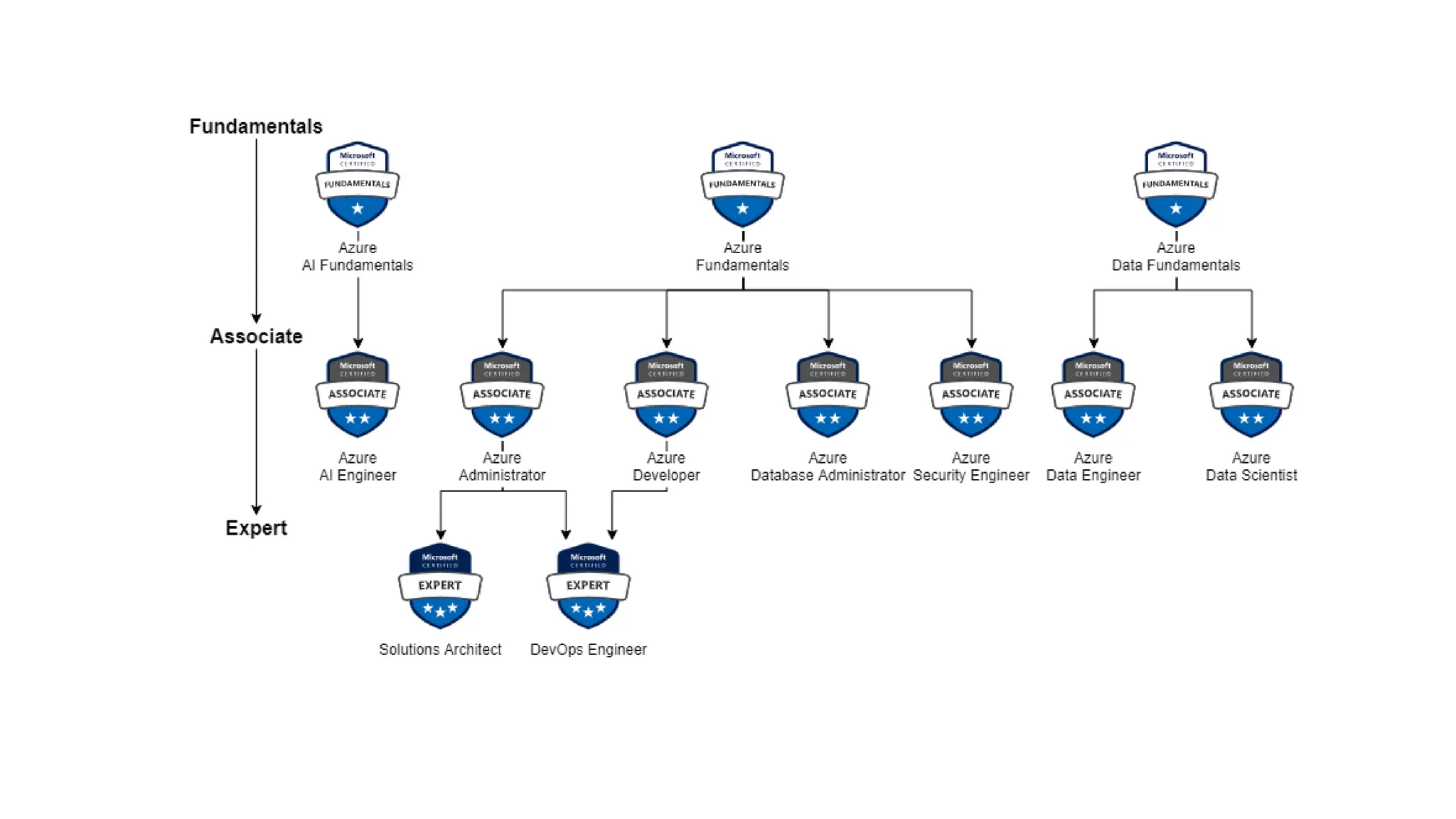
  • 156.
    ▪ Schema: definesthe location of the JSON file that describes the version of the template language. Content version: Version of the template. Use this value to document significant changes in your template. apiprofile: an API version that serves as a collection of API versions for resource types. ▪ ▪ ▪ Parameters: Values that are provided when deployment is executed to customize resource deployment. ▪ Variables: Values used in templates as JSON fragments to simplify template language expressions. ▪ Functions: User-defined functions that are available within the template. ▪ Resources: Resource types that are deployed or updated in a resource group or subscription. ▪ Outputs: Values that are returned after deployment. ARM Template Structure Required Source: https://docs.microsoft.com/
  • 157.
      Automate therepetitive work of post-deployment configuration and tasks on Azure VMs.  Software installation, anti-virus protection, or a configuration script inside Managed with Azure CLI, PowerShell, Azure Resource Manager templates, and the Azure portal.  Bundled with a new VM deployment or run against any existing system. Virtualmachines extensions Source: https://docs.microsoft.com/
  • 158.
    ▪ The CustomScript Extension downloads and runs scripts on Azure virtual machines (VMs). This extension is useful for post-deployment configuration, software installation, or any other configuration or management task. ▪Example: Install IIS on Windows server, or Apache on a Linux server with a web app You can download scripts from Azure Storage or GitHub, or provide them to the Azure portal at extension runtime. You can add extensions in the new or existing instance as well Can integrates with Azure Resource Manager templates. Script only runs once, schedule a task to run again Removing the extension does not undo what the script did You can also run it by using the Azure CLI, PowerShell, the Azure portal, or the Azure Virtual Machines REST API. Considerations ▪ ▪ ▪ ▪ ▪ ▪ ▪ ▪ ▪ Timeout. Custom Script extensions have 90 minutes to run. Dependencies. If your extension requires networking or storage access, make sure that content is available. Failure events. Be sure to account for any errors that might occur when running your script. ▪For example, running out of disk space, or security and access restrictions. What will the script do if there is an error? Sensitive data. Your extension may need sensitive information such as credentials, storage account names, and storage account access keys. How will you protect/encrypt this information? Reboot: It's best to avoid including reboots in the script because the extension will stop working after the reboot. As a result, if you have any other commands that require the extension to run after the reboot, they will not run. ▪If you need rebook, look for other solutions like Desired state configuration, chef or puppet ▪ ▪ ▪ ▪ Custom Script Extensions Source: https://docs.microsoft.com/
  • 159.
     Image: Thisis a copy of the full VM (include OS and data disks)  After you build and customize a virtual machine, you can save the new image as a set of VHDs.  You can put this new image in to Azure compute gallery.  Two types of Images  Specialized VM images: copy of a live virtual machine  Copy of the configured operating system, software, user accounts, databases, connection information, and other data for your system.  Use as a backup of your system at a particular point in time, you can restore your virtual machine from this image a  New VM created out of image will have same host name, user accounts, and other settings  Generalized VM Images: No information retained.  Original VM is unusable after you perform the process  Tools for preparing a virtual machine for generalization –  For Windows, use the Microsoft System Preparation (Sysprep) tool.  For Linux, use the Windows Azure Linux Agent (waagent) tool. VM Images Source: https://docs.microsoft.com/
  • 160.
    Azure App Service enables youto build and host web apps, background jobs, mobile back-ends, and RESTful APIs
  • 161.
    ⮚ Enables youto host and manage your web applications ⮚ Platform as a service (PaaS) environment ⮚ Focus on the business value and logic ⮚ Azure handles the infrastructure ⮚ Automatic scaling and high availability ⮚ Programming language of your choice ⮚ Supports Windows and Linux ⮚ Automated deployments from GitHub or Azure DevOps ⮚ Pay only for compute resources your app uses ⮚ App Service plan determines how much hardware is devoted to your application Azure App Service
  • 162.
    ⮚ Web apps ⮚Full support for hosting websites and web applications ⮚ Language: ASP.NET, ASP.NET Core, Java, Ruby, Node.js, PHP, or Python. ⮚ Operating System: Windows or Linux ⮚ Web apps for containers can host your existing container images. ⮚ API apps ⮚ Build REST-based web APIs ⮚ Choice of language and framework ⮚ Can be consumed from any HTTP- or HTTPS-based client. ⮚ WebJobs ⮚ Run a program (.exe, Java, PHP, Python, or Node.js) ⮚ Run a script (.cmd, .bat, PowerShell, or Bash) ⮚ Can be scheduled or run by a trigger ⮚ Often used to run background tasks as part of your application logic. ⮚ Mobile apps ⮚ Quickly build a back end for iOS and Android apps ⮚ Store mobile app data in a cloud-based SQL database. ⮚ Authenticate customers against common social providers, such as MSA, Google, Twitter, and Facebook. ⮚ Send push notifications. ⮚ Execute custom back-end logic in C# or Node.js. Types of app services Source: https://docs.microsoft.com/
  • 163.
    ⮚ App configuration,file content and database connected to your app ⮚ Can backup manually or scheduled ⮚ Can perform partial and full backups ⮚ Backups are visible on the containers page of storage account ⮚ Must have standard premium or isolated app service plan ⮚ Must have an azure storage account and container in same subscription account ⮚ Backups max out at 10GB of app and database content ⮚ Backups of TLS enabled Azure Database for MySQL and PostgreSQL are not supported. App Service Backup Source: https://docs.microsoft.com/
  • 164.
     lets youeasily create app backups manually or on a schedule.  Can restore the app by overwriting the existing app or restoring to another app.  Backup files store in storage account in same subscription.  What gets backed up: App configuration, file content and database connected to your app  Must have standard premium or isolated app service plan  Backups can be up to 10 GB of app and database content.  Backups of TLS enabled Azure Database for MySQL and PostgreSQL are not supported.  Partial backups are supported. Partial backups allow you choose exactly which files you want to back up.  Using a firewall enabled storage account as the destination for your backups is not supported. App Service Backup Source: https://docs.microsoft.com/
  • 165.
     You cantest and validate changes in staging deployment slot before pushing them to production slot.  After validation, you can simply swap staging and production slot.  There is no downtime in this swap. No requests are lost due to traffic redirection.  If rollback required, simply swap again.  When pre-swap validation is not required, Auto Swap can be configured to automate the whole workflow. Deployment Settings Source: https://docs.microsoft.com/
  • 166.
  • 167.
     Deployment slotsare live apps with their own hostnames.  App content and configurations elements can be swapped between two deployment slots.  Stage deployment slots allow you to test changes before deploying to production.  Pre-warming a slot before deploying an app ensures that all instances of the slot are ready to go. Deploying your app without downtime. No requests are lost due to traffic redirection.  When pre-swap validation is not required, Auto Swap can be configured to automate the whole workflow.  After a swap, the previously staged app is now the production app. To restore your “last known good site” if the changes swapped into production do not meet your expectations, simply perform the same swap.  Automated swapping simplifies Azure DevOps scenarios that require no cold starts or downtime for app users. When auto swap from a source slot to production is enabled, App Service automatically swaps the app into production after it has warmed up in the source slot. Web apps on Linux don't support auto swap yet. Security– App Service Source: https://docs.microsoft.com/
  • 168.
    Containers Wrap up anapplication into its own isolated package
  • 170.
    Containers ⮚ Problem Statement1: I can’t share project with others because of dependencies on OS, framework, libraries and so on. ⮚ Problem Statement 2: Need different machines to run three different Python-based applications that use of a different version of Python ⮚ Solution: The simple solution is to create a container of your project in which you mention all the dependencies to run the project. Thus your project can be run universally on any computer having container runtime installed. ⮚ Containers are a way to wrap up an application into its own isolated package. ⮚ In a nut shell, Container is the modern era solution for transferring your projects to friends, family, colleagues, clients etc without worrying about their system configuration to run the project. ⮚ Imp Features: ⮚ Portability: Deploy to diff environment ⮚ Consistency: will behave same each time ⮚ No maintenance related to infrastructure ⮚ Deployment and maintenance are efficient ⮚ Auto scaling Apps DLLs/ Libs Container Source: https://docs.microsoft.com/
  • 171.
    ACI vs AKS Azure ContainerInstances (ACI) vs Azure Kubernetes Services
  • 172.
    Hosting Options for Containers LocalWorkstation Source: https://docs.microsoft.com/ On-premises Servers VMs in Azure Azure Container Instances (ACI) Azure Kubernetes Services (AKS) Azure App Services
  • 173.
    ACIvs AKS Azure ContainerInstances (ACI) Source: https://docs.microsoft.com/ ⮚ ACI is a service that lets you deploy containers on Azure without having to maintain or patch the environment. ⮚ Basic web applications, DevTest scenarios, and batch processing are all supported by ACI. ⮚ When you just need to run a few containers, it's a perfect option. ⮚ Limited scalability and low availability ⮚ Managed environment ⮚ Only pay for containers ⮚ Deployment is easy. ⮚ Alternatively, For more complex container designs where you require additional control over the health and performance of your containers, you may utilize Azure Kubernetes Service (AKS). ⮚ You can coordinate the deployment, update, and management operations for all of your containers using AKS. ⮚ If you need to operate tens, hundreds, or even thousands of containers, the AKS Open source project could be a good fit. ⮚ It's one tool in a class of tools called container orchestrators
  • 174.
    Azure KubernetesServices (AKS) ⮚ Azure'scontainer management system ⮚ Scale your application to meet demands by adding and removing container instances ⮚ Monitor the deployed containers and resolving any issues that may come ⮚ Groups of containers are called Pods ⮚ Virtual machines are called Nodes ⮚ Azure Container Registry pull Source: https://docs.microsoft.com/
  • 175.
  • 176.
    VirtualMachinevs Containers ⮚ Virtual machinecontains a full copy of an operating system ⮚ Virtual machine virtualizes the underlying hardware, meaning the CPU, memory, and storage ⮚ Containers, on the other hand, virtualize the operating system. ⮚ Containers smaller in size than a virtual machine and quicker to spin up because you're only waiting for the app to launch, not the operating system.
  • 177.
    Docker & AzureContainer Registry Docker is an open source containerization platform
  • 178.
    Azure Container Registry ⮚ Animage is a read-only template with instructions on how to create the container. ⮚ Container is the runnable instance of the image. ⮚ A container registry is a service that stores and distributes container images. ⮚ Docker Hub is a public container registry on the web that serves as a general catalog of images. ⮚ Azure offers a similar service called Azure Container Registry, which gives customers complete control over their images, integrated authentication with Azure AD, and more. Image Base Image Container Registry Docker Hub Azure Container Registry
  • 179.
    What is Docker? ⮚ ADocker container is a standard that describes the format of containers and provides a runtime for Docker containers. ⮚ Docker is an open source project that automates the deployment of containers that can run in the cloud or on-premises. ⮚ Docker is also a company that promotes and evolves the technology, and they work in collaboration with cloud vendors like Microsoft. ⮚ The result from adopting docker, or container, is that application can be deployed or undeployed faster, start and stop faster, change to another “image” faster, process and do many things faster. ⮚ Apps run the same, regardless of where they’re run ⮚ Any machine ⮚ No compatibility issues ⮚ Predictable behavior ⮚ Works with any language, any OS, any technology Source: https://docs.microsoft.com/
  • 180.
    Benefits of AzureContainer instance(ACI) Quick starting time - in seconds. Bill-per second - only pay while the container is running Highly secure - isolates your program like it would in a VM. Custom sizes - define specific CPU cores and RAM. Persistent storage - Azure file shares may be mounted straight to a container. Linux and Windows - same API may schedule Linux and Windows containers. Azure Container Instances (ACI) Source: https://docs.microsoft.com/
  • 181.
  • 182.
    Docker terminology  Container.  Containeris an instance of a Docker image  Represents single application, process, or service.  Includes: application executable code, the runtime environment (such as .NET Core), system tools, settings.  Can create multiple instances of a container from the same image  Container image  Refers to a package with all the dependencies and information required to create a container.  Dependencies include frameworks and the deployment and execution configuration that a container runtime uses.  Usually, an image derives from multiple base images that are layers stacked on top of each other to form the container's file system.  An image is immutable once it has been created.  Build  Build refers to the action of building a container image based on the information and context provided by the Dockerfile.  The build also includes any other files that are needed.  Pull - Refers to the process of downloading a container image from a container registry.  Push - Refers to the process of uploading a container image to a container registry.  Dockerfile  Dockerfile refers to a text file that contains instructions on how to build a Docker image.  The Dockerfile is like a batch script.  The first line identifies the base image. The rest of the file includes the build actions. Source: https://docs.microsoft.com/
  • 183.
  • 184.
    Container groups  Container groupis a collection of containers that get scheduled on the same host machine.  Containers in a container group share a lifecycle, resources, local network, and storage volumes.  Similar in concept to a pod in Kubernetes.  Multi-container groups currently support only Linux containers.  Two common ways to deploy a multi-container group:  ARM Template – Also deploy additional Azure service resources (for example, an Azure Files share)  YAML file – only container instance, concise & recommended.  Resource allocation Source: https://docs.microsoft.com/
  • 185.
    Container groups  Modify propertyin container – redeploy the group  All containers will be restarted  Will stay on same host system.  Modify property that requires container deletion  OS type - Linux distribution  CPU, memory or GPU  Restart policy  Network profile Source: https://docs.microsoft.com/
  • 186.
  • 187.
    Containers ⮚ Efficient useof hardware ⮚ Secure to run multiple instances simultaneously on the same host without affecting each other ⮚ Can scale out by deploying more instances. Source: https://docs.microsoft.com/
  • 188.
    Container management ⮚ Challenges: ⮚ Configuringand maintaining load balancing ⮚ Network connectivity ⮚ Orchestrating the deployment process ⮚ To make the management process easier, it's common to use a container management platform, such as Kubernetes. ⮚ Container management is the process of organizing, adding, removing, or updating a significant number of containers. Source: https://docs.microsoft.com/
  • 189.
    What is container orchestration? Source:https://docs.microsoft.com/
  • 190.
    Kubernetes ⮚ Kubernetes abstractsaway complex container management tasks, and provides you with declarative configuration to orchestrate containers in different computing environments. ⮚ Benefits ⮚ Self-healing of containers. An example would be restarting containers that fail or replacing containers. ⮚ Scaling deployed container count up or down dynamically, based on demand ⮚ Automating rolling updates and rollbacks of containers. ⮚ Managing storage. ⮚ Managing network traffic. ⮚ Storing and managing sensitive information, such as usernames and passwords. Source: https://docs.microsoft.com/
  • 191.
  • 192.
    Computer cluster ⮚ Master Node/Control Planes – that controls and manages the whole Kubernetes system ⮚ Worker Node – that run the actual applications that you deploy. ⮚ Both the control planes and node instances can be physical devices, virtual machines, or instances in the cloud. Source: https://docs.microsoft.com/
  • 193.
    Kubernetesarchitecture ⮚ API serveris like the front end to the control plane in your Kubernetes cluster.  All the communication between the components in Kubernetes is done through this API. ⮚ Scheduler is the component that's responsible for the assignment of workloads across all nodes.  The scheduler monitors the cluster for newly created containers, and assigns them to nodes. ⮚ etcd - key-value store  Stores the current state and the desired state of all objects within your cluster. ⮚ Controllers track the state of objects in the cluster.  If the object's current state is not the desired state, the controller will intervene. Source: https://docs.microsoft.com/
  • 194.
    Kubernetesarchitecture ⮚ Kubelet -monitors work requests from the API server  makes sure that the requested unit of work is running and healthy   kube-proxy - handle routing and load balancing of traffic  responsible for local cluster networking Container runtime - runtime is responsible for fetching, starting, and stopping container images. Source: https://docs.microsoft.com/
  • 195.
    KubernetesObjects ⮚ kubectl isa command line interface for running commands against Kubernetes clusters. ⮚ Example : “kubectl get nodes” -> get the list of nodes running in your Kubernetes cluster ⮚ Kubernetes pods ⮚ Represents a single instance of an app running in Kubernetes ⮚ A single pod can hold a group of one or more containers. ⮚ A pod includes information about the shared storage and network configuration, and a specification about how to run its packaged containers. ⮚ All container running within a pod will share the Node’s network with any other containers in the same pod ⮚ Containers within a pod can share files through volumes, attached to the containers ⮚ A pod has a explicit life cycle, and will always remain on the Node in which it was started. Source: https://docs.microsoft.com/
  • 196.
    Azure Kubernetes Service (AKS) Deployand scale containers on managed Kubernetes
  • 197.
    Source: https://docs.microsoft.com/ Why weneed Azure KubernetesService (AKS) Challenges with Kubernetes ⮚You're responsible for finding the best solution for deployment, scaling, load balancing, logging, and monitoring. ⮚Need to understand concepts, such as microservices architecture. ⮚Kubernetes doesn't provide middleware, data-processing frameworks, databases, caches, or cluster storage systems. ⮚You're responsible for maintaining your Kubernetes environment. ⮚ Manually install the master and worker nodes ⮚ Need to consider high availability of the master, adding additional worker nodes, pathing, upgrades etc. ⮚ For example, you need to manage OS upgrades and the Kubernetes installation and upgrades. ⮚ You also manage the hardware configuration of the host machines, such as networking, memory, and storage.
  • 198.
    Azure KubernetesService (AKS)  Reducethese challenges by providing a hosted Kubernetes environment.  Simplify the deployment and management of containerized apps in Azure.  With AKS, you get the benefits of open-source Kubernetes without the complexity or operational overhead of running your own custom Kubernetes cluster.  Microsoft manages the master node  Microsoft Azure enterprise features are available to you.  By offloading much of the responsibility for managing a Kubernetes cluster to Azure, it reduces the complexity and operational overhead.  Takes care of important tasks for you, such as health monitoring and maintenance. Source: https://docs.microsoft.com/
  • 199.
    Benefits of AzureKubernetesService (AKS) Kubernetes version updates and patching are automated. Cluster scaling is simple. Hosted control plane that self-heals (masters) Cost-cutting Source: https://docs.microsoft.com/
  • 200.
    AKSterminology ⮚ Pools aregroups of nodes with identical configurations. ⮚ Nodes are individual virtual machines running containerized applications. ⮚ Pods are a single instance of an application. A pod can contain multiple containers. ⮚ Container is a lightweight and portable executable image that contains software and all of its dependencies. ⮚ Deployment has one or more identical pods managed by Kubernetes. ⮚ Manifest is the YAML file describing a deployment. Source: https://docs.microsoft.com/
  • 201.
    Storagein AKS ⮚ Kubernetestypically treats individual pods as ephemeral, disposable resources. ⮚ Multiple pods may need to: ⮚ Share the same data volumes. ⮚ Reattach data volumes if the pod is rescheduled on a different node. ⮚ Volume ⮚ A volume represents a way to store, retrieve, and persist data across pods and through the application lifecycle. ⮚ You can manually create data volumes to be assigned to pods directly, or have Kubernetes automatically create them. Source: https://docs.microsoft.com/
  • 202.
    Storagein AKS ⮚ Kubernetestypically treats individual pods as ephemeral, disposable resources. ⮚ Multiple pods may need to: ⮚ Share the same data volumes. ⮚ Reattach data volumes if the pod is rescheduled on a different node. Source: https://docs.microsoft.com/
  • 203.
    Storagein AKS ⮚ Volume ⮚Represents a way to store, retrieve, and persist data across pods and through the application lifecycle. ⮚ Can be created manually or have Kubernetes automatically create them. ⮚ Persistent volumes ⮚ Storage resource created and managed by the Kubernetes API ⮚ Can exist beyond the lifetime of an individual pod. ⮚ Azure Disks or Azure Files ⮚ Can be statically created by a cluster administrator, or dynamically created by the Kubernetes API server. ⮚ Storage classes ⮚ Define different tiers of storage, such as Premium and Standard ⮚ Defines the reclaimPolicy ⮚ Persistent volume claims ⮚ A user's request for storage is called a PersistentVolumeClaim. ⮚ Requests storage of a particular StorageClass, access mode, and size ⮚ It looks like a pod. Node resources are consumed by pods, and PersistentVolume resources are consumed by PersistentVolumeClaims. ⮚ Pods have the ability to request specific resource levels (CPU and Memory). ⮚ Claims can specify a specific size and mode of access (for example, once read/write or many times read-only). Source: https://docs.microsoft.com/
  • 204.
    Scaling in AKS ⮚ Scaling– as workload increase/decrease, you may need to increase/decrease infrastructure in terms of pods and nodes ⮚ Manually scale ⮚ Scale Pods ⮚ Scale Nodes ⮚ Horizontal pod autoscaler (HPA) ⮚ Monitor the resource demand and automatically scale the number of replicas ⮚ Define the minimum and maximum number of replicas that can run ⮚ Define the metric to monitor like CPU usage ⮚ Cluster autoscaler ⮚ Adjusts the number of nodes based on the requested compute resources in the node pool ⮚ Scale out events – increase number of nodes because of node pool resource constraints ⮚ Scale in events – decreases the number of nodes because node pool has more compute resources than are required Source: https://docs.microsoft.com/
  • 205.
    Learning Objectives  Virtual Network(VNet) and Subnets  VPN Gateway and Vnet Peering  Load Balancer and Application Gateway  Content Delivery Network (CDN)  ExpressRoute  ExpressRoute vs VPN Gateway  In this module, you'll learn about the different Azure networking options and the scenarios in which each is appropriate. Source: https://docs.microsoft.com/ Azure networking services
  • 206.
    IP Address -IPv4 vs IPv6
  • 207.
    IP Address -IPv4 vs IPv6 ⮚ A numeric address ⮚ It’s an identifier for a computer or device on a network ⮚ Every device has to have an IP address for communication purposes. ⮚ 2 types: IPv4 vs IPv6 Home Address Source: https://docs.microsoft.com/ IP: 66.94.29.03 IP: 76.54.23.13 Internet
  • 208.
    IP Address- IPv4 ⮚32 bit numeric address written as four numbers separated by periods. ⮚Example: 66.94.234.03 ⮚Each group of number separated by periods is called an octet. ⮚ Number range in each octet is 0 to 255 ⮚ This address version can produce over 4 billion unique addresses Home Address Source: https://docs.microsoft.com/ IP: 66.94.29.03 IP: 76.54.23.13 Internet
  • 209.
    IP Address- IPv4 ⮚Computers and network don’t read IP addresses in this numeric format. ⮚ They only understand binary format (1s and 0s) 66.94.29.03 01000010 . 01011110 . 00011101 . 00000011 Source: https://docs.microsoft.com/ 128 64 32 16 8 4 2 1 8 Bit Octet Chart
  • 210.
    IP Address– IPv6 ⮚128 bit long new generation of IP addresses ⮚ IPv6 address is represented as eight groups of four hexadecimal digits ⮚ Each group representing 16 bits[a] ⮚ The groups are separated by colons (:). ⮚ An example of an IPv6 address is: ⮚ 2001:0db8:85a3:0000:0000:8a2e:0370:7334 ⮚ Can produce 340 undecillion addresses ⮚ 340,282,366,920,938,463,463,374,607,431,768,211,456) ⮚ about 3.4×1038 (340 trillion trillion trillion) unique IPv6 addresses. Source: https://docs.microsoft.com/
  • 211.
  • 212.
    Public vs PrivateIP Address Public IP address for each device? ⮚More Expensive ⮚Unnecessary ⮚Waste of Public IP addresses 192.168.0.1 192.168.0.2 Router 12.234.56.13 192.168.0.3 192.168.0.4 Home Network IP: 76.54.23.13 Source: https://docs.microsoft.com/ Global Internet
  • 213.
    Public vs PrivateIP Address ⮚ Public IP address ⮚ Public IP address are registered on the internet ⮚ Public IP address is Unique – no duplicate anywhere in the world ⮚ Assigned to your network router by your internet service provider (ISP) ⮚ Private IP ⮚ Private IP addresses are not publicly registered on the internet ⮚ You can’t access internet using a private IP address ⮚ Use internally – inside home, business etc. ⮚ Non-unique. Can be used on other private networks ⮚ DHCP is a service used in routers to assign private Ips ⮚ NAT (network address translation) is what translates a set of IP addresses to another set of IP addresses Router 12.234.56.13 Source: https://docs.microsoft.com/ 192.168.0.1 192.168.0.2 192.168.0.3 192.168.0.4
  • 214.
    Private IP Address ⮚Private IP address ranges can be used without registration in any number of private networks. ⮚ For setting up private networks, three IP address ranges have been reserved by internet Assigned Numbers Authority (IANA) ⮚ Class A – for large organization ⮚ Class B – Medium size organization ⮚ Class C – home or small business Source: https://docs.microsoft.com/
  • 215.
    Public vs PrivateIP Address Public IP address ⮚ Unique ⮚ Public registered on the internet ⮚ Used externally ⮚ Assigned by ISP ⮚ Not free ⮚ Not secure Private IP Address ⮚ Non-unique. Can be used on other private networks ⮚ Not publicly registered ⮚ Used internally ⮚ Assigned by a router (DHCP service) ⮚ FREE ⮚ More secure Source: https://docs.microsoft.com/
  • 216.
    Virtual Network (VNet)and Subnets Provision private networks, optionally connect to on-premises datacenters
  • 217.
    Need forAzure Virtual Network Corporateon-premises network Source: https://docs.microsoft.com/ ⮚ In a corporate on-premises data center network: ⮚ Nobody on the internet see the data exchange between the application and the database? ⮚ Nobody on the internet can directly connect to your database ⮚ You must first establish a connection to your corporate network before gaining access to your apps or databases. ⮚ Corporate networks offer a secure internal network that safeguards your resources, data, and communications from unauthorized access. ⮚ How can you build your own private cloud network? ⮚ Azure Virtual Network
  • 218.
    Azure Virtual Network ⮚ Yourown isolated network in Azure. ⮚ Region can have multiple VNets but each VNet belong to same Region ⮚ Within a VNet, network traffic is isolated (not visible) from network traffic in all other Azure VNet. ⮚ You maintain complete control over all traffic entering and leaving a VNet. ⮚ IP Address is a address of resource which ensures the traffic gets to the right server on the internet ⮚ Every resource gets its own unique IP Address on that Vnet within the address space. ⮚ Scaling – You can add more VNets or more addresses on existing VNet. VNet CIDR Range: 10.0.0.0/16 VNet Source: https://docs.microsoft.com/ VNet
  • 219.
    Need for VNet Subnets ⮚Each kind of resource has distinct access requirements. ⮚ Elastic Load Balancers that are publicly available are accessible through the internet (public resources) ⮚ Databases and App Server instances should be inaccessible from the internet. ⮚ Only apps running inside your VNet should be able to access them (private resources). ⮚ How do you partition public and private resources inside a VNet? VNet CIDR Range: 10.0.0.0/16 VNet Source: https://docs.microsoft.com/ VNet
  • 220.
    VNet Subnets ⮚ Organize andgroup resources on subnets ⮚ Separate public and private resources into distinct subnets ⮚ Resources in a public subnet CAN be accessed from internet ⮚ Resources in a private subnet CANNOT be accessed from internet, but resources in a public subnet can connect with resources in a private subnet. ⮚ We can use network security groups to secure individual subnets Source: https://docs.microsoft.com/
  • 221.
    Source: https://docs.microsoft.com/ VNet Peering ⮚Connect VNets from same or different regions (Global VNet peering) ⮚ Allows for secure communication between VNets that are linked. ⮚ Low Latency: Resources between diff VNets are connected using high bandwidth connections. ⮚ Assemble them as though they were members of the same network ⮚ Must not have CIDRs that overlap (IP address range)
  • 222.
    Subnet Mask and CIDR definesthe range of IP addresses that can be used within a network
  • 223.
    IPv4 Address ⮚ IPaddress is a logical address that is used to uniquely identify a device on an network What is the binary 10000011 in decimal? Source: https://docs.microsoft.com/
  • 224.
    Subnet Mask ⮚ InIP address = Network address + Host Address ⮚ 192.168.0.0 ⮚ The Subnet Mask specifies which part of the IP address corresponds to the network and which part corresponds to the host, by masking the network portion of the IP address. 192.168.0.1 192.168.0.2 Router 12.234.56.13 192.168.0.3 192.168.0.4 Home – Network Address Global Internet Source: https://docs.microsoft.com/
  • 225.
    SubnetMask and CIDR Notation ⮚Classless inter domain routing (Slash notation) ⮚ It’s a shorter way to write a subnet mask. ⮚ “Slash” notation tells you how many bits are associated with Subnet Mask. Source: https://docs.microsoft.com/
  • 226.
    Network Interface Card (NIC) NICconnects VM to the VNet
  • 227.
    NetworkInterface Card (NIC) ⮚ Anetwork interface card (NIC) is a piece of hardware that allows a computer to connect to a network. ⮚ Network Interface Card (NIC) also called: ⮚ Network Interface Controller ⮚ Network Adapter ⮚ LAN Adapter ⮚ Can be: ⮚ Wired ⮚ Wireless ⮚ A network interface enables an Azure Virtual Machine to communicate with internet, Azure, and on-premises resources. ⮚ When you create VM using portal, one NIC with default setting created. ⮚ IP address and NSG rules are attach with NIC ⮚ You can create more than one NIC and attach to VM. Source: https://docs.microsoft.com/
  • 228.
    User-defined Routes (UDR) Route andControl the flow of traffic within Azure networks
  • 229.
    System Route ⮚ Routing: Processof finding/selecting a path for a traffic in one or across multiple networks ⮚ Azure routing is setup by default ⮚ Azure uses system routes to direct network traffic between virtual machines, on- premises networks, and the Internet. ⮚ Information about the system routes is recorded in a route table. ⮚ Routing tables are associated to subnets ⮚ A route table contains a set of rules, called routes, that specifies how packets should be routed in a virtual network. Source: https://docs.microsoft.com/
  • 230.
    User-defined network routes ⮚ NetworkVirtual appliance (NVA) – this is simply a specified optimized virtual machine for certain tasks. ⮚ UDRs designed to override Azure default routing or add new routes ⮚ Managed via Azure Route Table resource ⮚ UDRs control network traffic by defining routes that specify the next hop (destination) of the traffic flow. ⮚ The hop can be a virtual network gateway, virtual network, internet, or virtual appliance. ⮚ Can be associated with more than one VNet subnets Source: https://docs.microsoft.com/
  • 231.
    Virtual Network Peering Connects twovirtual networks in one region or across regions
  • 232.
    VNet Peering VNet A VNetB VNet C ⮚ Virtual networks are isolated with each other and have strong communication boundary. ⮚ Azure network peering can connect two virtual networks located in the same region or across regions. Source: https://docs.microsoft.com/ Peering Peering
  • 233.
    VNet Peering ⮚ Regional VNetpeering connects Azure virtual networks in the same region. ⮚ Global VNet peering connects Azure virtual networks in different regions. ⮚ The virtual networks can't have overlapping IP addresses. ⮚ After peering, VMs across diff VNets can communicate using private IPs. ⮚ Benefits: ⮚ Private. Network traffic between peered virtual networks is private. Traffic between the virtual networks is kept on the Microsoft backbone network. No public Internet, gateways, or encryption is required in the communication between the virtual networks. ⮚ Performance. A low-latency, high-bandwidth connection between resources in different virtual networks. ⮚ Seamless. The ability to transfer data across Azure subscriptions, deployment models, and across Azure regions. ⮚ No disruption. No downtime to resources in either virtual network when creating the peering, or after the peering is created. ⮚ Use case: database failover, disaster recovery, or cross-region data replication Source: https://docs.microsoft.com/
  • 234.
    Demo: VNet Peering VNet A 10.0.0.0/16 VNetB 10.1.0.0/16 Subnet-A 10.0.0.0/24 Private IP Subnet-B 10.1.0.0/24 Private IP Peering Source: https://docs.microsoft.com/
  • 235.
    VPN Gateway andVnet Peering Connecting your infrastructure to the cloud
  • 236.
    VPN (Virtual private network) ⮚Connect two or more trusted private networks to one another over securely an untrusted network (typically the public internet). ⮚ Traffic is encrypted while traveling over the untrusted network to prevent eavesdropping or other attacks. west-coast office east-coast office Tunnel Source: https://docs.microsoft.com/
  • 237.
    VPN gateways ⮚ Can connectAzure virtual network with On-premises network ⮚ All transferred data is encrypted in a private tunnel as it crosses the internet. ⮚ Azure VPN Gateway instances are deployed in Azure Virtual Network ⮚ Site-to-Site connection - Connect on-premises datacenters to virtual networks ⮚ Point-to-Site connection - Connect individual devices to virtual network ⮚ Multi-site connection – Connect more than one on-premises network to virtual network ⮚ Network-to-Network connection - Connect virtual networks to other virtual networks ⮚ We can also use “Network peering” On-Premises Azure Virtual Network VPN Gateway Tunnel Source: https://docs.microsoft.com/
  • 238.
    Network Connections VPN Gateway TunnelVPN Gateway Network Peering East US VNet Source: https://docs.microsoft.com/ West US VNet East US VNet West US VNet
  • 239.
    VPN Gatewayvs Vnet Peering ⮚Vnet Peering ⮚ Connect VNets from same or different regions (Global VNet peering) ⮚ Allows for secure communication between VNets that are linked. ⮚ Low Latency: Resources between diff VNets are connected using high bandwidth connections. ⮚ Which is best for you? ⮚ VNet Peering provides a low latency, high bandwidth connection useful in scenarios such as cross-region data replication and database failover scenarios. Since traffic is completely private and remains on the Microsoft backbone, customers with strict data policies prefer to use VNet Peering as public internet is not involved. Since there is no gateway in the path, there are no extra hops, ensuring low latency connections. ⮚ VPN Gateways provide a limited bandwidth connection and is useful in scenarios where encryption is needed, but bandwidth restrictions are tolerable. In these scenarios, customers are also not as latency-sensitive. Source: https://docs.microsoft.com/
  • 240.
    Service Chaining Enables youto direct traffic from one virtual network to a virtual appliance or gateway in a peered network through user-defined routes.
  • 241.
    VNet Peering is nontransitive ⮚VNet Peering is nontransitive ⮚ Limit – 500 VNets peering per virtual network ⮚ Configure user-defined routes and service chaining to provide the transitivity ⮚ Implement a multi-level hub and spoke architecture. VNet A VNet B VNet C Peering Peering Source: https://docs.microsoft.com/
  • 242.
    Hubandspoke architecture ⮚ Hub virtualnetwork can host infrastructure components like the network virtual appliance or VPN gateway. ⮚ All the spoke virtual networks can then peer with the hub virtual network. ⮚ Traffic can flow through network virtual appliances or VPN gateways in the hub virtual network. Hub VNet Source: https://docs.microsoft.com/ Spoke VNet A Spoke VNet B Spoke VNet C Spoke VNet D NVA VPN Gateway
  • 243.
  • 244.
  • 245.
    Domain Name System (DNS) Server 20.11.310.65 WebBrowser Domain Name System (DNS) translates (or resolve) a human-readable domain names, for example: www.wideworldimports.com, into a known IP address. Source: Microsoft Docs 1. Where is Microsoft.com 2. IP Address: 20.11.310.65 Microsoft.com 3. HTTP Request 4. HTTP Response
  • 247.
    Domain Name System (DNS) Server 20.11.310.65 WebBrowser 1. Where is Microsoft.com 2. IP Address: 20.11.310.65 Microsoft.com 3. HTTP Request 4. HTTP Response Source: Redgate
  • 248.
  • 249.
    Azure DNS • Can NOTbuy Domain Name • Manage DNS Server  DNS server is also known as a DNS name server, or just a name server.  DNS uses a global directory hosted on servers around the world.  Microsoft is part of that network that provides a DNS service through Azure DNS. Install DNS Server Source: Microsoft Docs Azure DNS Internet-facing DNS domains Azure Private DNS Internal facing • Buy Domain Name (cloudgita.com) • Manage DNS Server
  • 250.
    Demo: Configure DNS Server WebServer (IIS) Public IP Address (Subnet-web) Cloudhungry.com = Public IP address (web Server) VNet-DNS Azure-provided DNS servers. Example: mylabel.Location.cloudapp.azure.com. Source: Microsoft Docs
  • 251.
    Demo: Azure DNSZone Web Server (IIS) Public IP Address (Subnet-web) Cloudhungry.com = Public IP address (web Server) VNet-DNS Source: Microsoft Docs Azure-provided DNS servers. Example: mylabel.Location.cloudapp.azure.com.
  • 252.
    Azure DNS ⮚ Hosting servicefor DNS domains that provides name resolution by using Microsoft Azure infrastructure. ⮚ Domains can be hosted in Azure DNS for record management. ⮚ Billing = no of DNS zones + number of DNS queries received ⮚ Advantages: ⮚ DNS domains in Azure DNS are hosted on Azure's global network of DNS name servers. ⮚ Each DNS query is answered by the closest available DNS server to provide fast performance and high availability for your domain. ⮚ Can be managed using Portal, PowerShell or CLI
  • 253.
    Demo: Azure Internal Domainname Vm-test (Subnet-test) VNet-DNS vm-web (IIS) Private IP Address (Subnet-web) Azure-provided default DNS name. Example: srv-name.internal.cloudapp.net Source: Microsoft Docs
  • 254.
    Demo: Host internal privateDNS server Vm-test (Subnet-test) VNet-DNS vm-web (IIS) Private IP Address (Subnet-web) vm-dns (Subnet-dns) DNS Server  Install DNS Server (Active Directory Domain Services)  Promote the server to a domain controller  Specify a root domain name – CloudGita.com  Change VNet default DNS server to custom DNS Server we just created.  Customize Azure provided domain names in vm-dns machine DNS Server -> Default Azure-provided default DNS name. Example: srv-name.internal.cloudapp.net Source: Microsoft Docs
  • 255.
    Demo: Azure Private DNS Vm-test (Subnet-test) VNet-DNS vm-web(IIS) Private IP Address (Subnet-web) vm-dns (Subnet-dns) DNS Server Azure Private DNS Internal facing Replace Source: Microsoft Docs  Create Resource -> Private DNS Zone  Link with virtual network (vnet-dns)  Enable auto-registration DNS Server -> Default Azure-provided default DNS name. Example: srv-name.internal.cloudapp.net
  • 256.
    Azure Private DNS ⮚Azure Private DNS provides a reliable and secure DNS service for your virtual network. Azure ⮚ Private DNS manages and resolves domain names in the virtual network without the need to configure a custom DNS solution. ⮚ By using private DNS zones, you can use your own custom domain name instead of the Azure-provided names during deployment. ⮚ A private zone can be linked to one or more virtual networks by the use of virtual ⮚ networks links ⮚ Auto-registration – This allows VM’s to be automatically registered in the private DNS zone
  • 257.
    Network SecurityGroup ⮚ NSGcan filter incoming and outgoing traffic. ⮚ NSG can contain set of security rules which can allow or deny traffic ⮚ NSGs is like internal firewall inside your Virtual network ⮚ Remember Azure firewall is an external firewall, outside your virtual network ⮚ NSG is a basic network filtering and does not have features like FQDN and threat intelligence. ⮚ NSG can be associated to one or multiple subnets or network interface (NIC) ⮚ You can’t link NSG with VNet. ⮚ OSI Layer 4 (5 properties or tuples) ⮚ Source and Destination IP address ⮚ Source and Destination port number ⮚ Protocol ⮚ Priority – lower number, higher priority NIC Source: https://docs.microsoft.com/
  • 258.
  • 259.
    Application Security Group ⮚ Applicationsecurity group allows you to group virtual machines and define NSG rules on that group. ⮚ Don’t need a manual maintenance of explicit IP addresses. ⮚ ASGs introduce the ability to deploy multiple applications within the same subnet and also isolate traffic based on ASGs. ⮚ If the VM is running more than one workloads, we can simply assign multiple ASGs. Source: https://docs.microsoft.com/
  • 260.
    Application Security Group VM-Back Subnet- back VM-front Subnet - front ASG - Front ASG - Back Vnet-asg Source: https://docs.microsoft.com/
  • 261.
    Network SecurityGroup ⮚ NSGcan filter incoming and outgoing traffic. ⮚ NSG can contain set of security rules which can allow or deny traffic ⮚ NSGs is like internal firewall inside your Virtual network ⮚ Remember Azure firewall is an external firewall, outside your virtual network ⮚ NSG is a basic network filtering and does not have features like FQDN and threat intelligence. ⮚ NSG can be associated to one or multiple subnets or network interface (NIC) ⮚ You can’t link NSG with VNet. ⮚ OSI Layer 4 (5 properties or tuples) ⮚ Source and Destination IP address ⮚ Source and Destination port number ⮚ Protocol ⮚ Priority – lower number, higher priority NIC Source: https://docs.microsoft.com/
  • 262.
    Azure Firewall ⮚ Managed, networksecurity service that protects your Azure Virtual Network resources. ⮚ Highly available and unrestricted scalable. ⮚ Fully integrated with Azure Monitor for logging and analytics. ⮚ Just like with NSGs, your Azure Firewall rules can apply inbound and outbound access. ⮚ Azure Firewall goes from OSI layer 3 all the way up to layer 7 ⮚ NSG operates at OSI layer 4 ⮚ Firewall can also deal with DNS names, as well as ports, protocols, and IP addresses. ⮚ Azure Firewall can function in a hybrid cloud ⮚ All traffic that's going from your Azure infrastructure to on-premises has to go through the Azure Firewall ⮚ The Azure firewall uses a statically assigned public IP address. Source: https://docs.microsoft.com/
  • 263.
    Azure Firewall Manager ⮚ AzureFirewall Manager ⮚ Centrally manage Azure Firewalls across multiple subscriptions. ⮚ Rule sets can be shared across multiple Azure Firewall instances. ⮚ Can integrate with third-party services, like iboss, Zscaler, and Check Point, to provide additional firewall or enterprise class firewall functionality ⮚ Can also integrate with the virtual WAN concept. Source: https://docs.microsoft.com/
  • 264.
    Demo: Azure Firewall AzureFirewallSubnet PublicIP Private IP demo-vm Private IP Subnet - default vnet-firewall Source: https://docs.microsoft.com/
  • 265.
    Azure Firewall Rules ⮚ Bydefault, Azure Firewall blocks all traffic, unless you enable it. ⮚ You create Rules ⮚ Rule collection: zero or more Rules. They are of type NAT, Network or Applications. All rules in collection must be of same type. ⮚ Rule Collection Group: zero or more Rule collection. Multiple collection types can be in one group. ⮚ With Firewall Policy, rules are organized inside Rule Collections and Rule Collection Groups. ⮚ There are three types of rule collections: ⮚ Application rules: ⮚ Configure fully qualified domain names (FQDNs) that can be accessed from a subnet. ⮚ For example, specify the Windows Update network traffic through the firewall. ⮚ Network rules: ⮚ Similar like NSG ⮚ Non-HTTP/S traffic must have a network rule to pass through the firewall. ⮚ If resources one subnet must communicate with another, you would configure a network rule from source to destination. ⮚ DNAT rules: ⮚ Destination Network Address Translation (DNAT) ⮚ Translate and filter inbound traffic to your subnets. ⮚ Translate your firewall public IP and port to a private IP and port. Source: https://docs.microsoft.com/
  • 266.
    Azure Firewall Features ⮚ Highavailability: Azure Firewall does not require any additional settings or services. It is fully managed and has a very good uptime. ⮚ Availability zones: Based on your needs, a firewall can be made available across various availability zones or restricted to specific zones. There is no extra charge for this, however data transfer rates may vary based on the zones. ⮚ Scalability: The firewall can be scaled to meet the changing needs of the network. ⮚ Traffic filtering rules: Rules for allowing or disallowing connections can be established based on IP addresses, ports, and other factors. Azure Firewall can differentiate between packets from various connections and apply rules to accept or deny them. ⮚ FQDN tags: Tags for fully qualified domain names (FQDNs) can be assigned to trustworthy sources that need to pass across the firewall. Based on this, rules may be built to allow traffic from qualifying domains to pass through. ⮚ Service tags: These are labels for Azure Key Vault, Container Registry, and other services that represent a range of IP addresses. These are handled by Microsoft and cannot be modified. These may be used to create filtering rules in the firewall. Source: https://docs.microsoft.com/
  • 267.
    Azure Firewall Features ⮚ Threatintelligence: Microsoft maintains a threat intelligence field that contains a list of harmful sources and domains. Azure Firewall can utilize this information to block connections or notify users. ⮚ Multiple public IP addresses: Azure Firewall allows you to add up to 250 IP addresses. ⮚ Azure Monitor logging: Azure Monitor and Azure Firewall are tightly connected. As a result, all occurrences are logged, and these logs may be preserved or broadcast to event hubs, among other things. ⮚ Web categories: Administrators can grant or refuse access to certain websites based on which category they fall into. This can include social networking sites, gaming sites, and other types of websites. ⮚ Certifications: All of the following certifications are available for Azure Firewall: Payment Card Industry (PCI), Service Organization Controls (SOC), International Organization for Standardization (ISO), and ICSA Labs. Source: https://docs.microsoft.com/
  • 268.
    Firewallvs NSG ⮚ Azure Firewallis a fully stateful, centralized network firewall as-a-service, which provides network- and application-level protection across different subscriptions and virtual networks. ⮚ Support application FQDN tags ⮚ Can mask the source and destination network addresses ⮚ Threat Intelligence ⮚ Can analyze and filter L3-L7 application traffic ⮚ Robust and Fully managed service ⮚ Network security groups provide distributed network layer traffic filtering to limit traffic to resources within virtual networks in each subscription. ⮚ Missing ⮚ Missing ⮚ Missing ⮚ Missing ⮚ Basic firewall Source: https://docs.microsoft.com/
  • 269.
    Azure Load Balancer Deliver highavailability and network performance to your apps
  • 270.
  • 271.
    Load Balancer Load Balancer Uses IPaddress / port Source: https://docs.microsoft.com/ Backend Pool HTTP Request ⮚ Distribute incoming traffic to backend resources ⮚ Provides:  High Availability  Scalable performance
  • 272.
    Load Balancer Components ⮚ Frontendconfiguration – IP address of your Azure Load Balancer. It's the point of contact for clients. ⮚ Backend pool – Group of virtual machines that is serving incoming traffic. ⮚ Adding or removing VMs from the backend pool reconfigures the load balancer without additional operations. ⮚ Load-balancing rules determine how traffic is distributed to the backend pool. ⮚ Health probes ensure the resources in the backend are healthy. ⮚ Health probe dynamically adds or removes VMs from the load balancer rotation based on their response to health checks. ⮚ When a probe fails to respond, the load balancer stops sending new connections to the unhealthy instances. Source: https://docs.microsoft.com/
  • 273.
    Demo: Basic Load BalancerImplementation Source: https://docs.microsoft.com/
  • 274.
    Load Balancer – Publicvs Internal ⮚ Two types of load balancers: Public and Internal ⮚ A public load balancer maps the public IP address and port number of incoming traffic to the private IP address and port number of the VM. ⮚ An internal load balancer directs traffic to resources that are inside a virtual network or that use a VPN to access Azure infrastructure. Source: https://docs.microsoft.com/
  • 275.
    Load balancer SKUs (stockkeeping unit) Basic Standard Cost Free Cost per hour Backend pool Size Supports up to 300 instances Support up to 1000 instances Backend pool endpoints Only VMs in single availability set or scale set Any VM in single Vnet. VM Public IP type Basic SKU Public IP or No Public IP Standard SKU Public IP or No Public IP NSG Rules Open by default. Network security group optional. Closed to inbound flows unless allowed by a network security group. Health Probe TCP, HTTP TCP, HTTP, HTTPS Availability Zones No Support Support SLA Not available 99.99% Use Azure LB SKU can’t be changed after cre Dev/Test ation (not mutable) Production Source: https://docs.microsoft.com/ ⮚
  • 276.
    Load Balancer distribution modes Source:https://docs.microsoft.com/
  • 277.
    Demo: Load Balancer- NATRules ⮚ An inbound NAT rule forwards incoming traffic sent to frontend IP address and port combination. ⮚ The traffic is sent to a specific virtual machine or instance in the backend pool. Source: https://docs.microsoft.com/
  • 278.
    Load Balancer Load Balancer Uses IPaddress / port Backend Pool A HTTP Request Backend Pool B Source: https://docs.microsoft.com/
  • 279.
    Load Balancer – Outboundrule Source: https://docs.microsoft.com/
  • 280.
  • 281.
    Application Gateway ⮚ Azure ApplicationGateway is a web traffic load balancer that enables you to manage traffic to your web applications. ⮚ OSI layer-7 (Application layer) load balancer. ⮚ HTTP and HTTPS traffic only ⮚ Traditional Load Balancer –> Layer 4 – TCP and UDP ( source/destination IP/port and protocol) ⮚ Routing rules based on HTTP request parameters: ⮚ URL path (web address) ⮚ Host headers (request data) ⮚ Can be configured public facing, internal or combination of both. ⮚ You can only assign Static IP address to application gateway. ⮚ Needs a separate empty subnet to install application gateway components
  • 282.
  • 283.
  • 284.
    Web application firewall ⮚ Webapplication firewall ⮚ Checks each request for many common threats ⮚ Based on the Open Web Application Security Project (OWASP) ⮚ SQL-injection, Cross-site scripting, Command injection, HTTP request smuggling, HTTP response splitting, Remote file inclusion, Bots, crawlers, and scanners, and HTTP protocol violations and anomalies.
  • 285.
    Application Gateway Components Settingsfor backend traffic: port, stickiness, probe, timeout
  • 286.
    Demo: URL Path- basedrouting demo-AppGateway BackendPoolDefault HTTPRequest BackendPoolImages BackendPoolVideos IP-address/images/test.htm Source: https://docs.microsoft.com/
  • 287.
    Demo: Multiple site routing demo-AppGateway BackendPoolDefault HTTPRequest BackendPoolImages BackendPoolVideos Cloudhungry.com Source: https://docs.microsoft.com/
  • 288.
  • 289.
    Application Gateway Features ⮚ Roundrobin load balancing ⮚ Cookie-based session affinity: Session stickiness ensures client requests in the same session are routed to the same back-end server. ⮚ Session stickiness is critical for e-commerce apps, since you don't want a transaction disturbed by a load balancer. ⮚ Web application firewall ⮚ Checks each request for many common threats ⮚ Based on the Open Web Application Security Project (OWASP) ⮚ SQL-injection, Cross-site scripting, Command injection, HTTP request smuggling, HTTP response splitting, Remote file inclusion, Bots, crawlers, and scanners, and HTTP protocol violations and anomalies. ⮚ Application Gateway routing ⮚ Path-based routing ⮚ Multiple-site routing ⮚ Support Secure Socket Layer (SSL/TLS termination) ⮚ Thus communication to backend servers is unencrypted. ⮚ This functionality reduces web server encryption and decryption burden/costs.
  • 290.
    Application Gateway Features ⮚ Redirection:Redirection can be used to another site, or from HTTP to HTTPS. ⮚ Rewrite HTTP headers: Rewriting these HTTP headers helps you add security-related header fields or Removing response header fields that can reveal sensitive information. ⮚ Custom error pages: Application Gateway allows you to create custom error pages instead of displaying default error pages. You can use your own branding and layout using a custom error page. ⮚ Autoscaling: can scale up or down based on changing traffic load patterns. Autoscaling also removes the requirement to choose a deployment size or instance count during provisioning. ⮚ Connection draining: Connection draining helps you achieve graceful removal of backend pool members during planned service updates. Once enabled, Application Gateway ensures all deregistering instances of a backend pool don't receive any new request while allowing existing requests to complete within a configured time limit. ⮚ Support Websocket and HTTP/2 traffic: There's no user-configurable setting to selectively enable or disable WebSocket support. ⮚ Zone redundancy: A Standard_v2 Application Gateway can extent multiple Availability Zones, offering better fault resiliency and removing the need to provision separate Application Gateways in each zone.
  • 291.
    Application Gateway vs LoadBalancer Azure Application Gateway ⮚ OSI Layer 7 (Application Layer) ⮚ HTTP/HTTPS and WebSockets ⮚ Load Balancing – Round Robin or based on URL (path or domain name) ⮚ Deployed in Vnet within reserved subnet ⮚ Web Application Firewall (WAF) ⮚ SSL/TLS offload Azure Load Balancer ⮚ OSI Layer 4 (Transport Layer) ⮚ Any (TCP/UDP) workload ⮚ Load Balancing mode – 5 tuple ⮚ No such requirement ⮚ Missing ⮚ Missing
  • 292.
  • 293.
    VPN (Virtual private network) ⮚A secure, encrypted connection over an unsecure/untrusted network (public internet) ⮚ Traffic is encrypted while traveling over the untrusted network to prevent attacks. west-coast office east-coast office Tunnel Source: https://docs.microsoft.com/
  • 294.
    Virtual Network connectivity User Machine On-PremisesSite Azure Vnet – Region A Azure Vnet Region -B point-to-site VPN site-to-site VPN vnet-vnet VPN Peering Express Route ⮚ VPN Connections Source: https://docs.microsoft.com/ ⮚ Over Internet ⮚ Use tunnel ⮚ Encrypted, secure ⮚ Slow ⮚ Peering ⮚ Use Microsoft backbone ⮚ High bandwidth connection ⮚ low latency ⮚ Secure ⮚ Express Route ⮚ Private Wired Connection ⮚ Secure ⮚ Complex ⮚ Only for Large organizations or mission critical workload
  • 295.
  • 296.
    VPN Gateway Connecting yourinfrastructure to the cloud
  • 297.
    VirtualNetworkGateway ⮚ There aretwo types of Virtual Network Gateway ⮚ VPN Gateway ⮚ ExpressRoute ⮚ VPN Gateway sends encrypted traffic between an Azure VNet and an on-premises location over the public Internet. ⮚ Can also use to connect diff VNets using encrypted tunnel. ⮚ Each virtual network can have only one VPN gateway. ⮚ However, you can create multiple connections to the same VPN gateway. On-Premises Azure Virtual Network VPN Gateway Tunnel Source: https://docs.microsoft.com/
  • 298.
    VPN Gateway ⮚ How itworks? ⮚ We have to deploy “Gateway subnet” ⮚ A virtual network gateway consists of two or more VMs automatically configured and deployed to the gateway subnet. ⮚ The gateway VMs contain routing tables and run specific gateway services. ⮚ This behind the scene infrastructure managed automatically by Azure and do not require administrative attention. ⮚ Gateway SKUs : number of tunnels, max bandwidth, throughputs, features, and SLAs ⮚ Pricing: Hourly compute cost + egress data transfer ⮚ Types of Azure VPN Gateway you can choose from: ⮚ Policy based - Static routing ⮚ Only 1 tunnel ⮚ Only S2S connection ⮚ Support for IKEv1 only ⮚ Generally use for compatibility with legacy on-premises VPN devices ⮚ Route based - Dynamic routing ⮚ Multiple tunnels ⮚ Supports IKEv2 point-to-site VPN Azure VNet Local /User Machine Source: https://docs.microsoft.com/ Default Subnet Gateway Subnet
  • 299.
    VPN Gatewaydesign Site-to-Site VPN Source:https://docs.microsoft.com/ Multi-site connection Point-to-Site VPN VNet-to-VNet connections
  • 300.
    VPN gateway– High Availability •Azure VPN gateway consists of two instances • For any planned maintenance or unplanned disruption that happens to the active instance, the standby instance would take over (failover) automatically, and resume the connections. • switch over will cause a brief interruption Active/active • Both instances of the gateway VMs will be active and establish connection. • If planned maintenance or unplanned event happens to one gateway instance, the traffic will be switched over to the other active tunnel automatically. Source: https://docs.microsoft.com/ Active/standby
  • 301.
    Point-to-site VPN connection ⮚ Useto connect a single computer to an Azure virtual network. ⮚ Commonly used by remote workers with portable computers. vm-central GatewaySubnet 10.0.1.0/24 vnet-central 10.0.0.0/16 point-to-site VPN Source: https://docs.microsoft.com/
  • 302.
    VNet-to-VNet VPN Connection ⮚ Bothconnectivity types use a VPN gateway to provide a secure tunnel using IPsec/IKE ⮚ Vnets can be in the: ⮚ Same or different regions ⮚ Same or different subscriptions (have to use powershell or CLI) ⮚ Local Network gateways are automatically created and populated ⮚ If you update the address space for one VNet, the other VNet automatically knows to route to the updated address space ⮚ VNet-to-VNet traffic within the same region is free for both directions ⮚ Cross region VNet-to-VNet egress traffic is charged with the outbound inter-VNet data transfer rates Source: https://docs.microsoft.com/
  • 303.
    Site-to-Site (S2S) VPN connection ⮚Allows you to connect one network to another network with traffic between the two networks passing across an encrypted VPN tunnel. ⮚ Used to connect: ⮚ On-premises sites to Azure VNet ⮚ Azure VNet to VNet ⮚ Protocols: Internet protocol security (IPSec), internet key exchange (IKE, IKEv2) ⮚ Scenarios ⮚ Capacity on-demand: Your on-premises datacenter may be expanded without new equipment. ⮚ Migration: migrate resources/data to Azure ⮚ Disaster recovery ⮚ There should not be duplicate address range between two networks ⮚ Multi-Site VPN Connection: More than one networks connect with VPN Gateway Source: https://docs.microsoft.com/
  • 304.
    VNet Peering ⮚ Connect twoAzure VNet ⮚ Traffic route through the Microsoft backbone infrastructure ⮚ Azure supports: ⮚ VNet peering: same Azure region ⮚ Global VNet peering: across different Azure regions ⮚ Benefits: ⮚ Low latency, high bandwidth connection ⮚ Secure because using Azure internal networks (not internet like VPN) ⮚ Can transfer data across Azure subscription and regions ⮚ Faster and easier to setup ⮚ No public IP required ⮚ Cannot use overlapping address range ⮚ Peering relationship is not transitive. Source: https://docs.microsoft.com/
  • 305.
    VPN Gatewayvs Vnet Peering VPNGateway Tunnel VPN Gateway Network Peering East US VNet Source: https://docs.microsoft.com/ West US VNet East US VNet West US VNet ⮚ Which is best for you? ⮚ VNet Peering provides a low latency, high bandwidth connection useful in scenarios such as cross-region data replication and database failover scenarios. Since traffic is completely private and remains on the Microsoft backbone, customers with strict data policies prefer to use VNet Peering as public internet is not involved. Since there is no gateway in the path, there are no extra hops, ensuring low latency connections. ⮚ VPN Gateways provide a limited bandwidth connection and is useful in scenarios where encryption is needed, but bandwidth restrictions are tolerable. In these scenarios, customers are also not as latency-sensitive.
  • 306.
    vnet-west 10.1.0.0/16 Point-to-site VPN vnet-central 10.0.0.0/16 vnet-east-001 10.2.0.0/16 vm-west vm-central vm-east-001 vnet-north 10.3.0.0/16 vm-north site-to-site VPN vnet-vnetVPN Peering Local Laptop/User Machine 10.4.0.0/16 vnet-east-002 10.5.0.0/16 vm-east-002 Peering vnet-west 10.5.0.0/16 vm-west-003 vnet-vnet VPN On-Premises Software Router
  • 307.
    Azure Virtual WAN Simple, unified,global connectivity and security
  • 308.
  • 309.
    Hub-Spoke vs Mesh Hub-SpokeTopology Mesh Topology
  • 310.
    vnet-west 10.1.0.0/16 Point-to-site VPN vnet-east-001 10.2.0.0/16 vm-west vm-east-001 vnet-north 10.3.0.0/16 vm-north site-to-site VPN vnet-vnetVPN Peering Local Laptop/User Machine 10.4.0.0/16 vnet-east-002 10.5.0.0/16 vm-east-002 Peering Virtual WAN Hub
  • 311.
  • 312.
    Virtual WAN ⮚ WAN standsfor “wide area network” ⮚ Azure Virtual WAN - > software-defined WAN sometimes called SD-WAN. ⮚ Microsoft-managed, transitive, VNet hub-and-spoke architecture. ⮚ Virtual WAN like an umbrella which includes lots of services: ⮚ VNet peering ⮚ All Azure VPN types - point-to-site, site-to-site, vnet-to-vnet VPN connections ⮚ Azure ExpressRoute ⮚ Azure Firewall ⮚ Connectivity, security, monitoring and routing features like user-defined routing (UDRs), and route tables.. ⮚ With Virtual WAN you have a single management interface for these services. Source: https://docs.microsoft.com/
  • 313.
    Virtual WAN global transit ⮚Global transit network architecture will connect cloud and on-premises network endpoints across regions. ⮚ Hubs are automatically interconnected via hub-to-hub links ⮚ Using Azure Global Network's hub-to-hub connection, traffic from a cloud-connected branch in one region can reach another branch or VNet in a different region. ⮚ Customers can transit traffic globally through the Microsoft Backbone without using AT&T, British Telecom, or others. Source: https://docs.microsoft.com/
  • 314.
  • 315.
    ExpressRoute Fast, reliable, andprivate connection to Azure
  • 316.
  • 317.
  • 318.
    vnet-west 10.1.0.0/16 Point-to-site VPN vnet-east-001 10.2.0.0/16 vm-west vm-east-001 vnet-north 10.3.0.0/16 vm-north site-to-site VPN vnet-vnetVPN Peering vm-east-002 Peering vnet-east-002 10.5.0.0/16 Local Laptop/User Machine 10.4.0.0/16 Virtual WAN Hub
  • 319.
    ExpressRou te On-Premises Azure Virtual Network ExpressRoute •Data travel over the Internet • Data is Encrypted • Slow connection, Latency, use for light traffic • Use a private, dedicated connection • Data do not go over the public Internet • Data is not Encrypted • high bandwidth, Low Latency, faster connection, for high
  • 320.
    ExpressRoute ⮚ Create privateconnections between Azure datacenters and infrastructure on your on-premises ⮚ Offer more reliability, faster speeds, and lower latencies ⮚ The setup and configuration for ExpressRoute is more complex, and will require collaboration with the connectivity provider. ⮚ Large-scale, mission-critical workloads requiring scalability and resilience are suitable for this architecture. On-Premises Azure Virtual Network ExpressRoute Source: https://docs.microsoft.com/
  • 321.
    ExpressRoute vs VPN Gateway ⮚ExpressRoute: ⮚ Suitable for requirement for a high speeds, low-latency connection and high level of availability/resiliency. ⮚ Suitable for mission critical workload. ⮚ Access to all Azure services. ⮚ Doesn’t suit smaller satellite offices that have a lower connectivity requirement. ⮚ VPN Gateway: ⮚ Suitable for prototyping, development, test, labs, and small production workloads. ⮚ Suitable for the small organization. ⮚ VPN isn’t designed to handle high data volumes. Source: https://docs.microsoft.com/
  • 322.
    ExpressRoute Architecture ⮚ An ExpressRoutecircuit represents a logical connection between your on-premises infrastructure and Microsoft cloud services through a connectivity provider ⮚ To get the high availability SLA, connect at least two routers to your on-premises corporate network and Microsoft Edge. ⮚ ExpressRoute Peering ⮚ Private peering domain: Azure virtual networks, connect to compute services, namely virtual machines (IaaS) and cloud services (PaaS) ⮚ Microsoft peering: Microsoft 365, Dynamic 365, Azure public services (Public IPs) Source: https://docs.microsoft.com/
  • 323.
    ExpressRoute connectivity models ⮚ CloudExchange co-location: use this to order virtual cross-connections to the Azure cloud through the co-location provider’s Ethernet exchange. You need to bring your own routers to your service provider's datacenter and coming into the Microsoft Edge. ⮚ Point-to-Point Ethernet connection: connect on-premises data centers to the Azure cloud through individual point-to-point links. ⮚ Any-to-Any connection: designed for integrating an on-premises WAN with the Azure cloud. The connection to the Azure cloud looks just like any other branch office. ⮚ Direct from ExpressRoute site: You can connect to Microsoft's worldwide network at a peering site. This enables Active/Active scaling at 100 Gbps or 10 Gbps. Source: https://docs.microsoft.com/
  • 324.
    Network Watcher Network performancemonitoring and diagnostics solution
  • 325.
    Network Watcher ⮚ Set ofmonitoring tools. ⮚ Focused on troubleshooting Azure Virtual Network issues ⮚ Designed for network health of IaaS products which includes Virtual Machines, Virtual Networks, Application Gateways, Load balancers, etc. ⮚ Not work for PaaS monitoring or Web analytics. ⮚ Three major sets of capabilities ⮚ Monitoring ⮚ Diagnostics ⮚ Metrics & Logging ⮚ Monitor, diagnose and solve issues related to performance, connectivity, security, etc ⮚ VNet traffic filtering problems ⮚ Network routing problems ⮚ Hybrid cloud connectivity issues related to Gateway or Express Route ⮚ Every region has a unique Network Watcher instance. ⮚ The hidden NetworkWatcherRG resource group contains Network Watcher resources. Source: https://docs.microsoft.com/
  • 326.
    Connection Troubleshoot ▧ The connectiontroubleshoot capability enables you to test a point in time connection between a VM and another VM, an FQDN, a URI, or an IPv4 address. VM, FQDN, URI, IP • NSGs • Firewalls • UDR Source: https://docs.microsoft.com/
  • 327.
    Connection Monitor  Connection monitorcapability monitors communication at a regular interval and informs you of reachability, latency, and network topology changes between the VM and the endpoint.  Potential reasons are a DNS name resolution problem, the CPU, memory, or firewall within the operating system of a VM, or the hop type of a custom route, or security rule for the VM or subnet of the outbound connection.  Provides the minimum, average, and maximum latency observed over time.  Can send you alerts Web Server VM DB VM Source: https://docs.microsoft.com/
  • 328.
  • 329.
    IP Flow  IP FlowVerify Purpose: Checks if a packet is allowed or denied to or from a virtual machine.  For example, confirming if a security rule is blocking ingress or egress traffic to or from a virtual machine.  Based on 5-tuple - specify a source and destination IPv4 address, port, protocol (TCP or UDP), and traffic direction (inbound or outbound).  IP flow verify tests the communication and reports success or failure.  IP flow verify tells you which security rule allowed or denied the communication if the connection fails. Source: https://docs.microsoft.com/
  • 330.
    VPN Troubleshoot  VPN diagnosticsdiagnoses the gateway's health and availability.  VPN diagnostics tells you why the gateway or connection isn't working so you can fix it. Source: https://docs.microsoft.com/
  • 331.
    Packet Capture  Track trafficto and from a virtual machine.  Helps to diagnose network anomalies both reactively and proactively. Source: https://docs.microsoft.com/
  • 332.
    NetworkMonitoring Logs  NSG flowlogs record source and destination IP addresses, ports, protocols, and whether traffic was allowed or denied.  Traffic analytics can analyze logs and provide rich visualizations Source: https://docs.microsoft.com/
  • 333.
    NetworkMonitoring Logs  NSG flowlogs record source and destination IP addresses, ports, protocols, and whether traffic was allowed or denied.  Traffic analytics can analyze logs and provide rich visualizations  Traffic analytics provides the following information:  Most-communicating hosts  Most-communicating application protocols  Most-conversing host pairs  Allowed and blocked traffic  Inbound and outbound traffic  Open internet ports  Most-blocking rules  Traffic distribution per Azure datacenter, virtual network, subnets, or rogue network Source: https://docs.microsoft.com/
  • 334.
    Network Watcher Tools ⮚ Monitoring ⮚Topology view shows you the resources in your virtual network and the relationships between them. ⮚ Connection Monitor allows you to monitor connectivity and latency between a VM and another network resource. ⮚ Network performance monitor allows you to monitor connectivity and latencies across hybrid network architectures, Expressroute circuits, and service/application endpoints. ⮚ Diagnostics ⮚ IP Flow Verify allows you to detect traffic filtering issues at a VM level. ⮚ Next Hop helps you verify traffic routes and detect routing issues. ⮚ Connection Troubleshoot enables a one-time connectivity and latency check between a VM and another network resource. ⮚ Packet Capture enables you to capture all traffic on a VM in your virtual network. ⮚ VPN Troubleshoot runs multiple diagnostics checks on your VPN gateways and connections to help debug issues. ⮚ Logging ⮚ NSG Flow Logs allows you to log all traffic in your Network Security Groups (NSGs) ⮚ Traffic Analytics processes your NSG Flow Log data enabling you to visualize, query, analyze, and understand your network traffic. Source: https://docs.microsoft.com/
  • 335.
    Azure Monitor Full observabilityinto your applications, infrastructure, and network
  • 336.
    Azure Monitor ⮚ Collect, Analyze,Visualize and take actions based on matric and logging data ⮚ Collect data from Cloud and On-premises infrastructure Source: Microsoft
  • 337.
    Azure Monitor –Key Capabilities Source: Microsoft
  • 338.
    Azure Monitor – Metrics lightweightand capable of supporting near-real-time scenarios. ⮚ Collect numeric data at regular intervals in to time-series database. ⮚ ⮚ What you can do with them? Be proactively notified with an alert when a value crosses a threshold. ⮚ Analyze them interactively by using Metrics Explorer. ⮚ ⮚ Visualize them in a workbook or dashboard. ⮚ Azure resources Overview page displays Azure Monitor data for many resources. ⮚ Metrics can be accessed from the Azure Portal, the Monitor REST and.Net APIs, and analysis tools like Log Analytics and Event Hubs. Source: Microsoft
  • 339.
    Azure Monitor Logs ⮚ ResourceLogs ⮚ Layer: Azure Resources ⮚ Provide insight into operations that were performed within an Azure resource (the data plane). ⮚ Examples: for SQL Server: Error, Timeout, Deadlock. ⮚ The content of resource logs varies by the Azure service and resource type. ⮚ Activity Log ⮚ Layer: Azure Subscription ⮚ Provides insight into the operations on each Azure resource in the subscription from the outside (the management plane) ⮚ Also included Service Health events ⮚ Use the Activity log to determine the what, who, and when for any write operations ⮚ Azure Activity Directory Logs: ⮚ Contain the history of sign-in activity and audit trail of changes made in Azure AD for a particular tenant. Source: Microsoft
  • 340.
    Azure Monitor – ResourceLogs ⮚ Provide insight into operations that were performed within an Azure resource (the data plane). ⮚ Source: Microsoft Azure resources generate logs automatically, but NOT collected without a diagnostic setting. ⮚Without storing logs, you cannot even view them. ⮚Diagnostic setting destinations Azure Event Hubs: Optimized for telemetry data, great when you are building event pipelines, forward outside of Azure Azure Storage: cheaper, long term retention, archival store, compliance purpose. ⮚ Log Analytics workspace: Like a Datawarehouse, data repository, for more complex querying and alerting. ⮚ ⮚ ⮚ Partner solution: Specialized integrations between Azure Monitor and other non-Microsoft monitoring platforms. Log content varies by Azure service and resource type. ⮚ Resource, Event Hub, and Azure Storage must be in the same region. ⮚ ⮚ Resource log tables vary by collection type. Resource-specific: Data is written to individual tables for each category of the resource. ⮚ Azure diagnostics: All data is written to the AzureDiagnostics table. ⮚ ⮚ All Azure services will eventually migrate to the resource-specific mode. ⮚ Resource logs were previously referred to as diagnostic logs.
  • 341.
    Azure Monitor – Activitylog ⮚ Provides insight into subscription-level events. ⮚ Includes information like when a resource is modified or property change at the service level ⮚Example: Virtual machine is started/stopped or Size changed or tier changed ⮚Activity Log events are stored for 90 days. To store this data for longer periods, export it to Storage Account, Log Analytics or Event Hubs. ⮚ Activity logs you send to a Log Analytics workspace are stored in a table called AzureActivity. Source: Microsoft
  • 342.
    Azure Monitor – Alerts Theyallow you to identify and address issues before the users of your system notice them. ⮚ Alerts proactively notify you when Azure Monitor data indicates that there may be a problem with your infrastructure or appli cation. ⮚ ⮚ You create an alert rule by combining: The signal or telemetry from the resource ⮚ The resource(s) to be monitored. ⮚ ⮚ Conditions ⮚ Once an alert is triggered, the alert is made up of: ⮚ Action Group: can trigger notifications or an automated workflow to let users know that an alert has been triggered. ⮚ Various alerts may use the same or different action groups based on user needs. Alert Condition: set by system (Fired, resolved) ⮚ Alert Processing Rule: You can add or suppress action groups, apply filters, or schedule alert processing rules. ⮚ ⮚ Alert State: set by the user Acknowledged: An administrator has reviewed the alert and started working on it. ⮚ New: The issue has been detected and has not yet been reviewed. ⮚ ⮚ Closed: The issue has been resolved. After an alert has been closed, you can reopen it by changing it to another state. Source: Microsoft
  • 343.
    Azure Monitor – AlertsTypes There are four types of alerts: ⮚Metric alerts  evaluates conditions on the resource metrics at regular intervals  NOT Free, charged based on the number of time-series that are monitored. ⮚Log alerts  monitors a resource by using a Log Analytics query  NOT Free ⮚Activity log alerts  monitors a resource by checking the activity logs  FREE ⮚Smart detection alerts  Smart Detection monitors the data received from your app, and in particular the failure rates.  It uses machine learning algorithms to predict the normal failure rate.  App Insights alerts you in near real time if your web app experiences an abnormal rise in the rate of failed requests. Source: Microsoft
  • 344.
    Log Analytics (Azure MonitorLogs) Source: docs.microsoft.com Helps you collect and analyze data generated by resources in your cloud and on-premises environments. Logs are handled not meaningless strings of text, but instead organized in well defined schemas, helps analyze the data properly and efficiently. Workspace can handle terabytes of data per day. Log Management: example RBAC, retention, policies and more ⮚ A separate Azure resource which act like a container for logs. ⮚ ⮚ ⮚ ⮚ ⮚ Log Exploration: including non-azure resources (example on-premises vm)
  • 345.
    Azure Application Insights ⮚ Providesapplication performance management (APM) and monitoring for live web apps. ⮚ Azure Monitor vs Application Insight ⮚ Azure Monitor metrics, alerts and logs - > Azure Infrastructure (performance and troubleshooting and optimization) ⮚ Application Insights -> Business Application performance ⮚ Developers and DevOps professionals can use Application Insights to: Help diagnose issues by using powerful analytics tools. See what users actually do with apps. ⮚ Automatically detect performance anomalies. ⮚ ⮚ ⮚ Help continuously improve app performance and usability. ⮚ Application Insights: Works for apps hosted on-premises, hybrid, or on any public cloud. Integrates with DevOps processes. Has connection points to many development tools. ⮚ Supports a wide variety of platforms, including .NET, Node.js, Java, and Python. ⮚ ⮚ ⮚ ⮚ Can monitor and analyze telemetry from mobile apps by integrating with Visual Studio App Center. Source: Microsoft
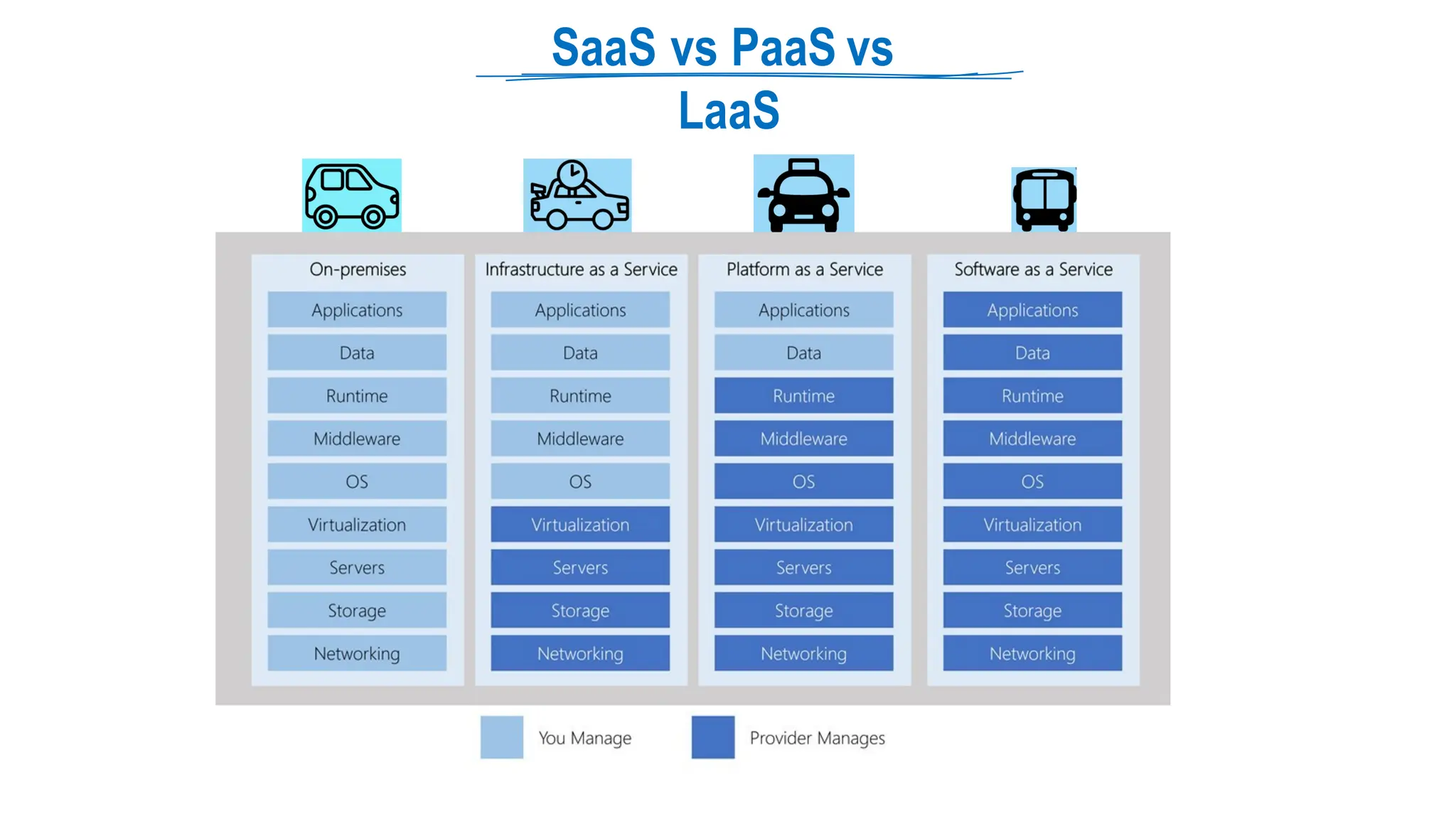
  • 346.
    How Application Insights works SmallInstrument Package (SDK) ⮚ Install a small instrumentation package (SDK) in your application or enable Application Insights using the Application Insights Agent when supported. ⮚ Source: Microsoft The instrumentation monitors your app and directs the telemetry data to an Azure Application Insights
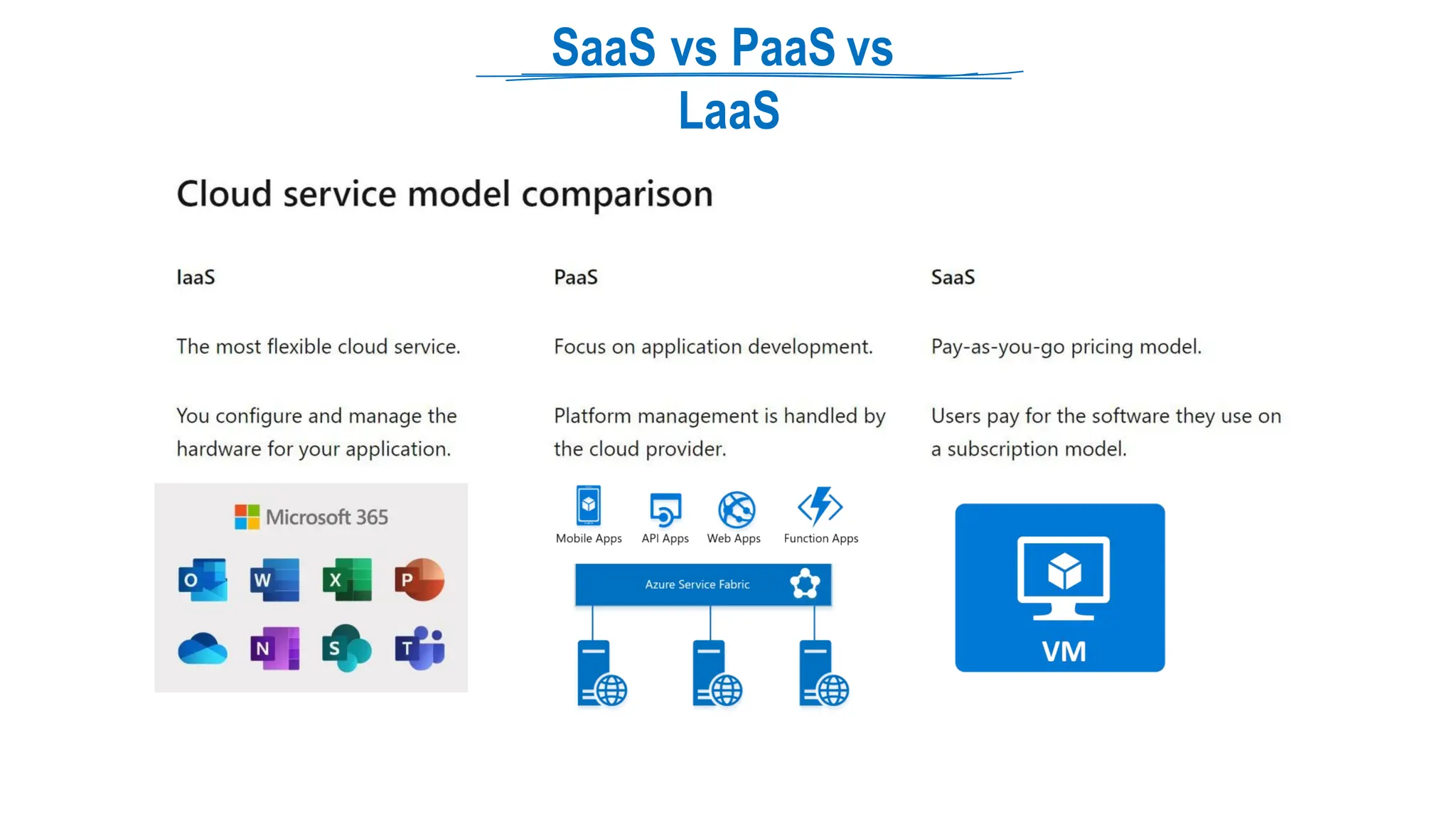
  • 347.
    What Application Insights monitors? ⮚Request rates, response times, and failure rates - Find out which pages are most popular, at what times of day, and where your users are. See which pages perform best. If your response times and failure rates go high when there are more requests, then perhaps you have a resourcing problem. ⮚ Dependency rates, response times, and failure rates - Find out whether external services are slowing you down. ⮚ Exceptions - Analyze the aggregated statistics, or pick specific instances and drill into the stack trace and related requests. Both server and browser exceptions are reported. ⮚ Page views and load performance - reported by your users' browsers. ⮚ AJAX calls from web pages - rates, response times, and failure rates. ⮚ User and session counts. ⮚ Performance counters from your Windows or Linux server machines, such as CPU, memory, and network usage. ⮚ Host diagnostics from Docker or Azure. ⮚ Diagnostic trace logs from your app - so that you can correlate trace events with requests. ⮚ Custom events and metrics that you write yourself in the client or server code, to track business events such as items sold or games won. Source: Microsoft
  • 348.
    Backupvs Disaster Recovery ⮚ Source: Microsoft ⮚ ⮚Disaster Recovery: After a catastrophic failure, you must run your sites, servers, or applications in Azure secondary datacenter. ⮚ Azure Site Recovery: replicates the data in almost real time and allows for a failover. Backup: When your data is corrupted or lost and you need to restore it to original copy. ⮚ Azure Backup Service: maintain copies of stateful data that allow you to go back in time. ⮚ Granular data protection and restoration, you can restore only few corrupted files. RTO vs RPO ⮚ Recovery Time Objective (RTO): The time it takes to complete a recovery or restore. ⮚ Recovery Point Objective (RPO): The amount of acceptable data loss if a recovery is needed.
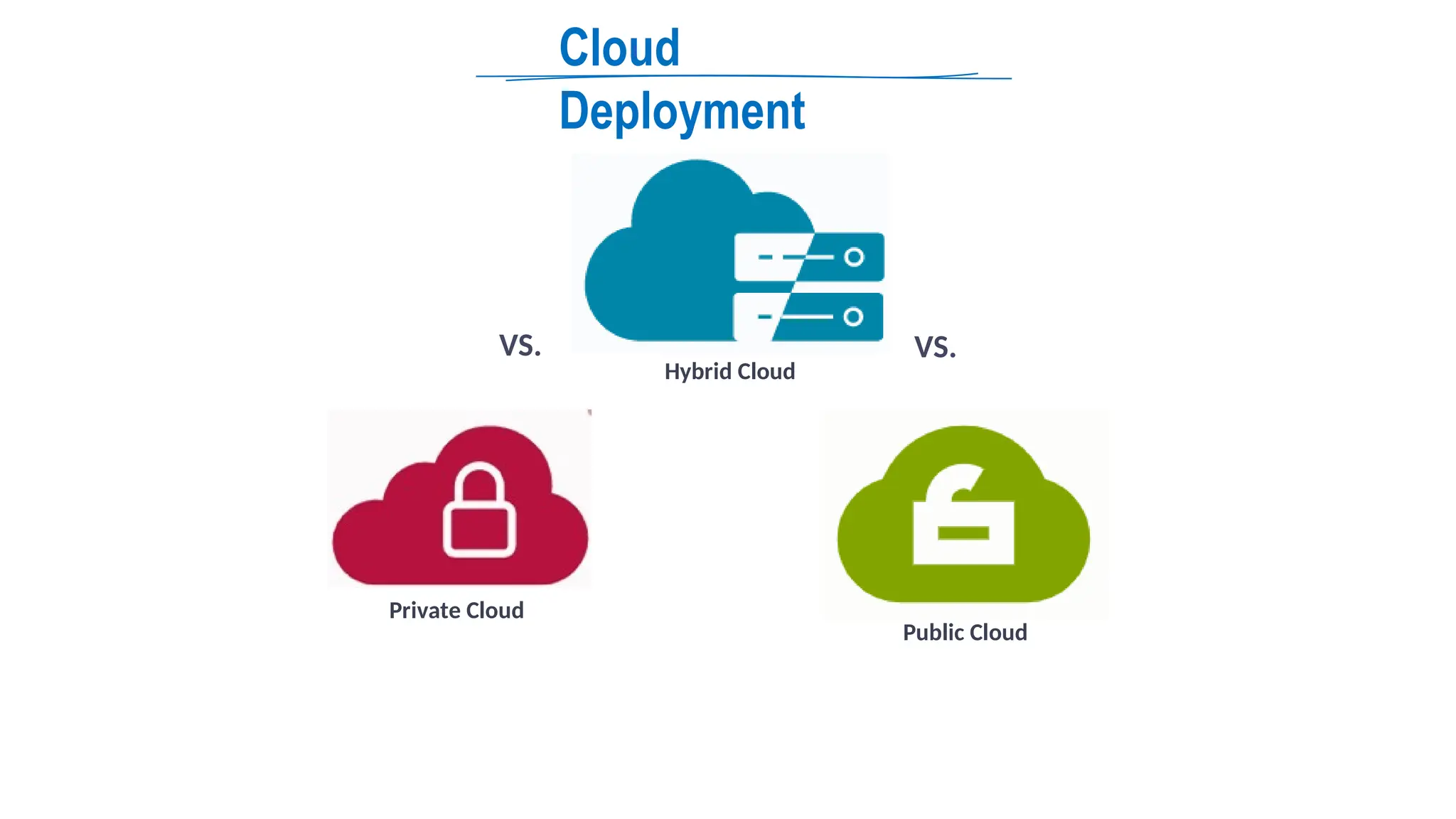
  • 349.
    Azure Backup Service ⮚ Allowsyou to back up Azure virtual machines, on-premises servers, Azure file shares, and SQL Server or SAP HANA running on Azure VMs, and other application workloads. ⮚ Azure Backup uses a Recovery Services vault to manage and store the backup data. ⮚ Recovery Services vault is a storage object in Azure Provide a central place for organizing and managing your backup continuity and disaster recovery strategy Use for both Azure Backup and Azure Site Recovery. Handles management tasks like reporting, site replication, backup, and restore. Can be used for on-premises workloads in addition to workloads in AWS ⮚ Designed for backup and recovery of Azure Resources. ⮚ ⮚ ⮚ ⮚ ⮚ Recovery service vault and source VM should be in same location Source: Microsoft
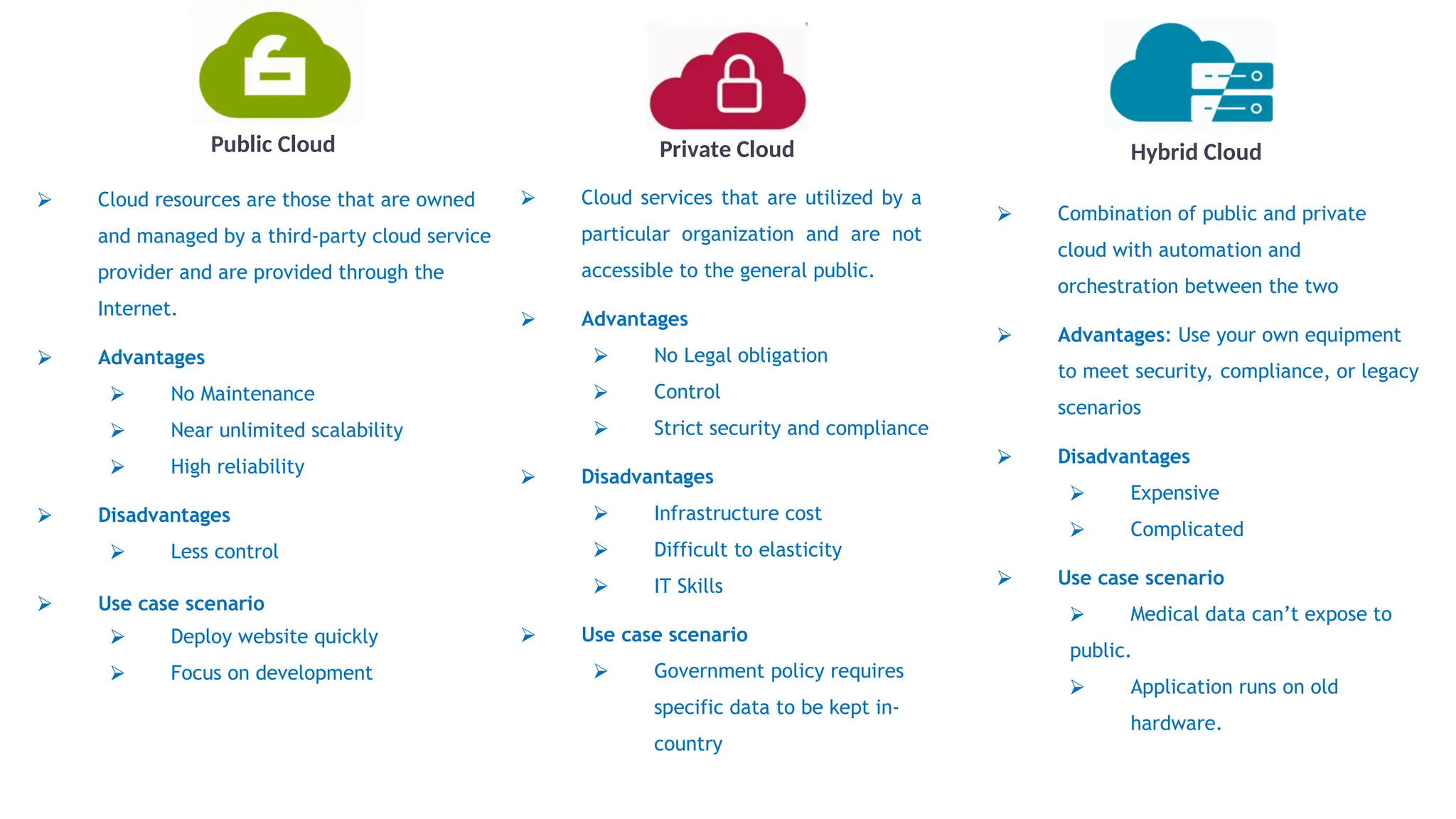
  • 350.
  • 351.
  • 352.
  • 353.
    Azure Backup features ⮚ Zero-infrastructurebackup: Azure Backup eliminates the need to deploy and manage overhead of backup infrastructure or storage. ⮚ Long-term retention ⮚ Security: Azure Backup protects data in transit and at rest. ⮚ Azure role-based access control: RBAC lets you segregate team duties and give users only the access they need. ⮚ Encryption of backups: Microsoft-managed keys encrypt backup data. You can also encrypt backed-up data using customer-managed keys in Azure Key Vault. ⮚ Soft delete: Soft delete keeps backup data for 14 days after deleting an item. This protects backups from accidental or malicious deletion , preventing data loss. ⮚ High availability: Azure Backup offers three types of replication: ⮚ Locally redundant storage (LRS): Provides basic protection against server rack and drive failures. Non-critical situations are best. ⮚ Geo-redundant storage (GRS): Provides failover in a secondary region. It's great for backups. ⮚ Zone-redundant storage (ZRS): Provides datacenter-level failure protection. High availability is recommended. ⮚ Centralized monitoring and management: Azure Backup's Recovery Services vault includes built-in monitoring and alerting. These capabilities are available without additional management infrastructure. Source: Microsoft
  • 354.
    Backup Methods ⮚ Azure VMbackup ⮚ Azure Backup service directly backs up Azure virtual machines (VMs). ⮚ Azure Backup adds a backup extension (VMSnapshot extension) to the Azure VM agent. ⮚ This method backs up the entire VM. If you want to back up specific files and folders on the VM, install and use the MARS age nt alongside the extension. ⮚ MARS (Microsoft Azure Recovery Services) ⮚ You can back up specific files and folders ⮚ You can backup both Azure VM or on-premises Windows Server machines by running the MARS agent. ⮚ DPM/MABS (Data Protection Manager/Azure Backup Server) ⮚ On-premises machines can be backed up to DPM or Azure Backup Server (MABS). The backup server can be backed up to Azure Recovery Services. ⮚ You can back up Azure VMs to the MABS that's running in Azure, and you can then back up the MABS to a Recovery Services vault. Source: Microsoft
  • 355.
    MARS agent ⮚ The MARSagent uses VSS to take a point-in-time snapshot of the volumes selected for backup. ⮚ The MARS agent captures the snapshot using Windows system write. ⮚ The agent doesn't capture app-consistent snapshots because it doesn't use application VSS writers. ⮚ Backup scenarios ⮚ Files and Folders: Selectively protect Windows files and folders. ⮚ Volume Level: Protect an entire Windows volume of your machine. ⮚ System Level: Protect an entire Windows system state Source: Microsoft
  • 356.
    MARS (Microsoft AzureRecove r y Services) agent Source: Microsoft
  • 357.
    Azure VM backup options ⮚Azure VM backup by using VM extension ⮚ Directly backup Azure VMs. Azure Backup adds a backup extension to the Azure VM agent. This extension backs up VMs. ⮚ This method backs up the entire VM. If you want to back up specific files and folders on the VM, install and use the MARS age nt alongside the extension. ⮚ Azure VM backup by using MARS agent ⮚ You can back up specific files and folders on the Azure VM or on-premises Windows Server machines by running the MARS agent. ⮚ Azure VM with DPM/MABS ⮚ On-premises machines can be backed up to DPM or Azure Backup Server (MABS). The backup server can be backed up to Azure Recovery Services. ⮚ You can back up Azure VMs to the MABS that's running in Azure, and you can then back up the MABS to a Recovery Services vault. Source: Microsoft
  • 358.
    Back up toDPM/ MABS ⮚ You install the DPM or MABS protection agent on machines to protect. You then add the machines to a DPM protection group. ⮚ DPM/MABS protects backups, shares, files, and folders. You can also protect bare metal and specific apps with app-aware backup. ⮚ The DPM/MABS disks are backed up to the vault by the MARS agent that's running on the DPM/MABS server. Source: Microsoft
  • 359.
    Backup Report ⮚ Help youget rich insights on your backups across your entire backup estate. ⮚ Allocating and forecasting of cloud storage consumed. ⮚ Auditing of backups and restores. ⮚ Azure Backup leverages Azure Monitor logs and Azure workbooks for reporting. ⮚ Supported for Azure VMs, SQL in Azure VMs, SAP HANA in Azure VMs, Microsoft Azure Recovery Services (MARS) agent, Microsoft Azure Backup Server (MABS), and System Center Data Protection Manager (DPM). ⮚ Can be viewed across all backup items, vaults, subscriptions, and regions as long as their data is being sent to a Log Analytics workspace that the user has access to. Source: Microsoft
  • 360.
  • 361.
  • 362.
  • 363.
  • 364.
  • 365.
    Azure Site Recovery Source: MicrosoftDocs ⮚ Ensure business continuity and disaster recovery (BCDR) ⮚ Site Recovery replicates workloads running on physical and virtual machines (VMs) from a primary site to a secondary location. ⮚ ⮚ When an outage occurs at your primary site, you fail over to a secondary location, and access apps from there. ⮚ After the primary location is running again, you can fail back to it. Helps ensure business continuity by keeping business apps and workloads running during outages. ⮚ You can replicate: VMware VMs to Azure ⮚ Azure VMs from a primary region to a secondary region. ⮚ ⮚ On-premises VMs and physical servers to Azure, or to a secondary on-premises datacenter. Planned failovers for expected outages with zero-data loss. ⮚ Replication frequency as low as 30 seconds for Hyper-V ⮚ ⮚ Unplanned failovers with minimal data loss, depending on replication frequency VNet Replication VNet West US East US
  • 366.
    EnableReplication Process (ASR) ⮚ Targetresource group may be in any region except the source VMs’. ⮚ The Site Recovery Mobility service extension is automatically installed on the VM. ⮚ The extension registers the VM with Site Recovery. ⮚ Continuous replication begins for the VM. Disk writes are immediately transferred to the cache storage account in the source location. ⮚ Site Recovery processes the data in the cache, and sends it to the target storage account, or to the replica managed disks. ⮚ After the data is processed, crash-consistent recovery points are generated every five minutes. ⮚ App-consistent recovery points are generated according to the setting specified in the replication policy. Source: Microsoft
  • 367.
    Consistency Crash-consistent ⮚ Captures datathat was on the disk when the snapshot was taken. It doesn't include anything in memory. ⮚ Doesn't guarantee data consistency for the operating system, or for apps on the VM. App-consistent  App-consistent recovery points are created from app-consistent snapshots.  contain all the information in a crash-consistent snapshot, plus all the data in memory and transactions in progress. Source: Microsoft
  • 368.
    Failover process ⮚ When youinitiate a failover, the VMs are created in the target resource group, target virtual network, target subnet, and in the target availability set. ⮚ During a failover, you can use any recovery point. Source: Microsoft
  • 369.
    Azure Portal One stopshop – Single portal, single login for all your Azure assets
  • 370.
    Azure Portal ⮚ Web-based userinterface to almost all Azure features. ⮚ See all your services, create new ones, configure them, and see reports ⮚ Single login for all user assets When Portal is preferred? ⮚ Occasionally management and administrative tasks can be performed via the Azure portal. ⮚ A visual interface for reporting makes sense if you're just learning Azure and only need to set up and manage resources occasionally. When Portal is not preferred? ⮚ The routine setup, teardown, and maintenance of a single resource or multiple connected resources. ⮚ Use scripts - Powershell or CLI
  • 371.
    PowerShell ⮚ PowerShell canbe used to manage tasks from the command line and automate tasks across multiple platforms. ⮚ Cross-platform task automation scripting language ⮚ Initially designed for system administrators ⮚ Can perform every possible management task ⮚ Windows PowerShell, which was previously a Windows-only component, became open-source and cross-platform on August 18, 2016, with the release of PowerShell Core. ⮚ PowerShell accepts and returns .NET objects. (Unlike most shells that only accept and return text) ⮚ Extensible through modules ⮚ Deploy and Manage almost any technology: ⮚ Runs on Windows, Linux, and macOS ⮚ Microsoft: Azure, Windows, Exchange, SQL etc. ⮚ Third-party: AWS, VMWare, Google Cloud etc. ⮚ Exam Perspective: ⮚ You don’t have to write scripts ⮚ Code will be given either in question or options, you have to select the right one
  • 372.
    Cmdlet (PowerShell COmmand) ⮚ Commands forPowerShell are known as cmdlets (pronounced command-lets) ⮚ Cmdlets can be executed independently or combined into a script file ⮚ PowerShell uses a Verb-Noun name pair to name cmdlets. ⮚ Verb identifies the action that the cmdlet performs ⮚ Noun identifies the resource on which the cmdlet performs its action ⮚ Examples: ⮚ Get-Command -> retrieves a list of all commands installed on your machine. ⮚ Set-Date ⮚ Sort-Object ⮚ Start-Process ⮚ Stop-AzureVM ⮚ Write-Error ⮚ Get-Verb command to list all verbs ⮚ Cmdlets are collected into PowerShell modules ⮚ Modules can be loaded on demand ⮚ Get-Module –ListAvailable command to list all modules
  • 373.
    Azure PowerShell ⮚ Azure PowerShellis a set of cmdlets for managing Azure resources directly from PowerShell. ⮚ Azure PowerShell is available on Linux, macOS or Windows platforms. ⮚ Common Scenarios: Day to day operations: ⮚ Automation of repetitive tasks ⮚ Scheduling ⮚ Deployments ⮚ Routine setup, teardown, and maintenance of a single resource or multiple connected resources. ⮚ Two Module: ⮚ AzureRM (Azure Resource Management - old) ⮚ Az -> (Renamed, new, recommended) ⮚ Az PowerShell module is a wrapper module ⮚ Az.Network for Azure networking services ⮚ Az.AKS for Azure Kubernetes Service.
  • 374.
    PowerShell vs CLI PowerShell vsCLI ⮚Primary difference is the syntax ⮚Windows administrators can prefer PowerShell. ⮚Linux administrators can prefer Azure CLI, similar to Bash scripting. PowerShell CLI
  • 375.
    PowerShell vs CLI CLI ⮚ azvm create ⮚ az vm list ⮚ az resize ⮚ az sql db copy ⮚ az sql db create ⮚ az sql db delete ⮚ az network vnet create ⮚ az network vnet delete ⮚ az network vnet list ⮚ az network vnet peering create ⮚ az network vnet peering delete ⮚ az network vnet peering list PowerShell ⮚ Get-AzVM ⮚ New-AzVM ⮚ Remove-AzVM ⮚ Get-AzSqlDatabase ⮚ New-AzSqlDatabase ⮚ Remove-AzSqlServer ⮚ Get-AzVirtualNetwork ⮚ New-AzVirtualNetwork ⮚ Remove-AzVirtualNetwork ⮚ Set-AzVirtualNetworkPeering ⮚ Get-AzVirtualNetworkPeering ⮚ Remove-AzVirtualNetworkPeering
  • 376.
    Command-Line Interface (CLI) ⮚ AzureCommand-Line Interface (CLI) is a cross-platform command-line tool to manage Azure resources. ⮚ You can install the Azure CLI locally on Linux, Mac, or Windows computers. ⮚ Or use from Azure Cloud Shell Or run from inside a Docker container.
  • 377.
    Azure PowerShell command-line toolsthat enable you to create and manage Azure resources.
  • 378.
    PowerShell vs CLIvs Cloud Shell ⮚ PowerShell can execute commands called Cmdlets ⮚ Commands call the Azure Rest API ⮚ Can perform every possible management task in Azure ⮚ ⮚ Cmdlets can be executed independently or combined into a script file ⮚ Script makes the process repeatable and automatable The routine setup, teardown, and maintenance of a single resource or multiple connected resources. ⮚ Available for Windows, Linux, and Mac ⮚ PowerShell can work with other platform as well PowerShell vs CLI ⮚ Primary difference is the syntax ⮚ Windows administrators can prefer PowerShell. ⮚ Linux administrators can prefer Azure CLI, similar to Bash scripting. PowerShell CLI
  • 379.
    Azure Cloud Shell ⮚ Aninteractive shell that runs in the browser for free (Access from Azure Portal) ⮚ Pre-installed and configured Azure tools like interpreters or modules. ⮚ Language support for Node.js, .Net and python ⮚ Supports both PowerShell and CLI (bash) ⮚ Dedicated storage to persist between sessions ⮚ Integrated file editor
  • 380.
    When PowerShell orCLI are not preferred? ⮚ The deployment of an entire infrastructure, which might contain dozens or hundreds of resources, from imperative code. ⮚ A validation step ensures that all resources can be created in the proper order based on dependencies, in parallel, and idempotent. ⮚ ARM template – Azure Resource Manager
  • 381.
    Azure Resource Manager (ARM) Deploymentand management service for Azure
  • 382.
  • 383.
    Azure Resource Manager ⮚ Deploymentand management service for Azure ⮚ All Azure resource activities are routed via ARM. ⮚ Describe the resources in a declarative JSON format ⮚ ARM template is verified before any code is executed to ensure that the resources will be created and connected correctly ⮚ Automatic Rollback in case of failure ⮚ The template then orchestrates the creation of those resources in parallel ⮚ Templates can even execute PowerShell and Bash scripts before or after the resource has been set up ⮚ Creates all dependencies in the correct order ⮚ Save previous scripts for version control ⮚ ARM templates define your application's infrastructure requirements for a repeatable deployment that is done in a consistent manner ⮚ Why not PowerShell or CLI? ⮚ No validation step in these tools ⮚ If a script encounters an error, the dependency resources can't be rolled back easily ⮚ Deployments happen serially ⮚ You have to figure out dependencies Source: Microsoft