
基于AWS的DevOps实践指南基于AWS的DevOps实践指南
亚马逊高级解决方案架构师,区域主管
王毅
亚马逊高级解决方案架构师,区域主管
王毅
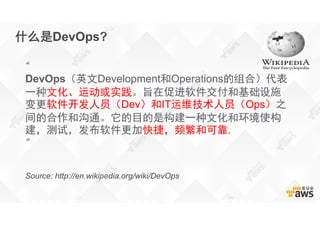
什么是DevOps?
“
DevOps(英文Development和Operations的组合)代表
一种文化、运动或实践。旨在促进软件交付和基础设施
变更软件开发人员(Dev)和IT运维技术人员(Ops)之
间的合作和沟通。它的目的是构建一种文化和环境使构
建,测试,发布软件更加快捷,频繁和可靠.
”
Source: http://en.wikipedia.org/wiki/DevOps
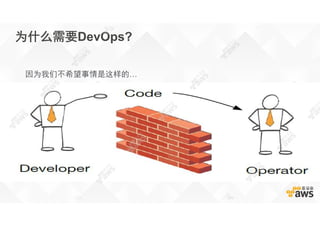
为什么需要DevOps?
因为我们不希望事情是这样的…
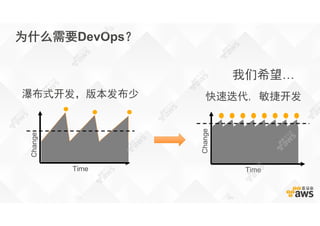
为什么需要DevOps?
快速迭代, 敏捷开发
Time
Change
瀑布式开发,版本发布少
Time
Change
我们希望…
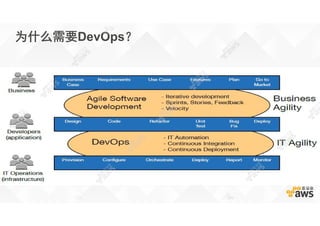
为什么需要DevOps?
怎么实现DevOps?怎么实现DevOps?
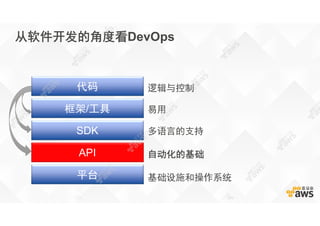
从软件开发的角度看DevOps
逻辑与控制
易用
多语言的支持
自动化的基础
基础设施和操作系统平台
API
SDK
框架/工具
代码
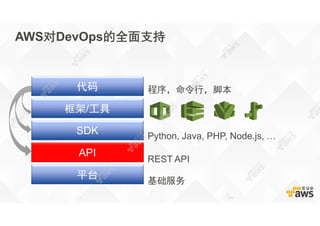
AWS对DevOps的全面支持
程序,命令行,脚本
Python, Java, PHP, Node.js, …
REST API
基础服务
平台
API
SDK
框架/工具
代码
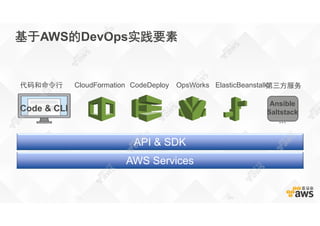
基于AWS的DevOps实践要素
API & SDK
Code & CLI
AWS Services
代码和命令行 CloudFormation CodeDeploy OpsWorks ElasticBeanstalk第三方服务
Ansible
Saltstack
…
Code & CLI
代码和命令行
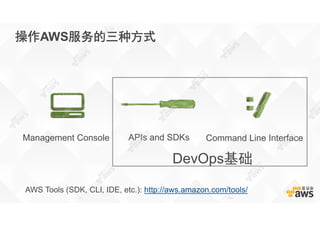
操作AWS服务的三种方式
APIs and SDKsManagement Console Command Line Interface
DevOps基础
AWS Tools (SDK, CLI, IDE, etc.): http://aws.amazon.com/tools/
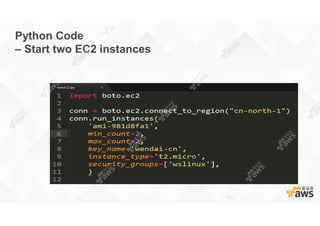
Python Code
– Start two EC2 instances
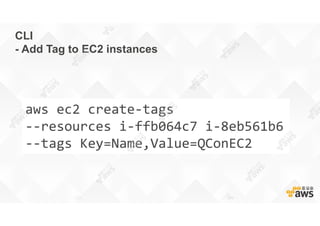
CLI
- Add Tag to EC2 instances
aws ec2 create-tags
--resources i-ffb064c7 i-8eb561b6
--tags Key=Name,Value=QConEC2
大规模基础架构的
DevOps
需要框架和工具
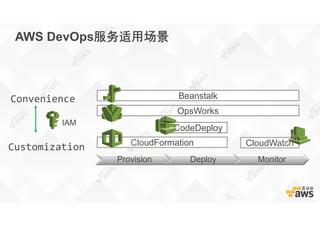
AWS DevOps服务适用场景
Provision Deploy Monitor
Customization
Convenience
CloudFormation
CodeDeploy
CloudWatch
Beanstalk
OpsWorks
IAM
CloudFormation
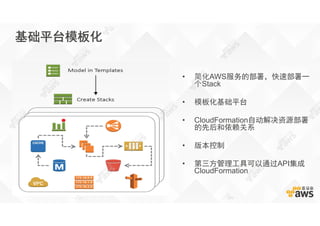
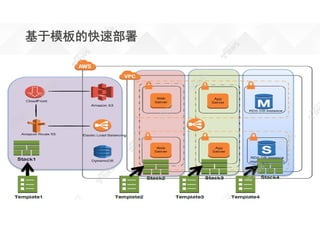
基础平台模板化
• 简化AWS服务的部署,快速部署一
个Stack
• 模板化基础平台
• CloudFormation自动解决资源部署
的先后和依赖关系
• 版本控制
• 第三方管理工具可以通过API集成
CloudFormation
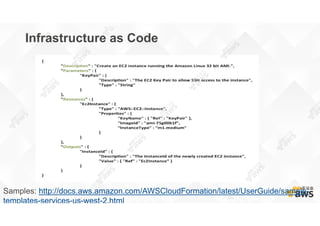
Infrastructure as Code
Samples: http://docs.aws.amazon.com/AWSCloudFormation/latest/UserGuide/sample-
templates-services-us-west-2.html
基于模板的快速部署
CodeDeploy
Agent Agent
Agent Agent
Agent
Agent
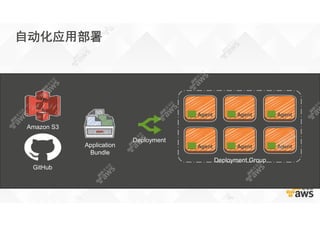
Deployment Group
Deployment
Amazon S3
GitHub
Application
Bundle
自动化应用部署
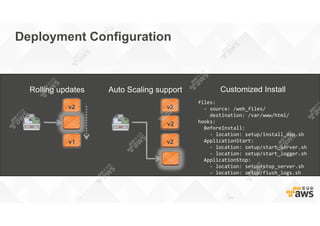
Deployment Configuration
Rolling updates
v2
v1
Auto Scaling support
v2
v2
v2
Customized Install
files:
- source: /web_files/
destination: /var/www/html/
hooks:
BeforeInstall:
- location: setup/install_dep.sh
ApplicationStart:
- location: setup/start_server.sh
- location: setup/start_logger.sh
ApplicationStop:
- location: setup/stop_server.sh
- location: setup/flush_logs.sh
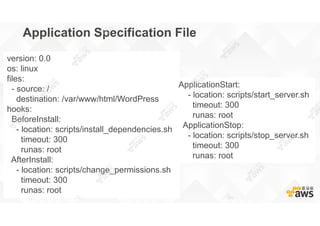
Application Specification File
version: 0.0
os: linux
files:
- source: /
destination: /var/www/html/WordPress
hooks:
BeforeInstall:
- location: scripts/install_dependencies.sh
timeout: 300
runas: root
AfterInstall:
- location: scripts/change_permissions.sh
timeout: 300
runas: root
ApplicationStart:
- location: scripts/start_server.sh
timeout: 300
runas: root
ApplicationStop:
- location: scripts/stop_server.sh
timeout: 300
runas: root
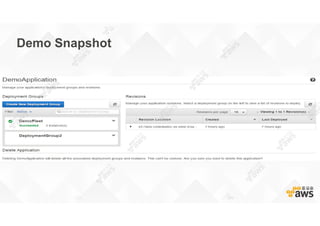
Demo Snapshot
OpsWorks
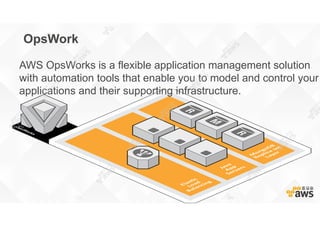
OpsWork
AWS OpsWorks is a flexible application management solution
with automation tools that enable you to model and control your
applications and their supporting infrastructure.
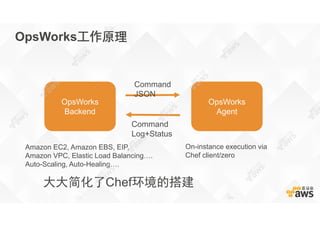
OpsWorks工作原理
OpsWorks
Backend
OpsWorks
Agent
Amazon EC2, Amazon EBS, EIP,
Amazon VPC, Elastic Load Balancing….
Auto-Scaling, Auto-Healing….
On-instance execution via
Chef client/zero
Command
JSON
Command
Log+Status
大大简化了Chef环境的搭建
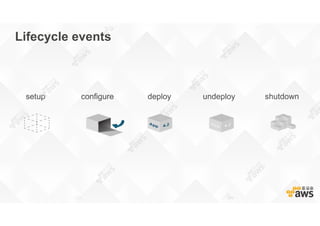
Lifecycle events
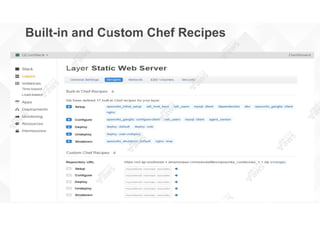
Built-in and Custom Chef Recipes
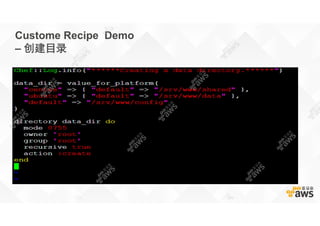
Custome Recipe Demo
– 创建目录
ElasticBeanstalk
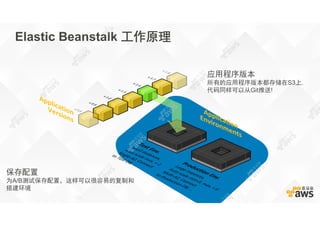
保存配置
为A/B测试保存配置,这样可以很容易的复制和
搭建环境
应用程序版本
所有的应用程序版本都存储在S3上.
代码同样可以从Git推送!
Elastic Beanstalk 工作原理
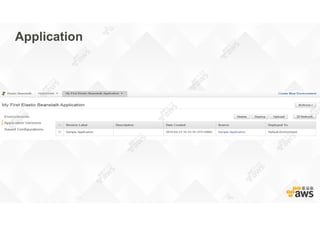
Application
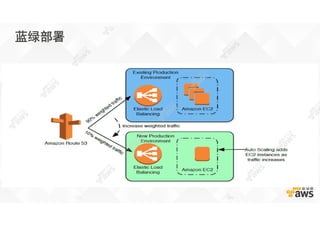
蓝绿部署
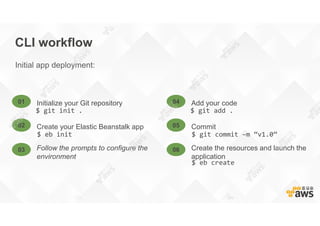
CLI workflow
Initial app deployment:
$ git init . $ git add .
Initialize your Git repository01 Add your code04
$ eb init $ git commit –m “v1.0”
Create your Elastic Beanstalk app02 Commit05
Follow the prompts to configure the
environment
03 Create the resources and launch the
application
06
$ eb create
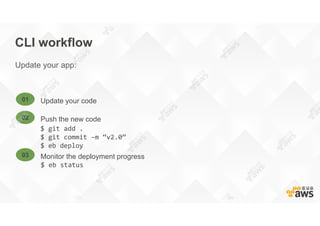
CLI workflow
Update your app:
Update your code01
$ git add .
$ git commit –m “v2.0”
$ eb deploy
Push the new code02
Monitor the deployment progress03
$ eb status
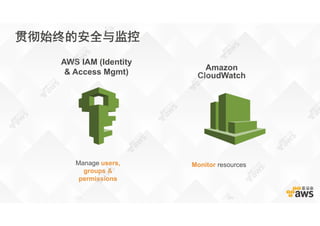
Amazon
CloudWatch
AWS IAM (Identity
& Access Mgmt)
Monitor resourcesManage users,
groups &
permissions
贯彻始终的安全与监控
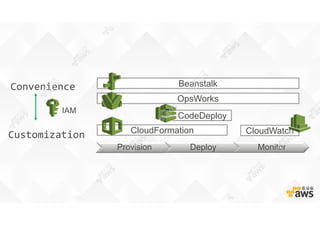
Provision Deploy Monitor
Customization
Convenience
CloudFormation
CodeDeploy
CloudWatch
Beanstalk
OpsWorks
IAM
基于Aws的dev ops实践指南 王毅

基于Aws的dev ops实践指南 王毅