AWS KMS
Agenda
• Service Introduction
• Service Enablement
• Design Patterns
• Access Management
• Best Practices
2
Akesh Patil
Sr. Cloud Architect
Digital & Cloud Consulting
AWS Community Builder | AWS APN
Ambassador
Speaker
AWS KMS
4
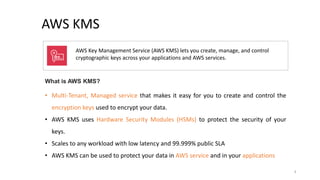
AWS Key Management Service (AWS KMS) lets you create, manage, and control
cryptographic keys across your applications and AWS services.
What is AWS KMS?
• Multi-Tenant, Managed service that makes it easy for you to create and control the
encryption keys used to encrypt your data.
• AWS KMS uses Hardware Security Modules (HSMs) to protect the security of your
keys.
• Scales to any workload with low latency and 99.999% public SLA
• AWS KMS can be used to protect your data in AWS service and in your applications
5
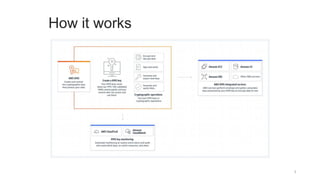
How it works
6
KMS Key Hierarchy
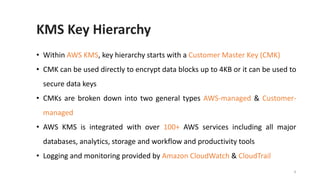
• Within AWS KMS, key hierarchy starts with a Customer Master Key (CMK)
• CMK can be used directly to encrypt data blocks up to 4KB or it can be used to
secure data keys
• CMKs are broken down into two general types AWS-managed & Customer-
managed
• AWS KMS is integrated with over 100+ AWS services including all major
databases, analytics, storage and workflow and productivity tools
• Logging and monitoring provided by Amazon CloudWatch & CloudTrail
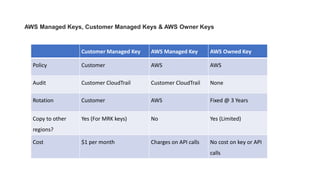
AWS Managed Keys, Customer Managed Keys & AWS Owner Keys
Customer Managed Key AWS Managed Key AWS Owned Key
Policy Customer AWS AWS
Audit Customer CloudTrail Customer CloudTrail None
Rotation Customer AWS Fixed @ 3 Years
Copy to other
regions?
Yes (For MRK keys) No Yes (Limited)
Cost $1 per month Charges on API calls No cost on key or API
calls
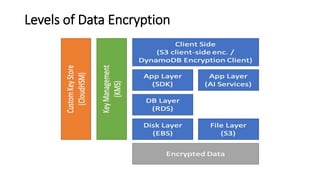
Levels of Data Encryption
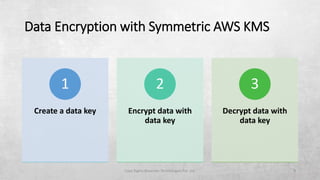
Data Encryption with Symmetric AWS KMS
Copy Rights Blazeclan Technologies Pvt. Ltd. 9
Create a data key
1
Encrypt data with
data key
2
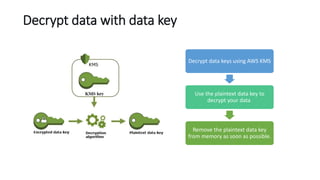
Decrypt data with
data key
3
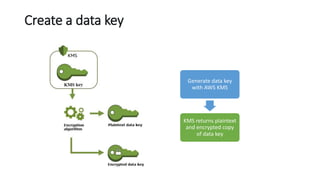
Create a data key
Generate data key
with AWS KMS
KMS returns plaintext
and encrypted copy
of data key
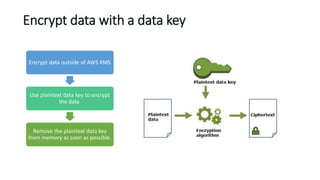
Encrypt data with a data key
Encrypt data outside of AWS KMS
Use plaintext data key to encrypt
the data
Remove the plaintext data key
from memory as soon as possible.
Decrypt data with data key
Decrypt data keys using AWS KMS
Use the plaintext data key to
decrypt your data
Remove the plaintext data key
from memory as soon as possible.
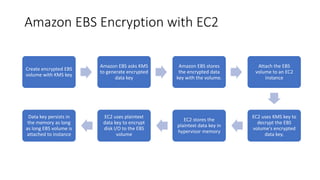
Amazon EBS Encryption with EC2
Create encrypted EBS
volume with KMS key
Amazon EBS asks KMS
to generate encrypted
data key
Amazon EBS stores
the encrypted data
key with the volume.
Attach the EBS
volume to an EC2
instance
EC2 uses KMS key to
decrypt the EBS
volume's encrypted
data key.
EC2 stores the
plaintext data key in
hypervisor memory
EC2 uses plaintext
data key to encrypt
disk I/O to the EBS
volume
Data key persists in
the memory as long
as long EBS volume is
attached to instance
How unusable KMS keys affect data keys?
KMS keys can become unusable for a variety of reasons
• Disabling KMS Key
• Scheduling KMS Key deletion
• Deleting the key material
• Disconnecting the AWS CloudHSM key store
• Disconnecting the external key store
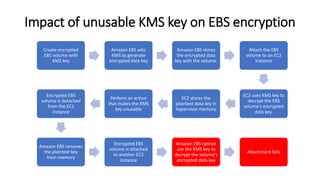
Impact of unusable KMS key on EBS encryption
Create encrypted
EBS volume with
KMS key
Amazon EBS asks
KMS to generate
encrypted data key
Amazon EBS stores
the encrypted data
key with the volume.
Attach the EBS
volume to an EC2
instance
EC2 uses KMS key to
decrypt the EBS
volume's encrypted
data key.
EC2 stores the
plaintext data key in
hypervisor memory
Perform an action
that makes the KMS
key unusable
Encrypted EBS
volume is detached
from the EC2
instance
Amazon EBS removes
the plaintext key
from memory
Encrypted EBS
volume is attached
to another EC2
instance
Amazon EBS cannot
use the KMS key to
decrypt the volume's
encrypted data key
Attachment fails
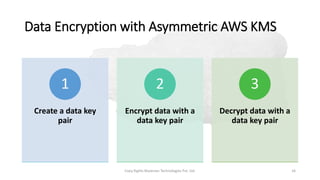
Data Encryption with Asymmetric AWS KMS
Copy Rights Blazeclan Technologies Pvt. Ltd. 16
Create a data key
pair
1
Encrypt data with a
data key pair
2
Decrypt data with a
data key pair
3
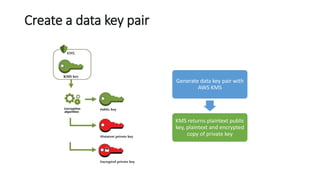
Create a data key pair
Generate data key pair with
AWS KMS
KMS returns plaintext public
key, plaintext and encrypted
copy of private key
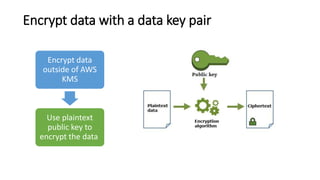
Encrypt data with a data key pair
Encrypt data
outside of AWS
KMS
Use plaintext
public key to
encrypt the data
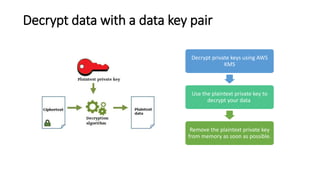
Decrypt data with a data key pair
Decrypt private keys using AWS
KMS
Use the plaintext private key to
decrypt your data
Remove the plaintext private key
from memory as soon as possible.
AWS KMS : Design Patterns
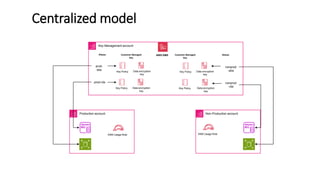
Centralized model
Key Management account
Key Policy Data encryption
key
Key Policy Data encryption
key
Customer Managed
Key
Aliases
Key Policy Data encryption
key
Key Policy Data encryption
key
Customer Managed
Key
Aliases
prod-
ebs
prod-rds
nonprod
-ebs
nonprod
-rds
AWS KMS
Production account Non-Production account
KMS Usage Role KMS Usage Role
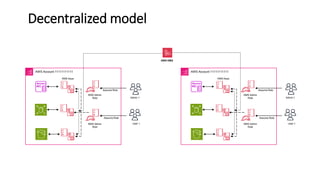
Decentralized model
AWS Account 11111111111
KMS Admin
Role
KMS Keys
KMS Admin
Role
Admin 1
User 1
Assume Role
Assume Role
AWS Account 11111111111
KMS Admin
Role
KMS Keys
AWS KMS
KMS Admin
Role
Admin 1
User 1
Assume Role
Assume Role
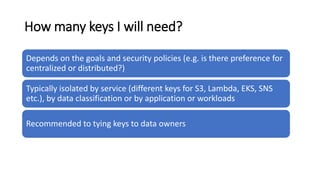
How many keys I will need?
Depends on the goals and security policies (e.g. is there preference for
centralized or distributed?)
Typically isolated by service (different keys for S3, Lambda, EKS, SNS
etc.), by data classification or by application or workloads
Recommended to tying keys to data owners
AWS KMS : Access Management
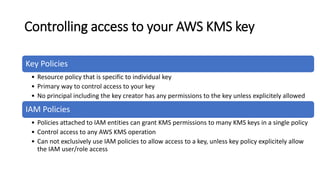
Controlling access to your AWS KMS key
Key Policies
• Resource policy that is specific to individual key
• Primary way to control access to your key
• No principal including the key creator has any permissions to the key unless explicitely allowed
IAM Policies
• Policies attached to IAM entities can grant KMS permissions to many KMS keys in a single policy
• Control access to any AWS KMS operation
• Can not exclusively use IAM policies to allow access to a key, unless key policy explicitely allow
the IAM user/role access
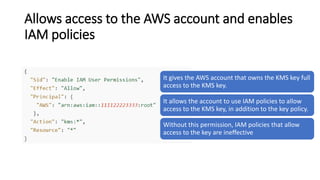
Allows access to the AWS account and enables
IAM policies
It gives the AWS account that owns the KMS key full
access to the KMS key.
It allows the account to use IAM policies to allow
access to the KMS key, in addition to the key policy.
Without this permission, IAM policies that allow
access to the key are ineffective
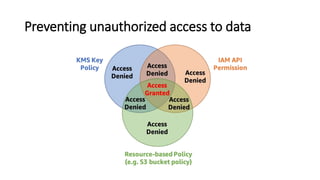
Preventing unauthorized access to data
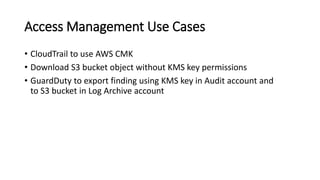
Access Management Use Cases
• CloudTrail to use AWS CMK
• Download S3 bucket object without KMS key permissions
• GuardDuty to export finding using KMS key in Audit account and
to S3 bucket in Log Archive account
AWS KMS : Monitoring with CloudWatch
Amazon CloudWatch can be used to alert on important events, such as the
following ones.
• The imported key material in a KMS key is nearing its expiration date.
• A KMS key that is pending deletion is still being used.
• The key material in a KMS key was automatically rotated.
• A KMS key was deleted.
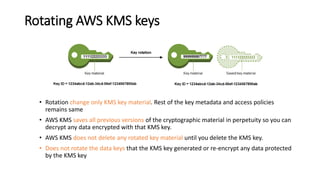
Rotating AWS KMS keys
• Rotation change only KMS key material. Rest of the key metadata and access policies
remains same
• AWS KMS saves all previous versions of the cryptographic material in perpetuity so you can
decrypt any data encrypted with that KMS key.
• AWS KMS does not delete any rotated key material until you delete the KMS key.
• Does not rotate the data keys that the KMS key generated or re-encrypt any data protected
by the KMS key
KMS Multi-Region Keys
• Multi-region keys allow key replicas to be created in other AWS
Regions
• Useful when ciphertext in AWS Region A needs to be decrypted in
AWS Region B
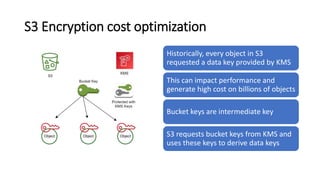
S3 Encryption cost optimization
Historically, every object in S3
requested a data key provided by KMS
This can impact performance and
generate high cost on billions of objects
Bucket keys are intermediate key
S3 requests bucket keys from KMS and
uses these keys to derive data keys
Thank you
36

Introduction to AWS KMS

  • 1.
  • 2.
    Agenda • Service Introduction •Service Enablement • Design Patterns • Access Management • Best Practices 2
  • 3.
    Akesh Patil Sr. CloudArchitect Digital & Cloud Consulting AWS Community Builder | AWS APN Ambassador Speaker
  • 4.
    AWS KMS 4 AWS KeyManagement Service (AWS KMS) lets you create, manage, and control cryptographic keys across your applications and AWS services. What is AWS KMS? • Multi-Tenant, Managed service that makes it easy for you to create and control the encryption keys used to encrypt your data. • AWS KMS uses Hardware Security Modules (HSMs) to protect the security of your keys. • Scales to any workload with low latency and 99.999% public SLA • AWS KMS can be used to protect your data in AWS service and in your applications
  • 5.
  • 6.
    6 KMS Key Hierarchy •Within AWS KMS, key hierarchy starts with a Customer Master Key (CMK) • CMK can be used directly to encrypt data blocks up to 4KB or it can be used to secure data keys • CMKs are broken down into two general types AWS-managed & Customer- managed • AWS KMS is integrated with over 100+ AWS services including all major databases, analytics, storage and workflow and productivity tools • Logging and monitoring provided by Amazon CloudWatch & CloudTrail
  • 7.
    AWS Managed Keys,Customer Managed Keys & AWS Owner Keys Customer Managed Key AWS Managed Key AWS Owned Key Policy Customer AWS AWS Audit Customer CloudTrail Customer CloudTrail None Rotation Customer AWS Fixed @ 3 Years Copy to other regions? Yes (For MRK keys) No Yes (Limited) Cost $1 per month Charges on API calls No cost on key or API calls
  • 8.
    Levels of DataEncryption
  • 9.
    Data Encryption withSymmetric AWS KMS Copy Rights Blazeclan Technologies Pvt. Ltd. 9 Create a data key 1 Encrypt data with data key 2 Decrypt data with data key 3
  • 10.
    Create a datakey Generate data key with AWS KMS KMS returns plaintext and encrypted copy of data key
  • 11.
    Encrypt data witha data key Encrypt data outside of AWS KMS Use plaintext data key to encrypt the data Remove the plaintext data key from memory as soon as possible.
  • 12.
    Decrypt data withdata key Decrypt data keys using AWS KMS Use the plaintext data key to decrypt your data Remove the plaintext data key from memory as soon as possible.
  • 13.
    Amazon EBS Encryptionwith EC2 Create encrypted EBS volume with KMS key Amazon EBS asks KMS to generate encrypted data key Amazon EBS stores the encrypted data key with the volume. Attach the EBS volume to an EC2 instance EC2 uses KMS key to decrypt the EBS volume's encrypted data key. EC2 stores the plaintext data key in hypervisor memory EC2 uses plaintext data key to encrypt disk I/O to the EBS volume Data key persists in the memory as long as long EBS volume is attached to instance
  • 14.
    How unusable KMSkeys affect data keys? KMS keys can become unusable for a variety of reasons • Disabling KMS Key • Scheduling KMS Key deletion • Deleting the key material • Disconnecting the AWS CloudHSM key store • Disconnecting the external key store
  • 15.
    Impact of unusableKMS key on EBS encryption Create encrypted EBS volume with KMS key Amazon EBS asks KMS to generate encrypted data key Amazon EBS stores the encrypted data key with the volume. Attach the EBS volume to an EC2 instance EC2 uses KMS key to decrypt the EBS volume's encrypted data key. EC2 stores the plaintext data key in hypervisor memory Perform an action that makes the KMS key unusable Encrypted EBS volume is detached from the EC2 instance Amazon EBS removes the plaintext key from memory Encrypted EBS volume is attached to another EC2 instance Amazon EBS cannot use the KMS key to decrypt the volume's encrypted data key Attachment fails
  • 16.
    Data Encryption withAsymmetric AWS KMS Copy Rights Blazeclan Technologies Pvt. Ltd. 16 Create a data key pair 1 Encrypt data with a data key pair 2 Decrypt data with a data key pair 3
  • 17.
    Create a datakey pair Generate data key pair with AWS KMS KMS returns plaintext public key, plaintext and encrypted copy of private key
  • 18.
    Encrypt data witha data key pair Encrypt data outside of AWS KMS Use plaintext public key to encrypt the data
  • 19.
    Decrypt data witha data key pair Decrypt private keys using AWS KMS Use the plaintext private key to decrypt your data Remove the plaintext private key from memory as soon as possible.
  • 20.
    AWS KMS :Design Patterns
  • 21.
    Centralized model Key Managementaccount Key Policy Data encryption key Key Policy Data encryption key Customer Managed Key Aliases Key Policy Data encryption key Key Policy Data encryption key Customer Managed Key Aliases prod- ebs prod-rds nonprod -ebs nonprod -rds AWS KMS Production account Non-Production account KMS Usage Role KMS Usage Role
  • 22.
    Decentralized model AWS Account11111111111 KMS Admin Role KMS Keys KMS Admin Role Admin 1 User 1 Assume Role Assume Role AWS Account 11111111111 KMS Admin Role KMS Keys AWS KMS KMS Admin Role Admin 1 User 1 Assume Role Assume Role
  • 23.
    How many keysI will need? Depends on the goals and security policies (e.g. is there preference for centralized or distributed?) Typically isolated by service (different keys for S3, Lambda, EKS, SNS etc.), by data classification or by application or workloads Recommended to tying keys to data owners
  • 24.
    AWS KMS :Access Management
  • 25.
    Controlling access toyour AWS KMS key Key Policies • Resource policy that is specific to individual key • Primary way to control access to your key • No principal including the key creator has any permissions to the key unless explicitely allowed IAM Policies • Policies attached to IAM entities can grant KMS permissions to many KMS keys in a single policy • Control access to any AWS KMS operation • Can not exclusively use IAM policies to allow access to a key, unless key policy explicitely allow the IAM user/role access
  • 26.
    Allows access tothe AWS account and enables IAM policies It gives the AWS account that owns the KMS key full access to the KMS key. It allows the account to use IAM policies to allow access to the KMS key, in addition to the key policy. Without this permission, IAM policies that allow access to the key are ineffective
  • 27.
  • 28.
    Access Management UseCases • CloudTrail to use AWS CMK • Download S3 bucket object without KMS key permissions • GuardDuty to export finding using KMS key in Audit account and to S3 bucket in Log Archive account
  • 29.
    AWS KMS :Monitoring with CloudWatch Amazon CloudWatch can be used to alert on important events, such as the following ones. • The imported key material in a KMS key is nearing its expiration date. • A KMS key that is pending deletion is still being used. • The key material in a KMS key was automatically rotated. • A KMS key was deleted.
  • 30.
    Rotating AWS KMSkeys • Rotation change only KMS key material. Rest of the key metadata and access policies remains same • AWS KMS saves all previous versions of the cryptographic material in perpetuity so you can decrypt any data encrypted with that KMS key. • AWS KMS does not delete any rotated key material until you delete the KMS key. • Does not rotate the data keys that the KMS key generated or re-encrypt any data protected by the KMS key
  • 31.
    KMS Multi-Region Keys •Multi-region keys allow key replicas to be created in other AWS Regions • Useful when ciphertext in AWS Region A needs to be decrypted in AWS Region B
  • 32.
    S3 Encryption costoptimization Historically, every object in S3 requested a data key provided by KMS This can impact performance and generate high cost on billions of objects Bucket keys are intermediate key S3 requests bucket keys from KMS and uses these keys to derive data keys
  • 33.