Amazon Web Services
Based on the concept of Pay-As-You-Go
Presentation by:
Dhivya Ramasamy
Email:achudhivi08@gmail.com
Cloud Computing
● Cloud computing is a term referred to storing and accessing data over the internet.
● It doesn't store any data on the hard disk of your personal computer.
● Access data from a remote server.
Amazon Web Service
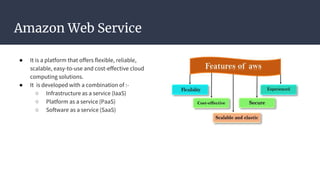
● It is a platform that offers flexible, reliable,
scalable, easy-to-use and cost-effective cloud
computing solutions.
● It is developed with a combination of :-
○ Infrastructure as a service (IaaS)
○ Platform as a service (PaaS)
○ Software as a service (SaaS)
LaaS vs PaaS vs SaaS
● IaaS
○ Cloud-based services, pay-as-you-go for services such as storage, networking, and
virtualization.
● PaaS
○ Hardware and software tools available over the internet.
● SaaS
○ Software that’s available via a third-party over the internet.
Aws services & offerings
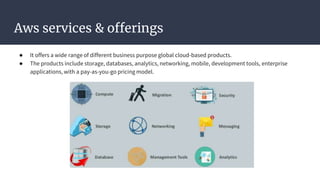
● It offers a wide range of different business purpose global cloud-based products.
● The products include storage, databases, analytics, networking, mobile, development tools, enterprise
applications, with a pay-as-you-go pricing model.
Zones and Regions
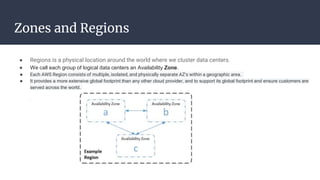
● Regions is a physical location around the world where we cluster data centers.
● We call each group of logical data centers an Availability Zone.
● Each AWS Region consists of multiple, isolated, and physically separate AZ's within a geographic area.
● It provides a more extensive global footprint than any other cloud provider, and to support its global footprint and ensure customers are
served across the world.
AWS Local Zone
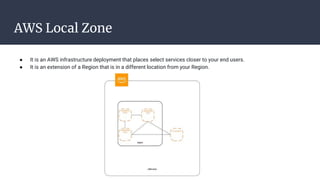
● It is an AWS infrastructure deployment that places select services closer to your end users.
● It is an extension of a Region that is in a different location from your Region.
Storage - Amazon S3 (Simple Storage Service)
● It is an object storage service that offers industry-leading scalability, data availability, security, and performance.
● Customers of all sizes and industries can use it to store and protect any amount of data for a range of use cases, such as
websites, mobile applications, backup and restore, archive, enterprise applications, IoT devices, and big data analytics.
● It is designed for 99.999999999% (11 9's) of durability, and stores data for millions of applications for companies all
around the world.
● Amazon S3 Features
■ Low cost and Easy to Use
■ Secure
■ Scalable
■ Higher performance
■ Integrated with AWS services
Amazon EBS(Elastic Block Storage)
● It is a web service that provides block level storage volumes for use with EC2 instances.
● EBS volumes are highly available and reliable storage volumes that can be attached to any running instance
and used like a hard drive.
● It has three types of volume,
○ EBS General Purpose (SSD)
○ Provisioned IOPS (SSD)
○ EBS Magnetic Volumes
Amazon EFS( Elastic File System)
● A fully managed file storage service that makes it easy to setup and scale file storage in the Amazon cloud.
● Amazon EFS is not supported on Windows instances.
Thanks...

AWS Basics

  • 1.
    Amazon Web Services Basedon the concept of Pay-As-You-Go Presentation by: Dhivya Ramasamy Email:achudhivi08@gmail.com
  • 2.
    Cloud Computing ● Cloudcomputing is a term referred to storing and accessing data over the internet. ● It doesn't store any data on the hard disk of your personal computer. ● Access data from a remote server.
  • 3.
    Amazon Web Service ●It is a platform that offers flexible, reliable, scalable, easy-to-use and cost-effective cloud computing solutions. ● It is developed with a combination of :- ○ Infrastructure as a service (IaaS) ○ Platform as a service (PaaS) ○ Software as a service (SaaS)
  • 4.
    LaaS vs PaaSvs SaaS ● IaaS ○ Cloud-based services, pay-as-you-go for services such as storage, networking, and virtualization. ● PaaS ○ Hardware and software tools available over the internet. ● SaaS ○ Software that’s available via a third-party over the internet.
  • 5.
    Aws services &offerings ● It offers a wide range of different business purpose global cloud-based products. ● The products include storage, databases, analytics, networking, mobile, development tools, enterprise applications, with a pay-as-you-go pricing model.
  • 6.
    Zones and Regions ●Regions is a physical location around the world where we cluster data centers. ● We call each group of logical data centers an Availability Zone. ● Each AWS Region consists of multiple, isolated, and physically separate AZ's within a geographic area. ● It provides a more extensive global footprint than any other cloud provider, and to support its global footprint and ensure customers are served across the world.
  • 7.
    AWS Local Zone ●It is an AWS infrastructure deployment that places select services closer to your end users. ● It is an extension of a Region that is in a different location from your Region.
  • 8.
    Storage - AmazonS3 (Simple Storage Service) ● It is an object storage service that offers industry-leading scalability, data availability, security, and performance. ● Customers of all sizes and industries can use it to store and protect any amount of data for a range of use cases, such as websites, mobile applications, backup and restore, archive, enterprise applications, IoT devices, and big data analytics. ● It is designed for 99.999999999% (11 9's) of durability, and stores data for millions of applications for companies all around the world. ● Amazon S3 Features ■ Low cost and Easy to Use ■ Secure ■ Scalable ■ Higher performance ■ Integrated with AWS services
  • 9.
    Amazon EBS(Elastic BlockStorage) ● It is a web service that provides block level storage volumes for use with EC2 instances. ● EBS volumes are highly available and reliable storage volumes that can be attached to any running instance and used like a hard drive. ● It has three types of volume, ○ EBS General Purpose (SSD) ○ Provisioned IOPS (SSD) ○ EBS Magnetic Volumes
  • 10.
    Amazon EFS( ElasticFile System) ● A fully managed file storage service that makes it easy to setup and scale file storage in the Amazon cloud. ● Amazon EFS is not supported on Windows instances.
  • 11.