www.schneider-electric.com
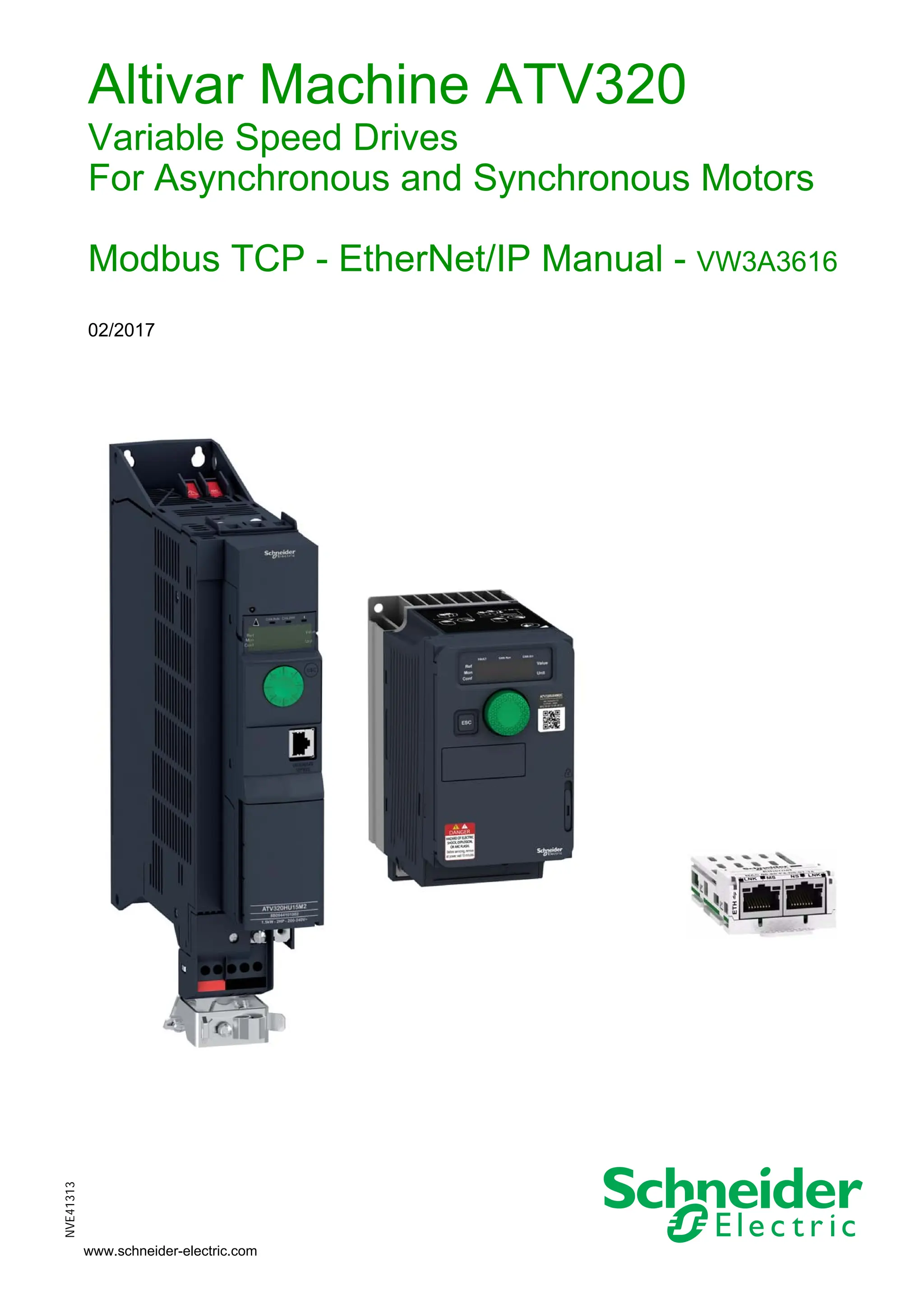
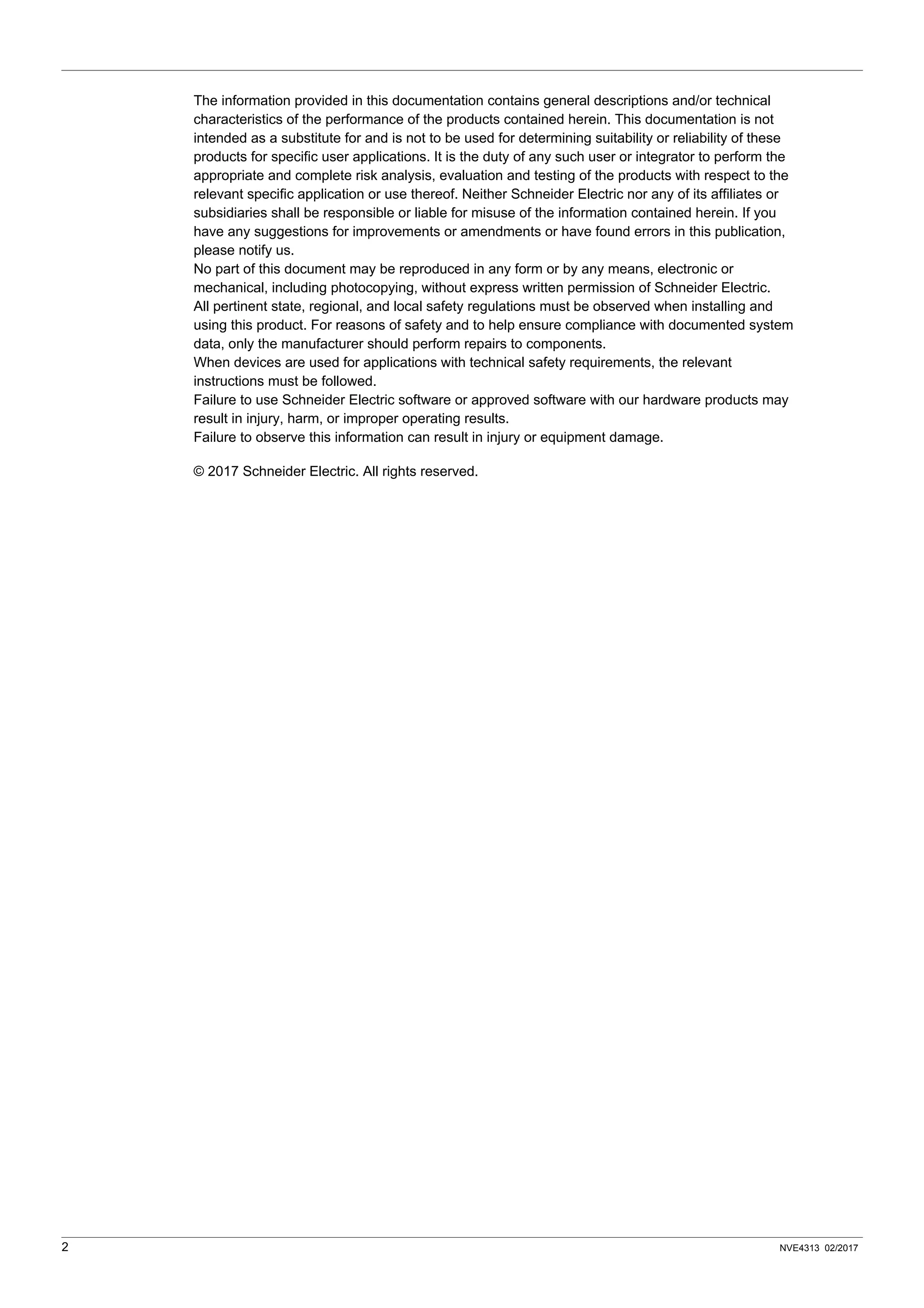
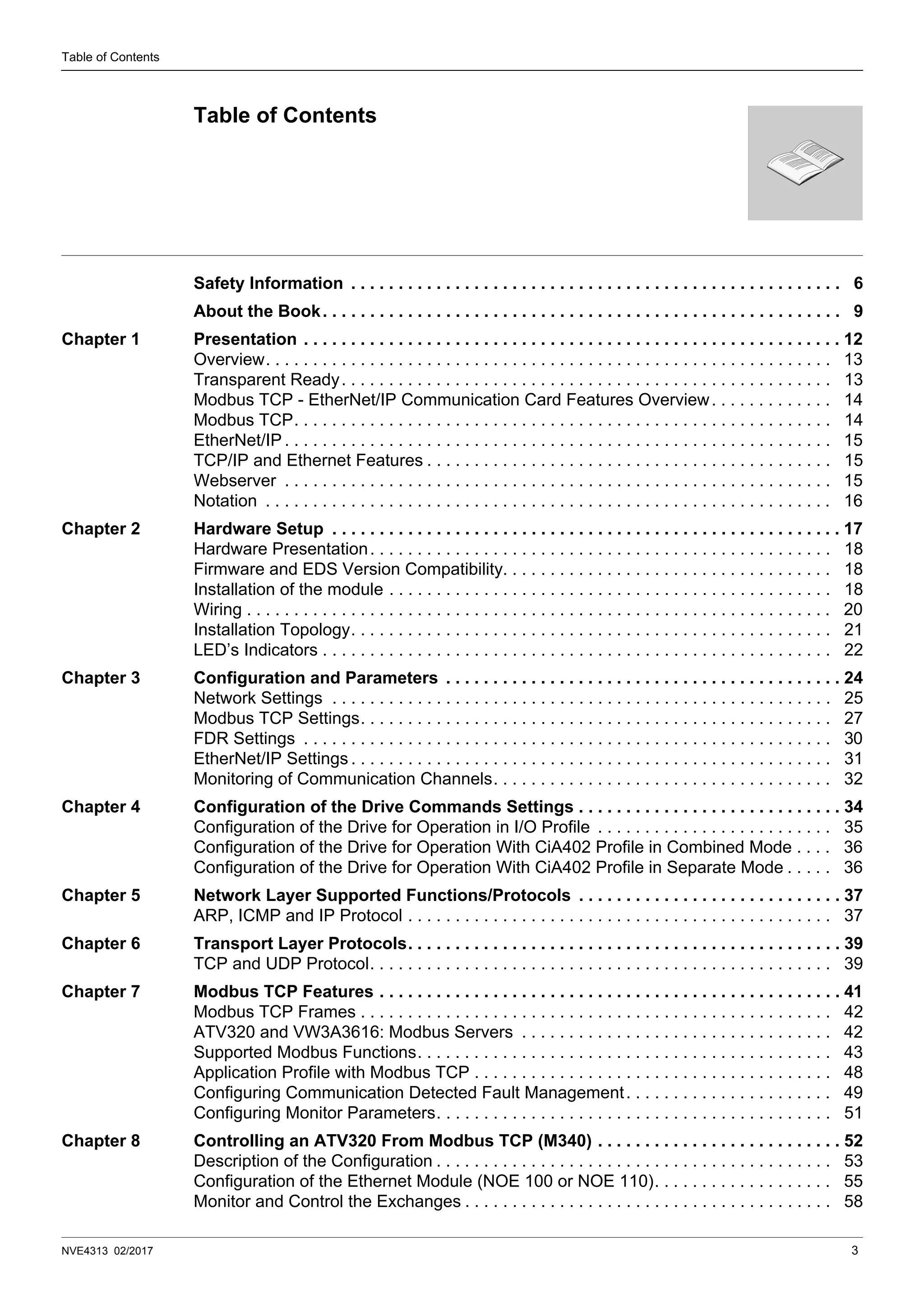
Altivar Machine ATV320
Variable Speed Drives
For Asynchronous and Synchronous Motors
Modbus TCP - EtherNet/IP Manual - VW3A3616
02/2017
NVE41313
2 NVE4313 02/2017
The information provided in this documentation contains general descriptions and/or technical
characteristics of the performance of the products contained herein. This documentation is not
intended as a substitute for and is not to be used for determining suitability or reliability of these
products for specific user applications. It is the duty of any such user or integrator to perform the
appropriate and complete risk analysis, evaluation and testing of the products with respect to the
relevant specific application or use thereof. Neither Schneider Electric nor any of its affiliates or
subsidiaries shall be responsible or liable for misuse of the information contained herein. If you
have any suggestions for improvements or amendments or have found errors in this publication,
please notify us.
No part of this document may be reproduced in any form or by any means, electronic or
mechanical, including photocopying, without express written permission of Schneider Electric.
All pertinent state, regional, and local safety regulations must be observed when installing and
using this product. For reasons of safety and to help ensure compliance with documented system
data, only the manufacturer should perform repairs to components.
When devices are used for applications with technical safety requirements, the relevant
instructions must be followed.
Failure to use Schneider Electric software or approved software with our hardware products may
result in injury, harm, or improper operating results.
Failure to observe this information can result in injury or equipment damage.
© 2017 Schneider Electric. All rights reserved.
NVE4313 02/2017 3
Table of Contents
Safety Information . . . . . . . . . . . . . . . . . . . . . . . . . . . . . . . . . . . . . . . . . . . . . . . . . . . . 6
About the Book. . . . . . . . . . . . . . . . . . . . . . . . . . . . . . . . . . . . . . . . . . . . . . . . . . . . . . . 9
Chapter 1 Presentation . . . . . . . . . . . . . . . . . . . . . . . . . . . . . . . . . . . . . . . . . . . . . . . . . . . . . . . . . 12
Overview. . . . . . . . . . . . . . . . . . . . . . . . . . . . . . . . . . . . . . . . . . . . . . . . . . . . . . . . . . . . 13
Transparent Ready. . . . . . . . . . . . . . . . . . . . . . . . . . . . . . . . . . . . . . . . . . . . . . . . . . . . 13
Modbus TCP - EtherNet/IP Communication Card Features Overview. . . . . . . . . . . . . 14
Modbus TCP. . . . . . . . . . . . . . . . . . . . . . . . . . . . . . . . . . . . . . . . . . . . . . . . . . . . . . . . . 14
EtherNet/IP . . . . . . . . . . . . . . . . . . . . . . . . . . . . . . . . . . . . . . . . . . . . . . . . . . . . . . . . . . 15
TCP/IP and Ethernet Features . . . . . . . . . . . . . . . . . . . . . . . . . . . . . . . . . . . . . . . . . . . 15
Webserver . . . . . . . . . . . . . . . . . . . . . . . . . . . . . . . . . . . . . . . . . . . . . . . . . . . . . . . . . . 15
Notation . . . . . . . . . . . . . . . . . . . . . . . . . . . . . . . . . . . . . . . . . . . . . . . . . . . . . . . . . . . . 16
Chapter 2 Hardware Setup . . . . . . . . . . . . . . . . . . . . . . . . . . . . . . . . . . . . . . . . . . . . . . . . . . . . . . 17
Hardware Presentation. . . . . . . . . . . . . . . . . . . . . . . . . . . . . . . . . . . . . . . . . . . . . . . . . 18
Firmware and EDS Version Compatibility. . . . . . . . . . . . . . . . . . . . . . . . . . . . . . . . . . . 18
Installation of the module . . . . . . . . . . . . . . . . . . . . . . . . . . . . . . . . . . . . . . . . . . . . . . . 18
Wiring . . . . . . . . . . . . . . . . . . . . . . . . . . . . . . . . . . . . . . . . . . . . . . . . . . . . . . . . . . . . . . 20
Installation Topology. . . . . . . . . . . . . . . . . . . . . . . . . . . . . . . . . . . . . . . . . . . . . . . . . . . 21
LED’s Indicators . . . . . . . . . . . . . . . . . . . . . . . . . . . . . . . . . . . . . . . . . . . . . . . . . . . . . . 22
Chapter 3 Configuration and Parameters . . . . . . . . . . . . . . . . . . . . . . . . . . . . . . . . . . . . . . . . . . 24
Network Settings . . . . . . . . . . . . . . . . . . . . . . . . . . . . . . . . . . . . . . . . . . . . . . . . . . . . . 25
Modbus TCP Settings. . . . . . . . . . . . . . . . . . . . . . . . . . . . . . . . . . . . . . . . . . . . . . . . . . 27
FDR Settings . . . . . . . . . . . . . . . . . . . . . . . . . . . . . . . . . . . . . . . . . . . . . . . . . . . . . . . . 30
EtherNet/IP Settings . . . . . . . . . . . . . . . . . . . . . . . . . . . . . . . . . . . . . . . . . . . . . . . . . . . 31
Monitoring of Communication Channels. . . . . . . . . . . . . . . . . . . . . . . . . . . . . . . . . . . . 32
Chapter 4 Configuration of the Drive Commands Settings . . . . . . . . . . . . . . . . . . . . . . . . . . . . 34
Configuration of the Drive for Operation in I/O Profile . . . . . . . . . . . . . . . . . . . . . . . . . 35
Configuration of the Drive for Operation With CiA402 Profile in Combined Mode . . . . 36
Configuration of the Drive for Operation With CiA402 Profile in Separate Mode . . . . . 36
Chapter 5 Network Layer Supported Functions/Protocols . . . . . . . . . . . . . . . . . . . . . . . . . . . . 37
ARP, ICMP and IP Protocol . . . . . . . . . . . . . . . . . . . . . . . . . . . . . . . . . . . . . . . . . . . . . 37
Chapter 6 Transport Layer Protocols. . . . . . . . . . . . . . . . . . . . . . . . . . . . . . . . . . . . . . . . . . . . . . 39
TCP and UDP Protocol. . . . . . . . . . . . . . . . . . . . . . . . . . . . . . . . . . . . . . . . . . . . . . . . . 39
Chapter 7 Modbus TCP Features . . . . . . . . . . . . . . . . . . . . . . . . . . . . . . . . . . . . . . . . . . . . . . . . . 41
Modbus TCP Frames . . . . . . . . . . . . . . . . . . . . . . . . . . . . . . . . . . . . . . . . . . . . . . . . . . 42
ATV320 and VW3A3616: Modbus Servers . . . . . . . . . . . . . . . . . . . . . . . . . . . . . . . . . 42
Supported Modbus Functions. . . . . . . . . . . . . . . . . . . . . . . . . . . . . . . . . . . . . . . . . . . . 43
Application Profile with Modbus TCP . . . . . . . . . . . . . . . . . . . . . . . . . . . . . . . . . . . . . . 48
Configuring Communication Detected Fault Management. . . . . . . . . . . . . . . . . . . . . . 49
Configuring Monitor Parameters. . . . . . . . . . . . . . . . . . . . . . . . . . . . . . . . . . . . . . . . . . 51
Chapter 8 Controlling an ATV320 From Modbus TCP (M340) . . . . . . . . . . . . . . . . . . . . . . . . . . 52
Description of the Configuration . . . . . . . . . . . . . . . . . . . . . . . . . . . . . . . . . . . . . . . . . . 53
Configuration of the Ethernet Module (NOE 100 or NOE 110). . . . . . . . . . . . . . . . . . . 55
Monitor and Control the Exchanges . . . . . . . . . . . . . . . . . . . . . . . . . . . . . . . . . . . . . . . 58
Table of Contents
Table of Contents
4 NVE4313 02/2017
Modbus Messaging . . . . . . . . . . . . . . . . . . . . . . . . . . . . . . . . . . . . . . . . . . . . . . . . . . . 59
Chapter 9 EtherNet/IP Features . . . . . . . . . . . . . . . . . . . . . . . . . . . . . . . . . . . . . . . . . . . . . . . . . . 60
VW3A3616 and EtherNet/IP Overview. . . . . . . . . . . . . . . . . . . . . . . . . . . . . . . . . . . . . 61
Cyclical Exchanges (Implicit Exchanges) . . . . . . . . . . . . . . . . . . . . . . . . . . . . . . . . . . . 62
Messaging (Explicit Exchanges). . . . . . . . . . . . . . . . . . . . . . . . . . . . . . . . . . . . . . . . . . 66
Detected Fault Management . . . . . . . . . . . . . . . . . . . . . . . . . . . . . . . . . . . . . . . . . . . . 67
Chapter 10 ATV320 Configuration in ETC100 . . . . . . . . . . . . . . . . . . . . . . . . . . . . . . . . . . . . . . . . 68
Procedure . . . . . . . . . . . . . . . . . . . . . . . . . . . . . . . . . . . . . . . . . . . . . . . . . . . . . . . . . . . 69
Explicit Messaging . . . . . . . . . . . . . . . . . . . . . . . . . . . . . . . . . . . . . . . . . . . . . . . . . . . . 74
Chapter 11 Profiles . . . . . . . . . . . . . . . . . . . . . . . . . . . . . . . . . . . . . . . . . . . . . . . . . . . . . . . . . . . . . 76
Definition of a Profile . . . . . . . . . . . . . . . . . . . . . . . . . . . . . . . . . . . . . . . . . . . . . . . . . . 77
Functional Profiles Supported by the Altivar 320 . . . . . . . . . . . . . . . . . . . . . . . . . . . . . 78
Chapter 12 CiA®402 - IEC61800-7 Functional Profile . . . . . . . . . . . . . . . . . . . . . . . . . . . . . . . . . . 79
Functional Description . . . . . . . . . . . . . . . . . . . . . . . . . . . . . . . . . . . . . . . . . . . . . . . . . 80
CiA402 State Chart . . . . . . . . . . . . . . . . . . . . . . . . . . . . . . . . . . . . . . . . . . . . . . . . . . . 81
Description of States . . . . . . . . . . . . . . . . . . . . . . . . . . . . . . . . . . . . . . . . . . . . . . . . . . 82
Summary . . . . . . . . . . . . . . . . . . . . . . . . . . . . . . . . . . . . . . . . . . . . . . . . . . . . . . . . . . . 83
Control Word (CMd) . . . . . . . . . . . . . . . . . . . . . . . . . . . . . . . . . . . . . . . . . . . . . . . . . . . 84
Stop Commands. . . . . . . . . . . . . . . . . . . . . . . . . . . . . . . . . . . . . . . . . . . . . . . . . . . . . . 85
Assigning Control Word Bits. . . . . . . . . . . . . . . . . . . . . . . . . . . . . . . . . . . . . . . . . . . . . 85
Status Word (EtA). . . . . . . . . . . . . . . . . . . . . . . . . . . . . . . . . . . . . . . . . . . . . . . . . . . . . 86
Starting Sequence . . . . . . . . . . . . . . . . . . . . . . . . . . . . . . . . . . . . . . . . . . . . . . . . . . . . 87
Sequence for a Drive Powered by the Power Section Line Supply . . . . . . . . . . . . . . . 88
Sequence for a Drive With Separate Control Section . . . . . . . . . . . . . . . . . . . . . . . . . 90
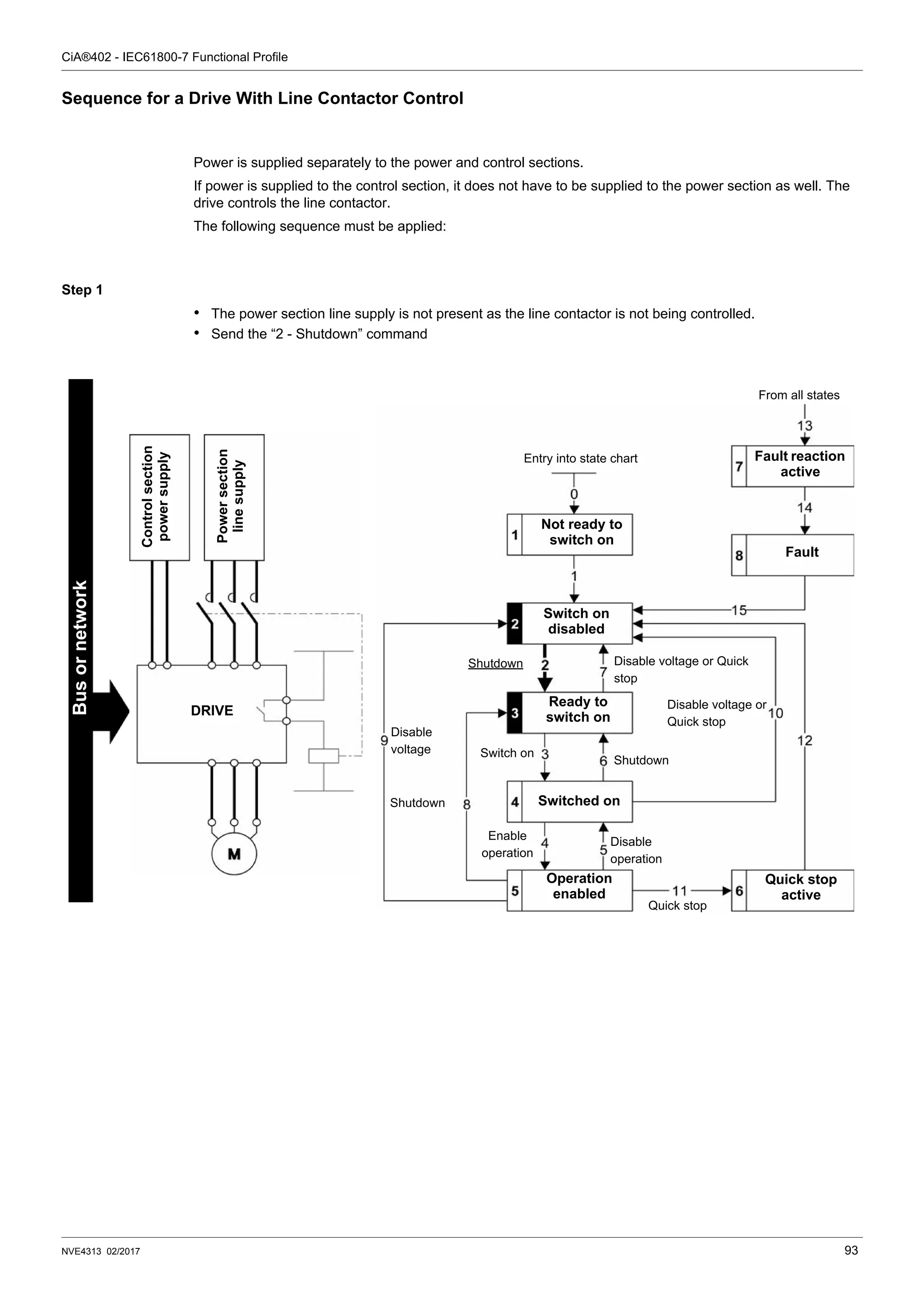
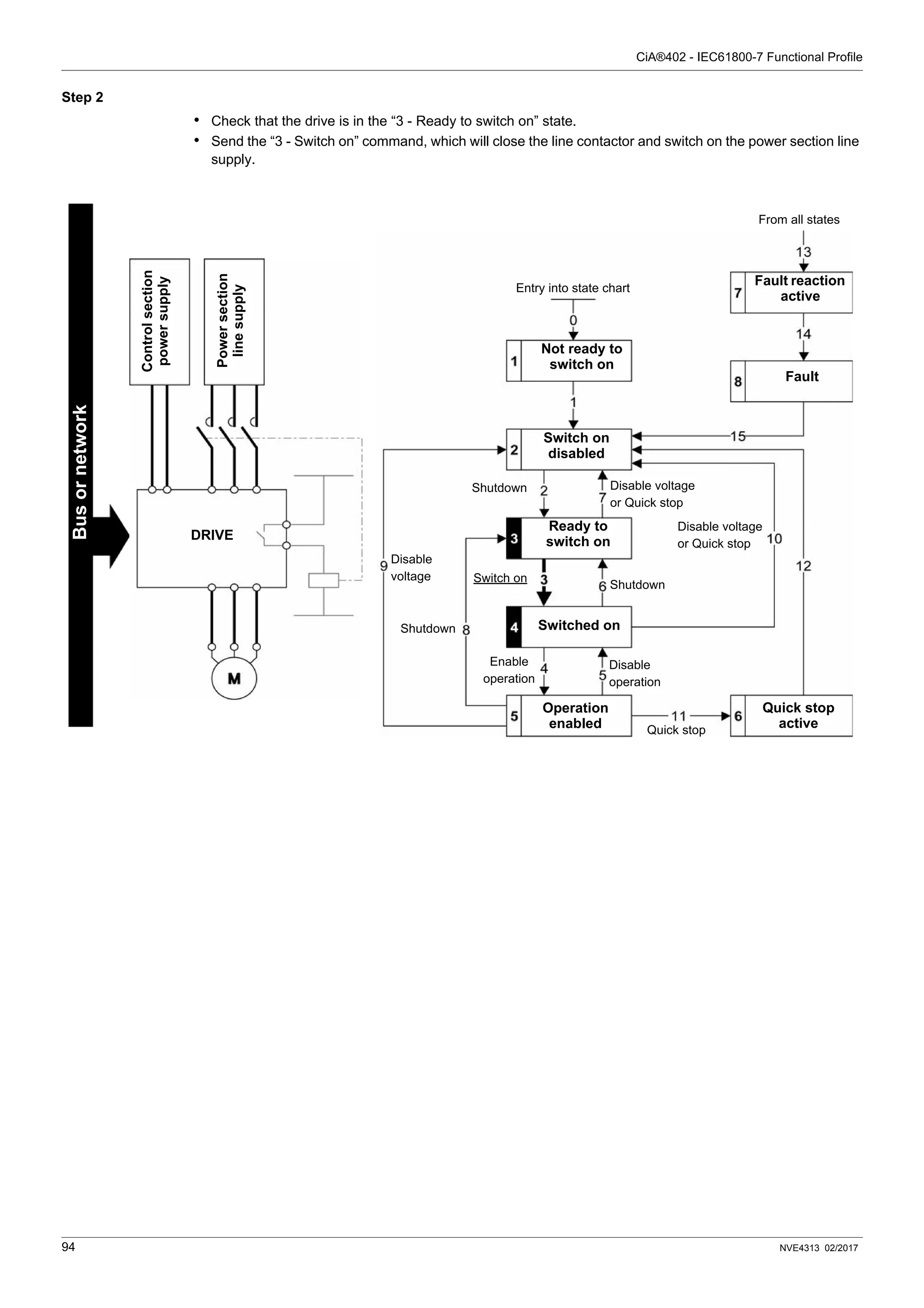
Sequence for a Drive With Line Contactor Control. . . . . . . . . . . . . . . . . . . . . . . . . . . . 93
Chapter 13 CIP Objects Overview . . . . . . . . . . . . . . . . . . . . . . . . . . . . . . . . . . . . . . . . . . . . . . . . . 95
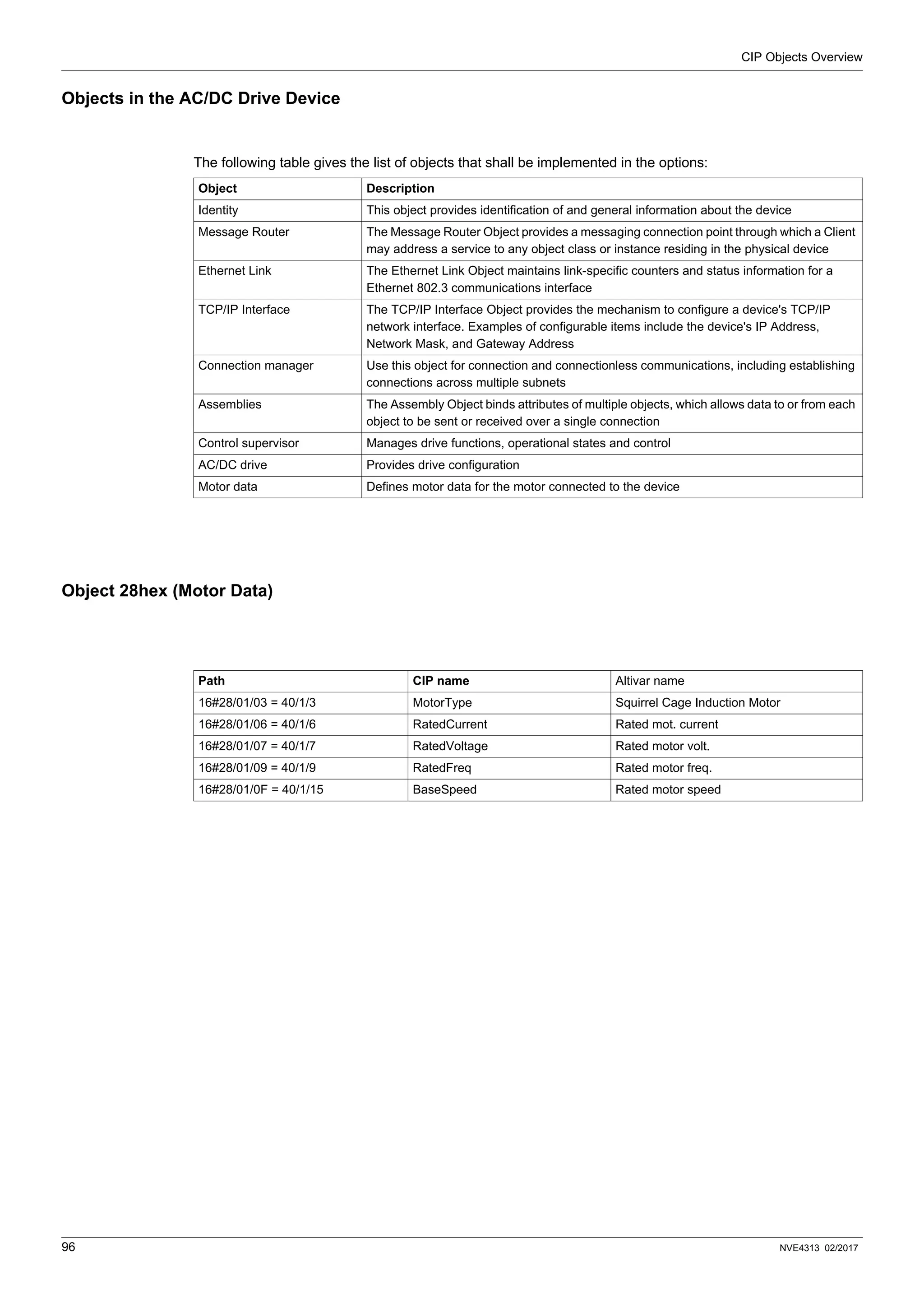
Objects in the AC/DC Drive Device . . . . . . . . . . . . . . . . . . . . . . . . . . . . . . . . . . . . . . . 96
Object 28hex (Motor Data) . . . . . . . . . . . . . . . . . . . . . . . . . . . . . . . . . . . . . . . . . . . . . . 96
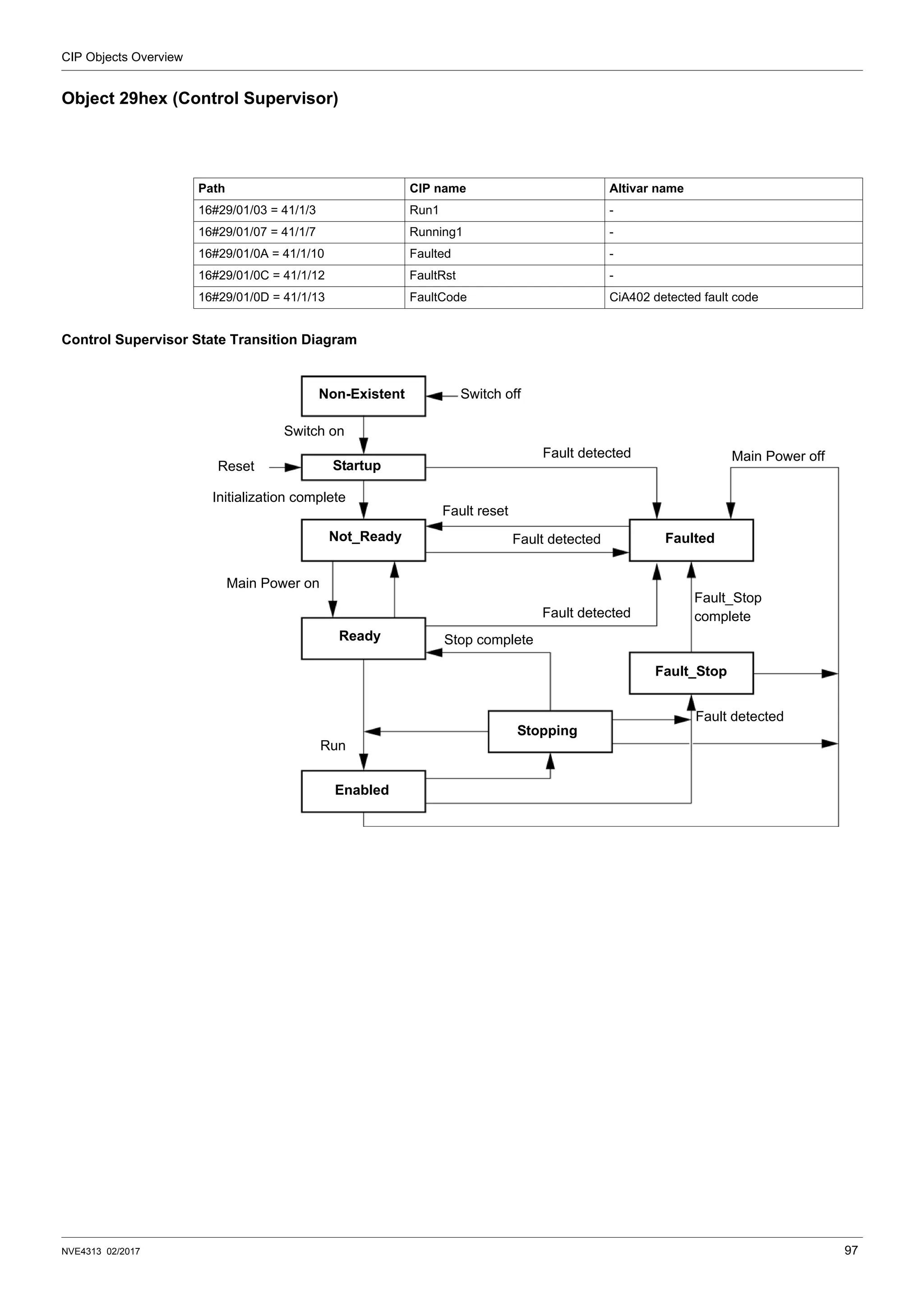
Object 29hex (Control Supervisor) . . . . . . . . . . . . . . . . . . . . . . . . . . . . . . . . . . . . . . . . 97
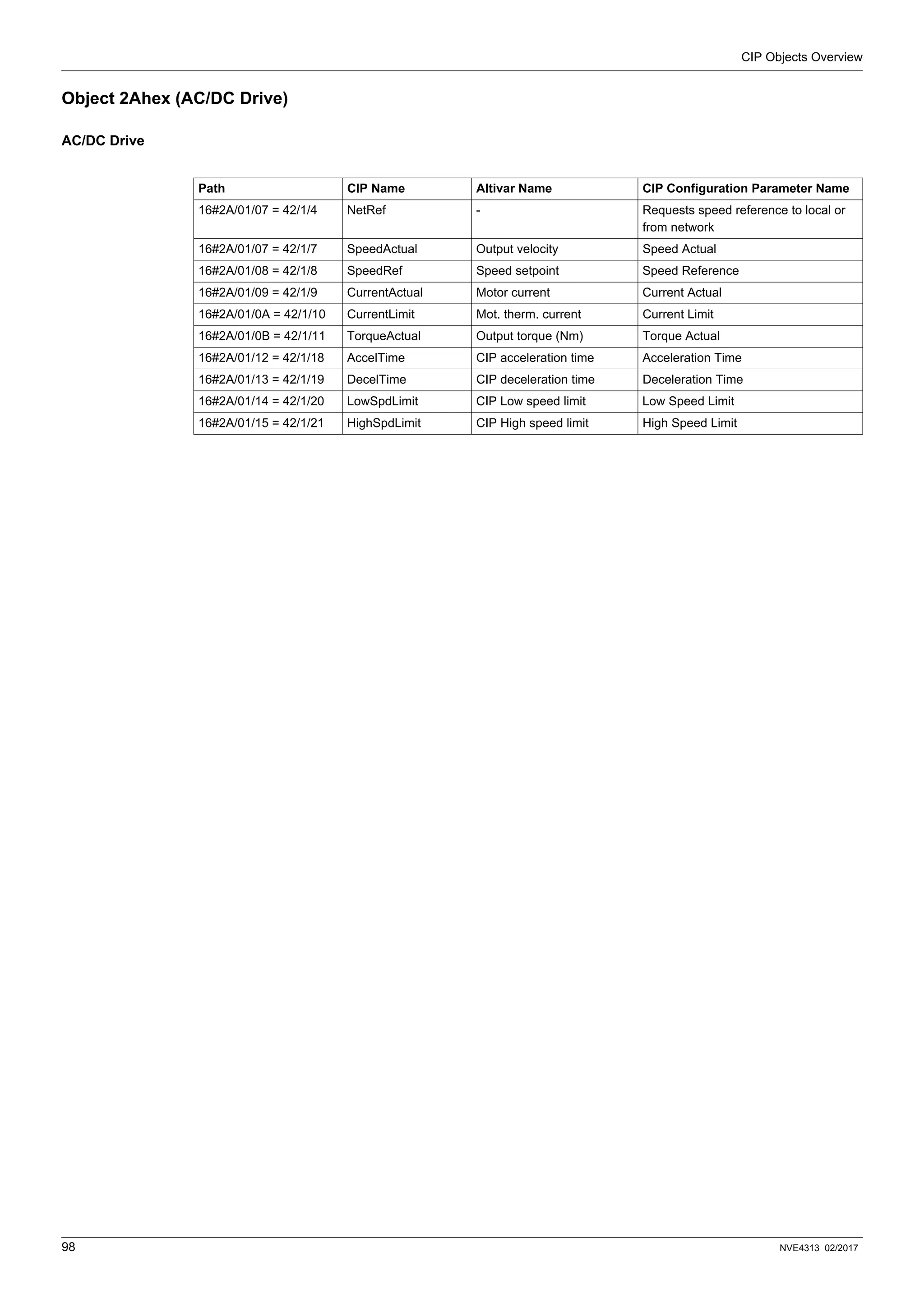
Object 2Ahex (AC/DC Drive) . . . . . . . . . . . . . . . . . . . . . . . . . . . . . . . . . . . . . . . . . . . . 98
Chapter 14 Transparent Ready Features . . . . . . . . . . . . . . . . . . . . . . . . . . . . . . . . . . . . . . . . . . . . 99
Presentation . . . . . . . . . . . . . . . . . . . . . . . . . . . . . . . . . . . . . . . . . . . . . . . . . . . . . . . . 100
Startup Detailed Behavior. . . . . . . . . . . . . . . . . . . . . . . . . . . . . . . . . . . . . . . . . . . . . . 101
FDR Operation Behavior . . . . . . . . . . . . . . . . . . . . . . . . . . . . . . . . . . . . . . . . . . . . . . 102
FDR Settings . . . . . . . . . . . . . . . . . . . . . . . . . . . . . . . . . . . . . . . . . . . . . . . . . . . . . . . 103
Local Configuration. . . . . . . . . . . . . . . . . . . . . . . . . . . . . . . . . . . . . . . . . . . . . . . . . . . 104
Downloaded Configuration . . . . . . . . . . . . . . . . . . . . . . . . . . . . . . . . . . . . . . . . . . . . . 105
Chapter 15 Embedded Webserver . . . . . . . . . . . . . . . . . . . . . . . . . . . . . . . . . . . . . . . . . . . . . . . . 107
Overview. . . . . . . . . . . . . . . . . . . . . . . . . . . . . . . . . . . . . . . . . . . . . . . . . . . . . . . . . . . 108
Connexion to the Webserver . . . . . . . . . . . . . . . . . . . . . . . . . . . . . . . . . . . . . . . . . . . 108
Pages Description . . . . . . . . . . . . . . . . . . . . . . . . . . . . . . . . . . . . . . . . . . . . . . . . . . . 109
FTP Server . . . . . . . . . . . . . . . . . . . . . . . . . . . . . . . . . . . . . . . . . . . . . . . . . . . . . . . . . 117
Chapter 16 Integration in the EtherNet/IP Network. . . . . . . . . . . . . . . . . . . . . . . . . . . . . . . . . . . 118
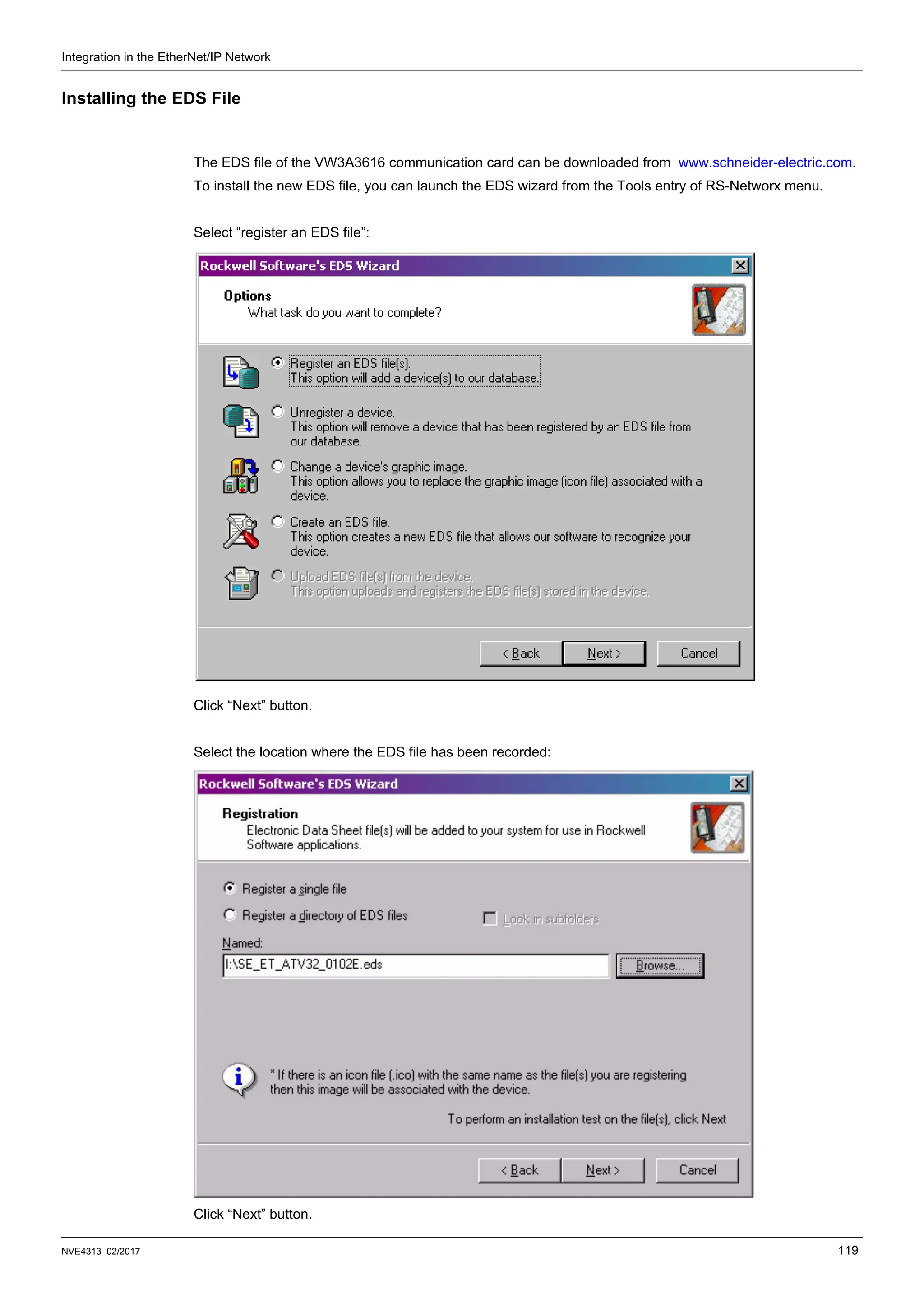
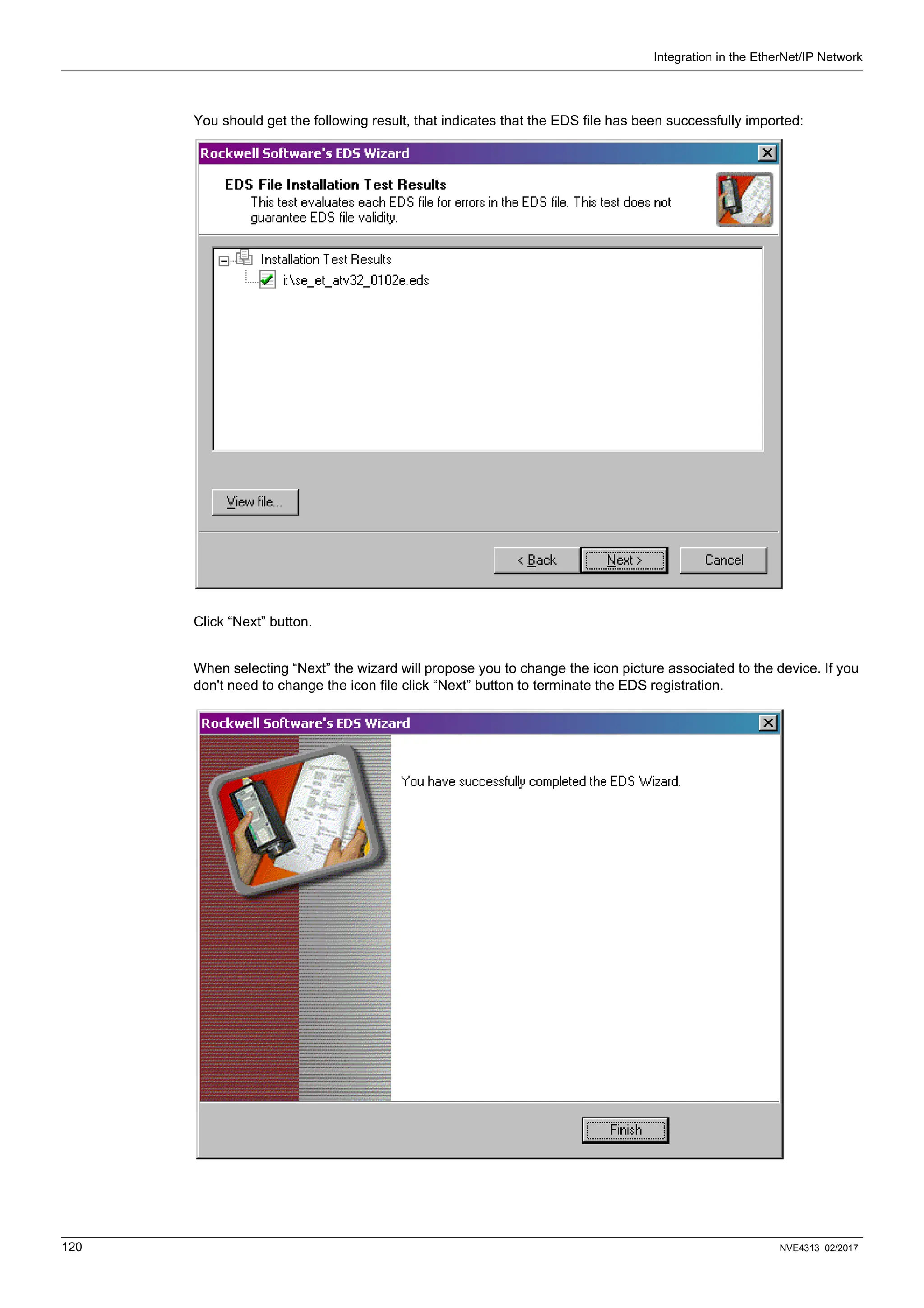
Installing the EDS File . . . . . . . . . . . . . . . . . . . . . . . . . . . . . . . . . . . . . . . . . . . . . . . . 119
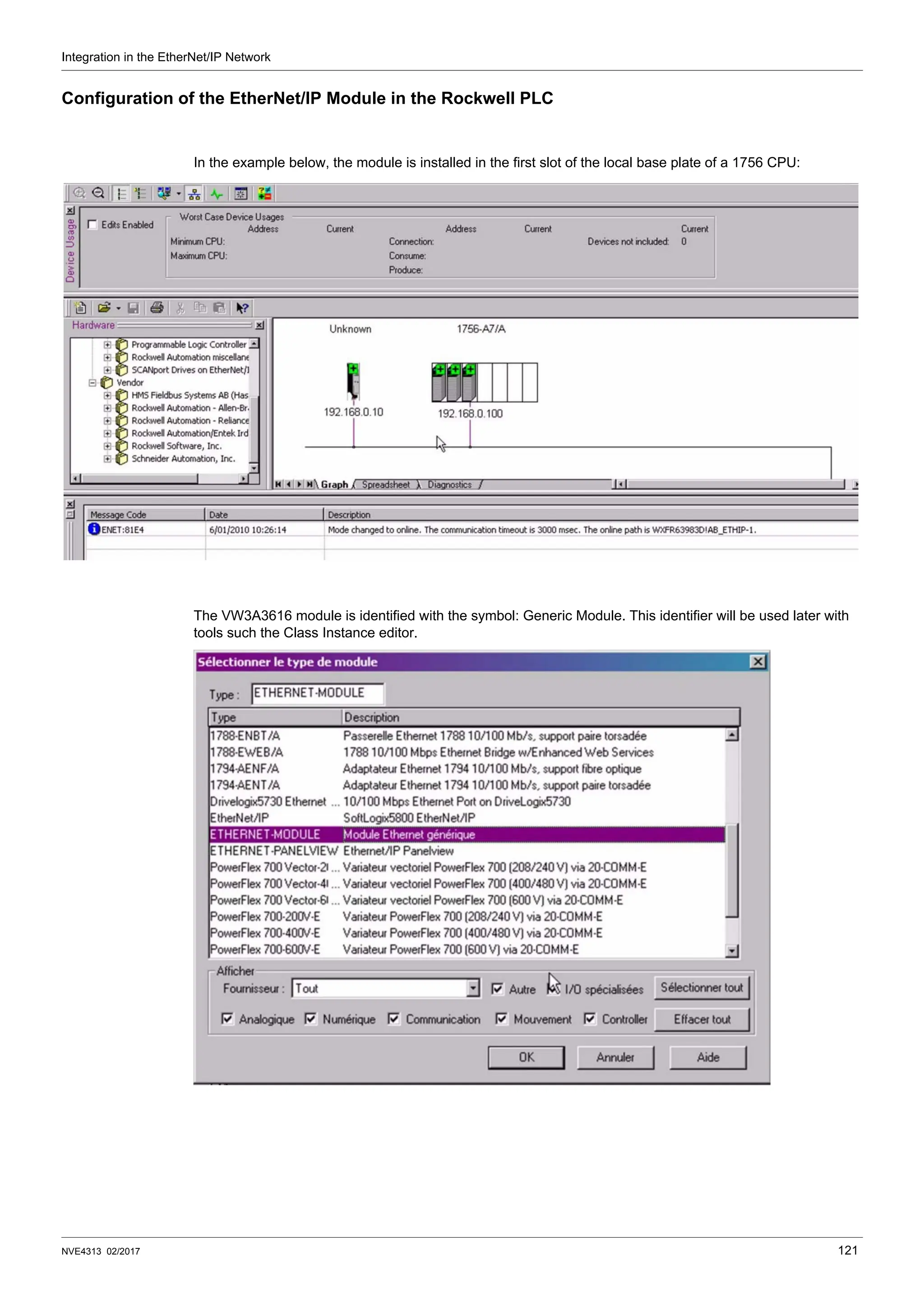
Configuration of the EtherNet/IP Module in the Rockwell PLC. . . . . . . . . . . . . . . . . . 121
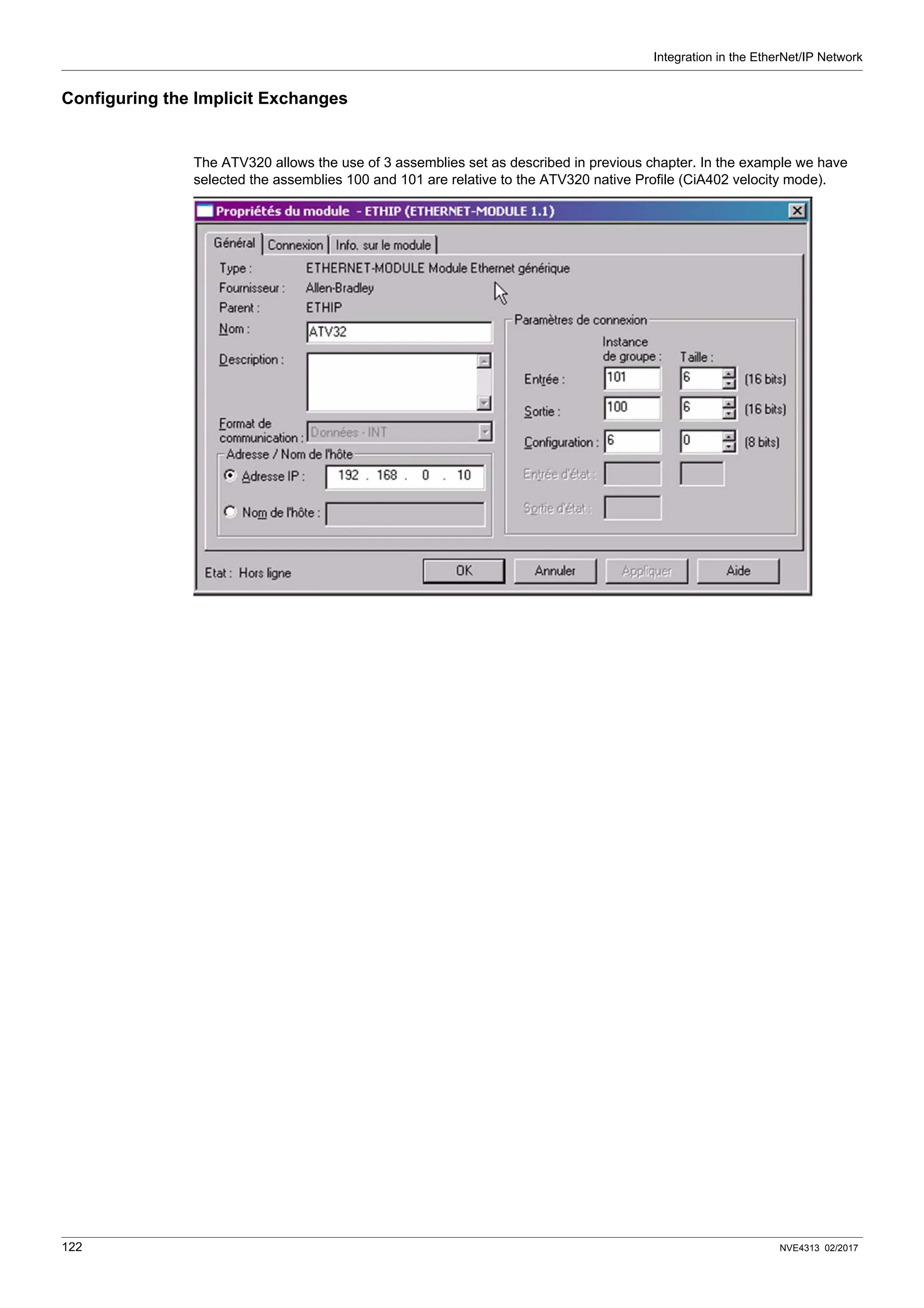
Configuring the Implicit Exchanges . . . . . . . . . . . . . . . . . . . . . . . . . . . . . . . . . . . . . . 122
Configuration of the Communication Scanner . . . . . . . . . . . . . . . . . . . . . . . . . . . . . . 124
Configuration of the Communication Period. . . . . . . . . . . . . . . . . . . . . . . . . . . . . . . . 125
Explicit Messaging . . . . . . . . . . . . . . . . . . . . . . . . . . . . . . . . . . . . . . . . . . . . . . . . . . . 126
Assembly Selection . . . . . . . . . . . . . . . . . . . . . . . . . . . . . . . . . . . . . . . . . . . . . . . . . . 128
Chapter 17 Software Setup with SoMachine (M251). . . . . . . . . . . . . . . . . . . . . . . . . . . . . . . . . . 129
Introduction. . . . . . . . . . . . . . . . . . . . . . . . . . . . . . . . . . . . . . . . . . . . . . . . . . . . . . . . . 130
Table of Contents
NVE4313 02/2017 5
Drive Configuration. . . . . . . . . . . . . . . . . . . . . . . . . . . . . . . . . . . . . . . . . . . . . . . . . . . 131
Ethernet Master Configuration . . . . . . . . . . . . . . . . . . . . . . . . . . . . . . . . . . . . . . . . . . 132
Chapter 18 CIP Objects . . . . . . . . . . . . . . . . . . . . . . . . . . . . . . . . . . . . . . . . . . . . . . . . . . . . . . . . . 137
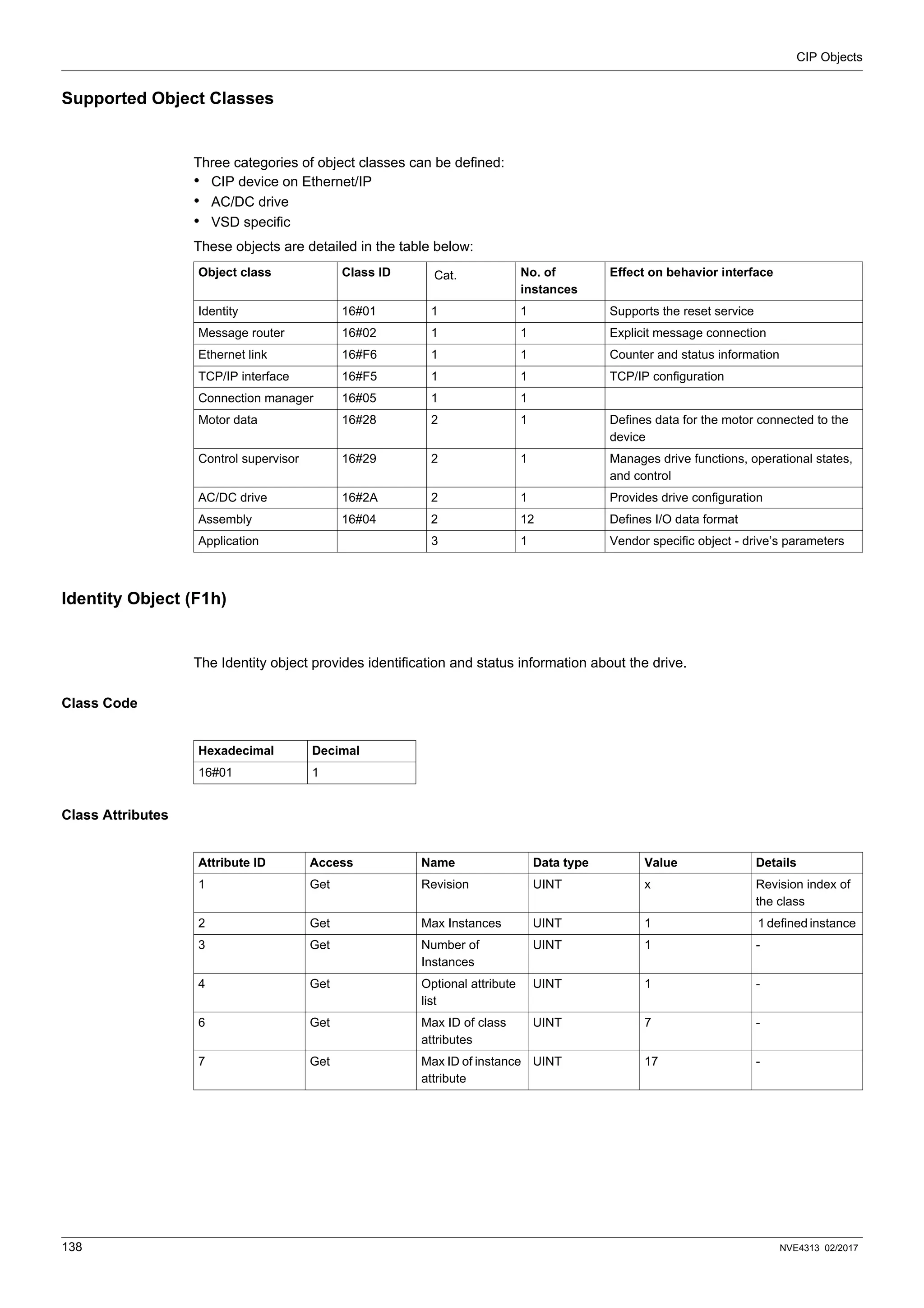
Supported Object Classes . . . . . . . . . . . . . . . . . . . . . . . . . . . . . . . . . . . . . . . . . . . . . 138
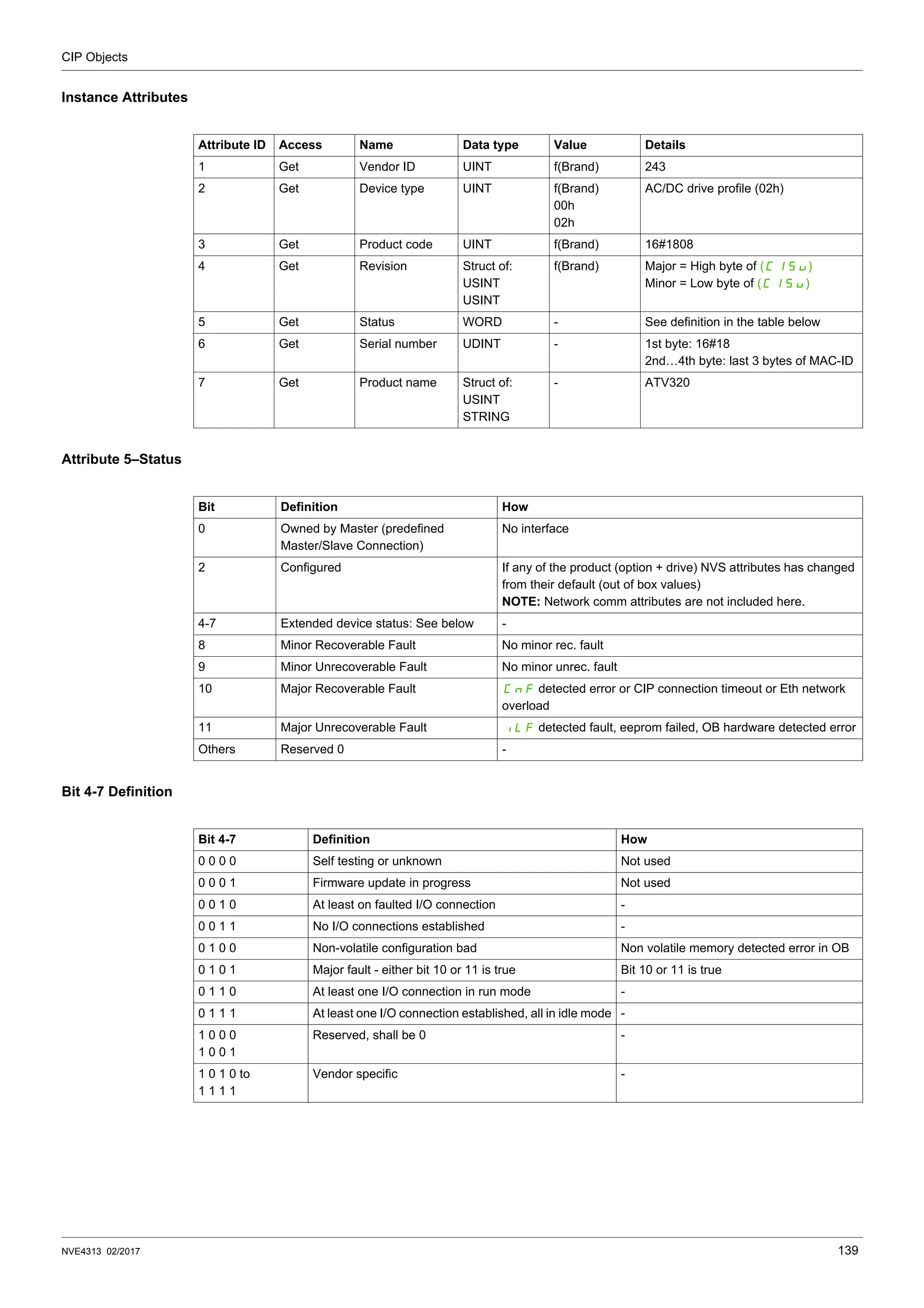
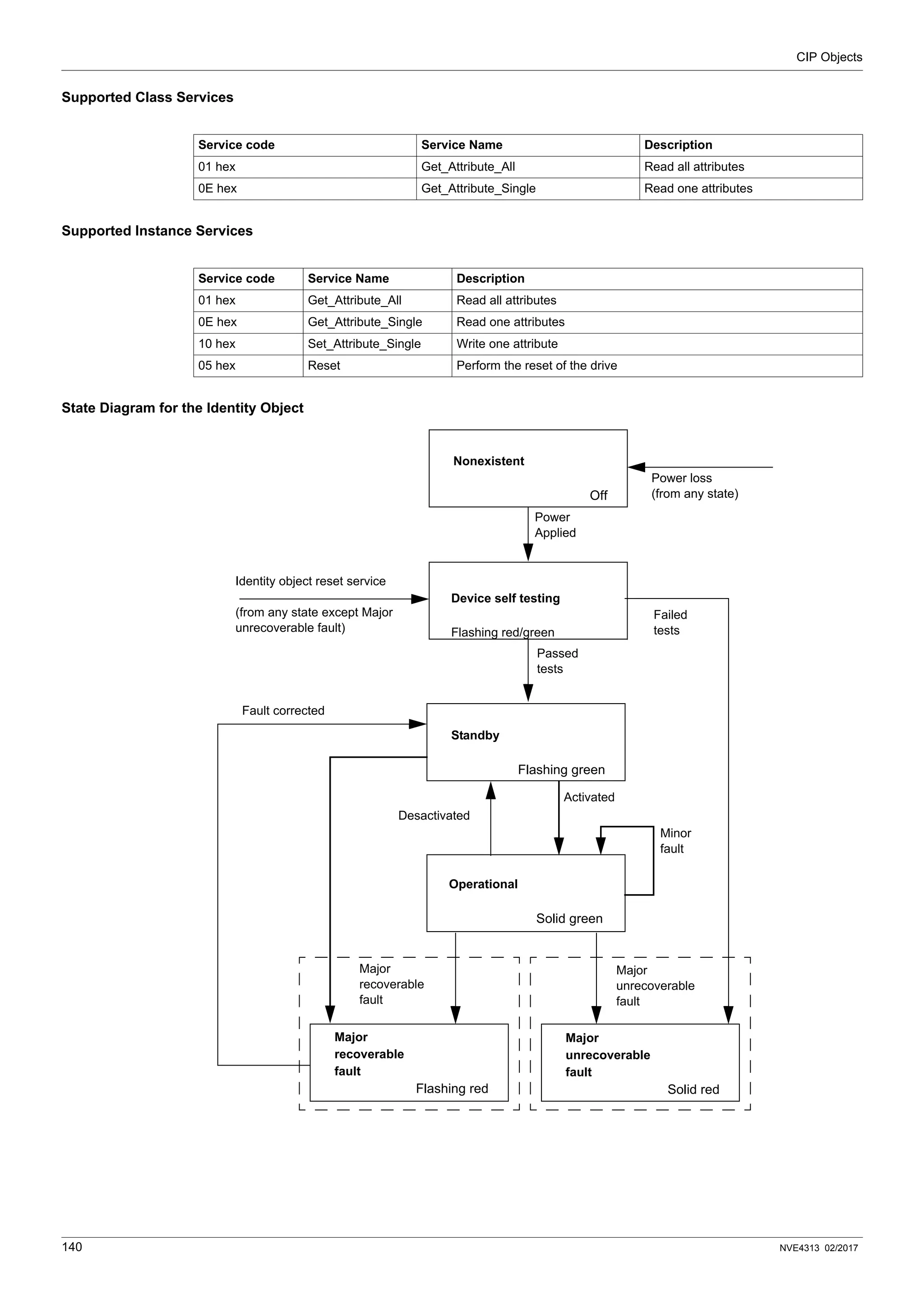
Identity Object (F1h) . . . . . . . . . . . . . . . . . . . . . . . . . . . . . . . . . . . . . . . . . . . . . . . . . . 138
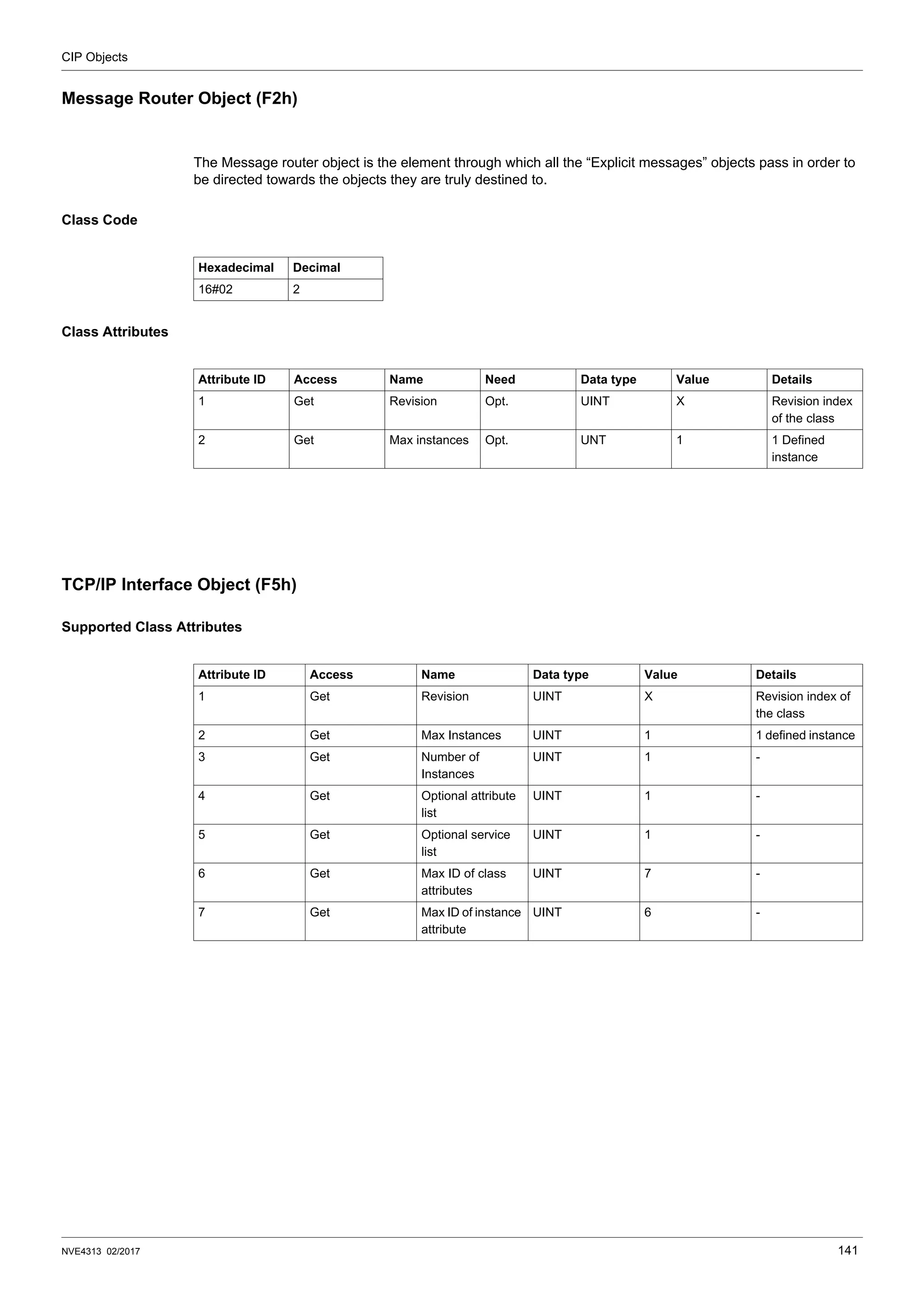
Message Router Object (F2h) . . . . . . . . . . . . . . . . . . . . . . . . . . . . . . . . . . . . . . . . . . 141
TCP/IP Interface Object (F5h) . . . . . . . . . . . . . . . . . . . . . . . . . . . . . . . . . . . . . . . . . . 141
Ethernet Link Object (F6h) . . . . . . . . . . . . . . . . . . . . . . . . . . . . . . . . . . . . . . . . . . . . . 144
Assembly Object (04 hex) . . . . . . . . . . . . . . . . . . . . . . . . . . . . . . . . . . . . . . . . . . . . . 145
Connection Manager Object (06h) . . . . . . . . . . . . . . . . . . . . . . . . . . . . . . . . . . . . . . . 147
Motor Data Object (28h) . . . . . . . . . . . . . . . . . . . . . . . . . . . . . . . . . . . . . . . . . . . . . . . 149
Control Supervisor Object (29h) . . . . . . . . . . . . . . . . . . . . . . . . . . . . . . . . . . . . . . . . . 150
AC/DC Drive Object (2Ah) . . . . . . . . . . . . . . . . . . . . . . . . . . . . . . . . . . . . . . . . . . . . . 151
Application Object (70h to C7h) / Explicit Messaging. . . . . . . . . . . . . . . . . . . . . . . . . 154
6 NVE4313 02/2017
Safety Information
§
Safety Information
Important Information
NOTICE
Read these instructions carefully, and look at the equipment to become familiar with the device before trying
to install, operate, or maintain it. The following special messages may appear throughout this documentation
or on the equipment to warn of potential hazards or to call attention to information that clarifies or simplifies a
procedure.
PLEASE NOTE
Electrical equipment should be installed, operated, serviced, and maintained only by qualified personnel. No
responsibility is assumed by Schneider Electric for any consequences arising out of the use of this material.
A qualified person is one who has skills and knowledge related to the construction and operation of electrical
equipment and its installation, and has received safety training to recognize and avoid the hazards involved.
Qualification Of Personnel
Only appropriately trained persons who are familiar with and understand the contents of this manual and all
other pertinent product documentation are authorized to work on and with this product. In addition, these
persons must have received safety training to recognize and avoid hazards involved. These persons must
have sufficient technical training, knowledge and experience and be able to foresee and detect potential
hazards that may be caused by using the product, by changing the settings and by the mechanical, electrical
and electronic equipment of the entire system in which the product is used. All persons working on and with
the product must be fully familiar with all applicable standards, directives, and accident prevention regulations
when performing such work.
The addition of this symbol to a Danger or Warning safety label indicates that an electrical hazard
exists, which will result in personal injury if the instructions are not followed.
This is the safety alert symbol. It is used to alert you to potentiel personal injury hazards. Obey all
safety messages that follow this symbol to avoid possible injury or death.
DANGER
DANGER indicates a hazardous situation, which, if not avoided, will result in death or serious injury.
WARNING
WARNING indicates a hazardous situation, which, if not avoided, could result in death or serious injury.
CAUTION
CAUTION indicates a hazardous situation, which, if not avoided, could result in minor or moderate injury.
NOTICE
NOTICE is used to address practices not related to physical injury.
NVE4313 02/2017 7
Product Related Information
Read and understand these instructions before performing any procedure with this drive.
Drive systems may perform unexpected movements because of incorrect wiring, incorrect settings, incorrect
data or other errors.
Damaged products or accessories may cause electric shock or unanticipated equipment operation.
Contact your local Schneider Electric sales office if you detect any damage whatsoever.
DANGER
HAZARD OF ELECTRIC SHOCK, EXPLOSION OR ARC FLASH
• Only appropriately trained persons who are familiar with and understand the contents of this manual
and all other pertinent product documentation and who have received safety training to recognize and
avoid hazards involved are authorized to work on and with this drive system. Installation, adjustment,
repair and maintenance must be performed by qualified personnel.
• The system integrator is responsible for compliance with all local and national electrical code
requirements as well as all other applicable regulations with respect to grounding of all equipment.
• Many components of the product, including the printed circuit boards, operate with mains voltage. Do
not touch.
• Only use properly rated, electrically insulated tools and measuring equipment.
• Do not touch unshielded components or terminals with voltage present.
• Motors can generate voltage when the shaft is rotated. Prior to performing any type of work on the
drive system, block the motor shaft to prevent rotation.
• AC voltage can couple voltage to unused conductors in the motor cable. Insulate both ends of unused
conductors of the motor cable.
• Do not short across the DC bus terminals or the DC bus capacitors or the braking resistor terminals.
• Before performing work on the drive system:
 Disconnect all power, including external control power that may be present.
 Place a Do Not Turn On label on all power switches related to the drive system.
 Lock all power switches in the open position.
 Wait 15 minutes to allow the DC bus capacitors to discharge.
 Follow the instructions given in the chapter "Verifying the Absence of Voltage" in the installation-
manual of the product.
• Before applying voltage to the drive system:
 Verify that the work has been completed and that the entire installation cannot cause hazards.
 If the mains input terminals and the motor output terminals have been grounded and short-circuited,
remove the ground and the short circuits on the mains input terminals and the motor output
terminals.
 Verify proper grounding of all equipment.
 Verify that all protective equipment such as covers, doors, grids is installed and/or closed.
Failure to follow these instructions will result in death or serious injury.
WARNING
UNEXPECTED EQUIPMENT OPERATION
• Carefully install the wiring in accordance with the EMC requirements.
• Do not operate the product with unknown or unsuitable settings or data.
• Perform a comprehensive commissioning test.
Failure to follow these instructions can result in death, serious injury, or equipment damage.
DANGER
ELECTRIC SHOCK OR UNANTICIPATED EQUIPMENT OPERATION
Do not use damaged products or accessories.
Failure to follow these instructions will result in death or serious injury.
8 NVE4313 02/2017
(1) For USA: Additional information, refer to NEMA ICS 1.1 (latest edition), Safety Guidelines for the
Application, Installation, and Maintenance of Solid State Control and to NEMA ICS 7.1 (latest edition), Safety
Standards for Construction and Guide for Selection, Installation and Operation of Adjustable-Speed Drive
Systems.
The product is not approved for use in hazardous areas (explosive atmospheres).
Machines, controllers, and related equipment are usually integrated into networks. Unauthorized persons and
malware may gain access to the machine as well as to other devices on the network/fieldbus of the machine
and connected networks via insufficiently secure access to software and networks.
WARNING
LOSS OF CONTROL
• The designer of any control scheme must consider the potential failure modes of control paths and,
for critical control functions, provide a means to achieve a safe state during and after a path failure.
Examples of critical control functions are emergency stop, overtravel stop, power outage and restart.
• Separate or redundant control paths must be provided for critical control functions.
• System control paths may include communication links. Consideration must be given to the
implications of unanticipated transmission delays or failures of the link.
• Observe all accident prevention regulations and local safety guidelines (1).
• Each implementation of the product must be individually and thoroughly tested for proper operation
before being placed into service.
Failure to follow these instructions can result in death, serious injury, or equipment damage.
NOTICE
DESTRUCTION DUE TO INCORRECT MAINS VOLTAGE
Before switching on and configuring the product, verify that it is approved for the mains voltage
Failure to follow these instructions can result in equipment damage.
WARNING
EXPLOSION HAZARD
Only use this device outside of hazardous areas (explosive atmospheres).
Failure to follow these instructions can result in death, serious injury, or equipment damage.
WARNING
UNAUTHORIZED ACCESS TO THE MACHINE VIA SOFTWARE AND NETWORKS
• In your hazard and risk analysis, consider all hazards that result from access to and operation on the
network/fieldbus and develop an appropriate cyber security concept.
• Verify that the hardware infrastructure and the software infrastructure into which the machine is
integrated as well as all organizational measures and rules covering access to this infrastructure
consider the results of the hazard and risk analysis and are implemented according to best practices
and standards covering IT security and cyber security (such as: ISO/IEC 27000 series, Common
Criteria for Information Technology Security Evaluation, ISO/IEC 15408, IEC 62351, ISA/IEC 62443,
NIST Cybersecurity Framework, Information Security Forum - Standard of Good Practice for
Information Security).
• Verify the effectiveness of your IT security and cyber security systems using appropriate, proven
methods.
Failure to follow these instructions can result in death, serious injury, or equipment damage.
NVE4313 02/2017 9
About the Book
About the Book
At a Glance
Document Scope
The purpose of this document is to:
• show you how to install the Ethernet fieldbus on your drive,
• show you how to configure the drive to use Ethernet for monitoring and control,
• provide examples of setup using Unity.
NOTE: Read and understand this document and all related documents (see below) before installing,
operating, or maintaining your drive.
Validity Note
This documentation is valid for the Altivar Machine drives.
The technical characteristics of the devices described in this document also appear online. To access this
information online:
The characteristics that are presented in this manual should be the same as those characteristics that appear
online. In line with our policy of constant improvement, we may revise content over time to improve clarity and
accuracy. If you see a difference between the manual and online information, use the online information as
your reference.
Step Action
1 Go to the Schneider Electric home page www.schneider-electric.com.
2 In the Search box type the reference of a product or the name of a product range.
 Do not include blank spaces in the reference or product range.
 To get information on grouping similar modules, use asterisks (*).
3 If you entered a reference, go to the Product Datasheets search results and click on the reference that
interests you.
If you entered the name of a product range, go to the Product Ranges search results and click on the
product range that interests you.
4 If more than one reference appears in the Products search results, click on the reference that interests
you.
5 Depending on the size of your screen, you may need to scroll down to see the data sheet.
6 To save or print a data sheet as a .pdf file, click Download XXX product datasheet.
About the Book
10 NVE4313 02/2017
Related Documents
Use your tablet or your PC to quickly access detailed and comprehensive information on all our products on
www.schneider-electric.com
The internet site provides the information you need for products and solutions
 The whole catalog for detailed characteristics and selection guides
 The CAD files to help design your installation, available in over 20 different file formats
 All software and firmware to maintain your installation up to date
 A large quantity of White Papers, Environment documents, Application solutions, Specifications... to gain a
better understanding of our electrical systems and equipment or automation
And finally all the User Guides related to your drive, listed below:You can download the latest versions of these
technical publications and other technical information from our website at www.schneider-electric.com.
You can download these technical publications and other technical information from our website at
http://download.schneider-electric.com
Terminology
The technical terms, terminology, and the corresponding descriptions in this manual normally use the terms
or definitions in the relevant standards.
In the area of drive systems this includes, but is not limited to, terms such as error, error message, failure,
fault, fault reset, protection, safe state, safety function, warning, warning message, and so on.
Among others, these standards include:
 IEC 61800 series: Adjustable speed electrical power drive systems
 IEC 61508 Ed.2 series: Functional safety of electrical/electronic/programmable electronic safety-related
 EN 954-1 Safety of machinery - Safety related parts of control systems
Title of documentation Reference Number
ATV320 Getting Started NVE21763 (English)
NVE21771 (French)
NVE21772 (German)
NVE21773 (Spanish)
NVE21774 (Italian)
NVE21776 (Chinese)
ATV320 Getting Started Annex (SCCR) NVE21777 (English)
ATV320 Installation manual NVE41289 (English)
NVE41290 (French)
NVE41291 (German)
NVE41292 (Spanish)
NVE41293 (Italian)
NVE41294 (Chinese)
ATV320 Programming manual NVE41295 (English)
NVE41296 (French)
NVE41297 (German)
NVE41298 (Spanish)
NVE41299 (Italian)
NVE41300 (Chinese)
ATVATV320 Modbus Serial Link manual NVE41308 (English)
ATV320 PROFIBUS DP manual (VW3A3607) NVE41310 (English)
ATV320 Ethernet IP/Modbus TCP manual
(VW3A3616)
NVE41313 (English)
ATV320 DeviceNet manual (VW3A3609) NVE41314 (English)
ATV320 CANopen manual (VW3A3608, 618, 628) NVE41309 (English)
ATV320 POWERLINK manual (VW3A3619) NVE41312 (English)
ATV320 EtherCAT manual (VW3A3601) NVE41315 (English)
ATV320 Communication Parameters NVE41316 (English)
ATV320 PROFINET manual NVE41311 (English)
ATV320 Safety Functions manual NVE50467 (English)
NVE50468 (French)
NVE50469 (German)
NVE50470 (Spanish)
NVE50472 (Italian)
NVE50473 (Chinese)
About the Book
NVE4313 02/2017 11
 EN ISO 13849-1 & 2 Safety of machinery - Safety related parts of control systems.
 IEC 61158 series: Industrial communication networks - Fieldbus specifications
 IEC 61784 series: Industrial communication networks - Profiles
 IEC 60204-1: Safety of machinery - Electrical equipment of machines – Part 1: General requirements
In addition, the term zone of operation is used in conjunction with the description of specific hazards, and is
defined as it is for a hazard zone or danger zone in the EC Machinery Directive (2006/42/EC) and in ISO
12100-1.
12 NVE4313 02/2017
Presentation
1
Presentation
What's in this Chapter?
This chapter contains the following topics:
Topic Page
Overview 13
Transparent Ready 13
Modbus TCP - EtherNet/IP Communication Card Features Overview 14
Modbus TCP 14
EtherNet/IP 15
TCP/IP and Ethernet Features 15
Webserver 15
Notation 16
Presentation
NVE4313 02/2017 13
Overview
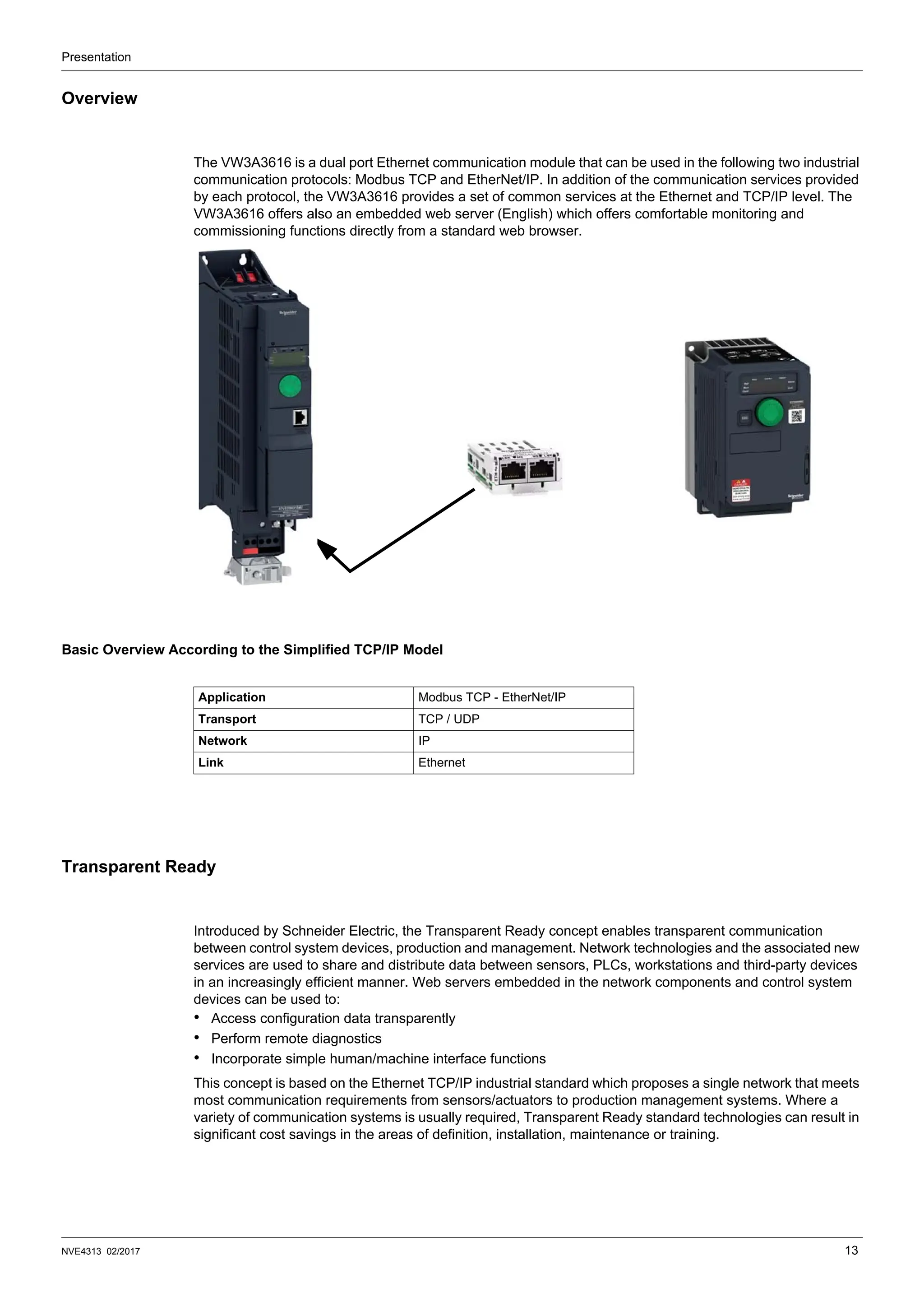
The VW3A3616 is a dual port Ethernet communication module that can be used in the following two industrial
communication protocols: Modbus TCP and EtherNet/IP. In addition of the communication services provided
by each protocol, the VW3A3616 provides a set of common services at the Ethernet and TCP/IP level. The
VW3A3616 offers also an embedded web server (English) which offers comfortable monitoring and
commissioning functions directly from a standard web browser.
Basic Overview According to the Simplified TCP/IP Model
Transparent Ready
Introduced by Schneider Electric, the Transparent Ready concept enables transparent communication
between control system devices, production and management. Network technologies and the associated new
services are used to share and distribute data between sensors, PLCs, workstations and third-party devices
in an increasingly efficient manner. Web servers embedded in the network components and control system
devices can be used to:
• Access configuration data transparently
• Perform remote diagnostics
• Incorporate simple human/machine interface functions
This concept is based on the Ethernet TCP/IP industrial standard which proposes a single network that meets
most communication requirements from sensors/actuators to production management systems. Where a
variety of communication systems is usually required, Transparent Ready standard technologies can result in
significant cost savings in the areas of definition, installation, maintenance or training.
Application Modbus TCP - EtherNet/IP
Transport TCP / UDP
Network IP
Link Ethernet
Presentation
14 NVE4313 02/2017
Transparent Ready is based on:
• Ethernet TCP/IP-based services meeting control system requirements in terms of functions, performance
and quality of services
• Products including several ranges of PLC, distributed I/O, industrial terminals, variable speed drives,
gateways and an increasing number of partner products
• The ConneXium range of cabling accessories: hubs, switches, cables adapted to the environment and to
the requirements of industrial conditions.
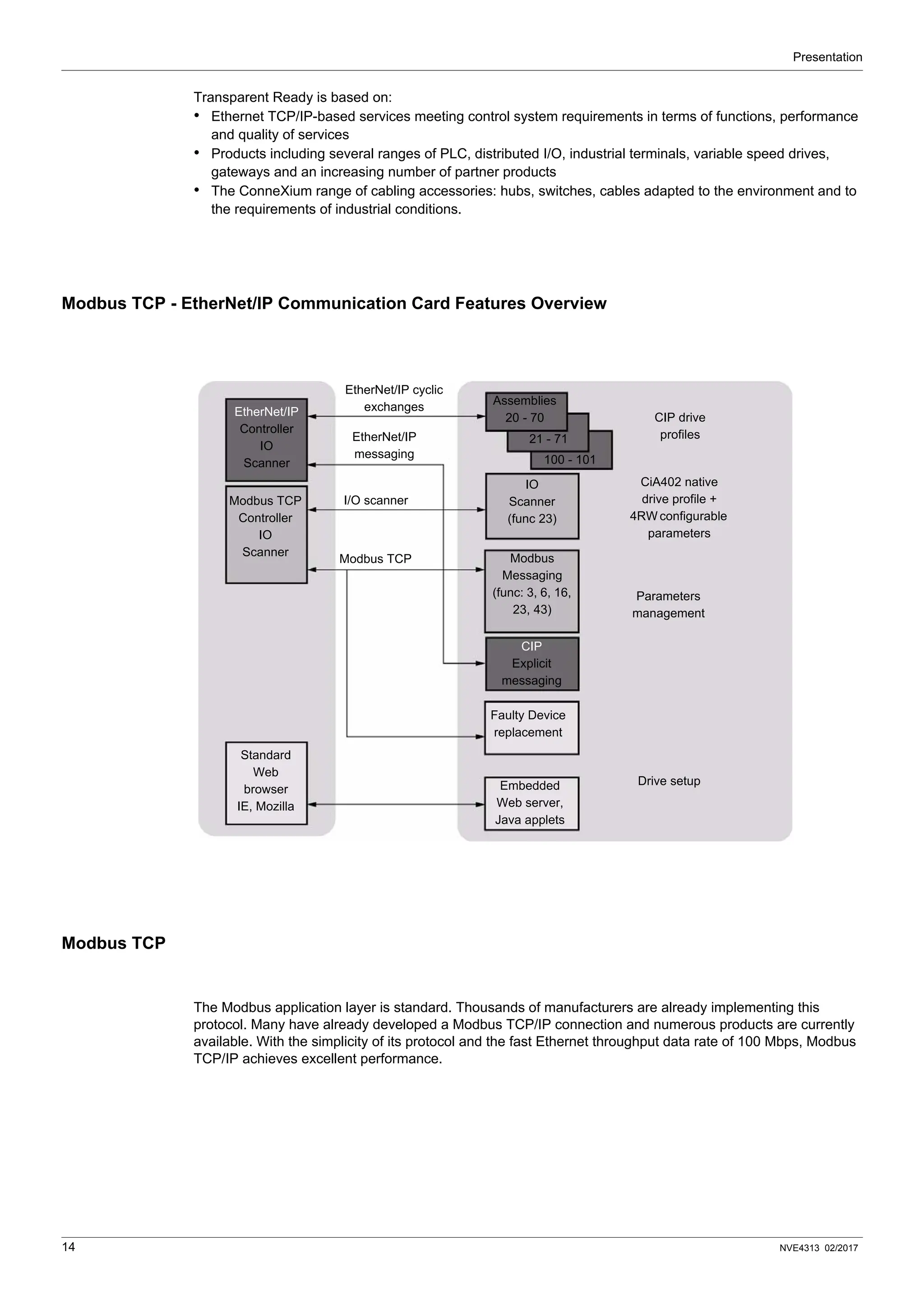
Modbus TCP - EtherNet/IP Communication Card Features Overview
Modbus TCP
The Modbus application layer is standard. Thousands of manufacturers are already implementing this
protocol. Many have already developed a Modbus TCP/IP connection and numerous products are currently
available. With the simplicity of its protocol and the fast Ethernet throughput data rate of 100 Mbps, Modbus
TCP/IP achieves excellent performance.
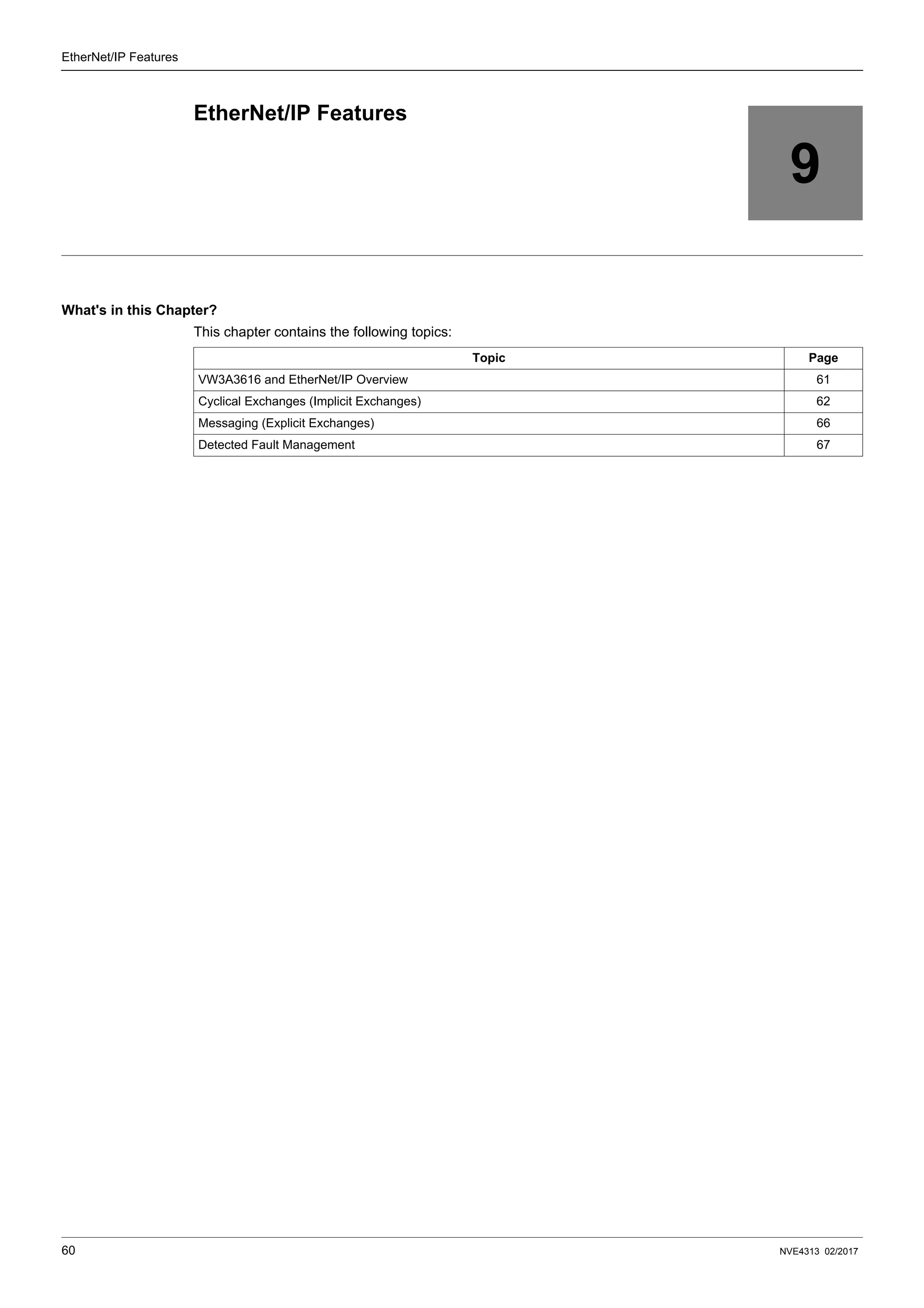
100 - 101
EtherNet/IP
Controller
IO
Scanner
CIP
Explicit
messaging
Assemblies
20 - 70
21 - 71
Modbus TCP
Controller
IO
Scanner
Standard
Web
browser
IE, Mozilla
Modbus
Messaging
(func: 3, 6, 16,
23, 43)
IO
Scanner
(func 23)
Faulty Device
replacement
Embedded
Web server,
Java applets
EtherNet/IP cyclic
exchanges
I/O scanner
Modbus TCP
EtherNet/IP
messaging
CIP drive
profiles
CiA402 native
drive profile +
4RW configurable
parameters
Parameters
management
Drive setup
Presentation
NVE4313 02/2017 15
EtherNet/IP
EtherNet/IP is a fieldbus based on TCP and UDP. EtherNet/IP extends Ethernet by an advanced industrial
protocol (CIP, Common Industrial Protocol) as an application layer for automation applications in this way,
Ethernet is excellently suited for industrial control. Products from different manufacturers can be networked
without the need for special interface adaptation.
TCP/IP and Ethernet Features
The product supports the following functions via:
• Automatic IP address assignment via BOOTP or DHCP
• Automatic configuration data via FDR (only in Modbus TCP)
• Commissioning via commissioning software SoMove
• Diagnostics and configuration via integrated web server
Webserver
The standard Web server (English only) provides access to the following pages:
• Altivar Viewer
• Data Viewer
• Ethernet
• Security
• Etc...
Presentation
16 NVE4313 02/2017
Notation
Drive Terminal Displays
The graphic display terminal (to be ordered separately - reference VW3A1101) menus are shown in square
brackets.
Example: [Communication]
The integrated 7-segment display terminal menus are shown in round brackets.
Example: (COM-)
Parameter names are displayed on the graphic display terminal in square brackets.
Example: [Fallback speed]
Parameter codes are displayed on the integrated 7-segment display terminal in round brackets.
Example: (LFF)
Formats
In this manual, hexadecimal values are written as follows: 16#
Binary values are written as follows: 2#
Abbreviations
Req. = Required
Opt. = Optional
NVE4313 02/2017 17
Hardware Setup
2
Hardware Setup
What's in this Chapter?
This chapter contains the following topics:
Topic Page
Hardware Presentation 18
Firmware and EDS Version Compatibility 18
Installation of the module 18
Wiring 20
Installation Topology 21
LED’s Indicators 22
Hardware Setup
18 NVE4313 02/2017
Hardware Presentation
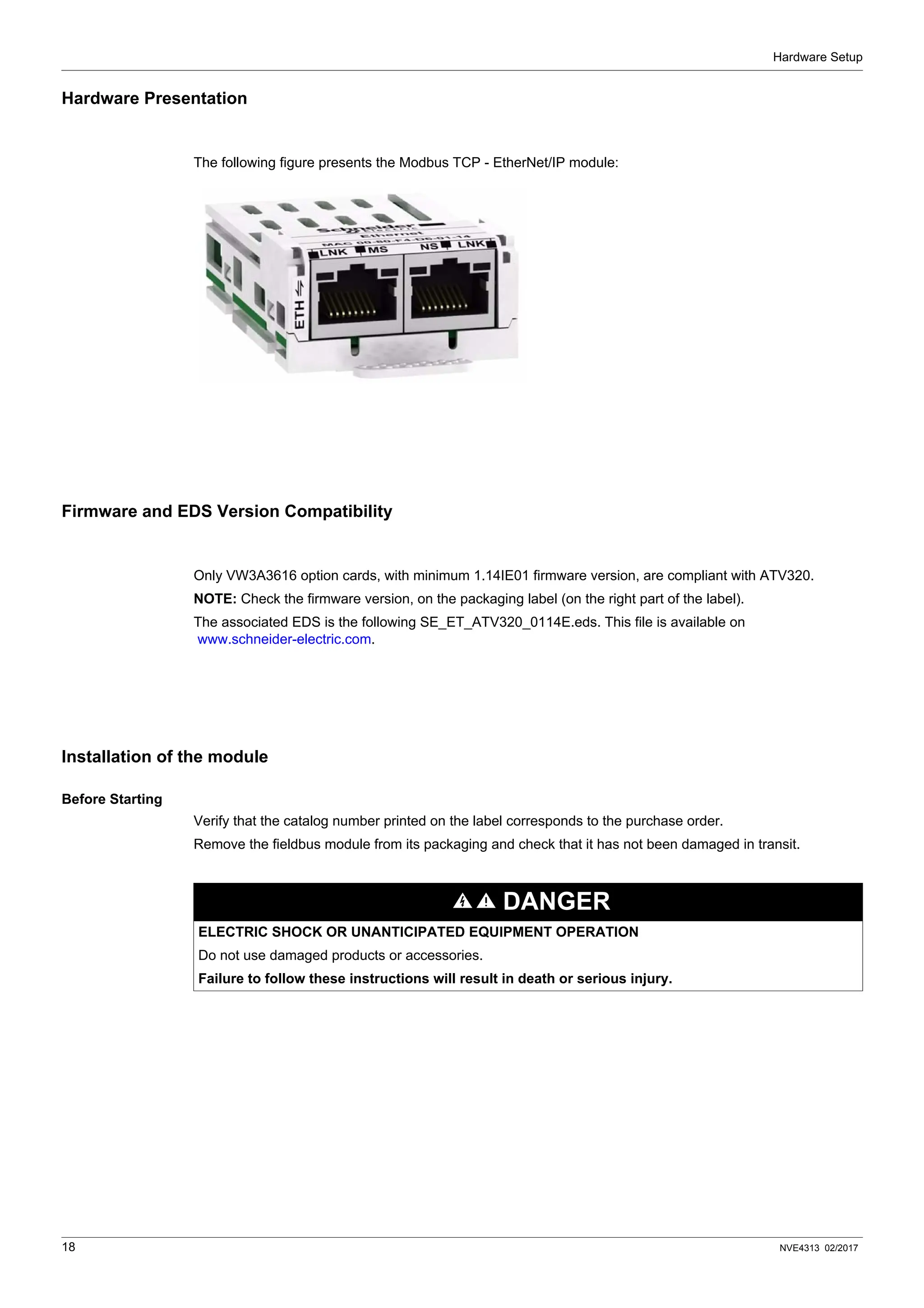
The following figure presents the Modbus TCP - EtherNet/IP module:
Firmware and EDS Version Compatibility
Only VW3A3616 option cards, with minimum 1.14IE01 firmware version, are compliant with ATV320.
NOTE: Check the firmware version, on the packaging label (on the right part of the label).
The associated EDS is the following SE_ET_ATV320_0114E.eds. This file is available on
www.schneider-electric.com.
Installation of the module
Before Starting
Verify that the catalog number printed on the label corresponds to the purchase order.
Remove the fieldbus module from its packaging and check that it has not been damaged in transit.
DANGER
ELECTRIC SHOCK OR UNANTICIPATED EQUIPMENT OPERATION
Do not use damaged products or accessories.
Failure to follow these instructions will result in death or serious injury.
Hardware Setup
NVE4313 02/2017 19
Insertion of the fieldbus module
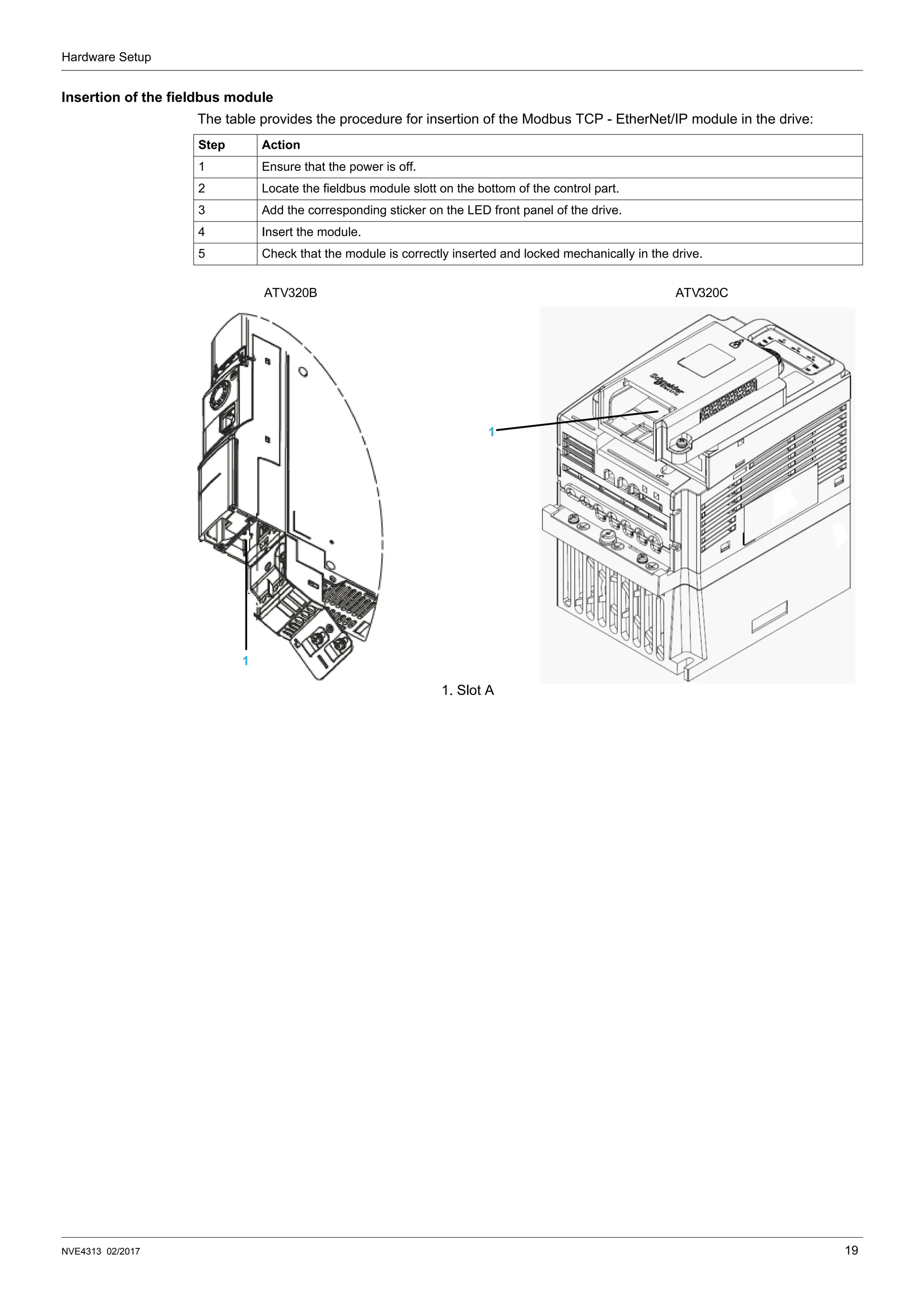
The table provides the procedure for insertion of the Modbus TCP - EtherNet/IP module in the drive:
Step Action
1 Ensure that the power is off.
2 Locate the fieldbus module slott on the bottom of the control part.
3 Add the corresponding sticker on the LED front panel of the drive.
4 Insert the module.
5 Check that the module is correctly inserted and locked mechanically in the drive.
1. Slot A
1
1
ATV320B ATV320C
Hardware Setup
20 NVE4313 02/2017
Wiring
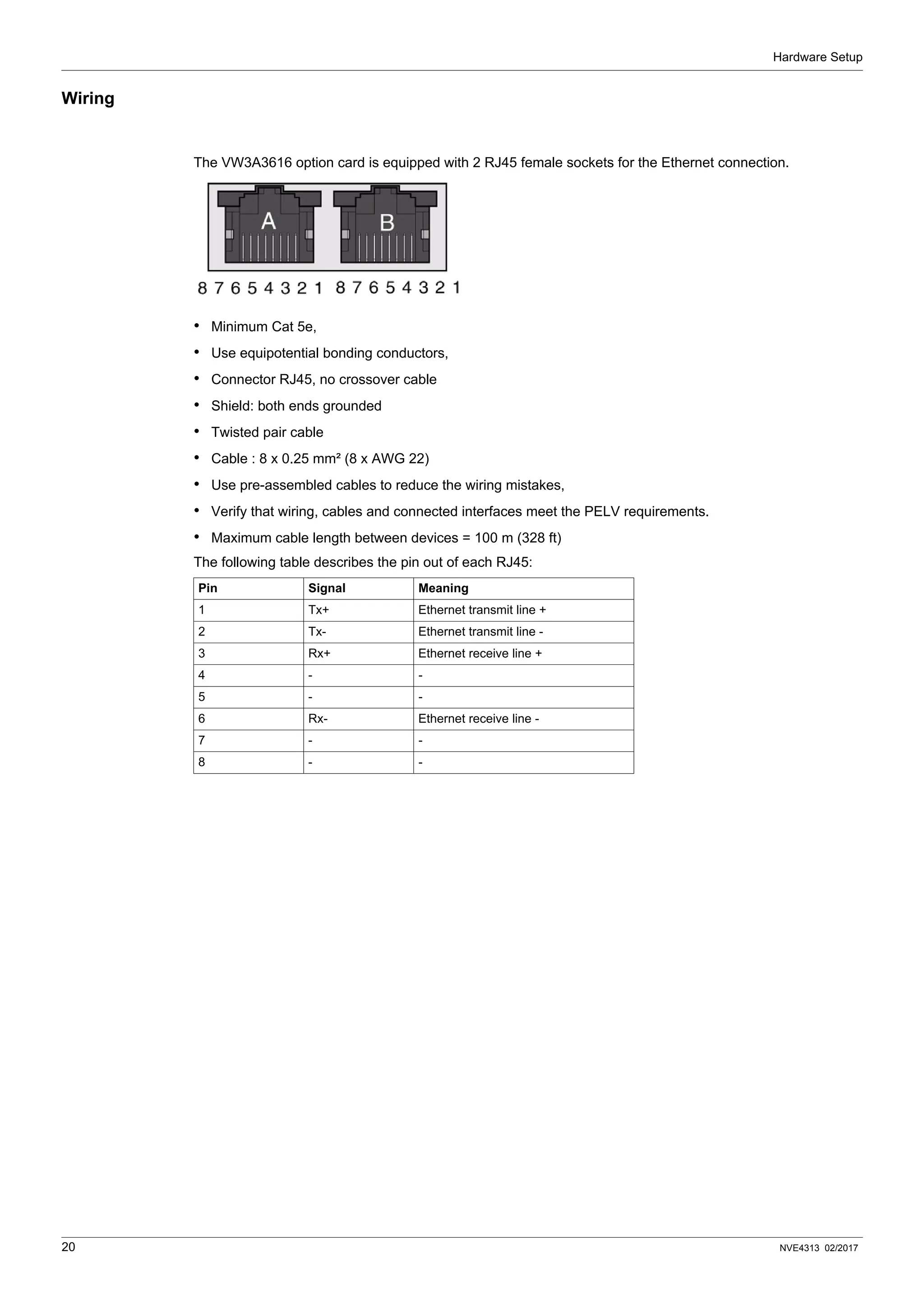
The VW3A3616 option card is equipped with 2 RJ45 female sockets for the Ethernet connection.
• Minimum Cat 5e,
• Use equipotential bonding conductors,
• Connector RJ45, no crossover cable
• Shield: both ends grounded
• Twisted pair cable
• Cable : 8 x 0.25 mm² (8 x AWG 22)
• Use pre-assembled cables to reduce the wiring mistakes,
• Verify that wiring, cables and connected interfaces meet the PELV requirements.
• Maximum cable length between devices = 100 m (328 ft)
The following table describes the pin out of each RJ45:
Pin Signal Meaning
1 Tx+ Ethernet transmit line +
2 Tx- Ethernet transmit line -
3 Rx+ Ethernet receive line +
4 - -
5 - -
6 Rx- Ethernet receive line -
7 - -
8 - -
Hardware Setup
NVE4313 02/2017 21
Installation Topology
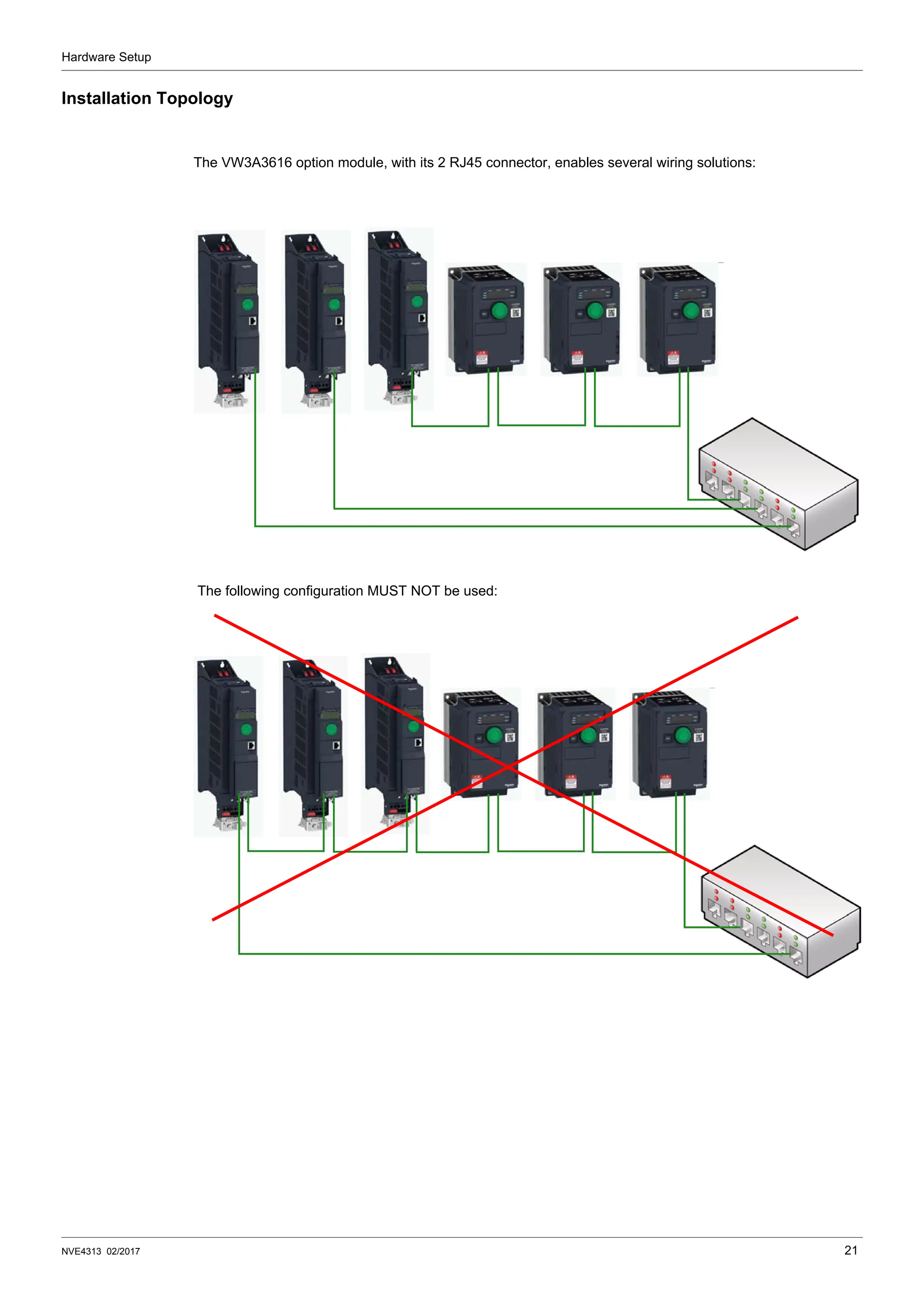
The VW3A3616 option module, with its 2 RJ45 connector, enables several wiring solutions:
The following configuration MUST NOT be used:
Hardware Setup
22 NVE4313 02/2017
LED’s Indicators
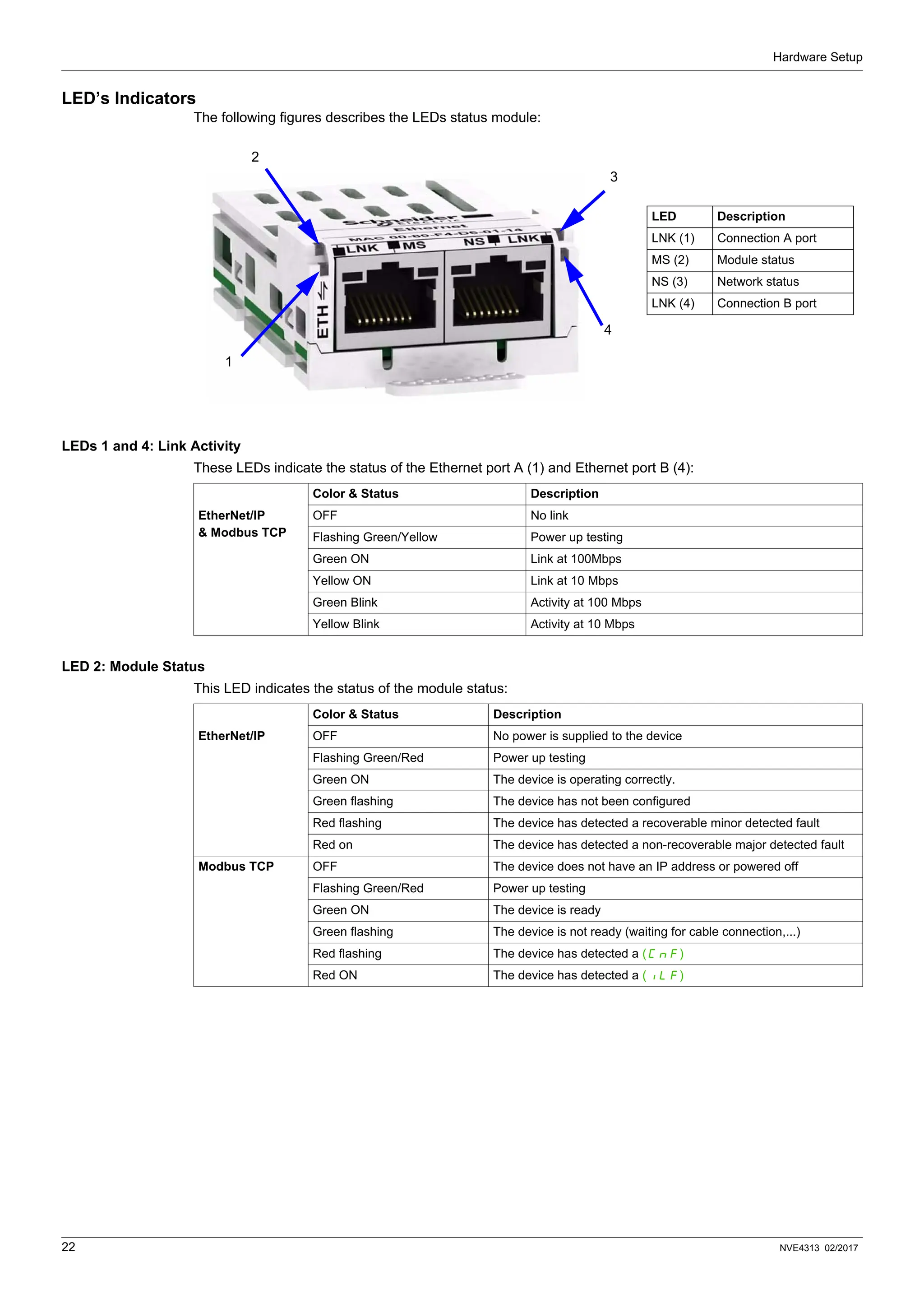
The following figures describes the LEDs status module:
LEDs 1 and 4: Link Activity
These LEDs indicate the status of the Ethernet port A (1) and Ethernet port B (4):
LED 2: Module Status
This LED indicates the status of the module status:
LED Description
LNK (1) Connection A port
MS (2) Module status
NS (3) Network status
LNK (4) Connection B port
1
2
3
4
Color & Status Description
EtherNet/IP
& Modbus TCP
OFF No link
Flashing Green/Yellow Power up testing
Green ON Link at 100Mbps
Yellow ON Link at 10 Mbps
Green Blink Activity at 100 Mbps
Yellow Blink Activity at 10 Mbps
Color & Status Description
EtherNet/IP OFF No power is supplied to the device
Flashing Green/Red Power up testing
Green ON The device is operating correctly.
Green flashing The device has not been configured
Red flashing The device has detected a recoverable minor detected fault
Red on The device has detected a non-recoverable major detected fault
Modbus TCP OFF The device does not have an IP address or powered off
Flashing Green/Red Power up testing
Green ON The device is ready
Green flashing The device is not ready (waiting for cable connection,...)
Red flashing The device has detected a (CnF)
Red ON The device has detected a (ILF)
Hardware Setup
NVE4313 02/2017 23
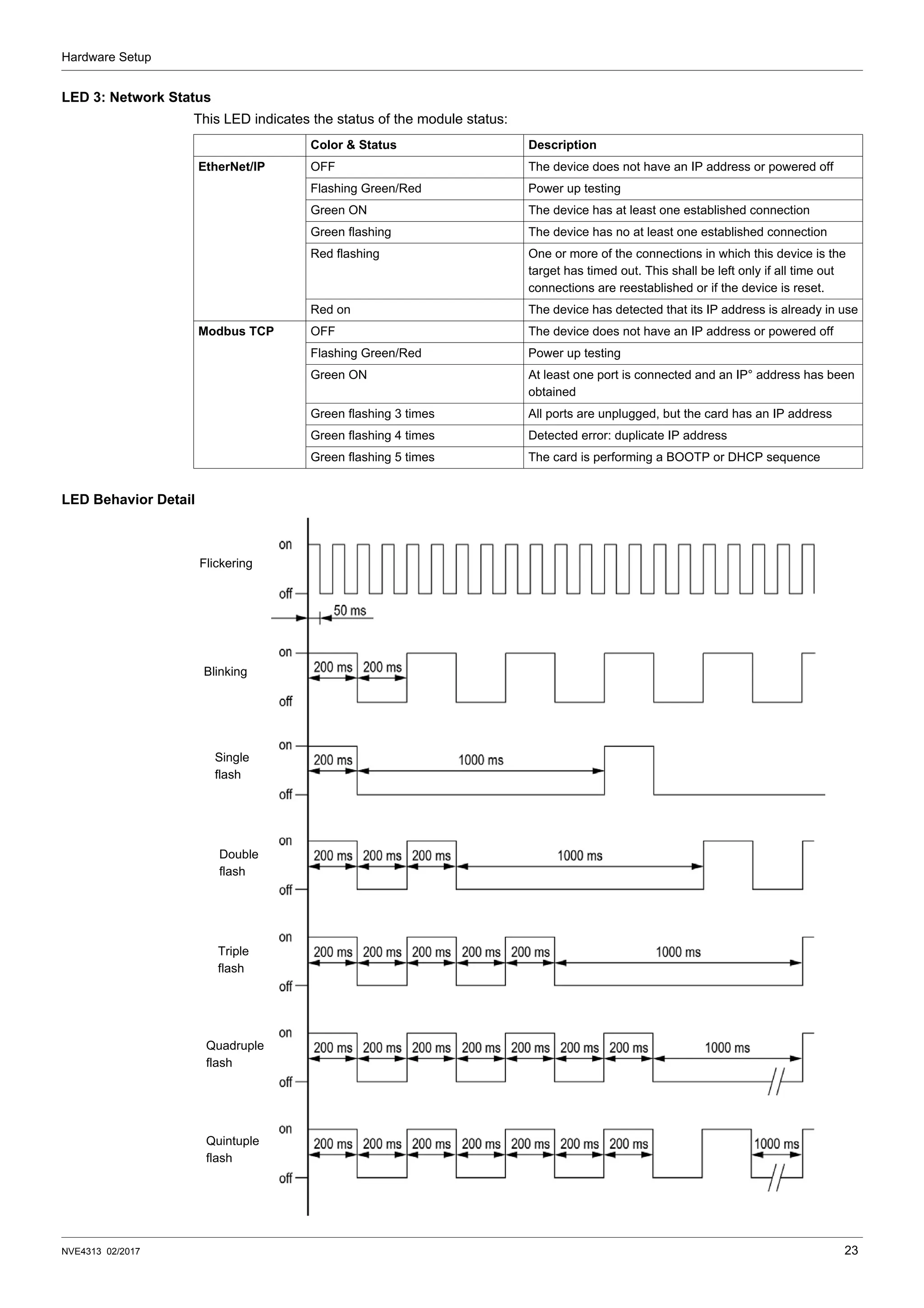
LED 3: Network Status
This LED indicates the status of the module status:
LED Behavior Detail
Color & Status Description
EtherNet/IP OFF The device does not have an IP address or powered off
Flashing Green/Red Power up testing
Green ON The device has at least one established connection
Green flashing The device has no at least one established connection
Red flashing One or more of the connections in which this device is the
target has timed out. This shall be left only if all time out
connections are reestablished or if the device is reset.
Red on The device has detected that its IP address is already in use
Modbus TCP OFF The device does not have an IP address or powered off
Flashing Green/Red Power up testing
Green ON At least one port is connected and an IP° address has been
obtained
Green flashing 3 times All ports are unplugged, but the card has an IP address
Green flashing 4 times Detected error: duplicate IP address
Green flashing 5 times The card is performing a BOOTP or DHCP sequence
Flickering
Blinking
Single
flash
Double
flash
Triple
flash
Quadruple
flash
Quintuple
flash
24 NVE4313 02/2017
Configuration and Parameters
3
Configuration and Parameters
Overview
This chapters describes the parameters of the VW3A3616 module. These parameters are described here
according to the local HMI or the Graphic keypad. These settings are also possible from SoMove or from the
embedded web server.
What's in this Chapter?
This chapter contains the following topics:
Topic Page
Network Settings 25
Modbus TCP Settings 27
FDR Settings 30
EtherNet/IP Settings 31
Monitoring of Communication Channels 32
Configuration and Parameters
NVE4313 02/2017 25
Network Settings
The parameters are accessible via [Configuration] (COnF-), [Full] (FULL-), [Communication]
(COM-) menu and [Communication module] (Cbd-) submenu.
NOTE: Before entry begins, the IP address displayed is the active IP address.
Assigning IP Addresses
The drive needs 3 IP addresses:
• The drive IP address.
• The subnet mask.
• The gateway IP address.
These IP addresses can be entered directly: Using the integrated display terminal. Using the graphic display
terminal. Or using the SoMove software. They can be provided by:
• A BOOTP server (correspondence between the MAC address and the IP addresses).
• Or a DHCP server (correspondence between Device Name [Device Name] and the IP addresses).
If an IP address other than 0.0.0.0 has been entered using the display terminal or the SoMove software,
assignment using a server is disabled.
Parameter Description
(HMI mnemonic)
Range or Listed Values Default Long Name Short
Name
Access Parameter
Number
[Ethernet protocol] (EthM)
This parameter defines which protocol is
used for implicit exchanges
0:Modbus TCP
1:EtherNet/IP
0 [Modbus TCP]
[Ethernet IP]
(MtCP)
(EIP)
R/W 64241
[Rate setting] (rdS)
Rate and data settings
0: Autodetect
1: 10 Mbps Full
2: 10 Mbps Half
3: 100 Mbps Full
4: 100 Mbps Half
Auto [Auto]
[10M. full]
[10M. half]
[100M. full]
[100M. half]
(AUtO)
(10F)
(10H)
(100F)
(100H)
R/W 64251
[IP mode] (IpM)
Use this parameter to select the IP
address assignment method
0: Man
1: BOOTP
2: DHCP
DHCP [Fixed]
[BOOTP]
[DHCP]
(MAnU)
(bOOt)
(dHCP)
R/W 64250
[IP module] (IPC)
(IPC1) (IPC2) (IPC3) (IPC4)
These fields are editable when IP mode
is set to Fixed address
0 to 255 for each 4 fields - [139.160.069.241] (139)
(160)
(069)
(241)
R/W 64212
64213
64214
64215
[IP Mask] (IPM)
(IPM1) (IPM2) (IPM3) (IPM4)
These fields are editable when IP mode
is set to Fixed address
0 to 255 for each 4 fields - [255.255.254.0] (255)
(255)
(254)
(0)
R/W 64216
64217
64218
64219
[IP Gate] (IPG)
(IPG1) (IPG2) (IPG3) (IPG4)
These fields are editable when IP mode
is set to Fixed address
0 to 255 for each 4 fields - [0.0.0.0] (0)
(0)
(0)
(0)
R/W 64220
64221
64222
64223
[MAC @] (MAC)
MAC address display
[00-80-F4-XX-XX-XX] - [00-80-F4-XX-XX-XX] 0080
F4---
XX
XXXX
R 64267
64268
64269
Configuration and Parameters
26 NVE4313 02/2017
Entering IP Addresses in the Terminal
In the [Communication] (COM-) menu, [Communication module] (CBD-) submenu, enter the following
IP addresses:
• [IP card] (IPC1) (IPC2) (IPC3) (IPC4),
• [IP Mask] (IPM1) (IPM2) (IPM3) (IPM4),
• [IP Gate] (IPG1) (IPG2) (IPG3) (IPG4).
Turn the drive off and then back on again (control voltage if a separate power supply is being used), otherwise
the IP addresses are not taken into account.
If this address is modified, the new IP address entered is displayed. This IP address will be effective the next
time the drive is turned on.
Configuring BOOTP
The BOOTP service is used to assign IP addresses from the MAC address. The MAC address consisting of 6
hexadecimal digits (00-80-F4-80-xx-yy) must be entered in the BOOTP server. The MAC address appears on
the label attached to the Ethernet card.
In the [Communication] (COM-) menu, [Communication module] (CBD-) submenu:
• Leave the IP address [IP card] (IPC1) (IPC2) (IPC3) (IPC4) at the value
[0.0.0.0] (0) (0) (0) (0).
• Do not enable the FDR service: [FDR Activation] (FdrU) = [No] (nO).
Configuration and Parameters
NVE4313 02/2017 27
Modbus TCP Settings
The parameters are accessible via [Configuration] (COnF-), [Full] (FULL-), [Communication]
(COM-) menu and [Communication module] (Cbd-) submenu.
These settings are only visible when the parameter [Ethernet protocol] (EtHM) is defined on
[ModbusTCP] (MbtP):
Parameter Description
(HMI mnemonic)
Range or Listed Values Default Long
Name
Short
Name
Access Parameter
Number
[MAC @] (MAC)
MAC address display
[00-80-F4-XX-XX-XX] - [00-80-F4-XX-
XX-XX]
0080
F4---
XX
XXXX
R 64267
64268
64269
[Rate setting] (rdS) 0: Autodetect
1: 10 Mbps Full
2: 10 Mbps Half
3: 100 Mbps Full
4: 100 Mbps Half
Auto [Auto]
[10M. full]
[10M. half]
[100M. full]
[100M. half]
(AUtO)
(10F)
(10H)
(100F)
(100H)
R/W 64251
[Ethernet protocol] (EthM) 0:Modbus TCP
1:EtherNet/IP
0 [Modbus TCP]
[EthernetIP]
(MbtP)
(EtIP)
R/W 64241
[IP mode] (IpM)
Use this parameter to select the IP
address assignment method
0: Man
1: BOOTP
2: DHCP
DHCP [Fixed]
[BOOTP]
[DHCP]
(MAnU)
(bOOt)
(dHCP)
R/W 64250
[IP Module] (IPC)
(IPC1) (IPC2) (IPC3)
(IPC4) These fields are editable
when IP mode is set to Fixed
address
0 to 255 for each 4 fields 0.0.0.0 [0.0.0.0] (0)
(0)
(0)
(0)
R/W 64212
64213
64214
64215
[IP Gate] (IPG)
(IPG1) (IPG2) (IPG3)
(IPG4)
These fields are editable when IP
mode is set to Fixed address
0 to 255 for each 4 fields - [0.0.0.0] (0)
(0)
(0)
(0)
R/W 64220
64221
64222
64223
[IP Master] (IPp)
(IPp1) (IPp2) (IPp3)
(IPp4) These fields define the
address of the device which
retains control of the drive
0 to 255 for each 4 fields 0.0.0.0 [0.0.0.0] (0)
(0)
(0)
(0)
R/W 64234
64235
64236
64237
[IP FDR] (IPF)
(IPF1) (IPF2) (IPF3)
(IPF4) These fields displays the
served address of the FDR server
0 to 255 for each 4 fields 0.0.0.0 [0.0.0.0] (0)
(0)
(0)
(0)
R/W 64224
64225
64226
64227
[FDR Activation] (FdrU)
Enable FDR service
0: no
1: yes
yes [No]
[Yes]
(nO)
(YES)
R/W 64228
[FDR Action] (FdrA) NOT ACTIVE: No command
SAVE: save command
REST: download command
DEL: delete command
IDLE [NOT ACTIVE]
[SAVE]
[REST]
[DEL]
(IdLE)
(SAUE)
(rESt)
(dEL)
R/W 64229
[FDR Autosave] (FdrS)
Interval for periodic saving of the
FDR service
0: no
1: yes
no [No]
[Yes]
(nO)
(YES)
R/W 64230
[FDR Autosave Timer] (Fdrt) 0 to 9999 minutes 0 [0] (0) R/W 64231
Configuration and Parameters
28 NVE4313 02/2017
[FDR Status] (FdrE)
FDR service status
- NOT ACTIVE: idle state
- INIT: initialisation
- CONF: configuration
- RDY: ready
- GET: download the current
configuration
- SET: save the current configuration
- APP: Write the FDR server conf. to the
drive
- OPE: operational
- UCFG: not configured
IDLE [NOT ACTIVE]
[INIT]
[CONF]
[RDY]
[GET]
[SET]
[APP]
[OPE]
[UCFG]
(IdLE)
(INIt)
(CONF)
(rdY)
(GEt)
(SEt)
(APP)
(OPE)
(UCFG)
RW 64232
[FDR file error] (FdrF)
Enable FDR detected fault
management
0: no
1: yes
yes [No]
[Yes]
(nO)
(YES)
R/W 64240
[Ethernet local conf] (LCFG)
Selection of local or server
configuration
0: no
1: yes
no [No]
[Yes]
(nO)
(YES)
R/W 64238
[Eth IO scan act] (IOSA)
Enable I/O scanner
0: no
1: Yes
- [No]
[Yes]
(nO)
(YES)
R/W 64239
[Services] (EWE-)
Enable web services
0: No web services
1: Web server enabled
1 - - R/W -
[Ethernet Timeout] (tOUt) 0.5 to 60 s
0: disabled
2.0 [2.0s] (2.0) R/W 64211
[FDR Error Code] (Fdrd) - 0: No error
- 2: the FDR configuration file is not
compatible with the drive type
- 3: Detected error reading the FDR
configuration file on the server
- 4: Detected error writing the
configuration file to the server
- 7:Time out for receipt of the FDR
configuration file from the server
- 9: duplicated IP address.
- 12:the FDR configuration file is
missing
- 13: the FDR configuration file
deployment on the drive has detected
an error (local detected error)
- 14: the configuration file delete
request has detected an error on the
FDR server
0 [0]
[2]
[3]
[4]
[7]
[9]
[12]
[13]
[14]
(0)
(2)
(3)
(4)
(7)
(9)
(12)
(13)
(14)
R 64233
[Scan.Out1 address] (OCA1) Eligible modbus address CM [OCA1] (OCA1) R/W 15421
[Scan.Out2 address] (OCA2) Eligible modbus address LFRD [OCA2] (OCA2) R/W 15422
[Scan.Out3 address] (OCA3) Eligible modbus address 0 [OCA3] (OCA3) R/W 15423
[Scan.Out4 address] (OCA4) Eligible modbus address 0 [OCA4] (OCA4) R/W 15424
[Scan.Out5 address] (OCA5) Eligible modbus address 0 [OCA5] (OCA5) R/W 15425
[Scan.Out6 address] (OCA6) Eligible modbus address 0 [OCA6] (OCA6) R/W 15426
[Scan. IN1 address] (OMA1) Eligible modbus address ETA [OMA1] (OMA1) R/W 15401
[Scan. IN2 address] (OMA2) Eligible modbus address RFRD [OMA2] (OMA2) R/W 15402
[Scan. IN3 address] (OMA3) Eligible modbus address 0 [OMA3] (OMA3) R/W 15403
[Scan. IN4 address] (OMA4) Eligible modbus address 0 [OMA4] (OMA4) R/W 15404
[Scan. IN5 address] (OMA5) Eligible modbus address 0 [OMA5] (OMA5) R/W 15405
[Scan. IN6 address] (OMA6) Eligible modbus address 0 [OMA6] (OMA6) R/W 15406
[InternCom Error 1] (ILF1)
Option card 1 ILF Errors
Eligible modbus address 0 [-] (-) R/W 7134
[Fieldbus Com Interrupt] (CnF)
Communication module error
Eligible modbus address 0 [-] (-) R/W 7132
Parameter Description
(HMI mnemonic)
Range or Listed Values Default Long
Name
Short
Name
Access Parameter
Number
Configuration and Parameters
NVE4313 02/2017 29
• If control has been reserved: only the control word (CMd) written by the master with control will be
accepted via I/O Scanning or via Modbus TCP messaging. Two TCP connections are reserved for this
device. In this way, you avoid other TCP clients using all the available connections (8 maximum) and the
control master therefore no longer being able to access the drive Modbus TCP server.
NOTE: Other parameters written from other IP addresses are accepted (for example, adjustments or writing
a setpoint). When control has been reserved and another device attempts to write the control word (CMd):
- via I/O Scanning: The Modbus TCP connection for this client is immediately reinitialized.
- via Modbus TCP messaging: Control is denied.
• If control has not been reserved ([IP Master] = [0.0.0.0] (0) (0) (0) (0)), control can come from any IP
address.
Configuring I/O Scanning
The drive I/O Scanning service can be enabled or disabled in the [Communication] (COM-) menu,
[Communication module] (Cbd-)submenu via parameter [Eth IO scan act] (IOSA).
It is not possible to modify the assignment of the I/O Scanning periodic variables using the display terminal
(integrated or graphic). To configure I/O Scanning, use the standard Web server or the SoMove software.
Configuration and Parameters
30 NVE4313 02/2017
FDR Settings
The parameters are accessible via [Configuration] (COnF-), [Full] (FULL-), [Communication]
(COM-) menu and [Communication module] (Cbd-) submenu.
The following table describes the parameters related to the “Fast device replacement settings”. More
information about FDR settings can be found in “FDR Settings” on page 103
NOTE: During the application of the configuration, the option use the File Transfer mechanism (FTP) and
some system services. If all the transfers are well finished, the operational state is reached. If the configuration
is ok: the operational state is reached, else if the configuration is not ok: the unconfigured state is reached
(FDR error #14).
Parameter Description
(HMI mnemonic)
Range or Listed Values Default Long
Name
Short
Name
Access Parameter
Number
[IP FDR] (IPF)
(IPF1) (IPF2) (IPF3)
(IPF4)
These fields displays the served
address of the FDR server
0 to 255 for each 4 fields 0.0.0.0 [0.0.0.0] (0)
(0)
(0)
(0)
R/W 64224
64225
64226
64227
[FDR Activation] (FdrU)
Enable FDR service
0: no
1: yes
yes [No]
[Yes]
(nO)
(YES)
R/W 64228
[Ethernet local conf] (LCFG)
Selection of local or server
configuration
0: no
1: yes
no [No]
[Yes]
(nO)
(YES)
R/W 64238
[FDR file error] (FdrF)
Enable FDR error management
0: no
1: yes
yes [No]
[Yes]
(nO)
(YES)
R/W 64240
[FDR Action] (FdrA) NOT ACTIVE: No command
SAVE: save command
REST: download command
DEL: delete command
IDLE [NOT
ACTIVE]
[SAVE]
[REST]
[DEL]
(IdLE)
(SAUE)
(rESt)
(dEL)
R/W 64229
[FDR Autosave] (FdrS)
Interval for periodic saving of the
FDR service
0: no
1: yes
no [No]
[Yes]
(nO)
(YES)
R/W 64230
[FDR Autosave Timer] (Fdrt) 0 to 9999 minutes 0 [0] (0) R/W 64231
[FDR Status] (FdrE)
FDR service status
- NOT ACTIVE: idle state
- INIT: initialisation
- CONF: configuration
- RDY: ready
- GET: download the current configuration
- SET: save the current configuration
- APP: Write the FDR server conf. to the drive
- OPE: operational
- UCFG: not configured
IDLE [NOT
ACTIVE]
[INIT]
[CONF]
[RDY]
[GET]
[SET]
[APP]
[OPE]
[UCFG]
(IdLE)
(INIt)
(CONF)
(rdY)
(GEt)
(SEt)
(APP)
(OPE)
(UCFG)
RW 64232
[FDR Error Code] (Fdrd) - 0: No error
- 2: the FDR configuration file is not
compatible with the drive type
- 3: Detected error reading the FDR
configuration file on the server
- 4: Detected error writing the configuration
file to the server
- 7:Time out for receipt of the FDR
configuration file from the server
- 9: duplicated IP address.
- 12:the FDR configuration file is missing
- 13: the FDR configuration file deployment
on the drive has detected an error (local
detected error)
- 14: the configuration file delete request has
detected an error on the FDR server
0 [0]
[2]
[3]
[4]
[7]
[9]
[12]
[13]
[14]
(0)
(2)
(3)
(4)
(7)
(9)
(12)
(13)
(14)
R 64233
Configuration and Parameters
NVE4313 02/2017 31
EtherNet/IP Settings
The parameters are accessible via [Configuration] (COnF-), [Full] (FULL-), [Communication]
(COM-) menu and [Communication module] (Cbd-) submenu.
These settings are only visible when the parameter [Ethernet protocol] (EtHM) is defined on
[EthernetIP] (EtIP):
Parameter Description
(HMI mnemonic)
Range or Listed Values Default Long Name Short
Name
Access Parameter
Number
[MAC @] (MAC)
MAC address display
[00-80-F4-XX-XX-XX] - [00-80-F4-XX-XX-XX] 0080
F4---
XX
XXXX
R 64267
64268
64269
[Rate setting] (rdS) 0: Autodetect
1: 10 Mbps Full
2: 10 Mbps Half
3: 100 Mbps Full
4: 100 Mbps Half
Auto [Auto]
[10M. full]
[10M. half]
[100M. full]
[100M. half]
(AUtO)
(10F)
(10H)
(100F)
(100H)
R/W 64251
[Ethernet protocol] (EthM) 0:Modbus TCP
1:EtherNet/IP
0 [Modbus TCP]
[EthernetIP]
(MbtP)
(EtIP)
R/W 64241
[IP mode] (IpM)
Use this parameter to select the IP
address assignment method
0: Man
1: BOOTP
2: DHCP
DHCP [fixed]
[BOOTP]
[DHCP]
(MAnU)
(bOOt)
(dHCP)
R/W 64250
[IP Module] (IPC)
(IPC1) (IPC2) (IPC3)
(IPC4) These fields are editable
when IP mode is set to Fixed
address
0 to 255 for each 4 fields 0.0.0.0 [0.0.0.0] (0)
(0)
(0)
(0)
R/W 64212
64213
64214
64215
[IP Gate] (IPG)
(IPG1) (IPG2) (IPG3)
(IPG4)
These fields are editable when IP
mode is set to Fixed address
0 to 255 for each 4 fields - [0.0.0.0] (0)
(0)
(0)
(0)
R/W 64220
64221
64222
64223
[Conf. Assembly] (CIO2)
Configured output assembly
20,21,100, 101 20 [20] - R -
[Services] (EWE-)
Enable web services
0: No web services
1: Web server enabled
1 - - R/W -
[Scan.Out1 address] (OCA1) Eligible modbus address CMD [OCA1] (OCA1) R/W 15421
[Scan.Out2 address] (OCA2) Eligible modbus address LFRD [OCA2] (OCA2) R/W 15422
[Scan.Out3 address] (OCA3) Eligible modbus address 0 [OCA3] (OCA3) R/W 15423
[Scan.Out4 address] (OCA4) Eligible modbus address 0 [OCA4] (OCA4) R/W 15424
[Scan.Out5 address] (OCA5) Eligible modbus address 0 [OCA5] (OCA5) R/W 15425
[Scan.Out6 address] (OCA6) Eligible modbus address 0 [OCA6] (OCA6) R/W 15426
[Scan. IN1 address] (OMA1) Eligible modbus address ETA [OMA1] (OMA1) R/W 15401
[Scan. IN2 address] (OMA2) Eligible modbus address RFRD [OMA2] (OMA2) R/W 15402
[Scan. IN3 address] (OMA3) Eligible modbus address 0 [OMA3] (OMA3) R/W 15403
[Scan. IN4 address] (OMA4) Eligible modbus address 0 [OMA4] (OMA4) R/W 15404
[Scan. IN5 address] (OMA5) Eligible modbus address 0 [OMA5] (OMA5) R/W 15405
[Scan. IN6 address] (OMA6) Eligible modbus address 0 [OMA6] (OMA6) R/W 15406
[InternCom Error1] (ILF1)
Communication interruption
between option card 1 and drive
Eligible modbus address 0 [-] (-) R/W 7134
[Fieldbus Com Interrupt] (CnF)
Communication module error
Eligible modbus address 0 [-] (-) R/W 7132
Configuration and Parameters
32 NVE4313 02/2017
Monitoring of Communication Channels
Command and Reference Channels
All the drive's command and reference parameters are managed on a channel-by-channel basis.
It is possible to identify the last value written for each channel and each command or reference parameter:
Network Monitoring Criteria
The network is monitored according to the protocol-specific criteria.
Monitoring of Communication Channels
Communication channels are monitored if they are involved in one of the following parameters:
• The control word ([Cmd Register] (CMd)) from the active command channel
• The control word containing the command switch (bit configured on [Command Switching] (CCS))
• The control word containing the switch for reference 1'1B (bit configured on [Ref 1B switching] (rCb))
• The control word containing the switch for reference 1'2 (bit configured on [Freq Switch Assign] (rFC))
• The frequency or speed reference ([Ref Frequency] (LFr) or LFRD: Nominal speed value) from the
active reference channel
• Summing frequency or speed reference ([Ref Frequency] (LFr) or LFRD: Nominal speed value) 2
(assigned to [Summing Input 2] (SA2))
• Summing frequency or speed reference ([Ref Frequency] (LFr) or LFRD: Nominal speed value) 3
(assigned to [Summing Input 3] (SA3))
• Subtracting frequency or speed reference ([Ref Frequency] (LFr) or LFRD: Nominal speed value) 2
(assigned to [Subtract Ref Freq 2] (dA2))
• Subtracting frequency or speed reference ([Ref Frequency] (LFr) or LFRD: Nominal speed value) 3
(assigned to [Subtract Ref Freq 3] (dA3))
• The PID regulator reference (PISP)
• The PID regulator feedback ([AI Virtual 2] (AIU2))
• The reference multiplication coefficient ([Multiplying coeff.] (MFr)) 2 (assigned to
[Ref Freq 2 Multiply] (MA2))
• The reference multiplication coefficient ([Multiplying coeff.] (MFr)) 3 (assigned to
[Ref Freq 3 Multiply] (MA3))
As soon as one of these parameters has been written once to a communication channel, it activates monitoring
for that channel.
If a communication alarm is sent (in accordance with the protocol criteria) by a monitored port or network card,
the drive will trigger a communication interruption.
The drive reacts according to the communication interruption configuration (detected fault, maintenance,
fallback, etc.)
Parameter name Parameter code
Taken into account
by the drive
Modbus CANopen Communication card
Control word (CMd) (CMd1) (CMd2) (CMd3)
Extended control word (CMI) (CMI1) (CMI2) (CMI3)
Speed reference (rpm) (LFrd) (LFd1) (LFd2) (LFd3)
Frequency reference
(0.1 Hz)
(LFr) (LFr1) (LFr2) (LFr3)
PI regulator reference (PISP) (PIr1) (PIr2) (PIr3)
Analog multiplier
reference
(MFr) (MFr1) (MFr2) (MFr3)
Protocol Criteria Related detected fault
Integrated Modbus
port
Adjustable time-out for received requests destined for
the drive.
[Modbus Com Interruption] (SLF)
Ethernet card FDR detected fault
IP address duplication detected fault
Adjustable time-out for received control word
(I/O scanning or messaging)
Network overload
[Fieldbus Error] (EPF2)
[Fieldbus Com Interrupt] (CNF)
Configuration and Parameters
NVE4313 02/2017 33
If a communication alarm occurs on a channel that is not being monitored, the drive will not trigger a
communication interruption.
Enabling of Communication Channels
A communication channel is enabled once all the parameters involved have been written at least one time.
The drive is only able to start if all channels involved in command and reference are enabled.
Example:
A drive in DSP402 profile is connected to an active communication channel.
It is mandatory to write at least one time the reference and the command in order to switch from “4-Switched
on” to “5-Operation enabled” state
A communication channel is disabled:
• In the event of a communication alarm
• In “forced local“ mode.
Note: On exiting “forced local“ mode:
• The drive copies the run commands, the direction and the forced local reference to the active channel
(maintained).
• Monitoring of the active command and reference channels resumes following a time delay
[Time-out forc. local] (FLOt).
• Drive control only takes effect once the drive has received the reference and the command from the active
channel.
34 NVE4313 02/2017
Configuration of the Drive Commands Settings
4
Configuration of the Drive Commands Settings
Overview
This chapter explains how to configure the drive for operation from communication network through 3 following
examples:
• I/O Mode - a simple command Word (based on forward, reverse and reset binary commands).
• Combined Mode (with native profile CiA402) - Both reference and command word come from the
communication network.
• Separate (with native profile CiA402) - Reference and command word come from separate sources: for
example, the command word (in CiA402) comes from the communication network and the reference word
from the HMI.
What's in this Chapter?
This chapter contains the following topics:
Topic Page
Configuration of the Drive for Operation in I/O Profile 35
Configuration of the Drive for Operation With CiA402 Profile in Combined Mode 36
Configuration of the Drive for Operation With CiA402 Profile in Separate Mode 36
Configuration of the Drive Commands Settings
NVE4313 02/2017 35
Configuration of the Drive for Operation in I/O Profile
To illustrate the I/O Profile, we will describe a simple example, which can be of course extended with additional
features. The Command word is made of Run forward (bit 0 of CMd), run reverse (bit 1 of CMd), and a
detected fault reset (bit 7 of CMd).
The settings will be the following:
The bits of the command word must now be configured.
In the [Inputs / Outputs] Menu, configure:
In the [Monitoring] menu, [Fault reset] submenu, configure:
[Ref Freq 1 Config] (Fr1) [Ref.Freq-Rmt.Term] (LCC) (for
example)
[Reverse Disable] (rIn) Default
[Stop Key Enable] (PSt) Default
[Control Mode] (CHCF) [I/O profile] (IO)
[Command Switching] (CCS) Default
[Cmd channel 1] (Cd1) [Com. Module] (nEt)
[Forward] (Frd) [Cd00] (Cd00)
[Reverse Assign] (rrS) [Cd01] (Cd01)
[Fault Reset Assign] (rSF) [Cd07] (Cd07)
Reset
Run reverse
Run forward
[Inputs / Outputs] / [Forward] is
assigned to CMD bit 0
[Inputs / Outputs] / [Reverse
Assign] is assigned to CMd bit 1
[Monitoring] / [Fault Reset] /
[Fault Reset Assign] is assigned
to CMd bit 7
Configuration of the Drive Commands Settings
36 NVE4313 02/2017
Configuration of the Drive for Operation With CiA402 Profile in Combined Mode
This chapter describes how to configure the settings of the drive if it is controlled in CiA402 Mode. The example
focuses on the Not separate mode (Combined). Additional modes such as the separate Mode are detailed in
the ATV320 Programming manual.
In the Command Menu [Command] (CtL-):
• [Ref Freq 1 Config] (Fr1): is set according to the communication source you can choose in the following
table:
• [Control Mode] (CHCF): defines if the drive operates in combined mode (reference and command from
the same channel).
Configuration of the Drive for Operation With CiA402 Profile in Separate Mode
Alternate combinations are possible, see the ATV320 programming manual for the list of possible settings.
Example:
The drive is controlled from the communication (EtherNet) but the reference is adjusted on the local HMI. The
control word comes from the controller and is written according to CiA402 profile.
The settings will be as follows:
Origin of the control Ref1 Channel setting
EtherNet/IP - Modbus TCP [Ref. Freq-Com. Module] (nEt)
[Ref Freq 1 Config] (Fr1) [AI virtual 1] (AIU1)
[Reverse Disable] (rIn) Default
[Stop Key enable] (PSt) Default
[Control Mode] (CHCF) [Separate] (SEp)
[Command switching] (CCS) Default
[Cmd channel 1] (Cd1) [Com. module] (nEt)
Control Word
Speed
reference
NVE4313 02/2017 37
Network Layer Supported Functions/Protocols
5
Network Layer Supported Functions/Protocols
ARP, ICMP and IP Protocol
ARP Protocol
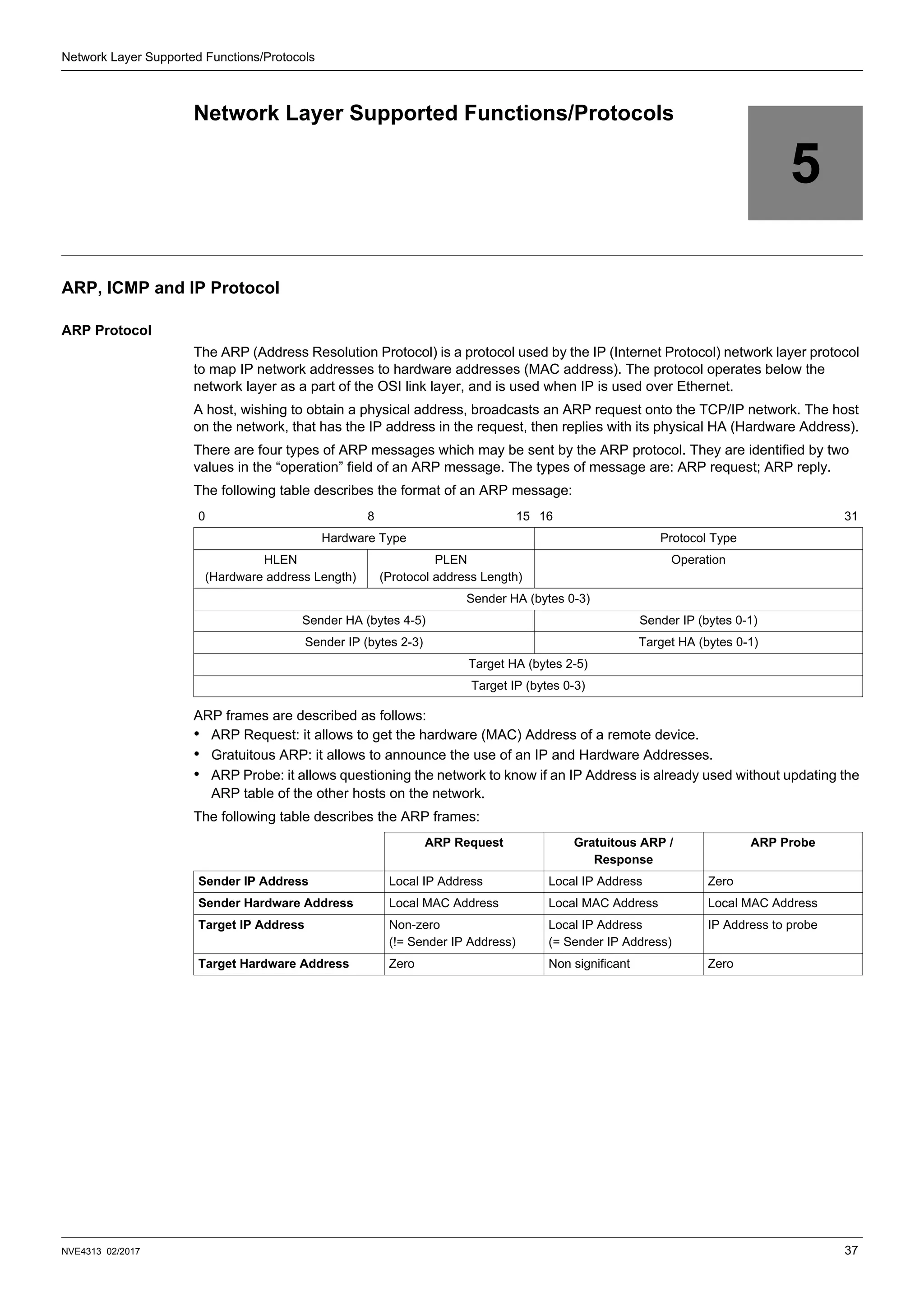
The ARP (Address Resolution Protocol) is a protocol used by the IP (Internet Protocol) network layer protocol
to map IP network addresses to hardware addresses (MAC address). The protocol operates below the
network layer as a part of the OSI link layer, and is used when IP is used over Ethernet.
A host, wishing to obtain a physical address, broadcasts an ARP request onto the TCP/IP network. The host
on the network, that has the IP address in the request, then replies with its physical HA (Hardware Address).
There are four types of ARP messages which may be sent by the ARP protocol. They are identified by two
values in the “operation” field of an ARP message. The types of message are: ARP request; ARP reply.
The following table describes the format of an ARP message:
ARP frames are described as follows:
• ARP Request: it allows to get the hardware (MAC) Address of a remote device.
• Gratuitous ARP: it allows to announce the use of an IP and Hardware Addresses.
• ARP Probe: it allows questioning the network to know if an IP Address is already used without updating the
ARP table of the other hosts on the network.
The following table describes the ARP frames:
0 8 15 16 31
Hardware Type Protocol Type
HLEN
(Hardware address Length)
PLEN
(Protocol address Length)
Operation
Sender HA (bytes 0-3)
Sender HA (bytes 4-5) Sender IP (bytes 0-1)
Sender IP (bytes 2-3) Target HA (bytes 0-1)
Target HA (bytes 2-5)
Target IP (bytes 0-3)
ARP Request Gratuitous ARP /
Response
ARP Probe
Sender IP Address Local IP Address Local IP Address Zero
Sender Hardware Address Local MAC Address Local MAC Address Local MAC Address
Target IP Address Non-zero
(!= Sender IP Address)
Local IP Address
(= Sender IP Address)
IP Address to probe
Target Hardware Address Zero Non significant Zero
Network Layer Supported Functions/Protocols
38 NVE4313 02/2017
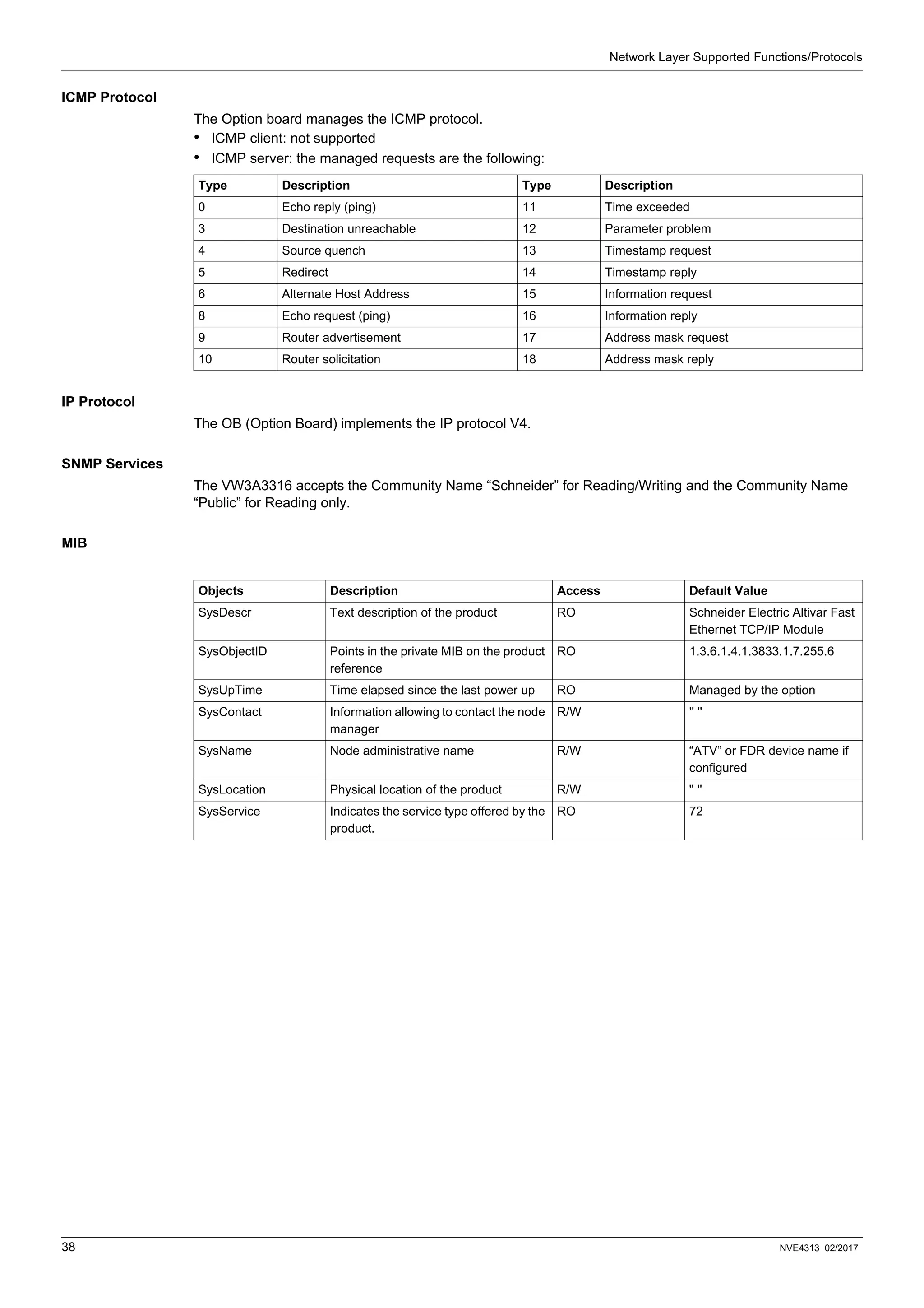
ICMP Protocol
The Option board manages the ICMP protocol.
• ICMP client: not supported
• ICMP server: the managed requests are the following:
IP Protocol
The OB (Option Board) implements the IP protocol V4.
SNMP Services
The VW3A3316 accepts the Community Name “Schneider” for Reading/Writing and the Community Name
“Public” for Reading only.
MIB
Type Description Type Description
0 Echo reply (ping) 11 Time exceeded
3 Destination unreachable 12 Parameter problem
4 Source quench 13 Timestamp request
5 Redirect 14 Timestamp reply
6 Alternate Host Address 15 Information request
8 Echo request (ping) 16 Information reply
9 Router advertisement 17 Address mask request
10 Router solicitation 18 Address mask reply
Objects Description Access Default Value
SysDescr Text description of the product RO Schneider Electric Altivar Fast
Ethernet TCP/IP Module
SysObjectID Points in the private MIB on the product
reference
RO 1.3.6.1.4.1.3833.1.7.255.6
SysUpTime Time elapsed since the last power up RO Managed by the option
SysContact Information allowing to contact the node
manager
R/W '' ''
SysName Node administrative name R/W “ATV” or FDR device name if
configured
SysLocation Physical location of the product R/W '' ''
SysService Indicates the service type offered by the
product.
RO 72
NVE4313 02/2017 39
Transport Layer Protocols
6
Transport Layer Protocols
TCP and UDP Protocol
Connections
The VW3A3616 supports maximum 8 concurrent TCP connections.
The VW3A3616 device, according to EtherNet/IP specifications, supports:
• 3 concurrent encapsulation sessions,
• 6 concurrent transport class 3 explicit messaging connections,
• more than 1 transport class 3 connection per encapsulation session.
BOOTP and DHCP Protocol
The VW3A3616 can use BOOTP and DHCP protocols.
BOOTP & DHCP protocol frames
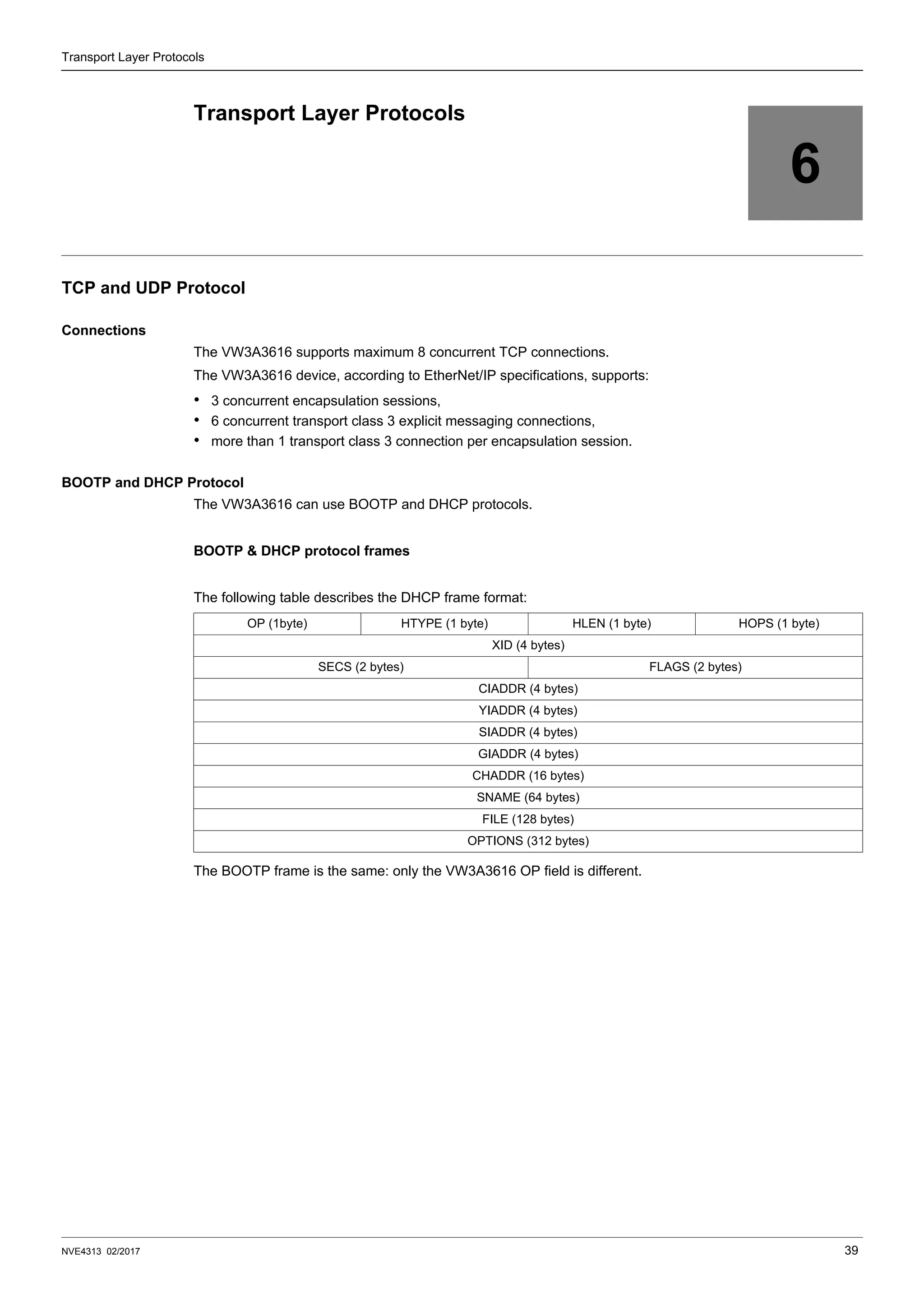
The following table describes the DHCP frame format:
The BOOTP frame is the same: only the VW3A3616 OP field is different.
OP (1byte) HTYPE (1 byte) HLEN (1 byte) HOPS (1 byte)
XID (4 bytes)
SECS (2 bytes) FLAGS (2 bytes)
CIADDR (4 bytes)
YIADDR (4 bytes)
SIADDR (4 bytes)
GIADDR (4 bytes)
CHADDR (16 bytes)
SNAME (64 bytes)
FILE (128 bytes)
OPTIONS (312 bytes)
Transport Layer Protocols
40 NVE4313 02/2017
DHCP frame fields are described as follows:
DHCP messages
The DHCP protocol uses 8 different types of message during the IP assigning process.
The following table describes the 8 messages:
Operating mode
The choice between DHCP, BOOTP and manual configuration is made through one parameter:
• Manual mode: the VW3A3616 uses the address stored in parameter.
• BOOTP: card receives the addresses from BOOTP server.
• DHCP: if the Altivar Device name [XXX] is a valid name, the VW3A3616 receives the addresses from the
DHCP server.
Field Description
op Message type DHCP Request / DHCP Reply
htype Address hardware type
hlen Hardware address length
hops Used by relay agent
xid Transaction identifier, random number chosen by the client allowing to associate the request and the
response
secs Time in seconds since the beginning of the transaction
flags First bit used for the Broadcast reply flag
ciaddr Client IP address, only used if the client can respond to ARP request
yiaddr Client IP address, “your” IP address proposed by the server
siaddr IP address of the server
giaddr Gateway IP address, used when a relay agent needs to be crossed
sname Server Name
file Location of boot file
options Optional parameters with DHCP extensions
Message Description
DISCOVER The client tries to discover the DHCP server using a broadcast
OFFER The server proposes a configuration
REQUEST The client chooses a DHCP server and declines other offers
ACK The chosen server assigns the IP configuration
NAK The server rejects the client request
DECLINE The client declines the assigned IP configuration
RELEASE The client releases Its IP address before the end of the lease
INFORM The client asks for network information (it already has an IP address)
NVE4313 02/2017 41
Modbus TCP Features
7
Modbus TCP Features
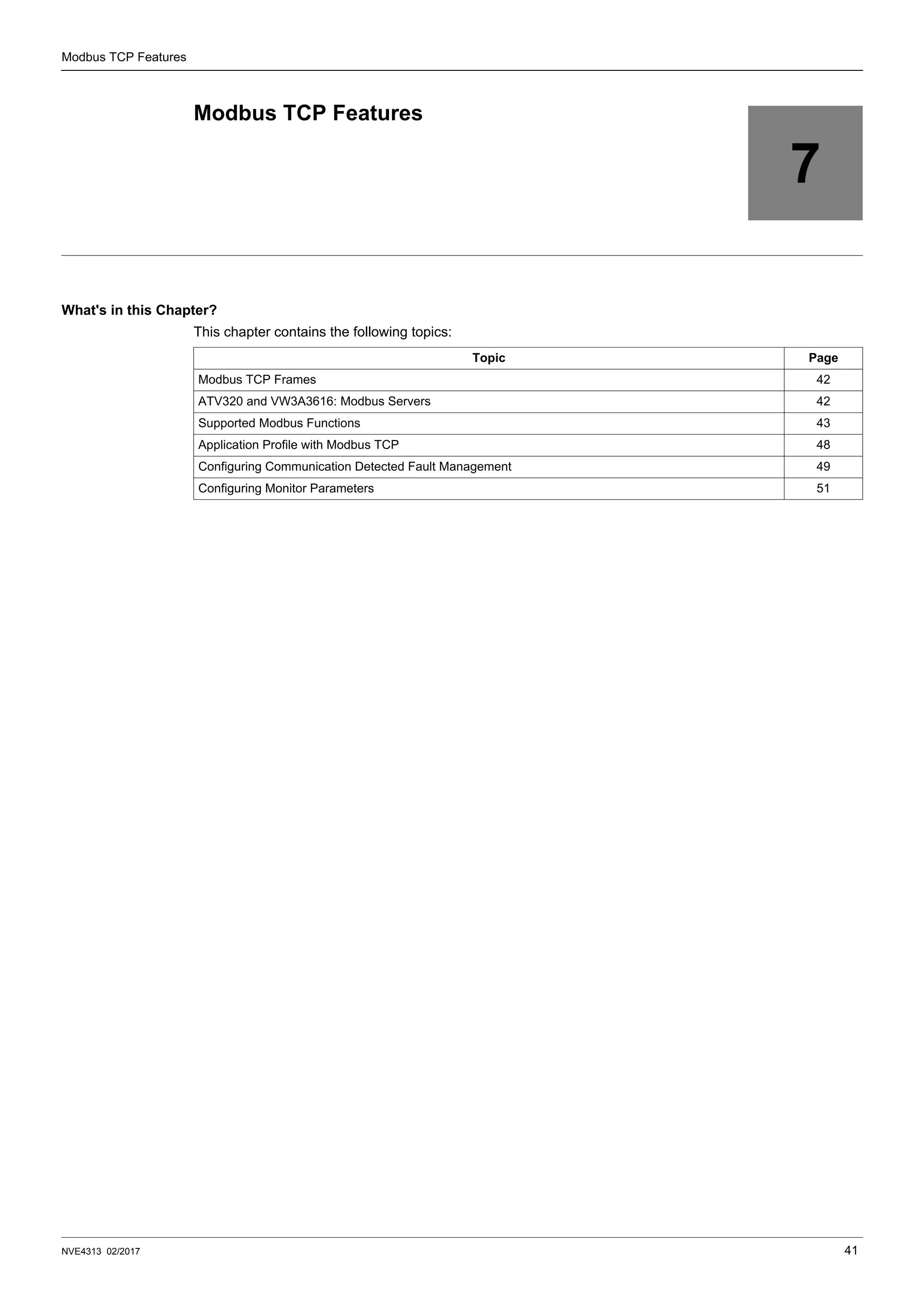
What's in this Chapter?
This chapter contains the following topics:
Topic Page
Modbus TCP Frames 42
ATV320 and VW3A3616: Modbus Servers 42
Supported Modbus Functions 43
Application Profile with Modbus TCP 48
Configuring Communication Detected Fault Management 49
Configuring Monitor Parameters 51
Modbus TCP Features
42 NVE4313 02/2017
Modbus TCP Frames
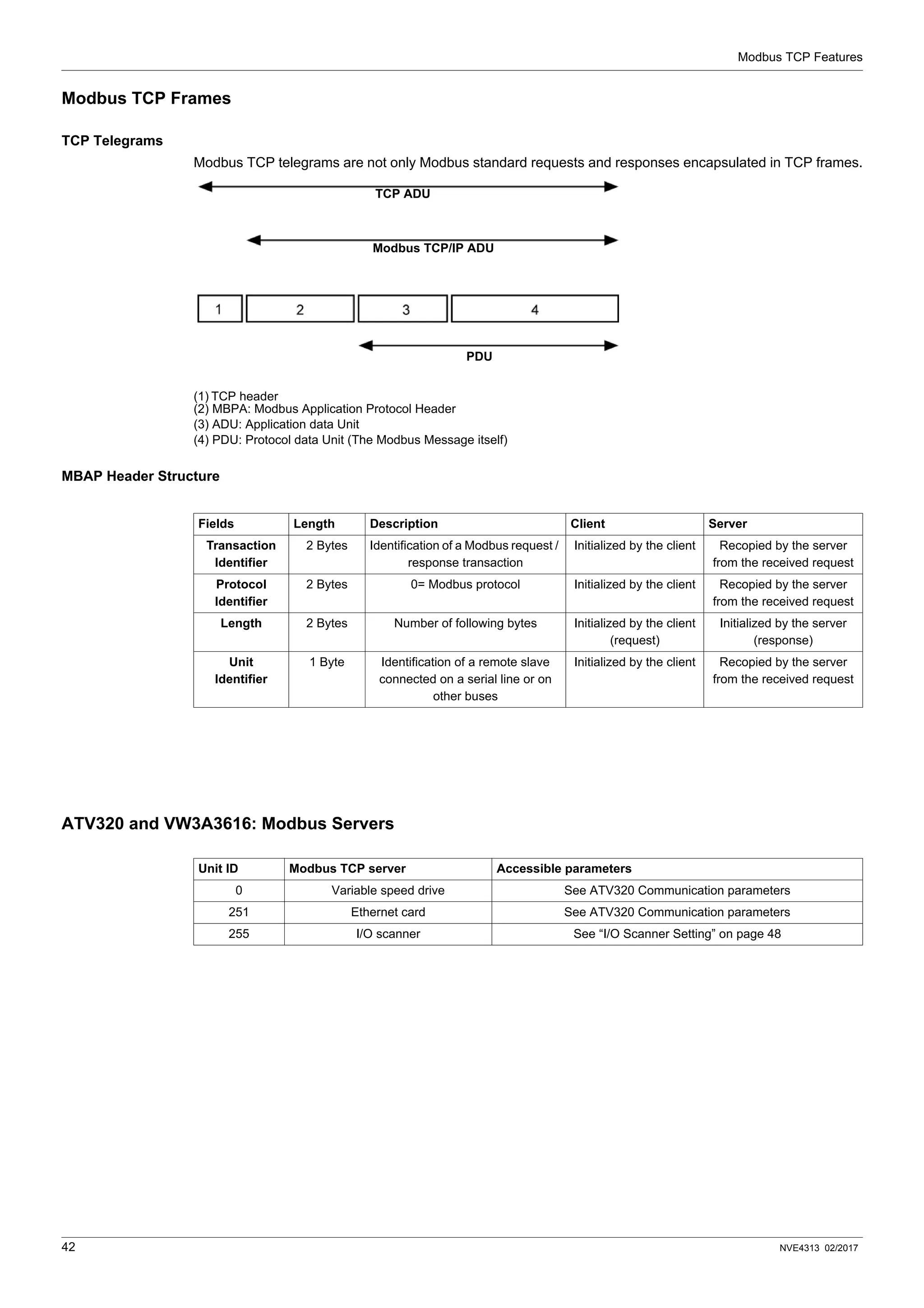
TCP Telegrams
Modbus TCP telegrams are not only Modbus standard requests and responses encapsulated in TCP frames.
(1) TCP header
(2) MBPA: Modbus Application Protocol Header
(3) ADU: Application data Unit
(4) PDU: Protocol data Unit (The Modbus Message itself)
MBAP Header Structure
ATV320 and VW3A3616: Modbus Servers
TCP ADU
Modbus TCP/IP ADU
PDU
Fields Length Description Client Server
Transaction
Identifier
2 Bytes Identification of a Modbus request /
response transaction
Initialized by the client Recopied by the server
from the received request
Protocol
Identifier
2 Bytes 0= Modbus protocol Initialized by the client Recopied by the server
from the received request
Length 2 Bytes Number of following bytes Initialized by the client
(request)
Initialized by the server
(response)
Unit
Identifier
1 Byte Identification of a remote slave
connected on a serial line or on
other buses
Initialized by the client Recopied by the server
from the received request
Unit ID Modbus TCP server Accessible parameters
0 Variable speed drive See ATV320 Communication parameters
251 Ethernet card See ATV320 Communication parameters
255 I/O scanner See “I/O Scanner Setting” on page 48
Modbus TCP Features
NVE4313 02/2017 43
Supported Modbus Functions
Modbus Services
The Modbus TCP option supports the following Modbus services:
NOTE: I/O scanner service is based on the function 23. To avoid unpredictable behavior, priority should be
given to this function with regards to the functions 6 and 16.
Function Name Code Description Remarks
Read holding registers 03
16#03
Read N output words Max PDU length: 63 words
Write one output word 06
16#06
Write one output word
Write multiple registers 16
16#10
Write N output word Max PDU length: 63 words
Read/write Multiple registers 23
16#17
Read/write multiple registers Max PDU length: 20 words (W),
20 words ®
(Sub-function)
Read device Identification
43/14
16#2B
16#OE
Encapsulated interface transport /
Read device identification
See the table below
Modbus TCP Features
44 NVE4313 02/2017
Parameters in Option Board EtherNet
Description OptMb
(Option)
AdL
(Drive)
Type R/W-NV Short label Long Label Range list values
Comments / Units
MB
Address
MB
Address
access HMI Name Graphic Keypad
Name
Valid values
Network
Rate setting 60108 64251 UINT8 / LIST R/W-NV rdS Rate setting Default value : 0
AUtO Auto 0 = Autodetect
10M. Full 10F 1 = 10 Mbps Full
10M. Half 10H 2 = 10 Mbps Half
100M. Full 100F 3 = 100 Mbps Full
100M. Half 100H 4 = 100 Mbps Half
Actual Rate Left port 60109 ─ UINT8 / LIST R ArdL ─ ─
0 = No Link
1 = 10 Mbps Full
2 = 10 Mbps Half
3 = 100 Mbps Full
4 = 100 Mbps Half
Actual Rate Right
port
60110 ─ UINT8 / LIST R Ardr ─ ─
0 = No Link
1 = 10 Mbps Full
2 = 10 Mbps Half
3 = 100 Mbps Full
4 = 100 Mbps Half
EEPROM value
of IP Address
60006 64212 ─ R/W-NV IPC IP card IPC1.IPC2.IPC2.IPC4
Default value : 0.0.0.0
60006 64212
UINT8 UINT8
IPC1 IP card 1
0-255
60007 64213 IPC2 IP card 2
60008 64214 IPC3 IP card 3
60009 64215 IPC4 IP card 4
EEPROM value
of Subnet mask
60010 64216 ─ R/W-NV ─ IP mask IPM1.IPM2.IPM3.IPM4
Default value : 0.0.0.0
60010 64216
UINT8 ─
IPM1 IP mask 1
0-255
60011 64217 IPM2 IP mask 2
60012 64218 IPM3 IP mask 3
60013 64219 IPM4 IP mask 4
EEPROM value
of Gateway Address
60014 64220 R/W-NV IPG IP gate IPG1.IPG2.IPG3.IPG4
Default value : 0.0.0.0
60014 64220
UINT8 ─
IPG1 IP gate 1
0-255
60015 64221 IPG2 IP gate 2
60016 64222 IPG3 IP gate 3
60017 64223 IPG4 IP gate 4
Current value
of IP Address
60075 64252 R IPA Actual IP ICA1.ICA2.ICA3.ICA4
Default value : 0.0.0.0
60075 64252
UINT8 ─
ICA1 IP card actual 1
0-255
60076 64253 ICA2 IP card actual 2
60077 64254 ICA3 IP card actual 3
60078 64255 ICA4 IP card actual 4
Current value
of Subnet mask
60079 64256 R IPS Actual mask IMA1.IMA2.IMA3.IMA4
60079 64256
UINT8 ─
IMA1 IP mask actual 1
0-255
60080 64257 IMA2 IP mask actual 2
60081 64258 IMA3 IP mask actual 3
60082 64259 IMA4 IP mask actual 4
Current value
of Gateway Address
60083 64260 R IPt Actual gate. IGA1.IGA2.IGA3.IGA4
60083 64260
UINT8
IGA1 IP gate actual 1
0-255
60084 64261 IGA2 IP gate actual 2
60085 64262 IGA3 IP gate actual 3
60086 64263 IGA4 IP gate actual 4
Modbus TCP Features
NVE4313 02/2017 45
MAC address 60000 ─ ─ R ─ ─ MAC1:MAC2:MAC3
MAC4:MAC5:MAC6
60000 64267 UINT8/UINT16
─
MAC1 MAC1 / MAC2:MAC1
0-255
60001 ─ UINT8 MAC2 MAC2
60002 64268 UINT8/UINT16 MAC3 MAC3 / MAC4:MAC3
60003 ─ UINT8 MAC4 MAC4
60004 64269 UINT8/UINT16 MAC5 MAC5 / MAC6:MAC5
60005 ─ UINT8 MAC6 MAC6
IO Scanner
Enable IO Scanner 60048 64239 UINT8 / LIST R/W-NV IOSA IO Scan. activ. Default value : 0
OFF OFF 0 = Disable
On ON 1 = Enable
IP address of Master 60050 64234 ─ R/W-NV IPP IP Master IPP1.IPP2.IPP3.IPP4
Default value : 0.0.0.0
60050 64234
UINT8 ─
IPP1 IP Master 1
0-255
60051 64235 IPP2 IP Master 2
60052 64236 IPP3 IP Master 3
60053 64237 IPP4 IP Master 4
Communication
monitoring time out
60045 64211 UINT16 R/W-NV tOUt time out Default value:20
Unit : 0.1 sec
─ ─ ─ 0.20-600
FDR
IP address
of DHCP-FDR
server
60054 64224 ─ R IPF IP FDR IPF1.IPF2.IPF3.IPF4
60054 64224
UINT8 ─
IPF1 IP FDR 1
0-255
60055 64225 IPF2 IP FDR 2
60056 64226 IPF3 IP FDR 3
60057 64227 IPF4 IP FDR 4
Enable FDR service 60058 64228 UINT8 / LIST R/W-NV FdrU FDR validation Default value : 1
─
nO No 0 = Disable
YES Yes 1= Enable
Select local
configuration
60059 64238 UINT8 / LIST R/W-NV LCFG FDR Local Config. Default value : 0
─
OFF OFF
0 = Disable
The drive configuration
is downloaded from a
FDR server)
On ON
1= Enable
The drive configuration is local
Enable FDR fault 60060 64240 UINT8 / LIST R/W-NV FdrF FDR Error
management
In the event of a problem
with the FDR file
(missing or invalid)
Default value : 1
─
OFF OFF
0 = Disable
The Ethernet card does
not trigger an Ethernet fault)
On ON
1= Enable
The Ethernet card triggers
an Ethernet fault)
FDR Action 60061 64229 UINT8 / LIST R/W FdrA FDR Action ─
─
IdLE NOT ACTIVE 0 = Idle
SAE SAVE 1 = Save
rESt REST 2 = Restore
dEL DEL 3 = Delete
Description OptMb
(Option)
AdL
(Drive)
Type R/W-NV Short label Long Label Range list values
Comments / Units
MB
Address
MB
Address
access HMI Name Graphic Keypad
Name
Valid values
Modbus TCP Features
46 NVE4313 02/2017
FDR state 60062 64232 UINT8 / LIST R FdrE FDR state
─
IdLE NOT ACTIVE 0 = Idle
INIt INIT 1 = Initialization
COnF CONF 2 = Configuration
rDY RDY 3 = Ready
GEt GET 4 = Downloading
the current configuration
SEt SET 5 = Saving
the current configuration
APP APP 6 = Writing the FDR server
configuration to the drive
OPE OPE 7 = Operational
UCFG UCFG 8 = Not configured
Ethernet fault code 60063 64233 UINT8 / LIST R Fdrd FDR fault See (1)
─ ─ ─
0 = No fault
2 = The FDR configuration file
is not compatible with the drive
type (example: the drive
is not the correct rating)
3 = Error reading the FDR
configuration file on the server
4 = Error writing the FDR
configuration file to the server
7 = Time out for receipt
of the FDR configuration file
from the server
12 = The FDR configuration
file is missing
13 = Copy served->stored
14 = File has invalid data
Periodic saving of
the FDR
service
60064 64230 UINT8 / LIST R/W-NV Fdrt FDR autosave Default value : 0
─
nO No 0 = Disable
YES Yes 1= Enable
Interval for the FDR
autosave service
60065 64231 UINT16 R/W-NV Fdrt FDR t.autosave. Default value: 10
Unit : 1 min
─ ─ ─ 0, 2-9999
Number of FDR
save operations
60066 UINT16 R/W FdSc ─ ─
─ ─ ─ 0-65535
Number of FDR
restore operations
60067 UINT16 R/W FdrC ─ ─
─ ─ ─ 0-65535
Number of FDR
deletions
60068 UINT16 R/W FdDc ─
─ ─ ─ 0-65535
Statistics
Number of active
TCP connections
60044 UINT16 R ─ ─ 8 maximum
Received Modbus
TCP message
counter
60034 UINT32 R ─ ─ IO Scanning messages
not included
Sent Modbus
TCP message
counter
60032 UINT32 R ─ ─ IO Scanning messages
not included
Modbus TCP
message error
counter
60120 UINT32 R ─ ─ IO Scanning messages
not included
Received IO
Scanning
message counter
60039 UINT32 R ─ ─ ─
Sent IO Scanning
message counter
60037 UINT32 R ─ ─ ─
IO Scanning
message
error counter
60041 UINT32 R ─ ─ ─
60111 UINT16 R ─ ─ Bit 0 = Ethernet II
─
─ ─ Bit 1 = IEEE 802.3 sender
─ ─ Bit 2 = IEEE 802.3 receiver
Description OptMb
(Option)
AdL
(Drive)
Type R/W-NV Short label Long Label Range list values
Comments / Units
MB
Address
MB
Address
access HMI Name Graphic Keypad
Name
Valid values
Modbus TCP Features
NVE4313 02/2017 47
(1) This parameter is used to ascertain the cause of the interruption. The fault code remains saved.
Legend:
• R: Read only
• R/W: Read and Write access
• NV: Value is stored in non-volatile memory
Note: Parameters on 2 words are double words (low order in address word n, high order in address word n+1).
The EEPROM IP addresses (60006 60017) are the ones set by the user, The current IP addresses (60075
60086) are the actual value.
Identification
OK reception
counter
60024 ─ UINT32 R ─ ─ ─
OK transmission
counter
60019 ─ UINT32 R ─ ─ ─
CRC error counter 60026 ─ UINT32 R ─ ─ ─
Collision counter 60118 ─ UINT32 R ─ ─ ─
Carrier sense errors
counter
60122 ─ UINT32 R ─ ─ ─
Excessive collisions
counter
60116 ─ UINT32 R ─ ─ ─
Late collision
counter
60022 ─ UINT32 R ─ ─ ─
Link status:
right port.
60113 ─ UINT16 R ─ ─ ─
─ ─ ─
Bit 0: (Speed)
0 = 10Mbps
1 = 100Mbps
Bit 1 &2: (Cable type)
00 = T
01 = FL
10 = FX
Bit 3 & 4: (duplex mode)
00 = half duplex
01 = full duplex
11 &10 = unkown
Bit 5: (state)
0 = link down
1 = link up
Link status: left port 60114 UINT16 R Same as link status
for right port
Description OptMb
(Option)
AdL
(Drive)
Type R/W-NV Short label Long Label Range list values
Comments / Units
MB
Address
MB
Address
access HMI Name Graphic Keypad
Name
Valid values
Id Value Comment
16#00 “Schneider electric” -
16#01 -- -
16#02 “0201” -
16#04 “ALTIVAR 320” Drive family
16#05 “ATV-XXXXX” Drive commercial reference
16#06 “North elevator” Device Name
16#07 -- -
16#08 2#00000000_00001011 -
16#09 -- -
16#0A -- -
16#0B -- -
16#0C -- -
Modbus TCP Features
48 NVE4313 02/2017
I/O Scanning Service
The I/O scanning service is used to exchange periodic I/O data between:
• A controller or PLC (I/O scanner).
• Devices (I/O scanning servers).
This service is activated with [Eth IO scan act] (IOSA) parameter ((IOSA) = OFF by default).
This exchange is usually performed by implicit services, thus avoiding the need to program the controller
(PLC).
The I/O scanner periodically generates the Read/Write Multiple Registers (23 = 16#17) request. The I/O
scanning service operates if it has been enabled in the PLC and the drive. The drive parameters assigned to
I/O scanning have been selected by default. This assignment can be modified by configuration.
The drive I/O scanning service can also be configured by the Ethernet card Modbus server.
When the I/O scanning service has been enabled in the Altivar 320 drive:
• A TCP connection is assigned to it.
• The parameters assigned in the periodic variables are exchanged cyclically between the Ethernet card and
the drive.
• The parameters assigned to the periodic output variables are reserved for I/O scanning. They cannot be
written by other Modbus services, even if the I/O scanner is not sending its periodic output variables.
I/O Scanner Setting
The communication scanner is accessible via the following menus: [Communication] (COM-) and
[Communication module] (cbd) submenus.
The 6 output variables and the 6 input variables are assigned by means of parameters (OCA1) to (OCA6)
and (OMA1) to (OMA6). An (OCA x) or (OMA x) parameter with a value of zero is not linked to a
parameter in the drive.
These 6 parameters are described in the table below.
(OCA x) or (OMA x) defines the addresses.
Application Profile with Modbus TCP
The profiles managed with the ATV320 when it is controlled through Modbus TCP are:
• native profile (CiA402 - IEC 61800-7),
• I/O profile.
Please refer to “CiA®402 - IEC61800-7 Functional Profile” on page 79.
[Scan.Out1 address] (OCA1) (CMd)
[Scan.Out2 address] (OCA2) (LFrd)
[Scan.Out3 address] (OCA3) 0
[Scan.Out4 address] (OCA4) 0
[Scan.Out5 address] (OCA5) 0
[Scan.Out6 address] (OCA6) 0
[Scan.IN1 address] (OMA1) (EtA)
[Scan.IN2 address] (OMA2) (rFrd)
[Scan.IN3 address] (OMA3) 0
[Scan.IN4 address] (OMA4) 0
[Scan.IN5 address] (OMA5) 0
[Scan.IN6 address] (OMA6) 0
Modbus TCP Features
NVE4313 02/2017 49
Configuring Communication Detected Fault Management
The response of the drive in the event of an Ethernet communication detected fault can be configured.
It can be configured via the graphic display terminal or the integrated display terminal from the
[Monitoring] (FLt-) menu, [Fieldbus MONITORING] (CLL-) submenu, via the
[Fieldbus interrupt resp] (CLL) parameter.
The values of the [Fieldbus interrupt resp] (CLL) parameter, which trigger a drive detected fault
[Fieldbus Com Interrupt] (CnF), are:
The values of the [Fieldbus interrupt resp] (CLL) parameter, which do not trigger a drive detected fault, are:
The fallback speed can be configured in the [Monitoring] (FLt-) menu using the
[Fallback speed] (LFF) parameter.
RDY NET +0.00Hz 0A
Fieldbus MONITORING
Fieldbus interrupt resp : Freewheel
CANopen fault mgt : Freewheel
Modbus fault mgt : Freewheel
Code Quick
Value Meaning
[Freewheel] (YES) Freewheel stop (factory setting)
[Ramp stop] (rMP) Stop on ramp
[Fast stop] (FSt) Fast stop
[DC injection] (dCI) DC injection stop
Value Meaning
[Ignore] (nO) Detected fault ignored
[Per STT] (Stt) Stop according to configuration of [Type of stop] (Stt)
[fallback spd] (LFF) Change to fallback speed, maintained as long as the detected fault persists and the run
command has not been removed
[Spd maint.] (rLS) The drive maintains the speed at the time the detected fault occurred, as long as the
detected fault persists and the run command has not been removed
WARNING
LOSS OF CONTROL
If this parameter is set to nO, fieldbus communication monitoring is disabled.
• Only use this setting after a thorough risk assessment in compliance with all regulations and standards
that apply to the device and to the application.
• Only use this setting for tests during commissioning.
• Verify that communication monitoring has been re-enabled before completing the commissioning
procedure and performing the final commissioning test.
Failure to follow these instructions can result in death, serious injury, or equipment damage.
Modbus TCP Features
50 NVE4313 02/2017
CnF and ILF Detected Faults
The following table lists the time-out parameters:
Parameter Description Possible Values Terminal
Display
[Fieldbus Com
Interrupt]
(CnF)
(written to the device)
This detected fault is used to indicate that
a network detected fault has occurred.
When the detected fault occurs, the
option position the CNF parameter to the
value corresponding to the detected fault.
When the detected fault has disappeared,
the option writes the CNF parameter to 0
1: Modbus TCP timeout
10: Network overload
11: Loss of carrier
14: Ethernet/IP Scanner timeout
15: Ethernet/IP Idle Poll
16: Ethernet/IP forced EIP trip
17: Application I/O configuration
detected error
[1] (1)
[10] (10)
[11] (11)
[14] (14)
[15] (15)
[16] (16)
[17] (17)
[InternCom Error1]
(ILF)
This detected fault indicates a critical
detected error and can be cleared. It
needs a Power Off / Power On to remove
the detected fault
13: FDR uncoverable detected error
18: EEPROM detected error
21: Internal detected error
[13] (13)
[18] (18)
[21] (21)
[Fieldbus Error]
(EPF2)
8: No valid IP
9: Duplicate IP address
12: FRD unconfigured detected error
13: FDR uncoverable detected error
20: invalid drive config when
activating ODVA profile.
[8] (8)
[9] (9)
[12] (12)
[13] (13)
[20] (20)
Modbus TCP Features
NVE4313 02/2017 51
Configuring Monitor Parameters
It is possible to select up to 4 parameters to display their values in the [1.2 DISPLAY] menu on the graphic
display terminal (to be ordered separately - reference VW3A1101).
The selection is made via the [3.3 Display configuration] menu, [Com. map config.] submenu.
Each parameter, in the range [Word 1 add. select.] ... [Word 4 add. select.], can be used to select the
parameter logic address. An address at zero is used to disable the function.
Example
In the example given here, the monitored words are:
• Parameter 1 = Motor current (LCr): logic address 3204, signed decimal format.
• Parameter 2 = Motor torque (Otr): logic address 3205, signed decimal format.
• Parameter 3 = Last detected fault occurred (LFt): logic address 7121, hexadecimal format.
• Disabled parameter: Address W0; default format: Hexadecimal format
One of the three display formats below can be assigned to each monitored word:
NOTE: If a monitored parameter:
• Has been assigned to an unknown address (example: 3200).
• Has been assigned to a protected parameter.
• Has not been assigned.
the value displayed in the [Communication map] screen will be: “••••” (see “CnF and ILF Detected Faults” on
page 50).
RDY NET +0.00Hz 0A
Com. map config..
Word 1 add. select. : 3204
Format word 1 : Signed
Word 2 add. select. : 3205
Format word 2 : Signed
Word 3 add. select. : 7121
Code Quick
Format Range Terminal display
Hexadecimal 0000 ... FFFF [Hex] (HEX)
Signed decimal -32 767 ... 32 767 [Signed] (SIG)
Unsigned decimal 0 ... 65 535 [Unsigned] (nSG)
52 NVE4313 02/2017
Controlling an ATV320 From Modbus TCP (M340)
8
Controlling an ATV320 From Modbus TCP (M340)
What's in this Chapter?
This chapter contains the following topics:
Topic Page
Description of the Configuration 53
Configuration of the Ethernet Module (NOE 100 or NOE 110) 55
Monitor and Control the Exchanges 58
Modbus Messaging 59
Controlling an ATV320 From Modbus TCP (M340)
NVE4313 02/2017 53
Description of the Configuration
The configuration is made of an ATV320 and a M340 with a NOE110 (or NOE100) Ethernet module.
The devices are configured with the (fixed) following IP addresses as follows:
The ATV320 will be controlled through the option communication scanner by means of the I/O scanning
service.
It is important to notice that the implicit exchanges are based on the VW3A3616 internal communication
scanner and not on the ATV320 internal scanner. The first one is reachable by using the unit ID 255, while the
second one is reachable with the Unit ID 0:
The option Com scanner parameters start with (OCA x) and (OMA x) and are part of the communication card
submenu (instead of (nCA x), (nMA x) for the drive which are directly located in the Communication main
menu). The usage of the (nCA x), (nMA x) with (via Unit ID 0) is not recommended.
IP: 10.0.0.11 IP: 10.0.0.10
Unit ID: 255 Unit ID: 0
VW3A3616
Communication
scanner
ATV320 Internal
Communication
scanner
Controlling an ATV320 From Modbus TCP (M340)
54 NVE4313 02/2017
Configuration of the VW3A3616 Communication Card
Conf > Full > Communication > Communication card
Configuration of the Command
In the Command Menu [Command] (CtL):
• [Ref Freq 1 Config] (Fr1): is set according to the communication source you can choose in the following
table:
• [Reverse Disable] (rIn): default.
• [Stop Key enable] (PSt): default.
• [Control Mode] (CHCF): defines if the drives operates in combined mode (reference and command from
the same channel)
For the current example, [Control Mode] (CHCF) will be adjusted to [Not Separ.] (SIM) as reference and
control are originated from the communication network:
ETHM = MBTP Defines the protocol used: Modbus TCP
IPM = MANU IP address is defined locally
IP card = 10.0.0.11 -
IP Mask 255.0.0.0 -
IP Master = 10.0.0.10 Defines the address of the I/O scanner client
(M340 Ethernet module)
OCA1 8501 > CMD In the example we will use the default
parameters + an additional parameter for
monitoring
OCA2 8602 > LFRD
OCA3 -
OCA4 -
OCA5 -
OCA6 -
OMA1 3201 > ETA
OMA2 8604 > RFRD
OMA3 3207 > ULN
OMA4 -
OMA5 -
OMA6 -
Origin of the control Ref1 Channel setting
Modbus TCP [Com. Module] (nEt)
Profile Ref1 Channel setting
CiA402 [Not Separ.] (SIM)
Separate [Separate] (SEp)
I/O Profile [I/O Profile] (IO)
Controlling an ATV320 From Modbus TCP (M340)
NVE4313 02/2017 55
Configuration of the Ethernet Module (NOE 100 or NOE 110)
Create a new logical network in the section:
Configuration of the IP Settings
Controlling an ATV320 From Modbus TCP (M340)
56 NVE4313 02/2017
Enable Messaging With the ATV320
Configure I/O Scanning With the ATV320
NOTE: The length of the communication is 6 words, but the first word of the I/O scanning service is reserved.
In practice, (OMA1) will be linked to %MW101 and (OCA1) will be linked to %MW201.
ATV IP address
Unit ID: 255 (option card)
Time out for monitoring
Period: here 10 ms 1st address of the %MW for the
read data (ATV > M340)
1st address of the %MW for the
read data (ATV > M340)
Length: 7
Controlling an ATV320 From Modbus TCP (M340)
NVE4313 02/2017 57
1st address of the %MW for the written data (M340 > ATV) is shown below:
NOTE: The length of the communication is 6 words, but the first word of the I/O scanning service is reserved.
In practice, (OMA1) will be linked %MW101 and (OCA1) will be linked to %MW201.
Start and Check the Exchanges
Once the project is
built, it can be downloaded to the PLC and then launched. The exchanges (implicit) should start immediately:
1st address of the %MW for the
read data (M340 > ATV)
1st address of the %MW for the
written data (M340 > ATV)
Length: 7
Default values if I/O scanning
is stopped or detect a fault.
Controlling an ATV320 From Modbus TCP (M340)
58 NVE4313 02/2017
Monitor and Control the Exchanges
The communication can be monitored with several I/O objects.
In the example below, the I/O objects have been prefixed EthStatus.
You can check EthStatus.MOD_ERROR (will be equal to 1 if one or more exchanges are unsuccessful).
I/O Scanning
The array %IW0.1.0.1:4 displays the status of the overall active I/O scanning Client/server. This table is
graphically animated in the debug view of the Ethernet module:
The exchanges can be stopped by setting to 1 the pending bit in the array %QW0.1.0.0 (in the example).
Controlling an ATV320 From Modbus TCP (M340)
NVE4313 02/2017 59
Modbus Messaging
Access to the drive parameters is also available by means of the Modbus read / write functions. With the M340,
this feature is achieved with the functions READ_VAR, WRITE_VAR.
Example with READ_VAR:
READ_VAR address value:
The path to the device is obtained by the ADDM function with the following syntax:
if not ReadVarbusy then
READ_VAR( ADDM ('0.1.0{10.0.0.11}0'), '%MW' ,3603,2, ReadvarMGT, %MW124:4);
END_If;
3603 logic address of the 1st read word in the ATV320
2 Numbers of %MW
ReadvarMGT 1st word destination address
%MW124:4 Read_Var request status array
Readvarbusy bit member of the array %MW124:4
0.1.0 Ethernet module
{10.0.0.11} The IP address of the module
0: UnitID Drive Unit ID (see “Modbus TCP Features” on page 41 for more details)
60 NVE4313 02/2017
EtherNet/IP Features
9
EtherNet/IP Features
What's in this Chapter?
This chapter contains the following topics:
Topic Page
VW3A3616 and EtherNet/IP Overview 61
Cyclical Exchanges (Implicit Exchanges) 62
Messaging (Explicit Exchanges) 66
Detected Fault Management 67
EtherNet/IP Features
NVE4313 02/2017 61
VW3A3616 and EtherNet/IP Overview
EtherNet/IP Communication Card Features Overview
The Altivar 320, equipped with the VW3A3616, is compliant with the ODVA drive profile. It supports the 3
following profiles:
• CIP basic speed control
• CIP extended speed control
• ATV320 native profile (IEC 61800-7 CiA402) and I/O profile only for assembly 100 and 101.
In addition to these cyclic exchanges, the VW3A3616 also supports explicit messaging.
Master
Controller
I/O Scanner
Standard
Web
browser IE,
Mozilla
Embedded
Web server
Assemblies
20 - 70
Assemblies
21 - 71
Assemblies
100 - 101
CIP Explicit
messaging
CIP basic speed control profile
CIP extended speed control profile
Native drive profile, I/O profile
Parameters
management
Drive setup
EtherNet/IP
Cyclic
exchanges
EtherNet/IP
messaging
EtherNet/IP Features
62 NVE4313 02/2017
Cyclical Exchanges (Implicit Exchanges)
Overview
This part gives a description of the 3 assembly sets and how to configure them.
Principle of Control configuration
By the configuration of the control, it is possible to decide from what channel the drive receives its commands
and setpoint, either permanently or depending on a switching command. Numerous configurations are
possible. For more information, refer to the Programming manual and Communication parameters manual.
The following configurations are some of the available possibilities.
The selection of the assembly set is made with the EtherNet/IP communication adapter.
Control With Communication Scanner
If the default assemblies (100, 101) are selected, the Altivar 320 will be controlled according to its native profile
CiA402.-IEC-61800-7 (See “CiA®402 - IEC61800-7 Functional Profile” on page 79). By configuring the
communication scanner, it is possible to assign any relevant parameter of the drive to the 6 input and 6 output
variables of the assemblies.
The size of the assembly (100, 101) is fixed and is equal to 6 words.
The mapping of the other parameters is made with the communication scanner.
The configuration of the addresses defined with (OCA x) and (OMA x) can be made with the graphic keypad:
• For assembly 100: [Communication] (COM-) menu, [Communication module] (Cbd-) submenu.
• For assembly 101: [Communication] (COM-) menu, [Communication module] (Cbd-) submenu.
See menu [1.2 DISPLAY] (MOn-) > COMMUNICATION MAP to monitor the communication scanner.
Altivar
The mapping of the 100-101 assemblies is
made with the communication scanner
(OCA1) (OMA1)
(OCA2) (OMA2)
(OCA3) (OMA3)
(OCA4) (OMA4)
(OCA5) (OMA5)
(OCA6) (OMA6)
Assembly
100
Assembly
101
Up to additional
parameters are
mapped
This configuration can be made with:
• HMI
• Keypad
• SoMove
• Webserver
EtherNet/IP option
EtherNet/IP
scanner
100-101
Native drive profile
CiA402
EtherNet/IP Features
NVE4313 02/2017 63
Assembly Set Selection With RS Logix - From Controller Side
Example of selection of the assemblies 100, 101 in the EtherNet/IP adapter configuration dialog box.
Control According to ODVA AC Drive Profile
The ODVA AC drive profile is activated when one of the following assemblies is selected:
• 20: Basic speed control output, size 2 words / 4 bytes
• 21: Extended speed control output, size 2 words / 4 bytes
• 70: Basic speed control input, size 2 words / 4 bytes
• 71: Extended speed control input, size 2 words / 4 bytes
The EtherNet/IP card translates the commands, behavior and monitoring information from of ODVA profile (on
the network) to the CiA402 profile (in the drive).
CIP Basic Speed Control (Assemblies 20 and 70)
• Assembly 20: CIP basic speed control output
The following table describes the assembly mapping:
Word Number Definition
0 CIP basic command word
1 Speed setpoint (rpm)
EtherNet/IP Features
64 NVE4313 02/2017
The following table describes the CIP basic command word:
• Assembly 70: CIP basic speed control input
The following table describes the assembly mapping:
The following table describes the CIP basic status word:
CIP Extended Speed Control (Assemblies 21 and 71)
Note: «NetRef» and «NetCtrl» objects must be set by explicit messaging to control the drive by Network.
• Assembly 21: CIP extended speed control output
The following table describes the assembly mapping:
The following table describes the CIP extended command word:
Bit 7 Bit 6 Bit 5 Bit 4 Bit 3 Bit 2 Bit 1 Bit 0
Not used Not used Not used Not used Not used Fault reset (1)
0= No
command
1= Fault
reset
Not used Run forward
(2)
0= Stop
1= Run
(1) Active on rising edge
(2) Active on level
Bit 15 Bit 14 Bit 13 Bit 12 Bit 11 Bit 10 Bit 9 Bit 8
Not used Not used Not used Not used Not used Not used Not used Not used
Word Number Definition
0 CIP basic status word
1 Actual speed (rpm)
Bit 7 Bit 6 Bit 5 Bit 4 Bit 3 Bit 2 Bit 1 Bit 0
Not used Not used Not used Not used Not used Running
0= Stopped
1= Running
Not used Faulted
0= No fault
1= Fault
Bit 15 Bit 14 Bit 13 Bit 12 Bit 11 Bit 10 Bit 9 Bit 8
Not used Not used Not used Not used Not used Not used Not used Not used
Word Number Definition
0 CIP extended command word
1 Speed setpoint (rpm)
Bit 7 Bit 6 Bit 5 Bit 4 Bit 3 Bit 2 Bit 1 Bit 0
Not used Network setpoint
0 = Setpoint by
terminals
1= Setpoint by
network
Network command
0 = Setpoint by
terminals
1= Setpoint by network
Not used Not used Fault reset (1)
0= No
command
1= Fault
reset
Run forward / reverse
00= Quick stop
01= Run forward
10= Run reverse
11= No action
(1) Active on rising edge
Bit 15 Bit 14 Bit 13 Bit 12 Bit 11 Bit 10 Bit 9 Bit 8
Not used Not used Not used Not used Not used Not used Not used Not used
EtherNet/IP Features
NVE4313 02/2017 65
Network setpoint and network address management
The assembly 21 uses the setpoint and reference switching of the Altivar 320. The VW3A3616, when
configured with the assembly 21, links the bit 5 and the bit 6 to C312 and C313 respectively. To operate
correctly, the Command settings of the ATV320 must be as follows:
• Assembly 71: CIP extended speed control input
The following table describes the assembly mapping:
The following table describes the CIP extended status word:
Menu Parameter Permitted value
[Command] (CtL-)
[Application function] (FUn-)
[Ref Freq switch] (rEF-)
[Control Mode] (CHCF) [Separate] (SEP)
[Ref Freq 1 Config] (Fr1) [Com. Module] (nEt)
[Ref Freq 2 Config] (Fr2) [Al1] (AI1) or [Al2] (AI2)
[Cmd channel 1] (Cd1) [Com. module] (nEt)
[Cmd channel 2] (Cd2) [Terminals] (tEr)
[Command switching] (CCS) [C312] (C312)
[Freq switch Assign] (rFC) [C313] (C313)
Word Number Definition
0 CIP extended status word
1 Actual speed (rpm)
Bit 7 Bit 6 Bit 5 Bit 4 Bit 3 Bit 2 Bit 1 Bit 0
At reference
0= Reference
not reached
1= Reference
reached
Setpoint from
network
0= Setpoint from
terminals
1= Setpoint from
network
Command from
network
0= Command
from terminals
1= Command
from network
Ready
0= Not ready
1= Ready
Run forward / reverse
00= Stopped
01= Running forward
10= Running reverse
11= Not used
Warning
0= No
warning
1= Warning
Not used
Bit 15 Bit 14 Bit 13 Bit 12 Bit 11 Bit 10 Bit 9 Bit 8
Not used Not used Not used Not used Not used Bit 8 to 10 are used for the drive state
000= Not used
001= Startup
010= Not ready
011= Ready
100= Enabled
101= Stopping
110= Fault stop
111= Faulted
EtherNet/IP Features
66 NVE4313 02/2017
Messaging (Explicit Exchanges)
Introduction
All the ATV320 parameters can be accessed by R/W as CIP objects.
Altivar Parameters Path
The Altivar parameters are grouped in classes:
• Each application class has only 1 instance.
• Each instance groups 200 parameters.
• Each attribute in an instance relates to a parameter.
The first parameter registered in the first application class (class code: 16#70 = 112) has the logical address
3000.
Examples
The following table describes the examples of logical addresses:
An example of explicit messaging is shown below. The value of the ACC parameter
(Modbus @ = 9001 / CIP address 16#8E/01/02) is modified when the variable “bit01” is toggled ON.
Logical Address Path Hexadecimal Path Decimal
3000 16#70 / 01 / 01 112 / 1 / 1
3100 16#70 / 01 / 65 112 / 1 / 101
3200 16#71 / 01 / 01 113 / 1 / 1
64318 16#A2 / 1 / 77 418 / 1 / 119
EtherNet/IP Features
NVE4313 02/2017 67
Detected Fault Management
An EtherNet/IP time out is triggered if the card does not receive any cyclic messages (within a predefined time
period).
This period is managed by the EtherNet/IP controller (not by the drive) and is configured in its module
properties box. The duration of the time out is defined by the RPI (Request packet intervals).
Configuration can be performed using the graphic display terminal or integrated display terminal using the
[Fieldbus interrupt resp] (CLL) parameter in the [Monitoring] (FLt-) menu,
[Fieldbus MONITORING] (CLL-) submenu.
68 NVE4313 02/2017
ATV320 Configuration in ETC100
10
ATV320 Configuration in ETC100
What's in this Chapter?
This chapter contains the following topics:
Topic Page
Procedure 69
Explicit Messaging 74
ATV320 Configuration in ETC100
NVE4313 02/2017 69
Procedure
Create a New Project and Add the ETC100 Module
Open the ETC100 Module
• Choose the Network name (1)
• Choose the input and output size (2)
• Launch the Ethernet/IP configuration tool (3)
2
1
3
ATV320 Configuration in ETC100
70 NVE4313 02/2017
Define the ETC100 Network Parameter
• Double-click on ETC100 module (1)
• Configure ETC100 (2)
- IP address
- Mask
- Gateway
In EIP Configuration Tool, Insert the ATV320 EDS File
Follow the EIP configuration tool to add the ATV320 EDS file.
1
2
ATV320 Configuration in ETC100
NVE4313 02/2017 71
Add the ATV320
• Double-click on ATV320 (1)
• Choose a name (2)
• Select the device number (3)
• Select “link parameter” (4)
• Configure the ATV320 IP Address (5)
Assemblies Configuration
Here is a selection of Native drive control (Assembly 100-101):
ATV320 Configuration in ETC100
72 NVE4313 02/2017
Item Configuration
This configuration pre-defines the input and output. This input and output can be used in UNITY.
• Double-click on assembly configured (1)
• Select all the items (2)
• Define the items (3)
• Choose “word” and click on OK (4)
After this operation, you can save and close the EIP configuration tool.
ATV320 Configuration in ETC100
NVE4313 02/2017 73
Unity Update
When the configuration has been changed in the EIP configuration tool, it is necessary to update the UNITY
configuration.
After this update, the Items configured in EIP configuration tool are present and can be used in UNITY
program.
ATV320 Configuration in ETC100
74 NVE4313 02/2017
Explicit Messaging
An example of explicit messaging is shown below. The value of the ACC parameter
(Modbus @ = 9001 / CIP address 16#8E:01:02).
Get Single Attribute
SEND_REQ description:
(0.2.0.1): Rack.location.way.equipment number
16#000E: messaging CIP (mandatory)
Set Single Attribute
SEND_REQ description:
(0.2.0.1): Rack.location.way.equipment number
16#000E: messaging CIP (mandatory)
(*Get single attribut*)
if not reading_diagnostic [0] .0 and %M0 then
reading_request_contents [0] :=16#0000; (*Reserved*)
reading_request_contents [1] :=16#030E; (*03 - Request length in words / 0E - Get single*)
reading_request_contents [2] :=16#8E20; (*Class*)
reading_request_contents [3] :=16#0124; (*Instance*)
reading_request_contents [4] :=16#0230; (*Attribut*)
reading_diagnostic [3] :=16#0A; (*Fixed size of request in bytes*)
SEND_REQ (addr(‘0.2.0.1’),16#000E,reading_request_contents,reading_diagnostic,reading_results);
%M0:=False
End_if;
(*Set single attribut*)
if not writing_diagnostic [0] .0 and %M1 then
writing_request_contents [0] :=16#0000; (*Reserved*)
writing_request_contents [1] :=16#0310; (*03 - Request length in words / 10 - SET single*)
writing_request_contents [2] :=16#8E20; (*Class*)
writing_request_contents [3] :=16#0124; (*Instance*)
writing_request_contents [4] :=16#0230; (*Attribut*)
writing_request_contents [5] :=35; (*value to write*)
writing_diagnostic [3] :=16#0c; (*size of request in bytes*)
SEND_REQ (addr(‘0.2.0.1’),16#000E,writing_request_contents,writing_diagnostic,writing_results);
%M1:=False
End_if;
ATV320 Configuration in ETC100
NVE4313 02/2017 75
Get All Attribute
SEND_REQ description:
(0.2.0.1): Rack.location.way.equipment number
16#000E: messaging CIP (mandatory)
Set All Attribute
SEND_REQ description:
(0.2.0.1): Rack.location.way.equipment number
16#000E: messaging CIP (mandatory)
(*Get all attribut*)
if not reading_diagnostic_all [0] .0 and %M2 then
reading_request_contents_all [0] :=16#0000; (*Reserved*)
reading_request_contents_all [1] :=16#0201; (*02 - Request length in words / 01 - Get All*)
reading_request_contents_all [2] :=16#8E20; (*Class*)
reading_request_contents_all [3] :=16#0124; (*Instance*)
reading_diagnostic_all [3] :=16#08; (*Fixed size of request in bytes*)
SEND_REQ
(addr(‘0.2.0.1’),16#000E,reading_request_contents_all,reading_diagnostic_all,reading_results_all);
%M2:=False
End_if;
(*Set all attribut*)
if not reading_diagnostic_all [0] .0 and %M3 then
writing_request_contents_all [0] :=16#0000; (*Reserved*)
writing_request_contents_all [1] :=16#0202; (*02 - Request length in words / 02 - SET All*)
writing_request_contents_all [2] :=16#8E20; (*Class*)
writing_request_contents_all [3] :=16#0124; (*Instance*)
writing_diagnostic_all [3] :=16#2A; (*size of request in bytes*)
SEND_REQ
(addr(‘0.2.0.1’),16#000E,writing_request_contents_all,writing_diagnostic_all,writing_results_all);
%M3:=False
End_if;
76 NVE4313 02/2017
Profiles
11
Profiles
What's in this Chapter?
This chapter contains the following topics:
Topic Page
Definition of a Profile 77
Functional Profiles Supported by the Altivar 320 78
Profiles
NVE4313 02/2017 77
Definition of a Profile
There are three types of profile:
• Communication profiles
• Functional profiles
• Application profiles
Communication Profiles
A communication profile describes the characteristics of the bus or network:
• Cables
• Connectors
• Electrical characteristics
• Access protocol
• Addressing system
• Periodic exchange service
• Messaging service
• ...
A communication profile is unique to a type of network (Modbus CIP, Profibus DP, etc.) and is used by various
different types of device.
Functional Profiles
A functional profile describes the behavior of a type of device. It defines:
• Functions
• Parameters (name, format, unit, type, etc.)
• Periodic I/O variables
• State chart(s)
• ...
A functional profile is common to all members of a device family (variable speed drives, encoders, I/O
modules, displays, etc.).
They can feature common or similar parts. The standardized (IEC 61800-7) functional profiles of variable
speed drives are:
• CiA402
• PROFIDRIVE
• CIP
DRIVECOM has been available since 1991.
CiA402 “Device profile for drives and motion control” represents the next stage of this standard’s development
and is now part of the IEC 61800-7 standard.
Some protocols also support the ODVA (Open DeviceNet Vendor Association) profile.
Application Profiles
Application profiles define in their entirety the services to be provided by the devices on a machine. For
example, “CiA DSP 417-2 V 1.01 part 2: CANopen application profile for lift control systems - virtual device
definitions”.
Interchangeability
The aim of communication and functional profiles is to achieve interchangeability of the devices connected via
the network.
Profiles
78 NVE4313 02/2017
Functional Profiles Supported by the Altivar 320
I/O Profile
Using the I/O profile simplifies PLC programming.
The I/O profile mirrors the use of the terminal strip for control by utilizing 1 bit to control a function.
With an Altivar 320, the I/O profile can also be used when controlling via a network.
The drive starts up as soon as the run command is sent.
15 bits of the control word (bits 1 to 15) can be assigned to a specific function.
This profile can be developed for simultaneous control of the drive via:
• The terminals
• The Modbus control word
• The CANopen control word
• The network module control word
The I/O profile is supported by the drive itself and therefore in turn by all the communication ports (integrated
Modbus, CANopen, Ethernet, Profibus DP, DeviceNet communication modules).
CiA402 Profile
The drive only starts up following a command sequence.
The control word is standardized.
5 bits of the control word (bits 11 to 15) can be assigned to a function.
The CiA402 profile is supported by the drive itself and therefore in turn by all the communication ports
(integrated Modbus, CANopen, Ethernet, Profibus DP, DeviceNet communication modules).
The Altivar 320 supports the CiA402 profile’s “Velocity mode”.
In the CiA402 profile, there are two modes that are specific to the Altivar 320 and characterize command and
reference management:
• Separate mode [Separate] (SEP)
• Not separate mode [Not separ.] (SIM)
See “CiA®402 - IEC61800-7 Functional Profile” on page 79.
NVE4313 02/2017 79
CiA®402 - IEC61800-7 Functional Profile
12
CiA®402 - IEC61800-7 Functional Profile
What's in this Chapter?
This chapter contains the following topics:
Topic Page
Functional Description 80
CiA402 State Chart 81
Description of States 82
Summary 83
Control Word (CMd) 84
Stop Commands 85
Assigning Control Word Bits 85
Status Word (EtA) 86
Starting Sequence 87
Sequence for a Drive Powered by the Power Section Line Supply 88
Sequence for a Drive With Separate Control Section 90
Sequence for a Drive With Line Contactor Control 93
CiA®402 - IEC61800-7 Functional Profile
80 NVE4313 02/2017
Functional Description
Drive operation involves two main functions, which are illustrated in the diagrams below.
CiA402
The main parameters are shown with their CiA402 name and their CiA402/Drivecom index (the values in
brackets are the CANopen addresses of the parameter).
Control diagram:
Simplified diagram of speed control in “Velocity” mode:
Altivar 320
These diagrams translate as follows for the Altivar system.
Control diagram:
Simplified diagram of speed control in “Velocity” mode:
Statemachine
Controlword
(6040)
Statusword
(6041)
Limit Ramp Power device
vl_target_velocity
(6042)
vl_velocity_min_max amount
(6046)
vl_velocity_acceleration (6048)
vl_velocity_acceleration (6049)
vl_control_effort
(6044)
vl_velocity_
demand(6043)
Statemachine
Control word
(CMd)
Status word
(EtA)
Reference limit Ramp Power module
Speed reference
(LFrd)
Speed min amount 1
(SMIL)
Speed max amount 1
(SMAL)
Acceleration - Speed delta 1
SPAL
Acceleration - Time delta
SPAt
Deceleration - Speed delta 1
SPdL
Deceleration - Time delta
SPdt
Actual speed value
rFrd
Speed reference
after ramp
(FrHd)
CiA®402 - IEC61800-7 Functional Profile
NVE4313 02/2017 81
CiA402 State Chart
Fault
Power section line supply present or absent
Power section line supply present
Transition condition
with example of command
Value of
status word
Power
absent
Power
present
Status display on
graphic display terminal
State
Key:
Examples:
ETA=16#0637: Stop or forward, speed reached
ETA=16#8637: Stop or reverse, speed reached
ETA=16#0237: Forward, accelerating or decelerating
ETA=16#8237: Reverse, accelerating or decelerating
Enable
operation
CMD=16#xxxF
Switched on
Ready to switch on
or
Switched on
Operation enabled
Power absent
or present
Enable
operation
CMD=16#xxxF
Disable
operation
CMD=16#xxx7
or
fast stop
Quick stop
CMD=16#0002
Quick stop active
Switch on
CMD=16#xxxF
Shutdown
CMD=16#0006
Switch on
CMD=16#0007
Shutdown
CMD=16#0006
Disable
voltage
CMD=16#0000
or
Quick stop
CMD=16#0002
or
STOP key
or
freewheel stop
at the terminals
or
modification
of a configuration
parameter
If Quick stop option code
= 2:
transition after stop.
If Quick stop option code
= 6:
Disable voltage
CMD=16#0000
or
STOP key
or
freewheel stop at
terminals
Disable
voltage
CMD=16#0000
or
Quick stop
CMD=16#0002
or
STOP key
Shutdown
CMD=16#0006
Disable voltage
CMD=16#0000
or
STOP key
or
freewheel stop at
the terminals
or
STO (Safe
Torque Off)
or
Switch on disabled
Fault disappeared
and faults reset
CMD=16#0080
Not ready to switch on
Entry into
state chart
Fault reaction active
From all states
Fault
Fault
CiA®402 - IEC61800-7 Functional Profile
82 NVE4313 02/2017
Description of States
Each state represents an internal reaction by the drive.
This chart will change depending on whether the control word is sent (CMd) or an event occurs (a detected
fault, for example).
The drive state can be identified by the value of the status word (EtA).
State Drive internal reaction
1 - Not ready to switch on Initialization starts. This is a transient state invisible to the communication network.
2 - Switch on disabled The drive is inactive.
The drive is locked, no power is supplied to the motor.
For a separate control section, it is not necessary to supply AC power to the power section.
For a separate control section with line contactor, the contactor is not controlled.
The configuration and adjustment parameters can be modified.
3 - Ready to switch on Awaiting power section line supply.
For a separate control section, it is not necessary to supply AC power to the power section, but the system will expect
it in order to change to state “4 - Switched on”.
For a separate control section with line contactor, the contactor is not controlled.
The drive is locked, no power is supplied to the motor.
The configuration and adjustment parameters can be modified.
4 - Switched on The drive is supplied with AC power but is stationary.
For a separate control section, the power section line supply must be present.
For a separate control section with line contactor, the contactor is controlled.
The drive is locked, no power is supplied to the motor.
The power stage of the drive is ready to operate, but voltage has not yet been applied to the output.
The adjustment parameters can be modified.
Modification of a configuration parameter returns the drive to state “2 - Switch on disabled”.
5 - Operation enabled The drive is running.
For a separate control section, the power section line supply must be present.
For a separate control section with line contactor, the contactor is controlled.
The drive is unlocked, power is supplied to the motor.
The drive functions are activated and voltage is applied to the motor terminals.
If the reference is zero or the “Halt” command is applied, no power is supplied to the motor and no torque is applied.
[Auto tuning] (tUn) requires an injection of current into the motor. The drive must therefore be in state
“5 - Operation enabled” for this command.
The adjustment parameters can be modified.
The configuration parameters cannot be modified.
NOTE: The command “4 - Enable operation” must be taken into consideration only if the channel is valid. In
particular, if the channel is involved in the command and the reference, transition 4 will take place only after the
reference has been received for the first time.
The reaction of the drive to a “Disable operation” command depends on the value of the
[Dis. operat opt code] (dOtd) parameter:
- If the [Dis. operat opt code] (dOtd) parameter has the value 0, the drive changes to “4 - Switched on” and
stops in freewheel stop.
- If the [Dis. operat opt code] (dOtd) parameter has the value 1, the drive stops on ramp and then changes
to “4 - Switched on”.
6 - Quick stop active Emergency stop.
The drive performs a fast stop, after which restarting will only be possible once the drive has changed to the
“Switch on disabled” state.
During fast stop, the drive is unlocked and power is supplied to the motor.
The configuration parameters cannot be modified.
The condition for transition 12 to state “2 - Switch on disabled” depends on the value of the parameter Quick stop
mode (QStd):
If the Quick stop mode parameter has the value FST2, the drive stops according to the fast stop ramp and then
changes to state “2 - Switch on disabled”.
If the Quick stop mode parameter has the value FST6, the drive stops according to the fast stop ramp and then
remains in state “6 - Quick stop active” until:
- A “Disable voltage” command is received.
- Or the STOP key is pressed.
- Or there is a freewheel stop command via the terminals.
CiA®402 - IEC61800-7 Functional Profile
NVE4313 02/2017 83
Summary
7 - Fault reaction active Transient state during which the drive performs an action appropriate to the type of detected fault.
The drive function is activated or deactivated according to the type of reaction configured in the detected fault
management parameters.
8 - Fault Drive has detected a fault.
The drive is locked, no power is supplied to the motor.
State Drive internal reaction
State Power section line supply for
separate control section
Power supplied to motor Modification of configuration
parameters
1 - Not ready to switch on Not required No Yes
2 - Switch on disabled Not required No Yes
3 - Ready to switch on Not required No Yes
4 - Switched on Required No Yes, return to
“2 - Switch on disabled” state
5 - Operation enabled Required Yes No
6 - Quick stop active Required Yes, during fast stop No
7 - Fault reaction active Depends on detected fault
management configuration
Depends on detected fault
management configuration
-
8 - Fault Not required No Yes
CiA®402 - IEC61800-7 Functional Profile
84 NVE4313 02/2017
Control Word (CMd)
x: Value is of no significance for this command.
0 V 1: Command on rising edge.
bit 7 bit 6 bit 5 bit 4 bit 3 bit 2 bit 1 bit 0
Fault reset Reserved (=0) Reserved (=0) Reserved (=0) Enable operation Quick stop Enable voltage Switch on
0 to 1 transition
= Ack. fault
1 = Run
command
0 = Emergency
stop
Authorization to
supply AC
power
Contactor
control
bit 15 bit 14 bit 13 bit 12 bit 11 bit 10 bit 9 bit 8
Manufacturer
specific
Assignable
Manufacturer
specific
Assignable
Manufacturer
specific
Assignable
Manufacturer
specific
Assignable
Manufacturer
specific
Reserved (=0) Reserved (=0) Halt
0 = Forward
direction asked
1= Reverse
direction asked
Halt
Command Transition
address
Final state bit 7 bit 3 bit 2 bit 1 bit 0 Example value
Fault reset Enable
operation
Quick stop Enable
voltage
Switch on
Shutdown 2, 6, 8 3 - Ready to switch
on
x x 1 1 0 16#0006
Switch on 3 4 - Switched on x x 1 1 1 16#0007
Enable operation 4 5 - Operation
enabled
x 1 1 1 1 16#000F
Disable
operation
5 4 - Switched on x 0 1 1 1 16#0007
Disable voltage 7, 9, 10, 12 2 - Switch on
disabled
x x x 0 x 16#0000
Quick stop 11 6 - Quick stop
active
x x 0 1 x 16#0002
7, 10 2 - Switch on
disabled
Fault reset 15 2 - Switch on
disabled
0 V 1 x x x x 16#0080
CiA®402 - IEC61800-7 Functional Profile
NVE4313 02/2017 85
Stop Commands
The “Halt” command enables movement to be interrupted without having to leave the “5 - Operation enabled”
state. The stop is performed in accordance with the [Type of stop] (Stt) parameter.
If the “Halt” command is active, no power is supplied to the motor and no torque is applied.
Regardless of the assignment of the [Type of stop] (Stt) parameter ([Fast stop assign] (FSt),
[Ramp stop] (rMP), [Freewheel] (nSt), or [DC injection assign.] (dCI)), the drive remains in the “5 -
Operation enabled” state.
A Fast Stop command at the terminals or using a bit of the control word assigned to Fast Stop causes a change
to the “4 - Switched on” state. A “Halt” command does not cause this transition.
A Freewheel Stop command at the terminals or using a bit of the control word assigned to Freewheel Stop
causes a change to the “2 - Switch on disabled” state. A “Halt” command does not cause this transition.
Assigning Control Word Bits
In the CiA402 profile, fixed assignment of a function input is possible using the following codes:
For example, to assign the DC injection braking to bit 13 of Ethernet, simply configure the
[DC injection assign.] (dCI) parameter with the [C313] (C313) value.
Bit 11 is assigned by default to the operating direction command [Reverse Assign] (rrS).
Bit Network module
bit 11 C311
bit 12 C312
bit 13 C313
bit 14 C314
bit 15 C315
CiA®402 - IEC61800-7 Functional Profile
86 NVE4313 02/2017
Status Word (EtA)
(1) This mask can be used by the PLC program to test the chart state.
(2) Detected fault following state “6 - Quick stop active”.
x: In this state, the value of the bit can be 0 or 1.
bit 7 bit 6 bit 5 bit 4 bit 3 bit 2 bit 1 bit 0
Warning Switch on
disabled
Quick stop Voltage
enabled
Fault Operation
enabled
Switched on Ready to switch
on
Alarm Power section
line supply
disabled
0 = Emergency
stop
Power section
line supply
present
Fault Running Ready 1 = Awaiting
power section
line supply
bit 15 bit 14 bit 13 bit 12 bit 11 bit 10 bit 9 bit 8
Manufacturer
specific
Direction of
rotation
Manufacturer
specific
Stop via STOP
key
Reserved (=0) Reserved (=0) Internal limit
active
Target reached Remote Reserved (=0)
Reference
outside limits
Reference
reached
Command or
reference via
network
Status bit 6 bit 5 bit 4 bit 3 bit 2 bit 1 bit 0 ETA
masked by
16#006F (1)
Switch on
disabled
Quick stop Voltage
enabled
Fault Operation
enabled
Switched
on
Ready to
switch on
1 -Not ready to
switch on
0 x x 0 0 0 0 -
2 -Switch on
disabled
1 x x 0 0 0 0 16#0040
3 -Ready to switch
on
0 1 x 0 0 0 1 16#0021
4 -Switched on 0 1 1 0 0 1 1 16#0023
5 -Operation
enabled
0 1 1 0 1 1 1 16#0027
6 -Quick stop active 0 0 1 0 1 1 1 16#0007
7 -Fault reaction
active
0 x x 1 1 1 1 -
8 -Fault 0 x x 1 0 0 0 16#0008 (2)
or 16#0028
CiA®402 - IEC61800-7 Functional Profile
NVE4313 02/2017 87
Starting Sequence
The command sequence in the state chart depends on how power is being supplied to the drive.
There are three possible scenarios:
(1) The power section supplies the control section.
Power section line
supply
Direct Direct Line contactor controlled by the drive
Control section
power supply
Not separate (1) Separate Separate
DRIVE
Power
section
line
supply
DRIVE
Control
section
power
supply
Power
section
line
supply DRIVE
Power
section
line
supply
Control
section
power
supply
CiA®402 - IEC61800-7 Functional Profile
88 NVE4313 02/2017
Sequence for a Drive Powered by the Power Section Line Supply
Both the power and control sections are powered by the power section line supply.
If power is supplied to the control section, it has to be supplied to the power section as well.
The following sequence must be applied:
Step 1
Send the “2 - Shutdown” command
DRIVE
Power
section
line
supply
Bus
or
network
Entry into state chart
From all states
Not ready to
switch on
Fault reaction
active
Fault
Switch on
disabled
Ready to
switch on
Shutdown Disable voltage
or Quick stop
Shutdown
Disable
voltage
Shutdown
Switch on
Disable voltage
or Quick stop
Switched on
Operation
enabled
Quick stop
active
Enable
operation
Disable
operation
Quick stop
CiA®402 - IEC61800-7 Functional Profile
NVE4313 02/2017 89
Step 2
• Check that the drive is in the “3 - Ready to switch on” state.
• Then send the “4 - Enable operation” command.
• The motor can be controlled (send a reference not equal to zero).
NOTE: It is possible, but not necessary, to send the “3 - Switch on” command followed by the “4 - Enable
Operation” command to switch successively into the states “3 - Ready to Switch on”, “4 - Switched on” and
then “5 - Operation Enabled”.
The “4 - Enable operation” command is sufficient.
DRIVE
Power
section
line
supply
Bus
or
network
Entry into state chart
From all states
Not ready to
switch on
Fault reaction
active
Fault
Switch on
disabled
Ready to
switch on
Disable voltage or
Quick stop
Shutdown
Disable
voltage
Shutdown
Switch on
Disable voltage
or Quick stop
Switched on
Operation
enabled
Quick stop
active
Enable
operation
Disable
operation
Quick stop
Switch on
CiA®402 - IEC61800-7 Functional Profile
90 NVE4313 02/2017
Sequence for a Drive With Separate Control Section
Power is supplied separately to the power and control sections.
If power is supplied to the control section, it does not have to be supplied to the power section as well.
The following sequence must be applied:
Step 1
• The power section line supply is not necessarily present.
• Send the “2 - Shutdown” command
DRIVE
Power
section
line
supply
Bus
or
network
Control
section
power
supply
From all states
Not ready to
switch on
Fault reaction
active
Fault
Switch on
disabled
Ready to
switch on
Shutdown Disable voltage or
Quick stop
Shutdown
Disable
voltage
Shutdown
Switch on
Disable voltage
or Quick stop
Switched on
Operation
enabled
Quick stop
active
Enable
operation
Disable
operation
Quick stop
Entry into state chart
CiA®402 - IEC61800-7 Functional Profile
NVE4313 02/2017 91
Step 2
• Check that the drive is in the “3 - Ready to switch on” state.
• Check that the power section line supply is present (“Voltage enabled” of the status word).
• Send the “3 - Switch on” command
Power section line supply Terminal display Status word
Absent nLP 16#pp21
Present rdY 16#pp31
DRIVE
Power
section
line
supply
Bus
or
network
Control
section
power
supply
Entry into state chart
From all states
Not ready to
switch on
Fault reaction
active
Fault
Switch on
disabled
Ready to
switch on
Shutdown Disable voltage
or Quick stop
Shutdown
Disable
voltage
Shutdown
Disable voltage
or Quick stop
Switched on
Operation
enabled
Quick stop
active
Enable
operation
Disable
operation
Quick stop
Switch on
CiA®402 - IEC61800-7 Functional Profile
92 NVE4313 02/2017
Step 3
• Check that the drive is in the “4 - Switched on” state.
• Then send the “4 - Enable operation” command.
• The motor can be controlled (send a reference not equal to zero).
• If the power section line supply is still not present in the “4 - Switched on” state after a time delay
[Mains V. time out] (LCt), the drive triggers an error [Input Contactor] (LCF).
DRIVE
Power
section
line
supply
Bus
or
network
Control
section
power
supply
Entry into state chart
From all states
Not ready to
switch on
Fault reaction
active
Fault
Switch on
disabled
Ready to
switch on
Disable voltage
or Quick stop
Shutdown
Disable
voltage
Shutdown
Switch on
Disable voltage
or Quick stop
Switched on
Operation
enabled
Quick stop
active
Disable
operation
Quick stop
Shutdown
Enable
operation
CiA®402 - IEC61800-7 Functional Profile
NVE4313 02/2017 93
Sequence for a Drive With Line Contactor Control
Power is supplied separately to the power and control sections.
If power is supplied to the control section, it does not have to be supplied to the power section as well. The
drive controls the line contactor.
The following sequence must be applied:
Step 1
• The power section line supply is not present as the line contactor is not being controlled.
• Send the “2 - Shutdown” command
DRIVE
Power
section
line
supply
Bus
or
network
Control
section
power
supply
Entry into state chart
From all states
Not ready to
switch on
Fault reaction
active
Fault
Switch on
disabled
Ready to
switch on
Shutdown Disable voltage or Quick
stop
Shutdown
Disable
voltage
Shutdown
Switch on
Disable voltage or
Quick stop
Switched on
Operation
enabled
Quick stop
active
Enable
operation
Disable
operation
Quick stop
CiA®402 - IEC61800-7 Functional Profile
94 NVE4313 02/2017
Step 2
• Check that the drive is in the “3 - Ready to switch on” state.
• Send the “3 - Switch on” command, which will close the line contactor and switch on the power section line
supply.
DRIVE
Power
section
line
supply
Bus
or
network
Control
section
power
supply
Entry into state chart
From all states
Not ready to
switch on
Fault reaction
active
Fault
Switch on
disabled
Ready to
switch on
Shutdown Disable voltage
or Quick stop
Shutdown
Disable
voltage
Shutdown
Switch on
Disable voltage
or Quick stop
Switched on
Operation
enabled
Quick stop
active
Enable
operation
Disable
operation
Quick stop
NVE4313 02/2017 95
CIP Objects Overview
13
CIP Objects Overview
Overview
This chapter shows an overview of the CIP objects. For more details, please refer to the “CIP Objects” on
page 137.
What's in this Chapter?
This chapter contains the following topics:
Topic Page
Objects in the AC/DC Drive Device 96
Object 28hex (Motor Data) 96
Object 29hex (Control Supervisor) 97
Object 2Ahex (AC/DC Drive) 98
CIP Objects Overview
96 NVE4313 02/2017
Objects in the AC/DC Drive Device
The following table gives the list of objects that shall be implemented in the options:
Object 28hex (Motor Data)
Object Description
Identity This object provides identification of and general information about the device
Message Router The Message Router Object provides a messaging connection point through which a Client
may address a service to any object class or instance residing in the physical device
Ethernet Link The Ethernet Link Object maintains link-specific counters and status information for a
Ethernet 802.3 communications interface
TCP/IP Interface The TCP/IP Interface Object provides the mechanism to configure a device's TCP/IP
network interface. Examples of configurable items include the device's IP Address,
Network Mask, and Gateway Address
Connection manager Use this object for connection and connectionless communications, including establishing
connections across multiple subnets
Assemblies The Assembly Object binds attributes of multiple objects, which allows data to or from each
object to be sent or received over a single connection
Control supervisor Manages drive functions, operational states and control
AC/DC drive Provides drive configuration
Motor data Defines motor data for the motor connected to the device
Path CIP name Altivar name
16#28/01/03 = 40/1/3 MotorType Squirrel Cage Induction Motor
16#28/01/06 = 40/1/6 RatedCurrent Rated mot. current
16#28/01/07 = 40/1/7 RatedVoltage Rated motor volt.
16#28/01/09 = 40/1/9 RatedFreq Rated motor freq.
16#28/01/0F = 40/1/15 BaseSpeed Rated motor speed
CIP Objects Overview
NVE4313 02/2017 97
Object 29hex (Control Supervisor)
Control Supervisor State Transition Diagram
Path CIP name Altivar name
16#29/01/03 = 41/1/3 Run1 -
16#29/01/07 = 41/1/7 Running1 -
16#29/01/0A = 41/1/10 Faulted -
16#29/01/0C = 41/1/12 FaultRst -
16#29/01/0D = 41/1/13 FaultCode CiA402 detected fault code
Reset
Initialization complete
Switch on
Run
Ready
Enabled
Non-Existent
Startup
Not_Ready
Main Power on
Switch off
Fault detected
Fault detected
Fault reset
Fault detected
Stopping
Stop complete
Faulted
Fault_Stop
Fault detected
Main Power off
Fault_Stop
complete
CIP Objects Overview
98 NVE4313 02/2017
Object 2Ahex (AC/DC Drive)
AC/DC Drive
Path CIP Name Altivar Name CIP Configuration Parameter Name
16#2A/01/07 = 42/1/4 NetRef - Requests speed reference to local or
from network
16#2A/01/07 = 42/1/7 SpeedActual Output velocity Speed Actual
16#2A/01/08 = 42/1/8 SpeedRef Speed setpoint Speed Reference
16#2A/01/09 = 42/1/9 CurrentActual Motor current Current Actual
16#2A/01/0A = 42/1/10 CurrentLimit Mot. therm. current Current Limit
16#2A/01/0B = 42/1/11 TorqueActual Output torque (Nm) Torque Actual
16#2A/01/12 = 42/1/18 AccelTime CIP acceleration time Acceleration Time
16#2A/01/13 = 42/1/19 DecelTime CIP deceleration time Deceleration Time
16#2A/01/14 = 42/1/20 LowSpdLimit CIP Low speed limit Low Speed Limit
16#2A/01/15 = 42/1/21 HighSpdLimit CIP High speed limit High Speed Limit
NVE4313 02/2017 99
Transparent Ready Features
14
Transparent Ready Features
What's in this Chapter?
This chapter contains the following topics:
Topic Page
Presentation 100
Startup Detailed Behavior 101
FDR Operation Behavior 102
FDR Settings 103
Local Configuration 104
Downloaded Configuration 105
Transparent Ready Features
100 NVE4313 02/2017
Presentation
The FDR (Fast Device Replacement) service is used to simplify the maintenance of drives connected on the
Ethernet network. In the event of a drive malfunction, this service automatically reconfigure its replacement.
The new drive (FDR client) retrieves:
• its IP addresses and the FDR file path from a DHCP server
• the FDR file from an FTP server, if the drive is not configured in local configuration
In practice, the DHCP server and the FTP server are the same device (PLCs: TSX Premium, Quantum PLC
or dedicated PCs).
The FDR file contains:
• the Ethernet parameters (configuration of I/O scanning, FDR etc.)
• the drive parameters (drive, functions, application, etc.)
The FDR service is based on identification of the device by a “Device Name”. In the case of the Altivar 320
drive, this is represented by the [Device Name] (PAn) parameter.
Configuration using the drive graphic display terminal or the integrated display terminal is explained in the
“Configuration of the Drive Commands Settings” on page 34. Configuration using the standard Web server is
explained in the “Embedded Webserver” on page 107. For configuration using the SoMove software
workshop, refer to the software online help.
NOTE: Check that all the network devices do have different “Device Names”.
The FDR server controls duplication of “Device Names” (it does not assign an IP address that has already
been assigned and is active).
If the same IP address is supplied on 2 devices, the 2nd should trigger an IP address duplication (network
management detected fault which leads to a drive detected error [Fieldbus Error] (EPF2) by default).
If the FDR service has been enabled, the Ethernet card attempts to restore its IP addresses on each
power-up. Each time the procedure detects a fault, the Ethernet card reiterates its FDR requests (DHCP).
Where the configuration also needs to be downloaded by the FDR server:
After assigning the Ethernet card IP addresses, if the configuration download detects a fault, the Ethernet card
detects a network management detected fault (which leads to a drive detected fault
[Fieldbus Error] (EPF2) by default).
Transparent Ready Features
NVE4313 02/2017 101
Startup Detailed Behavior
Ready
Check stored
configuration
Operational
Apply
configuration
Copy served ->
Stored
Check served
configuration
Get configuration
(from FDR Server)
Start random timer
Check FDR
error mgt.
Unrecoverable
detected fault
Unconfigurred and
ETH detected error
[Apply NOK]
FDR error
FDR error mgt=1
[Served Conf NOK or empty]
[Local storage NOK]
[No valid response after N retries]
[Local storage OK]
[Apply OK]
[Served Conf OK]
[Access OK]
[FDR Local config=0]
[Stored
Configuration
OK]
[Stored
Configuration
NOK]
[FDR Local config=1]
[Parameter file
management supported]
Transparent Ready Features
102 NVE4313 02/2017
FDR Operation Behavior
Delete Configuration
(In FDR Server)
[Apply OK]
[Access OK]
Operational
Get configuration
(from FDR Server)
Check served
configuration
Store configuration
(on FDR Server)
(Stored -> Served)
Copy served ->
Stored
Unrecovable
detected fault
Unconfigurredand
ETH detected error
Check FDR
error mgt.
Apply device params
(Stored -> Current)
[No valid response after N retries]
[Delete performed]
[Triggered Restore]
[Triggered Deleted]
[Triggered Backup]
[Store OK]
[Served Conf OK]
[Served Conf NOK or empty]
[Local Storage OK]
[Local Storage NOK]
[No valid response after N retries]
FDR error mgt=1
FDR error mgt=0
Transparent Ready Features
NVE4313 02/2017 103
FDR Settings
The following table describes the FDR setting parameters:
NOTE: During the application of the configuration, the option use the File Transfer mechanism (FTP) and
some system services. If all the transfers are well finished, the operational state is reached. If the configuration
is ok: the operational state is reached, else if the configuration is not ok: the unconfigured state is reached
(FDR error #14).
Parameter Description
(HMI mnemonic)
Range or Listed Values Default Long
Name
Short
Name
Access Parameter
Number
[IP FDR] (IPF-)
(IPF1) (IPF2) (IPF3)
(IPF4)
These fields displays the served
address of the FDR server
0 to 255 for each 4 fields 0.0.0.0 [0.0.0.0] (0)
(0)
(0)
(0)
R/W 64224
64225
64226
64227
[FDR Activation] (FdrU)
Enable FDR service
0: no
1: yes
yes [No]
[Yes]
(nO)
(YES)
R/W 64228
[Ethernet local conf] (LCFG)
Selection of local or server
configuration
0: no
1: yes
no [No]
[Yes]
(nO)
(YES)
R/W 64238
[FDR file error] (FdrF)
Enable FDR detected fault
management
0: no
1: yes
yes [No]
[Yes]
(nO)
(YES)
R/W 64240
[FDR Action] (FdrA) NOT ACTIVE: No command
SAVE: save command
REST: download command
DEL: delete command
IDLE [NOT
ACTIVE]
[SAVE]
[REST]
[DEL]
(IdLE)
(SAUE)
(rESt)
(dEL)
R/W 64229
[FDR Autosave] (FdrS)
Interval for periodic saving of the
FDR service
0: no
1: yes
no [No]
[Yes]
(nO)
(YES)
R/W 64230
[FDR Autosave Timer] (Fdrt) 0 to 9999 minutes 0 [0] (0) R/W 64231
[FDR Status] (FdrE)
FDR service status
- NOT ACTIVE: idle state
- INIT: initialisation
- CONF: configuration
- RDY: ready
- GET: download the current configuration
- SET: save the current configuration
- APP: Write the FDR server conf. to the drive
- OPE: operational
- UCFG: not configured
IDLE [NOT
ACTIVE]
[INIT]
[CONF]
[RDY]
[GET]
[SET]
[APP]
[OPE]
[UCFG]
(IdLE)
(INIt)
(CONF)
(rdY)
(GEt)
(SEt)
(APP)
(OPE)
(UCFG)
RW 64232
[FDR Error Code]
(Fdrd)
- 0: No error
- 2: the FDR configuration file is not
compatible with the drive type
- 3: Detected error reading the FDR
configuration file on the server
- 4: Detected error writing the configuration
file to the server
- 7:Time out for receipt of the FDR
configuration file from the server
- 9: duplicated IP address.
- 12:the FDR configuration file is missing
- 13: the FDR configuration file deployment
on the drive has detected a fault (local
detected error)
- 14: the configuration file delete request has
detected an error on the FDR server
0 [0]
[2]
[3]
[4]
[7]
[9]
[12]
[13]
[14]
(0)
(2)
(3)
(4)
(7)
(9)
(12)
(13)
(14)
R 64233
Transparent Ready Features
104 NVE4313 02/2017
Local Configuration
IP Assignment Save
If the drive parameter configuration is local, the FDR server only assigns the following IP addresses:
• Card IP address,
• Subnet mask,
• Gateway IP address.
On connection to the network, the drive automatically saves its parameters in the FDR server.
Drive Connection Procedure
To make the system operational, it is necessary to follow this procedure:
IP Assignment
Save
Step Action
Configure the FDR
server
See the PLC manual or the section on software setup using PL7
Configure the drive In the [Communication] (COM-) menu, [Communication module] (Cbd-) submenu:
Configure [IP mode] (IPM)=DHCP
Enable the FDR service: [FDR Activation] (FdrU) = [Yes] (YES)
Select local drive configuration: [Ethernet local conf] (LCFG) = [Yes] (YES)
Enter the device name, [Device Name], in the [Communication] (COM-) menu,
[Communication module] (Cbd-) submenu
Turn off the drive Turn the drive off and then back on again (control voltage if a separate power supply is being
used), otherwise the device name is not taken into account
Connect the drive to
the network
Connect the drive and the FDR server (PLC) to the Ethernet network
Transparent Ready Features
NVE4313 02/2017 105
Downloaded Configuration
IP Assignment Save
If the drive parameter configuration has been downloaded, the FDR server assigns the following addresses:
• Card IP address,
• Subnet mask,
• Gateway IP address,
• FDR server IP address.
Periodic Saving
Periodic saving of the drive configuration can be configured on the FDR server in either local configuration or
downloaded configuration mode.
In the [Communication] (COM-) menu, [Ethernet] (EtH-) submenu,
• Select: [FDR Autosave] (FdrS) = [Yes] (YES).
• Set the [FDR Autosave Timer] (Fdrt) parameter.
NOTE: Saving too often risks overburdening the network and adversely affecting its performance (factory
setting: 10 min).
Other Commands
On request, the configuration saved in the FDR server can be downloaded to the drive using the
[FDR Action] (FdrA) command = [REST] (rESt). The saved configuration can be deleted from the FDR
server using the [FDR Action] (FdrA) command = [DEL] (dEL).
Limitations
The FDR service is able to store the current configuration of the drive, but does not provide the possibility to
store multi-configurations or multi-parameters configurations.
Drive Parameters (Configuration)
In the procedure described below, the configuration file is supplied to the FDR server, via the Ethernet network,
using a save command performed on the drive graphic display terminal.
NOTE: This procedure can also be performed using a Web browser, which is more user-friendly than the drive
graphic display terminal (see “Embedded Webserver” on page 107).
IP Assignment
Save
Downloading
Transparent Ready Features
106 NVE4313 02/2017
For the first use, it is necessary to follow the procedure below:
Replacing a Drive
For replace a drive, it is necessary to follow the procedure below:
Step Action
Configure the drive In the [Communication] (COM-) menu, [Ethernet] (EtH-) submenu:
• Leave the IP address [IP card] (IPC1) (IPC2) (IPC3) (IPC4) at the value
[0.0.0.0] (0) (0) (0) (0)
• Enable the FDR service: [FDR Activation] (FdrU) = [Yes] (YES)
• Caution, before the first connection, you must select local drive configuration:
[Ethernet local conf] (LCFG) = [Yes] (YES). The drive must first supply the configuration
to the server.
Enter the device name, [Device Name], in the [Display config.] menu,
[User Parameters] submenu. This menu can only be accessed in expert mode: In the [Access
Level] (LAC-) menu, set the level to [Expert] (EPr)
Turn off the drive Turn the drive off and then back on again (control voltage if a separate power supply is being
used), otherwise the device name is not taken into account
Connect the drive to
the network
Connect the drive and the FDR server (PLC) to the Ethernet network
Configure the FDR
server (see the PLC
manual)
The server downloads the IP addresses to the Ethernet card.
Check that the operation has proceeded correctly: you can also check, in the [Communication]
(COM-) menu, [Ethernet] (EtH-) submenu whether the
[IP card] (IPC1) (IPC2) (IPC3) (IPC4), [IP Mask] (IPM1) (IPM2) (IPM3)
(IPM4) and [IP Gate] (IPG1) (IPG2) (IPG3) (IPG4) parameters have values other
than [0.0.0.0] (0) (0) (0) (0)
Supply the FDR
server with the
configuration file
Configure the drive parameters.
In the [Communication] (COM-) menu, [Ethernet] (EtH-) submenu:
Specify that the drive configuration is to be downloaded from the FDR server on each power-up:
[Ethernet local conf] (LCFG) = [No] (nO).
Send a save command to the FDR server: [FDR Action] (FdrA) = [SAVE] (SAUE).
After execution of the command, the [FDR Action] (FdrA) parameter reverts to the value [NOT
ACTIVE] (IdLE)
Check that the system
is operational
Check that the operation has proceeded correctly: the [FDR Status] (FdrE) parameter should
be at the value [OPE] (OPE)
If the save operation has not been successful, the card detects a communication (network
management) detected fault which, in factory settings mode, triggers a drive detected fault
[Fieldbus Error] (EPF2)
Step Action
Configure the drive In the [Communication] (COM-) menu, [Ethernet] (EtH-) submenu:
• Leave the IP address [IP card] (IPC1) (IPC2) (IPC3) (IPC4) at the value
[0.0.0.0] (0) (0) (0) (0)
• Enable the FDR service: [FDR Activation] (FdrU) = [Yes] (YES)
• Specify that the drive configuration is to be downloaded from the FDR server on each power-
up: [Ethernet local conf] (LCFG) = [No] (nO).
These configurations are the default values
Enter the device name, [Device Name], in the [Display config.] menu,
[User Parameters] submenu. This menu can only be accessed in expert mode: In the [Access
Level] (LAC-) menu, set the level to [Expert] (EPr)
Turn off the drive Turn the drive off and then back on again (control voltage if a separate power supply is being
used), otherwise the device name is not taken into account
Connect the drive to
the network
Connect the drive and the FDR server (PLC) to the Ethernet network
Check that the drive is
operational
Check that the operation has proceeded correctly:
• The “STS” LED should be on
• The [FDR Status] (FdrE) parameter should be at the value [OPE] (OPE)
If downloading has not been possible after a period of 2 min following assignment of the IP
addresses, the card detects a communication (network management) detected fault which, in
factory settings mode, triggers a drive detected fault [Fieldbus Error] (EPF2)
NVE4313 02/2017 107
Embedded Webserver
15
Embedded Webserver
What's in this Chapter?
This chapter contains the following topics:
Topic Page
Overview 108
Connexion to the Webserver 108
Pages Description 109
FTP Server 117
Embedded Webserver
108 NVE4313 02/2017
Overview
The VW3A3616 provides an integrated web server which allows several function like: monitoring, parameter
settings and diagnostics. This chapter describes the services provided by this webserver.
The webserver can be accessed from standard Browsers like Internet Explorer or Firefox.
Connexion to the Webserver
The webserver can be accessed from standard browsers like Internet Explorer or Firefox.
In the following example, the ATV320 has received the IP address 10.0.0.5:
First connect the PLC to the ATV320 by typing http:// followed by the ATV320 IP address.
You will be asked to first enter a User Name and a password.
By default the user name is USER and the password is also USER.
Once connected, the webserver home page is displayed.
Access Rights - Password and User Names
Before stating the description of the different topics of the server, you should notice that:
• “Web read password”: Access to the different pages requires a User access level. This is the first level of
password, you can monitor and access to all the pages of the webserver, but not modify data.
- User name: USER (default value)
- Password: USER (default value)
• “Web write password”: Access to data or settings change, an Administrator access level is required.
- Password: USER (default value).
The user names and the password of both level can be modified from the administration section (> homer >
Network Setup > Administration).
Embedded Webserver
NVE4313 02/2017 109
Web Server Site Map
Pages Description
Home Page
The home page or “Home” menu contain the following item:
A “Languages” submenu containing a link to the “English” page.
The only link in the “Languages” submenu sends the user to the home page in English and configures the Web
browser to open the HTML pages located in the corresponding directory.
(example: the “http://139.160.69.241/html/english/” directory becomes the standard directory in the case of
English).
Home Monitoring Altivar viewer
Drive parameters
Network settings Modbus TCP - I/O scanner configuration
Ethernet/IP - I/O scanner configuration
Fast device replacement
Administration
Diagnostics TCP/IP statistics
CIP and Ethernet/IP statistics
Embedded Webserver
110 NVE4313 02/2017
Note About Java Applets
The Webserver downloads Java programs called “applets” to your computer. These applets communicate with
the drive using Modbus services (on port 502), thus establishing one or more connections between the
computer and the drive. Until an applet has been fully transmitted from the drive to the browser, a gray
rectangle appears in the place reserved for it in the page.
The applets associated with the Web pages monitor communication with the drive. When the drive no longer
responds to requests to update the data, the message “Link down” is displayed in one field and all the other
field contents are emptied.
Subsequently, the description of each page indicates the data refresh period requested by the applet loaded
on the computer. The refresh period actually observed depends on:
• The performance of the computer on which the Web browser is running,
• The communication system response time,
• The amount of data to be refreshed on the page.
Monitoring Menu
The “Monitoring” menu contains the two following items:
• A link to the “Altivar viewer” page:
The state indicated in the “Altivar State” field corresponds to the display on the drive integrated display
terminal. A delay may sometimes be noticed between the displays on the Web server and the display terminal,
depending on the performance of the computer used to display the pages using a Web browser and the
communication system performance.
The motor speed displayed on the “Motor Speed” gauge is calibrated according to the maximum frequency
[Max Frequency] (tFr) and the number of pairs of poles [Poles pair number] (PPn).
The LI… area gives the state of the drive terminals (logic inputs LI1 to LI16, logic outputs LO1, relay outputs
R1 to R2, analog inputs AI1 to AI3 and analog output AO1. When a logic input is active, the LED is green.
When a logic output is active, the LED is red.
Embedded Webserver
NVE4313 02/2017 111
• A link to the “Drive parameters” page:
This page is used to display the drive parameters and to modify their values.
The parameters are arranged in groups, and are consistent with the keypad and user manuals.
The display mode for each value depends on the nature of the parameter:
• The unit for the physical values is displayed in the “Unit” column.
• The registers (bit fields) are displayed in hexadecimal format (16#xxxx).
• Signed values are displayed as such.
To begin the monitoring, click on the “Start animation” button:
To modify the parameter value, click on the “Write value of selected row” button then select the parameter to
modify.
It is only possible to modify the parameter values after entering the “Write password” (see “Access Rights -
Password and User Names” on page 108). Click on the “Password” button to enter this password. An entry
field then appears in the parameter table, and also a “Cancel” button, for cancelling the password entry. After
entering the password, press the Enter key so that it is taken into account by the Web browser.
When the value of a parameter cannot be modified, the following warning appears: “This parameter can't be
written!”.
This is the case for all parameters until you have correctly entered the Password.
If I/O Scanning has been enabled, modifying the value of a parameter assigned to periodic output variables
will have no effect since this value is updated cyclically by the PLC. The same applies if a parameter is written
periodically by a Modbus service.
Embedded Webserver
112 NVE4313 02/2017
Network Parameters
Modbus Scanner
This page is used to:
• Enable or disable I/O Scanning.
• Display and modify assignment of the I/O Scanning periodic variables.
• Set the communication monitoring time out.
All modifications are protected by the “Write password” modification password.
Click on the “PassWord” button to enter the”Write password”.
After correctly entering the password, you can access “I/O scanner”, “Time Out (s)”, “Master”, “Output
parameters”, “Input parameters” and the “Save” and “Abort” buttons.
By default, the password is “USER”. It can be modified in the “Data write password” page.
Enabling I/O Scanning
Control by the I/O scanner is enabled if the “I/O scanner” field is at the value “Yes” and is disabled by the value
“No”.The “I/O scanner” field corresponds to the parameter [Eth IO scan act] (IOSA).
NOTE: Disabling I/O Scanning results in loss of control if a PLC is using an I/O scanner.
Before disabling I/O Scanning, you must disable the time out (set the value to 0). However, communication
monitoring remains active and the card triggers a communication detected fault at the end of the period defined
by the time out. In factory settings mode, the drive then changes to [Fieldbus Com Interrupt] (CnF) error.
Once the value in the “I/O scanner” field has been modified, it may take a while to update the page, depending
on the capacity of your computer.
The “I/O scanner” field corresponds to the parameter [Eth IO scan act] (IOSA).
Assigning the I/O Scanning periodic variables
Embedded Webserver
NVE4313 02/2017 113
NOTE: Modifying the assignment of the periodic variables can result in loss of control if a PLC is using an I/O
scanner.
To modify the I/O Scanning periodic variables, proceed as follows:
• Enter “No” in the “I/O scanner” field.
• Modify the assignment of periodic variables.
• Apply these modifications using the “Save” button.
• Enter “Yes” in the “I/O scanner” field.
Once the value in the “I/O scanner” field has been set to “No”, it may take a while to update the page,
depending on the capacity of your computer. A dropdown menu is used to modify the assignment of each of
the periodic variables.
Click on the periodic variable whose assignment you wish to modify, then choose the code corresponding to
the drive parameter to be assigned. The parameter can be chosen from the drop down list or directly entered
with its Modbus address.
All modifications to “Output parameters” and/or “Input parameters” can be confirmed by clicking on the “Save”
button or canceled by clicking the “Abort” button.
Each time the “Save” button is pressed, the address table will be saved to an EEPROM on the Ethernet card.
The assignments are now saved, even if the power is turned off.
Master
To configure reservation, enter an IP address other than [0.0.0.0] in the “Master” field. This field is equivalent
to the [IP Master] (IPP-) parameter.
Time out
This page can also be used to modify the communication monitoring “time out”. All entries must be confirmed
by pressing “Enter”.
The accepted values are as follows:
• 0: No communication check.
• 0.5 to 60.0 s: Time out value.
See “Configuring Communication Detected Fault Management” on page 49. The default time out value is 2 s
(display: “2.0”).
The “Time Out” field corresponds to the [time out] (tOUt) parameter.
Embedded Webserver
114 NVE4313 02/2017
EtherNet/IP Scanner
A dropdown menu is used to modify the assignment of each of the periodic variables.
Click on the periodic variable whose assignment you wish to modify, then choose the code corresponding to
the drive parameter to be assigned.
The parameter can be chosen from the drop down list or directly entered with its Modbus address.
All modifications to “Output parameters” and/or “Input parameters” can be confirmed by clicking on the “Save”
button or canceled by clicking on the “Abort” button.
NOTE: These modifications will be taken into account when the power is switched off /on.
Each time the “Save” button is pressed the address table will be saved to an EEPROM on the Ethernet card.
The assignments are now saved, even if the power is turned off.
Fast Device Replacement
This page displays the main parameters used by the VW3A3616 Ethernet card FDR function and is used to
configure these parameters. See the “FDR Service” chapter in this section for more information.
Embedded Webserver
NVE4313 02/2017 115
Administration
This page is used to modify the Web read and the web write password. See “Access Rights - Password and
User Names” on page 108.
TCP/IP Statistics
This page gives detailed information about the Ethernet status and settings.
Modbus Messaging Statistics
This page gives detailed information about the Modbus server.
Embedded Webserver
116 NVE4313 02/2017
EtherNet/IP Statistics
This page gives detailed information about the status and the CIP* settings.
CIP: Common Industrial Protocol
Embedded Webserver
NVE4313 02/2017 117
FTP Server
Access
• Access the embedded Web server resource files.
• Store the FDR (Faulty Device Replacement) service configuration files.
Access to the FTP server is protected. To access it, the user has to enter a user name and a password:
• The user name is USER.
• The default HTTP password is USER. It can be changed by the standard Web server.
Restrictions:
• The “FDR” folder is “fixed” and cannot be removed.
• The file names can be up to 48 characters long (maximum).
SNMP Agent
The VW3A3616 is compliant with SNMP V1.0.
Supported Functions
Remark
• The VW3A3616 manages the following PDU: GET, GetNext, Set. it does not manage the PDU “TRAP”.
• A SET with a too big size generates a standard detected error named: “tooBit (1)”
• Trying to access other objects must return “noSuchName (2)”,
Address format in Internet Explorer: ftp://USER:USER@xxx.xxx.xxx.xx
user name IP address
HTTP password
Objects Description Access Default Value
SysDescr Text description of the product RO Schneider Electric Altivar Fast
Ethernet TCP/IP Module
SysObjectID Points in the private MIB on the product
reference
RO 1.3.6.1.4.1.3833.1.7.255.6
SysUpTime Time elapsed since the last power up RO Managed by the option
SysContact Information allowing to contact the node
manager
R/W '' ''
SysName Node administrative name R/W “ATV” or FDR device name if
configured
SysLocation Physical location of the product R/W '' ''
SysService Indicates the service type offered by the
product.
RO 72
118 NVE4313 02/2017
Integration in the EtherNet/IP Network
16
Integration in the EtherNet/IP Network
What's in this Chapter?
This chapter contains the following topics:
Topic Page
Installing the EDS File 119
Configuration of the EtherNet/IP Module in the Rockwell PLC 121
Configuring the Implicit Exchanges 122
Configuration of the Communication Scanner 124
Configuration of the Communication Period 125
Explicit Messaging 126
Assembly Selection 128
Integration in the EtherNet/IP Network
NVE4313 02/2017 119
Installing the EDS File
The EDS file of the VW3A3616 communication card can be downloaded from www.schneider-electric.com.
To install the new EDS file, you can launch the EDS wizard from the Tools entry of RS-Networx menu.
Select “register an EDS file”:
Click “Next” button.
Select the location where the EDS file has been recorded:
Click “Next” button.
Integration in the EtherNet/IP Network
120 NVE4313 02/2017
You should get the following result, that indicates that the EDS file has been successfully imported:
Click “Next” button.
When selecting “Next” the wizard will propose you to change the icon picture associated to the device. If you
don't need to change the icon file click “Next” button to terminate the EDS registration.
Integration in the EtherNet/IP Network
NVE4313 02/2017 121
Configuration of the EtherNet/IP Module in the Rockwell PLC
In the example below, the module is installed in the first slot of the local base plate of a 1756 CPU:
The VW3A3616 module is identified with the symbol: Generic Module. This identifier will be used later with
tools such the Class Instance editor.
Integration in the EtherNet/IP Network
122 NVE4313 02/2017
Configuring the Implicit Exchanges
The ATV320 allows the use of 3 assemblies set as described in previous chapter. In the example we have
selected the assemblies 100 and 101 are relative to the ATV320 native Profile (CiA402 velocity mode).
Integration in the EtherNet/IP Network
NVE4313 02/2017 123
Once configured, the data objects are automatically updated and linked with the implicit exchanges
mechanism:
The assemblies are linked to the Option card communication scanner - see relative chapter - the example is
based on the default values of the communication scanner.
I/O PLC data ATV320 parameter Linked to: (Through Communication scanner)
Input ATV320:I.Data[0] (OMA1) (EtA)
ATV320:I.Data[1] (OMA2) (rFrd)
Output ATV320:O.Data[0] (OCA1) (CMd)
ATV320:O.Data[1] (OCA2) (LFrd)
Integration in the EtherNet/IP Network
124 NVE4313 02/2017
Configuration of the Communication Scanner
The communication scanner is accessible via the following menus: [Communication] (COM-) and
[Communication Module] (cbd) submenus.
The 6 output variables and the 6 input variables are assigned by means of parameters (OCA1) to (OCA6)
and (OMA1) to (OMA6). An (OCA x) or (OMA x) parameter with a value of zero is not linked to a
parameter in the drive.
These 6 parameters are described in the table below.
(OCA x) or (OMA x) defines the addresses.
[Scan.Out1 address] (OCA1) (CMd)
[Scan.Out2 address] (OCA2) (LFrd)
[Scan.Out3 address] (OCA3) 0
[Scan.Out4 address] (OCA4) 0
[Scan.Out5 address] (OCA5) 0
[Scan.Out6 address] (OCA6) 0
[Scan.IN1 address] (OMA1) (EtA)
[Scan.IN2 address] (OMA2) (rFrd)
[Scan.IN3 address] (OMA3) 0
[Scan.IN4 address] (OMA4) 0
[Scan.IN5 address] (OMA5) 0
[Scan.IN6 address] (OMA6) 0
Integration in the EtherNet/IP Network
NVE4313 02/2017 125
Configuration of the Communication Period
In the module properties dialog box, you must also define the period for the implicit exchanges.
NOTE: This is also used for monitoring the connection. The option will time-out its connexion after a fixed time
which is defined by 3 X RPI period (Requests packet Interval), only for Rockwell automat.
Example
RPI = 20ms. Time out occurs after 60ms if no implicit exchanges are requested by the scanner.
Integration in the EtherNet/IP Network
126 NVE4313 02/2017
Explicit Messaging
By using the MSG function of the PLC, it is possible to get or set the value of the parameters. The access to
the parameters is obtained by the use of the CIP addresses.
Integration in the EtherNet/IP Network
NVE4313 02/2017 127
Then define the Path to the device:
Integration in the EtherNet/IP Network
128 NVE4313 02/2017
Assembly Selection
The choice of the assembly set should be done from the PLC, by applying the required assembly number to
the following objects:
• Output assembly: 5/0/64
• Input assembly: 5/0/65
The default setting of these assemblies is 100 and 101.
It is recommended to set by program (when PLC starts) the assemblies needed for the application.
NVE4313 02/2017 129
Software Setup with SoMachine (M251)
17
Software Setup with SoMachine (M251)
What's in this Chapter?
This chapter contains the following topics:
Topic Page
Introduction 130
Drive Configuration 131
Ethernet Master Configuration 132
Software Setup with SoMachine (M251)
130 NVE4313 02/2017
Introduction
Overview
In the following example
• Drive is connected to the M251MESE
• Communication protocol used is EtherNet/IP
• You can control the drive directly via SoMachine
Note: The version of SoMachine used is V 4.2
Software Setup with SoMachine (M251)
NVE4313 02/2017 131
Drive Configuration
Overview
In the following example, the drive configuration must be done as follows in-order to establish communication
between the drive and the PLC.
You can configure the drive using the
• Graphical Display Terminal
• DTM via the SoMachine container
Factory Settings
Before configuring the drive, make sure that you reset the drive to factory settings
Go to
• [Drive menu] (DRI-) menu, [Configuration] (CONF-) submenu,
• [Factory settings] (FCS-) submenu
Then configure the following parameters
• [Parameters group list] (FrY-) to [All] (All)
• [Go to Factory Settings] (GFS) to OK
Command Configuration
To control the drive with an Ethernet master, select Ethernet as active command channel
Go to
• [Drive menu] (DRI-) menu, [Configuration] (CONF-) submenu,
• [Full] (Full-) menu
• [Command] (CTL-) menu
Then configure
• [Ref Freq 1 Config] (Fr1) parameter to [Ref. Freq-Com. Module] (NET) value
Communication Configuration
To set the Ethernet address of the drive, go to:
• [Communication] (COM-) menu
• [Communication module] (CBD-) submenu
Then configure
• [Ethernet protocol] (ETHM) to value [EthernetIP] (ETIP)
• [IP mode] (IPM) to value [Fixed] (MAnu)
• [IP Module] (IPC) to value 192.168.0.2
• [IP Mask] (IPM) to value 255.255.255.0
You must restart the device to take into account the modified Ethernet related parameters.
Software Setup with SoMachine (M251)
132 NVE4313 02/2017
Ethernet Master Configuration
Overview
In the following example, Ethernet master is configured via SoMachine.
Master Configuration
To access the master configuration window, double click Ethernet_2 (Device Network)
In the Configuration window, do the following to configure the master:
• Select Fixed IP Address
• In the IP Address box, enter 192.168.0.1 as the IP address of the master
• In the Subnet Mask box, enter 255.255.255.0 as the subnet mask of the master
Note: Other parameters are linked to Cyber Security parameters. For more information, refer to the
M251MESE documentation.
Software Setup with SoMachine (M251)
NVE4313 02/2017 133
Software Setup with SoMachine (M251)
134 NVE4313 02/2017
Add ATV320 Device
Right-click Industrial_Ethernet_Manager and then click Add Device
Software Setup with SoMachine (M251)
NVE4313 02/2017 135
In the Add Device dialog box, under Name, select Altivar 320, and then click the Add Device button.
ATV320 Configuration
Double-click ATV320
Software Setup with SoMachine (M251)
136 NVE4313 02/2017
In the Target settings tab, configure the IP address of the device as shown in the figure.
In the Ethernet/IP I/O Mapping Tab, inputs/output are automatically created depending on the selected
assemblies (for example: assemblies 100/101)
You can give variable names and descriptions to these variables to use them in your PLC program.
The figure shows the input mapping for the selected assemblies
The figure shows the output mapping for the selected assemblies
NVE4313 02/2017 137
CIP Objects
18
CIP Objects
What's in this Chapter?
This chapter contains the following topics:
Topic Page
Supported Object Classes 138
Identity Object (F1h) 138
Message Router Object (F2h) 141
TCP/IP Interface Object (F5h) 141
Ethernet Link Object (F6h) 144
Assembly Object (04 hex) 145
Connection Manager Object (06h) 147
Motor Data Object (28h) 149
Control Supervisor Object (29h) 150
AC/DC Drive Object (2Ah) 151
Application Object (70h to C7h) / Explicit Messaging 154
CIP Objects
138 NVE4313 02/2017
Supported Object Classes
Three categories of object classes can be defined:
• CIP device on Ethernet/IP
• AC/DC drive
• VSD specific
These objects are detailed in the table below:
Identity Object (F1h)
The Identity object provides identification and status information about the drive.
Class Code
Class Attributes
Object class Class ID Cat. No. of
instances
Effect on behavior interface
Identity 16#01 1 1 Supports the reset service
Message router 16#02 1 1 Explicit message connection
Ethernet link 16#F6 1 1 Counter and status information
TCP/IP interface 16#F5 1 1 TCP/IP configuration
Connection manager 16#05 1 1
Motor data 16#28 2 1 Defines data for the motor connected to the
device
Control supervisor 16#29 2 1 Manages drive functions, operational states,
and control
AC/DC drive 16#2A 2 1 Provides drive configuration
Assembly 16#04 2 12 Defines I/O data format
Application 3 1 Vendor specific object - drive’s parameters
Hexadecimal Decimal
16#01 1
Attribute ID Access Name Data type Value Details
1 Get Revision UINT x Revision index of
the class
2 Get Max Instances UINT 1 1 defined instance
3 Get Number of
Instances
UINT 1 -
4 Get Optional attribute
list
UINT 1 -
6 Get Max ID of class
attributes
UINT 7 -
7 Get Max ID of instance
attribute
UINT 17 -
CIP Objects
NVE4313 02/2017 139
Instance Attributes
Attribute 5–Status
Bit 4-7 Definition
Attribute ID Access Name Data type Value Details
1 Get Vendor ID UINT f(Brand) 243
2 Get Device type UINT f(Brand)
00h
02h
AC/DC drive profile (02h)
3 Get Product code UINT f(Brand) 16#1808
4 Get Revision Struct of:
USINT
USINT
f(Brand) Major = High byte of (C1SU)
Minor = Low byte of (C1SU)
5 Get Status WORD - See definition in the table below
6 Get Serial number UDINT - 1st byte: 16#18
2nd…4th byte: last 3 bytes of MAC-ID
7 Get Product name Struct of:
USINT
STRING
- ATV320
Bit Definition How
0 Owned by Master (predefined
Master/Slave Connection)
No interface
2 Configured If any of the product (option + drive) NVS attributes has changed
from their default (out of box values)
NOTE: Network comm attributes are not included here.
4-7 Extended device status: See below -
8 Minor Recoverable Fault No minor rec. fault
9 Minor Unrecoverable Fault No minor unrec. fault
10 Major Recoverable Fault CnF detected error or CIP connection timeout or Eth network
overload
11 Major Unrecoverable Fault ILF detected fault, eeprom failed, OB hardware detected error
Others Reserved 0 -
Bit 4-7 Definition How
0 0 0 0 Self testing or unknown Not used
0 0 0 1 Firmware update in progress Not used
0 0 1 0 At least on faulted I/O connection -
0 0 1 1 No I/O connections established -
0 1 0 0 Non-volatile configuration bad Non volatile memory detected error in OB
0 1 0 1 Major fault - either bit 10 or 11 is true Bit 10 or 11 is true
0 1 1 0 At least one I/O connection in run mode -
0 1 1 1 At least one I/O connection established, all in idle mode -
1 0 0 0
1 0 0 1
Reserved, shall be 0 -
1 0 1 0 to
1 1 1 1
Vendor specific -
CIP Objects
140 NVE4313 02/2017
Supported Class Services
Supported Instance Services
State Diagram for the Identity Object
Service code Service Name Description
01 hex Get_Attribute_All Read all attributes
0E hex Get_Attribute_Single Read one attributes
Service code Service Name Description
01 hex Get_Attribute_All Read all attributes
0E hex Get_Attribute_Single Read one attributes
10 hex Set_Attribute_Single Write one attribute
05 hex Reset Perform the reset of the drive
Major
unrecoverable
fault
Major
recoverable
fault
Major
recoverable
fault
Flashing red
Operational
Solid green
Standby
Flashing green
Device self testing
Flashing red/green
Nonexistent
Off
Major
unrecoverable
fault
Solid red
Desactivated
Activated
Minor
fault
Failed
tests
Passed
tests
Power
Applied
Power loss
(from any state)
Identity object reset service
(from any state except Major
unrecoverable fault)
Fault corrected
CIP Objects
NVE4313 02/2017 141
Message Router Object (F2h)
The Message router object is the element through which all the “Explicit messages” objects pass in order to
be directed towards the objects they are truly destined to.
Class Code
Class Attributes
TCP/IP Interface Object (F5h)
Supported Class Attributes
Hexadecimal Decimal
16#02 2
Attribute ID Access Name Need Data type Value Details
1 Get Revision Opt. UINT X Revision index
of the class
2 Get Max instances Opt. UNT 1 1 Defined
instance
Attribute ID Access Name Data type Value Details
1 Get Revision UINT X Revision index of
the class
2 Get Max Instances UINT 1 1 defined instance
3 Get Number of
Instances
UINT 1 -
4 Get Optional attribute
list
UINT 1 -
5 Get Optional service
list
UINT 1 -
6 Get Max ID of class
attributes
UINT 7 -
7 Get Max ID of instance
attribute
UINT 6 -
CIP Objects
142 NVE4313 02/2017
Supported Instance Attributes
(1) If set option board parameter OBP:FDRU=0 will also be set to implicitly disable the FDR mechanism on the DHCP
protocol. This to be compatible with CIP tools that has configured the device to operate in a non-FDR specific
environment. The user has to manually enable the feature if desired to be used.
Attribute
ID
Access Name Data type Details
1 Get Status DWORD 0 = The Interface Configuration attribute has not been
configured
1 = The Interface Configuration attribute contains valid
configuration
2 Get Configuration
capability
DWORD Bit 0 = 1 (TRUE) shall indicate the device is capable of
obtaining its network configuration via BOOTP
Bit 1 = 1 (TRUE) shall indicate the device is capable of
resolving host names by querying a DNS server
Bit 2 = 1 (TRUE) shall indicate the device is capable of
obtaining its network configuration via DHCP
Bit 3 = 1 (TRUE) shall indicate the device is capable of
sending its host name in the DHCP request
Bit 4 = 1 (TRUE) shall indicate the Interface Configuration
attribute is setable.
Bit 5-31: reserved
3 Get/Set Configuration
control
DWORD Bits 0-3 Start-up configuration
0 = The device shall use the interface configuration values
previously stored
1 = The device shall obtain its interface configuration values
via BOOTP
2 = The device shall obtain its interface configuration values
via DHCP upon start-up (1)
3-15 = Reserved for future use
Bit 4 = 1 (TRUE), the device shall resolve host names by
querying a DNS server
Bit 5-31: reserved
4 Get Physical Link Object STRUCT of
UINT
EPATH
Path Size
Path: Logical segments identifying the physical link object
Example [20][F6][24][01]: [20] = 8 bit class segment type;
[F6] = Ethernet Link Object class; [24] = 8 bit instance
segment type; [01] = instance 1
5 Get/Set Interface
Configuration
STRUCT of
UDINT
UDINT
UDINT
UDINT
UDINT
String
IP address (0: no address configured)
Network Mask (0: no Network mask configured)
Gateway address (0: no address configured)
Name server address (0: no address configured)
Name server address 2 (0: no address configured)
Domain Name
6 Get/Set Host Name String Read/write name of the drive
8 Get/Set TTL value USINT TTL value for Ethernet/IP multicast packets
9 Get/Set Mcast Config Struct Of. IP Multicast address configuration
Alloc Control USINT 0 - Use default allocation algorithm to generate multicast
addresses
1 - Multicast addresses shall be allocated according to the
values in Num Mcast and Mcast Start Addr
Reserved USINT Shall be 0
Num Mcast UINT Number of multicast addresses to allocate for EtherNet/IP
Mcast Start Addr UDINT Starting multicast address from which to begin allocation
CIP Objects
NVE4313 02/2017 143
Supported Class Services
Supported Instance Services
TCP/IP Interface Behavior
Service Code Service Name Description
01 hex Get_Attribute_All Read all attributes
0E hex Get_Attribute_Single Read one attribute
10 hex Set_Attribute_Single Write one attribute
Service Code Service Name Description
0E hex Get_Attribute_Single Read one attribute
10 hex Set_Attribute_Single Write one attribute
01 hex Get_Attribute_All
Nonexistent
Powerup/Reset
Obtaining initial
configuration
Status = 16#00000000
Waiting for
configuration
BOOTP/DHCP disabled
AND stored config invalid
BOOTP OR
DHCP enabled
Set_Attributes request
received
BOOTP/DHCP
response received
Applying
configuration
TCP/IP network interface
configured
(Status = 16#00000000)
Status = 16#00000000
Change interface
configuration
Configuration
applied
BOOTP/DHCP
disabled AND
stored config is
valid
CIP Objects
144 NVE4313 02/2017
Ethernet Link Object (F6h)
Supported Class Attributes
Supported Instance Attributes
Supported Class Services
Attribute ID Access Name Data type Value Details
1 Get Revision UINT X Revision index of
the class
2 Get Max Instances UINT 1 1 defined instance
3 Get Number of Instances UINT 1 -
6 Get Max ID of class attributes UINT 7 -
7 Get Max ID of instance attribute UINT 6 -
Attribute
ID
Access Name Data type Details
1 Get Interface Speed UDINT Interface speed currently in use
2 Get Interface Flags DWORD Bit 0: Link Status Indicates whether or not the Ethernet
802.3 communications interface is connected to an
active network. 0 indicates an inactive link; 1 indicates an
active link
Bit 1: Half/Full Duplex Indicates the duplex mode
currently in use. 0 indicates the interface is running half
duplex; 1 indicates full duplex
Bit 2-4: Negotiation Status
- 0 = Auto-negotiation in progress
- 1 = Auto-negotiation and speed detection failed
- 2 = Auto negotiation failed but detected speed
Duplex was defaulted
- 3 = Successfully negotiated speed and duplex
- 4 = Auto-negotiation not attempted. Forced speed
and duplex
Bit 5: Manual Setting Requires Reset. 0 indicates the
interface can activate changes to link parameters (auto-
negotiate, duplex mode, interface speed) automatically.
1 indicates the device requires a Reset service be issued
to its Identity Object in order for the changes to take
effect.
Bit 6: Local Hardware Fault. 0 indicates the interface
detects no local hardware fault; 1 indicates a local
hardware fault is detected. The meaning of this is
product-specific
Bit 7-31: Reserved Shall be set to zero
3 Get Physical Address USINT [6] MAC layer address
4 Get Interface counters - -
5 Get Media counters - -
6 Get/Set Interface Control - Force auto negotiate, half full and speed
7 Get Interface Type USINT 2
10 Get Interface Label SHORT_STRING ATV320: Instance 1: “Left”
ATV320: Instance 2: “Right”
Service code Service Name Description
0E hex Get_Attribute_Single Read one attribute
01 hex Get_Attribute_All -
CIP Objects
NVE4313 02/2017 145
Supported Instance Services
Assembly Object (04 hex)
Supported Class Attributes
Supported Instances
Supported Instances for Altivar 320
Supported Class Services
Supported Instance Services
Service Code Service Name Description
0E hex Get_Attribute_Single Read one attribute
10 hex Set_Attribute_Single Write one attribute
01 hex Get_Attribute_All -
4C hex Get_And_Clear Same than Get_Attribute_Single
Attribute ID Access Name Data type Value Details
1 Get Revision UINT X Revision index of
the class
2 Get Max Instances UINT 1 1 defined instance
3 Get Number of Instances UINT 1
6 Get Max ID of class attributes UINT 7
7 Get Max ID of instance attribute UINT 3
Attribute ID Access Name Data type Value Details
3 Get/Set Data ARRAY OF BYTE
4 Get Size UINT
Instance Type Name
20 AC Drive Output CIP Basic Speed Control Output
21 AC Drive Output CIP Extended Speed Control Output
70 AC Drive Input CIP Basic Speed Control Input
71 AC Drive Input CIP Extended Speed Control Input
100 AC Drive Output Native Drive Output
101 AC Drive Input Native Drive Input
Service code Service Name Description
0E hex Get_Attribute_Single Read one attribute
Service Code Service Name Description
0E hex Get_Attribute_Single Read one attribute
10 hex Set_Attribute_Single Write one attribute
CIP Objects
146 NVE4313 02/2017
Output instance data description
Instance Byte Bit7 Bit6 Bit5 Bit4 Bit3 Bit2 Bit1 Bit0
20 0 X X X X X Fault Reset
0 = No
command
1= Fault
Reset
X Run
Forward
0 = Stop
1 = Run
1 X X X X X X X X
2-3 Speed Actual (rpm)
21 0 X Net
Reference
0 = Local, by
terminal
1= Network
Net
Command
0 = Local
1 = Network
X X Fault Reset
0=No
command
1= Fault
Reset
Run Fwd / Reverse:
00: Quick stop
01: Run forward
10: Run reverse
11: No action
1 X X X X X X X X
2-3 Speed Actual (rpm)
100 0-1 I/O Scanning word 1
2-3 I/O Scanning word 2
4-5 I/O Scanning word 3
6-7 I/O Scanning word 4
8-9 I/O Scanning word 5
10-11 I/O Scanning word 6
70 0 X X X X X 0 = Stopped
1 = Running
X 0 = No fault
1 = Fault
1 X X X X X X X X
2-3 Speed Actual (rpm)
71 0 At
Reference
0 = Not
reached
1 = Reached
Ref From
Net
0 = From
terminal
1 = From
network
Cmd From
Net
0 = From
terminal
1 = From
network
Ready
0 = Not
ready
1 =Ready
Running Fwd / reverse
00: Stopped
01: Running Forward
10: Running reverse
11: Not used
Warning
0 = No
warning
1 = Warning
Not used
1 X X X X X 000: Not used
001: Startup
010: Not ready
011: Ready
100: Enabled
101: Stopping
110: Fault stop
111: Faulted
2-3 Speed Actual (rpm)
101 0-1 Scanner Read word 1
2-3 Scanner Read word 2
4-5 Scanner Read word 3
6-7 Scanner Read word 4
8-9 Scanner Read word 5
10-11 Scanner Read word 6
CIP Objects
NVE4313 02/2017 147
Connection Manager Object (06h)
Class Code
Class Attributes
Attributes of Instance 1 - Explicit Message Instance
Refer to Ethernet/ specification for more information.
Supported Class Attributes
Hexadecimal Decimal
16#05 5
Attribute ID Access Name Need Data type Value Details
1 Get Revision Opt. UINT X Revision index
of the class
2 Get Max instances Opt. UINT 4 3 defined
instances
Attribute ID Access Name Need Data type Value Details
1 Get State Req. USINT - 0: Non-existent
3: Established
5: Deferred Delete
2 Get Instance_type Req. USINT 0 Explicit Message
3 Get TransportClass_trigger Req. BYTE 16#83 Class 3 server
4 Get Produced_connection_id Req. UINT 10xxxxxx011 xxxxxx = Node address
5 Get Consumed_connection_id Req. UINT 10xxxxxx100 xxxxxx = Node address
6 Get Initial_comm_characteristics Req. BYTE 16#21 Explicit messaging via Group
2
7 Get Produced_connection_size Req. UINT 36 Produced data maximum
size (in bytes)
8 Get Consumed_connection_size Req. UINT 36 Consumed data maximum
size (in bytes)
9 Get/Set Expected_packet_rate Req. UINT 2500 2.5 sec. (TimeOut)
12 Get/Set Watchdog_timeout_action Req. USINT 1 or 3 1: Auto-Delete
3: Deferred Delete (Default)
13 Get Produced connection path
length
Req. UINT 0 Length of attribute 14 data
14 Get Produced connection path Req. Array of
UINT
Null Empty
15 Get Consumed connection path
length
Req. UINT 0 Length of attribute 16 data
16 Get Consumed connection path Req. Array of
UINT
Null Empty
Attribute
ID
Access Name Data type Value Details
1 Get Revision UINT X Revision index of the class
2 Get Max Instances UINT 1 1 defined instance
3 Get Number of Instances UINT 1 -
4 Get Optional attribute list STRUCT of List of optional attribute numbers
6 Get Max ID of class attributes UINT 7 -
7 Get Max ID of instance attributes UINT Attribute ID number of last class attribute
CIP Objects
148 NVE4313 02/2017
Supported Instance1 (Explicit) Attributes
Supported Class Services
Supported Instance Services
Attribute ID Access Name Data type Details
1 Get Open Requests UINT Number of Forward Open service requests
received.
2 Get Open Format Rejects UINT Number of Forward Open service requests which
were rejected due to bad format.
3 Get Open Resources Rejects UINT Number of Forward Open service requests which
were rejected due to lack of resources.
4 Get Open Other Rejects UINT Number of Forward Open service requests which
were rejected for reasons other than bad format or
lack of resources.
5 Get Close Requests UINT Number of Forward Close service requests
received.
6 Get Close Format Requests UINT Number of Forward Close service requests which
were rejected due to bad format.
7 Get Close Other Requests UINT Number of Forward Close service requests which
were rejected for reasons other than bad format.
8 Get Connection Timeouts UINT Total number of connection timeouts that have
occurred in connections controlled by this
Connection Manager
Service code Service Name Description
01 hex Get_Attribute_All Read all attributes
0E hex Get_Attribute_Single Read one attribute
Service Code Service Name Description
0E hex Get_Attribute_Single Read one attribute
10 hex Set_Attribute_Single Write one attribute
4Ehex Forward_Close Closes a connection
54hex Forward_Open Opens a connection, maximum data
size is 511 bytes
CIP Objects
NVE4313 02/2017 149
Motor Data Object (28h)
Supported Class Attributes
Supported Instance Attributes
Supported Class Services
Supported Instance Services
Attribute ID Access Name Data type Value Details
1 Get Revision UINT X Revision index of
the class
2 Get Max Instances UINT 1 1 defined instance
3 Get Number of Instances UINT 1 -
6 Get Max ID of class attributes UINT 7 -
7 Get Max ID of instance attribute UINT 15 -
Attribute ID Access Name Need Data type ATV320 Details
1 Get NumAttr Opt. USINT No -
2 Get Attributes List Opt. USINT (ARRAY) No -
3 Get MotorType Req. USINT Yes -
6 Get/Set RatedCurrent Req. UINT Yes Motor nominal current
Linked to NCR drive parameter.
NCR unit is 0,1 A as attribute 6.
7 Get/Set RatedVoltage Req. UINT Yes Motor nominal voltage
Linked to UNS drive parameter
UNS unit is 1V as attribute 7
8 Get/Set RatedPower Opt. UINT No -
9 Get/Set RatedFreq Opt. UINT Yes Motor nominal frequency
Linked to FRS drive parameter
FRS unit is 0,1 Hz.
The parameter value has to be
divided by 10 to be in the unit of
attribute 9
12 Get/Set PoleCount Opt. UINT No -
15 Get/Set BaseSpeed Opt. UINT Yes Motor nominal speed
Linked to NSP drive parameter
NSP unit is 1rpm as attribute 15
Service Code Service Name Description
0E hex Get_Attribute_Single Read one attribute
Service Code Service Name Description
0E hex Get_Attribute_Single Read one attribute
10 hex Set_Attribute_Single Write one attribute
CIP Objects
150 NVE4313 02/2017
Control Supervisor Object (29h)
Supported Class Attributes
Supported Instance Attributes for Schneider Electric
Supported Class Services
Attribute ID Access Name Data type Value Details
1 Get Revision UINT X Revision index of
the class
2 Get Max Instances UINT 1 1 defined instance
3 Get Number of Instances UINT 1 -
6 Get Max ID of class attributes UINT 7 -
7 Get Max ID of instance attribute UINT 17 -
Attribute ID Access Name Data type Details
3 Get/Set Run Fwd BOOL On edge (0 --> 1)
4 Get/Set Run Rev BOOL On edge (0 --> 1)
5 Get/Set Net Ctrl BOOL 0: Local Control
1: Network Control
(default)
6 Get State USINT See state machine:
0:
1: Startup
2: Not_Ready
3: Ready
4: Enabled
5: Stopping
6: Fault_stop
7: Faulted
7 Get Running Fwd BOOL ETA.15 = 0
8 Get Running Rev BOOL ETA.15=1
9 Get Ready BOOL ETA.1=1
10 Get Faulted BOOL ETA.7=1
12 Get/Set Fault Rst BOOL CMD.7 = 1.
13 Get Fault Code UINT Parameter Errd
15 Get Ctrl From Net BOOL 0: Local Control
1: Network Control
16 Get/Set DN Fault Mode USINT Action on loss of CIP
network.
0: Stop + CnF
detected fault
1: Ignored
17 Get/Set ForceFault/Trip BOOL Force CnF detected
fault (On edge)
Service Code Service Name Description
0E hex Get_Attribute_Single Read one attribute
CIP Objects
NVE4313 02/2017 151
Supported Instance Services
Control Supervisor States
AC/DC Drive Object (2Ah)
Supported Class Attributes
Service Code Service Name Description
0E hex Get_Attribute_Single Read one attribute
10 hex Set_Attribute_Single Write one attribute
05 hex Reset Reset drive
Non-Existent
Startup
Switch off
Switch on
Not_Ready
Ready
Fault detected
Main power on
Enabled
Stopping
Stop
Run
Initialization complete
Stop complete
Fault detected
Fault Reset
Faulted
Fault_Stop
Fault detected
Fault stop complete
Main power off
Reset Main power off
Attribute ID Access Name Data type Value Details
1 Get Revision UINT X Revision index of the
class
2 Get Max Instances UINT 1 1 defined instance
3 Get Number of Instances UINT 1 -
6 Get Max ID of class attributes UINT 7 -
7 Get Max ID of instance attribute UINT 21 -
CIP Objects
152 NVE4313 02/2017
Supported Instance
(1) For the standard, the acceleration and deceleration time are given to go from 0 to HighSpdLimit (attribute 21 of AC/DC
drive object). For Altivar 320, the acceleration and deceleration time are given to go from 0 to the motor nominal
frequency ((FrS) parameter).
(2) Altivar 320: In the drive, the unit of acceleration and deceleration time depends on INR parameter.
(Inr) = 0: acceleration and deceleration time are in 0,01s
(Inr) = 1 (factory setting): acceleration and deceleration time are in 0,1s
(Inr) = 2: acceleration and deceleration time are in 1s
The minimal requirement is to have this attribute in ms when (Inr) parameter is in factory setting.
Attribute
ID
Access Name Need Data type ATV320 Comments
1 Get NumAttr Opt. USINT No -
2 Get Attributes List Opt. USINT (ARRAY) No -
3 Get At Reference Opt. BOOL Yes Use the result of the “reference reached” function of the device.
No more, no less specific adjustment than what is in the drive
function.
4 Get/Set NetRef Req. BOOL Yes Image of the NetRef signal received from the network.
'Get' order returns the value written by 'Set' order.
Used to manage the reference channel.
6 Get Drive mode Req. USINT Yes Used to get the drive mode.
In the standard, the attribute can also be used to set the drive
mode, but it is not possible on our products.
Value is fixed at 1.
NOTE: On other drives this value main depends on the Motor
control law set in the device.
7 Get Speed Actual Req. INT Yes Used to get the value of the motor Speed.
Unit: rpm
8 Get/Set SpeedRef Req. INT Yes Image of the Speed Reference signal received from the
network.
Unit: rpm
'Get' order returns the value written by 'Set' order
Used to set the speed reference in the drive.
9 Get Current Actual Opt. INT Yes Used to get the value of the current in the motor.
Unit: 0.1 Amps
10 Get/Set Current Limit Opt. INT Yes Unit: 0,1 Amps.
Used to set or get the current value used for the motor thermal
protection.
11 Get Torque Actual Opt. INT Yes Used to get the value of the motor torque
Unit: 1 N.m
15 Get Power Actual Opt. INT No Used to get the value of the output power.
Unit 1 <--> 1/2PowerScale.
18 Get/Set AccelTime Opt. UINT Yes Used to get and set the acceleration time(1)
Units ms (2)
19 Get/Set DecelTime Opt. UINT Yes Used to get and set the deceleration time(1)
Units: ms(2)
20 Get/Set LowSpdLimit Opt. UINT Yes Used to get and set the low speed limit.
Units: rpm
21 Get/Set HighSpdLimit Opt. UINT Yes Used to get and set the high speed limit.
Units: rpm
26 Get/Set PowerScale Opt. SINT No
28 Get/Set TimeScale Opt. SINT No Default value = 0
29 Get RefFromNet Opt. BOOL No Used to know if the drive is processing the reference sent by the
NetWork that asks the Attribute 29 value
46 Get Cumulative Run
Time
Brand UINT No Cumulative run time
CIP Objects
NVE4313 02/2017 153
Supported Class Services
Supported Instance Services
Attribute ID Details
3 Attribute value = value of bit 10 of ETA drive parameter (TBC)
7 Motor speed.
Linked to (rFrd) drive parameter (TBC).
(rFrd is in 1rpm on ATV320 as attribute 7
8 Speed reference.
Linked to (LFrd drive parameter (TBC).
(LFrd) is in 1rpm on ATV320 as attribute 8
9 Actual current in the motor.
Linked to (LCr) drive parameter.
(LCr) is in 0,1A on ATV320 as attribute 9
10 Current value used for the motor thermal protection.
Linked to (ItH) drive parameter.
(ItH) is in 0,1A on ATV320 as attribute 10
11 Actual torque in the motor.
Linked to (Otrn) drive parameter (TBC).
(Otrn) is in 0,1 N.m on ATV320.
The value has to be multiplied by 10 to be in the unit of attribute 11
18 Acceleration time.
Linked to (ACC) drive parameter.
See note (2) of the specification above
19 Deceleration time.
Linked to (DEC) drive parameter.
See note (2) of the specification above
20 Low speed.
Linked to (SMIL) drive parameter.
(SMIL) is in 1rpm on ATV320 as attribute 20
21 High speed.
Linked to (SMAL) drive parameter.
(SMAL) is in 1rpm on ATV320 as attribute 21
Service Code Service Name Description
0E hex Get_Attribute_Single Read one attribute
Service Code Service Name Description
0E hex Get_Attribute_Single Read one attribute
10 hex Set_Attribute_Single Write one attribute
CIP Objects
154 NVE4313 02/2017
Application Object (70h to C7h) / Explicit Messaging
Application Object Behavior
Class = ((AdL - 3000) / 200) + 70h
Instance = 1
Attribute = (AdL % 200) + 1
AdL = (Class - 70h) * 200 + Attribute - 1 + 3000
This rule allows the access to address under 20599. The other address are not accessible.
The drive parameters are grouped into classes.
• Each application class has only 1 instance.
• Each instance groups 200 parameters.
• Each attribute in an instance relates to a parameter.
Example:
Supported Class Attributes
Supported Instance Attributes
Supported Class Services
Supported Instance Services
Drive logical address Hexadecimal path
3 000 16# 70 / 01 / 01
3 100 16# 70 / 01 / 65
3 200 16# 71 / 01 / 01
Attribute ID Access Name Data type Value Details
1 Get Revision UINT X Revision index of
the class
2 Get Max Instances UINT 1 1 defined instance
3 Get Number of Instances UINT 1 -
6 Get Max ID of class attributes UINT 7 -
7 Get Max ID of instance attribute UINT X -
Attribute ID Access Name Data type Details
1 Get/Set 1st parameter of the
block
UINT Value returned by the
drive at Address xx
.. .. .. .. Value returned by the
drive at Address xx
X Get/Set Last parameter of the
block
UINT Value returned by the
drive at Address xx
Service Code Service Name Description
0E hex Get_Attribute_Single Read one attribute
Service Code Service Name Description
0E hex Get_Attribute_Single Read one attribute
10 hex Set_Attribute_Single Write one attribute
ATV320_Modbus TCP - EtherNet/IP_NVE41313_02
02/2017

ATV320_Modbus_TCP_EtherNet_IP_Manual_NVE41313_02.pdf

  • 1.
    www.schneider-electric.com Altivar Machine ATV320 VariableSpeed Drives For Asynchronous and Synchronous Motors Modbus TCP - EtherNet/IP Manual - VW3A3616 02/2017 NVE41313
  • 2.
    2 NVE4313 02/2017 Theinformation provided in this documentation contains general descriptions and/or technical characteristics of the performance of the products contained herein. This documentation is not intended as a substitute for and is not to be used for determining suitability or reliability of these products for specific user applications. It is the duty of any such user or integrator to perform the appropriate and complete risk analysis, evaluation and testing of the products with respect to the relevant specific application or use thereof. Neither Schneider Electric nor any of its affiliates or subsidiaries shall be responsible or liable for misuse of the information contained herein. If you have any suggestions for improvements or amendments or have found errors in this publication, please notify us. No part of this document may be reproduced in any form or by any means, electronic or mechanical, including photocopying, without express written permission of Schneider Electric. All pertinent state, regional, and local safety regulations must be observed when installing and using this product. For reasons of safety and to help ensure compliance with documented system data, only the manufacturer should perform repairs to components. When devices are used for applications with technical safety requirements, the relevant instructions must be followed. Failure to use Schneider Electric software or approved software with our hardware products may result in injury, harm, or improper operating results. Failure to observe this information can result in injury or equipment damage. © 2017 Schneider Electric. All rights reserved.
  • 3.
    NVE4313 02/2017 3 Tableof Contents Safety Information . . . . . . . . . . . . . . . . . . . . . . . . . . . . . . . . . . . . . . . . . . . . . . . . . . . . 6 About the Book. . . . . . . . . . . . . . . . . . . . . . . . . . . . . . . . . . . . . . . . . . . . . . . . . . . . . . . 9 Chapter 1 Presentation . . . . . . . . . . . . . . . . . . . . . . . . . . . . . . . . . . . . . . . . . . . . . . . . . . . . . . . . . 12 Overview. . . . . . . . . . . . . . . . . . . . . . . . . . . . . . . . . . . . . . . . . . . . . . . . . . . . . . . . . . . . 13 Transparent Ready. . . . . . . . . . . . . . . . . . . . . . . . . . . . . . . . . . . . . . . . . . . . . . . . . . . . 13 Modbus TCP - EtherNet/IP Communication Card Features Overview. . . . . . . . . . . . . 14 Modbus TCP. . . . . . . . . . . . . . . . . . . . . . . . . . . . . . . . . . . . . . . . . . . . . . . . . . . . . . . . . 14 EtherNet/IP . . . . . . . . . . . . . . . . . . . . . . . . . . . . . . . . . . . . . . . . . . . . . . . . . . . . . . . . . . 15 TCP/IP and Ethernet Features . . . . . . . . . . . . . . . . . . . . . . . . . . . . . . . . . . . . . . . . . . . 15 Webserver . . . . . . . . . . . . . . . . . . . . . . . . . . . . . . . . . . . . . . . . . . . . . . . . . . . . . . . . . . 15 Notation . . . . . . . . . . . . . . . . . . . . . . . . . . . . . . . . . . . . . . . . . . . . . . . . . . . . . . . . . . . . 16 Chapter 2 Hardware Setup . . . . . . . . . . . . . . . . . . . . . . . . . . . . . . . . . . . . . . . . . . . . . . . . . . . . . . 17 Hardware Presentation. . . . . . . . . . . . . . . . . . . . . . . . . . . . . . . . . . . . . . . . . . . . . . . . . 18 Firmware and EDS Version Compatibility. . . . . . . . . . . . . . . . . . . . . . . . . . . . . . . . . . . 18 Installation of the module . . . . . . . . . . . . . . . . . . . . . . . . . . . . . . . . . . . . . . . . . . . . . . . 18 Wiring . . . . . . . . . . . . . . . . . . . . . . . . . . . . . . . . . . . . . . . . . . . . . . . . . . . . . . . . . . . . . . 20 Installation Topology. . . . . . . . . . . . . . . . . . . . . . . . . . . . . . . . . . . . . . . . . . . . . . . . . . . 21 LED’s Indicators . . . . . . . . . . . . . . . . . . . . . . . . . . . . . . . . . . . . . . . . . . . . . . . . . . . . . . 22 Chapter 3 Configuration and Parameters . . . . . . . . . . . . . . . . . . . . . . . . . . . . . . . . . . . . . . . . . . 24 Network Settings . . . . . . . . . . . . . . . . . . . . . . . . . . . . . . . . . . . . . . . . . . . . . . . . . . . . . 25 Modbus TCP Settings. . . . . . . . . . . . . . . . . . . . . . . . . . . . . . . . . . . . . . . . . . . . . . . . . . 27 FDR Settings . . . . . . . . . . . . . . . . . . . . . . . . . . . . . . . . . . . . . . . . . . . . . . . . . . . . . . . . 30 EtherNet/IP Settings . . . . . . . . . . . . . . . . . . . . . . . . . . . . . . . . . . . . . . . . . . . . . . . . . . . 31 Monitoring of Communication Channels. . . . . . . . . . . . . . . . . . . . . . . . . . . . . . . . . . . . 32 Chapter 4 Configuration of the Drive Commands Settings . . . . . . . . . . . . . . . . . . . . . . . . . . . . 34 Configuration of the Drive for Operation in I/O Profile . . . . . . . . . . . . . . . . . . . . . . . . . 35 Configuration of the Drive for Operation With CiA402 Profile in Combined Mode . . . . 36 Configuration of the Drive for Operation With CiA402 Profile in Separate Mode . . . . . 36 Chapter 5 Network Layer Supported Functions/Protocols . . . . . . . . . . . . . . . . . . . . . . . . . . . . 37 ARP, ICMP and IP Protocol . . . . . . . . . . . . . . . . . . . . . . . . . . . . . . . . . . . . . . . . . . . . . 37 Chapter 6 Transport Layer Protocols. . . . . . . . . . . . . . . . . . . . . . . . . . . . . . . . . . . . . . . . . . . . . . 39 TCP and UDP Protocol. . . . . . . . . . . . . . . . . . . . . . . . . . . . . . . . . . . . . . . . . . . . . . . . . 39 Chapter 7 Modbus TCP Features . . . . . . . . . . . . . . . . . . . . . . . . . . . . . . . . . . . . . . . . . . . . . . . . . 41 Modbus TCP Frames . . . . . . . . . . . . . . . . . . . . . . . . . . . . . . . . . . . . . . . . . . . . . . . . . . 42 ATV320 and VW3A3616: Modbus Servers . . . . . . . . . . . . . . . . . . . . . . . . . . . . . . . . . 42 Supported Modbus Functions. . . . . . . . . . . . . . . . . . . . . . . . . . . . . . . . . . . . . . . . . . . . 43 Application Profile with Modbus TCP . . . . . . . . . . . . . . . . . . . . . . . . . . . . . . . . . . . . . . 48 Configuring Communication Detected Fault Management. . . . . . . . . . . . . . . . . . . . . . 49 Configuring Monitor Parameters. . . . . . . . . . . . . . . . . . . . . . . . . . . . . . . . . . . . . . . . . . 51 Chapter 8 Controlling an ATV320 From Modbus TCP (M340) . . . . . . . . . . . . . . . . . . . . . . . . . . 52 Description of the Configuration . . . . . . . . . . . . . . . . . . . . . . . . . . . . . . . . . . . . . . . . . . 53 Configuration of the Ethernet Module (NOE 100 or NOE 110). . . . . . . . . . . . . . . . . . . 55 Monitor and Control the Exchanges . . . . . . . . . . . . . . . . . . . . . . . . . . . . . . . . . . . . . . . 58 Table of Contents
  • 4.
    Table of Contents 4NVE4313 02/2017 Modbus Messaging . . . . . . . . . . . . . . . . . . . . . . . . . . . . . . . . . . . . . . . . . . . . . . . . . . . 59 Chapter 9 EtherNet/IP Features . . . . . . . . . . . . . . . . . . . . . . . . . . . . . . . . . . . . . . . . . . . . . . . . . . 60 VW3A3616 and EtherNet/IP Overview. . . . . . . . . . . . . . . . . . . . . . . . . . . . . . . . . . . . . 61 Cyclical Exchanges (Implicit Exchanges) . . . . . . . . . . . . . . . . . . . . . . . . . . . . . . . . . . . 62 Messaging (Explicit Exchanges). . . . . . . . . . . . . . . . . . . . . . . . . . . . . . . . . . . . . . . . . . 66 Detected Fault Management . . . . . . . . . . . . . . . . . . . . . . . . . . . . . . . . . . . . . . . . . . . . 67 Chapter 10 ATV320 Configuration in ETC100 . . . . . . . . . . . . . . . . . . . . . . . . . . . . . . . . . . . . . . . . 68 Procedure . . . . . . . . . . . . . . . . . . . . . . . . . . . . . . . . . . . . . . . . . . . . . . . . . . . . . . . . . . . 69 Explicit Messaging . . . . . . . . . . . . . . . . . . . . . . . . . . . . . . . . . . . . . . . . . . . . . . . . . . . . 74 Chapter 11 Profiles . . . . . . . . . . . . . . . . . . . . . . . . . . . . . . . . . . . . . . . . . . . . . . . . . . . . . . . . . . . . . 76 Definition of a Profile . . . . . . . . . . . . . . . . . . . . . . . . . . . . . . . . . . . . . . . . . . . . . . . . . . 77 Functional Profiles Supported by the Altivar 320 . . . . . . . . . . . . . . . . . . . . . . . . . . . . . 78 Chapter 12 CiA®402 - IEC61800-7 Functional Profile . . . . . . . . . . . . . . . . . . . . . . . . . . . . . . . . . . 79 Functional Description . . . . . . . . . . . . . . . . . . . . . . . . . . . . . . . . . . . . . . . . . . . . . . . . . 80 CiA402 State Chart . . . . . . . . . . . . . . . . . . . . . . . . . . . . . . . . . . . . . . . . . . . . . . . . . . . 81 Description of States . . . . . . . . . . . . . . . . . . . . . . . . . . . . . . . . . . . . . . . . . . . . . . . . . . 82 Summary . . . . . . . . . . . . . . . . . . . . . . . . . . . . . . . . . . . . . . . . . . . . . . . . . . . . . . . . . . . 83 Control Word (CMd) . . . . . . . . . . . . . . . . . . . . . . . . . . . . . . . . . . . . . . . . . . . . . . . . . . . 84 Stop Commands. . . . . . . . . . . . . . . . . . . . . . . . . . . . . . . . . . . . . . . . . . . . . . . . . . . . . . 85 Assigning Control Word Bits. . . . . . . . . . . . . . . . . . . . . . . . . . . . . . . . . . . . . . . . . . . . . 85 Status Word (EtA). . . . . . . . . . . . . . . . . . . . . . . . . . . . . . . . . . . . . . . . . . . . . . . . . . . . . 86 Starting Sequence . . . . . . . . . . . . . . . . . . . . . . . . . . . . . . . . . . . . . . . . . . . . . . . . . . . . 87 Sequence for a Drive Powered by the Power Section Line Supply . . . . . . . . . . . . . . . 88 Sequence for a Drive With Separate Control Section . . . . . . . . . . . . . . . . . . . . . . . . . 90 Sequence for a Drive With Line Contactor Control. . . . . . . . . . . . . . . . . . . . . . . . . . . . 93 Chapter 13 CIP Objects Overview . . . . . . . . . . . . . . . . . . . . . . . . . . . . . . . . . . . . . . . . . . . . . . . . . 95 Objects in the AC/DC Drive Device . . . . . . . . . . . . . . . . . . . . . . . . . . . . . . . . . . . . . . . 96 Object 28hex (Motor Data) . . . . . . . . . . . . . . . . . . . . . . . . . . . . . . . . . . . . . . . . . . . . . . 96 Object 29hex (Control Supervisor) . . . . . . . . . . . . . . . . . . . . . . . . . . . . . . . . . . . . . . . . 97 Object 2Ahex (AC/DC Drive) . . . . . . . . . . . . . . . . . . . . . . . . . . . . . . . . . . . . . . . . . . . . 98 Chapter 14 Transparent Ready Features . . . . . . . . . . . . . . . . . . . . . . . . . . . . . . . . . . . . . . . . . . . . 99 Presentation . . . . . . . . . . . . . . . . . . . . . . . . . . . . . . . . . . . . . . . . . . . . . . . . . . . . . . . . 100 Startup Detailed Behavior. . . . . . . . . . . . . . . . . . . . . . . . . . . . . . . . . . . . . . . . . . . . . . 101 FDR Operation Behavior . . . . . . . . . . . . . . . . . . . . . . . . . . . . . . . . . . . . . . . . . . . . . . 102 FDR Settings . . . . . . . . . . . . . . . . . . . . . . . . . . . . . . . . . . . . . . . . . . . . . . . . . . . . . . . 103 Local Configuration. . . . . . . . . . . . . . . . . . . . . . . . . . . . . . . . . . . . . . . . . . . . . . . . . . . 104 Downloaded Configuration . . . . . . . . . . . . . . . . . . . . . . . . . . . . . . . . . . . . . . . . . . . . . 105 Chapter 15 Embedded Webserver . . . . . . . . . . . . . . . . . . . . . . . . . . . . . . . . . . . . . . . . . . . . . . . . 107 Overview. . . . . . . . . . . . . . . . . . . . . . . . . . . . . . . . . . . . . . . . . . . . . . . . . . . . . . . . . . . 108 Connexion to the Webserver . . . . . . . . . . . . . . . . . . . . . . . . . . . . . . . . . . . . . . . . . . . 108 Pages Description . . . . . . . . . . . . . . . . . . . . . . . . . . . . . . . . . . . . . . . . . . . . . . . . . . . 109 FTP Server . . . . . . . . . . . . . . . . . . . . . . . . . . . . . . . . . . . . . . . . . . . . . . . . . . . . . . . . . 117 Chapter 16 Integration in the EtherNet/IP Network. . . . . . . . . . . . . . . . . . . . . . . . . . . . . . . . . . . 118 Installing the EDS File . . . . . . . . . . . . . . . . . . . . . . . . . . . . . . . . . . . . . . . . . . . . . . . . 119 Configuration of the EtherNet/IP Module in the Rockwell PLC. . . . . . . . . . . . . . . . . . 121 Configuring the Implicit Exchanges . . . . . . . . . . . . . . . . . . . . . . . . . . . . . . . . . . . . . . 122 Configuration of the Communication Scanner . . . . . . . . . . . . . . . . . . . . . . . . . . . . . . 124 Configuration of the Communication Period. . . . . . . . . . . . . . . . . . . . . . . . . . . . . . . . 125 Explicit Messaging . . . . . . . . . . . . . . . . . . . . . . . . . . . . . . . . . . . . . . . . . . . . . . . . . . . 126 Assembly Selection . . . . . . . . . . . . . . . . . . . . . . . . . . . . . . . . . . . . . . . . . . . . . . . . . . 128 Chapter 17 Software Setup with SoMachine (M251). . . . . . . . . . . . . . . . . . . . . . . . . . . . . . . . . . 129 Introduction. . . . . . . . . . . . . . . . . . . . . . . . . . . . . . . . . . . . . . . . . . . . . . . . . . . . . . . . . 130
  • 5.
    Table of Contents NVE431302/2017 5 Drive Configuration. . . . . . . . . . . . . . . . . . . . . . . . . . . . . . . . . . . . . . . . . . . . . . . . . . . 131 Ethernet Master Configuration . . . . . . . . . . . . . . . . . . . . . . . . . . . . . . . . . . . . . . . . . . 132 Chapter 18 CIP Objects . . . . . . . . . . . . . . . . . . . . . . . . . . . . . . . . . . . . . . . . . . . . . . . . . . . . . . . . . 137 Supported Object Classes . . . . . . . . . . . . . . . . . . . . . . . . . . . . . . . . . . . . . . . . . . . . . 138 Identity Object (F1h) . . . . . . . . . . . . . . . . . . . . . . . . . . . . . . . . . . . . . . . . . . . . . . . . . . 138 Message Router Object (F2h) . . . . . . . . . . . . . . . . . . . . . . . . . . . . . . . . . . . . . . . . . . 141 TCP/IP Interface Object (F5h) . . . . . . . . . . . . . . . . . . . . . . . . . . . . . . . . . . . . . . . . . . 141 Ethernet Link Object (F6h) . . . . . . . . . . . . . . . . . . . . . . . . . . . . . . . . . . . . . . . . . . . . . 144 Assembly Object (04 hex) . . . . . . . . . . . . . . . . . . . . . . . . . . . . . . . . . . . . . . . . . . . . . 145 Connection Manager Object (06h) . . . . . . . . . . . . . . . . . . . . . . . . . . . . . . . . . . . . . . . 147 Motor Data Object (28h) . . . . . . . . . . . . . . . . . . . . . . . . . . . . . . . . . . . . . . . . . . . . . . . 149 Control Supervisor Object (29h) . . . . . . . . . . . . . . . . . . . . . . . . . . . . . . . . . . . . . . . . . 150 AC/DC Drive Object (2Ah) . . . . . . . . . . . . . . . . . . . . . . . . . . . . . . . . . . . . . . . . . . . . . 151 Application Object (70h to C7h) / Explicit Messaging. . . . . . . . . . . . . . . . . . . . . . . . . 154
  • 6.
    6 NVE4313 02/2017 SafetyInformation § Safety Information Important Information NOTICE Read these instructions carefully, and look at the equipment to become familiar with the device before trying to install, operate, or maintain it. The following special messages may appear throughout this documentation or on the equipment to warn of potential hazards or to call attention to information that clarifies or simplifies a procedure. PLEASE NOTE Electrical equipment should be installed, operated, serviced, and maintained only by qualified personnel. No responsibility is assumed by Schneider Electric for any consequences arising out of the use of this material. A qualified person is one who has skills and knowledge related to the construction and operation of electrical equipment and its installation, and has received safety training to recognize and avoid the hazards involved. Qualification Of Personnel Only appropriately trained persons who are familiar with and understand the contents of this manual and all other pertinent product documentation are authorized to work on and with this product. In addition, these persons must have received safety training to recognize and avoid hazards involved. These persons must have sufficient technical training, knowledge and experience and be able to foresee and detect potential hazards that may be caused by using the product, by changing the settings and by the mechanical, electrical and electronic equipment of the entire system in which the product is used. All persons working on and with the product must be fully familiar with all applicable standards, directives, and accident prevention regulations when performing such work. The addition of this symbol to a Danger or Warning safety label indicates that an electrical hazard exists, which will result in personal injury if the instructions are not followed. This is the safety alert symbol. It is used to alert you to potentiel personal injury hazards. Obey all safety messages that follow this symbol to avoid possible injury or death. DANGER DANGER indicates a hazardous situation, which, if not avoided, will result in death or serious injury. WARNING WARNING indicates a hazardous situation, which, if not avoided, could result in death or serious injury. CAUTION CAUTION indicates a hazardous situation, which, if not avoided, could result in minor or moderate injury. NOTICE NOTICE is used to address practices not related to physical injury.
  • 7.
    NVE4313 02/2017 7 ProductRelated Information Read and understand these instructions before performing any procedure with this drive. Drive systems may perform unexpected movements because of incorrect wiring, incorrect settings, incorrect data or other errors. Damaged products or accessories may cause electric shock or unanticipated equipment operation. Contact your local Schneider Electric sales office if you detect any damage whatsoever. DANGER HAZARD OF ELECTRIC SHOCK, EXPLOSION OR ARC FLASH • Only appropriately trained persons who are familiar with and understand the contents of this manual and all other pertinent product documentation and who have received safety training to recognize and avoid hazards involved are authorized to work on and with this drive system. Installation, adjustment, repair and maintenance must be performed by qualified personnel. • The system integrator is responsible for compliance with all local and national electrical code requirements as well as all other applicable regulations with respect to grounding of all equipment. • Many components of the product, including the printed circuit boards, operate with mains voltage. Do not touch. • Only use properly rated, electrically insulated tools and measuring equipment. • Do not touch unshielded components or terminals with voltage present. • Motors can generate voltage when the shaft is rotated. Prior to performing any type of work on the drive system, block the motor shaft to prevent rotation. • AC voltage can couple voltage to unused conductors in the motor cable. Insulate both ends of unused conductors of the motor cable. • Do not short across the DC bus terminals or the DC bus capacitors or the braking resistor terminals. • Before performing work on the drive system:  Disconnect all power, including external control power that may be present.  Place a Do Not Turn On label on all power switches related to the drive system.  Lock all power switches in the open position.  Wait 15 minutes to allow the DC bus capacitors to discharge.  Follow the instructions given in the chapter "Verifying the Absence of Voltage" in the installation- manual of the product. • Before applying voltage to the drive system:  Verify that the work has been completed and that the entire installation cannot cause hazards.  If the mains input terminals and the motor output terminals have been grounded and short-circuited, remove the ground and the short circuits on the mains input terminals and the motor output terminals.  Verify proper grounding of all equipment.  Verify that all protective equipment such as covers, doors, grids is installed and/or closed. Failure to follow these instructions will result in death or serious injury. WARNING UNEXPECTED EQUIPMENT OPERATION • Carefully install the wiring in accordance with the EMC requirements. • Do not operate the product with unknown or unsuitable settings or data. • Perform a comprehensive commissioning test. Failure to follow these instructions can result in death, serious injury, or equipment damage. DANGER ELECTRIC SHOCK OR UNANTICIPATED EQUIPMENT OPERATION Do not use damaged products or accessories. Failure to follow these instructions will result in death or serious injury.
  • 8.
    8 NVE4313 02/2017 (1)For USA: Additional information, refer to NEMA ICS 1.1 (latest edition), Safety Guidelines for the Application, Installation, and Maintenance of Solid State Control and to NEMA ICS 7.1 (latest edition), Safety Standards for Construction and Guide for Selection, Installation and Operation of Adjustable-Speed Drive Systems. The product is not approved for use in hazardous areas (explosive atmospheres). Machines, controllers, and related equipment are usually integrated into networks. Unauthorized persons and malware may gain access to the machine as well as to other devices on the network/fieldbus of the machine and connected networks via insufficiently secure access to software and networks. WARNING LOSS OF CONTROL • The designer of any control scheme must consider the potential failure modes of control paths and, for critical control functions, provide a means to achieve a safe state during and after a path failure. Examples of critical control functions are emergency stop, overtravel stop, power outage and restart. • Separate or redundant control paths must be provided for critical control functions. • System control paths may include communication links. Consideration must be given to the implications of unanticipated transmission delays or failures of the link. • Observe all accident prevention regulations and local safety guidelines (1). • Each implementation of the product must be individually and thoroughly tested for proper operation before being placed into service. Failure to follow these instructions can result in death, serious injury, or equipment damage. NOTICE DESTRUCTION DUE TO INCORRECT MAINS VOLTAGE Before switching on and configuring the product, verify that it is approved for the mains voltage Failure to follow these instructions can result in equipment damage. WARNING EXPLOSION HAZARD Only use this device outside of hazardous areas (explosive atmospheres). Failure to follow these instructions can result in death, serious injury, or equipment damage. WARNING UNAUTHORIZED ACCESS TO THE MACHINE VIA SOFTWARE AND NETWORKS • In your hazard and risk analysis, consider all hazards that result from access to and operation on the network/fieldbus and develop an appropriate cyber security concept. • Verify that the hardware infrastructure and the software infrastructure into which the machine is integrated as well as all organizational measures and rules covering access to this infrastructure consider the results of the hazard and risk analysis and are implemented according to best practices and standards covering IT security and cyber security (such as: ISO/IEC 27000 series, Common Criteria for Information Technology Security Evaluation, ISO/IEC 15408, IEC 62351, ISA/IEC 62443, NIST Cybersecurity Framework, Information Security Forum - Standard of Good Practice for Information Security). • Verify the effectiveness of your IT security and cyber security systems using appropriate, proven methods. Failure to follow these instructions can result in death, serious injury, or equipment damage.
  • 9.
    NVE4313 02/2017 9 Aboutthe Book About the Book At a Glance Document Scope The purpose of this document is to: • show you how to install the Ethernet fieldbus on your drive, • show you how to configure the drive to use Ethernet for monitoring and control, • provide examples of setup using Unity. NOTE: Read and understand this document and all related documents (see below) before installing, operating, or maintaining your drive. Validity Note This documentation is valid for the Altivar Machine drives. The technical characteristics of the devices described in this document also appear online. To access this information online: The characteristics that are presented in this manual should be the same as those characteristics that appear online. In line with our policy of constant improvement, we may revise content over time to improve clarity and accuracy. If you see a difference between the manual and online information, use the online information as your reference. Step Action 1 Go to the Schneider Electric home page www.schneider-electric.com. 2 In the Search box type the reference of a product or the name of a product range.  Do not include blank spaces in the reference or product range.  To get information on grouping similar modules, use asterisks (*). 3 If you entered a reference, go to the Product Datasheets search results and click on the reference that interests you. If you entered the name of a product range, go to the Product Ranges search results and click on the product range that interests you. 4 If more than one reference appears in the Products search results, click on the reference that interests you. 5 Depending on the size of your screen, you may need to scroll down to see the data sheet. 6 To save or print a data sheet as a .pdf file, click Download XXX product datasheet.
  • 10.
    About the Book 10NVE4313 02/2017 Related Documents Use your tablet or your PC to quickly access detailed and comprehensive information on all our products on www.schneider-electric.com The internet site provides the information you need for products and solutions  The whole catalog for detailed characteristics and selection guides  The CAD files to help design your installation, available in over 20 different file formats  All software and firmware to maintain your installation up to date  A large quantity of White Papers, Environment documents, Application solutions, Specifications... to gain a better understanding of our electrical systems and equipment or automation And finally all the User Guides related to your drive, listed below:You can download the latest versions of these technical publications and other technical information from our website at www.schneider-electric.com. You can download these technical publications and other technical information from our website at http://download.schneider-electric.com Terminology The technical terms, terminology, and the corresponding descriptions in this manual normally use the terms or definitions in the relevant standards. In the area of drive systems this includes, but is not limited to, terms such as error, error message, failure, fault, fault reset, protection, safe state, safety function, warning, warning message, and so on. Among others, these standards include:  IEC 61800 series: Adjustable speed electrical power drive systems  IEC 61508 Ed.2 series: Functional safety of electrical/electronic/programmable electronic safety-related  EN 954-1 Safety of machinery - Safety related parts of control systems Title of documentation Reference Number ATV320 Getting Started NVE21763 (English) NVE21771 (French) NVE21772 (German) NVE21773 (Spanish) NVE21774 (Italian) NVE21776 (Chinese) ATV320 Getting Started Annex (SCCR) NVE21777 (English) ATV320 Installation manual NVE41289 (English) NVE41290 (French) NVE41291 (German) NVE41292 (Spanish) NVE41293 (Italian) NVE41294 (Chinese) ATV320 Programming manual NVE41295 (English) NVE41296 (French) NVE41297 (German) NVE41298 (Spanish) NVE41299 (Italian) NVE41300 (Chinese) ATVATV320 Modbus Serial Link manual NVE41308 (English) ATV320 PROFIBUS DP manual (VW3A3607) NVE41310 (English) ATV320 Ethernet IP/Modbus TCP manual (VW3A3616) NVE41313 (English) ATV320 DeviceNet manual (VW3A3609) NVE41314 (English) ATV320 CANopen manual (VW3A3608, 618, 628) NVE41309 (English) ATV320 POWERLINK manual (VW3A3619) NVE41312 (English) ATV320 EtherCAT manual (VW3A3601) NVE41315 (English) ATV320 Communication Parameters NVE41316 (English) ATV320 PROFINET manual NVE41311 (English) ATV320 Safety Functions manual NVE50467 (English) NVE50468 (French) NVE50469 (German) NVE50470 (Spanish) NVE50472 (Italian) NVE50473 (Chinese)
  • 11.
    About the Book NVE431302/2017 11  EN ISO 13849-1 & 2 Safety of machinery - Safety related parts of control systems.  IEC 61158 series: Industrial communication networks - Fieldbus specifications  IEC 61784 series: Industrial communication networks - Profiles  IEC 60204-1: Safety of machinery - Electrical equipment of machines – Part 1: General requirements In addition, the term zone of operation is used in conjunction with the description of specific hazards, and is defined as it is for a hazard zone or danger zone in the EC Machinery Directive (2006/42/EC) and in ISO 12100-1.
  • 12.
    12 NVE4313 02/2017 Presentation 1 Presentation What'sin this Chapter? This chapter contains the following topics: Topic Page Overview 13 Transparent Ready 13 Modbus TCP - EtherNet/IP Communication Card Features Overview 14 Modbus TCP 14 EtherNet/IP 15 TCP/IP and Ethernet Features 15 Webserver 15 Notation 16
  • 13.
    Presentation NVE4313 02/2017 13 Overview TheVW3A3616 is a dual port Ethernet communication module that can be used in the following two industrial communication protocols: Modbus TCP and EtherNet/IP. In addition of the communication services provided by each protocol, the VW3A3616 provides a set of common services at the Ethernet and TCP/IP level. The VW3A3616 offers also an embedded web server (English) which offers comfortable monitoring and commissioning functions directly from a standard web browser. Basic Overview According to the Simplified TCP/IP Model Transparent Ready Introduced by Schneider Electric, the Transparent Ready concept enables transparent communication between control system devices, production and management. Network technologies and the associated new services are used to share and distribute data between sensors, PLCs, workstations and third-party devices in an increasingly efficient manner. Web servers embedded in the network components and control system devices can be used to: • Access configuration data transparently • Perform remote diagnostics • Incorporate simple human/machine interface functions This concept is based on the Ethernet TCP/IP industrial standard which proposes a single network that meets most communication requirements from sensors/actuators to production management systems. Where a variety of communication systems is usually required, Transparent Ready standard technologies can result in significant cost savings in the areas of definition, installation, maintenance or training. Application Modbus TCP - EtherNet/IP Transport TCP / UDP Network IP Link Ethernet
  • 14.
    Presentation 14 NVE4313 02/2017 TransparentReady is based on: • Ethernet TCP/IP-based services meeting control system requirements in terms of functions, performance and quality of services • Products including several ranges of PLC, distributed I/O, industrial terminals, variable speed drives, gateways and an increasing number of partner products • The ConneXium range of cabling accessories: hubs, switches, cables adapted to the environment and to the requirements of industrial conditions. Modbus TCP - EtherNet/IP Communication Card Features Overview Modbus TCP The Modbus application layer is standard. Thousands of manufacturers are already implementing this protocol. Many have already developed a Modbus TCP/IP connection and numerous products are currently available. With the simplicity of its protocol and the fast Ethernet throughput data rate of 100 Mbps, Modbus TCP/IP achieves excellent performance. 100 - 101 EtherNet/IP Controller IO Scanner CIP Explicit messaging Assemblies 20 - 70 21 - 71 Modbus TCP Controller IO Scanner Standard Web browser IE, Mozilla Modbus Messaging (func: 3, 6, 16, 23, 43) IO Scanner (func 23) Faulty Device replacement Embedded Web server, Java applets EtherNet/IP cyclic exchanges I/O scanner Modbus TCP EtherNet/IP messaging CIP drive profiles CiA402 native drive profile + 4RW configurable parameters Parameters management Drive setup
  • 15.
    Presentation NVE4313 02/2017 15 EtherNet/IP EtherNet/IPis a fieldbus based on TCP and UDP. EtherNet/IP extends Ethernet by an advanced industrial protocol (CIP, Common Industrial Protocol) as an application layer for automation applications in this way, Ethernet is excellently suited for industrial control. Products from different manufacturers can be networked without the need for special interface adaptation. TCP/IP and Ethernet Features The product supports the following functions via: • Automatic IP address assignment via BOOTP or DHCP • Automatic configuration data via FDR (only in Modbus TCP) • Commissioning via commissioning software SoMove • Diagnostics and configuration via integrated web server Webserver The standard Web server (English only) provides access to the following pages: • Altivar Viewer • Data Viewer • Ethernet • Security • Etc...
  • 16.
    Presentation 16 NVE4313 02/2017 Notation DriveTerminal Displays The graphic display terminal (to be ordered separately - reference VW3A1101) menus are shown in square brackets. Example: [Communication] The integrated 7-segment display terminal menus are shown in round brackets. Example: (COM-) Parameter names are displayed on the graphic display terminal in square brackets. Example: [Fallback speed] Parameter codes are displayed on the integrated 7-segment display terminal in round brackets. Example: (LFF) Formats In this manual, hexadecimal values are written as follows: 16# Binary values are written as follows: 2# Abbreviations Req. = Required Opt. = Optional
  • 17.
    NVE4313 02/2017 17 HardwareSetup 2 Hardware Setup What's in this Chapter? This chapter contains the following topics: Topic Page Hardware Presentation 18 Firmware and EDS Version Compatibility 18 Installation of the module 18 Wiring 20 Installation Topology 21 LED’s Indicators 22
  • 18.
    Hardware Setup 18 NVE431302/2017 Hardware Presentation The following figure presents the Modbus TCP - EtherNet/IP module: Firmware and EDS Version Compatibility Only VW3A3616 option cards, with minimum 1.14IE01 firmware version, are compliant with ATV320. NOTE: Check the firmware version, on the packaging label (on the right part of the label). The associated EDS is the following SE_ET_ATV320_0114E.eds. This file is available on www.schneider-electric.com. Installation of the module Before Starting Verify that the catalog number printed on the label corresponds to the purchase order. Remove the fieldbus module from its packaging and check that it has not been damaged in transit. DANGER ELECTRIC SHOCK OR UNANTICIPATED EQUIPMENT OPERATION Do not use damaged products or accessories. Failure to follow these instructions will result in death or serious injury.
  • 19.
    Hardware Setup NVE4313 02/201719 Insertion of the fieldbus module The table provides the procedure for insertion of the Modbus TCP - EtherNet/IP module in the drive: Step Action 1 Ensure that the power is off. 2 Locate the fieldbus module slott on the bottom of the control part. 3 Add the corresponding sticker on the LED front panel of the drive. 4 Insert the module. 5 Check that the module is correctly inserted and locked mechanically in the drive. 1. Slot A 1 1 ATV320B ATV320C
  • 20.
    Hardware Setup 20 NVE431302/2017 Wiring The VW3A3616 option card is equipped with 2 RJ45 female sockets for the Ethernet connection. • Minimum Cat 5e, • Use equipotential bonding conductors, • Connector RJ45, no crossover cable • Shield: both ends grounded • Twisted pair cable • Cable : 8 x 0.25 mm² (8 x AWG 22) • Use pre-assembled cables to reduce the wiring mistakes, • Verify that wiring, cables and connected interfaces meet the PELV requirements. • Maximum cable length between devices = 100 m (328 ft) The following table describes the pin out of each RJ45: Pin Signal Meaning 1 Tx+ Ethernet transmit line + 2 Tx- Ethernet transmit line - 3 Rx+ Ethernet receive line + 4 - - 5 - - 6 Rx- Ethernet receive line - 7 - - 8 - -
  • 21.
    Hardware Setup NVE4313 02/201721 Installation Topology The VW3A3616 option module, with its 2 RJ45 connector, enables several wiring solutions: The following configuration MUST NOT be used:
  • 22.
    Hardware Setup 22 NVE431302/2017 LED’s Indicators The following figures describes the LEDs status module: LEDs 1 and 4: Link Activity These LEDs indicate the status of the Ethernet port A (1) and Ethernet port B (4): LED 2: Module Status This LED indicates the status of the module status: LED Description LNK (1) Connection A port MS (2) Module status NS (3) Network status LNK (4) Connection B port 1 2 3 4 Color & Status Description EtherNet/IP & Modbus TCP OFF No link Flashing Green/Yellow Power up testing Green ON Link at 100Mbps Yellow ON Link at 10 Mbps Green Blink Activity at 100 Mbps Yellow Blink Activity at 10 Mbps Color & Status Description EtherNet/IP OFF No power is supplied to the device Flashing Green/Red Power up testing Green ON The device is operating correctly. Green flashing The device has not been configured Red flashing The device has detected a recoverable minor detected fault Red on The device has detected a non-recoverable major detected fault Modbus TCP OFF The device does not have an IP address or powered off Flashing Green/Red Power up testing Green ON The device is ready Green flashing The device is not ready (waiting for cable connection,...) Red flashing The device has detected a (CnF) Red ON The device has detected a (ILF)
  • 23.
    Hardware Setup NVE4313 02/201723 LED 3: Network Status This LED indicates the status of the module status: LED Behavior Detail Color & Status Description EtherNet/IP OFF The device does not have an IP address or powered off Flashing Green/Red Power up testing Green ON The device has at least one established connection Green flashing The device has no at least one established connection Red flashing One or more of the connections in which this device is the target has timed out. This shall be left only if all time out connections are reestablished or if the device is reset. Red on The device has detected that its IP address is already in use Modbus TCP OFF The device does not have an IP address or powered off Flashing Green/Red Power up testing Green ON At least one port is connected and an IP° address has been obtained Green flashing 3 times All ports are unplugged, but the card has an IP address Green flashing 4 times Detected error: duplicate IP address Green flashing 5 times The card is performing a BOOTP or DHCP sequence Flickering Blinking Single flash Double flash Triple flash Quadruple flash Quintuple flash
  • 24.
    24 NVE4313 02/2017 Configurationand Parameters 3 Configuration and Parameters Overview This chapters describes the parameters of the VW3A3616 module. These parameters are described here according to the local HMI or the Graphic keypad. These settings are also possible from SoMove or from the embedded web server. What's in this Chapter? This chapter contains the following topics: Topic Page Network Settings 25 Modbus TCP Settings 27 FDR Settings 30 EtherNet/IP Settings 31 Monitoring of Communication Channels 32
  • 25.
    Configuration and Parameters NVE431302/2017 25 Network Settings The parameters are accessible via [Configuration] (COnF-), [Full] (FULL-), [Communication] (COM-) menu and [Communication module] (Cbd-) submenu. NOTE: Before entry begins, the IP address displayed is the active IP address. Assigning IP Addresses The drive needs 3 IP addresses: • The drive IP address. • The subnet mask. • The gateway IP address. These IP addresses can be entered directly: Using the integrated display terminal. Using the graphic display terminal. Or using the SoMove software. They can be provided by: • A BOOTP server (correspondence between the MAC address and the IP addresses). • Or a DHCP server (correspondence between Device Name [Device Name] and the IP addresses). If an IP address other than 0.0.0.0 has been entered using the display terminal or the SoMove software, assignment using a server is disabled. Parameter Description (HMI mnemonic) Range or Listed Values Default Long Name Short Name Access Parameter Number [Ethernet protocol] (EthM) This parameter defines which protocol is used for implicit exchanges 0:Modbus TCP 1:EtherNet/IP 0 [Modbus TCP] [Ethernet IP] (MtCP) (EIP) R/W 64241 [Rate setting] (rdS) Rate and data settings 0: Autodetect 1: 10 Mbps Full 2: 10 Mbps Half 3: 100 Mbps Full 4: 100 Mbps Half Auto [Auto] [10M. full] [10M. half] [100M. full] [100M. half] (AUtO) (10F) (10H) (100F) (100H) R/W 64251 [IP mode] (IpM) Use this parameter to select the IP address assignment method 0: Man 1: BOOTP 2: DHCP DHCP [Fixed] [BOOTP] [DHCP] (MAnU) (bOOt) (dHCP) R/W 64250 [IP module] (IPC) (IPC1) (IPC2) (IPC3) (IPC4) These fields are editable when IP mode is set to Fixed address 0 to 255 for each 4 fields - [139.160.069.241] (139) (160) (069) (241) R/W 64212 64213 64214 64215 [IP Mask] (IPM) (IPM1) (IPM2) (IPM3) (IPM4) These fields are editable when IP mode is set to Fixed address 0 to 255 for each 4 fields - [255.255.254.0] (255) (255) (254) (0) R/W 64216 64217 64218 64219 [IP Gate] (IPG) (IPG1) (IPG2) (IPG3) (IPG4) These fields are editable when IP mode is set to Fixed address 0 to 255 for each 4 fields - [0.0.0.0] (0) (0) (0) (0) R/W 64220 64221 64222 64223 [MAC @] (MAC) MAC address display [00-80-F4-XX-XX-XX] - [00-80-F4-XX-XX-XX] 0080 F4--- XX XXXX R 64267 64268 64269
  • 26.
    Configuration and Parameters 26NVE4313 02/2017 Entering IP Addresses in the Terminal In the [Communication] (COM-) menu, [Communication module] (CBD-) submenu, enter the following IP addresses: • [IP card] (IPC1) (IPC2) (IPC3) (IPC4), • [IP Mask] (IPM1) (IPM2) (IPM3) (IPM4), • [IP Gate] (IPG1) (IPG2) (IPG3) (IPG4). Turn the drive off and then back on again (control voltage if a separate power supply is being used), otherwise the IP addresses are not taken into account. If this address is modified, the new IP address entered is displayed. This IP address will be effective the next time the drive is turned on. Configuring BOOTP The BOOTP service is used to assign IP addresses from the MAC address. The MAC address consisting of 6 hexadecimal digits (00-80-F4-80-xx-yy) must be entered in the BOOTP server. The MAC address appears on the label attached to the Ethernet card. In the [Communication] (COM-) menu, [Communication module] (CBD-) submenu: • Leave the IP address [IP card] (IPC1) (IPC2) (IPC3) (IPC4) at the value [0.0.0.0] (0) (0) (0) (0). • Do not enable the FDR service: [FDR Activation] (FdrU) = [No] (nO).
  • 27.
    Configuration and Parameters NVE431302/2017 27 Modbus TCP Settings The parameters are accessible via [Configuration] (COnF-), [Full] (FULL-), [Communication] (COM-) menu and [Communication module] (Cbd-) submenu. These settings are only visible when the parameter [Ethernet protocol] (EtHM) is defined on [ModbusTCP] (MbtP): Parameter Description (HMI mnemonic) Range or Listed Values Default Long Name Short Name Access Parameter Number [MAC @] (MAC) MAC address display [00-80-F4-XX-XX-XX] - [00-80-F4-XX- XX-XX] 0080 F4--- XX XXXX R 64267 64268 64269 [Rate setting] (rdS) 0: Autodetect 1: 10 Mbps Full 2: 10 Mbps Half 3: 100 Mbps Full 4: 100 Mbps Half Auto [Auto] [10M. full] [10M. half] [100M. full] [100M. half] (AUtO) (10F) (10H) (100F) (100H) R/W 64251 [Ethernet protocol] (EthM) 0:Modbus TCP 1:EtherNet/IP 0 [Modbus TCP] [EthernetIP] (MbtP) (EtIP) R/W 64241 [IP mode] (IpM) Use this parameter to select the IP address assignment method 0: Man 1: BOOTP 2: DHCP DHCP [Fixed] [BOOTP] [DHCP] (MAnU) (bOOt) (dHCP) R/W 64250 [IP Module] (IPC) (IPC1) (IPC2) (IPC3) (IPC4) These fields are editable when IP mode is set to Fixed address 0 to 255 for each 4 fields 0.0.0.0 [0.0.0.0] (0) (0) (0) (0) R/W 64212 64213 64214 64215 [IP Gate] (IPG) (IPG1) (IPG2) (IPG3) (IPG4) These fields are editable when IP mode is set to Fixed address 0 to 255 for each 4 fields - [0.0.0.0] (0) (0) (0) (0) R/W 64220 64221 64222 64223 [IP Master] (IPp) (IPp1) (IPp2) (IPp3) (IPp4) These fields define the address of the device which retains control of the drive 0 to 255 for each 4 fields 0.0.0.0 [0.0.0.0] (0) (0) (0) (0) R/W 64234 64235 64236 64237 [IP FDR] (IPF) (IPF1) (IPF2) (IPF3) (IPF4) These fields displays the served address of the FDR server 0 to 255 for each 4 fields 0.0.0.0 [0.0.0.0] (0) (0) (0) (0) R/W 64224 64225 64226 64227 [FDR Activation] (FdrU) Enable FDR service 0: no 1: yes yes [No] [Yes] (nO) (YES) R/W 64228 [FDR Action] (FdrA) NOT ACTIVE: No command SAVE: save command REST: download command DEL: delete command IDLE [NOT ACTIVE] [SAVE] [REST] [DEL] (IdLE) (SAUE) (rESt) (dEL) R/W 64229 [FDR Autosave] (FdrS) Interval for periodic saving of the FDR service 0: no 1: yes no [No] [Yes] (nO) (YES) R/W 64230 [FDR Autosave Timer] (Fdrt) 0 to 9999 minutes 0 [0] (0) R/W 64231
  • 28.
    Configuration and Parameters 28NVE4313 02/2017 [FDR Status] (FdrE) FDR service status - NOT ACTIVE: idle state - INIT: initialisation - CONF: configuration - RDY: ready - GET: download the current configuration - SET: save the current configuration - APP: Write the FDR server conf. to the drive - OPE: operational - UCFG: not configured IDLE [NOT ACTIVE] [INIT] [CONF] [RDY] [GET] [SET] [APP] [OPE] [UCFG] (IdLE) (INIt) (CONF) (rdY) (GEt) (SEt) (APP) (OPE) (UCFG) RW 64232 [FDR file error] (FdrF) Enable FDR detected fault management 0: no 1: yes yes [No] [Yes] (nO) (YES) R/W 64240 [Ethernet local conf] (LCFG) Selection of local or server configuration 0: no 1: yes no [No] [Yes] (nO) (YES) R/W 64238 [Eth IO scan act] (IOSA) Enable I/O scanner 0: no 1: Yes - [No] [Yes] (nO) (YES) R/W 64239 [Services] (EWE-) Enable web services 0: No web services 1: Web server enabled 1 - - R/W - [Ethernet Timeout] (tOUt) 0.5 to 60 s 0: disabled 2.0 [2.0s] (2.0) R/W 64211 [FDR Error Code] (Fdrd) - 0: No error - 2: the FDR configuration file is not compatible with the drive type - 3: Detected error reading the FDR configuration file on the server - 4: Detected error writing the configuration file to the server - 7:Time out for receipt of the FDR configuration file from the server - 9: duplicated IP address. - 12:the FDR configuration file is missing - 13: the FDR configuration file deployment on the drive has detected an error (local detected error) - 14: the configuration file delete request has detected an error on the FDR server 0 [0] [2] [3] [4] [7] [9] [12] [13] [14] (0) (2) (3) (4) (7) (9) (12) (13) (14) R 64233 [Scan.Out1 address] (OCA1) Eligible modbus address CM [OCA1] (OCA1) R/W 15421 [Scan.Out2 address] (OCA2) Eligible modbus address LFRD [OCA2] (OCA2) R/W 15422 [Scan.Out3 address] (OCA3) Eligible modbus address 0 [OCA3] (OCA3) R/W 15423 [Scan.Out4 address] (OCA4) Eligible modbus address 0 [OCA4] (OCA4) R/W 15424 [Scan.Out5 address] (OCA5) Eligible modbus address 0 [OCA5] (OCA5) R/W 15425 [Scan.Out6 address] (OCA6) Eligible modbus address 0 [OCA6] (OCA6) R/W 15426 [Scan. IN1 address] (OMA1) Eligible modbus address ETA [OMA1] (OMA1) R/W 15401 [Scan. IN2 address] (OMA2) Eligible modbus address RFRD [OMA2] (OMA2) R/W 15402 [Scan. IN3 address] (OMA3) Eligible modbus address 0 [OMA3] (OMA3) R/W 15403 [Scan. IN4 address] (OMA4) Eligible modbus address 0 [OMA4] (OMA4) R/W 15404 [Scan. IN5 address] (OMA5) Eligible modbus address 0 [OMA5] (OMA5) R/W 15405 [Scan. IN6 address] (OMA6) Eligible modbus address 0 [OMA6] (OMA6) R/W 15406 [InternCom Error 1] (ILF1) Option card 1 ILF Errors Eligible modbus address 0 [-] (-) R/W 7134 [Fieldbus Com Interrupt] (CnF) Communication module error Eligible modbus address 0 [-] (-) R/W 7132 Parameter Description (HMI mnemonic) Range or Listed Values Default Long Name Short Name Access Parameter Number
  • 29.
    Configuration and Parameters NVE431302/2017 29 • If control has been reserved: only the control word (CMd) written by the master with control will be accepted via I/O Scanning or via Modbus TCP messaging. Two TCP connections are reserved for this device. In this way, you avoid other TCP clients using all the available connections (8 maximum) and the control master therefore no longer being able to access the drive Modbus TCP server. NOTE: Other parameters written from other IP addresses are accepted (for example, adjustments or writing a setpoint). When control has been reserved and another device attempts to write the control word (CMd): - via I/O Scanning: The Modbus TCP connection for this client is immediately reinitialized. - via Modbus TCP messaging: Control is denied. • If control has not been reserved ([IP Master] = [0.0.0.0] (0) (0) (0) (0)), control can come from any IP address. Configuring I/O Scanning The drive I/O Scanning service can be enabled or disabled in the [Communication] (COM-) menu, [Communication module] (Cbd-)submenu via parameter [Eth IO scan act] (IOSA). It is not possible to modify the assignment of the I/O Scanning periodic variables using the display terminal (integrated or graphic). To configure I/O Scanning, use the standard Web server or the SoMove software.
  • 30.
    Configuration and Parameters 30NVE4313 02/2017 FDR Settings The parameters are accessible via [Configuration] (COnF-), [Full] (FULL-), [Communication] (COM-) menu and [Communication module] (Cbd-) submenu. The following table describes the parameters related to the “Fast device replacement settings”. More information about FDR settings can be found in “FDR Settings” on page 103 NOTE: During the application of the configuration, the option use the File Transfer mechanism (FTP) and some system services. If all the transfers are well finished, the operational state is reached. If the configuration is ok: the operational state is reached, else if the configuration is not ok: the unconfigured state is reached (FDR error #14). Parameter Description (HMI mnemonic) Range or Listed Values Default Long Name Short Name Access Parameter Number [IP FDR] (IPF) (IPF1) (IPF2) (IPF3) (IPF4) These fields displays the served address of the FDR server 0 to 255 for each 4 fields 0.0.0.0 [0.0.0.0] (0) (0) (0) (0) R/W 64224 64225 64226 64227 [FDR Activation] (FdrU) Enable FDR service 0: no 1: yes yes [No] [Yes] (nO) (YES) R/W 64228 [Ethernet local conf] (LCFG) Selection of local or server configuration 0: no 1: yes no [No] [Yes] (nO) (YES) R/W 64238 [FDR file error] (FdrF) Enable FDR error management 0: no 1: yes yes [No] [Yes] (nO) (YES) R/W 64240 [FDR Action] (FdrA) NOT ACTIVE: No command SAVE: save command REST: download command DEL: delete command IDLE [NOT ACTIVE] [SAVE] [REST] [DEL] (IdLE) (SAUE) (rESt) (dEL) R/W 64229 [FDR Autosave] (FdrS) Interval for periodic saving of the FDR service 0: no 1: yes no [No] [Yes] (nO) (YES) R/W 64230 [FDR Autosave Timer] (Fdrt) 0 to 9999 minutes 0 [0] (0) R/W 64231 [FDR Status] (FdrE) FDR service status - NOT ACTIVE: idle state - INIT: initialisation - CONF: configuration - RDY: ready - GET: download the current configuration - SET: save the current configuration - APP: Write the FDR server conf. to the drive - OPE: operational - UCFG: not configured IDLE [NOT ACTIVE] [INIT] [CONF] [RDY] [GET] [SET] [APP] [OPE] [UCFG] (IdLE) (INIt) (CONF) (rdY) (GEt) (SEt) (APP) (OPE) (UCFG) RW 64232 [FDR Error Code] (Fdrd) - 0: No error - 2: the FDR configuration file is not compatible with the drive type - 3: Detected error reading the FDR configuration file on the server - 4: Detected error writing the configuration file to the server - 7:Time out for receipt of the FDR configuration file from the server - 9: duplicated IP address. - 12:the FDR configuration file is missing - 13: the FDR configuration file deployment on the drive has detected an error (local detected error) - 14: the configuration file delete request has detected an error on the FDR server 0 [0] [2] [3] [4] [7] [9] [12] [13] [14] (0) (2) (3) (4) (7) (9) (12) (13) (14) R 64233
  • 31.
    Configuration and Parameters NVE431302/2017 31 EtherNet/IP Settings The parameters are accessible via [Configuration] (COnF-), [Full] (FULL-), [Communication] (COM-) menu and [Communication module] (Cbd-) submenu. These settings are only visible when the parameter [Ethernet protocol] (EtHM) is defined on [EthernetIP] (EtIP): Parameter Description (HMI mnemonic) Range or Listed Values Default Long Name Short Name Access Parameter Number [MAC @] (MAC) MAC address display [00-80-F4-XX-XX-XX] - [00-80-F4-XX-XX-XX] 0080 F4--- XX XXXX R 64267 64268 64269 [Rate setting] (rdS) 0: Autodetect 1: 10 Mbps Full 2: 10 Mbps Half 3: 100 Mbps Full 4: 100 Mbps Half Auto [Auto] [10M. full] [10M. half] [100M. full] [100M. half] (AUtO) (10F) (10H) (100F) (100H) R/W 64251 [Ethernet protocol] (EthM) 0:Modbus TCP 1:EtherNet/IP 0 [Modbus TCP] [EthernetIP] (MbtP) (EtIP) R/W 64241 [IP mode] (IpM) Use this parameter to select the IP address assignment method 0: Man 1: BOOTP 2: DHCP DHCP [fixed] [BOOTP] [DHCP] (MAnU) (bOOt) (dHCP) R/W 64250 [IP Module] (IPC) (IPC1) (IPC2) (IPC3) (IPC4) These fields are editable when IP mode is set to Fixed address 0 to 255 for each 4 fields 0.0.0.0 [0.0.0.0] (0) (0) (0) (0) R/W 64212 64213 64214 64215 [IP Gate] (IPG) (IPG1) (IPG2) (IPG3) (IPG4) These fields are editable when IP mode is set to Fixed address 0 to 255 for each 4 fields - [0.0.0.0] (0) (0) (0) (0) R/W 64220 64221 64222 64223 [Conf. Assembly] (CIO2) Configured output assembly 20,21,100, 101 20 [20] - R - [Services] (EWE-) Enable web services 0: No web services 1: Web server enabled 1 - - R/W - [Scan.Out1 address] (OCA1) Eligible modbus address CMD [OCA1] (OCA1) R/W 15421 [Scan.Out2 address] (OCA2) Eligible modbus address LFRD [OCA2] (OCA2) R/W 15422 [Scan.Out3 address] (OCA3) Eligible modbus address 0 [OCA3] (OCA3) R/W 15423 [Scan.Out4 address] (OCA4) Eligible modbus address 0 [OCA4] (OCA4) R/W 15424 [Scan.Out5 address] (OCA5) Eligible modbus address 0 [OCA5] (OCA5) R/W 15425 [Scan.Out6 address] (OCA6) Eligible modbus address 0 [OCA6] (OCA6) R/W 15426 [Scan. IN1 address] (OMA1) Eligible modbus address ETA [OMA1] (OMA1) R/W 15401 [Scan. IN2 address] (OMA2) Eligible modbus address RFRD [OMA2] (OMA2) R/W 15402 [Scan. IN3 address] (OMA3) Eligible modbus address 0 [OMA3] (OMA3) R/W 15403 [Scan. IN4 address] (OMA4) Eligible modbus address 0 [OMA4] (OMA4) R/W 15404 [Scan. IN5 address] (OMA5) Eligible modbus address 0 [OMA5] (OMA5) R/W 15405 [Scan. IN6 address] (OMA6) Eligible modbus address 0 [OMA6] (OMA6) R/W 15406 [InternCom Error1] (ILF1) Communication interruption between option card 1 and drive Eligible modbus address 0 [-] (-) R/W 7134 [Fieldbus Com Interrupt] (CnF) Communication module error Eligible modbus address 0 [-] (-) R/W 7132
  • 32.
    Configuration and Parameters 32NVE4313 02/2017 Monitoring of Communication Channels Command and Reference Channels All the drive's command and reference parameters are managed on a channel-by-channel basis. It is possible to identify the last value written for each channel and each command or reference parameter: Network Monitoring Criteria The network is monitored according to the protocol-specific criteria. Monitoring of Communication Channels Communication channels are monitored if they are involved in one of the following parameters: • The control word ([Cmd Register] (CMd)) from the active command channel • The control word containing the command switch (bit configured on [Command Switching] (CCS)) • The control word containing the switch for reference 1'1B (bit configured on [Ref 1B switching] (rCb)) • The control word containing the switch for reference 1'2 (bit configured on [Freq Switch Assign] (rFC)) • The frequency or speed reference ([Ref Frequency] (LFr) or LFRD: Nominal speed value) from the active reference channel • Summing frequency or speed reference ([Ref Frequency] (LFr) or LFRD: Nominal speed value) 2 (assigned to [Summing Input 2] (SA2)) • Summing frequency or speed reference ([Ref Frequency] (LFr) or LFRD: Nominal speed value) 3 (assigned to [Summing Input 3] (SA3)) • Subtracting frequency or speed reference ([Ref Frequency] (LFr) or LFRD: Nominal speed value) 2 (assigned to [Subtract Ref Freq 2] (dA2)) • Subtracting frequency or speed reference ([Ref Frequency] (LFr) or LFRD: Nominal speed value) 3 (assigned to [Subtract Ref Freq 3] (dA3)) • The PID regulator reference (PISP) • The PID regulator feedback ([AI Virtual 2] (AIU2)) • The reference multiplication coefficient ([Multiplying coeff.] (MFr)) 2 (assigned to [Ref Freq 2 Multiply] (MA2)) • The reference multiplication coefficient ([Multiplying coeff.] (MFr)) 3 (assigned to [Ref Freq 3 Multiply] (MA3)) As soon as one of these parameters has been written once to a communication channel, it activates monitoring for that channel. If a communication alarm is sent (in accordance with the protocol criteria) by a monitored port or network card, the drive will trigger a communication interruption. The drive reacts according to the communication interruption configuration (detected fault, maintenance, fallback, etc.) Parameter name Parameter code Taken into account by the drive Modbus CANopen Communication card Control word (CMd) (CMd1) (CMd2) (CMd3) Extended control word (CMI) (CMI1) (CMI2) (CMI3) Speed reference (rpm) (LFrd) (LFd1) (LFd2) (LFd3) Frequency reference (0.1 Hz) (LFr) (LFr1) (LFr2) (LFr3) PI regulator reference (PISP) (PIr1) (PIr2) (PIr3) Analog multiplier reference (MFr) (MFr1) (MFr2) (MFr3) Protocol Criteria Related detected fault Integrated Modbus port Adjustable time-out for received requests destined for the drive. [Modbus Com Interruption] (SLF) Ethernet card FDR detected fault IP address duplication detected fault Adjustable time-out for received control word (I/O scanning or messaging) Network overload [Fieldbus Error] (EPF2) [Fieldbus Com Interrupt] (CNF)
  • 33.
    Configuration and Parameters NVE431302/2017 33 If a communication alarm occurs on a channel that is not being monitored, the drive will not trigger a communication interruption. Enabling of Communication Channels A communication channel is enabled once all the parameters involved have been written at least one time. The drive is only able to start if all channels involved in command and reference are enabled. Example: A drive in DSP402 profile is connected to an active communication channel. It is mandatory to write at least one time the reference and the command in order to switch from “4-Switched on” to “5-Operation enabled” state A communication channel is disabled: • In the event of a communication alarm • In “forced local“ mode. Note: On exiting “forced local“ mode: • The drive copies the run commands, the direction and the forced local reference to the active channel (maintained). • Monitoring of the active command and reference channels resumes following a time delay [Time-out forc. local] (FLOt). • Drive control only takes effect once the drive has received the reference and the command from the active channel.
  • 34.
    34 NVE4313 02/2017 Configurationof the Drive Commands Settings 4 Configuration of the Drive Commands Settings Overview This chapter explains how to configure the drive for operation from communication network through 3 following examples: • I/O Mode - a simple command Word (based on forward, reverse and reset binary commands). • Combined Mode (with native profile CiA402) - Both reference and command word come from the communication network. • Separate (with native profile CiA402) - Reference and command word come from separate sources: for example, the command word (in CiA402) comes from the communication network and the reference word from the HMI. What's in this Chapter? This chapter contains the following topics: Topic Page Configuration of the Drive for Operation in I/O Profile 35 Configuration of the Drive for Operation With CiA402 Profile in Combined Mode 36 Configuration of the Drive for Operation With CiA402 Profile in Separate Mode 36
  • 35.
    Configuration of theDrive Commands Settings NVE4313 02/2017 35 Configuration of the Drive for Operation in I/O Profile To illustrate the I/O Profile, we will describe a simple example, which can be of course extended with additional features. The Command word is made of Run forward (bit 0 of CMd), run reverse (bit 1 of CMd), and a detected fault reset (bit 7 of CMd). The settings will be the following: The bits of the command word must now be configured. In the [Inputs / Outputs] Menu, configure: In the [Monitoring] menu, [Fault reset] submenu, configure: [Ref Freq 1 Config] (Fr1) [Ref.Freq-Rmt.Term] (LCC) (for example) [Reverse Disable] (rIn) Default [Stop Key Enable] (PSt) Default [Control Mode] (CHCF) [I/O profile] (IO) [Command Switching] (CCS) Default [Cmd channel 1] (Cd1) [Com. Module] (nEt) [Forward] (Frd) [Cd00] (Cd00) [Reverse Assign] (rrS) [Cd01] (Cd01) [Fault Reset Assign] (rSF) [Cd07] (Cd07) Reset Run reverse Run forward [Inputs / Outputs] / [Forward] is assigned to CMD bit 0 [Inputs / Outputs] / [Reverse Assign] is assigned to CMd bit 1 [Monitoring] / [Fault Reset] / [Fault Reset Assign] is assigned to CMd bit 7
  • 36.
    Configuration of theDrive Commands Settings 36 NVE4313 02/2017 Configuration of the Drive for Operation With CiA402 Profile in Combined Mode This chapter describes how to configure the settings of the drive if it is controlled in CiA402 Mode. The example focuses on the Not separate mode (Combined). Additional modes such as the separate Mode are detailed in the ATV320 Programming manual. In the Command Menu [Command] (CtL-): • [Ref Freq 1 Config] (Fr1): is set according to the communication source you can choose in the following table: • [Control Mode] (CHCF): defines if the drive operates in combined mode (reference and command from the same channel). Configuration of the Drive for Operation With CiA402 Profile in Separate Mode Alternate combinations are possible, see the ATV320 programming manual for the list of possible settings. Example: The drive is controlled from the communication (EtherNet) but the reference is adjusted on the local HMI. The control word comes from the controller and is written according to CiA402 profile. The settings will be as follows: Origin of the control Ref1 Channel setting EtherNet/IP - Modbus TCP [Ref. Freq-Com. Module] (nEt) [Ref Freq 1 Config] (Fr1) [AI virtual 1] (AIU1) [Reverse Disable] (rIn) Default [Stop Key enable] (PSt) Default [Control Mode] (CHCF) [Separate] (SEp) [Command switching] (CCS) Default [Cmd channel 1] (Cd1) [Com. module] (nEt) Control Word Speed reference
  • 37.
    NVE4313 02/2017 37 NetworkLayer Supported Functions/Protocols 5 Network Layer Supported Functions/Protocols ARP, ICMP and IP Protocol ARP Protocol The ARP (Address Resolution Protocol) is a protocol used by the IP (Internet Protocol) network layer protocol to map IP network addresses to hardware addresses (MAC address). The protocol operates below the network layer as a part of the OSI link layer, and is used when IP is used over Ethernet. A host, wishing to obtain a physical address, broadcasts an ARP request onto the TCP/IP network. The host on the network, that has the IP address in the request, then replies with its physical HA (Hardware Address). There are four types of ARP messages which may be sent by the ARP protocol. They are identified by two values in the “operation” field of an ARP message. The types of message are: ARP request; ARP reply. The following table describes the format of an ARP message: ARP frames are described as follows: • ARP Request: it allows to get the hardware (MAC) Address of a remote device. • Gratuitous ARP: it allows to announce the use of an IP and Hardware Addresses. • ARP Probe: it allows questioning the network to know if an IP Address is already used without updating the ARP table of the other hosts on the network. The following table describes the ARP frames: 0 8 15 16 31 Hardware Type Protocol Type HLEN (Hardware address Length) PLEN (Protocol address Length) Operation Sender HA (bytes 0-3) Sender HA (bytes 4-5) Sender IP (bytes 0-1) Sender IP (bytes 2-3) Target HA (bytes 0-1) Target HA (bytes 2-5) Target IP (bytes 0-3) ARP Request Gratuitous ARP / Response ARP Probe Sender IP Address Local IP Address Local IP Address Zero Sender Hardware Address Local MAC Address Local MAC Address Local MAC Address Target IP Address Non-zero (!= Sender IP Address) Local IP Address (= Sender IP Address) IP Address to probe Target Hardware Address Zero Non significant Zero
  • 38.
    Network Layer SupportedFunctions/Protocols 38 NVE4313 02/2017 ICMP Protocol The Option board manages the ICMP protocol. • ICMP client: not supported • ICMP server: the managed requests are the following: IP Protocol The OB (Option Board) implements the IP protocol V4. SNMP Services The VW3A3316 accepts the Community Name “Schneider” for Reading/Writing and the Community Name “Public” for Reading only. MIB Type Description Type Description 0 Echo reply (ping) 11 Time exceeded 3 Destination unreachable 12 Parameter problem 4 Source quench 13 Timestamp request 5 Redirect 14 Timestamp reply 6 Alternate Host Address 15 Information request 8 Echo request (ping) 16 Information reply 9 Router advertisement 17 Address mask request 10 Router solicitation 18 Address mask reply Objects Description Access Default Value SysDescr Text description of the product RO Schneider Electric Altivar Fast Ethernet TCP/IP Module SysObjectID Points in the private MIB on the product reference RO 1.3.6.1.4.1.3833.1.7.255.6 SysUpTime Time elapsed since the last power up RO Managed by the option SysContact Information allowing to contact the node manager R/W '' '' SysName Node administrative name R/W “ATV” or FDR device name if configured SysLocation Physical location of the product R/W '' '' SysService Indicates the service type offered by the product. RO 72
  • 39.
    NVE4313 02/2017 39 TransportLayer Protocols 6 Transport Layer Protocols TCP and UDP Protocol Connections The VW3A3616 supports maximum 8 concurrent TCP connections. The VW3A3616 device, according to EtherNet/IP specifications, supports: • 3 concurrent encapsulation sessions, • 6 concurrent transport class 3 explicit messaging connections, • more than 1 transport class 3 connection per encapsulation session. BOOTP and DHCP Protocol The VW3A3616 can use BOOTP and DHCP protocols. BOOTP & DHCP protocol frames The following table describes the DHCP frame format: The BOOTP frame is the same: only the VW3A3616 OP field is different. OP (1byte) HTYPE (1 byte) HLEN (1 byte) HOPS (1 byte) XID (4 bytes) SECS (2 bytes) FLAGS (2 bytes) CIADDR (4 bytes) YIADDR (4 bytes) SIADDR (4 bytes) GIADDR (4 bytes) CHADDR (16 bytes) SNAME (64 bytes) FILE (128 bytes) OPTIONS (312 bytes)
  • 40.
    Transport Layer Protocols 40NVE4313 02/2017 DHCP frame fields are described as follows: DHCP messages The DHCP protocol uses 8 different types of message during the IP assigning process. The following table describes the 8 messages: Operating mode The choice between DHCP, BOOTP and manual configuration is made through one parameter: • Manual mode: the VW3A3616 uses the address stored in parameter. • BOOTP: card receives the addresses from BOOTP server. • DHCP: if the Altivar Device name [XXX] is a valid name, the VW3A3616 receives the addresses from the DHCP server. Field Description op Message type DHCP Request / DHCP Reply htype Address hardware type hlen Hardware address length hops Used by relay agent xid Transaction identifier, random number chosen by the client allowing to associate the request and the response secs Time in seconds since the beginning of the transaction flags First bit used for the Broadcast reply flag ciaddr Client IP address, only used if the client can respond to ARP request yiaddr Client IP address, “your” IP address proposed by the server siaddr IP address of the server giaddr Gateway IP address, used when a relay agent needs to be crossed sname Server Name file Location of boot file options Optional parameters with DHCP extensions Message Description DISCOVER The client tries to discover the DHCP server using a broadcast OFFER The server proposes a configuration REQUEST The client chooses a DHCP server and declines other offers ACK The chosen server assigns the IP configuration NAK The server rejects the client request DECLINE The client declines the assigned IP configuration RELEASE The client releases Its IP address before the end of the lease INFORM The client asks for network information (it already has an IP address)
  • 41.
    NVE4313 02/2017 41 ModbusTCP Features 7 Modbus TCP Features What's in this Chapter? This chapter contains the following topics: Topic Page Modbus TCP Frames 42 ATV320 and VW3A3616: Modbus Servers 42 Supported Modbus Functions 43 Application Profile with Modbus TCP 48 Configuring Communication Detected Fault Management 49 Configuring Monitor Parameters 51
  • 42.
    Modbus TCP Features 42NVE4313 02/2017 Modbus TCP Frames TCP Telegrams Modbus TCP telegrams are not only Modbus standard requests and responses encapsulated in TCP frames. (1) TCP header (2) MBPA: Modbus Application Protocol Header (3) ADU: Application data Unit (4) PDU: Protocol data Unit (The Modbus Message itself) MBAP Header Structure ATV320 and VW3A3616: Modbus Servers TCP ADU Modbus TCP/IP ADU PDU Fields Length Description Client Server Transaction Identifier 2 Bytes Identification of a Modbus request / response transaction Initialized by the client Recopied by the server from the received request Protocol Identifier 2 Bytes 0= Modbus protocol Initialized by the client Recopied by the server from the received request Length 2 Bytes Number of following bytes Initialized by the client (request) Initialized by the server (response) Unit Identifier 1 Byte Identification of a remote slave connected on a serial line or on other buses Initialized by the client Recopied by the server from the received request Unit ID Modbus TCP server Accessible parameters 0 Variable speed drive See ATV320 Communication parameters 251 Ethernet card See ATV320 Communication parameters 255 I/O scanner See “I/O Scanner Setting” on page 48
  • 43.
    Modbus TCP Features NVE431302/2017 43 Supported Modbus Functions Modbus Services The Modbus TCP option supports the following Modbus services: NOTE: I/O scanner service is based on the function 23. To avoid unpredictable behavior, priority should be given to this function with regards to the functions 6 and 16. Function Name Code Description Remarks Read holding registers 03 16#03 Read N output words Max PDU length: 63 words Write one output word 06 16#06 Write one output word Write multiple registers 16 16#10 Write N output word Max PDU length: 63 words Read/write Multiple registers 23 16#17 Read/write multiple registers Max PDU length: 20 words (W), 20 words ® (Sub-function) Read device Identification 43/14 16#2B 16#OE Encapsulated interface transport / Read device identification See the table below
  • 44.
    Modbus TCP Features 44NVE4313 02/2017 Parameters in Option Board EtherNet Description OptMb (Option) AdL (Drive) Type R/W-NV Short label Long Label Range list values Comments / Units MB Address MB Address access HMI Name Graphic Keypad Name Valid values Network Rate setting 60108 64251 UINT8 / LIST R/W-NV rdS Rate setting Default value : 0 AUtO Auto 0 = Autodetect 10M. Full 10F 1 = 10 Mbps Full 10M. Half 10H 2 = 10 Mbps Half 100M. Full 100F 3 = 100 Mbps Full 100M. Half 100H 4 = 100 Mbps Half Actual Rate Left port 60109 ─ UINT8 / LIST R ArdL ─ ─ 0 = No Link 1 = 10 Mbps Full 2 = 10 Mbps Half 3 = 100 Mbps Full 4 = 100 Mbps Half Actual Rate Right port 60110 ─ UINT8 / LIST R Ardr ─ ─ 0 = No Link 1 = 10 Mbps Full 2 = 10 Mbps Half 3 = 100 Mbps Full 4 = 100 Mbps Half EEPROM value of IP Address 60006 64212 ─ R/W-NV IPC IP card IPC1.IPC2.IPC2.IPC4 Default value : 0.0.0.0 60006 64212 UINT8 UINT8 IPC1 IP card 1 0-255 60007 64213 IPC2 IP card 2 60008 64214 IPC3 IP card 3 60009 64215 IPC4 IP card 4 EEPROM value of Subnet mask 60010 64216 ─ R/W-NV ─ IP mask IPM1.IPM2.IPM3.IPM4 Default value : 0.0.0.0 60010 64216 UINT8 ─ IPM1 IP mask 1 0-255 60011 64217 IPM2 IP mask 2 60012 64218 IPM3 IP mask 3 60013 64219 IPM4 IP mask 4 EEPROM value of Gateway Address 60014 64220 R/W-NV IPG IP gate IPG1.IPG2.IPG3.IPG4 Default value : 0.0.0.0 60014 64220 UINT8 ─ IPG1 IP gate 1 0-255 60015 64221 IPG2 IP gate 2 60016 64222 IPG3 IP gate 3 60017 64223 IPG4 IP gate 4 Current value of IP Address 60075 64252 R IPA Actual IP ICA1.ICA2.ICA3.ICA4 Default value : 0.0.0.0 60075 64252 UINT8 ─ ICA1 IP card actual 1 0-255 60076 64253 ICA2 IP card actual 2 60077 64254 ICA3 IP card actual 3 60078 64255 ICA4 IP card actual 4 Current value of Subnet mask 60079 64256 R IPS Actual mask IMA1.IMA2.IMA3.IMA4 60079 64256 UINT8 ─ IMA1 IP mask actual 1 0-255 60080 64257 IMA2 IP mask actual 2 60081 64258 IMA3 IP mask actual 3 60082 64259 IMA4 IP mask actual 4 Current value of Gateway Address 60083 64260 R IPt Actual gate. IGA1.IGA2.IGA3.IGA4 60083 64260 UINT8 IGA1 IP gate actual 1 0-255 60084 64261 IGA2 IP gate actual 2 60085 64262 IGA3 IP gate actual 3 60086 64263 IGA4 IP gate actual 4
  • 45.
    Modbus TCP Features NVE431302/2017 45 MAC address 60000 ─ ─ R ─ ─ MAC1:MAC2:MAC3 MAC4:MAC5:MAC6 60000 64267 UINT8/UINT16 ─ MAC1 MAC1 / MAC2:MAC1 0-255 60001 ─ UINT8 MAC2 MAC2 60002 64268 UINT8/UINT16 MAC3 MAC3 / MAC4:MAC3 60003 ─ UINT8 MAC4 MAC4 60004 64269 UINT8/UINT16 MAC5 MAC5 / MAC6:MAC5 60005 ─ UINT8 MAC6 MAC6 IO Scanner Enable IO Scanner 60048 64239 UINT8 / LIST R/W-NV IOSA IO Scan. activ. Default value : 0 OFF OFF 0 = Disable On ON 1 = Enable IP address of Master 60050 64234 ─ R/W-NV IPP IP Master IPP1.IPP2.IPP3.IPP4 Default value : 0.0.0.0 60050 64234 UINT8 ─ IPP1 IP Master 1 0-255 60051 64235 IPP2 IP Master 2 60052 64236 IPP3 IP Master 3 60053 64237 IPP4 IP Master 4 Communication monitoring time out 60045 64211 UINT16 R/W-NV tOUt time out Default value:20 Unit : 0.1 sec ─ ─ ─ 0.20-600 FDR IP address of DHCP-FDR server 60054 64224 ─ R IPF IP FDR IPF1.IPF2.IPF3.IPF4 60054 64224 UINT8 ─ IPF1 IP FDR 1 0-255 60055 64225 IPF2 IP FDR 2 60056 64226 IPF3 IP FDR 3 60057 64227 IPF4 IP FDR 4 Enable FDR service 60058 64228 UINT8 / LIST R/W-NV FdrU FDR validation Default value : 1 ─ nO No 0 = Disable YES Yes 1= Enable Select local configuration 60059 64238 UINT8 / LIST R/W-NV LCFG FDR Local Config. Default value : 0 ─ OFF OFF 0 = Disable The drive configuration is downloaded from a FDR server) On ON 1= Enable The drive configuration is local Enable FDR fault 60060 64240 UINT8 / LIST R/W-NV FdrF FDR Error management In the event of a problem with the FDR file (missing or invalid) Default value : 1 ─ OFF OFF 0 = Disable The Ethernet card does not trigger an Ethernet fault) On ON 1= Enable The Ethernet card triggers an Ethernet fault) FDR Action 60061 64229 UINT8 / LIST R/W FdrA FDR Action ─ ─ IdLE NOT ACTIVE 0 = Idle SAE SAVE 1 = Save rESt REST 2 = Restore dEL DEL 3 = Delete Description OptMb (Option) AdL (Drive) Type R/W-NV Short label Long Label Range list values Comments / Units MB Address MB Address access HMI Name Graphic Keypad Name Valid values
  • 46.
    Modbus TCP Features 46NVE4313 02/2017 FDR state 60062 64232 UINT8 / LIST R FdrE FDR state ─ IdLE NOT ACTIVE 0 = Idle INIt INIT 1 = Initialization COnF CONF 2 = Configuration rDY RDY 3 = Ready GEt GET 4 = Downloading the current configuration SEt SET 5 = Saving the current configuration APP APP 6 = Writing the FDR server configuration to the drive OPE OPE 7 = Operational UCFG UCFG 8 = Not configured Ethernet fault code 60063 64233 UINT8 / LIST R Fdrd FDR fault See (1) ─ ─ ─ 0 = No fault 2 = The FDR configuration file is not compatible with the drive type (example: the drive is not the correct rating) 3 = Error reading the FDR configuration file on the server 4 = Error writing the FDR configuration file to the server 7 = Time out for receipt of the FDR configuration file from the server 12 = The FDR configuration file is missing 13 = Copy served->stored 14 = File has invalid data Periodic saving of the FDR service 60064 64230 UINT8 / LIST R/W-NV Fdrt FDR autosave Default value : 0 ─ nO No 0 = Disable YES Yes 1= Enable Interval for the FDR autosave service 60065 64231 UINT16 R/W-NV Fdrt FDR t.autosave. Default value: 10 Unit : 1 min ─ ─ ─ 0, 2-9999 Number of FDR save operations 60066 UINT16 R/W FdSc ─ ─ ─ ─ ─ 0-65535 Number of FDR restore operations 60067 UINT16 R/W FdrC ─ ─ ─ ─ ─ 0-65535 Number of FDR deletions 60068 UINT16 R/W FdDc ─ ─ ─ ─ 0-65535 Statistics Number of active TCP connections 60044 UINT16 R ─ ─ 8 maximum Received Modbus TCP message counter 60034 UINT32 R ─ ─ IO Scanning messages not included Sent Modbus TCP message counter 60032 UINT32 R ─ ─ IO Scanning messages not included Modbus TCP message error counter 60120 UINT32 R ─ ─ IO Scanning messages not included Received IO Scanning message counter 60039 UINT32 R ─ ─ ─ Sent IO Scanning message counter 60037 UINT32 R ─ ─ ─ IO Scanning message error counter 60041 UINT32 R ─ ─ ─ 60111 UINT16 R ─ ─ Bit 0 = Ethernet II ─ ─ ─ Bit 1 = IEEE 802.3 sender ─ ─ Bit 2 = IEEE 802.3 receiver Description OptMb (Option) AdL (Drive) Type R/W-NV Short label Long Label Range list values Comments / Units MB Address MB Address access HMI Name Graphic Keypad Name Valid values
  • 47.
    Modbus TCP Features NVE431302/2017 47 (1) This parameter is used to ascertain the cause of the interruption. The fault code remains saved. Legend: • R: Read only • R/W: Read and Write access • NV: Value is stored in non-volatile memory Note: Parameters on 2 words are double words (low order in address word n, high order in address word n+1). The EEPROM IP addresses (60006 60017) are the ones set by the user, The current IP addresses (60075 60086) are the actual value. Identification OK reception counter 60024 ─ UINT32 R ─ ─ ─ OK transmission counter 60019 ─ UINT32 R ─ ─ ─ CRC error counter 60026 ─ UINT32 R ─ ─ ─ Collision counter 60118 ─ UINT32 R ─ ─ ─ Carrier sense errors counter 60122 ─ UINT32 R ─ ─ ─ Excessive collisions counter 60116 ─ UINT32 R ─ ─ ─ Late collision counter 60022 ─ UINT32 R ─ ─ ─ Link status: right port. 60113 ─ UINT16 R ─ ─ ─ ─ ─ ─ Bit 0: (Speed) 0 = 10Mbps 1 = 100Mbps Bit 1 &2: (Cable type) 00 = T 01 = FL 10 = FX Bit 3 & 4: (duplex mode) 00 = half duplex 01 = full duplex 11 &10 = unkown Bit 5: (state) 0 = link down 1 = link up Link status: left port 60114 UINT16 R Same as link status for right port Description OptMb (Option) AdL (Drive) Type R/W-NV Short label Long Label Range list values Comments / Units MB Address MB Address access HMI Name Graphic Keypad Name Valid values Id Value Comment 16#00 “Schneider electric” - 16#01 -- - 16#02 “0201” - 16#04 “ALTIVAR 320” Drive family 16#05 “ATV-XXXXX” Drive commercial reference 16#06 “North elevator” Device Name 16#07 -- - 16#08 2#00000000_00001011 - 16#09 -- - 16#0A -- - 16#0B -- - 16#0C -- -
  • 48.
    Modbus TCP Features 48NVE4313 02/2017 I/O Scanning Service The I/O scanning service is used to exchange periodic I/O data between: • A controller or PLC (I/O scanner). • Devices (I/O scanning servers). This service is activated with [Eth IO scan act] (IOSA) parameter ((IOSA) = OFF by default). This exchange is usually performed by implicit services, thus avoiding the need to program the controller (PLC). The I/O scanner periodically generates the Read/Write Multiple Registers (23 = 16#17) request. The I/O scanning service operates if it has been enabled in the PLC and the drive. The drive parameters assigned to I/O scanning have been selected by default. This assignment can be modified by configuration. The drive I/O scanning service can also be configured by the Ethernet card Modbus server. When the I/O scanning service has been enabled in the Altivar 320 drive: • A TCP connection is assigned to it. • The parameters assigned in the periodic variables are exchanged cyclically between the Ethernet card and the drive. • The parameters assigned to the periodic output variables are reserved for I/O scanning. They cannot be written by other Modbus services, even if the I/O scanner is not sending its periodic output variables. I/O Scanner Setting The communication scanner is accessible via the following menus: [Communication] (COM-) and [Communication module] (cbd) submenus. The 6 output variables and the 6 input variables are assigned by means of parameters (OCA1) to (OCA6) and (OMA1) to (OMA6). An (OCA x) or (OMA x) parameter with a value of zero is not linked to a parameter in the drive. These 6 parameters are described in the table below. (OCA x) or (OMA x) defines the addresses. Application Profile with Modbus TCP The profiles managed with the ATV320 when it is controlled through Modbus TCP are: • native profile (CiA402 - IEC 61800-7), • I/O profile. Please refer to “CiA®402 - IEC61800-7 Functional Profile” on page 79. [Scan.Out1 address] (OCA1) (CMd) [Scan.Out2 address] (OCA2) (LFrd) [Scan.Out3 address] (OCA3) 0 [Scan.Out4 address] (OCA4) 0 [Scan.Out5 address] (OCA5) 0 [Scan.Out6 address] (OCA6) 0 [Scan.IN1 address] (OMA1) (EtA) [Scan.IN2 address] (OMA2) (rFrd) [Scan.IN3 address] (OMA3) 0 [Scan.IN4 address] (OMA4) 0 [Scan.IN5 address] (OMA5) 0 [Scan.IN6 address] (OMA6) 0
  • 49.
    Modbus TCP Features NVE431302/2017 49 Configuring Communication Detected Fault Management The response of the drive in the event of an Ethernet communication detected fault can be configured. It can be configured via the graphic display terminal or the integrated display terminal from the [Monitoring] (FLt-) menu, [Fieldbus MONITORING] (CLL-) submenu, via the [Fieldbus interrupt resp] (CLL) parameter. The values of the [Fieldbus interrupt resp] (CLL) parameter, which trigger a drive detected fault [Fieldbus Com Interrupt] (CnF), are: The values of the [Fieldbus interrupt resp] (CLL) parameter, which do not trigger a drive detected fault, are: The fallback speed can be configured in the [Monitoring] (FLt-) menu using the [Fallback speed] (LFF) parameter. RDY NET +0.00Hz 0A Fieldbus MONITORING Fieldbus interrupt resp : Freewheel CANopen fault mgt : Freewheel Modbus fault mgt : Freewheel Code Quick Value Meaning [Freewheel] (YES) Freewheel stop (factory setting) [Ramp stop] (rMP) Stop on ramp [Fast stop] (FSt) Fast stop [DC injection] (dCI) DC injection stop Value Meaning [Ignore] (nO) Detected fault ignored [Per STT] (Stt) Stop according to configuration of [Type of stop] (Stt) [fallback spd] (LFF) Change to fallback speed, maintained as long as the detected fault persists and the run command has not been removed [Spd maint.] (rLS) The drive maintains the speed at the time the detected fault occurred, as long as the detected fault persists and the run command has not been removed WARNING LOSS OF CONTROL If this parameter is set to nO, fieldbus communication monitoring is disabled. • Only use this setting after a thorough risk assessment in compliance with all regulations and standards that apply to the device and to the application. • Only use this setting for tests during commissioning. • Verify that communication monitoring has been re-enabled before completing the commissioning procedure and performing the final commissioning test. Failure to follow these instructions can result in death, serious injury, or equipment damage.
  • 50.
    Modbus TCP Features 50NVE4313 02/2017 CnF and ILF Detected Faults The following table lists the time-out parameters: Parameter Description Possible Values Terminal Display [Fieldbus Com Interrupt] (CnF) (written to the device) This detected fault is used to indicate that a network detected fault has occurred. When the detected fault occurs, the option position the CNF parameter to the value corresponding to the detected fault. When the detected fault has disappeared, the option writes the CNF parameter to 0 1: Modbus TCP timeout 10: Network overload 11: Loss of carrier 14: Ethernet/IP Scanner timeout 15: Ethernet/IP Idle Poll 16: Ethernet/IP forced EIP trip 17: Application I/O configuration detected error [1] (1) [10] (10) [11] (11) [14] (14) [15] (15) [16] (16) [17] (17) [InternCom Error1] (ILF) This detected fault indicates a critical detected error and can be cleared. It needs a Power Off / Power On to remove the detected fault 13: FDR uncoverable detected error 18: EEPROM detected error 21: Internal detected error [13] (13) [18] (18) [21] (21) [Fieldbus Error] (EPF2) 8: No valid IP 9: Duplicate IP address 12: FRD unconfigured detected error 13: FDR uncoverable detected error 20: invalid drive config when activating ODVA profile. [8] (8) [9] (9) [12] (12) [13] (13) [20] (20)
  • 51.
    Modbus TCP Features NVE431302/2017 51 Configuring Monitor Parameters It is possible to select up to 4 parameters to display their values in the [1.2 DISPLAY] menu on the graphic display terminal (to be ordered separately - reference VW3A1101). The selection is made via the [3.3 Display configuration] menu, [Com. map config.] submenu. Each parameter, in the range [Word 1 add. select.] ... [Word 4 add. select.], can be used to select the parameter logic address. An address at zero is used to disable the function. Example In the example given here, the monitored words are: • Parameter 1 = Motor current (LCr): logic address 3204, signed decimal format. • Parameter 2 = Motor torque (Otr): logic address 3205, signed decimal format. • Parameter 3 = Last detected fault occurred (LFt): logic address 7121, hexadecimal format. • Disabled parameter: Address W0; default format: Hexadecimal format One of the three display formats below can be assigned to each monitored word: NOTE: If a monitored parameter: • Has been assigned to an unknown address (example: 3200). • Has been assigned to a protected parameter. • Has not been assigned. the value displayed in the [Communication map] screen will be: “••••” (see “CnF and ILF Detected Faults” on page 50). RDY NET +0.00Hz 0A Com. map config.. Word 1 add. select. : 3204 Format word 1 : Signed Word 2 add. select. : 3205 Format word 2 : Signed Word 3 add. select. : 7121 Code Quick Format Range Terminal display Hexadecimal 0000 ... FFFF [Hex] (HEX) Signed decimal -32 767 ... 32 767 [Signed] (SIG) Unsigned decimal 0 ... 65 535 [Unsigned] (nSG)
  • 52.
    52 NVE4313 02/2017 Controllingan ATV320 From Modbus TCP (M340) 8 Controlling an ATV320 From Modbus TCP (M340) What's in this Chapter? This chapter contains the following topics: Topic Page Description of the Configuration 53 Configuration of the Ethernet Module (NOE 100 or NOE 110) 55 Monitor and Control the Exchanges 58 Modbus Messaging 59
  • 53.
    Controlling an ATV320From Modbus TCP (M340) NVE4313 02/2017 53 Description of the Configuration The configuration is made of an ATV320 and a M340 with a NOE110 (or NOE100) Ethernet module. The devices are configured with the (fixed) following IP addresses as follows: The ATV320 will be controlled through the option communication scanner by means of the I/O scanning service. It is important to notice that the implicit exchanges are based on the VW3A3616 internal communication scanner and not on the ATV320 internal scanner. The first one is reachable by using the unit ID 255, while the second one is reachable with the Unit ID 0: The option Com scanner parameters start with (OCA x) and (OMA x) and are part of the communication card submenu (instead of (nCA x), (nMA x) for the drive which are directly located in the Communication main menu). The usage of the (nCA x), (nMA x) with (via Unit ID 0) is not recommended. IP: 10.0.0.11 IP: 10.0.0.10 Unit ID: 255 Unit ID: 0 VW3A3616 Communication scanner ATV320 Internal Communication scanner
  • 54.
    Controlling an ATV320From Modbus TCP (M340) 54 NVE4313 02/2017 Configuration of the VW3A3616 Communication Card Conf > Full > Communication > Communication card Configuration of the Command In the Command Menu [Command] (CtL): • [Ref Freq 1 Config] (Fr1): is set according to the communication source you can choose in the following table: • [Reverse Disable] (rIn): default. • [Stop Key enable] (PSt): default. • [Control Mode] (CHCF): defines if the drives operates in combined mode (reference and command from the same channel) For the current example, [Control Mode] (CHCF) will be adjusted to [Not Separ.] (SIM) as reference and control are originated from the communication network: ETHM = MBTP Defines the protocol used: Modbus TCP IPM = MANU IP address is defined locally IP card = 10.0.0.11 - IP Mask 255.0.0.0 - IP Master = 10.0.0.10 Defines the address of the I/O scanner client (M340 Ethernet module) OCA1 8501 > CMD In the example we will use the default parameters + an additional parameter for monitoring OCA2 8602 > LFRD OCA3 - OCA4 - OCA5 - OCA6 - OMA1 3201 > ETA OMA2 8604 > RFRD OMA3 3207 > ULN OMA4 - OMA5 - OMA6 - Origin of the control Ref1 Channel setting Modbus TCP [Com. Module] (nEt) Profile Ref1 Channel setting CiA402 [Not Separ.] (SIM) Separate [Separate] (SEp) I/O Profile [I/O Profile] (IO)
  • 55.
    Controlling an ATV320From Modbus TCP (M340) NVE4313 02/2017 55 Configuration of the Ethernet Module (NOE 100 or NOE 110) Create a new logical network in the section: Configuration of the IP Settings
  • 56.
    Controlling an ATV320From Modbus TCP (M340) 56 NVE4313 02/2017 Enable Messaging With the ATV320 Configure I/O Scanning With the ATV320 NOTE: The length of the communication is 6 words, but the first word of the I/O scanning service is reserved. In practice, (OMA1) will be linked to %MW101 and (OCA1) will be linked to %MW201. ATV IP address Unit ID: 255 (option card) Time out for monitoring Period: here 10 ms 1st address of the %MW for the read data (ATV > M340) 1st address of the %MW for the read data (ATV > M340) Length: 7
  • 57.
    Controlling an ATV320From Modbus TCP (M340) NVE4313 02/2017 57 1st address of the %MW for the written data (M340 > ATV) is shown below: NOTE: The length of the communication is 6 words, but the first word of the I/O scanning service is reserved. In practice, (OMA1) will be linked %MW101 and (OCA1) will be linked to %MW201. Start and Check the Exchanges Once the project is built, it can be downloaded to the PLC and then launched. The exchanges (implicit) should start immediately: 1st address of the %MW for the read data (M340 > ATV) 1st address of the %MW for the written data (M340 > ATV) Length: 7 Default values if I/O scanning is stopped or detect a fault.
  • 58.
    Controlling an ATV320From Modbus TCP (M340) 58 NVE4313 02/2017 Monitor and Control the Exchanges The communication can be monitored with several I/O objects. In the example below, the I/O objects have been prefixed EthStatus. You can check EthStatus.MOD_ERROR (will be equal to 1 if one or more exchanges are unsuccessful). I/O Scanning The array %IW0.1.0.1:4 displays the status of the overall active I/O scanning Client/server. This table is graphically animated in the debug view of the Ethernet module: The exchanges can be stopped by setting to 1 the pending bit in the array %QW0.1.0.0 (in the example).
  • 59.
    Controlling an ATV320From Modbus TCP (M340) NVE4313 02/2017 59 Modbus Messaging Access to the drive parameters is also available by means of the Modbus read / write functions. With the M340, this feature is achieved with the functions READ_VAR, WRITE_VAR. Example with READ_VAR: READ_VAR address value: The path to the device is obtained by the ADDM function with the following syntax: if not ReadVarbusy then READ_VAR( ADDM ('0.1.0{10.0.0.11}0'), '%MW' ,3603,2, ReadvarMGT, %MW124:4); END_If; 3603 logic address of the 1st read word in the ATV320 2 Numbers of %MW ReadvarMGT 1st word destination address %MW124:4 Read_Var request status array Readvarbusy bit member of the array %MW124:4 0.1.0 Ethernet module {10.0.0.11} The IP address of the module 0: UnitID Drive Unit ID (see “Modbus TCP Features” on page 41 for more details)
  • 60.
    60 NVE4313 02/2017 EtherNet/IPFeatures 9 EtherNet/IP Features What's in this Chapter? This chapter contains the following topics: Topic Page VW3A3616 and EtherNet/IP Overview 61 Cyclical Exchanges (Implicit Exchanges) 62 Messaging (Explicit Exchanges) 66 Detected Fault Management 67
  • 61.
    EtherNet/IP Features NVE4313 02/201761 VW3A3616 and EtherNet/IP Overview EtherNet/IP Communication Card Features Overview The Altivar 320, equipped with the VW3A3616, is compliant with the ODVA drive profile. It supports the 3 following profiles: • CIP basic speed control • CIP extended speed control • ATV320 native profile (IEC 61800-7 CiA402) and I/O profile only for assembly 100 and 101. In addition to these cyclic exchanges, the VW3A3616 also supports explicit messaging. Master Controller I/O Scanner Standard Web browser IE, Mozilla Embedded Web server Assemblies 20 - 70 Assemblies 21 - 71 Assemblies 100 - 101 CIP Explicit messaging CIP basic speed control profile CIP extended speed control profile Native drive profile, I/O profile Parameters management Drive setup EtherNet/IP Cyclic exchanges EtherNet/IP messaging
  • 62.
    EtherNet/IP Features 62 NVE431302/2017 Cyclical Exchanges (Implicit Exchanges) Overview This part gives a description of the 3 assembly sets and how to configure them. Principle of Control configuration By the configuration of the control, it is possible to decide from what channel the drive receives its commands and setpoint, either permanently or depending on a switching command. Numerous configurations are possible. For more information, refer to the Programming manual and Communication parameters manual. The following configurations are some of the available possibilities. The selection of the assembly set is made with the EtherNet/IP communication adapter. Control With Communication Scanner If the default assemblies (100, 101) are selected, the Altivar 320 will be controlled according to its native profile CiA402.-IEC-61800-7 (See “CiA®402 - IEC61800-7 Functional Profile” on page 79). By configuring the communication scanner, it is possible to assign any relevant parameter of the drive to the 6 input and 6 output variables of the assemblies. The size of the assembly (100, 101) is fixed and is equal to 6 words. The mapping of the other parameters is made with the communication scanner. The configuration of the addresses defined with (OCA x) and (OMA x) can be made with the graphic keypad: • For assembly 100: [Communication] (COM-) menu, [Communication module] (Cbd-) submenu. • For assembly 101: [Communication] (COM-) menu, [Communication module] (Cbd-) submenu. See menu [1.2 DISPLAY] (MOn-) > COMMUNICATION MAP to monitor the communication scanner. Altivar The mapping of the 100-101 assemblies is made with the communication scanner (OCA1) (OMA1) (OCA2) (OMA2) (OCA3) (OMA3) (OCA4) (OMA4) (OCA5) (OMA5) (OCA6) (OMA6) Assembly 100 Assembly 101 Up to additional parameters are mapped This configuration can be made with: • HMI • Keypad • SoMove • Webserver EtherNet/IP option EtherNet/IP scanner 100-101 Native drive profile CiA402
  • 63.
    EtherNet/IP Features NVE4313 02/201763 Assembly Set Selection With RS Logix - From Controller Side Example of selection of the assemblies 100, 101 in the EtherNet/IP adapter configuration dialog box. Control According to ODVA AC Drive Profile The ODVA AC drive profile is activated when one of the following assemblies is selected: • 20: Basic speed control output, size 2 words / 4 bytes • 21: Extended speed control output, size 2 words / 4 bytes • 70: Basic speed control input, size 2 words / 4 bytes • 71: Extended speed control input, size 2 words / 4 bytes The EtherNet/IP card translates the commands, behavior and monitoring information from of ODVA profile (on the network) to the CiA402 profile (in the drive). CIP Basic Speed Control (Assemblies 20 and 70) • Assembly 20: CIP basic speed control output The following table describes the assembly mapping: Word Number Definition 0 CIP basic command word 1 Speed setpoint (rpm)
  • 64.
    EtherNet/IP Features 64 NVE431302/2017 The following table describes the CIP basic command word: • Assembly 70: CIP basic speed control input The following table describes the assembly mapping: The following table describes the CIP basic status word: CIP Extended Speed Control (Assemblies 21 and 71) Note: «NetRef» and «NetCtrl» objects must be set by explicit messaging to control the drive by Network. • Assembly 21: CIP extended speed control output The following table describes the assembly mapping: The following table describes the CIP extended command word: Bit 7 Bit 6 Bit 5 Bit 4 Bit 3 Bit 2 Bit 1 Bit 0 Not used Not used Not used Not used Not used Fault reset (1) 0= No command 1= Fault reset Not used Run forward (2) 0= Stop 1= Run (1) Active on rising edge (2) Active on level Bit 15 Bit 14 Bit 13 Bit 12 Bit 11 Bit 10 Bit 9 Bit 8 Not used Not used Not used Not used Not used Not used Not used Not used Word Number Definition 0 CIP basic status word 1 Actual speed (rpm) Bit 7 Bit 6 Bit 5 Bit 4 Bit 3 Bit 2 Bit 1 Bit 0 Not used Not used Not used Not used Not used Running 0= Stopped 1= Running Not used Faulted 0= No fault 1= Fault Bit 15 Bit 14 Bit 13 Bit 12 Bit 11 Bit 10 Bit 9 Bit 8 Not used Not used Not used Not used Not used Not used Not used Not used Word Number Definition 0 CIP extended command word 1 Speed setpoint (rpm) Bit 7 Bit 6 Bit 5 Bit 4 Bit 3 Bit 2 Bit 1 Bit 0 Not used Network setpoint 0 = Setpoint by terminals 1= Setpoint by network Network command 0 = Setpoint by terminals 1= Setpoint by network Not used Not used Fault reset (1) 0= No command 1= Fault reset Run forward / reverse 00= Quick stop 01= Run forward 10= Run reverse 11= No action (1) Active on rising edge Bit 15 Bit 14 Bit 13 Bit 12 Bit 11 Bit 10 Bit 9 Bit 8 Not used Not used Not used Not used Not used Not used Not used Not used
  • 65.
    EtherNet/IP Features NVE4313 02/201765 Network setpoint and network address management The assembly 21 uses the setpoint and reference switching of the Altivar 320. The VW3A3616, when configured with the assembly 21, links the bit 5 and the bit 6 to C312 and C313 respectively. To operate correctly, the Command settings of the ATV320 must be as follows: • Assembly 71: CIP extended speed control input The following table describes the assembly mapping: The following table describes the CIP extended status word: Menu Parameter Permitted value [Command] (CtL-) [Application function] (FUn-) [Ref Freq switch] (rEF-) [Control Mode] (CHCF) [Separate] (SEP) [Ref Freq 1 Config] (Fr1) [Com. Module] (nEt) [Ref Freq 2 Config] (Fr2) [Al1] (AI1) or [Al2] (AI2) [Cmd channel 1] (Cd1) [Com. module] (nEt) [Cmd channel 2] (Cd2) [Terminals] (tEr) [Command switching] (CCS) [C312] (C312) [Freq switch Assign] (rFC) [C313] (C313) Word Number Definition 0 CIP extended status word 1 Actual speed (rpm) Bit 7 Bit 6 Bit 5 Bit 4 Bit 3 Bit 2 Bit 1 Bit 0 At reference 0= Reference not reached 1= Reference reached Setpoint from network 0= Setpoint from terminals 1= Setpoint from network Command from network 0= Command from terminals 1= Command from network Ready 0= Not ready 1= Ready Run forward / reverse 00= Stopped 01= Running forward 10= Running reverse 11= Not used Warning 0= No warning 1= Warning Not used Bit 15 Bit 14 Bit 13 Bit 12 Bit 11 Bit 10 Bit 9 Bit 8 Not used Not used Not used Not used Not used Bit 8 to 10 are used for the drive state 000= Not used 001= Startup 010= Not ready 011= Ready 100= Enabled 101= Stopping 110= Fault stop 111= Faulted
  • 66.
    EtherNet/IP Features 66 NVE431302/2017 Messaging (Explicit Exchanges) Introduction All the ATV320 parameters can be accessed by R/W as CIP objects. Altivar Parameters Path The Altivar parameters are grouped in classes: • Each application class has only 1 instance. • Each instance groups 200 parameters. • Each attribute in an instance relates to a parameter. The first parameter registered in the first application class (class code: 16#70 = 112) has the logical address 3000. Examples The following table describes the examples of logical addresses: An example of explicit messaging is shown below. The value of the ACC parameter (Modbus @ = 9001 / CIP address 16#8E/01/02) is modified when the variable “bit01” is toggled ON. Logical Address Path Hexadecimal Path Decimal 3000 16#70 / 01 / 01 112 / 1 / 1 3100 16#70 / 01 / 65 112 / 1 / 101 3200 16#71 / 01 / 01 113 / 1 / 1 64318 16#A2 / 1 / 77 418 / 1 / 119
  • 67.
    EtherNet/IP Features NVE4313 02/201767 Detected Fault Management An EtherNet/IP time out is triggered if the card does not receive any cyclic messages (within a predefined time period). This period is managed by the EtherNet/IP controller (not by the drive) and is configured in its module properties box. The duration of the time out is defined by the RPI (Request packet intervals). Configuration can be performed using the graphic display terminal or integrated display terminal using the [Fieldbus interrupt resp] (CLL) parameter in the [Monitoring] (FLt-) menu, [Fieldbus MONITORING] (CLL-) submenu.
  • 68.
    68 NVE4313 02/2017 ATV320Configuration in ETC100 10 ATV320 Configuration in ETC100 What's in this Chapter? This chapter contains the following topics: Topic Page Procedure 69 Explicit Messaging 74
  • 69.
    ATV320 Configuration inETC100 NVE4313 02/2017 69 Procedure Create a New Project and Add the ETC100 Module Open the ETC100 Module • Choose the Network name (1) • Choose the input and output size (2) • Launch the Ethernet/IP configuration tool (3) 2 1 3
  • 70.
    ATV320 Configuration inETC100 70 NVE4313 02/2017 Define the ETC100 Network Parameter • Double-click on ETC100 module (1) • Configure ETC100 (2) - IP address - Mask - Gateway In EIP Configuration Tool, Insert the ATV320 EDS File Follow the EIP configuration tool to add the ATV320 EDS file. 1 2
  • 71.
    ATV320 Configuration inETC100 NVE4313 02/2017 71 Add the ATV320 • Double-click on ATV320 (1) • Choose a name (2) • Select the device number (3) • Select “link parameter” (4) • Configure the ATV320 IP Address (5) Assemblies Configuration Here is a selection of Native drive control (Assembly 100-101):
  • 72.
    ATV320 Configuration inETC100 72 NVE4313 02/2017 Item Configuration This configuration pre-defines the input and output. This input and output can be used in UNITY. • Double-click on assembly configured (1) • Select all the items (2) • Define the items (3) • Choose “word” and click on OK (4) After this operation, you can save and close the EIP configuration tool.
  • 73.
    ATV320 Configuration inETC100 NVE4313 02/2017 73 Unity Update When the configuration has been changed in the EIP configuration tool, it is necessary to update the UNITY configuration. After this update, the Items configured in EIP configuration tool are present and can be used in UNITY program.
  • 74.
    ATV320 Configuration inETC100 74 NVE4313 02/2017 Explicit Messaging An example of explicit messaging is shown below. The value of the ACC parameter (Modbus @ = 9001 / CIP address 16#8E:01:02). Get Single Attribute SEND_REQ description: (0.2.0.1): Rack.location.way.equipment number 16#000E: messaging CIP (mandatory) Set Single Attribute SEND_REQ description: (0.2.0.1): Rack.location.way.equipment number 16#000E: messaging CIP (mandatory) (*Get single attribut*) if not reading_diagnostic [0] .0 and %M0 then reading_request_contents [0] :=16#0000; (*Reserved*) reading_request_contents [1] :=16#030E; (*03 - Request length in words / 0E - Get single*) reading_request_contents [2] :=16#8E20; (*Class*) reading_request_contents [3] :=16#0124; (*Instance*) reading_request_contents [4] :=16#0230; (*Attribut*) reading_diagnostic [3] :=16#0A; (*Fixed size of request in bytes*) SEND_REQ (addr(‘0.2.0.1’),16#000E,reading_request_contents,reading_diagnostic,reading_results); %M0:=False End_if; (*Set single attribut*) if not writing_diagnostic [0] .0 and %M1 then writing_request_contents [0] :=16#0000; (*Reserved*) writing_request_contents [1] :=16#0310; (*03 - Request length in words / 10 - SET single*) writing_request_contents [2] :=16#8E20; (*Class*) writing_request_contents [3] :=16#0124; (*Instance*) writing_request_contents [4] :=16#0230; (*Attribut*) writing_request_contents [5] :=35; (*value to write*) writing_diagnostic [3] :=16#0c; (*size of request in bytes*) SEND_REQ (addr(‘0.2.0.1’),16#000E,writing_request_contents,writing_diagnostic,writing_results); %M1:=False End_if;
  • 75.
    ATV320 Configuration inETC100 NVE4313 02/2017 75 Get All Attribute SEND_REQ description: (0.2.0.1): Rack.location.way.equipment number 16#000E: messaging CIP (mandatory) Set All Attribute SEND_REQ description: (0.2.0.1): Rack.location.way.equipment number 16#000E: messaging CIP (mandatory) (*Get all attribut*) if not reading_diagnostic_all [0] .0 and %M2 then reading_request_contents_all [0] :=16#0000; (*Reserved*) reading_request_contents_all [1] :=16#0201; (*02 - Request length in words / 01 - Get All*) reading_request_contents_all [2] :=16#8E20; (*Class*) reading_request_contents_all [3] :=16#0124; (*Instance*) reading_diagnostic_all [3] :=16#08; (*Fixed size of request in bytes*) SEND_REQ (addr(‘0.2.0.1’),16#000E,reading_request_contents_all,reading_diagnostic_all,reading_results_all); %M2:=False End_if; (*Set all attribut*) if not reading_diagnostic_all [0] .0 and %M3 then writing_request_contents_all [0] :=16#0000; (*Reserved*) writing_request_contents_all [1] :=16#0202; (*02 - Request length in words / 02 - SET All*) writing_request_contents_all [2] :=16#8E20; (*Class*) writing_request_contents_all [3] :=16#0124; (*Instance*) writing_diagnostic_all [3] :=16#2A; (*size of request in bytes*) SEND_REQ (addr(‘0.2.0.1’),16#000E,writing_request_contents_all,writing_diagnostic_all,writing_results_all); %M3:=False End_if;
  • 76.
    76 NVE4313 02/2017 Profiles 11 Profiles What'sin this Chapter? This chapter contains the following topics: Topic Page Definition of a Profile 77 Functional Profiles Supported by the Altivar 320 78
  • 77.
    Profiles NVE4313 02/2017 77 Definitionof a Profile There are three types of profile: • Communication profiles • Functional profiles • Application profiles Communication Profiles A communication profile describes the characteristics of the bus or network: • Cables • Connectors • Electrical characteristics • Access protocol • Addressing system • Periodic exchange service • Messaging service • ... A communication profile is unique to a type of network (Modbus CIP, Profibus DP, etc.) and is used by various different types of device. Functional Profiles A functional profile describes the behavior of a type of device. It defines: • Functions • Parameters (name, format, unit, type, etc.) • Periodic I/O variables • State chart(s) • ... A functional profile is common to all members of a device family (variable speed drives, encoders, I/O modules, displays, etc.). They can feature common or similar parts. The standardized (IEC 61800-7) functional profiles of variable speed drives are: • CiA402 • PROFIDRIVE • CIP DRIVECOM has been available since 1991. CiA402 “Device profile for drives and motion control” represents the next stage of this standard’s development and is now part of the IEC 61800-7 standard. Some protocols also support the ODVA (Open DeviceNet Vendor Association) profile. Application Profiles Application profiles define in their entirety the services to be provided by the devices on a machine. For example, “CiA DSP 417-2 V 1.01 part 2: CANopen application profile for lift control systems - virtual device definitions”. Interchangeability The aim of communication and functional profiles is to achieve interchangeability of the devices connected via the network.
  • 78.
    Profiles 78 NVE4313 02/2017 FunctionalProfiles Supported by the Altivar 320 I/O Profile Using the I/O profile simplifies PLC programming. The I/O profile mirrors the use of the terminal strip for control by utilizing 1 bit to control a function. With an Altivar 320, the I/O profile can also be used when controlling via a network. The drive starts up as soon as the run command is sent. 15 bits of the control word (bits 1 to 15) can be assigned to a specific function. This profile can be developed for simultaneous control of the drive via: • The terminals • The Modbus control word • The CANopen control word • The network module control word The I/O profile is supported by the drive itself and therefore in turn by all the communication ports (integrated Modbus, CANopen, Ethernet, Profibus DP, DeviceNet communication modules). CiA402 Profile The drive only starts up following a command sequence. The control word is standardized. 5 bits of the control word (bits 11 to 15) can be assigned to a function. The CiA402 profile is supported by the drive itself and therefore in turn by all the communication ports (integrated Modbus, CANopen, Ethernet, Profibus DP, DeviceNet communication modules). The Altivar 320 supports the CiA402 profile’s “Velocity mode”. In the CiA402 profile, there are two modes that are specific to the Altivar 320 and characterize command and reference management: • Separate mode [Separate] (SEP) • Not separate mode [Not separ.] (SIM) See “CiA®402 - IEC61800-7 Functional Profile” on page 79.
  • 79.
    NVE4313 02/2017 79 CiA®402- IEC61800-7 Functional Profile 12 CiA®402 - IEC61800-7 Functional Profile What's in this Chapter? This chapter contains the following topics: Topic Page Functional Description 80 CiA402 State Chart 81 Description of States 82 Summary 83 Control Word (CMd) 84 Stop Commands 85 Assigning Control Word Bits 85 Status Word (EtA) 86 Starting Sequence 87 Sequence for a Drive Powered by the Power Section Line Supply 88 Sequence for a Drive With Separate Control Section 90 Sequence for a Drive With Line Contactor Control 93
  • 80.
    CiA®402 - IEC61800-7Functional Profile 80 NVE4313 02/2017 Functional Description Drive operation involves two main functions, which are illustrated in the diagrams below. CiA402 The main parameters are shown with their CiA402 name and their CiA402/Drivecom index (the values in brackets are the CANopen addresses of the parameter). Control diagram: Simplified diagram of speed control in “Velocity” mode: Altivar 320 These diagrams translate as follows for the Altivar system. Control diagram: Simplified diagram of speed control in “Velocity” mode: Statemachine Controlword (6040) Statusword (6041) Limit Ramp Power device vl_target_velocity (6042) vl_velocity_min_max amount (6046) vl_velocity_acceleration (6048) vl_velocity_acceleration (6049) vl_control_effort (6044) vl_velocity_ demand(6043) Statemachine Control word (CMd) Status word (EtA) Reference limit Ramp Power module Speed reference (LFrd) Speed min amount 1 (SMIL) Speed max amount 1 (SMAL) Acceleration - Speed delta 1 SPAL Acceleration - Time delta SPAt Deceleration - Speed delta 1 SPdL Deceleration - Time delta SPdt Actual speed value rFrd Speed reference after ramp (FrHd)
  • 81.
    CiA®402 - IEC61800-7Functional Profile NVE4313 02/2017 81 CiA402 State Chart Fault Power section line supply present or absent Power section line supply present Transition condition with example of command Value of status word Power absent Power present Status display on graphic display terminal State Key: Examples: ETA=16#0637: Stop or forward, speed reached ETA=16#8637: Stop or reverse, speed reached ETA=16#0237: Forward, accelerating or decelerating ETA=16#8237: Reverse, accelerating or decelerating Enable operation CMD=16#xxxF Switched on Ready to switch on or Switched on Operation enabled Power absent or present Enable operation CMD=16#xxxF Disable operation CMD=16#xxx7 or fast stop Quick stop CMD=16#0002 Quick stop active Switch on CMD=16#xxxF Shutdown CMD=16#0006 Switch on CMD=16#0007 Shutdown CMD=16#0006 Disable voltage CMD=16#0000 or Quick stop CMD=16#0002 or STOP key or freewheel stop at the terminals or modification of a configuration parameter If Quick stop option code = 2: transition after stop. If Quick stop option code = 6: Disable voltage CMD=16#0000 or STOP key or freewheel stop at terminals Disable voltage CMD=16#0000 or Quick stop CMD=16#0002 or STOP key Shutdown CMD=16#0006 Disable voltage CMD=16#0000 or STOP key or freewheel stop at the terminals or STO (Safe Torque Off) or Switch on disabled Fault disappeared and faults reset CMD=16#0080 Not ready to switch on Entry into state chart Fault reaction active From all states Fault Fault
  • 82.
    CiA®402 - IEC61800-7Functional Profile 82 NVE4313 02/2017 Description of States Each state represents an internal reaction by the drive. This chart will change depending on whether the control word is sent (CMd) or an event occurs (a detected fault, for example). The drive state can be identified by the value of the status word (EtA). State Drive internal reaction 1 - Not ready to switch on Initialization starts. This is a transient state invisible to the communication network. 2 - Switch on disabled The drive is inactive. The drive is locked, no power is supplied to the motor. For a separate control section, it is not necessary to supply AC power to the power section. For a separate control section with line contactor, the contactor is not controlled. The configuration and adjustment parameters can be modified. 3 - Ready to switch on Awaiting power section line supply. For a separate control section, it is not necessary to supply AC power to the power section, but the system will expect it in order to change to state “4 - Switched on”. For a separate control section with line contactor, the contactor is not controlled. The drive is locked, no power is supplied to the motor. The configuration and adjustment parameters can be modified. 4 - Switched on The drive is supplied with AC power but is stationary. For a separate control section, the power section line supply must be present. For a separate control section with line contactor, the contactor is controlled. The drive is locked, no power is supplied to the motor. The power stage of the drive is ready to operate, but voltage has not yet been applied to the output. The adjustment parameters can be modified. Modification of a configuration parameter returns the drive to state “2 - Switch on disabled”. 5 - Operation enabled The drive is running. For a separate control section, the power section line supply must be present. For a separate control section with line contactor, the contactor is controlled. The drive is unlocked, power is supplied to the motor. The drive functions are activated and voltage is applied to the motor terminals. If the reference is zero or the “Halt” command is applied, no power is supplied to the motor and no torque is applied. [Auto tuning] (tUn) requires an injection of current into the motor. The drive must therefore be in state “5 - Operation enabled” for this command. The adjustment parameters can be modified. The configuration parameters cannot be modified. NOTE: The command “4 - Enable operation” must be taken into consideration only if the channel is valid. In particular, if the channel is involved in the command and the reference, transition 4 will take place only after the reference has been received for the first time. The reaction of the drive to a “Disable operation” command depends on the value of the [Dis. operat opt code] (dOtd) parameter: - If the [Dis. operat opt code] (dOtd) parameter has the value 0, the drive changes to “4 - Switched on” and stops in freewheel stop. - If the [Dis. operat opt code] (dOtd) parameter has the value 1, the drive stops on ramp and then changes to “4 - Switched on”. 6 - Quick stop active Emergency stop. The drive performs a fast stop, after which restarting will only be possible once the drive has changed to the “Switch on disabled” state. During fast stop, the drive is unlocked and power is supplied to the motor. The configuration parameters cannot be modified. The condition for transition 12 to state “2 - Switch on disabled” depends on the value of the parameter Quick stop mode (QStd): If the Quick stop mode parameter has the value FST2, the drive stops according to the fast stop ramp and then changes to state “2 - Switch on disabled”. If the Quick stop mode parameter has the value FST6, the drive stops according to the fast stop ramp and then remains in state “6 - Quick stop active” until: - A “Disable voltage” command is received. - Or the STOP key is pressed. - Or there is a freewheel stop command via the terminals.
  • 83.
    CiA®402 - IEC61800-7Functional Profile NVE4313 02/2017 83 Summary 7 - Fault reaction active Transient state during which the drive performs an action appropriate to the type of detected fault. The drive function is activated or deactivated according to the type of reaction configured in the detected fault management parameters. 8 - Fault Drive has detected a fault. The drive is locked, no power is supplied to the motor. State Drive internal reaction State Power section line supply for separate control section Power supplied to motor Modification of configuration parameters 1 - Not ready to switch on Not required No Yes 2 - Switch on disabled Not required No Yes 3 - Ready to switch on Not required No Yes 4 - Switched on Required No Yes, return to “2 - Switch on disabled” state 5 - Operation enabled Required Yes No 6 - Quick stop active Required Yes, during fast stop No 7 - Fault reaction active Depends on detected fault management configuration Depends on detected fault management configuration - 8 - Fault Not required No Yes
  • 84.
    CiA®402 - IEC61800-7Functional Profile 84 NVE4313 02/2017 Control Word (CMd) x: Value is of no significance for this command. 0 V 1: Command on rising edge. bit 7 bit 6 bit 5 bit 4 bit 3 bit 2 bit 1 bit 0 Fault reset Reserved (=0) Reserved (=0) Reserved (=0) Enable operation Quick stop Enable voltage Switch on 0 to 1 transition = Ack. fault 1 = Run command 0 = Emergency stop Authorization to supply AC power Contactor control bit 15 bit 14 bit 13 bit 12 bit 11 bit 10 bit 9 bit 8 Manufacturer specific Assignable Manufacturer specific Assignable Manufacturer specific Assignable Manufacturer specific Assignable Manufacturer specific Reserved (=0) Reserved (=0) Halt 0 = Forward direction asked 1= Reverse direction asked Halt Command Transition address Final state bit 7 bit 3 bit 2 bit 1 bit 0 Example value Fault reset Enable operation Quick stop Enable voltage Switch on Shutdown 2, 6, 8 3 - Ready to switch on x x 1 1 0 16#0006 Switch on 3 4 - Switched on x x 1 1 1 16#0007 Enable operation 4 5 - Operation enabled x 1 1 1 1 16#000F Disable operation 5 4 - Switched on x 0 1 1 1 16#0007 Disable voltage 7, 9, 10, 12 2 - Switch on disabled x x x 0 x 16#0000 Quick stop 11 6 - Quick stop active x x 0 1 x 16#0002 7, 10 2 - Switch on disabled Fault reset 15 2 - Switch on disabled 0 V 1 x x x x 16#0080
  • 85.
    CiA®402 - IEC61800-7Functional Profile NVE4313 02/2017 85 Stop Commands The “Halt” command enables movement to be interrupted without having to leave the “5 - Operation enabled” state. The stop is performed in accordance with the [Type of stop] (Stt) parameter. If the “Halt” command is active, no power is supplied to the motor and no torque is applied. Regardless of the assignment of the [Type of stop] (Stt) parameter ([Fast stop assign] (FSt), [Ramp stop] (rMP), [Freewheel] (nSt), or [DC injection assign.] (dCI)), the drive remains in the “5 - Operation enabled” state. A Fast Stop command at the terminals or using a bit of the control word assigned to Fast Stop causes a change to the “4 - Switched on” state. A “Halt” command does not cause this transition. A Freewheel Stop command at the terminals or using a bit of the control word assigned to Freewheel Stop causes a change to the “2 - Switch on disabled” state. A “Halt” command does not cause this transition. Assigning Control Word Bits In the CiA402 profile, fixed assignment of a function input is possible using the following codes: For example, to assign the DC injection braking to bit 13 of Ethernet, simply configure the [DC injection assign.] (dCI) parameter with the [C313] (C313) value. Bit 11 is assigned by default to the operating direction command [Reverse Assign] (rrS). Bit Network module bit 11 C311 bit 12 C312 bit 13 C313 bit 14 C314 bit 15 C315
  • 86.
    CiA®402 - IEC61800-7Functional Profile 86 NVE4313 02/2017 Status Word (EtA) (1) This mask can be used by the PLC program to test the chart state. (2) Detected fault following state “6 - Quick stop active”. x: In this state, the value of the bit can be 0 or 1. bit 7 bit 6 bit 5 bit 4 bit 3 bit 2 bit 1 bit 0 Warning Switch on disabled Quick stop Voltage enabled Fault Operation enabled Switched on Ready to switch on Alarm Power section line supply disabled 0 = Emergency stop Power section line supply present Fault Running Ready 1 = Awaiting power section line supply bit 15 bit 14 bit 13 bit 12 bit 11 bit 10 bit 9 bit 8 Manufacturer specific Direction of rotation Manufacturer specific Stop via STOP key Reserved (=0) Reserved (=0) Internal limit active Target reached Remote Reserved (=0) Reference outside limits Reference reached Command or reference via network Status bit 6 bit 5 bit 4 bit 3 bit 2 bit 1 bit 0 ETA masked by 16#006F (1) Switch on disabled Quick stop Voltage enabled Fault Operation enabled Switched on Ready to switch on 1 -Not ready to switch on 0 x x 0 0 0 0 - 2 -Switch on disabled 1 x x 0 0 0 0 16#0040 3 -Ready to switch on 0 1 x 0 0 0 1 16#0021 4 -Switched on 0 1 1 0 0 1 1 16#0023 5 -Operation enabled 0 1 1 0 1 1 1 16#0027 6 -Quick stop active 0 0 1 0 1 1 1 16#0007 7 -Fault reaction active 0 x x 1 1 1 1 - 8 -Fault 0 x x 1 0 0 0 16#0008 (2) or 16#0028
  • 87.
    CiA®402 - IEC61800-7Functional Profile NVE4313 02/2017 87 Starting Sequence The command sequence in the state chart depends on how power is being supplied to the drive. There are three possible scenarios: (1) The power section supplies the control section. Power section line supply Direct Direct Line contactor controlled by the drive Control section power supply Not separate (1) Separate Separate DRIVE Power section line supply DRIVE Control section power supply Power section line supply DRIVE Power section line supply Control section power supply
  • 88.
    CiA®402 - IEC61800-7Functional Profile 88 NVE4313 02/2017 Sequence for a Drive Powered by the Power Section Line Supply Both the power and control sections are powered by the power section line supply. If power is supplied to the control section, it has to be supplied to the power section as well. The following sequence must be applied: Step 1 Send the “2 - Shutdown” command DRIVE Power section line supply Bus or network Entry into state chart From all states Not ready to switch on Fault reaction active Fault Switch on disabled Ready to switch on Shutdown Disable voltage or Quick stop Shutdown Disable voltage Shutdown Switch on Disable voltage or Quick stop Switched on Operation enabled Quick stop active Enable operation Disable operation Quick stop
  • 89.
    CiA®402 - IEC61800-7Functional Profile NVE4313 02/2017 89 Step 2 • Check that the drive is in the “3 - Ready to switch on” state. • Then send the “4 - Enable operation” command. • The motor can be controlled (send a reference not equal to zero). NOTE: It is possible, but not necessary, to send the “3 - Switch on” command followed by the “4 - Enable Operation” command to switch successively into the states “3 - Ready to Switch on”, “4 - Switched on” and then “5 - Operation Enabled”. The “4 - Enable operation” command is sufficient. DRIVE Power section line supply Bus or network Entry into state chart From all states Not ready to switch on Fault reaction active Fault Switch on disabled Ready to switch on Disable voltage or Quick stop Shutdown Disable voltage Shutdown Switch on Disable voltage or Quick stop Switched on Operation enabled Quick stop active Enable operation Disable operation Quick stop Switch on
  • 90.
    CiA®402 - IEC61800-7Functional Profile 90 NVE4313 02/2017 Sequence for a Drive With Separate Control Section Power is supplied separately to the power and control sections. If power is supplied to the control section, it does not have to be supplied to the power section as well. The following sequence must be applied: Step 1 • The power section line supply is not necessarily present. • Send the “2 - Shutdown” command DRIVE Power section line supply Bus or network Control section power supply From all states Not ready to switch on Fault reaction active Fault Switch on disabled Ready to switch on Shutdown Disable voltage or Quick stop Shutdown Disable voltage Shutdown Switch on Disable voltage or Quick stop Switched on Operation enabled Quick stop active Enable operation Disable operation Quick stop Entry into state chart
  • 91.
    CiA®402 - IEC61800-7Functional Profile NVE4313 02/2017 91 Step 2 • Check that the drive is in the “3 - Ready to switch on” state. • Check that the power section line supply is present (“Voltage enabled” of the status word). • Send the “3 - Switch on” command Power section line supply Terminal display Status word Absent nLP 16#pp21 Present rdY 16#pp31 DRIVE Power section line supply Bus or network Control section power supply Entry into state chart From all states Not ready to switch on Fault reaction active Fault Switch on disabled Ready to switch on Shutdown Disable voltage or Quick stop Shutdown Disable voltage Shutdown Disable voltage or Quick stop Switched on Operation enabled Quick stop active Enable operation Disable operation Quick stop Switch on
  • 92.
    CiA®402 - IEC61800-7Functional Profile 92 NVE4313 02/2017 Step 3 • Check that the drive is in the “4 - Switched on” state. • Then send the “4 - Enable operation” command. • The motor can be controlled (send a reference not equal to zero). • If the power section line supply is still not present in the “4 - Switched on” state after a time delay [Mains V. time out] (LCt), the drive triggers an error [Input Contactor] (LCF). DRIVE Power section line supply Bus or network Control section power supply Entry into state chart From all states Not ready to switch on Fault reaction active Fault Switch on disabled Ready to switch on Disable voltage or Quick stop Shutdown Disable voltage Shutdown Switch on Disable voltage or Quick stop Switched on Operation enabled Quick stop active Disable operation Quick stop Shutdown Enable operation
  • 93.
    CiA®402 - IEC61800-7Functional Profile NVE4313 02/2017 93 Sequence for a Drive With Line Contactor Control Power is supplied separately to the power and control sections. If power is supplied to the control section, it does not have to be supplied to the power section as well. The drive controls the line contactor. The following sequence must be applied: Step 1 • The power section line supply is not present as the line contactor is not being controlled. • Send the “2 - Shutdown” command DRIVE Power section line supply Bus or network Control section power supply Entry into state chart From all states Not ready to switch on Fault reaction active Fault Switch on disabled Ready to switch on Shutdown Disable voltage or Quick stop Shutdown Disable voltage Shutdown Switch on Disable voltage or Quick stop Switched on Operation enabled Quick stop active Enable operation Disable operation Quick stop
  • 94.
    CiA®402 - IEC61800-7Functional Profile 94 NVE4313 02/2017 Step 2 • Check that the drive is in the “3 - Ready to switch on” state. • Send the “3 - Switch on” command, which will close the line contactor and switch on the power section line supply. DRIVE Power section line supply Bus or network Control section power supply Entry into state chart From all states Not ready to switch on Fault reaction active Fault Switch on disabled Ready to switch on Shutdown Disable voltage or Quick stop Shutdown Disable voltage Shutdown Switch on Disable voltage or Quick stop Switched on Operation enabled Quick stop active Enable operation Disable operation Quick stop
  • 95.
    NVE4313 02/2017 95 CIPObjects Overview 13 CIP Objects Overview Overview This chapter shows an overview of the CIP objects. For more details, please refer to the “CIP Objects” on page 137. What's in this Chapter? This chapter contains the following topics: Topic Page Objects in the AC/DC Drive Device 96 Object 28hex (Motor Data) 96 Object 29hex (Control Supervisor) 97 Object 2Ahex (AC/DC Drive) 98
  • 96.
    CIP Objects Overview 96NVE4313 02/2017 Objects in the AC/DC Drive Device The following table gives the list of objects that shall be implemented in the options: Object 28hex (Motor Data) Object Description Identity This object provides identification of and general information about the device Message Router The Message Router Object provides a messaging connection point through which a Client may address a service to any object class or instance residing in the physical device Ethernet Link The Ethernet Link Object maintains link-specific counters and status information for a Ethernet 802.3 communications interface TCP/IP Interface The TCP/IP Interface Object provides the mechanism to configure a device's TCP/IP network interface. Examples of configurable items include the device's IP Address, Network Mask, and Gateway Address Connection manager Use this object for connection and connectionless communications, including establishing connections across multiple subnets Assemblies The Assembly Object binds attributes of multiple objects, which allows data to or from each object to be sent or received over a single connection Control supervisor Manages drive functions, operational states and control AC/DC drive Provides drive configuration Motor data Defines motor data for the motor connected to the device Path CIP name Altivar name 16#28/01/03 = 40/1/3 MotorType Squirrel Cage Induction Motor 16#28/01/06 = 40/1/6 RatedCurrent Rated mot. current 16#28/01/07 = 40/1/7 RatedVoltage Rated motor volt. 16#28/01/09 = 40/1/9 RatedFreq Rated motor freq. 16#28/01/0F = 40/1/15 BaseSpeed Rated motor speed
  • 97.
    CIP Objects Overview NVE431302/2017 97 Object 29hex (Control Supervisor) Control Supervisor State Transition Diagram Path CIP name Altivar name 16#29/01/03 = 41/1/3 Run1 - 16#29/01/07 = 41/1/7 Running1 - 16#29/01/0A = 41/1/10 Faulted - 16#29/01/0C = 41/1/12 FaultRst - 16#29/01/0D = 41/1/13 FaultCode CiA402 detected fault code Reset Initialization complete Switch on Run Ready Enabled Non-Existent Startup Not_Ready Main Power on Switch off Fault detected Fault detected Fault reset Fault detected Stopping Stop complete Faulted Fault_Stop Fault detected Main Power off Fault_Stop complete
  • 98.
    CIP Objects Overview 98NVE4313 02/2017 Object 2Ahex (AC/DC Drive) AC/DC Drive Path CIP Name Altivar Name CIP Configuration Parameter Name 16#2A/01/07 = 42/1/4 NetRef - Requests speed reference to local or from network 16#2A/01/07 = 42/1/7 SpeedActual Output velocity Speed Actual 16#2A/01/08 = 42/1/8 SpeedRef Speed setpoint Speed Reference 16#2A/01/09 = 42/1/9 CurrentActual Motor current Current Actual 16#2A/01/0A = 42/1/10 CurrentLimit Mot. therm. current Current Limit 16#2A/01/0B = 42/1/11 TorqueActual Output torque (Nm) Torque Actual 16#2A/01/12 = 42/1/18 AccelTime CIP acceleration time Acceleration Time 16#2A/01/13 = 42/1/19 DecelTime CIP deceleration time Deceleration Time 16#2A/01/14 = 42/1/20 LowSpdLimit CIP Low speed limit Low Speed Limit 16#2A/01/15 = 42/1/21 HighSpdLimit CIP High speed limit High Speed Limit
  • 99.
    NVE4313 02/2017 99 TransparentReady Features 14 Transparent Ready Features What's in this Chapter? This chapter contains the following topics: Topic Page Presentation 100 Startup Detailed Behavior 101 FDR Operation Behavior 102 FDR Settings 103 Local Configuration 104 Downloaded Configuration 105
  • 100.
    Transparent Ready Features 100NVE4313 02/2017 Presentation The FDR (Fast Device Replacement) service is used to simplify the maintenance of drives connected on the Ethernet network. In the event of a drive malfunction, this service automatically reconfigure its replacement. The new drive (FDR client) retrieves: • its IP addresses and the FDR file path from a DHCP server • the FDR file from an FTP server, if the drive is not configured in local configuration In practice, the DHCP server and the FTP server are the same device (PLCs: TSX Premium, Quantum PLC or dedicated PCs). The FDR file contains: • the Ethernet parameters (configuration of I/O scanning, FDR etc.) • the drive parameters (drive, functions, application, etc.) The FDR service is based on identification of the device by a “Device Name”. In the case of the Altivar 320 drive, this is represented by the [Device Name] (PAn) parameter. Configuration using the drive graphic display terminal or the integrated display terminal is explained in the “Configuration of the Drive Commands Settings” on page 34. Configuration using the standard Web server is explained in the “Embedded Webserver” on page 107. For configuration using the SoMove software workshop, refer to the software online help. NOTE: Check that all the network devices do have different “Device Names”. The FDR server controls duplication of “Device Names” (it does not assign an IP address that has already been assigned and is active). If the same IP address is supplied on 2 devices, the 2nd should trigger an IP address duplication (network management detected fault which leads to a drive detected error [Fieldbus Error] (EPF2) by default). If the FDR service has been enabled, the Ethernet card attempts to restore its IP addresses on each power-up. Each time the procedure detects a fault, the Ethernet card reiterates its FDR requests (DHCP). Where the configuration also needs to be downloaded by the FDR server: After assigning the Ethernet card IP addresses, if the configuration download detects a fault, the Ethernet card detects a network management detected fault (which leads to a drive detected fault [Fieldbus Error] (EPF2) by default).
  • 101.
    Transparent Ready Features NVE431302/2017 101 Startup Detailed Behavior Ready Check stored configuration Operational Apply configuration Copy served -> Stored Check served configuration Get configuration (from FDR Server) Start random timer Check FDR error mgt. Unrecoverable detected fault Unconfigurred and ETH detected error [Apply NOK] FDR error FDR error mgt=1 [Served Conf NOK or empty] [Local storage NOK] [No valid response after N retries] [Local storage OK] [Apply OK] [Served Conf OK] [Access OK] [FDR Local config=0] [Stored Configuration OK] [Stored Configuration NOK] [FDR Local config=1] [Parameter file management supported]
  • 102.
    Transparent Ready Features 102NVE4313 02/2017 FDR Operation Behavior Delete Configuration (In FDR Server) [Apply OK] [Access OK] Operational Get configuration (from FDR Server) Check served configuration Store configuration (on FDR Server) (Stored -> Served) Copy served -> Stored Unrecovable detected fault Unconfigurredand ETH detected error Check FDR error mgt. Apply device params (Stored -> Current) [No valid response after N retries] [Delete performed] [Triggered Restore] [Triggered Deleted] [Triggered Backup] [Store OK] [Served Conf OK] [Served Conf NOK or empty] [Local Storage OK] [Local Storage NOK] [No valid response after N retries] FDR error mgt=1 FDR error mgt=0
  • 103.
    Transparent Ready Features NVE431302/2017 103 FDR Settings The following table describes the FDR setting parameters: NOTE: During the application of the configuration, the option use the File Transfer mechanism (FTP) and some system services. If all the transfers are well finished, the operational state is reached. If the configuration is ok: the operational state is reached, else if the configuration is not ok: the unconfigured state is reached (FDR error #14). Parameter Description (HMI mnemonic) Range or Listed Values Default Long Name Short Name Access Parameter Number [IP FDR] (IPF-) (IPF1) (IPF2) (IPF3) (IPF4) These fields displays the served address of the FDR server 0 to 255 for each 4 fields 0.0.0.0 [0.0.0.0] (0) (0) (0) (0) R/W 64224 64225 64226 64227 [FDR Activation] (FdrU) Enable FDR service 0: no 1: yes yes [No] [Yes] (nO) (YES) R/W 64228 [Ethernet local conf] (LCFG) Selection of local or server configuration 0: no 1: yes no [No] [Yes] (nO) (YES) R/W 64238 [FDR file error] (FdrF) Enable FDR detected fault management 0: no 1: yes yes [No] [Yes] (nO) (YES) R/W 64240 [FDR Action] (FdrA) NOT ACTIVE: No command SAVE: save command REST: download command DEL: delete command IDLE [NOT ACTIVE] [SAVE] [REST] [DEL] (IdLE) (SAUE) (rESt) (dEL) R/W 64229 [FDR Autosave] (FdrS) Interval for periodic saving of the FDR service 0: no 1: yes no [No] [Yes] (nO) (YES) R/W 64230 [FDR Autosave Timer] (Fdrt) 0 to 9999 minutes 0 [0] (0) R/W 64231 [FDR Status] (FdrE) FDR service status - NOT ACTIVE: idle state - INIT: initialisation - CONF: configuration - RDY: ready - GET: download the current configuration - SET: save the current configuration - APP: Write the FDR server conf. to the drive - OPE: operational - UCFG: not configured IDLE [NOT ACTIVE] [INIT] [CONF] [RDY] [GET] [SET] [APP] [OPE] [UCFG] (IdLE) (INIt) (CONF) (rdY) (GEt) (SEt) (APP) (OPE) (UCFG) RW 64232 [FDR Error Code] (Fdrd) - 0: No error - 2: the FDR configuration file is not compatible with the drive type - 3: Detected error reading the FDR configuration file on the server - 4: Detected error writing the configuration file to the server - 7:Time out for receipt of the FDR configuration file from the server - 9: duplicated IP address. - 12:the FDR configuration file is missing - 13: the FDR configuration file deployment on the drive has detected a fault (local detected error) - 14: the configuration file delete request has detected an error on the FDR server 0 [0] [2] [3] [4] [7] [9] [12] [13] [14] (0) (2) (3) (4) (7) (9) (12) (13) (14) R 64233
  • 104.
    Transparent Ready Features 104NVE4313 02/2017 Local Configuration IP Assignment Save If the drive parameter configuration is local, the FDR server only assigns the following IP addresses: • Card IP address, • Subnet mask, • Gateway IP address. On connection to the network, the drive automatically saves its parameters in the FDR server. Drive Connection Procedure To make the system operational, it is necessary to follow this procedure: IP Assignment Save Step Action Configure the FDR server See the PLC manual or the section on software setup using PL7 Configure the drive In the [Communication] (COM-) menu, [Communication module] (Cbd-) submenu: Configure [IP mode] (IPM)=DHCP Enable the FDR service: [FDR Activation] (FdrU) = [Yes] (YES) Select local drive configuration: [Ethernet local conf] (LCFG) = [Yes] (YES) Enter the device name, [Device Name], in the [Communication] (COM-) menu, [Communication module] (Cbd-) submenu Turn off the drive Turn the drive off and then back on again (control voltage if a separate power supply is being used), otherwise the device name is not taken into account Connect the drive to the network Connect the drive and the FDR server (PLC) to the Ethernet network
  • 105.
    Transparent Ready Features NVE431302/2017 105 Downloaded Configuration IP Assignment Save If the drive parameter configuration has been downloaded, the FDR server assigns the following addresses: • Card IP address, • Subnet mask, • Gateway IP address, • FDR server IP address. Periodic Saving Periodic saving of the drive configuration can be configured on the FDR server in either local configuration or downloaded configuration mode. In the [Communication] (COM-) menu, [Ethernet] (EtH-) submenu, • Select: [FDR Autosave] (FdrS) = [Yes] (YES). • Set the [FDR Autosave Timer] (Fdrt) parameter. NOTE: Saving too often risks overburdening the network and adversely affecting its performance (factory setting: 10 min). Other Commands On request, the configuration saved in the FDR server can be downloaded to the drive using the [FDR Action] (FdrA) command = [REST] (rESt). The saved configuration can be deleted from the FDR server using the [FDR Action] (FdrA) command = [DEL] (dEL). Limitations The FDR service is able to store the current configuration of the drive, but does not provide the possibility to store multi-configurations or multi-parameters configurations. Drive Parameters (Configuration) In the procedure described below, the configuration file is supplied to the FDR server, via the Ethernet network, using a save command performed on the drive graphic display terminal. NOTE: This procedure can also be performed using a Web browser, which is more user-friendly than the drive graphic display terminal (see “Embedded Webserver” on page 107). IP Assignment Save Downloading
  • 106.
    Transparent Ready Features 106NVE4313 02/2017 For the first use, it is necessary to follow the procedure below: Replacing a Drive For replace a drive, it is necessary to follow the procedure below: Step Action Configure the drive In the [Communication] (COM-) menu, [Ethernet] (EtH-) submenu: • Leave the IP address [IP card] (IPC1) (IPC2) (IPC3) (IPC4) at the value [0.0.0.0] (0) (0) (0) (0) • Enable the FDR service: [FDR Activation] (FdrU) = [Yes] (YES) • Caution, before the first connection, you must select local drive configuration: [Ethernet local conf] (LCFG) = [Yes] (YES). The drive must first supply the configuration to the server. Enter the device name, [Device Name], in the [Display config.] menu, [User Parameters] submenu. This menu can only be accessed in expert mode: In the [Access Level] (LAC-) menu, set the level to [Expert] (EPr) Turn off the drive Turn the drive off and then back on again (control voltage if a separate power supply is being used), otherwise the device name is not taken into account Connect the drive to the network Connect the drive and the FDR server (PLC) to the Ethernet network Configure the FDR server (see the PLC manual) The server downloads the IP addresses to the Ethernet card. Check that the operation has proceeded correctly: you can also check, in the [Communication] (COM-) menu, [Ethernet] (EtH-) submenu whether the [IP card] (IPC1) (IPC2) (IPC3) (IPC4), [IP Mask] (IPM1) (IPM2) (IPM3) (IPM4) and [IP Gate] (IPG1) (IPG2) (IPG3) (IPG4) parameters have values other than [0.0.0.0] (0) (0) (0) (0) Supply the FDR server with the configuration file Configure the drive parameters. In the [Communication] (COM-) menu, [Ethernet] (EtH-) submenu: Specify that the drive configuration is to be downloaded from the FDR server on each power-up: [Ethernet local conf] (LCFG) = [No] (nO). Send a save command to the FDR server: [FDR Action] (FdrA) = [SAVE] (SAUE). After execution of the command, the [FDR Action] (FdrA) parameter reverts to the value [NOT ACTIVE] (IdLE) Check that the system is operational Check that the operation has proceeded correctly: the [FDR Status] (FdrE) parameter should be at the value [OPE] (OPE) If the save operation has not been successful, the card detects a communication (network management) detected fault which, in factory settings mode, triggers a drive detected fault [Fieldbus Error] (EPF2) Step Action Configure the drive In the [Communication] (COM-) menu, [Ethernet] (EtH-) submenu: • Leave the IP address [IP card] (IPC1) (IPC2) (IPC3) (IPC4) at the value [0.0.0.0] (0) (0) (0) (0) • Enable the FDR service: [FDR Activation] (FdrU) = [Yes] (YES) • Specify that the drive configuration is to be downloaded from the FDR server on each power- up: [Ethernet local conf] (LCFG) = [No] (nO). These configurations are the default values Enter the device name, [Device Name], in the [Display config.] menu, [User Parameters] submenu. This menu can only be accessed in expert mode: In the [Access Level] (LAC-) menu, set the level to [Expert] (EPr) Turn off the drive Turn the drive off and then back on again (control voltage if a separate power supply is being used), otherwise the device name is not taken into account Connect the drive to the network Connect the drive and the FDR server (PLC) to the Ethernet network Check that the drive is operational Check that the operation has proceeded correctly: • The “STS” LED should be on • The [FDR Status] (FdrE) parameter should be at the value [OPE] (OPE) If downloading has not been possible after a period of 2 min following assignment of the IP addresses, the card detects a communication (network management) detected fault which, in factory settings mode, triggers a drive detected fault [Fieldbus Error] (EPF2)
  • 107.
    NVE4313 02/2017 107 EmbeddedWebserver 15 Embedded Webserver What's in this Chapter? This chapter contains the following topics: Topic Page Overview 108 Connexion to the Webserver 108 Pages Description 109 FTP Server 117
  • 108.
    Embedded Webserver 108 NVE431302/2017 Overview The VW3A3616 provides an integrated web server which allows several function like: monitoring, parameter settings and diagnostics. This chapter describes the services provided by this webserver. The webserver can be accessed from standard Browsers like Internet Explorer or Firefox. Connexion to the Webserver The webserver can be accessed from standard browsers like Internet Explorer or Firefox. In the following example, the ATV320 has received the IP address 10.0.0.5: First connect the PLC to the ATV320 by typing http:// followed by the ATV320 IP address. You will be asked to first enter a User Name and a password. By default the user name is USER and the password is also USER. Once connected, the webserver home page is displayed. Access Rights - Password and User Names Before stating the description of the different topics of the server, you should notice that: • “Web read password”: Access to the different pages requires a User access level. This is the first level of password, you can monitor and access to all the pages of the webserver, but not modify data. - User name: USER (default value) - Password: USER (default value) • “Web write password”: Access to data or settings change, an Administrator access level is required. - Password: USER (default value). The user names and the password of both level can be modified from the administration section (> homer > Network Setup > Administration).
  • 109.
    Embedded Webserver NVE4313 02/2017109 Web Server Site Map Pages Description Home Page The home page or “Home” menu contain the following item: A “Languages” submenu containing a link to the “English” page. The only link in the “Languages” submenu sends the user to the home page in English and configures the Web browser to open the HTML pages located in the corresponding directory. (example: the “http://139.160.69.241/html/english/” directory becomes the standard directory in the case of English). Home Monitoring Altivar viewer Drive parameters Network settings Modbus TCP - I/O scanner configuration Ethernet/IP - I/O scanner configuration Fast device replacement Administration Diagnostics TCP/IP statistics CIP and Ethernet/IP statistics
  • 110.
    Embedded Webserver 110 NVE431302/2017 Note About Java Applets The Webserver downloads Java programs called “applets” to your computer. These applets communicate with the drive using Modbus services (on port 502), thus establishing one or more connections between the computer and the drive. Until an applet has been fully transmitted from the drive to the browser, a gray rectangle appears in the place reserved for it in the page. The applets associated with the Web pages monitor communication with the drive. When the drive no longer responds to requests to update the data, the message “Link down” is displayed in one field and all the other field contents are emptied. Subsequently, the description of each page indicates the data refresh period requested by the applet loaded on the computer. The refresh period actually observed depends on: • The performance of the computer on which the Web browser is running, • The communication system response time, • The amount of data to be refreshed on the page. Monitoring Menu The “Monitoring” menu contains the two following items: • A link to the “Altivar viewer” page: The state indicated in the “Altivar State” field corresponds to the display on the drive integrated display terminal. A delay may sometimes be noticed between the displays on the Web server and the display terminal, depending on the performance of the computer used to display the pages using a Web browser and the communication system performance. The motor speed displayed on the “Motor Speed” gauge is calibrated according to the maximum frequency [Max Frequency] (tFr) and the number of pairs of poles [Poles pair number] (PPn). The LI… area gives the state of the drive terminals (logic inputs LI1 to LI16, logic outputs LO1, relay outputs R1 to R2, analog inputs AI1 to AI3 and analog output AO1. When a logic input is active, the LED is green. When a logic output is active, the LED is red.
  • 111.
    Embedded Webserver NVE4313 02/2017111 • A link to the “Drive parameters” page: This page is used to display the drive parameters and to modify their values. The parameters are arranged in groups, and are consistent with the keypad and user manuals. The display mode for each value depends on the nature of the parameter: • The unit for the physical values is displayed in the “Unit” column. • The registers (bit fields) are displayed in hexadecimal format (16#xxxx). • Signed values are displayed as such. To begin the monitoring, click on the “Start animation” button: To modify the parameter value, click on the “Write value of selected row” button then select the parameter to modify. It is only possible to modify the parameter values after entering the “Write password” (see “Access Rights - Password and User Names” on page 108). Click on the “Password” button to enter this password. An entry field then appears in the parameter table, and also a “Cancel” button, for cancelling the password entry. After entering the password, press the Enter key so that it is taken into account by the Web browser. When the value of a parameter cannot be modified, the following warning appears: “This parameter can't be written!”. This is the case for all parameters until you have correctly entered the Password. If I/O Scanning has been enabled, modifying the value of a parameter assigned to periodic output variables will have no effect since this value is updated cyclically by the PLC. The same applies if a parameter is written periodically by a Modbus service.
  • 112.
    Embedded Webserver 112 NVE431302/2017 Network Parameters Modbus Scanner This page is used to: • Enable or disable I/O Scanning. • Display and modify assignment of the I/O Scanning periodic variables. • Set the communication monitoring time out. All modifications are protected by the “Write password” modification password. Click on the “PassWord” button to enter the”Write password”. After correctly entering the password, you can access “I/O scanner”, “Time Out (s)”, “Master”, “Output parameters”, “Input parameters” and the “Save” and “Abort” buttons. By default, the password is “USER”. It can be modified in the “Data write password” page. Enabling I/O Scanning Control by the I/O scanner is enabled if the “I/O scanner” field is at the value “Yes” and is disabled by the value “No”.The “I/O scanner” field corresponds to the parameter [Eth IO scan act] (IOSA). NOTE: Disabling I/O Scanning results in loss of control if a PLC is using an I/O scanner. Before disabling I/O Scanning, you must disable the time out (set the value to 0). However, communication monitoring remains active and the card triggers a communication detected fault at the end of the period defined by the time out. In factory settings mode, the drive then changes to [Fieldbus Com Interrupt] (CnF) error. Once the value in the “I/O scanner” field has been modified, it may take a while to update the page, depending on the capacity of your computer. The “I/O scanner” field corresponds to the parameter [Eth IO scan act] (IOSA). Assigning the I/O Scanning periodic variables
  • 113.
    Embedded Webserver NVE4313 02/2017113 NOTE: Modifying the assignment of the periodic variables can result in loss of control if a PLC is using an I/O scanner. To modify the I/O Scanning periodic variables, proceed as follows: • Enter “No” in the “I/O scanner” field. • Modify the assignment of periodic variables. • Apply these modifications using the “Save” button. • Enter “Yes” in the “I/O scanner” field. Once the value in the “I/O scanner” field has been set to “No”, it may take a while to update the page, depending on the capacity of your computer. A dropdown menu is used to modify the assignment of each of the periodic variables. Click on the periodic variable whose assignment you wish to modify, then choose the code corresponding to the drive parameter to be assigned. The parameter can be chosen from the drop down list or directly entered with its Modbus address. All modifications to “Output parameters” and/or “Input parameters” can be confirmed by clicking on the “Save” button or canceled by clicking the “Abort” button. Each time the “Save” button is pressed, the address table will be saved to an EEPROM on the Ethernet card. The assignments are now saved, even if the power is turned off. Master To configure reservation, enter an IP address other than [0.0.0.0] in the “Master” field. This field is equivalent to the [IP Master] (IPP-) parameter. Time out This page can also be used to modify the communication monitoring “time out”. All entries must be confirmed by pressing “Enter”. The accepted values are as follows: • 0: No communication check. • 0.5 to 60.0 s: Time out value. See “Configuring Communication Detected Fault Management” on page 49. The default time out value is 2 s (display: “2.0”). The “Time Out” field corresponds to the [time out] (tOUt) parameter.
  • 114.
    Embedded Webserver 114 NVE431302/2017 EtherNet/IP Scanner A dropdown menu is used to modify the assignment of each of the periodic variables. Click on the periodic variable whose assignment you wish to modify, then choose the code corresponding to the drive parameter to be assigned. The parameter can be chosen from the drop down list or directly entered with its Modbus address. All modifications to “Output parameters” and/or “Input parameters” can be confirmed by clicking on the “Save” button or canceled by clicking on the “Abort” button. NOTE: These modifications will be taken into account when the power is switched off /on. Each time the “Save” button is pressed the address table will be saved to an EEPROM on the Ethernet card. The assignments are now saved, even if the power is turned off. Fast Device Replacement This page displays the main parameters used by the VW3A3616 Ethernet card FDR function and is used to configure these parameters. See the “FDR Service” chapter in this section for more information.
  • 115.
    Embedded Webserver NVE4313 02/2017115 Administration This page is used to modify the Web read and the web write password. See “Access Rights - Password and User Names” on page 108. TCP/IP Statistics This page gives detailed information about the Ethernet status and settings. Modbus Messaging Statistics This page gives detailed information about the Modbus server.
  • 116.
    Embedded Webserver 116 NVE431302/2017 EtherNet/IP Statistics This page gives detailed information about the status and the CIP* settings. CIP: Common Industrial Protocol
  • 117.
    Embedded Webserver NVE4313 02/2017117 FTP Server Access • Access the embedded Web server resource files. • Store the FDR (Faulty Device Replacement) service configuration files. Access to the FTP server is protected. To access it, the user has to enter a user name and a password: • The user name is USER. • The default HTTP password is USER. It can be changed by the standard Web server. Restrictions: • The “FDR” folder is “fixed” and cannot be removed. • The file names can be up to 48 characters long (maximum). SNMP Agent The VW3A3616 is compliant with SNMP V1.0. Supported Functions Remark • The VW3A3616 manages the following PDU: GET, GetNext, Set. it does not manage the PDU “TRAP”. • A SET with a too big size generates a standard detected error named: “tooBit (1)” • Trying to access other objects must return “noSuchName (2)”, Address format in Internet Explorer: ftp://USER:USER@xxx.xxx.xxx.xx user name IP address HTTP password Objects Description Access Default Value SysDescr Text description of the product RO Schneider Electric Altivar Fast Ethernet TCP/IP Module SysObjectID Points in the private MIB on the product reference RO 1.3.6.1.4.1.3833.1.7.255.6 SysUpTime Time elapsed since the last power up RO Managed by the option SysContact Information allowing to contact the node manager R/W '' '' SysName Node administrative name R/W “ATV” or FDR device name if configured SysLocation Physical location of the product R/W '' '' SysService Indicates the service type offered by the product. RO 72
  • 118.
    118 NVE4313 02/2017 Integrationin the EtherNet/IP Network 16 Integration in the EtherNet/IP Network What's in this Chapter? This chapter contains the following topics: Topic Page Installing the EDS File 119 Configuration of the EtherNet/IP Module in the Rockwell PLC 121 Configuring the Implicit Exchanges 122 Configuration of the Communication Scanner 124 Configuration of the Communication Period 125 Explicit Messaging 126 Assembly Selection 128
  • 119.
    Integration in theEtherNet/IP Network NVE4313 02/2017 119 Installing the EDS File The EDS file of the VW3A3616 communication card can be downloaded from www.schneider-electric.com. To install the new EDS file, you can launch the EDS wizard from the Tools entry of RS-Networx menu. Select “register an EDS file”: Click “Next” button. Select the location where the EDS file has been recorded: Click “Next” button.
  • 120.
    Integration in theEtherNet/IP Network 120 NVE4313 02/2017 You should get the following result, that indicates that the EDS file has been successfully imported: Click “Next” button. When selecting “Next” the wizard will propose you to change the icon picture associated to the device. If you don't need to change the icon file click “Next” button to terminate the EDS registration.
  • 121.
    Integration in theEtherNet/IP Network NVE4313 02/2017 121 Configuration of the EtherNet/IP Module in the Rockwell PLC In the example below, the module is installed in the first slot of the local base plate of a 1756 CPU: The VW3A3616 module is identified with the symbol: Generic Module. This identifier will be used later with tools such the Class Instance editor.
  • 122.
    Integration in theEtherNet/IP Network 122 NVE4313 02/2017 Configuring the Implicit Exchanges The ATV320 allows the use of 3 assemblies set as described in previous chapter. In the example we have selected the assemblies 100 and 101 are relative to the ATV320 native Profile (CiA402 velocity mode).
  • 123.
    Integration in theEtherNet/IP Network NVE4313 02/2017 123 Once configured, the data objects are automatically updated and linked with the implicit exchanges mechanism: The assemblies are linked to the Option card communication scanner - see relative chapter - the example is based on the default values of the communication scanner. I/O PLC data ATV320 parameter Linked to: (Through Communication scanner) Input ATV320:I.Data[0] (OMA1) (EtA) ATV320:I.Data[1] (OMA2) (rFrd) Output ATV320:O.Data[0] (OCA1) (CMd) ATV320:O.Data[1] (OCA2) (LFrd)
  • 124.
    Integration in theEtherNet/IP Network 124 NVE4313 02/2017 Configuration of the Communication Scanner The communication scanner is accessible via the following menus: [Communication] (COM-) and [Communication Module] (cbd) submenus. The 6 output variables and the 6 input variables are assigned by means of parameters (OCA1) to (OCA6) and (OMA1) to (OMA6). An (OCA x) or (OMA x) parameter with a value of zero is not linked to a parameter in the drive. These 6 parameters are described in the table below. (OCA x) or (OMA x) defines the addresses. [Scan.Out1 address] (OCA1) (CMd) [Scan.Out2 address] (OCA2) (LFrd) [Scan.Out3 address] (OCA3) 0 [Scan.Out4 address] (OCA4) 0 [Scan.Out5 address] (OCA5) 0 [Scan.Out6 address] (OCA6) 0 [Scan.IN1 address] (OMA1) (EtA) [Scan.IN2 address] (OMA2) (rFrd) [Scan.IN3 address] (OMA3) 0 [Scan.IN4 address] (OMA4) 0 [Scan.IN5 address] (OMA5) 0 [Scan.IN6 address] (OMA6) 0
  • 125.
    Integration in theEtherNet/IP Network NVE4313 02/2017 125 Configuration of the Communication Period In the module properties dialog box, you must also define the period for the implicit exchanges. NOTE: This is also used for monitoring the connection. The option will time-out its connexion after a fixed time which is defined by 3 X RPI period (Requests packet Interval), only for Rockwell automat. Example RPI = 20ms. Time out occurs after 60ms if no implicit exchanges are requested by the scanner.
  • 126.
    Integration in theEtherNet/IP Network 126 NVE4313 02/2017 Explicit Messaging By using the MSG function of the PLC, it is possible to get or set the value of the parameters. The access to the parameters is obtained by the use of the CIP addresses.
  • 127.
    Integration in theEtherNet/IP Network NVE4313 02/2017 127 Then define the Path to the device:
  • 128.
    Integration in theEtherNet/IP Network 128 NVE4313 02/2017 Assembly Selection The choice of the assembly set should be done from the PLC, by applying the required assembly number to the following objects: • Output assembly: 5/0/64 • Input assembly: 5/0/65 The default setting of these assemblies is 100 and 101. It is recommended to set by program (when PLC starts) the assemblies needed for the application.
  • 129.
    NVE4313 02/2017 129 SoftwareSetup with SoMachine (M251) 17 Software Setup with SoMachine (M251) What's in this Chapter? This chapter contains the following topics: Topic Page Introduction 130 Drive Configuration 131 Ethernet Master Configuration 132
  • 130.
    Software Setup withSoMachine (M251) 130 NVE4313 02/2017 Introduction Overview In the following example • Drive is connected to the M251MESE • Communication protocol used is EtherNet/IP • You can control the drive directly via SoMachine Note: The version of SoMachine used is V 4.2
  • 131.
    Software Setup withSoMachine (M251) NVE4313 02/2017 131 Drive Configuration Overview In the following example, the drive configuration must be done as follows in-order to establish communication between the drive and the PLC. You can configure the drive using the • Graphical Display Terminal • DTM via the SoMachine container Factory Settings Before configuring the drive, make sure that you reset the drive to factory settings Go to • [Drive menu] (DRI-) menu, [Configuration] (CONF-) submenu, • [Factory settings] (FCS-) submenu Then configure the following parameters • [Parameters group list] (FrY-) to [All] (All) • [Go to Factory Settings] (GFS) to OK Command Configuration To control the drive with an Ethernet master, select Ethernet as active command channel Go to • [Drive menu] (DRI-) menu, [Configuration] (CONF-) submenu, • [Full] (Full-) menu • [Command] (CTL-) menu Then configure • [Ref Freq 1 Config] (Fr1) parameter to [Ref. Freq-Com. Module] (NET) value Communication Configuration To set the Ethernet address of the drive, go to: • [Communication] (COM-) menu • [Communication module] (CBD-) submenu Then configure • [Ethernet protocol] (ETHM) to value [EthernetIP] (ETIP) • [IP mode] (IPM) to value [Fixed] (MAnu) • [IP Module] (IPC) to value 192.168.0.2 • [IP Mask] (IPM) to value 255.255.255.0 You must restart the device to take into account the modified Ethernet related parameters.
  • 132.
    Software Setup withSoMachine (M251) 132 NVE4313 02/2017 Ethernet Master Configuration Overview In the following example, Ethernet master is configured via SoMachine. Master Configuration To access the master configuration window, double click Ethernet_2 (Device Network) In the Configuration window, do the following to configure the master: • Select Fixed IP Address • In the IP Address box, enter 192.168.0.1 as the IP address of the master • In the Subnet Mask box, enter 255.255.255.0 as the subnet mask of the master Note: Other parameters are linked to Cyber Security parameters. For more information, refer to the M251MESE documentation.
  • 133.
    Software Setup withSoMachine (M251) NVE4313 02/2017 133
  • 134.
    Software Setup withSoMachine (M251) 134 NVE4313 02/2017 Add ATV320 Device Right-click Industrial_Ethernet_Manager and then click Add Device
  • 135.
    Software Setup withSoMachine (M251) NVE4313 02/2017 135 In the Add Device dialog box, under Name, select Altivar 320, and then click the Add Device button. ATV320 Configuration Double-click ATV320
  • 136.
    Software Setup withSoMachine (M251) 136 NVE4313 02/2017 In the Target settings tab, configure the IP address of the device as shown in the figure. In the Ethernet/IP I/O Mapping Tab, inputs/output are automatically created depending on the selected assemblies (for example: assemblies 100/101) You can give variable names and descriptions to these variables to use them in your PLC program. The figure shows the input mapping for the selected assemblies The figure shows the output mapping for the selected assemblies
  • 137.
    NVE4313 02/2017 137 CIPObjects 18 CIP Objects What's in this Chapter? This chapter contains the following topics: Topic Page Supported Object Classes 138 Identity Object (F1h) 138 Message Router Object (F2h) 141 TCP/IP Interface Object (F5h) 141 Ethernet Link Object (F6h) 144 Assembly Object (04 hex) 145 Connection Manager Object (06h) 147 Motor Data Object (28h) 149 Control Supervisor Object (29h) 150 AC/DC Drive Object (2Ah) 151 Application Object (70h to C7h) / Explicit Messaging 154
  • 138.
    CIP Objects 138 NVE431302/2017 Supported Object Classes Three categories of object classes can be defined: • CIP device on Ethernet/IP • AC/DC drive • VSD specific These objects are detailed in the table below: Identity Object (F1h) The Identity object provides identification and status information about the drive. Class Code Class Attributes Object class Class ID Cat. No. of instances Effect on behavior interface Identity 16#01 1 1 Supports the reset service Message router 16#02 1 1 Explicit message connection Ethernet link 16#F6 1 1 Counter and status information TCP/IP interface 16#F5 1 1 TCP/IP configuration Connection manager 16#05 1 1 Motor data 16#28 2 1 Defines data for the motor connected to the device Control supervisor 16#29 2 1 Manages drive functions, operational states, and control AC/DC drive 16#2A 2 1 Provides drive configuration Assembly 16#04 2 12 Defines I/O data format Application 3 1 Vendor specific object - drive’s parameters Hexadecimal Decimal 16#01 1 Attribute ID Access Name Data type Value Details 1 Get Revision UINT x Revision index of the class 2 Get Max Instances UINT 1 1 defined instance 3 Get Number of Instances UINT 1 - 4 Get Optional attribute list UINT 1 - 6 Get Max ID of class attributes UINT 7 - 7 Get Max ID of instance attribute UINT 17 -
  • 139.
    CIP Objects NVE4313 02/2017139 Instance Attributes Attribute 5–Status Bit 4-7 Definition Attribute ID Access Name Data type Value Details 1 Get Vendor ID UINT f(Brand) 243 2 Get Device type UINT f(Brand) 00h 02h AC/DC drive profile (02h) 3 Get Product code UINT f(Brand) 16#1808 4 Get Revision Struct of: USINT USINT f(Brand) Major = High byte of (C1SU) Minor = Low byte of (C1SU) 5 Get Status WORD - See definition in the table below 6 Get Serial number UDINT - 1st byte: 16#18 2nd…4th byte: last 3 bytes of MAC-ID 7 Get Product name Struct of: USINT STRING - ATV320 Bit Definition How 0 Owned by Master (predefined Master/Slave Connection) No interface 2 Configured If any of the product (option + drive) NVS attributes has changed from their default (out of box values) NOTE: Network comm attributes are not included here. 4-7 Extended device status: See below - 8 Minor Recoverable Fault No minor rec. fault 9 Minor Unrecoverable Fault No minor unrec. fault 10 Major Recoverable Fault CnF detected error or CIP connection timeout or Eth network overload 11 Major Unrecoverable Fault ILF detected fault, eeprom failed, OB hardware detected error Others Reserved 0 - Bit 4-7 Definition How 0 0 0 0 Self testing or unknown Not used 0 0 0 1 Firmware update in progress Not used 0 0 1 0 At least on faulted I/O connection - 0 0 1 1 No I/O connections established - 0 1 0 0 Non-volatile configuration bad Non volatile memory detected error in OB 0 1 0 1 Major fault - either bit 10 or 11 is true Bit 10 or 11 is true 0 1 1 0 At least one I/O connection in run mode - 0 1 1 1 At least one I/O connection established, all in idle mode - 1 0 0 0 1 0 0 1 Reserved, shall be 0 - 1 0 1 0 to 1 1 1 1 Vendor specific -
  • 140.
    CIP Objects 140 NVE431302/2017 Supported Class Services Supported Instance Services State Diagram for the Identity Object Service code Service Name Description 01 hex Get_Attribute_All Read all attributes 0E hex Get_Attribute_Single Read one attributes Service code Service Name Description 01 hex Get_Attribute_All Read all attributes 0E hex Get_Attribute_Single Read one attributes 10 hex Set_Attribute_Single Write one attribute 05 hex Reset Perform the reset of the drive Major unrecoverable fault Major recoverable fault Major recoverable fault Flashing red Operational Solid green Standby Flashing green Device self testing Flashing red/green Nonexistent Off Major unrecoverable fault Solid red Desactivated Activated Minor fault Failed tests Passed tests Power Applied Power loss (from any state) Identity object reset service (from any state except Major unrecoverable fault) Fault corrected
  • 141.
    CIP Objects NVE4313 02/2017141 Message Router Object (F2h) The Message router object is the element through which all the “Explicit messages” objects pass in order to be directed towards the objects they are truly destined to. Class Code Class Attributes TCP/IP Interface Object (F5h) Supported Class Attributes Hexadecimal Decimal 16#02 2 Attribute ID Access Name Need Data type Value Details 1 Get Revision Opt. UINT X Revision index of the class 2 Get Max instances Opt. UNT 1 1 Defined instance Attribute ID Access Name Data type Value Details 1 Get Revision UINT X Revision index of the class 2 Get Max Instances UINT 1 1 defined instance 3 Get Number of Instances UINT 1 - 4 Get Optional attribute list UINT 1 - 5 Get Optional service list UINT 1 - 6 Get Max ID of class attributes UINT 7 - 7 Get Max ID of instance attribute UINT 6 -
  • 142.
    CIP Objects 142 NVE431302/2017 Supported Instance Attributes (1) If set option board parameter OBP:FDRU=0 will also be set to implicitly disable the FDR mechanism on the DHCP protocol. This to be compatible with CIP tools that has configured the device to operate in a non-FDR specific environment. The user has to manually enable the feature if desired to be used. Attribute ID Access Name Data type Details 1 Get Status DWORD 0 = The Interface Configuration attribute has not been configured 1 = The Interface Configuration attribute contains valid configuration 2 Get Configuration capability DWORD Bit 0 = 1 (TRUE) shall indicate the device is capable of obtaining its network configuration via BOOTP Bit 1 = 1 (TRUE) shall indicate the device is capable of resolving host names by querying a DNS server Bit 2 = 1 (TRUE) shall indicate the device is capable of obtaining its network configuration via DHCP Bit 3 = 1 (TRUE) shall indicate the device is capable of sending its host name in the DHCP request Bit 4 = 1 (TRUE) shall indicate the Interface Configuration attribute is setable. Bit 5-31: reserved 3 Get/Set Configuration control DWORD Bits 0-3 Start-up configuration 0 = The device shall use the interface configuration values previously stored 1 = The device shall obtain its interface configuration values via BOOTP 2 = The device shall obtain its interface configuration values via DHCP upon start-up (1) 3-15 = Reserved for future use Bit 4 = 1 (TRUE), the device shall resolve host names by querying a DNS server Bit 5-31: reserved 4 Get Physical Link Object STRUCT of UINT EPATH Path Size Path: Logical segments identifying the physical link object Example [20][F6][24][01]: [20] = 8 bit class segment type; [F6] = Ethernet Link Object class; [24] = 8 bit instance segment type; [01] = instance 1 5 Get/Set Interface Configuration STRUCT of UDINT UDINT UDINT UDINT UDINT String IP address (0: no address configured) Network Mask (0: no Network mask configured) Gateway address (0: no address configured) Name server address (0: no address configured) Name server address 2 (0: no address configured) Domain Name 6 Get/Set Host Name String Read/write name of the drive 8 Get/Set TTL value USINT TTL value for Ethernet/IP multicast packets 9 Get/Set Mcast Config Struct Of. IP Multicast address configuration Alloc Control USINT 0 - Use default allocation algorithm to generate multicast addresses 1 - Multicast addresses shall be allocated according to the values in Num Mcast and Mcast Start Addr Reserved USINT Shall be 0 Num Mcast UINT Number of multicast addresses to allocate for EtherNet/IP Mcast Start Addr UDINT Starting multicast address from which to begin allocation
  • 143.
    CIP Objects NVE4313 02/2017143 Supported Class Services Supported Instance Services TCP/IP Interface Behavior Service Code Service Name Description 01 hex Get_Attribute_All Read all attributes 0E hex Get_Attribute_Single Read one attribute 10 hex Set_Attribute_Single Write one attribute Service Code Service Name Description 0E hex Get_Attribute_Single Read one attribute 10 hex Set_Attribute_Single Write one attribute 01 hex Get_Attribute_All Nonexistent Powerup/Reset Obtaining initial configuration Status = 16#00000000 Waiting for configuration BOOTP/DHCP disabled AND stored config invalid BOOTP OR DHCP enabled Set_Attributes request received BOOTP/DHCP response received Applying configuration TCP/IP network interface configured (Status = 16#00000000) Status = 16#00000000 Change interface configuration Configuration applied BOOTP/DHCP disabled AND stored config is valid
  • 144.
    CIP Objects 144 NVE431302/2017 Ethernet Link Object (F6h) Supported Class Attributes Supported Instance Attributes Supported Class Services Attribute ID Access Name Data type Value Details 1 Get Revision UINT X Revision index of the class 2 Get Max Instances UINT 1 1 defined instance 3 Get Number of Instances UINT 1 - 6 Get Max ID of class attributes UINT 7 - 7 Get Max ID of instance attribute UINT 6 - Attribute ID Access Name Data type Details 1 Get Interface Speed UDINT Interface speed currently in use 2 Get Interface Flags DWORD Bit 0: Link Status Indicates whether or not the Ethernet 802.3 communications interface is connected to an active network. 0 indicates an inactive link; 1 indicates an active link Bit 1: Half/Full Duplex Indicates the duplex mode currently in use. 0 indicates the interface is running half duplex; 1 indicates full duplex Bit 2-4: Negotiation Status - 0 = Auto-negotiation in progress - 1 = Auto-negotiation and speed detection failed - 2 = Auto negotiation failed but detected speed Duplex was defaulted - 3 = Successfully negotiated speed and duplex - 4 = Auto-negotiation not attempted. Forced speed and duplex Bit 5: Manual Setting Requires Reset. 0 indicates the interface can activate changes to link parameters (auto- negotiate, duplex mode, interface speed) automatically. 1 indicates the device requires a Reset service be issued to its Identity Object in order for the changes to take effect. Bit 6: Local Hardware Fault. 0 indicates the interface detects no local hardware fault; 1 indicates a local hardware fault is detected. The meaning of this is product-specific Bit 7-31: Reserved Shall be set to zero 3 Get Physical Address USINT [6] MAC layer address 4 Get Interface counters - - 5 Get Media counters - - 6 Get/Set Interface Control - Force auto negotiate, half full and speed 7 Get Interface Type USINT 2 10 Get Interface Label SHORT_STRING ATV320: Instance 1: “Left” ATV320: Instance 2: “Right” Service code Service Name Description 0E hex Get_Attribute_Single Read one attribute 01 hex Get_Attribute_All -
  • 145.
    CIP Objects NVE4313 02/2017145 Supported Instance Services Assembly Object (04 hex) Supported Class Attributes Supported Instances Supported Instances for Altivar 320 Supported Class Services Supported Instance Services Service Code Service Name Description 0E hex Get_Attribute_Single Read one attribute 10 hex Set_Attribute_Single Write one attribute 01 hex Get_Attribute_All - 4C hex Get_And_Clear Same than Get_Attribute_Single Attribute ID Access Name Data type Value Details 1 Get Revision UINT X Revision index of the class 2 Get Max Instances UINT 1 1 defined instance 3 Get Number of Instances UINT 1 6 Get Max ID of class attributes UINT 7 7 Get Max ID of instance attribute UINT 3 Attribute ID Access Name Data type Value Details 3 Get/Set Data ARRAY OF BYTE 4 Get Size UINT Instance Type Name 20 AC Drive Output CIP Basic Speed Control Output 21 AC Drive Output CIP Extended Speed Control Output 70 AC Drive Input CIP Basic Speed Control Input 71 AC Drive Input CIP Extended Speed Control Input 100 AC Drive Output Native Drive Output 101 AC Drive Input Native Drive Input Service code Service Name Description 0E hex Get_Attribute_Single Read one attribute Service Code Service Name Description 0E hex Get_Attribute_Single Read one attribute 10 hex Set_Attribute_Single Write one attribute
  • 146.
    CIP Objects 146 NVE431302/2017 Output instance data description Instance Byte Bit7 Bit6 Bit5 Bit4 Bit3 Bit2 Bit1 Bit0 20 0 X X X X X Fault Reset 0 = No command 1= Fault Reset X Run Forward 0 = Stop 1 = Run 1 X X X X X X X X 2-3 Speed Actual (rpm) 21 0 X Net Reference 0 = Local, by terminal 1= Network Net Command 0 = Local 1 = Network X X Fault Reset 0=No command 1= Fault Reset Run Fwd / Reverse: 00: Quick stop 01: Run forward 10: Run reverse 11: No action 1 X X X X X X X X 2-3 Speed Actual (rpm) 100 0-1 I/O Scanning word 1 2-3 I/O Scanning word 2 4-5 I/O Scanning word 3 6-7 I/O Scanning word 4 8-9 I/O Scanning word 5 10-11 I/O Scanning word 6 70 0 X X X X X 0 = Stopped 1 = Running X 0 = No fault 1 = Fault 1 X X X X X X X X 2-3 Speed Actual (rpm) 71 0 At Reference 0 = Not reached 1 = Reached Ref From Net 0 = From terminal 1 = From network Cmd From Net 0 = From terminal 1 = From network Ready 0 = Not ready 1 =Ready Running Fwd / reverse 00: Stopped 01: Running Forward 10: Running reverse 11: Not used Warning 0 = No warning 1 = Warning Not used 1 X X X X X 000: Not used 001: Startup 010: Not ready 011: Ready 100: Enabled 101: Stopping 110: Fault stop 111: Faulted 2-3 Speed Actual (rpm) 101 0-1 Scanner Read word 1 2-3 Scanner Read word 2 4-5 Scanner Read word 3 6-7 Scanner Read word 4 8-9 Scanner Read word 5 10-11 Scanner Read word 6
  • 147.
    CIP Objects NVE4313 02/2017147 Connection Manager Object (06h) Class Code Class Attributes Attributes of Instance 1 - Explicit Message Instance Refer to Ethernet/ specification for more information. Supported Class Attributes Hexadecimal Decimal 16#05 5 Attribute ID Access Name Need Data type Value Details 1 Get Revision Opt. UINT X Revision index of the class 2 Get Max instances Opt. UINT 4 3 defined instances Attribute ID Access Name Need Data type Value Details 1 Get State Req. USINT - 0: Non-existent 3: Established 5: Deferred Delete 2 Get Instance_type Req. USINT 0 Explicit Message 3 Get TransportClass_trigger Req. BYTE 16#83 Class 3 server 4 Get Produced_connection_id Req. UINT 10xxxxxx011 xxxxxx = Node address 5 Get Consumed_connection_id Req. UINT 10xxxxxx100 xxxxxx = Node address 6 Get Initial_comm_characteristics Req. BYTE 16#21 Explicit messaging via Group 2 7 Get Produced_connection_size Req. UINT 36 Produced data maximum size (in bytes) 8 Get Consumed_connection_size Req. UINT 36 Consumed data maximum size (in bytes) 9 Get/Set Expected_packet_rate Req. UINT 2500 2.5 sec. (TimeOut) 12 Get/Set Watchdog_timeout_action Req. USINT 1 or 3 1: Auto-Delete 3: Deferred Delete (Default) 13 Get Produced connection path length Req. UINT 0 Length of attribute 14 data 14 Get Produced connection path Req. Array of UINT Null Empty 15 Get Consumed connection path length Req. UINT 0 Length of attribute 16 data 16 Get Consumed connection path Req. Array of UINT Null Empty Attribute ID Access Name Data type Value Details 1 Get Revision UINT X Revision index of the class 2 Get Max Instances UINT 1 1 defined instance 3 Get Number of Instances UINT 1 - 4 Get Optional attribute list STRUCT of List of optional attribute numbers 6 Get Max ID of class attributes UINT 7 - 7 Get Max ID of instance attributes UINT Attribute ID number of last class attribute
  • 148.
    CIP Objects 148 NVE431302/2017 Supported Instance1 (Explicit) Attributes Supported Class Services Supported Instance Services Attribute ID Access Name Data type Details 1 Get Open Requests UINT Number of Forward Open service requests received. 2 Get Open Format Rejects UINT Number of Forward Open service requests which were rejected due to bad format. 3 Get Open Resources Rejects UINT Number of Forward Open service requests which were rejected due to lack of resources. 4 Get Open Other Rejects UINT Number of Forward Open service requests which were rejected for reasons other than bad format or lack of resources. 5 Get Close Requests UINT Number of Forward Close service requests received. 6 Get Close Format Requests UINT Number of Forward Close service requests which were rejected due to bad format. 7 Get Close Other Requests UINT Number of Forward Close service requests which were rejected for reasons other than bad format. 8 Get Connection Timeouts UINT Total number of connection timeouts that have occurred in connections controlled by this Connection Manager Service code Service Name Description 01 hex Get_Attribute_All Read all attributes 0E hex Get_Attribute_Single Read one attribute Service Code Service Name Description 0E hex Get_Attribute_Single Read one attribute 10 hex Set_Attribute_Single Write one attribute 4Ehex Forward_Close Closes a connection 54hex Forward_Open Opens a connection, maximum data size is 511 bytes
  • 149.
    CIP Objects NVE4313 02/2017149 Motor Data Object (28h) Supported Class Attributes Supported Instance Attributes Supported Class Services Supported Instance Services Attribute ID Access Name Data type Value Details 1 Get Revision UINT X Revision index of the class 2 Get Max Instances UINT 1 1 defined instance 3 Get Number of Instances UINT 1 - 6 Get Max ID of class attributes UINT 7 - 7 Get Max ID of instance attribute UINT 15 - Attribute ID Access Name Need Data type ATV320 Details 1 Get NumAttr Opt. USINT No - 2 Get Attributes List Opt. USINT (ARRAY) No - 3 Get MotorType Req. USINT Yes - 6 Get/Set RatedCurrent Req. UINT Yes Motor nominal current Linked to NCR drive parameter. NCR unit is 0,1 A as attribute 6. 7 Get/Set RatedVoltage Req. UINT Yes Motor nominal voltage Linked to UNS drive parameter UNS unit is 1V as attribute 7 8 Get/Set RatedPower Opt. UINT No - 9 Get/Set RatedFreq Opt. UINT Yes Motor nominal frequency Linked to FRS drive parameter FRS unit is 0,1 Hz. The parameter value has to be divided by 10 to be in the unit of attribute 9 12 Get/Set PoleCount Opt. UINT No - 15 Get/Set BaseSpeed Opt. UINT Yes Motor nominal speed Linked to NSP drive parameter NSP unit is 1rpm as attribute 15 Service Code Service Name Description 0E hex Get_Attribute_Single Read one attribute Service Code Service Name Description 0E hex Get_Attribute_Single Read one attribute 10 hex Set_Attribute_Single Write one attribute
  • 150.
    CIP Objects 150 NVE431302/2017 Control Supervisor Object (29h) Supported Class Attributes Supported Instance Attributes for Schneider Electric Supported Class Services Attribute ID Access Name Data type Value Details 1 Get Revision UINT X Revision index of the class 2 Get Max Instances UINT 1 1 defined instance 3 Get Number of Instances UINT 1 - 6 Get Max ID of class attributes UINT 7 - 7 Get Max ID of instance attribute UINT 17 - Attribute ID Access Name Data type Details 3 Get/Set Run Fwd BOOL On edge (0 --> 1) 4 Get/Set Run Rev BOOL On edge (0 --> 1) 5 Get/Set Net Ctrl BOOL 0: Local Control 1: Network Control (default) 6 Get State USINT See state machine: 0: 1: Startup 2: Not_Ready 3: Ready 4: Enabled 5: Stopping 6: Fault_stop 7: Faulted 7 Get Running Fwd BOOL ETA.15 = 0 8 Get Running Rev BOOL ETA.15=1 9 Get Ready BOOL ETA.1=1 10 Get Faulted BOOL ETA.7=1 12 Get/Set Fault Rst BOOL CMD.7 = 1. 13 Get Fault Code UINT Parameter Errd 15 Get Ctrl From Net BOOL 0: Local Control 1: Network Control 16 Get/Set DN Fault Mode USINT Action on loss of CIP network. 0: Stop + CnF detected fault 1: Ignored 17 Get/Set ForceFault/Trip BOOL Force CnF detected fault (On edge) Service Code Service Name Description 0E hex Get_Attribute_Single Read one attribute
  • 151.
    CIP Objects NVE4313 02/2017151 Supported Instance Services Control Supervisor States AC/DC Drive Object (2Ah) Supported Class Attributes Service Code Service Name Description 0E hex Get_Attribute_Single Read one attribute 10 hex Set_Attribute_Single Write one attribute 05 hex Reset Reset drive Non-Existent Startup Switch off Switch on Not_Ready Ready Fault detected Main power on Enabled Stopping Stop Run Initialization complete Stop complete Fault detected Fault Reset Faulted Fault_Stop Fault detected Fault stop complete Main power off Reset Main power off Attribute ID Access Name Data type Value Details 1 Get Revision UINT X Revision index of the class 2 Get Max Instances UINT 1 1 defined instance 3 Get Number of Instances UINT 1 - 6 Get Max ID of class attributes UINT 7 - 7 Get Max ID of instance attribute UINT 21 -
  • 152.
    CIP Objects 152 NVE431302/2017 Supported Instance (1) For the standard, the acceleration and deceleration time are given to go from 0 to HighSpdLimit (attribute 21 of AC/DC drive object). For Altivar 320, the acceleration and deceleration time are given to go from 0 to the motor nominal frequency ((FrS) parameter). (2) Altivar 320: In the drive, the unit of acceleration and deceleration time depends on INR parameter. (Inr) = 0: acceleration and deceleration time are in 0,01s (Inr) = 1 (factory setting): acceleration and deceleration time are in 0,1s (Inr) = 2: acceleration and deceleration time are in 1s The minimal requirement is to have this attribute in ms when (Inr) parameter is in factory setting. Attribute ID Access Name Need Data type ATV320 Comments 1 Get NumAttr Opt. USINT No - 2 Get Attributes List Opt. USINT (ARRAY) No - 3 Get At Reference Opt. BOOL Yes Use the result of the “reference reached” function of the device. No more, no less specific adjustment than what is in the drive function. 4 Get/Set NetRef Req. BOOL Yes Image of the NetRef signal received from the network. 'Get' order returns the value written by 'Set' order. Used to manage the reference channel. 6 Get Drive mode Req. USINT Yes Used to get the drive mode. In the standard, the attribute can also be used to set the drive mode, but it is not possible on our products. Value is fixed at 1. NOTE: On other drives this value main depends on the Motor control law set in the device. 7 Get Speed Actual Req. INT Yes Used to get the value of the motor Speed. Unit: rpm 8 Get/Set SpeedRef Req. INT Yes Image of the Speed Reference signal received from the network. Unit: rpm 'Get' order returns the value written by 'Set' order Used to set the speed reference in the drive. 9 Get Current Actual Opt. INT Yes Used to get the value of the current in the motor. Unit: 0.1 Amps 10 Get/Set Current Limit Opt. INT Yes Unit: 0,1 Amps. Used to set or get the current value used for the motor thermal protection. 11 Get Torque Actual Opt. INT Yes Used to get the value of the motor torque Unit: 1 N.m 15 Get Power Actual Opt. INT No Used to get the value of the output power. Unit 1 <--> 1/2PowerScale. 18 Get/Set AccelTime Opt. UINT Yes Used to get and set the acceleration time(1) Units ms (2) 19 Get/Set DecelTime Opt. UINT Yes Used to get and set the deceleration time(1) Units: ms(2) 20 Get/Set LowSpdLimit Opt. UINT Yes Used to get and set the low speed limit. Units: rpm 21 Get/Set HighSpdLimit Opt. UINT Yes Used to get and set the high speed limit. Units: rpm 26 Get/Set PowerScale Opt. SINT No 28 Get/Set TimeScale Opt. SINT No Default value = 0 29 Get RefFromNet Opt. BOOL No Used to know if the drive is processing the reference sent by the NetWork that asks the Attribute 29 value 46 Get Cumulative Run Time Brand UINT No Cumulative run time
  • 153.
    CIP Objects NVE4313 02/2017153 Supported Class Services Supported Instance Services Attribute ID Details 3 Attribute value = value of bit 10 of ETA drive parameter (TBC) 7 Motor speed. Linked to (rFrd) drive parameter (TBC). (rFrd is in 1rpm on ATV320 as attribute 7 8 Speed reference. Linked to (LFrd drive parameter (TBC). (LFrd) is in 1rpm on ATV320 as attribute 8 9 Actual current in the motor. Linked to (LCr) drive parameter. (LCr) is in 0,1A on ATV320 as attribute 9 10 Current value used for the motor thermal protection. Linked to (ItH) drive parameter. (ItH) is in 0,1A on ATV320 as attribute 10 11 Actual torque in the motor. Linked to (Otrn) drive parameter (TBC). (Otrn) is in 0,1 N.m on ATV320. The value has to be multiplied by 10 to be in the unit of attribute 11 18 Acceleration time. Linked to (ACC) drive parameter. See note (2) of the specification above 19 Deceleration time. Linked to (DEC) drive parameter. See note (2) of the specification above 20 Low speed. Linked to (SMIL) drive parameter. (SMIL) is in 1rpm on ATV320 as attribute 20 21 High speed. Linked to (SMAL) drive parameter. (SMAL) is in 1rpm on ATV320 as attribute 21 Service Code Service Name Description 0E hex Get_Attribute_Single Read one attribute Service Code Service Name Description 0E hex Get_Attribute_Single Read one attribute 10 hex Set_Attribute_Single Write one attribute
  • 154.
    CIP Objects 154 NVE431302/2017 Application Object (70h to C7h) / Explicit Messaging Application Object Behavior Class = ((AdL - 3000) / 200) + 70h Instance = 1 Attribute = (AdL % 200) + 1 AdL = (Class - 70h) * 200 + Attribute - 1 + 3000 This rule allows the access to address under 20599. The other address are not accessible. The drive parameters are grouped into classes. • Each application class has only 1 instance. • Each instance groups 200 parameters. • Each attribute in an instance relates to a parameter. Example: Supported Class Attributes Supported Instance Attributes Supported Class Services Supported Instance Services Drive logical address Hexadecimal path 3 000 16# 70 / 01 / 01 3 100 16# 70 / 01 / 65 3 200 16# 71 / 01 / 01 Attribute ID Access Name Data type Value Details 1 Get Revision UINT X Revision index of the class 2 Get Max Instances UINT 1 1 defined instance 3 Get Number of Instances UINT 1 - 6 Get Max ID of class attributes UINT 7 - 7 Get Max ID of instance attribute UINT X - Attribute ID Access Name Data type Details 1 Get/Set 1st parameter of the block UINT Value returned by the drive at Address xx .. .. .. .. Value returned by the drive at Address xx X Get/Set Last parameter of the block UINT Value returned by the drive at Address xx Service Code Service Name Description 0E hex Get_Attribute_Single Read one attribute Service Code Service Name Description 0E hex Get_Attribute_Single Read one attribute 10 hex Set_Attribute_Single Write one attribute
  • 155.
    ATV320_Modbus TCP -EtherNet/IP_NVE41313_02 02/2017