Asynchronous JS in Odoo
Vincent Schippefilt • JS Framework developer
It will be fine, It’s a new Promise()
2019
EXPERIENCE
Promises
Create a promise
Wait for a promise
Handle errors
*Handle errors in Odoo
Wait for multiple promises
Wait until first resolved
new Promise(function(resolve, reject) { ...
myPromise.then(function(result) { ...
const result = await myPromise;
myPromise.catch(function(error) { ...
try { await myPromise; } catch(error) { ...
myPromise.guardedCatch(function(e) { ...
Promise.all([prom1, prom2])
Promise.race([prom1, prom2])
Promises
● Asynchronous function
● Public function (API)
○ returns a promise
Code: tiny.cc/async-1
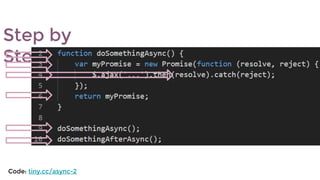
Step by
Step
  
Code: tiny.cc/async-2
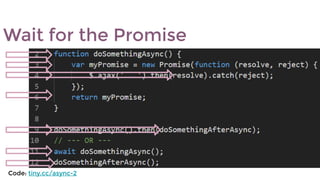
Wait for the Promise
  
Code: tiny.cc/async-2
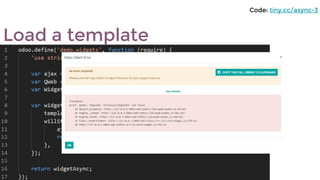
Load a template
Code: tiny.cc/async-3
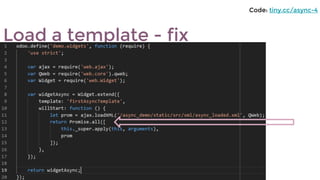
Load a template - fix
Code: tiny.cc/async-4
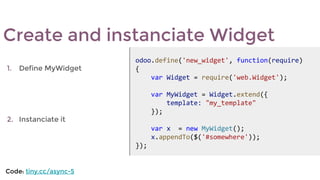
Create and instanciate Widget
1. Define MyWidget
2. Instanciate it
odoo.define('new_widget', function(require) 
{
    var Widget = require('web.Widget');
    var MyWidget = Widget.extend({
        template: "my_template"
    });
    var x  = new MyWidget();
    x.appendTo($('#somewhere'));
});
Code: tiny.cc/async-5
Create and instanciate - Fix
1. Define MyWidget
2. Instanciate it in an action
odoo.define('new_widget', function (require) {
    // require...
    var MyWidget = Widget.extend({
        template: "my_template"
    });
    var MyAction = AbstractAction.extend({
        start: function () {
            var myWidgetInstance = new MyWidget();
            var prom = myWidgetInstance.appendTo ($('#somewhere'))
            return Promise.all([
                prom,
                this._super.apply(this, arguments)
            ])
        }
    });
    core.action_registry.add('my_action', MyAction);
});
Code: tiny.cc/async-6
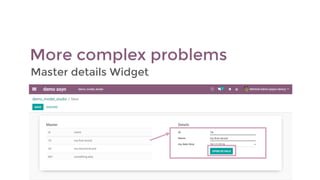
More complex problems
Master details Widget
1. Define Widget
2. On click row  showDetails
3. showDetails  RPC then render
4. On click button (in detail) 
navigateTo (in a modal)
odoo.define('master_detail_widget', function (require) {
    // require ...
    return Widget.extend({
        template: 'master_detail_template',
        events: {
            'click tr': 'showDetails',
            'click button.navigateTo': 'navigateTo'
        },
        async showDetails(ev) {
            this.id = ev.target.dataset.id;
            this.data = await this._rpc({/*...*/ id: this.id});
            this.render();
        },
        navigateTo(ev) {
            this.do_action('open_record_details',
                {
                    recordId: this.id,
                    target: 'new'
                });
        }
    });
});
The Code
Code: tiny.cc/async-7
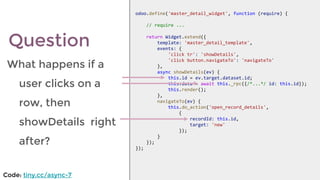
What happens if a
user clicks on a
row, then
showDetails right
after?
odoo.define('master_detail_widget', function (require) {
    // require ...
    return Widget.extend({
        template: 'master_detail_template',
        events: {
            'click tr': 'showDetails',
            'click button.navigateTo': 'navigateTo'
        },
        async showDetails(ev) {
            this.id = ev.target.dataset.id;
            this.data = await this._rpc({/*...*/ id: this.id});
            this.render();
        },
        navigateTo(ev) {
            this.do_action('open_record_details',
                {
                    recordId: this.id,
                    target: 'new'
                });
        }
    });
});
Question
Code: tiny.cc/async-7
Issue: when the user clicks fast
on navigateTo just after
selecting a row, he is shown
with the details of the
previously selected row
Fix: set the id of the selected row
after the rpc
odoo.define('master_detail_widget', function (require) {
    // require ...
    return Widget.extend({
        template: 'master_detail_template',
        events: {
            'click tr': 'showDetails',
            'click button.navigateTo': 'navigateTo'
        },
        async showDetails(ev) {
            var id = ev.target.dataset.id;
            this.data = await this._rpc({/*...*/ id: id});
            this.id = id;
            this.render();
        },
        navigateTo() {
            this.do_action('open_record_details',
                {
                    recordId: this.id,
                    target: 'new'
                });
        }
    });
});
[FIX] fast click
Code: tiny.cc/async-8
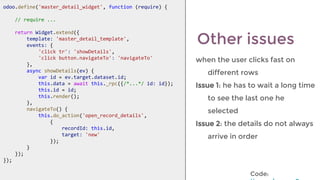
when the user clicks fast on
different rows
Issue 1: he has to wait a long time
to see the last one he
selected
Issue 2: the details do not always
arrive in order
Other issues
odoo.define('master_detail_widget', function (require) {
    // require ...
    return Widget.extend({
        template: 'master_detail_template',
        events: {
            'click tr': 'showDetails',
            'click button.navigateTo': 'navigateTo'
        },
        async showDetails(ev) {
            var id = ev.target.dataset.id;
            this.data = await this._rpc({/*...*/ id: id});
            this.id = id;
            this.render();
        },
        navigateTo() {
            this.do_action('open_record_details',
                {
                    recordId: this.id,
                    target: 'new'
                });
        }
    });
});
odoo.define('master_detail_widget', function (require) {
    // require ...
    return Widget.extend({
        template: 'master_detail_template',
        events: {
            'click tr': 'showDetails',
            'click button.navigateTo': 'navigateTo'
        },
        async showDetails(ev) {
            var id = ev.target.dataset.id;
            this.data = await this._rpc({/*...*/ id: id});
            this.id = id;
            this.render();
        },
        navigateTo() {
            this.do_action('open_record_details',
                {
                    recordId: this.id,
                    target: 'new'
                });
        }
    });
});
Code:
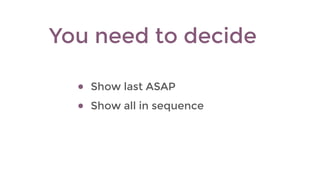
● Show last ASAP
● Show all in sequence
You need to decide
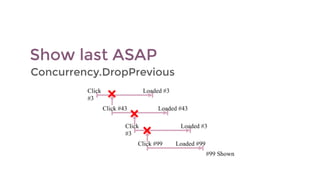
Show last ASAP
Concurrency.DropPrevious
Click
#3
Loaded #3
Click #43 Loaded #43
Click
#3
Loaded #3
Click #99 Loaded #99
#99 Shown
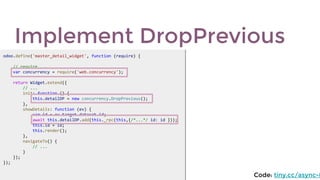
Implement DropPrevious
odoo.define('master_detail_widget', function (require) {
    // require ...
    var concurrency = require('web.concurrency');
    return Widget.extend({
        // ...
        init: function () {
            this.detailDP = new concurrency.DropPrevious();
        },
        showDetails: function (ev) {
            var id = ev.target.dataset.id;
            await this.detailDP.add(this._rpc(this,{/*...*/ id: id }));
            this.id = id;
            this.render();
        },
        navigateTo() {
            // ...
        }
    });
});
odoo.define('master_detail_widget', function (require) {
    // require ...
    var concurrency = require('web.concurrency');
    return Widget.extend({
        // ...
        init: function () {
            this.detailDP = new concurrency.DropPrevious();
        },
        showDetails: function (ev) {
            var id = ev.target.dataset.id;
            await this.detailDP.add(this._rpc(this,{/*...*/ id: id }));
            this.id = id;
            this.render();
        },
        navigateTo() {
            // ...
        }
    });
});
Code: tiny.cc/async-8
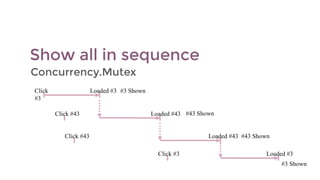
Show all in sequence
Concurrency.Mutex
Click
#3
Click #43
Click #43
Click #3 Loaded #3
#3 Shown
Loaded #43 #43 Shown
Loaded #3 #3 Shown
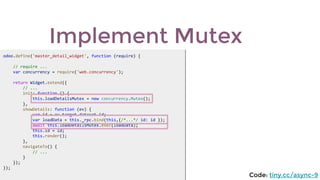
Implement Mutex
odoo.define('master_detail_widget', function (require) {
    // require ...
    var concurrency = require('web.concurrency');
    return Widget.extend({
        // ...
        init: function () {
            this.loadDetailsMutex = new concurrency.Mutex();
        },
        showDetails: function (ev) {
            var id = ev.target.dataset.id;
            var loadData = this._rpc.bind(this,{/*...*/ id: id });
            await this.loadDetailsMutex.exec(loadData);
            this.id = id;
            this.render();
        },
        navigateTo() {
            // ...
        }
    });
});
odoo.define('master_detail_widget', function (require) {
    // require ...
    var concurrency = require('web.concurrency');
    return Widget.extend({
        // ...
        init: function () {
            this.loadDetailsMutex = new concurrency.Mutex();
        },
        showDetails: function (ev) {
            var id = ev.target.dataset.id;
            var loadData = this._rpc.bind(this,{/*...*/ id: id });
            await this.loadDetailsMutex.exec(loadData);
            this.id = id;
            this.render();
        },
        navigateTo() {
            // ...
        }
    });
});
Code: tiny.cc/async-9
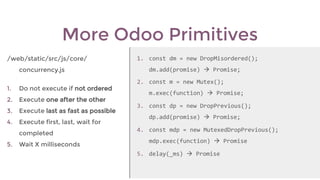
More Odoo Primitives
/web/static/src/js/core/
concurrency.js
1. Do not execute if not ordered
2. Execute one after the other
3. Execute last as fast as possible
4. Execute first, last, wait for
completed
5. Wait X milliseconds
1. const dm = new DropMisordered(); 
dm.add(promise)  Promise;
2. const m = new Mutex();
m.exec(function)  Promise;
3. const dp = new DropPrevious();
dp.add(promise)  Promise;
4. const mdp = new MutexedDropPrevious();
mdp.exec(function)  Promise
5. delay(_ms)  Promise
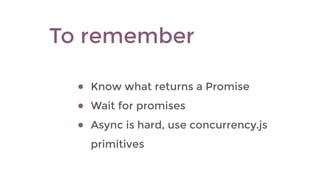
● Know what returns a Promise
● Wait for promises
● Async is hard, use concurrency.js
primitives
To remember
Thank you.
#odooexperience
2018
2019
EXPERIENCE

Asynchronous JS in Odoo