DIGEL Systems
• Microcontroller
• Idea behind Arduino
• Inroduction to Arduino
• History
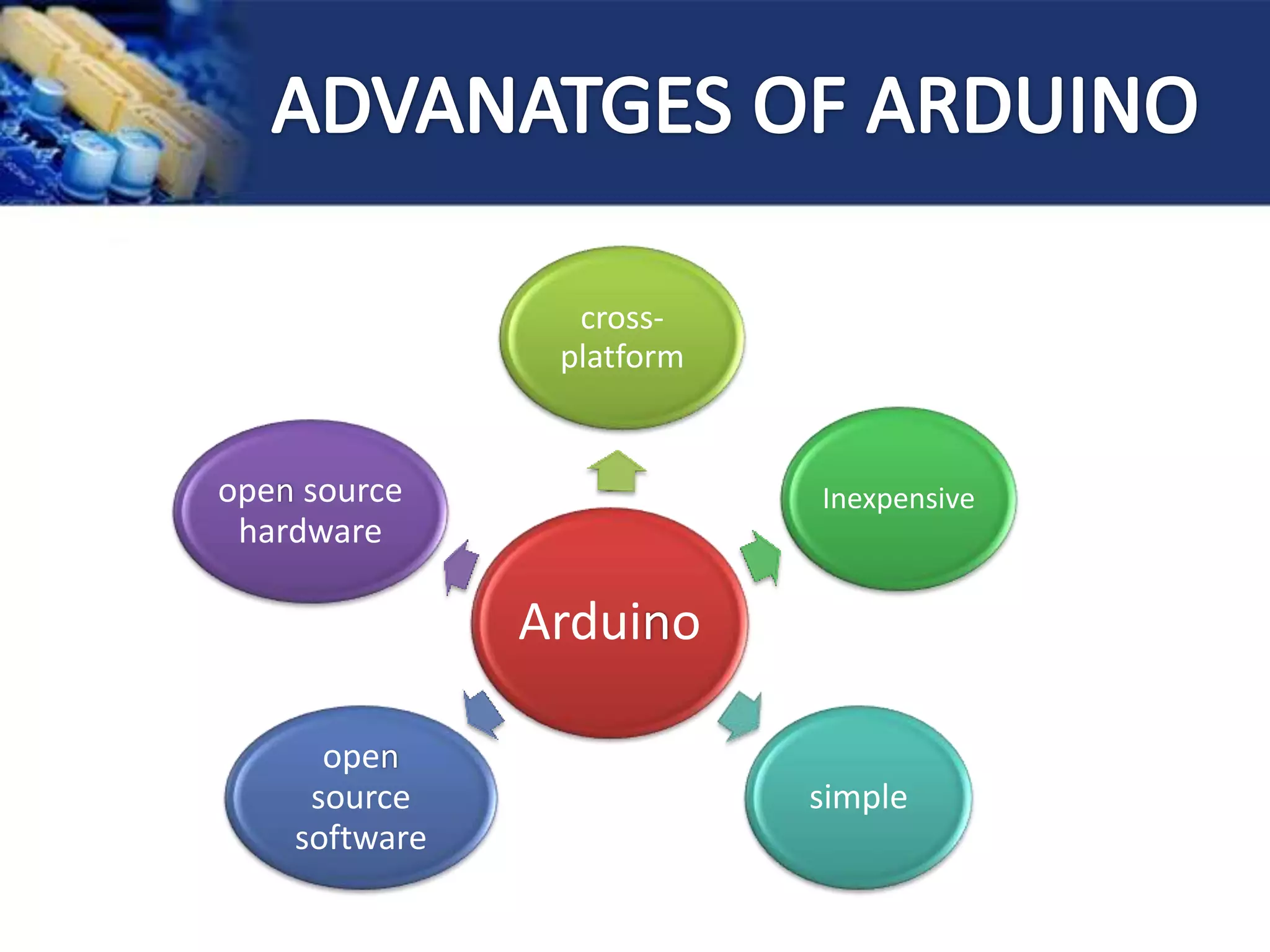
• Advantages
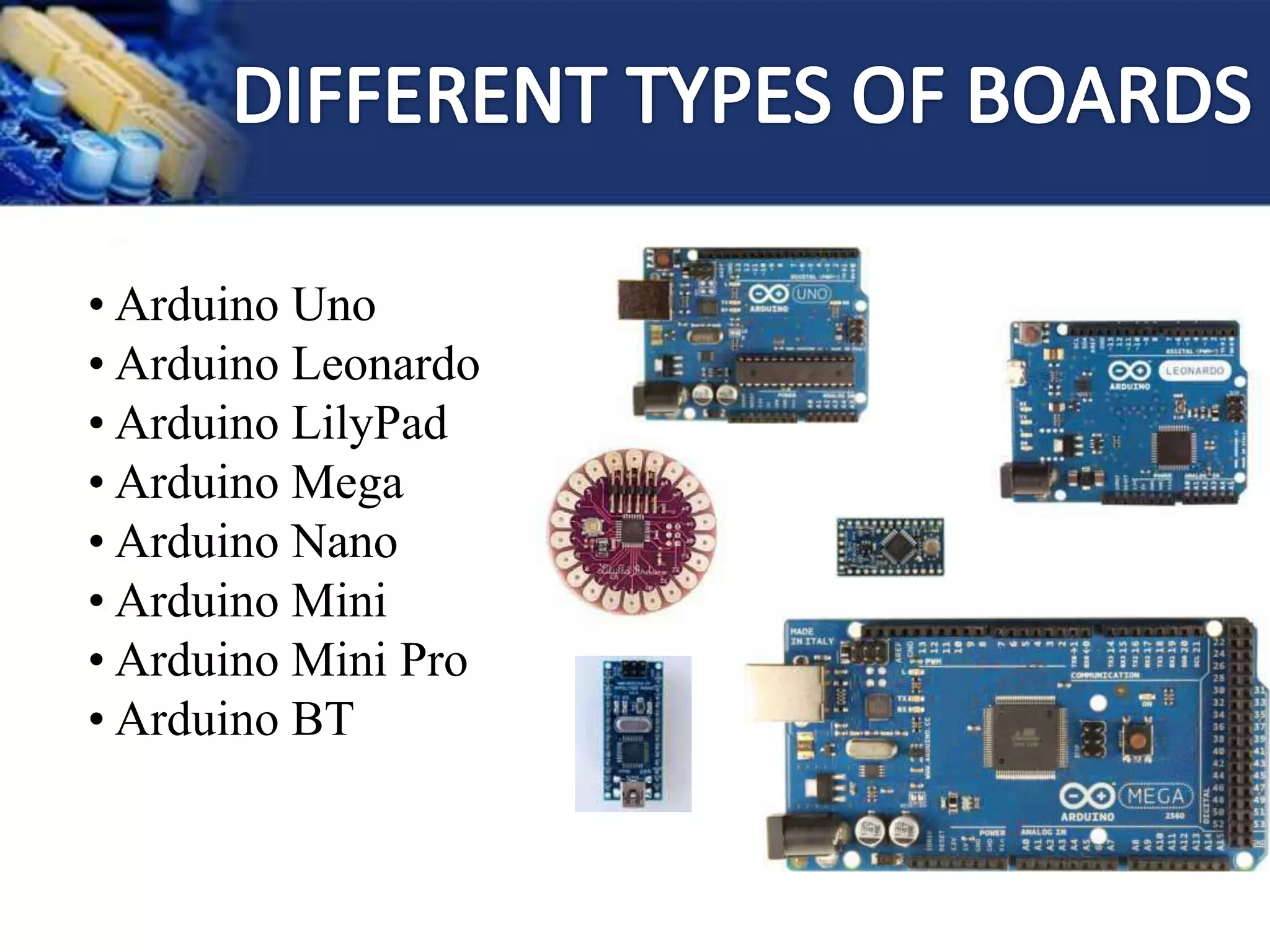
• Different Boards of Arduino
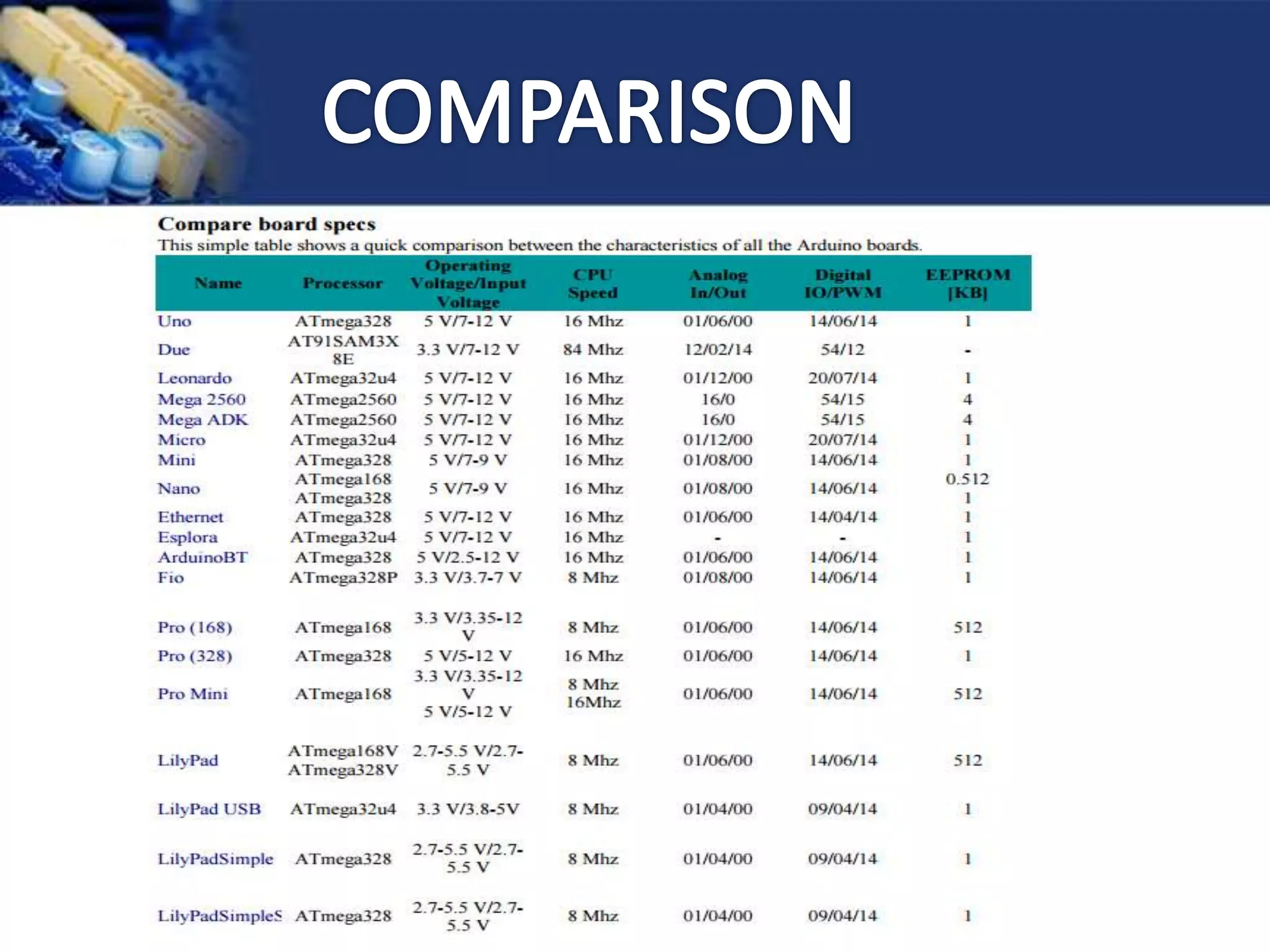
• Comparison
• ATmega328p Specifications
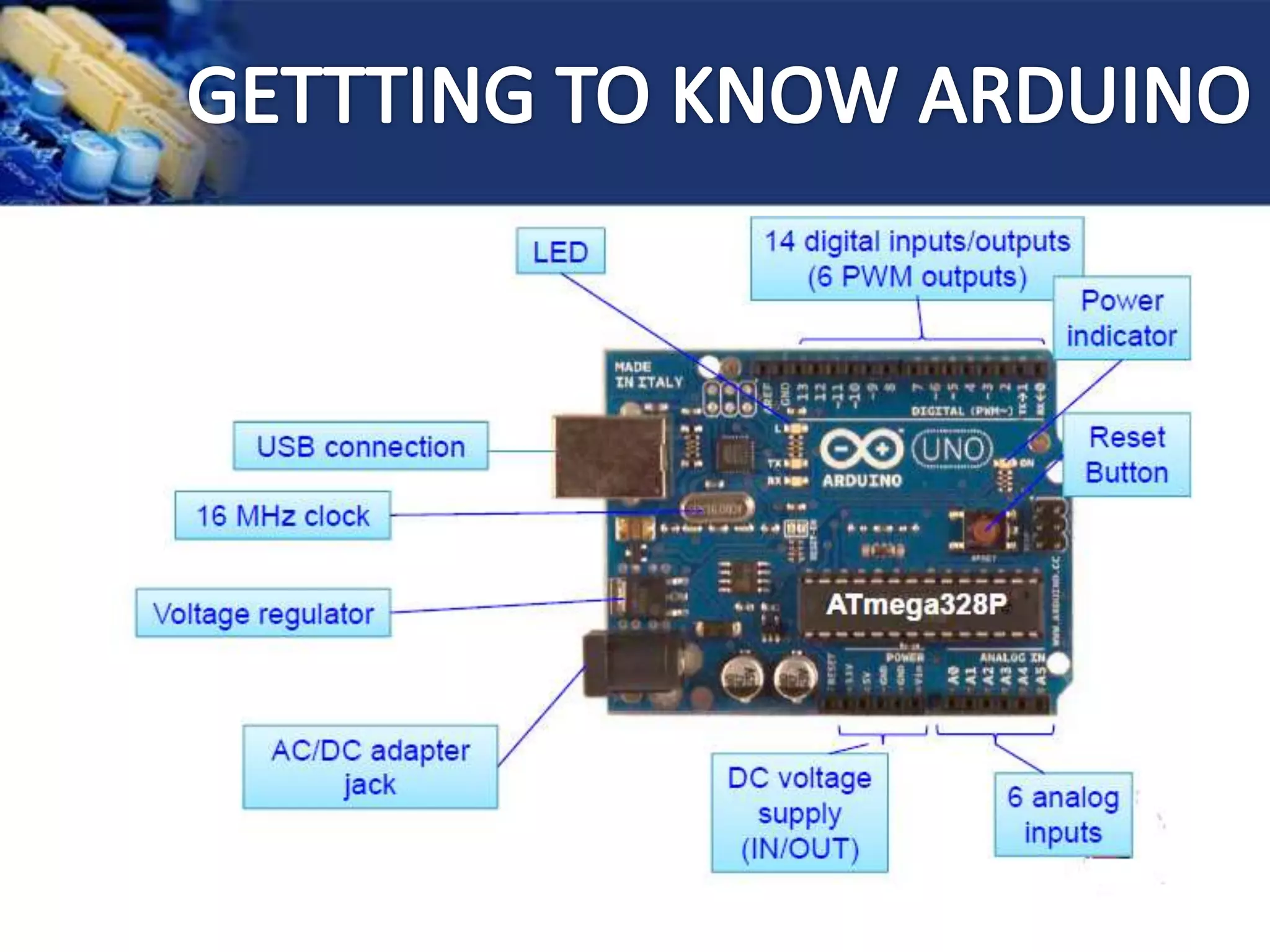
• Arduino Uno Board
• Download and Install software
• Writing programs
(μC, MCU)
• Computer on a single integrated chip
– Processor (CPU)
– Memory (RAM / ROM / Flash)
– I/O ports (USB, I2C, SPI, ADC)
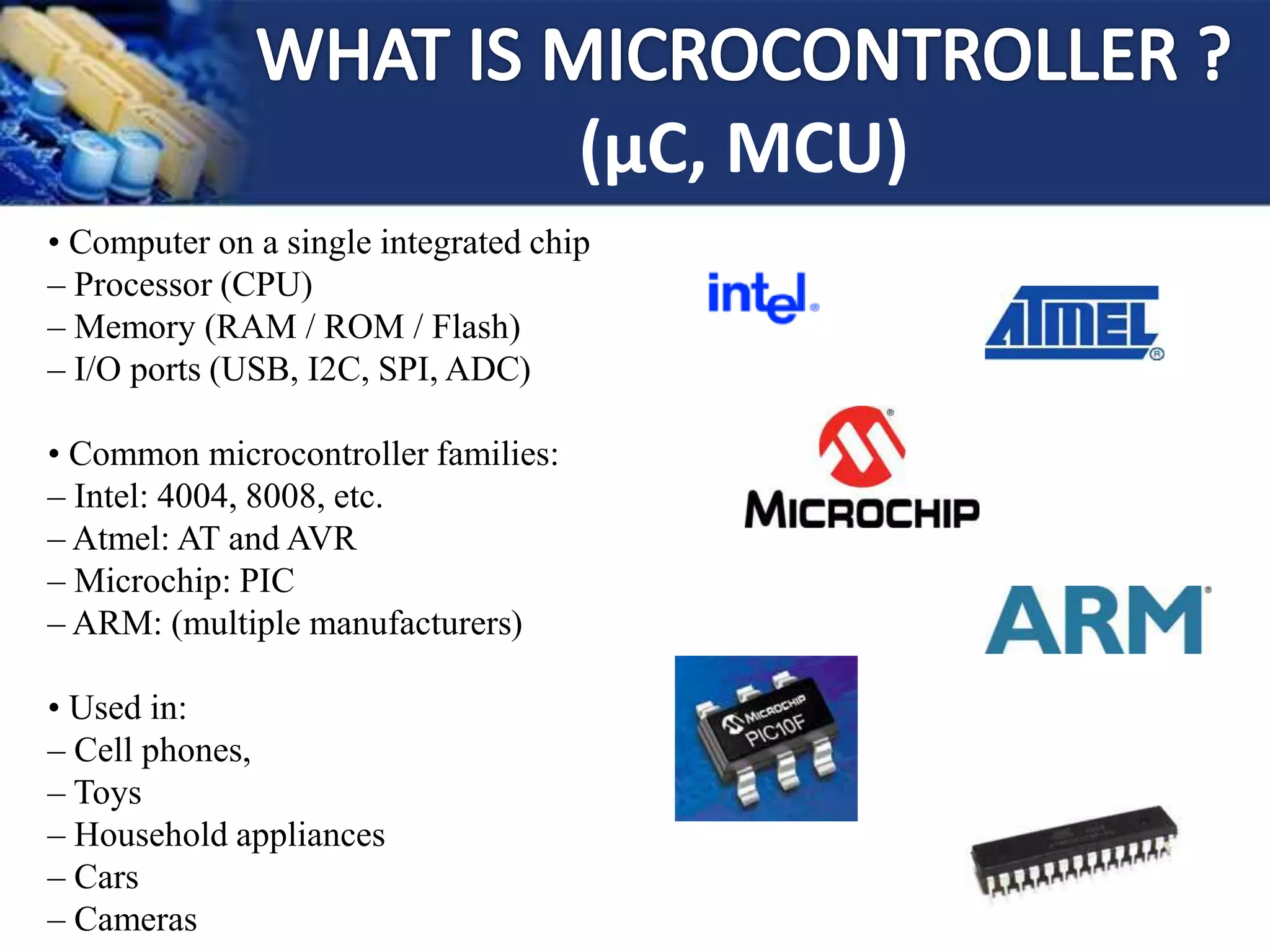
• Common microcontroller families:
– Intel: 4004, 8008, etc.
– Atmel: AT and AVR
– Microchip: PIC
– ARM: (multiple manufacturers)
• Used in:
– Cell phones,
– Toys
– Household appliances
– Cars
– Cameras
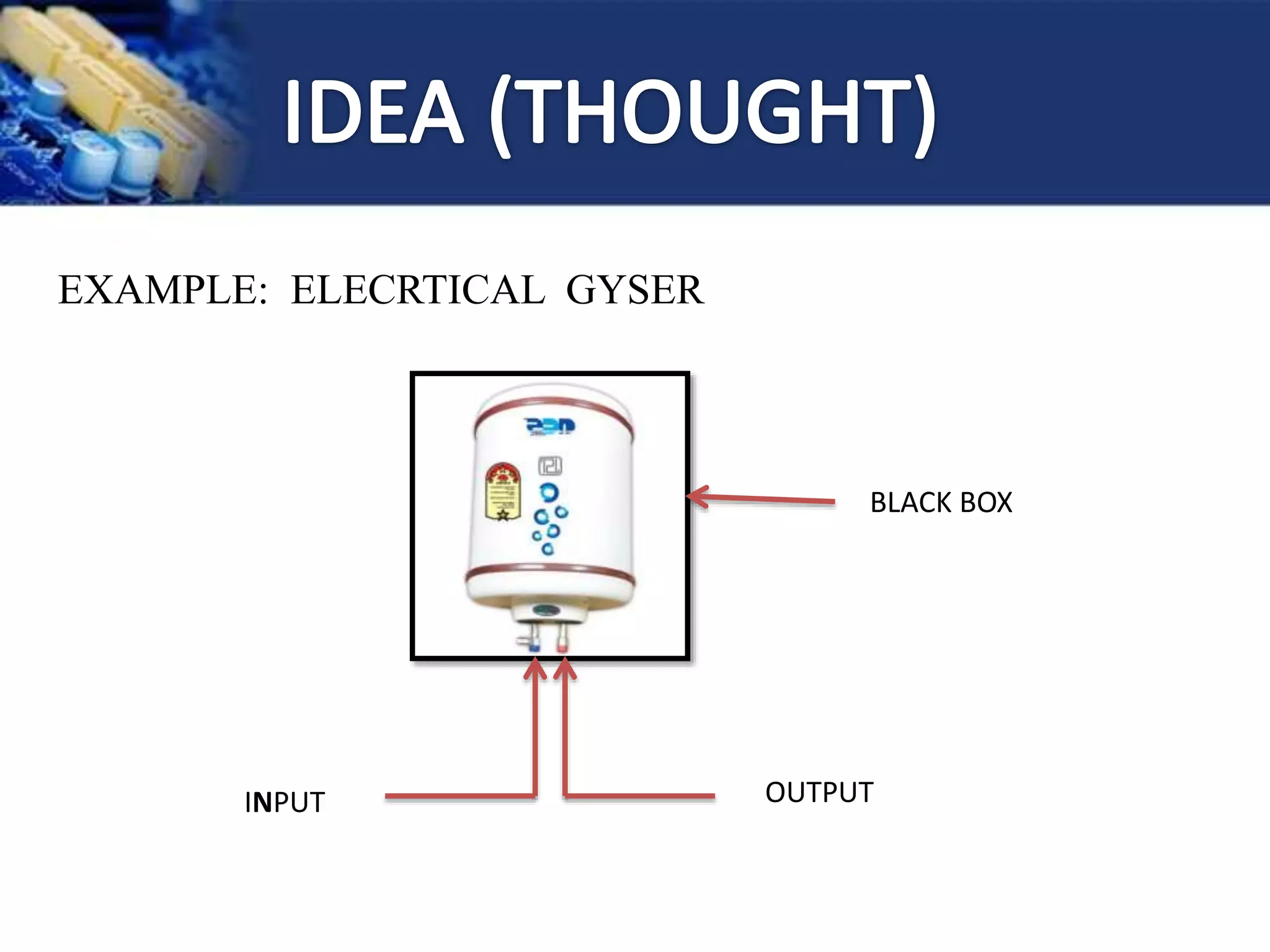
EXAMPLE: ELECRTICAL GYSER
INPUT
BLACK BOX
OUTPUT
• Arduino is an open-source prototyping
platform based on easy-to-use hardware and
software
• Arduino is a set of development boards that
come with pre-tested hardware and software
libraries
•It means, you can buy an inexpensive
Arduino board and start developing your
project instantly
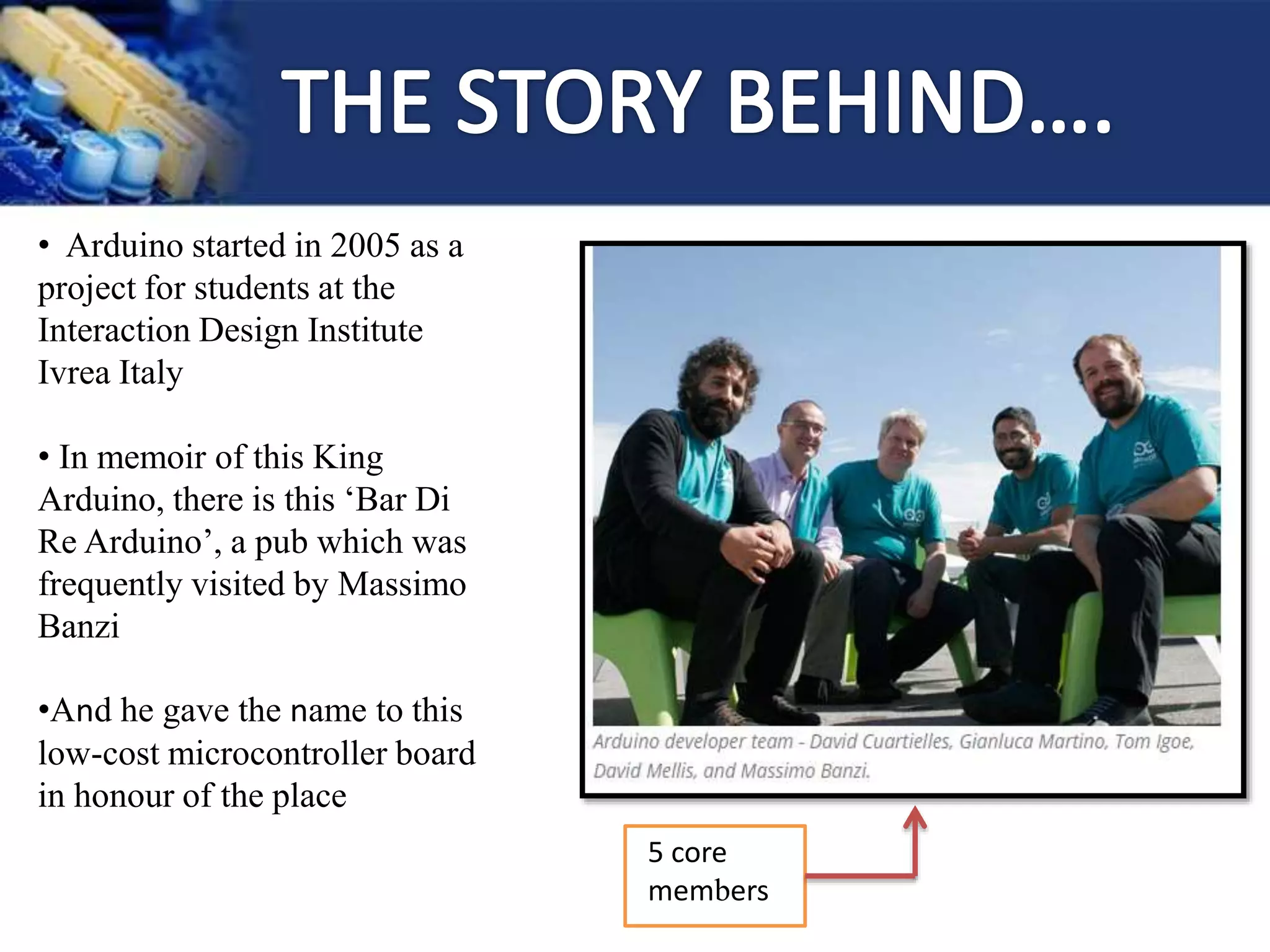
• Arduino started in 2005 as a
project for students at the
Interaction Design Institute
Ivrea Italy
• In memoir of this King
Arduino, there is this ‘Bar Di
Re Arduino’, a pub which was
frequently visited by Massimo
Banzi
•And he gave the name to this
low-cost microcontroller board
in honour of the place
5 core
members
Arduino
cross-
platform
Inexpensive
simple
open
source
software
open source
hardware
• Arduino Uno
• Arduino Leonardo
• Arduino LilyPad
• Arduino Mega
• Arduino Nano
• Arduino Mini
• Arduino Mini Pro
• Arduino BT
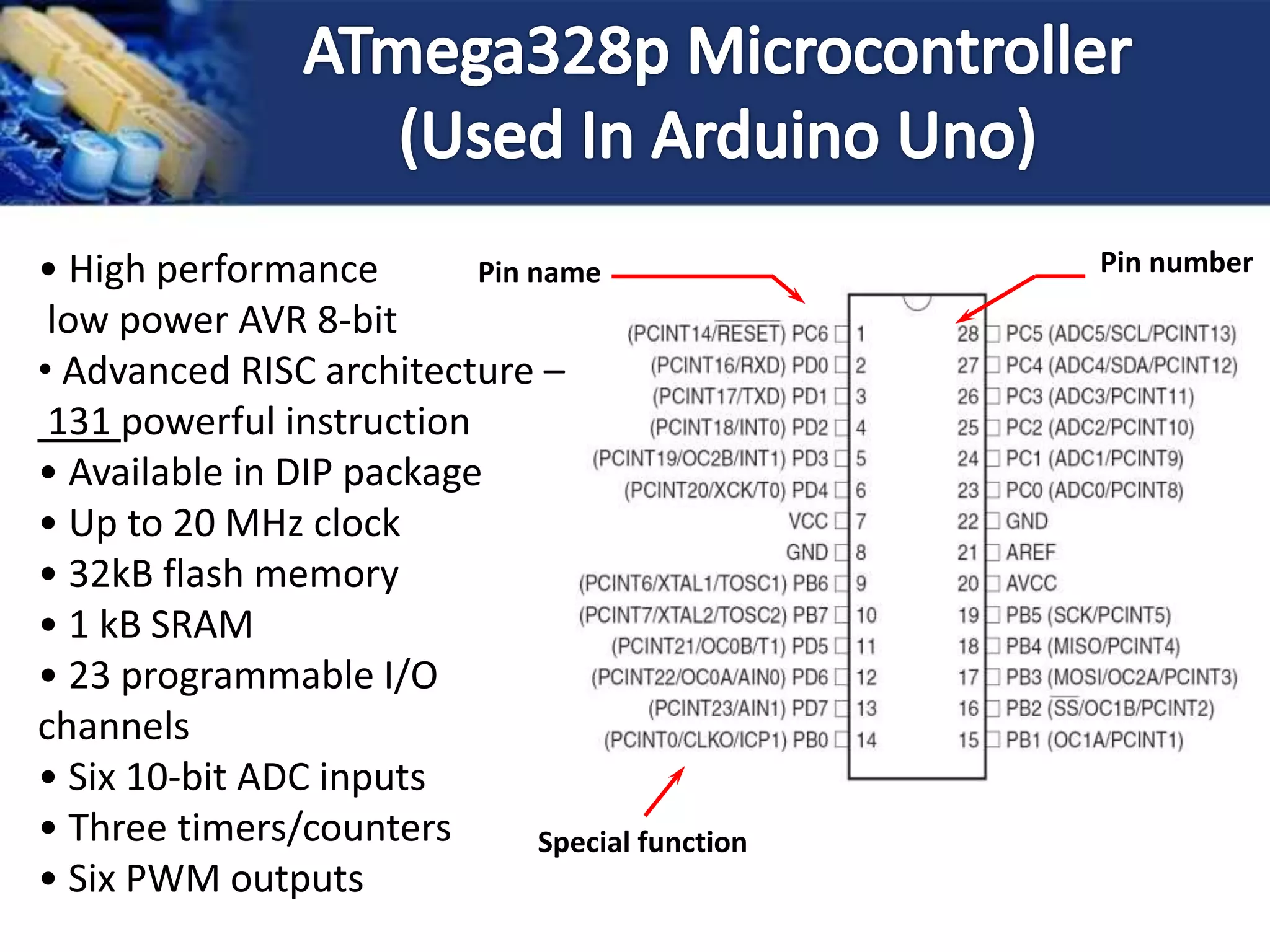
• High performance
low power AVR 8-bit
• Advanced RISC architecture –
131 powerful instruction
• Available in DIP package
• Up to 20 MHz clock
• 32kB flash memory
• 1 kB SRAM
• 23 programmable I/O
channels
• Six 10-bit ADC inputs
• Three timers/counters
• Six PWM outputs
Pin name Pin number
Special function
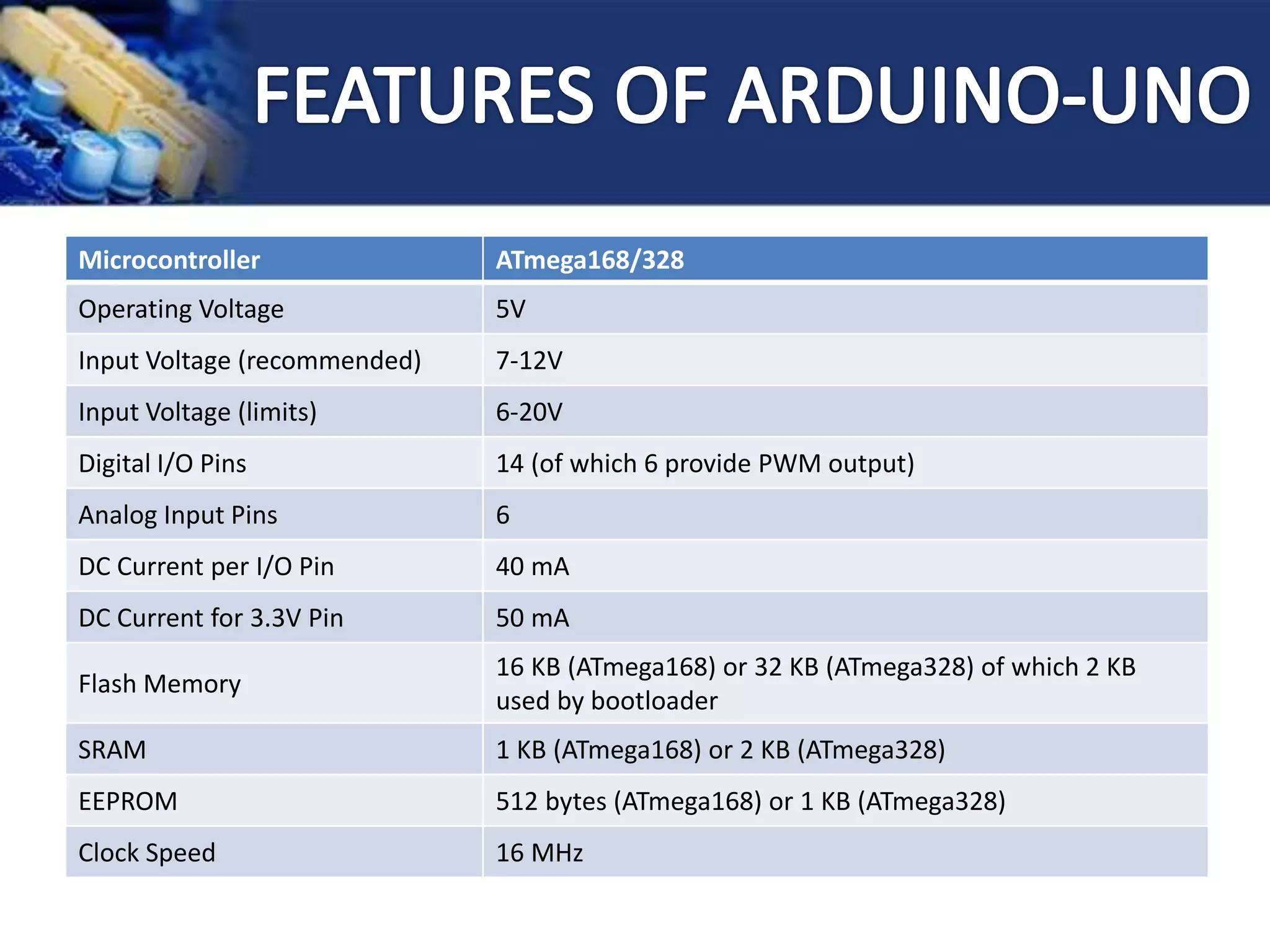
Microcontroller ATmega168/328
Operating Voltage 5V
Input Voltage (recommended) 7-12V
Input Voltage (limits) 6-20V
Digital I/O Pins 14 (of which 6 provide PWM output)
Analog Input Pins 6
DC Current per I/O Pin 40 mA
DC Current for 3.3V Pin 50 mA
Flash Memory
16 KB (ATmega168) or 32 KB (ATmega328) of which 2 KB
used by bootloader
SRAM 1 KB (ATmega168) or 2 KB (ATmega328)
EEPROM 512 bytes (ATmega168) or 1 KB (ATmega328)
Clock Speed 16 MHz
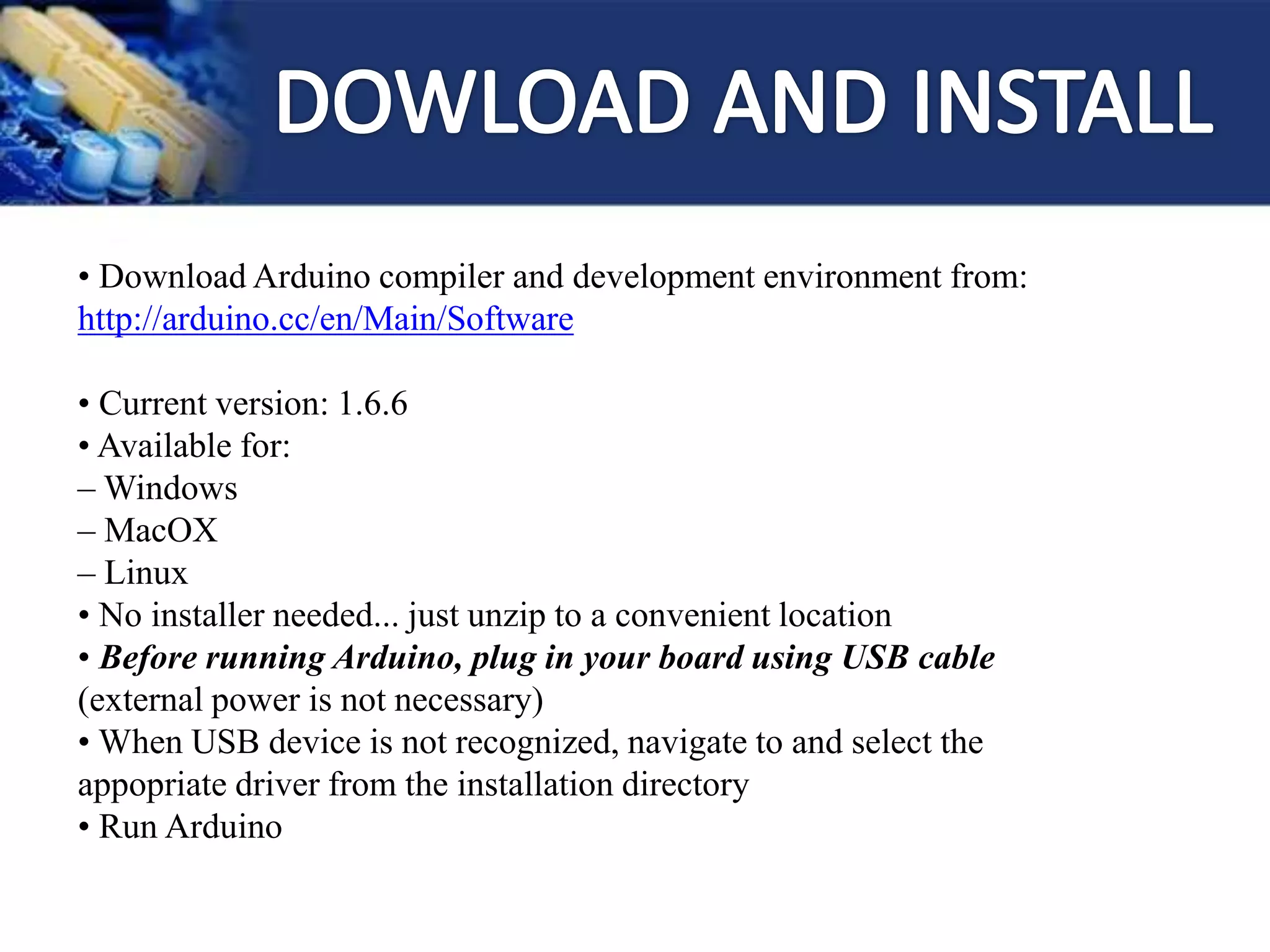
• Download Arduino compiler and development environment from:
http://arduino.cc/en/Main/Software
• Current version: 1.6.6
• Available for:
– Windows
– MacOX
– Linux
• No installer needed... just unzip to a convenient location
• Before running Arduino, plug in your board using USB cable
(external power is not necessary)
• When USB device is not recognized, navigate to and select the
appopriate driver from the installation directory
• Run Arduino
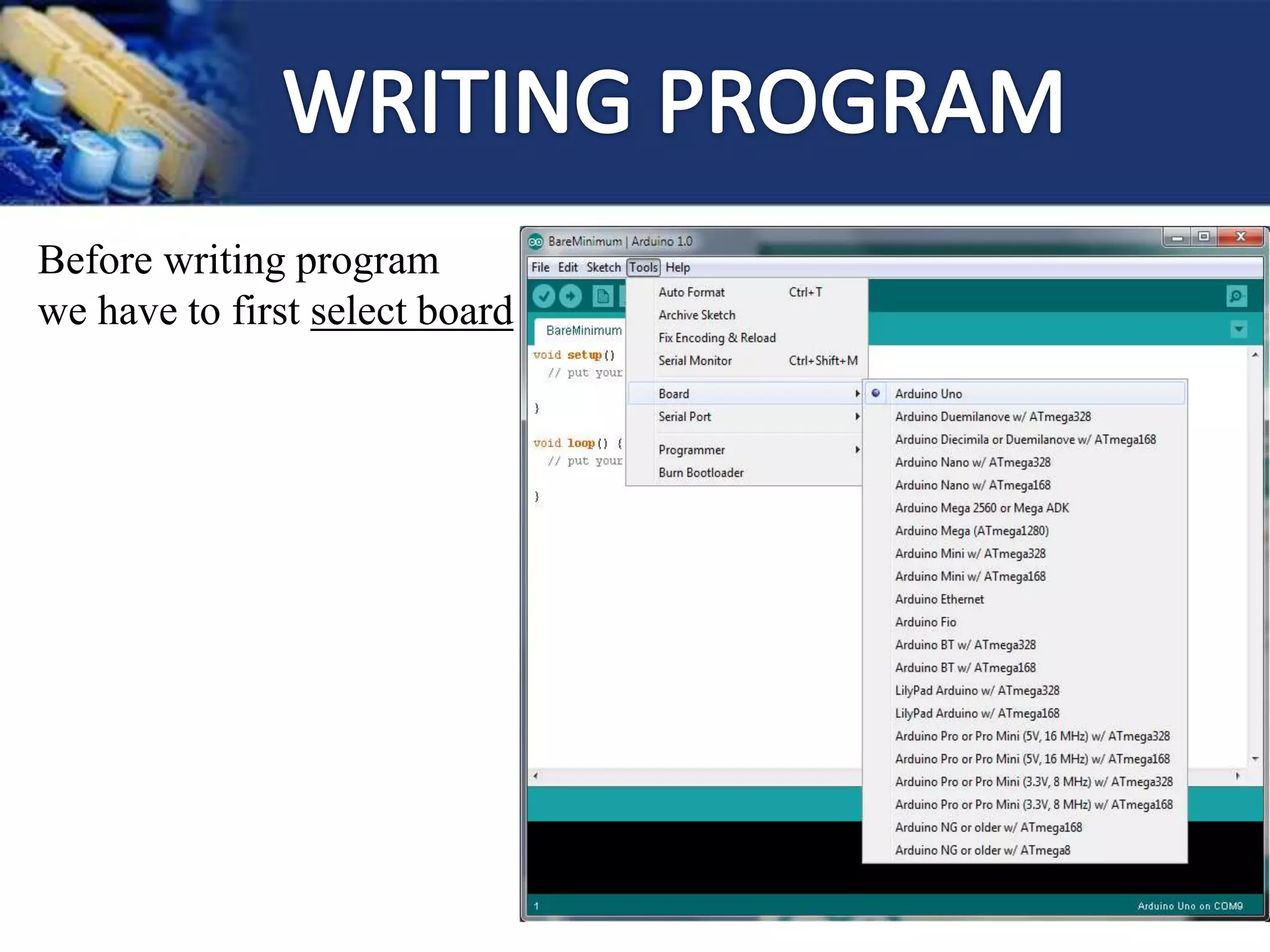
Before writing program
we have to first select board
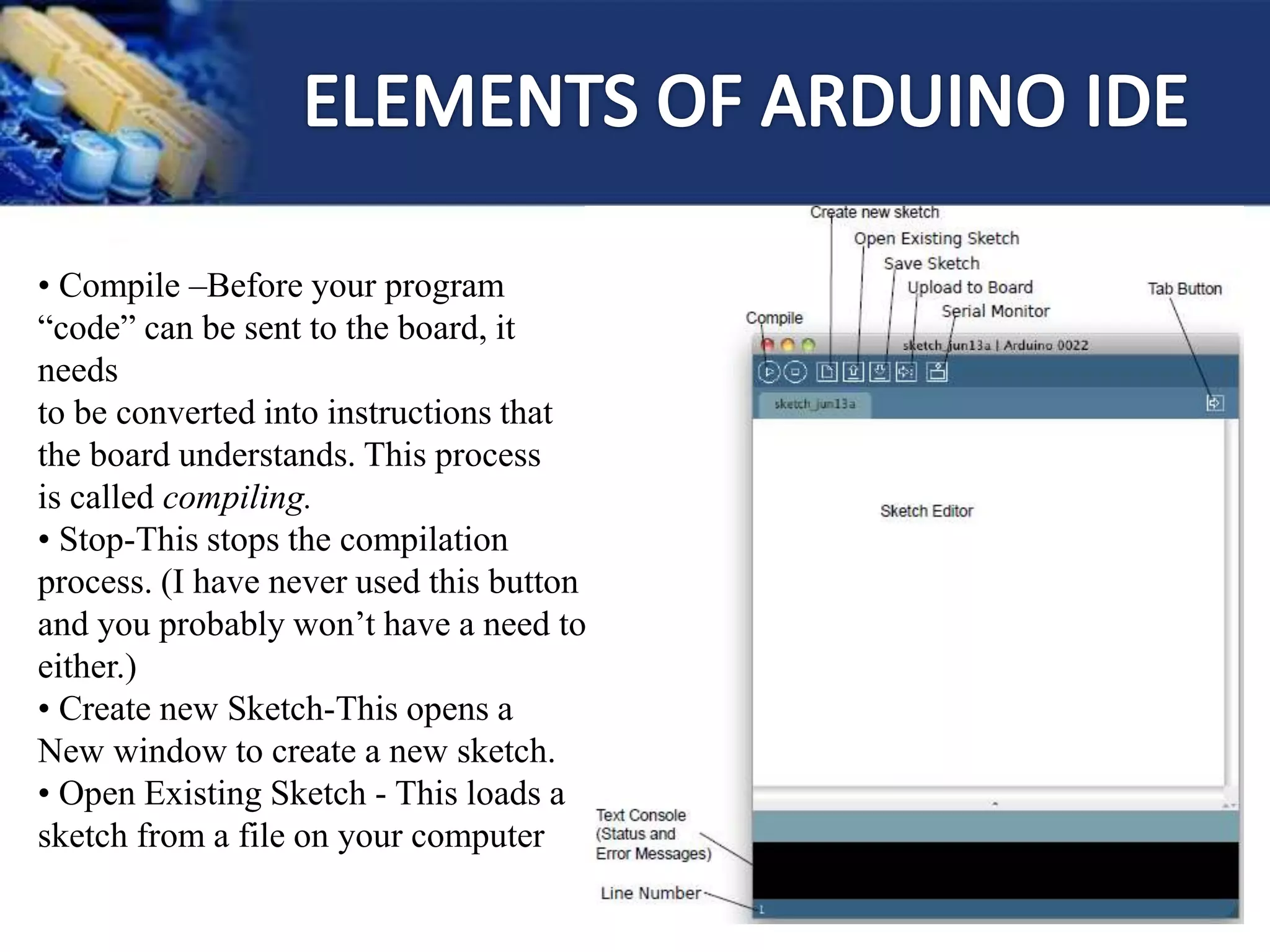
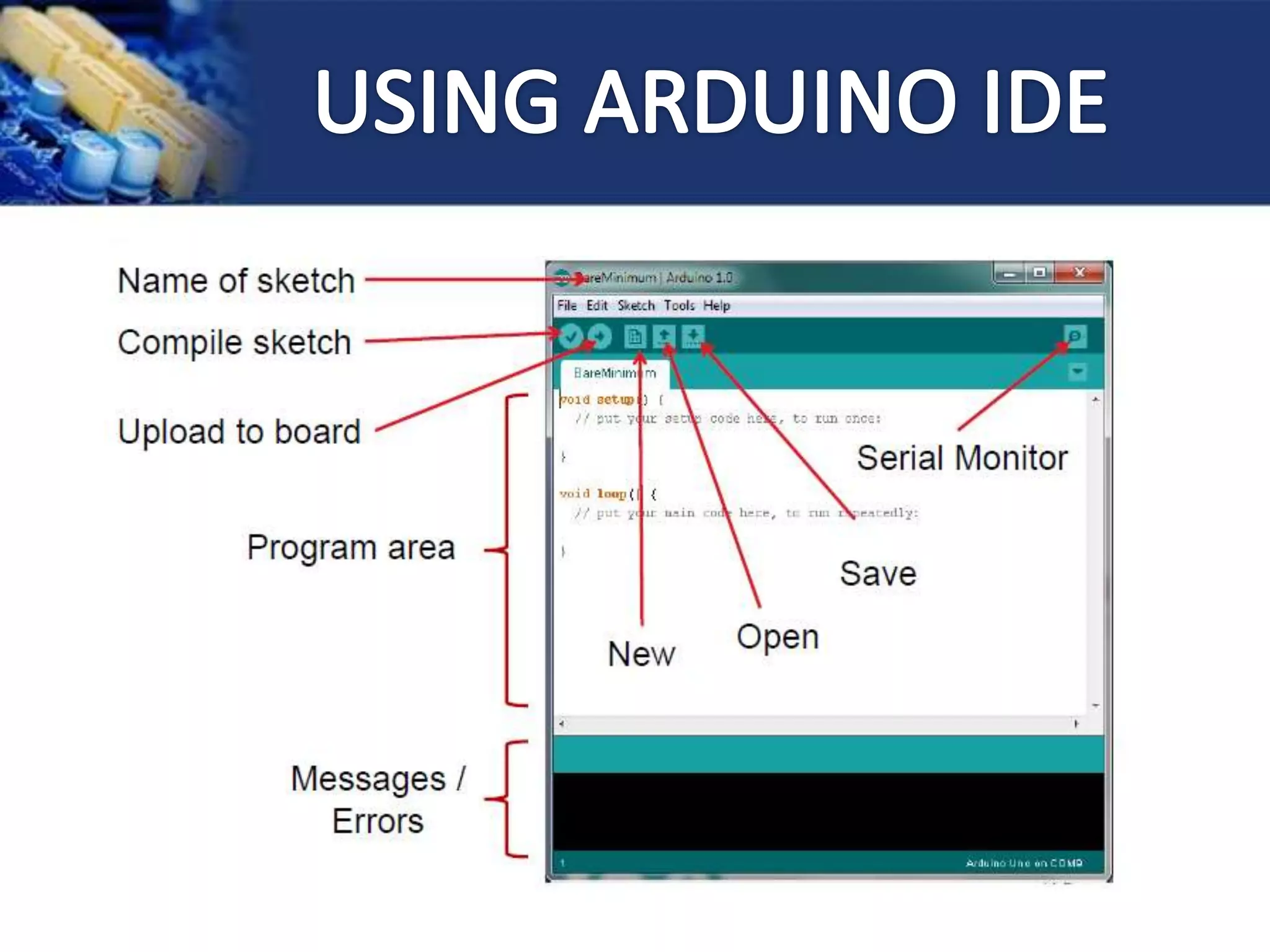
• Compile –Before your program
“code” can be sent to the board, it
needs
to be converted into instructions that
the board understands. This process
is called compiling.
• Stop-This stops the compilation
process. (I have never used this button
and you probably won’t have a need to
either.)
• Create new Sketch-This opens a
New window to create a new sketch.
• Open Existing Sketch - This loads a
sketch from a file on your computer
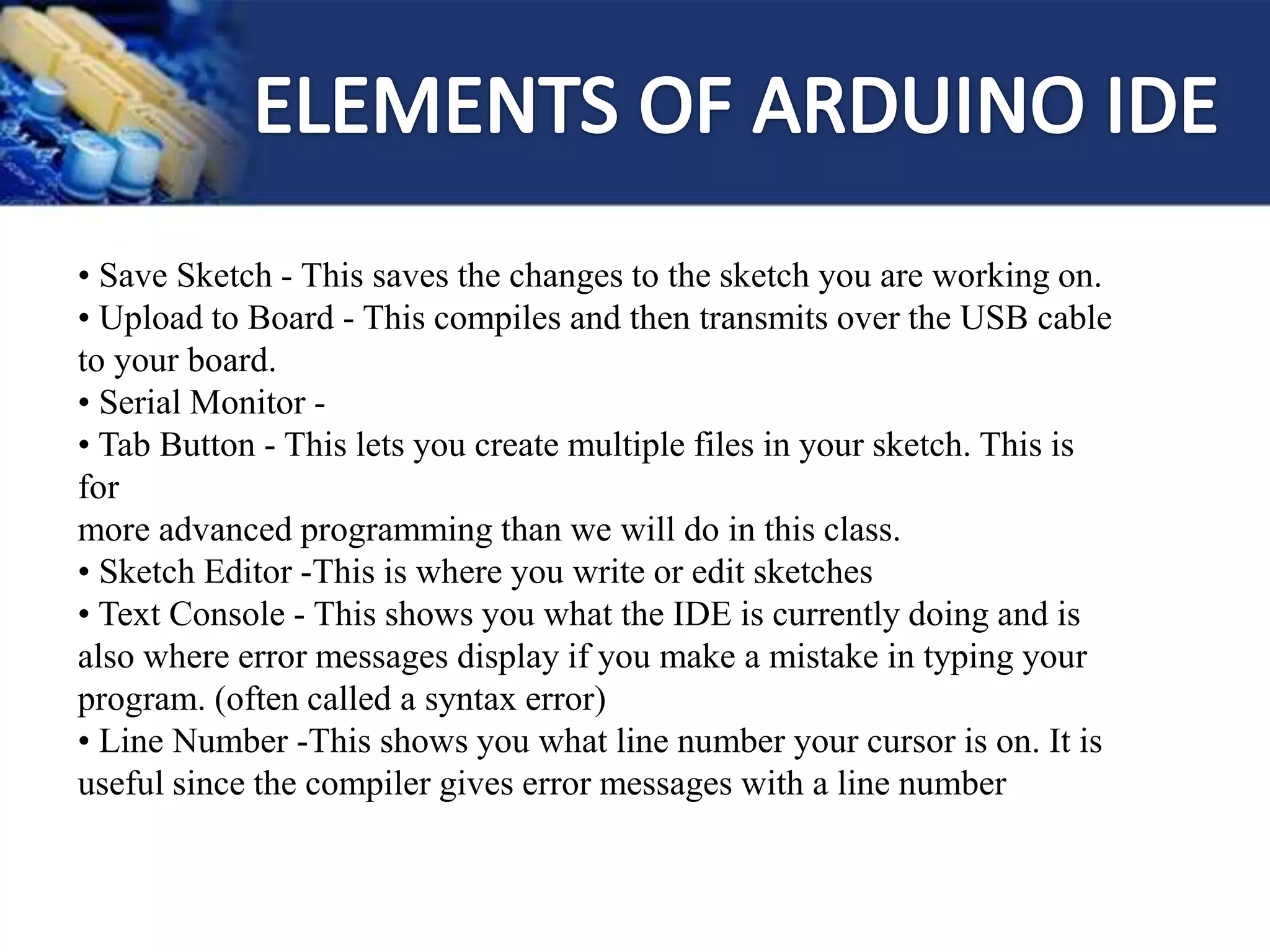
• Save Sketch - This saves the changes to the sketch you are working on.
• Upload to Board - This compiles and then transmits over the USB cable
to your board.
• Serial Monitor -
• Tab Button - This lets you create multiple files in your sketch. This is
for
more advanced programming than we will do in this class.
• Sketch Editor -This is where you write or edit sketches
• Text Console - This shows you what the IDE is currently doing and is
also where error messages display if you make a mistake in typing your
program. (often called a syntax error)
• Line Number -This shows you what line number your cursor is on. It is
useful since the compiler gives error messages with a line number
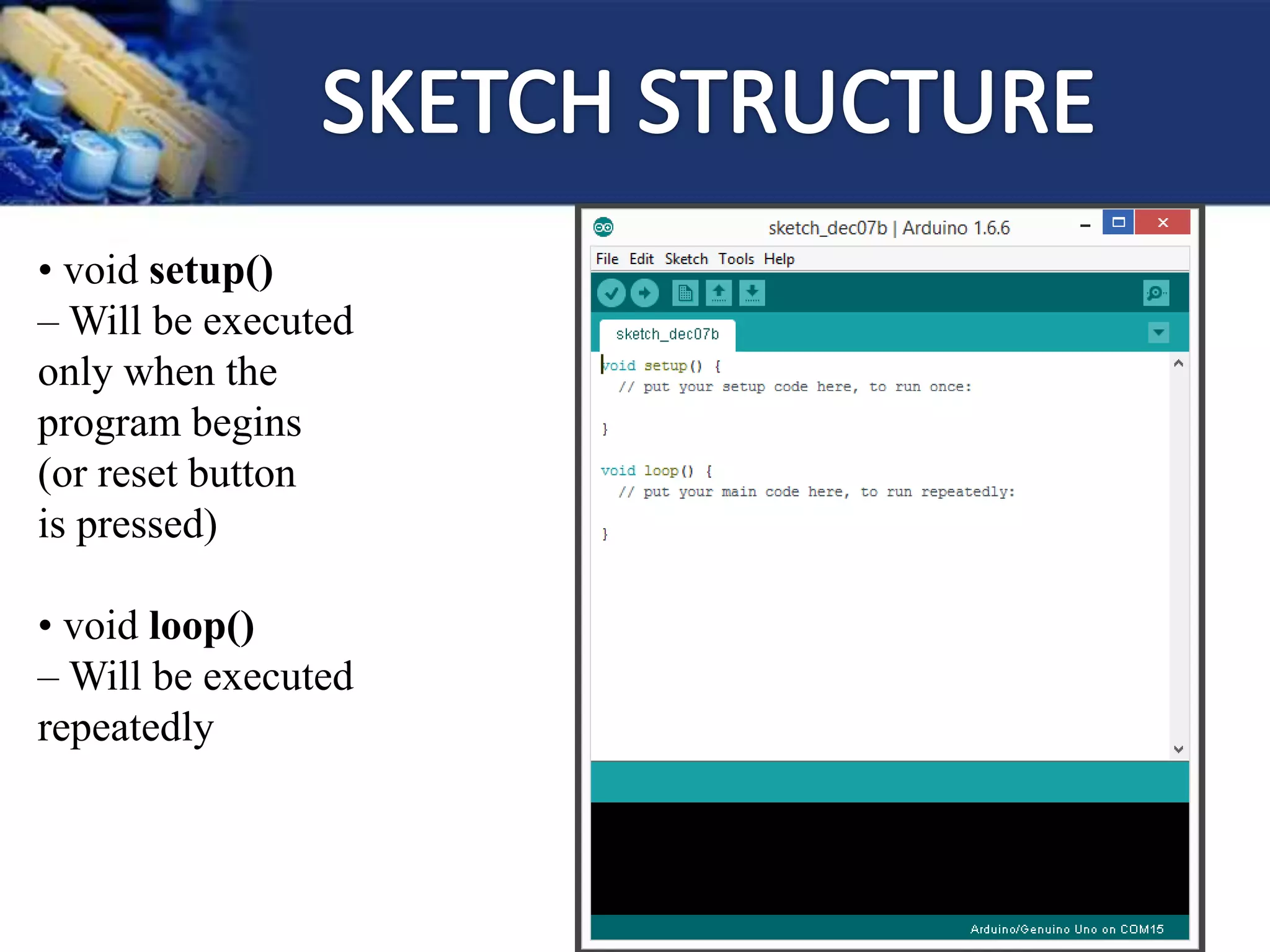
• void setup()
– Will be executed
only when the
program begins
(or reset button
is pressed)
• void loop()
– Will be executed
repeatedly
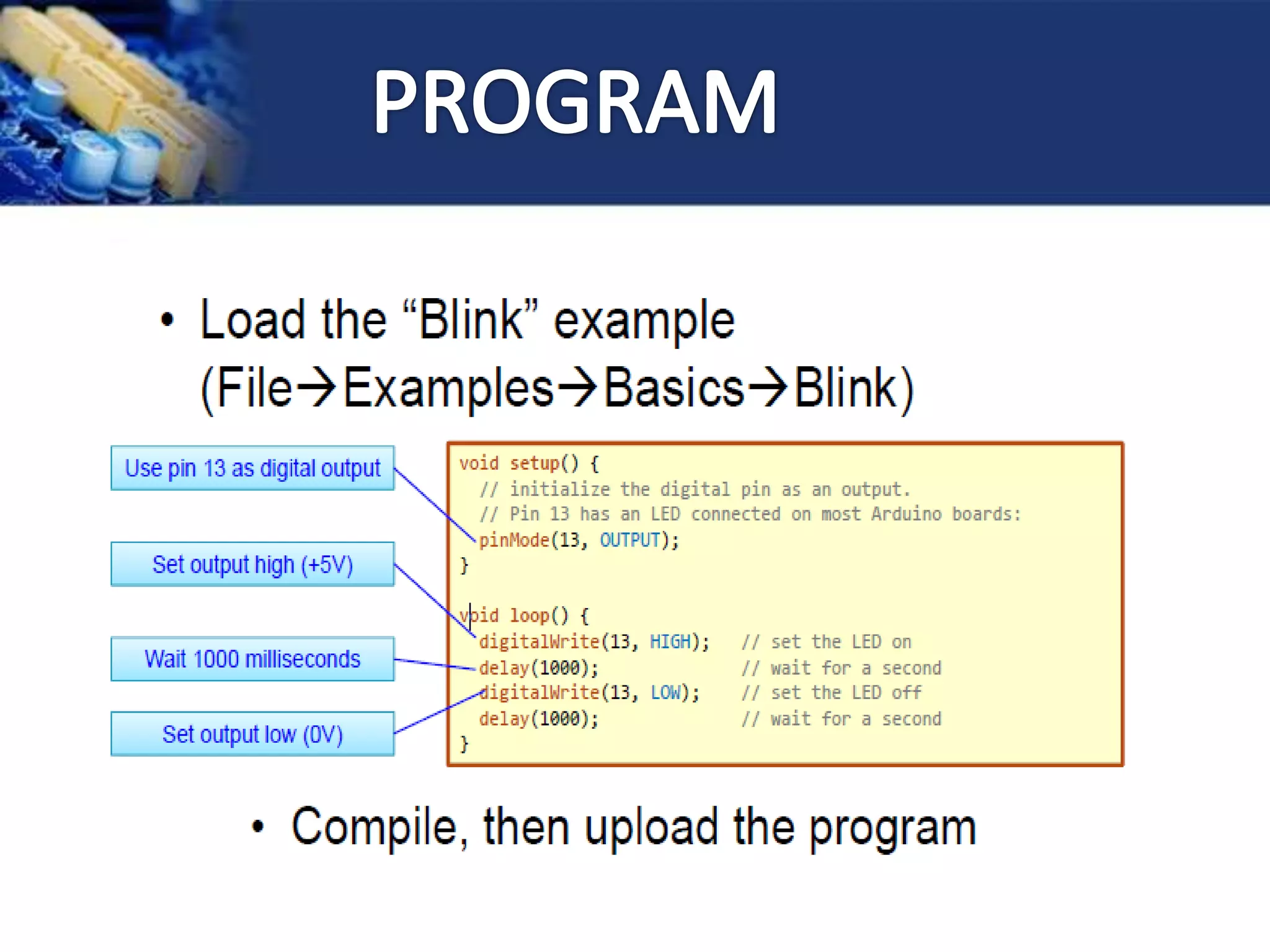
1] LED Blink
A light-emitting
diode (LED) is a two-lead
semiconductor light source.
- It is a p–n junction diode,
which emits light when
forward biased.
- A resistor is connected in
series so as to limit current
flowing through the LED.
1] Make Port line “ 9 ” as a Output and repeat the
same program
2] Reduce and increase the delay and check the
Output
3] Make Light Pattern (Reduce delay and use
loop)
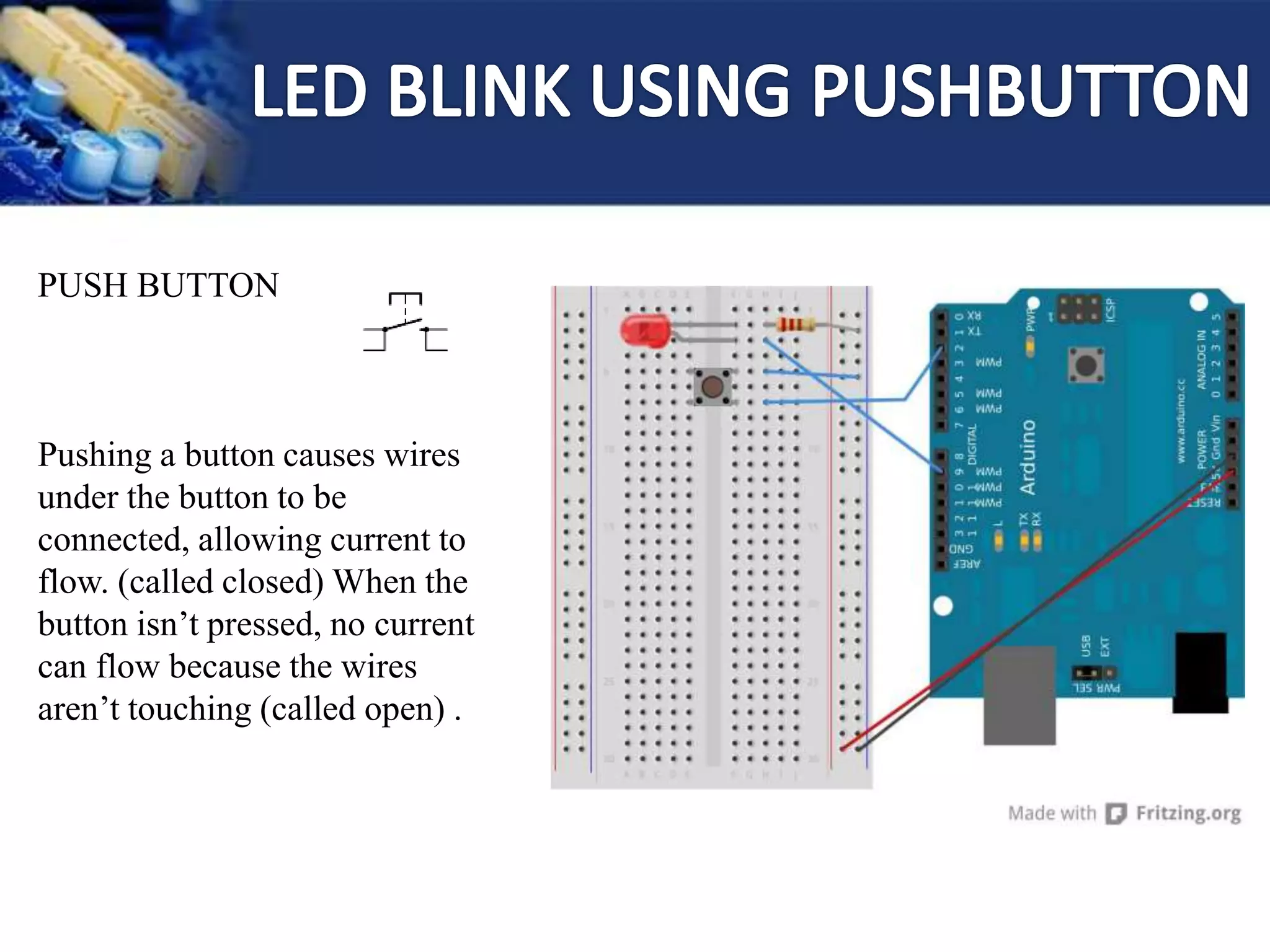
PUSH BUTTON
Pushing a button causes wires
under the button to be
connected, allowing current to
flow. (called closed) When the
button isn’t pressed, no current
can flow because the wires
aren’t touching (called open) .
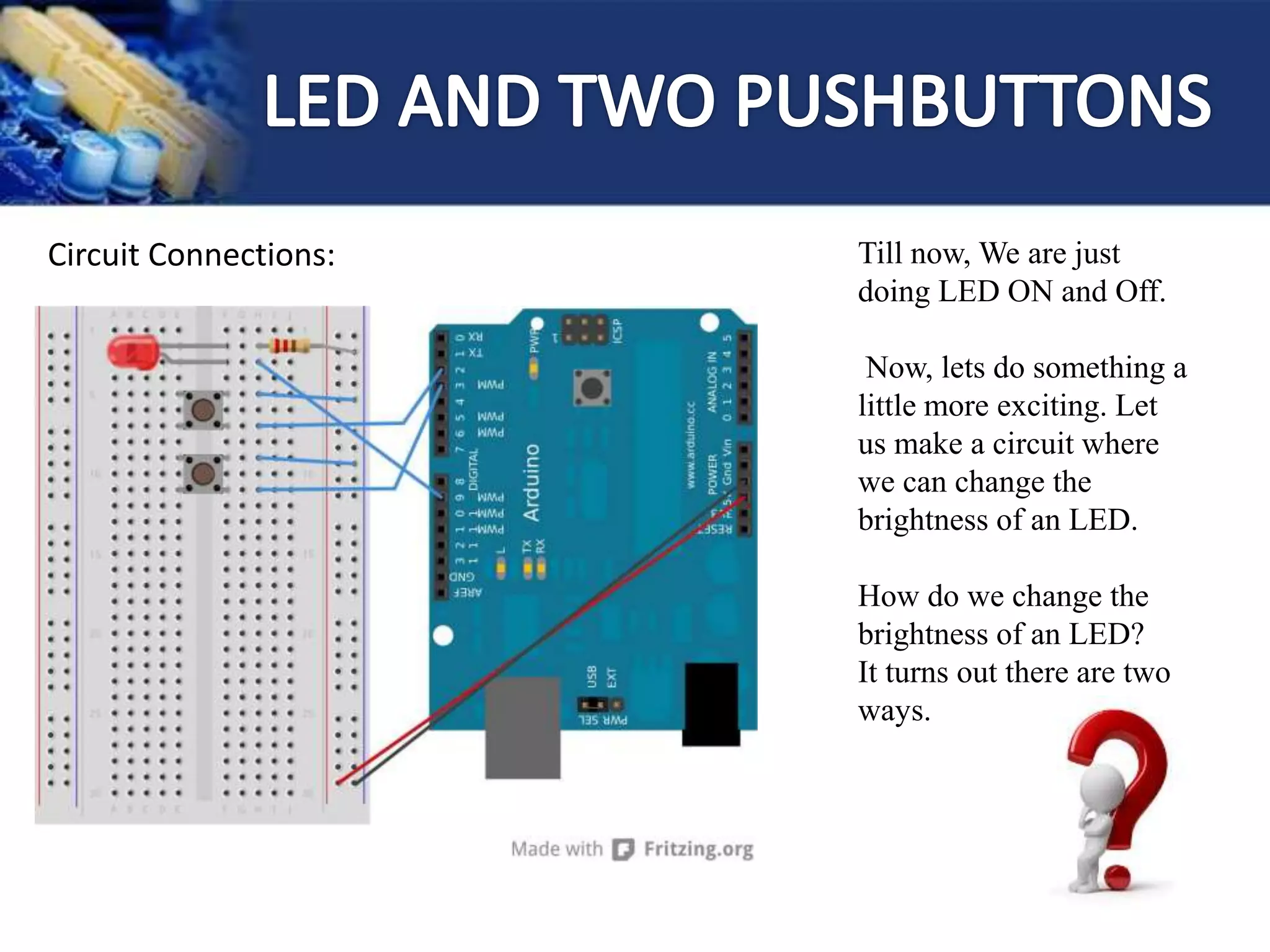
Circuit Connections: Till now, We are just
doing LED ON and Off.
Now, lets do something a
little more exciting. Let
us make a circuit where
we can change the
brightness of an LED.
How do we change the
brightness of an LED?
It turns out there are two
ways.
1. Change the amount of current going through the LED
2. Take advantage of the persistence of vision - The more time that the LED is on in
a given period of time, the “brighter” we think it is. The more time it is off, the
“dimmer” we think it is.
- On this principle standard method is defined called Pulse Width Modulation
(PWM for short).
- The Arduino supports PWM (on certain pins marked with a tilde(~) on your
board - pins 3, 4,5,9,10 and 11) at 500Hz. (500 times a second.)
- You can give it a value between 0 and 255.
- To do this you make a call to analogWrite() with the value.
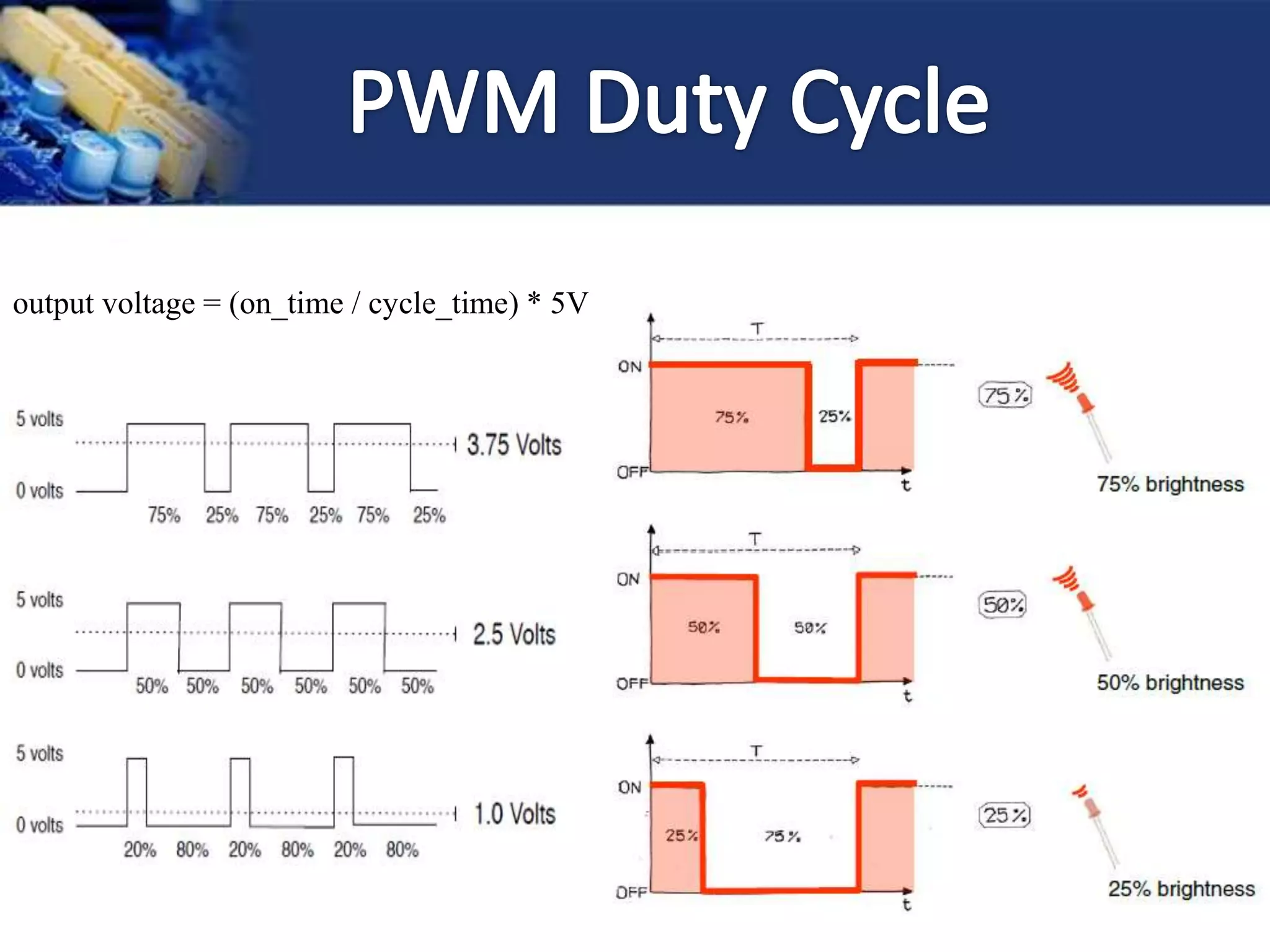
- The ratio of “ON” time to total time is called the “duty cycle”. A PWM output that
is ON .
- half the time is said to have a duty cycle of 50%.
output voltage = (on_time / cycle_time) * 5V
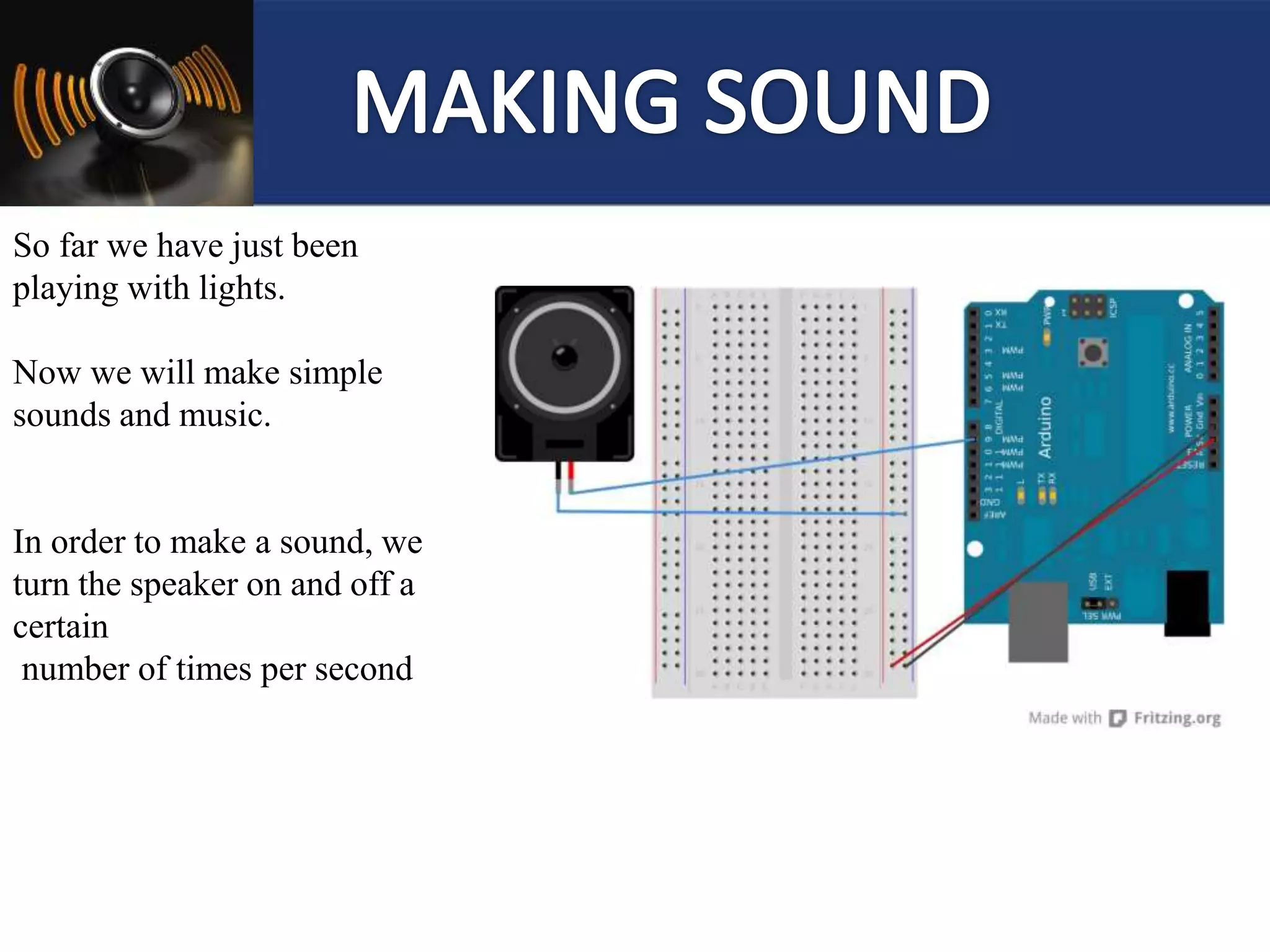
So far we have just been
playing with lights.
Now we will make simple
sounds and music.
In order to make a sound, we
turn the speaker on and off a
certain
number of times per second
1] Simply makes Speaker ON for some time.
2] Play some simple tone
3] Play Happy Birthday song
4] Play Song Melody
5] Playing One song Tone
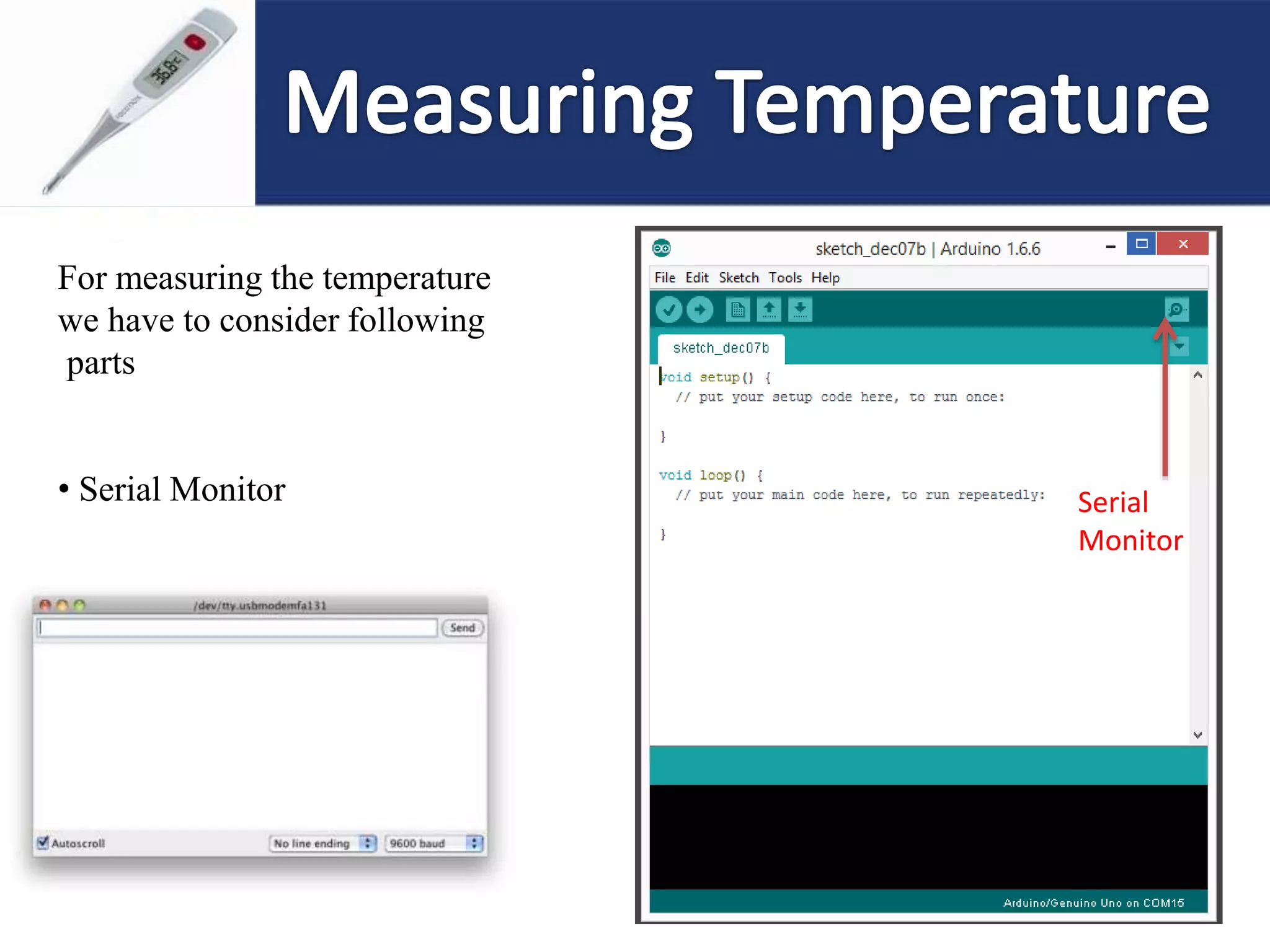
For measuring the temperature
we have to consider following
parts
• Serial Monitor Serial
Monitor
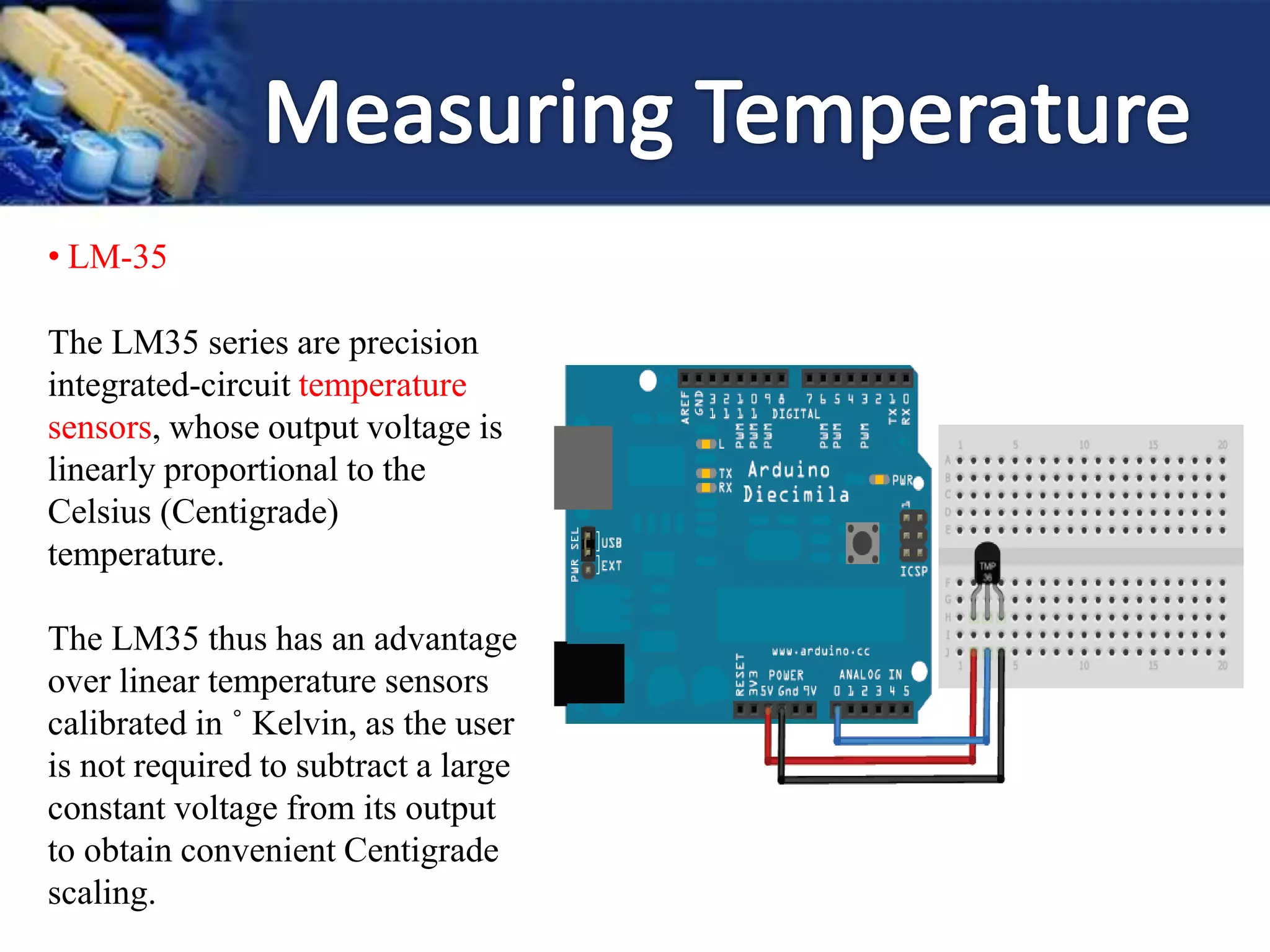
• LM-35
The LM35 series are precision
integrated-circuit temperature
sensors, whose output voltage is
linearly proportional to the
Celsius (Centigrade)
temperature.
The LM35 thus has an advantage
over linear temperature sensors
calibrated in ˚ Kelvin, as the user
is not required to subtract a large
constant voltage from its output
to obtain convenient Centigrade
scaling.
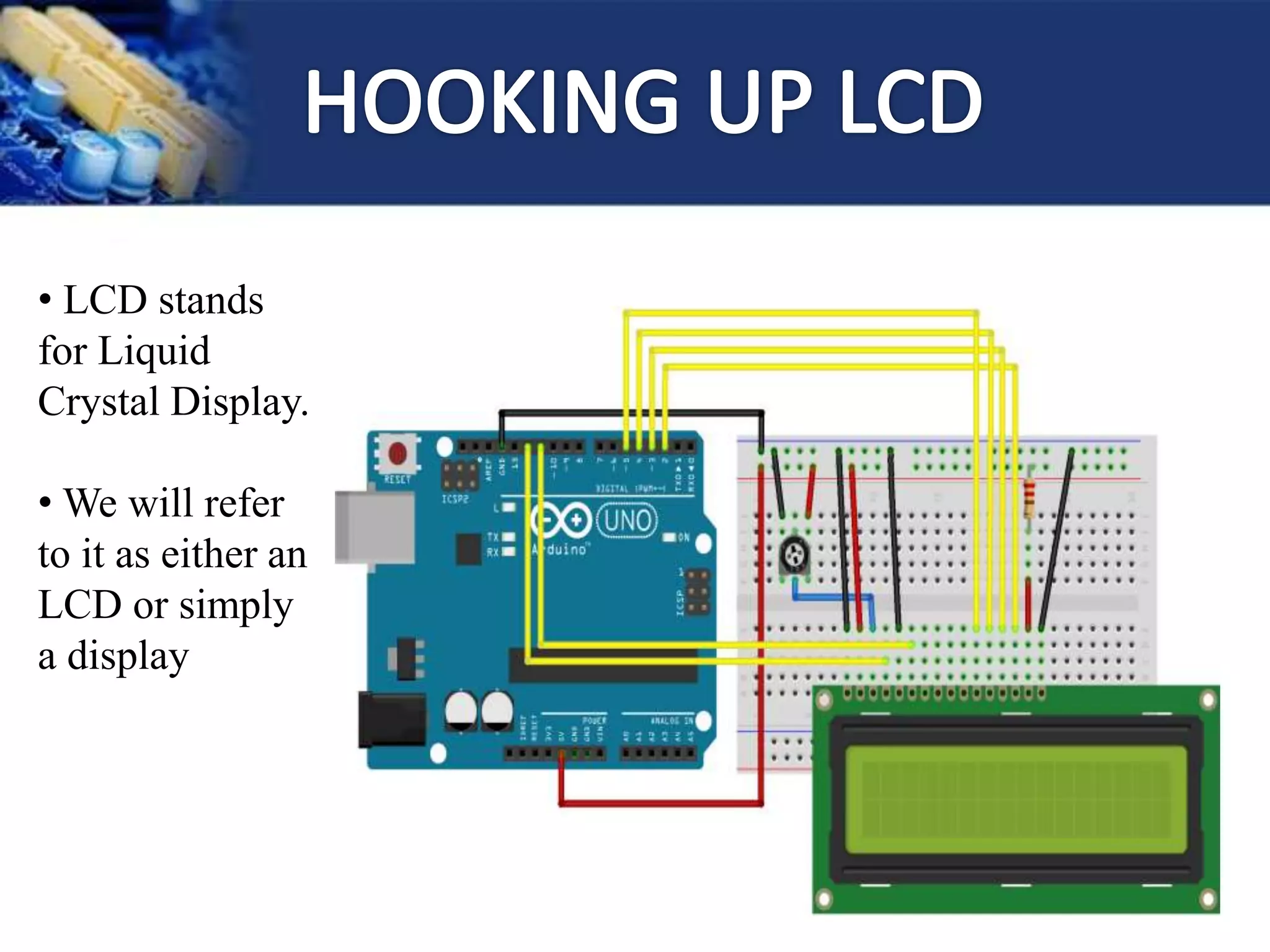
• LCD stands
for Liquid
Crystal Display.
• We will refer
to it as either an
LCD or simply
a display
• A sensor is an object whose purpose is to detect events or changes in
its environment, and then provide a corresponding output
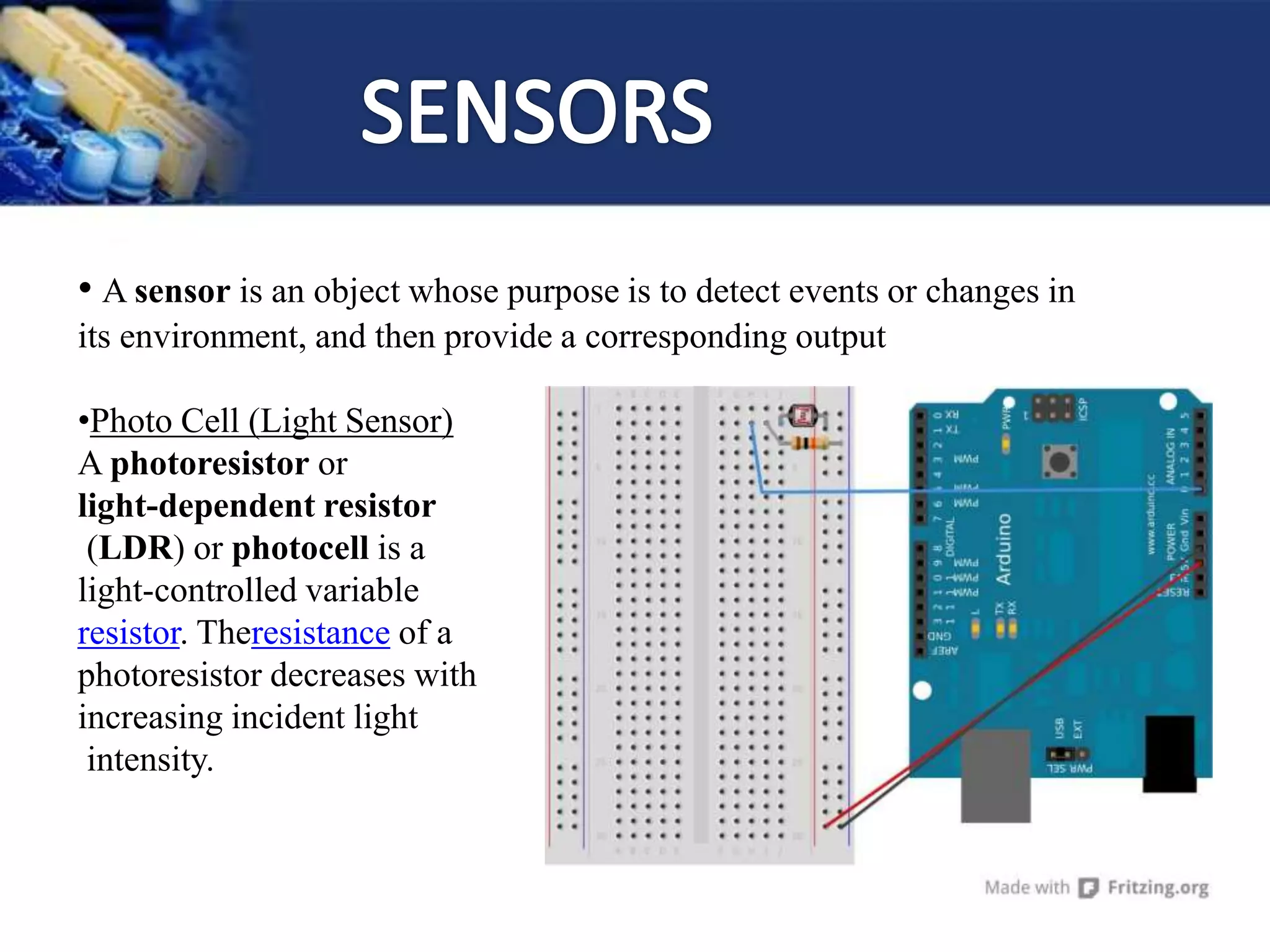
•Photo Cell (Light Sensor)
A photoresistor or
light-dependent resistor
(LDR) or photocell is a
light-controlled variable
resistor. Theresistance of a
photoresistor decreases with
increasing incident light
intensity.
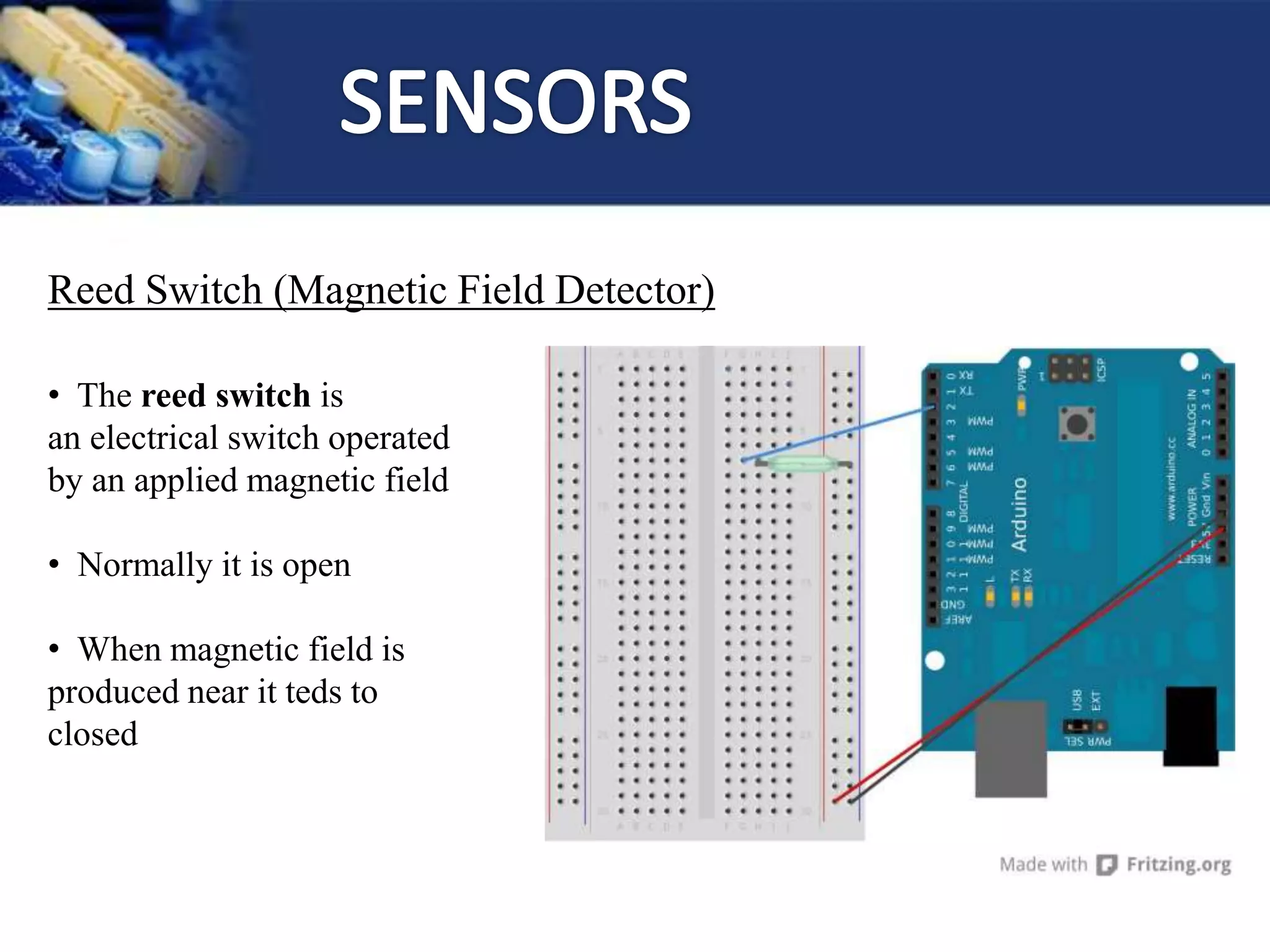
Reed Switch (Magnetic Field Detector)
• The reed switch is
an electrical switch operated
by an applied magnetic field
• Normally it is open
• When magnetic field is
produced near it teds to
closed
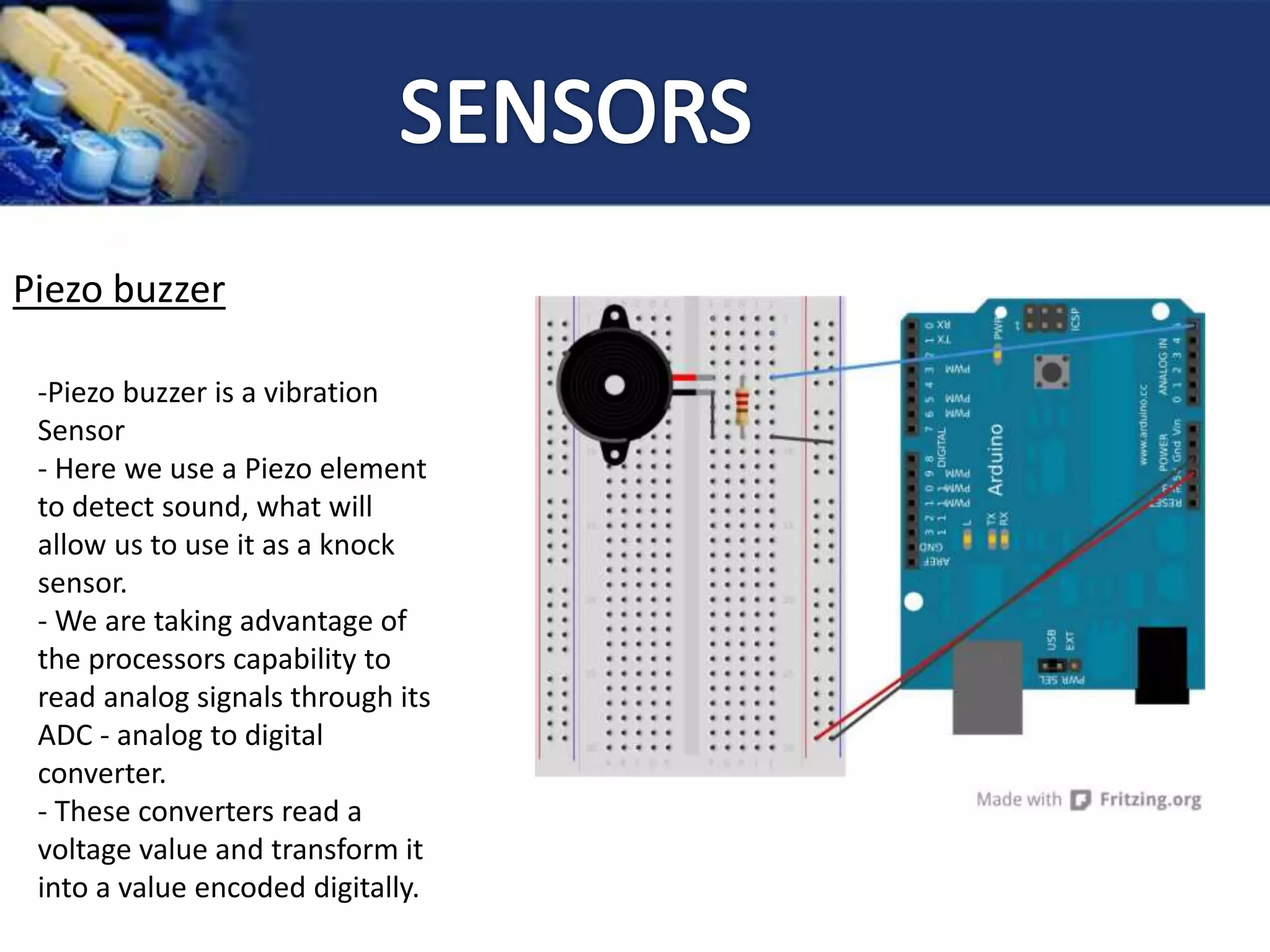
Piezo buzzer
-Piezo buzzer is a vibration
Sensor
- Here we use a Piezo element
to detect sound, what will
allow us to use it as a knock
sensor.
- We are taking advantage of
the processors capability to
read analog signals through its
ADC - analog to digital
converter.
- These converters read a
voltage value and transform it
into a value encoded digitally.
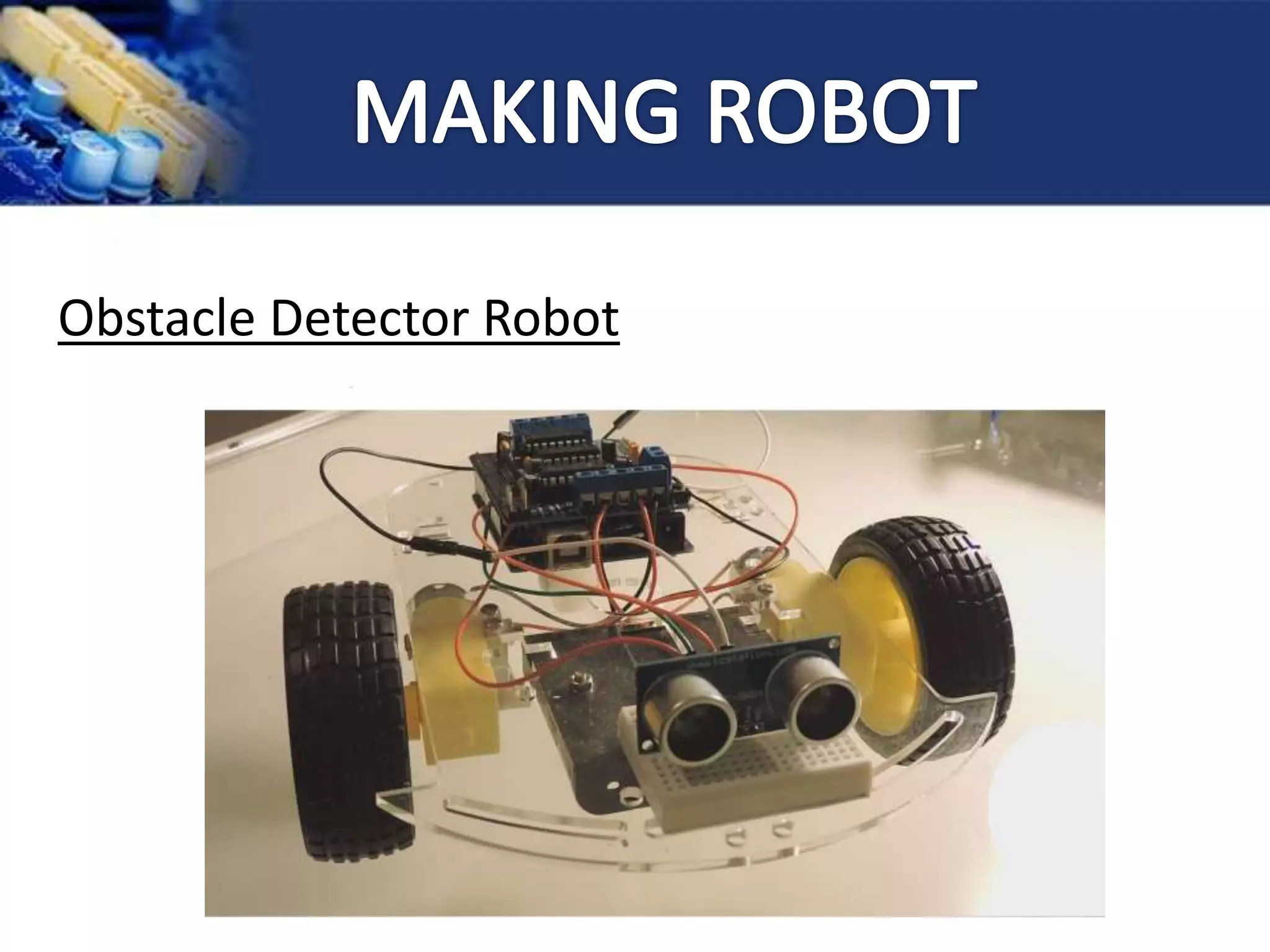
Obstacle Detector Robot
1] Arduino
2] Motor Driver Shield
3] Ultrasonic Sensor
4] Dc Motors
Ardui no
Ardui no

Ardui no

  • 2.
  • 3.
    • Microcontroller • Ideabehind Arduino • Inroduction to Arduino • History • Advantages • Different Boards of Arduino • Comparison • ATmega328p Specifications • Arduino Uno Board • Download and Install software • Writing programs
  • 4.
    (μC, MCU) • Computeron a single integrated chip – Processor (CPU) – Memory (RAM / ROM / Flash) – I/O ports (USB, I2C, SPI, ADC) • Common microcontroller families: – Intel: 4004, 8008, etc. – Atmel: AT and AVR – Microchip: PIC – ARM: (multiple manufacturers) • Used in: – Cell phones, – Toys – Household appliances – Cars – Cameras
  • 5.
  • 6.
    • Arduino isan open-source prototyping platform based on easy-to-use hardware and software • Arduino is a set of development boards that come with pre-tested hardware and software libraries •It means, you can buy an inexpensive Arduino board and start developing your project instantly
  • 7.
    • Arduino startedin 2005 as a project for students at the Interaction Design Institute Ivrea Italy • In memoir of this King Arduino, there is this ‘Bar Di Re Arduino’, a pub which was frequently visited by Massimo Banzi •And he gave the name to this low-cost microcontroller board in honour of the place 5 core members
  • 8.
  • 9.
    • Arduino Uno •Arduino Leonardo • Arduino LilyPad • Arduino Mega • Arduino Nano • Arduino Mini • Arduino Mini Pro • Arduino BT
  • 11.
    • High performance lowpower AVR 8-bit • Advanced RISC architecture – 131 powerful instruction • Available in DIP package • Up to 20 MHz clock • 32kB flash memory • 1 kB SRAM • 23 programmable I/O channels • Six 10-bit ADC inputs • Three timers/counters • Six PWM outputs Pin name Pin number Special function
  • 12.
    Microcontroller ATmega168/328 Operating Voltage5V Input Voltage (recommended) 7-12V Input Voltage (limits) 6-20V Digital I/O Pins 14 (of which 6 provide PWM output) Analog Input Pins 6 DC Current per I/O Pin 40 mA DC Current for 3.3V Pin 50 mA Flash Memory 16 KB (ATmega168) or 32 KB (ATmega328) of which 2 KB used by bootloader SRAM 1 KB (ATmega168) or 2 KB (ATmega328) EEPROM 512 bytes (ATmega168) or 1 KB (ATmega328) Clock Speed 16 MHz
  • 14.
    • Download Arduinocompiler and development environment from: http://arduino.cc/en/Main/Software • Current version: 1.6.6 • Available for: – Windows – MacOX – Linux • No installer needed... just unzip to a convenient location • Before running Arduino, plug in your board using USB cable (external power is not necessary) • When USB device is not recognized, navigate to and select the appopriate driver from the installation directory • Run Arduino
  • 15.
    Before writing program wehave to first select board
  • 17.
    • Compile –Beforeyour program “code” can be sent to the board, it needs to be converted into instructions that the board understands. This process is called compiling. • Stop-This stops the compilation process. (I have never used this button and you probably won’t have a need to either.) • Create new Sketch-This opens a New window to create a new sketch. • Open Existing Sketch - This loads a sketch from a file on your computer
  • 18.
    • Save Sketch- This saves the changes to the sketch you are working on. • Upload to Board - This compiles and then transmits over the USB cable to your board. • Serial Monitor - • Tab Button - This lets you create multiple files in your sketch. This is for more advanced programming than we will do in this class. • Sketch Editor -This is where you write or edit sketches • Text Console - This shows you what the IDE is currently doing and is also where error messages display if you make a mistake in typing your program. (often called a syntax error) • Line Number -This shows you what line number your cursor is on. It is useful since the compiler gives error messages with a line number
  • 20.
    • void setup() –Will be executed only when the program begins (or reset button is pressed) • void loop() – Will be executed repeatedly
  • 21.
    1] LED Blink Alight-emitting diode (LED) is a two-lead semiconductor light source. - It is a p–n junction diode, which emits light when forward biased. - A resistor is connected in series so as to limit current flowing through the LED.
  • 23.
    1] Make Portline “ 9 ” as a Output and repeat the same program 2] Reduce and increase the delay and check the Output 3] Make Light Pattern (Reduce delay and use loop)
  • 24.
    PUSH BUTTON Pushing abutton causes wires under the button to be connected, allowing current to flow. (called closed) When the button isn’t pressed, no current can flow because the wires aren’t touching (called open) .
  • 25.
    Circuit Connections: Tillnow, We are just doing LED ON and Off. Now, lets do something a little more exciting. Let us make a circuit where we can change the brightness of an LED. How do we change the brightness of an LED? It turns out there are two ways.
  • 26.
    1. Change theamount of current going through the LED 2. Take advantage of the persistence of vision - The more time that the LED is on in a given period of time, the “brighter” we think it is. The more time it is off, the “dimmer” we think it is. - On this principle standard method is defined called Pulse Width Modulation (PWM for short). - The Arduino supports PWM (on certain pins marked with a tilde(~) on your board - pins 3, 4,5,9,10 and 11) at 500Hz. (500 times a second.) - You can give it a value between 0 and 255. - To do this you make a call to analogWrite() with the value. - The ratio of “ON” time to total time is called the “duty cycle”. A PWM output that is ON . - half the time is said to have a duty cycle of 50%.
  • 27.
    output voltage =(on_time / cycle_time) * 5V
  • 28.
    So far wehave just been playing with lights. Now we will make simple sounds and music. In order to make a sound, we turn the speaker on and off a certain number of times per second
  • 29.
    1] Simply makesSpeaker ON for some time. 2] Play some simple tone 3] Play Happy Birthday song 4] Play Song Melody 5] Playing One song Tone
  • 30.
    For measuring thetemperature we have to consider following parts • Serial Monitor Serial Monitor
  • 31.
    • LM-35 The LM35series are precision integrated-circuit temperature sensors, whose output voltage is linearly proportional to the Celsius (Centigrade) temperature. The LM35 thus has an advantage over linear temperature sensors calibrated in ˚ Kelvin, as the user is not required to subtract a large constant voltage from its output to obtain convenient Centigrade scaling.
  • 32.
    • LCD stands forLiquid Crystal Display. • We will refer to it as either an LCD or simply a display
  • 33.
    • A sensoris an object whose purpose is to detect events or changes in its environment, and then provide a corresponding output •Photo Cell (Light Sensor) A photoresistor or light-dependent resistor (LDR) or photocell is a light-controlled variable resistor. Theresistance of a photoresistor decreases with increasing incident light intensity.
  • 34.
    Reed Switch (MagneticField Detector) • The reed switch is an electrical switch operated by an applied magnetic field • Normally it is open • When magnetic field is produced near it teds to closed
  • 35.
    Piezo buzzer -Piezo buzzeris a vibration Sensor - Here we use a Piezo element to detect sound, what will allow us to use it as a knock sensor. - We are taking advantage of the processors capability to read analog signals through its ADC - analog to digital converter. - These converters read a voltage value and transform it into a value encoded digitally.
  • 36.
  • 37.
    1] Arduino 2] MotorDriver Shield 3] Ultrasonic Sensor 4] Dc Motors