


API Lifecycle 
Let’s start by providing 
some context …
Run Unit, 
Functional, 
and 
Performance 
Tests 
©2014 Apigee Corp. All Rights Reserved. 
3 
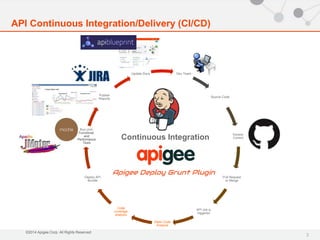
API Continuous Integration/Delivery (CI/CD) 
Dev Team 
Continuous Integration 
Source Code 
Version 
Control 
Pull Request 
or Merge 
API Job is 
triggered 
Static Code 
Analysis 
Code 
coverage 
analysis 
Deploy API 
Bundle 
Publish 
Reports 
Update Docs
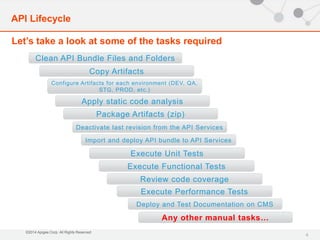
Let’s take a look at some of the tasks required 
Configure Artifacts for each environment (DEV, QA, 
Apply static code analysis 
©2014 Apigee Corp. All Rights Reserved. 
Execute Unit Tests 
Execute Functional Tests 
4 
API Lifecycle 
Clean API Bundle Files and Folders 
Copy Artifacts 
Deactivate last revision from the API Services 
Import and deploy API bundle to API Services 
Execute Performance Tests 
Deploy and Test Documentation on CMS 
Any other manual tasks… 
STG, PROD, etc.) 
Package Artifacts (zip) 
Review code coverage
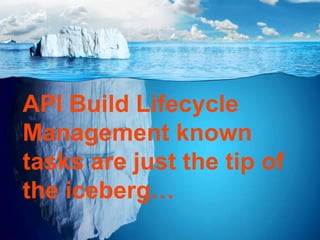
API Build Lifecycle 
Management known 
tasks are just the tip of 
the iceberg… 
©2014 Apigee Corp. All Rights Reserved.
Don’t shoot yourself on the foot… 
©2014 Apigee Corp. All Rights Reserved.
Without the right tools, API 
build can be really painful! 
process…
 Easy and flexible 
 It’s JavaScript! Node! NPM! 
 Plays well with TDD frameworks 
 Empowers developers, QA, Ops, and business 
owner - (DevOps) to apply continuous improvement 
to the lifecycle 
©2014 Apigee Corp. All Rights Reserved. 
8 
Apigee Deploy Grunt Plugin
Features 
 Ready for TDD with Mocha.js and Chai 
 Does static code analysis with JSHint 
 Reviews JavaScript complexity with Grunt-Complexity 
 Easier to troubleshoot spits out cURL command support. Just pass --curl=true 
 Deploys Node.js API Proxies. Support of Apigee NPM API 
 Searches and replace files content with RegEx, string patterns, or XPath 
 Supports JavaCallout Policies 
 Does DRY - Includes files dynamically from common git submodule 
 Compatible with most CI tools Jenkins, Bamboo, Go, and Travis 
 Sends automatic desktop notifications with Grunt Notify. Requires growlnotify for Windows 
 Compatible with IDEs. Chrome Grunt Dev Tools and WebStorm 
 Compatible with Maven 
©2014 Apigee Corp. All Rights Reserved. 
9 
Apigee Deploy Grunt Plugin
Apigee Deploy Grunt Plugin 
Getting Started 
©2014 Apigee Corp. All Rights Reserved. 
10 
1. Clone this repo from Github 
git clone https://github.com/apigeecs/apigee-deploy-grunt-plugin.git 
If you don't have Git is installed, download this repo as a zip file and 
expand it somewhere in the filesytem.
Apigee Deploy Grunt Plugin 
Getting Started 
©2014 Apigee Corp. All Rights Reserved. 
11 
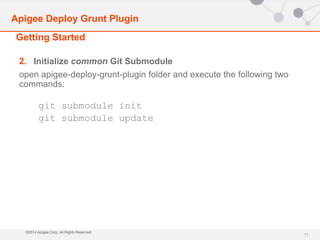
2. Initialize common Git Submodule 
open apigee-deploy-grunt-plugin folder and execute the following two 
commands: 
git submodule init 
git submodule update
Apigee Deploy Grunt Plugin 
Getting Started 
©2014 Apigee Corp. All Rights Reserved. 
12 
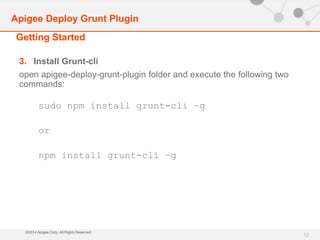
3. Install Grunt-cli 
open apigee-deploy-grunt-plugin folder and execute the following two 
commands: 
sudo npm install grunt-cli –g 
or 
npm install grunt-cli –g
Apigee Deploy Grunt Plugin 
Getting Started 
©2014 Apigee Corp. All Rights Reserved. 
13 
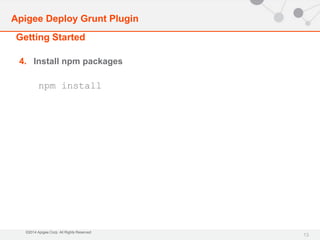
4. Install npm packages 
npm install
Apigee Deploy Grunt Plugin 
Getting Started 
©2014 Apigee Corp. All Rights Reserved. 
14 
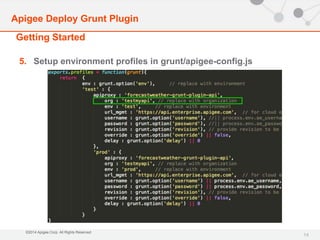
5. Setup environment profiles in grunt/apigee-config.js
Apigee Deploy Grunt Plugin 
Getting Started 
©2014 Apigee Corp. All Rights Reserved. 
15 
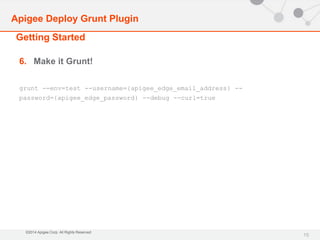
6. Make it Grunt! 
grunt --env=test --username={apigee_edge_email_address} -- 
password={apigee_edge_password} --debug --curl=true
Thank you

Apigee deploy grunt plugin.1.0

  • 2.
    API Lifecycle Let’sstart by providing some context …
  • 3.
    Run Unit, Functional, and Performance Tests ©2014 Apigee Corp. All Rights Reserved. 3 API Continuous Integration/Delivery (CI/CD) Dev Team Continuous Integration Source Code Version Control Pull Request or Merge API Job is triggered Static Code Analysis Code coverage analysis Deploy API Bundle Publish Reports Update Docs
  • 4.
    Let’s take alook at some of the tasks required Configure Artifacts for each environment (DEV, QA, Apply static code analysis ©2014 Apigee Corp. All Rights Reserved. Execute Unit Tests Execute Functional Tests 4 API Lifecycle Clean API Bundle Files and Folders Copy Artifacts Deactivate last revision from the API Services Import and deploy API bundle to API Services Execute Performance Tests Deploy and Test Documentation on CMS Any other manual tasks… STG, PROD, etc.) Package Artifacts (zip) Review code coverage
  • 5.
    API Build Lifecycle Management known tasks are just the tip of the iceberg… ©2014 Apigee Corp. All Rights Reserved.
  • 6.
    Don’t shoot yourselfon the foot… ©2014 Apigee Corp. All Rights Reserved.
  • 7.
    Without the righttools, API build can be really painful! process…
  • 8.
     Easy andflexible  It’s JavaScript! Node! NPM!  Plays well with TDD frameworks  Empowers developers, QA, Ops, and business owner - (DevOps) to apply continuous improvement to the lifecycle ©2014 Apigee Corp. All Rights Reserved. 8 Apigee Deploy Grunt Plugin
  • 9.
    Features  Readyfor TDD with Mocha.js and Chai  Does static code analysis with JSHint  Reviews JavaScript complexity with Grunt-Complexity  Easier to troubleshoot spits out cURL command support. Just pass --curl=true  Deploys Node.js API Proxies. Support of Apigee NPM API  Searches and replace files content with RegEx, string patterns, or XPath  Supports JavaCallout Policies  Does DRY - Includes files dynamically from common git submodule  Compatible with most CI tools Jenkins, Bamboo, Go, and Travis  Sends automatic desktop notifications with Grunt Notify. Requires growlnotify for Windows  Compatible with IDEs. Chrome Grunt Dev Tools and WebStorm  Compatible with Maven ©2014 Apigee Corp. All Rights Reserved. 9 Apigee Deploy Grunt Plugin
  • 10.
    Apigee Deploy GruntPlugin Getting Started ©2014 Apigee Corp. All Rights Reserved. 10 1. Clone this repo from Github git clone https://github.com/apigeecs/apigee-deploy-grunt-plugin.git If you don't have Git is installed, download this repo as a zip file and expand it somewhere in the filesytem.
  • 11.
    Apigee Deploy GruntPlugin Getting Started ©2014 Apigee Corp. All Rights Reserved. 11 2. Initialize common Git Submodule open apigee-deploy-grunt-plugin folder and execute the following two commands: git submodule init git submodule update
  • 12.
    Apigee Deploy GruntPlugin Getting Started ©2014 Apigee Corp. All Rights Reserved. 12 3. Install Grunt-cli open apigee-deploy-grunt-plugin folder and execute the following two commands: sudo npm install grunt-cli –g or npm install grunt-cli –g
  • 13.
    Apigee Deploy GruntPlugin Getting Started ©2014 Apigee Corp. All Rights Reserved. 13 4. Install npm packages npm install
  • 14.
    Apigee Deploy GruntPlugin Getting Started ©2014 Apigee Corp. All Rights Reserved. 14 5. Setup environment profiles in grunt/apigee-config.js
  • 15.
    Apigee Deploy GruntPlugin Getting Started ©2014 Apigee Corp. All Rights Reserved. 15 6. Make it Grunt! grunt --env=test --username={apigee_edge_email_address} -- password={apigee_edge_password} --debug --curl=true
  • 16.

Editor's Notes

  • #3 DIEGO – So, before diving deeper into technical aspects, let’s talk a little bit about the current state of the build and deployment process
  • #5 DIEGO This is assuming developers work on file-based development: UI Development does some of these tasks through the browser Before code gets shipped to an environment be it Development, QA, staging, or production, it needs to go through a build process which executes the following task Some of these tasks aren’t required or could be executed in a different sequence Too many steps to go through and each one of them is essential Depending on the task, between 38 per cent and 59 per cent of users were still carrying them out manually We (software engineers) do a great work at automating the work for others, but about ourselves
  • #8 DIEGO The reality is that software development in general without the right tools is more challenging than it should to be Current methodologies (Agile, TDD, BDD) methodologies now enable organizations to get faster time to market Which means, releases occur not only monthly, but bi-weekly, daily or even multiple times a day. So, it’s though to keep up with this pace
  • #9 Demo with no skipTests arguments Notice passing username and password as environment variables. You don’t want to expose your credentials storing them in you source control repository Notice I passed –Dorg=testmyapi, in case you want to target an organization different than the default one specified in pom.xml Config.json to be explained in the next steps Tests with Jmeter to be explained in the next steps
  • #10 Demo with no skipTests arguments Notice passing username and password as environment variables. You don’t want to expose your credentials storing them in you source control repository Notice I passed –Dorg=testmyapi, in case you want to target an organization different than the default one specified in pom.xml Config.json to be explained in the next steps Tests with Jmeter to be explained in the next steps
  • #11 If you notice, we’re using the same command that was used prior when running maven install for deployment. Except that we’re enabling a new plugin in the process to resolve fragments into actual code
  • #12 If you notice, we’re using the same command that was used prior when running maven install for deployment. Except that we’re enabling a new plugin in the process to resolve fragments into actual code
  • #13 If you notice, we’re using the same command that was used prior when running maven install for deployment. Except that we’re enabling a new plugin in the process to resolve fragments into actual code
  • #14 If you notice, we’re using the same command that was used prior when running maven install for deployment. Except that we’re enabling a new plugin in the process to resolve fragments into actual code
  • #15 If you notice, we’re using the same command that was used prior when running maven install for deployment. Except that we’re enabling a new plugin in the process to resolve fragments into actual code
  • #16 If you notice, we’re using the same command that was used prior when running maven install for deployment. Except that we’re enabling a new plugin in the process to resolve fragments into actual code