
Copyright (c) SunilOS ( Rays ) 1
Angular 8
www.sunilos.com
www.raystec.com
9/21/2019
Contents
 Introduction & Overview
 MVC Architecture
 Installation and Configuration
 Getting Started
 Variable and Operators
 Control Statements
 Directives
 Module
 Component
9/21/2019 Copyright (c) SunilOS ( Rays ) 2
 Pipe
 Services
 Router
 Http Client
 Forms
What is ANGULAR
 Angular is a JavaScript Framework
 Angular is used to build client-side applications using HTML
 Angular bootstraps JavaScript with HTML tags.
 Angular is used to make reach UI application.
 Angular enhances UI experience for User.
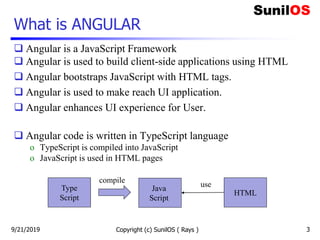
 Angular code is written in TypeScript language
o TypeScript is compiled into JavaScript
o JavaScript is used in HTML pages
Copyright (c) SunilOS ( Rays ) 3
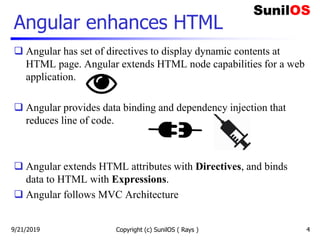
Type
Script
Java
Script
HTML
compile
use
9/21/2019
Angular enhances HTML
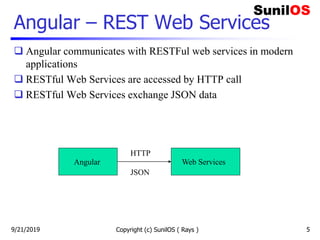
 Angular has set of directives to display dynamic contents at
HTML page. Angular extends HTML node capabilities for a web
application.
 Angular provides data binding and dependency injection that
reduces line of code.
 Angular extends HTML attributes with Directives, and binds
data to HTML with Expressions.
 Angular follows MVC Architecture
9/21/2019 Copyright (c) SunilOS ( Rays ) 4
Angular – REST Web Services
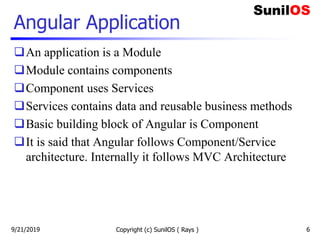
 Angular communicates with RESTFul web services in modern
applications
 RESTful Web Services are accessed by HTTP call
 RESTful Web Services exchange JSON data
Copyright (c) SunilOS ( Rays ) 5
Angular Web Services
HTTP
JSON
9/21/2019
Angular Application
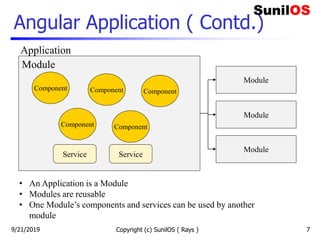
An application is a Module
Module contains components
Component uses Services
Services contains data and reusable business methods
Basic building block of Angular is Component
It is said that Angular follows Component/Service
architecture. Internally it follows MVC Architecture
Copyright (c) SunilOS ( Rays ) 69/21/2019
Angular Application ( Contd.)
Copyright (c) SunilOS ( Rays ) 7
Module
Module
Module
Component
Service Service
Module
• An Application is a Module
• Modules are reusable
• One Module’s components and services can be used by another
module
Application
Component
Component Component
Component
9/21/2019
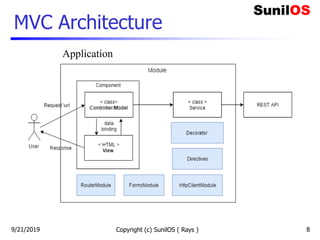
MVC Architecture
Copyright (c) SunilOS ( Rays ) 8
Application
9/21/2019
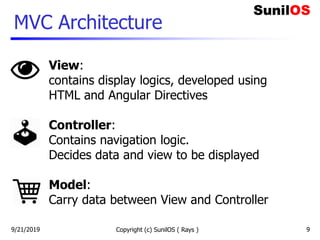
MVC Architecture
9/21/2019 Copyright (c) SunilOS ( Rays ) 9
View:
contains display logics, developed using
HTML and Angular Directives
Controller:
Contains navigation logic.
Decides data and view to be displayed
Model:
Carry data between View and Controller
Installation and Configuration
9/21/2019 Copyright (c) SunilOS ( Rays ) 10
Install Node
 Node.js development environment can be setup in Windows, Mac, Linux and
Solaris.
 Following development environment and editor are required to develop a node
application:
o Node.js
o Node Package Manager (NPM)
o IDE (Integrated Development Environment) or TextEditor
 Download installer and editor from
o https://nodejs.org: install node and npm
o https://code.visualstudio.com: Visual Studio Code
 You can check npm version by following command
o npm -v
9/21/2019 Copyright (c) SunilOS ( Rays ) 11
Install Angular CLI
 You can run following command to install Angular CLI.
 npm install @angular/cli -g
 After installation you can check version of Angular by running
the following command:
 ng -version
 CLI stand for Command Line Interface
Copyright (c) SunilOS ( Rays ) 129/21/2019
Angular Project
Angular provides CLI command to generate
project template
Copyright (c) SunilOS ( Rays ) 139/21/2019
Create Project
 Angular project is created using command:
o ng new project-name
 We are assuming project name is SOS
o ng new SOS
o Above command will create project directory structure. Default
component and configuration files is generated inside c:/SOS folder.
 Inside c:/SOS folder it will create following subfolders
o c:/SOS/e2e
o c:/SOS/node_modules
o c:/SOS/src/app
 All components will be created in c:/sos/src/app folder
Copyright (c) SunilOS ( Rays ) 149/21/2019
Run the project
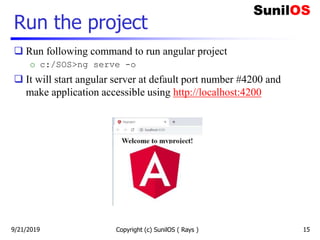
 Run following command to run angular project
o c:/SOS>ng serve -o
 It will start angular server at default port number #4200 and
make application accessible using http://localhost:4200
Copyright (c) SunilOS ( Rays ) 159/21/2019
Project flow
Copyright (c) SunilOS ( Rays ) 169/21/2019
Project Key components
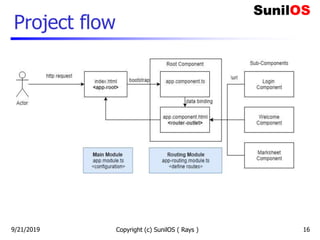
 File app.module.ts contains configuration of the
application.
 File app-routing.module.ts contains url mapping of
components. Components are accessed by their mapped urls.
 File app.component.ts contains definition of Root-
Component
 File index.html is first page of application. It bootstraps
root component.
 For new UI screens new components are created called sub
components.
Copyright (c) SunilOS ( Rays ) 179/21/2019
Getting Started
9/21/2019 Copyright (c) SunilOS ( Rays ) 18
Login
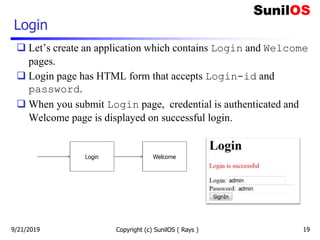
 Let’s create an application which contains Login and Welcome
pages.
 Login page has HTML form that accepts Login-id and
password.
 When you submit Login page, credential is authenticated and
Welcome page is displayed on successful login.
9/21/2019 Copyright (c) SunilOS ( Rays ) 19
Login & Welcome Components
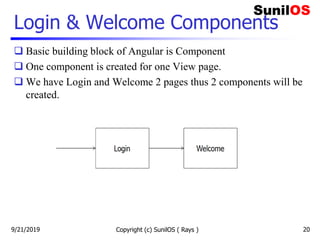
 Basic building block of Angular is Component
 One component is created for one View page.
 We have Login and Welcome 2 pages thus 2 components will be
created.
Copyright (c) SunilOS ( Rays ) 209/21/2019
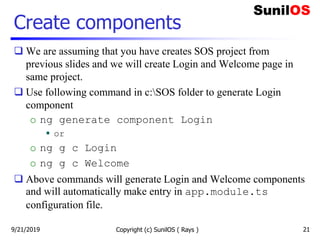
Create components
 We are assuming that you have creates SOS project from
previous slides and we will create Login and Welcome page in
same project.
 Use following command in c:SOS folder to generate Login
component
o ng generate component Login
 or
o ng g c Login
o ng g c Welcome
 Above commands will generate Login and Welcome components
and will automatically make entry in app.module.ts
configuration file.
Copyright (c) SunilOS ( Rays ) 219/21/2019
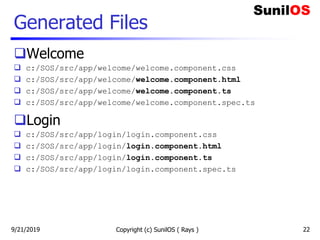
Generated Files
Welcome
 c:/SOS/src/app/welcome/welcome.component.css
 c:/SOS/src/app/welcome/welcome.component.html
 c:/SOS/src/app/welcome/welcome.component.ts
 c:/SOS/src/app/welcome/welcome.component.spec.ts
Login
 c:/SOS/src/app/login/login.component.css
 c:/SOS/src/app/login/login.component.html
 c:/SOS/src/app/login/login.component.ts
 c:/SOS/src/app/login/login.component.spec.ts
Copyright (c) SunilOS ( Rays ) 229/21/2019
Define routes
 In order to access pages, define routes in app-routing.module.ts
 const routes: Routes = [
 { path: 'login', component: LoginComponent},
 { path: 'welcome', component: WelcomeComponent}
 ];
 #app.module.ts file
 @NgModule({
 imports: [RouterModule.forRoot(routes)],
 exports: [RouterModule]
 })
 Access pages using following URLs
o http://localhost:4200/login
o http://localhost:4200/welcome
Copyright (c) SunilOS ( Rays ) 239/21/2019
Welcome page
 Lets initialize a variable message and display at html page
 File welcome.component.ts
o export class WelcomeComponent implements OnInit {
o message = 'Welcome to SunilOS’;
o }
 File welcome.component.html
o <H1>{{ message }}</H1>
 URL
o http://localhost:4200/welcome
Copyright (c) SunilOS ( Rays ) 249/21/2019
Login controller
 File login.component.ts
 export class LoginComponent implements OnInit {
 userId = 'Enter User ID';
 password = '';
 message = ‘’;
 constructor(private router: Router){}
 signIn(){
 if(this.userId == 'admin’
 && this.password =='admin'){
 this.router.navigateByUrl('/welcome');
 }else{
 this.message = 'Invalid login id or password';
 }
 }
 } Copyright (c) SunilOS ( Rays ) 25
Router is
injected
Navigate to
Welcome page
9/21/2019
Login View
 <H1>Login</H1>
 <p style="color:red" >{{message}}</p>
 <form >
 User ID: <input [(ngModel)]="userId" name="userId" type="text">
 Password: <input [(ngModel)]="password" name="password" type="password">
 <button (click)="signIn()">Sign In</button>
 </form>
 Directive [(ngModel)] is used for two-way data binding with attributes userId and password
of class LoginComponent.
 Directive (click) is used to bind on-click event. Method signIn() is called when
Sign-In button is clicked.
 Directive ngModel is provided by inbuild FormsModule module. This module will be
imported in app.module.ts.
 URL :http://localhost:4200/login Copyright (c) SunilOS (
Rays ) 269/21/2019
Angular Module
 Application is Module
 A module can be reused in
other applications
 Module key elements are:
o Components for view and
controller
o Directives for databinding
o Pipes for formatting
o Services for reusable
operations.
 One module can use another
module like FormModule
and RouteModule
Copyright (c) SunilOS ( Rays ) 279/21/2019
Module execution flow
Copyright (c) SunilOS ( Rays ) 28
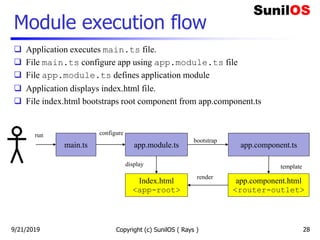
main.ts app.module.ts app.component.ts
Index.html
<app-root>
app.component.html
<router-outlet>
bootstrap
configure
display template
render
 Application executes main.ts file.
 File main.ts configure app using app.module.ts file
 File app.module.ts defines application module
 Application displays index.html file.
 File index.html bootstraps root component from app.component.ts
run
9/21/2019
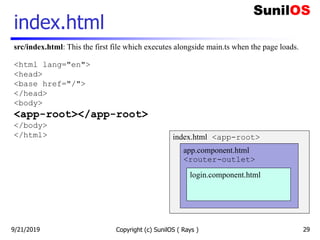
index.html
Copyright (c) SunilOS ( Rays ) 29
src/index.html: This the first file which executes alongside main.ts when the page loads.
<html lang="en">
<head>
<base href="/">
</head>
<body>
<app-root></app-root>
</body>
</html> index.html <app-root>
app.component.html
<router-outlet>
login.component.html
9/21/2019
Copyright (c) SunilOS ( Rays ) 30
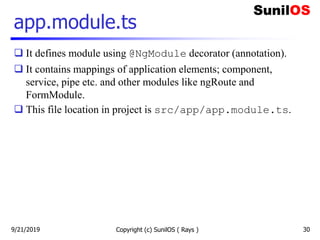
app.module.ts
 It defines module using @NgModule decorator (annotation).
 It contains mappings of application elements; component,
service, pipe etc. and other modules like ngRoute and
FormModule.
 This file location in project is src/app/app.module.ts.
9/21/2019
app.module.ts
Copyright (c) SunilOS ( Rays ) 31
import { FormsModule } from '@angular/forms';
import { AppRoutingModule } from './app-routing.module';
@NgModule({
declarations: [
AppComponent,
LoginComponent,
WelcomeComponent
],
imports: [
AppRoutingModule,
FormsModule,
],
providers: [
UserService,
MarksheetServce,
],
bootstrap: [AppComponent]
})
export class AppModule { }
Component
Modules
Services
Root Component
Module Class
9/21/2019
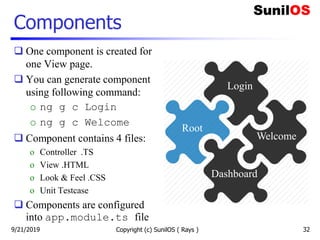
Components
 One component is created for
one View page.
 You can generate component
using following command:
o ng g c Login
o ng g c Welcome
 Component contains 4 files:
o Controller .TS
o View .HTML
o Look & Feel .CSS
o Unit Testcase
 Components are configured
into app.module.ts file
Copyright (c) SunilOS ( Rays ) 32
Root
Login
Welcome
Dashboard
9/21/2019
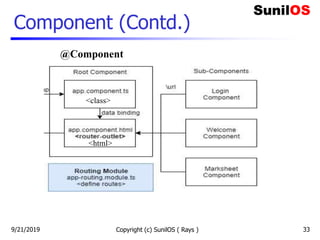
Component (Contd.)
Copyright (c) SunilOS ( Rays ) 33
@Component
<class>
<html>
9/21/2019
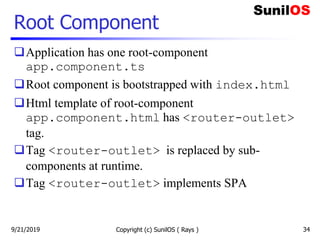
Root Component
Application has one root-component
app.component.ts
Root component is bootstrapped with index.html
Html template of root-component
app.component.html has <router-outlet>
tag.
Tag <router-outlet> is replaced by sub-
components at runtime.
Tag <router-outlet> implements SPA
Copyright (c) SunilOS ( Rays ) 349/21/2019
Copyright (c) SunilOS ( Rays ) 35
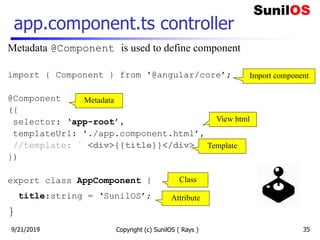
app.component.ts controller
Metadata @Component is used to define component
import { Component } from '@angular/core’;
@Component
({
selector: ‘app-root’,
templateUrl: './app.component.html’,
//template: ` <div>{{title}}</div> `
})
export class AppComponent {
title:string = ‘SunilOS’;
}
Metadata
Import component
Template
Class
Attribute
View html
9/21/2019
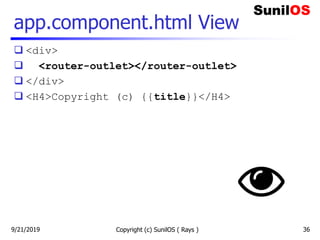
app.component.html View
 <div>
 <router-outlet></router-outlet>
 </div>
 <H4>Copyright (c) {{title}}</H4>
Copyright (c) SunilOS ( Rays ) 369/21/2019
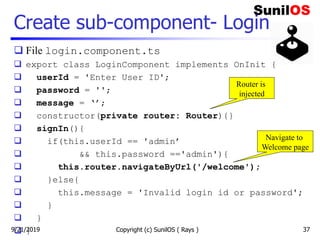
Create sub-component- Login
 File login.component.ts
 export class LoginComponent implements OnInit {
 userId = 'Enter User ID';
 password = '';
 message = ‘’;
 constructor(private router: Router){}
 signIn(){
 if(this.userId == 'admin’
 && this.password =='admin'){
 this.router.navigateByUrl('/welcome');
 }else{
 this.message = 'Invalid login id or password';
 }
 }
 } Copyright (c) SunilOS ( Rays ) 37
Router is
injected
Navigate to
Welcome page
9/21/2019
Login View
 <H1>Login</H1>
 <p style="color:red" >{{message}}</p>
 <form >
 User ID: <input [(ngModel)]="userId" name="userId" type="text">
 Password: <input [(ngModel)]="password" name="password" type="password">
 <button (click)="signIn()">Sign In</button>
 </form>
 Directive [(ngModel)] is used for two-way data binding with attributes userId and password
of class LoginComponent.
 Directive (click) is used to bind on-click event. Method signIn() is called when
Sign-In button is clicked.
 Directive ngModel is provided by inbuild FormsModule module. This module will be
imported in app.module.ts.
 URL :http://localhost:4200/login Copyright (c) SunilOS (
Rays ) 389/21/2019
Define Login-route
 In order to access pages, define routes in app-routing.module.ts
 const routes: Routes = [
 { path: 'login', component: LoginComponent},
 { path: 'welcome', component: WelcomeComponent}
 ];
 @NgModule({
 imports: [RouterModule.forRoot(routes)],
 exports: [RouterModule]
 })
 Access pages using following URLs
o http://localhost:4200/login
Copyright (c) SunilOS ( Rays ) 399/21/2019
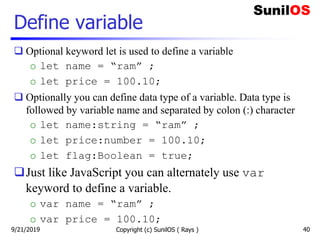
Define variable
 Optional keyword let is used to define a variable
o let name = “ram” ;
o let price = 100.10;
 Optionally you can define data type of a variable. Data type is
followed by variable name and separated by colon (:) character
o let name:string = “ram” ;
o let price:number = 100.10;
o let flag:Boolean = true;
Just like JavaScript you can alternately use var
keyword to define a variable.
o var name = “ram” ;
o var price = 100.10;
Copyright (c) SunilOS ( Rays ) 409/21/2019
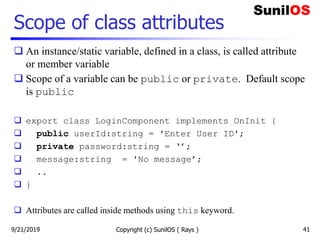
Scope of class attributes
 An instance/static variable, defined in a class, is called attribute
or member variable
 Scope of a variable can be public or private. Default scope
is public
 export class LoginComponent implements OnInit {
 public userId:string = 'Enter User ID';
 private password:string = ‘’;
 message:string = 'No message’;
 ..
 }
 Attributes are called inside methods using this keyword.
Copyright (c) SunilOS ( Rays ) 419/21/2019
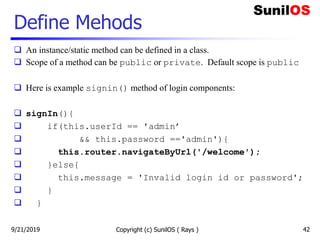
Define Mehods
 An instance/static method can be defined in a class.
 Scope of a method can be public or private. Default scope is public
 Here is example signin() method of login components:
 signIn(){
 if(this.userId == 'admin’
 && this.password =='admin'){
 this.router.navigateByUrl('/welcome');
 }else{
 this.message = 'Invalid login id or password';
 }
 }
Copyright (c) SunilOS ( Rays ) 429/21/2019
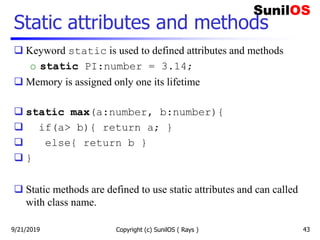
Static attributes and methods
 Keyword static is used to defined attributes and methods
o static PI:number = 3.14;
 Memory is assigned only one its lifetime
 static max(a:number, b:number){
 if(a> b){ return a; }
 else{ return b }
 }
 Static methods are defined to use static attributes and can called
with class name.
Copyright (c) SunilOS ( Rays ) 439/21/2019
Constants
Constant variable is defined using const
keyword
const PI:number = 3.14;
Copyright (c) SunilOS ( Rays ) 449/21/2019
Constructor
 Class has only one constructor
 It is called at the time of class instantiation
 Services are injected in controller using constructor arguments:
 export class LoginComponent implements OnInit {
 constructor(private router: Router) {
 }
 }
 You can pass one or more arguments to constructor
Copyright (c) SunilOS ( Rays ) 459/21/2019
Class and Interface
Angular uses Typescripts
TypeScript is Object Oriented
TS provides inheritance of classes and implementation
of Interfaces
A class can inherit another class using extents
keyword
Interface has abstract methods
One class may implement multiple interfaces using
implements keyword.
Copyright (c) SunilOS ( Rays ) 469/21/2019
OnInit interface
 A component must have to implement OnInit interface
 export class LoginComponent implements OnInit {
 ngOnInit() { .. }
 }
 Interface OnInit has one abstract method ngOnInit()
 This method is called after component instantiation
 You may write code inside this method to initialize your
component
Copyright (c) SunilOS ( Rays ) 479/21/2019
Control Statements
if-else
for loop
while loop
do-while loop
9/21/2019 Copyright (c) SunilOS ( Rays ) 48
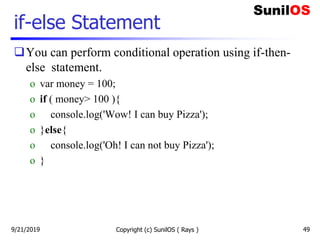
if-else Statement
You can perform conditional operation using if-then-
else statement.
o var money = 100;
o if ( money> 100 ){
o console.log('Wow! I can buy Pizza');
o }else{
o console.log('Oh! I can not buy Pizza');
o }
9/21/2019 Copyright (c) SunilOS ( Rays ) 49
For loop
var table = [2,4,6,8,10];
for (i=0; i<table.length; i++ ){
 console.log('table['+i+']: ' + table[i]);
}
For in loop
for (i in table){
 console.log('table['+i+']: ' + table[i]);
}
9/21/2019 Copyright (c) SunilOS ( Rays ) 50
While Loop
 var table = [2,4,6,8,10], var i=0;
 while(i<table.length){
 console.log('table['+i+']: ' + table[i]);
 i++;
 }
 do{
 console.log('table['+i+']: ' + table[i]);
 i++;
 }while(i<table.length)
9/21/2019 Copyright (c) SunilOS ( Rays ) 51
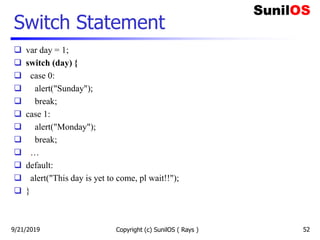
Switch Statement
 var day = 1;
 switch (day) {
 case 0:
 alert("Sunday");
 break;
 case 1:
 alert("Monday");
 break;
 …
 default:
 alert("This day is yet to come, pl wait!!");
 }
9/21/2019 Copyright (c) SunilOS ( Rays ) 52
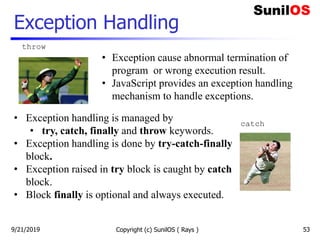
Exception Handling
9/21/2019 Copyright (c) SunilOS ( Rays ) 53
throw
catch
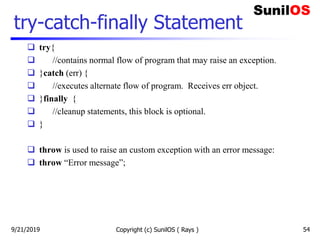
• Exception cause abnormal termination of
program or wrong execution result.
• JavaScript provides an exception handling
mechanism to handle exceptions.
• Exception handling is managed by
• try, catch, finally and throw keywords.
• Exception handling is done by try-catch-finally
block.
• Exception raised in try block is caught by catch
block.
• Block finally is optional and always executed.
Copyright (c) SunilOS ( Rays ) 54
try-catch-finally Statement
 try{
 //contains normal flow of program that may raise an exception.
 }catch (err) {
 //executes alternate flow of program. Receives err object.
 }finally {
 //cleanup statements, this block is optional.
 }
 throw is used to raise an custom exception with an error message:
 throw “Error message”;
9/21/2019
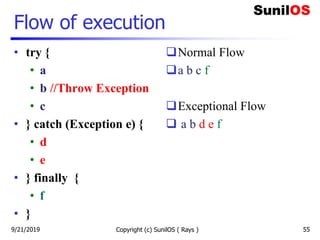
Flow of execution
• try {
• a
• b //Throw Exception
• c
• } catch (Exception e) {
• d
• e
• } finally {
• f
• }
Normal Flow
a b c f
Exceptional Flow
 a b d e f
Copyright (c) SunilOS ( Rays ) 559/21/2019
Data Binding
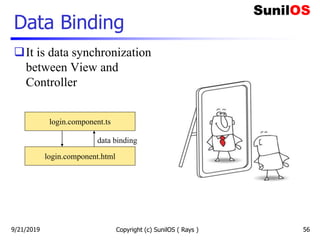
It is data synchronization
between View and
Controller
Copyright (c) SunilOS ( Rays ) 56
login.component.ts
login.component.html
data binding
9/21/2019
Data Binding (Contd.)
 Data Binding can be One-way, where data change in controller is
reflected at view, or Two-way, where data changes are reflected
in both directions; controller and view.
 The following types of bindings are supported by Angular:
o One-way binding
 Interpolation - {{attribute-name}}
 Property Binding - [attribute-name]
o Event Binding - (event)
o Two-way binding - [(attribute-name)]
Copyright (c) SunilOS ( Rays ) 579/21/2019
Interpolation
Copyright (c) SunilOS ( Rays ) 58
 One-way data binding is done by directive {{}}, called
interpolation.
 Attributes defined in controller can be displayed in html using
{{}}.
 For example, message attribute defined in LoginComponent is
displayed at login html using interpolation.
 export class LoginComponent implements OnInit {
 message = 'Invalid id or password’;
 }
 <H1>Login</H1>
 <p style="color:red" >{{message}}</p>
9/21/2019
Property Binding
 Property binding is used for one-way data binding
 It binds controller attribute with DOM property of HTML
elements
 For example
o <input type=“text” [value]=“message” >
o <img [src]='imageUrl’>
o export class LoginComponent implements OnInit {
o message = 'Invalid id or password’;
o imageUrl = ‘login.gif’;
o }
Copyright (c) SunilOS ( Rays ) 599/21/2019
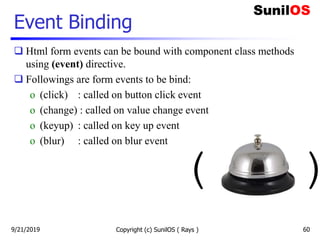
Event Binding
 Html form events can be bound with component class methods
using (event) directive.
 Followings are form events to be bind:
o (click) : called on button click event
o (change) : called on value change event
o (keyup) : called on key up event
o (blur) : called on blur event
Copyright (c) SunilOS ( Rays ) 60
( )
9/21/2019
Event Binding
 For example, signIn()method in LoginComponent is
bound with click event of submit button in login form.
 export class LoginComponent implements OnInit {
 signIn(){ .. }
 }
 <form >
 User ID:<input [(ngModel)]="userId" >
 Password: <input [(ngModel)]="password" >
 <button (click)="signIn()">Sign In</button>
 </form>
Copyright (c) SunilOS ( Rays ) 619/21/2019
Two-way data binding
 In two-way data binding, data will be changed in both directions;
controller and view.
 If you change data at view then controller will be changed. If you
change data at controller then view will be changed.
 Two-way data binding is done by directive [(ngModel)].
 It is used to bind html form input elements with controller class
attributes.
 For example login form elements are bound with [()]:
o User ID:<input [(ngModel)]="userId" >
o Password: <input [(ngModel)]="password" >
Copyright (c) SunilOS ( Rays ) 629/21/2019
Routing
 Routing is used to define paths to navigate to the components
(pages)
 One component has one or more routes
 Agular projects create app-routing.module.ts,which
contains routes of application
 RouterModule is used to configure routes which is imported in
app.module.ts
 Routes may contain URI variables
Copyright (c) SunilOS ( Rays ) 639/21/2019
Define routes
 In order to access pages, define routes in app-routing.module.ts
 const routes: Routes = [
 { path: 'login', component: LoginComponent},
 { path: 'welcome', component: WelcomeComponent}
 ];
 @NgModule({
 imports: [RouterModule.forRoot(routes)],
 exports: [RouterModule]
 })
 Access pages using following URLs
o http://localhost:4200/login
o http://localhost:4200/welcome
Copyright (c) SunilOS ( Rays ) 649/21/2019
Route Parameters
 You can define parametrized routes for a component
 Route parameter is defined by colon (:) character and placeholder
name.
 Here :id, :deptid, :empid are router parameter
o {
o path: 'marksheet/:id’,
o component: MarkheetComponent
o }
o {
o path: ‘employee/:deptid/:empid’,
o component: EmployeeComponent
o }
Copyright (c) SunilOS ( Rays ) 659/21/2019
Read Route Parameters
 Path variables are read by ActivatedRoute service.
 Service is injected into component constructor
 Parameters read buy registering callback with
route.params.subscribe method
o import {ActivatedRoute} from "@angular/router";
o constructor(private route: ActivatedRoute) {
o this.route.params.subscribe( params =>{
o console.log(params["id"])
o });
o }
Copyright (c) SunilOS ( Rays ) 669/21/2019
Directives
 Directives are used to change DOM structure of an html page
 Angular has many pre-defined directives such as *ngFor and
*ngIf
 You can create custom directives with help of @Directive
decorator
 There are four types of directives:
o Components directives
o Structural directives
o Attribute directives
o Custom Directive
Copyright (c) SunilOS ( Rays ) 679/21/2019
Component Directive
A component is also a directive-with-a-
template.
A @Component decorator is actually a
@Directive decorator extended with
template-oriented features.
Copyright (c) SunilOS ( Rays ) 689/21/2019
Structural Directive
 A structure directive iterates or conditionally manipulates DOM
elements.
 Structural directives have a * sign before the directive name such
as *ngIf and *ngFor
 Directive *ngFor is used to iterate and print list in html page.
 Directive *ngIf is used to conditionally display an html DOM
element.
Copyright (c) SunilOS ( Rays ) 699/21/2019
*ngFor
 export class MarksheetlistComponent implements OnInit {
 list = [
 {"id":1,"rollNo":"A1","name":"Rajesh Verma”},
 {"id":2,"rollNo":"A2","name":"Ashish Nehra"},
 {"id":3,"rollNo":"A3","name":"Manish”}
 ];
 }
 <table border="1">
 <tr *ngFor = "let e of list" >
 <td>{{e.id}}</td>
 <td>{{e.rollNo}}</td>
 <td>{{e.name}}</td>
 </tr>
 </table>
Copyright (c) SunilOS ( Rays ) 709/21/2019
*ngIf
 <p *ngIf="error" style="color:red" >
 {{message}}
 </p>
 You can use else with if directive
 <div *ngIf="success == true; then SUC else FAIL"></div>
 <ng-template #SUC >
 <p style="color:green" >{{message}}</p>
 </ng-template>
 <ng-template #FAIL>
 <p style="color:red">{{message}}</p>
 </ng-template>
Copyright (c) SunilOS ( Rays ) 719/21/2019
Attribute Directive
 Attribute directive alter the appearance or behavior of an existing
HTML element.
 Attribute directive look like regular HTML attributes.
 The ngModel directive, which implements two-way data
binding, is an example of an attribute directive.
 ngModel modifies the behavior of an existing element by
setting its display property and responding to the changing
events.
o <input [(ngModel)]="movie.name">
Copyright (c) SunilOS ( Rays ) 729/21/2019
Custom Directive
 You can define your own custom directive using @Directive
decorator.
 Custom directive can be generated by CLI command:
o ng generate directive myDir
 Above command will generate
o @Directive({
o selector: '[appMyDir]'
o })
o export class MyDirDirective {..}
Copyright (c) SunilOS ( Rays ) 739/21/2019
Pipe
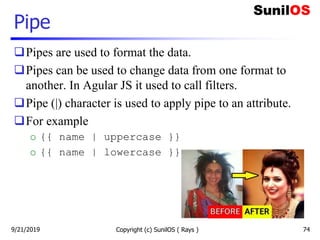
Pipes are used to format the data.
Pipes can be used to change data from one format to
another. In Agular JS it used to call filters.
Pipe (|) character is used to apply pipe to an attribute.
For example
o {{ name | uppercase }}
o {{ name | lowercase }}
Copyright (c) SunilOS ( Rays ) 749/21/2019
Pipes
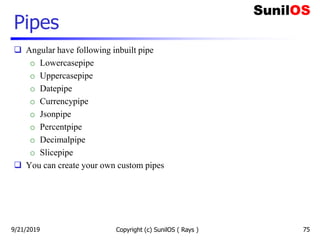
 Angular have following inbuilt pipe
o Lowercasepipe
o Uppercasepipe
o Datepipe
o Currencypipe
o Jsonpipe
o Percentpipe
o Decimalpipe
o Slicepipe
 You can create your own custom pipes
Copyright (c) SunilOS ( Rays ) 759/21/2019
Pipe examples
Copyright (c) SunilOS ( Rays ) 76
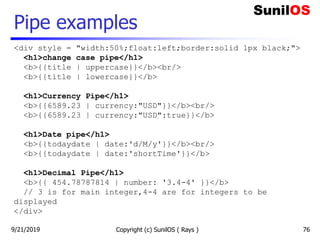
<div style = "width:50%;float:left;border:solid 1px black;">
<h1>change case pipe</h1>
<b>{{title | uppercase}}</b><br/>
<b>{{title | lowercase}}</b>
<h1>Currency Pipe</h1>
<b>{{6589.23 | currency:"USD"}}</b><br/>
<b>{{6589.23 | currency:"USD":true}}</b>
<h1>Date pipe</h1>
<b>{{todaydate | date:'d/M/y'}}</b><br/>
<b>{{todaydate | date:'shortTime'}}</b>
<h1>Decimal Pipe</h1>
<b>{{ 454.78787814 | number: '3.4-4' }}</b>
// 3 is for main integer,4-4 are for integers to be
displayed
</div>
9/21/2019
Services
Copyright (c) SunilOS ( Rays )
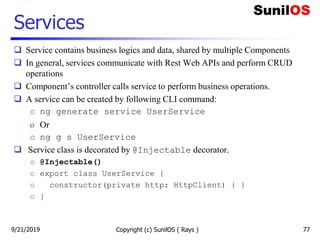
 Service contains business logics and data, shared by multiple Components
 In general, services communicate with Rest Web APIs and perform CRUD
operations
 Component’s controller calls service to perform business operations.
 A service can be created by following CLI command:
o ng generate service UserService
o Or
o ng g s UserService
 Service class is decorated by @Injectable decorator.
o @Injectable()
o export class UserService {
o constructor(private http: HttpClient) { }
o }
779/21/2019
UserService
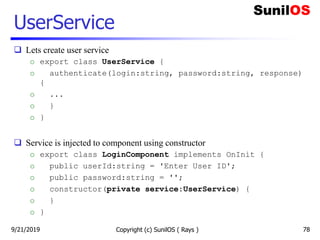
 Lets create user service
o export class UserService {
o authenticate(login:string, password:string, response)
{
o ...
o }
o }
 Service is injected to component using constructor
o export class LoginComponent implements OnInit {
o public userId:string = 'Enter User ID';
o public password:string = '';
o constructor(private service:UserService) {
o }
o }
Copyright (c) SunilOS ( Rays ) 789/21/2019
HttpClient Service
 HttpClient service is used to communicate with http server.
 It is contained by HttpClientModule module.
 Module HttpClientModule is imported in app.module.ts.
 Http Client is introduced in Angular 6.
 //app.module.ts
o import { HttpClientModule } from '@angular/common/http’;
o @NgModule({
o imports: [
o BrowserModule,
o HttpClientModule
o ]
o })
Copyright (c) SunilOS ( Rays ) 799/21/2019
HTTP Methods
 HttpClient contains get(), post(), put(),patch(), delete()
methods to make http calls to the server.
 Methods get(url) and delete(url) receive one parameter; url (endpoint) whereas
put(url,data), post(url,data) and patch(url,data) receive two parameters; url and
data.
 Data is added to the request body. Usually data is a JSON object.
 All methods receive “httpOptions” as last optional parameter.
 get(url [,httpOptions])
 delete(url[,httpOptions])
 put(url,data[,httpOptions])
 post(url,data[,httpOptions])
 patch(url,data[,httpOptions])
 Object HttpOptions contains request header information, query parameters and
other configurable values.
Copyright (c) SunilOS ( Rays ) 809/21/2019
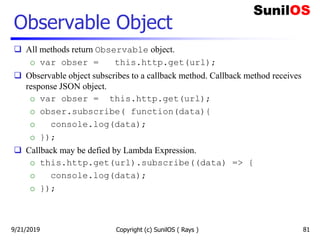
Observable Object
 All methods return Observable object.
o var obser = this.http.get(url);
 Observable object subscribes to a callback method. Callback method receives
response JSON object.
o var obser = this.http.get(url);
o obser.subscribe( function(data){
o console.log(data);
o });
 Callback may be defied by Lambda Expression.
o this.http.get(url).subscribe((data) => {
o console.log(data);
o });
Copyright (c) SunilOS ( Rays ) 819/21/2019
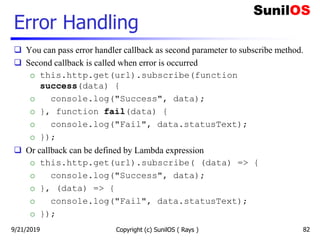
Error Handling
 You can pass error handler callback as second parameter to subscribe method.
 Second callback is called when error is occurred
o this.http.get(url).subscribe(function
success(data) {
o console.log("Success", data);
o }, function fail(data) {
o console.log("Fail", data.statusText);
o });
 Or callback can be defined by Lambda expression
o this.http.get(url).subscribe( (data) => {
o console.log("Success", data);
o }, (data) => {
o console.log("Fail", data.statusText);
o });
Copyright (c) SunilOS ( Rays ) 829/21/2019
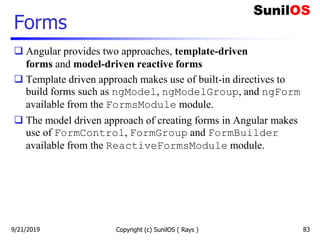
Forms
 Angular provides two approaches, template-driven
forms and model-driven reactive forms
 Template driven approach makes use of built-in directives to
build forms such as ngModel, ngModelGroup, and ngForm
available from the FormsModule module.
 The model driven approach of creating forms in Angular makes
use of FormControl, FormGroup and FormBuilder
available from the ReactiveFormsModule module.
Copyright (c) SunilOS ( Rays ) 839/21/2019
Template Driven Form
 With a template driven form, most of the work is done in the template
 We need to import to FormsModule in app.module.ts
import { FormsModule } from '@angular/forms’;
o @NgModule({
o imports: [
o BrowserModule,
o FormsModule
o ],
Copyright (c) SunilOS ( Rays ) 849/21/2019
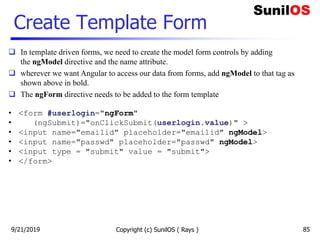
Create Template Form
Copyright (c) SunilOS ( Rays ) 85
 In template driven forms, we need to create the model form controls by adding
the ngModel directive and the name attribute.
 wherever we want Angular to access our data from forms, add ngModel to that tag as
shown above in bold.
 The ngForm directive needs to be added to the form template
• <form #userlogin="ngForm"
• (ngSubmit)="onClickSubmit(userlogin.value)" >
• <input name="emailid" placeholder="emailid" ngModel>
• <input name="passwd" placeholder="passwd" ngModel>
• <input type = "submit" value = "submit">
• </form>
9/21/2019
Model Driven Form
 In the model driven form, we need to import the ReactiveFormsModule from
@angular/forms and use the same in the imports array.
import { FormsModule } from '@angular/forms’;
o @NgModule({
o imports: [
o BrowserModule,
o ReactiveFormsModule
o ],
Copyright (c) SunilOS ( Rays ) 869/21/2019
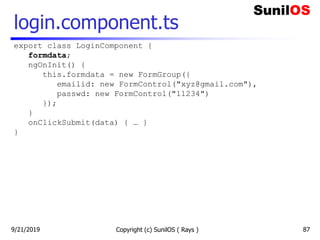
login.component.ts
Copyright (c) SunilOS ( Rays ) 87
export class LoginComponent {
formdata;
ngOnInit() {
this.formdata = new FormGroup({
emailid: new FormControl("xyz@gmail.com"),
passwd: new FormControl("11234")
});
}
onClickSubmit(data) { … }
}
9/21/2019
login.component.html
Copyright (c) SunilOS ( Rays ) 88
<form [formGroup] = "formdata"
(ngSubmit)="onClickSubmit(formdata.value)" >
<input name="emailid" placeholder="emailid"
formControlName="emailid">
<input name="passwd" placeholder="passwd"
formControlName="passwd">
<input type = "submit" value="Log In">
</form>
9/21/2019
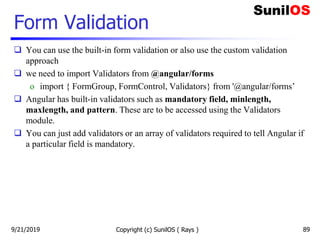
Form Validation
 You can use the built-in form validation or also use the custom validation
approach
 we need to import Validators from @angular/forms
o import { FormGroup, FormControl, Validators} from '@angular/forms’
 Angular has built-in validators such as mandatory field, minlength,
maxlength, and pattern. These are to be accessed using the Validators
module.
 You can just add validators or an array of validators required to tell Angular if
a particular field is mandatory.
Copyright (c) SunilOS ( Rays ) 899/21/2019
login.component.ts
Copyright (c) SunilOS ( Rays ) 90
export class AppComponent {
formdata;
ngOnInit() {
this.formdata = new FormGroup({
emailid: new FormControl("", Validators.compose([
Validators.required,
Validators.pattern("[^ @]*@[^ @]*")
])),
passwd: new FormControl("")
});
}
onClickSubmit(data) {this.emailid = data.emailid;}
}
9/21/2019
login.component.html
Copyright (c) SunilOS ( Rays ) 91
<form [formGroup] = "formdata"
(ngSubmit)="onClickSubmit(formdata.value)" >
<input type = "submit"
[disabled] = "!formdata.valid" value = "Log In">
</form>
9/21/2019
Disclaimer
 This is an educational presentation to enhance the skill of
computer science students.
 This presentation is available for free to computer science
students.
 Some internet images from different URLs are used in this
presentation to simplify technical examples and correlate
examples with the real world.
 We are grateful to owners of these URLs and pictures.
Copyright (c) SunilOS ( Rays ) 929/21/2019
Thank You!
Copyright (c) SunilOS ( Rays ) 93
www.SunilOS.com
9/21/2019

Angular 8

  • 1.
    Copyright (c) SunilOS( Rays ) 1 Angular 8 www.sunilos.com www.raystec.com 9/21/2019
  • 2.
    Contents  Introduction &Overview  MVC Architecture  Installation and Configuration  Getting Started  Variable and Operators  Control Statements  Directives  Module  Component 9/21/2019 Copyright (c) SunilOS ( Rays ) 2  Pipe  Services  Router  Http Client  Forms
  • 3.
    What is ANGULAR Angular is a JavaScript Framework  Angular is used to build client-side applications using HTML  Angular bootstraps JavaScript with HTML tags.  Angular is used to make reach UI application.  Angular enhances UI experience for User.  Angular code is written in TypeScript language o TypeScript is compiled into JavaScript o JavaScript is used in HTML pages Copyright (c) SunilOS ( Rays ) 3 Type Script Java Script HTML compile use 9/21/2019
  • 4.
    Angular enhances HTML Angular has set of directives to display dynamic contents at HTML page. Angular extends HTML node capabilities for a web application.  Angular provides data binding and dependency injection that reduces line of code.  Angular extends HTML attributes with Directives, and binds data to HTML with Expressions.  Angular follows MVC Architecture 9/21/2019 Copyright (c) SunilOS ( Rays ) 4
  • 5.
    Angular – RESTWeb Services  Angular communicates with RESTFul web services in modern applications  RESTful Web Services are accessed by HTTP call  RESTful Web Services exchange JSON data Copyright (c) SunilOS ( Rays ) 5 Angular Web Services HTTP JSON 9/21/2019
  • 6.
    Angular Application An applicationis a Module Module contains components Component uses Services Services contains data and reusable business methods Basic building block of Angular is Component It is said that Angular follows Component/Service architecture. Internally it follows MVC Architecture Copyright (c) SunilOS ( Rays ) 69/21/2019
  • 7.
    Angular Application (Contd.) Copyright (c) SunilOS ( Rays ) 7 Module Module Module Component Service Service Module • An Application is a Module • Modules are reusable • One Module’s components and services can be used by another module Application Component Component Component Component 9/21/2019
  • 8.
    MVC Architecture Copyright (c)SunilOS ( Rays ) 8 Application 9/21/2019
  • 9.
    MVC Architecture 9/21/2019 Copyright(c) SunilOS ( Rays ) 9 View: contains display logics, developed using HTML and Angular Directives Controller: Contains navigation logic. Decides data and view to be displayed Model: Carry data between View and Controller
  • 10.
    Installation and Configuration 9/21/2019Copyright (c) SunilOS ( Rays ) 10
  • 11.
    Install Node  Node.jsdevelopment environment can be setup in Windows, Mac, Linux and Solaris.  Following development environment and editor are required to develop a node application: o Node.js o Node Package Manager (NPM) o IDE (Integrated Development Environment) or TextEditor  Download installer and editor from o https://nodejs.org: install node and npm o https://code.visualstudio.com: Visual Studio Code  You can check npm version by following command o npm -v 9/21/2019 Copyright (c) SunilOS ( Rays ) 11
  • 12.
    Install Angular CLI You can run following command to install Angular CLI.  npm install @angular/cli -g  After installation you can check version of Angular by running the following command:  ng -version  CLI stand for Command Line Interface Copyright (c) SunilOS ( Rays ) 129/21/2019
  • 13.
    Angular Project Angular providesCLI command to generate project template Copyright (c) SunilOS ( Rays ) 139/21/2019
  • 14.
    Create Project  Angularproject is created using command: o ng new project-name  We are assuming project name is SOS o ng new SOS o Above command will create project directory structure. Default component and configuration files is generated inside c:/SOS folder.  Inside c:/SOS folder it will create following subfolders o c:/SOS/e2e o c:/SOS/node_modules o c:/SOS/src/app  All components will be created in c:/sos/src/app folder Copyright (c) SunilOS ( Rays ) 149/21/2019
  • 15.
    Run the project Run following command to run angular project o c:/SOS>ng serve -o  It will start angular server at default port number #4200 and make application accessible using http://localhost:4200 Copyright (c) SunilOS ( Rays ) 159/21/2019
  • 16.
    Project flow Copyright (c)SunilOS ( Rays ) 169/21/2019
  • 17.
    Project Key components File app.module.ts contains configuration of the application.  File app-routing.module.ts contains url mapping of components. Components are accessed by their mapped urls.  File app.component.ts contains definition of Root- Component  File index.html is first page of application. It bootstraps root component.  For new UI screens new components are created called sub components. Copyright (c) SunilOS ( Rays ) 179/21/2019
  • 18.
    Getting Started 9/21/2019 Copyright(c) SunilOS ( Rays ) 18
  • 19.
    Login  Let’s createan application which contains Login and Welcome pages.  Login page has HTML form that accepts Login-id and password.  When you submit Login page, credential is authenticated and Welcome page is displayed on successful login. 9/21/2019 Copyright (c) SunilOS ( Rays ) 19
  • 20.
    Login & WelcomeComponents  Basic building block of Angular is Component  One component is created for one View page.  We have Login and Welcome 2 pages thus 2 components will be created. Copyright (c) SunilOS ( Rays ) 209/21/2019
  • 21.
    Create components  Weare assuming that you have creates SOS project from previous slides and we will create Login and Welcome page in same project.  Use following command in c:SOS folder to generate Login component o ng generate component Login  or o ng g c Login o ng g c Welcome  Above commands will generate Login and Welcome components and will automatically make entry in app.module.ts configuration file. Copyright (c) SunilOS ( Rays ) 219/21/2019
  • 22.
    Generated Files Welcome  c:/SOS/src/app/welcome/welcome.component.css c:/SOS/src/app/welcome/welcome.component.html  c:/SOS/src/app/welcome/welcome.component.ts  c:/SOS/src/app/welcome/welcome.component.spec.ts Login  c:/SOS/src/app/login/login.component.css  c:/SOS/src/app/login/login.component.html  c:/SOS/src/app/login/login.component.ts  c:/SOS/src/app/login/login.component.spec.ts Copyright (c) SunilOS ( Rays ) 229/21/2019
  • 23.
    Define routes  Inorder to access pages, define routes in app-routing.module.ts  const routes: Routes = [  { path: 'login', component: LoginComponent},  { path: 'welcome', component: WelcomeComponent}  ];  #app.module.ts file  @NgModule({  imports: [RouterModule.forRoot(routes)],  exports: [RouterModule]  })  Access pages using following URLs o http://localhost:4200/login o http://localhost:4200/welcome Copyright (c) SunilOS ( Rays ) 239/21/2019
  • 24.
    Welcome page  Letsinitialize a variable message and display at html page  File welcome.component.ts o export class WelcomeComponent implements OnInit { o message = 'Welcome to SunilOS’; o }  File welcome.component.html o <H1>{{ message }}</H1>  URL o http://localhost:4200/welcome Copyright (c) SunilOS ( Rays ) 249/21/2019
  • 25.
    Login controller  Filelogin.component.ts  export class LoginComponent implements OnInit {  userId = 'Enter User ID';  password = '';  message = ‘’;  constructor(private router: Router){}  signIn(){  if(this.userId == 'admin’  && this.password =='admin'){  this.router.navigateByUrl('/welcome');  }else{  this.message = 'Invalid login id or password';  }  }  } Copyright (c) SunilOS ( Rays ) 25 Router is injected Navigate to Welcome page 9/21/2019
  • 26.
    Login View  <H1>Login</H1> <p style="color:red" >{{message}}</p>  <form >  User ID: <input [(ngModel)]="userId" name="userId" type="text">  Password: <input [(ngModel)]="password" name="password" type="password">  <button (click)="signIn()">Sign In</button>  </form>  Directive [(ngModel)] is used for two-way data binding with attributes userId and password of class LoginComponent.  Directive (click) is used to bind on-click event. Method signIn() is called when Sign-In button is clicked.  Directive ngModel is provided by inbuild FormsModule module. This module will be imported in app.module.ts.  URL :http://localhost:4200/login Copyright (c) SunilOS ( Rays ) 269/21/2019
  • 27.
    Angular Module  Applicationis Module  A module can be reused in other applications  Module key elements are: o Components for view and controller o Directives for databinding o Pipes for formatting o Services for reusable operations.  One module can use another module like FormModule and RouteModule Copyright (c) SunilOS ( Rays ) 279/21/2019
  • 28.
    Module execution flow Copyright(c) SunilOS ( Rays ) 28 main.ts app.module.ts app.component.ts Index.html <app-root> app.component.html <router-outlet> bootstrap configure display template render  Application executes main.ts file.  File main.ts configure app using app.module.ts file  File app.module.ts defines application module  Application displays index.html file.  File index.html bootstraps root component from app.component.ts run 9/21/2019
  • 29.
    index.html Copyright (c) SunilOS( Rays ) 29 src/index.html: This the first file which executes alongside main.ts when the page loads. <html lang="en"> <head> <base href="/"> </head> <body> <app-root></app-root> </body> </html> index.html <app-root> app.component.html <router-outlet> login.component.html 9/21/2019
  • 30.
    Copyright (c) SunilOS( Rays ) 30 app.module.ts  It defines module using @NgModule decorator (annotation).  It contains mappings of application elements; component, service, pipe etc. and other modules like ngRoute and FormModule.  This file location in project is src/app/app.module.ts. 9/21/2019
  • 31.
    app.module.ts Copyright (c) SunilOS( Rays ) 31 import { FormsModule } from '@angular/forms'; import { AppRoutingModule } from './app-routing.module'; @NgModule({ declarations: [ AppComponent, LoginComponent, WelcomeComponent ], imports: [ AppRoutingModule, FormsModule, ], providers: [ UserService, MarksheetServce, ], bootstrap: [AppComponent] }) export class AppModule { } Component Modules Services Root Component Module Class 9/21/2019
  • 32.
    Components  One componentis created for one View page.  You can generate component using following command: o ng g c Login o ng g c Welcome  Component contains 4 files: o Controller .TS o View .HTML o Look & Feel .CSS o Unit Testcase  Components are configured into app.module.ts file Copyright (c) SunilOS ( Rays ) 32 Root Login Welcome Dashboard 9/21/2019
  • 33.
    Component (Contd.) Copyright (c)SunilOS ( Rays ) 33 @Component <class> <html> 9/21/2019
  • 34.
    Root Component Application hasone root-component app.component.ts Root component is bootstrapped with index.html Html template of root-component app.component.html has <router-outlet> tag. Tag <router-outlet> is replaced by sub- components at runtime. Tag <router-outlet> implements SPA Copyright (c) SunilOS ( Rays ) 349/21/2019
  • 35.
    Copyright (c) SunilOS( Rays ) 35 app.component.ts controller Metadata @Component is used to define component import { Component } from '@angular/core’; @Component ({ selector: ‘app-root’, templateUrl: './app.component.html’, //template: ` <div>{{title}}</div> ` }) export class AppComponent { title:string = ‘SunilOS’; } Metadata Import component Template Class Attribute View html 9/21/2019
  • 36.
    app.component.html View  <div> <router-outlet></router-outlet>  </div>  <H4>Copyright (c) {{title}}</H4> Copyright (c) SunilOS ( Rays ) 369/21/2019
  • 37.
    Create sub-component- Login File login.component.ts  export class LoginComponent implements OnInit {  userId = 'Enter User ID';  password = '';  message = ‘’;  constructor(private router: Router){}  signIn(){  if(this.userId == 'admin’  && this.password =='admin'){  this.router.navigateByUrl('/welcome');  }else{  this.message = 'Invalid login id or password';  }  }  } Copyright (c) SunilOS ( Rays ) 37 Router is injected Navigate to Welcome page 9/21/2019
  • 38.
    Login View  <H1>Login</H1> <p style="color:red" >{{message}}</p>  <form >  User ID: <input [(ngModel)]="userId" name="userId" type="text">  Password: <input [(ngModel)]="password" name="password" type="password">  <button (click)="signIn()">Sign In</button>  </form>  Directive [(ngModel)] is used for two-way data binding with attributes userId and password of class LoginComponent.  Directive (click) is used to bind on-click event. Method signIn() is called when Sign-In button is clicked.  Directive ngModel is provided by inbuild FormsModule module. This module will be imported in app.module.ts.  URL :http://localhost:4200/login Copyright (c) SunilOS ( Rays ) 389/21/2019
  • 39.
    Define Login-route  Inorder to access pages, define routes in app-routing.module.ts  const routes: Routes = [  { path: 'login', component: LoginComponent},  { path: 'welcome', component: WelcomeComponent}  ];  @NgModule({  imports: [RouterModule.forRoot(routes)],  exports: [RouterModule]  })  Access pages using following URLs o http://localhost:4200/login Copyright (c) SunilOS ( Rays ) 399/21/2019
  • 40.
    Define variable  Optionalkeyword let is used to define a variable o let name = “ram” ; o let price = 100.10;  Optionally you can define data type of a variable. Data type is followed by variable name and separated by colon (:) character o let name:string = “ram” ; o let price:number = 100.10; o let flag:Boolean = true; Just like JavaScript you can alternately use var keyword to define a variable. o var name = “ram” ; o var price = 100.10; Copyright (c) SunilOS ( Rays ) 409/21/2019
  • 41.
    Scope of classattributes  An instance/static variable, defined in a class, is called attribute or member variable  Scope of a variable can be public or private. Default scope is public  export class LoginComponent implements OnInit {  public userId:string = 'Enter User ID';  private password:string = ‘’;  message:string = 'No message’;  ..  }  Attributes are called inside methods using this keyword. Copyright (c) SunilOS ( Rays ) 419/21/2019
  • 42.
    Define Mehods  Aninstance/static method can be defined in a class.  Scope of a method can be public or private. Default scope is public  Here is example signin() method of login components:  signIn(){  if(this.userId == 'admin’  && this.password =='admin'){  this.router.navigateByUrl('/welcome');  }else{  this.message = 'Invalid login id or password';  }  } Copyright (c) SunilOS ( Rays ) 429/21/2019
  • 43.
    Static attributes andmethods  Keyword static is used to defined attributes and methods o static PI:number = 3.14;  Memory is assigned only one its lifetime  static max(a:number, b:number){  if(a> b){ return a; }  else{ return b }  }  Static methods are defined to use static attributes and can called with class name. Copyright (c) SunilOS ( Rays ) 439/21/2019
  • 44.
    Constants Constant variable isdefined using const keyword const PI:number = 3.14; Copyright (c) SunilOS ( Rays ) 449/21/2019
  • 45.
    Constructor  Class hasonly one constructor  It is called at the time of class instantiation  Services are injected in controller using constructor arguments:  export class LoginComponent implements OnInit {  constructor(private router: Router) {  }  }  You can pass one or more arguments to constructor Copyright (c) SunilOS ( Rays ) 459/21/2019
  • 46.
    Class and Interface Angularuses Typescripts TypeScript is Object Oriented TS provides inheritance of classes and implementation of Interfaces A class can inherit another class using extents keyword Interface has abstract methods One class may implement multiple interfaces using implements keyword. Copyright (c) SunilOS ( Rays ) 469/21/2019
  • 47.
    OnInit interface  Acomponent must have to implement OnInit interface  export class LoginComponent implements OnInit {  ngOnInit() { .. }  }  Interface OnInit has one abstract method ngOnInit()  This method is called after component instantiation  You may write code inside this method to initialize your component Copyright (c) SunilOS ( Rays ) 479/21/2019
  • 48.
    Control Statements if-else for loop whileloop do-while loop 9/21/2019 Copyright (c) SunilOS ( Rays ) 48
  • 49.
    if-else Statement You canperform conditional operation using if-then- else statement. o var money = 100; o if ( money> 100 ){ o console.log('Wow! I can buy Pizza'); o }else{ o console.log('Oh! I can not buy Pizza'); o } 9/21/2019 Copyright (c) SunilOS ( Rays ) 49
  • 50.
    For loop var table= [2,4,6,8,10]; for (i=0; i<table.length; i++ ){  console.log('table['+i+']: ' + table[i]); } For in loop for (i in table){  console.log('table['+i+']: ' + table[i]); } 9/21/2019 Copyright (c) SunilOS ( Rays ) 50
  • 51.
    While Loop  vartable = [2,4,6,8,10], var i=0;  while(i<table.length){  console.log('table['+i+']: ' + table[i]);  i++;  }  do{  console.log('table['+i+']: ' + table[i]);  i++;  }while(i<table.length) 9/21/2019 Copyright (c) SunilOS ( Rays ) 51
  • 52.
    Switch Statement  varday = 1;  switch (day) {  case 0:  alert("Sunday");  break;  case 1:  alert("Monday");  break;  …  default:  alert("This day is yet to come, pl wait!!");  } 9/21/2019 Copyright (c) SunilOS ( Rays ) 52
  • 53.
    Exception Handling 9/21/2019 Copyright(c) SunilOS ( Rays ) 53 throw catch • Exception cause abnormal termination of program or wrong execution result. • JavaScript provides an exception handling mechanism to handle exceptions. • Exception handling is managed by • try, catch, finally and throw keywords. • Exception handling is done by try-catch-finally block. • Exception raised in try block is caught by catch block. • Block finally is optional and always executed.
  • 54.
    Copyright (c) SunilOS( Rays ) 54 try-catch-finally Statement  try{  //contains normal flow of program that may raise an exception.  }catch (err) {  //executes alternate flow of program. Receives err object.  }finally {  //cleanup statements, this block is optional.  }  throw is used to raise an custom exception with an error message:  throw “Error message”; 9/21/2019
  • 55.
    Flow of execution •try { • a • b //Throw Exception • c • } catch (Exception e) { • d • e • } finally { • f • } Normal Flow a b c f Exceptional Flow  a b d e f Copyright (c) SunilOS ( Rays ) 559/21/2019
  • 56.
    Data Binding It isdata synchronization between View and Controller Copyright (c) SunilOS ( Rays ) 56 login.component.ts login.component.html data binding 9/21/2019
  • 57.
    Data Binding (Contd.) Data Binding can be One-way, where data change in controller is reflected at view, or Two-way, where data changes are reflected in both directions; controller and view.  The following types of bindings are supported by Angular: o One-way binding  Interpolation - {{attribute-name}}  Property Binding - [attribute-name] o Event Binding - (event) o Two-way binding - [(attribute-name)] Copyright (c) SunilOS ( Rays ) 579/21/2019
  • 58.
    Interpolation Copyright (c) SunilOS( Rays ) 58  One-way data binding is done by directive {{}}, called interpolation.  Attributes defined in controller can be displayed in html using {{}}.  For example, message attribute defined in LoginComponent is displayed at login html using interpolation.  export class LoginComponent implements OnInit {  message = 'Invalid id or password’;  }  <H1>Login</H1>  <p style="color:red" >{{message}}</p> 9/21/2019
  • 59.
    Property Binding  Propertybinding is used for one-way data binding  It binds controller attribute with DOM property of HTML elements  For example o <input type=“text” [value]=“message” > o <img [src]='imageUrl’> o export class LoginComponent implements OnInit { o message = 'Invalid id or password’; o imageUrl = ‘login.gif’; o } Copyright (c) SunilOS ( Rays ) 599/21/2019
  • 60.
    Event Binding  Htmlform events can be bound with component class methods using (event) directive.  Followings are form events to be bind: o (click) : called on button click event o (change) : called on value change event o (keyup) : called on key up event o (blur) : called on blur event Copyright (c) SunilOS ( Rays ) 60 ( ) 9/21/2019
  • 61.
    Event Binding  Forexample, signIn()method in LoginComponent is bound with click event of submit button in login form.  export class LoginComponent implements OnInit {  signIn(){ .. }  }  <form >  User ID:<input [(ngModel)]="userId" >  Password: <input [(ngModel)]="password" >  <button (click)="signIn()">Sign In</button>  </form> Copyright (c) SunilOS ( Rays ) 619/21/2019
  • 62.
    Two-way data binding In two-way data binding, data will be changed in both directions; controller and view.  If you change data at view then controller will be changed. If you change data at controller then view will be changed.  Two-way data binding is done by directive [(ngModel)].  It is used to bind html form input elements with controller class attributes.  For example login form elements are bound with [()]: o User ID:<input [(ngModel)]="userId" > o Password: <input [(ngModel)]="password" > Copyright (c) SunilOS ( Rays ) 629/21/2019
  • 63.
    Routing  Routing isused to define paths to navigate to the components (pages)  One component has one or more routes  Agular projects create app-routing.module.ts,which contains routes of application  RouterModule is used to configure routes which is imported in app.module.ts  Routes may contain URI variables Copyright (c) SunilOS ( Rays ) 639/21/2019
  • 64.
    Define routes  Inorder to access pages, define routes in app-routing.module.ts  const routes: Routes = [  { path: 'login', component: LoginComponent},  { path: 'welcome', component: WelcomeComponent}  ];  @NgModule({  imports: [RouterModule.forRoot(routes)],  exports: [RouterModule]  })  Access pages using following URLs o http://localhost:4200/login o http://localhost:4200/welcome Copyright (c) SunilOS ( Rays ) 649/21/2019
  • 65.
    Route Parameters  Youcan define parametrized routes for a component  Route parameter is defined by colon (:) character and placeholder name.  Here :id, :deptid, :empid are router parameter o { o path: 'marksheet/:id’, o component: MarkheetComponent o } o { o path: ‘employee/:deptid/:empid’, o component: EmployeeComponent o } Copyright (c) SunilOS ( Rays ) 659/21/2019
  • 66.
    Read Route Parameters Path variables are read by ActivatedRoute service.  Service is injected into component constructor  Parameters read buy registering callback with route.params.subscribe method o import {ActivatedRoute} from "@angular/router"; o constructor(private route: ActivatedRoute) { o this.route.params.subscribe( params =>{ o console.log(params["id"]) o }); o } Copyright (c) SunilOS ( Rays ) 669/21/2019
  • 67.
    Directives  Directives areused to change DOM structure of an html page  Angular has many pre-defined directives such as *ngFor and *ngIf  You can create custom directives with help of @Directive decorator  There are four types of directives: o Components directives o Structural directives o Attribute directives o Custom Directive Copyright (c) SunilOS ( Rays ) 679/21/2019
  • 68.
    Component Directive A componentis also a directive-with-a- template. A @Component decorator is actually a @Directive decorator extended with template-oriented features. Copyright (c) SunilOS ( Rays ) 689/21/2019
  • 69.
    Structural Directive  Astructure directive iterates or conditionally manipulates DOM elements.  Structural directives have a * sign before the directive name such as *ngIf and *ngFor  Directive *ngFor is used to iterate and print list in html page.  Directive *ngIf is used to conditionally display an html DOM element. Copyright (c) SunilOS ( Rays ) 699/21/2019
  • 70.
    *ngFor  export classMarksheetlistComponent implements OnInit {  list = [  {"id":1,"rollNo":"A1","name":"Rajesh Verma”},  {"id":2,"rollNo":"A2","name":"Ashish Nehra"},  {"id":3,"rollNo":"A3","name":"Manish”}  ];  }  <table border="1">  <tr *ngFor = "let e of list" >  <td>{{e.id}}</td>  <td>{{e.rollNo}}</td>  <td>{{e.name}}</td>  </tr>  </table> Copyright (c) SunilOS ( Rays ) 709/21/2019
  • 71.
    *ngIf  <p *ngIf="error"style="color:red" >  {{message}}  </p>  You can use else with if directive  <div *ngIf="success == true; then SUC else FAIL"></div>  <ng-template #SUC >  <p style="color:green" >{{message}}</p>  </ng-template>  <ng-template #FAIL>  <p style="color:red">{{message}}</p>  </ng-template> Copyright (c) SunilOS ( Rays ) 719/21/2019
  • 72.
    Attribute Directive  Attributedirective alter the appearance or behavior of an existing HTML element.  Attribute directive look like regular HTML attributes.  The ngModel directive, which implements two-way data binding, is an example of an attribute directive.  ngModel modifies the behavior of an existing element by setting its display property and responding to the changing events. o <input [(ngModel)]="movie.name"> Copyright (c) SunilOS ( Rays ) 729/21/2019
  • 73.
    Custom Directive  Youcan define your own custom directive using @Directive decorator.  Custom directive can be generated by CLI command: o ng generate directive myDir  Above command will generate o @Directive({ o selector: '[appMyDir]' o }) o export class MyDirDirective {..} Copyright (c) SunilOS ( Rays ) 739/21/2019
  • 74.
    Pipe Pipes are usedto format the data. Pipes can be used to change data from one format to another. In Agular JS it used to call filters. Pipe (|) character is used to apply pipe to an attribute. For example o {{ name | uppercase }} o {{ name | lowercase }} Copyright (c) SunilOS ( Rays ) 749/21/2019
  • 75.
    Pipes  Angular havefollowing inbuilt pipe o Lowercasepipe o Uppercasepipe o Datepipe o Currencypipe o Jsonpipe o Percentpipe o Decimalpipe o Slicepipe  You can create your own custom pipes Copyright (c) SunilOS ( Rays ) 759/21/2019
  • 76.
    Pipe examples Copyright (c)SunilOS ( Rays ) 76 <div style = "width:50%;float:left;border:solid 1px black;"> <h1>change case pipe</h1> <b>{{title | uppercase}}</b><br/> <b>{{title | lowercase}}</b> <h1>Currency Pipe</h1> <b>{{6589.23 | currency:"USD"}}</b><br/> <b>{{6589.23 | currency:"USD":true}}</b> <h1>Date pipe</h1> <b>{{todaydate | date:'d/M/y'}}</b><br/> <b>{{todaydate | date:'shortTime'}}</b> <h1>Decimal Pipe</h1> <b>{{ 454.78787814 | number: '3.4-4' }}</b> // 3 is for main integer,4-4 are for integers to be displayed </div> 9/21/2019
  • 77.
    Services Copyright (c) SunilOS( Rays )  Service contains business logics and data, shared by multiple Components  In general, services communicate with Rest Web APIs and perform CRUD operations  Component’s controller calls service to perform business operations.  A service can be created by following CLI command: o ng generate service UserService o Or o ng g s UserService  Service class is decorated by @Injectable decorator. o @Injectable() o export class UserService { o constructor(private http: HttpClient) { } o } 779/21/2019
  • 78.
    UserService  Lets createuser service o export class UserService { o authenticate(login:string, password:string, response) { o ... o } o }  Service is injected to component using constructor o export class LoginComponent implements OnInit { o public userId:string = 'Enter User ID'; o public password:string = ''; o constructor(private service:UserService) { o } o } Copyright (c) SunilOS ( Rays ) 789/21/2019
  • 79.
    HttpClient Service  HttpClientservice is used to communicate with http server.  It is contained by HttpClientModule module.  Module HttpClientModule is imported in app.module.ts.  Http Client is introduced in Angular 6.  //app.module.ts o import { HttpClientModule } from '@angular/common/http’; o @NgModule({ o imports: [ o BrowserModule, o HttpClientModule o ] o }) Copyright (c) SunilOS ( Rays ) 799/21/2019
  • 80.
    HTTP Methods  HttpClientcontains get(), post(), put(),patch(), delete() methods to make http calls to the server.  Methods get(url) and delete(url) receive one parameter; url (endpoint) whereas put(url,data), post(url,data) and patch(url,data) receive two parameters; url and data.  Data is added to the request body. Usually data is a JSON object.  All methods receive “httpOptions” as last optional parameter.  get(url [,httpOptions])  delete(url[,httpOptions])  put(url,data[,httpOptions])  post(url,data[,httpOptions])  patch(url,data[,httpOptions])  Object HttpOptions contains request header information, query parameters and other configurable values. Copyright (c) SunilOS ( Rays ) 809/21/2019
  • 81.
    Observable Object  Allmethods return Observable object. o var obser = this.http.get(url);  Observable object subscribes to a callback method. Callback method receives response JSON object. o var obser = this.http.get(url); o obser.subscribe( function(data){ o console.log(data); o });  Callback may be defied by Lambda Expression. o this.http.get(url).subscribe((data) => { o console.log(data); o }); Copyright (c) SunilOS ( Rays ) 819/21/2019
  • 82.
    Error Handling  Youcan pass error handler callback as second parameter to subscribe method.  Second callback is called when error is occurred o this.http.get(url).subscribe(function success(data) { o console.log("Success", data); o }, function fail(data) { o console.log("Fail", data.statusText); o });  Or callback can be defined by Lambda expression o this.http.get(url).subscribe( (data) => { o console.log("Success", data); o }, (data) => { o console.log("Fail", data.statusText); o }); Copyright (c) SunilOS ( Rays ) 829/21/2019
  • 83.
    Forms  Angular providestwo approaches, template-driven forms and model-driven reactive forms  Template driven approach makes use of built-in directives to build forms such as ngModel, ngModelGroup, and ngForm available from the FormsModule module.  The model driven approach of creating forms in Angular makes use of FormControl, FormGroup and FormBuilder available from the ReactiveFormsModule module. Copyright (c) SunilOS ( Rays ) 839/21/2019
  • 84.
    Template Driven Form With a template driven form, most of the work is done in the template  We need to import to FormsModule in app.module.ts import { FormsModule } from '@angular/forms’; o @NgModule({ o imports: [ o BrowserModule, o FormsModule o ], Copyright (c) SunilOS ( Rays ) 849/21/2019
  • 85.
    Create Template Form Copyright(c) SunilOS ( Rays ) 85  In template driven forms, we need to create the model form controls by adding the ngModel directive and the name attribute.  wherever we want Angular to access our data from forms, add ngModel to that tag as shown above in bold.  The ngForm directive needs to be added to the form template • <form #userlogin="ngForm" • (ngSubmit)="onClickSubmit(userlogin.value)" > • <input name="emailid" placeholder="emailid" ngModel> • <input name="passwd" placeholder="passwd" ngModel> • <input type = "submit" value = "submit"> • </form> 9/21/2019
  • 86.
    Model Driven Form In the model driven form, we need to import the ReactiveFormsModule from @angular/forms and use the same in the imports array. import { FormsModule } from '@angular/forms’; o @NgModule({ o imports: [ o BrowserModule, o ReactiveFormsModule o ], Copyright (c) SunilOS ( Rays ) 869/21/2019
  • 87.
    login.component.ts Copyright (c) SunilOS( Rays ) 87 export class LoginComponent { formdata; ngOnInit() { this.formdata = new FormGroup({ emailid: new FormControl("xyz@gmail.com"), passwd: new FormControl("11234") }); } onClickSubmit(data) { … } } 9/21/2019
  • 88.
    login.component.html Copyright (c) SunilOS( Rays ) 88 <form [formGroup] = "formdata" (ngSubmit)="onClickSubmit(formdata.value)" > <input name="emailid" placeholder="emailid" formControlName="emailid"> <input name="passwd" placeholder="passwd" formControlName="passwd"> <input type = "submit" value="Log In"> </form> 9/21/2019
  • 89.
    Form Validation  Youcan use the built-in form validation or also use the custom validation approach  we need to import Validators from @angular/forms o import { FormGroup, FormControl, Validators} from '@angular/forms’  Angular has built-in validators such as mandatory field, minlength, maxlength, and pattern. These are to be accessed using the Validators module.  You can just add validators or an array of validators required to tell Angular if a particular field is mandatory. Copyright (c) SunilOS ( Rays ) 899/21/2019
  • 90.
    login.component.ts Copyright (c) SunilOS( Rays ) 90 export class AppComponent { formdata; ngOnInit() { this.formdata = new FormGroup({ emailid: new FormControl("", Validators.compose([ Validators.required, Validators.pattern("[^ @]*@[^ @]*") ])), passwd: new FormControl("") }); } onClickSubmit(data) {this.emailid = data.emailid;} } 9/21/2019
  • 91.
    login.component.html Copyright (c) SunilOS( Rays ) 91 <form [formGroup] = "formdata" (ngSubmit)="onClickSubmit(formdata.value)" > <input type = "submit" [disabled] = "!formdata.valid" value = "Log In"> </form> 9/21/2019
  • 92.
    Disclaimer  This isan educational presentation to enhance the skill of computer science students.  This presentation is available for free to computer science students.  Some internet images from different URLs are used in this presentation to simplify technical examples and correlate examples with the real world.  We are grateful to owners of these URLs and pictures. Copyright (c) SunilOS ( Rays ) 929/21/2019
  • 93.
    Thank You! Copyright (c)SunilOS ( Rays ) 93 www.SunilOS.com 9/21/2019

Editor's Notes