App Development
PRESENTED BY
HTTPS://WWW.ANDROIDFLAP.COM
CONTENTS
What is Android
Android Architecture
Android software development
Android - Application
Components
Android Resources
2
Our Project Description
https://www.androidflap.com
WHAT IS ANDROID
 Android is an open source, Linux based operating system for mobile
devices such as tablet computers and smartphones.
 Android is based on JAVA and all its applications are developed in JAVA
 Android SDK offers rich tools for android application development and
many useful APIs
3
https://www.androidflap.com
FEATURES OF ANDROID
 Android OS basic screen provides a beautiful and interactive user interface.
 GSM, IDEN, CDMA, EV-DO, UMTS, Bluetooth, Wi-Fi, LTE, NFC and WiMAX
connectivity support.
 SQLite, a lightweight relational database, is used for data storage purposes.
 Android has native support for multi-touch which was initially made available in
handsets such as the HTC Hero.
 User can jump from one task to another and same time various application can
run simultaneously.
4
https://www.androidflap.com
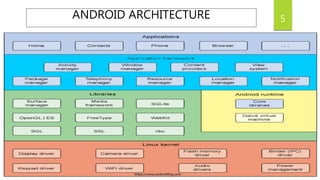
5ANDROID ARCHITECTURE
https://www.androidflap.com
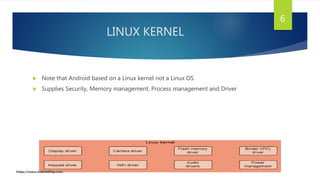
LINUX KERNEL
 Note that Android based on a Linux kernel not a Linux OS
 Supplies Security, Memory management, Process management and Driver
6
https://www.androidflap.com
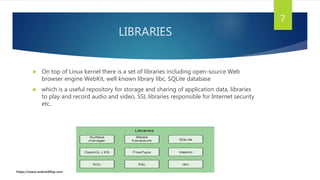
LIBRARIES
 On top of Linux kernel there is a set of libraries including open-source Web
browser engine WebKit, well known library libc, SQLite database
 which is a useful repository for storage and sharing of application data, libraries
to play and record audio and video, SSL libraries responsible for Internet security
etc.
7
https://www.androidflap.com
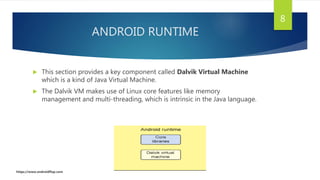
ANDROID RUNTIME
 This section provides a key component called Dalvik Virtual Machine
which is a kind of Java Virtual Machine.
 The Dalvik VM makes use of Linux core features like memory
management and multi-threading, which is intrinsic in the Java language.
8
https://www.androidflap.com
APPLICATION FRAMEWORK
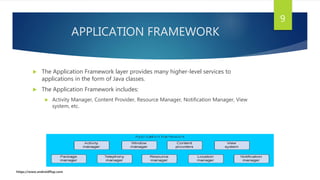
 The Application Framework layer provides many higher-level services to
applications in the form of Java classes.
 The Application Framework includes:
 Activity Manager, Content Provider, Resource Manager, Notification Manager, View
system, etc.
9
https://www.androidflap.com
APPLICATION FRAMEWORK (Cont.)
 Activity Manager − Controls all aspects of the application lifecycle.
 Content Providers − Allows applications to publish and share data with other
applications.
 Resource Manager − Provides access to non-code embedded resources such as
strings, color settings and user interface layouts.
 Notifications Manager − Allows applications to display alerts and notifications to the
user.
 View System − An extensible set of views used to create application user interfaces.
10
https://www.androidflap.com
APPLICATION
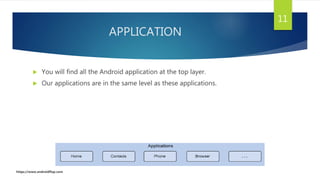
 You will find all the Android application at the top layer.
 Our applications are in the same level as these applications.
11
https://www.androidflap.com
ANDROID RESOURCES
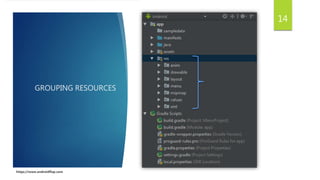
RESOURCE
 Resources are the additional files and static content that your code uses,
such as images, layout definitions, strings, animation instructions, and
more.
 At runtime, Android uses the appropriate resource based on the current
configuration.
13
https://www.androidflap.com
GROUPING RESOURCES
14
https://www.androidflap.com
APP MANIFEST
 Every app project must have an AndroidManifest.xml file.
 The manifest file describes essential information about your app to the Android
build tools, the Android operating system, and Google Play.
 The manifest file is required to declare the following:
 The app's package name
 The components of the app
 The permissions that the app needs
15
https://www.androidflap.com
Android software development
Set-up Java Development Kit (JDK)
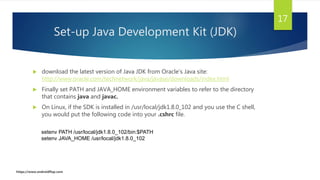
 download the latest version of Java JDK from Oracle's Java site:
http://www.oracle.com/technetwork/java/javase/downloads/index.html
 Finally set PATH and JAVA_HOME environment variables to refer to the directory
that contains java and javac.
 On Linux, if the SDK is installed in /usr/local/jdk1.8.0_102 and you use the C shell,
you would put the following code into your .cshrc file.
17
setenv PATH /usr/local/jdk1.8.0_102/bin:$PATH
setenv JAVA_HOME /usr/local/jdk1.8.0_102
https://www.androidflap.com
DEVELOPMENT ENVIRONMENT
 Eclipse IDE
 Android Studio
 Android SDK
18
https://www.androidflap.com
FEATURES OF ANDROID STUDIO
 Visual Layout Editor:
 Create complex layouts with ConstraintLayout by adding constraints from each view to
other views and guidelines. Then preview your layout on any screen size by selecting
one of various device configurations or by simply resizing the preview window.
19
https://www.androidflap.com
FEATURES OF ANDROID STUDIO(Cont.)
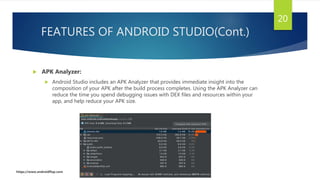
 APK Analyzer:
 Android Studio includes an APK Analyzer that provides immediate insight into the
composition of your APK after the build process completes. Using the APK Analyzer can
reduce the time you spend debugging issues with DEX files and resources within your
app, and help reduce your APK size.
20
https://www.androidflap.com
FEATURES OF ANDROID STUDIO(Cont.)
21
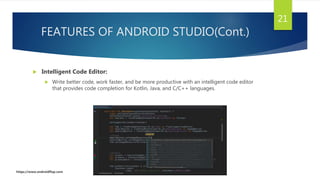
 Intelligent Code Editor:
 Write better code, work faster, and be more productive with an intelligent code editor
that provides code completion for Kotlin, Java, and C/C++ languages.
https://www.androidflap.com
Android - Application Components
APPLICATION COMPONENTS
 Application components are the essential building blocks of an Android
application.
 These components are loosely coupled by the application manifest file
AndroidManifest.xml that describes each component of the application
and how they interact.
23
https://www.androidflap.com
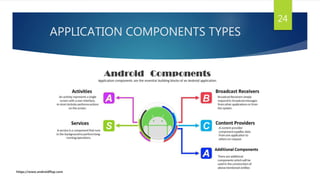
APPLICATION COMPONENTS TYPES
24
https://www.androidflap.com
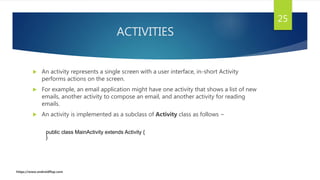
ACTIVITIES
 An activity represents a single screen with a user interface, in-short Activity
performs actions on the screen.
 For example, an email application might have one activity that shows a list of new
emails, another activity to compose an email, and another activity for reading
emails.
 An activity is implemented as a subclass of Activity class as follows −
25
public class MainActivity extends Activity {
}
https://www.androidflap.com
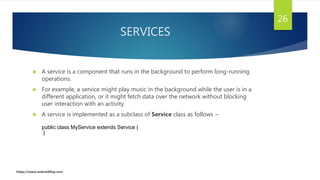
SERVICES
 A service is a component that runs in the background to perform long-running
operations.
 For example, a service might play music in the background while the user is in a
different application, or it might fetch data over the network without blocking
user interaction with an activity.
 A service is implemented as a subclass of Service class as follows −
26
public class MyService extends Service {
}
https://www.androidflap.com
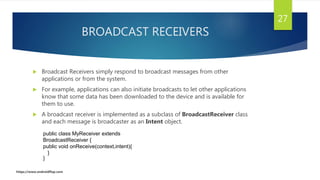
BROADCAST RECEIVERS
 Broadcast Receivers simply respond to broadcast messages from other
applications or from the system.
 For example, applications can also initiate broadcasts to let other applications
know that some data has been downloaded to the device and is available for
them to use.
 A broadcast receiver is implemented as a subclass of BroadcastReceiver class
and each message is broadcaster as an Intent object.
27
public class MyReceiver extends
BroadcastReceiver {
public void onReceive(context,intent){
}
}
https://www.androidflap.com
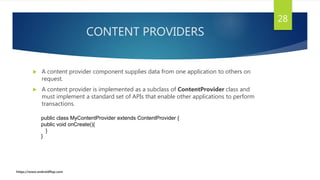
CONTENT PROVIDERS
 A content provider component supplies data from one application to others on
request.
 A content provider is implemented as a subclass of ContentProvider class and
must implement a standard set of APIs that enable other applications to perform
transactions.
28
public class MyContentProvider extends ContentProvider {
public void onCreate(){
}
}
https://www.androidflap.com
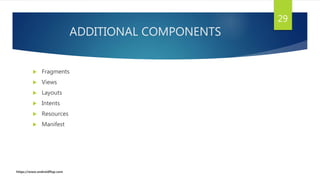
ADDITIONAL COMPONENTS
 Fragments
 Views
 Layouts
 Intents
 Resources
 Manifest
29
https://www.androidflap.com
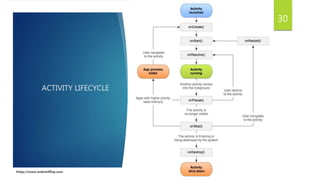
ACTIVITY LIFECYCLE
30
https://www.androidflap.com
OUR PROJECT DESCRIPTION
LEARN PROGRAMMING
PURPOSE
 This application introduces to some programming concepts.
 This application helps to build up on your programming skills once your
familiar with Basic programming languages.
32
https://www.androidflap.com
WHY ‘LEARN PROGRAMMING’
 Free of cost
 No Ads
 Easy contents
 Always logged in
 Offline
 Light weight
 AND MUCH MORE: dark theme , notification.
33
https://www.androidflap.com
SYSTEM REQUIREMENTS
 Hardware requires:
 RAM : minimum 512MB RAM
 MEMORY: minimum 50mb space
 Software requires:
 OS: minimum version of android is Lollipop.
34
https://www.androidflap.com
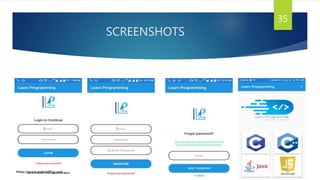
SCREENSHOTS
35
https://www.androidflap.com
CONCLUSION
 Android is an open source and Linux-based Operating System for mobile
devices such as smartphones and tablet computers.
 Android offers a unified approach to application development for mobile devices
which means developers need only develop for Android.
 The first beta version of the Android Software Development Kit (SDK) was
released by Google in 2007 where as the first commercial version, Android 1.0,
was released in September 2008.
36
https://www.androidflap.com
REFERENCES
 https://developer.android.com/
 https://stackoverflow.com
 https://www.androidflap.com
 Head First Android Development
-Dawn Griffiths
37
https://www.androidflap.com
Android app development

Android app development

  • 1.
  • 2.
    CONTENTS What is Android AndroidArchitecture Android software development Android - Application Components Android Resources 2 Our Project Description https://www.androidflap.com
  • 3.
    WHAT IS ANDROID Android is an open source, Linux based operating system for mobile devices such as tablet computers and smartphones.  Android is based on JAVA and all its applications are developed in JAVA  Android SDK offers rich tools for android application development and many useful APIs 3 https://www.androidflap.com
  • 4.
    FEATURES OF ANDROID Android OS basic screen provides a beautiful and interactive user interface.  GSM, IDEN, CDMA, EV-DO, UMTS, Bluetooth, Wi-Fi, LTE, NFC and WiMAX connectivity support.  SQLite, a lightweight relational database, is used for data storage purposes.  Android has native support for multi-touch which was initially made available in handsets such as the HTC Hero.  User can jump from one task to another and same time various application can run simultaneously. 4 https://www.androidflap.com
  • 5.
  • 6.
    LINUX KERNEL  Notethat Android based on a Linux kernel not a Linux OS  Supplies Security, Memory management, Process management and Driver 6 https://www.androidflap.com
  • 7.
    LIBRARIES  On topof Linux kernel there is a set of libraries including open-source Web browser engine WebKit, well known library libc, SQLite database  which is a useful repository for storage and sharing of application data, libraries to play and record audio and video, SSL libraries responsible for Internet security etc. 7 https://www.androidflap.com
  • 8.
    ANDROID RUNTIME  Thissection provides a key component called Dalvik Virtual Machine which is a kind of Java Virtual Machine.  The Dalvik VM makes use of Linux core features like memory management and multi-threading, which is intrinsic in the Java language. 8 https://www.androidflap.com
  • 9.
    APPLICATION FRAMEWORK  TheApplication Framework layer provides many higher-level services to applications in the form of Java classes.  The Application Framework includes:  Activity Manager, Content Provider, Resource Manager, Notification Manager, View system, etc. 9 https://www.androidflap.com
  • 10.
    APPLICATION FRAMEWORK (Cont.) Activity Manager − Controls all aspects of the application lifecycle.  Content Providers − Allows applications to publish and share data with other applications.  Resource Manager − Provides access to non-code embedded resources such as strings, color settings and user interface layouts.  Notifications Manager − Allows applications to display alerts and notifications to the user.  View System − An extensible set of views used to create application user interfaces. 10 https://www.androidflap.com
  • 11.
    APPLICATION  You willfind all the Android application at the top layer.  Our applications are in the same level as these applications. 11 https://www.androidflap.com
  • 12.
  • 13.
    RESOURCE  Resources arethe additional files and static content that your code uses, such as images, layout definitions, strings, animation instructions, and more.  At runtime, Android uses the appropriate resource based on the current configuration. 13 https://www.androidflap.com
  • 14.
  • 15.
    APP MANIFEST  Everyapp project must have an AndroidManifest.xml file.  The manifest file describes essential information about your app to the Android build tools, the Android operating system, and Google Play.  The manifest file is required to declare the following:  The app's package name  The components of the app  The permissions that the app needs 15 https://www.androidflap.com
  • 16.
  • 17.
    Set-up Java DevelopmentKit (JDK)  download the latest version of Java JDK from Oracle's Java site: http://www.oracle.com/technetwork/java/javase/downloads/index.html  Finally set PATH and JAVA_HOME environment variables to refer to the directory that contains java and javac.  On Linux, if the SDK is installed in /usr/local/jdk1.8.0_102 and you use the C shell, you would put the following code into your .cshrc file. 17 setenv PATH /usr/local/jdk1.8.0_102/bin:$PATH setenv JAVA_HOME /usr/local/jdk1.8.0_102 https://www.androidflap.com
  • 18.
    DEVELOPMENT ENVIRONMENT  EclipseIDE  Android Studio  Android SDK 18 https://www.androidflap.com
  • 19.
    FEATURES OF ANDROIDSTUDIO  Visual Layout Editor:  Create complex layouts with ConstraintLayout by adding constraints from each view to other views and guidelines. Then preview your layout on any screen size by selecting one of various device configurations or by simply resizing the preview window. 19 https://www.androidflap.com
  • 20.
    FEATURES OF ANDROIDSTUDIO(Cont.)  APK Analyzer:  Android Studio includes an APK Analyzer that provides immediate insight into the composition of your APK after the build process completes. Using the APK Analyzer can reduce the time you spend debugging issues with DEX files and resources within your app, and help reduce your APK size. 20 https://www.androidflap.com
  • 21.
    FEATURES OF ANDROIDSTUDIO(Cont.) 21  Intelligent Code Editor:  Write better code, work faster, and be more productive with an intelligent code editor that provides code completion for Kotlin, Java, and C/C++ languages. https://www.androidflap.com
  • 22.
  • 23.
    APPLICATION COMPONENTS  Applicationcomponents are the essential building blocks of an Android application.  These components are loosely coupled by the application manifest file AndroidManifest.xml that describes each component of the application and how they interact. 23 https://www.androidflap.com
  • 24.
  • 25.
    ACTIVITIES  An activityrepresents a single screen with a user interface, in-short Activity performs actions on the screen.  For example, an email application might have one activity that shows a list of new emails, another activity to compose an email, and another activity for reading emails.  An activity is implemented as a subclass of Activity class as follows − 25 public class MainActivity extends Activity { } https://www.androidflap.com
  • 26.
    SERVICES  A serviceis a component that runs in the background to perform long-running operations.  For example, a service might play music in the background while the user is in a different application, or it might fetch data over the network without blocking user interaction with an activity.  A service is implemented as a subclass of Service class as follows − 26 public class MyService extends Service { } https://www.androidflap.com
  • 27.
    BROADCAST RECEIVERS  BroadcastReceivers simply respond to broadcast messages from other applications or from the system.  For example, applications can also initiate broadcasts to let other applications know that some data has been downloaded to the device and is available for them to use.  A broadcast receiver is implemented as a subclass of BroadcastReceiver class and each message is broadcaster as an Intent object. 27 public class MyReceiver extends BroadcastReceiver { public void onReceive(context,intent){ } } https://www.androidflap.com
  • 28.
    CONTENT PROVIDERS  Acontent provider component supplies data from one application to others on request.  A content provider is implemented as a subclass of ContentProvider class and must implement a standard set of APIs that enable other applications to perform transactions. 28 public class MyContentProvider extends ContentProvider { public void onCreate(){ } } https://www.androidflap.com
  • 29.
    ADDITIONAL COMPONENTS  Fragments Views  Layouts  Intents  Resources  Manifest 29 https://www.androidflap.com
  • 30.
  • 31.
  • 32.
    PURPOSE  This applicationintroduces to some programming concepts.  This application helps to build up on your programming skills once your familiar with Basic programming languages. 32 https://www.androidflap.com
  • 33.

    WHY ‘LEARN PROGRAMMING’ Free of cost  No Ads  Easy contents  Always logged in  Offline  Light weight  AND MUCH MORE: dark theme , notification. 33 https://www.androidflap.com
  • 34.
    SYSTEM REQUIREMENTS  Hardwarerequires:  RAM : minimum 512MB RAM  MEMORY: minimum 50mb space  Software requires:  OS: minimum version of android is Lollipop. 34 https://www.androidflap.com
  • 35.
  • 36.
    CONCLUSION  Android isan open source and Linux-based Operating System for mobile devices such as smartphones and tablet computers.  Android offers a unified approach to application development for mobile devices which means developers need only develop for Android.  The first beta version of the Android Software Development Kit (SDK) was released by Google in 2007 where as the first commercial version, Android 1.0, was released in September 2008. 36 https://www.androidflap.com
  • 37.
    REFERENCES  https://developer.android.com/  https://stackoverflow.com https://www.androidflap.com  Head First Android Development -Dawn Griffiths 37 https://www.androidflap.com