Programming with Android:
Activities and Intents
Outline
3
Intent with results: Sender side
Intent-Resolution process
Handling implicit Intents
Handling Explicit Intents
Intent description
What is an intent?
Intent with results: Receiver side
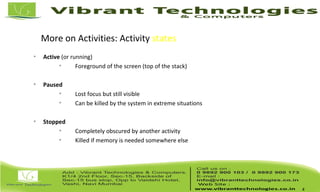
More on Activities: Activity states

Active (or running)

Foreground of the screen (top of the stack)

Paused

Lost focus but still visible

Can be killed by the system in extreme situations

Stopped

Completely obscured by another activity

Killed if memory is needed somewhere else
4
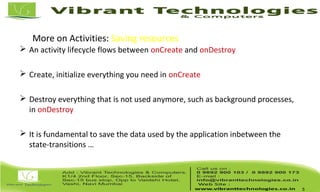
More on Activities: Saving resources
 An activity lifecycle flows between onCreate and onDestroy
 Create, initialize everything you need in onCreate
 Destroy everything that is not used anymore, such as background processes,
in onDestroy
 It is fundamental to save the data used by the application inbetween the
state-transitions …
5
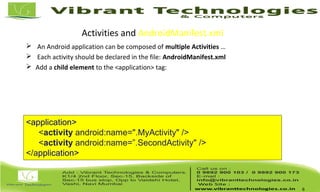
Activities and AndroidManifest.xml
 An Android application can be composed of multiple Activities …
 Each activity should be declared in the file: AndroidManifest.xml
 Add a child element to the <application> tag:
6
<application>
<activity android:name=".MyActivity" />
<activity android:name=”.SecondActivity" />
</application>
Activities and AndroidManifest.xml
 Each activity has its Java class and layout file.
7
public class FirstActivity extends Activity {
public void onCreate(Bundle savedInstanceState) {
super.onCreate(savedInstanceState);
setContentView(R.layout.activity_first);
}
public class SecondActivity extends Activity {
public void onCreate(Bundle savedInstanceState) {
super.onCreate(savedInstanceState);
setContentView(R.layout.activity_two);
}
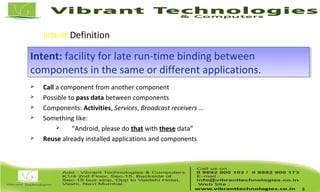
Intent Definition
 Call a component from another component
 Possible to pass data between components
 Components: Activities, Services, Broadcast receivers …
 Something like:
 “Android, please do that with these data”
 Reuse already installed applications and components
8
Intent: facility for late run-time binding between
components in the same or different applications.
Intent: facility for late run-time binding between
components in the same or different applications.
Intent Definition
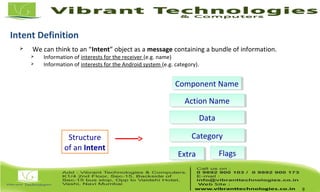
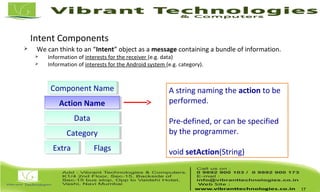
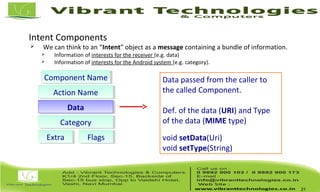
 We can think to an “Intent” object as a message containing a bundle of information.
 Information of interests for the receiver (e.g. name)
 Information of interests for the Android system (e.g. category).
9
Component NameComponent Name
Action NameAction Name
DataData
CategoryCategory
ExtraExtra FlagsFlags
Structure
of an Intent
10
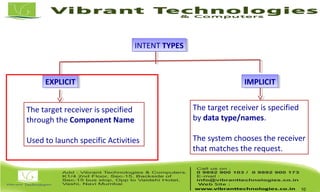
INTENT TYPESINTENT TYPES
EXPLICITEXPLICIT IMPLICITIMPLICIT
The target receiver is specified
through the Component Name
Used to launch specific Activities
The target receiver is specified
by data type/names.
The system chooses the receiver
that matches the request.
Intent Components
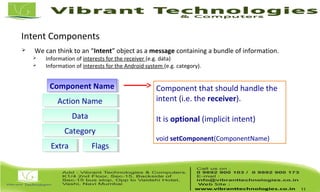
 We can think to an “Intent” object as a message containing a bundle of information.
 Information of interests for the receiver (e.g. data)
 Information of interests for the Android system (e.g. category).
11
Component NameComponent Name
Action NameAction Name
DataData
CategoryCategory
ExtraExtra FlagsFlags
Component that should handle the
intent (i.e. the receiver).
It is optional (implicit intent)
void setComponent(ComponentName)
Intent types: Explicit Intents
12
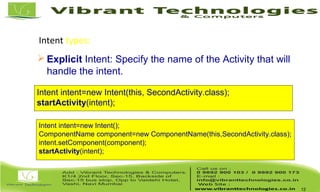
 Explicit Intent: Specify the name of the Activity that will
handle the intent.
Intent intent=new Intent(this, SecondActivity.class);
startActivity(intent);
Intent intent=new Intent();
ComponentName component=new ComponentName(this,SecondActivity.class);
intent.setComponent(component);
startActivity(intent);
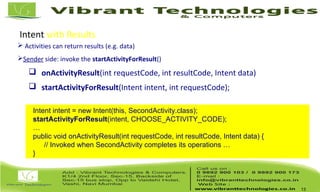
Intent with Results
 Activities can return results (e.g. data)
Sender side: invoke the startActivityForResult()
 onActivityResult(int requestCode, int resultCode, Intent data)
 startActivityForResult(Intent intent, int requestCode);
13
Intent intent = new Intent(this, SecondActivity.class);
startActivityForResult(intent, CHOOSE_ACTIVITY_CODE);
…
public void onActivityResult(int requestCode, int resultCode, Intent data) {
// Invoked when SecondActivity completes its operations …
}
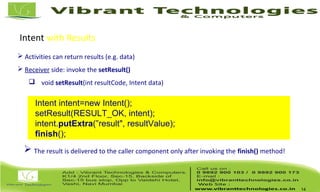
Intent with Results
 Activities can return results (e.g. data)
 Receiver side: invoke the setResult()
 void setResult(int resultCode, Intent data)
14
Intent intent=new Intent();
setResult(RESULT_OK, intent);
intent.putExtra(”result", resultValue);
finish();
 The result is delivered to the caller component only after invoking the finish() method!
15
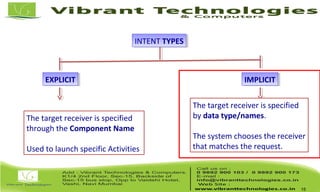
INTENT TYPESINTENT TYPES
EXPLICITEXPLICIT IMPLICITIMPLICIT
The target receiver is specified
through the Component Name
Used to launch specific Activities
The target receiver is specified
by data type/names.
The system chooses the receiver
that matches the request.
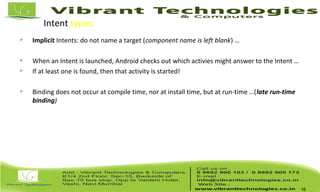
Intent types: Implicit Intents
 Implicit Intents: do not name a target (component name is left blank) …
 When an Intent is launched, Android checks out which activies might answer to the Intent …
 If at least one is found, then that activity is started!
 Binding does not occur at compile time, nor at install time, but at run-time …(late run-time
binding)
16
Intent Components
 We can think to an “Intent” object as a message containing a bundle of information.
 Information of interests for the receiver (e.g. data)
 Information of interests for the Android system (e.g. category).
17
Component NameComponent Name
Action NameAction Name
DataData
CategoryCategory
ExtraExtra FlagsFlags
A string naming the action to be
performed.
Pre-defined, or can be specified
by the programmer.
void setAction(String)
Intent Components
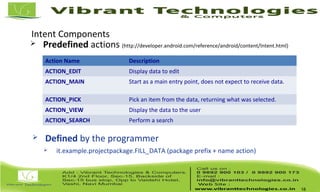
 Predefined actions (http://developer.android.com/reference/android/content/Intent.html)
18
Action Name Description
ACTION_EDIT Display data to edit
ACTION_MAIN Start as a main entry point, does not expect to receive data.
ACTION_PICK Pick an item from the data, returning what was selected.
ACTION_VIEW Display the data to the user
ACTION_SEARCH Perform a search
 Defined by the programmer
 it.example.projectpackage.FILL_DATA (package prefix + name action)
Intent Components
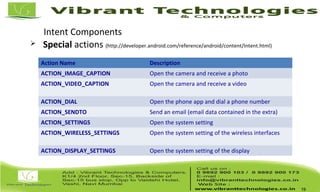
 Special actions (http://developer.android.com/reference/android/content/Intent.html)
19
Action Name Description
ACTION_IMAGE_CAPTION Open the camera and receive a photo
ACTION_VIDEO_CAPTION Open the camera and receive a video
ACTION_DIAL Open the phone app and dial a phone number
ACTION_SENDTO Send an email (email data contained in the extra)
ACTION_SETTINGS Open the system setting
ACTION_WIRELESS_SETTINGS Open the system setting of the wireless interfaces
ACTION_DISPLAY_SETTINGS Open the system setting of the display
Intent Components
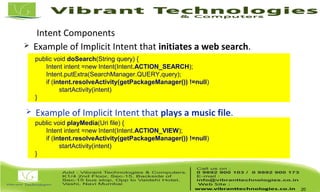
 Example of Implicit Intent that initiates a web search.
20
public void doSearch(String query) {
Intent intent =new Intent(Intent.ACTION_SEARCH);
Intent.putExtra(SearchManager.QUERY,query);
if (intent.resolveActivity(getPackageManager()) !=null)
startActivity(intent)
}
 Example of Implicit Intent that plays a music file.
public void playMedia(Uri file) {
Intent intent =new Intent(Intent.ACTION_VIEW);
if (intent.resolveActivity(getPackageManager()) !=null)
startActivity(intent)
}
Intent Components
 We can think to an “Intent” object as a message containing a bundle of information.
 Information of interests for the receiver (e.g. data)
 Information of interests for the Android system (e.g. category).
21
Component NameComponent Name
Action NameAction Name
DataData
CategoryCategory
ExtraExtra FlagsFlags
Data passed from the caller to
the called Component.
Def. of the data (URI) and Type
of the data (MIME type)
void setData(Uri)
void setType(String)
Intent Components
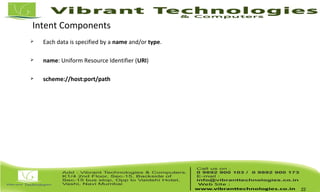
 Each data is specified by a name and/or type.
 name: Uniform Resource Identifier (URI)
 scheme://host:port/path
22
Intent Components
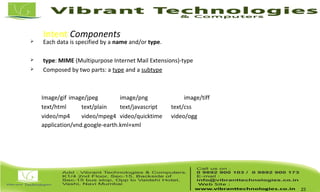
 Each data is specified by a name and/or type.
 type: MIME (Multipurpose Internet Mail Extensions)-type
 Composed by two parts: a type and a subtype
Image/gif image/jpeg image/png image/tiff
text/html text/plain text/javascript text/css
video/mp4 video/mpeg4 video/quicktime video/ogg
application/vnd.google-earth.kml+xml
23
Intent Components
 We can think to an “Intent” object as a message containing a bundle of information.
 Information of interests for the receiver (e.g. data)
 Information of interests for the Android system (e.g. category).
24
Component NameComponent Name
Action NameAction Name
DataData
CategoryCategory
ExtraExtra FlagsFlags
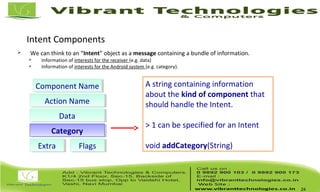
A string containing information
about the kind of component that
should handle the Intent.
> 1 can be specified for an Intent
void addCategory(String)
Intent Components
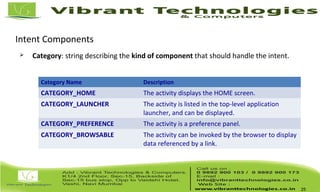
 Category: string describing the kind of component that should handle the intent.
25
Category Name Description
CATEGORY_HOME The activity displays the HOME screen.
CATEGORY_LAUNCHER The activity is listed in the top-level application
launcher, and can be displayed.
CATEGORY_PREFERENCE The activity is a preference panel.
CATEGORY_BROWSABLE The activity can be invoked by the browser to display
data referenced by a link.
Intent Components
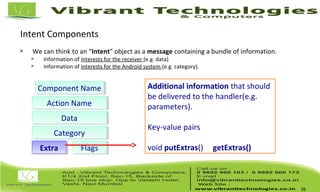
 We can think to an “Intent” object as a message containing a bundle of information.
 Information of interests for the receiver (e.g. data)
 Information of interests for the Android system (e.g. category).
26
Component NameComponent Name
Action NameAction Name
DataData
CategoryCategory
ExtraExtra FlagsFlags
Additional information that should
be delivered to the handler(e.g.
parameters).
Key-value pairs
void putExtras() getExtras()
Intent Components
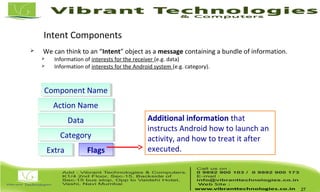
 We can think to an “Intent” object as a message containing a bundle of information.
 Information of interests for the receiver (e.g. data)
 Information of interests for the Android system (e.g. category).
27
Component NameComponent Name
Action NameAction Name
DataData
CategoryCategory
ExtraExtra FlagsFlags
Additional information that
instructs Android how to launch an
activity, and how to treat it after
executed.
Intent types: Implicit Intents
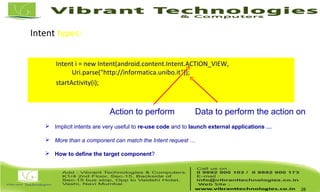
Intent i = new Intent(android.content.Intent.ACTION_VIEW,
Uri.parse("http://informatica.unibo.it"));
startActivity(i);
28
Action to perform Data to perform the action on
 Implicit intents are very useful to re-use code and to launch external applications …
 More than a component can match the Intent request …
 How to define the target component?
Intent types: Implicit Intents

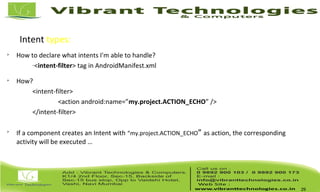
How to declare what intents I'm able to handle?
–
<intent-filter> tag in AndroidManifest.xml

How?
<intent-filter>
<action android:name=”my.project.ACTION_ECHO” />
</intent-filter>

If a component creates an Intent with “my.project.ACTION_ECHO” as action, the corresponding
activity will be executed …
29
Intent types: Intent Resolution
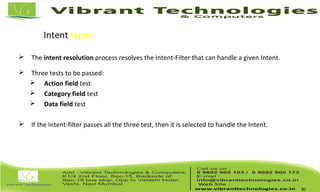
 The intent resolution process resolves the Intent-Filter that can handle a given Intent.
 Three tests to be passed:
 Action field test
 Category field test
 Data field test
 If the Intent-filter passes all the three test, then it is selected to handle the Intent.
30
Intent types: Intent Resolution
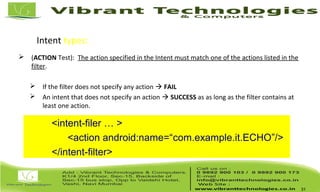
 (ACTION Test): The action specified in the Intent must match one of the actions listed in the
filter.
 If the filter does not specify any action  FAIL
 An intent that does not specify an action  SUCCESS as as long as the filter contains at
least one action.
31
<intent-filer … >
<action android:name=“com.example.it.ECHO”/>
</intent-filter>
Intent types: Intent Resolution
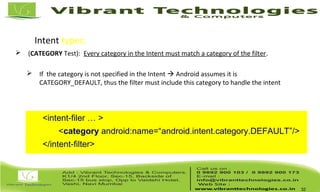
 (CATEGORY Test): Every category in the Intent must match a category of the filter.
 If the category is not specified in the Intent  Android assumes it is
CATEGORY_DEFAULT, thus the filter must include this category to handle the intent
32
<intent-filer … >
<category android:name=“android.intent.category.DEFAULT”/>
</intent-filter>
Intent types: Intent Resolution
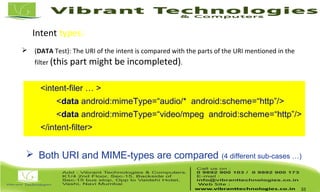
 (DATA Test): The URI of the intent is compared with the parts of the URI mentioned in the
filter (this part might be incompleted).
33
<intent-filer … >
<data android:mimeType=“audio/* android:scheme=“http”/>
<data android:mimeType=“video/mpeg android:scheme=“http”/>
</intent-filter>
 Both URI and MIME-types are compared (4 different sub-cases …)
Thank You !!!
For More Information click below link:
Follow Us on:
http://vibranttechnologies.co.in/android-classes-in-mumbai.html

Android - Android Intent Types

  • 2.
  • 3.
    Outline 3 Intent with results:Sender side Intent-Resolution process Handling implicit Intents Handling Explicit Intents Intent description What is an intent? Intent with results: Receiver side
  • 4.
    More on Activities:Activity states  Active (or running)  Foreground of the screen (top of the stack)  Paused  Lost focus but still visible  Can be killed by the system in extreme situations  Stopped  Completely obscured by another activity  Killed if memory is needed somewhere else 4
  • 5.
    More on Activities:Saving resources  An activity lifecycle flows between onCreate and onDestroy  Create, initialize everything you need in onCreate  Destroy everything that is not used anymore, such as background processes, in onDestroy  It is fundamental to save the data used by the application inbetween the state-transitions … 5
  • 6.
    Activities and AndroidManifest.xml An Android application can be composed of multiple Activities …  Each activity should be declared in the file: AndroidManifest.xml  Add a child element to the <application> tag: 6 <application> <activity android:name=".MyActivity" /> <activity android:name=”.SecondActivity" /> </application>
  • 7.
    Activities and AndroidManifest.xml Each activity has its Java class and layout file. 7 public class FirstActivity extends Activity { public void onCreate(Bundle savedInstanceState) { super.onCreate(savedInstanceState); setContentView(R.layout.activity_first); } public class SecondActivity extends Activity { public void onCreate(Bundle savedInstanceState) { super.onCreate(savedInstanceState); setContentView(R.layout.activity_two); }
  • 8.
    Intent Definition  Calla component from another component  Possible to pass data between components  Components: Activities, Services, Broadcast receivers …  Something like:  “Android, please do that with these data”  Reuse already installed applications and components 8 Intent: facility for late run-time binding between components in the same or different applications. Intent: facility for late run-time binding between components in the same or different applications.
  • 9.
    Intent Definition  Wecan think to an “Intent” object as a message containing a bundle of information.  Information of interests for the receiver (e.g. name)  Information of interests for the Android system (e.g. category). 9 Component NameComponent Name Action NameAction Name DataData CategoryCategory ExtraExtra FlagsFlags Structure of an Intent
  • 10.
    10 INTENT TYPESINTENT TYPES EXPLICITEXPLICITIMPLICITIMPLICIT The target receiver is specified through the Component Name Used to launch specific Activities The target receiver is specified by data type/names. The system chooses the receiver that matches the request.
  • 11.
    Intent Components  Wecan think to an “Intent” object as a message containing a bundle of information.  Information of interests for the receiver (e.g. data)  Information of interests for the Android system (e.g. category). 11 Component NameComponent Name Action NameAction Name DataData CategoryCategory ExtraExtra FlagsFlags Component that should handle the intent (i.e. the receiver). It is optional (implicit intent) void setComponent(ComponentName)
  • 12.
    Intent types: ExplicitIntents 12  Explicit Intent: Specify the name of the Activity that will handle the intent. Intent intent=new Intent(this, SecondActivity.class); startActivity(intent); Intent intent=new Intent(); ComponentName component=new ComponentName(this,SecondActivity.class); intent.setComponent(component); startActivity(intent);
  • 13.
    Intent with Results Activities can return results (e.g. data) Sender side: invoke the startActivityForResult()  onActivityResult(int requestCode, int resultCode, Intent data)  startActivityForResult(Intent intent, int requestCode); 13 Intent intent = new Intent(this, SecondActivity.class); startActivityForResult(intent, CHOOSE_ACTIVITY_CODE); … public void onActivityResult(int requestCode, int resultCode, Intent data) { // Invoked when SecondActivity completes its operations … }
  • 14.
    Intent with Results Activities can return results (e.g. data)  Receiver side: invoke the setResult()  void setResult(int resultCode, Intent data) 14 Intent intent=new Intent(); setResult(RESULT_OK, intent); intent.putExtra(”result", resultValue); finish();  The result is delivered to the caller component only after invoking the finish() method!
  • 15.
    15 INTENT TYPESINTENT TYPES EXPLICITEXPLICITIMPLICITIMPLICIT The target receiver is specified through the Component Name Used to launch specific Activities The target receiver is specified by data type/names. The system chooses the receiver that matches the request.
  • 16.
    Intent types: ImplicitIntents  Implicit Intents: do not name a target (component name is left blank) …  When an Intent is launched, Android checks out which activies might answer to the Intent …  If at least one is found, then that activity is started!  Binding does not occur at compile time, nor at install time, but at run-time …(late run-time binding) 16
  • 17.
    Intent Components  Wecan think to an “Intent” object as a message containing a bundle of information.  Information of interests for the receiver (e.g. data)  Information of interests for the Android system (e.g. category). 17 Component NameComponent Name Action NameAction Name DataData CategoryCategory ExtraExtra FlagsFlags A string naming the action to be performed. Pre-defined, or can be specified by the programmer. void setAction(String)
  • 18.
    Intent Components  Predefinedactions (http://developer.android.com/reference/android/content/Intent.html) 18 Action Name Description ACTION_EDIT Display data to edit ACTION_MAIN Start as a main entry point, does not expect to receive data. ACTION_PICK Pick an item from the data, returning what was selected. ACTION_VIEW Display the data to the user ACTION_SEARCH Perform a search  Defined by the programmer  it.example.projectpackage.FILL_DATA (package prefix + name action)
  • 19.
    Intent Components  Specialactions (http://developer.android.com/reference/android/content/Intent.html) 19 Action Name Description ACTION_IMAGE_CAPTION Open the camera and receive a photo ACTION_VIDEO_CAPTION Open the camera and receive a video ACTION_DIAL Open the phone app and dial a phone number ACTION_SENDTO Send an email (email data contained in the extra) ACTION_SETTINGS Open the system setting ACTION_WIRELESS_SETTINGS Open the system setting of the wireless interfaces ACTION_DISPLAY_SETTINGS Open the system setting of the display
  • 20.
    Intent Components  Exampleof Implicit Intent that initiates a web search. 20 public void doSearch(String query) { Intent intent =new Intent(Intent.ACTION_SEARCH); Intent.putExtra(SearchManager.QUERY,query); if (intent.resolveActivity(getPackageManager()) !=null) startActivity(intent) }  Example of Implicit Intent that plays a music file. public void playMedia(Uri file) { Intent intent =new Intent(Intent.ACTION_VIEW); if (intent.resolveActivity(getPackageManager()) !=null) startActivity(intent) }
  • 21.
    Intent Components  Wecan think to an “Intent” object as a message containing a bundle of information.  Information of interests for the receiver (e.g. data)  Information of interests for the Android system (e.g. category). 21 Component NameComponent Name Action NameAction Name DataData CategoryCategory ExtraExtra FlagsFlags Data passed from the caller to the called Component. Def. of the data (URI) and Type of the data (MIME type) void setData(Uri) void setType(String)
  • 22.
    Intent Components  Eachdata is specified by a name and/or type.  name: Uniform Resource Identifier (URI)  scheme://host:port/path 22
  • 23.
    Intent Components  Eachdata is specified by a name and/or type.  type: MIME (Multipurpose Internet Mail Extensions)-type  Composed by two parts: a type and a subtype Image/gif image/jpeg image/png image/tiff text/html text/plain text/javascript text/css video/mp4 video/mpeg4 video/quicktime video/ogg application/vnd.google-earth.kml+xml 23
  • 24.
    Intent Components  Wecan think to an “Intent” object as a message containing a bundle of information.  Information of interests for the receiver (e.g. data)  Information of interests for the Android system (e.g. category). 24 Component NameComponent Name Action NameAction Name DataData CategoryCategory ExtraExtra FlagsFlags A string containing information about the kind of component that should handle the Intent. > 1 can be specified for an Intent void addCategory(String)
  • 25.
    Intent Components  Category:string describing the kind of component that should handle the intent. 25 Category Name Description CATEGORY_HOME The activity displays the HOME screen. CATEGORY_LAUNCHER The activity is listed in the top-level application launcher, and can be displayed. CATEGORY_PREFERENCE The activity is a preference panel. CATEGORY_BROWSABLE The activity can be invoked by the browser to display data referenced by a link.
  • 26.
    Intent Components  Wecan think to an “Intent” object as a message containing a bundle of information.  Information of interests for the receiver (e.g. data)  Information of interests for the Android system (e.g. category). 26 Component NameComponent Name Action NameAction Name DataData CategoryCategory ExtraExtra FlagsFlags Additional information that should be delivered to the handler(e.g. parameters). Key-value pairs void putExtras() getExtras()
  • 27.
    Intent Components  Wecan think to an “Intent” object as a message containing a bundle of information.  Information of interests for the receiver (e.g. data)  Information of interests for the Android system (e.g. category). 27 Component NameComponent Name Action NameAction Name DataData CategoryCategory ExtraExtra FlagsFlags Additional information that instructs Android how to launch an activity, and how to treat it after executed.
  • 28.
    Intent types: ImplicitIntents Intent i = new Intent(android.content.Intent.ACTION_VIEW, Uri.parse("http://informatica.unibo.it")); startActivity(i); 28 Action to perform Data to perform the action on  Implicit intents are very useful to re-use code and to launch external applications …  More than a component can match the Intent request …  How to define the target component?
  • 29.
    Intent types: ImplicitIntents  How to declare what intents I'm able to handle? – <intent-filter> tag in AndroidManifest.xml  How? <intent-filter> <action android:name=”my.project.ACTION_ECHO” /> </intent-filter>  If a component creates an Intent with “my.project.ACTION_ECHO” as action, the corresponding activity will be executed … 29
  • 30.
    Intent types: IntentResolution  The intent resolution process resolves the Intent-Filter that can handle a given Intent.  Three tests to be passed:  Action field test  Category field test  Data field test  If the Intent-filter passes all the three test, then it is selected to handle the Intent. 30
  • 31.
    Intent types: IntentResolution  (ACTION Test): The action specified in the Intent must match one of the actions listed in the filter.  If the filter does not specify any action  FAIL  An intent that does not specify an action  SUCCESS as as long as the filter contains at least one action. 31 <intent-filer … > <action android:name=“com.example.it.ECHO”/> </intent-filter>
  • 32.
    Intent types: IntentResolution  (CATEGORY Test): Every category in the Intent must match a category of the filter.  If the category is not specified in the Intent  Android assumes it is CATEGORY_DEFAULT, thus the filter must include this category to handle the intent 32 <intent-filer … > <category android:name=“android.intent.category.DEFAULT”/> </intent-filter>
  • 33.
    Intent types: IntentResolution  (DATA Test): The URI of the intent is compared with the parts of the URI mentioned in the filter (this part might be incompleted). 33 <intent-filer … > <data android:mimeType=“audio/* android:scheme=“http”/> <data android:mimeType=“video/mpeg android:scheme=“http”/> </intent-filter>  Both URI and MIME-types are compared (4 different sub-cases …)
  • 34.
    Thank You !!! ForMore Information click below link: Follow Us on: http://vibranttechnologies.co.in/android-classes-in-mumbai.html