Silberschatz, Galvin and Gagne ©2013
Operating System Concepts – 9th Edit9on
Chapter 1: Introduction
1.2 Silberschatz, Galvin and Gagne ©2013
Operating System Concepts – 9th Edition
Chapter 1: Introduction
 What Operating Systems Do
 Computer-System Organization
 Computer-System Architecture
 Operating-System Structure
 Operating-System Operations
 Process Management
 Memory Management
 Storage Management
 Protection and Security
 Kernel Data Structures
 Computing Environments
 Open-Source Operating Systems
1.3 Silberschatz, Galvin and Gagne ©2013
Operating System Concepts – 9th Edition
Objectives
 To describe the basic organization of computer systems
 To provide a grand tour of the major components of operat
ing systems
 To give an overview of the many types of computing enviro
nments
 To explore several open-source operating systems
1.4 Silberschatz, Galvin and Gagne ©2013
Operating System Concepts – 9th Edition
What is an Operating System?
 A program that acts as an intermediary between a user of a com
puter and the computer hardware
 Operating system goals:
 Execute user programs and make solving user problems eas
ier
 Make the computer system convenient to use
 Use the computer hardware in an efficient manner
1.5 Silberschatz, Galvin and Gagne ©2013
Operating System Concepts – 9th Edition
Computer System Structure
 Computer system can be divided into four components:
 Hardware – provides basic computing resources
 CPU, memory, I/O devices
 Operating system
 Controls and coordinates use of hardware among various a
pplications and users
 Application programs – define the ways in which the system re
sources are used to solve the computing problems of the users
 Word processors, compilers, web browsers, database syste
ms, video games
 Users
 People, machines, other computers
1.6 Silberschatz, Galvin and Gagne ©2013
Operating System Concepts – 9th Edition
Four Components of a Computer System
1.7 Silberschatz, Galvin and Gagne ©2013
Operating System Concepts – 9th Edition
What Operating Systems Do
 Depends on the point of view
 Users want convenience, ease of use and good performance
 Don’t care about resource utilization
 But shared computer such as mainframe or minicomputer must
keep all users happy
 Users of dedicate systems such as workstations have dedicated
resources but frequently use shared resources from servers
 Handheld computers are resource poor, optimized for usability an
d battery life
 Some computers have little or no user interface, such as embedde
d computers in devices and automobiles
1.8 Silberschatz, Galvin and Gagne ©2013
Operating System Concepts – 9th Edition
Operating System Definition
 OS is a resource allocator
 Manages all resources
 Decides between conflicting requests for efficient and fai
r resource use
 OS is a control program
 Controls execution of programs to prevent errors and im
proper use of the computer
1.9 Silberschatz, Galvin and Gagne ©2013
Operating System Concepts – 9th Edition
Operating System Definition (Cont.)
 No universally accepted definition
 “Everything a vendor ships when you order an operating syst
em” is a good approximation
 But varies wildly
 “The one program running at all times on the computer” is th
e kernel.
 Everything else is either
 a system program (ships with the operating system) , or
 an application program.
1.10 Silberschatz, Galvin and Gagne ©2013
Operating System Concepts – 9th Edition
Computer Startup
 bootstrap program is loaded at power-up or reboot
 Typically stored in ROM or EPROM, generally known
as firmware
 Initializes all aspects of system
 Loads operating system kernel and starts execution
1.11 Silberschatz, Galvin and Gagne ©2013
Operating System Concepts – 9th Edition
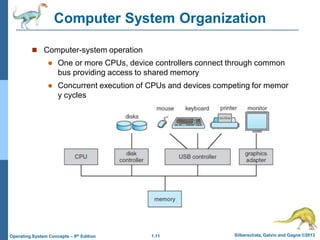
Computer System Organization
 Computer-system operation
 One or more CPUs, device controllers connect through common
bus providing access to shared memory
 Concurrent execution of CPUs and devices competing for memor
y cycles
1.12 Silberschatz, Galvin and Gagne ©2013
Operating System Concepts – 9th Edition
Computer-System Operation
 I/O devices and the CPU can execute concurrently
 Each device controller is in charge of a particular device type
 Each device controller has a local buffer
 CPU moves data from/to main memory to/from local buffers
 I/O is from the device to local buffer of controller
 Device controller informs CPU that it has finished its operatio
n by causing an interrupt
1.13 Silberschatz, Galvin and Gagne ©2013
Operating System Concepts – 9th Edition
Common Functions of Interrupts
 Interrupt transfers control to the interrupt service routine ge
nerally, through the interrupt vector, which contains the ad
dresses of all the service routines
 Interrupt architecture must save the address of the interrupt
ed instruction
 A trap or exception is a software-generated interrupt caus
ed either by an error or a user request
 An operating system is interrupt driven
1.14 Silberschatz, Galvin and Gagne ©2013
Operating System Concepts – 9th Edition
Interrupt Handling
 The operating system preserves the state of the CPU by sto
ring registers and the program counter
 Determines which type of interrupt has occurred:
 polling
 vectored interrupt system
 Separate segments of code determine what action should b
e taken for each type of interrupt
1.15 Silberschatz, Galvin and Gagne ©2013
Operating System Concepts – 9th Edition
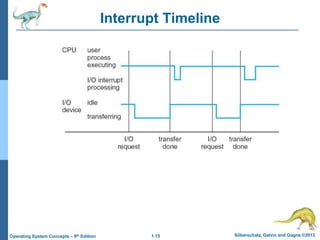
Interrupt Timeline
1.16 Silberschatz, Galvin and Gagne ©2013
Operating System Concepts – 9th Edition
I/O Structure
 After I/O starts, control returns to user program only upon I/O
completion
 Wait instruction idles the CPU until the next interrupt
 Wait loop (contention for memory access)
 At most one I/O request is outstanding at a time, no simult
aneous I/O processing
 After I/O starts, control returns to user program without waiting
for I/O completion
 System call – request to the OS to allow user to wait for I/
O completion
 Device-status table contains entry for each I/O device ind
icating its type, address, and state
 OS indexes into I/O device table to determine device statu
s and to modify table entry to include interrupt
1.17 Silberschatz, Galvin and Gagne ©2013
Operating System Concepts – 9th Edition
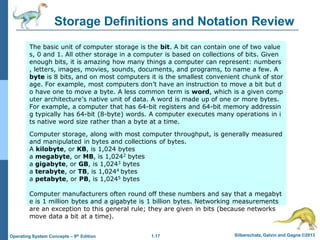
Storage Definitions and Notation Review
The basic unit of computer storage is the bit. A bit can contain one of two value
s, 0 and 1. All other storage in a computer is based on collections of bits. Given
enough bits, it is amazing how many things a computer can represent: numbers
, letters, images, movies, sounds, documents, and programs, to name a few. A
byte is 8 bits, and on most computers it is the smallest convenient chunk of stor
age. For example, most computers don’t have an instruction to move a bit but d
o have one to move a byte. A less common term is word, which is a given comp
uter architecture’s native unit of data. A word is made up of one or more bytes.
For example, a computer that has 64-bit registers and 64-bit memory addressin
g typically has 64-bit (8-byte) words. A computer executes many operations in i
ts native word size rather than a byte at a time.
Computer storage, along with most computer throughput, is generally measured
and manipulated in bytes and collections of bytes.
A kilobyte, or KB, is 1,024 bytes
a megabyte, or MB, is 1,0242 bytes
a gigabyte, or GB, is 1,0243 bytes
a terabyte, or TB, is 1,0244 bytes
a petabyte, or PB, is 1,0245 bytes
Computer manufacturers often round off these numbers and say that a megabyt
e is 1 million bytes and a gigabyte is 1 billion bytes. Networking measurements
are an exception to this general rule; they are given in bits (because networks
move data a bit at a time).
1.18 Silberschatz, Galvin and Gagne ©2013
Operating System Concepts – 9th Edition
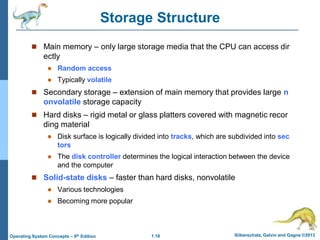
Storage Structure
 Main memory – only large storage media that the CPU can access dir
ectly
 Random access
 Typically volatile
 Secondary storage – extension of main memory that provides large n
onvolatile storage capacity
 Hard disks – rigid metal or glass platters covered with magnetic recor
ding material
 Disk surface is logically divided into tracks, which are subdivided into sec
tors
 The disk controller determines the logical interaction between the device
and the computer
 Solid-state disks – faster than hard disks, nonvolatile
 Various technologies
 Becoming more popular
1.19 Silberschatz, Galvin and Gagne ©2013
Operating System Concepts – 9th Edition
Storage Hierarchy
 Storage systems organized in hierarchy
 Speed
 Cost
 Volatility
 Caching – copying information into faster storage system;
main memory can be viewed as a cache for secondary sto
rage
 Device Driver for each device controller to manage I/O
 Provides uniform interface between controller and kern
el
1.20 Silberschatz, Galvin and Gagne ©2013
Operating System Concepts – 9th Edition
Storage-Device Hierarchy
1.21 Silberschatz, Galvin and Gagne ©2013
Operating System Concepts – 9th Edition
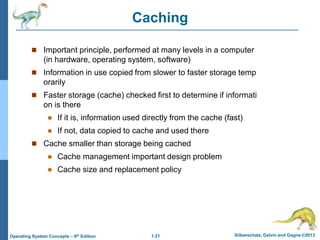
Caching
 Important principle, performed at many levels in a computer
(in hardware, operating system, software)
 Information in use copied from slower to faster storage temp
orarily
 Faster storage (cache) checked first to determine if informati
on is there
 If it is, information used directly from the cache (fast)
 If not, data copied to cache and used there
 Cache smaller than storage being cached
 Cache management important design problem
 Cache size and replacement policy
1.22 Silberschatz, Galvin and Gagne ©2013
Operating System Concepts – 9th Edition
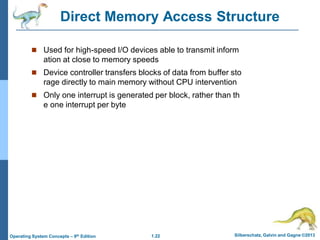
Direct Memory Access Structure
 Used for high-speed I/O devices able to transmit inform
ation at close to memory speeds
 Device controller transfers blocks of data from buffer sto
rage directly to main memory without CPU intervention
 Only one interrupt is generated per block, rather than th
e one interrupt per byte
1.23 Silberschatz, Galvin and Gagne ©2013
Operating System Concepts – 9th Edition
How a Modern Computer Works
A von Neumann architecture
1.24 Silberschatz, Galvin and Gagne ©2013
Operating System Concepts – 9th Edition
Computer-System Architecture
 Most systems use a single general-purpose processor
 Most systems have special-purpose processors as well
 Multiprocessors systems growing in use and importance
 Also known as parallel systems, tightly-coupled systems
 Advantages include:
1. Increased throughput
2. Economy of scale
3. Increased reliability – graceful degradation or fault tolerance
 Two types:
1. Asymmetric Multiprocessing – each processor is assigned a speci
e task.
2. Symmetric Multiprocessing – each processor performs all tasks
1.25 Silberschatz, Galvin and Gagne ©2013
Operating System Concepts – 9th Edition
Symmetric Multiprocessing Architecture
1.26 Silberschatz, Galvin and Gagne ©2013
Operating System Concepts – 9th Edition
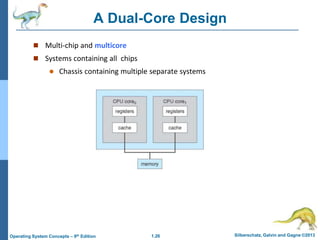
A Dual-Core Design
 Multi-chip and multicore
 Systems containing all chips
 Chassis containing multiple separate systems
1.27 Silberschatz, Galvin and Gagne ©2013
Operating System Concepts – 9th Edition
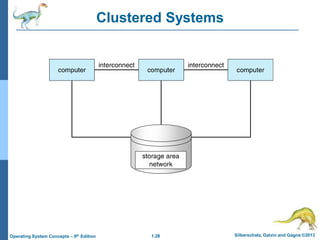
Clustered Systems
 Like multiprocessor systems, but multiple systems working together
 Usually sharing storage via a storage-area network (SAN)
 Provides a high-availability service which survives failures
 Asymmetric clustering has one machine in hot-standby mode
 Symmetric clustering has multiple nodes running applications, mon
itoring each other
 Some clusters are for high-performance computing (HPC)
 Applications must be written to use parallelization
 Some have distributed lock manager (DLM) to avoid conflicting operat
ions
1.28 Silberschatz, Galvin and Gagne ©2013
Operating System Concepts – 9th Edition
Clustered Systems
1.29 Silberschatz, Galvin and Gagne ©2013
Operating System Concepts – 9th Edition
Operating System Structure
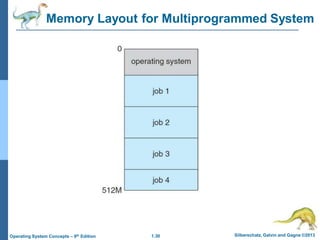
 Multiprogramming (Batch system) needed for efficiency
 Single user cannot keep CPU and I/O devices busy at all times
 Multiprogramming organizes jobs (code and data) so CPU always has one t
o execute
 A subset of total jobs in system is kept in memory
 One job selected and run via job scheduling
 When it has to wait (for I/O for example), OS switches to another job
 Timesharing (multitasking) is logical extension in which CPU switches jobs
so frequently that users can interact with each job while it is running, creating int
eractive computing
 Response time should be < 1 second
 Each user has at least one program executing in memory process
 If several jobs ready to run at the same time  CPU scheduling
 If processes don’t fit in memory, swapping moves them in and out to run
 Virtual memory allows execution of processes not completely in memory
1.30 Silberschatz, Galvin and Gagne ©2013
Operating System Concepts – 9th Edition
Memory Layout for Multiprogrammed System
1.31 Silberschatz, Galvin and Gagne ©2013
Operating System Concepts – 9th Edition
Operating-System Operations
 Interrupt driven (hardware and software)
 Hardware interrupt by one of the devices
 Software interrupt (exception or trap):
 Software error (e.g., division by zero)
 Request for operating system service
 Other process problems include infinite loop, processes
modifying each other or the operating system
1.32 Silberschatz, Galvin and Gagne ©2013
Operating System Concepts – 9th Edition
Operating-System Operations (cont.)
 Dual-mode operation allows OS to protect itself and other system
components
 User mode and kernel mode
 Mode bit provided by hardware
 Provides ability to distinguish when system is running user
code or kernel code
 Some instructions designated as privileged, only executab
le in kernel mode
 System call changes mode to kernel, return from call resets
it to user
 Increasingly CPUs support multi-mode operations
 i.e. virtual machine manager (VMM) mode for guest VMs
1.33 Silberschatz, Galvin and Gagne ©2013
Operating System Concepts – 9th Edition
Transition from User to Kernel Mode
 Timer to prevent infinite loop / process hogging resources
 Timer is set to interrupt the computer after some time period
 Keep a counter that is decremented by the physical clock.
 Operating system set the counter (privileged instruction)
 When counter zero generate an interrupt
 Set up before scheduling process to regain control or terminate pro
gram that exceeds allotted time
1.34 Silberschatz, Galvin and Gagne ©2013
Operating System Concepts – 9th Edition
Process Management
 A process is a program in execution. It is a unit of work within the
system. Program is a passive entity, process is an active entity.
 Process needs resources to accomplish its task
 CPU, memory, I/O, files
 Initialization data
 Process termination requires reclaim of any reusable resources
 Single-threaded process has one program counter specifying lo
cation of next instruction to execute
 Process executes instructions sequentially, one at a time, unti
l completion
 Multi-threaded process has one program counter per thread
 Typically system has many processes, some user, some operatin
g system running concurrently on one or more CPUs
 Concurrency by multiplexing the CPUs among the processes
/ threads
1.35 Silberschatz, Galvin and Gagne ©2013
Operating System Concepts – 9th Edition
Process Management Activities
 Creating and deleting both user and system processes
 Suspending and resuming processes
 Providing mechanisms for process synchronization
 Providing mechanisms for process communication
 Providing mechanisms for deadlock handling
The operating system is responsible for the following activities in connect
ion with process management:
1.36 Silberschatz, Galvin and Gagne ©2013
Operating System Concepts – 9th Edition
Memory Management
 To execute a program all (or part) of the instructions must be in
memory
 All (or part) of the data that is needed by the program must be in
memory.
 Memory management determines what is in memory and when
 Optimizing CPU utilization and computer response to users
 Memory management activities
 Keeping track of which parts of memory are currently being u
sed and by whom
 Deciding which processes (or parts thereof) and data to mov
e into and out of memory
 Allocating and deallocating memory space as needed
1.37 Silberschatz, Galvin and Gagne ©2013
Operating System Concepts – 9th Edition
Storage Management
 OS provides uniform, logical view of information storage
 Abstracts physical properties to logical storage unit - file
 Each medium is controlled by device (i.e., disk drive, tape drive)
 Varying properties include access speed, capacity, data-tran
sfer rate, access method (sequential or random)
 File-System management
 Files usually organized into directories
 Access control on most systems to determine who can access
what
 OS activities include
 Creating and deleting files and directories
 Primitives to manipulate files and directories
 Mapping files onto secondary storage
 Backup files onto stable (non-volatile) storage media
1.38 Silberschatz, Galvin and Gagne ©2013
Operating System Concepts – 9th Edition
Mass-Storage Management
 Usually disks used to store data that does not fit in main memory or d
ata that must be kept for a “long” period of time
 Proper management is of central importance
 Entire speed of computer operation hinges on disk subsystem and its
algorithms
 OS activities
 Free-space management
 Storage allocation
 Disk scheduling
 Some storage need not be fast
 Tertiary storage includes optical storage, magnetic tape
 Still must be managed – by OS or applications
 Varies between WORM (write-once, read-many-times) and RW (r
ead-write)
1.39 Silberschatz, Galvin and Gagne ©2013
Operating System Concepts – 9th Edition
Performance of Various Levels of Storage
Movement between levels of storage hierarchy can be explicit or implicit
1.40 Silberschatz, Galvin and Gagne ©2013
Operating System Concepts – 9th Edition
Migration of data “A” from Disk to Register
 Multitasking environments must be careful to use most recent value
, no matter where it is stored in the storage hierarchy
 Multiprocessor environment must provide cache coherency in hard
ware such that all CPUs have the most recent value in their cache
 Distributed environment situation even more complex
 Several copies of a datum can exist
 Various solutions covered in Chapter 17
1.41 Silberschatz, Galvin and Gagne ©2013
Operating System Concepts – 9th Edition
I/O Subsystem
 One purpose of OS is to hide peculiarities of hardware devices fro
m the user
 I/O subsystem responsible for
 Memory management of I/O including buffering (storing data t
emporarily while it is being transferred), caching (storing parts
of data in faster storage for performance), spooling (the overla
pping of output of one job with input of other jobs)
 General device-driver interface
 Drivers for specific hardware devices
1.42 Silberschatz, Galvin and Gagne ©2013
Operating System Concepts – 9th Edition
Protection and Security
 Protection – any mechanism for controlling access of processes or u
sers to resources defined by the OS
 Security – defense of the system against internal and external attacks
 Huge range, including denial-of-service, worms, viruses, identity th
eft, theft of service
 Systems generally first distinguish among users, to determine who ca
n do what
 User identities (user IDs, security IDs) include name and associat
ed number, one per user
 User ID then associated with all files, processes of that user to det
ermine access control
 Group identifier (group ID) allows set of users to be defined and c
ontrols managed, then also associated with each process, file
 Privilege escalation allows user to change to effective ID with mo
re rights
1.43 Silberschatz, Galvin and Gagne ©2013
Operating System Concepts – 9th Edition
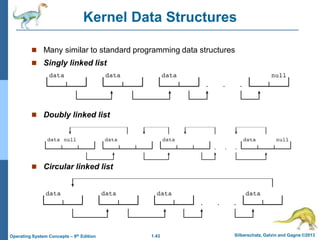
Kernel Data Structures
 Many similar to standard programming data structures
 Singly linked list
 Doubly linked list
 Circular linked list
1.44 Silberschatz, Galvin and Gagne ©2013
Operating System Concepts – 9th Edition
Kernel Data Structures
 Binary search tree
left <= right
 Search performance is O(n)
 Balanced binary search tree is O(lg n)
1.45 Silberschatz, Galvin and Gagne ©2013
Operating System Concepts – 9th Edition
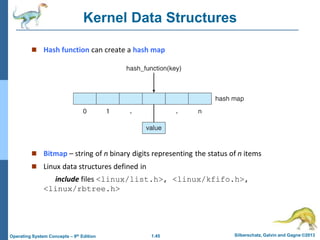
Kernel Data Structures
 Hash function can create a hash map
 Bitmap – string of n binary digits representing the status of n items
 Linux data structures defined in
include files <linux/list.h>, <linux/kfifo.h>,
<linux/rbtree.h>
1.46 Silberschatz, Galvin and Gagne ©2013
Operating System Concepts – 9th Edition
Computing Environments - Traditional
 Stand-alone general purpose machines
 But blurred as most systems interconnect with others (i.e., t
he Internet)
 Portals provide web access to internal systems
 Network computers (thin clients) are like Web terminals
 Mobile computers interconnect via wireless networks
 Networking becoming ubiquitous – even home systems use
firewalls to protect home computers from Internet attacks
1.47 Silberschatz, Galvin and Gagne ©2013
Operating System Concepts – 9th Edition
Computing Environments - Mobile
 Handheld smartphones, tablets, etc
 What is the functional difference between them and a “traditio
nal” laptop?
 Extra feature – more OS features (GPS, gyroscope)
 Allows new types of apps like augmented reality
 Use IEEE 802.11 wireless, or cellular data networks for conne
ctivity
 Leaders are Apple iOS and Google Android
1.48 Silberschatz, Galvin and Gagne ©2013
Operating System Concepts – 9th Edition
Computing Environments – Distributed
 Distributed computiing
 Collection of separate, possibly heterogeneous, systems netw
orked together
 Network is a communications path, TCP/IP most common
– Local Area Network (LAN)
– Wide Area Network (WAN)
– Metropolitan Area Network (MAN)
– Personal Area Network (PAN)
 Network Operating System provides features between syste
ms across network
 Communication scheme allows systems to exchange mess
ages
 Illusion of a single system
1.49 Silberschatz, Galvin and Gagne ©2013
Operating System Concepts – 9th Edition
Computing Environments – Client-Server
 Client-Server Computing
 Dumb terminals supplanted by smart PCs
 Many systems now servers, responding to requests generated
by clients
 Compute-server system provides an interface to client to r
equest services (i.e., database)
 File-server system provides interface for clients to store an
d retrieve files
1.50 Silberschatz, Galvin and Gagne ©2013
Operating System Concepts – 9th Edition
Computing Environments - Peer-to-Peer
 Another model of distributed system
 P2P does not distinguish clients and servers
 Instead all nodes are considered peers
 May each act as client, server or both
 Node must join P2P network
 Registers its service with central look
up service on network, or
 Broadcast request for service and re
spond to requests for service via dis
covery protocol
 Examples include Napster and Gnutella,
Voice over IP (VoIP) such as Skype
1.51 Silberschatz, Galvin and Gagne ©2013
Operating System Concepts – 9th Edition
Computing Environments - Virtualization
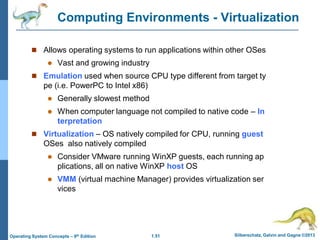
 Allows operating systems to run applications within other OSes
 Vast and growing industry
 Emulation used when source CPU type different from target ty
pe (i.e. PowerPC to Intel x86)
 Generally slowest method
 When computer language not compiled to native code – In
terpretation
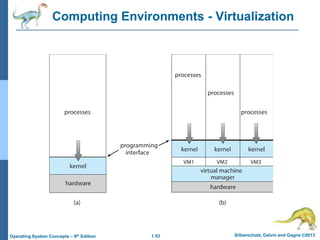
 Virtualization – OS natively compiled for CPU, running guest
OSes also natively compiled
 Consider VMware running WinXP guests, each running ap
plications, all on native WinXP host OS
 VMM (virtual machine Manager) provides virtualization ser
vices
1.52 Silberschatz, Galvin and Gagne ©2013
Operating System Concepts – 9th Edition
Computing Environments - Virtualization
 Use cases involve laptops and desktops running multiple OSes f
or exploration or compatibility
 Apple laptop running Mac OS X host, Windows as a guest
 Developing apps for multiple OSes without having multiple s
ystems
 QA testing applications without having multiple systems
 Executing and managing compute environments within data
centers
 VMM can run natively, in which case they are also the host
 There is no general purpose host then (VMware ESX and Ci
trix XenServer)
1.53 Silberschatz, Galvin and Gagne ©2013
Operating System Concepts – 9th Edition
Computing Environments - Virtualization
1.54 Silberschatz, Galvin and Gagne ©2013
Operating System Concepts – 9th Edition
Computing Environments – Cloud Computing
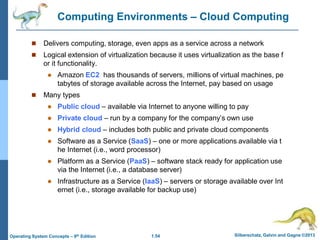
 Delivers computing, storage, even apps as a service across a network
 Logical extension of virtualization because it uses virtualization as the base f
or it functionality.
 Amazon EC2 has thousands of servers, millions of virtual machines, pe
tabytes of storage available across the Internet, pay based on usage
 Many types
 Public cloud – available via Internet to anyone willing to pay
 Private cloud – run by a company for the company’s own use
 Hybrid cloud – includes both public and private cloud components
 Software as a Service (SaaS) – one or more applications available via t
he Internet (i.e., word processor)
 Platform as a Service (PaaS) – software stack ready for application use
via the Internet (i.e., a database server)
 Infrastructure as a Service (IaaS) – servers or storage available over Int
ernet (i.e., storage available for backup use)
1.55 Silberschatz, Galvin and Gagne ©2013
Operating System Concepts – 9th Edition
Computing Environments – Cloud Computing
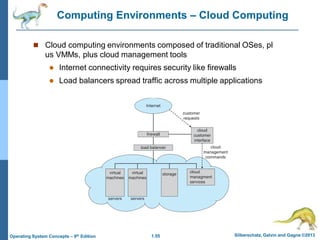
 Cloud computing environments composed of traditional OSes, pl
us VMMs, plus cloud management tools
 Internet connectivity requires security like firewalls
 Load balancers spread traffic across multiple applications
1.56 Silberschatz, Galvin and Gagne ©2013
Operating System Concepts – 9th Edition
Computing Environments – Real-Time Embedded Systems
 Real-time embedded systems most prevalent form of computers
 Vary considerable, special purpose, limited purpose OS, rea
l-time OS
 Use expanding
 Many other special computing environments as well
 Some have OSes, some perform tasks without an OS
 Real-time OS has well-defined fixed time constraints
 Processing must be done within constraint
 Correct operation only if constraints met
1.57 Silberschatz, Galvin and Gagne ©2013
Operating System Concepts – 9th Edition
Open-Source Operating Systems
 Operating systems made available in source-code format rather t
han just binary closed-source
 Counter to the copy protection and Digital Rights Managemen
t (DRM) movement
 Started by Free Software Foundation (FSF), which has “copylef
t” GNU Public License (GPL)
 Examples include GNU/Linux and BSD UNIX (including core of
Mac OS X), and many more
 Can use VMM like VMware Player (Free on Windows), Virtualbox
(open source and free on many platforms - http://www.virtualbox.
com)
 Use to run guest operating systems for exploration
Silberschatz, Galvin and Gagne ©2013
Operating System Concepts – 9th Edit9on
End of Chapter 1

An operating system (OS) is system software that manages computer hardware and software resources, and provides common services for computer programs.

  • 1.
    Silberschatz, Galvin andGagne ©2013 Operating System Concepts – 9th Edit9on Chapter 1: Introduction
  • 2.
    1.2 Silberschatz, Galvinand Gagne ©2013 Operating System Concepts – 9th Edition Chapter 1: Introduction  What Operating Systems Do  Computer-System Organization  Computer-System Architecture  Operating-System Structure  Operating-System Operations  Process Management  Memory Management  Storage Management  Protection and Security  Kernel Data Structures  Computing Environments  Open-Source Operating Systems
  • 3.
    1.3 Silberschatz, Galvinand Gagne ©2013 Operating System Concepts – 9th Edition Objectives  To describe the basic organization of computer systems  To provide a grand tour of the major components of operat ing systems  To give an overview of the many types of computing enviro nments  To explore several open-source operating systems
  • 4.
    1.4 Silberschatz, Galvinand Gagne ©2013 Operating System Concepts – 9th Edition What is an Operating System?  A program that acts as an intermediary between a user of a com puter and the computer hardware  Operating system goals:  Execute user programs and make solving user problems eas ier  Make the computer system convenient to use  Use the computer hardware in an efficient manner
  • 5.
    1.5 Silberschatz, Galvinand Gagne ©2013 Operating System Concepts – 9th Edition Computer System Structure  Computer system can be divided into four components:  Hardware – provides basic computing resources  CPU, memory, I/O devices  Operating system  Controls and coordinates use of hardware among various a pplications and users  Application programs – define the ways in which the system re sources are used to solve the computing problems of the users  Word processors, compilers, web browsers, database syste ms, video games  Users  People, machines, other computers
  • 6.
    1.6 Silberschatz, Galvinand Gagne ©2013 Operating System Concepts – 9th Edition Four Components of a Computer System
  • 7.
    1.7 Silberschatz, Galvinand Gagne ©2013 Operating System Concepts – 9th Edition What Operating Systems Do  Depends on the point of view  Users want convenience, ease of use and good performance  Don’t care about resource utilization  But shared computer such as mainframe or minicomputer must keep all users happy  Users of dedicate systems such as workstations have dedicated resources but frequently use shared resources from servers  Handheld computers are resource poor, optimized for usability an d battery life  Some computers have little or no user interface, such as embedde d computers in devices and automobiles
  • 8.
    1.8 Silberschatz, Galvinand Gagne ©2013 Operating System Concepts – 9th Edition Operating System Definition  OS is a resource allocator  Manages all resources  Decides between conflicting requests for efficient and fai r resource use  OS is a control program  Controls execution of programs to prevent errors and im proper use of the computer
  • 9.
    1.9 Silberschatz, Galvinand Gagne ©2013 Operating System Concepts – 9th Edition Operating System Definition (Cont.)  No universally accepted definition  “Everything a vendor ships when you order an operating syst em” is a good approximation  But varies wildly  “The one program running at all times on the computer” is th e kernel.  Everything else is either  a system program (ships with the operating system) , or  an application program.
  • 10.
    1.10 Silberschatz, Galvinand Gagne ©2013 Operating System Concepts – 9th Edition Computer Startup  bootstrap program is loaded at power-up or reboot  Typically stored in ROM or EPROM, generally known as firmware  Initializes all aspects of system  Loads operating system kernel and starts execution
  • 11.
    1.11 Silberschatz, Galvinand Gagne ©2013 Operating System Concepts – 9th Edition Computer System Organization  Computer-system operation  One or more CPUs, device controllers connect through common bus providing access to shared memory  Concurrent execution of CPUs and devices competing for memor y cycles
  • 12.
    1.12 Silberschatz, Galvinand Gagne ©2013 Operating System Concepts – 9th Edition Computer-System Operation  I/O devices and the CPU can execute concurrently  Each device controller is in charge of a particular device type  Each device controller has a local buffer  CPU moves data from/to main memory to/from local buffers  I/O is from the device to local buffer of controller  Device controller informs CPU that it has finished its operatio n by causing an interrupt
  • 13.
    1.13 Silberschatz, Galvinand Gagne ©2013 Operating System Concepts – 9th Edition Common Functions of Interrupts  Interrupt transfers control to the interrupt service routine ge nerally, through the interrupt vector, which contains the ad dresses of all the service routines  Interrupt architecture must save the address of the interrupt ed instruction  A trap or exception is a software-generated interrupt caus ed either by an error or a user request  An operating system is interrupt driven
  • 14.
    1.14 Silberschatz, Galvinand Gagne ©2013 Operating System Concepts – 9th Edition Interrupt Handling  The operating system preserves the state of the CPU by sto ring registers and the program counter  Determines which type of interrupt has occurred:  polling  vectored interrupt system  Separate segments of code determine what action should b e taken for each type of interrupt
  • 15.
    1.15 Silberschatz, Galvinand Gagne ©2013 Operating System Concepts – 9th Edition Interrupt Timeline
  • 16.
    1.16 Silberschatz, Galvinand Gagne ©2013 Operating System Concepts – 9th Edition I/O Structure  After I/O starts, control returns to user program only upon I/O completion  Wait instruction idles the CPU until the next interrupt  Wait loop (contention for memory access)  At most one I/O request is outstanding at a time, no simult aneous I/O processing  After I/O starts, control returns to user program without waiting for I/O completion  System call – request to the OS to allow user to wait for I/ O completion  Device-status table contains entry for each I/O device ind icating its type, address, and state  OS indexes into I/O device table to determine device statu s and to modify table entry to include interrupt
  • 17.
    1.17 Silberschatz, Galvinand Gagne ©2013 Operating System Concepts – 9th Edition Storage Definitions and Notation Review The basic unit of computer storage is the bit. A bit can contain one of two value s, 0 and 1. All other storage in a computer is based on collections of bits. Given enough bits, it is amazing how many things a computer can represent: numbers , letters, images, movies, sounds, documents, and programs, to name a few. A byte is 8 bits, and on most computers it is the smallest convenient chunk of stor age. For example, most computers don’t have an instruction to move a bit but d o have one to move a byte. A less common term is word, which is a given comp uter architecture’s native unit of data. A word is made up of one or more bytes. For example, a computer that has 64-bit registers and 64-bit memory addressin g typically has 64-bit (8-byte) words. A computer executes many operations in i ts native word size rather than a byte at a time. Computer storage, along with most computer throughput, is generally measured and manipulated in bytes and collections of bytes. A kilobyte, or KB, is 1,024 bytes a megabyte, or MB, is 1,0242 bytes a gigabyte, or GB, is 1,0243 bytes a terabyte, or TB, is 1,0244 bytes a petabyte, or PB, is 1,0245 bytes Computer manufacturers often round off these numbers and say that a megabyt e is 1 million bytes and a gigabyte is 1 billion bytes. Networking measurements are an exception to this general rule; they are given in bits (because networks move data a bit at a time).
  • 18.
    1.18 Silberschatz, Galvinand Gagne ©2013 Operating System Concepts – 9th Edition Storage Structure  Main memory – only large storage media that the CPU can access dir ectly  Random access  Typically volatile  Secondary storage – extension of main memory that provides large n onvolatile storage capacity  Hard disks – rigid metal or glass platters covered with magnetic recor ding material  Disk surface is logically divided into tracks, which are subdivided into sec tors  The disk controller determines the logical interaction between the device and the computer  Solid-state disks – faster than hard disks, nonvolatile  Various technologies  Becoming more popular
  • 19.
    1.19 Silberschatz, Galvinand Gagne ©2013 Operating System Concepts – 9th Edition Storage Hierarchy  Storage systems organized in hierarchy  Speed  Cost  Volatility  Caching – copying information into faster storage system; main memory can be viewed as a cache for secondary sto rage  Device Driver for each device controller to manage I/O  Provides uniform interface between controller and kern el
  • 20.
    1.20 Silberschatz, Galvinand Gagne ©2013 Operating System Concepts – 9th Edition Storage-Device Hierarchy
  • 21.
    1.21 Silberschatz, Galvinand Gagne ©2013 Operating System Concepts – 9th Edition Caching  Important principle, performed at many levels in a computer (in hardware, operating system, software)  Information in use copied from slower to faster storage temp orarily  Faster storage (cache) checked first to determine if informati on is there  If it is, information used directly from the cache (fast)  If not, data copied to cache and used there  Cache smaller than storage being cached  Cache management important design problem  Cache size and replacement policy
  • 22.
    1.22 Silberschatz, Galvinand Gagne ©2013 Operating System Concepts – 9th Edition Direct Memory Access Structure  Used for high-speed I/O devices able to transmit inform ation at close to memory speeds  Device controller transfers blocks of data from buffer sto rage directly to main memory without CPU intervention  Only one interrupt is generated per block, rather than th e one interrupt per byte
  • 23.
    1.23 Silberschatz, Galvinand Gagne ©2013 Operating System Concepts – 9th Edition How a Modern Computer Works A von Neumann architecture
  • 24.
    1.24 Silberschatz, Galvinand Gagne ©2013 Operating System Concepts – 9th Edition Computer-System Architecture  Most systems use a single general-purpose processor  Most systems have special-purpose processors as well  Multiprocessors systems growing in use and importance  Also known as parallel systems, tightly-coupled systems  Advantages include: 1. Increased throughput 2. Economy of scale 3. Increased reliability – graceful degradation or fault tolerance  Two types: 1. Asymmetric Multiprocessing – each processor is assigned a speci e task. 2. Symmetric Multiprocessing – each processor performs all tasks
  • 25.
    1.25 Silberschatz, Galvinand Gagne ©2013 Operating System Concepts – 9th Edition Symmetric Multiprocessing Architecture
  • 26.
    1.26 Silberschatz, Galvinand Gagne ©2013 Operating System Concepts – 9th Edition A Dual-Core Design  Multi-chip and multicore  Systems containing all chips  Chassis containing multiple separate systems
  • 27.
    1.27 Silberschatz, Galvinand Gagne ©2013 Operating System Concepts – 9th Edition Clustered Systems  Like multiprocessor systems, but multiple systems working together  Usually sharing storage via a storage-area network (SAN)  Provides a high-availability service which survives failures  Asymmetric clustering has one machine in hot-standby mode  Symmetric clustering has multiple nodes running applications, mon itoring each other  Some clusters are for high-performance computing (HPC)  Applications must be written to use parallelization  Some have distributed lock manager (DLM) to avoid conflicting operat ions
  • 28.
    1.28 Silberschatz, Galvinand Gagne ©2013 Operating System Concepts – 9th Edition Clustered Systems
  • 29.
    1.29 Silberschatz, Galvinand Gagne ©2013 Operating System Concepts – 9th Edition Operating System Structure  Multiprogramming (Batch system) needed for efficiency  Single user cannot keep CPU and I/O devices busy at all times  Multiprogramming organizes jobs (code and data) so CPU always has one t o execute  A subset of total jobs in system is kept in memory  One job selected and run via job scheduling  When it has to wait (for I/O for example), OS switches to another job  Timesharing (multitasking) is logical extension in which CPU switches jobs so frequently that users can interact with each job while it is running, creating int eractive computing  Response time should be < 1 second  Each user has at least one program executing in memory process  If several jobs ready to run at the same time  CPU scheduling  If processes don’t fit in memory, swapping moves them in and out to run  Virtual memory allows execution of processes not completely in memory
  • 30.
    1.30 Silberschatz, Galvinand Gagne ©2013 Operating System Concepts – 9th Edition Memory Layout for Multiprogrammed System
  • 31.
    1.31 Silberschatz, Galvinand Gagne ©2013 Operating System Concepts – 9th Edition Operating-System Operations  Interrupt driven (hardware and software)  Hardware interrupt by one of the devices  Software interrupt (exception or trap):  Software error (e.g., division by zero)  Request for operating system service  Other process problems include infinite loop, processes modifying each other or the operating system
  • 32.
    1.32 Silberschatz, Galvinand Gagne ©2013 Operating System Concepts – 9th Edition Operating-System Operations (cont.)  Dual-mode operation allows OS to protect itself and other system components  User mode and kernel mode  Mode bit provided by hardware  Provides ability to distinguish when system is running user code or kernel code  Some instructions designated as privileged, only executab le in kernel mode  System call changes mode to kernel, return from call resets it to user  Increasingly CPUs support multi-mode operations  i.e. virtual machine manager (VMM) mode for guest VMs
  • 33.
    1.33 Silberschatz, Galvinand Gagne ©2013 Operating System Concepts – 9th Edition Transition from User to Kernel Mode  Timer to prevent infinite loop / process hogging resources  Timer is set to interrupt the computer after some time period  Keep a counter that is decremented by the physical clock.  Operating system set the counter (privileged instruction)  When counter zero generate an interrupt  Set up before scheduling process to regain control or terminate pro gram that exceeds allotted time
  • 34.
    1.34 Silberschatz, Galvinand Gagne ©2013 Operating System Concepts – 9th Edition Process Management  A process is a program in execution. It is a unit of work within the system. Program is a passive entity, process is an active entity.  Process needs resources to accomplish its task  CPU, memory, I/O, files  Initialization data  Process termination requires reclaim of any reusable resources  Single-threaded process has one program counter specifying lo cation of next instruction to execute  Process executes instructions sequentially, one at a time, unti l completion  Multi-threaded process has one program counter per thread  Typically system has many processes, some user, some operatin g system running concurrently on one or more CPUs  Concurrency by multiplexing the CPUs among the processes / threads
  • 35.
    1.35 Silberschatz, Galvinand Gagne ©2013 Operating System Concepts – 9th Edition Process Management Activities  Creating and deleting both user and system processes  Suspending and resuming processes  Providing mechanisms for process synchronization  Providing mechanisms for process communication  Providing mechanisms for deadlock handling The operating system is responsible for the following activities in connect ion with process management:
  • 36.
    1.36 Silberschatz, Galvinand Gagne ©2013 Operating System Concepts – 9th Edition Memory Management  To execute a program all (or part) of the instructions must be in memory  All (or part) of the data that is needed by the program must be in memory.  Memory management determines what is in memory and when  Optimizing CPU utilization and computer response to users  Memory management activities  Keeping track of which parts of memory are currently being u sed and by whom  Deciding which processes (or parts thereof) and data to mov e into and out of memory  Allocating and deallocating memory space as needed
  • 37.
    1.37 Silberschatz, Galvinand Gagne ©2013 Operating System Concepts – 9th Edition Storage Management  OS provides uniform, logical view of information storage  Abstracts physical properties to logical storage unit - file  Each medium is controlled by device (i.e., disk drive, tape drive)  Varying properties include access speed, capacity, data-tran sfer rate, access method (sequential or random)  File-System management  Files usually organized into directories  Access control on most systems to determine who can access what  OS activities include  Creating and deleting files and directories  Primitives to manipulate files and directories  Mapping files onto secondary storage  Backup files onto stable (non-volatile) storage media
  • 38.
    1.38 Silberschatz, Galvinand Gagne ©2013 Operating System Concepts – 9th Edition Mass-Storage Management  Usually disks used to store data that does not fit in main memory or d ata that must be kept for a “long” period of time  Proper management is of central importance  Entire speed of computer operation hinges on disk subsystem and its algorithms  OS activities  Free-space management  Storage allocation  Disk scheduling  Some storage need not be fast  Tertiary storage includes optical storage, magnetic tape  Still must be managed – by OS or applications  Varies between WORM (write-once, read-many-times) and RW (r ead-write)
  • 39.
    1.39 Silberschatz, Galvinand Gagne ©2013 Operating System Concepts – 9th Edition Performance of Various Levels of Storage Movement between levels of storage hierarchy can be explicit or implicit
  • 40.
    1.40 Silberschatz, Galvinand Gagne ©2013 Operating System Concepts – 9th Edition Migration of data “A” from Disk to Register  Multitasking environments must be careful to use most recent value , no matter where it is stored in the storage hierarchy  Multiprocessor environment must provide cache coherency in hard ware such that all CPUs have the most recent value in their cache  Distributed environment situation even more complex  Several copies of a datum can exist  Various solutions covered in Chapter 17
  • 41.
    1.41 Silberschatz, Galvinand Gagne ©2013 Operating System Concepts – 9th Edition I/O Subsystem  One purpose of OS is to hide peculiarities of hardware devices fro m the user  I/O subsystem responsible for  Memory management of I/O including buffering (storing data t emporarily while it is being transferred), caching (storing parts of data in faster storage for performance), spooling (the overla pping of output of one job with input of other jobs)  General device-driver interface  Drivers for specific hardware devices
  • 42.
    1.42 Silberschatz, Galvinand Gagne ©2013 Operating System Concepts – 9th Edition Protection and Security  Protection – any mechanism for controlling access of processes or u sers to resources defined by the OS  Security – defense of the system against internal and external attacks  Huge range, including denial-of-service, worms, viruses, identity th eft, theft of service  Systems generally first distinguish among users, to determine who ca n do what  User identities (user IDs, security IDs) include name and associat ed number, one per user  User ID then associated with all files, processes of that user to det ermine access control  Group identifier (group ID) allows set of users to be defined and c ontrols managed, then also associated with each process, file  Privilege escalation allows user to change to effective ID with mo re rights
  • 43.
    1.43 Silberschatz, Galvinand Gagne ©2013 Operating System Concepts – 9th Edition Kernel Data Structures  Many similar to standard programming data structures  Singly linked list  Doubly linked list  Circular linked list
  • 44.
    1.44 Silberschatz, Galvinand Gagne ©2013 Operating System Concepts – 9th Edition Kernel Data Structures  Binary search tree left <= right  Search performance is O(n)  Balanced binary search tree is O(lg n)
  • 45.
    1.45 Silberschatz, Galvinand Gagne ©2013 Operating System Concepts – 9th Edition Kernel Data Structures  Hash function can create a hash map  Bitmap – string of n binary digits representing the status of n items  Linux data structures defined in include files <linux/list.h>, <linux/kfifo.h>, <linux/rbtree.h>
  • 46.
    1.46 Silberschatz, Galvinand Gagne ©2013 Operating System Concepts – 9th Edition Computing Environments - Traditional  Stand-alone general purpose machines  But blurred as most systems interconnect with others (i.e., t he Internet)  Portals provide web access to internal systems  Network computers (thin clients) are like Web terminals  Mobile computers interconnect via wireless networks  Networking becoming ubiquitous – even home systems use firewalls to protect home computers from Internet attacks
  • 47.
    1.47 Silberschatz, Galvinand Gagne ©2013 Operating System Concepts – 9th Edition Computing Environments - Mobile  Handheld smartphones, tablets, etc  What is the functional difference between them and a “traditio nal” laptop?  Extra feature – more OS features (GPS, gyroscope)  Allows new types of apps like augmented reality  Use IEEE 802.11 wireless, or cellular data networks for conne ctivity  Leaders are Apple iOS and Google Android
  • 48.
    1.48 Silberschatz, Galvinand Gagne ©2013 Operating System Concepts – 9th Edition Computing Environments – Distributed  Distributed computiing  Collection of separate, possibly heterogeneous, systems netw orked together  Network is a communications path, TCP/IP most common – Local Area Network (LAN) – Wide Area Network (WAN) – Metropolitan Area Network (MAN) – Personal Area Network (PAN)  Network Operating System provides features between syste ms across network  Communication scheme allows systems to exchange mess ages  Illusion of a single system
  • 49.
    1.49 Silberschatz, Galvinand Gagne ©2013 Operating System Concepts – 9th Edition Computing Environments – Client-Server  Client-Server Computing  Dumb terminals supplanted by smart PCs  Many systems now servers, responding to requests generated by clients  Compute-server system provides an interface to client to r equest services (i.e., database)  File-server system provides interface for clients to store an d retrieve files
  • 50.
    1.50 Silberschatz, Galvinand Gagne ©2013 Operating System Concepts – 9th Edition Computing Environments - Peer-to-Peer  Another model of distributed system  P2P does not distinguish clients and servers  Instead all nodes are considered peers  May each act as client, server or both  Node must join P2P network  Registers its service with central look up service on network, or  Broadcast request for service and re spond to requests for service via dis covery protocol  Examples include Napster and Gnutella, Voice over IP (VoIP) such as Skype
  • 51.
    1.51 Silberschatz, Galvinand Gagne ©2013 Operating System Concepts – 9th Edition Computing Environments - Virtualization  Allows operating systems to run applications within other OSes  Vast and growing industry  Emulation used when source CPU type different from target ty pe (i.e. PowerPC to Intel x86)  Generally slowest method  When computer language not compiled to native code – In terpretation  Virtualization – OS natively compiled for CPU, running guest OSes also natively compiled  Consider VMware running WinXP guests, each running ap plications, all on native WinXP host OS  VMM (virtual machine Manager) provides virtualization ser vices
  • 52.
    1.52 Silberschatz, Galvinand Gagne ©2013 Operating System Concepts – 9th Edition Computing Environments - Virtualization  Use cases involve laptops and desktops running multiple OSes f or exploration or compatibility  Apple laptop running Mac OS X host, Windows as a guest  Developing apps for multiple OSes without having multiple s ystems  QA testing applications without having multiple systems  Executing and managing compute environments within data centers  VMM can run natively, in which case they are also the host  There is no general purpose host then (VMware ESX and Ci trix XenServer)
  • 53.
    1.53 Silberschatz, Galvinand Gagne ©2013 Operating System Concepts – 9th Edition Computing Environments - Virtualization
  • 54.
    1.54 Silberschatz, Galvinand Gagne ©2013 Operating System Concepts – 9th Edition Computing Environments – Cloud Computing  Delivers computing, storage, even apps as a service across a network  Logical extension of virtualization because it uses virtualization as the base f or it functionality.  Amazon EC2 has thousands of servers, millions of virtual machines, pe tabytes of storage available across the Internet, pay based on usage  Many types  Public cloud – available via Internet to anyone willing to pay  Private cloud – run by a company for the company’s own use  Hybrid cloud – includes both public and private cloud components  Software as a Service (SaaS) – one or more applications available via t he Internet (i.e., word processor)  Platform as a Service (PaaS) – software stack ready for application use via the Internet (i.e., a database server)  Infrastructure as a Service (IaaS) – servers or storage available over Int ernet (i.e., storage available for backup use)
  • 55.
    1.55 Silberschatz, Galvinand Gagne ©2013 Operating System Concepts – 9th Edition Computing Environments – Cloud Computing  Cloud computing environments composed of traditional OSes, pl us VMMs, plus cloud management tools  Internet connectivity requires security like firewalls  Load balancers spread traffic across multiple applications
  • 56.
    1.56 Silberschatz, Galvinand Gagne ©2013 Operating System Concepts – 9th Edition Computing Environments – Real-Time Embedded Systems  Real-time embedded systems most prevalent form of computers  Vary considerable, special purpose, limited purpose OS, rea l-time OS  Use expanding  Many other special computing environments as well  Some have OSes, some perform tasks without an OS  Real-time OS has well-defined fixed time constraints  Processing must be done within constraint  Correct operation only if constraints met
  • 57.
    1.57 Silberschatz, Galvinand Gagne ©2013 Operating System Concepts – 9th Edition Open-Source Operating Systems  Operating systems made available in source-code format rather t han just binary closed-source  Counter to the copy protection and Digital Rights Managemen t (DRM) movement  Started by Free Software Foundation (FSF), which has “copylef t” GNU Public License (GPL)  Examples include GNU/Linux and BSD UNIX (including core of Mac OS X), and many more  Can use VMM like VMware Player (Free on Windows), Virtualbox (open source and free on many platforms - http://www.virtualbox. com)  Use to run guest operating systems for exploration
  • 58.
    Silberschatz, Galvin andGagne ©2013 Operating System Concepts – 9th Edit9on End of Chapter 1