ALL YOU NEED
TO KNOW
ABOUT JS
FUNCTIONS
{ }
Hi there, I am
Oluwaleke Fakorede, a
software and data
engineer with 4 years
of experience.
I currently apply my
expertise and
experience on a
product at Binance.
Twitter: @Oluwalekae
Medium: @Oluwalekae
GitHub: @Lekky71
2go: @Lekky71
Email: hashilekky@gmail.com
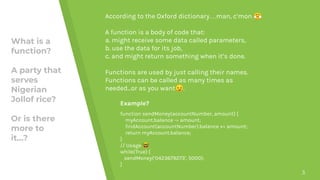
What is a
function?
A party that
serves
Nigerian
Jollof rice?
Or is there
more to
it…?
3
According to the Oxford dictionary…man, c’mon 😤
A function is a body of code that:
a. might receive some data called parameters,
b. use the data for its job,
c. and might return something when it’s done.
Functions are used by just calling their names.
Functions can be called as many times as
needed...or as you want😏.
Example?
function sendMoney(accountNumber, amount) {
myAccount.balance -= amount;
findAccount(accountNumber).balance += amount;
return myAccount.balance;
}
// Usage 🤓
while(True) {
sendMoney(‘0423679273’, 5000);
}
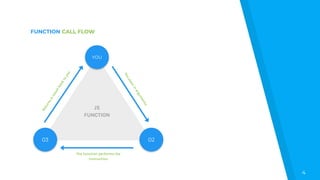
FUNCTION CALL FLOW
4
JS
FUNCTION
The function performs the
instruction
02
Returnsaresultbacktoyou
03
YOU
Youpassinargum
ents
5
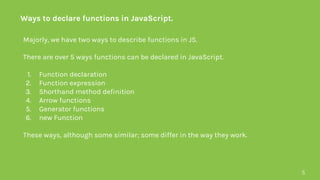
Ways to declare functions in JavaScript.
Majorly, we have two ways to describe functions in JS.
There are over 5 ways functions can be declared in JavaScript.
1. Function declaration
2. Function expression
3. Shorthand method definition
4. Arrow functions
5. Generator functions
6. new Function
These ways, although some similar; some differ in the way they work.
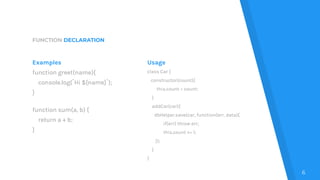
FUNCTION DECLARATION
Examples
function greet(name){
console.log(`Hi ${name}`);
}
function sum(a, b) {
return a + b;
}
Usage
class Car {
constructor(count){
this.count = count;
}
addCar(car){
dbHelper.save(car, function(err, data){
if(err) throw err;
this.count += 1;
});
}
}
6
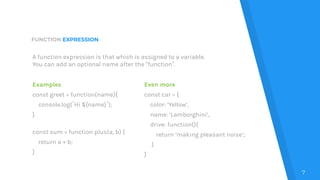
FUNCTION EXPRESSION
Examples
const greet = function(name){
console.log(`Hi ${name}`);
}
const sum = function plus(a, b) {
return a + b;
}
Even more
const car = {
color: ‘Yellow’,
name: ‘Lamborghini’,
drive: function(){
return ‘making pleasant noise’;
}
}
7
A function expression is that which is assigned to a variable.
You can add an optional name after the “function”.
SHORTHAND METHOD DEFINITION
Example
class Star {
constructor(name) {
this.name = name;
}
getMessage(message) {
return this.name + message;
}
}
const sun = new Star('Sun');
sun.getMessage(' is shining')
// => 'Sun is shining'
Even more
const collection = {
items: [],
add(...items){
this.items.push(...items);
},
get(index) {
return this.items[index];
}
};
collection.add('C', 'Java', 'PHP');
collection.get(1) // => 'Java'
8
This is used in object literals and ECMAScript 6 to define functions.
They do not use the “function” keyword.
COMPUTED PROPERTY NAMES AND METHODS
Example
const addMethod = 'add',
getMethod = 'get';
const collection = {
items: [],
[addMethod](...items){
this.items.push(...items);
},
[getMethod](index){
return this.items[index];
}
};
9
ECMAScript 2015 adds a nice feature: computed property names in object
literals and classes.
The computed properties use a slight different syntax [methodName]()
{...}, so the method definition looks this way:
Test
collection[addMethod]('C', 'Java', 'PHP');
collection[getMethod](1) // => 'Java'
ARROW FUNCTIONS
Examples
const greet = (name) => {
console.log(`Hi ${name}`);
}
const sum = (a, b) => {
return a + b;
}
const numbers = [1, 5, 10, 0];
numbers.filter(item => item > 7);
// => [10]
10
Arrow functions are defined by parenthesis “()” containing the
parameters, followed by the arrow “=>” and then the body of the function
enclosed by “{” and “}”.
The this advantage
class Car {
constructor(count){
this.count = count;
}
addCar(car){
dbHelper.save(car, (err, data) => {
if(err) throw err;
this.count += 1;
});
}
}
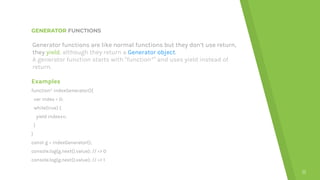
GENERATOR FUNCTIONS
Examples
function* indexGenerator(){
var index = 0;
while(true) {
yield index++;
}
}
const g = indexGenerator();
console.log(g.next().value); // => 0
console.log(g.next().value); // => 1
11
Generator functions are like normal functions but they don’t use return,
they yield, although they return a Generator object.
A generator function starts with “function*” and uses yield instead of
return.
CALLBACK FUNCTIONS
Example
const peelOff = (plantain, cb) => {
const res = plantain.remove(‘outer layer’);
cb(res);
}
const fry = (body) => {
body.add([‘pepper’, ‘salt’]);
const fried = hotOil.accept(body);
plate.serve(fried);
}
peelOff(plantain, fry); //usage
12
A callback function is a function passed as a parameter to another
function call. In the called function, the callback function is called; most
times after it is done with its process.
This aids the asynchronous feature of Js.
You can also have
…
peelOff(plantain, (body) => {
const fried = hotOil.accept(body);
const complete = fried.accept(eggs);
plate.serve(complete);
});
NOTE: Keep callbacks to a minimal
in order to avoid callback hell. 😵
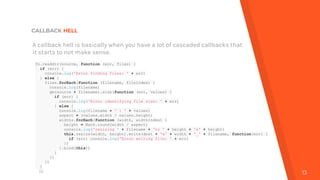
CALLBACK HELL
13
A callback hell is basically when you have a lot of cascaded callbacks that
it starts to not make sense.
fs.readdir(source, function (err, files) {
if (err) {
console.log('Error finding files: ' + err)
} else {
files.forEach(function (filename, fileIndex) {
console.log(filename)
gm(source + filename).size(function (err, values) {
if (err) {
console.log('Error identifying file size: ' + err)
} else {
console.log(filename + ' : ' + values)
aspect = (values.width / values.height)
widths.forEach(function (width, widthIndex) {
height = Math.round(width / aspect)
console.log('resizing ' + filename + 'to ' + height + 'x' + height)
this.resize(width, height).write(dest + 'w' + width + '_' + filename, function(err) {
if (err) console.log('Error writing file: ' + err)
})
}.bind(this))
}
})
})
}
})
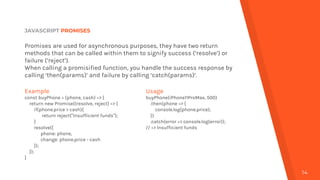
JAVASCRIPT PROMISES
14
Promises are used for asynchronous purposes, they have two return
methods that can be called within them to signify success (‘resolve’) or
failure (‘reject’).
When calling a promisified function, you handle the success response by
calling ‘then(params)’ and failure by calling ‘catch(params)’.
Example
const buyPhone = (phone, cash) => {
return new Promise((resolve, reject) => {
if(phone.price > cash){
return reject(“Insufficient funds”);
}
resolve({
phone: phone,
change: phone.price - cash
});
});
}
Usage
buyPhone(iPhone11ProMax, 500)
.then(phone => {
console.log(phone.price);
})
.catch(error => console.log(error));
// => Insufficient funds
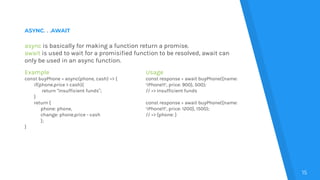
ASYNC. . .AWAIT
15
async is basically for making a function return a promise.
await is used to wait for a promisified function to be resolved, await can
only be used in an async function.
Example
const buyPhone = async(phone, cash) => {
if(phone.price > cash){
return “Insufficient funds”;
}
return {
phone: phone,
change: phone.price - cash
};
}
Usage
const response = await buyPhone({name:
‘iPhone11’, price: 900}, 500);
// => Insufficient funds
const response = await buyPhone({name:
‘iPhone11’, price: 1200}, 1500);
// => {phone: }
QUESTIONS?
16
CREDITS
Special thanks to all the people who made and released these
awesome resources for free:
▸ Presentation template by SlidesCarnival
▸ https://dmitripavlutin.com/6-ways-to-declare-javascript-functions/#6-one-mor
e-thing-new-function
▸ https://javascript.info/async-await
▸ http://callbackhell.com
17
THANK YOU
18
谢谢
Twitter: @Oluwalekae

All you need to know about JavaScript Functions

  • 1.
    ALL YOU NEED TOKNOW ABOUT JS FUNCTIONS { }
  • 2.
    Hi there, Iam Oluwaleke Fakorede, a software and data engineer with 4 years of experience. I currently apply my expertise and experience on a product at Binance. Twitter: @Oluwalekae Medium: @Oluwalekae GitHub: @Lekky71 2go: @Lekky71 Email: hashilekky@gmail.com
  • 3.
    What is a function? Aparty that serves Nigerian Jollof rice? Or is there more to it…? 3 According to the Oxford dictionary…man, c’mon 😤 A function is a body of code that: a. might receive some data called parameters, b. use the data for its job, c. and might return something when it’s done. Functions are used by just calling their names. Functions can be called as many times as needed...or as you want😏. Example? function sendMoney(accountNumber, amount) { myAccount.balance -= amount; findAccount(accountNumber).balance += amount; return myAccount.balance; } // Usage 🤓 while(True) { sendMoney(‘0423679273’, 5000); }
  • 4.
    FUNCTION CALL FLOW 4 JS FUNCTION Thefunction performs the instruction 02 Returnsaresultbacktoyou 03 YOU Youpassinargum ents
  • 5.
    5 Ways to declarefunctions in JavaScript. Majorly, we have two ways to describe functions in JS. There are over 5 ways functions can be declared in JavaScript. 1. Function declaration 2. Function expression 3. Shorthand method definition 4. Arrow functions 5. Generator functions 6. new Function These ways, although some similar; some differ in the way they work.
  • 6.
    FUNCTION DECLARATION Examples function greet(name){ console.log(`Hi${name}`); } function sum(a, b) { return a + b; } Usage class Car { constructor(count){ this.count = count; } addCar(car){ dbHelper.save(car, function(err, data){ if(err) throw err; this.count += 1; }); } } 6
  • 7.
    FUNCTION EXPRESSION Examples const greet= function(name){ console.log(`Hi ${name}`); } const sum = function plus(a, b) { return a + b; } Even more const car = { color: ‘Yellow’, name: ‘Lamborghini’, drive: function(){ return ‘making pleasant noise’; } } 7 A function expression is that which is assigned to a variable. You can add an optional name after the “function”.
  • 8.
    SHORTHAND METHOD DEFINITION Example classStar { constructor(name) { this.name = name; } getMessage(message) { return this.name + message; } } const sun = new Star('Sun'); sun.getMessage(' is shining') // => 'Sun is shining' Even more const collection = { items: [], add(...items){ this.items.push(...items); }, get(index) { return this.items[index]; } }; collection.add('C', 'Java', 'PHP'); collection.get(1) // => 'Java' 8 This is used in object literals and ECMAScript 6 to define functions. They do not use the “function” keyword.
  • 9.
    COMPUTED PROPERTY NAMESAND METHODS Example const addMethod = 'add', getMethod = 'get'; const collection = { items: [], [addMethod](...items){ this.items.push(...items); }, [getMethod](index){ return this.items[index]; } }; 9 ECMAScript 2015 adds a nice feature: computed property names in object literals and classes. The computed properties use a slight different syntax [methodName]() {...}, so the method definition looks this way: Test collection[addMethod]('C', 'Java', 'PHP'); collection[getMethod](1) // => 'Java'
  • 10.
    ARROW FUNCTIONS Examples const greet= (name) => { console.log(`Hi ${name}`); } const sum = (a, b) => { return a + b; } const numbers = [1, 5, 10, 0]; numbers.filter(item => item > 7); // => [10] 10 Arrow functions are defined by parenthesis “()” containing the parameters, followed by the arrow “=>” and then the body of the function enclosed by “{” and “}”. The this advantage class Car { constructor(count){ this.count = count; } addCar(car){ dbHelper.save(car, (err, data) => { if(err) throw err; this.count += 1; }); } }
  • 11.
    GENERATOR FUNCTIONS Examples function* indexGenerator(){ varindex = 0; while(true) { yield index++; } } const g = indexGenerator(); console.log(g.next().value); // => 0 console.log(g.next().value); // => 1 11 Generator functions are like normal functions but they don’t use return, they yield, although they return a Generator object. A generator function starts with “function*” and uses yield instead of return.
  • 12.
    CALLBACK FUNCTIONS Example const peelOff= (plantain, cb) => { const res = plantain.remove(‘outer layer’); cb(res); } const fry = (body) => { body.add([‘pepper’, ‘salt’]); const fried = hotOil.accept(body); plate.serve(fried); } peelOff(plantain, fry); //usage 12 A callback function is a function passed as a parameter to another function call. In the called function, the callback function is called; most times after it is done with its process. This aids the asynchronous feature of Js. You can also have … peelOff(plantain, (body) => { const fried = hotOil.accept(body); const complete = fried.accept(eggs); plate.serve(complete); }); NOTE: Keep callbacks to a minimal in order to avoid callback hell. 😵
  • 13.
    CALLBACK HELL 13 A callbackhell is basically when you have a lot of cascaded callbacks that it starts to not make sense. fs.readdir(source, function (err, files) { if (err) { console.log('Error finding files: ' + err) } else { files.forEach(function (filename, fileIndex) { console.log(filename) gm(source + filename).size(function (err, values) { if (err) { console.log('Error identifying file size: ' + err) } else { console.log(filename + ' : ' + values) aspect = (values.width / values.height) widths.forEach(function (width, widthIndex) { height = Math.round(width / aspect) console.log('resizing ' + filename + 'to ' + height + 'x' + height) this.resize(width, height).write(dest + 'w' + width + '_' + filename, function(err) { if (err) console.log('Error writing file: ' + err) }) }.bind(this)) } }) }) } })
  • 14.
    JAVASCRIPT PROMISES 14 Promises areused for asynchronous purposes, they have two return methods that can be called within them to signify success (‘resolve’) or failure (‘reject’). When calling a promisified function, you handle the success response by calling ‘then(params)’ and failure by calling ‘catch(params)’. Example const buyPhone = (phone, cash) => { return new Promise((resolve, reject) => { if(phone.price > cash){ return reject(“Insufficient funds”); } resolve({ phone: phone, change: phone.price - cash }); }); } Usage buyPhone(iPhone11ProMax, 500) .then(phone => { console.log(phone.price); }) .catch(error => console.log(error)); // => Insufficient funds
  • 15.
    ASYNC. . .AWAIT 15 asyncis basically for making a function return a promise. await is used to wait for a promisified function to be resolved, await can only be used in an async function. Example const buyPhone = async(phone, cash) => { if(phone.price > cash){ return “Insufficient funds”; } return { phone: phone, change: phone.price - cash }; } Usage const response = await buyPhone({name: ‘iPhone11’, price: 900}, 500); // => Insufficient funds const response = await buyPhone({name: ‘iPhone11’, price: 1200}, 1500); // => {phone: }
  • 16.
  • 17.
    CREDITS Special thanks toall the people who made and released these awesome resources for free: ▸ Presentation template by SlidesCarnival ▸ https://dmitripavlutin.com/6-ways-to-declare-javascript-functions/#6-one-mor e-thing-new-function ▸ https://javascript.info/async-await ▸ http://callbackhell.com 17
  • 18.