ADO.NET
ActiveX Data Objects
• ADO.NET has a number of classes that :
• Retrieve Data
• Manipulate Data
• Update Data
• VB,C#, C++, J#
ADO.NET provides a set of classes for
working with data. ADO.NET provides:
 An evolutionary, more flexible successor to ADO
 A system designed for disconnected environments
 A programming model with advanced XML support
 A set of classes, interfaces, structures, and
enumerations that manage data access from within
the .NET Framework
What is ADO.NET?
ADO vs. ADO.NET
• ADO works great, but:
• Requires COM and Windows
• Recordsets don’t travel well over the Internet
• Connected behavior is hard to work with
• Requires more code
• ADO.NET solves these problems
• Uses XML under the covers for all data transport
• No special code needed to marshal across the Internet
Disconnected?
• ADO.NET offers the capability of
working with databases in a
disconnected manner.
• An entire database table can be
retrieved to a local
computer/temp file if it is a
network database.
• A connection could also be
constant
Web-Centric Applications
• Download the data and
process it at a local level.
• If changes are made, the
connection can be remade
and the changes posted.
• The database could be LAN or
Internet based.
What is ADO.Net?
• The data access classes for the .Net framework
• Designed for highly efficient data access
• Support for XML and disconnected record sets
And the .Net framework?
• A standard cross language interface
• Encapsulation of services, classes and data types
• Uses XML for data representation
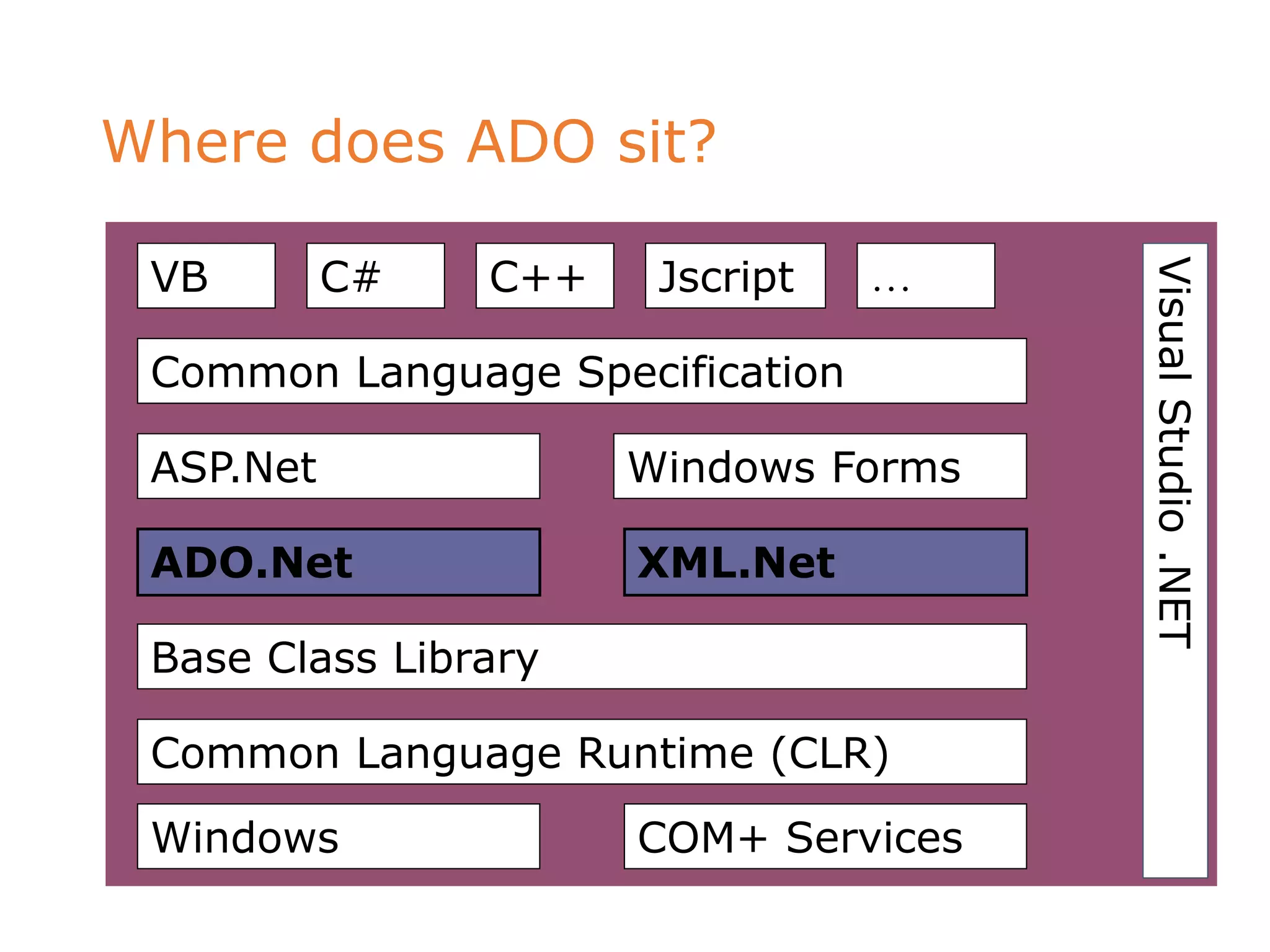
Where does ADO sit?
VisualStudio.NET
VB C# C++ Jscript …
Common Language Specification
ASP.Net Windows Forms
ADO.Net XML.Net
Base Class Library
Common Language Runtime (CLR)
Windows COM+ Services
ADO / ADO.Net Comparisons
Feature ADO ADO.Net
In memory
data storage
Recordset object
Mimics single table
Dataset object
Contains DataTables
Data Reads Sequential Sequential or non-
sequential
Data
Sources
OLE/DB via the
Connection object
Managed provider
calls the SQL APIs
ADO / ADO.Net Comparisons
Feature ADO ADO.Net
Disconnected
data
Limited support,
suitable for R/O
Strong support,
with updating
Passing
datasets
COM marshalling DataSet support for
XML passing
Scalability Limited Disconnected access
provides scalability
DataSet
SQL Server .NET
Data Provider
OLE DB .NET
Data Provider
SQL Server 7.0
(and later)
OLEDB sources
(SQL Server
6.5)
OleDbConnecti
on
OleDbDataAda
pter
SqlDataAda
pter
SqlConnectio
n
DataTable
DataTable
The ADO.NET Object Model
SQL Server
2000
DataSet
DataTable
DataTable
Physical storage
OleDb
Database
SqlDataAda
pter
SqlConnectio
n
DataTable
Client/Web server m
OleDbDataAda
pter
OleDbConne
ction
What is a Dataset?
Accessing Data with ADO.NET
Database
4. Return the DataSet to the Client
5. Client manipulates the data
2. Create the SqlConnection and SqlDataAdapter objects
3. Fill the DataSet from the DataAdapter
and close the connection
SqlDataAdapter
SqlConnection
List-
Bound
Control
1. Client makes request1
2
3
4
5
6. Update the DataSet
7. Use the SqlDataAdapter to open
the SqlConnection, update the
database, and close the
connection
6
7
Client
Web
server
DataSet
Data Providers
• MS SQL Server 7.0+
• Oracle
• OLE DB (old SQL & Access- Jet 4.0)
• Open Database Connectivity (ODBC)- earlier Visual Studio, Access
Driver, ODBC for Oracle
* Version 1.0 does not include ODBC
4 Core Classes of ADO.NET
•Connection-Connect to database
•Command-SQL statement to retrieve data
•DataReader-Sequential access to the data
source
•DataAdapter-Populate a dataset
& Update the database
Other ADO Terms
•Fill : The OleDbDataAdapter method Fill retrieves
information from the database associated with
OleDbConnection and places this information in the
DataSet.
•DataGrid: A DataGrid is the area which will be filled
with data from the database. The DataGrid method
SetDataBinding binds a DataGrid to a data source.
Architecture
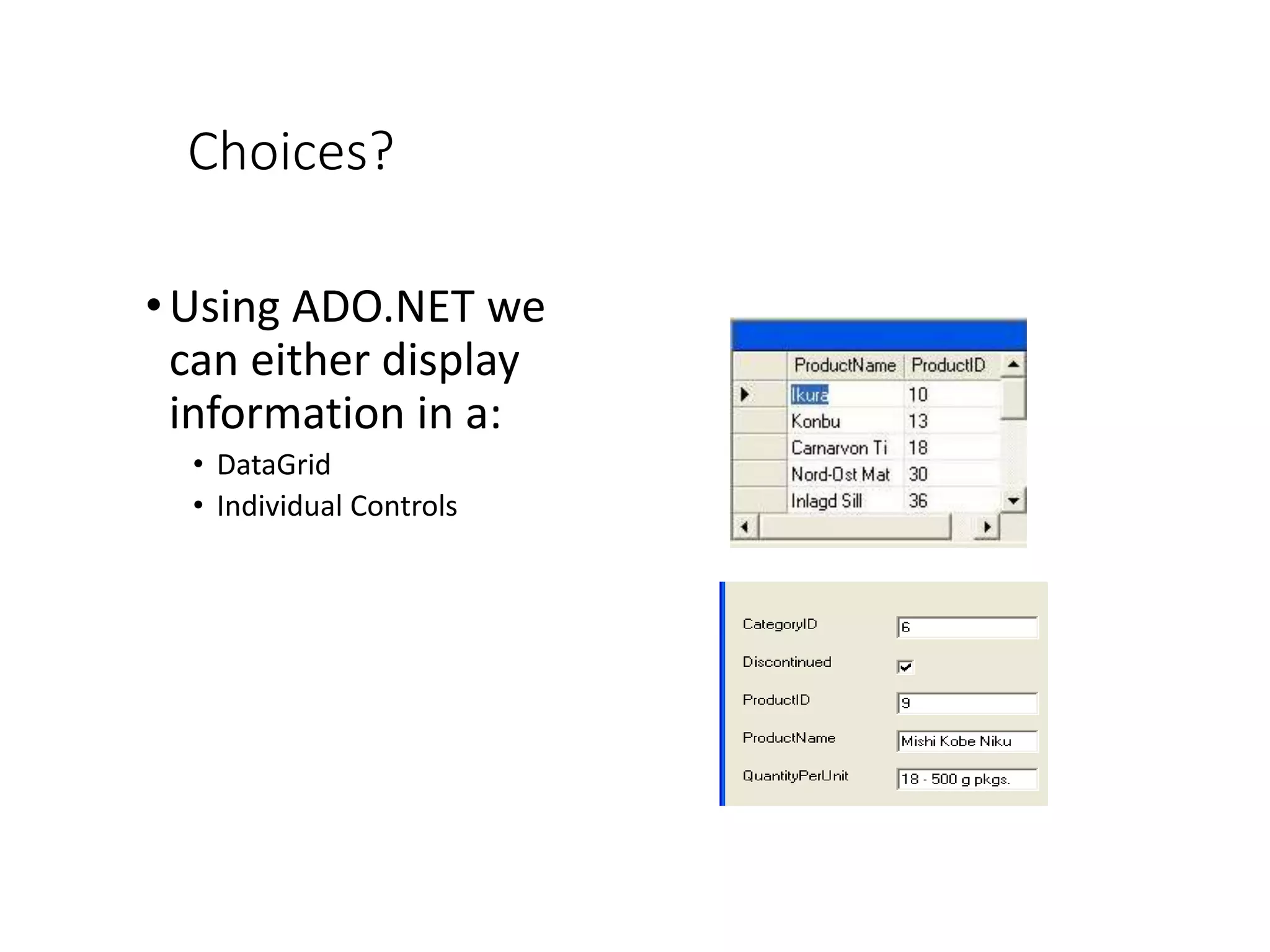
Choices?
•Using ADO.NET we
can either display
information in a:
• DataGrid
• Individual Controls
Let’s Connect to a Database
Adding a Connection
The ADD CONNECTION option is built into
ADO.NET to create a database connection in
the DATA LINK PROPERTIES window. The DATA
ADAPTER CONFIGURATION WIZARD is used to
set up an OleDbDataAdapter which generates
queries to the connected database.
Connecting to the Database
• Dragging an OleDbDataAdapter from
the Toolbox to the form of displays the
Data Adapter Configuration Wizard.
• Clicking Next on the welcome screen
displays the Choose Your Data
Connection window.
• Clicking the New Connection button
pops up the Data Link Properties form.
Click the Provider tab, choose
Microsoft Jet 4.0 OLE DB Provider
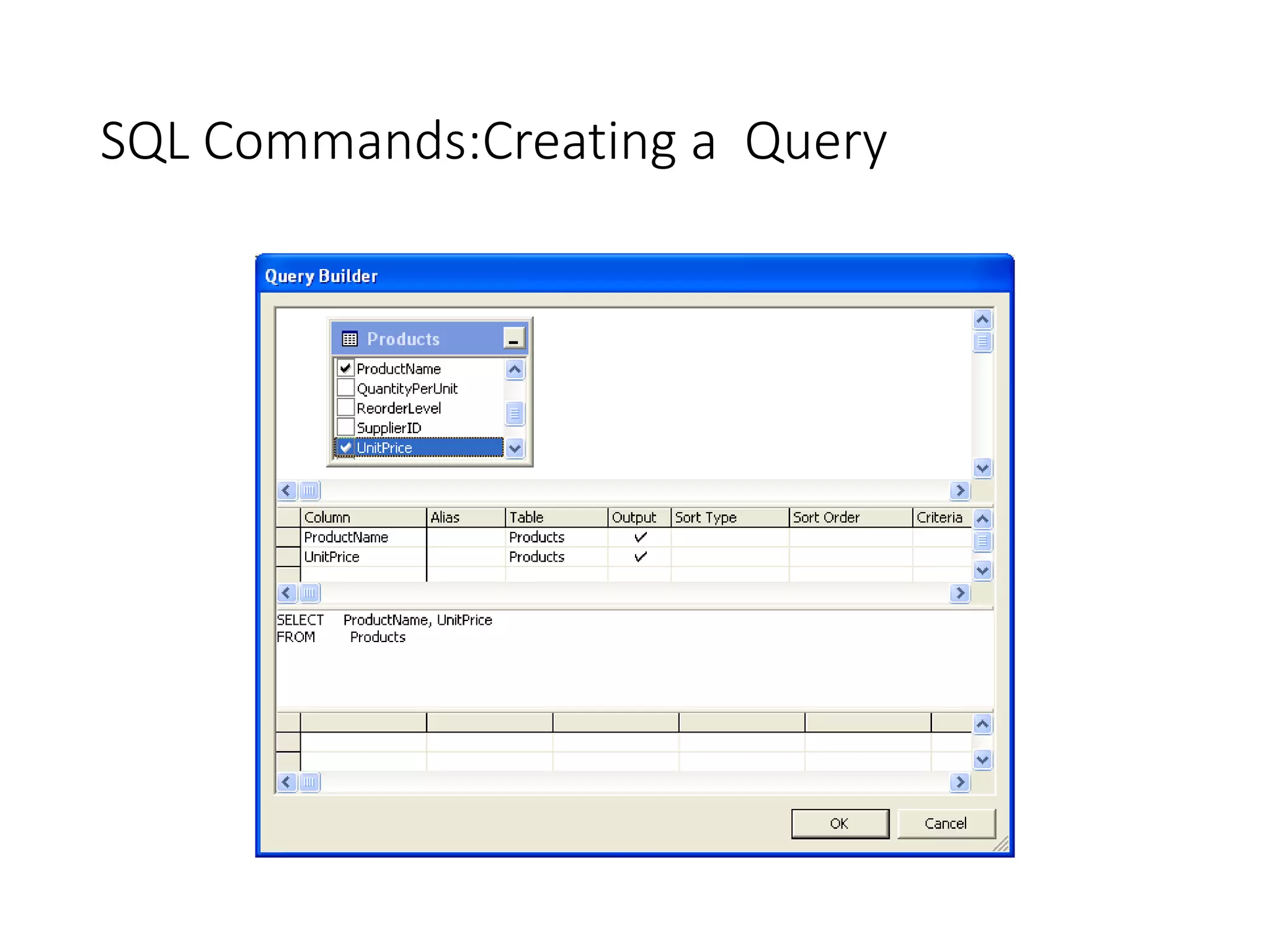
SQL Commands:Creating a Query
Time to try it!
Using a Data Form Wizard
Choosing Tables
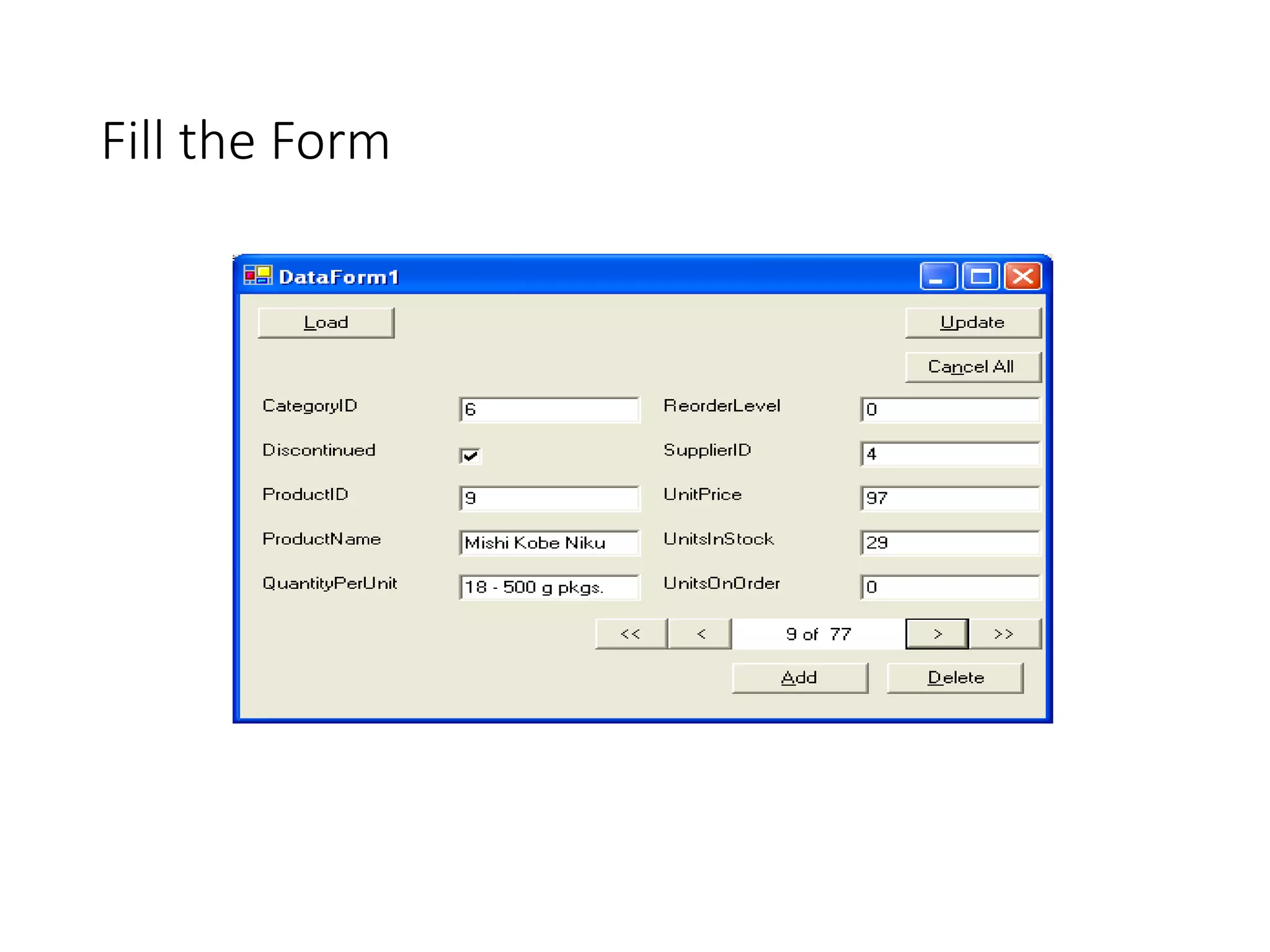
Fill the Form
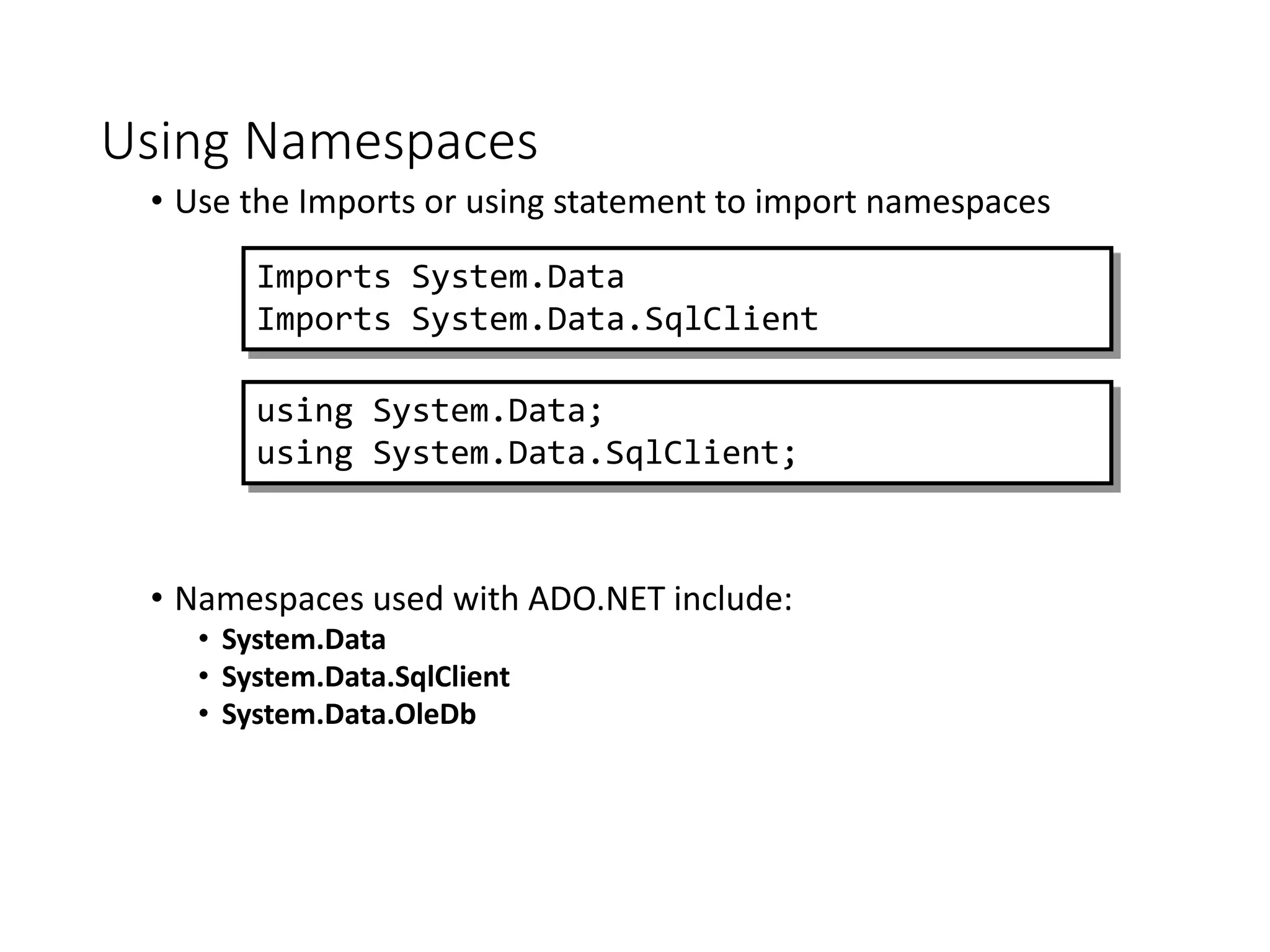
Using Namespaces
• Use the Imports or using statement to import namespaces
• Namespaces used with ADO.NET include:
• System.Data
• System.Data.SqlClient
• System.Data.OleDb
Imports System.Data
Imports System.Data.SqlClient
using System.Data;
using System.Data.SqlClient;
Using Server Explorer to Generate a
Connection
• Create a new data
connection by dragging a
Table from Server Explorer
 Create a new data
connection using the
Data Links dialog box
The DataAdapter Object Model
sp_SELECT
Command
SelectCommand UpdateCommand InsertCommand DeleteCommand
DataAdapter
Command Command Command
Connection
sp_UPDATE sp_INSERT sp_DELETE
Database
DataSet
DataReader
 Store the query in a DataAdapter
 The DataAdapter constructor sets the SelectCommand
property
 Set the InsertCommand, UpdateCommand, and
DeleteCommand properties if needed
Creating a DataAdapter
Dim da As New SqlDataAdapter _
("select * from Authors", conn)
da.SelectCommand.CommandText
da.SelectCommand.Connection
SqlDataAdapter da = new SqlDataAdapter
("select * from Authors",conn);
da.SelectCommand.CommandText;
da.SelectCommand.Connection;
Demonstration: Connecting to a Database
• Expand Server Explorer to a table in a SQL Server
database
• Drag and Drop Data Access
Generating a DataSet
• You can generate a DataSet…
• …through the UI…
• Creates a DataSet that allows you to access data as an object
• …or through code…
• and then fill…
Dim ds As New DataSet()
DataAdapter1.Fill(ds)
DataAdapter2.Fill(ds)
DataSet ds = new DataSet();
DataAdapter1.Fill(ds);
DataAdapter2.Fill(ds);
Storing Multiple Tables
 Add the first table
 Add the subsequent table(s)
daCustomers = New SqlDataAdapter _
("select * from Customers", conn1)
daCustomers.Fill(ds, "Customers")
Orders
Custome
rs
daOrders = New SqlDataAdapter _
("select * from Orders", conn2)
daOrders.Fill(ds, "Orders")
conn2conn1
DataS
et
Demonstration: Generating a DataSet
• Create a typed DataSet from a DataAdapter
• Add a second DataTable from a different
DataAdapter
• Show the schema of DataSet
What are List-Bound Controls?
 Controls that connect to a data source and display the
data
 List-bound controls include the following:
 DropDownList
 ListBox
 CheckBoxList
 RadioButtonList
 DataGrid
 DataList
 Repeater
Displaying DataSet Data in List-Bound
Controls
• Set the properties
• Fill the DataSet, then call the DataBind method
DataAdapter1.Fill(ds)
lstEmployees.DataBind()
Property Description
DataSource  The DataSet containing the data
DataMember  The DataTable in the DataSet
DataTextField  The field in the DataTable that is displayed
DataValueField
 The field in the DataTable that becomes the
value of the selected item in the list
DataAdapter1.Fill(ds);
lstEmployees.DataBind();

Ado .net

  • 1.
  • 2.
    ActiveX Data Objects •ADO.NET has a number of classes that : • Retrieve Data • Manipulate Data • Update Data • VB,C#, C++, J#
  • 3.
    ADO.NET provides aset of classes for working with data. ADO.NET provides:  An evolutionary, more flexible successor to ADO  A system designed for disconnected environments  A programming model with advanced XML support  A set of classes, interfaces, structures, and enumerations that manage data access from within the .NET Framework What is ADO.NET?
  • 4.
    ADO vs. ADO.NET •ADO works great, but: • Requires COM and Windows • Recordsets don’t travel well over the Internet • Connected behavior is hard to work with • Requires more code • ADO.NET solves these problems • Uses XML under the covers for all data transport • No special code needed to marshal across the Internet
  • 5.
    Disconnected? • ADO.NET offersthe capability of working with databases in a disconnected manner. • An entire database table can be retrieved to a local computer/temp file if it is a network database. • A connection could also be constant
  • 6.
    Web-Centric Applications • Downloadthe data and process it at a local level. • If changes are made, the connection can be remade and the changes posted. • The database could be LAN or Internet based.
  • 7.
    What is ADO.Net? •The data access classes for the .Net framework • Designed for highly efficient data access • Support for XML and disconnected record sets
  • 8.
    And the .Netframework? • A standard cross language interface • Encapsulation of services, classes and data types • Uses XML for data representation
  • 9.
    Where does ADOsit? VisualStudio.NET VB C# C++ Jscript … Common Language Specification ASP.Net Windows Forms ADO.Net XML.Net Base Class Library Common Language Runtime (CLR) Windows COM+ Services
  • 10.
    ADO / ADO.NetComparisons Feature ADO ADO.Net In memory data storage Recordset object Mimics single table Dataset object Contains DataTables Data Reads Sequential Sequential or non- sequential Data Sources OLE/DB via the Connection object Managed provider calls the SQL APIs
  • 11.
    ADO / ADO.NetComparisons Feature ADO ADO.Net Disconnected data Limited support, suitable for R/O Strong support, with updating Passing datasets COM marshalling DataSet support for XML passing Scalability Limited Disconnected access provides scalability
  • 13.
    DataSet SQL Server .NET DataProvider OLE DB .NET Data Provider SQL Server 7.0 (and later) OLEDB sources (SQL Server 6.5) OleDbConnecti on OleDbDataAda pter SqlDataAda pter SqlConnectio n DataTable DataTable The ADO.NET Object Model
  • 14.
  • 15.
    Accessing Data withADO.NET Database 4. Return the DataSet to the Client 5. Client manipulates the data 2. Create the SqlConnection and SqlDataAdapter objects 3. Fill the DataSet from the DataAdapter and close the connection SqlDataAdapter SqlConnection List- Bound Control 1. Client makes request1 2 3 4 5 6. Update the DataSet 7. Use the SqlDataAdapter to open the SqlConnection, update the database, and close the connection 6 7 Client Web server DataSet
  • 16.
    Data Providers • MSSQL Server 7.0+ • Oracle • OLE DB (old SQL & Access- Jet 4.0) • Open Database Connectivity (ODBC)- earlier Visual Studio, Access Driver, ODBC for Oracle * Version 1.0 does not include ODBC
  • 17.
    4 Core Classesof ADO.NET •Connection-Connect to database •Command-SQL statement to retrieve data •DataReader-Sequential access to the data source •DataAdapter-Populate a dataset & Update the database
  • 18.
    Other ADO Terms •Fill: The OleDbDataAdapter method Fill retrieves information from the database associated with OleDbConnection and places this information in the DataSet. •DataGrid: A DataGrid is the area which will be filled with data from the database. The DataGrid method SetDataBinding binds a DataGrid to a data source.
  • 19.
  • 20.
    Choices? •Using ADO.NET we caneither display information in a: • DataGrid • Individual Controls
  • 21.
  • 22.
    Adding a Connection TheADD CONNECTION option is built into ADO.NET to create a database connection in the DATA LINK PROPERTIES window. The DATA ADAPTER CONFIGURATION WIZARD is used to set up an OleDbDataAdapter which generates queries to the connected database.
  • 23.
    Connecting to theDatabase • Dragging an OleDbDataAdapter from the Toolbox to the form of displays the Data Adapter Configuration Wizard. • Clicking Next on the welcome screen displays the Choose Your Data Connection window. • Clicking the New Connection button pops up the Data Link Properties form. Click the Provider tab, choose Microsoft Jet 4.0 OLE DB Provider
  • 24.
  • 25.
  • 26.
    Using a DataForm Wizard
  • 27.
  • 28.
  • 29.
    Using Namespaces • Usethe Imports or using statement to import namespaces • Namespaces used with ADO.NET include: • System.Data • System.Data.SqlClient • System.Data.OleDb Imports System.Data Imports System.Data.SqlClient using System.Data; using System.Data.SqlClient;
  • 30.
    Using Server Explorerto Generate a Connection • Create a new data connection by dragging a Table from Server Explorer  Create a new data connection using the Data Links dialog box
  • 31.
    The DataAdapter ObjectModel sp_SELECT Command SelectCommand UpdateCommand InsertCommand DeleteCommand DataAdapter Command Command Command Connection sp_UPDATE sp_INSERT sp_DELETE Database DataSet DataReader
  • 32.
     Store thequery in a DataAdapter  The DataAdapter constructor sets the SelectCommand property  Set the InsertCommand, UpdateCommand, and DeleteCommand properties if needed Creating a DataAdapter Dim da As New SqlDataAdapter _ ("select * from Authors", conn) da.SelectCommand.CommandText da.SelectCommand.Connection SqlDataAdapter da = new SqlDataAdapter ("select * from Authors",conn); da.SelectCommand.CommandText; da.SelectCommand.Connection;
  • 33.
    Demonstration: Connecting toa Database • Expand Server Explorer to a table in a SQL Server database • Drag and Drop Data Access
  • 34.
    Generating a DataSet •You can generate a DataSet… • …through the UI… • Creates a DataSet that allows you to access data as an object • …or through code… • and then fill… Dim ds As New DataSet() DataAdapter1.Fill(ds) DataAdapter2.Fill(ds) DataSet ds = new DataSet(); DataAdapter1.Fill(ds); DataAdapter2.Fill(ds);
  • 35.
    Storing Multiple Tables Add the first table  Add the subsequent table(s) daCustomers = New SqlDataAdapter _ ("select * from Customers", conn1) daCustomers.Fill(ds, "Customers") Orders Custome rs daOrders = New SqlDataAdapter _ ("select * from Orders", conn2) daOrders.Fill(ds, "Orders") conn2conn1 DataS et
  • 36.
    Demonstration: Generating aDataSet • Create a typed DataSet from a DataAdapter • Add a second DataTable from a different DataAdapter • Show the schema of DataSet
  • 37.
    What are List-BoundControls?  Controls that connect to a data source and display the data  List-bound controls include the following:  DropDownList  ListBox  CheckBoxList  RadioButtonList  DataGrid  DataList  Repeater
  • 38.
    Displaying DataSet Datain List-Bound Controls • Set the properties • Fill the DataSet, then call the DataBind method DataAdapter1.Fill(ds) lstEmployees.DataBind() Property Description DataSource  The DataSet containing the data DataMember  The DataTable in the DataSet DataTextField  The field in the DataTable that is displayed DataValueField  The field in the DataTable that becomes the value of the selected item in the list DataAdapter1.Fill(ds); lstEmployees.DataBind();