ABAP Course Chapter 7 –  ABAP Objects and Business Server Pages Lecturer: André Bögelsack, UCC Technische Universität München Author: Valentin Nicolescu, André Bögelsack
Copyright 2008 UCC TU München  All rights reserved Weitergabe und Vervielfältigung dieser Publikation oder von Teilen daraus sind, zu welchem Zweck und in welcher Form auch immer, ohne die ausdrückliche schriftliche Genehmigung durch HCC TU München nicht gestattet. In dieser Publikation enthaltene Informationen können ohne vorherige Ankündigung geändert werden. Microsoft®, WINDOWS®, NT®, EXCEL®, Word®, PowerPoint® und SQL Server® sind eingetragene Marken der Microsoft Corporation. IBM®, DB2®, OS/2®, DB2/6000®, Parallel Sysplex®, MVS/ESA®, RS/6000®, AIX®, S/390®, AS/400®, OS/390® und OS/400® sind eingetragene Marken der IBM Corporation. ORACLE® ist eine eingetragene Marke der ORACLE Corporation. INFORMIX®-OnLine for SAP und Informix® Dynamic ServerTM sind eingetragene Marken der Informix Software Incorporated.  UNIX®, X/Open®, OSF/1® und Motif® sind eingetragene Marken der Open Group. Citrix®, das Citrix-Logo, ICA®, Program Neighborhood®, MetaFrame®, WinFrame®, VideoFrame®, MultiWin® und andere hier erwähnte Namen von Citrix-Produkten sind Marken von Citrix Systems, Inc. HTML, DHTML, XML, XHTML sind Marken oder eingetragene Marken des W3C®, World Wide Web Consortium, Massachusetts Institute of Technology.   JAVA® ist eine eingetragene Marke der Sun Microsystems, Inc.  JAVASCRIPT® ist eine eingetragene Marke der Sun Microsystems, Inc., verwendet unter der Lizenz der von Netscape entwickelten und implementierten Technologie.   SAP, SAP Logo, R/2, RIVA, R/3, SAP ArchiveLink, SAP Business Workflow, WebFlow, SAP EarlyWatch, BAPI, SAPPHIRE, Management Cockpit, mySAP, mySAP.com und weitere im Text erwähnte SAP-Produkte und -Dienstleistungen sowie die entsprechenden Logos sind Marken oder eingetragene Marken der SAP AG in Deutschland und anderen Ländern weltweit. MarketSet und Enterprise Buyer sind gemeinsame Marken von SAP Markets und Commerce One.  Alle anderen Namen von Produkten und Dienstleistungen sind Marken der jeweiligen Firmen. Die Verwendung der Screenshots wurde mit dem jeweiligen Eigner abgesprochen.
Agenda ABAP Objects Business Server Pages Maintenance and execution Usage of BAPIs in BSPs HTMLB Model View Controller
Introduction ABAP Objects Object-oriented enhancement of ABAP Stepwise conversion of existing ABAP source code into ABAP Objects Major tools: ABAP Editor Class Builder
Principles of Object Orientation I Classes are the definition of an object including attributes and methods of this object Objects are instances of classes Example:  Class: Car Instance: My car with the license number xxx
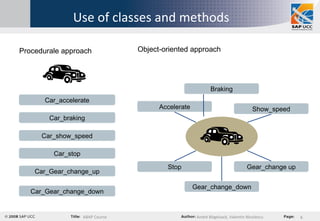
Use of classes and methods Car_accelerate Procedurale approach   Car_braking Car_show_speed Car_stop Car_Gear_change_up Car_Gear_change_down Car Accelerate Braking Show_speed Stop Gear_change up Gear_change_down Object-oriented approach
Principles of Object Orientation II Encapsulation: The implementation of a class is invisible outside the class. Interaction takes place only by a defined interface. Polymorphism: Identically-named methods used for different classes respond according to an appropriate class-specific behavior.  Inheritance: A new class can inherit attributes and methods from an existing class that can be extended by additional, own attributes and methods.
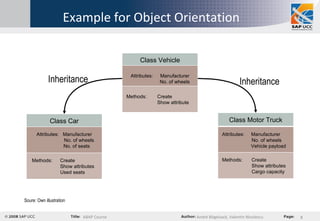
Example for Object Orientation Class Vehicle Class Car Class Motor Truck Attributes: Manufacturer No. of wheels Methods:   Create   Show attribute Inheritance Inheritance Attributes:  Manufacturer No. of wheels No. of seats Methods:   Create   Show attributes   Used seats Attributes:  Manufacturer   No. of wheels Vehicle payload Methods:   Create   Show attributes   Cargo capacity Soure: Own illustration
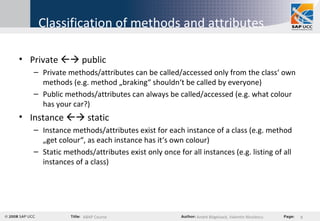
Classification of methods and attributes Private    public Private methods/attributes can be called/accessed only from the class‘ own methods (e.g. method „braking“ shouldn‘t be called by everyone) Public methods/attributes can always be called/accessed (e.g. what colour has your car?) Instance    static Instance methods/attributes exist for each instance of a class (e.g. method „get colour“, as each instance has it‘s own colour) Static methods/attributes exist only once for all instances (e.g. listing of all instances of a class)
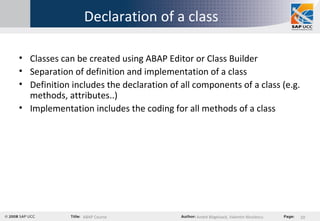
Declaration of a class Classes can be created using ABAP Editor or Class Builder  Separation of definition and implementation of a class Definition includes the declaration of all components of a class (e.g. methods, attributes..) Implementation includes the coding for all methods of a class
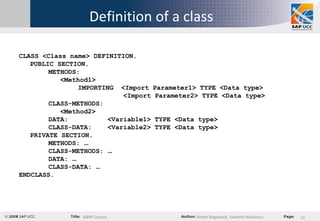
Definition of a class CLASS <Class name> DEFINITION. PUBLIC SECTION. METHODS:    <Method1>  IMPORTING  <Import Parameter1> TYPE <Data type>   <Import Parameter2> TYPE <Data type> CLASS-METHODS:   <Method2> DATA:  <Variable1> TYPE <Data type> CLASS-DATA:  <Variable2> TYPE <Data type> PRIVATE SECTION. METHODS:  … CLASS-METHODS:  … DATA:  … CLASS-DATA:  … ENDCLASS.
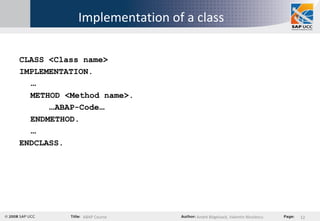
Implementation of a class CLASS <Class name> IMPLEMENTATION. … METHOD <Method name>. … ABAP-Code … ENDMETHOD. … ENDCLASS.
Calling methods and accessing attributes Instance method:  [CALL METHOD] <Instance name> -><Method>( <Import parameter> = Value ). Class method: [CALL METHOD] <Class name>  =><Method>( <Import parameter> = Value ). Instance attributes: <Instance name>-><Attribute>. Static attributes: <Class name>=><Attribute>.
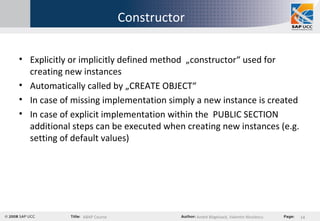
Constructor Explicitly or implicitly defined method  „constructor“ used for creating new instances Automatically called by „CREATE OBJECT“ In case of missing implementation simply a new instance is created In case of explicit implementation within the  PUBLIC SECTION additional steps can be executed when creating new instances (e.g. setting of default values)
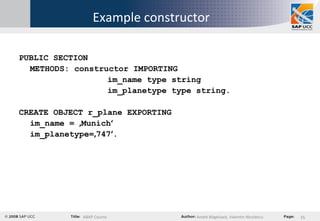
Example constructor PUBLIC SECTION METHODS: constructor IMPORTING im_name type string im_planetype type string. CREATE OBJECT r_plane EXPORTING  im_name =  ‚ Munich ‘ im_planetype= ‚ 747 ‘ .
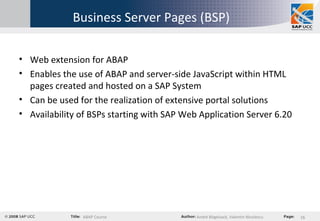
Business Server Pages (BSP) Web extension for ABAP Enables the use of ABAP and server-side JavaScript within HTML pages created and hosted on a SAP System Can be used for the realization of extensive portal solutions Availability of BSPs starting with SAP Web Application Server 6.20
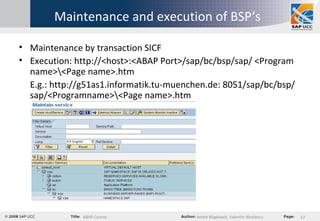
Maintenance and execution of BSP‘s Maintenance by transaction SICF Execution: http://<host>:<ABAP Port>/sap/bc/bsp/sap/ <Program name>\<Page name>.htm E.g.: http://g51as1.informatik.tu-muenchen.de: 8051/sap/bc/bsp/sap/<Programname>\<Page name>.htm
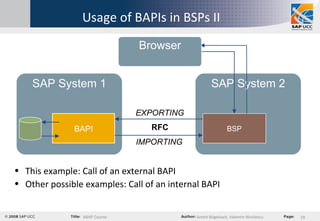
Usage of BAPIs in BSPs I Business Application Programming Interface = BAPI BAPI represent an interface to the outside world SAP systems offer a wide range of different BAPIs BAPI calls are executed using RFC Transaction „BAPI“ shows all available BAPIs of the current SAP system Search for BAPIs using BAPI Browser, cross-system access possible Use of BAPIs with help of information available in the  BAPI Browser
Usage of BAPIs in BSPs II SAP System 1 SAP System 2 BAPI BSP RFC Browser This example: Call of an external BAPI Other possible examples: Call of an internal BAPI EXPORTING IMPORTING
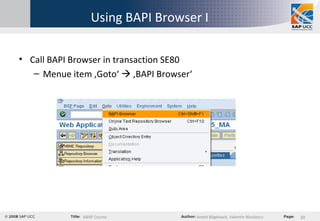
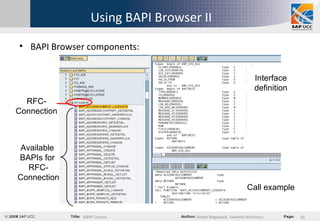
Using BAPI Browser I  Call BAPI Browser in transaction SE80  Menue item ‚Goto‘    ‚BAPI Browser‘
Using BAPI Browser II BAPI Browser components: RFC-Connection Available  BAPIs for  RFC- Connection Interface definition Call example
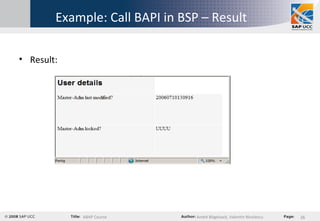
Usage of BAPIs in BSPs III Example scenario: Call BAPI „BAPI_USER_GET_DETAIL“ Show details of a certain user BAPI offers broad functionality for query of user data Use of BAPI in order to show the  „last changed on“ date
Example: Call BAPI in BSP – Step 1 Step 1: Definition of variables Temporary variables data username type c. data tmp_islocked type BAPISLOCKD. data tmp_moddat type BAPIMODDAT. Interface variables data ISLOCKED type BAPISLOCKD. data LASTMODIFIED type BAPIMODDAT.
Example: Call BAPI in BSP – Step 2 Step 2: Definition CALL FUNCTION CALL FUNCTION 'BAPI_USER_GET_DETAIL' DESTINATION 'G11clnt101 ‚ EXPORTING  … .. IMPORTING  … ... CALL FUNCTION refers to the BAPI name DESTINATION refers to the RFC-connection EXPORTING refers to input parameters of a BAPI IMPORTING refers to output parameters of a BAPI
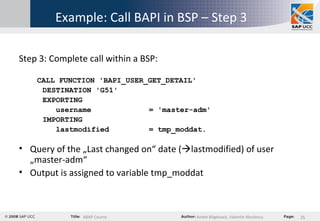
Example: Call BAPI in BSP – Step 3 Step 3: Complete call within a BSP: CALL FUNCTION 'BAPI_USER_GET_DETAIL' DESTINATION 'G51' EXPORTING username  = 'master-adm' IMPORTING lastmodified  = tmp_moddat. Query of the „Last changed on“ date (  lastmodified) of user „master-adm“ Output is assigned to variable tmp_moddat
Example: Call BAPI in BSP – Result Result:
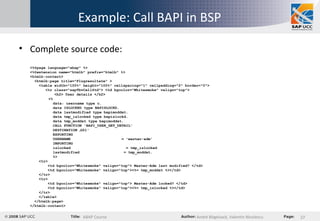
Example: Call BAPI in BSP  Complete source code: <%@page language=&quot;abap&quot; %> <%@extension name=&quot;htmlb&quot; prefix=&quot;htmlb&quot; %> <htmlb:content>   <htmlb:page title=&quot;Flugresultate&quot; >   <table width=&quot;100%&quot; height=&quot;100%&quot; cellspacing=&quot;1&quot; cellpadding=&quot;2&quot; border=&quot;0&quot;>   <tr class=&quot;sapTbvCellStd&quot;> <td bgcolor=&quot;Whitesmoke&quot; valign=&quot;top&quot;>   <h2> User details </h2>   <%   data: username type c.   data ISLOCKED type BAPISLOCKD.   data lastmodified type bapimoddat.   data tmp_islocked type bapislockd.   data tmp_moddat type bapimoddat.    CALL FUNCTION 'BAPI_USER_GET_DETAIL'   DESTINATION  ‚ G51'   EXPORTING   USERNAME  = 'master-adm'   IMPORTING   islocked  = tmp_islocked   lastmodified  = tmp_moddat.   %>   <tr>   <td bgcolor=&quot;Whitesmoke&quot; valign=&quot;top&quot;> Master-Adm last modified? </td>   <td bgcolor=&quot;Whitesmoke&quot; valign=&quot;top&quot;><%= tmp_moddat %></td>   </tr>   <tr>   <td bgcolor=&quot;Whitesmoke&quot; valign=&quot;top&quot;> Master-Adm locked? </td>   <td bgcolor=&quot;Whitesmoke&quot; valign=&quot;top&quot;><%= tmp_islocked %></td>   </tr>   </table>   </htmlb:page> </htmlb:content>
HTMLB Extension of HTML by SAP HTML-Business HTML-Business for Java HTML-Business for ABAP HTMLB is used e.g. for Enterprise Portal
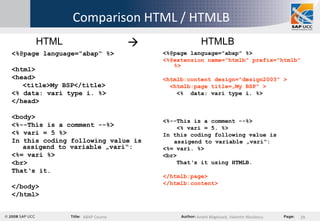
Comparison HTML / HTMLB <%@page language=“abap“ %> <html> <head> <title>My BSP</title> <% data: vari type i. %> </head> <body> <%--This is a comment --%> <% vari = 5 %> In this coding following value is assigend to variable „vari“:  <%= vari %> <br> That‘s it. </body> </html> <%@page language=&quot;abap&quot; %> <%@extension name=&quot;htmlb&quot; prefix=&quot;htmlb&quot; %> <htmlb:content design=&quot;design2003&quot; > <htmlb:page title=„My BSP&quot; > <%  data: vari type i. %> <%--This is a comment --%> <% vari = 5. %> In this coding following value is  assigend to variable „vari“: <%= vari. %>  <br> That‘s it using HTMLB. </htmlb:page> </htmlb:content> HTML HTMLB 
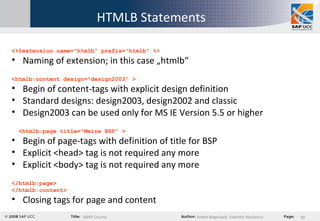
HTMLB Statements <%@extension name=&quot;htmlb&quot; prefix=&quot;htmlb&quot; %> Naming of extension; in this case „htmlb“ <htmlb:content design=&quot;design2003&quot; > Begin of content-tags with explicit design definition Standard designs: design2003, design2002 and classic Design2003 can be used only for MS IE Version 5.5 or higher <htmlb:page title=&quot;Meine BSP&quot; > Begin of page-tags with definition of title for BSP Explicit <head> tag is not required any more Explicit <body> tag is not required any more </htmlb:page> </htmlb:content> Closing tags for page and content
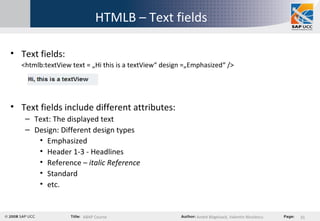
HTMLB – Text fields Text fields: <htmlb:textView text = „Hi this is a textView“ design =„Emphasized“ /> Text fields include different attributes: Text: The displayed text Design: Different design types Emphasized Header 1-3 - Headlines Reference –  italic Reference Standard etc.
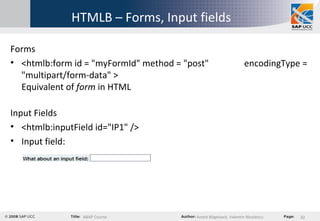
HTMLB – Forms, Input fields Forms <htmlb:form id = &quot;myFormId&quot; method = &quot;post&quot;  encodingType = &quot;multipart/form-data&quot; > Equivalent of  form  in HTML Input Fields <htmlb:inputField id=&quot;IP1&quot; /> Input field:
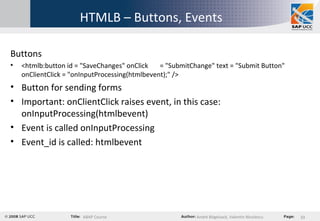
HTMLB – Buttons, Events Buttons <htmlb:button id = &quot;SaveChanges&quot; onClick  = &quot;SubmitChange&quot; text = &quot;Submit Button&quot; onClientClick = &quot;onInputProcessing(htmlbevent);&quot; /> Button for sending forms Important: onClientClick raises event, in this case: onInputProcessing(htmlbevent) Event is called onInputProcessing Event_id is called: htmlbevent
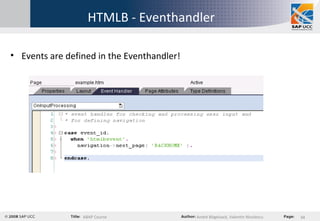
HTMLB - Eventhandler Events are defined in the Eventhandler!
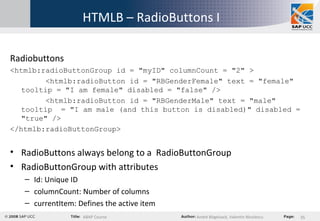
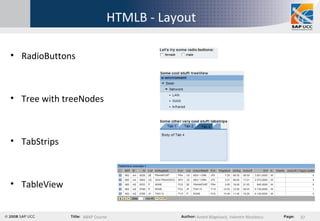
HTMLB – RadioButtons I Radiobuttons <htmlb:radioButtonGroup id = &quot;myID&quot; columnCount = &quot;2&quot; > <htmlb:radioButton id = &quot;RBGenderFemale&quot; text = &quot;female&quot; tooltip = &quot;I am female&quot; disabled = &quot;false&quot; /> <htmlb:radioButton id = &quot;RBGenderMale&quot; text = &quot;male&quot; tooltip  = &quot;I am male (and this button is disabled)&quot; disabled = &quot;true&quot; /> </htmlb:radioButtonGroup> RadioButtons always belong to a  RadioButtonGroup RadioButtonGroup with attributes Id: Unique ID columnCount: Number of columns currentItem: Defines the active item
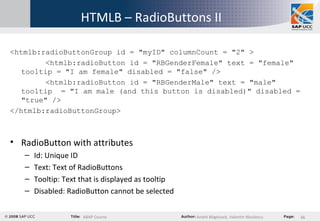
HTMLB – RadioButtons II <htmlb:radioButtonGroup id = &quot;myID&quot; columnCount = &quot;2&quot; > <htmlb:radioButton id = &quot;RBGenderFemale&quot; text = &quot;female&quot; tooltip = &quot;I am female&quot; disabled = &quot;false&quot; /> <htmlb:radioButton id = &quot;RBGenderMale&quot; text = &quot;male&quot; tooltip  = &quot;I am male (and this button is disabled)&quot; disabled = &quot;true&quot; /> </htmlb:radioButtonGroup> RadioButton with attributes Id: Unique ID Text: Text of RadioButtons Tooltip: Text that is displayed as tooltip Disabled: RadioButton cannot be selected
HTMLB - Layout RadioButtons Tree with treeNodes TabStrips TableView
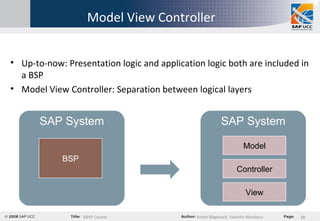
Model View Controller Up-to-now: Presentation logic and application logic both are included in a BSP Model View Controller: Separation between logical layers SAP System BSP SAP System View Controller Model
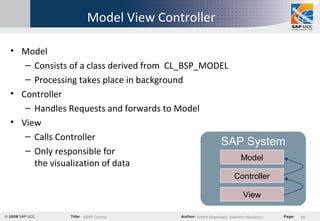
Model View Controller Model  Consists of a class derived from  CL_BSP_MODEL  Processing takes place in background Controller  Handles Requests and forwards to Model  View  Calls Controller  Only responsible for  the visualization of data SAP System View Controller Model
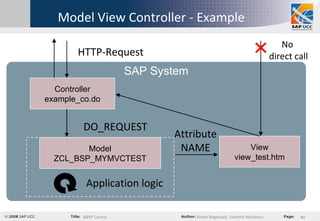
Model View Controller - Example SAP System View view_test.htm Controller example_co.do Model ZCL_BSP_MYMVCTEST HTTP-Request DO_REQUEST Application logic Attribute NAME No  direct call
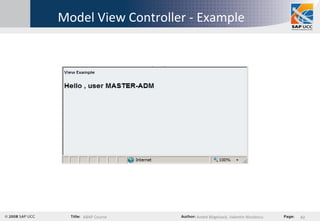
Model View Controller - Example Create Controller example_co.do  Derive own class  ZCL_BSP_MYMVCTEST   from CL_BSP_CONTROLLER2  Redefine method DO_REQUEST  Define view view_test.htm  Define attribute NAME  Call Controller
Model View Controller - Example

Abap course chapter 7 abap objects and bsp

  • 1.
    ABAP Course Chapter7 – ABAP Objects and Business Server Pages Lecturer: André Bögelsack, UCC Technische Universität München Author: Valentin Nicolescu, André Bögelsack
  • 2.
    Copyright 2008 UCCTU München All rights reserved Weitergabe und Vervielfältigung dieser Publikation oder von Teilen daraus sind, zu welchem Zweck und in welcher Form auch immer, ohne die ausdrückliche schriftliche Genehmigung durch HCC TU München nicht gestattet. In dieser Publikation enthaltene Informationen können ohne vorherige Ankündigung geändert werden. Microsoft®, WINDOWS®, NT®, EXCEL®, Word®, PowerPoint® und SQL Server® sind eingetragene Marken der Microsoft Corporation. IBM®, DB2®, OS/2®, DB2/6000®, Parallel Sysplex®, MVS/ESA®, RS/6000®, AIX®, S/390®, AS/400®, OS/390® und OS/400® sind eingetragene Marken der IBM Corporation. ORACLE® ist eine eingetragene Marke der ORACLE Corporation. INFORMIX®-OnLine for SAP und Informix® Dynamic ServerTM sind eingetragene Marken der Informix Software Incorporated.  UNIX®, X/Open®, OSF/1® und Motif® sind eingetragene Marken der Open Group. Citrix®, das Citrix-Logo, ICA®, Program Neighborhood®, MetaFrame®, WinFrame®, VideoFrame®, MultiWin® und andere hier erwähnte Namen von Citrix-Produkten sind Marken von Citrix Systems, Inc. HTML, DHTML, XML, XHTML sind Marken oder eingetragene Marken des W3C®, World Wide Web Consortium, Massachusetts Institute of Technology.   JAVA® ist eine eingetragene Marke der Sun Microsystems, Inc. JAVASCRIPT® ist eine eingetragene Marke der Sun Microsystems, Inc., verwendet unter der Lizenz der von Netscape entwickelten und implementierten Technologie.   SAP, SAP Logo, R/2, RIVA, R/3, SAP ArchiveLink, SAP Business Workflow, WebFlow, SAP EarlyWatch, BAPI, SAPPHIRE, Management Cockpit, mySAP, mySAP.com und weitere im Text erwähnte SAP-Produkte und -Dienstleistungen sowie die entsprechenden Logos sind Marken oder eingetragene Marken der SAP AG in Deutschland und anderen Ländern weltweit. MarketSet und Enterprise Buyer sind gemeinsame Marken von SAP Markets und Commerce One. Alle anderen Namen von Produkten und Dienstleistungen sind Marken der jeweiligen Firmen. Die Verwendung der Screenshots wurde mit dem jeweiligen Eigner abgesprochen.
  • 3.
    Agenda ABAP ObjectsBusiness Server Pages Maintenance and execution Usage of BAPIs in BSPs HTMLB Model View Controller
  • 4.
    Introduction ABAP ObjectsObject-oriented enhancement of ABAP Stepwise conversion of existing ABAP source code into ABAP Objects Major tools: ABAP Editor Class Builder
  • 5.
    Principles of ObjectOrientation I Classes are the definition of an object including attributes and methods of this object Objects are instances of classes Example: Class: Car Instance: My car with the license number xxx
  • 6.
    Use of classesand methods Car_accelerate Procedurale approach Car_braking Car_show_speed Car_stop Car_Gear_change_up Car_Gear_change_down Car Accelerate Braking Show_speed Stop Gear_change up Gear_change_down Object-oriented approach
  • 7.
    Principles of ObjectOrientation II Encapsulation: The implementation of a class is invisible outside the class. Interaction takes place only by a defined interface. Polymorphism: Identically-named methods used for different classes respond according to an appropriate class-specific behavior. Inheritance: A new class can inherit attributes and methods from an existing class that can be extended by additional, own attributes and methods.
  • 8.
    Example for ObjectOrientation Class Vehicle Class Car Class Motor Truck Attributes: Manufacturer No. of wheels Methods: Create Show attribute Inheritance Inheritance Attributes: Manufacturer No. of wheels No. of seats Methods: Create Show attributes Used seats Attributes: Manufacturer No. of wheels Vehicle payload Methods: Create Show attributes Cargo capacity Soure: Own illustration
  • 9.
    Classification of methodsand attributes Private  public Private methods/attributes can be called/accessed only from the class‘ own methods (e.g. method „braking“ shouldn‘t be called by everyone) Public methods/attributes can always be called/accessed (e.g. what colour has your car?) Instance  static Instance methods/attributes exist for each instance of a class (e.g. method „get colour“, as each instance has it‘s own colour) Static methods/attributes exist only once for all instances (e.g. listing of all instances of a class)
  • 10.
    Declaration of aclass Classes can be created using ABAP Editor or Class Builder Separation of definition and implementation of a class Definition includes the declaration of all components of a class (e.g. methods, attributes..) Implementation includes the coding for all methods of a class
  • 11.
    Definition of aclass CLASS <Class name> DEFINITION. PUBLIC SECTION. METHODS: <Method1> IMPORTING <Import Parameter1> TYPE <Data type> <Import Parameter2> TYPE <Data type> CLASS-METHODS: <Method2> DATA: <Variable1> TYPE <Data type> CLASS-DATA: <Variable2> TYPE <Data type> PRIVATE SECTION. METHODS: … CLASS-METHODS: … DATA: … CLASS-DATA: … ENDCLASS.
  • 12.
    Implementation of aclass CLASS <Class name> IMPLEMENTATION. … METHOD <Method name>. … ABAP-Code … ENDMETHOD. … ENDCLASS.
  • 13.
    Calling methods andaccessing attributes Instance method: [CALL METHOD] <Instance name> -><Method>( <Import parameter> = Value ). Class method: [CALL METHOD] <Class name> =><Method>( <Import parameter> = Value ). Instance attributes: <Instance name>-><Attribute>. Static attributes: <Class name>=><Attribute>.
  • 14.
    Constructor Explicitly orimplicitly defined method „constructor“ used for creating new instances Automatically called by „CREATE OBJECT“ In case of missing implementation simply a new instance is created In case of explicit implementation within the PUBLIC SECTION additional steps can be executed when creating new instances (e.g. setting of default values)
  • 15.
    Example constructor PUBLICSECTION METHODS: constructor IMPORTING im_name type string im_planetype type string. CREATE OBJECT r_plane EXPORTING im_name = ‚ Munich ‘ im_planetype= ‚ 747 ‘ .
  • 16.
    Business Server Pages(BSP) Web extension for ABAP Enables the use of ABAP and server-side JavaScript within HTML pages created and hosted on a SAP System Can be used for the realization of extensive portal solutions Availability of BSPs starting with SAP Web Application Server 6.20
  • 17.
    Maintenance and executionof BSP‘s Maintenance by transaction SICF Execution: http://<host>:<ABAP Port>/sap/bc/bsp/sap/ <Program name>\<Page name>.htm E.g.: http://g51as1.informatik.tu-muenchen.de: 8051/sap/bc/bsp/sap/<Programname>\<Page name>.htm
  • 18.
    Usage of BAPIsin BSPs I Business Application Programming Interface = BAPI BAPI represent an interface to the outside world SAP systems offer a wide range of different BAPIs BAPI calls are executed using RFC Transaction „BAPI“ shows all available BAPIs of the current SAP system Search for BAPIs using BAPI Browser, cross-system access possible Use of BAPIs with help of information available in the BAPI Browser
  • 19.
    Usage of BAPIsin BSPs II SAP System 1 SAP System 2 BAPI BSP RFC Browser This example: Call of an external BAPI Other possible examples: Call of an internal BAPI EXPORTING IMPORTING
  • 20.
    Using BAPI BrowserI Call BAPI Browser in transaction SE80 Menue item ‚Goto‘  ‚BAPI Browser‘
  • 21.
    Using BAPI BrowserII BAPI Browser components: RFC-Connection Available BAPIs for RFC- Connection Interface definition Call example
  • 22.
    Usage of BAPIsin BSPs III Example scenario: Call BAPI „BAPI_USER_GET_DETAIL“ Show details of a certain user BAPI offers broad functionality for query of user data Use of BAPI in order to show the „last changed on“ date
  • 23.
    Example: Call BAPIin BSP – Step 1 Step 1: Definition of variables Temporary variables data username type c. data tmp_islocked type BAPISLOCKD. data tmp_moddat type BAPIMODDAT. Interface variables data ISLOCKED type BAPISLOCKD. data LASTMODIFIED type BAPIMODDAT.
  • 24.
    Example: Call BAPIin BSP – Step 2 Step 2: Definition CALL FUNCTION CALL FUNCTION 'BAPI_USER_GET_DETAIL' DESTINATION 'G11clnt101 ‚ EXPORTING … .. IMPORTING … ... CALL FUNCTION refers to the BAPI name DESTINATION refers to the RFC-connection EXPORTING refers to input parameters of a BAPI IMPORTING refers to output parameters of a BAPI
  • 25.
    Example: Call BAPIin BSP – Step 3 Step 3: Complete call within a BSP: CALL FUNCTION 'BAPI_USER_GET_DETAIL' DESTINATION 'G51' EXPORTING username = 'master-adm' IMPORTING lastmodified = tmp_moddat. Query of the „Last changed on“ date (  lastmodified) of user „master-adm“ Output is assigned to variable tmp_moddat
  • 26.
    Example: Call BAPIin BSP – Result Result:
  • 27.
    Example: Call BAPIin BSP Complete source code: <%@page language=&quot;abap&quot; %> <%@extension name=&quot;htmlb&quot; prefix=&quot;htmlb&quot; %> <htmlb:content> <htmlb:page title=&quot;Flugresultate&quot; > <table width=&quot;100%&quot; height=&quot;100%&quot; cellspacing=&quot;1&quot; cellpadding=&quot;2&quot; border=&quot;0&quot;> <tr class=&quot;sapTbvCellStd&quot;> <td bgcolor=&quot;Whitesmoke&quot; valign=&quot;top&quot;> <h2> User details </h2> <% data: username type c. data ISLOCKED type BAPISLOCKD. data lastmodified type bapimoddat. data tmp_islocked type bapislockd. data tmp_moddat type bapimoddat. CALL FUNCTION 'BAPI_USER_GET_DETAIL' DESTINATION ‚ G51' EXPORTING USERNAME = 'master-adm' IMPORTING islocked = tmp_islocked lastmodified = tmp_moddat. %> <tr> <td bgcolor=&quot;Whitesmoke&quot; valign=&quot;top&quot;> Master-Adm last modified? </td> <td bgcolor=&quot;Whitesmoke&quot; valign=&quot;top&quot;><%= tmp_moddat %></td> </tr> <tr> <td bgcolor=&quot;Whitesmoke&quot; valign=&quot;top&quot;> Master-Adm locked? </td> <td bgcolor=&quot;Whitesmoke&quot; valign=&quot;top&quot;><%= tmp_islocked %></td> </tr> </table> </htmlb:page> </htmlb:content>
  • 28.
    HTMLB Extension ofHTML by SAP HTML-Business HTML-Business for Java HTML-Business for ABAP HTMLB is used e.g. for Enterprise Portal
  • 29.
    Comparison HTML /HTMLB <%@page language=“abap“ %> <html> <head> <title>My BSP</title> <% data: vari type i. %> </head> <body> <%--This is a comment --%> <% vari = 5 %> In this coding following value is assigend to variable „vari“: <%= vari %> <br> That‘s it. </body> </html> <%@page language=&quot;abap&quot; %> <%@extension name=&quot;htmlb&quot; prefix=&quot;htmlb&quot; %> <htmlb:content design=&quot;design2003&quot; > <htmlb:page title=„My BSP&quot; > <% data: vari type i. %> <%--This is a comment --%> <% vari = 5. %> In this coding following value is assigend to variable „vari“: <%= vari. %> <br> That‘s it using HTMLB. </htmlb:page> </htmlb:content> HTML HTMLB 
  • 30.
    HTMLB Statements <%@extensionname=&quot;htmlb&quot; prefix=&quot;htmlb&quot; %> Naming of extension; in this case „htmlb“ <htmlb:content design=&quot;design2003&quot; > Begin of content-tags with explicit design definition Standard designs: design2003, design2002 and classic Design2003 can be used only for MS IE Version 5.5 or higher <htmlb:page title=&quot;Meine BSP&quot; > Begin of page-tags with definition of title for BSP Explicit <head> tag is not required any more Explicit <body> tag is not required any more </htmlb:page> </htmlb:content> Closing tags for page and content
  • 31.
    HTMLB – Textfields Text fields: <htmlb:textView text = „Hi this is a textView“ design =„Emphasized“ /> Text fields include different attributes: Text: The displayed text Design: Different design types Emphasized Header 1-3 - Headlines Reference – italic Reference Standard etc.
  • 32.
    HTMLB – Forms,Input fields Forms <htmlb:form id = &quot;myFormId&quot; method = &quot;post&quot; encodingType = &quot;multipart/form-data&quot; > Equivalent of form in HTML Input Fields <htmlb:inputField id=&quot;IP1&quot; /> Input field:
  • 33.
    HTMLB – Buttons,Events Buttons <htmlb:button id = &quot;SaveChanges&quot; onClick = &quot;SubmitChange&quot; text = &quot;Submit Button&quot; onClientClick = &quot;onInputProcessing(htmlbevent);&quot; /> Button for sending forms Important: onClientClick raises event, in this case: onInputProcessing(htmlbevent) Event is called onInputProcessing Event_id is called: htmlbevent
  • 34.
    HTMLB - EventhandlerEvents are defined in the Eventhandler!
  • 35.
    HTMLB – RadioButtonsI Radiobuttons <htmlb:radioButtonGroup id = &quot;myID&quot; columnCount = &quot;2&quot; > <htmlb:radioButton id = &quot;RBGenderFemale&quot; text = &quot;female&quot; tooltip = &quot;I am female&quot; disabled = &quot;false&quot; /> <htmlb:radioButton id = &quot;RBGenderMale&quot; text = &quot;male&quot; tooltip = &quot;I am male (and this button is disabled)&quot; disabled = &quot;true&quot; /> </htmlb:radioButtonGroup> RadioButtons always belong to a RadioButtonGroup RadioButtonGroup with attributes Id: Unique ID columnCount: Number of columns currentItem: Defines the active item
  • 36.
    HTMLB – RadioButtonsII <htmlb:radioButtonGroup id = &quot;myID&quot; columnCount = &quot;2&quot; > <htmlb:radioButton id = &quot;RBGenderFemale&quot; text = &quot;female&quot; tooltip = &quot;I am female&quot; disabled = &quot;false&quot; /> <htmlb:radioButton id = &quot;RBGenderMale&quot; text = &quot;male&quot; tooltip = &quot;I am male (and this button is disabled)&quot; disabled = &quot;true&quot; /> </htmlb:radioButtonGroup> RadioButton with attributes Id: Unique ID Text: Text of RadioButtons Tooltip: Text that is displayed as tooltip Disabled: RadioButton cannot be selected
  • 37.
    HTMLB - LayoutRadioButtons Tree with treeNodes TabStrips TableView
  • 38.
    Model View ControllerUp-to-now: Presentation logic and application logic both are included in a BSP Model View Controller: Separation between logical layers SAP System BSP SAP System View Controller Model
  • 39.
    Model View ControllerModel Consists of a class derived from CL_BSP_MODEL Processing takes place in background Controller Handles Requests and forwards to Model View Calls Controller Only responsible for the visualization of data SAP System View Controller Model
  • 40.
    Model View Controller- Example SAP System View view_test.htm Controller example_co.do Model ZCL_BSP_MYMVCTEST HTTP-Request DO_REQUEST Application logic Attribute NAME No direct call
  • 41.
    Model View Controller- Example Create Controller example_co.do Derive own class ZCL_BSP_MYMVCTEST from CL_BSP_CONTROLLER2 Redefine method DO_REQUEST Define view view_test.htm Define attribute NAME Call Controller
  • 42.

Editor's Notes

  • #6 license number HSK-XX-XXXX