Windows Embedded CE 6.0 All about  Device Drivers   by-   Rahul P Shukla
Topics.. Device Driver Basics Implementing a Stream Interface Driver Configuring and Loading a Driver Implementing an Interrupt Mechanism in a Device Driver Implementing Power Management for a Driver.
Device Driver Basics
What is a Device Driver ? A driver is software that provides the operating system (OS) with an interface to a physical or a virtual device.  The operating system expects drivers to implement a predefined interface that creates an abstraction of a specific hardware or a virtual implementation of a device. The device drivers contain the hardware-specific code, and we can implement custom drivers in addition to the standard drivers that ship with CE to support additional peripherals. As device driver is a dynamic-link library (DLL) that provides a layer of abstraction between the underlying hardware, OS, and applications running on the target device. Device Driver Basics
Device Driver Basics  Classification of Device Driver Implementation architecture Layered driver Monolithic driver. Hybrid driver Loading module Device Manager (device.dll) - Stream drivers. GWES (gwes.dll) - Native drivers that are used only by the Graphics, Windowing, and Events Subsystem (GWES). File system (filesys.dll) - drivers of file systems. Loading into memory Kernel Memory User Memory System load time. System Startup On Request
Types of supported device. Serial port. Video adapter. Network card. Touch screen. Keyboard. Mouse. Human interface device (HID), and so on.. Device Driver Basics
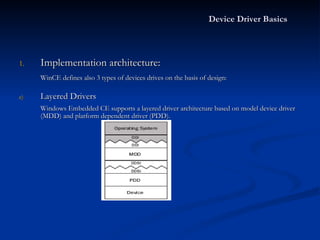
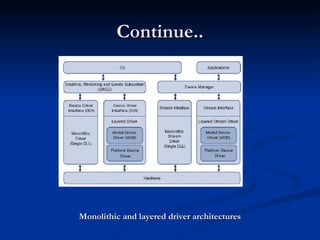
Device Driver Basics Implementation architecture: WinCE defines also 3 types of devices drives on the basis of design: Layered Drivers Windows Embedded CE supports a layered driver architecture based on model device driver (MDD) and platform dependent driver (PDD).
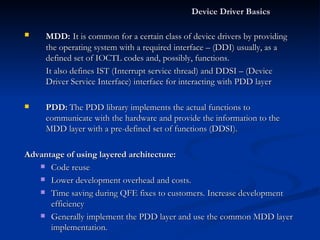
Device Driver Basics  MDD:   It is common for a certain class of device drivers by providing the operating system with a required interface – (DDI) usually, as a defined set of IOCTL codes and, possibly, functions. It also defines IST (Interrupt service thread) and DDSI – (Device Driver Service Interface) interface for interacting with PDD layer PDD:   The PDD library implements the actual functions to communicate with the hardware and provide the information to the MDD layer with a pre-defined set of functions (DDSI). Advantage of using layered architecture: Code reuse Lower development overhead and costs. Time saving during QFE fixes to customers. Increase development efficiency Generally implement the PDD layer and use the common MDD layer implementation.
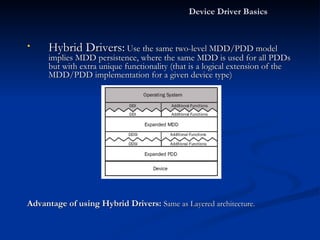
Hybrid Drivers:  Use the same two-level MDD/PDD model implies MDD persistence, where the same MDD is used for all PDDs but with extra unique functionality (that is a logical extension of the MDD/PDD implementation for a given device type)  Advantage of using Hybrid Drivers:   Same as Layered architecture. Device Driver Basics
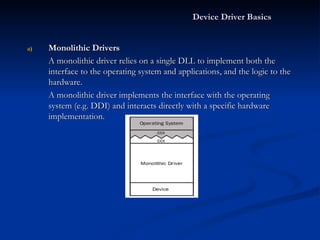
Monolithic Drivers A monolithic driver relies on a single DLL to implement both the interface to the operating system and applications, and the logic to the hardware. A monolithic driver implements the interface with the operating system (e.g. DDI) and interacts directly with a specific hardware implementation. Device Driver Basics
Continue.. This type of architecture is usually utilized in the following cases: When there is no layered model for a device type. Device hardware is uncommon and custom hardware. No layered driver code exists that could be reused. When using an MDD/PDD model, it is not possible to achieve a required efficiency level. Advantage:   High efficiency by avoiding the switching between separate layers and to maximize the hardware use. Disadvantage:  Building a monolithic driver is the most complex task. Higher Development cost and time.
Monolithic and layered driver architectures Continue..
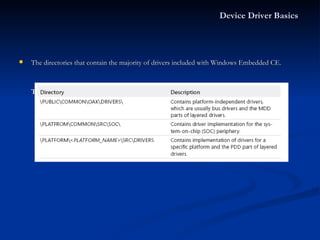
The directories that contain the majority of drivers included with Windows Embedded CE.  Table: Included driver directories. Device Driver Basics
Loading Module: Windows Embedded CE the following three modules (parts of the kernel) can load drivers: Device.dll:  Handled by Device Manager and referred as  Stream Drivers. Gwes.dll:   Handled by GWES and referred as  Native drivers. FileSys.dll:  Handled by File System. Device Manager The Windows Embedded CE Device Manager is the OS component that manages the stream device drivers on the system. The OAL (Oal.exe) loads the kernel (Kernel.dll), and the kernel loads Device Manager during the boot process. Specifically, the kernel loads the Device Manager shell (Device.dll), which in turn loads the actual core Device Manager code (Devmgr.dll), which again is in charge of loading, unloading, and interfacing with stream drivers. Device Driver Basics
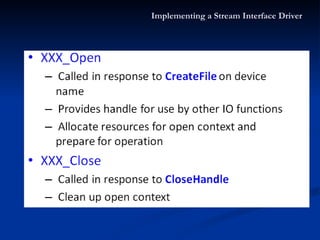
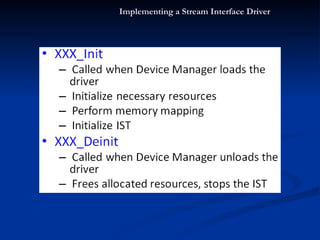
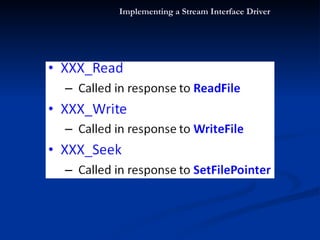
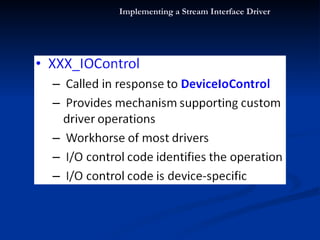
Stream Device Drivers: Handled by Device Manager. Expose a well-known set of functions that enable Device Manager to load and manage these drivers.   For Device Manager to interact with a stream driver, the driver must implement the Init, Deinit, Open, Close, Read, Write, Seek, and IOControl functions. Native Device Drivers:  Native CE drivers typically support input and output peripherals, such as display drivers, keyboard drivers, and touch screen drivers. The Graphics, Windowing, and Events Subsystem (GWES) loads and manages these drivers directly. Native drivers implement specific functions according to their purpose, which GWES can determine by calling the GetProcAddress API. Device Driver Basics
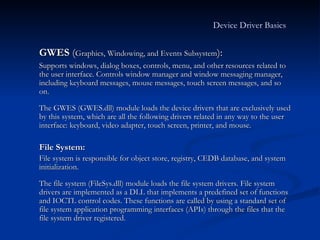
GWES  ( Graphics, Windowing, and Events Subsystem ):  Supports windows, dialog boxes, controls, menu, and other resources related to the user interface. Controls window manager and window messaging manager, including keyboard messages, mouse messages, touch screen messages, and so on. The GWES (GWES.dll) module loads the device drivers that are exclusively used by this system, which are all the following drivers related in any way to the user interface: keyboard, video adapter, touch screen, printer, and mouse.  File System:  File system is responsible for object store, registry, CEDB database, and system initialization. The file system (FileSys.dll) module loads the file system drivers. File system drivers are implemented as a DLL that implements a predefined set of functions and IOCTL control codes. These functions are called by using a standard set of file system application programming interfaces (APIs) through the files that the file system driver registered. Device Driver Basics
Question Time. Can you answer this.. Generally Which layer need to be modified in Layered Driver Architecture? Which module loads an Stream Drivers? What are the name of interfaces b/w MDD layer – OS and MDD Layer – PDD layer?
Implementing a Stream Interface Driver
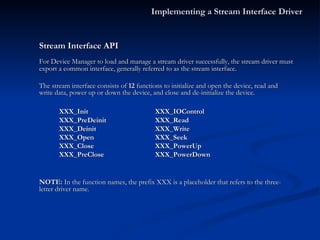
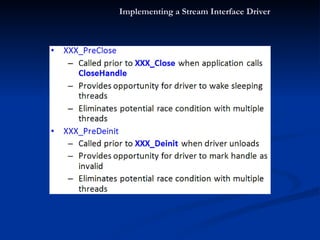
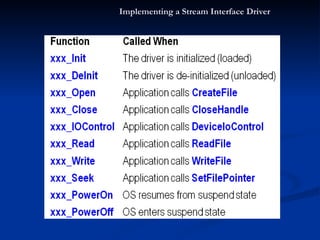
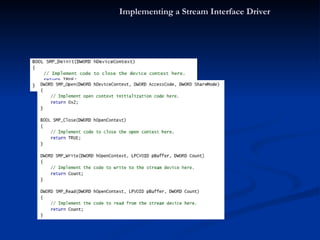
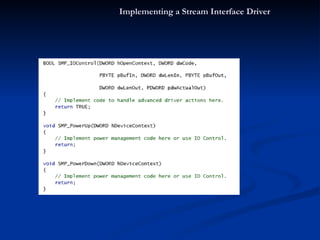
Stream Interface API For Device Manager to load and manage a stream driver successfully, the stream driver must export a common interface, generally referred to as the stream interface.  The stream interface consists of  12  functions to initialize and open the device, read and write data, power up or down the device, and close and de-initialize the device. XXX_Init XXX_IOControl XXX_PreDeinit XXX_Read XXX_Deinit XXX_Write XXX_Open XXX_Seek XXX_Close XXX_PowerUp  XXX_PreClose XXX_PowerDown NOTE:  In the function names, the prefix XXX is a placeholder that refers to the three-letter driver name. Implementing a Stream Interface Driver
Implementing a Stream Interface Driver
Driver Naming Convention: The Device Manager registers the following three different file namespaces in the file system for accessing named stream drivers: Legacy:  The classical naming convention for stream drivers consists of three upper case letters, a digit, and a colon. The format is  XXX [0–9]:, where  XXX  stands for the three-letter driver name and [ 0–9 ] is the index of the driver as specified in the driver’s registry settings . For example, CreateFile(L"COM1:"…) Device - Based:  A device namespace ($device) is similar to a legacy space but the former has no index restriction. format \$device\XXX[index]. For example, CreateFile(L"\$device\COM11"…) Bus - Based:  This is for bus based devices as PCMCIA or USB. Format is \$bus\BUSNAME_[bus number]_[device number]_[function number] For example, CreateFile(L"\$ bus\PCMCIA_0_0_0"…). Implementing a Stream Interface Driver
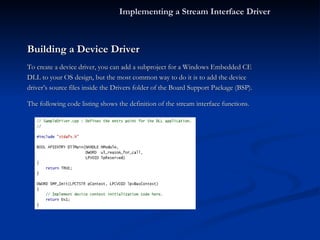
Building a Device Driver To create a device driver, you can add a subproject for a Windows Embedded CE DLL to your OS design, but the most common way to do it is to add the device  driver’s source files inside the Drivers folder of the Board Support Package (BSP). The following code listing shows the definition of the stream interface functions. Implementing a Stream Interface Driver
Implementing a Stream Interface Driver
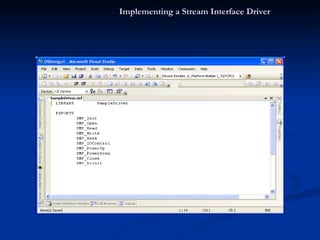
Exporting Stream Functions Making the stream functions in the driver DLL accessible to external applications requires the linker to export the functions during the build process. For driver DLLs compatible with Device Manager, you must export the functions by defining them in the .def file of the DLL subproject. The linker uses the .def file to determine which functions to export and how to do so. For a standard stream driver, you must export the stream interface functions using the prefix that you specify in the driver’s source code and registry settings. Implementing a Stream Interface Driver
Implementing a Stream Interface Driver
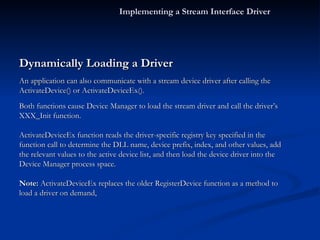
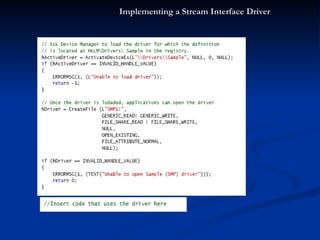
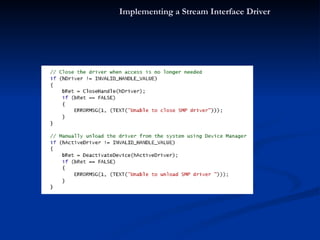
Dynamically Loading a Driver An application can also communicate with a stream device driver after calling the  ActivateDevice() or ActivateDeviceEx(). Both functions cause Device Manager to load the stream driver and call the driver’s XXX_Init function. ActivateDeviceEx function reads the driver-specific registry key specified in the function call to determine the DLL name, device prefix, index, and other values, add the relevant values to the active device list, and then load the device driver into the Device Manager process space. Note:  ActivateDeviceEx replaces the older RegisterDevice function as a method to load a driver on demand, Implementing a Stream Interface Driver
Implementing a Stream Interface Driver
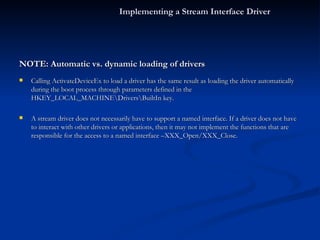
NOTE: Automatic vs. dynamic loading of drivers Calling ActivateDeviceEx to load a driver has the same result as loading the driver automatically during the boot process through parameters defined in the HKEY_LOCAL_MACHINE\Drivers\BuiltIn key. A stream driver does not necessarily have to support a named interface. If a driver does not have to interact with other drivers or applications, then it may not implement the functions that are responsible for the access to a named interface –XXX_Open/XXX_Close. Implementing a Stream Interface Driver
Question Time Can you answer this.. How many functions a Stream driver must export? How many max instance can be created in Legacy driver naming convention?
Configuring and Loading a Driver
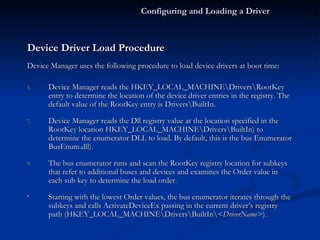
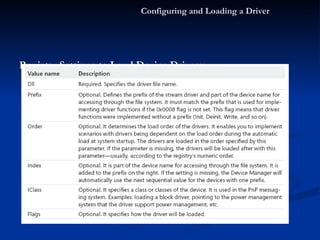
Device Driver Load Procedure Device Manager uses the following procedure to load device drivers at boot time: Device Manager reads the HKEY_LOCAL_MACHINE\Drivers\RootKey entry to determine the location of the device driver entries in the registry. The default value of the RootKey entry is Drivers\BuiltIn. Device Manager reads the Dll registry value at the location specified in the RootKey location HKEY_LOCAL_MACHINE\Drivers\BuiltIn) to determine the enumerator DLL to load. By default, this is the bus Enumerator BusEnum.dll). The bus enumerator runs and scan the RootKey registry location for subkeys that refer to additional buses and devices and examines the Order value in each sub key to determine the load order. Starting with the lowest Order values, the bus enumerator iterates through the subkeys and calls ActivateDeviceEx passing in the current driver’s registry path (HKEY_LOCAL_MACHINE\Drivers\BuiltIn\ <DriverName> ). Configuring and Loading a Driver
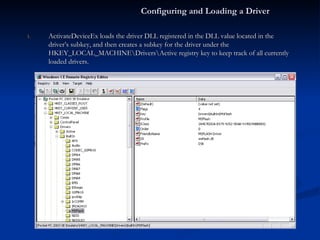
ActivateDeviceEx loads the driver DLL registered in the DLL value located in the driver’s subkey, and then creates a subkey for the driver under the HKEY_LOCAL_MACHINE\Drivers\Active registry key to keep track of all currently loaded drivers. Configuring and Loading a Driver
Registry Settings to Load Device Drivers: Configuring and Loading a Driver
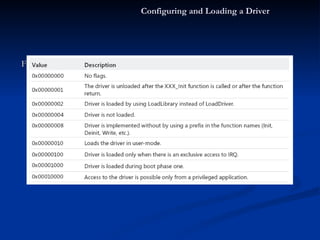
Flag Values: Configuring and Loading a Driver
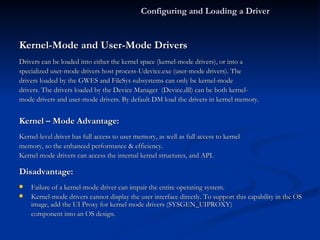
Kernel-Mode and User-Mode Drivers Drivers can be loaded into either the kernel space (kernel-mode drivers), or into a specialized user-mode drivers host process-Udevice.exe (user-mode drivers). The drivers loaded by the GWES and FileSys subsystems can only be kernel-mode drivers. The drivers loaded by the Device Manager  (Device.dll) can be both kernel- mode drivers and user-mode drivers. By default DM load the drivers in kernel memory.  Kernel – Mode Advantage: Kernel-level driver has full access to user memory, as well as full access to kernel memory, so the enhanced performance & efficiency.  Kernel mode drivers can access the internal kernel structures, and API.  Disadvantage: Failure of a kernel-mode driver can impair the entire operating system.  Kernel-mode drivers cannot display the user interface directly. To support this capability in the OS image, add the UI Proxy for kernel mode drivers (SYSGEN_UIPROXY) component into an OS design. Configuring and Loading a Driver
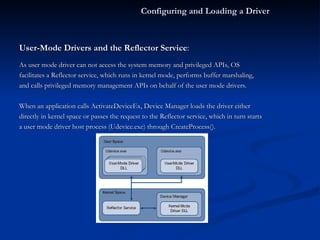
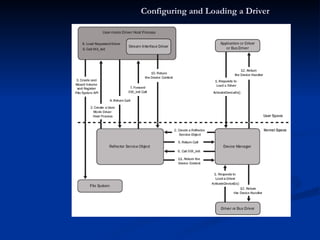
User-Mode Drivers and the Reflector Service : As user mode driver can not access the system memory and privileged APIs, OS facilitates a Reflector service, which runs in kernel mode, performs buffer marshaling,  and calls privileged memory management APIs on behalf of the user mode drivers. When an application calls ActivateDeviceEx, Device Manager loads the driver either directly in kernel space or passes the request to the Reflector service, which in turn starts a user mode driver host process (Udevice.exe) through CreateProcess().  Configuring and Loading a Driver
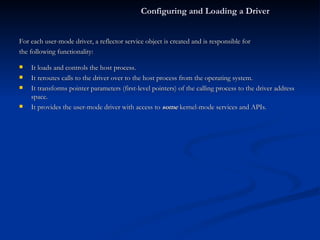
For each user-mode driver, a reflector service object is created and is responsible for the following functionality: It loads and controls the host process. It reroutes calls to the driver over to the host process from the operating system. It transforms pointer parameters (first-level pointers) of the calling process to the driver address space. It provides the user-mode driver with access to  some  kernel-mode services and APIs. Configuring and Loading a Driver
User-mode driver loading process. Configuring and Loading a Driver
Question Time Can you answer this.. What is the name of ONLY required registry entry for a Stream Diver? What is the name of Host process for a user-mode driver? Which memory DM loads a driver by default?
Implementing an Interrupt Mechanism in a Device Driver
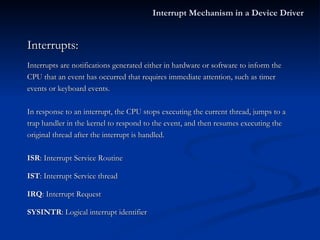
Interrupts: Interrupts are notifications generated either in hardware or software to inform the CPU that an event has occurred that requires immediate attention, such as timer events or keyboard events. In response to an interrupt, the CPU stops executing the current thread, jumps to a  trap handler in the kernel to respond to the event, and then resumes executing the original thread after the interrupt is handled. ISR : Interrupt Service Routine IST : Interrupt Service thread IRQ : Interrupt Request SYSINTR : Logical interrupt identifier Interrupt Mechanism in a Device Driver
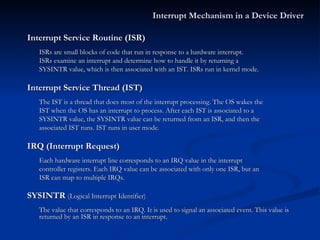
Interrupt Service Routine (ISR) ISRs are small blocks of code that run in response to a hardware interrupt. ISRs examine an interrupt and determine how to handle it by returning a SYSINTR value, which is then associated with an IST. ISRs run in kernel mode. Interrupt Service Thread (IST) The IST is a thread that does most of the interrupt processing. The OS wakes the IST when the OS has an interrupt to process. After each IST is associated to a SYSINTR value, the SYSINTR value can be returned from an ISR, and then the associated IST runs. IST runs in user mode. IRQ (Interrupt Request) Each hardware interrupt line corresponds to an IRQ value in the interrupt  controller registers. Each IRQ value can be associated with only one ISR, but an ISR can map to multiple IRQs. SYSINTR  (Logical Interrupt Identifier) The value that corresponds to an IRQ. It is used to signal an associated event. This value is returned by an ISR in response to an interrupt. Interrupt Mechanism in a Device Driver
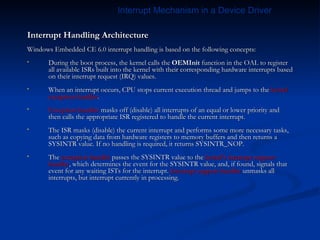
Interrupt Handling Architecture Windows Embedded CE 6.0 interrupt handling is based on the following concepts: During the boot process, the kernel calls the  OEMInit  function in the OAL to register all available ISRs built into the kernel with their corresponding hardware interrupts based on their interrupt request (IRQ) values.  When an interrupt occurs, CPU stops current execution thread and jumps to the  kernel exception handler . Exception handler  masks off (disable) all interrupts of an equal or lower priority and then calls the appropriate ISR registered to handle the current interrupt. The ISR masks (disable) the current interrupt and performs some more necessary tasks, such as copying data from hardware registers to memory buffers and then returns a SYSINTR value. If no handling is required, it returns SYSINTR_NOP.  The  exception handler  passes the SYSINTR value to the  kernel’s interrupt support handler , which determines the event for the SYSINTR value, and, if found, signals that event for any waiting ISTs for the interrupt.  Interrupt support handler  unmasks all interrupts, but interrupt currently in processing. Interrupt Mechanism in a Device Driver
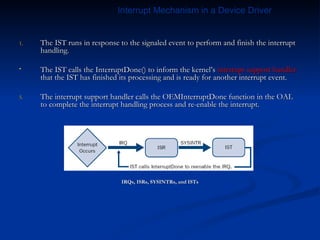
The IST runs in response to the signaled event to perform and finish the interrupt handling. The IST calls the InterruptDone() to inform the kernel’s  interrupt support handler  that the IST has finished its processing and is ready for another interrupt event. The interrupt support handler calls the OEMInterruptDone function in the OAL to complete the interrupt handling process and re-enable the interrupt. IRQs, ISRs, SYSINTRs, and ISTs Interrupt Mechanism in a Device Driver
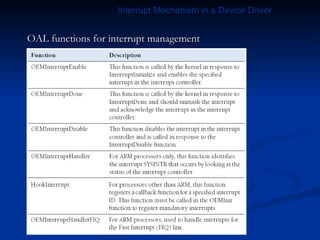
OAL functions for interrupt management Interrupt Mechanism in a Device Driver
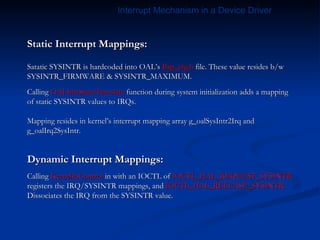
Static Interrupt Mappings: Satatic SYSINTR is hardcoded into OAL’s  Bsp_cfg.h  file. These value resides b/w SYSINTR_FIRMWARE & SYSINTR_MAXIMUM. Calling  OALIntrStaticTranslate  function during system initialization adds a mapping of static SYSINTR values to IRQs. Mapping resides in kernel’s interrupt mapping array g_oalSysIntr2Irq and g_oalIrq2SysIntr. Dynamic Interrupt Mappings: Calling  KernelIoControl  in with an IOCTL of  IOCTL_HAL_REQUEST_SYSINTR registers the IRQ/SYSINTR mappings, and  IOCTL_HAL_RELEASE_SYSINTR Dissociates the IRQ from the SYSINTR value. Interrupt Mechanism in a Device Driver
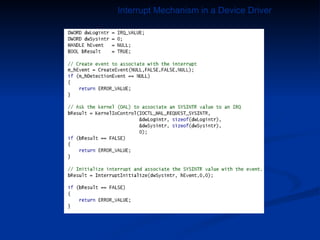
Sample code an IST Interrupt Mechanism in a Device Driver
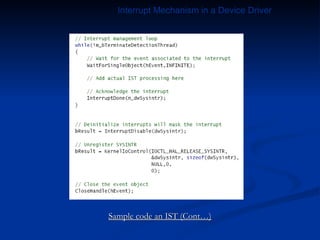
Sample code an IST (Cont…) Interrupt Mechanism in a Device Driver
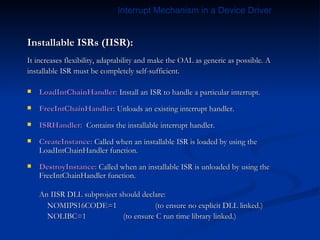
Installable ISRs (IISR): It increases flexibility, adaptability and make the OAL as generic as possible. A installable ISR must be completely self-sufficient. LoadIntChainHandler:  Install an ISR to handle a particular interrupt.  FreeIntChainHandler:  Unloads an existing interrupt handler.  ISRHandler:   Contains the installable interrupt handler. CreateInstance:  Called when an installable ISR is loaded by using the LoadIntChainHandler function. DestroyInstance:  Called when an installable ISR is unloaded by using the FreeIntChainHandler function. An IISR DLL subproject should declare:   NOMIPS16CODE=1  (to ensure no explicit DLL linked.)   NOLIBC=1 (to ensure C run time library linked.) Interrupt Mechanism in a Device Driver
Question Time Can you answer this.. In which memory ISR executes? If no processing required, What SYSINTR reurned by ISR? How many IRSs an IRQ can be associated?
Implementing Power Management for a Driver.
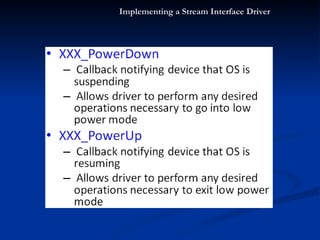
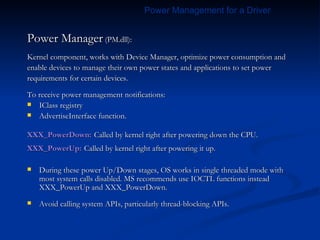
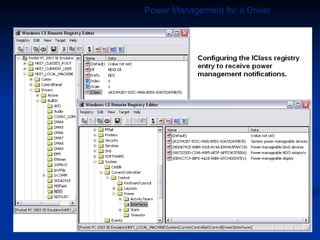
Power Manager  (PM.dll): Kernel component, works with Device Manager, optimize power consumption and enable devices to manage their own power states and applications to set power requirements for certain devices. To receive power management notifications: IClass registry AdvertiseInterface function. XXX_PowerDown:   Called by kernel right after powering down the CPU. XXX_PowerUp:   Called by kernel right after powering it up. During these power Up/Down stages, OS works in single threaded mode with most system calls disabled. MS recommends use IOCTL functions instead XXX_PowerUp and XXX_PowerDown.  Avoid calling system APIs, particularly thread-blocking APIs. Power Management for a Driver
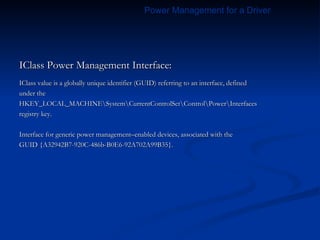
IClass Power Management Interface: IClass value is a globally unique identifier (GUID) referring to an interface, defined under the HKEY_LOCAL_MACHINE\System\CurrentControlSet\Control\Power\Interfaces registry key. Interface for generic power management–enabled devices, associated with the GUID {A32942B7-920C-486b-B0E6-92A702A99B35}. Power Management for a Driver
Power Management for a Driver
Question Time Can you answer this.. What are the 2 ways, a Stream driver can advertise that it is Power Management enabled?
Thank You  

Device Driver in WinCE 6.0 R2

  • 1.
    Windows Embedded CE6.0 All about Device Drivers by- Rahul P Shukla
  • 2.
    Topics.. Device DriverBasics Implementing a Stream Interface Driver Configuring and Loading a Driver Implementing an Interrupt Mechanism in a Device Driver Implementing Power Management for a Driver.
  • 3.
  • 4.
    What is aDevice Driver ? A driver is software that provides the operating system (OS) with an interface to a physical or a virtual device. The operating system expects drivers to implement a predefined interface that creates an abstraction of a specific hardware or a virtual implementation of a device. The device drivers contain the hardware-specific code, and we can implement custom drivers in addition to the standard drivers that ship with CE to support additional peripherals. As device driver is a dynamic-link library (DLL) that provides a layer of abstraction between the underlying hardware, OS, and applications running on the target device. Device Driver Basics
  • 5.
    Device Driver Basics Classification of Device Driver Implementation architecture Layered driver Monolithic driver. Hybrid driver Loading module Device Manager (device.dll) - Stream drivers. GWES (gwes.dll) - Native drivers that are used only by the Graphics, Windowing, and Events Subsystem (GWES). File system (filesys.dll) - drivers of file systems. Loading into memory Kernel Memory User Memory System load time. System Startup On Request
  • 6.
    Types of supporteddevice. Serial port. Video adapter. Network card. Touch screen. Keyboard. Mouse. Human interface device (HID), and so on.. Device Driver Basics
  • 7.
    Device Driver BasicsImplementation architecture: WinCE defines also 3 types of devices drives on the basis of design: Layered Drivers Windows Embedded CE supports a layered driver architecture based on model device driver (MDD) and platform dependent driver (PDD).
  • 8.
    Device Driver Basics MDD: It is common for a certain class of device drivers by providing the operating system with a required interface – (DDI) usually, as a defined set of IOCTL codes and, possibly, functions. It also defines IST (Interrupt service thread) and DDSI – (Device Driver Service Interface) interface for interacting with PDD layer PDD: The PDD library implements the actual functions to communicate with the hardware and provide the information to the MDD layer with a pre-defined set of functions (DDSI). Advantage of using layered architecture: Code reuse Lower development overhead and costs. Time saving during QFE fixes to customers. Increase development efficiency Generally implement the PDD layer and use the common MDD layer implementation.
  • 9.
    Hybrid Drivers: Use the same two-level MDD/PDD model implies MDD persistence, where the same MDD is used for all PDDs but with extra unique functionality (that is a logical extension of the MDD/PDD implementation for a given device type) Advantage of using Hybrid Drivers: Same as Layered architecture. Device Driver Basics
  • 10.
    Monolithic Drivers Amonolithic driver relies on a single DLL to implement both the interface to the operating system and applications, and the logic to the hardware. A monolithic driver implements the interface with the operating system (e.g. DDI) and interacts directly with a specific hardware implementation. Device Driver Basics
  • 11.
    Continue.. This typeof architecture is usually utilized in the following cases: When there is no layered model for a device type. Device hardware is uncommon and custom hardware. No layered driver code exists that could be reused. When using an MDD/PDD model, it is not possible to achieve a required efficiency level. Advantage: High efficiency by avoiding the switching between separate layers and to maximize the hardware use. Disadvantage: Building a monolithic driver is the most complex task. Higher Development cost and time.
  • 12.
    Monolithic and layereddriver architectures Continue..
  • 13.
    The directories thatcontain the majority of drivers included with Windows Embedded CE. Table: Included driver directories. Device Driver Basics
  • 14.
    Loading Module: WindowsEmbedded CE the following three modules (parts of the kernel) can load drivers: Device.dll: Handled by Device Manager and referred as Stream Drivers. Gwes.dll: Handled by GWES and referred as Native drivers. FileSys.dll: Handled by File System. Device Manager The Windows Embedded CE Device Manager is the OS component that manages the stream device drivers on the system. The OAL (Oal.exe) loads the kernel (Kernel.dll), and the kernel loads Device Manager during the boot process. Specifically, the kernel loads the Device Manager shell (Device.dll), which in turn loads the actual core Device Manager code (Devmgr.dll), which again is in charge of loading, unloading, and interfacing with stream drivers. Device Driver Basics
  • 15.
    Stream Device Drivers:Handled by Device Manager. Expose a well-known set of functions that enable Device Manager to load and manage these drivers. For Device Manager to interact with a stream driver, the driver must implement the Init, Deinit, Open, Close, Read, Write, Seek, and IOControl functions. Native Device Drivers: Native CE drivers typically support input and output peripherals, such as display drivers, keyboard drivers, and touch screen drivers. The Graphics, Windowing, and Events Subsystem (GWES) loads and manages these drivers directly. Native drivers implement specific functions according to their purpose, which GWES can determine by calling the GetProcAddress API. Device Driver Basics
  • 16.
    GWES (Graphics, Windowing, and Events Subsystem ): Supports windows, dialog boxes, controls, menu, and other resources related to the user interface. Controls window manager and window messaging manager, including keyboard messages, mouse messages, touch screen messages, and so on. The GWES (GWES.dll) module loads the device drivers that are exclusively used by this system, which are all the following drivers related in any way to the user interface: keyboard, video adapter, touch screen, printer, and mouse. File System: File system is responsible for object store, registry, CEDB database, and system initialization. The file system (FileSys.dll) module loads the file system drivers. File system drivers are implemented as a DLL that implements a predefined set of functions and IOCTL control codes. These functions are called by using a standard set of file system application programming interfaces (APIs) through the files that the file system driver registered. Device Driver Basics
  • 17.
    Question Time. Canyou answer this.. Generally Which layer need to be modified in Layered Driver Architecture? Which module loads an Stream Drivers? What are the name of interfaces b/w MDD layer – OS and MDD Layer – PDD layer?
  • 18.
    Implementing a StreamInterface Driver
  • 19.
    Stream Interface APIFor Device Manager to load and manage a stream driver successfully, the stream driver must export a common interface, generally referred to as the stream interface. The stream interface consists of 12 functions to initialize and open the device, read and write data, power up or down the device, and close and de-initialize the device. XXX_Init XXX_IOControl XXX_PreDeinit XXX_Read XXX_Deinit XXX_Write XXX_Open XXX_Seek XXX_Close XXX_PowerUp XXX_PreClose XXX_PowerDown NOTE: In the function names, the prefix XXX is a placeholder that refers to the three-letter driver name. Implementing a Stream Interface Driver
  • 20.
    Implementing a StreamInterface Driver
  • 21.
    Implementing a StreamInterface Driver
  • 22.
    Implementing a StreamInterface Driver
  • 23.
    Implementing a StreamInterface Driver
  • 24.
    Implementing a StreamInterface Driver
  • 25.
    Implementing a StreamInterface Driver
  • 26.
    Implementing a StreamInterface Driver
  • 27.
    Driver Naming Convention:The Device Manager registers the following three different file namespaces in the file system for accessing named stream drivers: Legacy: The classical naming convention for stream drivers consists of three upper case letters, a digit, and a colon. The format is XXX [0–9]:, where XXX stands for the three-letter driver name and [ 0–9 ] is the index of the driver as specified in the driver’s registry settings . For example, CreateFile(L&quot;COM1:&quot;…) Device - Based: A device namespace ($device) is similar to a legacy space but the former has no index restriction. format \$device\XXX[index]. For example, CreateFile(L&quot;\$device\COM11&quot;…) Bus - Based: This is for bus based devices as PCMCIA or USB. Format is \$bus\BUSNAME_[bus number]_[device number]_[function number] For example, CreateFile(L&quot;\$ bus\PCMCIA_0_0_0&quot;…). Implementing a Stream Interface Driver
  • 28.
    Building a DeviceDriver To create a device driver, you can add a subproject for a Windows Embedded CE DLL to your OS design, but the most common way to do it is to add the device driver’s source files inside the Drivers folder of the Board Support Package (BSP). The following code listing shows the definition of the stream interface functions. Implementing a Stream Interface Driver
  • 29.
    Implementing a StreamInterface Driver
  • 30.
    Implementing a StreamInterface Driver
  • 31.
    Exporting Stream FunctionsMaking the stream functions in the driver DLL accessible to external applications requires the linker to export the functions during the build process. For driver DLLs compatible with Device Manager, you must export the functions by defining them in the .def file of the DLL subproject. The linker uses the .def file to determine which functions to export and how to do so. For a standard stream driver, you must export the stream interface functions using the prefix that you specify in the driver’s source code and registry settings. Implementing a Stream Interface Driver
  • 32.
    Implementing a StreamInterface Driver
  • 33.
    Dynamically Loading aDriver An application can also communicate with a stream device driver after calling the ActivateDevice() or ActivateDeviceEx(). Both functions cause Device Manager to load the stream driver and call the driver’s XXX_Init function. ActivateDeviceEx function reads the driver-specific registry key specified in the function call to determine the DLL name, device prefix, index, and other values, add the relevant values to the active device list, and then load the device driver into the Device Manager process space. Note: ActivateDeviceEx replaces the older RegisterDevice function as a method to load a driver on demand, Implementing a Stream Interface Driver
  • 34.
    Implementing a StreamInterface Driver
  • 35.
    Implementing a StreamInterface Driver
  • 36.
    NOTE: Automatic vs.dynamic loading of drivers Calling ActivateDeviceEx to load a driver has the same result as loading the driver automatically during the boot process through parameters defined in the HKEY_LOCAL_MACHINE\Drivers\BuiltIn key. A stream driver does not necessarily have to support a named interface. If a driver does not have to interact with other drivers or applications, then it may not implement the functions that are responsible for the access to a named interface –XXX_Open/XXX_Close. Implementing a Stream Interface Driver
  • 37.
    Question Time Canyou answer this.. How many functions a Stream driver must export? How many max instance can be created in Legacy driver naming convention?
  • 38.
  • 39.
    Device Driver LoadProcedure Device Manager uses the following procedure to load device drivers at boot time: Device Manager reads the HKEY_LOCAL_MACHINE\Drivers\RootKey entry to determine the location of the device driver entries in the registry. The default value of the RootKey entry is Drivers\BuiltIn. Device Manager reads the Dll registry value at the location specified in the RootKey location HKEY_LOCAL_MACHINE\Drivers\BuiltIn) to determine the enumerator DLL to load. By default, this is the bus Enumerator BusEnum.dll). The bus enumerator runs and scan the RootKey registry location for subkeys that refer to additional buses and devices and examines the Order value in each sub key to determine the load order. Starting with the lowest Order values, the bus enumerator iterates through the subkeys and calls ActivateDeviceEx passing in the current driver’s registry path (HKEY_LOCAL_MACHINE\Drivers\BuiltIn\ <DriverName> ). Configuring and Loading a Driver
  • 40.
    ActivateDeviceEx loads thedriver DLL registered in the DLL value located in the driver’s subkey, and then creates a subkey for the driver under the HKEY_LOCAL_MACHINE\Drivers\Active registry key to keep track of all currently loaded drivers. Configuring and Loading a Driver
  • 41.
    Registry Settings toLoad Device Drivers: Configuring and Loading a Driver
  • 42.
    Flag Values: Configuringand Loading a Driver
  • 43.
    Kernel-Mode and User-ModeDrivers Drivers can be loaded into either the kernel space (kernel-mode drivers), or into a specialized user-mode drivers host process-Udevice.exe (user-mode drivers). The drivers loaded by the GWES and FileSys subsystems can only be kernel-mode drivers. The drivers loaded by the Device Manager (Device.dll) can be both kernel- mode drivers and user-mode drivers. By default DM load the drivers in kernel memory. Kernel – Mode Advantage: Kernel-level driver has full access to user memory, as well as full access to kernel memory, so the enhanced performance & efficiency. Kernel mode drivers can access the internal kernel structures, and API. Disadvantage: Failure of a kernel-mode driver can impair the entire operating system. Kernel-mode drivers cannot display the user interface directly. To support this capability in the OS image, add the UI Proxy for kernel mode drivers (SYSGEN_UIPROXY) component into an OS design. Configuring and Loading a Driver
  • 44.
    User-Mode Drivers andthe Reflector Service : As user mode driver can not access the system memory and privileged APIs, OS facilitates a Reflector service, which runs in kernel mode, performs buffer marshaling, and calls privileged memory management APIs on behalf of the user mode drivers. When an application calls ActivateDeviceEx, Device Manager loads the driver either directly in kernel space or passes the request to the Reflector service, which in turn starts a user mode driver host process (Udevice.exe) through CreateProcess(). Configuring and Loading a Driver
  • 45.
    For each user-modedriver, a reflector service object is created and is responsible for the following functionality: It loads and controls the host process. It reroutes calls to the driver over to the host process from the operating system. It transforms pointer parameters (first-level pointers) of the calling process to the driver address space. It provides the user-mode driver with access to some kernel-mode services and APIs. Configuring and Loading a Driver
  • 46.
    User-mode driver loadingprocess. Configuring and Loading a Driver
  • 47.
    Question Time Canyou answer this.. What is the name of ONLY required registry entry for a Stream Diver? What is the name of Host process for a user-mode driver? Which memory DM loads a driver by default?
  • 48.
    Implementing an InterruptMechanism in a Device Driver
  • 49.
    Interrupts: Interrupts arenotifications generated either in hardware or software to inform the CPU that an event has occurred that requires immediate attention, such as timer events or keyboard events. In response to an interrupt, the CPU stops executing the current thread, jumps to a trap handler in the kernel to respond to the event, and then resumes executing the original thread after the interrupt is handled. ISR : Interrupt Service Routine IST : Interrupt Service thread IRQ : Interrupt Request SYSINTR : Logical interrupt identifier Interrupt Mechanism in a Device Driver
  • 50.
    Interrupt Service Routine(ISR) ISRs are small blocks of code that run in response to a hardware interrupt. ISRs examine an interrupt and determine how to handle it by returning a SYSINTR value, which is then associated with an IST. ISRs run in kernel mode. Interrupt Service Thread (IST) The IST is a thread that does most of the interrupt processing. The OS wakes the IST when the OS has an interrupt to process. After each IST is associated to a SYSINTR value, the SYSINTR value can be returned from an ISR, and then the associated IST runs. IST runs in user mode. IRQ (Interrupt Request) Each hardware interrupt line corresponds to an IRQ value in the interrupt controller registers. Each IRQ value can be associated with only one ISR, but an ISR can map to multiple IRQs. SYSINTR (Logical Interrupt Identifier) The value that corresponds to an IRQ. It is used to signal an associated event. This value is returned by an ISR in response to an interrupt. Interrupt Mechanism in a Device Driver
  • 51.
    Interrupt Handling ArchitectureWindows Embedded CE 6.0 interrupt handling is based on the following concepts: During the boot process, the kernel calls the OEMInit function in the OAL to register all available ISRs built into the kernel with their corresponding hardware interrupts based on their interrupt request (IRQ) values. When an interrupt occurs, CPU stops current execution thread and jumps to the kernel exception handler . Exception handler masks off (disable) all interrupts of an equal or lower priority and then calls the appropriate ISR registered to handle the current interrupt. The ISR masks (disable) the current interrupt and performs some more necessary tasks, such as copying data from hardware registers to memory buffers and then returns a SYSINTR value. If no handling is required, it returns SYSINTR_NOP. The exception handler passes the SYSINTR value to the kernel’s interrupt support handler , which determines the event for the SYSINTR value, and, if found, signals that event for any waiting ISTs for the interrupt. Interrupt support handler unmasks all interrupts, but interrupt currently in processing. Interrupt Mechanism in a Device Driver
  • 52.
    The IST runsin response to the signaled event to perform and finish the interrupt handling. The IST calls the InterruptDone() to inform the kernel’s interrupt support handler that the IST has finished its processing and is ready for another interrupt event. The interrupt support handler calls the OEMInterruptDone function in the OAL to complete the interrupt handling process and re-enable the interrupt. IRQs, ISRs, SYSINTRs, and ISTs Interrupt Mechanism in a Device Driver
  • 53.
    OAL functions forinterrupt management Interrupt Mechanism in a Device Driver
  • 54.
    Static Interrupt Mappings:Satatic SYSINTR is hardcoded into OAL’s Bsp_cfg.h file. These value resides b/w SYSINTR_FIRMWARE & SYSINTR_MAXIMUM. Calling OALIntrStaticTranslate function during system initialization adds a mapping of static SYSINTR values to IRQs. Mapping resides in kernel’s interrupt mapping array g_oalSysIntr2Irq and g_oalIrq2SysIntr. Dynamic Interrupt Mappings: Calling KernelIoControl in with an IOCTL of IOCTL_HAL_REQUEST_SYSINTR registers the IRQ/SYSINTR mappings, and IOCTL_HAL_RELEASE_SYSINTR Dissociates the IRQ from the SYSINTR value. Interrupt Mechanism in a Device Driver
  • 55.
    Sample code anIST Interrupt Mechanism in a Device Driver
  • 56.
    Sample code anIST (Cont…) Interrupt Mechanism in a Device Driver
  • 57.
    Installable ISRs (IISR):It increases flexibility, adaptability and make the OAL as generic as possible. A installable ISR must be completely self-sufficient. LoadIntChainHandler: Install an ISR to handle a particular interrupt. FreeIntChainHandler: Unloads an existing interrupt handler. ISRHandler: Contains the installable interrupt handler. CreateInstance: Called when an installable ISR is loaded by using the LoadIntChainHandler function. DestroyInstance: Called when an installable ISR is unloaded by using the FreeIntChainHandler function. An IISR DLL subproject should declare: NOMIPS16CODE=1 (to ensure no explicit DLL linked.) NOLIBC=1 (to ensure C run time library linked.) Interrupt Mechanism in a Device Driver
  • 58.
    Question Time Canyou answer this.. In which memory ISR executes? If no processing required, What SYSINTR reurned by ISR? How many IRSs an IRQ can be associated?
  • 59.
  • 60.
    Power Manager (PM.dll): Kernel component, works with Device Manager, optimize power consumption and enable devices to manage their own power states and applications to set power requirements for certain devices. To receive power management notifications: IClass registry AdvertiseInterface function. XXX_PowerDown: Called by kernel right after powering down the CPU. XXX_PowerUp: Called by kernel right after powering it up. During these power Up/Down stages, OS works in single threaded mode with most system calls disabled. MS recommends use IOCTL functions instead XXX_PowerUp and XXX_PowerDown. Avoid calling system APIs, particularly thread-blocking APIs. Power Management for a Driver
  • 61.
    IClass Power ManagementInterface: IClass value is a globally unique identifier (GUID) referring to an interface, defined under the HKEY_LOCAL_MACHINE\System\CurrentControlSet\Control\Power\Interfaces registry key. Interface for generic power management–enabled devices, associated with the GUID {A32942B7-920C-486b-B0E6-92A702A99B35}. Power Management for a Driver
  • 62.
  • 63.
    Question Time Canyou answer this.. What are the 2 ways, a Stream driver can advertise that it is Power Management enabled?
  • 64.