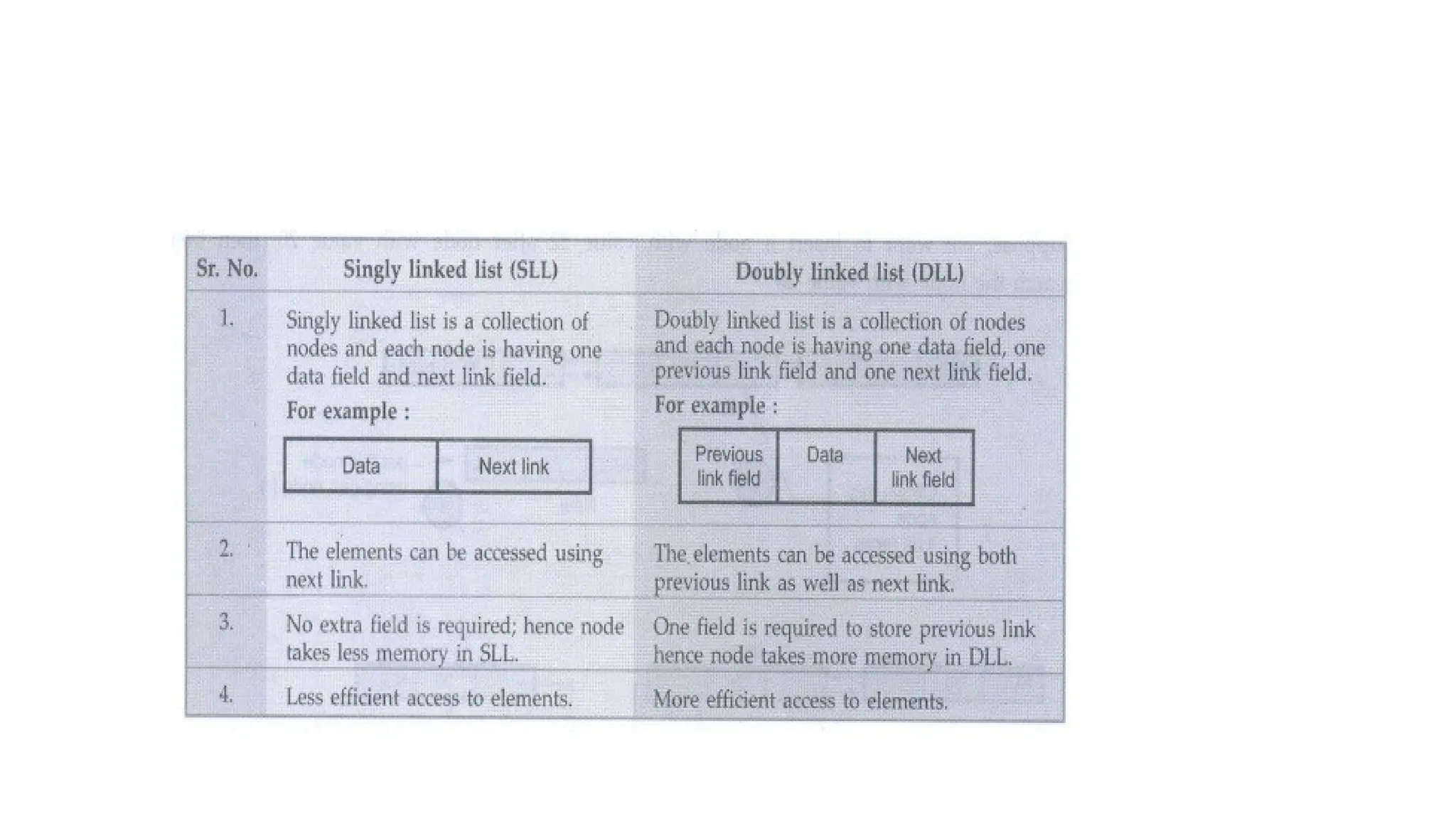
DATA STRUCTURES
CS 3301
UNIT 1-LISTS
INTRODUCTION TO DATA STRUCTURE
DEFINITION:
• The data structure can be defined as the collection of elements and all the possible operations
which are required for those set of elements.
• data structure will tell us the required elements as well as the legal operations on those set of
elements.
• EXAMPLE
• Consider a set of elements which are required to store in an array. Various operations such as
reading of the elements and storing them at appropriate index can be performed. If we want to
access any particular element then that element can be retrieved from the array.
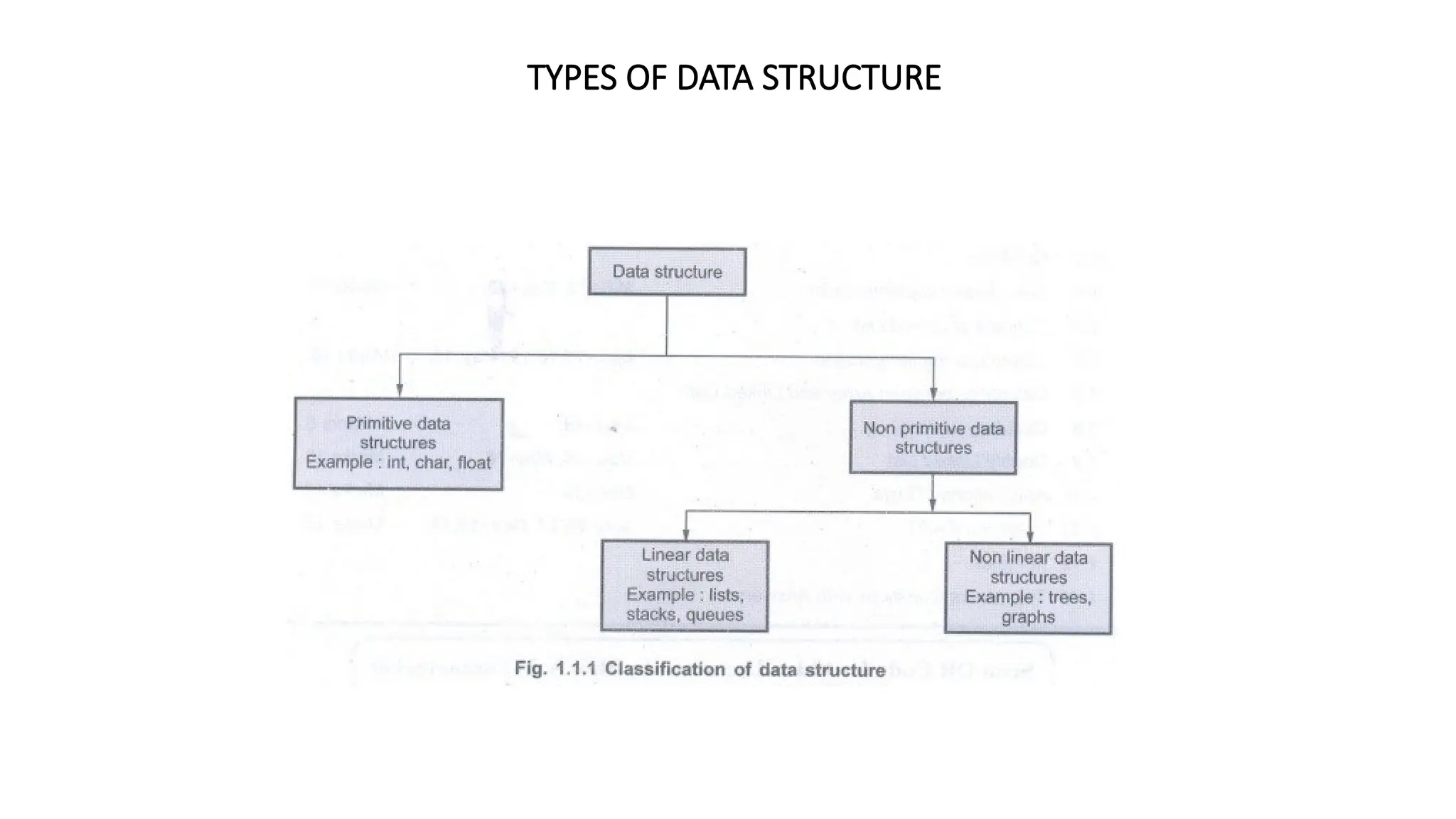
TYPES OF DATA STRUCTURE
NON PRIMITIVE DATA STRUCTURES
Linear data structures
Linear data structures are the data structures in which data is arranged in a list or in a straight sequence.
For example
Arrays, List
Non linear data structures
Non linear data structures are the data structures in which data may be arranged in hierarchical manner.
For example
Trees, Graphs
ABSTRACT DATATYPE(ADT)
ABSTRACT DATATYPES(ADT)
The abstract data type is a triple of D - Set of domains,
F - Set of functions,
A - Axioms in which only what is to be done is mentioned but how is to be done is not mentioned.
In ADT, all the implementation details are hidden. In short
ADT = Type + Function names + Behavior of each function
ADT Operations
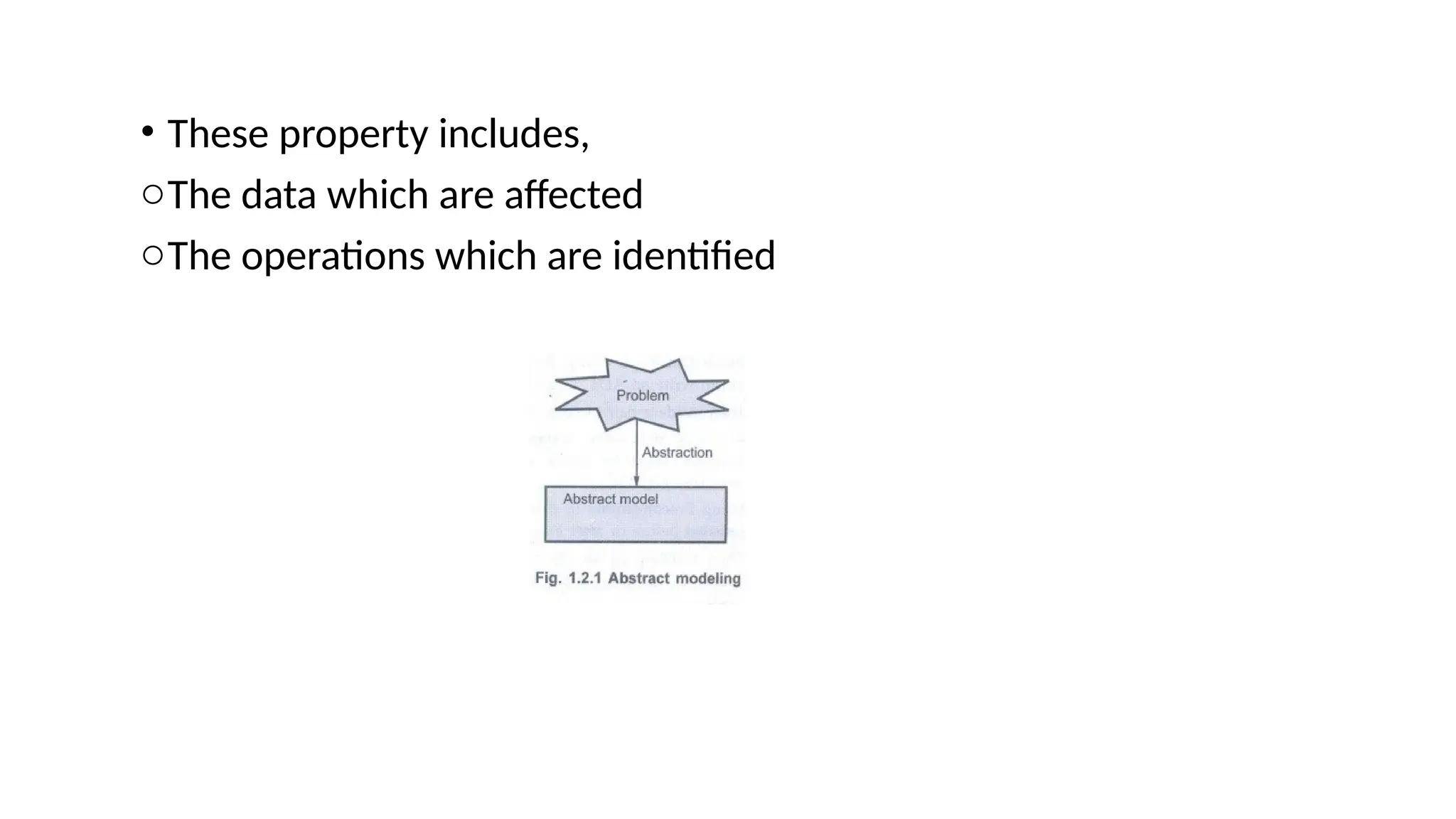
• While modeling the problems the necessary details are separated out from the unnecessary details.
This process of modeling the problem is called abstraction.
• The model defines an abstract view to the problem. Thus the model focuses only on problem related
stuff and that you try to define properties of the problem.
• These property includes,
oThe data which are affected
oThe operations which are identified
various Abstract Data Type operations are
1. Create: This operation creates the database.
2. Display: This operation is for displaying all the elements of the data structure.stagi
3. Insertion: By this operation the element can be inserted at any desired position.
4. Deletion : By this operation any desired element can be deleted from the data structure.
5. Modification: This operation modifies the desired element's value by any desired new
value.
• 1.ADT Data Structures
The ADT operations are carried out with the help of data structure. This part describes the structure of the data
used in the ADT in an informal way. Various data structures that can be used for ADT are Arrays, Set, Linked
list, Stack, Queues and so on.
Examples
1. ADT for Set
If we want to write ADT for a set of integers, then we will use following method AbstractDataType
Set
{
Instances: Set is a collection of integer type of elements.
Preconditions: none
Operations:
1. Store () This operation is for storing the integer element in a set.
2. Retrieve (): This operation is for retrieving the desired element from the given set.
3. Display (): This operation is for displaying the contents of set.
}
}
2. ADT for Arrays
AbstractDataType Array
{
Instances: An array A of some size, index i and total number of elements in the array n.
Operations:
}
1. Store () This operation stores the desired elements at each successive location.
2. display () This operation displays the elements of the array.
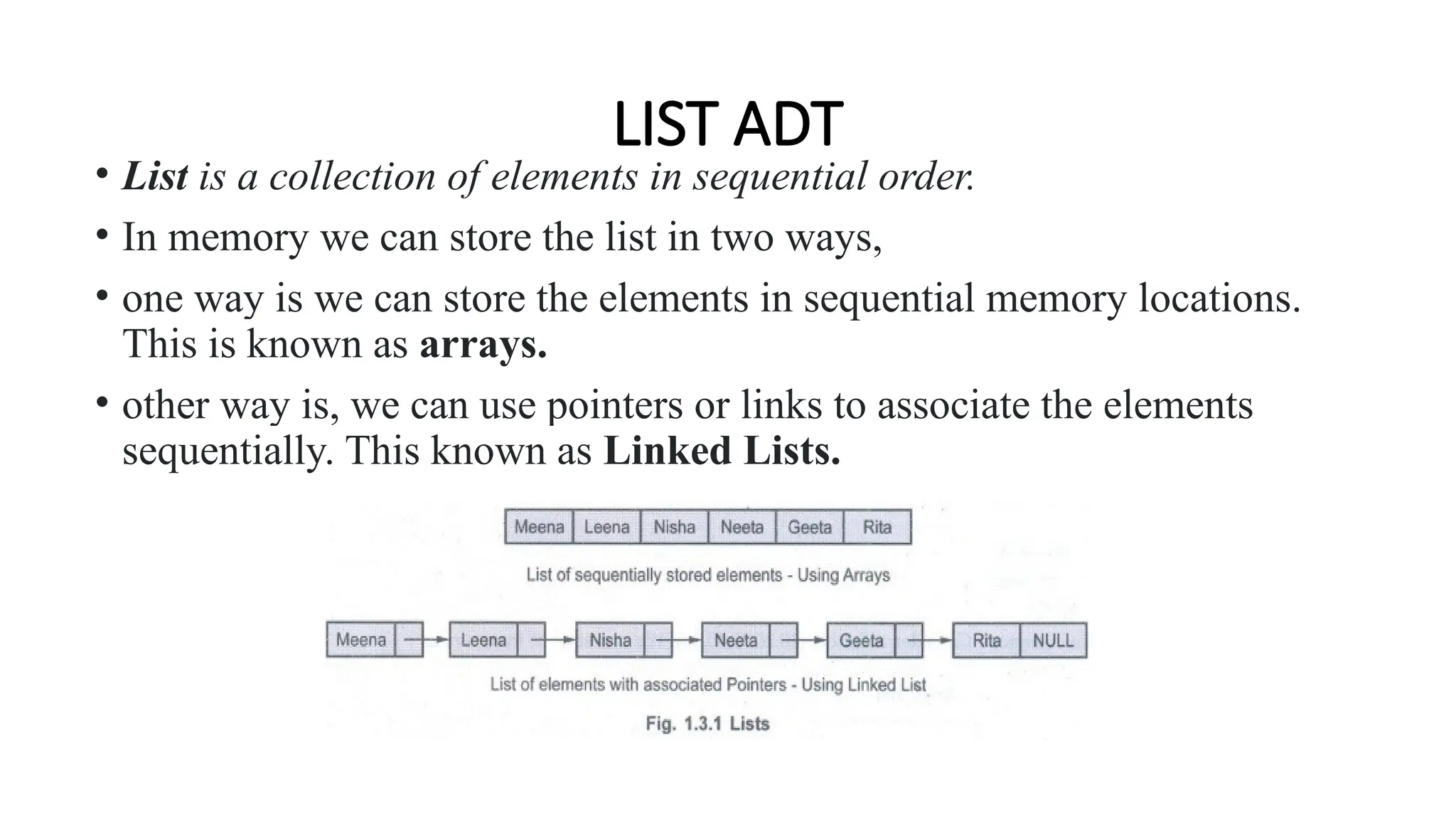
LIST ADT
• List is a collection of elements in sequential order.
• In memory we can store the list in two ways,
• one way is we can store the elements in sequential memory locations.
This is known as arrays.
• other way is, we can use pointers or links to associate the elements
sequentially. This known as Linked Lists.
• In ADT the implementation details are hidden. Hence the ADT will be-
AbstractDataType List
{
Instances: List is a collection of elements which are arranged in a linear manner.
Operations: Various operations that can be carried out on list are -
1. Insertion: This operation is for insertion of element in the list.
2. Deletion: This operation removed the element from the list.
3. Searching: Based on the value of the key element the desired element can be searched.
4. Modification: The value of the specific element can be changed without changing its location.
5. Display: The list can be displayed in forward or in backward manner.
}
List can be implemented in 2 ways,
Array based implementation
Linked list based implementation
Array based Implementation
• The linked list that can be represented by arrays is called static linked list.
• In this section we will discuss in detail how exactly the list can be represented using arrays.
• Basically list is a collection of elements.
• To show the list using arrays we will have 'data' and 'link' fields in the array.
• The array can be created as array of structure as
struct node
{
int data;
int next;
}a[10];
Various operations that can be performed on static linked list are -
1. Creation of list.
2. Display of list.
3. Insertion of any element in the list.
4. Deletion of any element from the list.
5. Searching of desired element in the list.
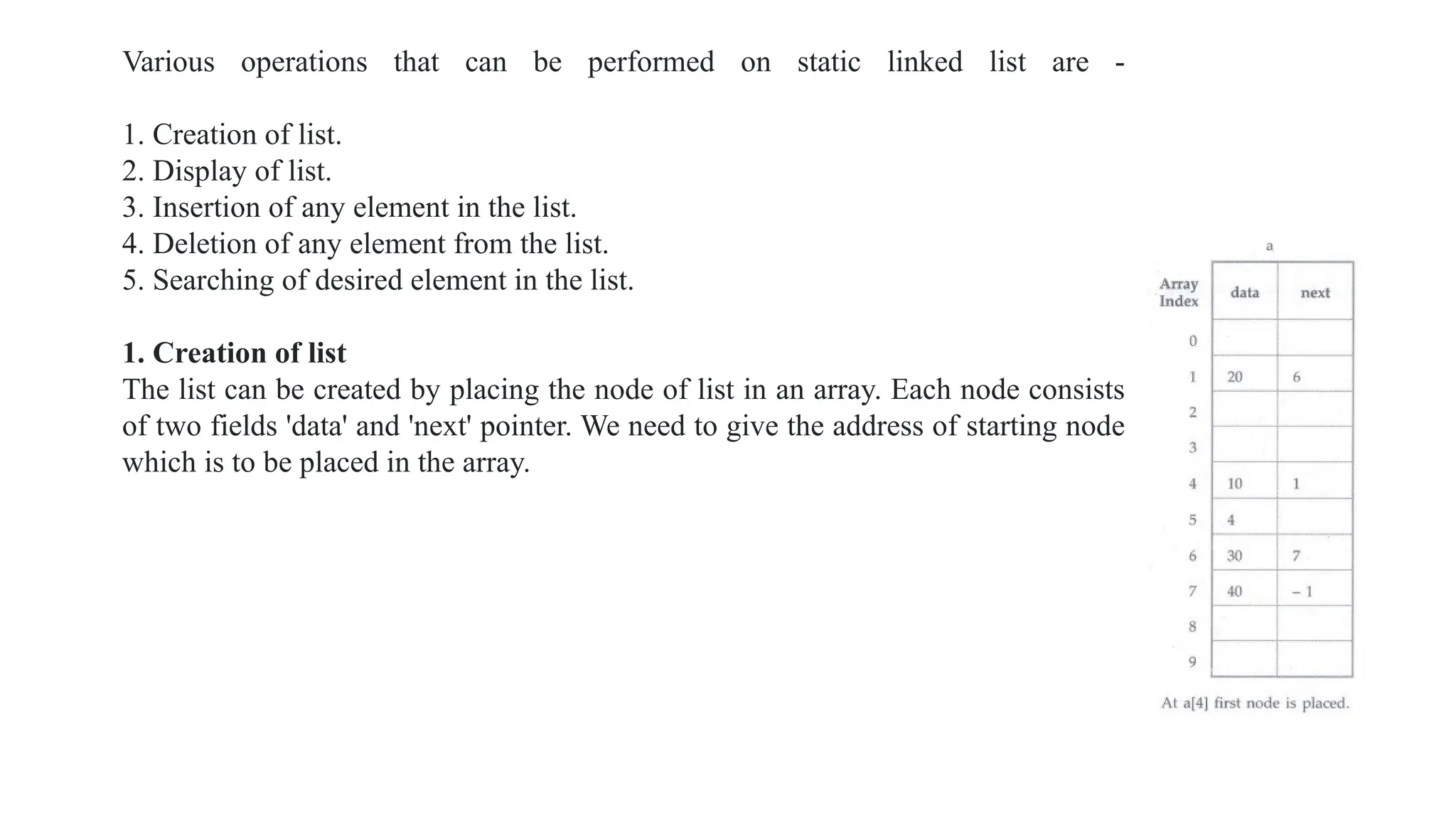
1. Creation of list
The list can be created by placing the node of list in an array. Each node consists
of two fields 'data' and 'next' pointer. We need to give the address of starting node
which is to be placed in the array.
While creating the list we have to first enter the location in an array where the first node is placed and then input the pair:
Data and next.
Int Create()
{
int head,i;
printf("n Enter the index for first node");
scanf("%d", &i);
head=i;
while(i!= -1)/*means terminate*/
{
printf("n Enter the data and index of the first element");
scanf("%d %d",&a[i].data,&a[i].next);
i=a[i].next;
}
return head;
}
2. Display
After creation we can display the list. Normally when the list is displayed simply the data fields are to be displayed.
void Display(int i).
{
printf("(");
while(i!= -1)
{
if(a[i].data==-1)/*no data item present at a[i]*/
printf(" ");
else
{
printf("%d ",a[i].data);
}
i=a[i].next;
}
printf(" NULL)");
}
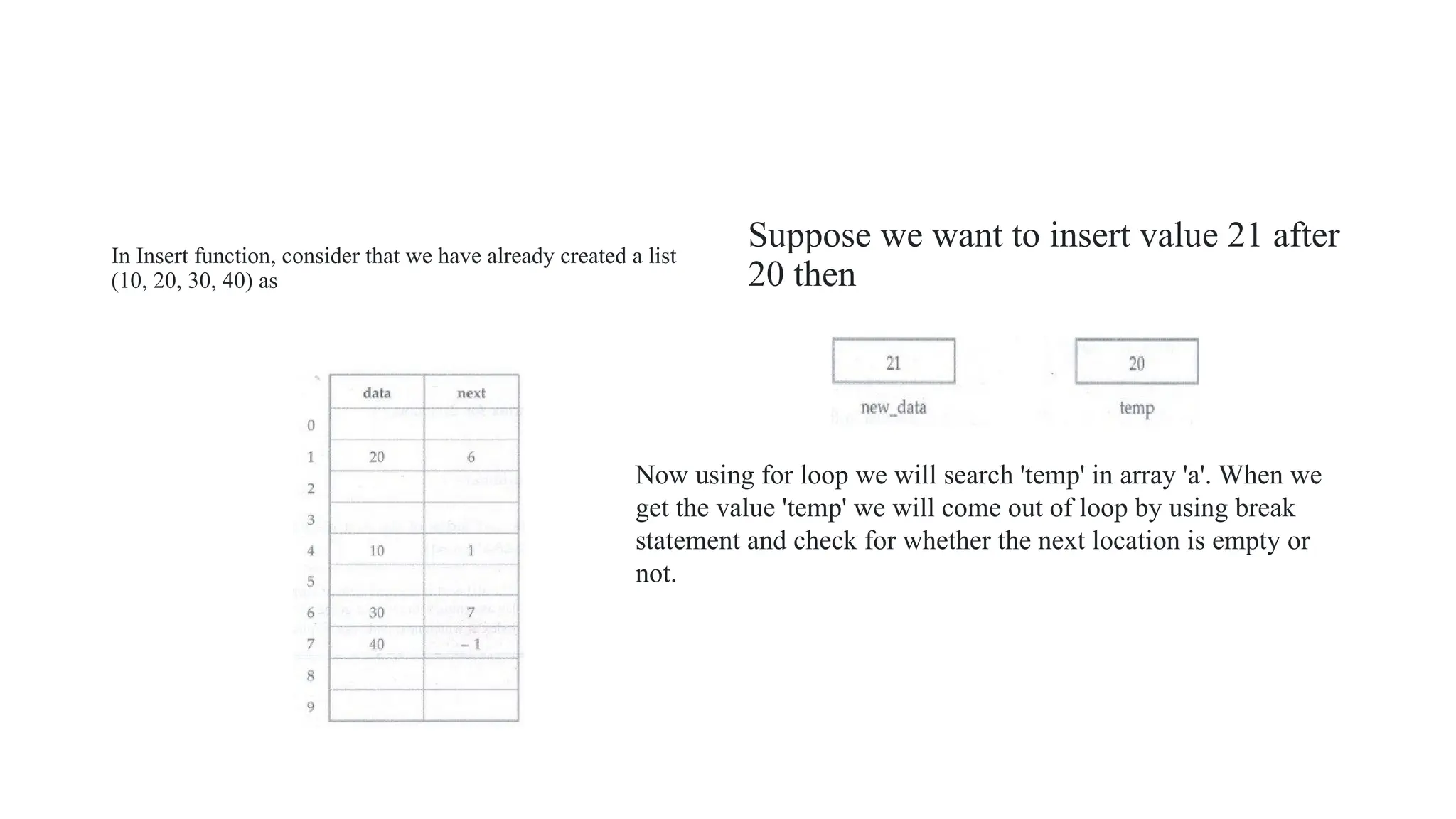
In Insert function, consider that we have already created a list
(10, 20, 30, 40) as
Suppose we want to insert value 21 after
20 then
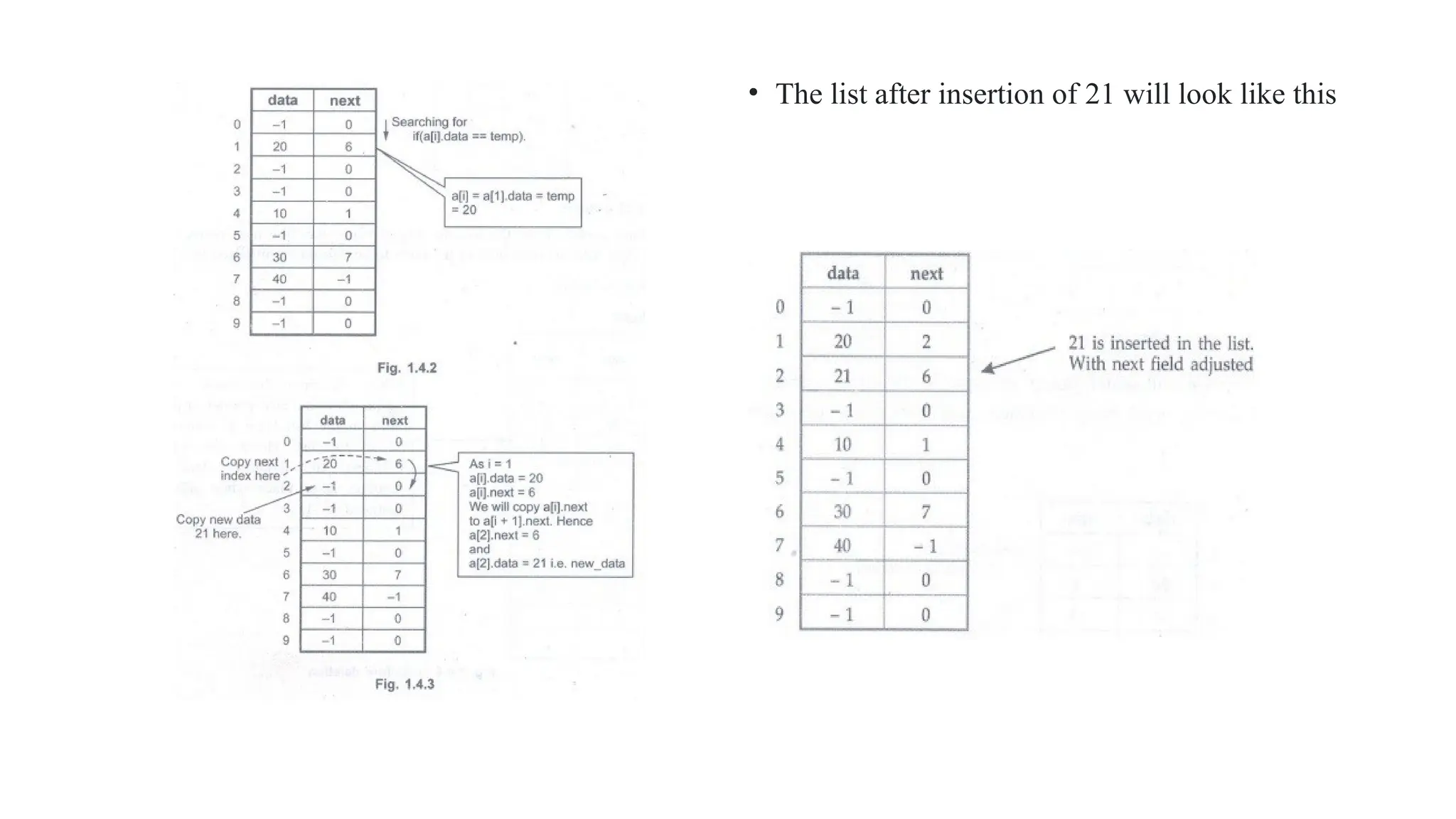
Now using for loop we will search 'temp' in array 'a'. When we
get the value 'temp' we will come out of loop by using break
statement and check for whether the next location is empty or
not.
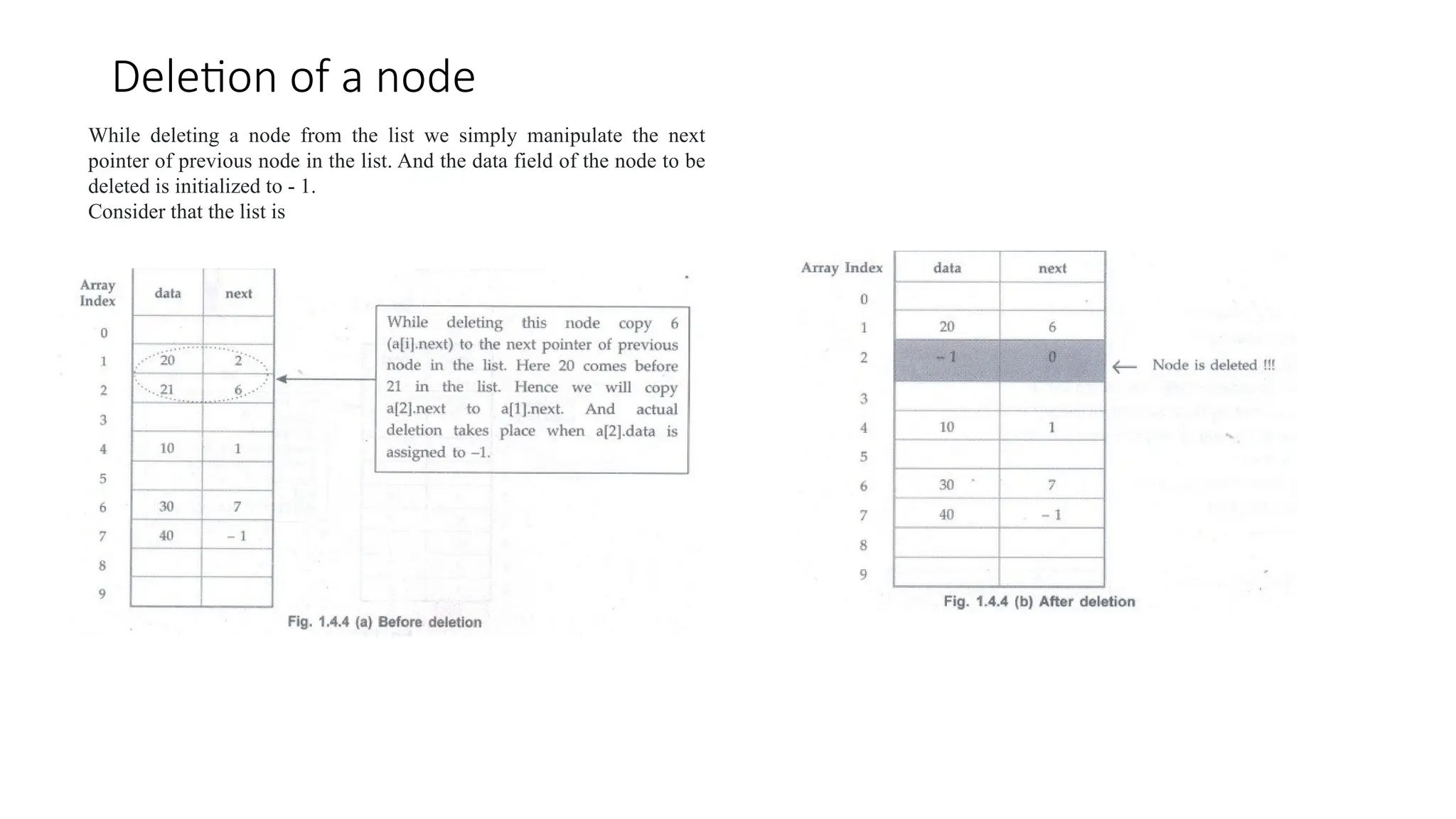
Deletion of a node
While deleting a node from the list we simply manipulate the next
pointer of previous node in the list. And the data field of the node to be
deleted is initialized to - 1.
Consider that the list is
• The list after insertion of 21 will look like this
Limitations
1. There is a limitation on the number of nodes in the list because of fixed size of array. Hence
sometimes memory may get wasted because of less elements in the list or there may be large
number of nodes in the list and we could not store some elements in the array.
2. Insertions and deletions of elements in the array(list) is complicated
Hence we will go for dynamic memory allocation for implementing the list.
ALGORITHM FOR INSERTION OF ELEMENT IN ARRAY
• Step 1: Enter the number of elements present in the array. Also enter the elements in the array.
printf("n How many elements are present in the array?");
scanf("%d", &n);
printf("n Enter the elements (Type -99 for empty location): ");
for(c=0;c<n;c++)
scanf("%d",&array[c]);
Step 2: Enter the value of the element which is to be inserted in the array, say Key_Element. Also enter the
position at which this element is to be inserted.Say Key_Position.
printf("n Enter the element to be inserted 2in the array: ");
scanf("%d", &Key_Element);
printf("n Enter the position at which the element is to be inserted: ");
scanf("%d", &Key_Postion);
Step 3:
//If the Key_Position is empty then insert the Key_Element at that position.
if(array[Key_Postion] ==-99)
array[Key_Position] =Key_Element;
Step 4:
//Otherwise, Count the number of elements present left and right to this Key_Element. We call
it as LeftElementCount and RightElementCount.
for(i=0;i<=Key_Position-1;i++); //note the semicolon after this for loop
LeftElementCount=i;
for(j=n-1;j>=Key_Position;j-);
RightElementCount=j;
Step 5: If Left ElementCount < RightElementCount then
{
Search for empty location in this left sublist.
If empty location is present then move the elements to the left by creating space at
Key_Position then
Insert Key Element at Key_Position.
else
goto step 8
}
Step 6: If Left ElementCount> RightElementCount then
{
Search for empty location in this right sublist.
If empty location is present then move the elements to the right by creating space at Key_Position then
Insert Key_Element at Key_Position.
else
goto step 8
}
Step 7:
//Create the space at Key_Position by shifting the last position elements to the rightmost
//empty space.
for(k=n-1;k>=Key_Position-1;k--)
{
array[k+1]=array[k];
array[Key_Position-1]=Key_Element;
}
Step 8: Display the list of elements in the array
for(c=0;c<=n;c++)
printf("%d", array[c]);
Concept of Linked List
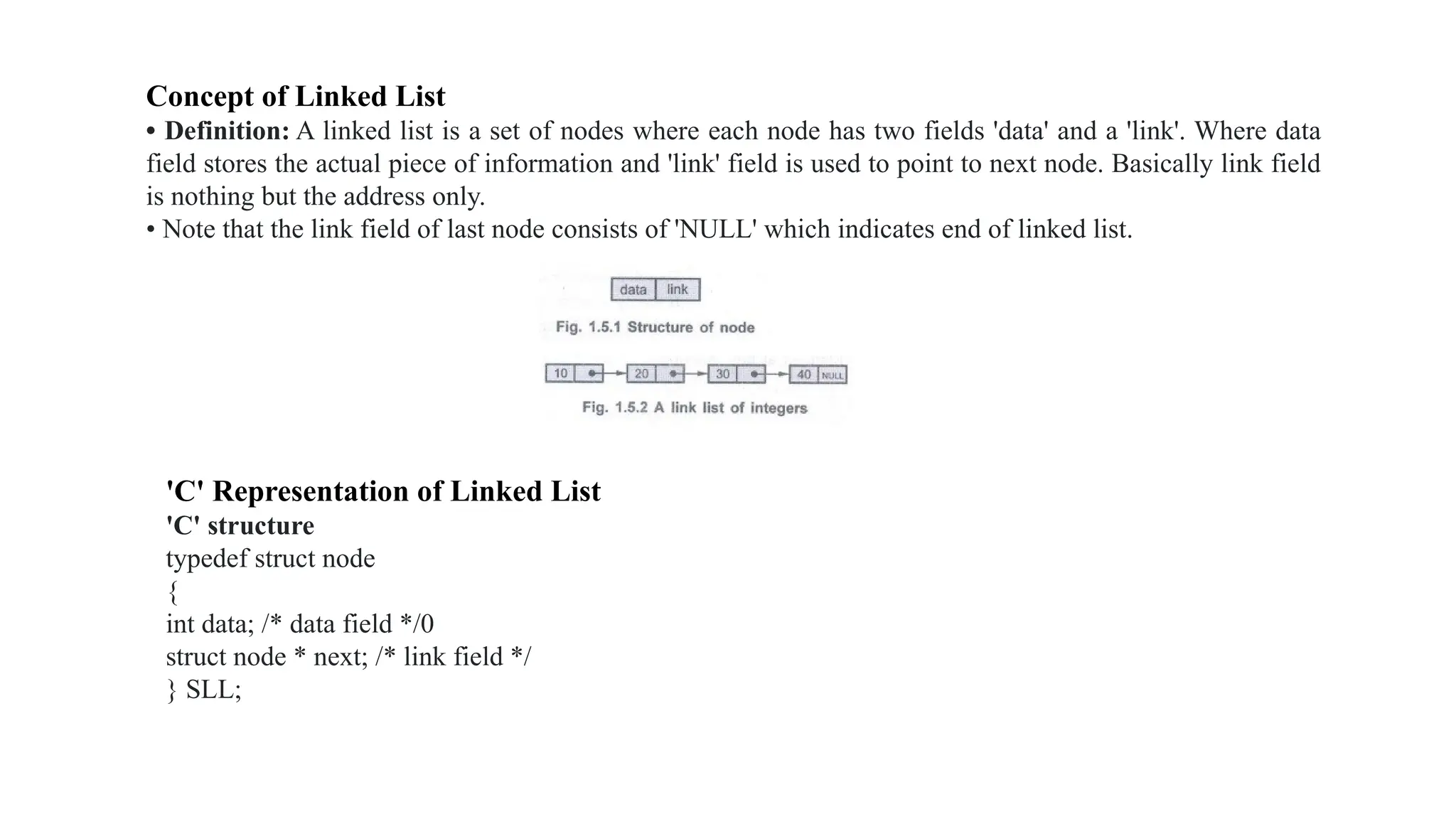
• Definition: A linked list is a set of nodes where each node has two fields 'data' and a 'link'. Where data
field stores the actual piece of information and 'link' field is used to point to next node. Basically link field
is nothing but the address only.
• Note that the link field of last node consists of 'NULL' which indicates end of linked list.
'C' Representation of Linked List
'C' structure
typedef struct node
{
int data; /* data field */0
struct node * next; /* link field */
} SLL;
Types of Linked List
There are various types of linked lists such as,
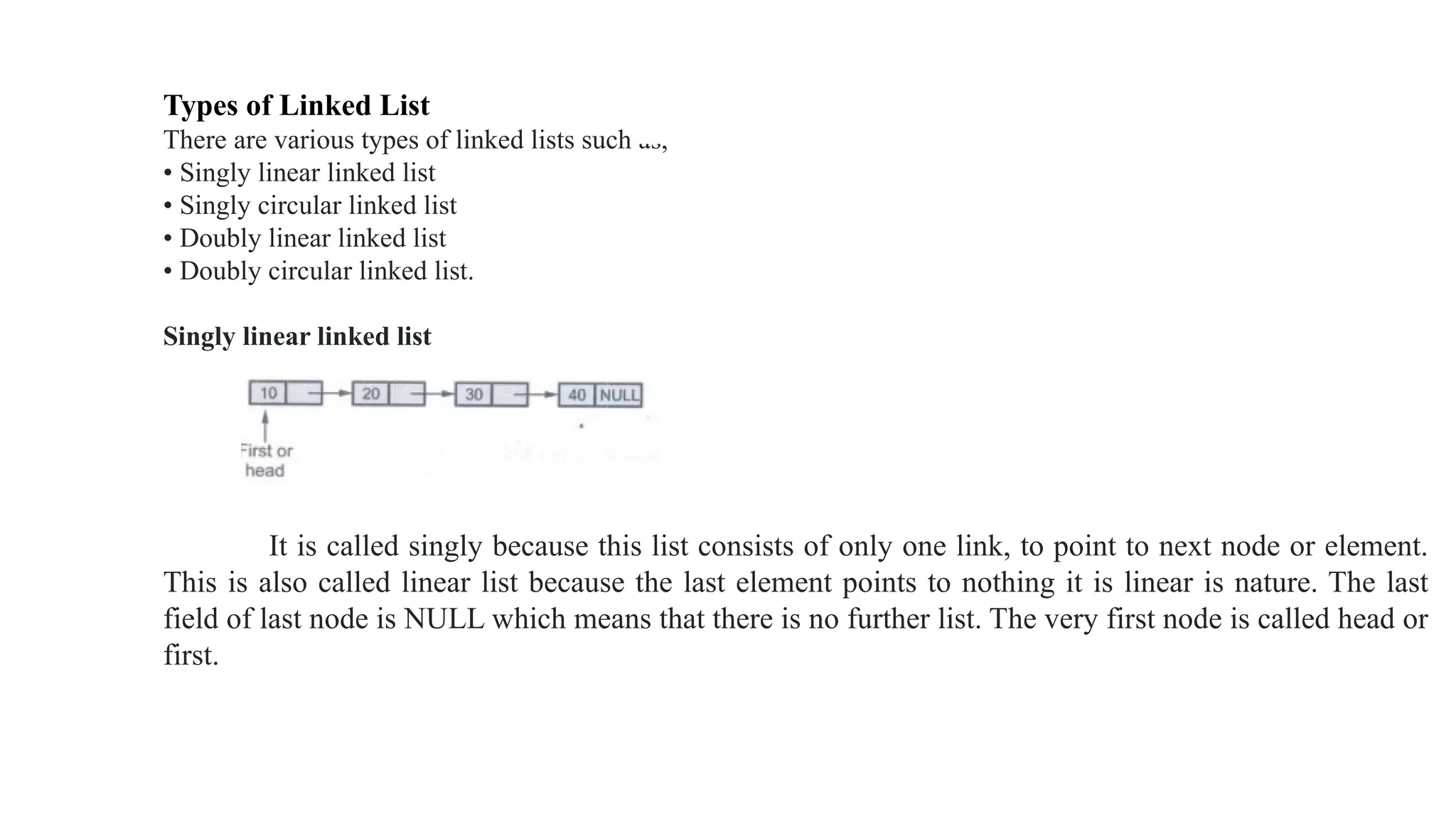
• Singly linear linked list
• Singly circular linked list
• Doubly linear linked list
• Doubly circular linked list.
Singly linear linked list
It is called singly because this list consists of only one link, to point to next node or element.
This is also called linear list because the last element points to nothing it is linear is nature. The last
field of last node is NULL which means that there is no further list. The very first node is called head or
first.
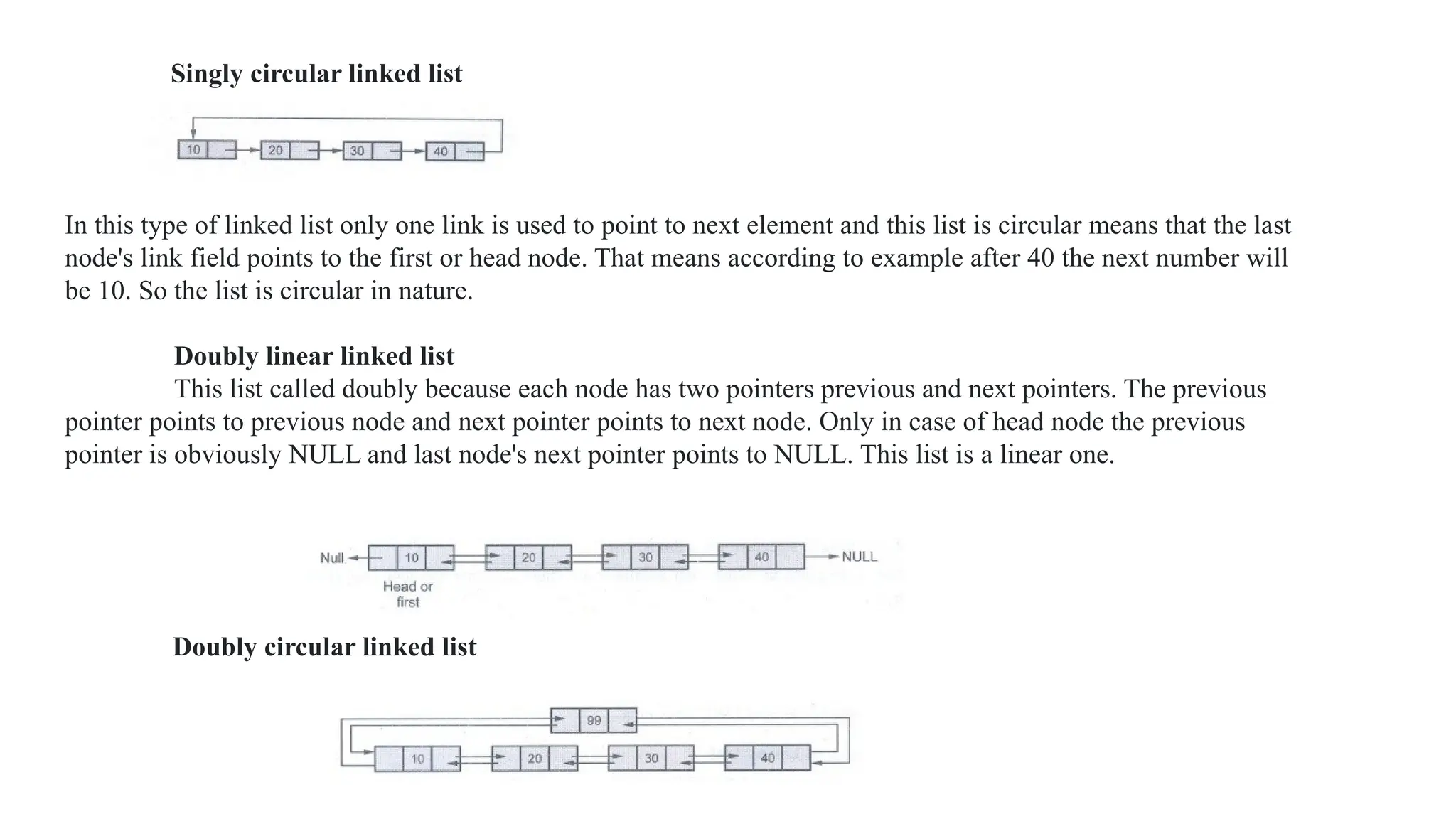
Singly circular linked list
In this type of linked list only one link is used to point to next element and this list is circular means that the last
node's link field points to the first or head node. That means according to example after 40 the next number will
be 10. So the list is circular in nature.
Doubly linear linked list
This list called doubly because each node has two pointers previous and next pointers. The previous
pointer points to previous node and next pointer points to next node. Only in case of head node the previous
pointer is obviously NULL and last node's next pointer points to NULL. This list is a linear one.
Doubly circular linked list
• In circular doubly linked list the previous pointer of first node and the next pointer of last node is
pointed to head node. Head node is a special node which may have any dummy data or it may
have some useful information such as total number of nodes in the list which may be used to
simplify the algorithms carrying various operations on the list.
Various operations of linked list are
• Creation of linked list.
• Display of linked list.
• Insertion of any element in the linked list.
• Deletion of any element from the linked list.
• Searching of desired element in the linked list.
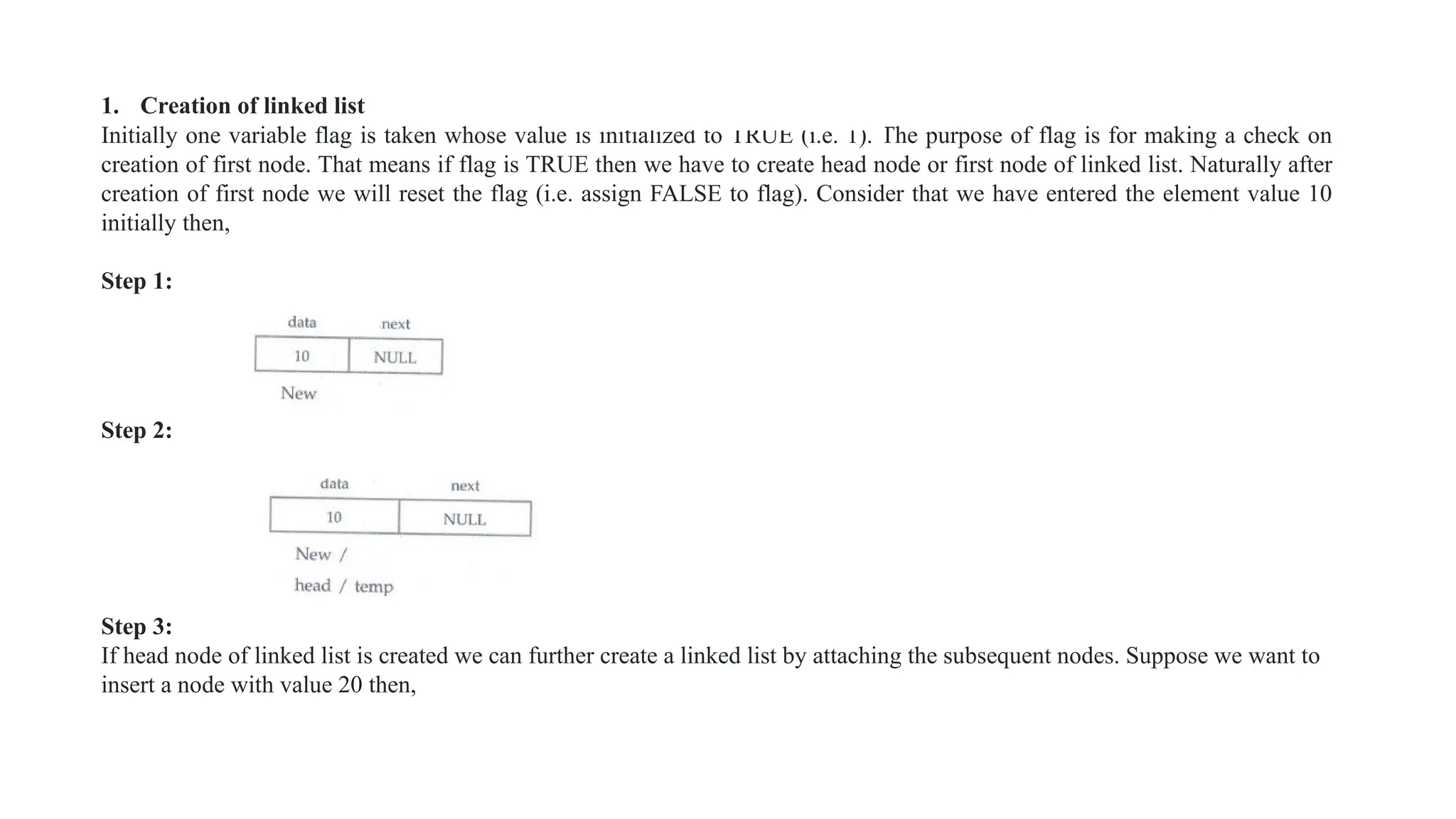
1. Creation of linked list
Initially one variable flag is taken whose value is initialized to TRUE (i.e. 1). The purpose of flag is for making a check on
creation of first node. That means if flag is TRUE then we have to create head node or first node of linked list. Naturally after
creation of first node we will reset the flag (i.e. assign FALSE to flag). Consider that we have entered the element value 10
initially then,
Step 1:
Step 2:
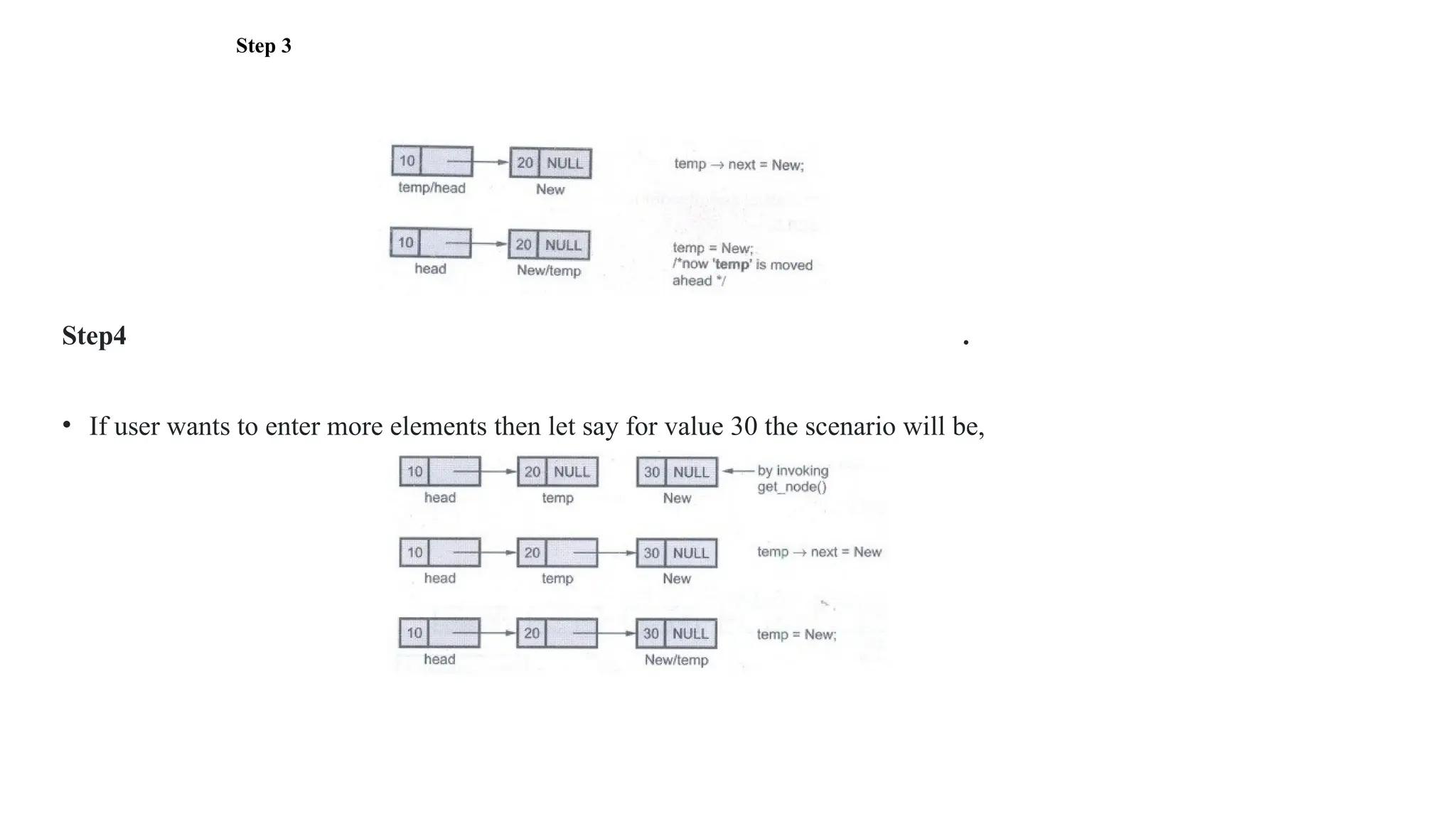
Step 3:
If head node of linked list is created we can further create a linked list by attaching the subsequent nodes. Suppose we want to
insert a node with value 20 then,
Step 3
Step4 .
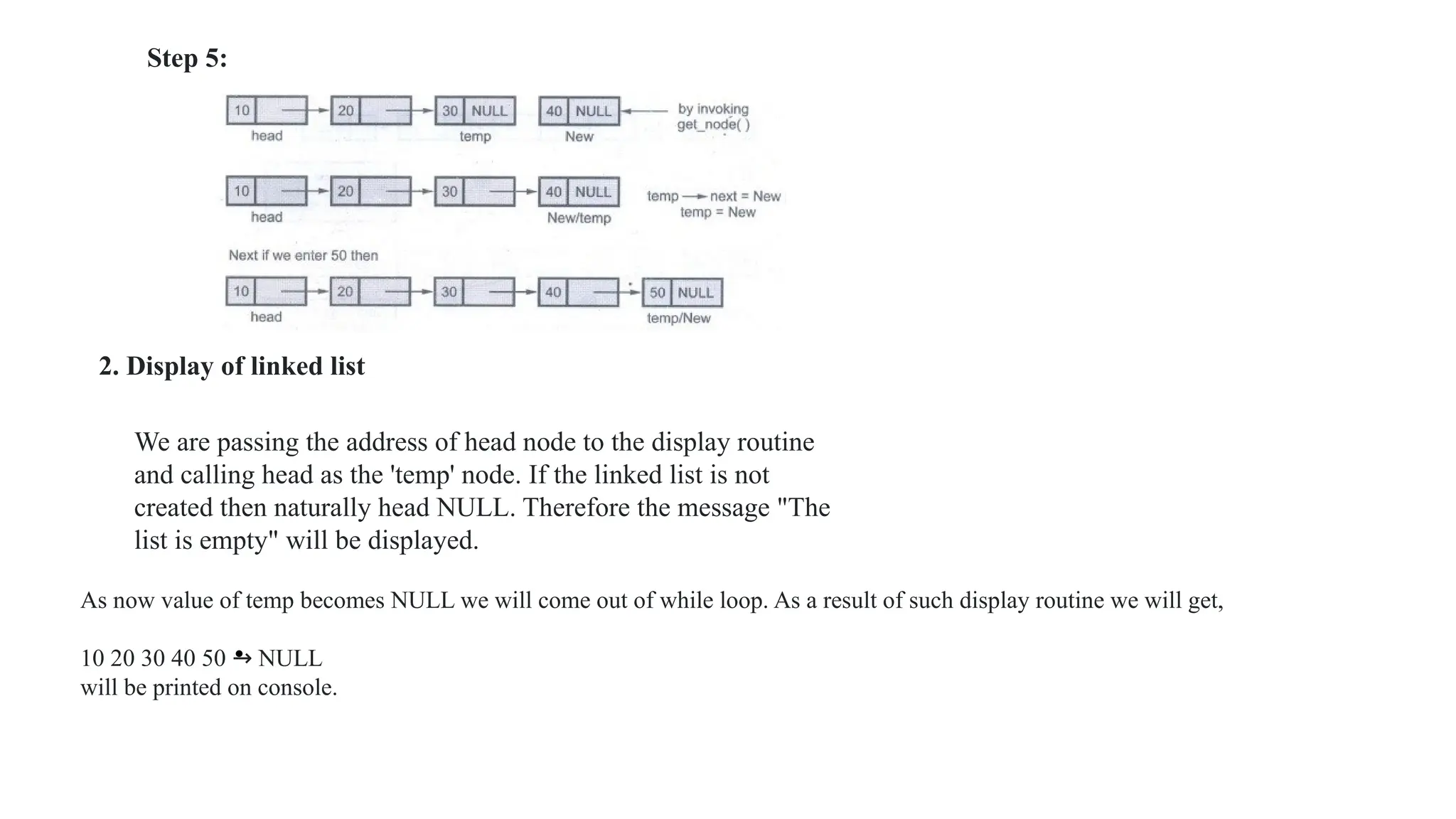
• If user wants to enter more elements then let say for value 30 the scenario will be,
•
2. Display of linked list
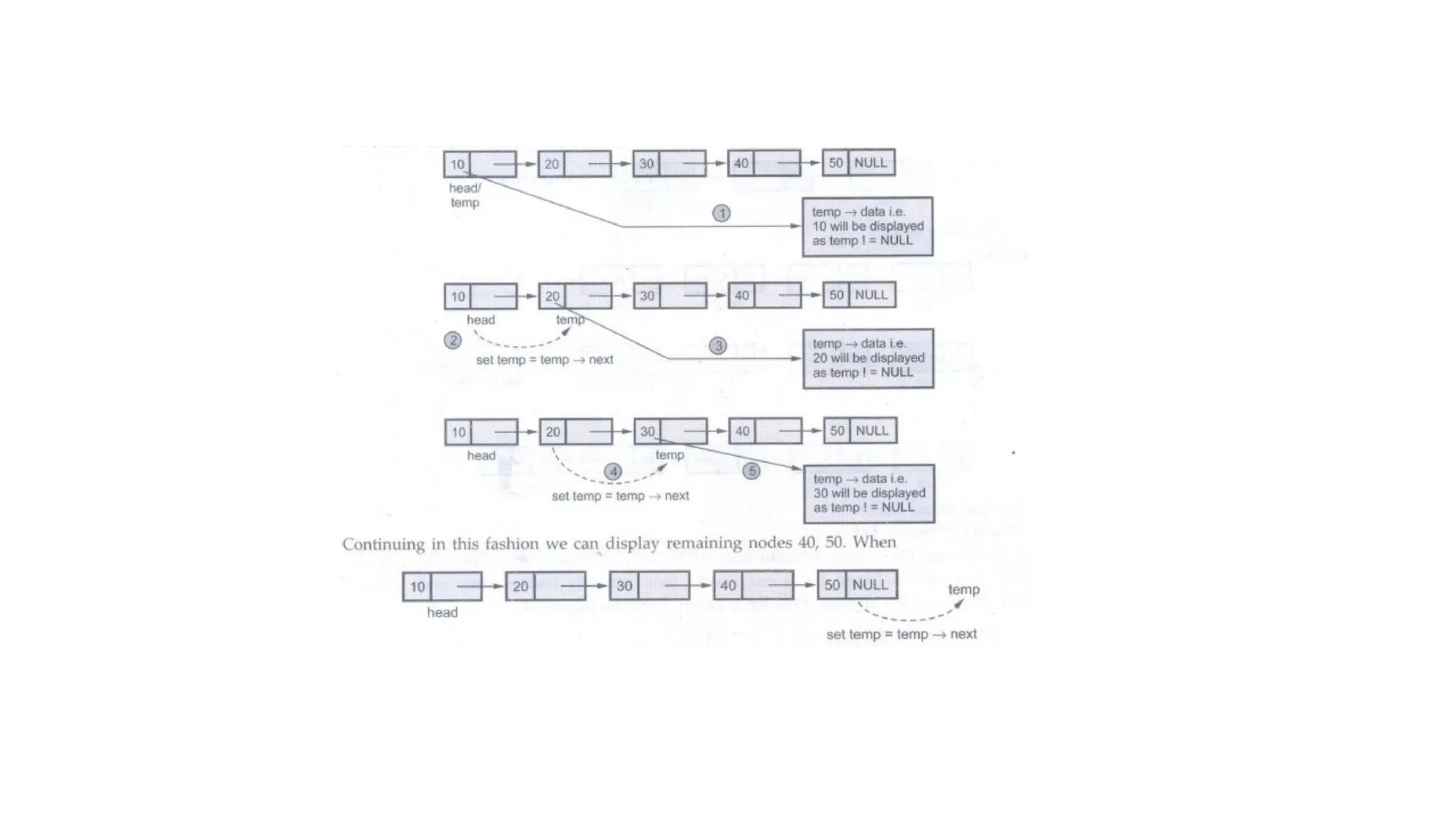
We are passing the address of head node to the display routine
and calling head as the 'temp' node. If the linked list is not
created then naturally head NULL. Therefore the message "The
list is empty" will be displayed.
As now value of temp becomes NULL we will come out of while loop. As a result of such display routine we will get,
10 20 30 40 50 → NULL
will be printed on console.
Step 5:
a) Insertion of a node as a head node
node *insert_head(node *head)
{
node *New,*temp;
New=get_node();
printf("n Enter The element which you want to insert");
scanf("%d", &New->data);
if(head == NULL)
head=New;
else
3. Insertion of any element at anywhere in the linked list
There are three possible cases when we want to insert an element in the linked list -
a) Insertion of a node as a head node.
b) Insertion of a node as a last node.
c) Insertion of a node after some node.
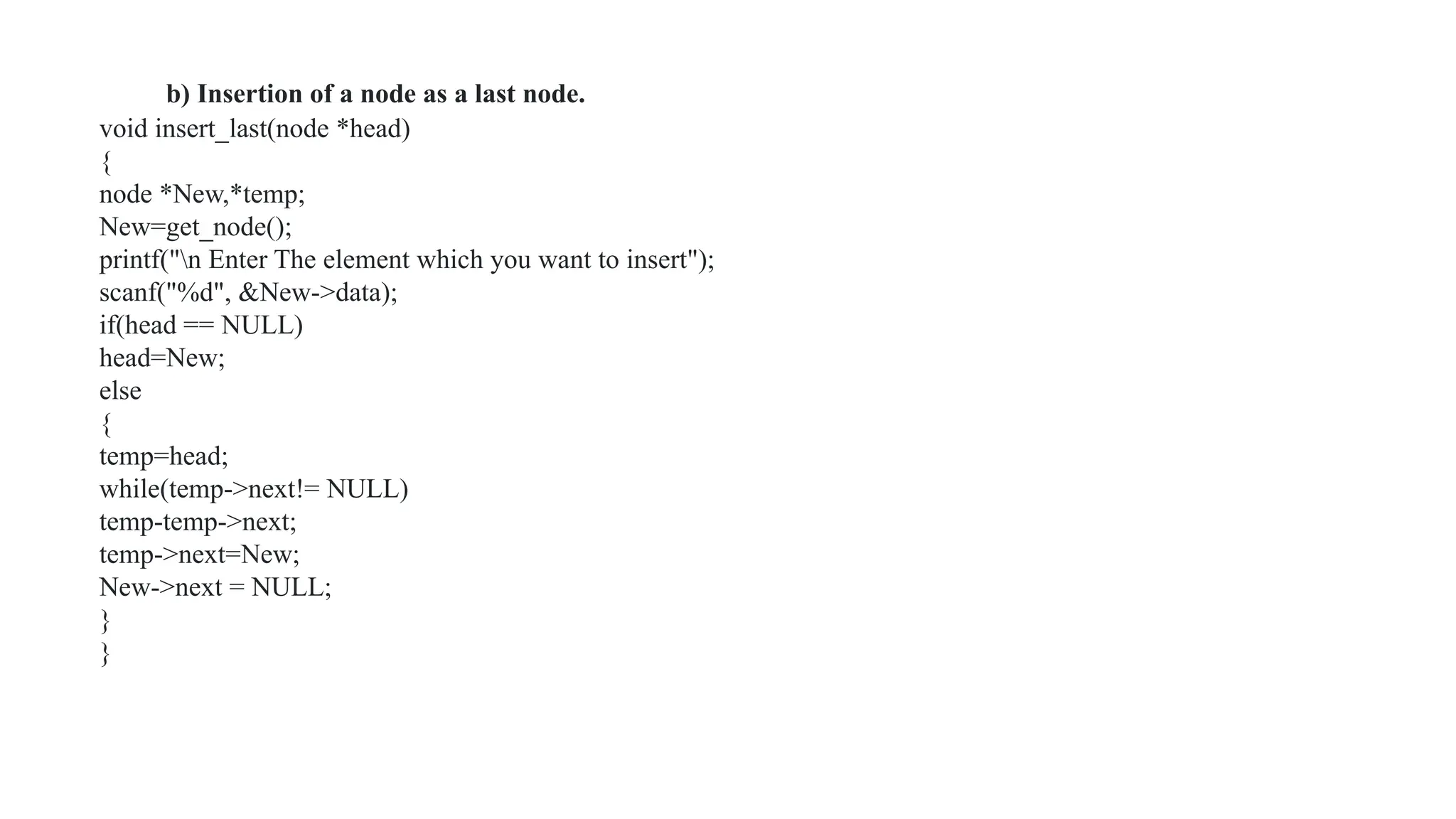
b) Insertion of a node as a last node.
void insert_last(node *head)
{
node *New,*temp;
New=get_node();
printf("n Enter The element which you want to insert");
scanf("%d", &New->data);
if(head == NULL)
head=New;
else
{
temp=head;
while(temp->next!= NULL)
temp-temp->next;
temp->next=New;
New->next = NULL;
}
}
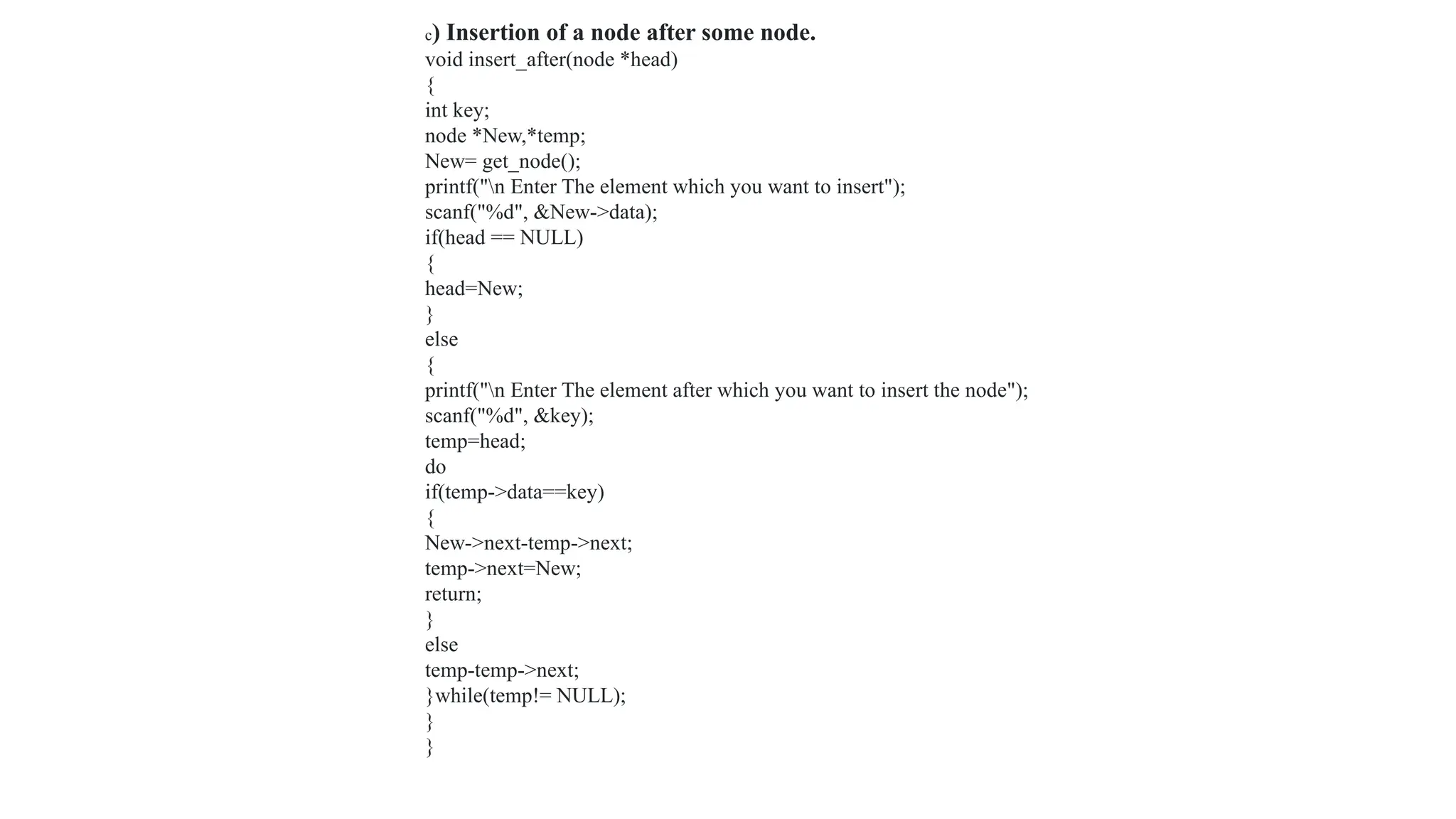
c) Insertion of a node after some node.
void insert_after(node *head)
{
int key;
node *New,*temp;
New= get_node();
printf("n Enter The element which you want to insert");
scanf("%d", &New->data);
if(head == NULL)
{
head=New;
}
else
{
printf("n Enter The element after which you want to insert the node");
scanf("%d", &key);
temp=head;
do
if(temp->data==key)
{
New->next-temp->next;
temp->next=New;
return;
}
else
temp-temp->next;
}while(temp!= NULL);
}
}
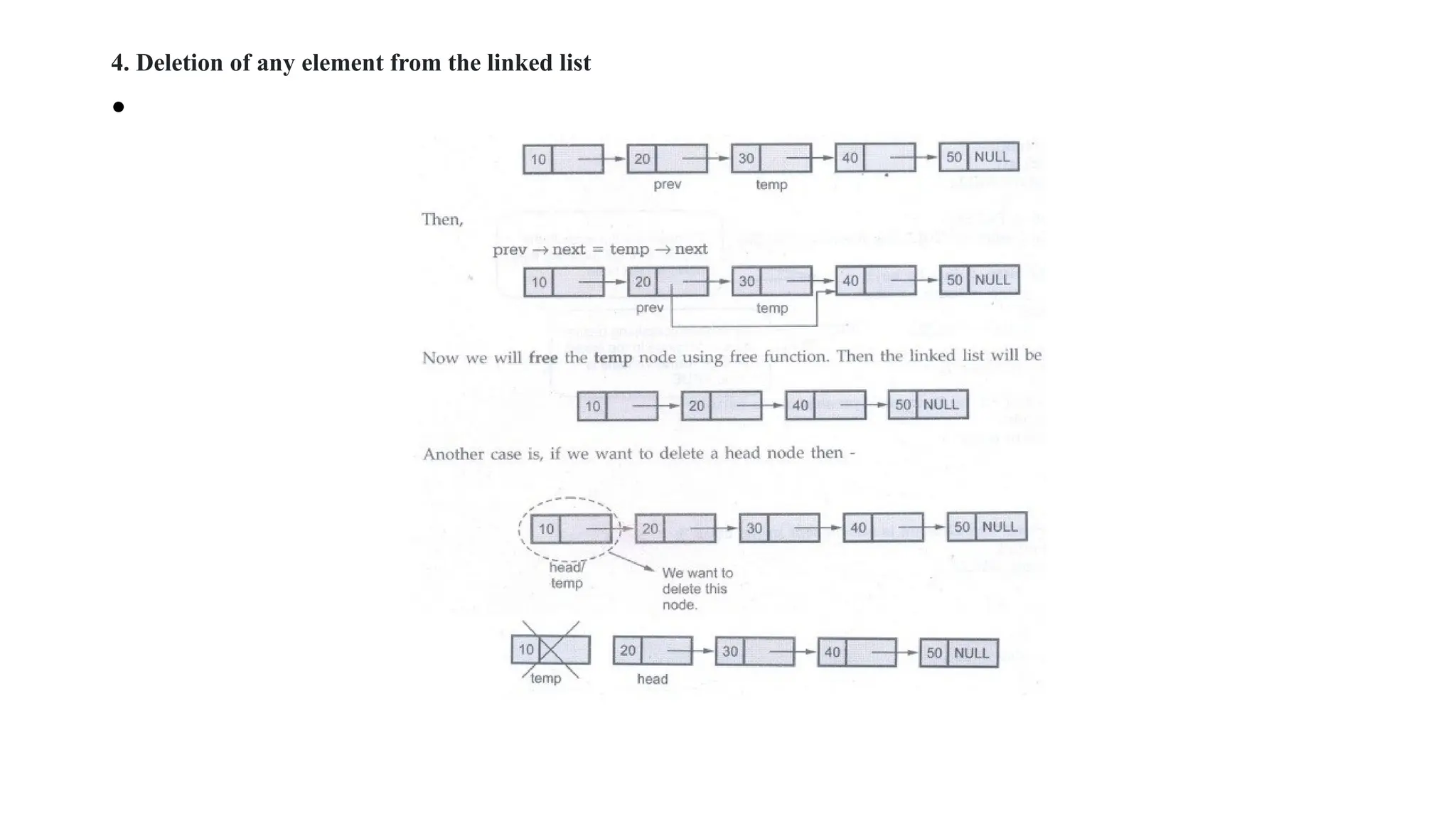
4. Deletion of any element from the linked list
•
5. Searching of desired element in the linked list
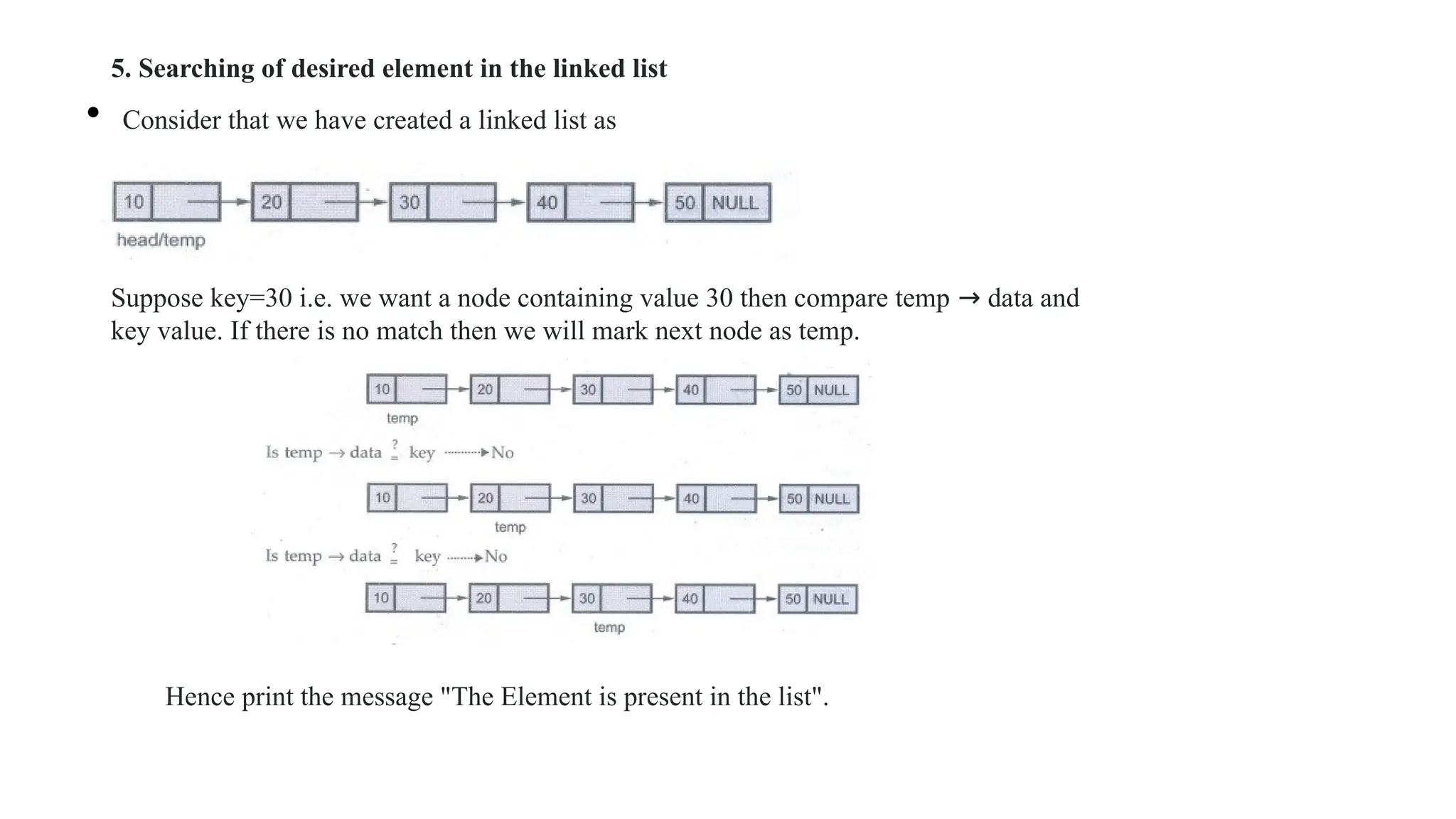
• Consider that we have created a linked list as
Suppose key=30 i.e. we want a node containing value 30 then compare temp → data and
key value. If there is no match then we will mark next node as temp.
Hence print the message "The Element is present in the list".
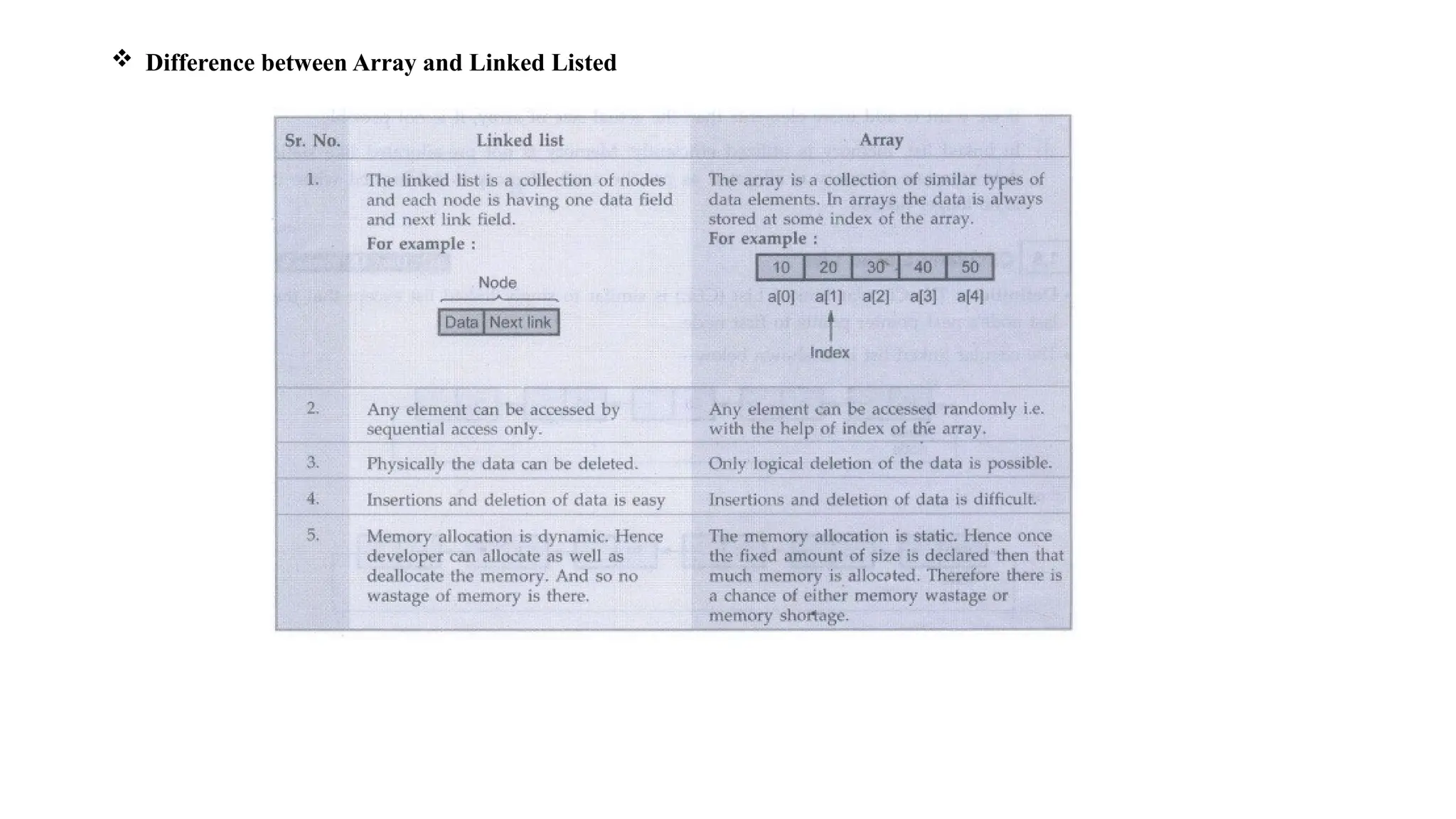
 Difference between Array and Linked Listed
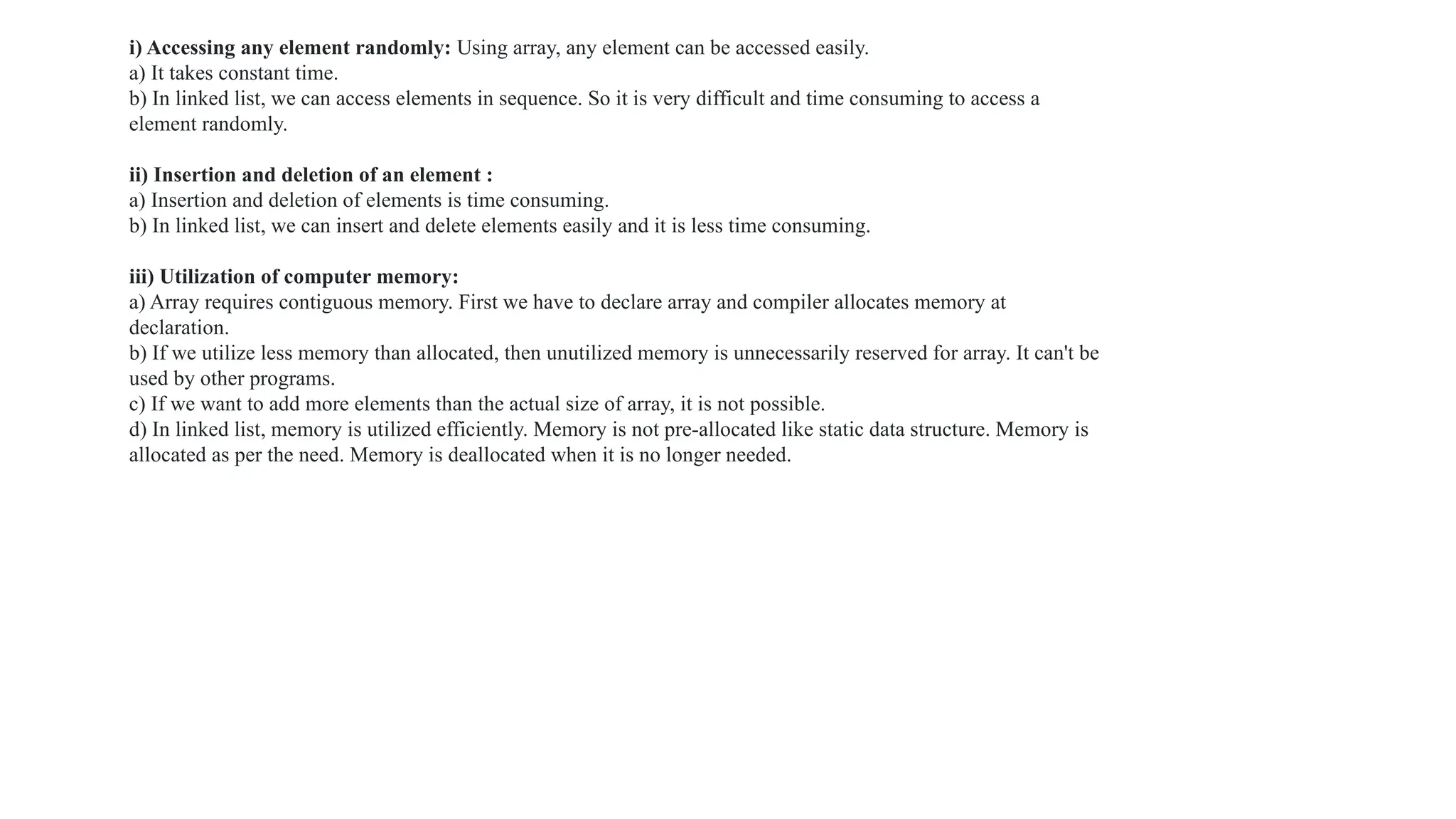
i) Accessing any element randomly: Using array, any element can be accessed easily.
a) It takes constant time.
b) In linked list, we can access elements in sequence. So it is very difficult and time consuming to access a
element randomly.
ii) Insertion and deletion of an element :
a) Insertion and deletion of elements is time consuming.
b) In linked list, we can insert and delete elements easily and it is less time consuming.
iii) Utilization of computer memory:
a) Array requires contiguous memory. First we have to declare array and compiler allocates memory at
declaration.
b) If we utilize less memory than allocated, then unutilized memory is unnecessarily reserved for array. It can't be
used by other programs.
c) If we want to add more elements than the actual size of array, it is not possible.
d) In linked list, memory is utilized efficiently. Memory is not pre-allocated like static data structure. Memory is
allocated as per the need. Memory is deallocated when it is no longer needed.
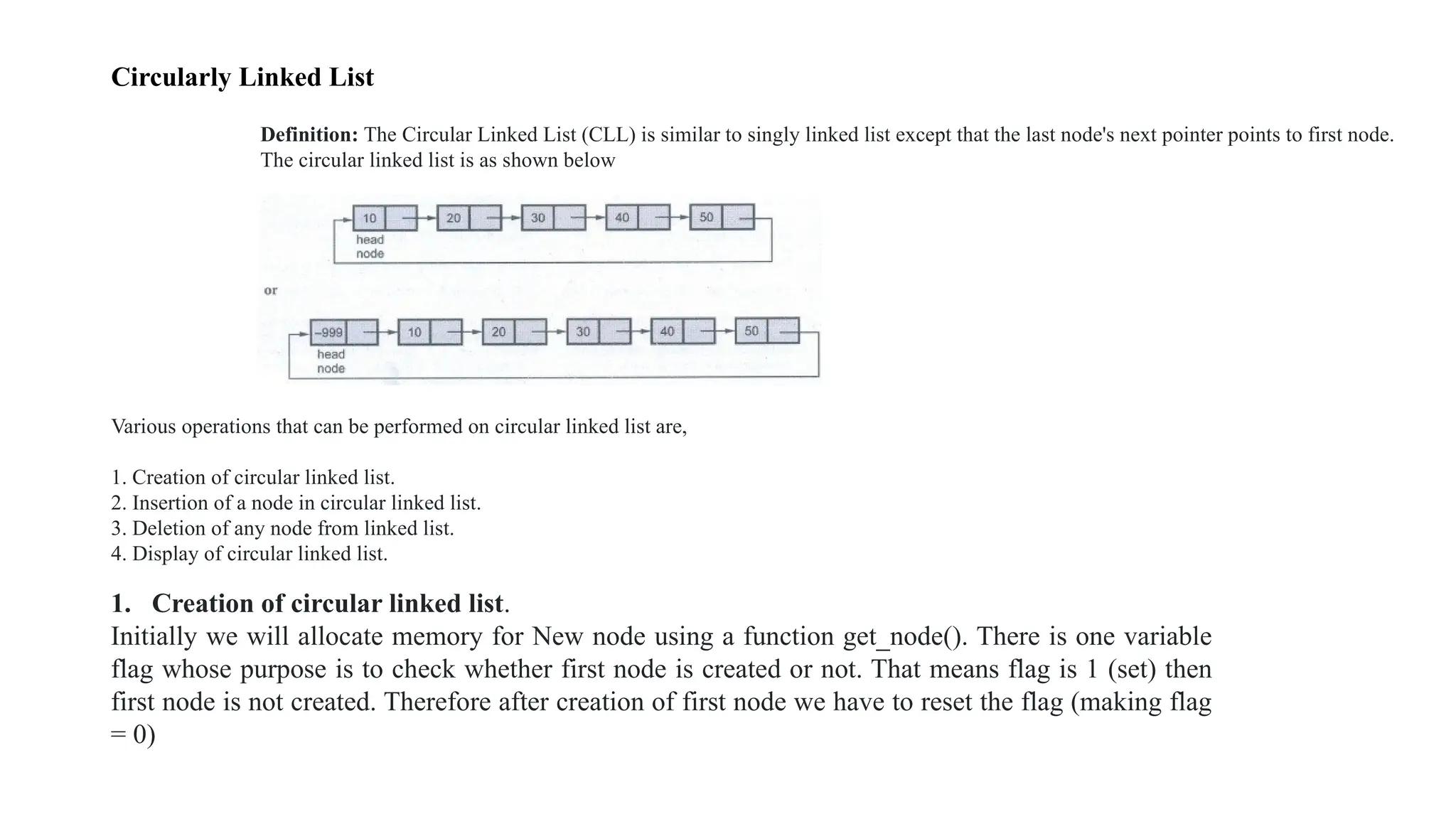
Circularly Linked List
Definition: The Circular Linked List (CLL) is similar to singly linked list except that the last node's next pointer points to first node.
The circular linked list is as shown below
Various operations that can be performed on circular linked list are,
1. Creation of circular linked list.
2. Insertion of a node in circular linked list.
3. Deletion of any node from linked list.
4. Display of circular linked list.
1. Creation of circular linked list.
Initially we will allocate memory for New node using a function get_node(). There is one variable
flag whose purpose is to check whether first node is created or not. That means flag is 1 (set) then
first node is not created. Therefore after creation of first node we have to reset the flag (making flag
= 0)
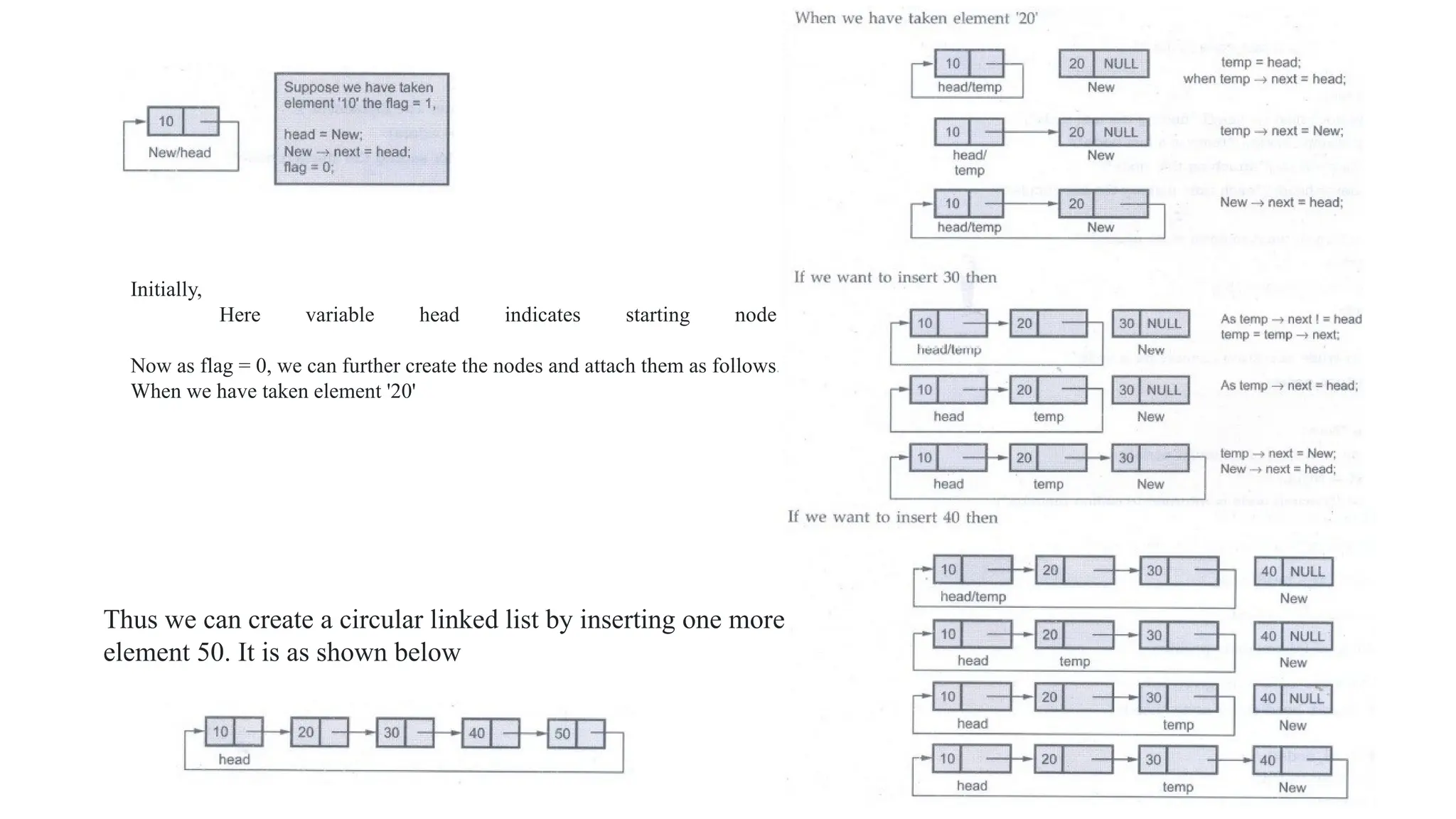
Initially,
Here variable head indicates starting node.
Now as flag = 0, we can further create the nodes and attach them as follows.
When we have taken element '20'
Thus we can create a circular linked list by inserting one more
element 50. It is as shown below
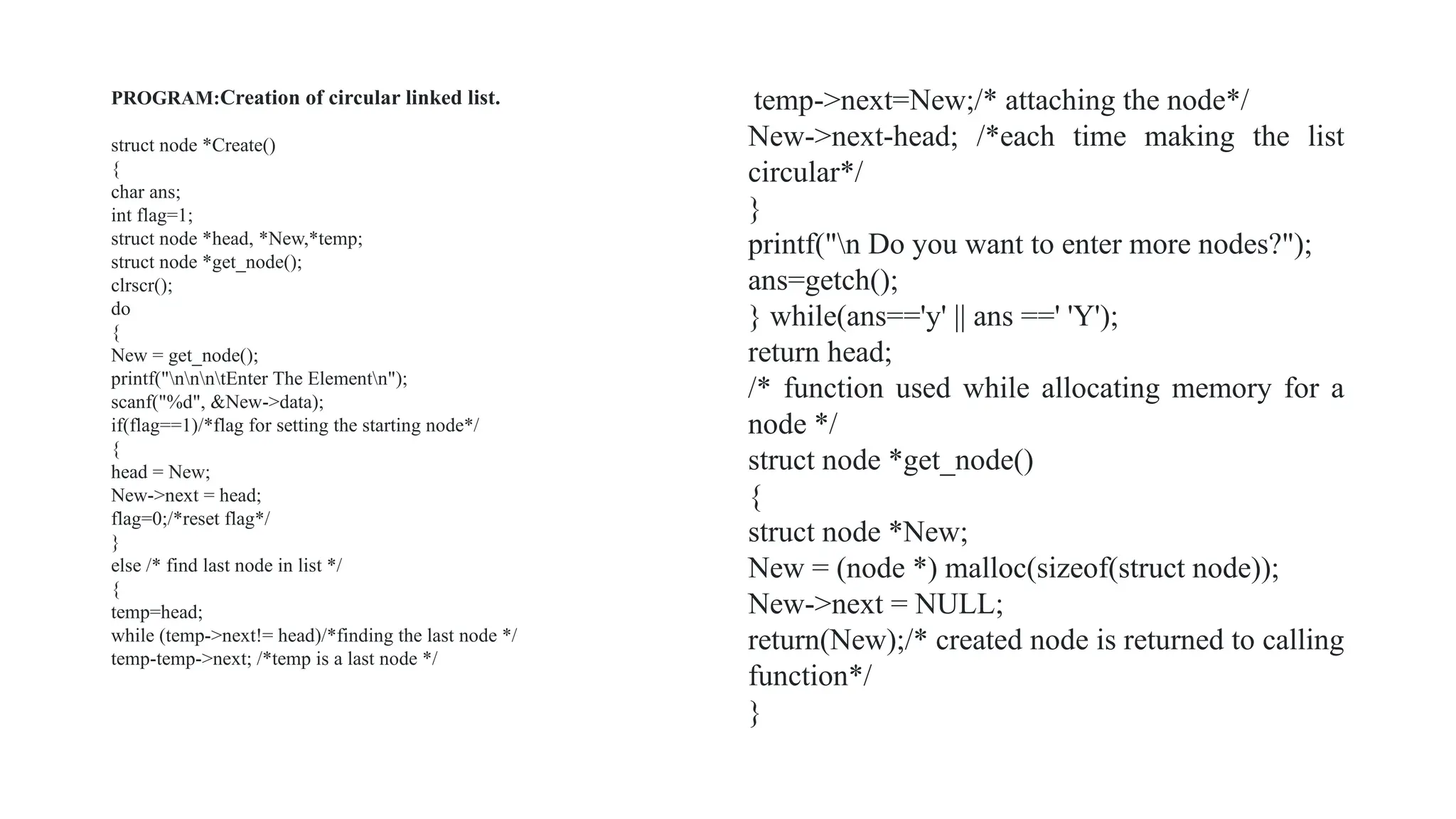
PROGRAM:Creation of circular linked list.
struct node *Create()
{
char ans;
int flag=1;
struct node *head, *New,*temp;
struct node *get_node();
clrscr();
do
{
New = get_node();
printf("nnntEnter The Elementn");
scanf("%d", &New->data);
if(flag==1)/*flag for setting the starting node*/
{
head = New;
New->next = head;
flag=0;/*reset flag*/
}
else /* find last node in list */
{
temp=head;
while (temp->next!= head)/*finding the last node */
temp-temp->next; /*temp is a last node */
temp->next=New;/* attaching the node*/
New->next-head; /*each time making the list
circular*/
}
printf("n Do you want to enter more nodes?");
ans=getch();
} while(ans=='y' || ans ==' 'Y');
return head;
/* function used while allocating memory for a
node */
struct node *get_node()
{
struct node *New;
New = (node *) malloc(sizeof(struct node));
New->next = NULL;
return(New);/* created node is returned to calling
function*/
}
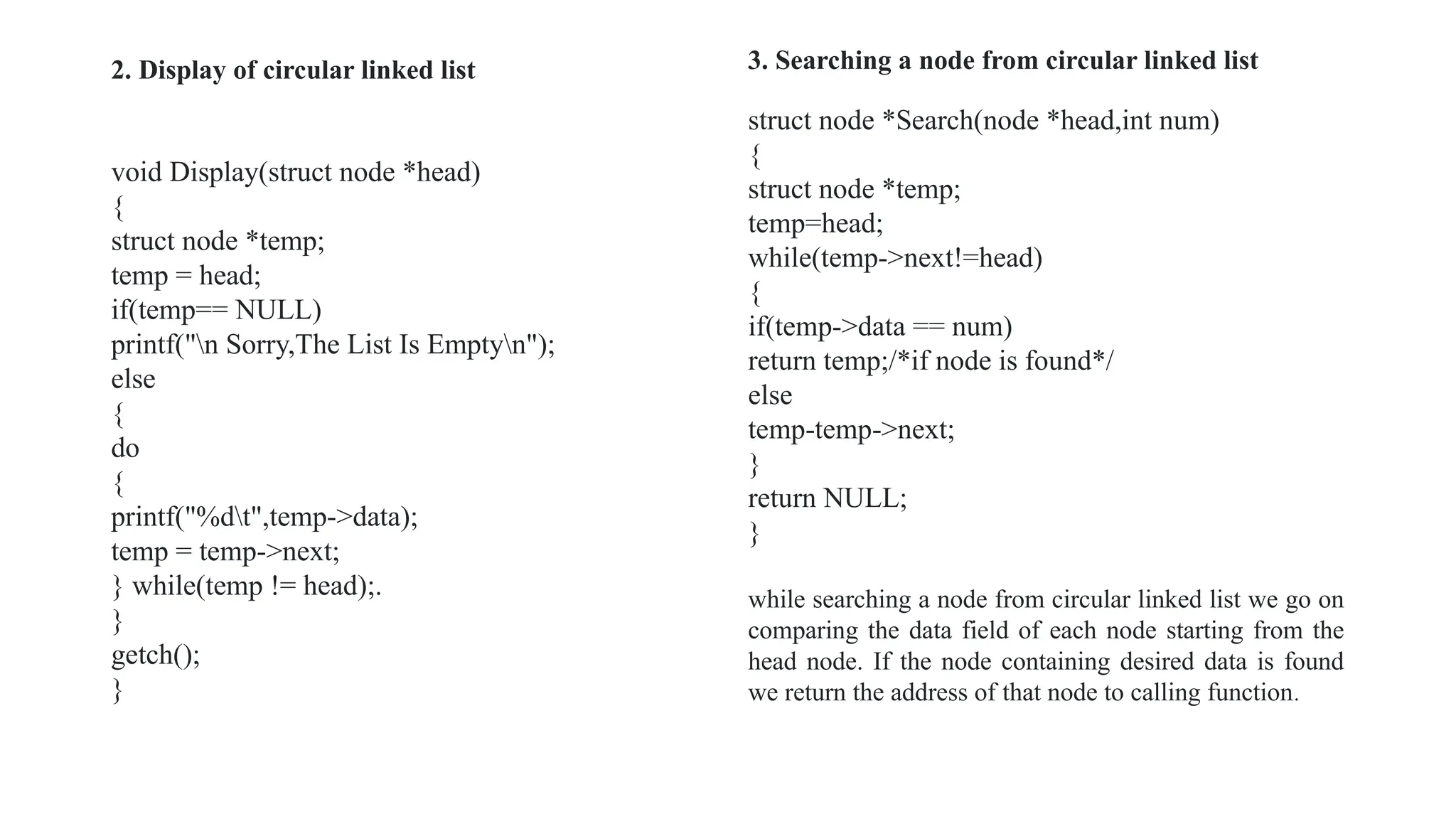
2. Display of circular linked list
void Display(struct node *head)
{
struct node *temp;
temp = head;
if(temp== NULL)
printf("n Sorry,The List Is Emptyn");
else
{
do
{
printf("%dt",temp->data);
temp = temp->next;
} while(temp != head);.
}
getch();
}
struct node *Search(node *head,int num)
{
struct node *temp;
temp=head;
while(temp->next!=head)
{
if(temp->data == num)
return temp;/*if node is found*/
else
temp-temp->next;
}
return NULL;
}
while searching a node from circular linked list we go on
comparing the data field of each node starting from the
head node. If the node containing desired data is found
we return the address of that node to calling function.
3. Searching a node from circular linked list
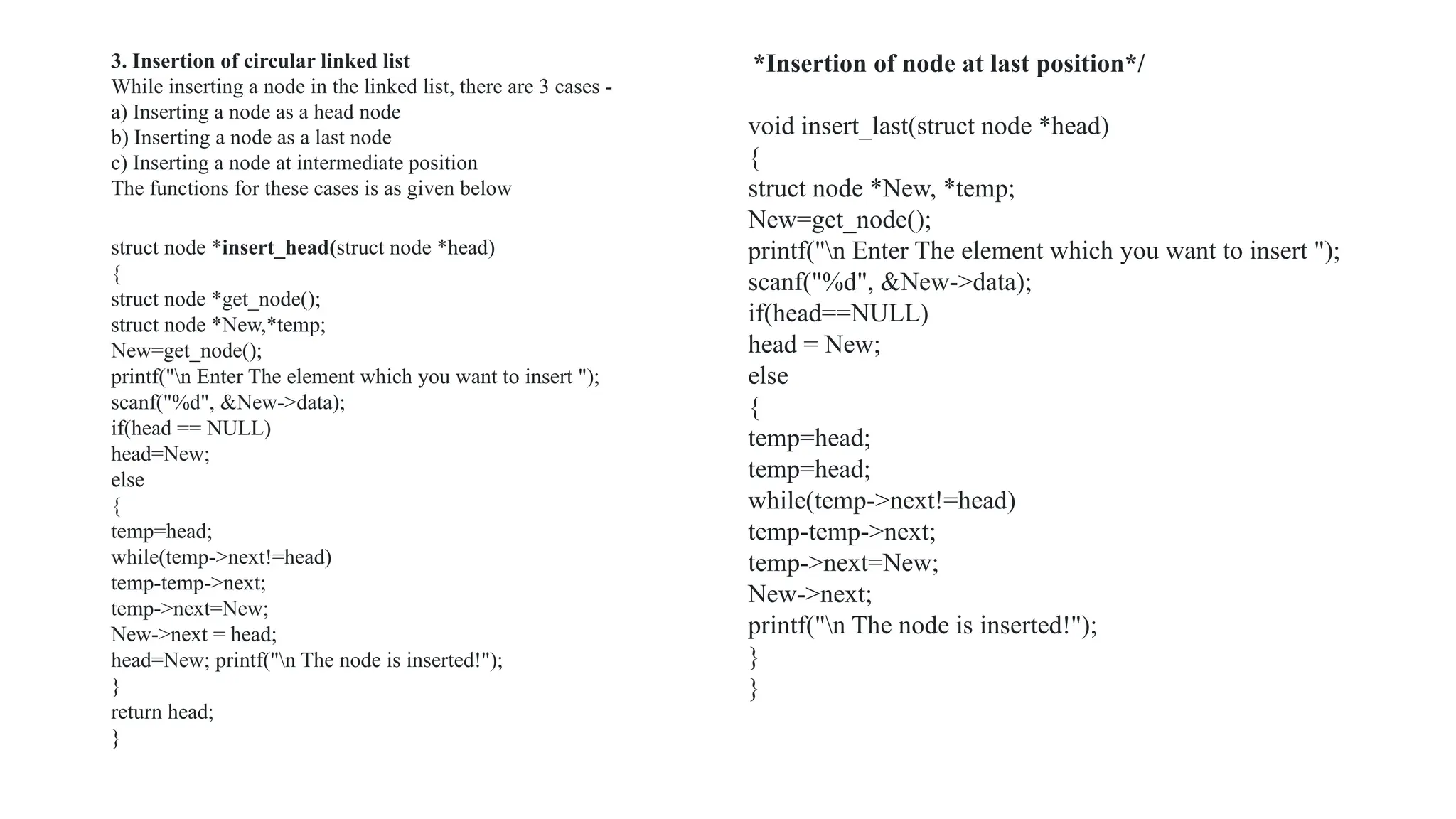
struct node *insert_head(struct node *head)
{
struct node *get_node();
struct node *New,*temp;
New=get_node();
printf("n Enter The element which you want to insert ");
scanf("%d", &New->data);
if(head == NULL)
head=New;
else
{
temp=head;
while(temp->next!=head)
temp-temp->next;
temp->next=New;
New->next = head;
head=New; printf("n The node is inserted!");
}
return head;
}
*Insertion of node at last position*/
void insert_last(struct node *head)
{
struct node *New, *temp;
New=get_node();
printf("n Enter The element which you want to insert ");
scanf("%d", &New->data);
if(head==NULL)
head = New;
else
{
temp=head;
temp=head;
while(temp->next!=head)
temp-temp->next;
temp->next=New;
New->next;
printf("n The node is inserted!");
}
}
3. Insertion of circular linked list
While inserting a node in the linked list, there are 3 cases -
a) Inserting a node as a head node
b) Inserting a node as a last node
c) Inserting a node at intermediate position
The functions for these cases is as given below
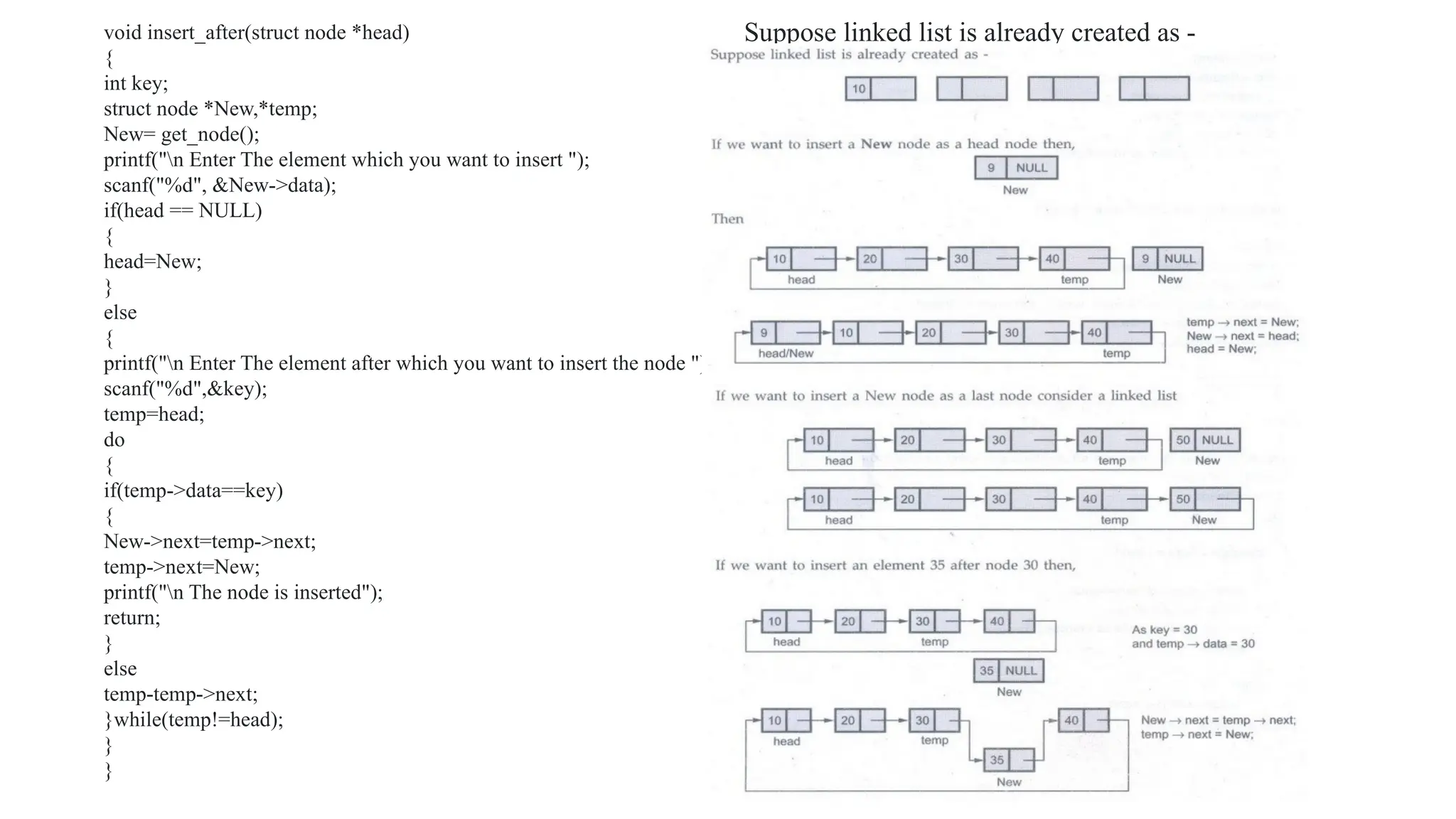
void insert_after(struct node *head)
{
int key;
struct node *New,*temp;
New= get_node();
printf("n Enter The element which you want to insert ");
scanf("%d", &New->data);
if(head == NULL)
{
head=New;
}
else
{
printf("n Enter The element after which you want to insert the node ");
scanf("%d",&key);
temp=head;
do
{
if(temp->data==key)
{
New->next=temp->next;
temp->next=New;
printf("n The node is inserted");
return;
}
else
temp-temp->next;
}while(temp!=head);
}
}
Suppose linked list is already created as -
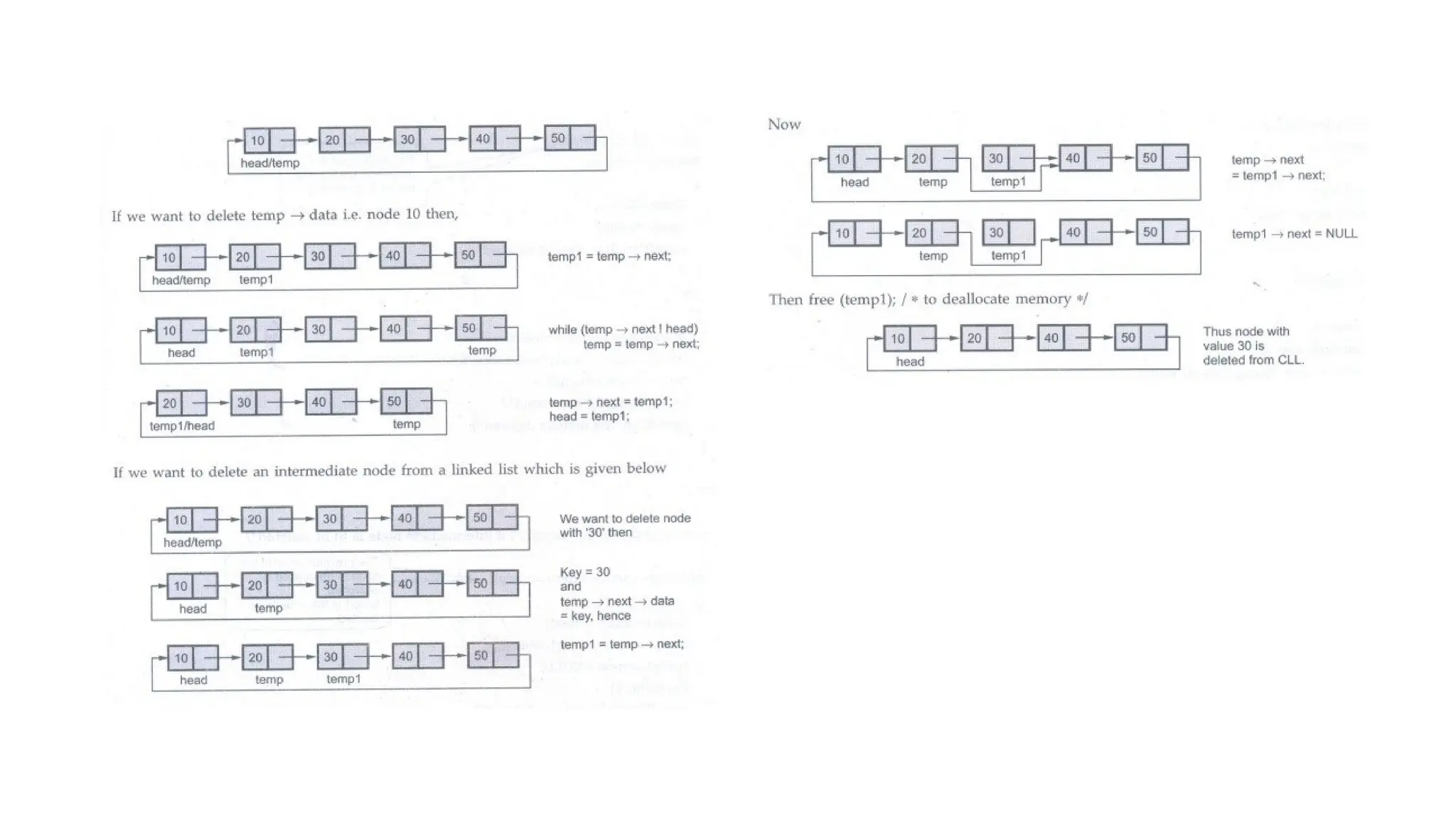
temp->next=temp1;
head=temp1;/*new head*/
printf("n The node is deleted");
}
}
else
{
while(temp->next!=head) /* if intermediate node is to be
deleted*/
{
if((temp->next)->data==key)
{
temp1=temp->next;
temp->next=temp1->next;
templ->next=NULL;
free(temp1);
printf("n The node is deleted");
}
else
temp-temp->next;
}
}
return head;
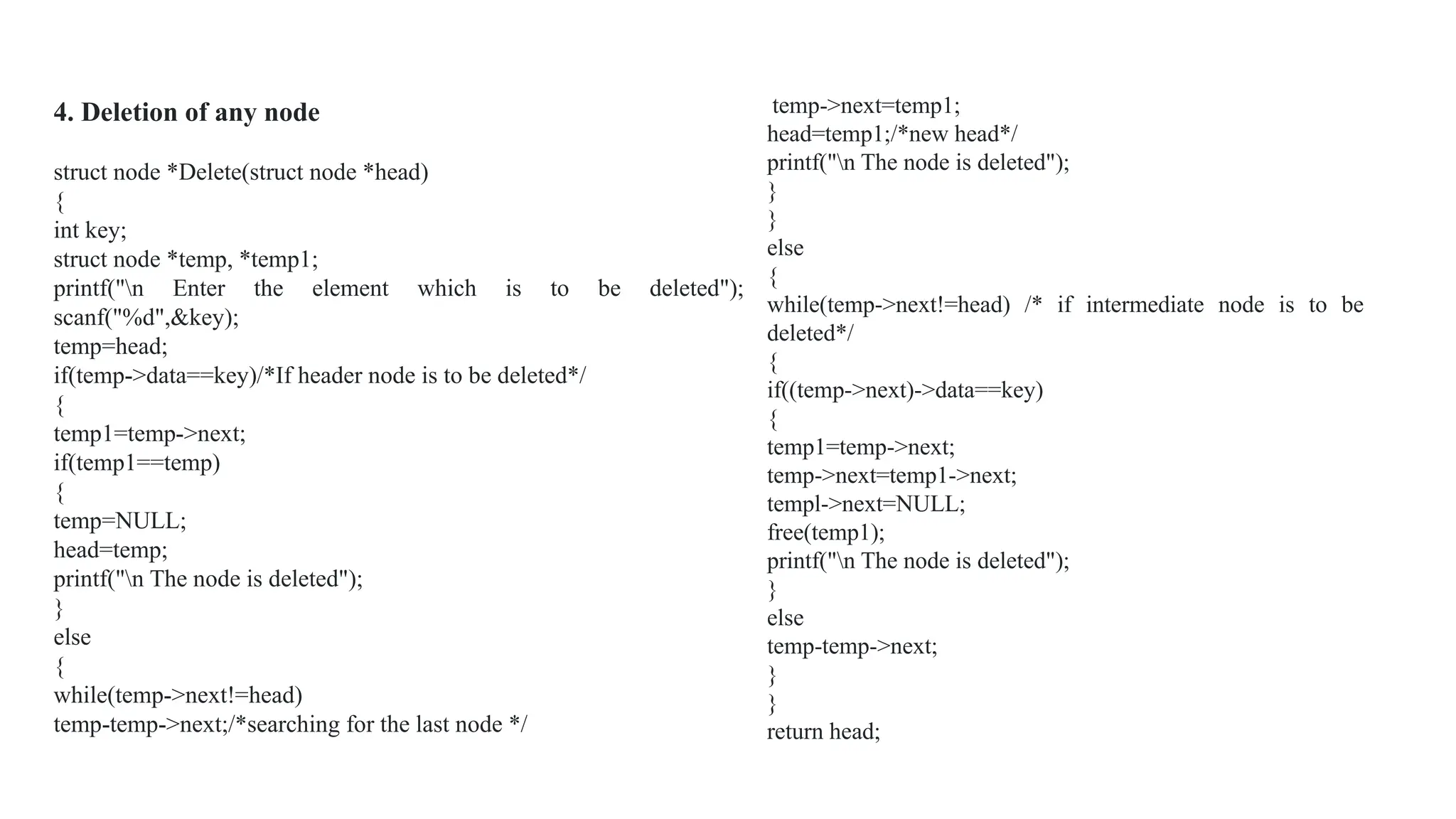
4. Deletion of any node
struct node *Delete(struct node *head)
{
int key;
struct node *temp, *temp1;
printf("n Enter the element which is to be deleted");
scanf("%d",&key);
temp=head;
if(temp->data==key)/*If header node is to be deleted*/
{
temp1=temp->next;
if(temp1==temp)
{
temp=NULL;
head=temp;
printf("n The node is deleted");
}
else
{
while(temp->next!=head)
temp-temp->next;/*searching for the last node */
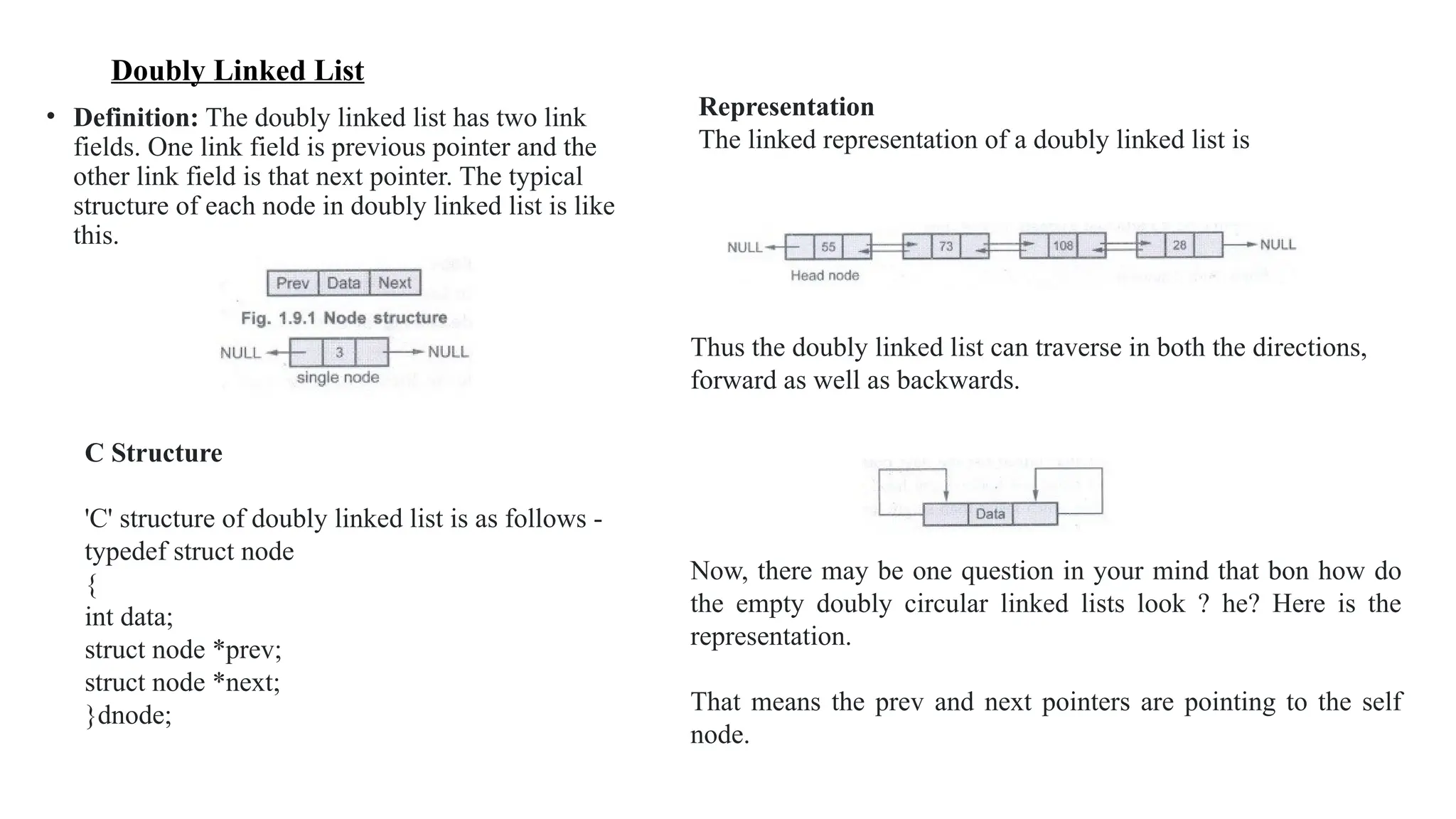
Doubly Linked List
• Definition: The doubly linked list has two link
fields. One link field is previous pointer and the
other link field is that next pointer. The typical
structure of each node in doubly linked list is like
this.
C Structure
'C' structure of doubly linked list is as follows -
typedef struct node
{
int data;
struct node *prev;
struct node *next;
}dnode;
Representation
The linked representation of a doubly linked list is
Thus the doubly linked list can traverse in both the directions,
forward as well as backwards.
Now, there may be one question in your mind that bon how do
the empty doubly circular linked lists look ? he? Here is the
representation.
That means the prev and next pointers are pointing to the self
node.
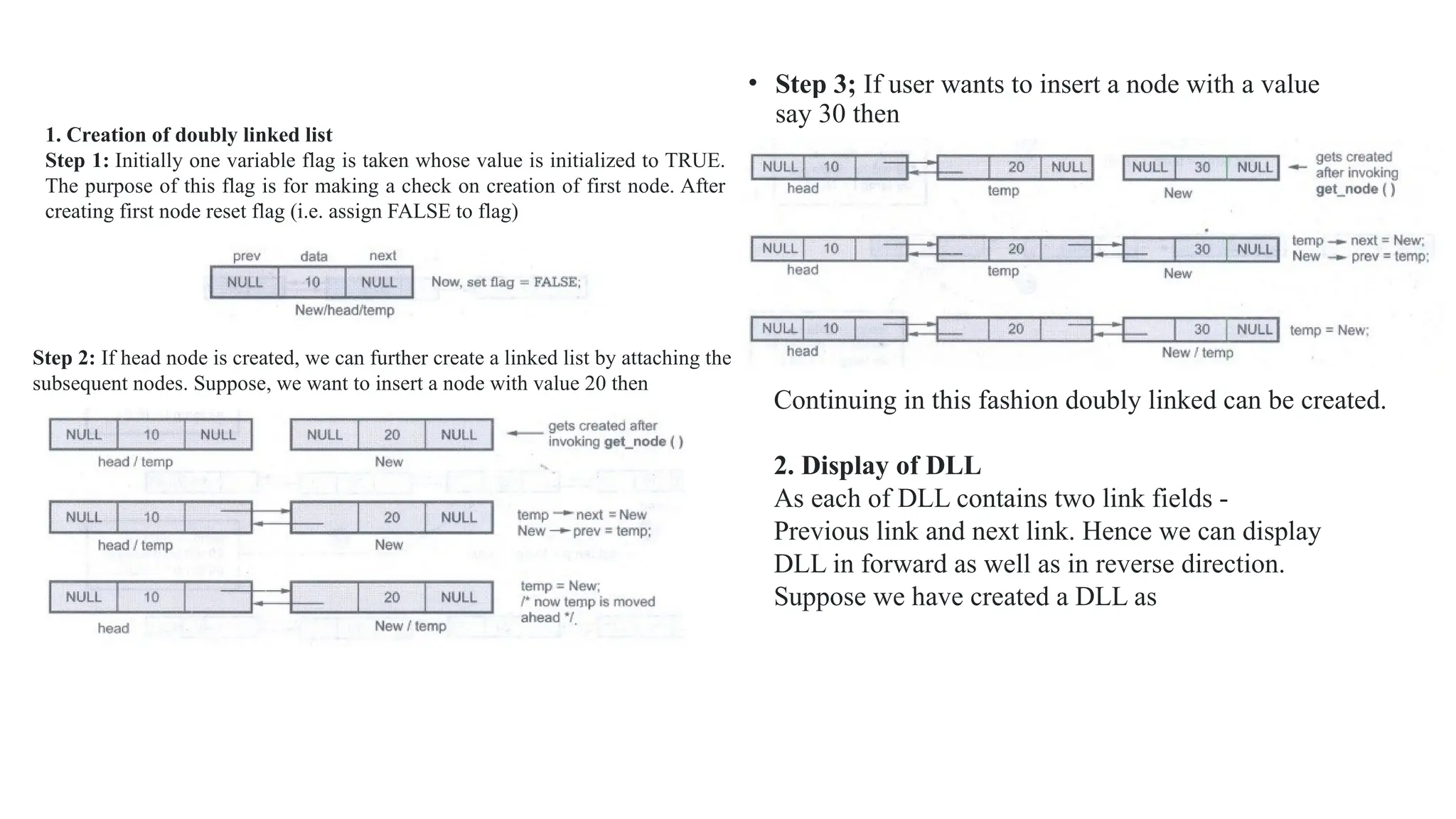
• Step 3; If user wants to insert a node with a value
say 30 then
1. Creation of doubly linked list
Step 1: Initially one variable flag is taken whose value is initialized to TRUE.
The purpose of this flag is for making a check on creation of first node. After
creating first node reset flag (i.e. assign FALSE to flag)
Step 2: If head node is created, we can further create a linked list by attaching the
subsequent nodes. Suppose, we want to insert a node with value 20 then
Continuing in this fashion doubly linked can be created.
2. Display of DLL
As each of DLL contains two link fields -
Previous link and next link. Hence we can display
DLL in forward as well as in reverse direction.
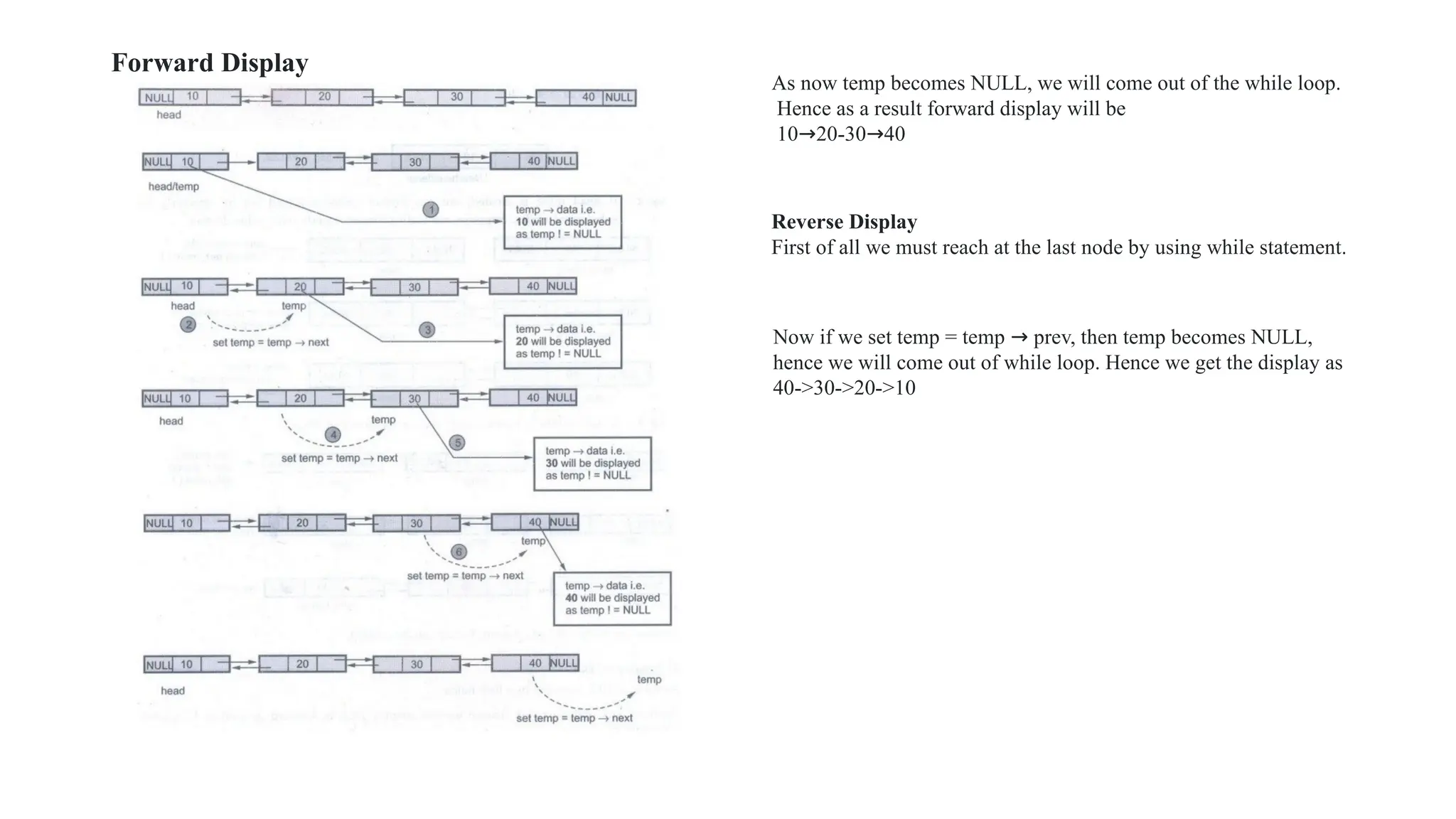
Suppose we have created a DLL as
Forward Display
As now temp becomes NULL, we will come out of the while loop.
Hence as a result forward display will be
10→20-30→40
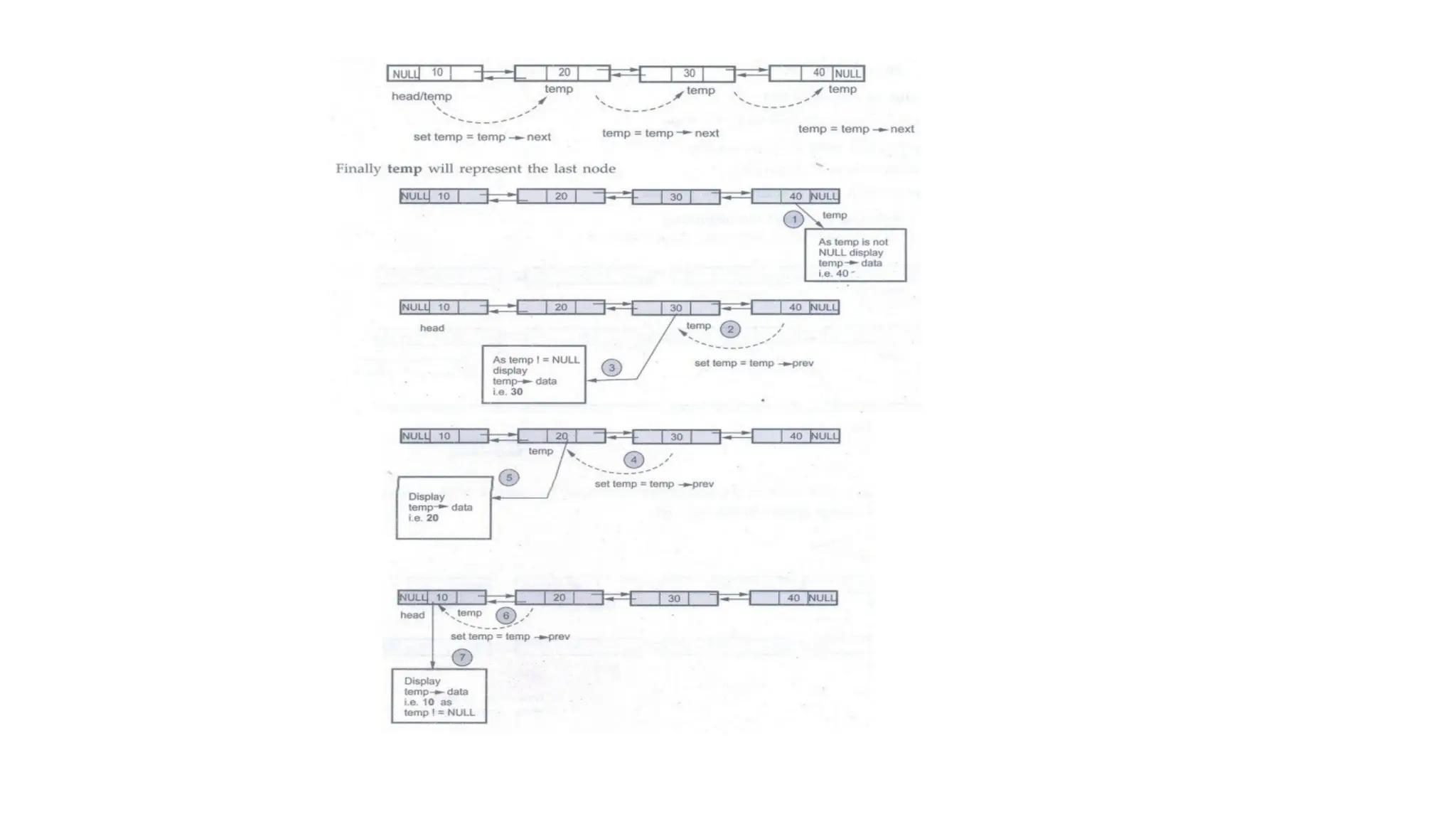
Reverse Display
First of all we must reach at the last node by using while statement.
Now if we set temp = temp → prev, then temp becomes NULL,
hence we will come out of while loop. Hence we get the display as
40->30->20->10
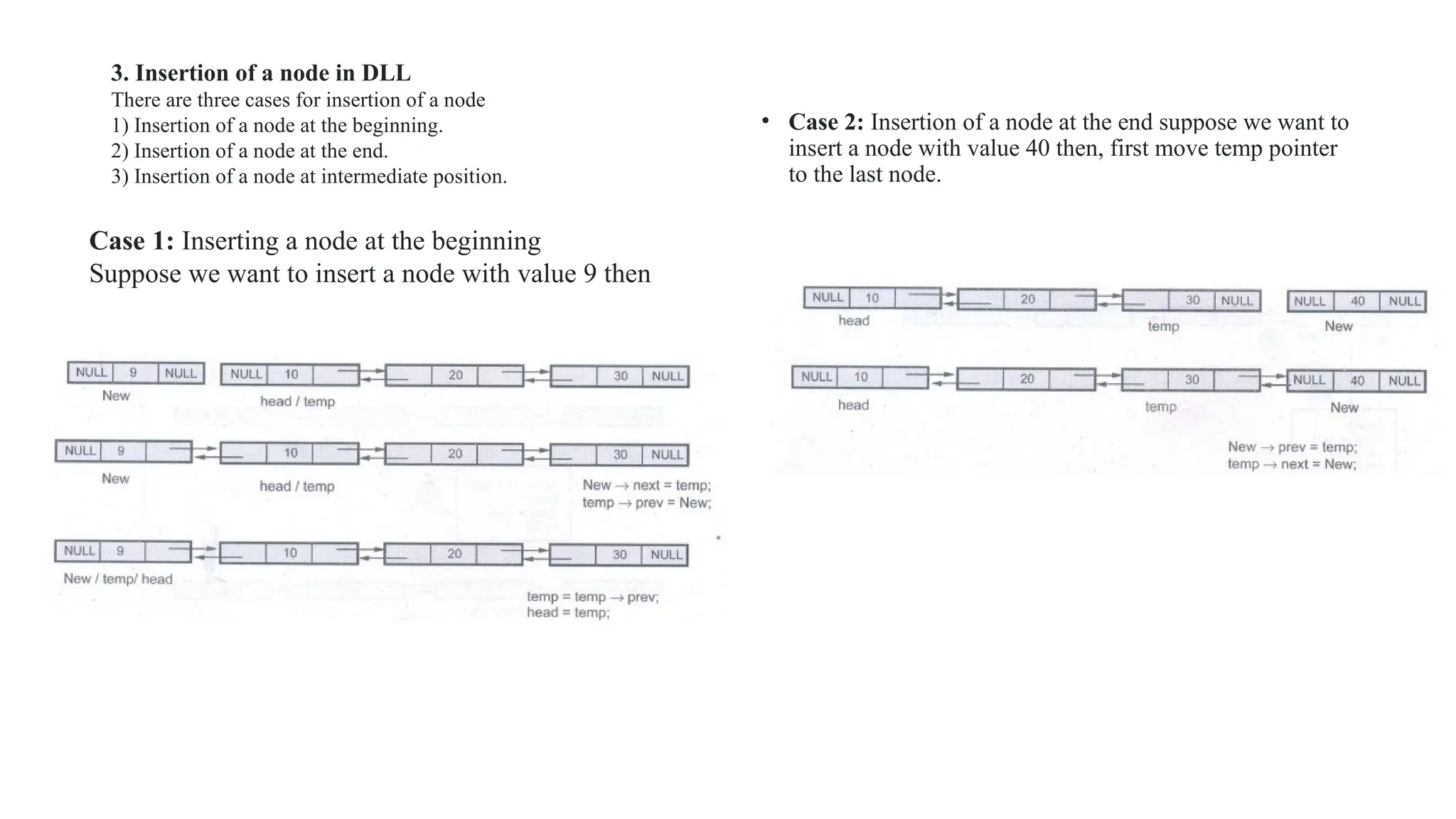
• Case 2: Insertion of a node at the end suppose we want to
insert a node with value 40 then, first move temp pointer
to the last node.
3. Insertion of a node in DLL
There are three cases for insertion of a node
1) Insertion of a node at the beginning.
2) Insertion of a node at the end.
3) Insertion of a node at intermediate position.
Case 1: Inserting a node at the beginning
Suppose we want to insert a node with value 9 then
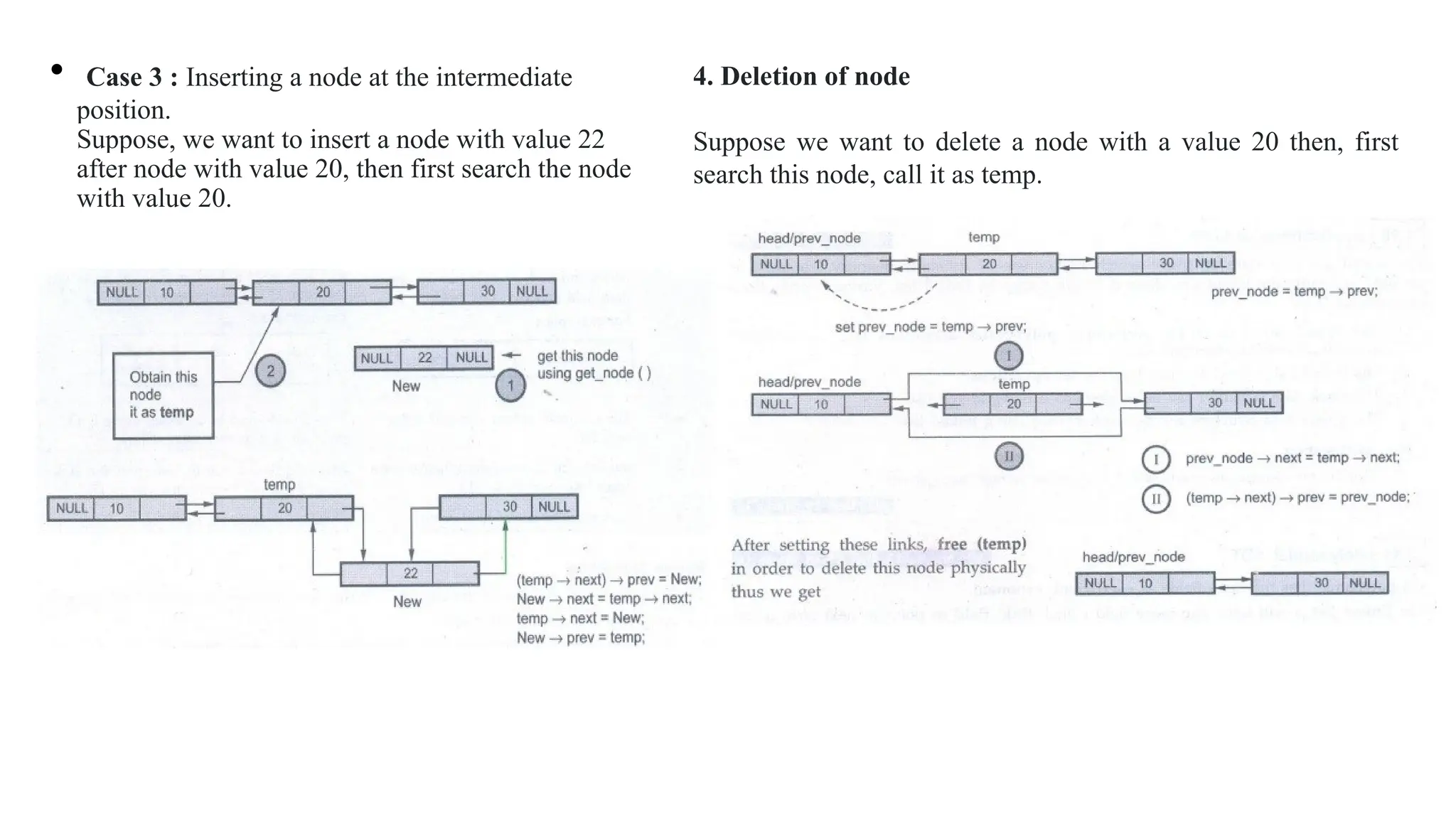
• Case 3 : Inserting a node at the intermediate
position.
Suppose, we want to insert a node with value 22
after node with value 20, then first search the node
with value 20.
•
4. Deletion of node
Suppose we want to delete a node with a value 20 then, first
search this node, call it as temp.
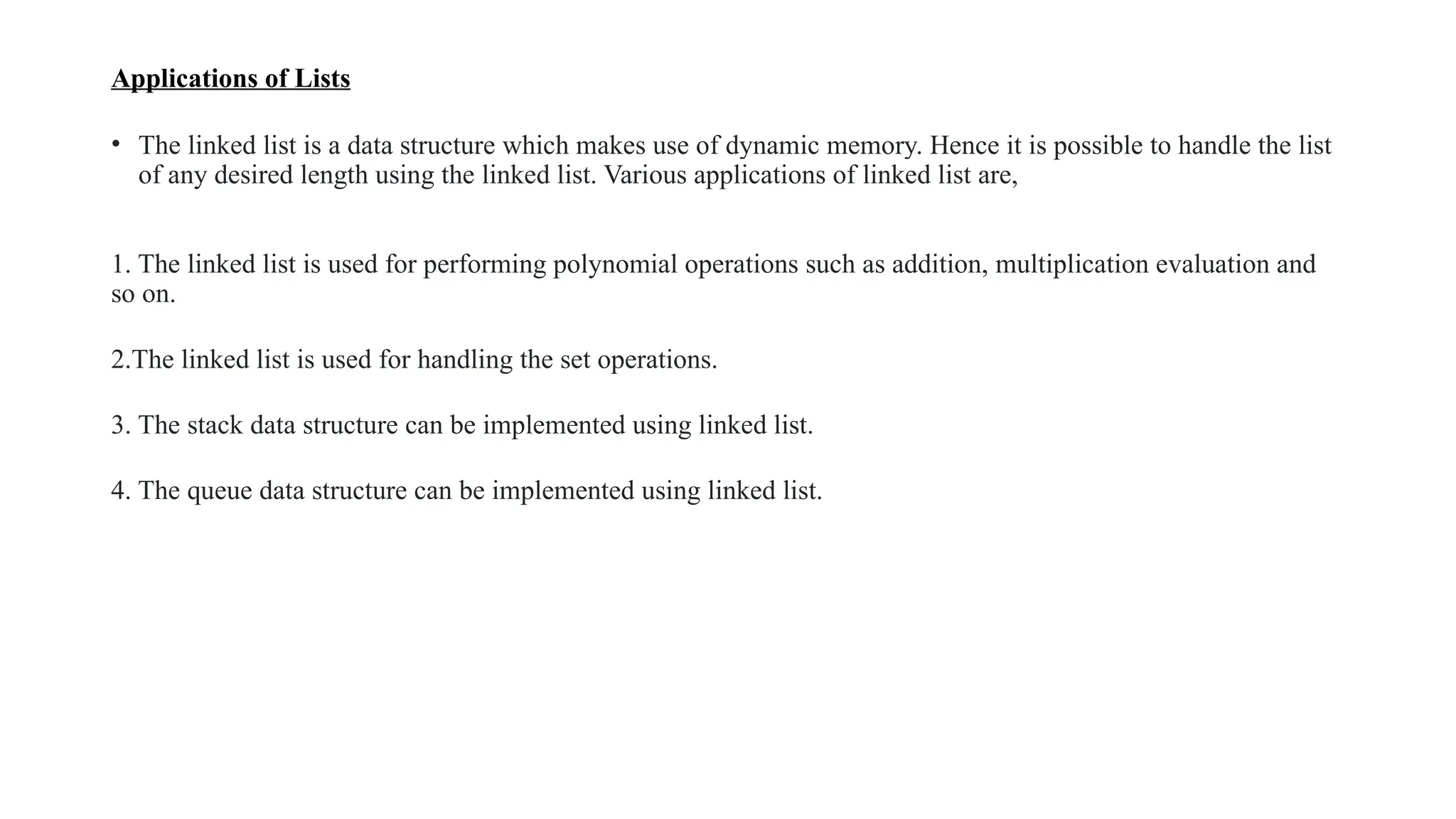
Applications of Lists
• The linked list is a data structure which makes use of dynamic memory. Hence it is possible to handle the list
of any desired length using the linked list. Various applications of linked list are,
1. The linked list is used for performing polynomial operations such as addition, multiplication evaluation and
so on.
2.The linked list is used for handling the set operations.
3. The stack data structure can be implemented using linked list.
4. The queue data structure can be implemented using linked list.
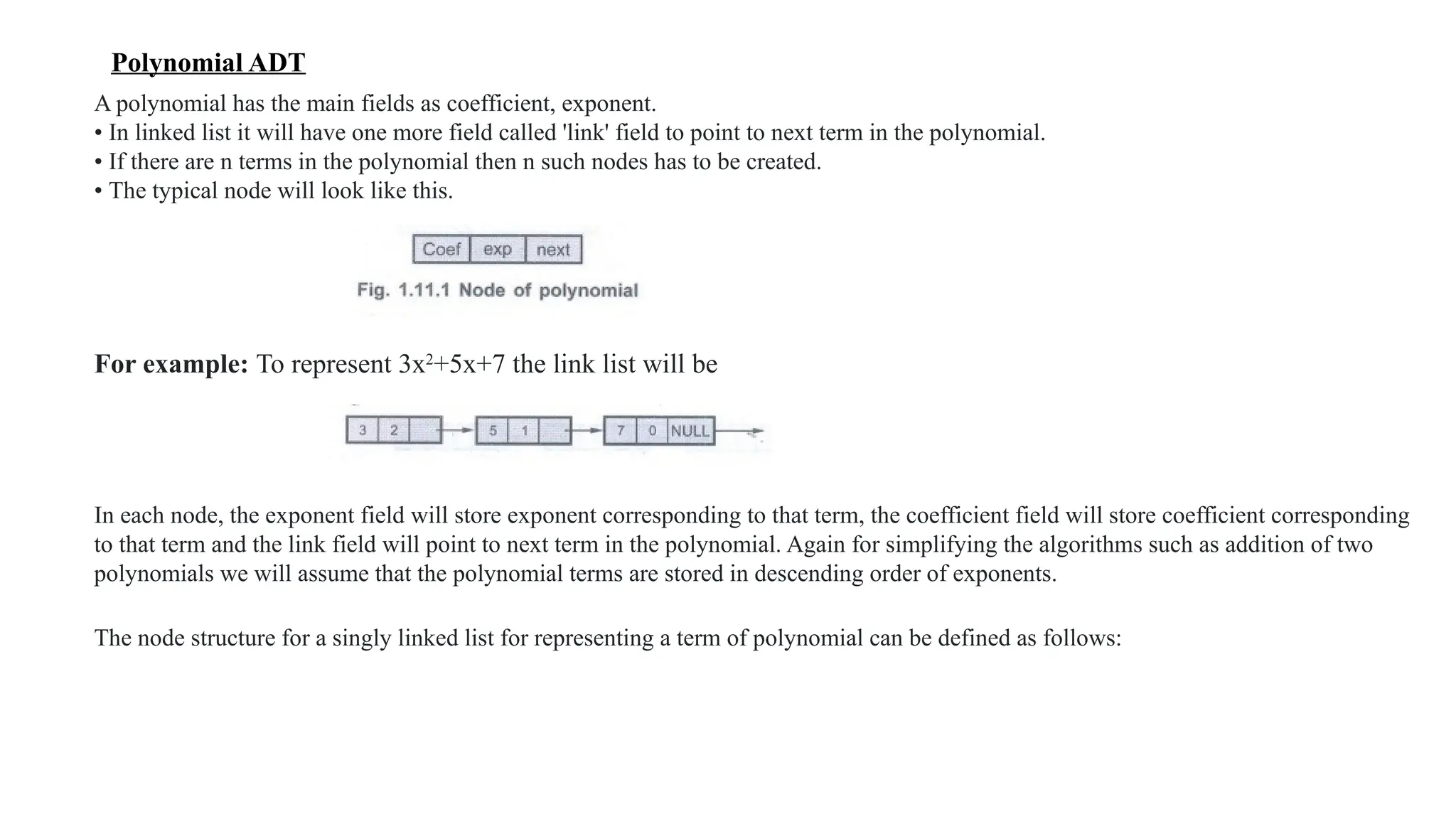
Polynomial ADT
A polynomial has the main fields as coefficient, exponent.
• In linked list it will have one more field called 'link' field to point to next term in the polynomial.
• If there are n terms in the polynomial then n such nodes has to be created.
• The typical node will look like this.
For example: To represent 3x2
+5x+7 the link list will be
In each node, the exponent field will store exponent corresponding to that term, the coefficient field will store coefficient corresponding
to that term and the link field will point to next term in the polynomial. Again for simplifying the algorithms such as addition of two
polynomials we will assume that the polynomial terms are stored in descending order of exponents.
The node structure for a singly linked list for representing a term of polynomial can be defined as follows:
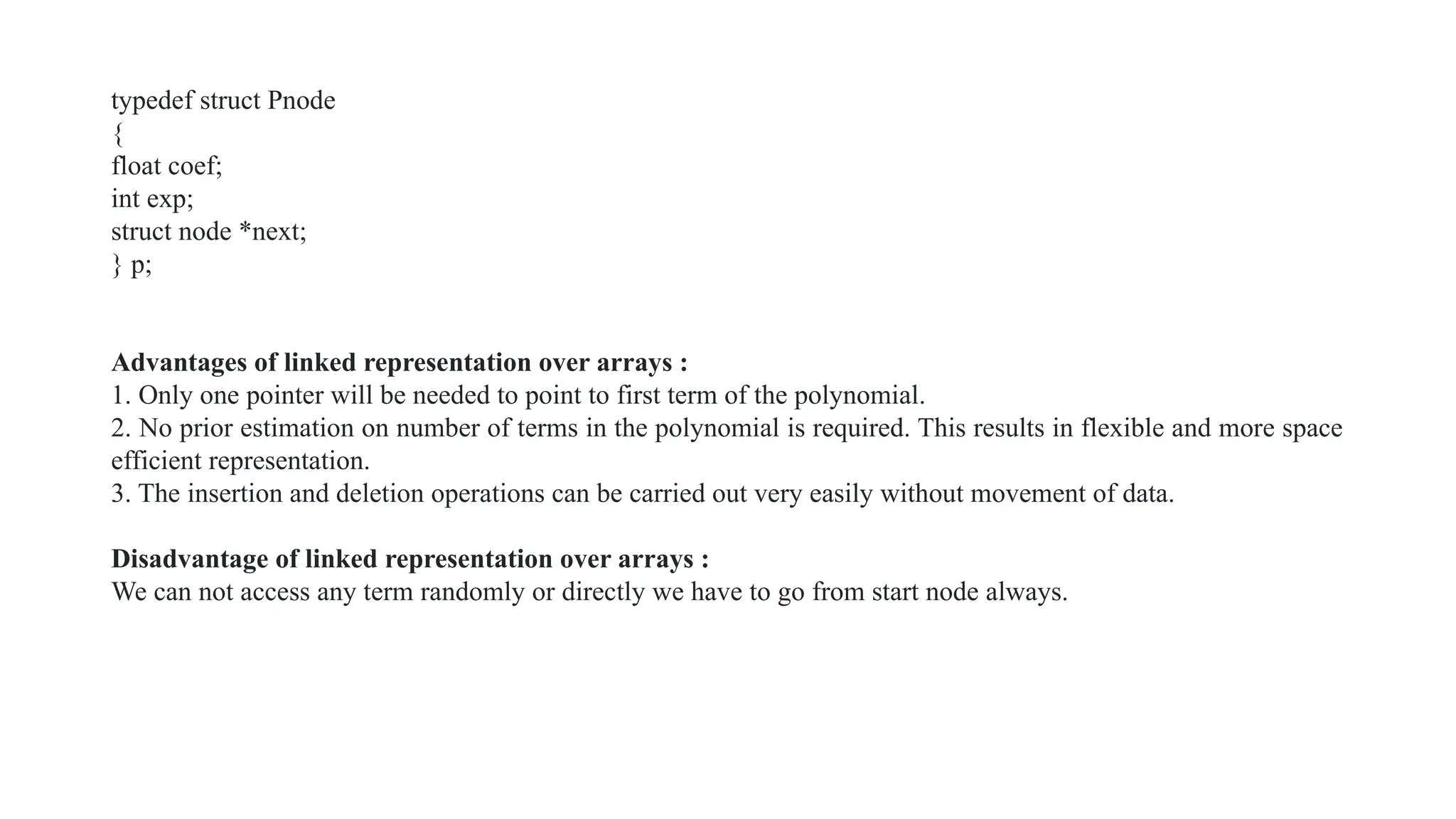
typedef struct Pnode
{
float coef;
int exp;
struct node *next;
} p;
Advantages of linked representation over arrays :
1. Only one pointer will be needed to point to first term of the polynomial.
2. No prior estimation on number of terms in the polynomial is required. This results in flexible and more space
efficient representation.
3. The insertion and deletion operations can be carried out very easily without movement of data.
Disadvantage of linked representation over arrays :
We can not access any term randomly or directly we have to go from start node always.
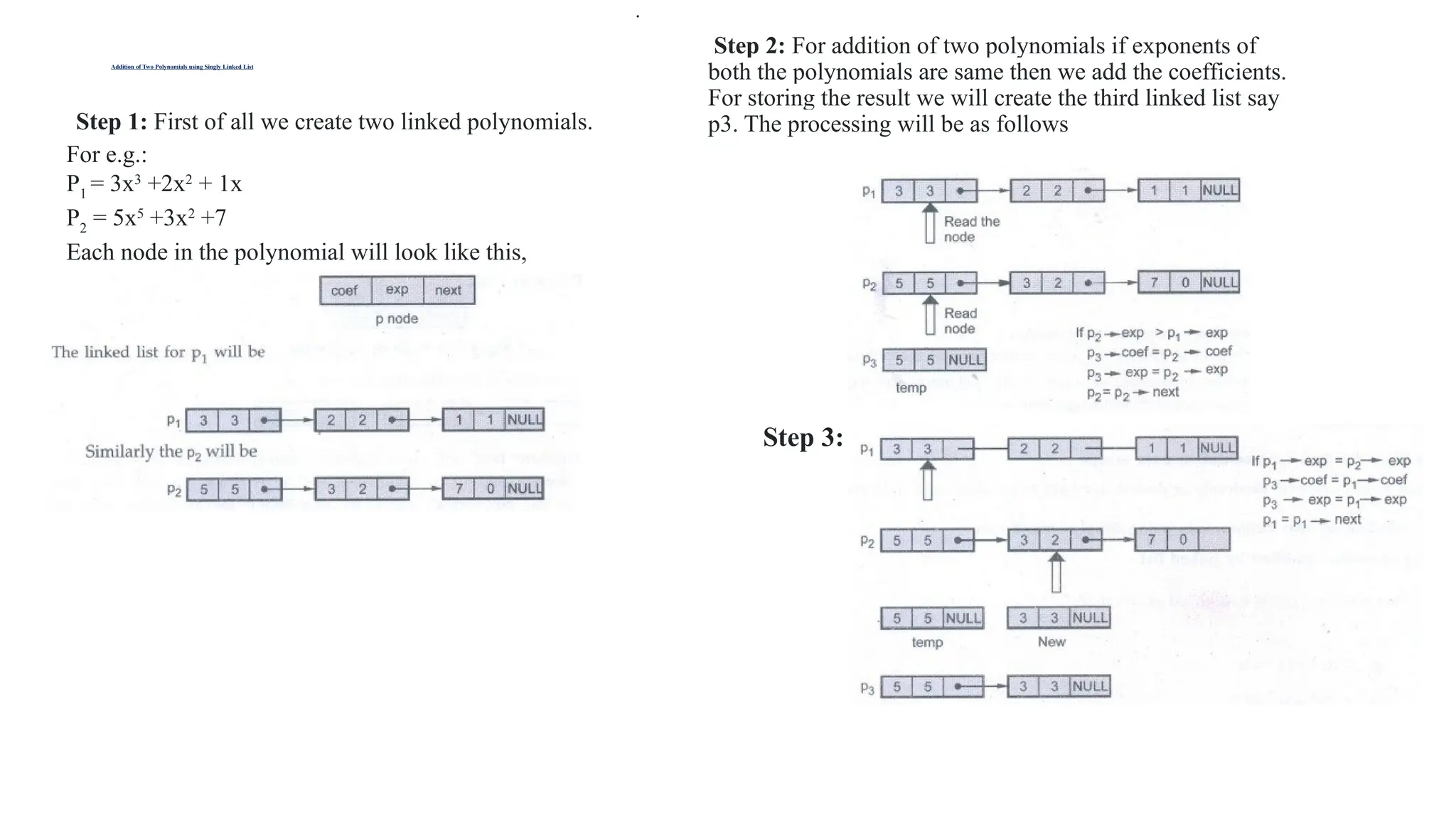
Addition of Two Polynomials using Singly Linked List
Step 1: First of all we create two linked polynomials.
For e.g.:
P1
= 3x3
+2x2
+ 1x
P2
= 5x5
+3x2
+7
Each node in the polynomial will look like this,
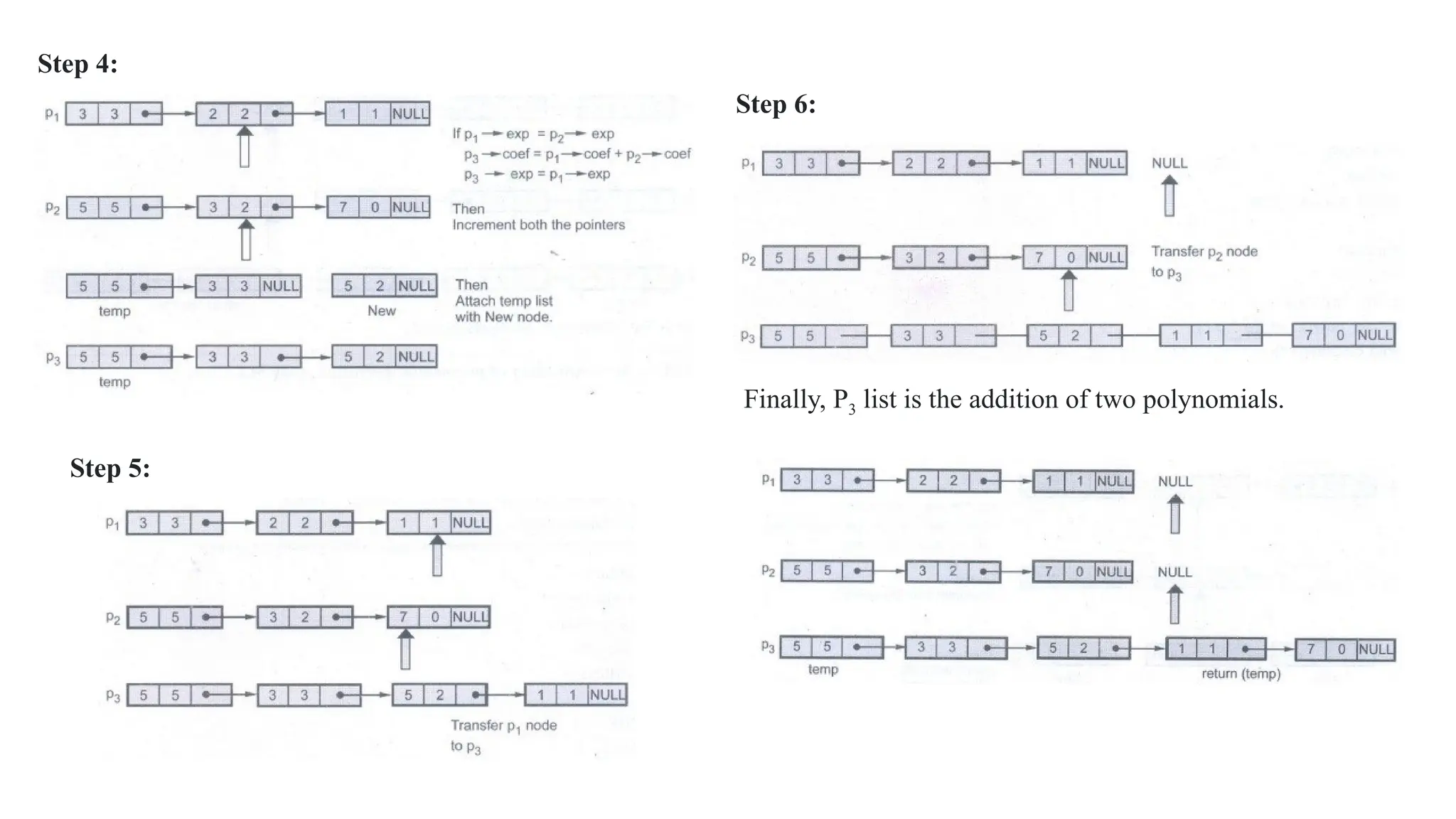
Step 2: For addition of two polynomials if exponents of
both the polynomials are same then we add the coefficients.
For storing the result we will create the third linked list say
p3. The processing will be as follows
.
Step 3:
Step 4:
Step 6:
Step 5:
Finally, P3 list is the addition of two polynomials.
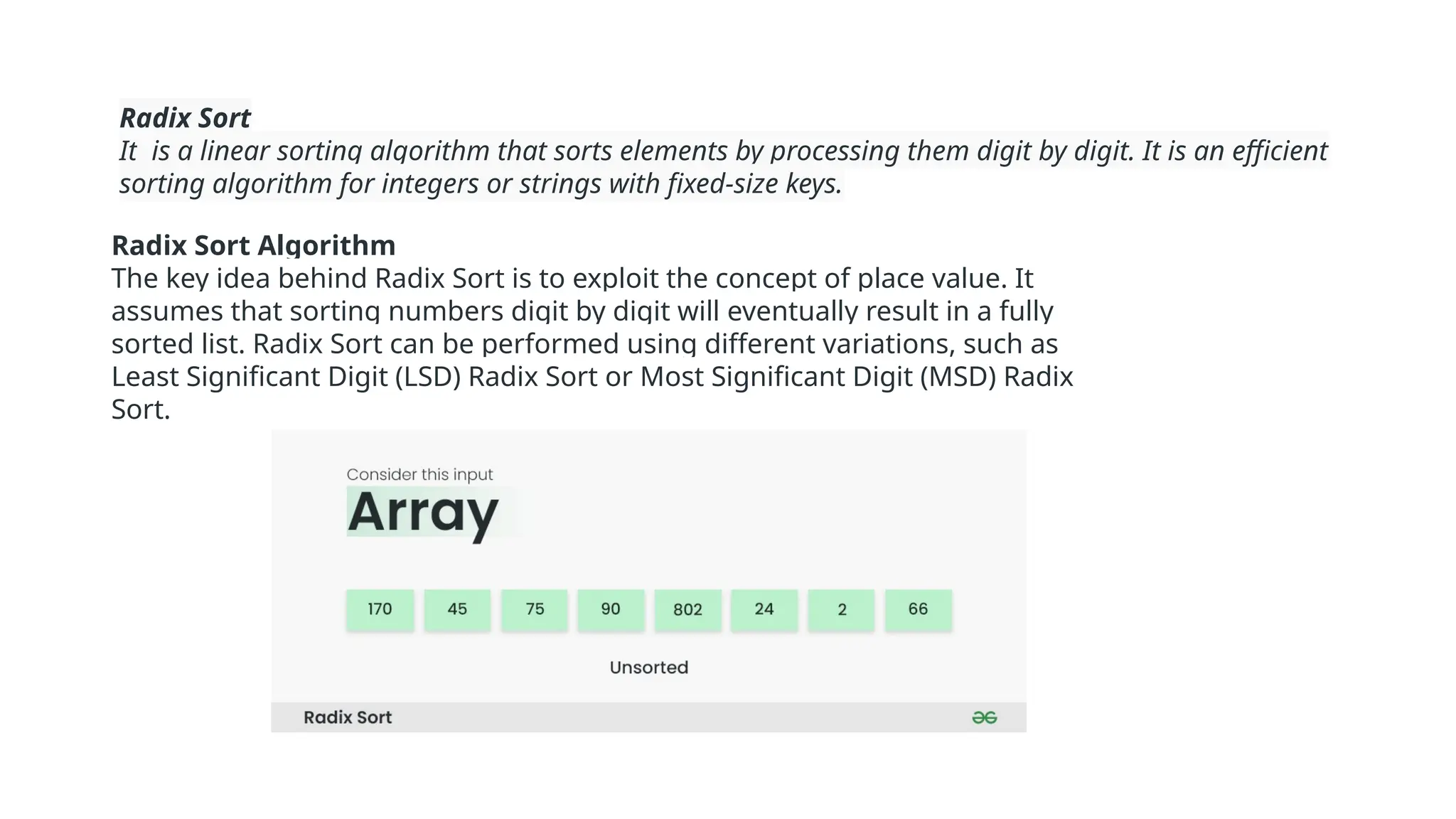
Radix Sort
It is a linear sorting algorithm that sorts elements by processing them digit by digit. It is an efficient
sorting algorithm for integers or strings with fixed-size keys.
Radix Sort Algorithm
The key idea behind Radix Sort is to exploit the concept of place value. It
assumes that sorting numbers digit by digit will eventually result in a fully
sorted list. Radix Sort can be performed using different variations, such as
Least Significant Digit (LSD) Radix Sort or Most Significant Digit (MSD) Radix
Sort.
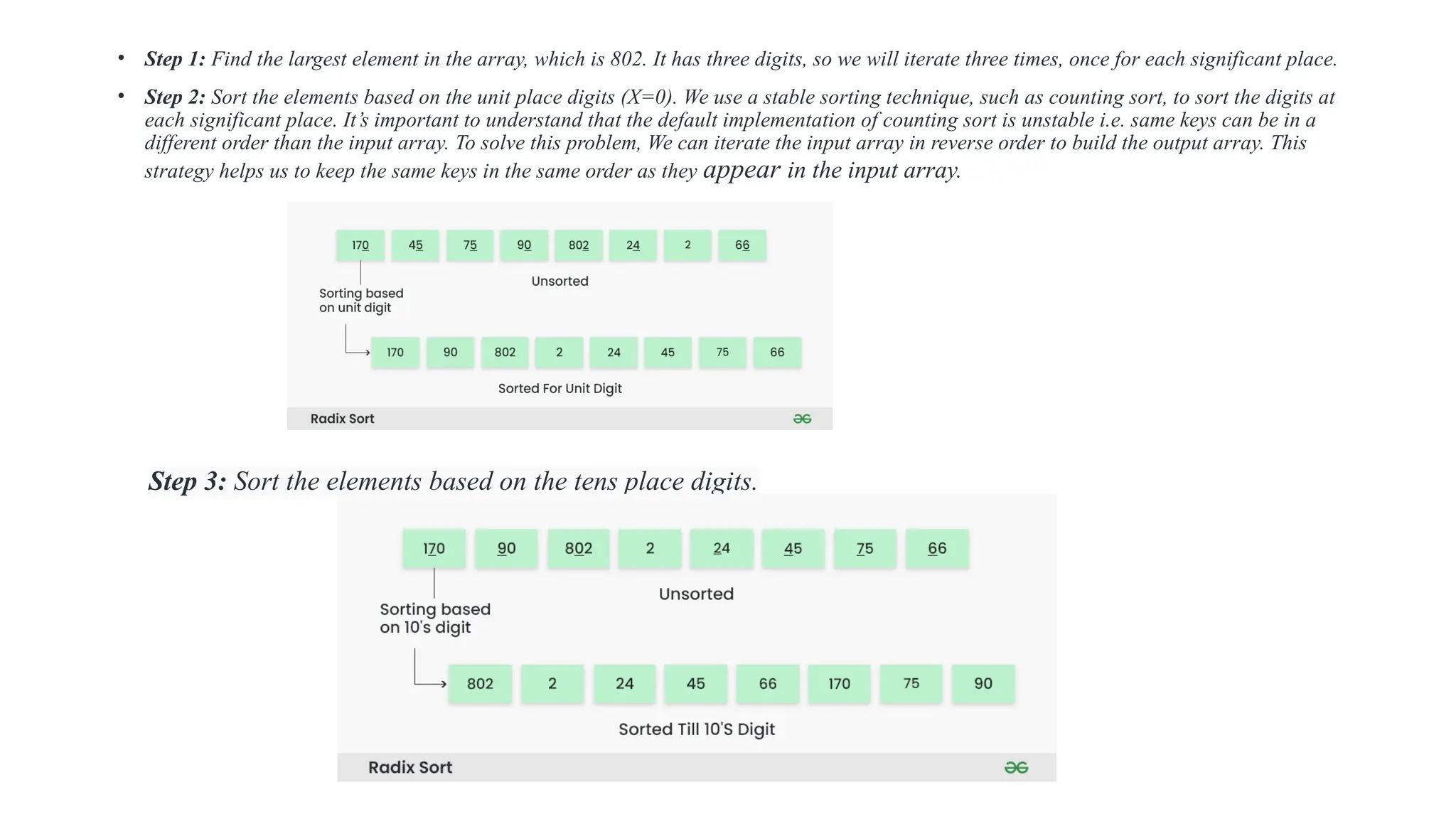
• Step 1: Find the largest element in the array, which is 802. It has three digits, so we will iterate three times, once for each significant place.
• Step 2: Sort the elements based on the unit place digits (X=0). We use a stable sorting technique, such as counting sort, to sort the digits at
each significant place. It’s important to understand that the default implementation of counting sort is unstable i.e. same keys can be in a
different order than the input array. To solve this problem, We can iterate the input array in reverse order to build the output array. This
strategy helps us to keep the same keys in the same order as they appear in the input array.
Step 3: Sort the elements based on the tens place digits.
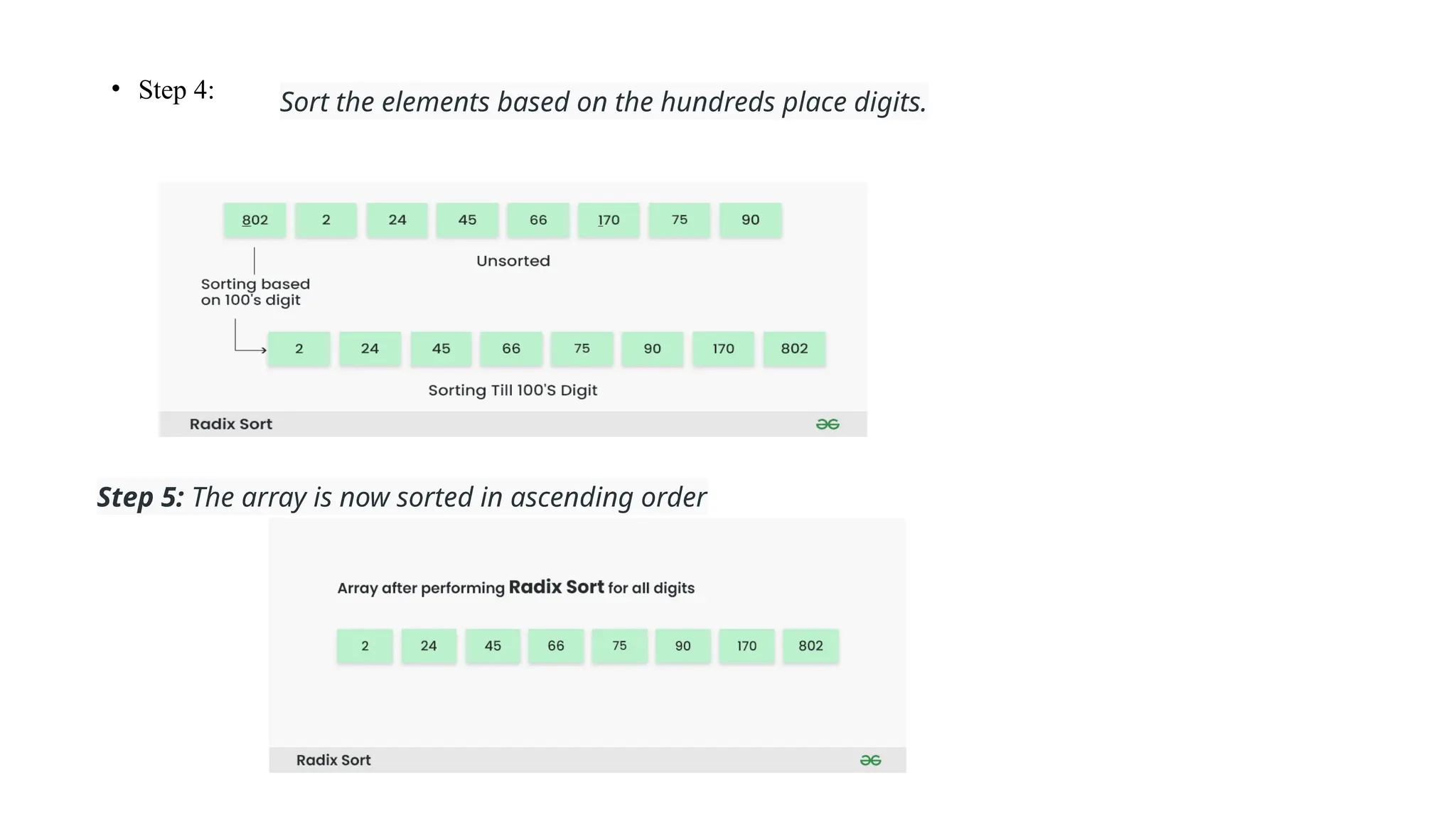
• Step 4: Sort the elements based on the hundreds place digits.
Step 5: The array is now sorted in ascending order
• Step 3: Sort the elements based on the tens place digits.
• Step 4: Sort the elements based on the hundreds place digits.
• Step 5: The array is now sorted in ascending order.
Multi list
• A multi list is a data structure in which there are multiple links from a node. In general multi-list, each node can have any
number of pointers to other nodes and there may or may not be inverses for each pointer.
• Multi-lists is a technique in which multiple lists are embedded into a single structure. In multi-list the pointers are used to
make multiple link routes through data.
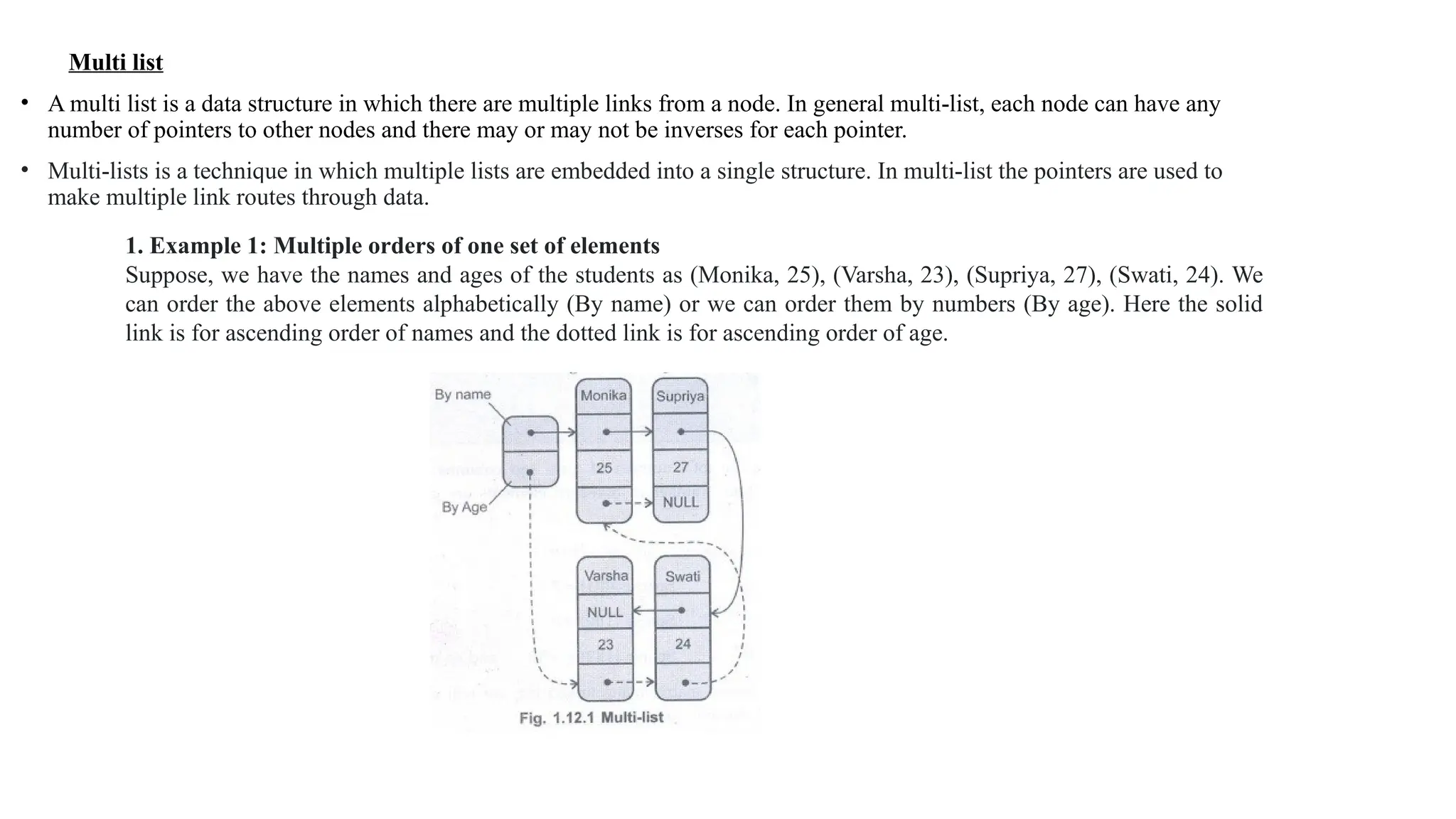
1. Example 1: Multiple orders of one set of elements
Suppose, we have the names and ages of the students as (Monika, 25), (Varsha, 23), (Supriya, 27), (Swati, 24). We
can order the above elements alphabetically (By name) or we can order them by numbers (By age). Here the solid
link is for ascending order of names and the dotted link is for ascending order of age.
2. Sparse matrix representation using multi-lists
• Defintion: A sparse matrix is a kind of matrix which has a very few non zero elements, as compared to the size m x n of the matrix.
• For example - If the matrix is of size 100 x 100 and only 10 elements are non zero. The concept of sparse matrix has came forward in
computer science to investigate such a representation which will store only non-zero elements of the matrix and still carry out the operations
quite efficiently.
Representations of sparse matrices :
The representation of sparse matrix will be a triplet only. In the sense that basically the sparse matrix means very few non-zero elements having in
it. Rest of the spaces are having the values zero which are basically useless values or simply empty values. So in this efficient representation we
will consider all the non-zero values along with their positions.
The 0th
row will store total rows of the matrix, total columns of the matrix and total
• For example - Suppose a matrix is 6 × 7 and number of non zero terms are say 8. In our sparse matrix representation the matrix will be stored as
For example - Suppose a matrix is 6 × 7 and number of non zero terms are say 8. In our sparse matrix representation the matrix
will be stored as
In above representation, the total number of rows and
columns of the matrix (6 × 7) are given in 0th
row. Also
total number of non-zero elements are given in 0th row of
value column i.e. 8.
Here the above array is say named "Sparse". Then
Sparse [0][0] = 6
Sparse [0][1] = 7
Sparse [0][2] = 8
Sparse [1][0] = 0
Sparse [1][1]=6
Sparse [1][2] =-10 and so on.
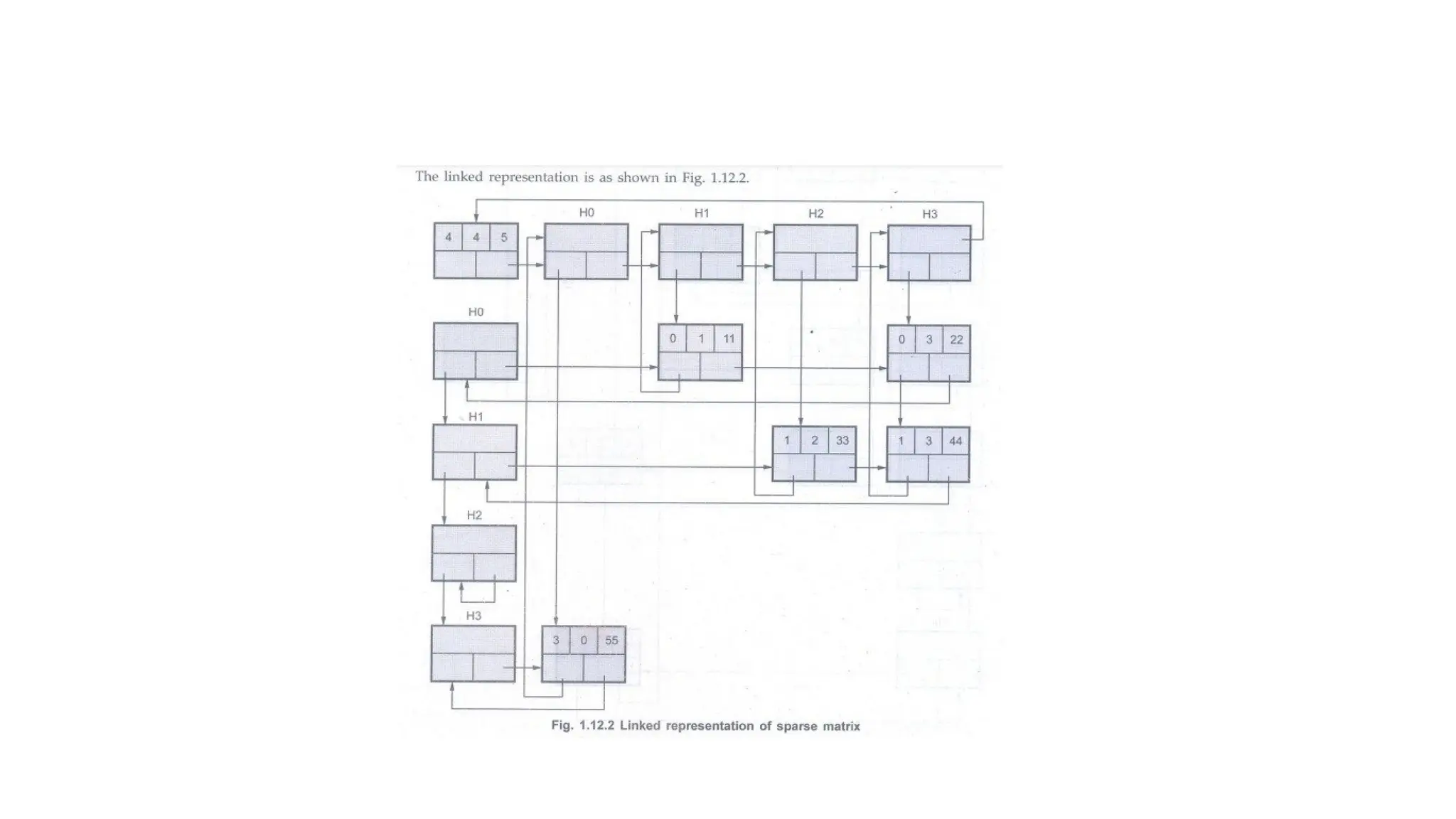
While representing the sparse matrix using linked list, we will
make use of two types of nodes, header node and element node.
UNIT 2
STACKS
Concept of Stack
• Definition :
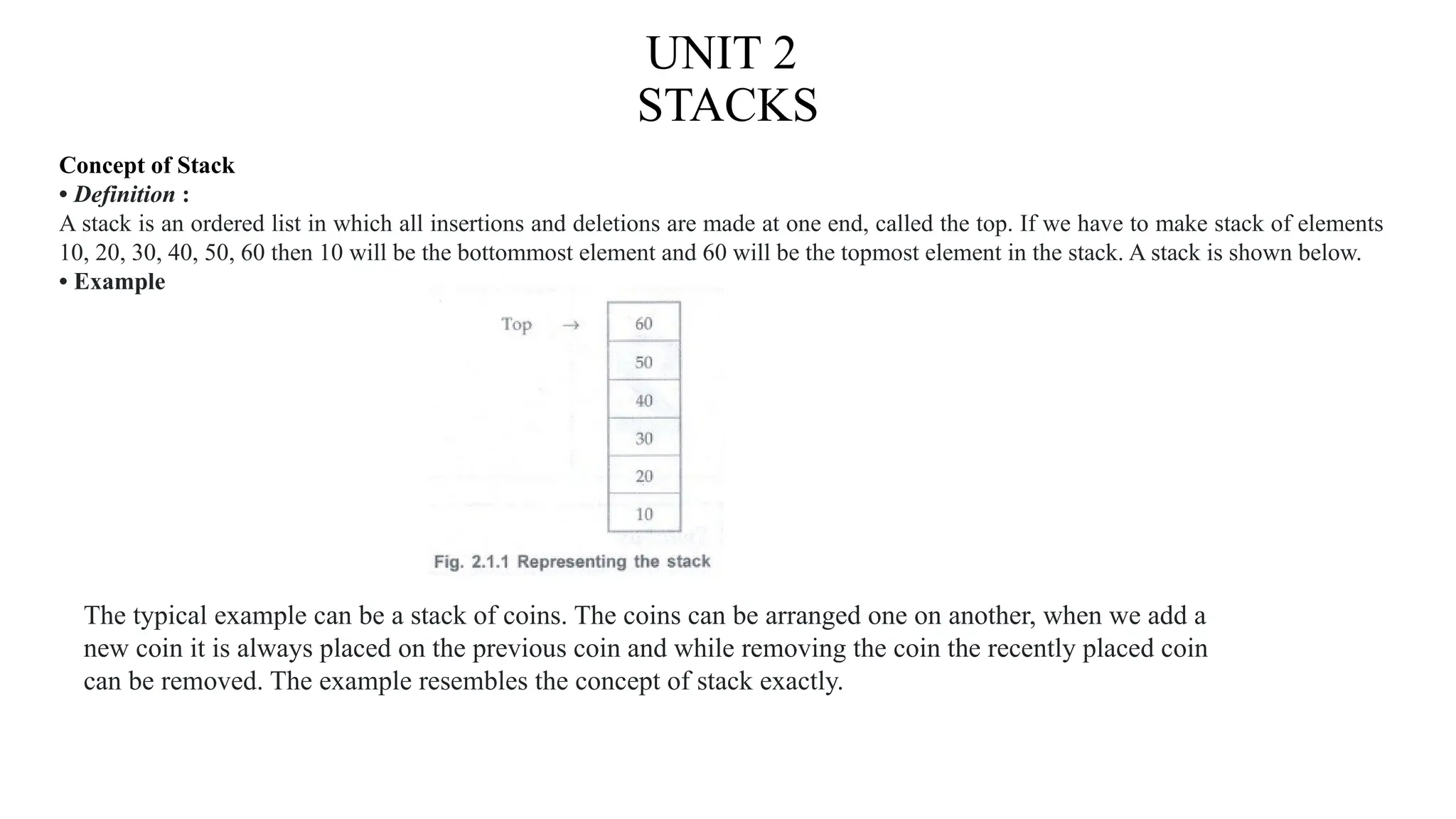
A stack is an ordered list in which all insertions and deletions are made at one end, called the top. If we have to make stack of elements
10, 20, 30, 40, 50, 60 then 10 will be the bottommost element and 60 will be the topmost element in the stack. A stack is shown below.
• Example
The typical example can be a stack of coins. The coins can be arranged one on another, when we add a
new coin it is always placed on the previous coin and while removing the coin the recently placed coin
can be removed. The example resembles the concept of stack exactly.
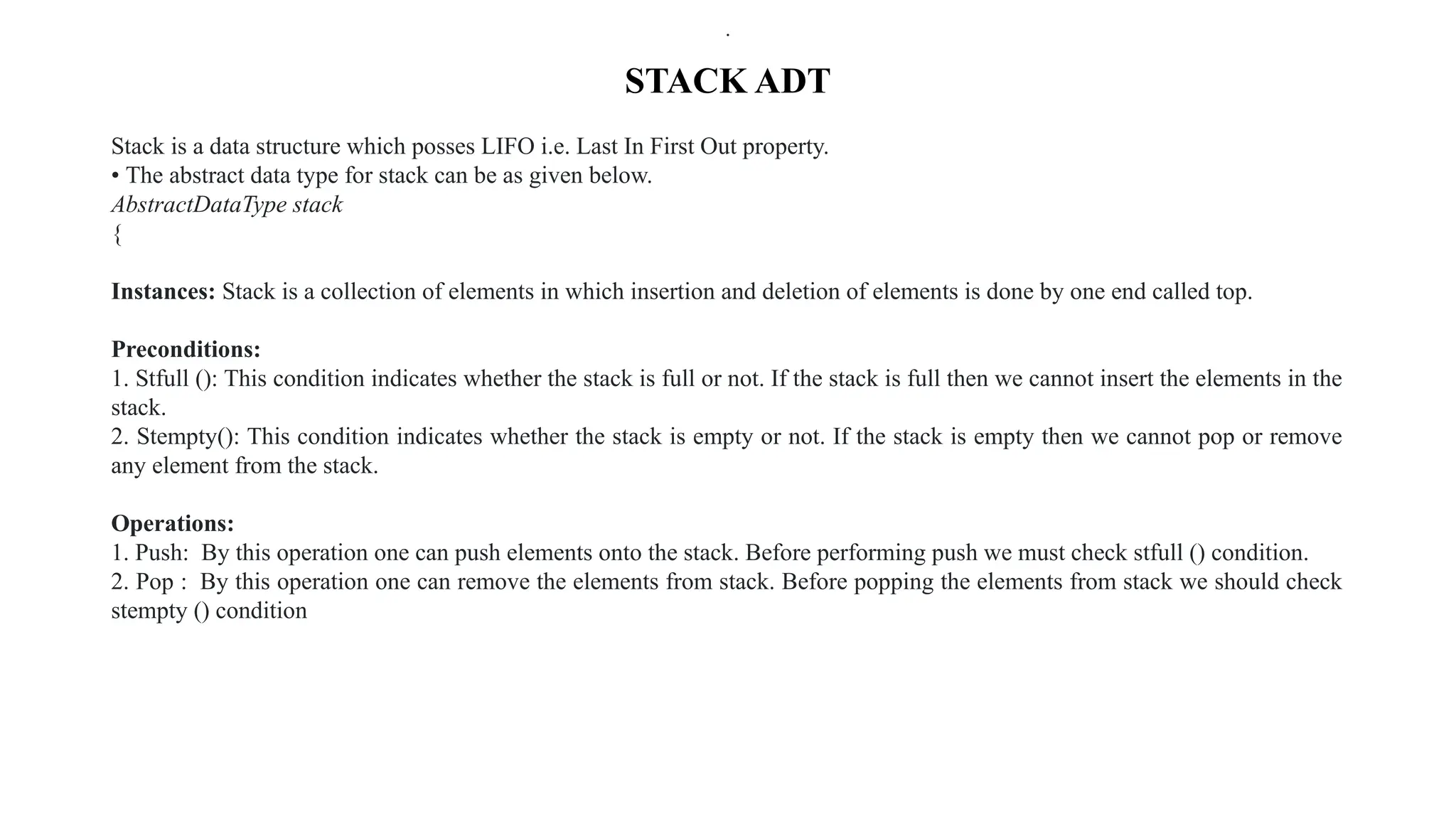
STACK ADT
Stack is a data structure which posses LIFO i.e. Last In First Out property.
• The abstract data type for stack can be as given below.
AbstractDataType stack
{
Instances: Stack is a collection of elements in which insertion and deletion of elements is done by one end called top.
Preconditions:
1. Stfull (): This condition indicates whether the stack is full or not. If the stack is full then we cannot insert the elements in the
stack.
2. Stempty(): This condition indicates whether the stack is empty or not. If the stack is empty then we cannot pop or remove
any element from the stack.
Operations:
1. Push: By this operation one can push elements onto the stack. Before performing push we must check stfull () condition.
2. Pop : By this operation one can remove the elements from stack. Before popping the elements from stack we should check
stempty () condition
.
.
.
Stack Operations
• A stack is a special case of an ordered list, i.e. it is a ordered list with some restrictions on the way in which we
perform various operations on a list.
• We need an integer variable top which will keep track of the top of the stack as more and more elements are
inserted into and deleted from the stack.
• The declarations in C are as follows.
Declaration 1: Using Arrays
#define size 100
int stack[size], top = -1;
The stack is of the size 100. As we insert the numbers, the top will get incremented. The elements will be placed
from oth position in the stack. At the most we can store 100 elements in the stack, so at the most last element can
be at (size - 1) position, i.e. at index 99.
Using Structure
#define size 10
struct stack {
int s[size];
int top;
}st;
We will make second use of the method of representing the stack in our program.
• The stack can also be used in the databases.
• For example if we want to of all the students of forth semester we can declare a structure of stack as follows
The above stack will look as
Thus we can store the data about whole class in our stack.
• The above declaration means creation of stack.
• Hence we will write only push and pop function to implement the stack.
• Before pushing or popping we should check whether stack is empty or full.
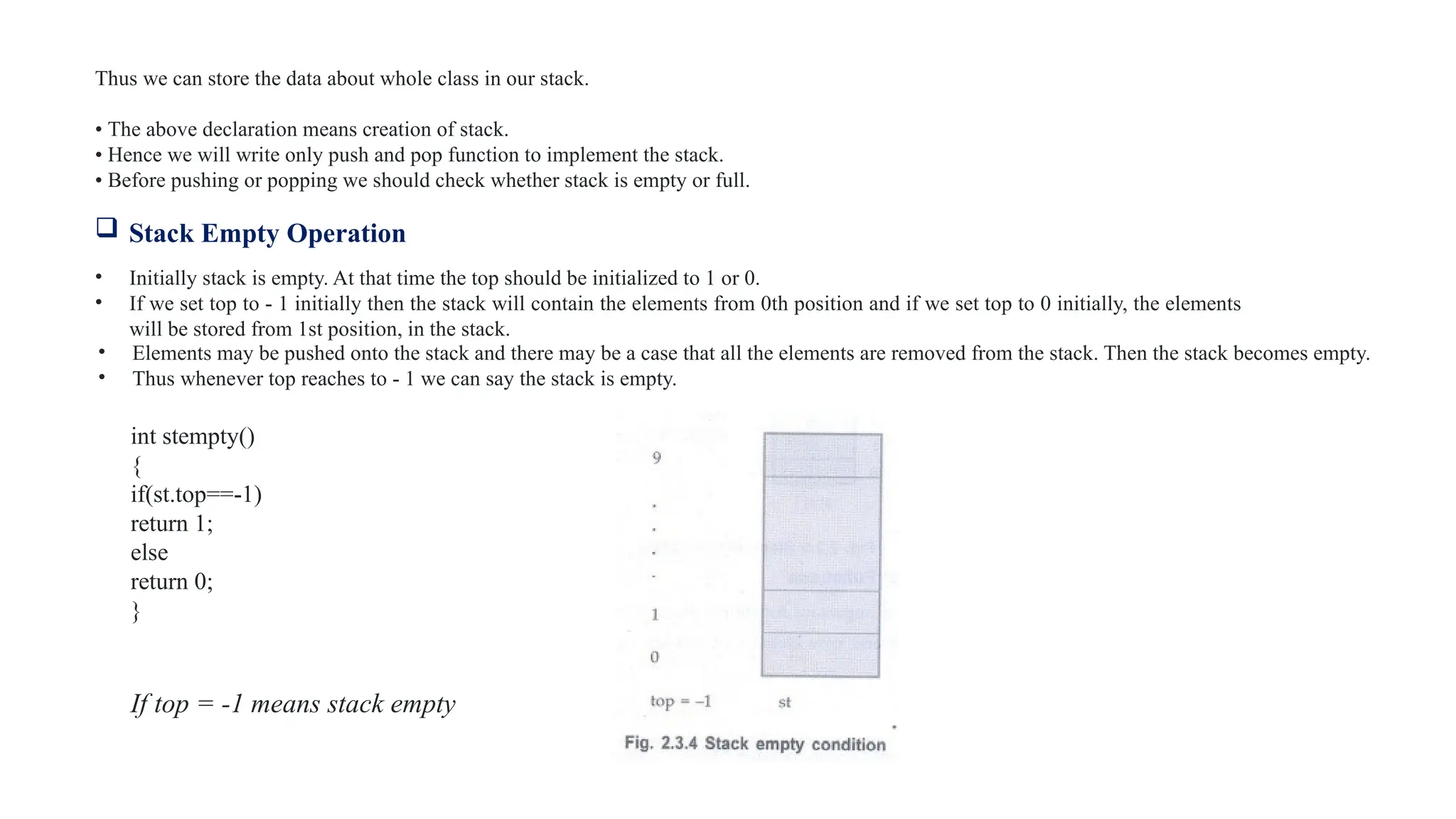
 Stack Empty Operation
• Initially stack is empty. At that time the top should be initialized to 1 or 0.
• If we set top to - 1 initially then the stack will contain the elements from 0th position and if we set top to 0 initially, the elements
will be stored from 1st position, in the stack.
• Elements may be pushed onto the stack and there may be a case that all the elements are removed from the stack. Then the stack becomes empty.
• Thus whenever top reaches to - 1 we can say the stack is empty.
int stempty()
{
if(st.top==-1)
return 1;
else
return 0;
}
If top = -1 means stack empty
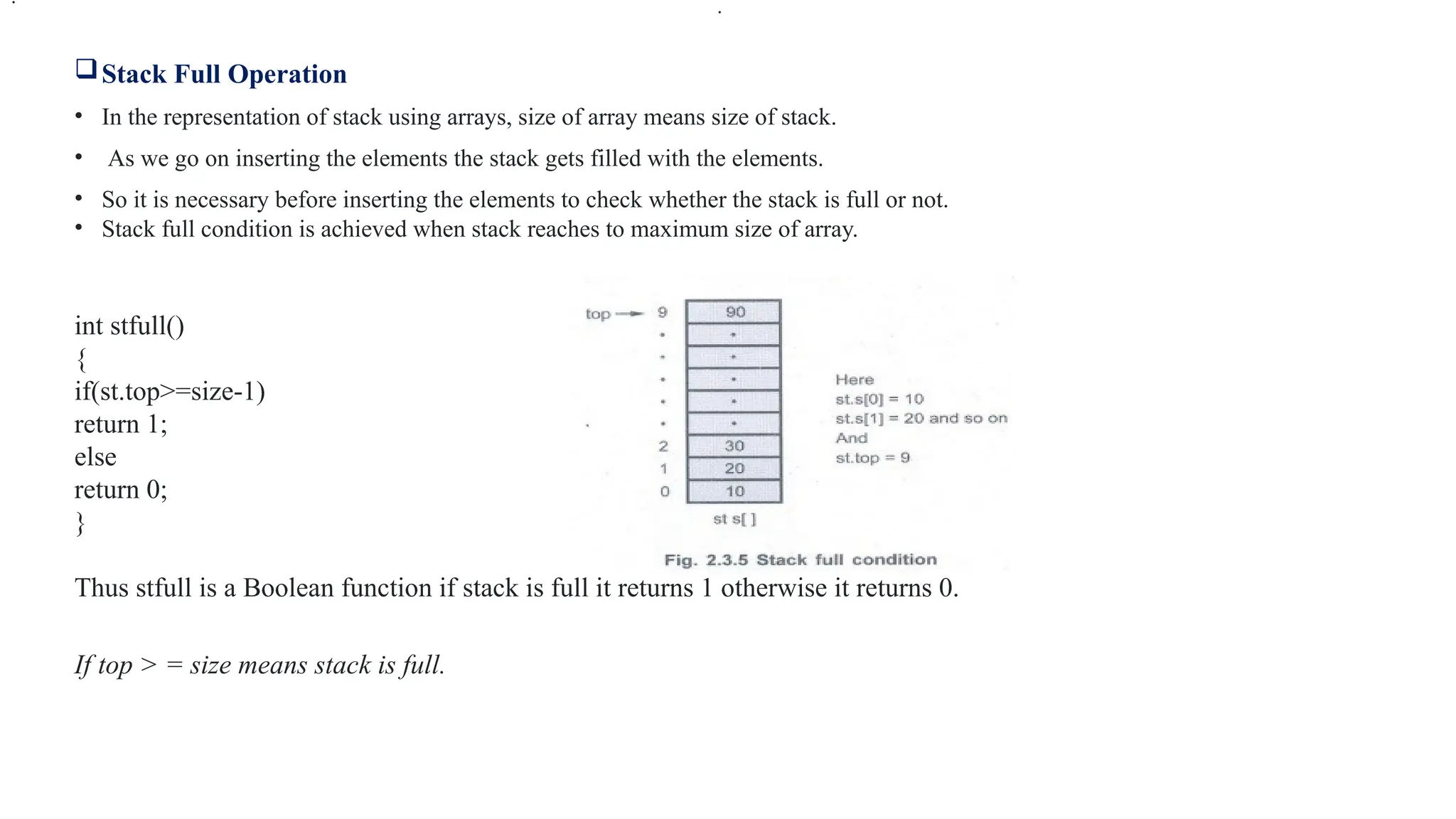
Stack Full Operation
• In the representation of stack using arrays, size of array means size of stack.
• As we go on inserting the elements the stack gets filled with the elements.
• So it is necessary before inserting the elements to check whether the stack is full or not.
• Stack full condition is achieved when stack reaches to maximum size of array.
int stfull()
{
if(st.top>=size-1)
return 1;
else
return 0;
}
Thus stfull is a Boolean function if stack is full it returns 1 otherwise it returns 0.
If top > = size means stack is full.
.
.
The 'Push' and 'Pop' Functions
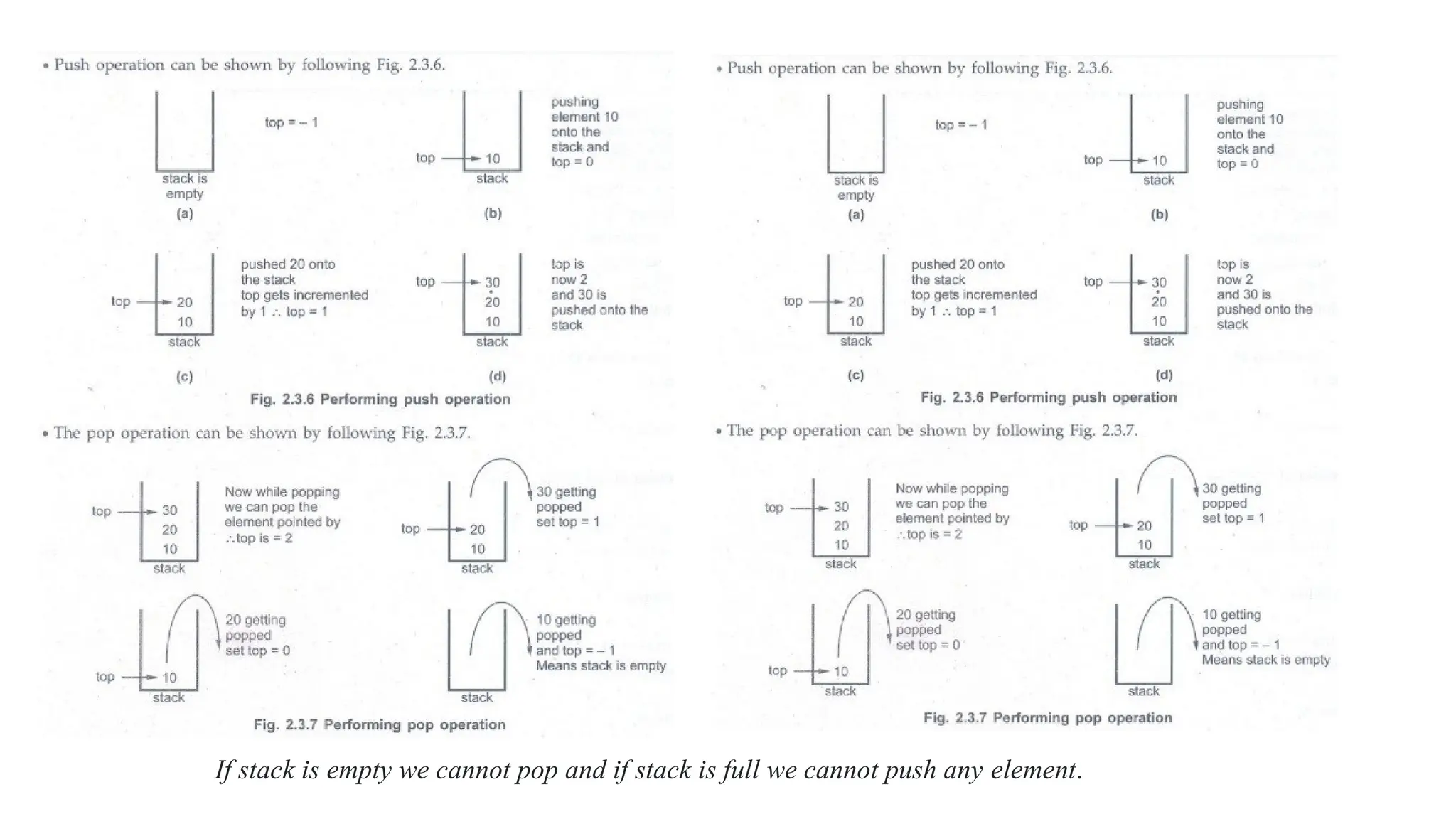
Push is a function which inserts new element at the top of the stack. The function is as follows.
void push(int item)
{
st.top++; /* top pointer is set to next location */
st.s[st.top] = item; /* placing the element at that location */
}
• The push function takes the parameter item which is actually the element which we
want to insert into the stack - means we are pushing the element stack.
In the function we have checked whether the stack is full or not, if the stack is not full then only the insertion
of the element can be achieved by means of push operation.
int pop()
{
int item;
item = st.s[st.top];
st.top--;
return(item);
}
If stack is empty we cannot pop and if stack is full we cannot push any element.
Implementation of Stack using Linked List
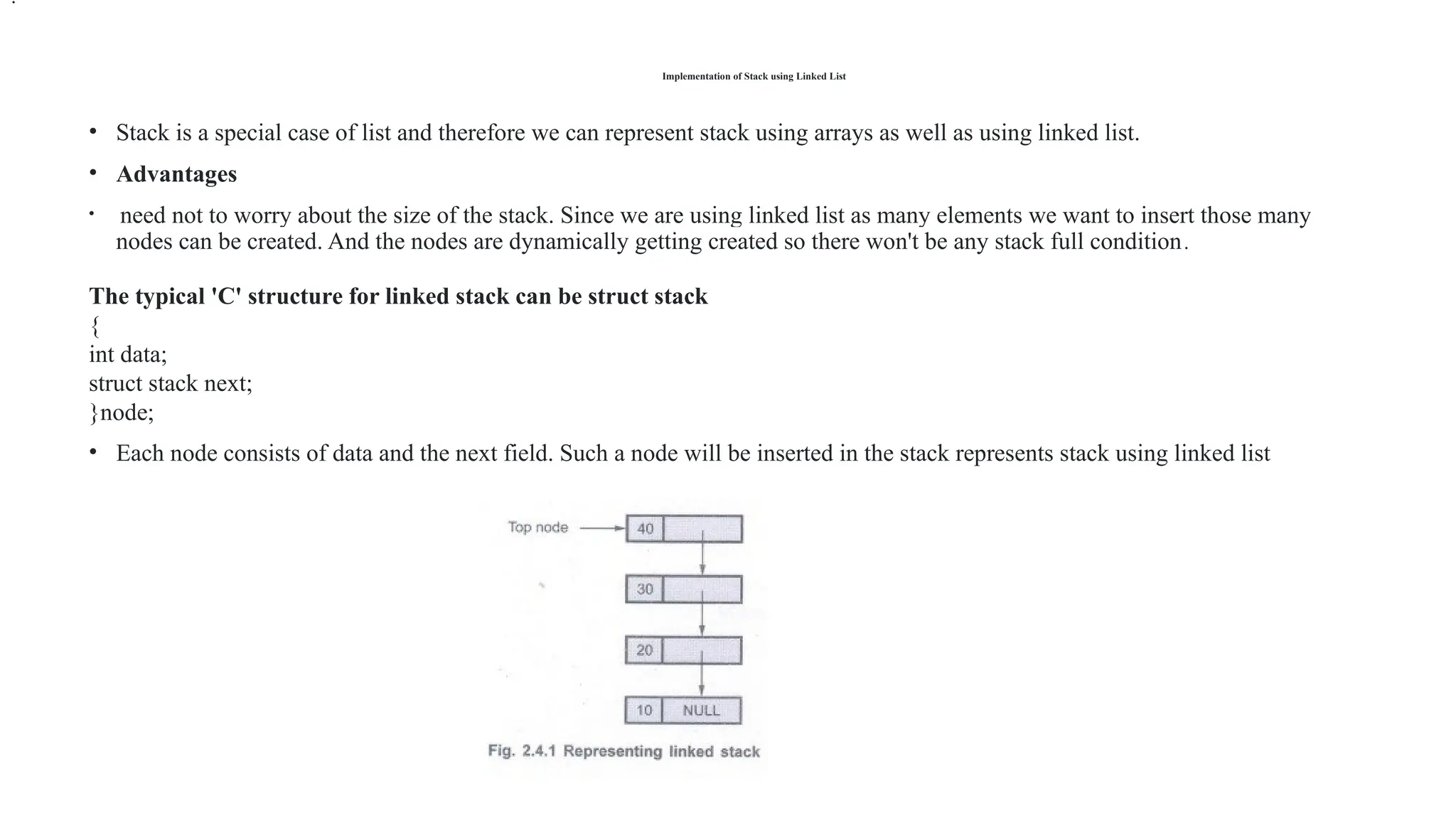
• Stack is a special case of list and therefore we can represent stack using arrays as well as using linked list.
• Advantages
• need not to worry about the size of the stack. Since we are using linked list as many elements we want to insert those many
nodes can be created. And the nodes are dynamically getting created so there won't be any stack full condition.
The typical 'C' structure for linked stack can be struct stack
{
int data;
struct stack next;
}node;
• Each node consists of data and the next field. Such a node will be inserted in the stack represents stack using linked list
.
There are various operations that can be performed on the linked stack. These operations are -
1. Push
2. Pop
3. Stack empty
4. Stack full
Push operation
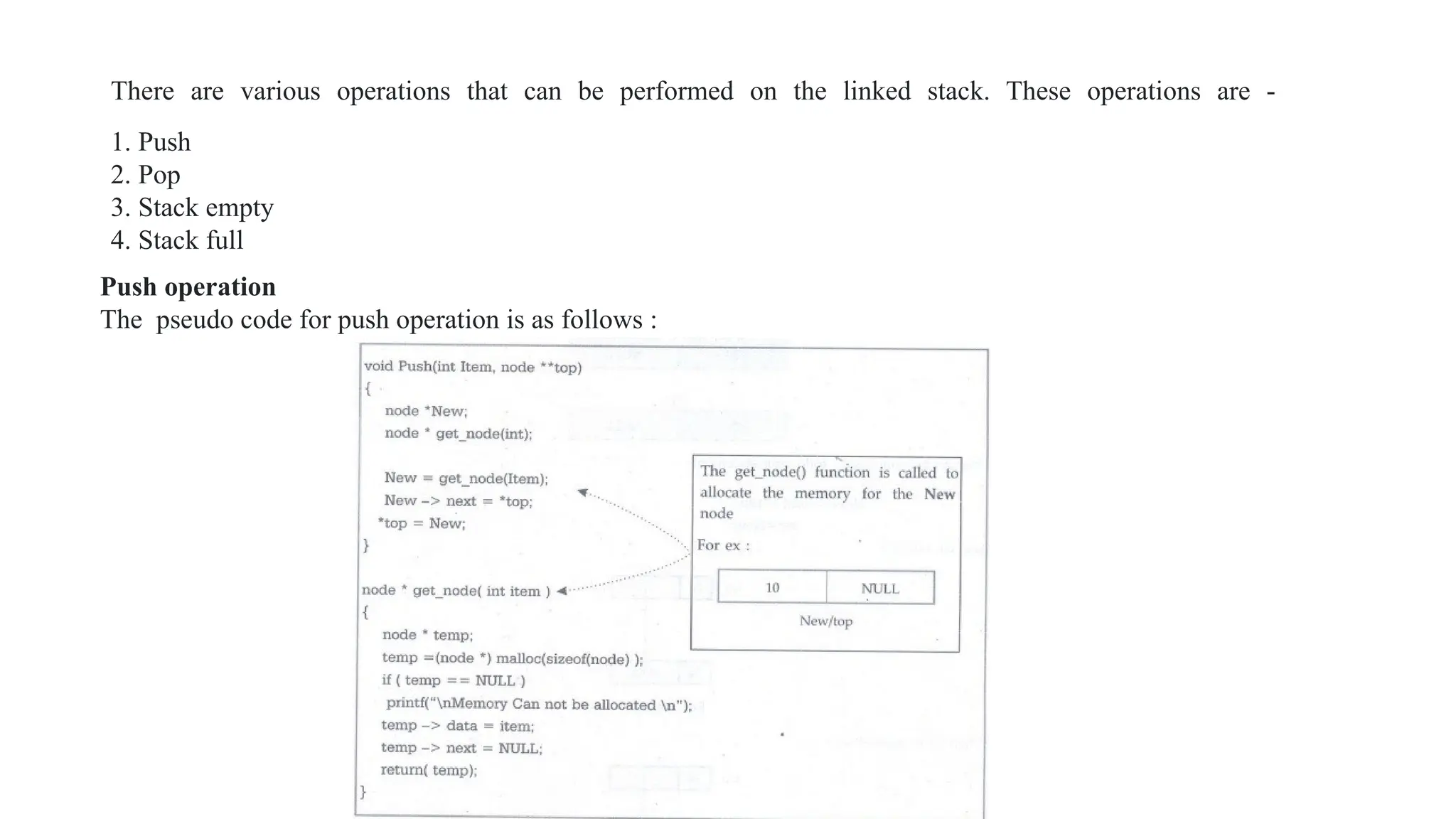
The pseudo code for push operation is as follows :
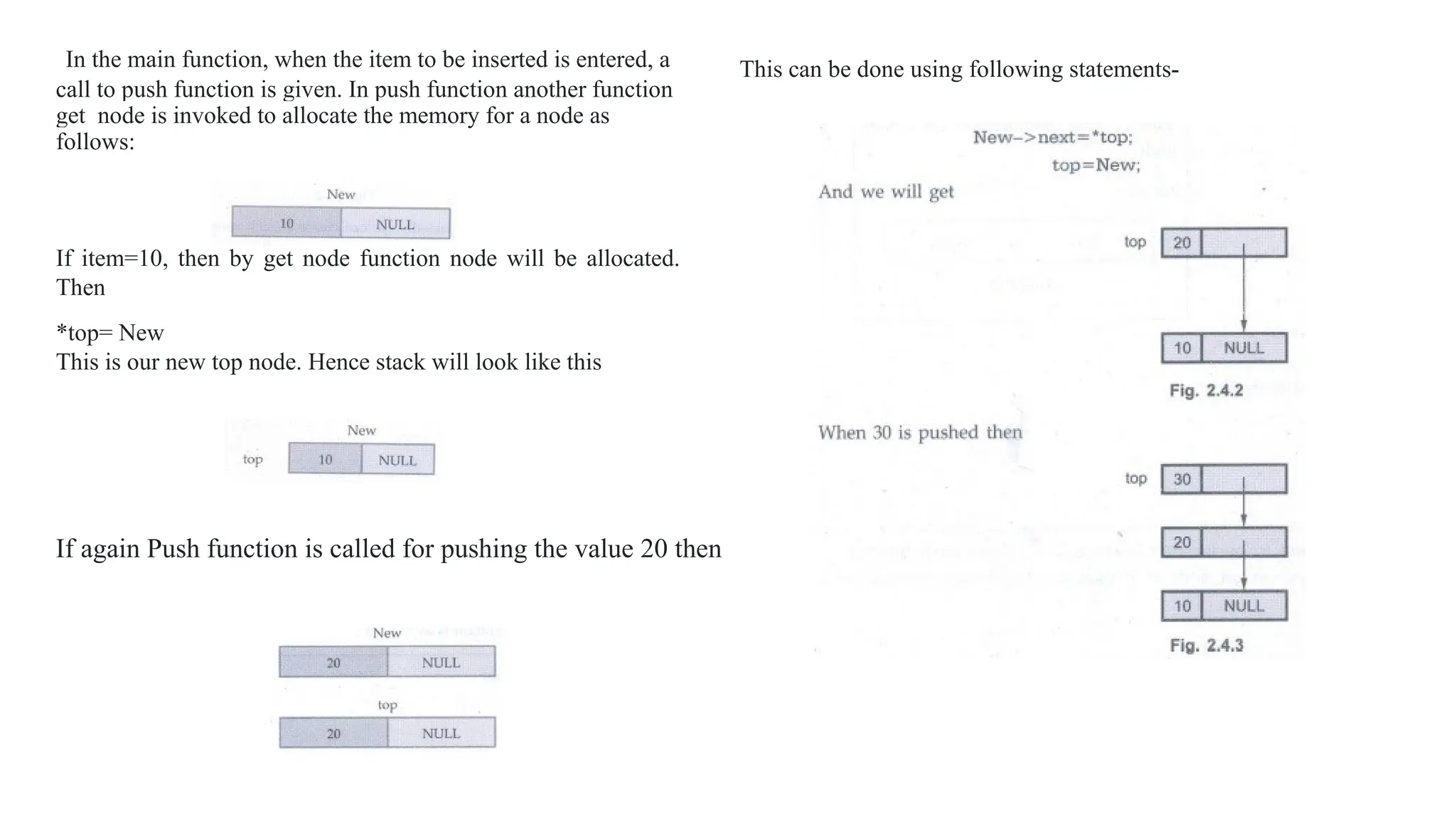
In the main function, when the item to be inserted is entered, a
call to push function is given. In push function another function
get_node is invoked to allocate the memory for a node as
follows:
If item=10, then by get node function node will be allocated.
Then
*top= New
This is our new top node. Hence stack will look like this
This can be done using following statements-
If again Push function is called for pushing the value 20 then
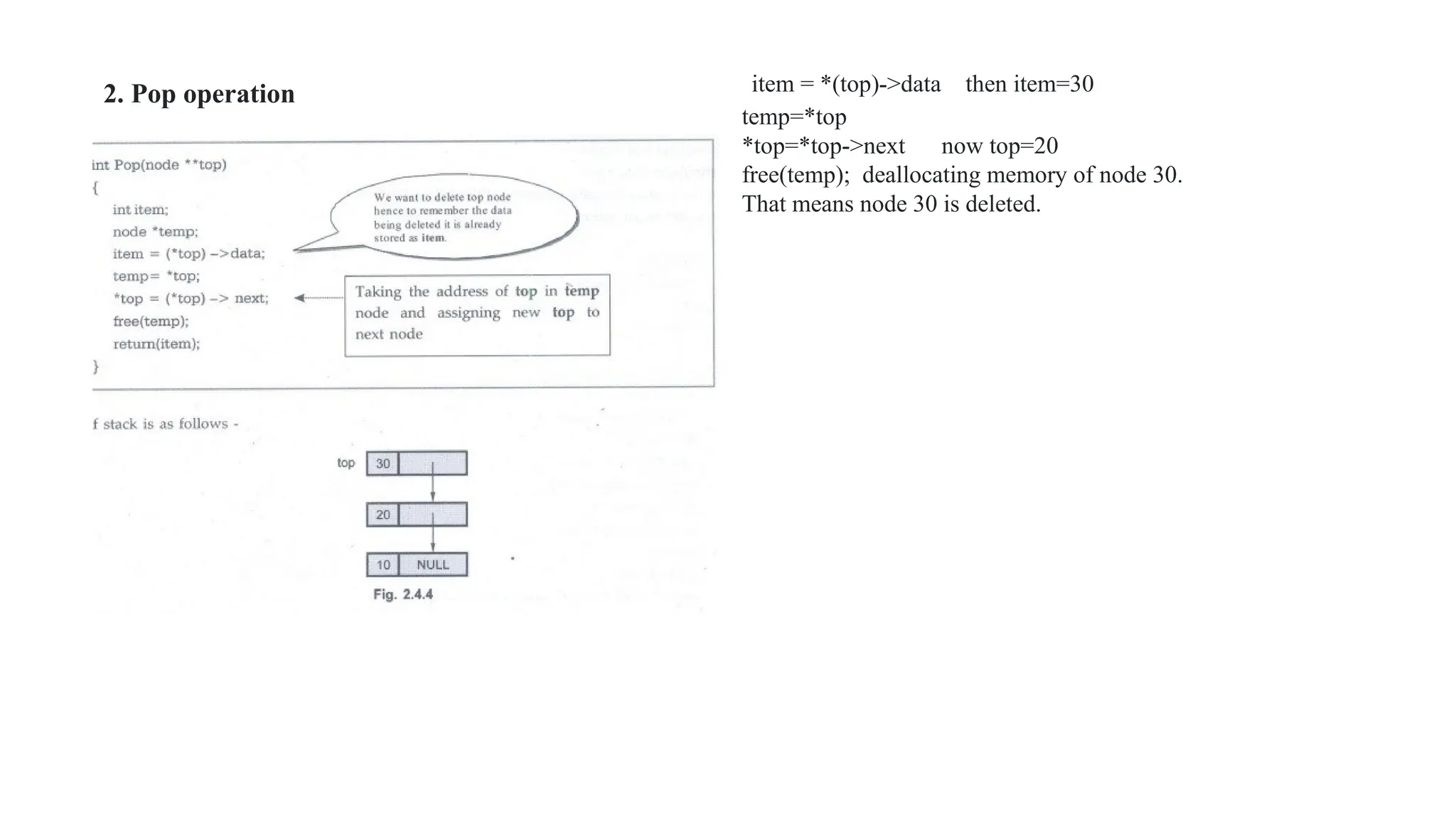
item = *(top)->data then item=30
temp=*top
*top=*top->next now top=20
free(temp); deallocating memory of node 30.
That means node 30 is deleted.
2. Pop operation
Applications of Stack
Various applications of stack are
1. Expression conversion
2. Expression evaluation
3. Parsing well formed parenthesis
4. Decimal to binary conversion
5. Reversing a string
6. Storing function calls
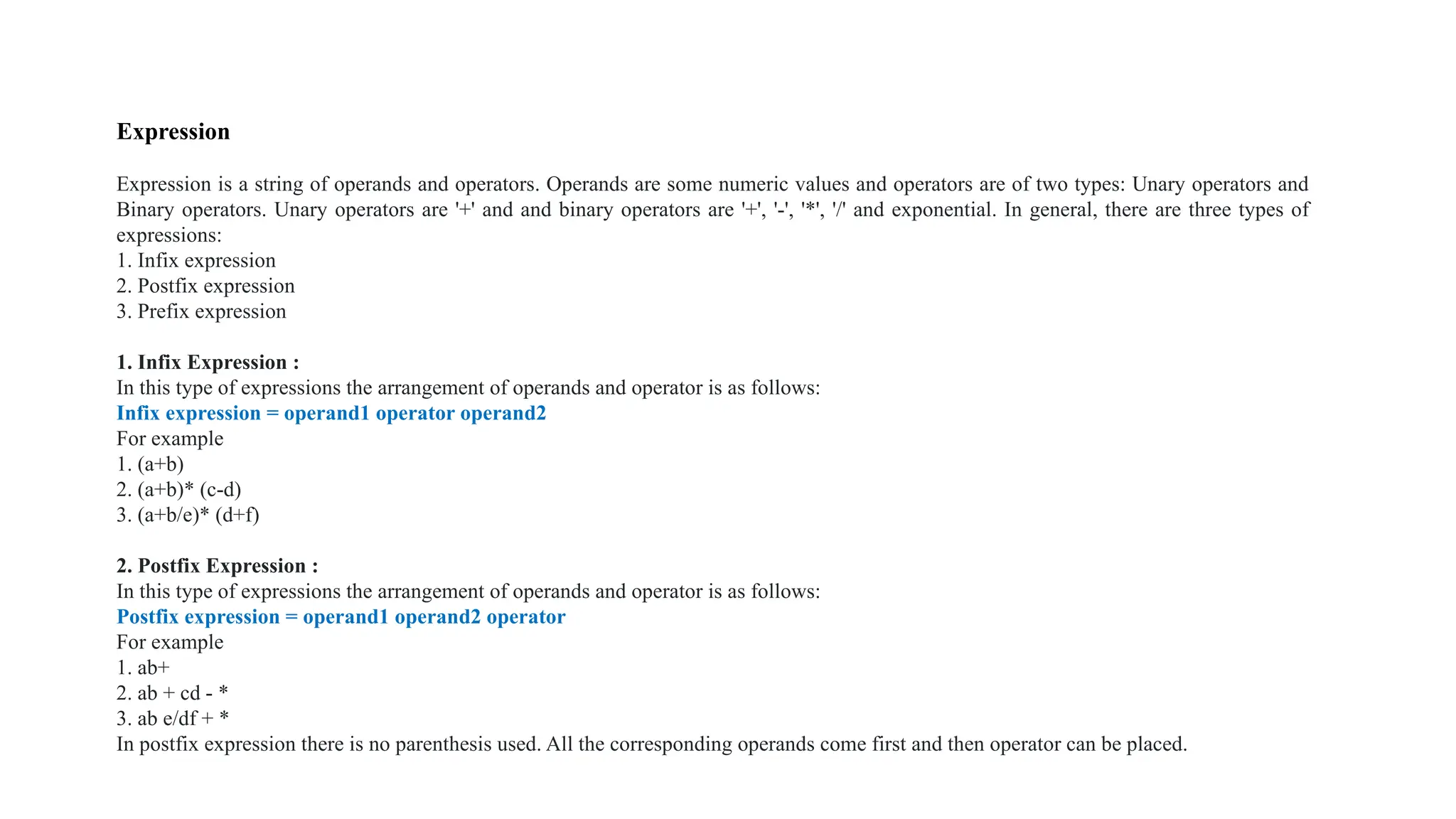
Expression
Expression is a string of operands and operators. Operands are some numeric values and operators are of two types: Unary operators and
Binary operators. Unary operators are '+' and and binary operators are '+', '-', '*', '/' and exponential. In general, there are three types of
expressions:
1. Infix expression
2. Postfix expression
3. Prefix expression
1. Infix Expression :
In this type of expressions the arrangement of operands and operator is as follows:
Infix expression = operand1 operator operand2
For example
1. (a+b)
2. (a+b)* (c-d)
3. (a+b/e)* (d+f)
2. Postfix Expression :
In this type of expressions the arrangement of operands and operator is as follows:
Postfix expression = operand1 operand2 operator
For example
1. ab+
2. ab + cd - *
3. ab e/df + *
In postfix expression there is no parenthesis used. All the corresponding operands come first and then operator can be placed.
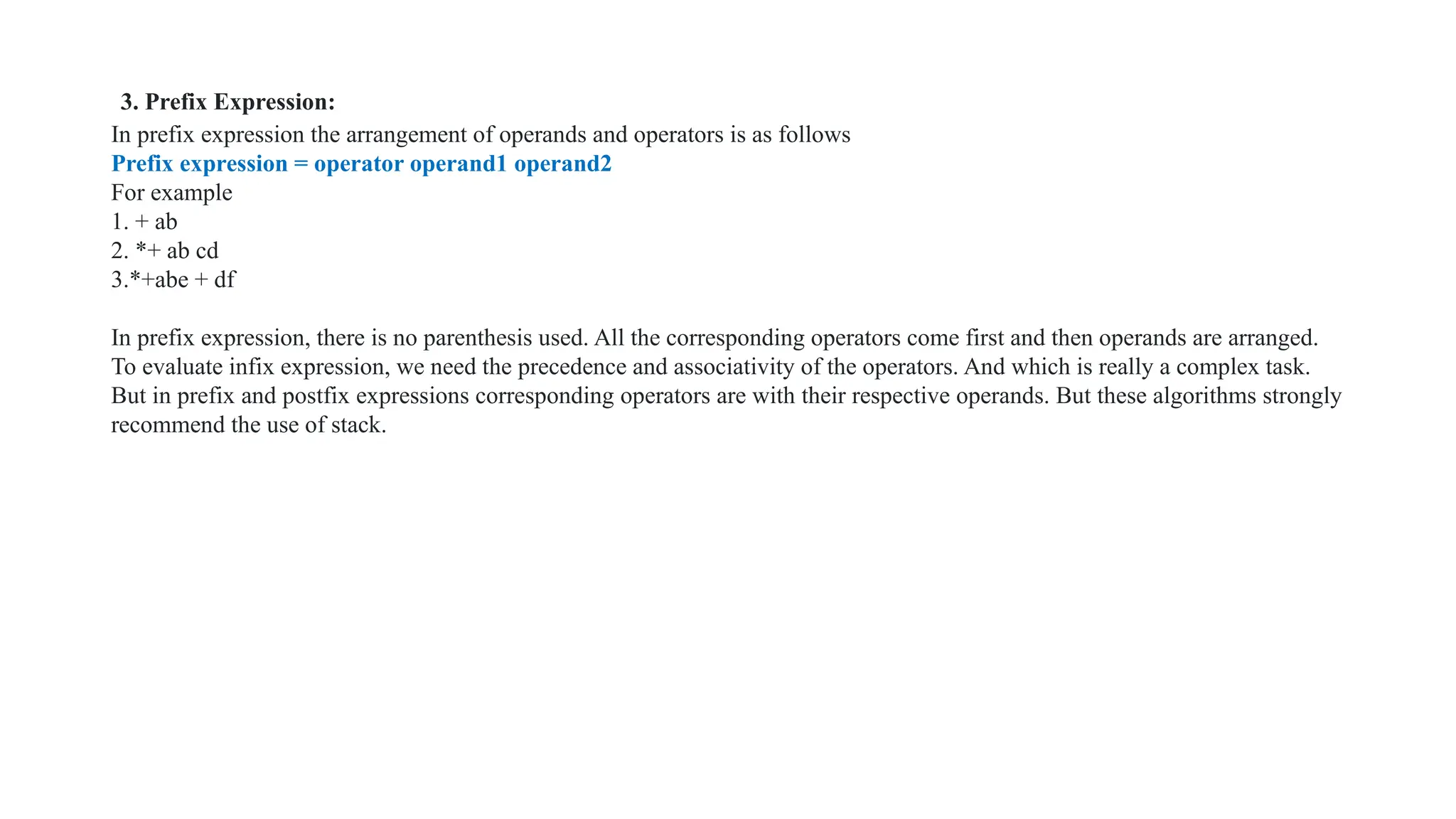
3. Prefix Expression:
In prefix expression the arrangement of operands and operators is as follows
Prefix expression = operator operand1 operand2
For example
1. + ab
2. *+ ab cd
3.*+abe + df
In prefix expression, there is no parenthesis used. All the corresponding operators come first and then operands are arranged.
To evaluate infix expression, we need the precedence and associativity of the operators. And which is really a complex task.
But in prefix and postfix expressions corresponding operators are with their respective operands. But these algorithms strongly
recommend the use of stack.
BALANCING SYMBOLS
Given an expression string exp, write a program to examine whether the pairs and the orders of “{“, “}”, “(“,
“)”, “[“, “]” are correct in the given expression.
Input: exp = “[()]{}{[()()]()}”
Output: Balanced
Explanation: all the brackets are well-formed
Input: exp = “[(])”
Output: Not Balanced
Explanation: 1 and 4 brackets are not balanced because
there is a closing ‘]’ before the closing ‘(‘
• Follow the steps mentioned below to implement the idea:
• Declare a character stack (say temp).
• Now traverse the string exp.
• If the current character is a starting bracket ( ‘(‘ or ‘{‘ or ‘[‘ ) then push it to stack.
• If the current character is a closing bracket ( ‘)’ or ‘}’ or ‘]’ ) then pop from the stack and if the popped character is the matching
starting bracket then fine.
• Else brackets are Not Balanced.
• After complete traversal, if some starting brackets are left in the stack then the expression is Not balanced, else Balanced.
• Time Complexity: O(N), Iteration over the string of size N one time.
Auxiliary Space: O(N) for the stack.
• Check for Balanced Bracket expression without using stack :
• Following are the steps to be followed:
• Initialize a variable i with -1.
• Iterate through the string and
• If it is an open bracket then increment the counter by 1 and replace ith
character of the string with the opening
bracket.
• Else if it is a closing bracket of the same corresponding opening bracket (opening bracket stored in exp[i])
then decrement i by 1.
• At last, if we get i = -1, then the string is balanced and we will return true. Otherwise, the function will return false.
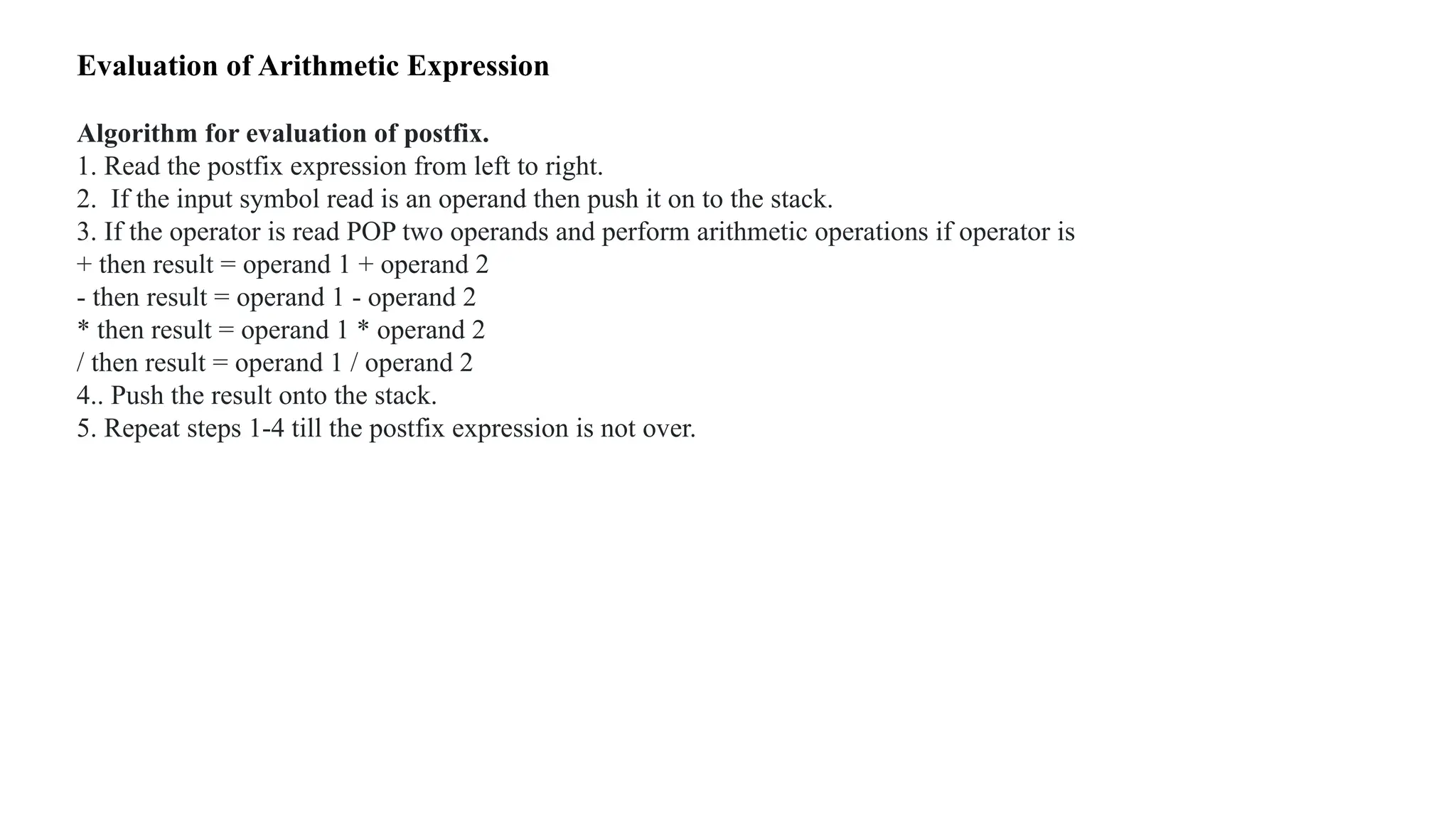
Evaluation of Arithmetic Expression
Algorithm for evaluation of postfix.
1. Read the postfix expression from left to right.
2. If the input symbol read is an operand then push it on to the stack.
3. If the operator is read POP two operands and perform arithmetic operations if operator is
+ then result = operand 1 + operand 2
- then result = operand 1 - operand 2
* then result = operand 1 * operand 2
/ then result = operand 1 / operand 2
4.. Push the result onto the stack.
5. Repeat steps 1-4 till the postfix expression is not over.
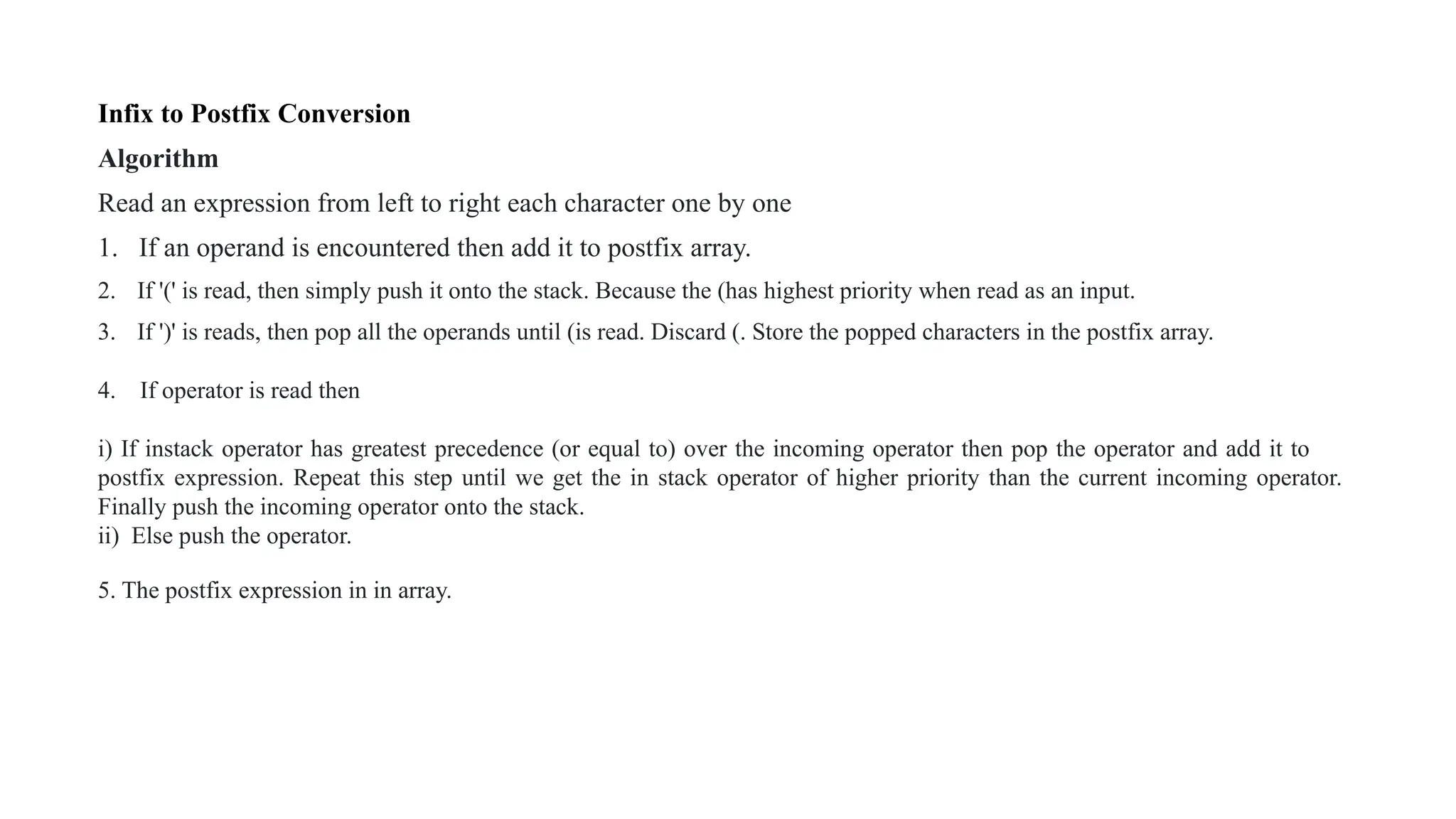
Infix to Postfix Conversion
Algorithm
Read an expression from left to right each character one by one
1. If an operand is encountered then add it to postfix array.
2. If '(' is read, then simply push it onto the stack. Because the (has highest priority when read as an input.
3. If ')' is reads, then pop all the operands until (is read. Discard (. Store the popped characters in the postfix array.
4. If operator is read then
i) If instack operator has greatest precedence (or equal to) over the incoming operator then pop the operator and add it to
postfix expression. Repeat this step until we get the in stack operator of higher priority than the current incoming operator.
Finally push the incoming operator onto the stack.
ii) Else push the operator.
5. The postfix expression in in array.
QUEUE
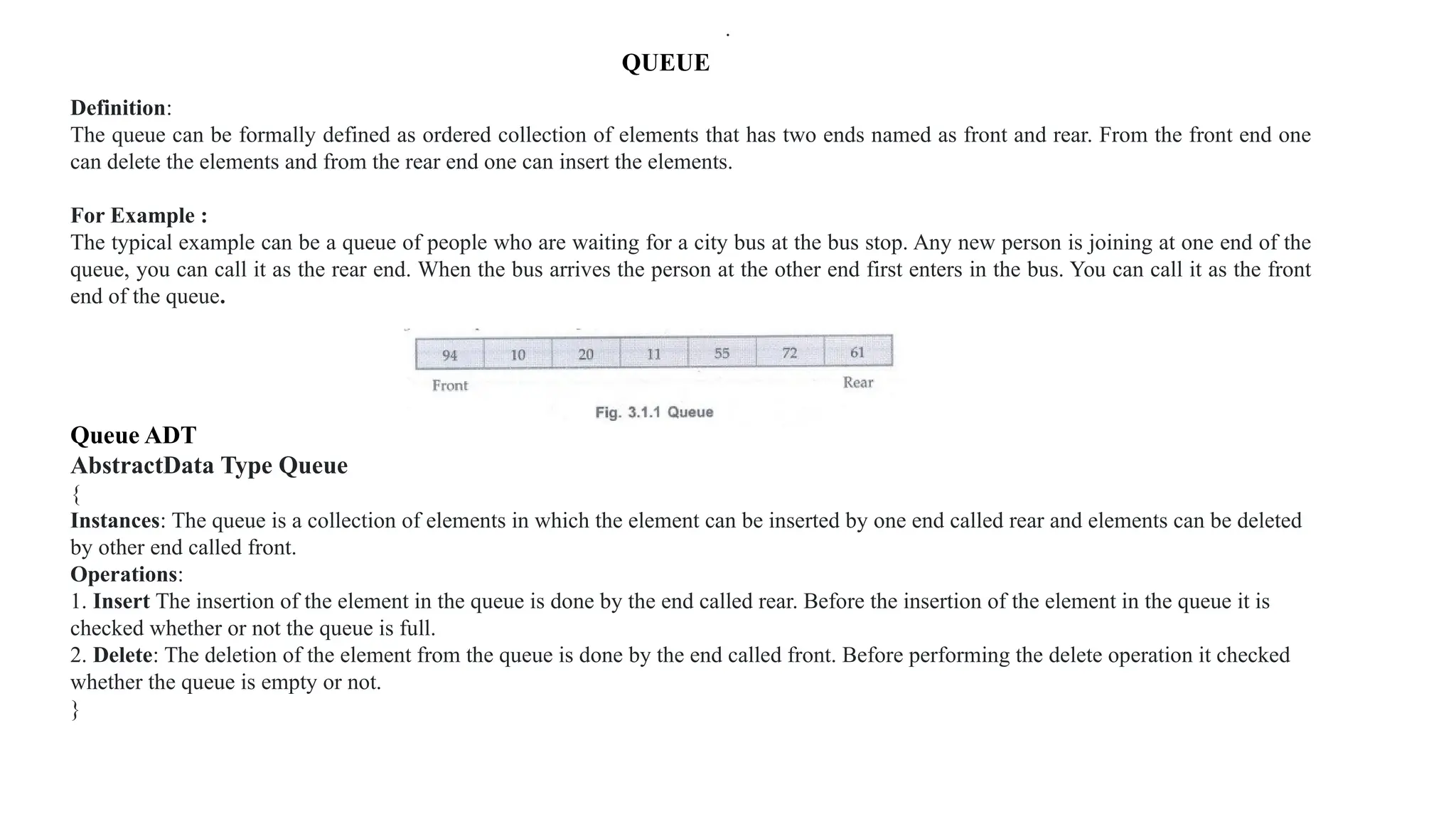
Definition:
The queue can be formally defined as ordered collection of elements that has two ends named as front and rear. From the front end one
can delete the elements and from the rear end one can insert the elements.
For Example :
The typical example can be a queue of people who are waiting for a city bus at the bus stop. Any new person is joining at one end of the
queue, you can call it as the rear end. When the bus arrives the person at the other end first enters in the bus. You can call it as the front
end of the queue.
Queue ADT
AbstractData Type Queue
{
Instances: The queue is a collection of elements in which the element can be inserted by one end called rear and elements can be deleted
by other end called front.
Operations:
1. Insert The insertion of the element in the queue is done by the end called rear. Before the insertion of the element in the queue it is
checked whether or not the queue is full.
2. Delete: The deletion of the element from the queue is done by the end called front. Before performing the delete operation it checked
whether the queue is empty or not.
}
.
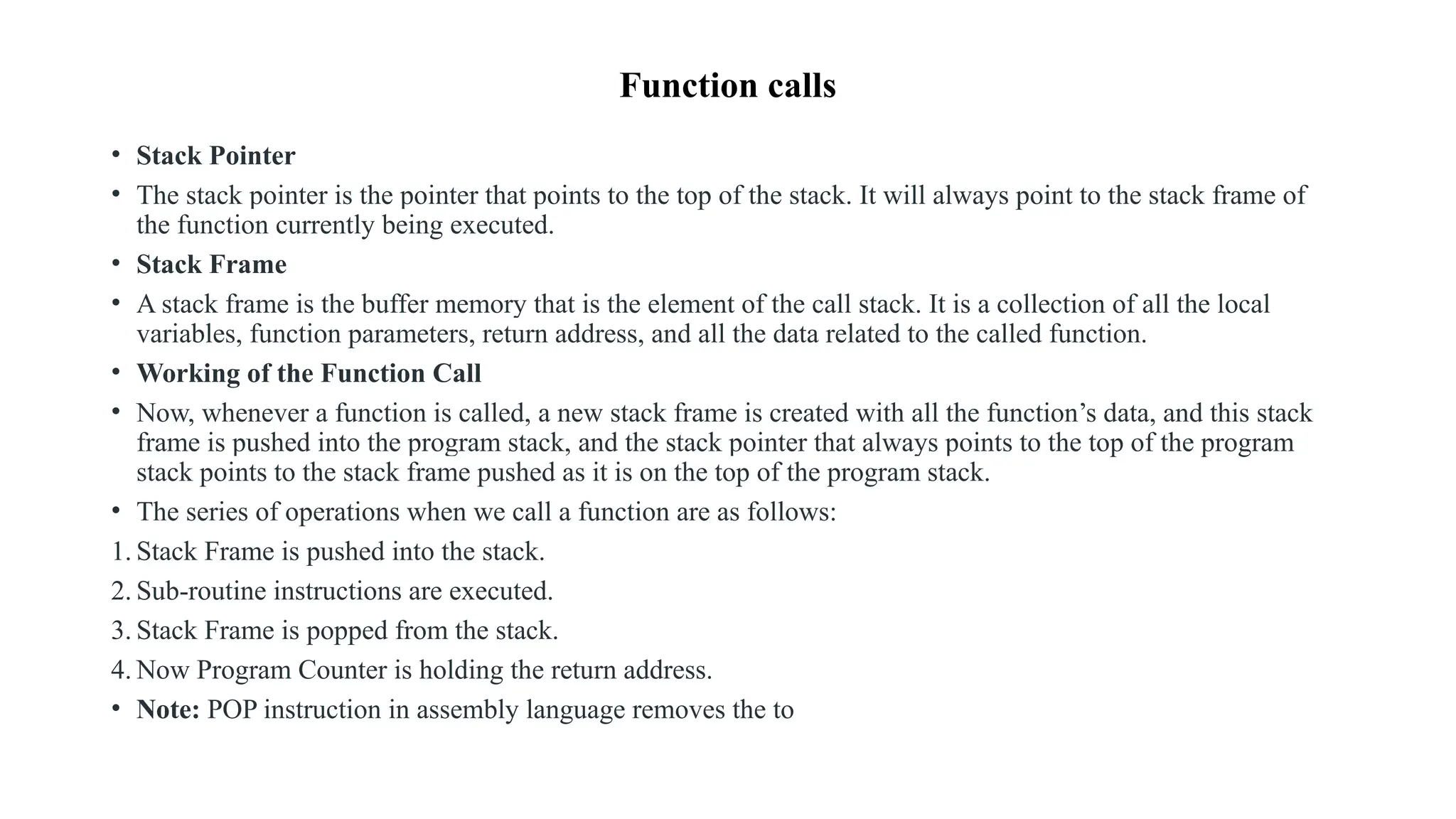
Function calls
• Stack Pointer
• The stack pointer is the pointer that points to the top of the stack. It will always point to the stack frame of
the function currently being executed.
• Stack Frame
• A stack frame is the buffer memory that is the element of the call stack. It is a collection of all the local
variables, function parameters, return address, and all the data related to the called function.
• Working of the Function Call
• Now, whenever a function is called, a new stack frame is created with all the function’s data, and this stack
frame is pushed into the program stack, and the stack pointer that always points to the top of the program
stack points to the stack frame pushed as it is on the top of the program stack.
• The series of operations when we call a function are as follows:
1. Stack Frame is pushed into the stack.
2. Sub-routine instructions are executed.
3. Stack Frame is popped from the stack.
4. Now Program Counter is holding the return address.
• Note: POP instruction in assembly language removes the to
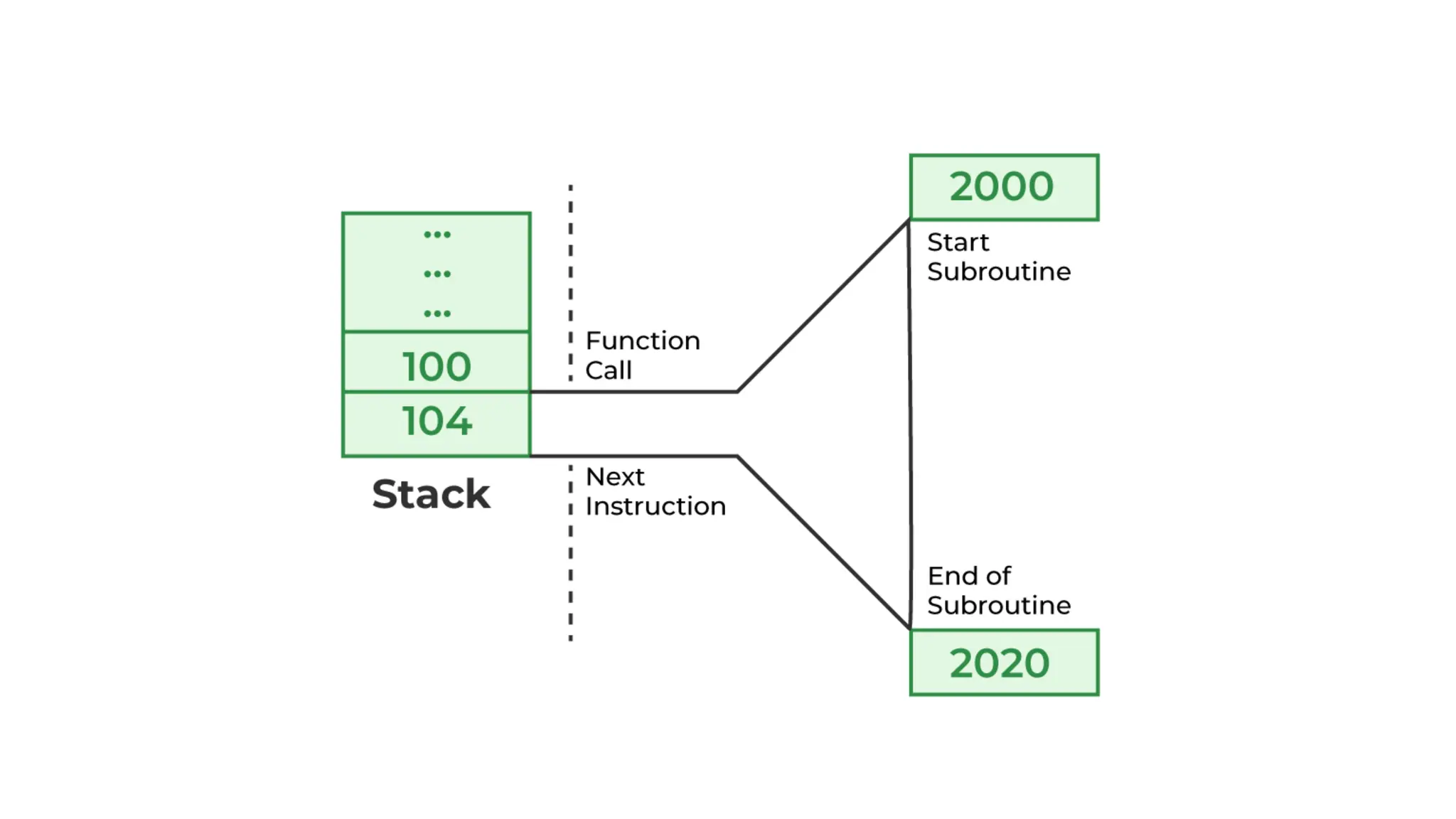
1.Program counterpoints to the next instruction memory location i.e., 104 before executing a
function whereas 100 is the memory location of the calling function.
2.To restore the return address, the contents of the Program Counter are pushed into the stack.
Now address stored at the top of the stack is 104.
3.Calling function Execution: Now Program Counterpoints to 2000 which is the starting
address of the subroutine. After execution of all successive instructions in the subroutine,
the address is popped from the stack.
4.Popping off the stack refers to removing the top of the stack and assigning it to the Program
Counter. Now Program Counter is holding the return address i.e., 104.
• Conclusion
• The main motive behind this article is to understand the reason behind pushing the return
address in the stack. However only pushing of return address into the stack is not sufficient
in the modern implementation of a function. We need to push the actual and formal
parameters before pushing the return address.
Queue Operations
• Queue is nothing but the collection of items. Both the ends of the queue are having their own functionality.
• The Queue is also called as FIFO i.e. a First In First Out data structure.
All the elements in the queue are stored sequentially.
• Various operations on the queue are
1. Queue overflow.
2. Insertion of the element into the queue.
3. Queue underflow.
4.Deletion of the element from the queue.
5. Display of the queue.
'C' representation of queue.
struct queue
{
int que [size];
int front;
int rear;
} Q;
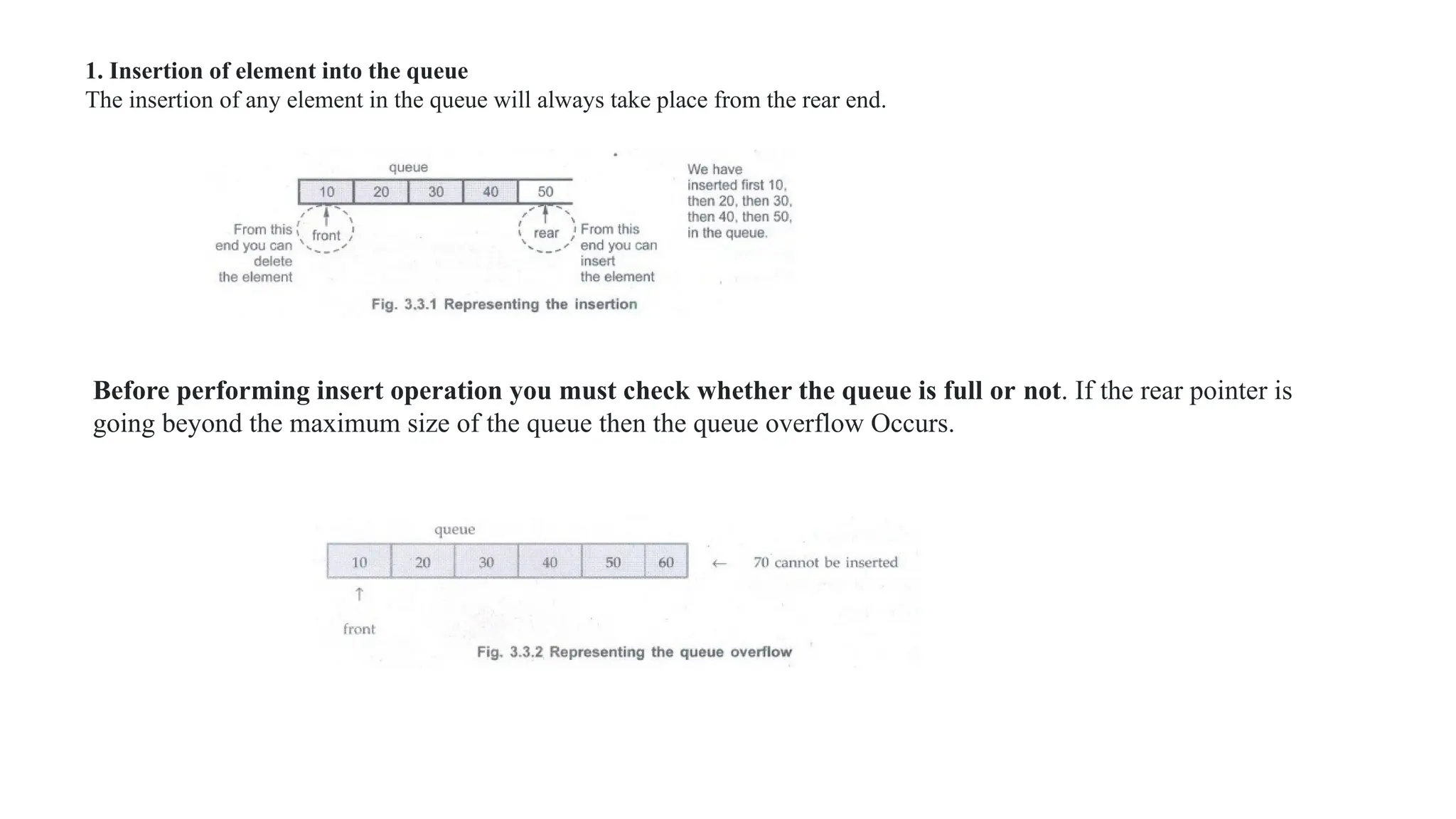
1. Insertion of element into the queue
The insertion of any element in the queue will always take place from the rear end.
Before performing insert operation you must check whether the queue is full or not. If the rear pointer is
going beyond the maximum size of the queue then the queue overflow Occurs.
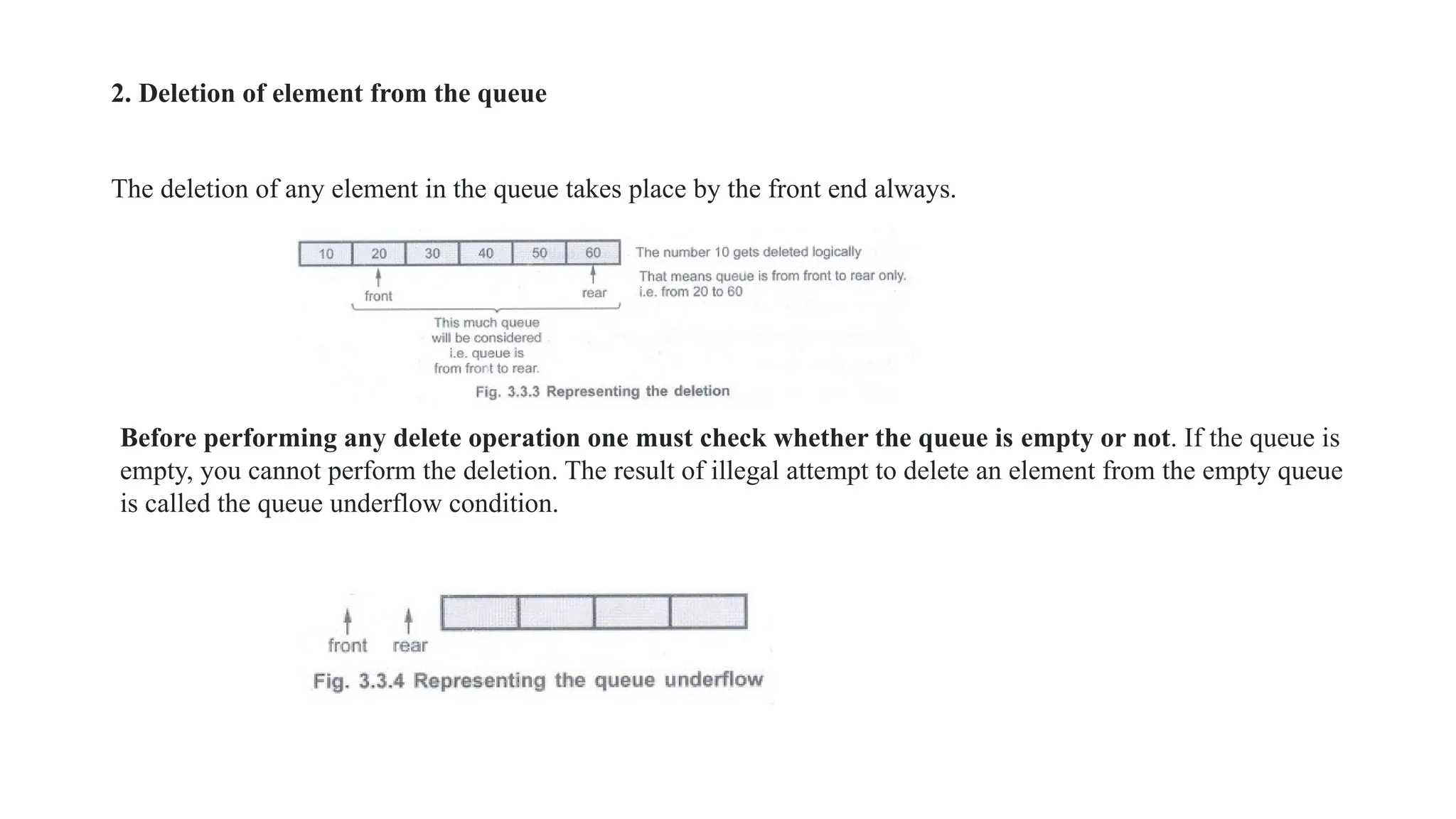
2. Deletion of element from the queue
The deletion of any element in the queue takes place by the front end always.
Before performing any delete operation one must check whether the queue is empty or not. If the queue is
empty, you cannot perform the deletion. The result of illegal attempt to delete an element from the empty queue
is called the queue underflow condition.
Program
#include<stdio.h>
#include<stdlib.h>
#include<conio.h>
#define size 5
struct queue
{
int que[size];
int front,rear;
}Q;
Qfull()
{
if(Q.rear >=size-1)
return 1;
else
return 0;
}
int insert(int item)
{
if(Q.front == -1)
Q.front++;
Q.que[++Q.rear] = item;
return Q.rear;
}
int Qempty()
{
if((Q.front == -1) || (Q.front > Q.rear))
return 1;
else
return 0;
}
int delet()
{
int item;
item = Q.que[Q.front];
Q.front++;
printf("n The deleted item is %d",item);
return Q.front;
}
void display()
{
int i;
for(i=Q.front;i<=Q.rear;i++)
printf("%d",Q.que[i]);
}
void main(void)
.{
int choice,item;
char ans;
clrscr();
Q.front = -1;
Q.rear = -1;
do
{
printf("n Main Menu");
printf("n1.Insertn2.Deleten3.Display");
printf("n Enter Your Choice");
scanf("%d", &choice);
switch(choice)
{
case 1:if(Qfull()) //checking for Queue overflow
printf("n Can not insert the element");
else
{
printf("n Enter The number to be inserted");
scanf("%d",&item);
insert(item);
}
break;
case 2:if(Qempty())
printf("n Queue Underflow!!");
else
delet();
break;
case 3:if(Qempty())
printf("nQueue Is Empty!");
else
display();
break;
default:printf("n Wrong choice!");
break;
}
printf("n Do You Want to continue?");
ans = getche();
} while(ans == 'Y' || ans =='y');
}
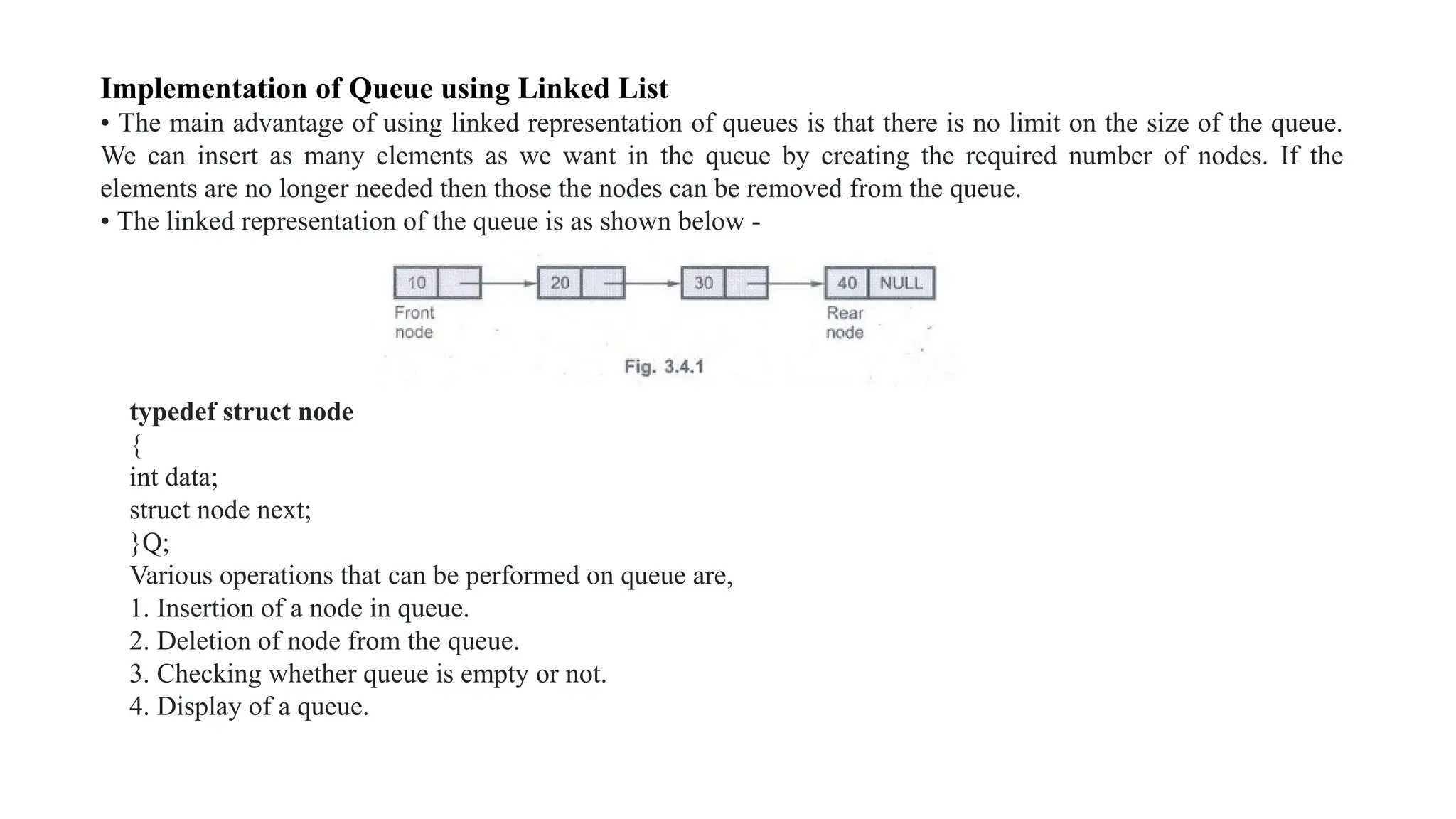
Implementation of Queue using Linked List
• The main advantage of using linked representation of queues is that there is no limit on the size of the queue.
We can insert as many elements as we want in the queue by creating the required number of nodes. If the
elements are no longer needed then those the nodes can be removed from the queue.
• The linked representation of the queue is as shown below -
typedef struct node
{
int data;
struct node next;
}Q;
Various operations that can be performed on queue are,
1. Insertion of a node in queue.
2. Deletion of node from the queue.
3. Checking whether queue is empty or not.
4. Display of a queue.
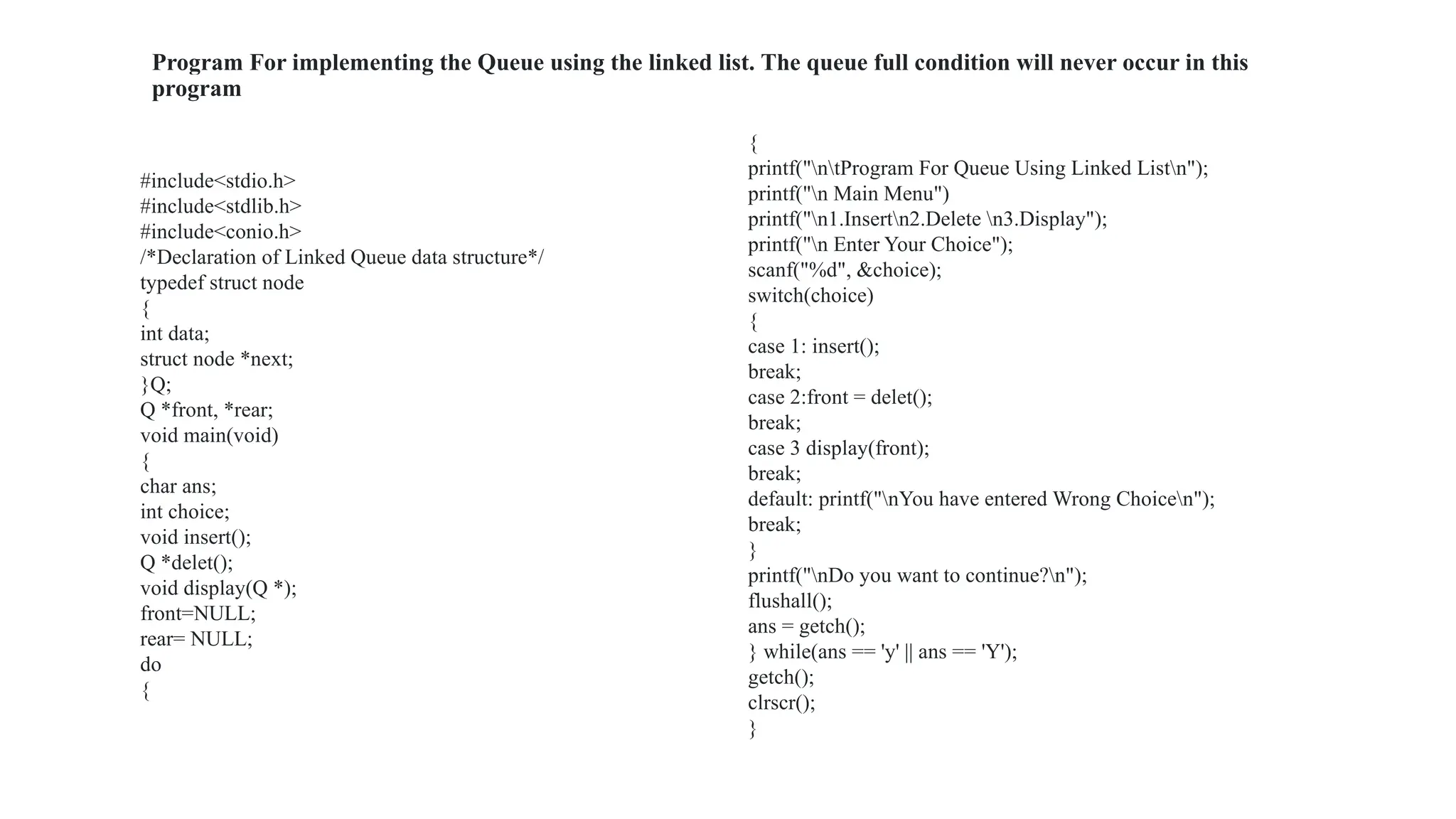
Program For implementing the Queue using the linked list. The queue full condition will never occur in this
program
#include<stdio.h>
#include<stdlib.h>
#include<conio.h>
/*Declaration of Linked Queue data structure*/
typedef struct node
{
int data;
struct node *next;
}Q;
Q *front, *rear;
void main(void)
{
char ans;
int choice;
void insert();
Q *delet();
void display(Q *);
front=NULL;
rear= NULL;
do
{
{
printf("ntProgram For Queue Using Linked Listn");
printf("n Main Menu")
printf("n1.Insertn2.Delete n3.Display");
printf("n Enter Your Choice");
scanf("%d", &choice);
switch(choice)
{
case 1: insert();
break;
case 2:front = delet();
break;
case 3 display(front);
break;
default: printf("nYou have entered Wrong Choicen");
break;
}
printf("nDo you want to continue?n");
flushall();
ans = getch();
} while(ans == 'y' || ans == 'Y');
getch();
clrscr();
}
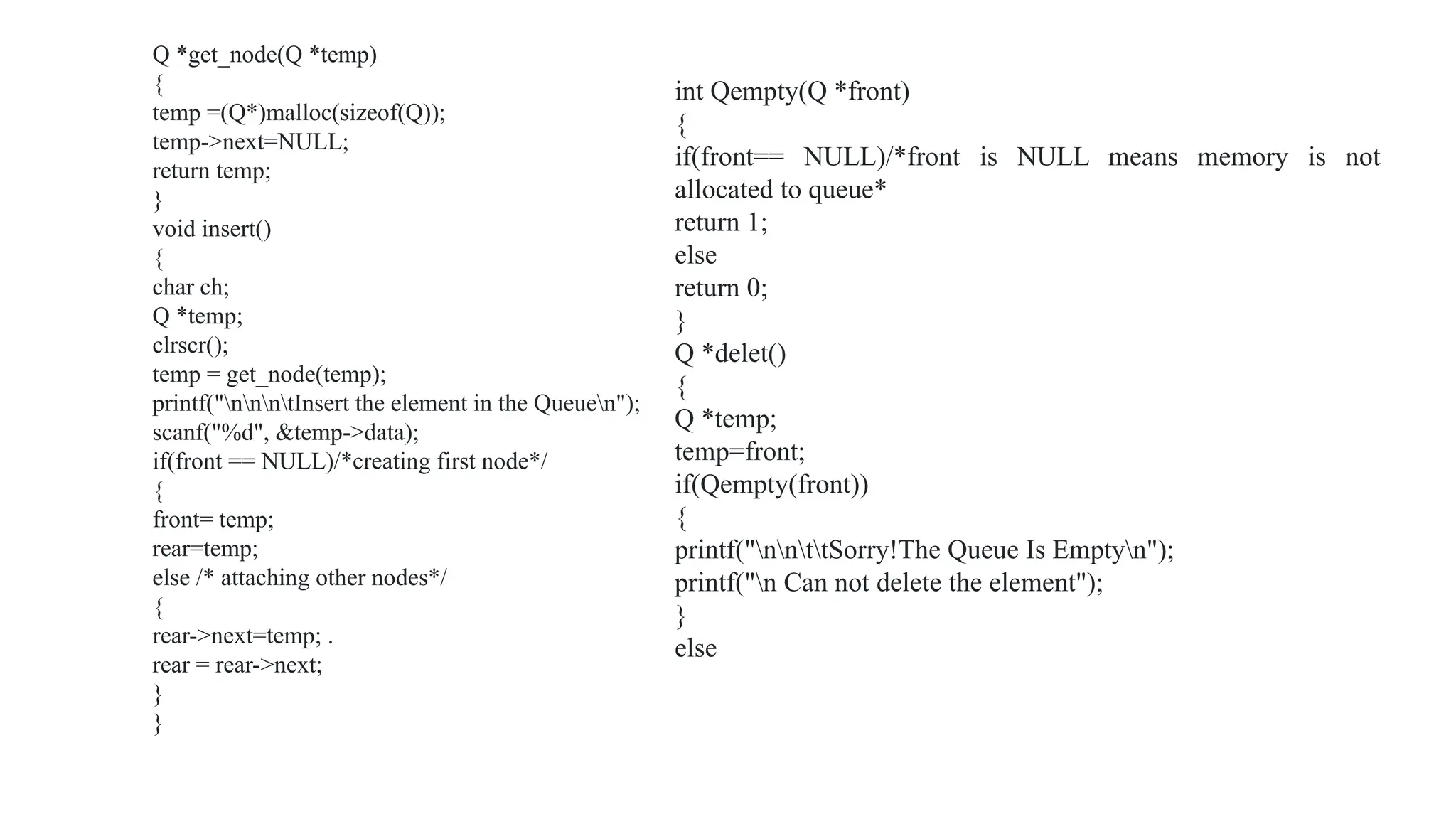
Q *get_node(Q *temp)
{
temp =(Q*)malloc(sizeof(Q));
temp->next=NULL;
return temp;
}
void insert()
{
char ch;
Q *temp;
clrscr();
temp = get_node(temp);
printf("nnntInsert the element in the Queuen");
scanf("%d", &temp->data);
if(front == NULL)/*creating first node*/
{
front= temp;
rear=temp;
else /* attaching other nodes*/
{
rear->next=temp; .
rear = rear->next;
}
}
int Qempty(Q *front)
{
if(front== NULL)/*front is NULL means memory is not
allocated to queue*
return 1;
else
return 0;
}
Q *delet()
{
Q *temp;
temp=front;
if(Qempty(front))
{
printf("nnttSorry!The Queue Is Emptyn");
printf("n Can not delete the element");
}
else
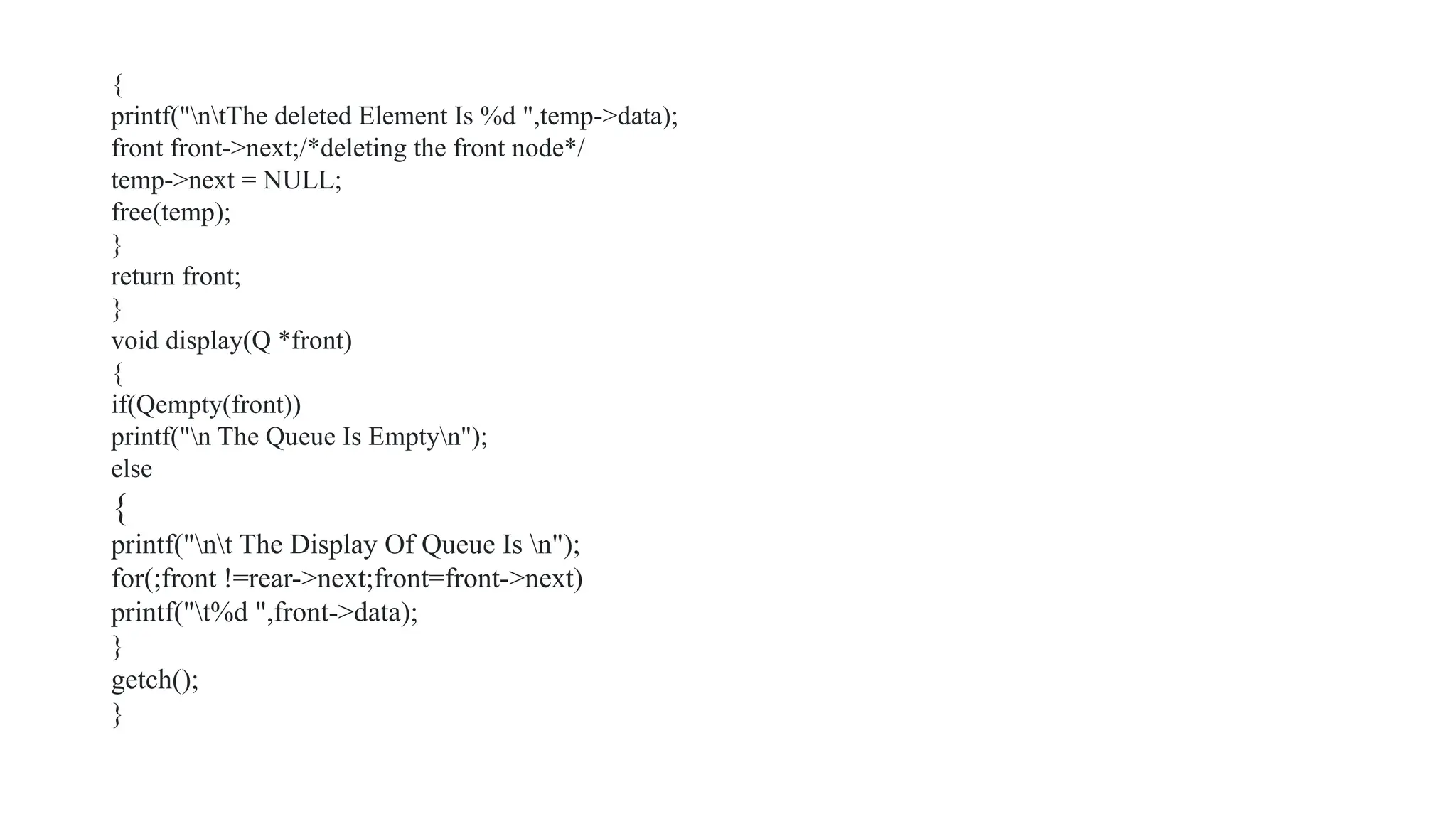
{
printf("ntThe deleted Element Is %d ",temp->data);
front front->next;/*deleting the front node*/
temp->next = NULL;
free(temp);
}
return front;
}
void display(Q *front)
{
if(Qempty(front))
printf("n The Queue Is Emptyn");
else
{
printf("nt The Display Of Queue Is n");
for(;front !=rear->next;front=front->next)
printf("t%d ",front->data);
}
getch();
}
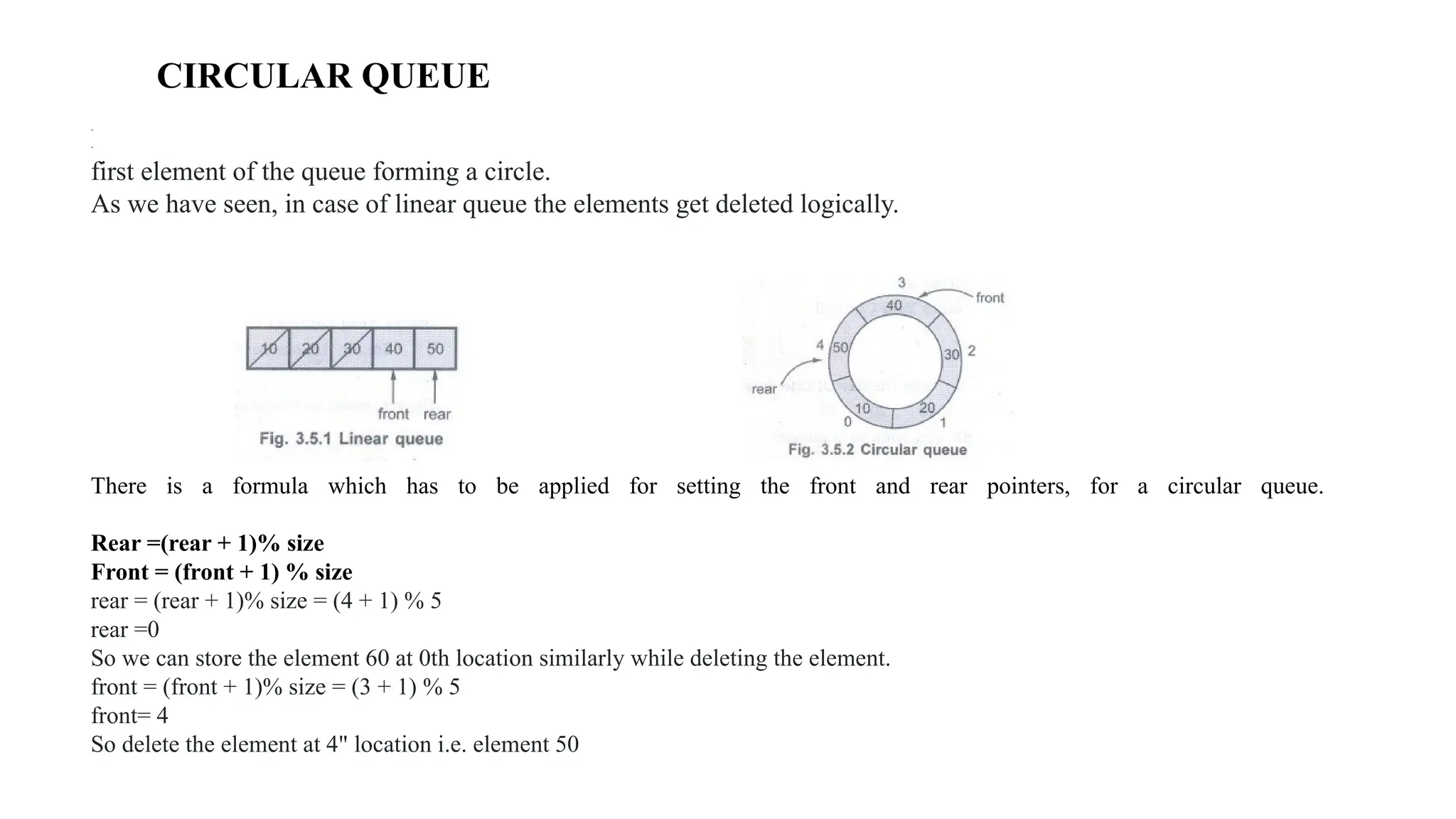
CIRCULAR QUEUE
Definition Circular queue is a special version of queue where the last element of the queue is connected to the
first element of the queue forming a circle.
As we have seen, in case of linear queue the elements get deleted logically.
There is a formula which has to be applied for setting the front and rear pointers, for a circular queue.
Rear =(rear + 1)% size
Front = (front + 1) % size
rear = (rear + 1)% size = (4 + 1) % 5
rear =0
So we can store the element 60 at 0th location similarly while deleting the element.
front = (front + 1)% size = (3 + 1) % 5
front= 4
So delete the element at 4" location i.e. element 50
Advantages of Circular Queue over Linear Queue
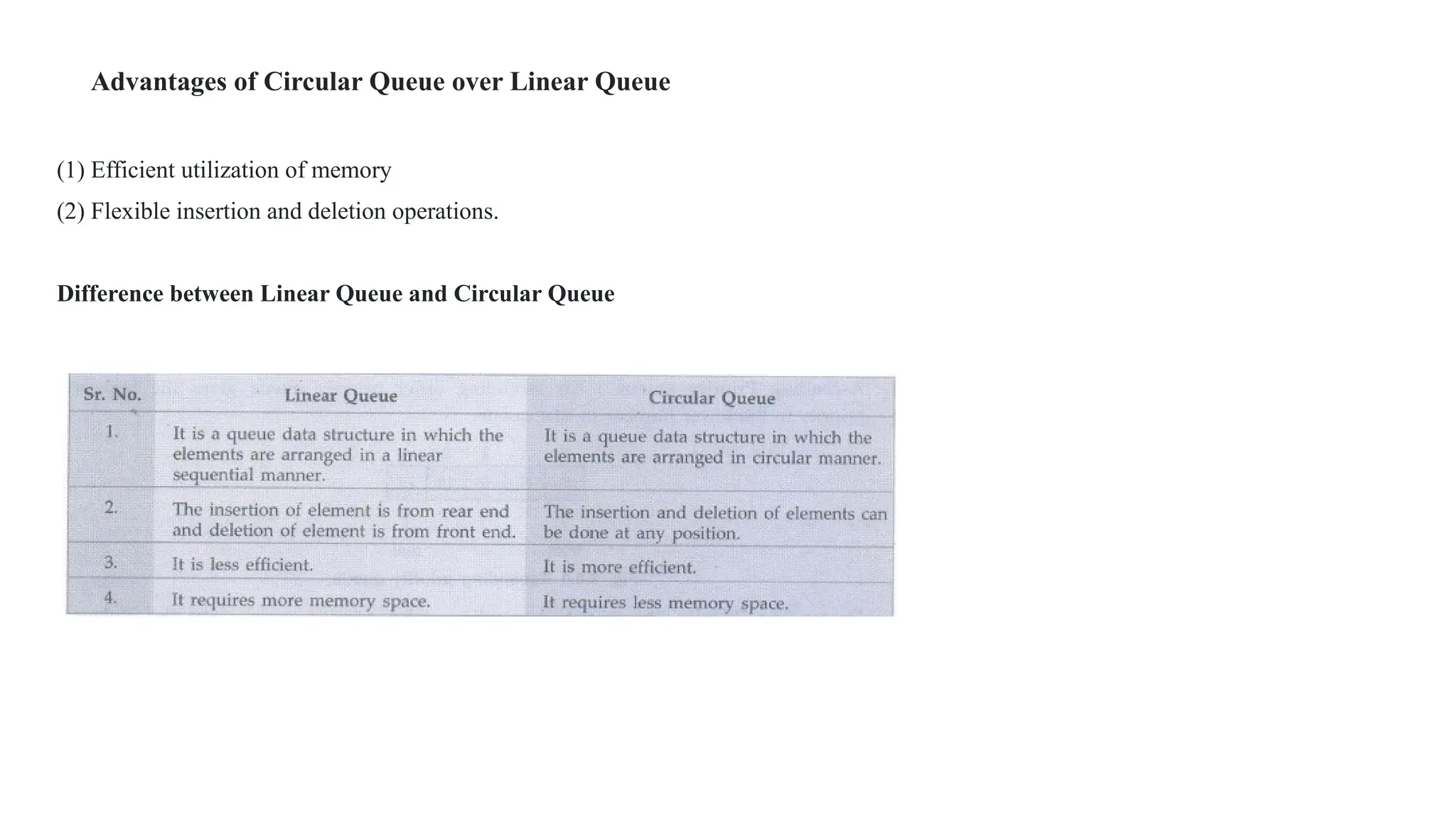
(1) Efficient utilization of memory
(2) Flexible insertion and deletion operations.
Difference between Linear Queue and Circular Queue
Priority Queue
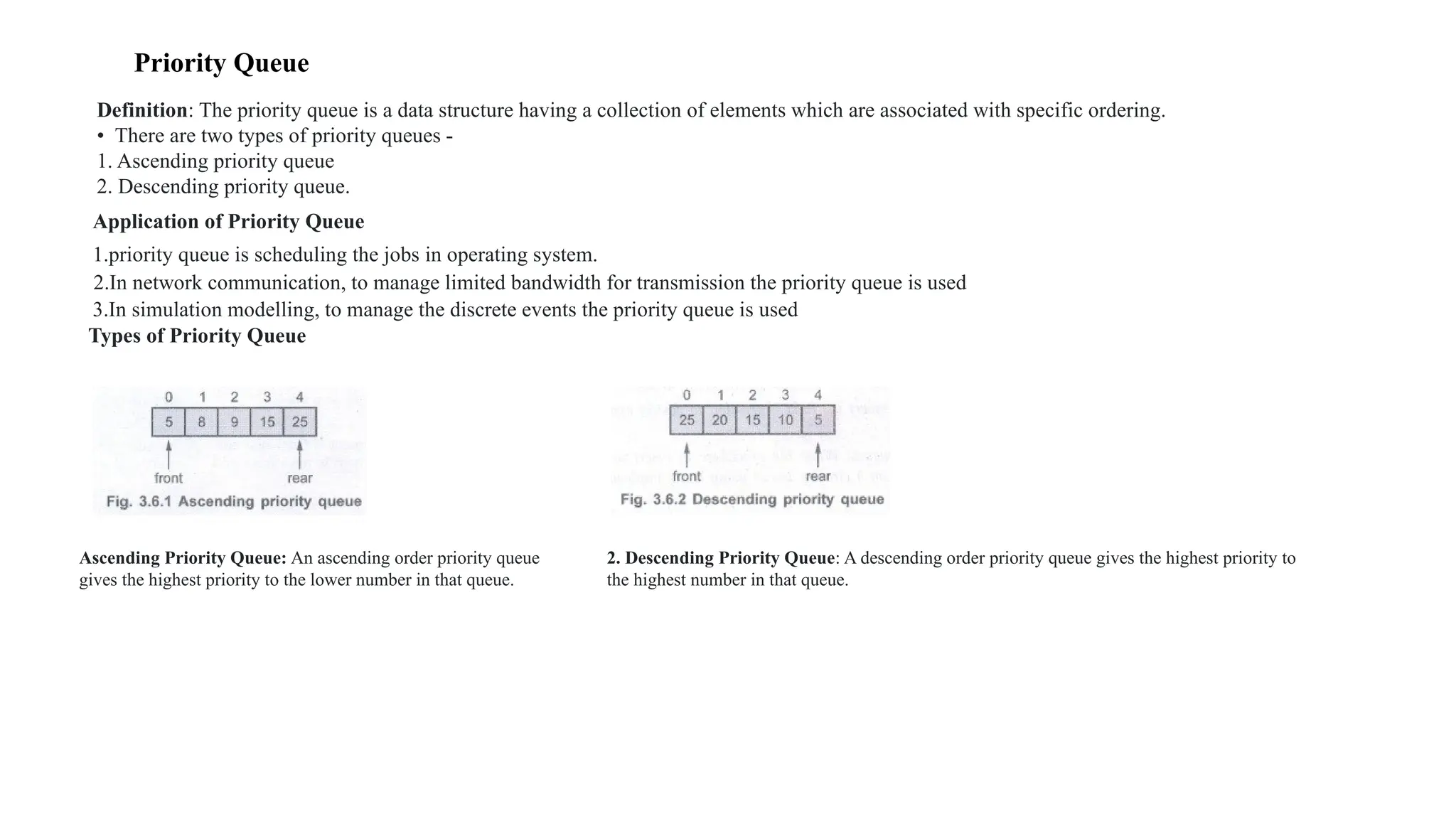
Definition: The priority queue is a data structure having a collection of elements which are associated with specific ordering.
• There are two types of priority queues -
1. Ascending priority queue
2. Descending priority queue.
Application of Priority Queue
1.priority queue is scheduling the jobs in operating system.
2.In network communication, to manage limited bandwidth for transmission the priority queue is used
3.In simulation modelling, to manage the discrete events the priority queue is used
Types of Priority Queue
Ascending Priority Queue: An ascending order priority queue
gives the highest priority to the lower number in that queue.
2. Descending Priority Queue: A descending order priority queue gives the highest priority to
the highest number in that queue.
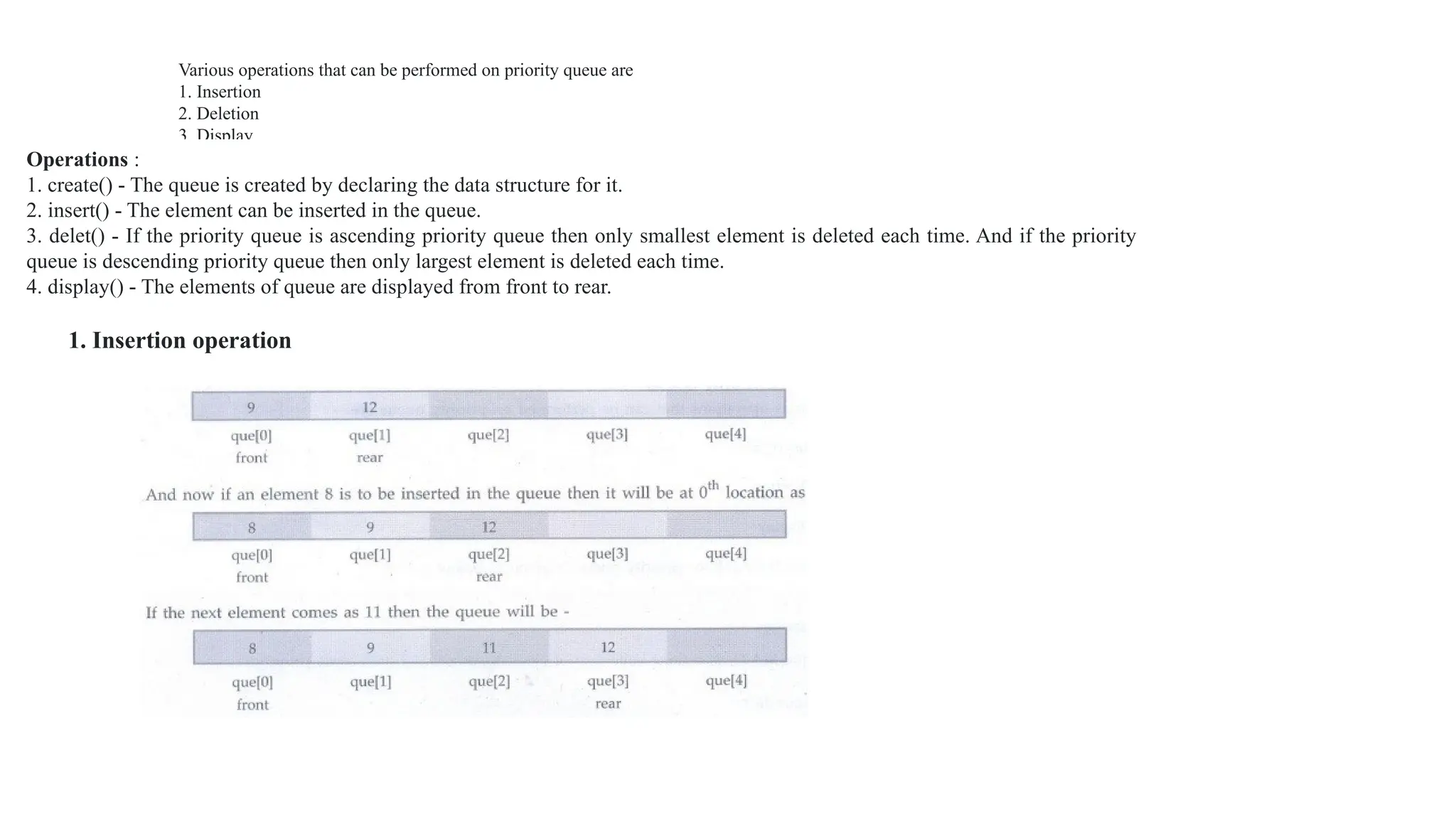
Various operations that can be performed on priority queue are
1. Insertion
2. Deletion
3. Display
Operations :
1. create() - The queue is created by declaring the data structure for it.
2. insert() - The element can be inserted in the queue.
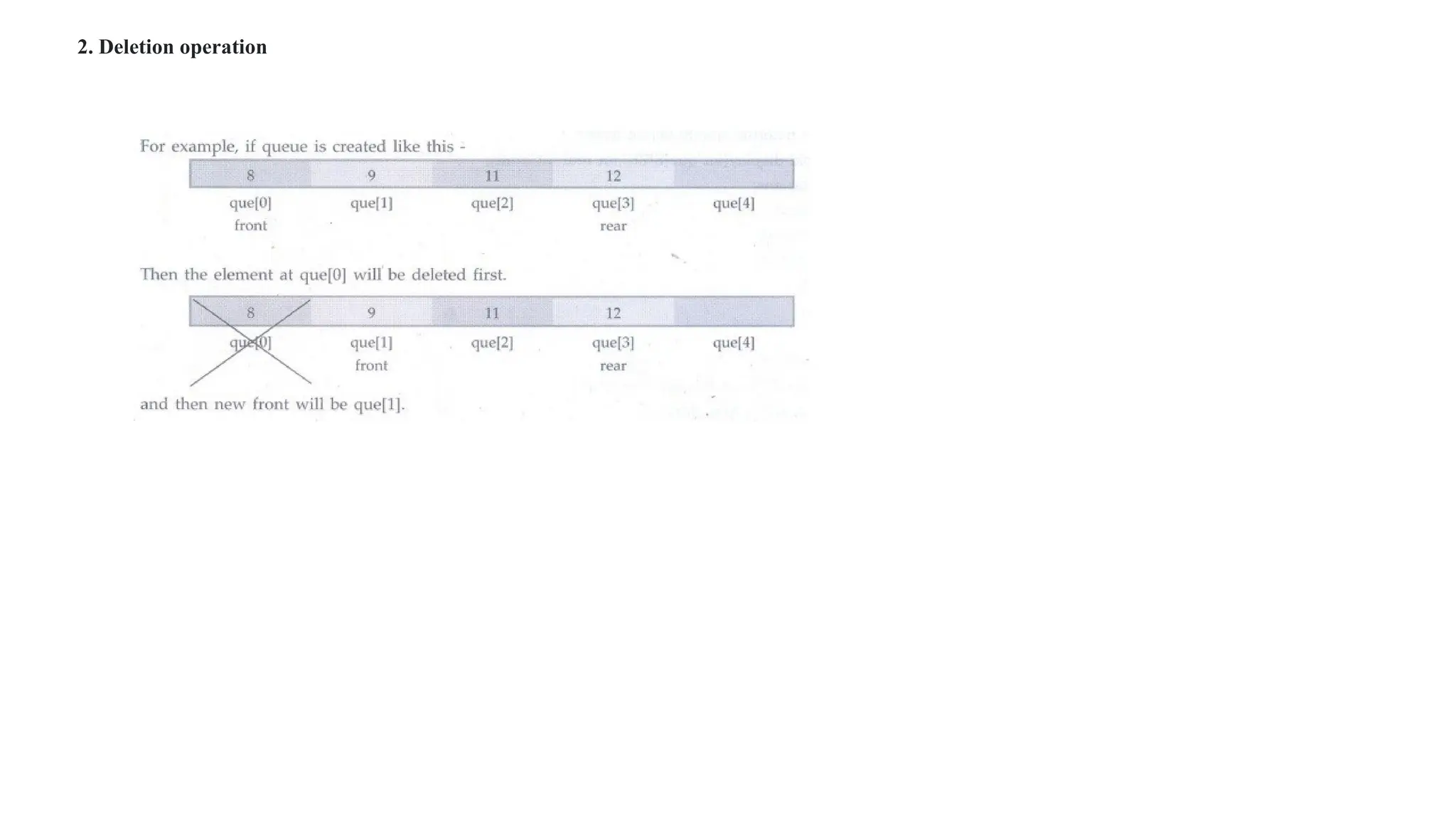
3. delet() - If the priority queue is ascending priority queue then only smallest element is deleted each time. And if the priority
queue is descending priority queue then only largest element is deleted each time.
4. display() - The elements of queue are displayed from front to rear.
1. Insertion operation
2. Deletion operation
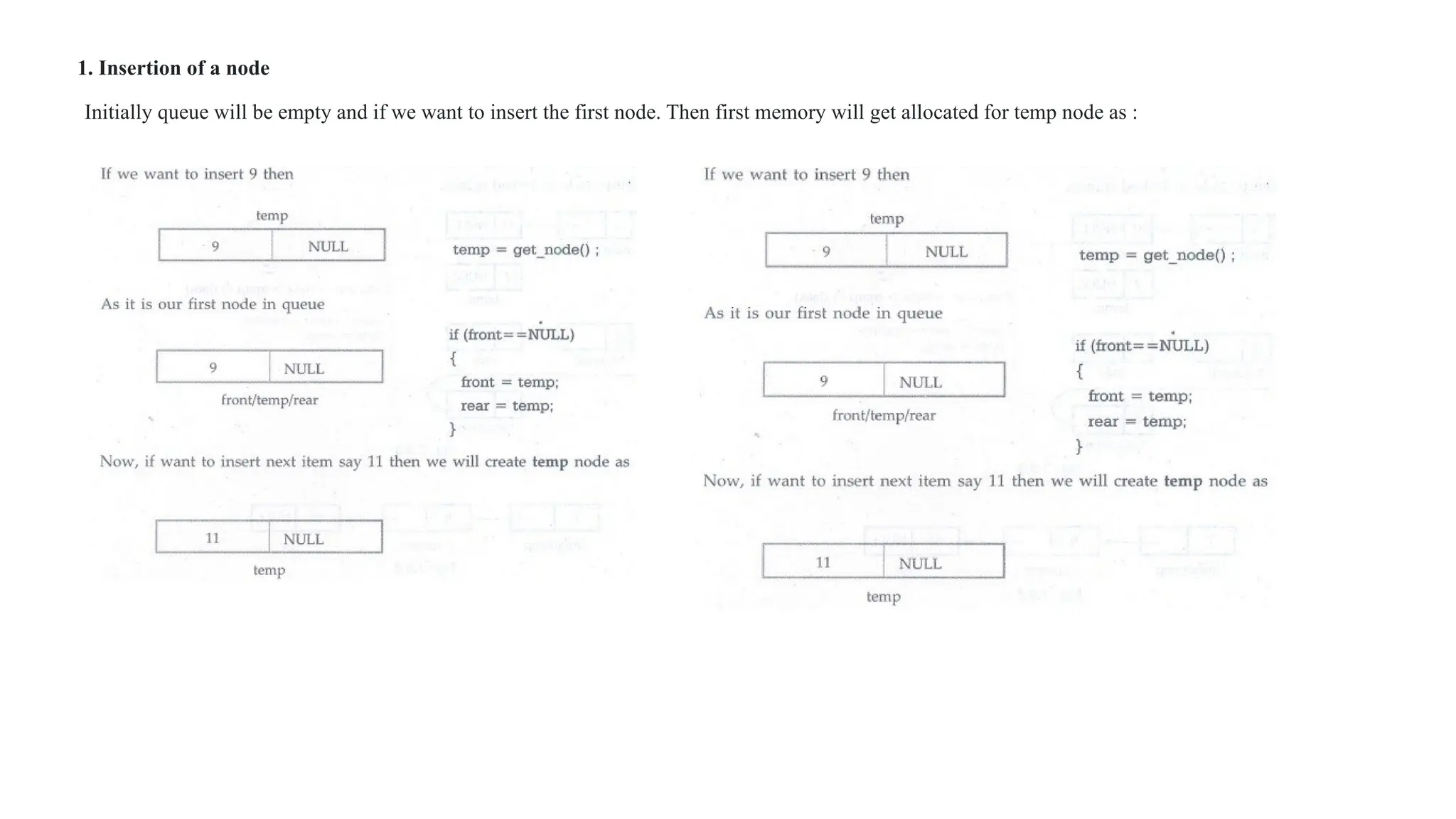
1. Insertion of a node
Initially queue will be empty and if we want to insert the first node. Then first memory will get allocated for temp node as :
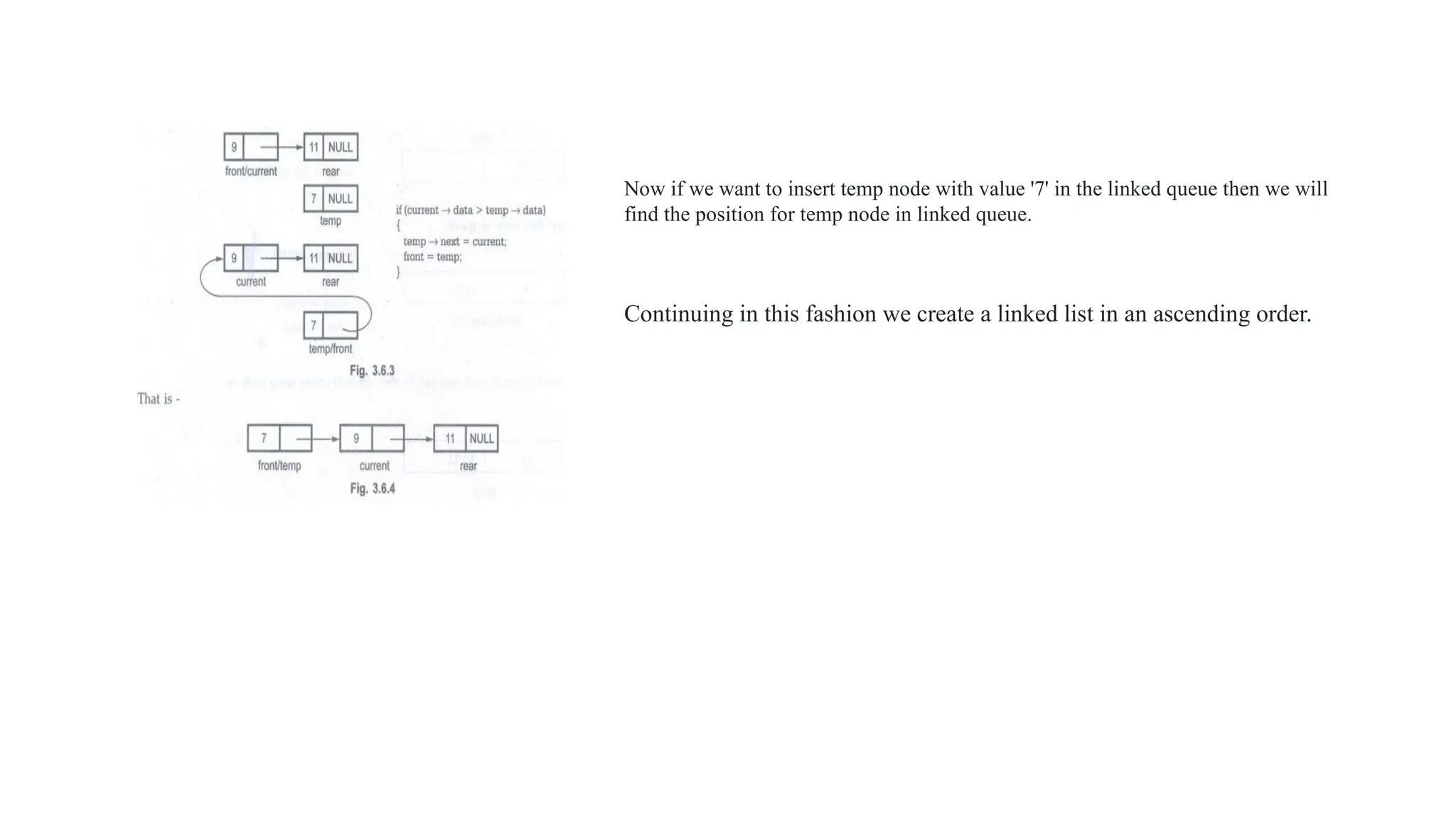
Now if we want to insert temp node with value '7' in the linked queue then we will
find the position for temp node in linked queue.
Continuing in this fashion we create a linked list in an ascending order.
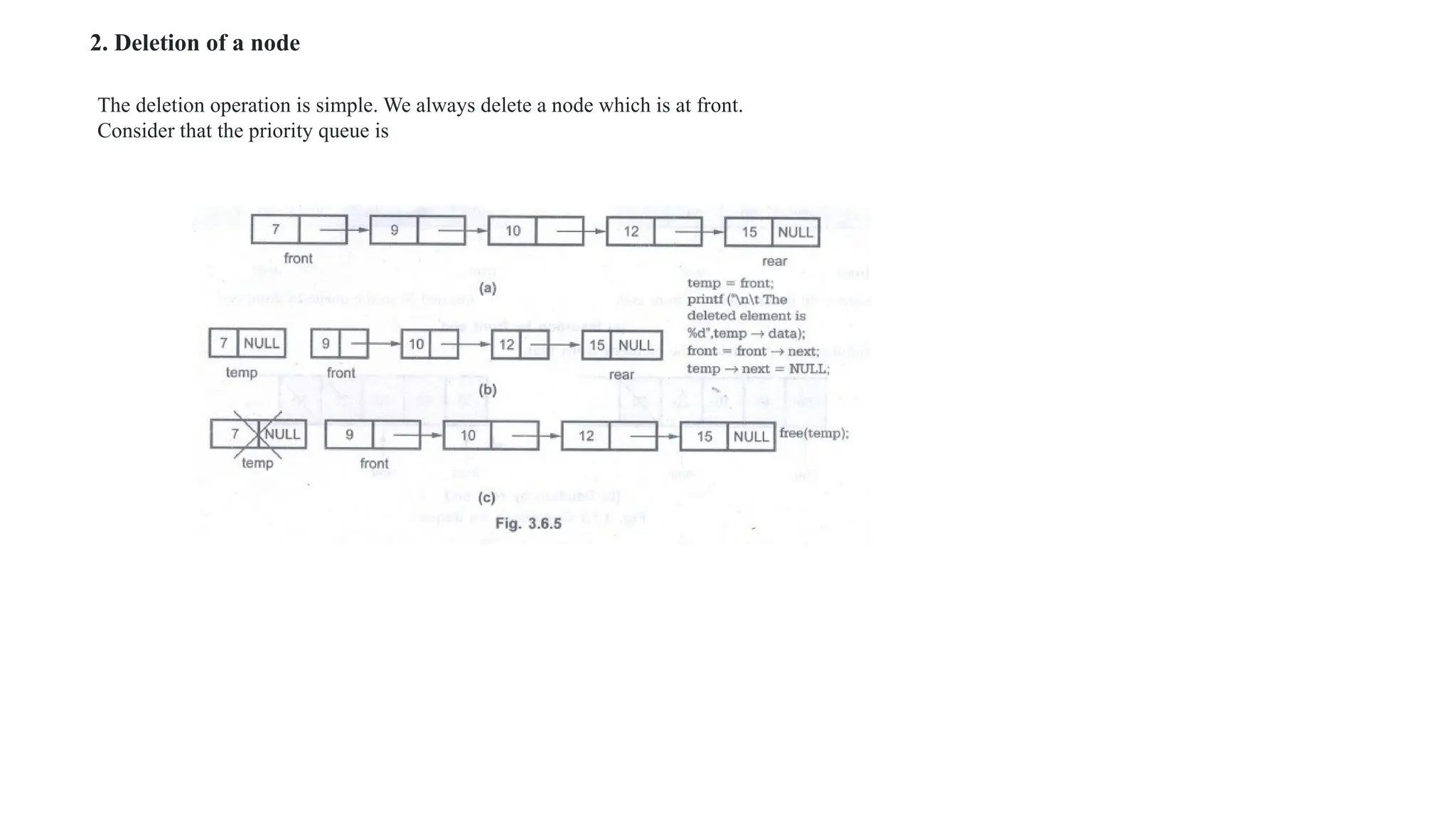
2. Deletion of a node
The deletion operation is simple. We always delete a node which is at front.
Consider that the priority queue is
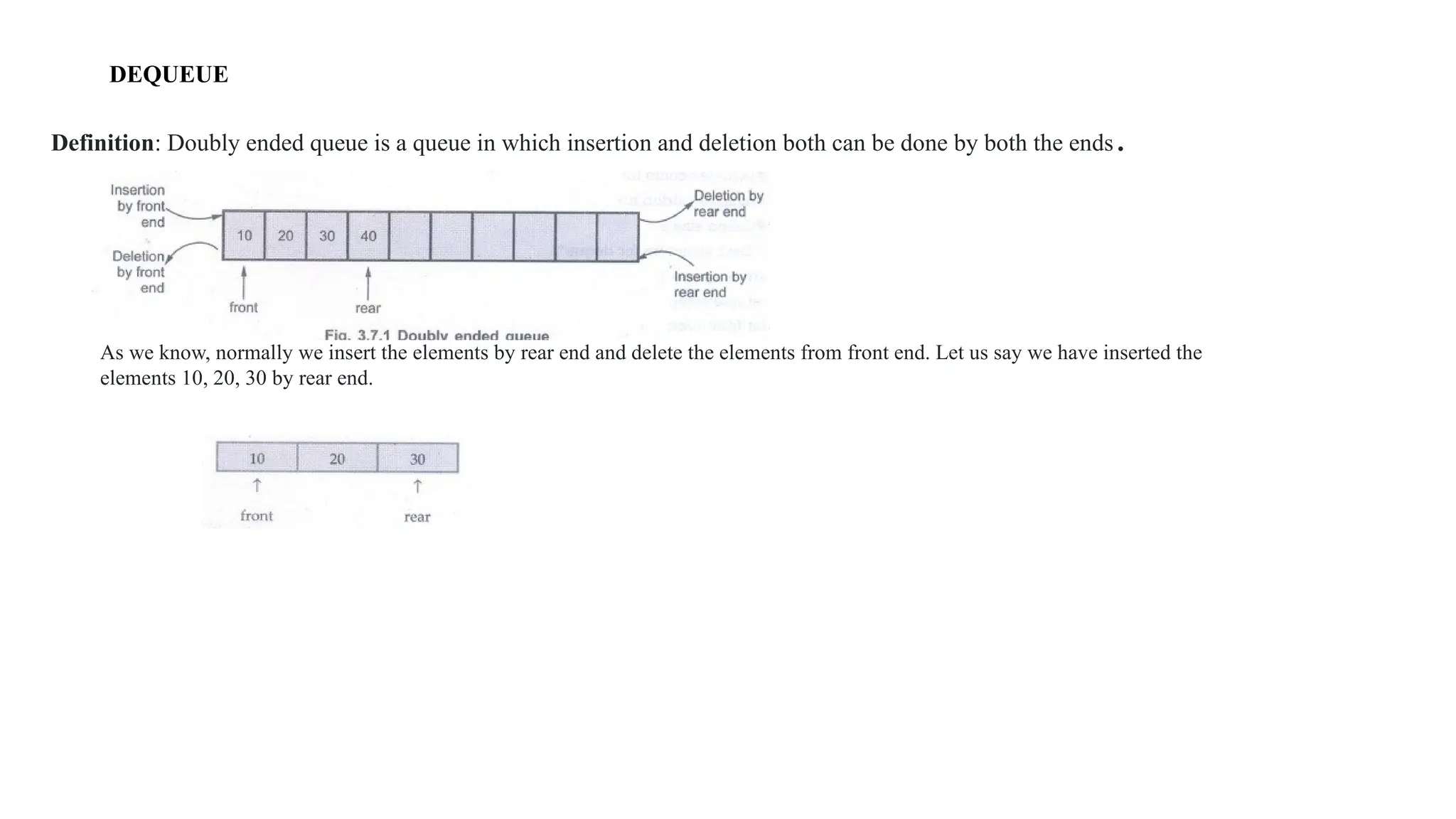
DEQUEUE
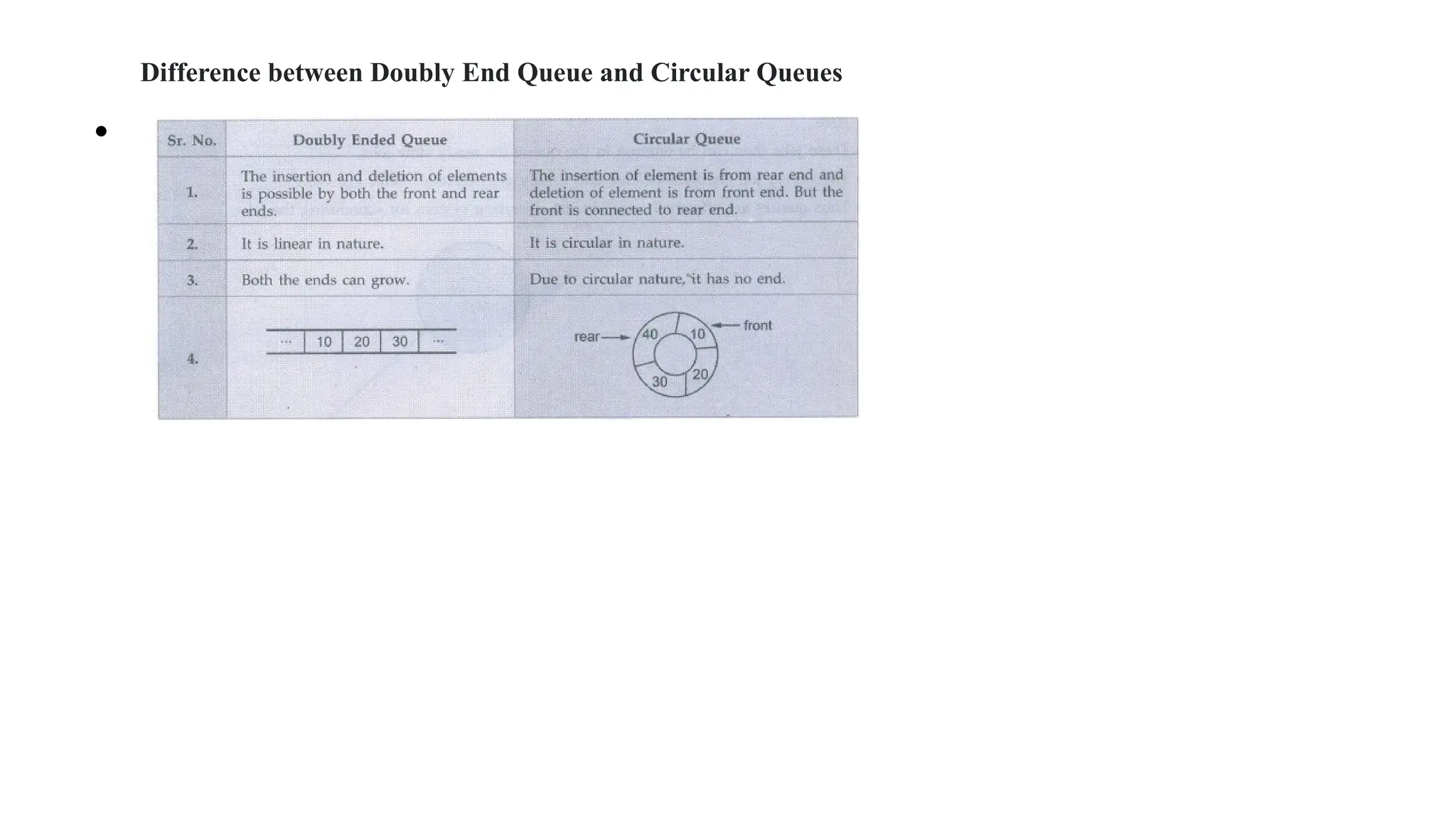
Definition: Doubly ended queue is a queue in which insertion and deletion both can be done by both the ends.
As we know, normally we insert the elements by rear end and delete the elements from front end. Let us say we have inserted the
elements 10, 20, 30 by rear end.
Difference between Doubly End Queue and Circular Queues
•
Applications of Queue
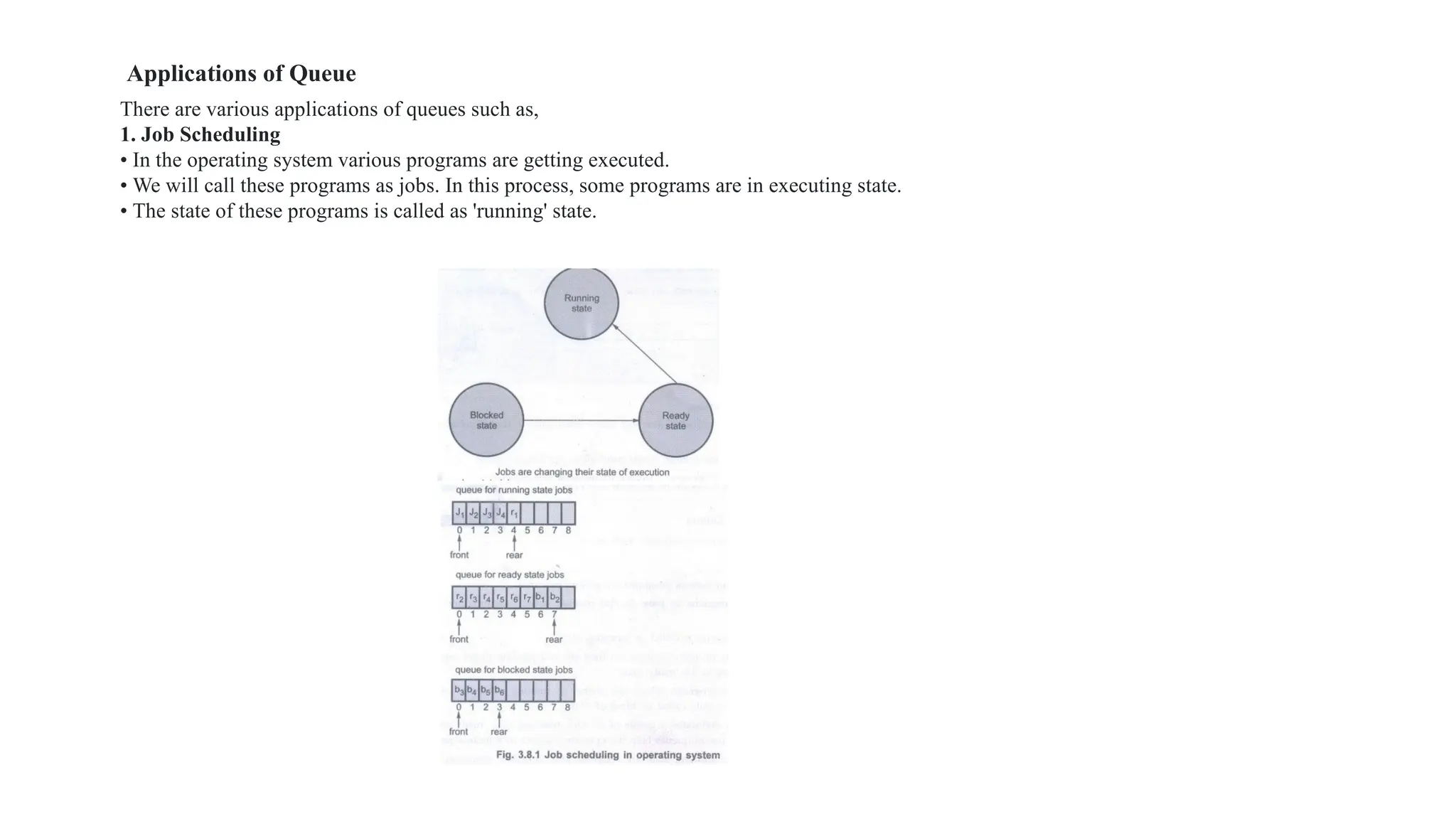
There are various applications of queues such as,
1. Job Scheduling
• In the operating system various programs are getting executed.
• We will call these programs as jobs. In this process, some programs are in executing state.
• The state of these programs is called as 'running' state.
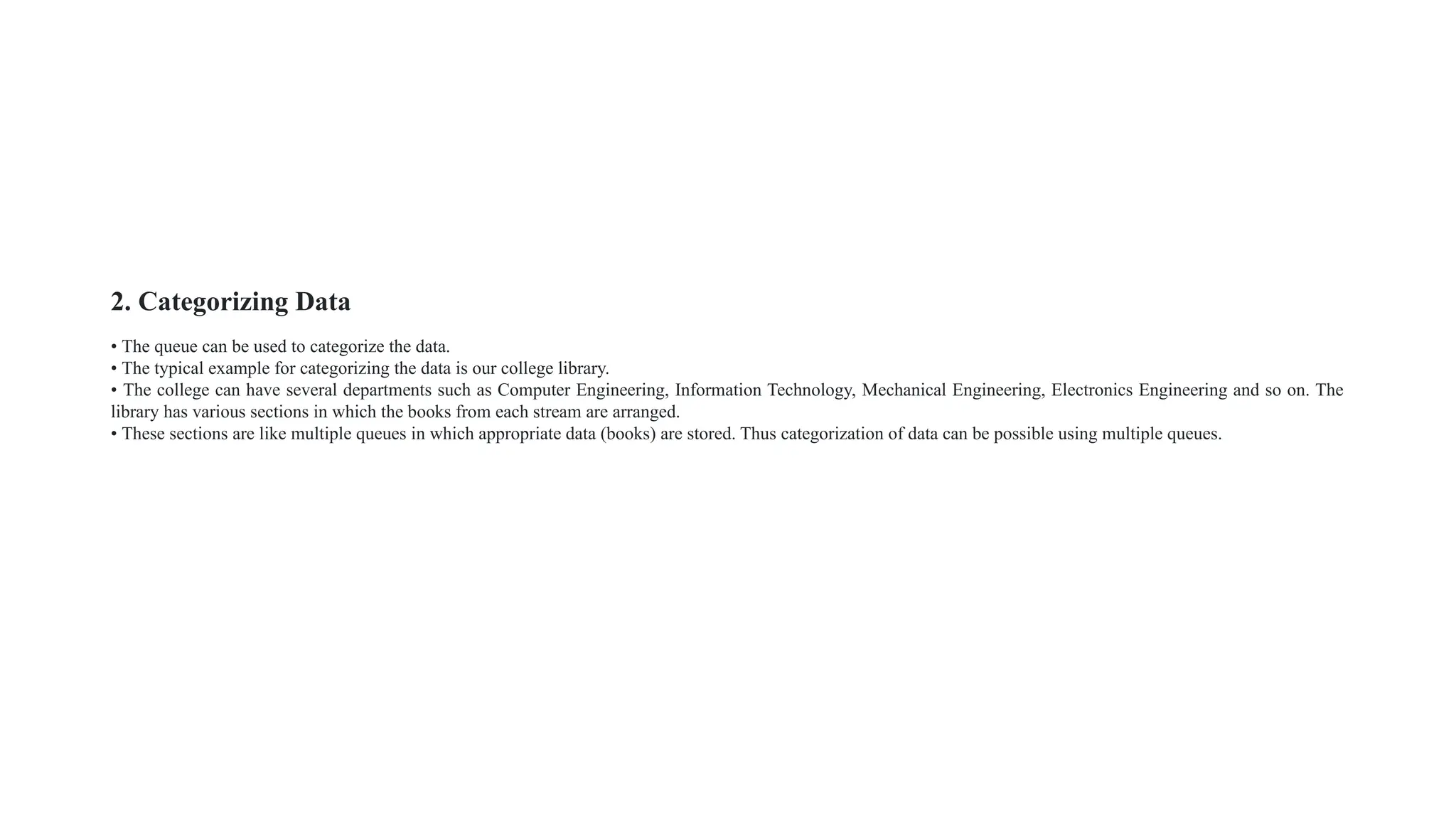
2. Categorizing Data
• The queue can be used to categorize the data.
• The typical example for categorizing the data is our college library.
• The college can have several departments such as Computer Engineering, Information Technology, Mechanical Engineering, Electronics Engineering and so on. The
library has various sections in which the books from each stream are arranged.
• These sections are like multiple queues in which appropriate data (books) are stored. Thus categorization of data can be possible using multiple queues.

8.DATA STRUCTURES UNIT 1 AND 2 CS3301PPT.pptx

  • 1.
  • 2.
    UNIT 1-LISTS INTRODUCTION TODATA STRUCTURE DEFINITION: • The data structure can be defined as the collection of elements and all the possible operations which are required for those set of elements. • data structure will tell us the required elements as well as the legal operations on those set of elements. • EXAMPLE • Consider a set of elements which are required to store in an array. Various operations such as reading of the elements and storing them at appropriate index can be performed. If we want to access any particular element then that element can be retrieved from the array.
  • 3.
    TYPES OF DATASTRUCTURE
  • 4.
    NON PRIMITIVE DATASTRUCTURES Linear data structures Linear data structures are the data structures in which data is arranged in a list or in a straight sequence. For example Arrays, List Non linear data structures Non linear data structures are the data structures in which data may be arranged in hierarchical manner. For example Trees, Graphs
  • 5.
    ABSTRACT DATATYPE(ADT) ABSTRACT DATATYPES(ADT) Theabstract data type is a triple of D - Set of domains, F - Set of functions, A - Axioms in which only what is to be done is mentioned but how is to be done is not mentioned. In ADT, all the implementation details are hidden. In short ADT = Type + Function names + Behavior of each function ADT Operations • While modeling the problems the necessary details are separated out from the unnecessary details. This process of modeling the problem is called abstraction. • The model defines an abstract view to the problem. Thus the model focuses only on problem related stuff and that you try to define properties of the problem.
  • 6.
    • These propertyincludes, oThe data which are affected oThe operations which are identified
  • 7.
    various Abstract DataType operations are 1. Create: This operation creates the database. 2. Display: This operation is for displaying all the elements of the data structure.stagi 3. Insertion: By this operation the element can be inserted at any desired position. 4. Deletion : By this operation any desired element can be deleted from the data structure. 5. Modification: This operation modifies the desired element's value by any desired new value.
  • 8.
    • 1.ADT DataStructures The ADT operations are carried out with the help of data structure. This part describes the structure of the data used in the ADT in an informal way. Various data structures that can be used for ADT are Arrays, Set, Linked list, Stack, Queues and so on. Examples 1. ADT for Set If we want to write ADT for a set of integers, then we will use following method AbstractDataType Set { Instances: Set is a collection of integer type of elements. Preconditions: none Operations: 1. Store () This operation is for storing the integer element in a set. 2. Retrieve (): This operation is for retrieving the desired element from the given set. 3. Display (): This operation is for displaying the contents of set. } }
  • 9.
    2. ADT forArrays AbstractDataType Array { Instances: An array A of some size, index i and total number of elements in the array n. Operations: } 1. Store () This operation stores the desired elements at each successive location. 2. display () This operation displays the elements of the array.
  • 10.
    LIST ADT • Listis a collection of elements in sequential order. • In memory we can store the list in two ways, • one way is we can store the elements in sequential memory locations. This is known as arrays. • other way is, we can use pointers or links to associate the elements sequentially. This known as Linked Lists.
  • 11.
    • In ADTthe implementation details are hidden. Hence the ADT will be- AbstractDataType List { Instances: List is a collection of elements which are arranged in a linear manner. Operations: Various operations that can be carried out on list are - 1. Insertion: This operation is for insertion of element in the list. 2. Deletion: This operation removed the element from the list. 3. Searching: Based on the value of the key element the desired element can be searched. 4. Modification: The value of the specific element can be changed without changing its location. 5. Display: The list can be displayed in forward or in backward manner. } List can be implemented in 2 ways, Array based implementation Linked list based implementation
  • 12.
    Array based Implementation •The linked list that can be represented by arrays is called static linked list. • In this section we will discuss in detail how exactly the list can be represented using arrays. • Basically list is a collection of elements. • To show the list using arrays we will have 'data' and 'link' fields in the array. • The array can be created as array of structure as struct node { int data; int next; }a[10];
  • 13.
    Various operations thatcan be performed on static linked list are - 1. Creation of list. 2. Display of list. 3. Insertion of any element in the list. 4. Deletion of any element from the list. 5. Searching of desired element in the list. 1. Creation of list The list can be created by placing the node of list in an array. Each node consists of two fields 'data' and 'next' pointer. We need to give the address of starting node which is to be placed in the array.
  • 14.
    While creating thelist we have to first enter the location in an array where the first node is placed and then input the pair: Data and next. Int Create() { int head,i; printf("n Enter the index for first node"); scanf("%d", &i); head=i; while(i!= -1)/*means terminate*/ { printf("n Enter the data and index of the first element"); scanf("%d %d",&a[i].data,&a[i].next); i=a[i].next; } return head; }
  • 15.
    2. Display After creationwe can display the list. Normally when the list is displayed simply the data fields are to be displayed. After creation we can display the list. Normally when the list is displayed simply the data fields are to be displayed. void Display(int i). { printf("("); while(i!= -1) { if(a[i].data==-1)/*no data item present at a[i]*/ printf(" "); else { printf("%d ",a[i].data); } i=a[i].next; } printf(" NULL)"); }
  • 16.
    In Insert function,consider that we have already created a list (10, 20, 30, 40) as Suppose we want to insert value 21 after 20 then Now using for loop we will search 'temp' in array 'a'. When we get the value 'temp' we will come out of loop by using break statement and check for whether the next location is empty or not.
  • 17.
    Deletion of anode While deleting a node from the list we simply manipulate the next pointer of previous node in the list. And the data field of the node to be deleted is initialized to - 1. Consider that the list is
  • 18.
    • The listafter insertion of 21 will look like this
  • 19.
    Limitations 1. There isa limitation on the number of nodes in the list because of fixed size of array. Hence sometimes memory may get wasted because of less elements in the list or there may be large number of nodes in the list and we could not store some elements in the array. 2. Insertions and deletions of elements in the array(list) is complicated Hence we will go for dynamic memory allocation for implementing the list.
  • 20.
    ALGORITHM FOR INSERTIONOF ELEMENT IN ARRAY • Step 1: Enter the number of elements present in the array. Also enter the elements in the array. printf("n How many elements are present in the array?"); scanf("%d", &n); printf("n Enter the elements (Type -99 for empty location): "); for(c=0;c<n;c++) scanf("%d",&array[c]); Step 2: Enter the value of the element which is to be inserted in the array, say Key_Element. Also enter the position at which this element is to be inserted.Say Key_Position. printf("n Enter the element to be inserted 2in the array: "); scanf("%d", &Key_Element); printf("n Enter the position at which the element is to be inserted: "); scanf("%d", &Key_Postion);
  • 21.
    Step 3: //If theKey_Position is empty then insert the Key_Element at that position. if(array[Key_Postion] ==-99) array[Key_Position] =Key_Element; Step 4: //Otherwise, Count the number of elements present left and right to this Key_Element. We call it as LeftElementCount and RightElementCount. for(i=0;i<=Key_Position-1;i++); //note the semicolon after this for loop LeftElementCount=i; for(j=n-1;j>=Key_Position;j-); RightElementCount=j; Step 5: If Left ElementCount < RightElementCount then { Search for empty location in this left sublist. If empty location is present then move the elements to the left by creating space at Key_Position then Insert Key Element at Key_Position. else goto step 8 }
  • 22.
    Step 6: IfLeft ElementCount> RightElementCount then { Search for empty location in this right sublist. If empty location is present then move the elements to the right by creating space at Key_Position then Insert Key_Element at Key_Position. else goto step 8 } Step 7: //Create the space at Key_Position by shifting the last position elements to the rightmost //empty space. for(k=n-1;k>=Key_Position-1;k--) { array[k+1]=array[k]; array[Key_Position-1]=Key_Element; } Step 8: Display the list of elements in the array for(c=0;c<=n;c++) printf("%d", array[c]);
  • 23.
    Concept of LinkedList • Definition: A linked list is a set of nodes where each node has two fields 'data' and a 'link'. Where data field stores the actual piece of information and 'link' field is used to point to next node. Basically link field is nothing but the address only. • Note that the link field of last node consists of 'NULL' which indicates end of linked list. 'C' Representation of Linked List 'C' structure typedef struct node { int data; /* data field */0 struct node * next; /* link field */ } SLL;
  • 24.
    Types of LinkedList There are various types of linked lists such as, • Singly linear linked list • Singly circular linked list • Doubly linear linked list • Doubly circular linked list. Singly linear linked list It is called singly because this list consists of only one link, to point to next node or element. This is also called linear list because the last element points to nothing it is linear is nature. The last field of last node is NULL which means that there is no further list. The very first node is called head or first.
  • 25.
    Singly circular linkedlist In this type of linked list only one link is used to point to next element and this list is circular means that the last node's link field points to the first or head node. That means according to example after 40 the next number will be 10. So the list is circular in nature. Doubly linear linked list This list called doubly because each node has two pointers previous and next pointers. The previous pointer points to previous node and next pointer points to next node. Only in case of head node the previous pointer is obviously NULL and last node's next pointer points to NULL. This list is a linear one. Doubly circular linked list
  • 26.
    • In circulardoubly linked list the previous pointer of first node and the next pointer of last node is pointed to head node. Head node is a special node which may have any dummy data or it may have some useful information such as total number of nodes in the list which may be used to simplify the algorithms carrying various operations on the list. Various operations of linked list are • Creation of linked list. • Display of linked list. • Insertion of any element in the linked list. • Deletion of any element from the linked list. • Searching of desired element in the linked list.
  • 27.
    1. Creation oflinked list Initially one variable flag is taken whose value is initialized to TRUE (i.e. 1). The purpose of flag is for making a check on creation of first node. That means if flag is TRUE then we have to create head node or first node of linked list. Naturally after creation of first node we will reset the flag (i.e. assign FALSE to flag). Consider that we have entered the element value 10 initially then, Step 1: Step 2: Step 3: If head node of linked list is created we can further create a linked list by attaching the subsequent nodes. Suppose we want to insert a node with value 20 then,
  • 28.
    Step 3 Step4 . •If user wants to enter more elements then let say for value 30 the scenario will be,
  • 29.
    • 2. Display oflinked list We are passing the address of head node to the display routine and calling head as the 'temp' node. If the linked list is not created then naturally head NULL. Therefore the message "The list is empty" will be displayed. As now value of temp becomes NULL we will come out of while loop. As a result of such display routine we will get, 10 20 30 40 50 → NULL will be printed on console. Step 5:
  • 31.
    a) Insertion ofa node as a head node node *insert_head(node *head) { node *New,*temp; New=get_node(); printf("n Enter The element which you want to insert"); scanf("%d", &New->data); if(head == NULL) head=New; else 3. Insertion of any element at anywhere in the linked list There are three possible cases when we want to insert an element in the linked list - a) Insertion of a node as a head node. b) Insertion of a node as a last node. c) Insertion of a node after some node.
  • 32.
    b) Insertion ofa node as a last node. void insert_last(node *head) { node *New,*temp; New=get_node(); printf("n Enter The element which you want to insert"); scanf("%d", &New->data); if(head == NULL) head=New; else { temp=head; while(temp->next!= NULL) temp-temp->next; temp->next=New; New->next = NULL; } }
  • 33.
    c) Insertion ofa node after some node. void insert_after(node *head) { int key; node *New,*temp; New= get_node(); printf("n Enter The element which you want to insert"); scanf("%d", &New->data); if(head == NULL) { head=New; } else { printf("n Enter The element after which you want to insert the node"); scanf("%d", &key); temp=head; do if(temp->data==key) { New->next-temp->next; temp->next=New; return; } else temp-temp->next; }while(temp!= NULL); } }
  • 34.
    4. Deletion ofany element from the linked list •
  • 35.
    5. Searching ofdesired element in the linked list • Consider that we have created a linked list as Suppose key=30 i.e. we want a node containing value 30 then compare temp → data and key value. If there is no match then we will mark next node as temp. Hence print the message "The Element is present in the list".
  • 36.
     Difference betweenArray and Linked Listed
  • 37.
    i) Accessing anyelement randomly: Using array, any element can be accessed easily. a) It takes constant time. b) In linked list, we can access elements in sequence. So it is very difficult and time consuming to access a element randomly. ii) Insertion and deletion of an element : a) Insertion and deletion of elements is time consuming. b) In linked list, we can insert and delete elements easily and it is less time consuming. iii) Utilization of computer memory: a) Array requires contiguous memory. First we have to declare array and compiler allocates memory at declaration. b) If we utilize less memory than allocated, then unutilized memory is unnecessarily reserved for array. It can't be used by other programs. c) If we want to add more elements than the actual size of array, it is not possible. d) In linked list, memory is utilized efficiently. Memory is not pre-allocated like static data structure. Memory is allocated as per the need. Memory is deallocated when it is no longer needed.
  • 38.
    Circularly Linked List Definition:The Circular Linked List (CLL) is similar to singly linked list except that the last node's next pointer points to first node. The circular linked list is as shown below Various operations that can be performed on circular linked list are, 1. Creation of circular linked list. 2. Insertion of a node in circular linked list. 3. Deletion of any node from linked list. 4. Display of circular linked list. 1. Creation of circular linked list. Initially we will allocate memory for New node using a function get_node(). There is one variable flag whose purpose is to check whether first node is created or not. That means flag is 1 (set) then first node is not created. Therefore after creation of first node we have to reset the flag (making flag = 0)
  • 39.
    Initially, Here variable headindicates starting node. Now as flag = 0, we can further create the nodes and attach them as follows. When we have taken element '20' Thus we can create a circular linked list by inserting one more element 50. It is as shown below
  • 40.
    PROGRAM:Creation of circularlinked list. struct node *Create() { char ans; int flag=1; struct node *head, *New,*temp; struct node *get_node(); clrscr(); do { New = get_node(); printf("nnntEnter The Elementn"); scanf("%d", &New->data); if(flag==1)/*flag for setting the starting node*/ { head = New; New->next = head; flag=0;/*reset flag*/ } else /* find last node in list */ { temp=head; while (temp->next!= head)/*finding the last node */ temp-temp->next; /*temp is a last node */ temp->next=New;/* attaching the node*/ New->next-head; /*each time making the list circular*/ } printf("n Do you want to enter more nodes?"); ans=getch(); } while(ans=='y' || ans ==' 'Y'); return head; /* function used while allocating memory for a node */ struct node *get_node() { struct node *New; New = (node *) malloc(sizeof(struct node)); New->next = NULL; return(New);/* created node is returned to calling function*/ }
  • 41.
    2. Display ofcircular linked list void Display(struct node *head) { struct node *temp; temp = head; if(temp== NULL) printf("n Sorry,The List Is Emptyn"); else { do { printf("%dt",temp->data); temp = temp->next; } while(temp != head);. } getch(); } struct node *Search(node *head,int num) { struct node *temp; temp=head; while(temp->next!=head) { if(temp->data == num) return temp;/*if node is found*/ else temp-temp->next; } return NULL; } while searching a node from circular linked list we go on comparing the data field of each node starting from the head node. If the node containing desired data is found we return the address of that node to calling function. 3. Searching a node from circular linked list
  • 42.
    struct node *insert_head(structnode *head) { struct node *get_node(); struct node *New,*temp; New=get_node(); printf("n Enter The element which you want to insert "); scanf("%d", &New->data); if(head == NULL) head=New; else { temp=head; while(temp->next!=head) temp-temp->next; temp->next=New; New->next = head; head=New; printf("n The node is inserted!"); } return head; } *Insertion of node at last position*/ void insert_last(struct node *head) { struct node *New, *temp; New=get_node(); printf("n Enter The element which you want to insert "); scanf("%d", &New->data); if(head==NULL) head = New; else { temp=head; temp=head; while(temp->next!=head) temp-temp->next; temp->next=New; New->next; printf("n The node is inserted!"); } } 3. Insertion of circular linked list While inserting a node in the linked list, there are 3 cases - a) Inserting a node as a head node b) Inserting a node as a last node c) Inserting a node at intermediate position The functions for these cases is as given below
  • 43.
    void insert_after(struct node*head) { int key; struct node *New,*temp; New= get_node(); printf("n Enter The element which you want to insert "); scanf("%d", &New->data); if(head == NULL) { head=New; } else { printf("n Enter The element after which you want to insert the node "); scanf("%d",&key); temp=head; do { if(temp->data==key) { New->next=temp->next; temp->next=New; printf("n The node is inserted"); return; } else temp-temp->next; }while(temp!=head); } } Suppose linked list is already created as -
  • 44.
    temp->next=temp1; head=temp1;/*new head*/ printf("n Thenode is deleted"); } } else { while(temp->next!=head) /* if intermediate node is to be deleted*/ { if((temp->next)->data==key) { temp1=temp->next; temp->next=temp1->next; templ->next=NULL; free(temp1); printf("n The node is deleted"); } else temp-temp->next; } } return head; 4. Deletion of any node struct node *Delete(struct node *head) { int key; struct node *temp, *temp1; printf("n Enter the element which is to be deleted"); scanf("%d",&key); temp=head; if(temp->data==key)/*If header node is to be deleted*/ { temp1=temp->next; if(temp1==temp) { temp=NULL; head=temp; printf("n The node is deleted"); } else { while(temp->next!=head) temp-temp->next;/*searching for the last node */
  • 46.
    Doubly Linked List •Definition: The doubly linked list has two link fields. One link field is previous pointer and the other link field is that next pointer. The typical structure of each node in doubly linked list is like this. C Structure 'C' structure of doubly linked list is as follows - typedef struct node { int data; struct node *prev; struct node *next; }dnode; Representation The linked representation of a doubly linked list is Thus the doubly linked list can traverse in both the directions, forward as well as backwards. Now, there may be one question in your mind that bon how do the empty doubly circular linked lists look ? he? Here is the representation. That means the prev and next pointers are pointing to the self node.
  • 47.
    • Step 3;If user wants to insert a node with a value say 30 then 1. Creation of doubly linked list Step 1: Initially one variable flag is taken whose value is initialized to TRUE. The purpose of this flag is for making a check on creation of first node. After creating first node reset flag (i.e. assign FALSE to flag) Step 2: If head node is created, we can further create a linked list by attaching the subsequent nodes. Suppose, we want to insert a node with value 20 then Continuing in this fashion doubly linked can be created. 2. Display of DLL As each of DLL contains two link fields - Previous link and next link. Hence we can display DLL in forward as well as in reverse direction. Suppose we have created a DLL as
  • 48.
    Forward Display As nowtemp becomes NULL, we will come out of the while loop. Hence as a result forward display will be 10→20-30→40 Reverse Display First of all we must reach at the last node by using while statement. Now if we set temp = temp → prev, then temp becomes NULL, hence we will come out of while loop. Hence we get the display as 40->30->20->10
  • 50.
    • Case 2:Insertion of a node at the end suppose we want to insert a node with value 40 then, first move temp pointer to the last node. 3. Insertion of a node in DLL There are three cases for insertion of a node 1) Insertion of a node at the beginning. 2) Insertion of a node at the end. 3) Insertion of a node at intermediate position. Case 1: Inserting a node at the beginning Suppose we want to insert a node with value 9 then
  • 51.
    • Case 3: Inserting a node at the intermediate position. Suppose, we want to insert a node with value 22 after node with value 20, then first search the node with value 20. • 4. Deletion of node Suppose we want to delete a node with a value 20 then, first search this node, call it as temp.
  • 53.
    Applications of Lists •The linked list is a data structure which makes use of dynamic memory. Hence it is possible to handle the list of any desired length using the linked list. Various applications of linked list are, 1. The linked list is used for performing polynomial operations such as addition, multiplication evaluation and so on. 2.The linked list is used for handling the set operations. 3. The stack data structure can be implemented using linked list. 4. The queue data structure can be implemented using linked list.
  • 54.
    Polynomial ADT A polynomialhas the main fields as coefficient, exponent. • In linked list it will have one more field called 'link' field to point to next term in the polynomial. • If there are n terms in the polynomial then n such nodes has to be created. • The typical node will look like this. For example: To represent 3x2 +5x+7 the link list will be In each node, the exponent field will store exponent corresponding to that term, the coefficient field will store coefficient corresponding to that term and the link field will point to next term in the polynomial. Again for simplifying the algorithms such as addition of two polynomials we will assume that the polynomial terms are stored in descending order of exponents. The node structure for a singly linked list for representing a term of polynomial can be defined as follows:
  • 55.
    typedef struct Pnode { floatcoef; int exp; struct node *next; } p; Advantages of linked representation over arrays : 1. Only one pointer will be needed to point to first term of the polynomial. 2. No prior estimation on number of terms in the polynomial is required. This results in flexible and more space efficient representation. 3. The insertion and deletion operations can be carried out very easily without movement of data. Disadvantage of linked representation over arrays : We can not access any term randomly or directly we have to go from start node always.
  • 56.
    Addition of TwoPolynomials using Singly Linked List Step 1: First of all we create two linked polynomials. For e.g.: P1 = 3x3 +2x2 + 1x P2 = 5x5 +3x2 +7 Each node in the polynomial will look like this, Step 2: For addition of two polynomials if exponents of both the polynomials are same then we add the coefficients. For storing the result we will create the third linked list say p3. The processing will be as follows . Step 3:
  • 57.
    Step 4: Step 6: Step5: Finally, P3 list is the addition of two polynomials.
  • 58.
    Radix Sort It isa linear sorting algorithm that sorts elements by processing them digit by digit. It is an efficient sorting algorithm for integers or strings with fixed-size keys. Radix Sort Algorithm The key idea behind Radix Sort is to exploit the concept of place value. It assumes that sorting numbers digit by digit will eventually result in a fully sorted list. Radix Sort can be performed using different variations, such as Least Significant Digit (LSD) Radix Sort or Most Significant Digit (MSD) Radix Sort.
  • 59.
    • Step 1:Find the largest element in the array, which is 802. It has three digits, so we will iterate three times, once for each significant place. • Step 2: Sort the elements based on the unit place digits (X=0). We use a stable sorting technique, such as counting sort, to sort the digits at each significant place. It’s important to understand that the default implementation of counting sort is unstable i.e. same keys can be in a different order than the input array. To solve this problem, We can iterate the input array in reverse order to build the output array. This strategy helps us to keep the same keys in the same order as they appear in the input array. Step 3: Sort the elements based on the tens place digits.
  • 60.
    • Step 4:Sort the elements based on the hundreds place digits. Step 5: The array is now sorted in ascending order
  • 61.
    • Step 3:Sort the elements based on the tens place digits. • Step 4: Sort the elements based on the hundreds place digits. • Step 5: The array is now sorted in ascending order.
  • 62.
    Multi list • Amulti list is a data structure in which there are multiple links from a node. In general multi-list, each node can have any number of pointers to other nodes and there may or may not be inverses for each pointer. • Multi-lists is a technique in which multiple lists are embedded into a single structure. In multi-list the pointers are used to make multiple link routes through data. 1. Example 1: Multiple orders of one set of elements Suppose, we have the names and ages of the students as (Monika, 25), (Varsha, 23), (Supriya, 27), (Swati, 24). We can order the above elements alphabetically (By name) or we can order them by numbers (By age). Here the solid link is for ascending order of names and the dotted link is for ascending order of age.
  • 63.
    2. Sparse matrixrepresentation using multi-lists • Defintion: A sparse matrix is a kind of matrix which has a very few non zero elements, as compared to the size m x n of the matrix. • For example - If the matrix is of size 100 x 100 and only 10 elements are non zero. The concept of sparse matrix has came forward in computer science to investigate such a representation which will store only non-zero elements of the matrix and still carry out the operations quite efficiently. Representations of sparse matrices : The representation of sparse matrix will be a triplet only. In the sense that basically the sparse matrix means very few non-zero elements having in it. Rest of the spaces are having the values zero which are basically useless values or simply empty values. So in this efficient representation we will consider all the non-zero values along with their positions. The 0th row will store total rows of the matrix, total columns of the matrix and total • For example - Suppose a matrix is 6 × 7 and number of non zero terms are say 8. In our sparse matrix representation the matrix will be stored as For example - Suppose a matrix is 6 × 7 and number of non zero terms are say 8. In our sparse matrix representation the matrix will be stored as
  • 64.
    In above representation,the total number of rows and columns of the matrix (6 × 7) are given in 0th row. Also total number of non-zero elements are given in 0th row of value column i.e. 8. Here the above array is say named "Sparse". Then Sparse [0][0] = 6 Sparse [0][1] = 7 Sparse [0][2] = 8 Sparse [1][0] = 0 Sparse [1][1]=6 Sparse [1][2] =-10 and so on. While representing the sparse matrix using linked list, we will make use of two types of nodes, header node and element node.
  • 66.
    UNIT 2 STACKS Concept ofStack • Definition : A stack is an ordered list in which all insertions and deletions are made at one end, called the top. If we have to make stack of elements 10, 20, 30, 40, 50, 60 then 10 will be the bottommost element and 60 will be the topmost element in the stack. A stack is shown below. • Example The typical example can be a stack of coins. The coins can be arranged one on another, when we add a new coin it is always placed on the previous coin and while removing the coin the recently placed coin can be removed. The example resembles the concept of stack exactly.
  • 67.
    STACK ADT Stack isa data structure which posses LIFO i.e. Last In First Out property. • The abstract data type for stack can be as given below. AbstractDataType stack { Instances: Stack is a collection of elements in which insertion and deletion of elements is done by one end called top. Preconditions: 1. Stfull (): This condition indicates whether the stack is full or not. If the stack is full then we cannot insert the elements in the stack. 2. Stempty(): This condition indicates whether the stack is empty or not. If the stack is empty then we cannot pop or remove any element from the stack. Operations: 1. Push: By this operation one can push elements onto the stack. Before performing push we must check stfull () condition. 2. Pop : By this operation one can remove the elements from stack. Before popping the elements from stack we should check stempty () condition . . .
  • 68.
    Stack Operations • Astack is a special case of an ordered list, i.e. it is a ordered list with some restrictions on the way in which we perform various operations on a list. • We need an integer variable top which will keep track of the top of the stack as more and more elements are inserted into and deleted from the stack. • The declarations in C are as follows. Declaration 1: Using Arrays #define size 100 int stack[size], top = -1; The stack is of the size 100. As we insert the numbers, the top will get incremented. The elements will be placed from oth position in the stack. At the most we can store 100 elements in the stack, so at the most last element can be at (size - 1) position, i.e. at index 99.
  • 69.
    Using Structure #define size10 struct stack { int s[size]; int top; }st; We will make second use of the method of representing the stack in our program. • The stack can also be used in the databases. • For example if we want to of all the students of forth semester we can declare a structure of stack as follows The above stack will look as
  • 70.
    Thus we canstore the data about whole class in our stack. • The above declaration means creation of stack. • Hence we will write only push and pop function to implement the stack. • Before pushing or popping we should check whether stack is empty or full.  Stack Empty Operation • Initially stack is empty. At that time the top should be initialized to 1 or 0. • If we set top to - 1 initially then the stack will contain the elements from 0th position and if we set top to 0 initially, the elements will be stored from 1st position, in the stack. • Elements may be pushed onto the stack and there may be a case that all the elements are removed from the stack. Then the stack becomes empty. • Thus whenever top reaches to - 1 we can say the stack is empty. int stempty() { if(st.top==-1) return 1; else return 0; } If top = -1 means stack empty
  • 71.
    Stack Full Operation •In the representation of stack using arrays, size of array means size of stack. • As we go on inserting the elements the stack gets filled with the elements. • So it is necessary before inserting the elements to check whether the stack is full or not. • Stack full condition is achieved when stack reaches to maximum size of array. int stfull() { if(st.top>=size-1) return 1; else return 0; } Thus stfull is a Boolean function if stack is full it returns 1 otherwise it returns 0. If top > = size means stack is full. . .
  • 72.
    The 'Push' and'Pop' Functions Push is a function which inserts new element at the top of the stack. The function is as follows. void push(int item) { st.top++; /* top pointer is set to next location */ st.s[st.top] = item; /* placing the element at that location */ } • The push function takes the parameter item which is actually the element which we want to insert into the stack - means we are pushing the element stack. In the function we have checked whether the stack is full or not, if the stack is not full then only the insertion of the element can be achieved by means of push operation. int pop() { int item; item = st.s[st.top]; st.top--; return(item); }
  • 73.
    If stack isempty we cannot pop and if stack is full we cannot push any element.
  • 74.
    Implementation of Stackusing Linked List • Stack is a special case of list and therefore we can represent stack using arrays as well as using linked list. • Advantages • need not to worry about the size of the stack. Since we are using linked list as many elements we want to insert those many nodes can be created. And the nodes are dynamically getting created so there won't be any stack full condition. The typical 'C' structure for linked stack can be struct stack { int data; struct stack next; }node; • Each node consists of data and the next field. Such a node will be inserted in the stack represents stack using linked list .
  • 75.
    There are variousoperations that can be performed on the linked stack. These operations are - 1. Push 2. Pop 3. Stack empty 4. Stack full Push operation The pseudo code for push operation is as follows :
  • 76.
    In the mainfunction, when the item to be inserted is entered, a call to push function is given. In push function another function get_node is invoked to allocate the memory for a node as follows: If item=10, then by get node function node will be allocated. Then *top= New This is our new top node. Hence stack will look like this This can be done using following statements- If again Push function is called for pushing the value 20 then
  • 77.
    item = *(top)->datathen item=30 temp=*top *top=*top->next now top=20 free(temp); deallocating memory of node 30. That means node 30 is deleted. 2. Pop operation
  • 78.
    Applications of Stack Variousapplications of stack are 1. Expression conversion 2. Expression evaluation 3. Parsing well formed parenthesis 4. Decimal to binary conversion 5. Reversing a string 6. Storing function calls
  • 79.
    Expression Expression is astring of operands and operators. Operands are some numeric values and operators are of two types: Unary operators and Binary operators. Unary operators are '+' and and binary operators are '+', '-', '*', '/' and exponential. In general, there are three types of expressions: 1. Infix expression 2. Postfix expression 3. Prefix expression 1. Infix Expression : In this type of expressions the arrangement of operands and operator is as follows: Infix expression = operand1 operator operand2 For example 1. (a+b) 2. (a+b)* (c-d) 3. (a+b/e)* (d+f) 2. Postfix Expression : In this type of expressions the arrangement of operands and operator is as follows: Postfix expression = operand1 operand2 operator For example 1. ab+ 2. ab + cd - * 3. ab e/df + * In postfix expression there is no parenthesis used. All the corresponding operands come first and then operator can be placed.
  • 80.
    3. Prefix Expression: Inprefix expression the arrangement of operands and operators is as follows Prefix expression = operator operand1 operand2 For example 1. + ab 2. *+ ab cd 3.*+abe + df In prefix expression, there is no parenthesis used. All the corresponding operators come first and then operands are arranged. To evaluate infix expression, we need the precedence and associativity of the operators. And which is really a complex task. But in prefix and postfix expressions corresponding operators are with their respective operands. But these algorithms strongly recommend the use of stack.
  • 81.
    BALANCING SYMBOLS Given anexpression string exp, write a program to examine whether the pairs and the orders of “{“, “}”, “(“, “)”, “[“, “]” are correct in the given expression. Input: exp = “[()]{}{[()()]()}” Output: Balanced Explanation: all the brackets are well-formed Input: exp = “[(])” Output: Not Balanced Explanation: 1 and 4 brackets are not balanced because there is a closing ‘]’ before the closing ‘(‘
  • 82.
    • Follow thesteps mentioned below to implement the idea: • Declare a character stack (say temp). • Now traverse the string exp. • If the current character is a starting bracket ( ‘(‘ or ‘{‘ or ‘[‘ ) then push it to stack. • If the current character is a closing bracket ( ‘)’ or ‘}’ or ‘]’ ) then pop from the stack and if the popped character is the matching starting bracket then fine. • Else brackets are Not Balanced. • After complete traversal, if some starting brackets are left in the stack then the expression is Not balanced, else Balanced. • Time Complexity: O(N), Iteration over the string of size N one time. Auxiliary Space: O(N) for the stack. • Check for Balanced Bracket expression without using stack : • Following are the steps to be followed: • Initialize a variable i with -1. • Iterate through the string and • If it is an open bracket then increment the counter by 1 and replace ith character of the string with the opening bracket. • Else if it is a closing bracket of the same corresponding opening bracket (opening bracket stored in exp[i]) then decrement i by 1. • At last, if we get i = -1, then the string is balanced and we will return true. Otherwise, the function will return false.
  • 83.
    Evaluation of ArithmeticExpression Algorithm for evaluation of postfix. 1. Read the postfix expression from left to right. 2. If the input symbol read is an operand then push it on to the stack. 3. If the operator is read POP two operands and perform arithmetic operations if operator is + then result = operand 1 + operand 2 - then result = operand 1 - operand 2 * then result = operand 1 * operand 2 / then result = operand 1 / operand 2 4.. Push the result onto the stack. 5. Repeat steps 1-4 till the postfix expression is not over.
  • 84.
    Infix to PostfixConversion Algorithm Read an expression from left to right each character one by one 1. If an operand is encountered then add it to postfix array. 2. If '(' is read, then simply push it onto the stack. Because the (has highest priority when read as an input. 3. If ')' is reads, then pop all the operands until (is read. Discard (. Store the popped characters in the postfix array. 4. If operator is read then i) If instack operator has greatest precedence (or equal to) over the incoming operator then pop the operator and add it to postfix expression. Repeat this step until we get the in stack operator of higher priority than the current incoming operator. Finally push the incoming operator onto the stack. ii) Else push the operator. 5. The postfix expression in in array.
  • 85.
    QUEUE Definition: The queue canbe formally defined as ordered collection of elements that has two ends named as front and rear. From the front end one can delete the elements and from the rear end one can insert the elements. For Example : The typical example can be a queue of people who are waiting for a city bus at the bus stop. Any new person is joining at one end of the queue, you can call it as the rear end. When the bus arrives the person at the other end first enters in the bus. You can call it as the front end of the queue. Queue ADT AbstractData Type Queue { Instances: The queue is a collection of elements in which the element can be inserted by one end called rear and elements can be deleted by other end called front. Operations: 1. Insert The insertion of the element in the queue is done by the end called rear. Before the insertion of the element in the queue it is checked whether or not the queue is full. 2. Delete: The deletion of the element from the queue is done by the end called front. Before performing the delete operation it checked whether the queue is empty or not. } .
  • 86.
    Function calls • StackPointer • The stack pointer is the pointer that points to the top of the stack. It will always point to the stack frame of the function currently being executed. • Stack Frame • A stack frame is the buffer memory that is the element of the call stack. It is a collection of all the local variables, function parameters, return address, and all the data related to the called function. • Working of the Function Call • Now, whenever a function is called, a new stack frame is created with all the function’s data, and this stack frame is pushed into the program stack, and the stack pointer that always points to the top of the program stack points to the stack frame pushed as it is on the top of the program stack. • The series of operations when we call a function are as follows: 1. Stack Frame is pushed into the stack. 2. Sub-routine instructions are executed. 3. Stack Frame is popped from the stack. 4. Now Program Counter is holding the return address. • Note: POP instruction in assembly language removes the to
  • 88.
    1.Program counterpoints tothe next instruction memory location i.e., 104 before executing a function whereas 100 is the memory location of the calling function. 2.To restore the return address, the contents of the Program Counter are pushed into the stack. Now address stored at the top of the stack is 104. 3.Calling function Execution: Now Program Counterpoints to 2000 which is the starting address of the subroutine. After execution of all successive instructions in the subroutine, the address is popped from the stack. 4.Popping off the stack refers to removing the top of the stack and assigning it to the Program Counter. Now Program Counter is holding the return address i.e., 104. • Conclusion • The main motive behind this article is to understand the reason behind pushing the return address in the stack. However only pushing of return address into the stack is not sufficient in the modern implementation of a function. We need to push the actual and formal parameters before pushing the return address.
  • 89.
    Queue Operations • Queueis nothing but the collection of items. Both the ends of the queue are having their own functionality. • The Queue is also called as FIFO i.e. a First In First Out data structure. All the elements in the queue are stored sequentially. • Various operations on the queue are 1. Queue overflow. 2. Insertion of the element into the queue. 3. Queue underflow. 4.Deletion of the element from the queue. 5. Display of the queue. 'C' representation of queue. struct queue { int que [size]; int front; int rear; } Q;
  • 90.
    1. Insertion ofelement into the queue The insertion of any element in the queue will always take place from the rear end. Before performing insert operation you must check whether the queue is full or not. If the rear pointer is going beyond the maximum size of the queue then the queue overflow Occurs.
  • 91.
    2. Deletion ofelement from the queue The deletion of any element in the queue takes place by the front end always. Before performing any delete operation one must check whether the queue is empty or not. If the queue is empty, you cannot perform the deletion. The result of illegal attempt to delete an element from the empty queue is called the queue underflow condition.
  • 92.
    Program #include<stdio.h> #include<stdlib.h> #include<conio.h> #define size 5 structqueue { int que[size]; int front,rear; }Q; Qfull() { if(Q.rear >=size-1) return 1; else return 0; } int insert(int item) { if(Q.front == -1) Q.front++; Q.que[++Q.rear] = item; return Q.rear; } int Qempty() { if((Q.front == -1) || (Q.front > Q.rear)) return 1; else return 0; } int delet() { int item; item = Q.que[Q.front]; Q.front++; printf("n The deleted item is %d",item); return Q.front; }
  • 93.
    void display() { int i; for(i=Q.front;i<=Q.rear;i++) printf("%d",Q.que[i]); } voidmain(void) .{ int choice,item; char ans; clrscr(); Q.front = -1; Q.rear = -1; do { printf("n Main Menu"); printf("n1.Insertn2.Deleten3.Display"); printf("n Enter Your Choice"); scanf("%d", &choice); switch(choice) { case 1:if(Qfull()) //checking for Queue overflow printf("n Can not insert the element"); else { printf("n Enter The number to be inserted"); scanf("%d",&item); insert(item); } break; case 2:if(Qempty()) printf("n Queue Underflow!!"); else delet(); break; case 3:if(Qempty()) printf("nQueue Is Empty!"); else display(); break; default:printf("n Wrong choice!"); break; } printf("n Do You Want to continue?"); ans = getche(); } while(ans == 'Y' || ans =='y'); }
  • 94.
    Implementation of Queueusing Linked List • The main advantage of using linked representation of queues is that there is no limit on the size of the queue. We can insert as many elements as we want in the queue by creating the required number of nodes. If the elements are no longer needed then those the nodes can be removed from the queue. • The linked representation of the queue is as shown below - typedef struct node { int data; struct node next; }Q; Various operations that can be performed on queue are, 1. Insertion of a node in queue. 2. Deletion of node from the queue. 3. Checking whether queue is empty or not. 4. Display of a queue.
  • 95.
    Program For implementingthe Queue using the linked list. The queue full condition will never occur in this program #include<stdio.h> #include<stdlib.h> #include<conio.h> /*Declaration of Linked Queue data structure*/ typedef struct node { int data; struct node *next; }Q; Q *front, *rear; void main(void) { char ans; int choice; void insert(); Q *delet(); void display(Q *); front=NULL; rear= NULL; do { { printf("ntProgram For Queue Using Linked Listn"); printf("n Main Menu") printf("n1.Insertn2.Delete n3.Display"); printf("n Enter Your Choice"); scanf("%d", &choice); switch(choice) { case 1: insert(); break; case 2:front = delet(); break; case 3 display(front); break; default: printf("nYou have entered Wrong Choicen"); break; } printf("nDo you want to continue?n"); flushall(); ans = getch(); } while(ans == 'y' || ans == 'Y'); getch(); clrscr(); }
  • 96.
    Q *get_node(Q *temp) { temp=(Q*)malloc(sizeof(Q)); temp->next=NULL; return temp; } void insert() { char ch; Q *temp; clrscr(); temp = get_node(temp); printf("nnntInsert the element in the Queuen"); scanf("%d", &temp->data); if(front == NULL)/*creating first node*/ { front= temp; rear=temp; else /* attaching other nodes*/ { rear->next=temp; . rear = rear->next; } } int Qempty(Q *front) { if(front== NULL)/*front is NULL means memory is not allocated to queue* return 1; else return 0; } Q *delet() { Q *temp; temp=front; if(Qempty(front)) { printf("nnttSorry!The Queue Is Emptyn"); printf("n Can not delete the element"); } else
  • 97.
    { printf("ntThe deleted ElementIs %d ",temp->data); front front->next;/*deleting the front node*/ temp->next = NULL; free(temp); } return front; } void display(Q *front) { if(Qempty(front)) printf("n The Queue Is Emptyn"); else { printf("nt The Display Of Queue Is n"); for(;front !=rear->next;front=front->next) printf("t%d ",front->data); } getch(); }
  • 98.
    CIRCULAR QUEUE Definition Circularqueue is a special version of queue where the last element of the queue is connected to the first element of the queue forming a circle. As we have seen, in case of linear queue the elements get deleted logically. There is a formula which has to be applied for setting the front and rear pointers, for a circular queue. Rear =(rear + 1)% size Front = (front + 1) % size rear = (rear + 1)% size = (4 + 1) % 5 rear =0 So we can store the element 60 at 0th location similarly while deleting the element. front = (front + 1)% size = (3 + 1) % 5 front= 4 So delete the element at 4" location i.e. element 50
  • 99.
    Advantages of CircularQueue over Linear Queue (1) Efficient utilization of memory (2) Flexible insertion and deletion operations. Difference between Linear Queue and Circular Queue
  • 100.
    Priority Queue Definition: Thepriority queue is a data structure having a collection of elements which are associated with specific ordering. • There are two types of priority queues - 1. Ascending priority queue 2. Descending priority queue. Application of Priority Queue 1.priority queue is scheduling the jobs in operating system. 2.In network communication, to manage limited bandwidth for transmission the priority queue is used 3.In simulation modelling, to manage the discrete events the priority queue is used Types of Priority Queue Ascending Priority Queue: An ascending order priority queue gives the highest priority to the lower number in that queue. 2. Descending Priority Queue: A descending order priority queue gives the highest priority to the highest number in that queue.
  • 101.
    Various operations thatcan be performed on priority queue are 1. Insertion 2. Deletion 3. Display Operations : 1. create() - The queue is created by declaring the data structure for it. 2. insert() - The element can be inserted in the queue. 3. delet() - If the priority queue is ascending priority queue then only smallest element is deleted each time. And if the priority queue is descending priority queue then only largest element is deleted each time. 4. display() - The elements of queue are displayed from front to rear. 1. Insertion operation
  • 102.
  • 103.
    1. Insertion ofa node Initially queue will be empty and if we want to insert the first node. Then first memory will get allocated for temp node as :
  • 104.
    Now if wewant to insert temp node with value '7' in the linked queue then we will find the position for temp node in linked queue. Continuing in this fashion we create a linked list in an ascending order.
  • 105.
    2. Deletion ofa node The deletion operation is simple. We always delete a node which is at front. Consider that the priority queue is
  • 106.
    DEQUEUE Definition: Doubly endedqueue is a queue in which insertion and deletion both can be done by both the ends. As we know, normally we insert the elements by rear end and delete the elements from front end. Let us say we have inserted the elements 10, 20, 30 by rear end.
  • 107.
    Difference between DoublyEnd Queue and Circular Queues •
  • 108.
    Applications of Queue Thereare various applications of queues such as, 1. Job Scheduling • In the operating system various programs are getting executed. • We will call these programs as jobs. In this process, some programs are in executing state. • The state of these programs is called as 'running' state.
  • 109.
    2. Categorizing Data •The queue can be used to categorize the data. • The typical example for categorizing the data is our college library. • The college can have several departments such as Computer Engineering, Information Technology, Mechanical Engineering, Electronics Engineering and so on. The library has various sections in which the books from each stream are arranged. • These sections are like multiple queues in which appropriate data (books) are stored. Thus categorization of data can be possible using multiple queues.