More Related Content

PDF
Internet speed 인터넷 속도를 측정해보자 
PDF

PDF

PPTX

PDF
![[문디 10주차] d3.js 상호작용](https://cdn.slidesharecdn.com/ss_thumbnails/10-150521023910-lva1-app6892-thumbnail.jpg?width=640&height=640&fit=bounds)
PDF
[문디 10주차] d3.js 상호작용 
PDF

PPTX
Similar to 6. html5 캔버스
![[Week4]canvas](https://cdn.slidesharecdn.com/ss_thumbnails/week4canvas-150704172419-lva1-app6892-thumbnail.jpg?width=640&height=640&fit=bounds)
PDF

PDF

PPTX

PDF
제2회 hello world 오픈세미나 collie html5-animationlibrary ![[Naver d2]html5 canvas overview](https://cdn.slidesharecdn.com/ss_thumbnails/naverd2html5canvasoverview-151110022856-lva1-app6892-thumbnail.jpg?width=640&height=640&fit=bounds)
PDF
[Naver d2]html5 canvas overview 
PDF
비개발자를 위한 Javascript 알아가기 #7.1 ![[C3]collie deview2012](https://cdn.slidesharecdn.com/ss_thumbnails/c3colliedeview2012-120919014606-phpapp01-thumbnail.jpg?width=640&height=640&fit=bounds)
PDF

PPTX
Html5 canvas study week1n2 
PPT
![[122]책에서는 맛볼 수 없는 HTML5 Canvas 이야기](https://cdn.slidesharecdn.com/ss_thumbnails/html5canvas-181011022536-thumbnail.jpg?width=640&height=640&fit=bounds)
PDF
[122]책에서는 맛볼 수 없는 HTML5 Canvas 이야기 
PPTX
More from 은심 강

PPTX

PPTX

PPTX

PPTX

PPTX

PPTX

PPTX

PPTX

PPTX

PPTX
6. html5 캔버스
- 2.
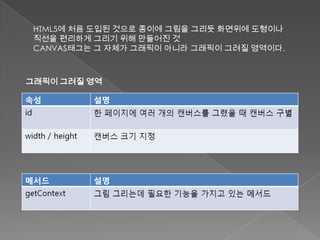
HTML5에 처음 도입된것으로 종이에 그림을 그리듯 화면위에 도형이나
직선을 편리하게 그리기 위해 만들어진 것
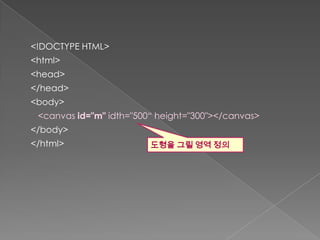
CANVAS태그는 그 자체가 그래픽이 아니라 그래픽이 그려질 영역이다.
그래픽이 그려질 영역
- 4.
- 5.
- 6.
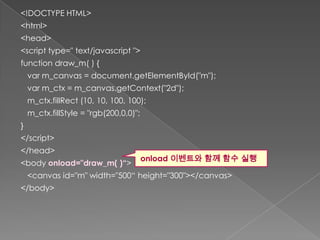
<!DOCTYPE HTML>
<html>
<head>
<script type="text/javascript ">
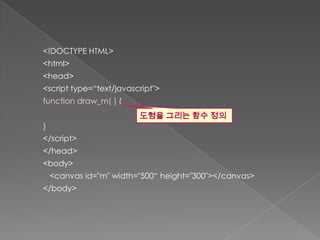
function draw_m( ) {
var m_canvas = document.getElementById("m");
var m_ctx = m_canvas.getContext("2d");
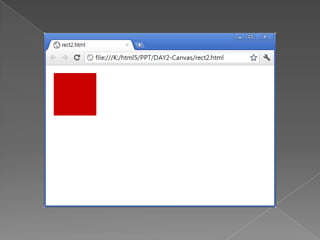
m_ctx.fillRect (10, 10, 100, 100);
m_ctx.fillStyle = "rgb(200,0,0)";
}
</script>
</head>
onload 이벤트와 함께 함수 실행
<body onload="draw_m( )“>
<canvas id="m" width="500“ height="300"></canvas>
</body>
- 8.
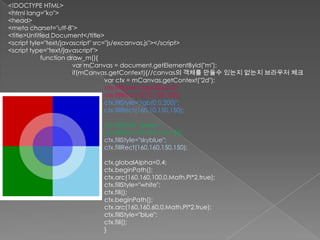
<!DOCTYPE HTML>
<html lang="ko">
<head>
<metacharset="utf-8">
<title>Untitled Document</title>
<script tyle="text/javascript" src="js/excanvas.js"></script>
<script type="text/javascript">
function draw_m(){
var mCanvas = document.getElementById("m");
if(mCanvas.getContext){//canvas의 객체를 만들수 있는지 없는지 브라우저 체크
var ctx = mCanvas.getContext("2d");
ctx.fillStyle="rgb(200,0,0)";
ctx.fillRect(10,10,150,150);
ctx.fillStyle="rgb(0,0,200)";
ctx.fillRect(160,10,150,150);
ctx.fillStyle="green";
ctx.fillRect(10,160,150,150);
ctx.fillStyle="skyblue";
ctx.fillRect(160,160,150,150);
ctx.globalAlpha=0.4;
ctx.beginPath();
ctx.arc(160,160,100,0,Math.PI*2,true);
ctx.fillStyle="white";
ctx.fill();
ctx.beginPath();
ctx.arc(160,160,60,0,Math.PI*2,true);
ctx.fillStyle="blue";
ctx.fill();
}
- 9.
• 구글에서 제공하는ExplorerCanvas 라이브러리를 사용한다.
• ExplorerCanvas 다운로드 :
http://code.google.com/p/explorercanvas/
사용법
<html>
<head>
<!--[if IE]>
<script type="text/javascript" src="excanvas.js"></script>
<![endif]-->
…
- 10.


![• 구글에서 제공하는 ExplorerCanvas 라이브러리를 사용한다.
• ExplorerCanvas 다운로드 :
http://code.google.com/p/explorercanvas/
사용법
<html>
<head>
<!--[if IE]>
<script type="text/javascript" src="excanvas.js"></script>
<![endif]-->
…](https://image.slidesharecdn.com/6-html5-130115184931-phpapp02/85/6-html5-9-320.jpg)