To run your small WordPress blog or a high traffic
WordPress installation, you need to optimize your
WordPress site.
In the current web scenario, more than 80% websites
are built on WordPress. When a website gets launched,
its optimization becomes an important concern for
every web developer for effective WordPress
Development.
How You Can Optimize Your WordPress Site?
There are a few steps for optimizing your
website given as:-
1) Using CDN(Content Delivery Network)
Each WordPress website is hosted in a data center
anywhere in the world. If your site’s visitor location is far
from the data center then it will automatically increase
the loading time of your site page. But CDN resolves this
issue by utilizing a large number of data centers in the
world.
2) Enable Browser Caching
Browser caching if enabled allows internet users to
speed up the loading time of their favorite websites by
storing a cached copy of your website locally. This
reduces repeated calls to the server and thus saves a
user from downloading the same file again.
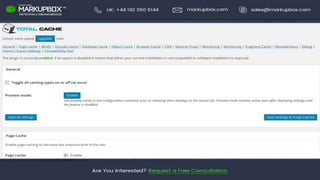
3) Properly install cache plugin
Installing a cache plugin to your WordPress site makes
your site faster. For this, you can install W3 Total Cache
or WP Super Cache or WP Fastest cache. Cache plugins
publish static HTML files rather than dynamic files. It
reduces server access for static resources, MySQL
database access, HTTP requests and a no. of PHP requests.
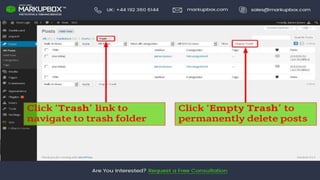
4) Empty Trash system
Whenever a piece of content(comment, page, media, post)
is deleted from the WordPress, it is sent to trash system.
From here only, the content can be restored or deleted
permanently.
Read More :- Optimize Your WordPress Site?
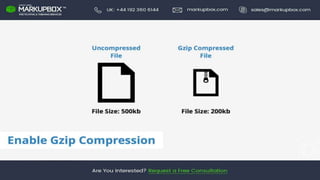
5) Enable the Gzip Compression
Enable compression via .htaccess. For most people
reading this, compression is enabled by adding some
code to a file called .htaccess on their web host/server.
Website gzip compression makes it possible to reduce the
file size of a web file (like HTML, PHP, CSS and Javascript
files) to about 30% or less of its original size before these
files get sent to the browser of a user.
sales@markupbox.com
markupbox.com
www.markupbox.com
+44 192 360 6144
+1 404 857 1565
Facebook Twitter Linkedin

5 Ways to Optimize Your WordPress Site

  • 2.
    To run yoursmall WordPress blog or a high traffic WordPress installation, you need to optimize your WordPress site. In the current web scenario, more than 80% websites are built on WordPress. When a website gets launched, its optimization becomes an important concern for every web developer for effective WordPress Development.
  • 4.
    How You CanOptimize Your WordPress Site? There are a few steps for optimizing your website given as:-
  • 5.
    1) Using CDN(ContentDelivery Network) Each WordPress website is hosted in a data center anywhere in the world. If your site’s visitor location is far from the data center then it will automatically increase the loading time of your site page. But CDN resolves this issue by utilizing a large number of data centers in the world.
  • 7.
    2) Enable BrowserCaching Browser caching if enabled allows internet users to speed up the loading time of their favorite websites by storing a cached copy of your website locally. This reduces repeated calls to the server and thus saves a user from downloading the same file again.
  • 9.
    3) Properly installcache plugin Installing a cache plugin to your WordPress site makes your site faster. For this, you can install W3 Total Cache or WP Super Cache or WP Fastest cache. Cache plugins publish static HTML files rather than dynamic files. It reduces server access for static resources, MySQL database access, HTTP requests and a no. of PHP requests.
  • 11.
    4) Empty Trashsystem Whenever a piece of content(comment, page, media, post) is deleted from the WordPress, it is sent to trash system. From here only, the content can be restored or deleted permanently. Read More :- Optimize Your WordPress Site?
  • 13.
    5) Enable theGzip Compression Enable compression via .htaccess. For most people reading this, compression is enabled by adding some code to a file called .htaccess on their web host/server. Website gzip compression makes it possible to reduce the file size of a web file (like HTML, PHP, CSS and Javascript files) to about 30% or less of its original size before these files get sent to the browser of a user.
  • 16.
    sales@markupbox.com markupbox.com www.markupbox.com +44 192 3606144 +1 404 857 1565 Facebook Twitter Linkedin