Bibexcel
Step by Step Guide
by Ravindra Bankar
Shivaji University Kolhapur
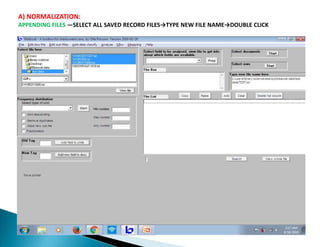
A) NORMALIZATION:
APPENDING FILES —SELECT ALL SAVED RECORD FILES→TYPE NEW FILE NAME→DOUBLE CLICK
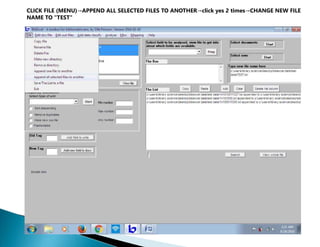
CLICK FILE (MENU)→APPEND ALL SELECTED FILES TO ANOTHER→click yes 2 times→CHANGE NEW FILE
NAME TO "TEST"
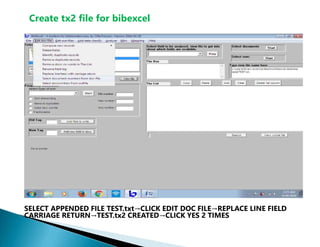
Create tx2 file for bibexcel
SELECT APPENDED FILE TEST.txt→CLICK EDIT DOC FILE→REPLACE LINE FIELD
CARRIAGE RETURN→TEST.tx2 CREATED→CLICK YES 2 TIMES
B)ANALYSIS:
CREATE NEW FOLDER ON DESKTOP WITH NAME BIBEXCEL→
OPEN IT AND CREATE FOLDERS NAMELY—
1. PUB YEAR
2. PUB PLACE
3. AUTH PATTERN
4. AUTH PRODUCTIVITY 5.ID FIELD
6. COUNTRY COLLAB
7. CO-AUTH PATTERN
8. H_INDEX
PASTE TEST.txt and TEST.tx2 FILES IN EVERY FOLDER.
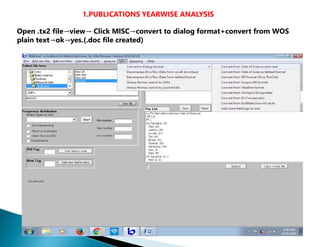
1.PUBLICATIONS YEARWISE ANALYSIS
Open .tx2 file→view→ Click MlSC→convert to dialog format+convert from WOS
plain text→ok→yes.(.doc file created)
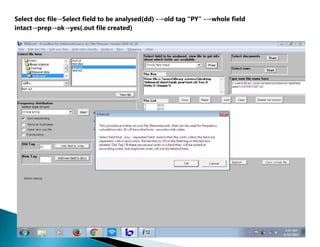
Select doc file→Select field to be analysed(dd) -→old tag "PY" -→whole field
intact→prep→ok→yes(.out file created)
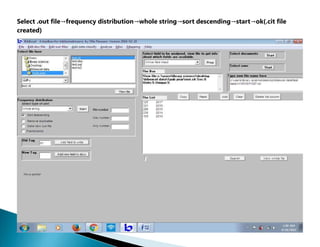
Select .out file→frequency distribution→whole string→sort descending→start→ok(.cit file
created)
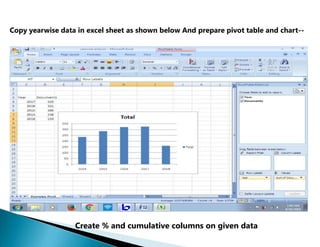
Copy yearwise data in excel sheet as shown below And prepare pivot table and chart--
Create % and cumulative columns on given data
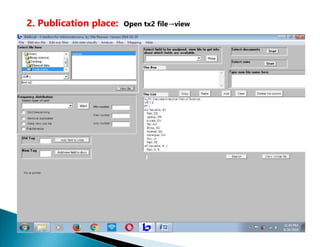
2. Publication place: Open tx2 file→view
BibExcel - Atoolboxfor bibliometriciani
Paste
Select type of unit
AU- Navathe GJ; Patil DS; Jadhav PR; Aw ale DV; Teli AM; Bhise SC; Kolekar SS; Karanjkar MM; Kim JH; Patil PS|
AF- Navathe G. J; Patil, D. S; Jadhav, P. R; Awale, D. V; Teli, A. M; Bhise, S. C; Kolekar, S. S; Karanjkar, M. M; Kim, J. H; F Tl- Rapid synthesis of
nanostructured copper oxide for electrochemical supercapacitor based on novel [HPMIM][CI] ionii SO- JOURNAL OF ELECTRO ANALYTICAL
CHEMISTRY]
LA- English)
DT-Article!
DE- Copper Oxide; Hydrothermal; Supercapacitor; Ionic liquidl
ID-ELECTRODE MATERIALS; MANGANESE OXIDE; PERFORMANCE; FILMS; CUO; NANO PARTICLES; GRAPHENE!
AB- Nanostructured Copper Oxide (CuO) thin films were rapidly' deposited on stainless steel substrates by hydrotherm C1- [Navathe, G. J.; Patil, D.
S.; Jadhav, P. R.; Teli, A. M.; Patil, P. S.J Shivaji Univ, Dept Phys, Thin Film Mat Lab, Kolhapur* RP- Patil, PS (reprint author}, Shivaji Univ, Dept
Phys, Thin Film Mat Lab, Kolhapur 416004, MS, India!
EM- jinhyeok@chonnam.ac.kr; patilps_2000@yahoo.com(
01- Kolekar, Sanjay→C 00 0-0 002-4367-6014!
FU- CSIR, New Delhi [03→(1240)→12→EMR-ll]; Department of Science and Technology (DST) New Delhi (INDIA); Human Re
Min number
|” Sort descending | Remove
duplicates | Make new out-file
|” Fractionalize
Add field to units
Search View whole file
Move pointer
Misc -→convert to dialog format+from WOS plain text.(click yes 2 times)
.doc file created.
The List
Frequency distribution
PT- J|
3 Start
□ Id Tag
New Tag
→ P
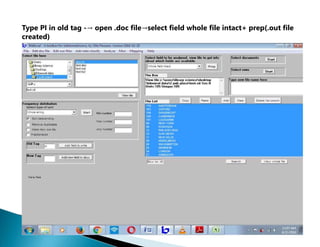
Type PI in old tag -→ open .doc file→select field whole file intact+ prep(.out file
created)
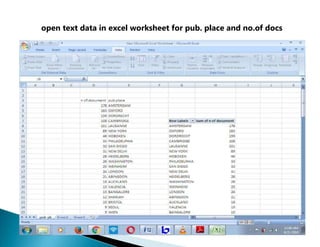
open text data in excel worksheet for pub. place and no.of docs
3. AUTHORSHIP PATTERN
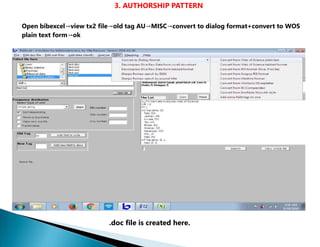
Open bibexcel→view tx2 file→old tag AU→MISC→convert to dialog format+convert to WOS
plain text form→ok
.doc file is created here.
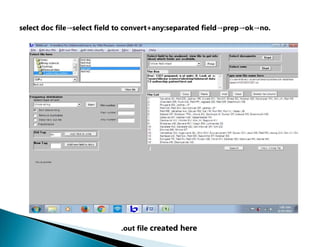
select doc file→select field to convert+any:separated field→prep→ok→no.
.out file created here
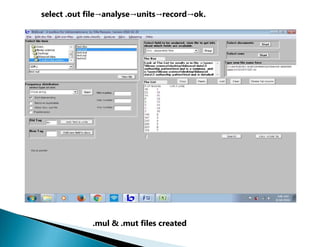
select .out file→analyse→units→record→ok.
.mul & .mut files created
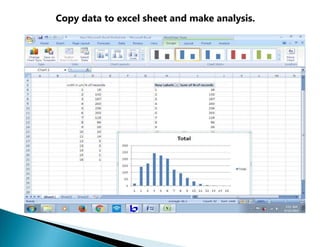
Copy data to excel sheet and make analysis.
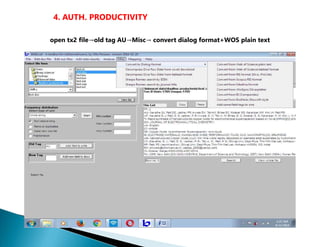
4. AUTH. PRODUCTIVITY
open tx2 file→old tag AU→Misc→ convert dialog format+WOS plain text
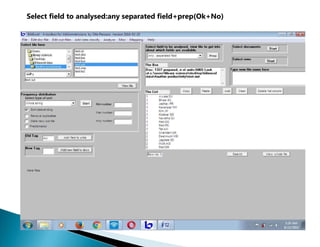
Select field to analysed:any separated field+prep(Ok+No)
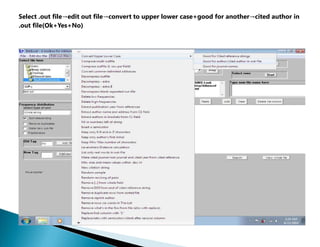
Select .out file→edit out file→convert to upper lower case+good for another→cited author in
.out file(Ok+Yes+No)
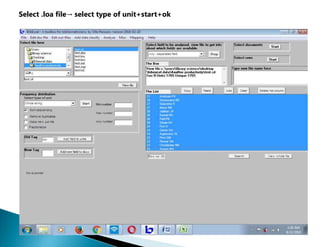
Select .loa file→ select type of unit+start+ok
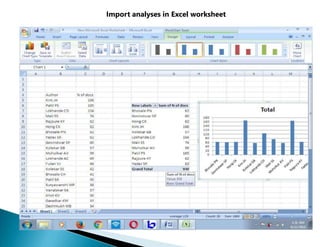
Import analyses in Excel worksheet
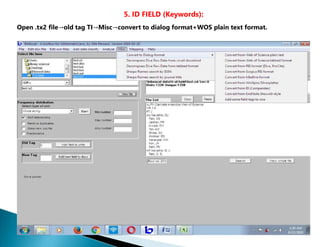
5. ID FIELD (Keywords):
Open .tx2 file→old tag TI→Misc→convert to dialog format+WOS plain text format.
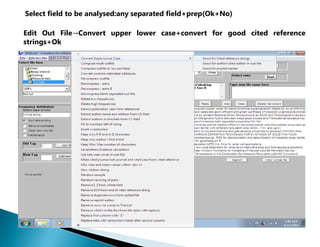
Select field to be analysed:any separated field+prep(Ok+No)
Edit Out File→Convert upper lower case+convert for good cited reference
strings+Ok
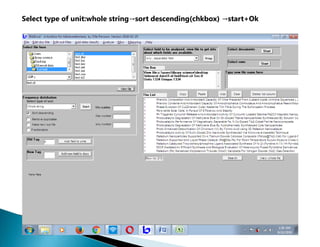
Select type of unit:whole string→sort descending(chkbox) →start+Ok
Ss - Pi?
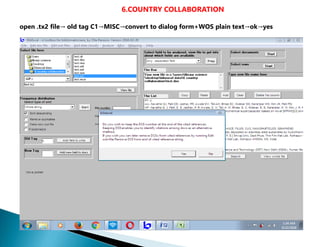
6.COUNTRY COLLABORATION
open .tx2 file→ old tag C1→MISC→convert to dialog form+WOS plain text→ok→yes
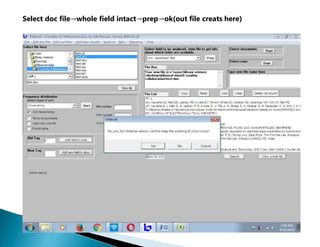
Select doc file→whole field intact→prep→ok(out file creats here)
Select .out file→edit out file+ remove[..] from whole field→OK→Yes(.wcm file
created)
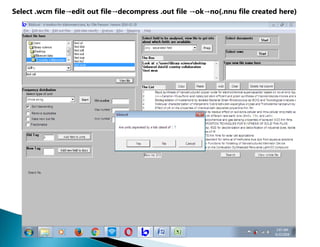
Select .wcm file→edit out file→decompress .out file →ok→no(.nnu file created here)
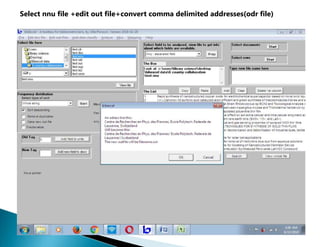
Select nnu file +edit out file+convert comma delimited addresses(odr file)
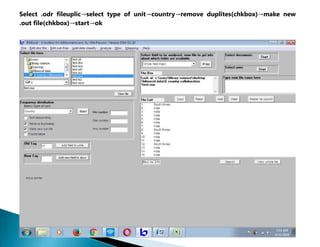
Select .odr fileuplic→select type of unit→country→remove duplites(chkbox)→make new
.out file(chkbox)→start→ok
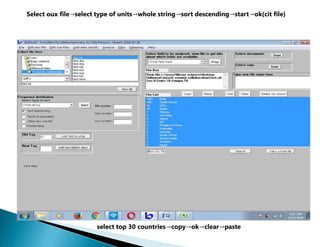
Select oux file→select type of units→whole string→sort descending→start→ok(cit file)
select top 30 countries→copy→ok→clear→paste
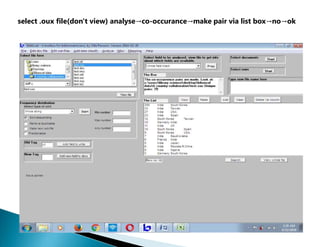
select .oux file(don't view) analyse→co-occurance→make pair via list box→no→ok
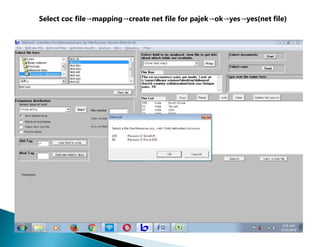
Select coc file→mapping→create net file for pajek→ok→yes→yes(net file)
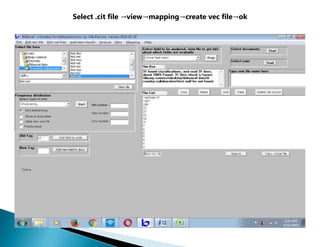
Select .cit file →view→mapping→create vec file→ok
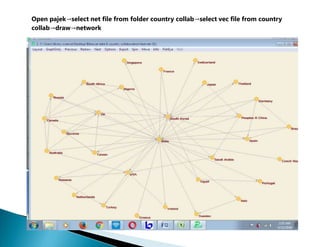
Open pajek→select net file from folder country collab→select vec file from country
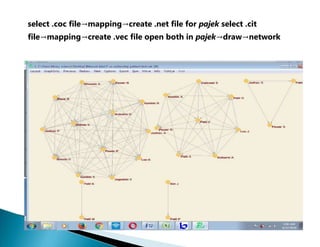
collab→draw→network
7.CO-AUTHORSHIP PATTERN
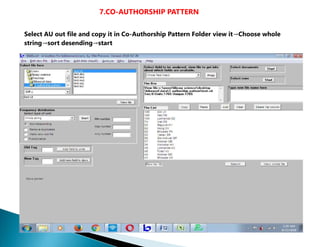
Select AU out file and copy it in Co-Authorship Pattern Folder view it→Choose whole
string→sort desending→start
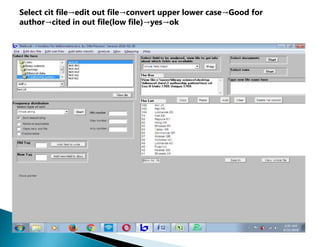
Select cit file→edit out file→convert upper lower case→Good for
author→cited in out file(low file)→yes→ok
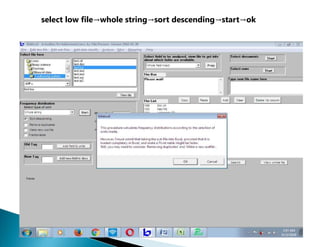
select low file→whole string→sort descending→start→ok
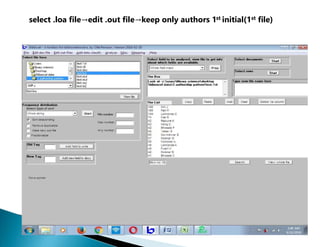
select .loa file→edit .out file→keep only authors 1st initial(1st file)
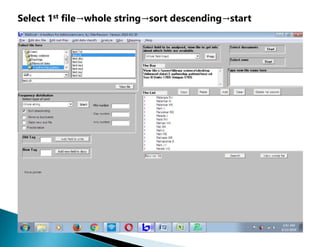
Select 1st file→whole string→sort descending→start
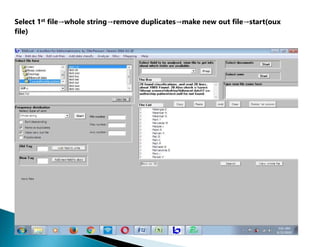
Select 1st file→whole string→remove duplicates→make new out file→start(oux
file)
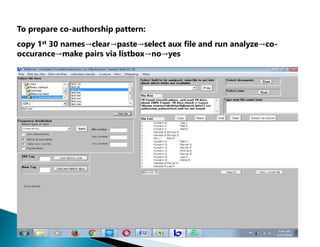
To prepare co-authorship pattern:
copy 1st 30 names→clear→paste→select aux file and run analyze→co-
occurance→make pairs via listbox→no→yes
select .coc file→mapping→create .net file for pajek select .cit
file→mapping→create .vec file open both in pajek→draw→network
8.H-INDEX
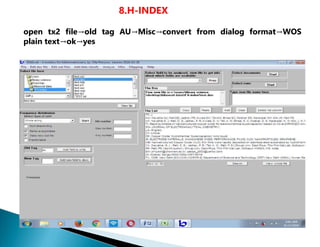
open tx2 file→old tag AU→Misc→convert from dialog format→WOS
plain text→ok→yes
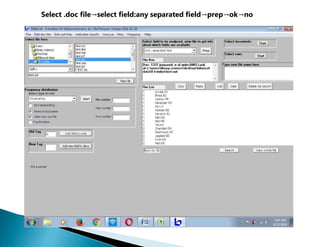
Select .doc file→select field:any separated field→prep→ok→no
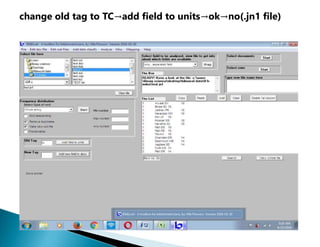
change old tag to TC→add field to units→ok→no(.jn1 file)
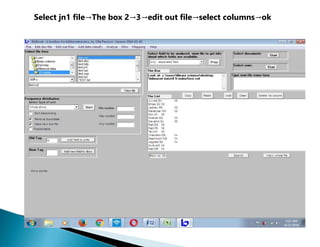
Select jn1 file→The box 2→3→edit out file→select columns→ok
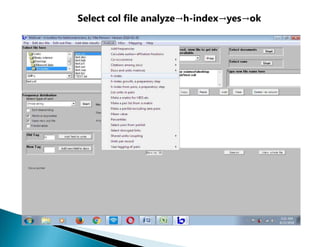
Select col file analyze→h-index→yes→ok
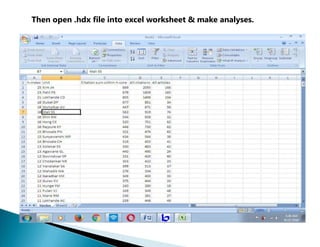
Then open .hdx file into excel worksheet & make analyses.
THANK YOU

2_bibexcel.ppt

  • 1.
    Bibexcel Step by StepGuide by Ravindra Bankar Shivaji University Kolhapur
  • 2.
    A) NORMALIZATION: APPENDING FILES—SELECT ALL SAVED RECORD FILES→TYPE NEW FILE NAME→DOUBLE CLICK
  • 3.
    CLICK FILE (MENU)→APPENDALL SELECTED FILES TO ANOTHER→click yes 2 times→CHANGE NEW FILE NAME TO "TEST"
  • 4.
    Create tx2 filefor bibexcel SELECT APPENDED FILE TEST.txt→CLICK EDIT DOC FILE→REPLACE LINE FIELD CARRIAGE RETURN→TEST.tx2 CREATED→CLICK YES 2 TIMES
  • 5.
    B)ANALYSIS: CREATE NEW FOLDERON DESKTOP WITH NAME BIBEXCEL→ OPEN IT AND CREATE FOLDERS NAMELY— 1. PUB YEAR 2. PUB PLACE 3. AUTH PATTERN 4. AUTH PRODUCTIVITY 5.ID FIELD 6. COUNTRY COLLAB 7. CO-AUTH PATTERN 8. H_INDEX PASTE TEST.txt and TEST.tx2 FILES IN EVERY FOLDER.
  • 6.
    1.PUBLICATIONS YEARWISE ANALYSIS Open.tx2 file→view→ Click MlSC→convert to dialog format+convert from WOS plain text→ok→yes.(.doc file created)
  • 7.
    Select doc file→Selectfield to be analysed(dd) -→old tag "PY" -→whole field intact→prep→ok→yes(.out file created)
  • 8.
    Select .out file→frequencydistribution→whole string→sort descending→start→ok(.cit file created)
  • 9.
    Copy yearwise datain excel sheet as shown below And prepare pivot table and chart-- Create % and cumulative columns on given data
  • 10.
    2. Publication place:Open tx2 file→view
  • 11.
    BibExcel - Atoolboxforbibliometriciani Paste Select type of unit AU- Navathe GJ; Patil DS; Jadhav PR; Aw ale DV; Teli AM; Bhise SC; Kolekar SS; Karanjkar MM; Kim JH; Patil PS| AF- Navathe G. J; Patil, D. S; Jadhav, P. R; Awale, D. V; Teli, A. M; Bhise, S. C; Kolekar, S. S; Karanjkar, M. M; Kim, J. H; F Tl- Rapid synthesis of nanostructured copper oxide for electrochemical supercapacitor based on novel [HPMIM][CI] ionii SO- JOURNAL OF ELECTRO ANALYTICAL CHEMISTRY] LA- English) DT-Article! DE- Copper Oxide; Hydrothermal; Supercapacitor; Ionic liquidl ID-ELECTRODE MATERIALS; MANGANESE OXIDE; PERFORMANCE; FILMS; CUO; NANO PARTICLES; GRAPHENE! AB- Nanostructured Copper Oxide (CuO) thin films were rapidly' deposited on stainless steel substrates by hydrotherm C1- [Navathe, G. J.; Patil, D. S.; Jadhav, P. R.; Teli, A. M.; Patil, P. S.J Shivaji Univ, Dept Phys, Thin Film Mat Lab, Kolhapur* RP- Patil, PS (reprint author}, Shivaji Univ, Dept Phys, Thin Film Mat Lab, Kolhapur 416004, MS, India! EM- jinhyeok@chonnam.ac.kr; patilps_2000@yahoo.com( 01- Kolekar, Sanjay→C 00 0-0 002-4367-6014! FU- CSIR, New Delhi [03→(1240)→12→EMR-ll]; Department of Science and Technology (DST) New Delhi (INDIA); Human Re Min number |” Sort descending | Remove duplicates | Make new out-file |” Fractionalize Add field to units Search View whole file Move pointer Misc -→convert to dialog format+from WOS plain text.(click yes 2 times) .doc file created. The List Frequency distribution PT- J| 3 Start □ Id Tag New Tag → P
  • 12.
    Type PI inold tag -→ open .doc file→select field whole file intact+ prep(.out file created)
  • 13.
    open text datain excel worksheet for pub. place and no.of docs
  • 14.
    3. AUTHORSHIP PATTERN Openbibexcel→view tx2 file→old tag AU→MISC→convert to dialog format+convert to WOS plain text form→ok .doc file is created here.
  • 15.
    select doc file→selectfield to convert+any:separated field→prep→ok→no. .out file created here
  • 16.
  • 17.
    Copy data toexcel sheet and make analysis.
  • 18.
    4. AUTH. PRODUCTIVITY opentx2 file→old tag AU→Misc→ convert dialog format+WOS plain text
  • 19.
    Select field toanalysed:any separated field+prep(Ok+No)
  • 20.
    Select .out file→editout file→convert to upper lower case+good for another→cited author in .out file(Ok+Yes+No)
  • 21.
    Select .loa file→select type of unit+start+ok
  • 22.
    Import analyses inExcel worksheet
  • 23.
    5. ID FIELD(Keywords): Open .tx2 file→old tag TI→Misc→convert to dialog format+WOS plain text format.
  • 24.
    Select field tobe analysed:any separated field+prep(Ok+No) Edit Out File→Convert upper lower case+convert for good cited reference strings+Ok
  • 25.
    Select type ofunit:whole string→sort descending(chkbox) →start+Ok Ss - Pi?
  • 26.
    6.COUNTRY COLLABORATION open .tx2file→ old tag C1→MISC→convert to dialog form+WOS plain text→ok→yes
  • 27.
    Select doc file→wholefield intact→prep→ok(out file creats here)
  • 28.
    Select .out file→editout file+ remove[..] from whole field→OK→Yes(.wcm file created)
  • 29.
    Select .wcm file→editout file→decompress .out file →ok→no(.nnu file created here)
  • 30.
    Select nnu file+edit out file+convert comma delimited addresses(odr file)
  • 31.
    Select .odr fileuplic→selecttype of unit→country→remove duplites(chkbox)→make new .out file(chkbox)→start→ok
  • 32.
    Select oux file→selecttype of units→whole string→sort descending→start→ok(cit file) select top 30 countries→copy→ok→clear→paste
  • 33.
    select .oux file(don'tview) analyse→co-occurance→make pair via list box→no→ok
  • 34.
    Select coc file→mapping→createnet file for pajek→ok→yes→yes(net file)
  • 35.
    Select .cit file→view→mapping→create vec file→ok
  • 36.
    Open pajek→select netfile from folder country collab→select vec file from country collab→draw→network
  • 37.
    7.CO-AUTHORSHIP PATTERN Select AUout file and copy it in Co-Authorship Pattern Folder view it→Choose whole string→sort desending→start
  • 38.
    Select cit file→editout file→convert upper lower case→Good for author→cited in out file(low file)→yes→ok
  • 39.
    select low file→wholestring→sort descending→start→ok
  • 40.
    select .loa file→edit.out file→keep only authors 1st initial(1st file)
  • 41.
    Select 1st file→wholestring→sort descending→start
  • 42.
    Select 1st file→wholestring→remove duplicates→make new out file→start(oux file)
  • 43.
    To prepare co-authorshippattern: copy 1st 30 names→clear→paste→select aux file and run analyze→co- occurance→make pairs via listbox→no→yes
  • 44.
    select .coc file→mapping→create.net file for pajek select .cit file→mapping→create .vec file open both in pajek→draw→network
  • 45.
    8.H-INDEX open tx2 file→oldtag AU→Misc→convert from dialog format→WOS plain text→ok→yes
  • 46.
    Select .doc file→selectfield:any separated field→prep→ok→no
  • 47.
    change old tagto TC→add field to units→ok→no(.jn1 file)
  • 48.
    Select jn1 file→Thebox 2→3→edit out file→select columns→ok
  • 49.
    Select col fileanalyze→h-index→yes→ok
  • 50.
    Then open .hdxfile into excel worksheet & make analyses.
  • 51.