Eclipse Plug-ins
and RCP
Training Course
Standard Widgets Toolkit
JFace
1
October 2013Copyright © 2013 Luca D’Onofrio – RCP Solutions
1. SWT Overview
a) Understanding Layouts
b) Events and Listeners
∗ Life-Cycle
a) Containers and Widgets
∗ Simple Widgets
∗ Complex Widgets
a) Class Hierarchy
b) Fonts, Colors, Images
c) SWT Style Bits
Agenda
2
October 2013Copyright © 2013 Luca D’Onofrio – RCP Solutions
∗ SWT is an open source widget toolkit for Java, designed to
provide efficient, portable access to the user-interface facilities
of the operating systems on which it is implemented.
∗ It abstracts the OS rendering implementation.
SWT Overview
3
October 2013Copyright © 2013 Luca D’Onofrio – RCP Solutions
∗ Layouts gives your windows a specific look, controlling the position and size of
childrens and how childrens adapt to their parent
Understanding Layouts
4
∗ Standard Layouts
∗ FillLayout lays out equal-sized
widgets in a single row or column
∗ RowLayout lays out widgets in a row
or rows, with fill, wrap, and spacing
options
∗ GridLayout lays out widgets in a grid
∗ FormLayout lays out widgets by
creating attachments for each of
their sides
October 2013Copyright © 2013 Luca D’Onofrio – RCP Solutions
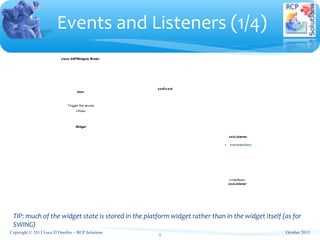
Events and Listeners (1/4)
5
TIP: much of the widget state is stored in the platform widget rather than in the widget itself (as for
SWING)
class SWTWidgets Model
User
Widget
xxxEv ent
xxxListener
+ eventHandler()
«interface»
xxxListener
Trigger the source
«flow»
October 2013Copyright © 2013 Luca D’Onofrio – RCP Solutions
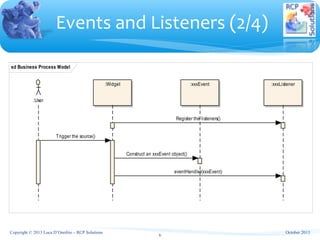
Events and Listeners (2/4)
6
sd Business Process Model
:User
:Widget :xxxEvent :xxxListener
Register the listeners()
Trigger the source()
Construct an xxxEvent object()
eventHandler(xxxEvent)
October 2013Copyright © 2013 Luca D’Onofrio – RCP Solutions
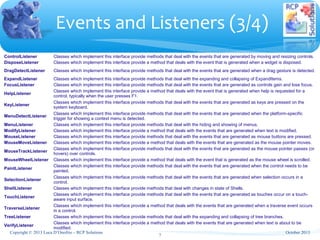
ControlListener Classes which implement this interface provide methods that deal with the events that are generated by moving and resizing controls.
DisposeListener Classes which implement this interface provide a method that deals with the event that is generated when a widget is disposed.
DragDetectListener Classes which implement this interface provide methods that deal with the events that are generated when a drag gesture is detected.
ExpandListener Classes which implement this interface provide methods that deal with the expanding and collapsing of ExpandItems.
FocusListener Classes which implement this interface provide methods that deal with the events that are generated as controls gain and lose focus.
HelpListener
Classes which implement this interface provide a method that deals with the event that is generated when help is requested for a
control, typically when the user presses F1.
KeyListener
Classes which implement this interface provide methods that deal with the events that are generated as keys are pressed on the
system keyboard.
MenuDetectListener
Classes which implement this interface provide methods that deal with the events that are generated when the platform-specific
trigger for showing a context menu is detected.
MenuListener Classes which implement this interface provide methods that deal with the hiding and showing of menus.
ModifyListener Classes which implement this interface provide a method that deals with the events that are generated when text is modified.
MouseListener Classes which implement this interface provide methods that deal with the events that are generated as mouse buttons are pressed.
MouseMoveListener Classes which implement this interface provide a method that deals with the events that are generated as the mouse pointer moves.
MouseTrackListener
Classes which implement this interface provide methods that deal with the events that are generated as the mouse pointer passes (or
hovers) over controls.
MouseWheelListener Classes which implement this interface provide a method that deals with the event that is generated as the mouse wheel is scrolled.
PaintListener
Classes which implement this interface provide methods that deal with the events that are generated when the control needs to be
painted.
SelectionListener
Classes which implement this interface provide methods that deal with the events that are generated when selection occurs in a
control.
ShellListener Classes which implement this interface provide methods that deal with changes in state of Shells.
TouchListener
Classes which implement this interface provide methods that deal with the events that are generated as touches occur on a touch-
aware input surface.
TraverseListener
Classes which implement this interface provide a method that deals with the events that are generated when a traverse event occurs
in a control.
TreeListener Classes which implement this interface provide methods that deal with the expanding and collapsing of tree branches.
VerifyListener
Classes which implement this interface provide a method that deals with the events that are generated when text is about to be
modified.
Events and Listeners (3/4)
7
October 2013Copyright © 2013 Luca D’Onofrio – RCP Solutions
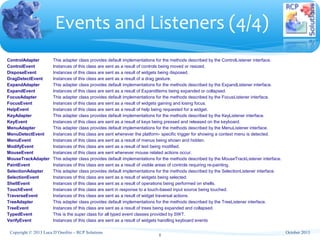
ControlAdapter This adapter class provides default implementations for the methods described by the ControlListener interface.
ControlEvent Instances of this class are sent as a result of controls being moved or resized.
DisposeEvent Instances of this class are sent as a result of widgets being disposed.
DragDetectEvent Instances of this class are sent as a result of a drag gesture.
ExpandAdapter This adapter class provides default implementations for the methods described by the ExpandListener interface.
ExpandEvent Instances of this class are sent as a result of ExpandItems being expanded or collapsed.
FocusAdapter This adapter class provides default implementations for the methods described by the FocusListener interface.
FocusEvent Instances of this class are sent as a result of widgets gaining and losing focus.
HelpEvent Instances of this class are sent as a result of help being requested for a widget.
KeyAdapter This adapter class provides default implementations for the methods described by the KeyListener interface.
KeyEvent Instances of this class are sent as a result of keys being pressed and released on the keyboard.
MenuAdapter This adapter class provides default implementations for the methods described by the MenuListener interface.
MenuDetectEvent Instances of this class are sent whenever the platform- specific trigger for showing a context menu is detected.
MenuEvent Instances of this class are sent as a result of menus being shown and hidden.
ModifyEvent Instances of this class are sent as a result of text being modified.
MouseEvent Instances of this class are sent whenever mouse related actions occur.
MouseTrackAdapter This adapter class provides default implementations for the methods described by the MouseTrackListener interface.
PaintEvent Instances of this class are sent as a result of visible areas of controls requiring re-painting.
SelectionAdapter This adapter class provides default implementations for the methods described by the SelectionListener interface.
SelectionEvent Instances of this class are sent as a result of widgets being selected.
ShellEvent Instances of this class are sent as a result of operations being performed on shells.
TouchEvent Instances of this class are sent in response to a touch-based input source being touched.
TraverseEvent Instances of this class are sent as a result of widget traversal actions.
TreeAdapter This adapter class provides default implementations for the methods described by the TreeListener interface.
TreeEvent Instances of this class are sent as a result of trees being expanded and collapsed.
TypedEvent This is the super class for all typed event classes provided by SWT.
VerifyEvent Instances of this class are sent as a result of widgets handling keyboard events
Events and Listeners (4/4)
8
October 2013Copyright © 2013 Luca D’Onofrio – RCP Solutions
∗ Display
∗ Instances of this class are responsible for managing the connection between SWT and the
underlying operating system.
∗ Their most important function is to implement the SWT event loop in terms of the platform
event model.
∗ They also provide various methods for accessing information about the operating system,
and have overall control over the operating system resources which SWT allocates.
∗ Shell
∗ Represent the "windows" which the desktop or is managing.
∗ Composite and Scrolled Composite
∗ Represent controls which are capable of containing other controls.
∗ A ScrolledComposite provides scrollbars and will scroll its
content when the user uses the scrollbars.
Containers (1/2)
9
October 2013Copyright © 2013 Luca D’Onofrio – RCP Solutions
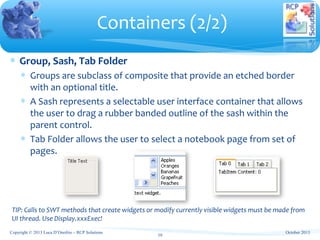
∗ Group, Sash, Tab Folder
∗ Groups are subclass of composite that provide an etched border
with an optional title.
∗ A Sash represents a selectable user interface container that allows
the user to drag a rubber banded outline of the sash within the
parent control.
∗ Tab Folder allows the user to select a notebook page from set of
pages.
Containers (2/2)
10
TIP: Calls to SWT methods that create widgets or modify currently visible widgets must be made from
UI thread. Use Display.xxxExec!
October 2013Copyright © 2013 Luca D’Onofrio – RCP Solutions
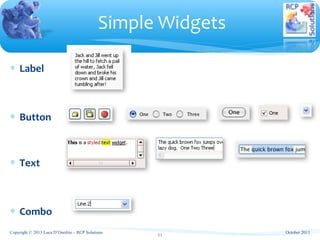
∗ Label
∗ Button
∗ Text
∗ Combo
Simple Widgets
11
October 2013Copyright © 2013 Luca D’Onofrio – RCP Solutions
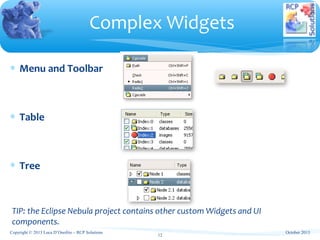
∗ Menu and Toolbar
∗ Table
∗ Tree
Complex Widgets
12
TIP: the Eclipse Nebula project contains other custom Widgets and UI
components.
October 2013Copyright © 2013 Luca D’Onofrio – RCP Solutions
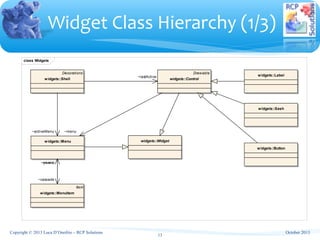
class Widgets
widgets::Button
Drawable
widgets::Control
widgets::Label
widgets::Menu
Item
widgets::MenuItem
widgets::Widget
Decorations
widgets::Shell
widgets::Sash
~menu
~parent~menu
~cascade
~lastActive
~activeMenu
Widget Class Hierarchy (1/3)
13
October 2013Copyright © 2013 Luca D’Onofrio – RCP Solutions
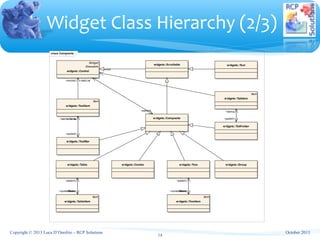
class Composite
widgets::Combo
widgets::Composite
Widget
Drawable
widgets::Control
widgets::Group
Item
widgets::TreeItem
widgets::TabFolder
Item
widgets::TabItem
widgets::Table
Item
widgets::TableItem
widgets::Text
Item
widgets::ToolItem
widgets::Tree
widgets::ToolBar
widgets::Scrollable
~items~parent
~tabList
~items
~items~currentItem
~parent
~control
~tabItemList
~parent~parent
~items~currentItem
~parent
~control
Widget Class Hierarchy (2/3)
14
October 2013Copyright © 2013 Luca D’Onofrio – RCP Solutions
Main Methods
 void addListener(int eventType, Listener listener) 
          Adds the listener to the collection of listeners who will be notified when an event of the given type occurs.
 void dispose() 
          Disposes of the operating system resources associated with the receiver and all its descendants.
 Object getData(String key) 
          Returns the application defined property of the receiver with the specified name, or null if it has not been set.
 Display getDisplay() 
          Returns the Display that is associated with the receiver.
 Listener[] getListeners(int eventType) 
          Returns an array of listeners who will be notified when an event of the given type occurs.
 int getStyle() 
          Returns the receiver's style information.
 boolean isDisposed() 
          Returns true if the widget has been disposed, and false otherwise.
 boolean isListening(int eventType) 
          Returns true if there are any listeners for the specified event type associated with the receiver, and false otherwise.
 void notifyListeners(int eventType, Event event) 
          Notifies all of the receiver's listeners for events of the given type that one such event has occurred by invoking their 
handleEvent() method.
 void removeListener(int eventType, Listener listener) 
          Removes the listener from the collection of listeners who will be notified when an event of the given type occurs.
protected 
 void
removeListener(int eventType, org.eclipse.swt.internal.SWTEventListener listener) 
          Removes the listener from the collection of listeners who will be notified when an event of the given type occurs.
 void setData(Object data) 
          Sets the application defined widget data associated with the receiver to be the argument.
 void setData(String key, Object value) 
          Sets the application defined property of the receiver with the specified name to the given value.
Widget Class Hierarchy (3/3)
15
October 2013Copyright © 2013 Luca D’Onofrio – RCP Solutions
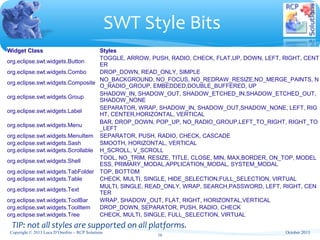
Widget Class Styles
org.eclipse.swt.widgets.Button
TOGGLE, ARROW, PUSH, RADIO, CHECK, FLAT,UP, DOWN, LEFT, RIGHT, CENT
ER
org.eclipse.swt.widgets.Combo DROP_DOWN, READ_ONLY, SIMPLE
org.eclipse.swt.widgets.Composite
NO_BACKGROUND, NO_FOCUS, NO_REDRAW_RESIZE,NO_MERGE_PAINTS, N
O_RADIO_GROUP, EMBEDDED,DOUBLE_BUFFERED, UP
org.eclipse.swt.widgets.Group
SHADOW_IN, SHADOW_OUT, SHADOW_ETCHED_IN,SHADOW_ETCHED_OUT, 
SHADOW_NONE
org.eclipse.swt.widgets.Label
SEPARATOR, WRAP, SHADOW_IN, SHADOW_OUT,SHADOW_NONE, LEFT, RIG
HT, CENTER,HORIZONTAL, VERTICAL
org.eclipse.swt.widgets.Menu
BAR, DROP_DOWN, POP_UP, NO_RADIO_GROUP,LEFT_TO_RIGHT, RIGHT_TO
_LEFT
org.eclipse.swt.widgets.MenuItem SEPARATOR, PUSH, RADIO, CHECK, CASCADE
org.eclipse.swt.widgets.Sash SMOOTH, HORIZONTAL, VERTICAL
org.eclipse.swt.widgets.Scrollable H_SCROLL, V_SCROLL
org.eclipse.swt.widgets.Shell
TOOL, NO_TRIM, RESIZE, TITLE, CLOSE, MIN, MAX,BORDER, ON_TOP, MODEL
ESS, PRIMARY_MODAL,APPLICATION_MODAL, SYSTEM_MODAL
org.eclipse.swt.widgets.TabFolder TOP, BOTTOM
org.eclipse.swt.widgets.Table CHECK, MULTI, SINGLE, HIDE_SELECTION,FULL_SELECTION, VIRTUAL
org.eclipse.swt.widgets.Text
MULTI, SINGLE, READ_ONLY, WRAP, SEARCH,PASSWORD, LEFT, RIGHT, CEN
TER
org.eclipse.swt.widgets.ToolBar WRAP, SHADOW_OUT, FLAT, RIGHT, HORIZONTAL,VERTICAL
org.eclipse.swt.widgets.ToolItem DROP_DOWN, SEPARATOR, PUSH, RADIO, CHECK
org.eclipse.swt.widgets.Tree CHECK, MULTI, SINGLE, FULL_SELECTION, VIRTUAL
SWT Style Bits
16
TIP: not all styles are supported on all platforms.
October 2013Copyright © 2013 Luca D’Onofrio – RCP Solutions
∗ Fonts:
∗ manage operating system resources that define how text looks when it is
displayed. Fonts may be constructed by providing a device and either name, size
and style information or a FontData object which encapsulates this data.
∗ Colors:
∗ manage the operating system resources that implement SWT's RGB color model.
To create a color you can either specify the individual color components as
integers in the range 0 to 255 or provide an instance of an RGB.
∗ Images:
∗ graphics which have been prepared for display on a specific device.
∗ If loaded from a file format that supports it, an Image may have transparency.
∗ Images can be also created using SWT Canvas and GC
∗ Supported formats: GIF, JPG, PNG, BMP (Windows) and ICO (Windows)
TIP: these resources should be managed by a resource manager that creates them once and
destroy them when the application exits.
Fonts, Colors, Images
17
October 2013Copyright © 2013 Luca D’Onofrio – RCP Solutions
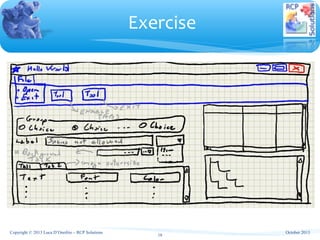
Exercise
18
October 2013Copyright © 2013 Luca D’Onofrio – RCP Solutions
1. JFace Overview
2. Model-View-Controller Concepts
a) A simple model
3. Viewers Architecture
a) ContentProvider, LabelProvider, DecoratingLabelProvider
b) Viewer Sorter and Viewer Filter
c) Drag & Drop
d) Managing Selection
4. Putting all togheter
Agenda
19
October 2013Copyright © 2013 Luca D’Onofrio – RCP Solutions
∗ SWT provides a direct interface to the native platform
widgets, but it is limited to using simple data types:
∗ strings, numbers, images, …
∗ This represents a limitation when dealing with object-
oriented (OO) data that needs to be presented in lists,
tables, trees, and text widgets.
∗ This is where JFace viewers step in to provide OO
wrappers around their associated SWT widgets.
JFace Overview (1/2)
20
October 2013Copyright © 2013 Luca D’Onofrio – RCP Solutions
∗ JFace allows you to directly use your domain model objects:
∗ No need to manually decompose them into their basic string,
numerical, and image elements.
∗ The viewers provide adapter interface for handling domain model
object.
∗ Main JFace Viewers
∗ Table Viewer
∗ Tree Viewer
∗ List Viewer
∗ Text Viewer
JFace Overview (2/2)
21
October 2013Copyright © 2013 Luca D’Onofrio – RCP Solutions
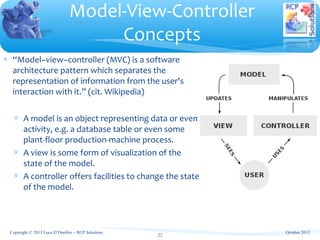
∗ “Model–view–controller (MVC) is a software
architecture pattern which separates the
representation of information from the user's
interaction with it.” (cit. Wikipedia)
∗ A model is an object representing data or even
activity, e.g. a database table or even some
plant-floor production-machine process.
∗ A view is some form of visualization of the
state of the model.
∗ A controller offers facilities to change the state
of the model.
Model-View-Controller
Concepts
22
October 2013Copyright © 2013 Luca D’Onofrio – RCP Solutions
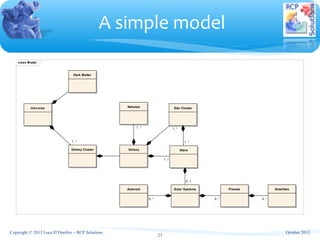
class Model
Universe
Galaxy Cluster
Dark Matter
Galaxy
Star ClusterNebulae
Solar Systems Planets
Stars
SatellitesAsteroid
0..* 0..*
0..1
1..*1..*
0..*
1..* 1..*
1..*
A simple model
23
October 2013Copyright © 2013 Luca D’Onofrio – RCP Solutions
∗ Input element
∗ An input element is the main object that the viewer is displaying (or editing).
∗ A viewer must be able to handle a change of input element.
∗ Content viewers
∗ A content viewer is a viewer that has a well defined protocol for obtaining information
from its input element.
∗ Content viewers use two specialized helper classes, the IContentProvider
and ILabelProvider, to populate their widget and display information about the input
element.
∗ IContentProvider provides basic lifecycle protocol for associating a content provider with an
input element and handling a change of input element. More specialized content providers are
implemented for different kinds of viewers.
∗ ILabelProvider given the content of a viewer, it can produce the specific UI elements, such as
names and icons, that are needed to display the content in the viewer.
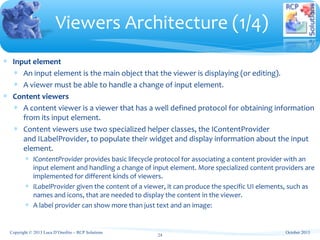
∗ A label provider can show more than just text and an image:
Viewers Architecture (1/4)
24
October 2013Copyright © 2013 Luca D’Onofrio – RCP Solutions
∗ Filter and Sorter
∗ Filtering and sorting capability is handled by designating a viewer sorter (ViewerSorter)
and/or viewer filter (ViewerFilter) for the viewer.
∗ Drag & Drop
∗ Viewers can handle D&D adding user defined classes known as DragSupport and
DropSupport
∗ Adding drag support to a viewer means that it enables the user to select any item in
the viewer with the mouse, and drag it into another viewer or another application,
while the drop support verify if the viewer can accept a dragged element.
∗ A Transfer provides a mechanism for converting between a java representation of data
and a platform specific representation of data and vice versa
∗ Managing Selection
∗ Viewers implement ISelectionProvider interface in order to provide selection to other
entities
Viewers Architecture (2/4)
25
October 2013Copyright © 2013 Luca D’Onofrio – RCP Solutions
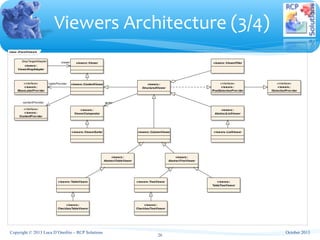
class JFaceViewers
viewers::
AbstractListViewer
viewers::
AbstractTableViewer
viewers::
AbstractTreeViewer
viewers::
CheckboxTableViewer
viewers::
CheckboxTreeViewer
viewers::ColumnViewer
viewers::ContentViewer«interface»
v iewers::
IBaseLabelProvider
«interface»
v iewers::
IContentProvider
«interface»
v iewers::
IPostSelectionProv ider
«interface»
v iewers::
ISelectionProv ider
v iewers::ListViewer
viewers::
StructuredViewer
v iewers::
TableTreeViewer
v iewers::TableViewer v iewers::TreeViewer
viewers::Viewer
viewers::
ViewerComparator
DropTargetAdapter
viewers::
ViewerDropAdapter
viewers::ViewerFilter
viewers::ViewerSorter
-contentProvider -sorter
-viewer
-labelProvider
Viewers Architecture (3/4)
26
October 2013Copyright © 2013 Luca D’Onofrio – RCP Solutions
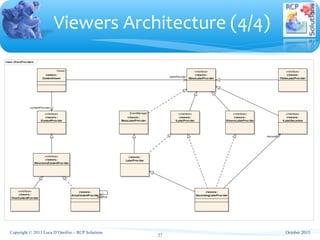
class JFaceProv iders
viewers::
ArrayContentProvider
EventManager
v iewers::
BaseLabelProv ider
Viewer
viewers::
ContentViewer
viewers::
DecoratingLabelProv ider
«interface»
v iewers::
IBaseLabelProv ider
«interface»
viewers::
IContentProvider
«interface»
v iewers::
ILabelDecorator
«interface»
viewers::
ILabelProvider
«interface»
viewers::
IStructuredContentProv ider
«interface»
v iewers::
ITableLabelProv ider
«interface»
v iewers::
ITreeContentProvider
«interface»
viewers::
IViewerLabelProv ider
v iewers::
LabelProv ider
-decorator
-instance
-labelProvider
-contentProvider
Viewers Architecture (4/4)
27
October 2013Copyright © 2013 Luca D’Onofrio – RCP Solutions
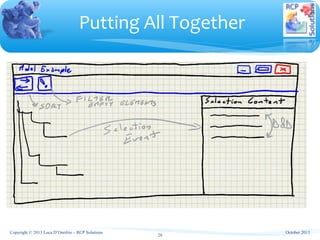
Putting All Together
28
October 2013Copyright © 2013 Luca D’Onofrio – RCP Solutions
∗ http://www.eclipse.org/swt/widgets/
∗ http://www.java2s.com/Tutorial/Java/0280__SWT/Catalog0280_
_SWT.htm
∗ http://wiki.eclipse.org/JFace
References
29
October 2013Copyright © 2013 Luca D’Onofrio – RCP Solutions

Eclipse Training - SWT & JFace

  • 1.
    Eclipse Plug-ins and RCP TrainingCourse Standard Widgets Toolkit JFace 1 October 2013Copyright © 2013 Luca D’Onofrio – RCP Solutions
  • 2.
    1. SWT Overview a)Understanding Layouts b) Events and Listeners ∗ Life-Cycle a) Containers and Widgets ∗ Simple Widgets ∗ Complex Widgets a) Class Hierarchy b) Fonts, Colors, Images c) SWT Style Bits Agenda 2 October 2013Copyright © 2013 Luca D’Onofrio – RCP Solutions
  • 3.
    ∗ SWT isan open source widget toolkit for Java, designed to provide efficient, portable access to the user-interface facilities of the operating systems on which it is implemented. ∗ It abstracts the OS rendering implementation. SWT Overview 3 October 2013Copyright © 2013 Luca D’Onofrio – RCP Solutions
  • 4.
    ∗ Layouts givesyour windows a specific look, controlling the position and size of childrens and how childrens adapt to their parent Understanding Layouts 4 ∗ Standard Layouts ∗ FillLayout lays out equal-sized widgets in a single row or column ∗ RowLayout lays out widgets in a row or rows, with fill, wrap, and spacing options ∗ GridLayout lays out widgets in a grid ∗ FormLayout lays out widgets by creating attachments for each of their sides October 2013Copyright © 2013 Luca D’Onofrio – RCP Solutions
  • 5.
    Events and Listeners(1/4) 5 TIP: much of the widget state is stored in the platform widget rather than in the widget itself (as for SWING) class SWTWidgets Model User Widget xxxEv ent xxxListener + eventHandler() «interface» xxxListener Trigger the source «flow» October 2013Copyright © 2013 Luca D’Onofrio – RCP Solutions
  • 6.
    Events and Listeners(2/4) 6 sd Business Process Model :User :Widget :xxxEvent :xxxListener Register the listeners() Trigger the source() Construct an xxxEvent object() eventHandler(xxxEvent) October 2013Copyright © 2013 Luca D’Onofrio – RCP Solutions
  • 7.
    ControlListener Classes whichimplement this interface provide methods that deal with the events that are generated by moving and resizing controls. DisposeListener Classes which implement this interface provide a method that deals with the event that is generated when a widget is disposed. DragDetectListener Classes which implement this interface provide methods that deal with the events that are generated when a drag gesture is detected. ExpandListener Classes which implement this interface provide methods that deal with the expanding and collapsing of ExpandItems. FocusListener Classes which implement this interface provide methods that deal with the events that are generated as controls gain and lose focus. HelpListener Classes which implement this interface provide a method that deals with the event that is generated when help is requested for a control, typically when the user presses F1. KeyListener Classes which implement this interface provide methods that deal with the events that are generated as keys are pressed on the system keyboard. MenuDetectListener Classes which implement this interface provide methods that deal with the events that are generated when the platform-specific trigger for showing a context menu is detected. MenuListener Classes which implement this interface provide methods that deal with the hiding and showing of menus. ModifyListener Classes which implement this interface provide a method that deals with the events that are generated when text is modified. MouseListener Classes which implement this interface provide methods that deal with the events that are generated as mouse buttons are pressed. MouseMoveListener Classes which implement this interface provide a method that deals with the events that are generated as the mouse pointer moves. MouseTrackListener Classes which implement this interface provide methods that deal with the events that are generated as the mouse pointer passes (or hovers) over controls. MouseWheelListener Classes which implement this interface provide a method that deals with the event that is generated as the mouse wheel is scrolled. PaintListener Classes which implement this interface provide methods that deal with the events that are generated when the control needs to be painted. SelectionListener Classes which implement this interface provide methods that deal with the events that are generated when selection occurs in a control. ShellListener Classes which implement this interface provide methods that deal with changes in state of Shells. TouchListener Classes which implement this interface provide methods that deal with the events that are generated as touches occur on a touch- aware input surface. TraverseListener Classes which implement this interface provide a method that deals with the events that are generated when a traverse event occurs in a control. TreeListener Classes which implement this interface provide methods that deal with the expanding and collapsing of tree branches. VerifyListener Classes which implement this interface provide a method that deals with the events that are generated when text is about to be modified. Events and Listeners (3/4) 7 October 2013Copyright © 2013 Luca D’Onofrio – RCP Solutions
  • 8.
    ControlAdapter This adapterclass provides default implementations for the methods described by the ControlListener interface. ControlEvent Instances of this class are sent as a result of controls being moved or resized. DisposeEvent Instances of this class are sent as a result of widgets being disposed. DragDetectEvent Instances of this class are sent as a result of a drag gesture. ExpandAdapter This adapter class provides default implementations for the methods described by the ExpandListener interface. ExpandEvent Instances of this class are sent as a result of ExpandItems being expanded or collapsed. FocusAdapter This adapter class provides default implementations for the methods described by the FocusListener interface. FocusEvent Instances of this class are sent as a result of widgets gaining and losing focus. HelpEvent Instances of this class are sent as a result of help being requested for a widget. KeyAdapter This adapter class provides default implementations for the methods described by the KeyListener interface. KeyEvent Instances of this class are sent as a result of keys being pressed and released on the keyboard. MenuAdapter This adapter class provides default implementations for the methods described by the MenuListener interface. MenuDetectEvent Instances of this class are sent whenever the platform- specific trigger for showing a context menu is detected. MenuEvent Instances of this class are sent as a result of menus being shown and hidden. ModifyEvent Instances of this class are sent as a result of text being modified. MouseEvent Instances of this class are sent whenever mouse related actions occur. MouseTrackAdapter This adapter class provides default implementations for the methods described by the MouseTrackListener interface. PaintEvent Instances of this class are sent as a result of visible areas of controls requiring re-painting. SelectionAdapter This adapter class provides default implementations for the methods described by the SelectionListener interface. SelectionEvent Instances of this class are sent as a result of widgets being selected. ShellEvent Instances of this class are sent as a result of operations being performed on shells. TouchEvent Instances of this class are sent in response to a touch-based input source being touched. TraverseEvent Instances of this class are sent as a result of widget traversal actions. TreeAdapter This adapter class provides default implementations for the methods described by the TreeListener interface. TreeEvent Instances of this class are sent as a result of trees being expanded and collapsed. TypedEvent This is the super class for all typed event classes provided by SWT. VerifyEvent Instances of this class are sent as a result of widgets handling keyboard events Events and Listeners (4/4) 8 October 2013Copyright © 2013 Luca D’Onofrio – RCP Solutions
  • 9.
    ∗ Display ∗ Instancesof this class are responsible for managing the connection between SWT and the underlying operating system. ∗ Their most important function is to implement the SWT event loop in terms of the platform event model. ∗ They also provide various methods for accessing information about the operating system, and have overall control over the operating system resources which SWT allocates. ∗ Shell ∗ Represent the "windows" which the desktop or is managing. ∗ Composite and Scrolled Composite ∗ Represent controls which are capable of containing other controls. ∗ A ScrolledComposite provides scrollbars and will scroll its content when the user uses the scrollbars. Containers (1/2) 9 October 2013Copyright © 2013 Luca D’Onofrio – RCP Solutions
  • 10.
    ∗ Group, Sash,Tab Folder ∗ Groups are subclass of composite that provide an etched border with an optional title. ∗ A Sash represents a selectable user interface container that allows the user to drag a rubber banded outline of the sash within the parent control. ∗ Tab Folder allows the user to select a notebook page from set of pages. Containers (2/2) 10 TIP: Calls to SWT methods that create widgets or modify currently visible widgets must be made from UI thread. Use Display.xxxExec! October 2013Copyright © 2013 Luca D’Onofrio – RCP Solutions
  • 11.
    ∗ Label ∗ Button ∗Text ∗ Combo Simple Widgets 11 October 2013Copyright © 2013 Luca D’Onofrio – RCP Solutions
  • 12.
    ∗ Menu andToolbar ∗ Table ∗ Tree Complex Widgets 12 TIP: the Eclipse Nebula project contains other custom Widgets and UI components. October 2013Copyright © 2013 Luca D’Onofrio – RCP Solutions
  • 13.
  • 14.
  • 15.
    Main Methods  void addListener(int eventType, Listener listener)            Adds the listener to the collection of listeners who will be notified when an event of the given type occurs.  voiddispose()            Disposes of the operating system resources associated with the receiver and all its descendants.  Object getData(String key)            Returns the application defined property of the receiver with the specified name, or null if it has not been set.  Display getDisplay()            Returns the Display that is associated with the receiver.  Listener[] getListeners(int eventType)            Returns an array of listeners who will be notified when an event of the given type occurs.  int getStyle()            Returns the receiver's style information.  boolean isDisposed()            Returns true if the widget has been disposed, and false otherwise.  boolean isListening(int eventType)            Returns true if there are any listeners for the specified event type associated with the receiver, and false otherwise.  void notifyListeners(int eventType, Event event)            Notifies all of the receiver's listeners for events of the given type that one such event has occurred by invoking their  handleEvent() method.  void removeListener(int eventType, Listener listener)            Removes the listener from the collection of listeners who will be notified when an event of the given type occurs. protected   void removeListener(int eventType, org.eclipse.swt.internal.SWTEventListener listener)            Removes the listener from the collection of listeners who will be notified when an event of the given type occurs.  void setData(Object data)            Sets the application defined widget data associated with the receiver to be the argument.  void setData(String key, Object value)            Sets the application defined property of the receiver with the specified name to the given value. Widget Class Hierarchy (3/3) 15 October 2013Copyright © 2013 Luca D’Onofrio – RCP Solutions
  • 16.
    Widget Class Styles org.eclipse.swt.widgets.Button TOGGLE, ARROW, PUSH, RADIO, CHECK, FLAT,UP, DOWN, LEFT, RIGHT, CENT ER org.eclipse.swt.widgets.ComboDROP_DOWN, READ_ONLY, SIMPLE org.eclipse.swt.widgets.Composite NO_BACKGROUND, NO_FOCUS, NO_REDRAW_RESIZE,NO_MERGE_PAINTS, N O_RADIO_GROUP, EMBEDDED,DOUBLE_BUFFERED, UP org.eclipse.swt.widgets.Group SHADOW_IN, SHADOW_OUT, SHADOW_ETCHED_IN,SHADOW_ETCHED_OUT,  SHADOW_NONE org.eclipse.swt.widgets.Label SEPARATOR, WRAP, SHADOW_IN, SHADOW_OUT,SHADOW_NONE, LEFT, RIG HT, CENTER,HORIZONTAL, VERTICAL org.eclipse.swt.widgets.Menu BAR, DROP_DOWN, POP_UP, NO_RADIO_GROUP,LEFT_TO_RIGHT, RIGHT_TO _LEFT org.eclipse.swt.widgets.MenuItem SEPARATOR, PUSH, RADIO, CHECK, CASCADE org.eclipse.swt.widgets.Sash SMOOTH, HORIZONTAL, VERTICAL org.eclipse.swt.widgets.Scrollable H_SCROLL, V_SCROLL org.eclipse.swt.widgets.Shell TOOL, NO_TRIM, RESIZE, TITLE, CLOSE, MIN, MAX,BORDER, ON_TOP, MODEL ESS, PRIMARY_MODAL,APPLICATION_MODAL, SYSTEM_MODAL org.eclipse.swt.widgets.TabFolder TOP, BOTTOM org.eclipse.swt.widgets.Table CHECK, MULTI, SINGLE, HIDE_SELECTION,FULL_SELECTION, VIRTUAL org.eclipse.swt.widgets.Text MULTI, SINGLE, READ_ONLY, WRAP, SEARCH,PASSWORD, LEFT, RIGHT, CEN TER org.eclipse.swt.widgets.ToolBar WRAP, SHADOW_OUT, FLAT, RIGHT, HORIZONTAL,VERTICAL org.eclipse.swt.widgets.ToolItem DROP_DOWN, SEPARATOR, PUSH, RADIO, CHECK org.eclipse.swt.widgets.Tree CHECK, MULTI, SINGLE, FULL_SELECTION, VIRTUAL SWT Style Bits 16 TIP: not all styles are supported on all platforms. October 2013Copyright © 2013 Luca D’Onofrio – RCP Solutions
  • 17.
    ∗ Fonts: ∗ manageoperating system resources that define how text looks when it is displayed. Fonts may be constructed by providing a device and either name, size and style information or a FontData object which encapsulates this data. ∗ Colors: ∗ manage the operating system resources that implement SWT's RGB color model. To create a color you can either specify the individual color components as integers in the range 0 to 255 or provide an instance of an RGB. ∗ Images: ∗ graphics which have been prepared for display on a specific device. ∗ If loaded from a file format that supports it, an Image may have transparency. ∗ Images can be also created using SWT Canvas and GC ∗ Supported formats: GIF, JPG, PNG, BMP (Windows) and ICO (Windows) TIP: these resources should be managed by a resource manager that creates them once and destroy them when the application exits. Fonts, Colors, Images 17 October 2013Copyright © 2013 Luca D’Onofrio – RCP Solutions
  • 18.
    Exercise 18 October 2013Copyright ©2013 Luca D’Onofrio – RCP Solutions
  • 19.
    1. JFace Overview 2.Model-View-Controller Concepts a) A simple model 3. Viewers Architecture a) ContentProvider, LabelProvider, DecoratingLabelProvider b) Viewer Sorter and Viewer Filter c) Drag & Drop d) Managing Selection 4. Putting all togheter Agenda 19 October 2013Copyright © 2013 Luca D’Onofrio – RCP Solutions
  • 20.
    ∗ SWT providesa direct interface to the native platform widgets, but it is limited to using simple data types: ∗ strings, numbers, images, … ∗ This represents a limitation when dealing with object- oriented (OO) data that needs to be presented in lists, tables, trees, and text widgets. ∗ This is where JFace viewers step in to provide OO wrappers around their associated SWT widgets. JFace Overview (1/2) 20 October 2013Copyright © 2013 Luca D’Onofrio – RCP Solutions
  • 21.
    ∗ JFace allowsyou to directly use your domain model objects: ∗ No need to manually decompose them into their basic string, numerical, and image elements. ∗ The viewers provide adapter interface for handling domain model object. ∗ Main JFace Viewers ∗ Table Viewer ∗ Tree Viewer ∗ List Viewer ∗ Text Viewer JFace Overview (2/2) 21 October 2013Copyright © 2013 Luca D’Onofrio – RCP Solutions
  • 22.
    ∗ “Model–view–controller (MVC)is a software architecture pattern which separates the representation of information from the user's interaction with it.” (cit. Wikipedia) ∗ A model is an object representing data or even activity, e.g. a database table or even some plant-floor production-machine process. ∗ A view is some form of visualization of the state of the model. ∗ A controller offers facilities to change the state of the model. Model-View-Controller Concepts 22 October 2013Copyright © 2013 Luca D’Onofrio – RCP Solutions
  • 23.
    class Model Universe Galaxy Cluster DarkMatter Galaxy Star ClusterNebulae Solar Systems Planets Stars SatellitesAsteroid 0..* 0..* 0..1 1..*1..* 0..* 1..* 1..* 1..* A simple model 23 October 2013Copyright © 2013 Luca D’Onofrio – RCP Solutions
  • 24.
    ∗ Input element ∗An input element is the main object that the viewer is displaying (or editing). ∗ A viewer must be able to handle a change of input element. ∗ Content viewers ∗ A content viewer is a viewer that has a well defined protocol for obtaining information from its input element. ∗ Content viewers use two specialized helper classes, the IContentProvider and ILabelProvider, to populate their widget and display information about the input element. ∗ IContentProvider provides basic lifecycle protocol for associating a content provider with an input element and handling a change of input element. More specialized content providers are implemented for different kinds of viewers. ∗ ILabelProvider given the content of a viewer, it can produce the specific UI elements, such as names and icons, that are needed to display the content in the viewer. ∗ A label provider can show more than just text and an image: Viewers Architecture (1/4) 24 October 2013Copyright © 2013 Luca D’Onofrio – RCP Solutions
  • 25.
    ∗ Filter andSorter ∗ Filtering and sorting capability is handled by designating a viewer sorter (ViewerSorter) and/or viewer filter (ViewerFilter) for the viewer. ∗ Drag & Drop ∗ Viewers can handle D&D adding user defined classes known as DragSupport and DropSupport ∗ Adding drag support to a viewer means that it enables the user to select any item in the viewer with the mouse, and drag it into another viewer or another application, while the drop support verify if the viewer can accept a dragged element. ∗ A Transfer provides a mechanism for converting between a java representation of data and a platform specific representation of data and vice versa ∗ Managing Selection ∗ Viewers implement ISelectionProvider interface in order to provide selection to other entities Viewers Architecture (2/4) 25 October 2013Copyright © 2013 Luca D’Onofrio – RCP Solutions
  • 26.
    class JFaceViewers viewers:: AbstractListViewer viewers:: AbstractTableViewer viewers:: AbstractTreeViewer viewers:: CheckboxTableViewer viewers:: CheckboxTreeViewer viewers::ColumnViewer viewers::ContentViewer«interface» v iewers:: IBaseLabelProvider «interface» viewers:: IContentProvider «interface» v iewers:: IPostSelectionProv ider «interface» v iewers:: ISelectionProv ider v iewers::ListViewer viewers:: StructuredViewer v iewers:: TableTreeViewer v iewers::TableViewer v iewers::TreeViewer viewers::Viewer viewers:: ViewerComparator DropTargetAdapter viewers:: ViewerDropAdapter viewers::ViewerFilter viewers::ViewerSorter -contentProvider -sorter -viewer -labelProvider Viewers Architecture (3/4) 26 October 2013Copyright © 2013 Luca D’Onofrio – RCP Solutions
  • 27.
    class JFaceProv iders viewers:: ArrayContentProvider EventManager viewers:: BaseLabelProv ider Viewer viewers:: ContentViewer viewers:: DecoratingLabelProv ider «interface» v iewers:: IBaseLabelProv ider «interface» viewers:: IContentProvider «interface» v iewers:: ILabelDecorator «interface» viewers:: ILabelProvider «interface» viewers:: IStructuredContentProv ider «interface» v iewers:: ITableLabelProv ider «interface» v iewers:: ITreeContentProvider «interface» viewers:: IViewerLabelProv ider v iewers:: LabelProv ider -decorator -instance -labelProvider -contentProvider Viewers Architecture (4/4) 27 October 2013Copyright © 2013 Luca D’Onofrio – RCP Solutions
  • 28.
    Putting All Together 28 October2013Copyright © 2013 Luca D’Onofrio – RCP Solutions
  • 29.
    ∗ http://www.eclipse.org/swt/widgets/ ∗ http://www.java2s.com/Tutorial/Java/0280__SWT/Catalog0280_ _SWT.htm ∗http://wiki.eclipse.org/JFace References 29 October 2013Copyright © 2013 Luca D’Onofrio – RCP Solutions