Approaches to
System
Development System Development Life Cycle
 Approaches to System Development
Waterfall Model
 Prototype Model
 Spiral Model
 Extreme Programming
 Unified Process
 Agile Modeling
 Rapid Application Development
 Joint Application Development
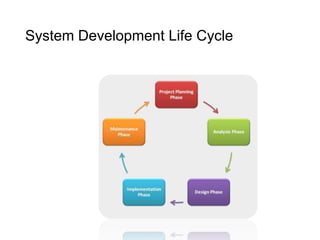
System Development Life Cycle
• conceptual model that describes the phases involved in an
information system development project
• possible to complete some activities in one phase in parallel with
some activities of another phase
• phases are repeated as required until an acceptable system is found
• General steps of an SDLC methodology:
1. The existing system is evaluated.
2. The new system requirements are defined.
3. The proposed system is designed.
4. The new system is developed.
5. The system is put into use.
6. The new system should be evaluated once it is up and running.
System Development Life Cycle
•Planning Phase
•process of defining clear, discrete activities, and the work
needed to complete each activity within a single project
•primary objectives:
• identify the scope of the new system
• ensure that the project is feasible
• develop a schedule, resource plan, and budget for the remainder of the
project
Activities:
• define the problem
• confirm project feasibility
• produce the project schedule
• staff the project
• launch the project
System Development Life Cycle
•Analysis Phase
•understand and document the business needs
and the processing requirements of the new
system
Activities:
• gather information
• define system requirements
• build prototypes for discovery of requirements
• prioritize requirements
• generate and evaluate alternatives
• review recommendations with management
System Development Life Cycle
•Design Phase
•design the solution system based on the
requirements defined and decisions made during
the analysis phase
Activities:
• design and integrate the network
• design the application architecture
• design the user interfaces
• design the system interfaces
• design and integrate the database
• prototype for design details
• design and integrate the system controls
System Development Life Cycle
•Implementation Phase
•final system is built, tested, and installed
•ensure that the users are all trained and that the
organization is ready to benefit as expected from
use of the system
Activities:
• construct software components
• verify and test
• convert data
• train users and document the system
• install the system
System Development Life Cycle
•Maintenance Phase
•keep the system running productively during
the years following its initial installation
•upgrades or enhancements may be carried
out to expand the system’s capabilities
Activities:
•maintain the system
•enhance the system
•support the users
Approaches to System Development
•Traditional Approach
•also known as structured system development
•Includes three techniques:
• Structured analysis
• Structured design
• Loosely coupled
• Highly cohesive
• Structured programming
• A sequence of program statements
• A decision where one set of statements or another set of statements executes
• A repetition of a set of statements
•Object Oriented Approach
•views an information system as a collection of interacting
objects that work together to accomplish tasks
•system consists of objects
Approaches to System Development
•includes three techniques:
•Object-oriented analysis (OOA)
• defines all of the types of objects
• shows what user interactions are required
•Object-oriented design (OOD)
• defines all of the additional types of objects necessary to
communicate with people and devices in the system
• shows how the objects interact to complete the tasks
• refines the definition of each type of object
•Object-oriented programming (OOP)
• writing of statements using a programming language
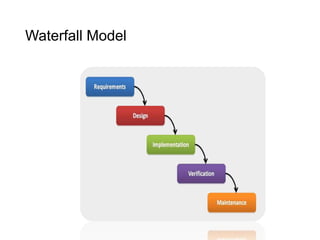
Waterfall Model
•describes a development method that is linear and
sequential
•based on the metaphor that when one phase was finished,
the development proceeds to the next phase and there is no
going back
•does not accept the expected changes and revisions that
become necessary with most projects
•some alternatives include joint application development
(JAD), rapid application development (RAD), and spiral
model
Waterfall Model
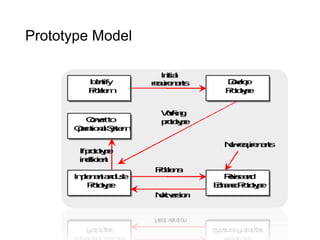
Prototype Model
•systems development methodology in which
a prototype is built, tested, and then
reworked as necessary until an acceptable
prototype is finally achieved from which the
complete system or product can now be
developed
•an iterative, trial-and-error process that takes
place between developers and end users
Prototype Model
Prototype Model
• Advantages:
May provide the proof of concept necessary to attract funding
Early visibility of the prototype gives users an idea of what the final system
looks like
Encourages active participation among users and producer
Enables a higher output for user
Prototype Model
Cost effective (Development costs reduced)
Increases system development speed
Assists to identify any problems with the efficacy of earlier design,
requirements analysis and coding activities
Helps to refine the potential risks associated with the delivery of the system
being developed
• Disadvantages:
Possibility of causing systems to be left unfinished
Producer might produce a system inadequate for overall organization needs
User can get too involved where as the program can not be to a high
standard
Structure of system can be damaged since many changes could be made
Not suitable for large applications
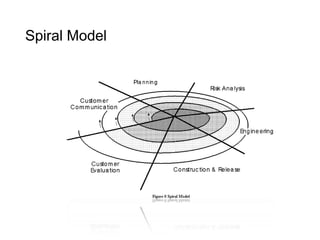
Spiral Model
• combines the features of the prototyping model and the waterfall
model
• shows the life cycle as a spiral, starting in the center and works its
way around, over and over again, until the project is complete
• intended for large, expensive, and complicated projects
Spiral Model
Spiral Model
•General steps of Spiral Model:
1. The new system requirements are defined in details.
2. An initial design is created for the new system.
3. A first prototype of the new system is constructed from
the initial design.
4. A second prototype is evolved by a fourfold procedure:
(1) evaluating the first prototype in terms of its
strengths, weaknesses, and risks; (2) defining the
requirements of the second prototype; (3) planning
and designing the second prototype; (4) constructing
and testing the second prototype.
5. At the customer's option, the entire project can be
aborted if the risk is deemed too great.
Spiral Model
6. The existing prototype is evaluated in the same
manner as was the previous prototype, and, if
necessary, another prototype is developed from
it according to the fourfold procedure outlined
above.
7. The preceding steps are iterated until the
customer is satisfied that the refined prototype
represents the final product desired.
8. The final system is constructed based on the
refined prototype.
9. The final system is completely evaluated and
tested.
Spiral Model
•Advantages
Estimates of the budget and schedule become more
realistic as work progresses because of the questions that
have been raised
Easier to cope with the changes inherent to software
development
Software engineers can start working on the project
earlier rather than wading through a lengthy early design
process
• Disadvantages
A drawback of a spiral model is that estimates of budget
and time are harder to judge at the beginning of the
project since the requirements evolve through the
process.
Extreme Programming
•discipline of system development that follows a
specific structure that is designed to simplify and
expedite the process of developing new software
•developed by Kent Beck to be used with small
teams of developers who need to develop software
quickly in an environment of rapidly-changing
requirements
•emphases on its use of two-person programming
teams and having a customer on-site during the
development process
Extreme Programming
•Relevant parts of XP that relate to design specifications:
1. How planning, analysis, design, and construction are all fused
into a single phase of activity, and
2. Its unique way of capturing and presenting system requirements
and design specifications.
•In XP, coding and testing are related parts of the same
process, which means the programmers who write the code
can also develop the tests.
•The overall philosophy of XP is that code will be integrated
into the system it is being developed for and tested within a
few hours after it has been written.
Extreme Programming
•Advantages of pair programming practice:
More and better communication among developers
Higher levels of productivity
Higher-quality code
Reinforcement of the other practices in XP, such as the
code-and-test discipline
•Disadvantages:
Problems with unstable requirements
No documented compromises of user conflicts
Lack of an overall design specification or document
Unified Process
•object-oriented system development methodology offered
by Rational Software
•uses UML (a standard modeling notation for OO approach)
for system models
•designed to reinforce six “best practices” for system
development that are common to many system
development methodologies
• Develop iteratively
• Define and manage system requirements
• Use component architectures
• Create visual models
• Verify quality
• Control changes
Unified Process
•Four Phases
•Inception
•Elaboration
•Construction
•Transition
•defines disciplines within each phase to make
iterative development manageable
•defines roles played by developers and models
created during the project
Agile Modeling
•popularized by Scott Ambler
•practice-based methodology for modeling and
documentation of software-based systems
•proposed to be a collection of values, principles, and
practices for modeling software that can be applied
on software development project in a more flexible
manner
Core practices:
•Iterative and Incremental Modeling
•Teamwork
•Simplicity
•Validation
Agile Modeling
•Typical Agile modeling process would go like:
•Listen for user stories from the customer.
•Draw a logical workflow model to gain an appreciation for
the business decisions represented in the user story.
•Create new user stories based on the logical model.
•Develop some display prototypes. In doing so, show the
customer what sort of interface they will have.
•Using feedback from the prototypes and the logical
workflow diagrams, develop the system until you create a
physical data model.
Rapid Application Development
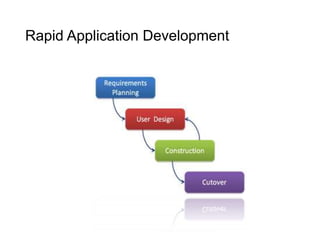
•emphasizes speed of development through
extensive user involvement in the rapid,
iterative, and incremental construction of a
series of functioning prototypes of a system
that eventually evolves into the final system
(or a version)
Rapid Application Development
•Consider using RAD when:
•The team includes programmers and analysts who are
experienced with it
•There are pressing business reasons for speeding up a
portion of an application development
•Working with a novel ecommerce application and the
development team believes that the business can
sufficiently benefit over their competitors from being an
innovator if this application is among the first to appear
on the Web
•Users are sophisticated and highly engaged with the
organizational goals of the company
Rapid Application Development
• Advantages:
It is useful for projects in which the user requirements are uncertain or
imprecise.
It encourages active user and management participation, which increases end-
user enthusiasm for the project.
Projects have higher visibility and support because of the extensive user
involvement throughout the process.
Errors and omissions tend to be detected earlier in prototypes than in system
models.
The iterative approach is a more “natural” process because change is an
expected factor during development.
• Disadvantages:
RAD prototypes can easily solve the wrong problems since problem analysis is
abbreviated or ignored.
A RAD-based prototype may discourage analysts from considering other, more
useful technical alternatives.
The emphasis on speed can adversely impact quality because of ill-advised
shortcuts through the methodology.
Joint Application Development
•involves the client or end users in the design and
development of an application, through a succession of
collaborative workshops called JAD sessions
•developed in the late 1970s by Chuck Morris and Tony
Crawford
•thought to lead to faster development times and greater
client satisfaction
•a variation on JAD is the RAD which attempts to create an
application more quickly through strategies that include
fewer formal methodologies and reusing software
components
•allows for the simultaneous gathering and consolidating of
large amounts of information
•it opens up a lot of scope of inter-personal conflict

2 approaches to system development

  • 1.
    Approaches to System Development SystemDevelopment Life Cycle  Approaches to System Development Waterfall Model  Prototype Model  Spiral Model  Extreme Programming  Unified Process  Agile Modeling  Rapid Application Development  Joint Application Development
  • 2.
    System Development LifeCycle • conceptual model that describes the phases involved in an information system development project • possible to complete some activities in one phase in parallel with some activities of another phase • phases are repeated as required until an acceptable system is found • General steps of an SDLC methodology: 1. The existing system is evaluated. 2. The new system requirements are defined. 3. The proposed system is designed. 4. The new system is developed. 5. The system is put into use. 6. The new system should be evaluated once it is up and running.
  • 3.
  • 4.
    System Development LifeCycle •Planning Phase •process of defining clear, discrete activities, and the work needed to complete each activity within a single project •primary objectives: • identify the scope of the new system • ensure that the project is feasible • develop a schedule, resource plan, and budget for the remainder of the project Activities: • define the problem • confirm project feasibility • produce the project schedule • staff the project • launch the project
  • 5.
    System Development LifeCycle •Analysis Phase •understand and document the business needs and the processing requirements of the new system Activities: • gather information • define system requirements • build prototypes for discovery of requirements • prioritize requirements • generate and evaluate alternatives • review recommendations with management
  • 6.
    System Development LifeCycle •Design Phase •design the solution system based on the requirements defined and decisions made during the analysis phase Activities: • design and integrate the network • design the application architecture • design the user interfaces • design the system interfaces • design and integrate the database • prototype for design details • design and integrate the system controls
  • 7.
    System Development LifeCycle •Implementation Phase •final system is built, tested, and installed •ensure that the users are all trained and that the organization is ready to benefit as expected from use of the system Activities: • construct software components • verify and test • convert data • train users and document the system • install the system
  • 8.
    System Development LifeCycle •Maintenance Phase •keep the system running productively during the years following its initial installation •upgrades or enhancements may be carried out to expand the system’s capabilities Activities: •maintain the system •enhance the system •support the users
  • 9.
    Approaches to SystemDevelopment •Traditional Approach •also known as structured system development •Includes three techniques: • Structured analysis • Structured design • Loosely coupled • Highly cohesive • Structured programming • A sequence of program statements • A decision where one set of statements or another set of statements executes • A repetition of a set of statements •Object Oriented Approach •views an information system as a collection of interacting objects that work together to accomplish tasks •system consists of objects
  • 10.
    Approaches to SystemDevelopment •includes three techniques: •Object-oriented analysis (OOA) • defines all of the types of objects • shows what user interactions are required •Object-oriented design (OOD) • defines all of the additional types of objects necessary to communicate with people and devices in the system • shows how the objects interact to complete the tasks • refines the definition of each type of object •Object-oriented programming (OOP) • writing of statements using a programming language
  • 11.
    Waterfall Model •describes adevelopment method that is linear and sequential •based on the metaphor that when one phase was finished, the development proceeds to the next phase and there is no going back •does not accept the expected changes and revisions that become necessary with most projects •some alternatives include joint application development (JAD), rapid application development (RAD), and spiral model
  • 12.
  • 13.
    Prototype Model •systems developmentmethodology in which a prototype is built, tested, and then reworked as necessary until an acceptable prototype is finally achieved from which the complete system or product can now be developed •an iterative, trial-and-error process that takes place between developers and end users
  • 14.
  • 15.
    Prototype Model • Advantages: Mayprovide the proof of concept necessary to attract funding Early visibility of the prototype gives users an idea of what the final system looks like Encourages active participation among users and producer Enables a higher output for user
  • 16.
    Prototype Model Cost effective(Development costs reduced) Increases system development speed Assists to identify any problems with the efficacy of earlier design, requirements analysis and coding activities Helps to refine the potential risks associated with the delivery of the system being developed • Disadvantages: Possibility of causing systems to be left unfinished Producer might produce a system inadequate for overall organization needs User can get too involved where as the program can not be to a high standard Structure of system can be damaged since many changes could be made Not suitable for large applications
  • 17.
    Spiral Model • combinesthe features of the prototyping model and the waterfall model • shows the life cycle as a spiral, starting in the center and works its way around, over and over again, until the project is complete • intended for large, expensive, and complicated projects
  • 18.
  • 19.
    Spiral Model •General stepsof Spiral Model: 1. The new system requirements are defined in details. 2. An initial design is created for the new system. 3. A first prototype of the new system is constructed from the initial design. 4. A second prototype is evolved by a fourfold procedure: (1) evaluating the first prototype in terms of its strengths, weaknesses, and risks; (2) defining the requirements of the second prototype; (3) planning and designing the second prototype; (4) constructing and testing the second prototype. 5. At the customer's option, the entire project can be aborted if the risk is deemed too great.
  • 20.
    Spiral Model 6. Theexisting prototype is evaluated in the same manner as was the previous prototype, and, if necessary, another prototype is developed from it according to the fourfold procedure outlined above. 7. The preceding steps are iterated until the customer is satisfied that the refined prototype represents the final product desired. 8. The final system is constructed based on the refined prototype. 9. The final system is completely evaluated and tested.
  • 21.
    Spiral Model •Advantages Estimates ofthe budget and schedule become more realistic as work progresses because of the questions that have been raised Easier to cope with the changes inherent to software development Software engineers can start working on the project earlier rather than wading through a lengthy early design process • Disadvantages A drawback of a spiral model is that estimates of budget and time are harder to judge at the beginning of the project since the requirements evolve through the process.
  • 22.
    Extreme Programming •discipline ofsystem development that follows a specific structure that is designed to simplify and expedite the process of developing new software •developed by Kent Beck to be used with small teams of developers who need to develop software quickly in an environment of rapidly-changing requirements •emphases on its use of two-person programming teams and having a customer on-site during the development process
  • 23.
    Extreme Programming •Relevant partsof XP that relate to design specifications: 1. How planning, analysis, design, and construction are all fused into a single phase of activity, and 2. Its unique way of capturing and presenting system requirements and design specifications. •In XP, coding and testing are related parts of the same process, which means the programmers who write the code can also develop the tests. •The overall philosophy of XP is that code will be integrated into the system it is being developed for and tested within a few hours after it has been written.
  • 24.
    Extreme Programming •Advantages ofpair programming practice: More and better communication among developers Higher levels of productivity Higher-quality code Reinforcement of the other practices in XP, such as the code-and-test discipline •Disadvantages: Problems with unstable requirements No documented compromises of user conflicts Lack of an overall design specification or document
  • 25.
    Unified Process •object-oriented systemdevelopment methodology offered by Rational Software •uses UML (a standard modeling notation for OO approach) for system models •designed to reinforce six “best practices” for system development that are common to many system development methodologies • Develop iteratively • Define and manage system requirements • Use component architectures • Create visual models • Verify quality • Control changes
  • 26.
    Unified Process •Four Phases •Inception •Elaboration •Construction •Transition •definesdisciplines within each phase to make iterative development manageable •defines roles played by developers and models created during the project
  • 27.
    Agile Modeling •popularized byScott Ambler •practice-based methodology for modeling and documentation of software-based systems •proposed to be a collection of values, principles, and practices for modeling software that can be applied on software development project in a more flexible manner Core practices: •Iterative and Incremental Modeling •Teamwork •Simplicity •Validation
  • 28.
    Agile Modeling •Typical Agilemodeling process would go like: •Listen for user stories from the customer. •Draw a logical workflow model to gain an appreciation for the business decisions represented in the user story. •Create new user stories based on the logical model. •Develop some display prototypes. In doing so, show the customer what sort of interface they will have. •Using feedback from the prototypes and the logical workflow diagrams, develop the system until you create a physical data model.
  • 29.
    Rapid Application Development •emphasizesspeed of development through extensive user involvement in the rapid, iterative, and incremental construction of a series of functioning prototypes of a system that eventually evolves into the final system (or a version)
  • 30.
  • 31.
    Rapid Application Development •Considerusing RAD when: •The team includes programmers and analysts who are experienced with it •There are pressing business reasons for speeding up a portion of an application development •Working with a novel ecommerce application and the development team believes that the business can sufficiently benefit over their competitors from being an innovator if this application is among the first to appear on the Web •Users are sophisticated and highly engaged with the organizational goals of the company
  • 32.
    Rapid Application Development •Advantages: It is useful for projects in which the user requirements are uncertain or imprecise. It encourages active user and management participation, which increases end- user enthusiasm for the project. Projects have higher visibility and support because of the extensive user involvement throughout the process. Errors and omissions tend to be detected earlier in prototypes than in system models. The iterative approach is a more “natural” process because change is an expected factor during development. • Disadvantages: RAD prototypes can easily solve the wrong problems since problem analysis is abbreviated or ignored. A RAD-based prototype may discourage analysts from considering other, more useful technical alternatives. The emphasis on speed can adversely impact quality because of ill-advised shortcuts through the methodology.
  • 33.
    Joint Application Development •involvesthe client or end users in the design and development of an application, through a succession of collaborative workshops called JAD sessions •developed in the late 1970s by Chuck Morris and Tony Crawford •thought to lead to faster development times and greater client satisfaction •a variation on JAD is the RAD which attempts to create an application more quickly through strategies that include fewer formal methodologies and reusing software components •allows for the simultaneous gathering and consolidating of large amounts of information •it opens up a lot of scope of inter-personal conflict