More Related Content

PDF
![Impractical Introduction of Boost Spirit Qi [PPT]](https://cdn.slidesharecdn.com/ss_thumbnails/impracticalintroductionofboostspiritqi-110513235009-phpapp01-thumbnail.jpg?width=640&height=640&fit=bounds)
PPT
Impractical Introduction of Boost Spirit Qi [PPT] 
PDF
Unity2015_No10_~UGUI&Audio~ 
PDF

PPTX

PDF

PPTX
デザイナーのためのPHP講座 for WordPress (初級) 
PDF
「Python言語」はじめの一歩 / First step of Python / 2016 Jan 12 What's hot

PDF
Pythonの処理系はどのように実装され,どのように動いているのか? 我々はその実態を調査すべくアマゾンへと飛んだ. 
PDF
「Python言語」はじめの一歩 / First step of Python 
PDF

PDF

PPTX
Apilecture for 2014/02/22 at shannonlab 
ODP

PDF

PDF
20170131 python3 6 PEP526 
PDF

PDF
FP習熟度レベルとFSharpxのIteratee 
PDF

PDF

PDF

PDF

PDF
STLの型の使い分け(ダイジェスト版) @ Sapporo.cpp 第7回勉強会 (2014.10.18) 
PPTX

PDF
What's new! TwentyThirteen + WordPress3.6 
PPTX

PPTX
Pythonスタートアップ勉強会201109 python入門 
PDF
Viewers also liked

PPTX

PPTX
Компютри, музика и интердисциплинарност 
PPT

PPTX

PPTX
Ден на отворените врати за бъдещите първокласници 
PPSX

PPT
флаш карта лебедово езеро 
PPT

PPTX
Музика на балкански народи 
PPTX

PPT

PPTX

PPT
Random 091108040922-phpapp02 
PPTX

PPTX
Музиката и приказката - Пепеляшка 
PPT
Неравномерно броене на четири. Дайчово хоро 
PPT

PPT
народни музикални инструменти 
PPT

PPS
Зима. характер в музиката Similar to 1221bot講習会

PDF

PPT
Python入門からpython twitter利用のハンズオン 
PDF

PDF
お前は PHP の歴史的な理由の数を覚えているのか 
KEY
WPerのWPerによるWPerのためのPHP入門 
KEY
PerlのTwitterモジュールの紹介 #twtr_hack 
KEY
![NPCA-LT hideo54[OSC Kyoto 2014]](https://cdn.slidesharecdn.com/ss_thumbnails/oscmain-140802084357-phpapp02-thumbnail.jpg?width=640&height=640&fit=bounds)
PDF
NPCA-LT hideo54[OSC Kyoto 2014] 
PDF
YAPC::Asia 2014 - 半端なPHPDisでPHPerに陰で笑われないためのPerl Monger向け最新PHP事情 
PDF

PDF
PHP初心者セッション2023 〜ChatGPT時代の簡単な始め方〜 ![Hachiojipm #5 LT資料 [テーマ:最近いいなと思ったもの]](https://cdn.slidesharecdn.com/ss_thumbnails/hachiojipm5-110529045127-phpapp01-thumbnail.jpg?width=640&height=640&fit=bounds)
PDF
Hachiojipm #5 LT資料 [テーマ:最近いいなと思ったもの] 
PPTX

PDF

PPTX
PHPCON_TOKYO_2022_Bigginer.pptx 
PPT
PHP使いから見たRuby(Talking about PHP & Ruby) 
ODP
SIG-WI2 twitterにおける、人工無脳との インタラクション 
PPTX

PDF
PHP language update 201211 
PDF
1221bot講習会
- 1.
- 2.
- 3.
- 4.
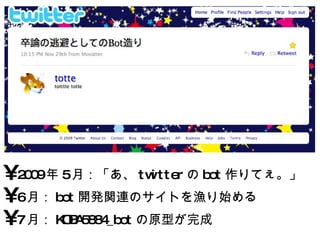
2009 年 5月:「あ、 twitter の bot 作りてぇ。」 6 月: bot 開発関連のサイトを漁り始める 7 月: KOBA5884_bot の原型が完成 - 5.
- 6.
- 7.
- 8.
- 9.
- 10.
- 11.
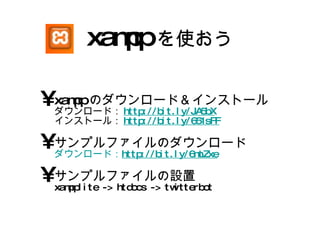
xampp を使おう xamppのダウンロード&インストールダウンロード: http://bit.ly/JA5bX インストール: http://bit.ly/651sFF サンプルファイルのダウンロード ダウンロード: http://bit.ly/6mtZxe サンプルファイルの設置 xampplite -> htdocs -> twitterbot - 12.
- 13.
- 14.
- 15.
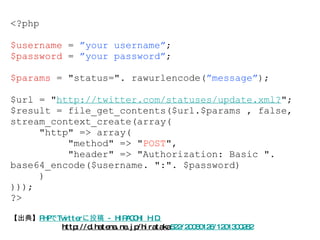
【出典】 PHPでTwitterに投稿 -HIRACCHI H.D. http://d.hatena.ne.jp/hirataka 522/20080126/1201300282 <?php $username = ”your username” ; $password = ”your password” ; $params = "status=". rawurlencode( ”message” ); $url = " http://twitter.com/statuses/update.xml? "; $result = file_get_contents($url.$params , false, stream_context_create(array( "http" => array( "method" => " POST ", "header" => "Authorization: Basic ". base64_encode($username. ":". $password) ) ))); ?> - 16.
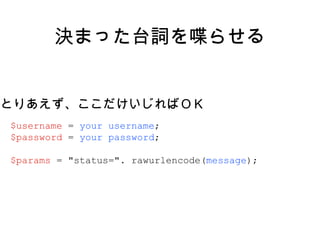
決まった台詞を喋らせる $username = your username ; $password = your password ; $params = "status=". rawurlencode( message ); とりあえず、ここだけいじればOK - 17.
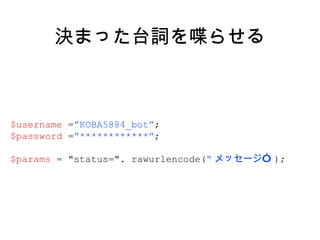
決まった台詞を喋らせる $username = ”KOBA5884_bot” ; $password = ”************” ; $params = "status=". rawurlencode( “ メッセージ” ); - 18.
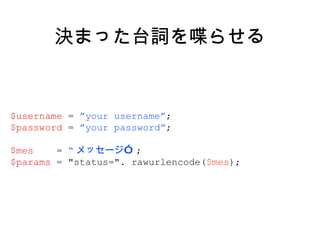
決まった台詞を喋らせる $username = ”your username” ; $password = ”your password” ; $mes = “ メッセージ” ; $params = "status=". rawurlencode( $mes ); - 19.
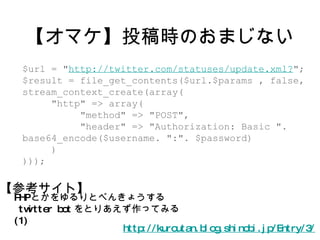
【オマケ】投稿時のおまじない http://kuroutan.blog.shinobi.jp/Entry/3/ PHPとかをゆるりとべんきょうする twitter bot をとりあえず作ってみる (1) $url = " http://twitter.com/statuses/update.xml? "; $result = file_get_contents($url.$params , false, stream_context_create(array( "http" => array( "method" => "POST", "header" => "Authorization: Basic ". base64_encode($username. ":". $password) ) ))); 【参考サイト】 - 20.
- 21.
- 22.
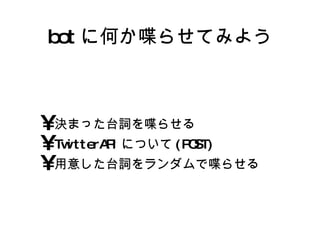
用意した台詞をランダムで喋らせる $username = your username ; $password = your password ; $mes[] = “ メッセージ 1” ; $mes[] = “ メッセージ 2” ; $mes[] = “ メッセージ 3” ; $mes = $mes[mt_rand(0,count($mes)-1)]; $params = "status=". rawurlencode( $mes ); - 23.
用意した台詞をランダムで喋らせる $username = your username ; $password = your password ; $mes[0] = “ メッセージ 1” ; $mes[1] = “ メッセージ 2” ; $mes[2] = “ メッセージ 3” ; $mes = $mes[mt_rand(0,count($mes)-1)] $params = "status=". rawurlencode( $mes ); 配列の個数を数える ( この場合は 3 つ ) - 24.
用意した台詞をランダムで喋らせる $username = your username ; $password = your password ; $mes = array( “ メッセージ 1”,“ メッセージ 2”,“ メッセージ 3”, ); $mes = $mes[mt_rand(0,count($mes)-1)] $params = "status=". rawurlencode( $mes ); 配列 - 25.
用意した台詞をランダムで喋らせる $username = your username ; $password = your password ; $mes = array( “ メッセージ 1”, “ メッセージ 2”, “ メッセージ 3”, ); $mes = $mes[mt_rand(0,count($mes)-1)] $params = "status=". rawurlencode( $mes ); - 26.
用意した台詞をランダムで喋らせる $username = your username ; $password = your password ; $mes = file(“ mes.dat ”); $mes = $mes[mt_rand(0,count($mes)-1)] $params = "status=". rawurlencode( $mes ); mes.dat メッセージ 1 メッセージ 2 メッセージ 3 ※ 改行毎に1要素扱い-> - 27.
- 28.
- 29.
- 30.
- 31.
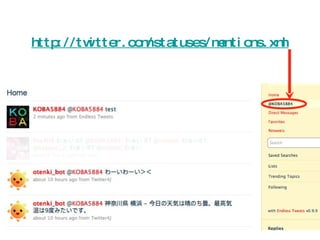
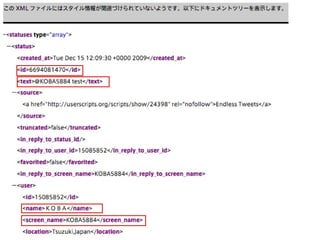
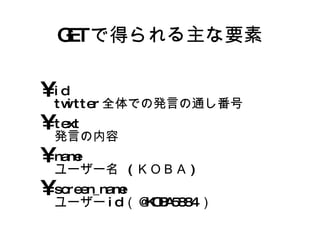
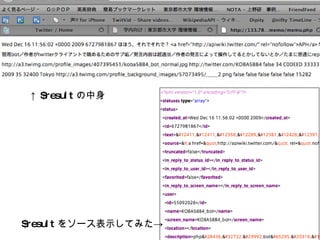
GET で得られる主な要素 idtwitter全体での発言の通し番号 text 発言の内容 name ユーザー名 (KOBA) screen_name ユーザーid(@KOBA5884) - 32.
- 33.
- 34.
- 35.
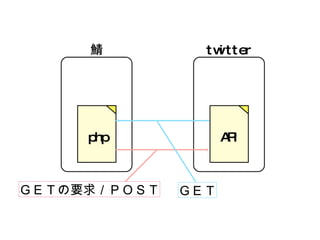
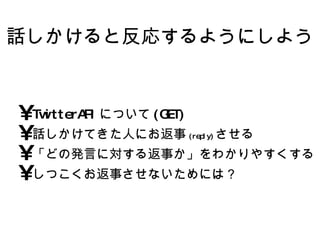
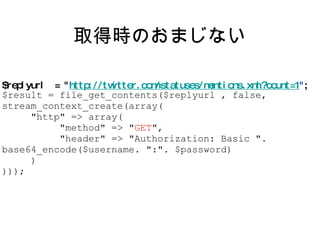
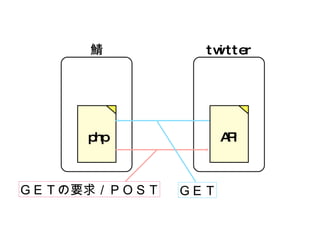
取得時のおまじない $replyurl = " http://twitter.com/statuses/mentions.xml?count=1 " ; $result = file_get_contents($replyurl , false, stream_context_create(array( "http" => array( "method" => " GET ", "header" => "Authorization: Basic ". base64_encode($username. ":". $password) ) ))); - 36.
- 37.
- 38.
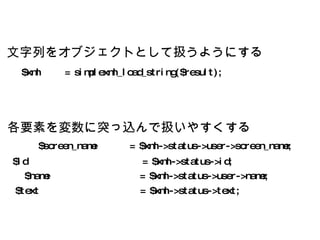
$id =$xml->status->id; $name = $xml->status->user->name; $screen_name = $xml->status->user->screen_name; $text = $xml->status->text; $xml = simplexml_load_string($result); 各要素を変数に突っ込んで扱いやすくする 文字列をオブジェクトとして扱うようにする - 39.
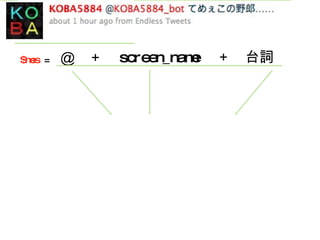
返信用メッセージの生成 $mes = array( “ メッセージ 1”,“ メッセージ 2”,“ メッセージ 3”, ); $mes = $mes[mt_rand(0,count($mes)-1)]; $mes = "@" . $screen_name . " " . $mes ; 空白 - 40.
- 41.
- 42.
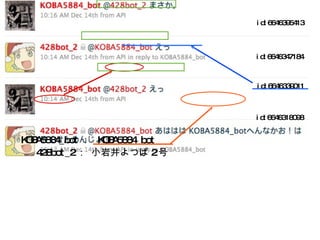
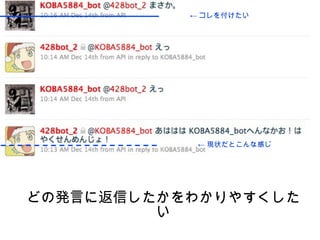
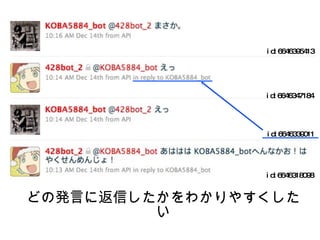
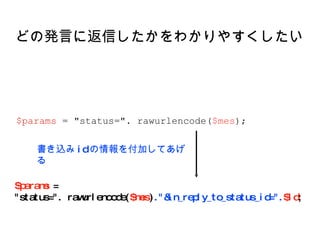
どの発言に返信したかをわかりやすくしたい $params = "status=". rawurlencode( $mes ) ."&in_reply_to_status_id=". $id ; $params = "status=". rawurlencode( $mes ); 書き込み id の情報を付加してあげる - 43.
- 44.
おまけ (Lesson 5)特定の単語に対して特殊な反応を返す if(preg_match( "/ 反応させたいワード /", $text)){ [ 特定のワードに対する処理 ] }else{ [ それ以外のワードに対する処理 ] } - 45.
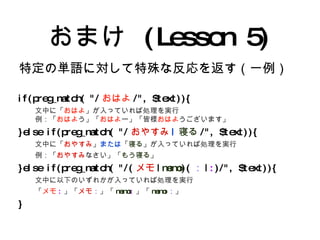
おまけ (Lesson 5)特定の単語に対して特殊な反応を返す(一例) if(preg_match( "/ おはよ /", $text)){ 文中に「 おはよ 」が入っていれば処理を実行 例:「 おはよ う」「 おはよ ー」「皆様 おはよ うございます」 }else if(preg_match( "/ おやすみ | 寝る /", $text)){ 文中に「 おやすみ 」 または 「 寝る 」が入っていれば処理を実行 例:「 おやすみ なさい」「 もう寝る 」 }else if(preg_match( "/( メモ | memo )( : | : )/", $text)){ 文中に以下のいずれかが入っていれば処理を実行 「 メモ : 」「 メモ : 」「 memo : 」「 memo : 」 } - 46.
- 47.
- 48.
- 49.
- 50.
- 51.
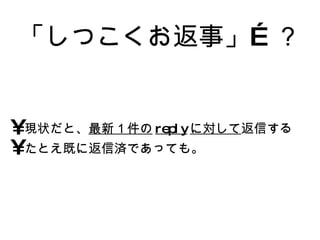
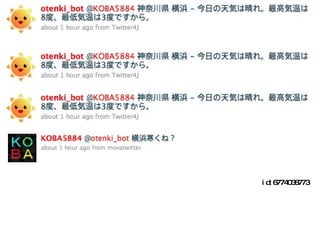
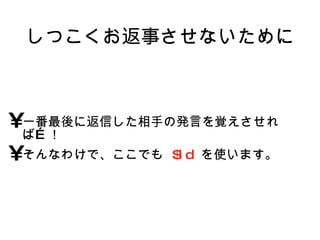
latest.dat 0( 初期値) if( $latest == $id ){ [ 投稿の処理を行わない ] }else{ [ 1.投稿処理 ] [ 2. latest.dat の書き換え ] } 6774038773 $id = [ 自分宛の呟き最新1件の id] $latest = [ 前回返信した呟きの id] # もし、それらが同一なら # 違った場合 別ファイルに 記憶させておく - 52.
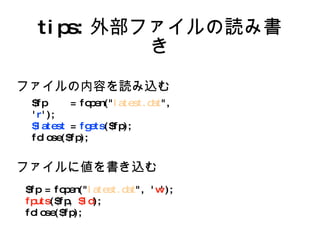
tips: 外部ファイルの読み書き $fp = fopen(" latest.dat ", ' r '); $latest = fgets ($fp); fclose($fp); $fp = fopen(" latest.dat ", ' w '); fputs ($fp, $id ); fclose($fp); ファイルの内容を読み込む ファイルに値を書き込む - 53.
- 54.
- 55.
- 56.
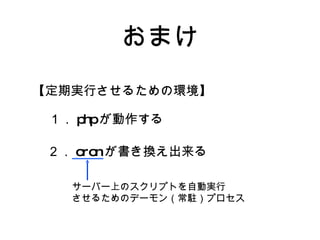
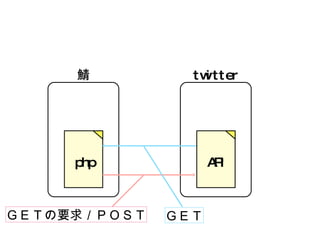
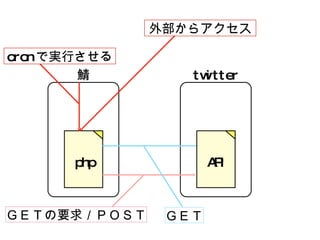
自動実行に関する参考サイト 【 cronが使える環境なら】 crontabの書き方 — server-memo.net http://www.server-memo.net/tip s/crontab.html 【cronが使えない環境なら】 cron タスクの設定 【 webcron の利用】 http://drupal.jp/drupal5/guide/cron_task_webcron - 57.


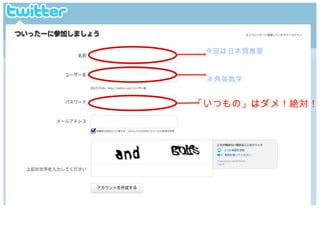
![bot 用アカウントの作成 http://www.lifehacker.jp/2009/08/twittergmail.html Gmail では、 メールアカウント名に「 . (ピリオド)」を追加 することができ、 かつ これらのアカウントは同じアカウントで受信 さ れるようになっています。 [email_address] [email_address] m [email_address] com 本アド 偽装アド 本アドにメールが届く](https://image.slidesharecdn.com/1221bot-091220061018-phpapp01/85/1221bot-8-320.jpg)
![用意した台詞をランダムで喋らせる $username = your username ; $password = your password ; $mes[] = “ メッセージ 1” ; $mes[] = “ メッセージ 2” ; $mes[] = “ メッセージ 3” ; $mes = $mes[mt_rand(0,count($mes)-1)]; $params = "status=". rawurlencode( $mes );](https://image.slidesharecdn.com/1221bot-091220061018-phpapp01/85/1221bot-22-320.jpg)
![用意した台詞をランダムで喋らせる $username = your username ; $password = your password ; $mes[0] = “ メッセージ 1” ; $mes[1] = “ メッセージ 2” ; $mes[2] = “ メッセージ 3” ; $mes = $mes[mt_rand(0,count($mes)-1)] $params = "status=". rawurlencode( $mes ); 配列の個数を数える ( この場合は 3 つ )](https://image.slidesharecdn.com/1221bot-091220061018-phpapp01/85/1221bot-23-320.jpg)
![用意した台詞をランダムで喋らせる $username = your username ; $password = your password ; $mes = array( “ メッセージ 1”,“ メッセージ 2”,“ メッセージ 3”, ); $mes = $mes[mt_rand(0,count($mes)-1)] $params = "status=". rawurlencode( $mes ); 配列](https://image.slidesharecdn.com/1221bot-091220061018-phpapp01/85/1221bot-24-320.jpg)
![用意した台詞をランダムで喋らせる $username = your username ; $password = your password ; $mes = array( “ メッセージ 1”, “ メッセージ 2”, “ メッセージ 3”, ); $mes = $mes[mt_rand(0,count($mes)-1)] $params = "status=". rawurlencode( $mes );](https://image.slidesharecdn.com/1221bot-091220061018-phpapp01/85/1221bot-25-320.jpg)
![用意した台詞をランダムで喋らせる $username = your username ; $password = your password ; $mes = file(“ mes.dat ”); $mes = $mes[mt_rand(0,count($mes)-1)] $params = "status=". rawurlencode( $mes ); mes.dat メッセージ 1 メッセージ 2 メッセージ 3 ※ 改行毎に1要素扱い->](https://image.slidesharecdn.com/1221bot-091220061018-phpapp01/85/1221bot-26-320.jpg)
![返信用メッセージの生成 $mes = array( “ メッセージ 1”,“ メッセージ 2”,“ メッセージ 3”, ); $mes = $mes[mt_rand(0,count($mes)-1)]; $mes = "@" . $screen_name . " " . $mes ; 空白](https://image.slidesharecdn.com/1221bot-091220061018-phpapp01/85/1221bot-39-320.jpg)
![おまけ(Lesson 4) 特定のユーザーに対して特殊な反応を返す if($screen_name == " 反応させたいユーザー id"){ [ 特定のユーザーに対する処理 ] }else{ [ それ以外のユーザーに対する処理 ] }](https://image.slidesharecdn.com/1221bot-091220061018-phpapp01/85/1221bot-43-320.jpg)
![おまけ (Lesson 5) 特定の単語に対して特殊な反応を返す if(preg_match( "/ 反応させたいワード /", $text)){ [ 特定のワードに対する処理 ] }else{ [ それ以外のワードに対する処理 ] }](https://image.slidesharecdn.com/1221bot-091220061018-phpapp01/85/1221bot-44-320.jpg)
![latest.dat 0( 初期値 ) if( $latest == $id ){ [ 投稿の処理を行わない ] }else{ [ 1.投稿処理 ] [ 2. latest.dat の書き換え ] } 6774038773 $id = [ 自分宛の呟き最新1件の id] $latest = [ 前回返信した呟きの id] # もし、それらが同一なら # 違った場合 別ファイルに 記憶させておく](https://image.slidesharecdn.com/1221bot-091220061018-phpapp01/85/1221bot-51-320.jpg)