10x Performance Improvements
          in 10 steps
    A MySQL Case Study
                Ronald Bradford
           http://ronaldbradford.com

       MySQL Users Conference - 2010.04
Application
Typical Web 2.0 social media site (Europe based)

• Users - Visitors, Free Members, Paying Members
• Friends
• User Content - Video, Pictures
• Forums, Chat, Email
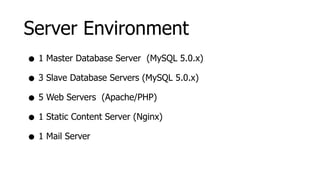
Server Environment
• 1 Master Database Server (MySQL 5.0.x)
• 3 Slave Database Servers (MySQL 5.0.x)
• 5 Web Servers (Apache/PHP)
• 1 Static Content Server (Nginx)
• 1 Mail Server
Step 1


Monitor, Monitor, Monitor
1. Monitor, Monitor, Monitor
• What’s happened?
• What’s happening now?
• What’s going to happen?

             Past, Present, Future
1. Monitor, Monitor, Monitor
                                                            Action 1
Monitoring Software

• Installation of Cacti http://www.cacti.net/
                      -


• Installation of MySQL Cacti Templates     -
  http://code.google.com/p/mysql-cacti-templates/

• (Optional) Installation of MONyog   -   http://www.webyog.com/
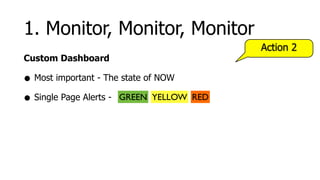
1. Monitor, Monitor, Monitor
                                            Action 2
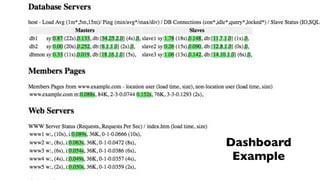
Custom Dashboard

• Most important - The state of NOW
• Single Page Alerts - GREEN YELLOW   RED
Screen print goes here


                         Dashboard
                          Example
1. Monitor, Monitor, Monitor
                                                  Action 3
Alerting Software

• Installation of Nagios http://www.nagios.org/
                       -


• MONyog also has some DB specific alerts
1. Monitor, Monitor, Monitor
                               Action 4
Application Metrics

• Total page generation time
Step 2


  Identify problem SQL
2. Identify Problem SQL
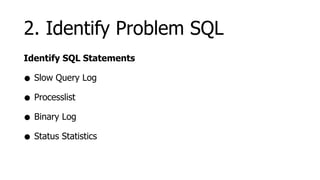
Identify SQL Statements

• Slow Query Log
• Processlist
• Binary Log
• Status Statistics
2. Identify Problem SQL
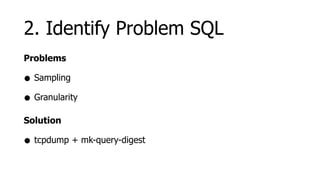
Problems

• Sampling
• Granularity
Solution

• tcpdump + mk-query-digest
2. Identify Problem SQL
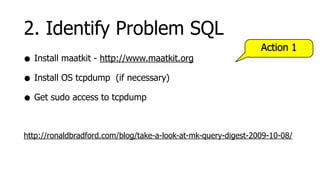
                                                                Action 1
• Install maatkit - http://www.maatkit.org
• Install OS tcpdump (if necessary)
• Get sudo access to tcpdump

http://ronaldbradford.com/blog/take-a-look-at-mk-query-digest-2009-10-08/
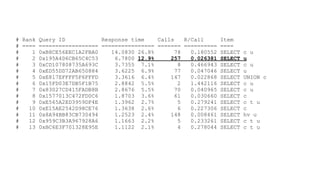
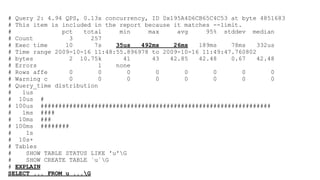
# Rank Query ID           Response time    Calls    R/Call       Item
# ==== ================== ================ ======= ==========    ====
#    1 0xB8CE56EEC1A2FBA0    14.0830 26.8%       78   0.180552   SELECT   c u
#    2 0x195A4D6CB65C4C53     6.7800 12.9%     257    0.026381   SELECT   u
#    3 0xCD107808735A693C     3.7355 7.1%         8   0.466943   SELECT   c u
#    4 0xED55DD72AB650884     3.6225 6.9%        77   0.047046   SELECT   u
#    5 0xE817EFFFF5F6FFFD     3.3616 6.4%      147    0.022868   SELECT   UNION c
#    6 0x15FD03E7DB5F1B75     2.8842 5.5%         2   1.442116   SELECT   c u
#    7 0x83027CD415FADB8B     2.8676 5.5%        70   0.040965   SELECT   c u
#    8 0x1577013C472FD0C6     1.8703 3.6%        61   0.030660   SELECT   c
#    9 0xE565A2ED3959DF4E     1.3962 2.7%         5   0.279241   SELECT   c t u
#   10 0xE15AE2542D98CE76     1.3638 2.6%         6   0.227306   SELECT   c
#   11 0x8A94BB83CB730494     1.2523 2.4%      148    0.008461   SELECT   hv u
#   12 0x959C3B3A967928A6     1.1663 2.2%         5   0.233261   SELECT   c t u
#   13 0xBC6E3F701328E95E     1.1122 2.1%         4   0.278044   SELECT   c t u
# Query 2: 4.94 QPS, 0.13x concurrency, ID 0x195A4D6CB65C4C53 at byte 4851683
# This item is included in the report because it matches --limit.
#              pct   total     min     max     avg     95% stddev median
# Count          3      257
# Exec time     10       7s   35us   492ms    26ms   189ms    78ms    332us
# Time range 2009-10-16 11:48:55.896978 to 2009-10-16 11:49:47.760802
# bytes          2 10.75k       41      43   42.85   42.48    0.67    42.48
# Errors                  1   none
# Rows affe      0        0       0      0       0       0        0       0
# Warning c      0        0       0      0       0       0        0       0
# Query_time distribution
#   1us
# 10us #
# 100us ################################################################
#   1ms ####
# 10ms ###
# 100ms ########
#    1s
# 10s+
# Tables
#    SHOW TABLE STATUS LIKE 'u'G
#    SHOW CREATE TABLE `u`G
# EXPLAIN
SELECT ... FROM u ...G
2. Identify Problem SQL
                                          Action 2
• Wrappers to capture SQL
• Re-run on single/multiple servers
  • e.g. Different slave configurations
2. Identify Problem SQL
                                                    Tip

• Enable General Query Log in Development/Testing
• Great for testing Batch Jobs
2. Identify Problem SQL
                                                       Action 3
Application Logic

• Show total master/slave SQL statements executed
• Show all SQL with execution time (admin user only)
                                                        Tip

• Have abstracted class/method to execute ALL SQL
Step 3


  Analyze problem SQL
3. Analyze Problem SQL
• Query Execution Plan (QEP)
  • EXPLAIN [EXTENDED] SELECT ...
• Table/Index Structure
  • SHOW CREATE TABLE <tablename>G
• Table Statistics
  • SHOW TABLE STATUS LIKE ‘<tablename>’G
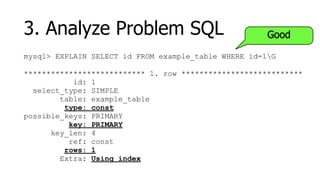
3. Analyze Problem SQL                                Good

mysql> EXPLAIN SELECT id FROM example_table WHERE id=1G

*************************** 1. row ***************************
           id: 1
  select_type: SIMPLE
        table: example_table
         type: const
possible_keys: PRIMARY
          key: PRIMARY
      key_len: 4
          ref: const
         rows: 1
        Extra: Using index
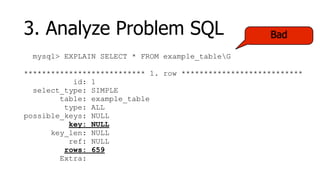
3. Analyze Problem SQL                                Bad

  mysql> EXPLAIN SELECT * FROM example_tableG

*************************** 1. row ***************************
           id: 1
  select_type: SIMPLE
        table: example_table
         type: ALL
possible_keys: NULL
          key: NULL
      key_len: NULL
          ref: NULL
         rows: 659
        Extra:
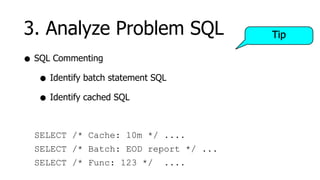
3. Analyze Problem SQL                 Tip

• SQL Commenting
   • Identify batch statement SQL
   • Identify cached SQL

  SELECT /* Cache: 10m */ ....
  SELECT /* Batch: EOD report */ ...
  SELECT /* Func: 123 */        ....
Step 4


    The Art of Indexes
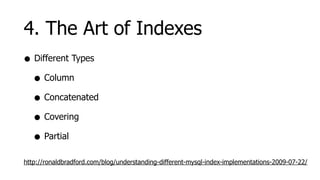
4. The Art of Indexes
• Different Types
  • Column
  • Concatenated
  • Covering
  • Partial
http://ronaldbradford.com/blog/understanding-different-mysql-index-implementations-2009-07-22/
4. The Art of Indexes
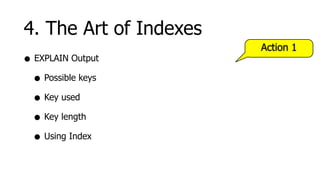
                        Action 1
• EXPLAIN Output
  • Possible keys
  • Key used
  • Key length
  • Using Index
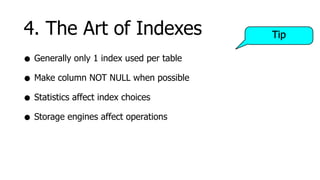
4. The Art of Indexes                     Tip

• Generally only 1 index used per table
• Make column NOT NULL when possible
• Statistics affect index choices
• Storage engines affect operations
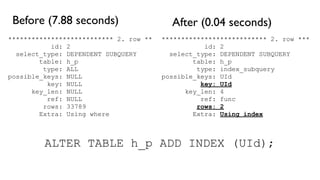
Before (7.88 seconds)                    After (0.04 seconds)
*************************** 2. row **   *************************** 2. row ***
           id: 2                                   id: 2
  select_type: DEPENDENT SUBQUERY         select_type: DEPENDENT SUBQUERY
        table: h_p                              table: h_p
         type: ALL                               type: index_subquery
possible_keys: NULL                     possible_keys: UId
          key: NULL                               key: UId
      key_len: NULL                           key_len: 4
          ref: NULL                               ref: func
         rows: 33789                             rows: 2
        Extra: Using where                      Extra: Using index


         ALTER TABLE h_p ADD INDEX (UId);
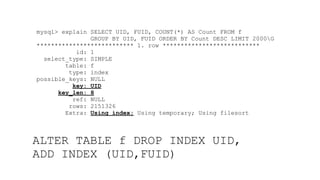
mysql> explain SELECT UID, FUID, COUNT(*) AS Count FROM f
               GROUP BY UID, FUID ORDER BY Count DESC LIMIT 2000G
*************************** 1. row ***************************
           id: 1
  select_type: SIMPLE
        table: f
         type: index
possible_keys: NULL
          key: UID
      key_len: 8
          ref: NULL
         rows: 2151326
        Extra: Using index; Using temporary; Using filesort


ALTER TABLE f DROP INDEX UID,
ADD INDEX (UID,FUID)
4. The Art of Indexes


  Indexes can hurt performance
Step 5


 Offloading Master Load
5. Offloading Master Load
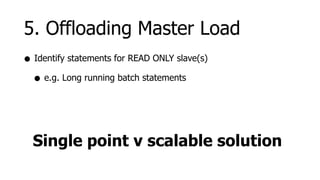
• Identify statements for READ ONLY slave(s)
  • e.g. Long running batch statements


  Single point v scalable solution
Step 6


         Improving SQL
6. Improving SQL
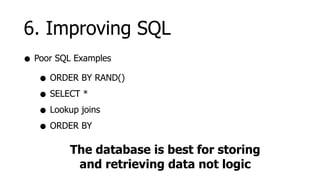
• Poor SQL Examples
   • ORDER BY RAND()
   • SELECT *
   • Lookup joins
   • ORDER BY
         The database is best for storing
          and retrieving data not logic
Step 7


     Storage Engines
7. Storage Engines
• MyISAM is default
• Table level locking
  • Concurrent SELECT statements
  • INSERT/UPDATE/DELETE blocked by long running SELECT
  • All SELECT’s blocked by INSERT/UPDATE/DELETE
• Supports FULLTEXT
7. Storage Engines
• InnoDB supports transactions
• Row level locking with MVCC
• Does not support FULLTEXT
• Different memory management
• Different system variables
7. Storage Engines
• There are other storage engines
  • Memory
  • Archive
  • Blackhole
  • Third party
7. Storage Engines
Using Multiple Engines

• Different memory management
• Different system variables
• Different monitoring
• Affects backup strategy
7. Storage Engines
                                     Action 1
• Configure InnoDB correctly
  • innodb_buffer_pool_size
  • innodb_log_file_size
  • innodb_flush_log_at_trx_commit
7. Storage Engines
                                     Action 2
• Converted the two primary tables
   • Users
   • Content

              Locking eliminated
Step 8


         Caching
8. Caching
                                                  Action 1
• Memcache is your friend http://memcached.org/
                         -


  • Cache query results
  • Cache lookup data (eliminate joins)
  • Cache aggregated per user information
• Caching Page Content
  • Top rated (e.g. for 5 minutes)
8. Caching
                                              Action 2
• MySQL has a Query Cache
  • Determine the real benefit
  • Turn on or off dynamically
  • SET GLOBAL query_cache_size   = 1024*1024*32;
8. Caching                        Tip


     The best performance
    improvement for an SQL
  statement is to eliminate it.
Step 9


         Sharding
9. Sharding
• Application level horizontal and vertical partitioning
• Vertical Partitioning
  • Grouping like structures together (e.g. logging, forums)
• Horizontal Partitioning
  • Affecting a smaller set of users (i.e. not 100%)
9. Sharding
                                                  Action 1
• Separate Logging
   • Reduced replication load on primary server
Step 10


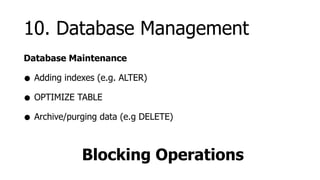
 Database Management
10. Database Management
Database Maintenance

• Adding indexes (e.g. ALTER)
• OPTIMIZE TABLE
• Archive/purging data (e.g DELETE)

             Blocking Operations
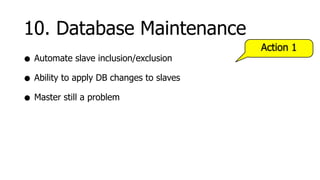
10. Database Maintenance
                                          Action 1
• Automate slave inclusion/exclusion
• Ability to apply DB changes to slaves
• Master still a problem
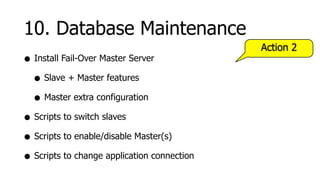
10. Database Maintenance
                                             Action 2
• Install Fail-Over Master Server
  • Slave + Master features
  • Master extra configuration
• Scripts to switch slaves
• Scripts to enable/disable Master(s)
• Scripts to change application connection
10. Database Maintenance

      Higher Availability
              &
   Testing Disaster Recovery
Bonus


Front End Improvements
11. Front End Improvements
• Know your total website load time http://getfirebug.com/
                                   -


  • How much time is actually database related?
• Reduce HTML page size - 15% improvement
  • Remove full URL’s, inline css styles
• Reduce/combine css & js files
• Identify blocking elements (e.g. js)
11. Front End Improvements
• Split static content to different ServerName
• Spread static content over multiple ServerNames (e.g. 3)
• Sprites - Combining lightweight images http://spriteme.org/
                                        -


• Cookie-less domain name for static content
Conclusion
Before
• Users experienced slow or unreliable load times
• Management could observe, but no quantifiable details
• Concern over load for increased growth
• Release of some new features on hold
Now
• Users experienced consistent load times (~60ms)
 • Quantifiable and visible real-time results
• Far greater load now supported (Clients + DB)
• Better testability and verification for scaling
• New features can be deployed
Consulting Available Now


  http://ronaldbradford.com

10x Performance Improvements

  • 1.
    10x Performance Improvements in 10 steps A MySQL Case Study Ronald Bradford http://ronaldbradford.com MySQL Users Conference - 2010.04
  • 2.
    Application Typical Web 2.0social media site (Europe based) • Users - Visitors, Free Members, Paying Members • Friends • User Content - Video, Pictures • Forums, Chat, Email
  • 3.
    Server Environment • 1Master Database Server (MySQL 5.0.x) • 3 Slave Database Servers (MySQL 5.0.x) • 5 Web Servers (Apache/PHP) • 1 Static Content Server (Nginx) • 1 Mail Server
  • 4.
  • 5.
    1. Monitor, Monitor,Monitor • What’s happened? • What’s happening now? • What’s going to happen? Past, Present, Future
  • 6.
    1. Monitor, Monitor,Monitor Action 1 Monitoring Software • Installation of Cacti http://www.cacti.net/ - • Installation of MySQL Cacti Templates - http://code.google.com/p/mysql-cacti-templates/ • (Optional) Installation of MONyog - http://www.webyog.com/
  • 7.
    1. Monitor, Monitor,Monitor Action 2 Custom Dashboard • Most important - The state of NOW • Single Page Alerts - GREEN YELLOW RED
  • 8.
    Screen print goeshere Dashboard Example
  • 9.
    1. Monitor, Monitor,Monitor Action 3 Alerting Software • Installation of Nagios http://www.nagios.org/ - • MONyog also has some DB specific alerts
  • 10.
    1. Monitor, Monitor,Monitor Action 4 Application Metrics • Total page generation time
  • 11.
    Step 2 Identify problem SQL
  • 12.
    2. Identify ProblemSQL Identify SQL Statements • Slow Query Log • Processlist • Binary Log • Status Statistics
  • 13.
    2. Identify ProblemSQL Problems • Sampling • Granularity Solution • tcpdump + mk-query-digest
  • 14.
    2. Identify ProblemSQL Action 1 • Install maatkit - http://www.maatkit.org • Install OS tcpdump (if necessary) • Get sudo access to tcpdump http://ronaldbradford.com/blog/take-a-look-at-mk-query-digest-2009-10-08/
  • 15.
    # Rank QueryID Response time Calls R/Call Item # ==== ================== ================ ======= ========== ==== # 1 0xB8CE56EEC1A2FBA0 14.0830 26.8% 78 0.180552 SELECT c u # 2 0x195A4D6CB65C4C53 6.7800 12.9% 257 0.026381 SELECT u # 3 0xCD107808735A693C 3.7355 7.1% 8 0.466943 SELECT c u # 4 0xED55DD72AB650884 3.6225 6.9% 77 0.047046 SELECT u # 5 0xE817EFFFF5F6FFFD 3.3616 6.4% 147 0.022868 SELECT UNION c # 6 0x15FD03E7DB5F1B75 2.8842 5.5% 2 1.442116 SELECT c u # 7 0x83027CD415FADB8B 2.8676 5.5% 70 0.040965 SELECT c u # 8 0x1577013C472FD0C6 1.8703 3.6% 61 0.030660 SELECT c # 9 0xE565A2ED3959DF4E 1.3962 2.7% 5 0.279241 SELECT c t u # 10 0xE15AE2542D98CE76 1.3638 2.6% 6 0.227306 SELECT c # 11 0x8A94BB83CB730494 1.2523 2.4% 148 0.008461 SELECT hv u # 12 0x959C3B3A967928A6 1.1663 2.2% 5 0.233261 SELECT c t u # 13 0xBC6E3F701328E95E 1.1122 2.1% 4 0.278044 SELECT c t u
  • 16.
    # Query 2:4.94 QPS, 0.13x concurrency, ID 0x195A4D6CB65C4C53 at byte 4851683 # This item is included in the report because it matches --limit. # pct total min max avg 95% stddev median # Count 3 257 # Exec time 10 7s 35us 492ms 26ms 189ms 78ms 332us # Time range 2009-10-16 11:48:55.896978 to 2009-10-16 11:49:47.760802 # bytes 2 10.75k 41 43 42.85 42.48 0.67 42.48 # Errors 1 none # Rows affe 0 0 0 0 0 0 0 0 # Warning c 0 0 0 0 0 0 0 0 # Query_time distribution # 1us # 10us # # 100us ################################################################ # 1ms #### # 10ms ### # 100ms ######## # 1s # 10s+ # Tables # SHOW TABLE STATUS LIKE 'u'G # SHOW CREATE TABLE `u`G # EXPLAIN SELECT ... FROM u ...G
  • 17.
    2. Identify ProblemSQL Action 2 • Wrappers to capture SQL • Re-run on single/multiple servers • e.g. Different slave configurations
  • 18.
    2. Identify ProblemSQL Tip • Enable General Query Log in Development/Testing • Great for testing Batch Jobs
  • 19.
    2. Identify ProblemSQL Action 3 Application Logic • Show total master/slave SQL statements executed • Show all SQL with execution time (admin user only) Tip • Have abstracted class/method to execute ALL SQL
  • 20.
    Step 3 Analyze problem SQL
  • 21.
    3. Analyze ProblemSQL • Query Execution Plan (QEP) • EXPLAIN [EXTENDED] SELECT ... • Table/Index Structure • SHOW CREATE TABLE <tablename>G • Table Statistics • SHOW TABLE STATUS LIKE ‘<tablename>’G
  • 22.
    3. Analyze ProblemSQL Good mysql> EXPLAIN SELECT id FROM example_table WHERE id=1G *************************** 1. row *************************** id: 1 select_type: SIMPLE table: example_table type: const possible_keys: PRIMARY key: PRIMARY key_len: 4 ref: const rows: 1 Extra: Using index
  • 23.
    3. Analyze ProblemSQL Bad mysql> EXPLAIN SELECT * FROM example_tableG *************************** 1. row *************************** id: 1 select_type: SIMPLE table: example_table type: ALL possible_keys: NULL key: NULL key_len: NULL ref: NULL rows: 659 Extra:
  • 24.
    3. Analyze ProblemSQL Tip • SQL Commenting • Identify batch statement SQL • Identify cached SQL SELECT /* Cache: 10m */ .... SELECT /* Batch: EOD report */ ... SELECT /* Func: 123 */ ....
  • 25.
    Step 4 The Art of Indexes
  • 26.
    4. The Artof Indexes • Different Types • Column • Concatenated • Covering • Partial http://ronaldbradford.com/blog/understanding-different-mysql-index-implementations-2009-07-22/
  • 27.
    4. The Artof Indexes Action 1 • EXPLAIN Output • Possible keys • Key used • Key length • Using Index
  • 28.
    4. The Artof Indexes Tip • Generally only 1 index used per table • Make column NOT NULL when possible • Statistics affect index choices • Storage engines affect operations
  • 29.
    Before (7.88 seconds) After (0.04 seconds) *************************** 2. row ** *************************** 2. row *** id: 2 id: 2 select_type: DEPENDENT SUBQUERY select_type: DEPENDENT SUBQUERY table: h_p table: h_p type: ALL type: index_subquery possible_keys: NULL possible_keys: UId key: NULL key: UId key_len: NULL key_len: 4 ref: NULL ref: func rows: 33789 rows: 2 Extra: Using where Extra: Using index ALTER TABLE h_p ADD INDEX (UId);
  • 30.
    mysql> explain SELECTUID, FUID, COUNT(*) AS Count FROM f GROUP BY UID, FUID ORDER BY Count DESC LIMIT 2000G *************************** 1. row *************************** id: 1 select_type: SIMPLE table: f type: index possible_keys: NULL key: UID key_len: 8 ref: NULL rows: 2151326 Extra: Using index; Using temporary; Using filesort ALTER TABLE f DROP INDEX UID, ADD INDEX (UID,FUID)
  • 31.
    4. The Artof Indexes Indexes can hurt performance
  • 32.
    Step 5 OffloadingMaster Load
  • 33.
    5. Offloading MasterLoad • Identify statements for READ ONLY slave(s) • e.g. Long running batch statements Single point v scalable solution
  • 34.
    Step 6 Improving SQL
  • 35.
    6. Improving SQL •Poor SQL Examples • ORDER BY RAND() • SELECT * • Lookup joins • ORDER BY The database is best for storing and retrieving data not logic
  • 36.
    Step 7 Storage Engines
  • 37.
    7. Storage Engines •MyISAM is default • Table level locking • Concurrent SELECT statements • INSERT/UPDATE/DELETE blocked by long running SELECT • All SELECT’s blocked by INSERT/UPDATE/DELETE • Supports FULLTEXT
  • 38.
    7. Storage Engines •InnoDB supports transactions • Row level locking with MVCC • Does not support FULLTEXT • Different memory management • Different system variables
  • 39.
    7. Storage Engines •There are other storage engines • Memory • Archive • Blackhole • Third party
  • 40.
    7. Storage Engines UsingMultiple Engines • Different memory management • Different system variables • Different monitoring • Affects backup strategy
  • 41.
    7. Storage Engines Action 1 • Configure InnoDB correctly • innodb_buffer_pool_size • innodb_log_file_size • innodb_flush_log_at_trx_commit
  • 42.
    7. Storage Engines Action 2 • Converted the two primary tables • Users • Content Locking eliminated
  • 43.
    Step 8 Caching
  • 44.
    8. Caching Action 1 • Memcache is your friend http://memcached.org/ - • Cache query results • Cache lookup data (eliminate joins) • Cache aggregated per user information • Caching Page Content • Top rated (e.g. for 5 minutes)
  • 45.
    8. Caching Action 2 • MySQL has a Query Cache • Determine the real benefit • Turn on or off dynamically • SET GLOBAL query_cache_size = 1024*1024*32;
  • 46.
    8. Caching Tip The best performance improvement for an SQL statement is to eliminate it.
  • 47.
    Step 9 Sharding
  • 48.
    9. Sharding • Applicationlevel horizontal and vertical partitioning • Vertical Partitioning • Grouping like structures together (e.g. logging, forums) • Horizontal Partitioning • Affecting a smaller set of users (i.e. not 100%)
  • 49.
    9. Sharding Action 1 • Separate Logging • Reduced replication load on primary server
  • 50.
    Step 10 DatabaseManagement
  • 51.
    10. Database Management DatabaseMaintenance • Adding indexes (e.g. ALTER) • OPTIMIZE TABLE • Archive/purging data (e.g DELETE) Blocking Operations
  • 52.
    10. Database Maintenance Action 1 • Automate slave inclusion/exclusion • Ability to apply DB changes to slaves • Master still a problem
  • 53.
    10. Database Maintenance Action 2 • Install Fail-Over Master Server • Slave + Master features • Master extra configuration • Scripts to switch slaves • Scripts to enable/disable Master(s) • Scripts to change application connection
  • 54.
    10. Database Maintenance Higher Availability & Testing Disaster Recovery
  • 55.
  • 56.
    11. Front EndImprovements • Know your total website load time http://getfirebug.com/ - • How much time is actually database related? • Reduce HTML page size - 15% improvement • Remove full URL’s, inline css styles • Reduce/combine css & js files • Identify blocking elements (e.g. js)
  • 57.
    11. Front EndImprovements • Split static content to different ServerName • Spread static content over multiple ServerNames (e.g. 3) • Sprites - Combining lightweight images http://spriteme.org/ - • Cookie-less domain name for static content
  • 58.
  • 59.
    Before • Users experiencedslow or unreliable load times • Management could observe, but no quantifiable details • Concern over load for increased growth • Release of some new features on hold
  • 60.
    Now • Users experiencedconsistent load times (~60ms) • Quantifiable and visible real-time results • Far greater load now supported (Clients + DB) • Better testability and verification for scaling • New features can be deployed
  • 61.
    Consulting Available Now http://ronaldbradford.com

Editor's Notes

  • #8 Server (Ping, Uptime) Database Processlist (Total/Active/Idle/Locked) Database Replication (Up,Lag) Web Server (Page Load x 3, Page Size, http processes)
  • #13 Traditional Existing Methods
  • #29 InnoDb, the PK value is stored
  • #32 Too many indexes Disk volume Slows DML Index with unused columns
  • #36 Text fields network bandwidth temporary tables filesort
  • #52 Site is effectively unavailable
  • #53 DB Changes * Add indexes * Change Storage Engines * Change Table structure