Loops
Repeating Code Multiple Times
Svetlin Nakov
Technical Trainer
www.nakov.com
Software University
http://softuni.bg
Table of Contents
1. What is a Loop?
2. Loops in C#
 while loops
 do … while loops
 for loops
 foreach loops
3. Special loop operators
 break, continue, goto
4. Nested loops
2
Loop: Definition
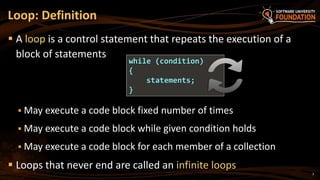
 A loop is a control statement that repeats the execution of a
block of statements
 May execute a code block fixed number of times
 May execute a code block while given condition holds
 May execute a code block for each member of a collection
 Loops that never end are called an infinite loops
while (condition)
{
statements;
}
3
Using while(…) Loop
Repeating a Statement While
Certain Condition Holds
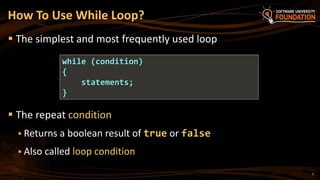
How To Use While Loop?
 The simplest and most frequently used loop
 The repeat condition
 Returns a boolean result of true or false
 Also called loop condition
while (condition)
{
statements;
}
5
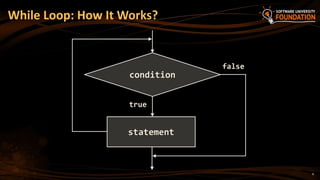
While Loop: How It Works?
true
statement
false
condition
6
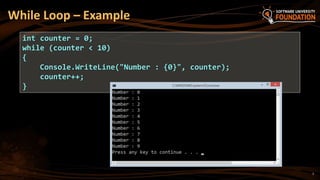
While Loop – Example
int counter = 0;
while (counter < 10)
{
Console.WriteLine("Number : {0}", counter);
counter++;
}
7
while(…) Loop
Examples
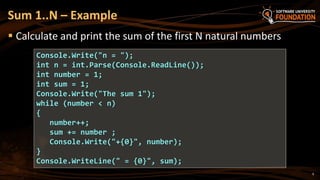
 Calculate and print the sum of the first N natural numbers
Sum 1..N – Example
Console.Write("n = ");
int n = int.Parse(Console.ReadLine());
int number = 1;
int sum = 1;
Console.Write("The sum 1");
while (number < n)
{
number++;
sum += number ;
Console.Write("+{0}", number);
}
Console.WriteLine(" = {0}", sum);
9
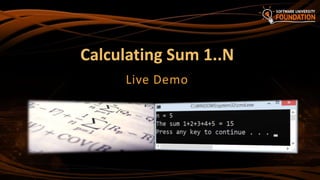
Calculating Sum 1..N
Live Demo
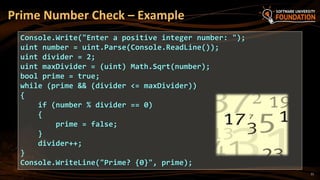
Prime Number Check – Example
Console.Write("Enter a positive integer number: ");
uint number = uint.Parse(Console.ReadLine());
uint divider = 2;
uint maxDivider = (uint) Math.Sqrt(number);
bool prime = true;
while (prime && (divider <= maxDivider))
{
if (number % divider == 0)
{
prime = false;
}
divider++;
}
Console.WriteLine("Prime? {0}", prime);
11
Checking Whether a
Number Is Prime
Live Demo
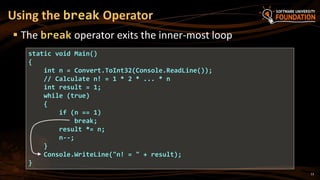
Using the break Operator
 The break operator exits the inner-most loop
static void Main()
{
int n = Convert.ToInt32(Console.ReadLine());
// Calculate n! = 1 * 2 * ... * n
int result = 1;
while (true)
{
if (n == 1)
break;
result *= n;
n--;
}
Console.WriteLine("n! = " + result);
}
13
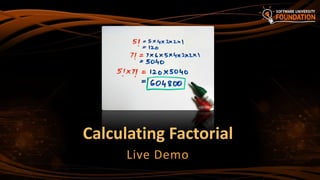
Calculating Factorial
Live Demo
do { … }
while (…)
Loop
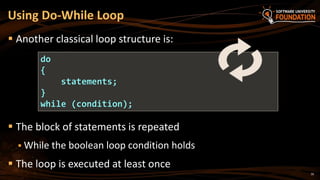
Using Do-While Loop
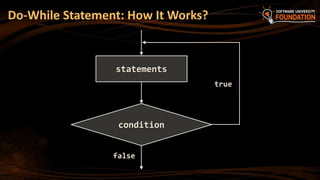
 Another classical loop structure is:
 The block of statements is repeated
 While the boolean loop condition holds
 The loop is executed at least once
do
{
statements;
}
while (condition);
16
Do-While Statement: How It Works?
true
condition
statements
false
do { … }
while (…)
Examples
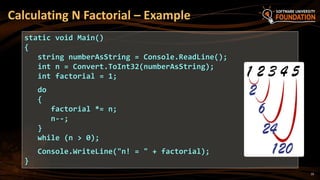
Calculating N Factorial – Example
static void Main()
{
string numberAsString = Console.ReadLine();
int n = Convert.ToInt32(numberAsString);
int factorial = 1;
do
{
factorial *= n;
n--;
}
while (n > 0);
Console.WriteLine("n! = " + factorial);
}
19
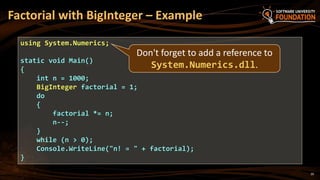
using System.Numerics;
static void Main()
{
int n = 1000;
BigInteger factorial = 1;
do
{
factorial *= n;
n--;
}
while (n > 0);
Console.WriteLine("n! = " + factorial);
}
Don't forget to add a reference to
System.Numerics.dll.
Factorial with BigInteger – Example
20
Factorial (do ... while)
Live Demo
22
 Calculating the product of all numbers in the interval [n..m]:
Product of Numbers [N..M] – Example
int n = int.Parse(Console.ReadLine());
int m = int.Parse(Console.ReadLine());
int number = n;
decimal product = 1;
do
{
product *= number;
number++;
}
while (number <= m);
Console.WriteLine("product[{0}..{1}] = {2}", n, m, product);
Product of the Numbers
in the Interval [n..m]
Live Demo
for Loops
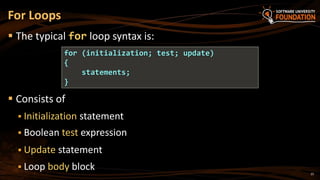
 The typical for loop syntax is:
 Consists of
 Initialization statement
 Boolean test expression
 Update statement
 Loop body block
For Loops
for (initialization; test; update)
{
statements;
}
25
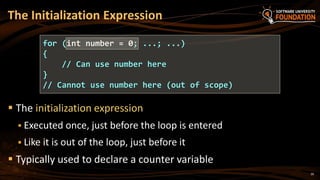
 The initialization expression
 Executed once, just before the loop is entered
 Like it is out of the loop, just before it
 Typically used to declare a counter variable
The Initialization Expression
for (int number = 0; ...; ...)
{
// Can use number here
}
// Cannot use number here (out of scope)
26
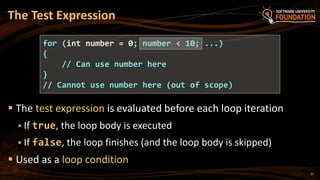
 The test expression is evaluated before each loop iteration
 If true, the loop body is executed
 If false, the loop finishes (and the loop body is skipped)
 Used as a loop condition
The Test Expression
for (int number = 0; number < 10; ...)
{
// Can use number here
}
// Cannot use number here (out of scope)
27
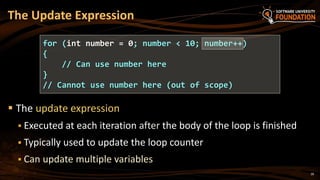
 The update expression
 Executed at each iteration after the body of the loop is finished
 Typically used to update the loop counter
 Can update multiple variables
The Update Expression
for (int number = 0; number < 10; number++)
{
// Can use number here
}
// Cannot use number here (out of scope)
28
for Loop
Examples
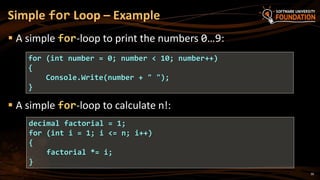
 A simple for-loop to print the numbers 0…9:
Simple for Loop – Example
for (int number = 0; number < 10; number++)
{
Console.Write(number + " ");
}
 A simple for-loop to calculate n!:
decimal factorial = 1;
for (int i = 1; i <= n; i++)
{
factorial *= i;
}
30
31
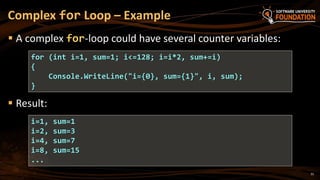
 A complex for-loop could have several counter variables:
Complex for Loop – Example
for (int i=1, sum=1; i<=128; i=i*2, sum+=i)
{
Console.WriteLine("i={0}, sum={1}", i, sum);
}
i=1, sum=1
i=2, sum=3
i=4, sum=7
i=8, sum=15
...
 Result:
For Loops
Live Demo
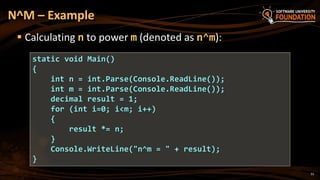
N^M – Example
 Calculating n to power m (denoted as n^m):
static void Main()
{
int n = int.Parse(Console.ReadLine());
int m = int.Parse(Console.ReadLine());
decimal result = 1;
for (int i=0; i<m; i++)
{
result *= n;
}
Console.WriteLine("n^m = " + result);
}
33
Calculating N^M
Live Demo
 continue bypasses the iteration of the inner-most loop
 Example: sum all odd numbers in [1…n], not divisors of 7:
Using the continue Operator
int n = int.Parse(Console.ReadLine());
int sum = 0;
for (int i = 1; i <= n; i += 2)
{
if (i % 7 == 0)
{
continue;
}
sum += i;
}
Console.WriteLine("sum = {0}", sum);
35
Using the continue Operator
Live Demo
foreach Loop
Iterating over a Collection
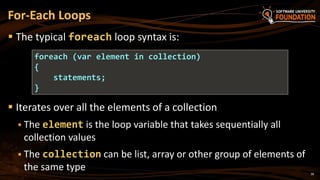
 The typical foreach loop syntax is:
 Iterates over all the elements of a collection
 The element is the loop variable that takes sequentially all
collection values
 The collection can be list, array or other group of elements of
the same type
For-Each Loops
foreach (var element in collection)
{
statements;
}
38
 Example of foreach loop:
 The loop iterates over the array of day names
 The variable day takes all its values
 Inside a foreach loop we cannot modify the current item
foreach Loop – Example
string[] days = {
"Monday", "Tuesday", "Wednesday", "Thursday",
"Friday", "Saturday", "Sunday" };
foreach (var day in days)
{
Console.WriteLine(day);
}
39
foreach Loop
Live Demo
Nested Loops
Using a Loop Inside a Loop
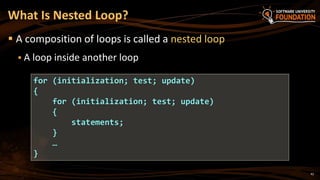
 A composition of loops is called a nested loop
 A loop inside another loop
What Is Nested Loop?
for (initialization; test; update)
{
for (initialization; test; update)
{
statements;
}
…
}
42
Nested Loops
Examples
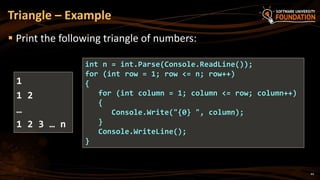
 Print the following triangle of numbers:
Triangle – Example
int n = int.Parse(Console.ReadLine());
for (int row = 1; row <= n; row++)
{
for (int column = 1; column <= row; column++)
{
Console.Write("{0} ", column);
}
Console.WriteLine();
}
1
1 2
…
1 2 3 … n
44
Triangle of Numbers
Live Demo
Primes in the Range [N … M] – Example
int n = int.Parse(Console.ReadLine());
int m = int.Parse(Console.ReadLine());
for (int number = n; number <= m; number++)
{
bool prime = true;
int divider = 2;
int maxDivider = Math.Sqrt(number);
while (divider <= maxDivider)
{
if (number % divider == 0)
{
prime = false;
break;
}
divider++;
}
if (prime)
Console.Write("{0} ", number);
}
46
Primes in the Range [n, m]
Live Demo
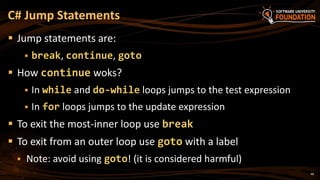
C# Jump Statements
 Jump statements are:
 break, continue, goto
 How continue woks?
 In while and do-while loops jumps to the test expression
 In for loops jumps to the update expression
 To exit the most-inner loop use break
 To exit from an outer loop use goto with a label
 Note: avoid using goto! (it is considered harmful)
48
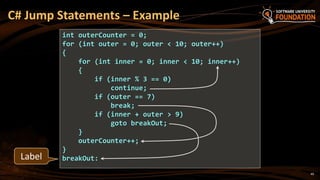
C# Jump Statements – Example
int outerCounter = 0;
for (int outer = 0; outer < 10; outer++)
{
for (int inner = 0; inner < 10; inner++)
{
if (inner % 3 == 0)
continue;
if (outer == 7)
break;
if (inner + outer > 9)
goto breakOut;
}
outerCounter++;
}
breakOut:Label
49
Loops: More Examples
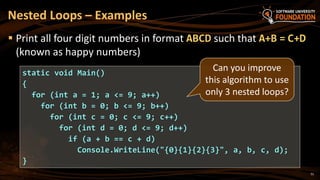
Nested Loops – Examples
 Print all four digit numbers in format ABCD such that A+B = C+D
(known as happy numbers)
static void Main()
{
for (int a = 1; a <= 9; a++)
for (int b = 0; b <= 9; b++)
for (int c = 0; c <= 9; c++)
for (int d = 0; d <= 9; d++)
if (a + b == c + d)
Console.WriteLine("{0}{1}{2}{3}", a, b, c, d);
}
Can you improve
this algorithm to use
only 3 nested loops?
51
Happy Numbers
Live Demo
Nested Loops – Examples
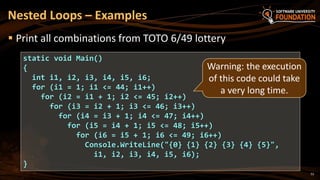
 Print all combinations from TOTO 6/49 lottery
static void Main()
{
int i1, i2, i3, i4, i5, i6;
for (i1 = 1; i1 <= 44; i1++)
for (i2 = i1 + 1; i2 <= 45; i2++)
for (i3 = i2 + 1; i3 <= 46; i3++)
for (i4 = i3 + 1; i4 <= 47; i4++)
for (i5 = i4 + 1; i5 <= 48; i5++)
for (i6 = i5 + 1; i6 <= 49; i6++)
Console.WriteLine("{0} {1} {2} {3} {4} {5}",
i1, i2, i3, i4, i5, i6);
}
Warning: the execution
of this code could take
a very long time.
53
TOTO 6/49
Live Demo
55
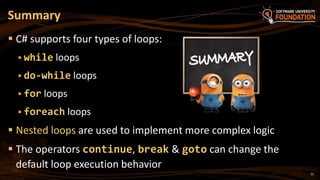
 C# supports four types of loops:
 while loops
 do-while loops
 for loops
 foreach loops
 Nested loops are used to implement more complex logic
 The operators continue, break & goto can change the
default loop execution behavior
Summary
?
http://softuni.bg/courses/csharp-basics/
Loops: Repeating Code Multiple Times
License
 This course (slides, examples, demos, videos, homework, etc.)
is licensed under the "Creative Commons Attribution-
NonCommercial-ShareAlike 4.0 International" license
57
 Attribution: this work may contain portions from
 "Fundamentals of Computer Programming with C#" book by Svetlin Nakov & Co. under CC-BY-SA license
 "C# Part I" course by Telerik Academy under CC-BY-NC-SA license
Free Trainings @ Software University
 Software University Foundation – softuni.org
 Software University – High-Quality Education,
Profession and Job for Software Developers
 softuni.bg
 Software University @ Facebook
 facebook.com/SoftwareUniversity
 Software University @ YouTube
 youtube.com/SoftwareUniversity
 Software University Forums – forum.softuni.bg

06.Loops

  • 1.
    Loops Repeating Code MultipleTimes Svetlin Nakov Technical Trainer www.nakov.com Software University http://softuni.bg
  • 2.
    Table of Contents 1.What is a Loop? 2. Loops in C#  while loops  do … while loops  for loops  foreach loops 3. Special loop operators  break, continue, goto 4. Nested loops 2
  • 3.
    Loop: Definition  Aloop is a control statement that repeats the execution of a block of statements  May execute a code block fixed number of times  May execute a code block while given condition holds  May execute a code block for each member of a collection  Loops that never end are called an infinite loops while (condition) { statements; } 3
  • 4.
    Using while(…) Loop Repeatinga Statement While Certain Condition Holds
  • 5.
    How To UseWhile Loop?  The simplest and most frequently used loop  The repeat condition  Returns a boolean result of true or false  Also called loop condition while (condition) { statements; } 5
  • 6.
    While Loop: HowIt Works? true statement false condition 6
  • 7.
    While Loop –Example int counter = 0; while (counter < 10) { Console.WriteLine("Number : {0}", counter); counter++; } 7
  • 8.
  • 9.
     Calculate andprint the sum of the first N natural numbers Sum 1..N – Example Console.Write("n = "); int n = int.Parse(Console.ReadLine()); int number = 1; int sum = 1; Console.Write("The sum 1"); while (number < n) { number++; sum += number ; Console.Write("+{0}", number); } Console.WriteLine(" = {0}", sum); 9
  • 10.
  • 11.
    Prime Number Check– Example Console.Write("Enter a positive integer number: "); uint number = uint.Parse(Console.ReadLine()); uint divider = 2; uint maxDivider = (uint) Math.Sqrt(number); bool prime = true; while (prime && (divider <= maxDivider)) { if (number % divider == 0) { prime = false; } divider++; } Console.WriteLine("Prime? {0}", prime); 11
  • 12.
    Checking Whether a NumberIs Prime Live Demo
  • 13.
    Using the breakOperator  The break operator exits the inner-most loop static void Main() { int n = Convert.ToInt32(Console.ReadLine()); // Calculate n! = 1 * 2 * ... * n int result = 1; while (true) { if (n == 1) break; result *= n; n--; } Console.WriteLine("n! = " + result); } 13
  • 14.
  • 15.
    do { …} while (…) Loop
  • 16.
    Using Do-While Loop Another classical loop structure is:  The block of statements is repeated  While the boolean loop condition holds  The loop is executed at least once do { statements; } while (condition); 16
  • 17.
    Do-While Statement: HowIt Works? true condition statements false
  • 18.
    do { …} while (…) Examples
  • 19.
    Calculating N Factorial– Example static void Main() { string numberAsString = Console.ReadLine(); int n = Convert.ToInt32(numberAsString); int factorial = 1; do { factorial *= n; n--; } while (n > 0); Console.WriteLine("n! = " + factorial); } 19
  • 20.
    using System.Numerics; static voidMain() { int n = 1000; BigInteger factorial = 1; do { factorial *= n; n--; } while (n > 0); Console.WriteLine("n! = " + factorial); } Don't forget to add a reference to System.Numerics.dll. Factorial with BigInteger – Example 20
  • 21.
    Factorial (do ...while) Live Demo
  • 22.
    22  Calculating theproduct of all numbers in the interval [n..m]: Product of Numbers [N..M] – Example int n = int.Parse(Console.ReadLine()); int m = int.Parse(Console.ReadLine()); int number = n; decimal product = 1; do { product *= number; number++; } while (number <= m); Console.WriteLine("product[{0}..{1}] = {2}", n, m, product);
  • 23.
    Product of theNumbers in the Interval [n..m] Live Demo
  • 24.
  • 25.
     The typicalfor loop syntax is:  Consists of  Initialization statement  Boolean test expression  Update statement  Loop body block For Loops for (initialization; test; update) { statements; } 25
  • 26.
     The initializationexpression  Executed once, just before the loop is entered  Like it is out of the loop, just before it  Typically used to declare a counter variable The Initialization Expression for (int number = 0; ...; ...) { // Can use number here } // Cannot use number here (out of scope) 26
  • 27.
     The testexpression is evaluated before each loop iteration  If true, the loop body is executed  If false, the loop finishes (and the loop body is skipped)  Used as a loop condition The Test Expression for (int number = 0; number < 10; ...) { // Can use number here } // Cannot use number here (out of scope) 27
  • 28.
     The updateexpression  Executed at each iteration after the body of the loop is finished  Typically used to update the loop counter  Can update multiple variables The Update Expression for (int number = 0; number < 10; number++) { // Can use number here } // Cannot use number here (out of scope) 28
  • 29.
  • 30.
     A simplefor-loop to print the numbers 0…9: Simple for Loop – Example for (int number = 0; number < 10; number++) { Console.Write(number + " "); }  A simple for-loop to calculate n!: decimal factorial = 1; for (int i = 1; i <= n; i++) { factorial *= i; } 30
  • 31.
    31  A complexfor-loop could have several counter variables: Complex for Loop – Example for (int i=1, sum=1; i<=128; i=i*2, sum+=i) { Console.WriteLine("i={0}, sum={1}", i, sum); } i=1, sum=1 i=2, sum=3 i=4, sum=7 i=8, sum=15 ...  Result:
  • 32.
  • 33.
    N^M – Example Calculating n to power m (denoted as n^m): static void Main() { int n = int.Parse(Console.ReadLine()); int m = int.Parse(Console.ReadLine()); decimal result = 1; for (int i=0; i<m; i++) { result *= n; } Console.WriteLine("n^m = " + result); } 33
  • 34.
  • 35.
     continue bypassesthe iteration of the inner-most loop  Example: sum all odd numbers in [1…n], not divisors of 7: Using the continue Operator int n = int.Parse(Console.ReadLine()); int sum = 0; for (int i = 1; i <= n; i += 2) { if (i % 7 == 0) { continue; } sum += i; } Console.WriteLine("sum = {0}", sum); 35
  • 36.
    Using the continueOperator Live Demo
  • 37.
  • 38.
     The typicalforeach loop syntax is:  Iterates over all the elements of a collection  The element is the loop variable that takes sequentially all collection values  The collection can be list, array or other group of elements of the same type For-Each Loops foreach (var element in collection) { statements; } 38
  • 39.
     Example offoreach loop:  The loop iterates over the array of day names  The variable day takes all its values  Inside a foreach loop we cannot modify the current item foreach Loop – Example string[] days = { "Monday", "Tuesday", "Wednesday", "Thursday", "Friday", "Saturday", "Sunday" }; foreach (var day in days) { Console.WriteLine(day); } 39
  • 40.
  • 41.
    Nested Loops Using aLoop Inside a Loop
  • 42.
     A compositionof loops is called a nested loop  A loop inside another loop What Is Nested Loop? for (initialization; test; update) { for (initialization; test; update) { statements; } … } 42
  • 43.
  • 44.
     Print thefollowing triangle of numbers: Triangle – Example int n = int.Parse(Console.ReadLine()); for (int row = 1; row <= n; row++) { for (int column = 1; column <= row; column++) { Console.Write("{0} ", column); } Console.WriteLine(); } 1 1 2 … 1 2 3 … n 44
  • 45.
  • 46.
    Primes in theRange [N … M] – Example int n = int.Parse(Console.ReadLine()); int m = int.Parse(Console.ReadLine()); for (int number = n; number <= m; number++) { bool prime = true; int divider = 2; int maxDivider = Math.Sqrt(number); while (divider <= maxDivider) { if (number % divider == 0) { prime = false; break; } divider++; } if (prime) Console.Write("{0} ", number); } 46
  • 47.
    Primes in theRange [n, m] Live Demo
  • 48.
    C# Jump Statements Jump statements are:  break, continue, goto  How continue woks?  In while and do-while loops jumps to the test expression  In for loops jumps to the update expression  To exit the most-inner loop use break  To exit from an outer loop use goto with a label  Note: avoid using goto! (it is considered harmful) 48
  • 49.
    C# Jump Statements– Example int outerCounter = 0; for (int outer = 0; outer < 10; outer++) { for (int inner = 0; inner < 10; inner++) { if (inner % 3 == 0) continue; if (outer == 7) break; if (inner + outer > 9) goto breakOut; } outerCounter++; } breakOut:Label 49
  • 50.
  • 51.
    Nested Loops –Examples  Print all four digit numbers in format ABCD such that A+B = C+D (known as happy numbers) static void Main() { for (int a = 1; a <= 9; a++) for (int b = 0; b <= 9; b++) for (int c = 0; c <= 9; c++) for (int d = 0; d <= 9; d++) if (a + b == c + d) Console.WriteLine("{0}{1}{2}{3}", a, b, c, d); } Can you improve this algorithm to use only 3 nested loops? 51
  • 52.
  • 53.
    Nested Loops –Examples  Print all combinations from TOTO 6/49 lottery static void Main() { int i1, i2, i3, i4, i5, i6; for (i1 = 1; i1 <= 44; i1++) for (i2 = i1 + 1; i2 <= 45; i2++) for (i3 = i2 + 1; i3 <= 46; i3++) for (i4 = i3 + 1; i4 <= 47; i4++) for (i5 = i4 + 1; i5 <= 48; i5++) for (i6 = i5 + 1; i6 <= 49; i6++) Console.WriteLine("{0} {1} {2} {3} {4} {5}", i1, i2, i3, i4, i5, i6); } Warning: the execution of this code could take a very long time. 53
  • 54.
  • 55.
    55  C# supportsfour types of loops:  while loops  do-while loops  for loops  foreach loops  Nested loops are used to implement more complex logic  The operators continue, break & goto can change the default loop execution behavior Summary
  • 56.
  • 57.
    License  This course(slides, examples, demos, videos, homework, etc.) is licensed under the "Creative Commons Attribution- NonCommercial-ShareAlike 4.0 International" license 57  Attribution: this work may contain portions from  "Fundamentals of Computer Programming with C#" book by Svetlin Nakov & Co. under CC-BY-SA license  "C# Part I" course by Telerik Academy under CC-BY-NC-SA license
  • 58.
    Free Trainings @Software University  Software University Foundation – softuni.org  Software University – High-Quality Education, Profession and Job for Software Developers  softuni.bg  Software University @ Facebook  facebook.com/SoftwareUniversity  Software University @ YouTube  youtube.com/SoftwareUniversity  Software University Forums – forum.softuni.bg

Editor's Notes

  • #5 (c) 2007 National Academy for Software Development - http://academy.devbg.org. All rights reserved. Unauthorized copying or re-distribution is strictly prohibited.*
  • #9 (c) 2007 National Academy for Software Development - http://academy.devbg.org. All rights reserved. Unauthorized copying or re-distribution is strictly prohibited.*
  • #11 (c) 2007 National Academy for Software Development - http://academy.devbg.org. All rights reserved. Unauthorized copying or re-distribution is strictly prohibited.*
  • #13 (c) 2007 National Academy for Software Development - http://academy.devbg.org. All rights reserved. Unauthorized copying or re-distribution is strictly prohibited.*
  • #15 (c) 2007 National Academy for Software Development - http://academy.devbg.org. All rights reserved. Unauthorized copying or re-distribution is strictly prohibited.*
  • #16 (c) 2007 National Academy for Software Development - http://academy.devbg.org. All rights reserved. Unauthorized copying or re-distribution is strictly prohibited.*
  • #19 (c) 2007 National Academy for Software Development - http://academy.devbg.org. All rights reserved. Unauthorized copying or re-distribution is strictly prohibited.*
  • #22 (c) 2007 National Academy for Software Development - http://academy.devbg.org. All rights reserved. Unauthorized copying or re-distribution is strictly prohibited.*
  • #24 (c) 2007 National Academy for Software Development - http://academy.devbg.org. All rights reserved. Unauthorized copying or re-distribution is strictly prohibited.*
  • #25 (c) 2007 National Academy for Software Development - http://academy.devbg.org. All rights reserved. Unauthorized copying or re-distribution is strictly prohibited.*
  • #30 (c) 2007 National Academy for Software Development - http://academy.devbg.org. All rights reserved. Unauthorized copying or re-distribution is strictly prohibited.*
  • #33 (c) 2007 National Academy for Software Development - http://academy.devbg.org. All rights reserved. Unauthorized copying or re-distribution is strictly prohibited.*
  • #35 (c) 2007 National Academy for Software Development - http://academy.devbg.org. All rights reserved. Unauthorized copying or re-distribution is strictly prohibited.*
  • #37 (c) 2007 National Academy for Software Development - http://academy.devbg.org. All rights reserved. Unauthorized copying or re-distribution is strictly prohibited.*
  • #38 (c) 2007 National Academy for Software Development - http://academy.devbg.org. All rights reserved. Unauthorized copying or re-distribution is strictly prohibited.*
  • #41 (c) 2007 National Academy for Software Development - http://academy.devbg.org. All rights reserved. Unauthorized copying or re-distribution is strictly prohibited.*
  • #42 (c) 2007 National Academy for Software Development - http://academy.devbg.org. All rights reserved. Unauthorized copying or re-distribution is strictly prohibited.*
  • #44 (c) 2007 National Academy for Software Development - http://academy.devbg.org. All rights reserved. Unauthorized copying or re-distribution is strictly prohibited.*
  • #46 (c) 2007 National Academy for Software Development - http://academy.devbg.org. All rights reserved. Unauthorized copying or re-distribution is strictly prohibited.*
  • #48 (c) 2007 National Academy for Software Development - http://academy.devbg.org. All rights reserved. Unauthorized copying or re-distribution is strictly prohibited.*
  • #51 (c) 2007 National Academy for Software Development - http://academy.devbg.org. All rights reserved. Unauthorized copying or re-distribution is strictly prohibited.*
  • #53 (c) 2007 National Academy for Software Development - http://academy.devbg.org. All rights reserved. Unauthorized copying or re-distribution is strictly prohibited.*
  • #55 (c) 2007 National Academy for Software Development - http://academy.devbg.org. All rights reserved. Unauthorized copying or re-distribution is strictly prohibited.*