Webformer:a Rapid Application Development
Toolkit for Writing Ajax Web Form Application

David W.L. Cheung         Thomas Y.T. Lee          Patrick K.C. Yee

Center for E-Commerce Infrastructure Development (CECID), Department of
               Computer Science, University of Hong Kong


                       December 10, 2007
Motivation


      Web forms are commonly used to capture data on the web.
      With Asynchronous Javascript and XML (Ajax) programming,
      interactive web forms can be created.
      However, Ajax programming is complex in a way that the
      model-view-controller (MVC) code is not clearly separated.
      We have developed a rapid application development toolkit
      called Webformer to simplify web form programming with
      Ajax.
      Webformer provides a scripting language called Web Form
      Application Language (WebFAL) for modeling web forms and
      generate Javascript/HTML code.
Webformer Architecture

      We have designed an XML-based scripting language called
      Web Form Application Language (WebFAL) for modeling web
      forms.
      A web form model written in WebFAL is complied by our
      Webformer Complier (wfc) to generate the Javascript/HTML
      source to run on the browser.
      A JavaScript engine called webformer.js is provided as
      provides a Javascript library to handle the MVC interactions
      on the browser, e.g. data validation and autocompletion,
      XML document object model (DOM) management, and Ajax
      messaging.
      A Java library called webformer.jar is provided for parsing
      and composing the messages in these formats to ease the
      programming the Java Servlet handlers on the server-side.
Web Form Application Development Lifecycle

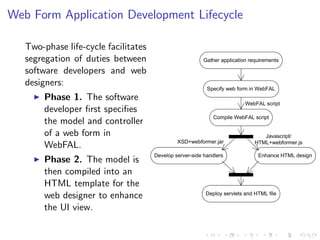
   Two-phase life-cycle facilitates
   segregation of duties between                         Gather application requirements

   software developers and web
   designers:
                                                           Specify web form in WebFAL
        Phase 1. The software
                                                                          WebFAL script
        developer first specifies
                                                             Compile WebFAL script
        the model and controller
        of a web form in                                                         Javascript/
                                               XSD+webformer.jar              HTML+webformer.js
        WebFAL.
                                      Develop server-side handlers             Enhance HTML design
        Phase 2. The model is
        then compiled into an
        HTML template for the
                                                          Deploy servlets and HTML file
        web designer to enhance
        the UI view.
Sample Web Form Application
    1. The user enters his username.
       The entered username is
       validated on-the-fly against
       the server database.
    2. The user enters the album
       name while the server
       suggests the possible names
       that match what the user
       types.
    3. The user can upload multiple photos. He can click on the
       [Add Photo] or the [Delete Photo] link to add or delete a
       upload entry.
    4. In each upload entry, the user specifies the photo file name,
       whether he wants to share the photo, and the number of
       prints of the photo he wants to order.
    5. The user clicks on the Submit button to send the form data
       to the server.
Web Form Application Language (WebFAL)

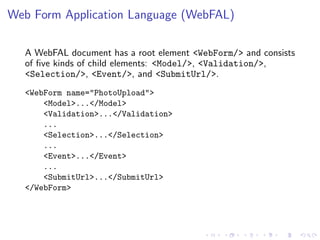
  A WebFAL document has a root element <WebForm/> and consists
  of five kinds of child elements: <Model/>, <Validation/>,
  <Selection/>, <Event/>, and <SubmitUrl/>.
  <WebForm name="PhotoUpload">
      <Model>...</Model>
      <Validation>...</Validation>
      ...
      <Selection>...</Selection>
      ...
      <Event>...</Event>
      ...
      <SubmitUrl>...</SubmitUrl>
  </WebForm>
<Model/> Element
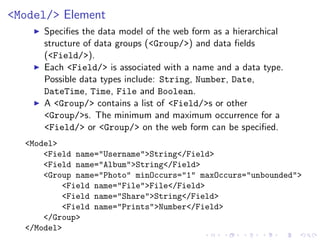
      Specifies the data model of the web form as a hierarchical
      structure of data groups (<Group/>) and data fields
      (<Field/>).
      Each <Field/> is associated with a name and a data type.
      Possible data types include: String, Number, Date,
      DateTime, Time, File and Boolean.
      A <Group/> contains a list of <Field/>s or other
      <Group/>s. The minimum and maximum occurrence for a
      <Field/> or <Group/> on the web form can be specified.
  <Model>
      <Field name="Username">String</Field>
      <Field name="Album">String</Field>
      <Group name="Photo" minOccurs="1" maxOccurs="unbounded">
          <Field name="File">File</Field>
          <Field name="Share">String</Field>
          <Field name="Prints">Number</Field>
      </Group>
  </Model>
<Validation/> Element
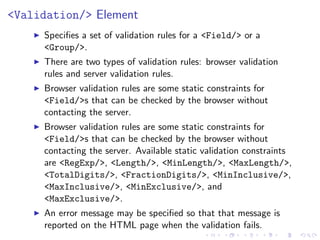
     Specifies a set of validation rules for a <Field/> or a
     <Group/>.
     There are two types of validation rules: browser validation
     rules and server validation rules.
     Browser validation rules are some static constraints for
     <Field/>s that can be checked by the browser without
     contacting the server.
     Browser validation rules are some static constraints for
     <Field/>s that can be checked by the browser without
     contacting the server. Available static validation constraints
     are <RegExp/>, <Length/>, <MinLength/>, <MaxLength/>,
     <TotalDigits/>, <FractionDigits/>, <MinInclusive/>,
     <MaxInclusive/>, <MinExclusive/>, and
     <MaxExclusive/>.
     An error message may be specified so that that message is
     reported on the HTML page when the validation fails.
<Validation/> Element (Continued)
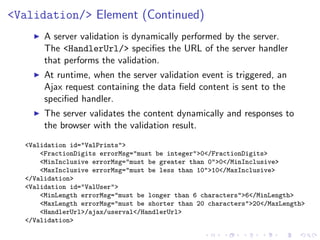
       A server validation is dynamically performed by the server.
       The <HandlerUrl/> specifies the URL of the server handler
       that performs the validation.
       At runtime, when the server validation event is triggered, an
       Ajax request containing the data field content is sent to the
       specified handler.
       The server validates the content dynamically and responses to
       the browser with the validation result.
  <Validation id="ValPrints">
      <FractionDigits errorMsg="must be integer">0</FractionDigits>
      <MinInclusive errorMsg="must be greater than 0">0</MinInclusive>
      <MaxInclusive errorMsg="must be less than 10">10</MaxInclusive>
  </Validation>
  <Validation id="ValUser">
      <MinLength errorMsg="must be longer than 6 characters">6</MinLength>
      <MaxLength errorMsg="must be shorter than 20 characters">20</MaxLength>
      <HandlerUrl>/ajax/userval</HandlerUrl>
  </Validation>
<Selection/> Element

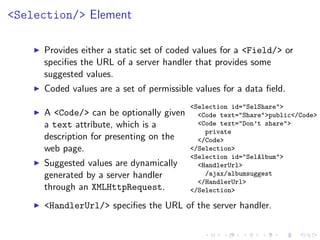
     Provides either a static set of coded values for a <Field/> or
     specifies the URL of a server handler that provides some
     suggested values.
     Coded values are a set of permissible values for a data field.
                                         <Selection id="SelShare">
     A <Code/> can be optionally given     <Code text="Share">public</Code>
     a text attribute, which is a          <Code text="Don’t share">
                                             private
     description for presenting on the     </Code>
     web page.                           </Selection>
                                         <Selection id="SelAlbum">
     Suggested values are dynamically      <HandlerUrl>
     generated by a server handler           /ajax/albumsuggest
                                           </HandlerUrl>
     through an XMLHttpRequest.          </Selection>

     <HandlerUrl/> specifies the URL of the server handler.
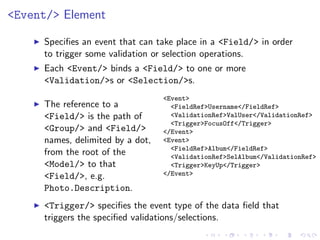
<Event/> Element

     Specifies an event that can take place in a <Field/> in order
     to trigger some validation or selection operations.
     Each <Event/> binds a <Field/> to one or more
     <Validation/>s or <Selection/>s.
                                  <Event>
     The reference to a             <FieldRef>Username</FieldRef>
     <Field/> is the path of        <ValidationRef>ValUser</ValidationRef>
                                    <Trigger>FocusOff</Trigger>
     <Group/> and <Field/>        </Event>
     names, delimited by a dot,   <Event>
                                    <FieldRef>Album</FieldRef>
     from the root of the           <ValidationRef>SelAlbum</ValidationRef>
     <Model/> to that               <Trigger>KeyUp</Trigger>
     <Field/>, e.g.               </Event>

     Photo.Description.
     <Trigger/> specifies the event type of the data field that
     triggers the specified validations/selections.
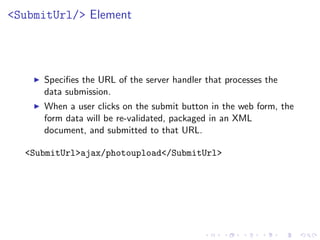
<SubmitUrl/> Element


     Specifies the URL of the server handler that processes the
     data submission.
     When a user clicks on the submit button in the web form, the
     form data will be re-validated, packaged in an XML
     document, and submitted to that URL.

  <SubmitUrl>ajax/photoupload</SubmitUrl>
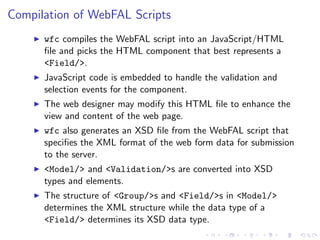
Compilation of WebFAL Scripts
      wfc compiles the WebFAL script into an JavaScript/HTML
      file and picks the HTML component that best represents a
      <Field/>.
      JavaScript code is embedded to handle the validation and
      selection events for the component.
      The web designer may modify this HTML file to enhance the
      view and content of the web page.
      wfc also generates an XSD file from the WebFAL script that
      specifies the XML format of the web form data for submission
      to the server.
      <Model/> and <Validation/>s are converted into XSD
      types and elements.
      The structure of <Group/>s and <Field/>s in <Model/>
      determines the XML structure while the data type of a
      <Field/> determines its XSD data type.
Sample Generated Code Fragments


  <html>
  <head>
  <title>PhotoUpload</title>
  <script language="JavaScript" src="webformer.js"></script>
  ...
  <input type="Album" id="Album_1.1" onkeyup="selfld(this) "/>
  ...
  <input type="text" id="Photo.Prints_1.1" onblur="valfld(this)"/>
  ...
  <a href="javascript:addgrp(Photo)" id="Photo">[Add Photo]</a>
  ...
  </body>
  </html>
Conclusion

   Contributions:
       Rapid application development framework for web client and
       server programming: WebFAL web form modeling language
       and wfc compiler.
       Facilitation of two-phase web development life-cycle.
   Future work:
       Choice of HTML controls for data fields.
             The current version of webformer does not allow the user to
             choose an HTML control (e.g. radio button or drop-down list)
             for a data field (e.g. coded value field).
       Inter-field data validation.
       GUI environment for specifying WebFAL.

Webformer: a Rapid Application Development Toolkit for Writing Ajax Web Form Application

  • 1.
    Webformer:a Rapid ApplicationDevelopment Toolkit for Writing Ajax Web Form Application David W.L. Cheung Thomas Y.T. Lee Patrick K.C. Yee Center for E-Commerce Infrastructure Development (CECID), Department of Computer Science, University of Hong Kong December 10, 2007
  • 2.
    Motivation Web forms are commonly used to capture data on the web. With Asynchronous Javascript and XML (Ajax) programming, interactive web forms can be created. However, Ajax programming is complex in a way that the model-view-controller (MVC) code is not clearly separated. We have developed a rapid application development toolkit called Webformer to simplify web form programming with Ajax. Webformer provides a scripting language called Web Form Application Language (WebFAL) for modeling web forms and generate Javascript/HTML code.
  • 3.
    Webformer Architecture We have designed an XML-based scripting language called Web Form Application Language (WebFAL) for modeling web forms. A web form model written in WebFAL is complied by our Webformer Complier (wfc) to generate the Javascript/HTML source to run on the browser. A JavaScript engine called webformer.js is provided as provides a Javascript library to handle the MVC interactions on the browser, e.g. data validation and autocompletion, XML document object model (DOM) management, and Ajax messaging. A Java library called webformer.jar is provided for parsing and composing the messages in these formats to ease the programming the Java Servlet handlers on the server-side.
  • 4.
    Web Form ApplicationDevelopment Lifecycle Two-phase life-cycle facilitates segregation of duties between Gather application requirements software developers and web designers: Specify web form in WebFAL Phase 1. The software WebFAL script developer first specifies Compile WebFAL script the model and controller of a web form in Javascript/ XSD+webformer.jar HTML+webformer.js WebFAL. Develop server-side handlers Enhance HTML design Phase 2. The model is then compiled into an HTML template for the Deploy servlets and HTML file web designer to enhance the UI view.
  • 5.
    Sample Web FormApplication 1. The user enters his username. The entered username is validated on-the-fly against the server database. 2. The user enters the album name while the server suggests the possible names that match what the user types. 3. The user can upload multiple photos. He can click on the [Add Photo] or the [Delete Photo] link to add or delete a upload entry. 4. In each upload entry, the user specifies the photo file name, whether he wants to share the photo, and the number of prints of the photo he wants to order. 5. The user clicks on the Submit button to send the form data to the server.
  • 6.
    Web Form ApplicationLanguage (WebFAL) A WebFAL document has a root element <WebForm/> and consists of five kinds of child elements: <Model/>, <Validation/>, <Selection/>, <Event/>, and <SubmitUrl/>. <WebForm name="PhotoUpload"> <Model>...</Model> <Validation>...</Validation> ... <Selection>...</Selection> ... <Event>...</Event> ... <SubmitUrl>...</SubmitUrl> </WebForm>
  • 7.
    <Model/> Element Specifies the data model of the web form as a hierarchical structure of data groups (<Group/>) and data fields (<Field/>). Each <Field/> is associated with a name and a data type. Possible data types include: String, Number, Date, DateTime, Time, File and Boolean. A <Group/> contains a list of <Field/>s or other <Group/>s. The minimum and maximum occurrence for a <Field/> or <Group/> on the web form can be specified. <Model> <Field name="Username">String</Field> <Field name="Album">String</Field> <Group name="Photo" minOccurs="1" maxOccurs="unbounded"> <Field name="File">File</Field> <Field name="Share">String</Field> <Field name="Prints">Number</Field> </Group> </Model>
  • 8.
    <Validation/> Element Specifies a set of validation rules for a <Field/> or a <Group/>. There are two types of validation rules: browser validation rules and server validation rules. Browser validation rules are some static constraints for <Field/>s that can be checked by the browser without contacting the server. Browser validation rules are some static constraints for <Field/>s that can be checked by the browser without contacting the server. Available static validation constraints are <RegExp/>, <Length/>, <MinLength/>, <MaxLength/>, <TotalDigits/>, <FractionDigits/>, <MinInclusive/>, <MaxInclusive/>, <MinExclusive/>, and <MaxExclusive/>. An error message may be specified so that that message is reported on the HTML page when the validation fails.
  • 9.
    <Validation/> Element (Continued) A server validation is dynamically performed by the server. The <HandlerUrl/> specifies the URL of the server handler that performs the validation. At runtime, when the server validation event is triggered, an Ajax request containing the data field content is sent to the specified handler. The server validates the content dynamically and responses to the browser with the validation result. <Validation id="ValPrints"> <FractionDigits errorMsg="must be integer">0</FractionDigits> <MinInclusive errorMsg="must be greater than 0">0</MinInclusive> <MaxInclusive errorMsg="must be less than 10">10</MaxInclusive> </Validation> <Validation id="ValUser"> <MinLength errorMsg="must be longer than 6 characters">6</MinLength> <MaxLength errorMsg="must be shorter than 20 characters">20</MaxLength> <HandlerUrl>/ajax/userval</HandlerUrl> </Validation>
  • 10.
    <Selection/> Element Provides either a static set of coded values for a <Field/> or specifies the URL of a server handler that provides some suggested values. Coded values are a set of permissible values for a data field. <Selection id="SelShare"> A <Code/> can be optionally given <Code text="Share">public</Code> a text attribute, which is a <Code text="Don’t share"> private description for presenting on the </Code> web page. </Selection> <Selection id="SelAlbum"> Suggested values are dynamically <HandlerUrl> generated by a server handler /ajax/albumsuggest </HandlerUrl> through an XMLHttpRequest. </Selection> <HandlerUrl/> specifies the URL of the server handler.
  • 11.
    <Event/> Element Specifies an event that can take place in a <Field/> in order to trigger some validation or selection operations. Each <Event/> binds a <Field/> to one or more <Validation/>s or <Selection/>s. <Event> The reference to a <FieldRef>Username</FieldRef> <Field/> is the path of <ValidationRef>ValUser</ValidationRef> <Trigger>FocusOff</Trigger> <Group/> and <Field/> </Event> names, delimited by a dot, <Event> <FieldRef>Album</FieldRef> from the root of the <ValidationRef>SelAlbum</ValidationRef> <Model/> to that <Trigger>KeyUp</Trigger> <Field/>, e.g. </Event> Photo.Description. <Trigger/> specifies the event type of the data field that triggers the specified validations/selections.
  • 12.
    <SubmitUrl/> Element Specifies the URL of the server handler that processes the data submission. When a user clicks on the submit button in the web form, the form data will be re-validated, packaged in an XML document, and submitted to that URL. <SubmitUrl>ajax/photoupload</SubmitUrl>
  • 13.
    Compilation of WebFALScripts wfc compiles the WebFAL script into an JavaScript/HTML file and picks the HTML component that best represents a <Field/>. JavaScript code is embedded to handle the validation and selection events for the component. The web designer may modify this HTML file to enhance the view and content of the web page. wfc also generates an XSD file from the WebFAL script that specifies the XML format of the web form data for submission to the server. <Model/> and <Validation/>s are converted into XSD types and elements. The structure of <Group/>s and <Field/>s in <Model/> determines the XML structure while the data type of a <Field/> determines its XSD data type.
  • 14.
    Sample Generated CodeFragments <html> <head> <title>PhotoUpload</title> <script language="JavaScript" src="webformer.js"></script> ... <input type="Album" id="Album_1.1" onkeyup="selfld(this) "/> ... <input type="text" id="Photo.Prints_1.1" onblur="valfld(this)"/> ... <a href="javascript:addgrp(Photo)" id="Photo">[Add Photo]</a> ... </body> </html>
  • 15.
    Conclusion Contributions: Rapid application development framework for web client and server programming: WebFAL web form modeling language and wfc compiler. Facilitation of two-phase web development life-cycle. Future work: Choice of HTML controls for data fields. The current version of webformer does not allow the user to choose an HTML control (e.g. radio button or drop-down list) for a data field (e.g. coded value field). Inter-field data validation. GUI environment for specifying WebFAL.