PHP
afm -INFO2301S1Y1314
THE BUILDING BLOCKS
Contents
 Anatomy
 Literals
 DataTypes
 Variables
 Constant
afm -INFO2301S1Y1314
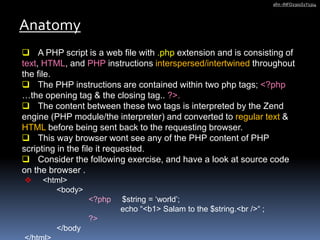
 A PHP script is a web file with .php extension and is consisting of
text, HTML, and PHP instructions interspersed/intertwined throughout
the file.
 The PHP instructions are contained within two php tags; <?php
…the opening tag & the closing tag.. ?>.
 The content between these two tags is interpreted by the Zend
engine (PHP module/the interpreter) and converted to regular text &
HTML before being sent back to the requesting browser.
 This way browser wont see any of the PHP content of PHP
scripting in the file it requested.
 Consider the following exercise, and have a look at source code
on the browser .
Anatomy
afm -INFO2301S1Y1314
 <html>
<body>
<?php $string = ‘world’;
echo “<b1> Salam to the $string.<br />“ ;
?>
</body
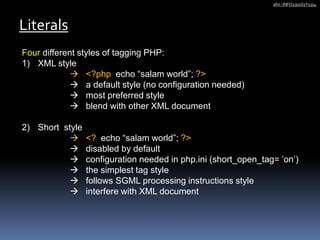
Four different styles of tagging PHP:
1) XML style
 <?php echo “salam world”; ?>
 a default style (no configuration needed)
 most preferred style
 blend with other XML document
2) Short style
 <? echo “salam world”; ?>
 disabled by default
 configuration needed in php.ini (short_open_tag= ‘on’)
 the simplest tag style
 follows SGML processing instructions style
 interfere with XML document
Literals
afm -INFO2301S1Y1314
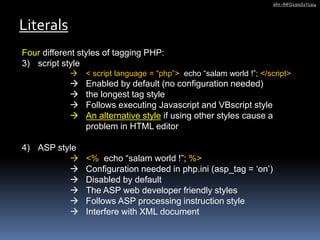
Four different styles of tagging PHP:
3) script style
 < script language = “php”> echo “salam world !”; </script>
 Enabled by default (no configuration needed)
 the longest tag style
 Follows executing Javascript and VBscript style
 An alternative style if using other styles cause a
problem in HTML editor
4) ASP style
 <% echo “salam world !”; %>
 Configuration needed in php.ini (asp_tag = ‘on’)
 Disabled by default
 The ASP web developer friendly styles
 Follows ASP processing instruction style
 Interfere with XML document
Literals
afm -INFO2301S1Y1314
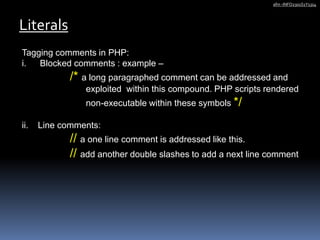
Tagging comments in PHP:
i. Blocked comments : example –
/* a long paragraphed comment can be addressed and
exploited within this compound. PHP scripts rendered
non-executable within these symbols */
ii. Line comments:
// a one line comment is addressed like this.
// add another double slashes to add a next line comment
Literals
afm -INFO2301S1Y1314
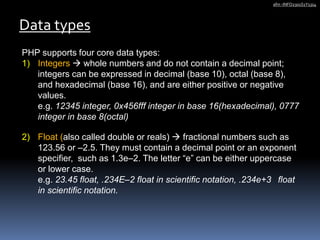
PHP supports four core data types:
1) Integers  whole numbers and do not contain a decimal point;
integers can be expressed in decimal (base 10), octal (base 8),
and hexadecimal (base 16), and are either positive or negative
values.
e.g. 12345 integer, 0x456fff integer in base 16(hexadecimal), 0777
integer in base 8(octal)
2) Float (also called double or reals)  fractional numbers such as
123.56 or –2.5. They must contain a decimal point or an exponent
specifier, such as 1.3e–2. The letter “e” can be either uppercase
or lower case.
e.g. 23.45 float, .234E–2 float in scientific notation, .234e+3 float
in scientific notation.
Data types
afm -INFO2301S1Y1314
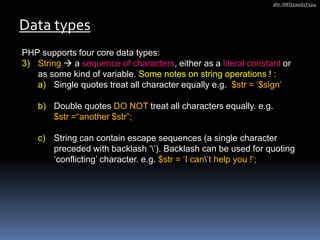
PHP supports four core data types:
3) String  a sequence of characters, either as a literal constant or
as some kind of variable. Some notes on string operations ! :
a) Single quotes treat all character equally e.g. $str = ‘$sign’
b) Double quotes DO NOT treat all characters equally. e.g.
$str =“another $str”;
c) String can contain escape sequences (a single character
preceded with backlash ‘’). Backlash can be used for quoting
‘conflicting’ character. e.g. $str = ‘I can’t help you !’;
Data types
afm -INFO2301S1Y1314
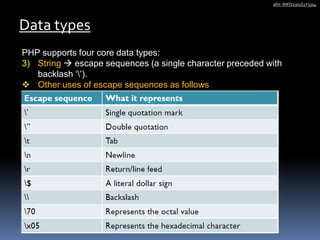
PHP supports four core data types:
3) String  escape sequences (a single character preceded with
backlash ‘’).
 Other uses of escape sequences as follows
Data types
afm -INFO2301S1Y1314
PHP supports four core data types:
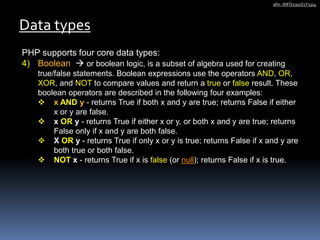
4) Boolean  or boolean logic, is a subset of algebra used for creating
true/false statements. Boolean expressions use the operators AND, OR,
XOR, and NOT to compare values and return a true or false result. These
boolean operators are described in the following four examples:
 x AND y - returns True if both x and y are true; returns False if either
x or y are false.
 x OR y - returns True if either x or y, or both x and y are true; returns
False only if x and y are both false.
 X OR y - returns True if only x or y is true; returns False if x and y are
both true or both false.
 NOT x - returns True if x is false (or null); returns False if x is true.
Data types
afm -INFO2301S1Y1314
PHP also supports 4 other SPECIAL data types:
1) NULL
2) ARRAY
3) OBJECT
4) RESOURCES
Data types
afm -INFO2301S1Y1314
Types of Variables in PHP
 Predefined variables
 User defined variables
 Form variables related to names in an HTML form
Variables
afm -INFO2301S1Y1314
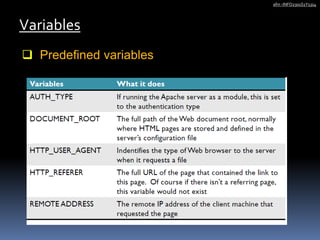
 Predefined variables
Variables
afm -INFO2301S1Y1314
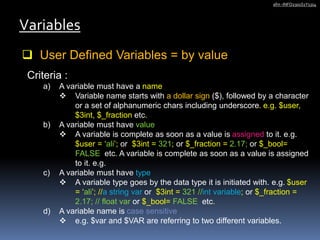
 User Defined Variables = by value
Variables
afm -INFO2301S1Y1314
Criteria :
a) A variable must have a name
 Variable name starts with a dollar sign ($), followed by a character
or a set of alphanumeric chars including underscore. e.g. $user,
$3int, $_fraction etc.
b) A variable must have value
 A variable is complete as soon as a value is assigned to it. e.g.
$user = ‘ali’; or $3int = 321; or $_fraction = 2.17; or $_bool=
FALSE etc. A variable is complete as soon as a value is assigned
to it. e.g.
c) A variable must have type
 A variable type goes by the data type it is initiated with. e.g. $user
= ‘ali’; //a string var or $3int = 321 //int variable; or $_fraction =
2.17; // float var or $_bool= FALSE etc.
d) A variable name is case sensitive
 e.g. $var and $VAR are referring to two different variables.
Displaying variable
Variables
afm -INFO2301S1Y1314
 echo “parameter” - output one or more string and all
parameters. (void echo ( string $arg1 [, string $... ] ). It can take a
comma-separated list of string arguments
 print “arg” - Outputs a string. (int print (string $arg).
Example:
$name = “Omar”; $state = “Selangor”;$salary = 10000;
echo $name, $state, $salary;
print $name;
print $name.$state.$salary;
echo $name.$state.$salary;
print “$name $state $salary <br/>”;
echo “$name $state $salary <br/>”;
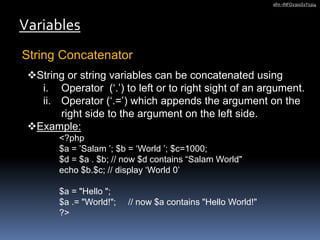
String Concatenator
Variables
afm -INFO2301S1Y1314
String or string variables can be concatenated using
i. Operator (‘.’) to left or to right sight of an argument.
ii. Operator (‘.=’) which appends the argument on the
right side to the argument on the left side.
Example:
<?php
$a = ’Salam ’; $b = ‘World ’; $c=1000;
$d = $a . $b; // now $d contains “Salam World"
echo $b.$c; // display ‘World 0’
$a = "Hello ";
$a .= "World!"; // now $a contains "Hello World!"
?>
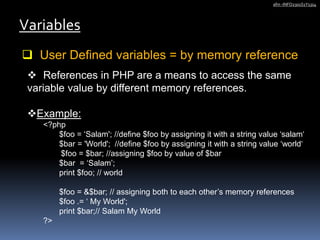
 User Defined variables = by memory reference
Variables
afm -INFO2301S1Y1314
 References in PHP are a means to access the same
variable value by different memory references.
Example:
<?php
$foo = ‘Salam'; //define $foo by assigning it with a string value ‘salam‘
$bar = 'World'; //define $foo by assigning it with a string value ‘world‘
$foo = $bar; //assigning $foo by value of $bar
$bar = ‘Salam’;
print $foo; // world
$foo = &$bar; // assigning both to each other’s memory references
$foo .= ‘ My World';
print $bar;// Salam My World
?>
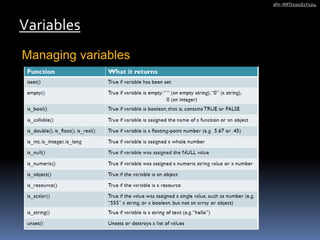
Managing variables
Variables
afm -INFO2301S1Y1314
Managing variables – examples
Variables
afm -INFO2301S1Y1314
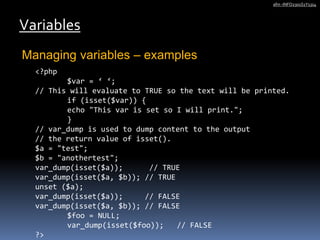
<?php
$var = ‘ ‘;
// This will evaluate to TRUE so the text will be printed.
if (isset($var)) {
echo "This var is set so I will print.";
}
// var_dump is used to dump content to the output
// the return value of isset().
$a = "test";
$b = "anothertest";
var_dump(isset($a)); // TRUE
var_dump(isset($a, $b)); // TRUE
unset ($a);
var_dump(isset($a)); // FALSE
var_dump(isset($a, $b)); // FALSE
$foo = NULL;
var_dump(isset($foo)); // FALSE
?>
Variable variables (Dynamic variables)
Variables
afm -INFO2301S1Y1314
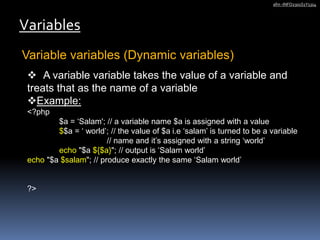
 A variable variable takes the value of a variable and
treats that as the name of a variable
Example:
<?php
$a = ‘Salam'; // a variable name $a is assigned with a value
$$a = ‘ world’; // the value of $a i.e ‘salam’ is turned to be a variable
// name and it’s assigned with a string ‘world’
echo "$a ${$a}"; // output is ‘Salam world’
echo "$a $salam"; // produce exactly the same ‘Salam world’
?>
Form variables
Variables
afm -INFO2301S1Y1314
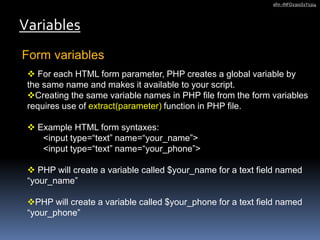
 For each HTML form parameter, PHP creates a global variable by
the same name and makes it available to your script.
Creating the same variable names in PHP file from the form variables
requires use of extract(parameter) function in PHP file.
 Example HTML form syntaxes:
<input type=“text” name=“your_name”>
<input type=“text” name=“your_phone”>
 PHP will create a variable called $your_name for a text field named
“your_name”
PHP will create a variable called $your_phone for a text field named
“your_phone”
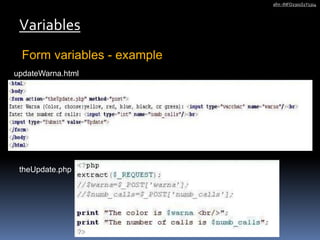
Form variables - example
Variables
afm -INFO2301S1Y1314
updateWarna.html
theUpdate.php
Constant
afm -INFO2301S1Y1314
 A constant is a value that, once set, cannot be
changed or unset during the execution of your
script.
 It is global in scope.
 Can be created using define() function 
defines a named constant.
 Description : bool define ( string $name , mixed $value
[$case_insensitive = false ] )
Constant
afm -INFO2301S1Y1314
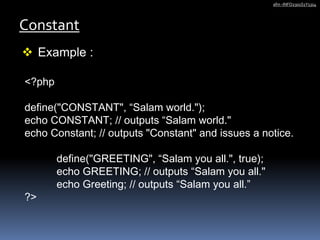
 Example :
<?php
define("CONSTANT", “Salam world.");
echo CONSTANT; // outputs “Salam world."
echo Constant; // outputs "Constant" and issues a notice.
define("GREETING", “Salam you all.", true);
echo GREETING; // outputs “Salam you all."
echo Greeting; // outputs “Salam you all.”
?>
Constant
afm -INFO2301S1Y1314
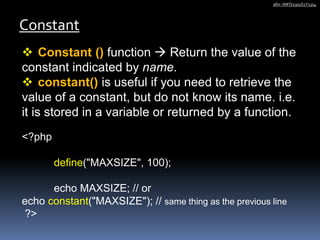
 Constant () function  Return the value of the
constant indicated by name.
 constant() is useful if you need to retrieve the
value of a constant, but do not know its name. i.e.
it is stored in a variable or returned by a function.
<?php
define("MAXSIZE", 100);
echo MAXSIZE; // or
echo constant("MAXSIZE"); // same thing as the previous line
?>
Constant
afm -INFO2301S1Y1314
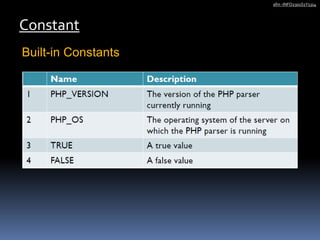
Built-in Constants
Constant
afm -INFO2301S1Y1314
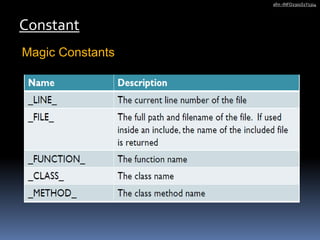
Magic Constants
PHP
afm -INFO2301S1Y1314
THE BUILDING BLOCKS

03phpbldgblock

  • 1.
  • 2.
    Contents  Anatomy  Literals DataTypes  Variables  Constant afm -INFO2301S1Y1314
  • 3.
     A PHPscript is a web file with .php extension and is consisting of text, HTML, and PHP instructions interspersed/intertwined throughout the file.  The PHP instructions are contained within two php tags; <?php …the opening tag & the closing tag.. ?>.  The content between these two tags is interpreted by the Zend engine (PHP module/the interpreter) and converted to regular text & HTML before being sent back to the requesting browser.  This way browser wont see any of the PHP content of PHP scripting in the file it requested.  Consider the following exercise, and have a look at source code on the browser . Anatomy afm -INFO2301S1Y1314  <html> <body> <?php $string = ‘world’; echo “<b1> Salam to the $string.<br />“ ; ?> </body
  • 4.
    Four different stylesof tagging PHP: 1) XML style  <?php echo “salam world”; ?>  a default style (no configuration needed)  most preferred style  blend with other XML document 2) Short style  <? echo “salam world”; ?>  disabled by default  configuration needed in php.ini (short_open_tag= ‘on’)  the simplest tag style  follows SGML processing instructions style  interfere with XML document Literals afm -INFO2301S1Y1314
  • 5.
    Four different stylesof tagging PHP: 3) script style  < script language = “php”> echo “salam world !”; </script>  Enabled by default (no configuration needed)  the longest tag style  Follows executing Javascript and VBscript style  An alternative style if using other styles cause a problem in HTML editor 4) ASP style  <% echo “salam world !”; %>  Configuration needed in php.ini (asp_tag = ‘on’)  Disabled by default  The ASP web developer friendly styles  Follows ASP processing instruction style  Interfere with XML document Literals afm -INFO2301S1Y1314
  • 6.
    Tagging comments inPHP: i. Blocked comments : example – /* a long paragraphed comment can be addressed and exploited within this compound. PHP scripts rendered non-executable within these symbols */ ii. Line comments: // a one line comment is addressed like this. // add another double slashes to add a next line comment Literals afm -INFO2301S1Y1314
  • 7.
    PHP supports fourcore data types: 1) Integers  whole numbers and do not contain a decimal point; integers can be expressed in decimal (base 10), octal (base 8), and hexadecimal (base 16), and are either positive or negative values. e.g. 12345 integer, 0x456fff integer in base 16(hexadecimal), 0777 integer in base 8(octal) 2) Float (also called double or reals)  fractional numbers such as 123.56 or –2.5. They must contain a decimal point or an exponent specifier, such as 1.3e–2. The letter “e” can be either uppercase or lower case. e.g. 23.45 float, .234E–2 float in scientific notation, .234e+3 float in scientific notation. Data types afm -INFO2301S1Y1314
  • 8.
    PHP supports fourcore data types: 3) String  a sequence of characters, either as a literal constant or as some kind of variable. Some notes on string operations ! : a) Single quotes treat all character equally e.g. $str = ‘$sign’ b) Double quotes DO NOT treat all characters equally. e.g. $str =“another $str”; c) String can contain escape sequences (a single character preceded with backlash ‘’). Backlash can be used for quoting ‘conflicting’ character. e.g. $str = ‘I can’t help you !’; Data types afm -INFO2301S1Y1314
  • 9.
    PHP supports fourcore data types: 3) String  escape sequences (a single character preceded with backlash ‘’).  Other uses of escape sequences as follows Data types afm -INFO2301S1Y1314
  • 10.
    PHP supports fourcore data types: 4) Boolean  or boolean logic, is a subset of algebra used for creating true/false statements. Boolean expressions use the operators AND, OR, XOR, and NOT to compare values and return a true or false result. These boolean operators are described in the following four examples:  x AND y - returns True if both x and y are true; returns False if either x or y are false.  x OR y - returns True if either x or y, or both x and y are true; returns False only if x and y are both false.  X OR y - returns True if only x or y is true; returns False if x and y are both true or both false.  NOT x - returns True if x is false (or null); returns False if x is true. Data types afm -INFO2301S1Y1314
  • 11.
    PHP also supports4 other SPECIAL data types: 1) NULL 2) ARRAY 3) OBJECT 4) RESOURCES Data types afm -INFO2301S1Y1314
  • 12.
    Types of Variablesin PHP  Predefined variables  User defined variables  Form variables related to names in an HTML form Variables afm -INFO2301S1Y1314
  • 13.
  • 14.
     User DefinedVariables = by value Variables afm -INFO2301S1Y1314 Criteria : a) A variable must have a name  Variable name starts with a dollar sign ($), followed by a character or a set of alphanumeric chars including underscore. e.g. $user, $3int, $_fraction etc. b) A variable must have value  A variable is complete as soon as a value is assigned to it. e.g. $user = ‘ali’; or $3int = 321; or $_fraction = 2.17; or $_bool= FALSE etc. A variable is complete as soon as a value is assigned to it. e.g. c) A variable must have type  A variable type goes by the data type it is initiated with. e.g. $user = ‘ali’; //a string var or $3int = 321 //int variable; or $_fraction = 2.17; // float var or $_bool= FALSE etc. d) A variable name is case sensitive  e.g. $var and $VAR are referring to two different variables.
  • 15.
    Displaying variable Variables afm -INFO2301S1Y1314 echo “parameter” - output one or more string and all parameters. (void echo ( string $arg1 [, string $... ] ). It can take a comma-separated list of string arguments  print “arg” - Outputs a string. (int print (string $arg). Example: $name = “Omar”; $state = “Selangor”;$salary = 10000; echo $name, $state, $salary; print $name; print $name.$state.$salary; echo $name.$state.$salary; print “$name $state $salary <br/>”; echo “$name $state $salary <br/>”;
  • 16.
    String Concatenator Variables afm -INFO2301S1Y1314 Stringor string variables can be concatenated using i. Operator (‘.’) to left or to right sight of an argument. ii. Operator (‘.=’) which appends the argument on the right side to the argument on the left side. Example: <?php $a = ’Salam ’; $b = ‘World ’; $c=1000; $d = $a . $b; // now $d contains “Salam World" echo $b.$c; // display ‘World 0’ $a = "Hello "; $a .= "World!"; // now $a contains "Hello World!" ?>
  • 17.
     User Definedvariables = by memory reference Variables afm -INFO2301S1Y1314  References in PHP are a means to access the same variable value by different memory references. Example: <?php $foo = ‘Salam'; //define $foo by assigning it with a string value ‘salam‘ $bar = 'World'; //define $foo by assigning it with a string value ‘world‘ $foo = $bar; //assigning $foo by value of $bar $bar = ‘Salam’; print $foo; // world $foo = &$bar; // assigning both to each other’s memory references $foo .= ‘ My World'; print $bar;// Salam My World ?>
  • 18.
  • 19.
    Managing variables –examples Variables afm -INFO2301S1Y1314 <?php $var = ‘ ‘; // This will evaluate to TRUE so the text will be printed. if (isset($var)) { echo "This var is set so I will print."; } // var_dump is used to dump content to the output // the return value of isset(). $a = "test"; $b = "anothertest"; var_dump(isset($a)); // TRUE var_dump(isset($a, $b)); // TRUE unset ($a); var_dump(isset($a)); // FALSE var_dump(isset($a, $b)); // FALSE $foo = NULL; var_dump(isset($foo)); // FALSE ?>
  • 20.
    Variable variables (Dynamicvariables) Variables afm -INFO2301S1Y1314  A variable variable takes the value of a variable and treats that as the name of a variable Example: <?php $a = ‘Salam'; // a variable name $a is assigned with a value $$a = ‘ world’; // the value of $a i.e ‘salam’ is turned to be a variable // name and it’s assigned with a string ‘world’ echo "$a ${$a}"; // output is ‘Salam world’ echo "$a $salam"; // produce exactly the same ‘Salam world’ ?>
  • 21.
    Form variables Variables afm -INFO2301S1Y1314 For each HTML form parameter, PHP creates a global variable by the same name and makes it available to your script. Creating the same variable names in PHP file from the form variables requires use of extract(parameter) function in PHP file.  Example HTML form syntaxes: <input type=“text” name=“your_name”> <input type=“text” name=“your_phone”>  PHP will create a variable called $your_name for a text field named “your_name” PHP will create a variable called $your_phone for a text field named “your_phone”
  • 22.
    Form variables -example Variables afm -INFO2301S1Y1314 updateWarna.html theUpdate.php
  • 23.
    Constant afm -INFO2301S1Y1314  Aconstant is a value that, once set, cannot be changed or unset during the execution of your script.  It is global in scope.  Can be created using define() function  defines a named constant.  Description : bool define ( string $name , mixed $value [$case_insensitive = false ] )
  • 24.
    Constant afm -INFO2301S1Y1314  Example: <?php define("CONSTANT", “Salam world."); echo CONSTANT; // outputs “Salam world." echo Constant; // outputs "Constant" and issues a notice. define("GREETING", “Salam you all.", true); echo GREETING; // outputs “Salam you all." echo Greeting; // outputs “Salam you all.” ?>
  • 25.
    Constant afm -INFO2301S1Y1314  Constant() function  Return the value of the constant indicated by name.  constant() is useful if you need to retrieve the value of a constant, but do not know its name. i.e. it is stored in a variable or returned by a function. <?php define("MAXSIZE", 100); echo MAXSIZE; // or echo constant("MAXSIZE"); // same thing as the previous line ?>
  • 26.
  • 27.
  • 28.