NVIDIA Application Acceleration Engines
| Seoul, Korea | December 15, 2010 |
Phillip Miller
Director, Workstation Software Product Management
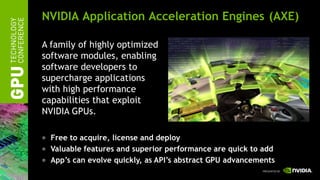
NVIDIA Application Acceleration Engines (AXE)

A family of highly optimized
software modules, enabling
software developers to
supercharge applications
with high performance
capabilities that exploit
NVIDIA GPUs.

  Free to acquire, license and deploy
  Valuable features and superior performance are quick to add
  App’s can evolve quickly, as API’s abstract GPU advancements
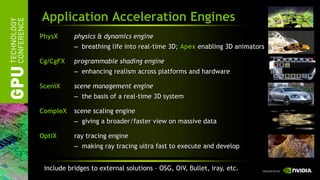
Application Acceleration Engines
PhysX      physics & dynamics engine
           – breathing life into real-time 3D; Apex enabling 3D animators

Cg/CgFX    programmable shading engine
           – enhancing realism across platforms and hardware

SceniX     scene management engine
           – the basis of a real-time 3D system

CompleX    scene scaling engine
           – giving a broader/faster view on massive data

OptiX      ray tracing engine
           – making ray tracing ultra fast to execute and develop


 include bridges to external solutions – OSG, OiV, Bullet, iray, etc.
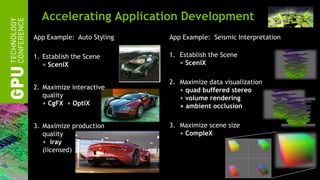
Accelerating Application Development
App Example: Auto Styling   App Example: Seismic Interpretation

1. Establish the Scene      1. Establish the Scene
   = SceniX                    = SceniX

                            2. Maximize data visualization
2. Maximize interactive        + quad buffered stereo
   quality                     + volume rendering
   + CgFX + OptiX              + ambient occlusion

3. Maximize production      3. Maximize scene size
   quality                     + CompleX
   + iray
   (licensed)
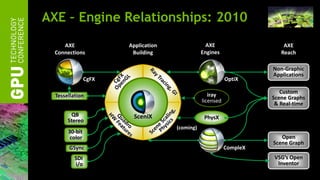
AXE – Engine Relationships: 2010
     AXE               Application                AXE                    AXE
  Connections           Building                Engines                 Reach

                                                                     Non-Graphic
                                                                     Applications
                CgFX                                       OptiX

                                                                        Custom
  Tessellation                                     iray              Scene Graphs
                                                licensed
                                                                      & Real-time
        QB              SceniX                   PhysX
       Stereo
                                     (coming)
       30-bit
        color                                                           Open
                                                                     Scene Graph
       GSync                                               CompleX
          SDI                                                        VSG’s Open
          i/o                                                         Inventor
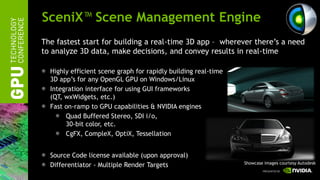
SceniX™ Scene Management Engine
The fastest start for building a real-time 3D app – wherever there’s a need
to analyze 3D data, make decisions, and convey results in real-time

  Highly efficient scene graph for rapidly building real-time
  3D app’s for any OpenGL GPU on Windows/Linux
  Integration interface for using GUI frameworks
  (QT, wxWidgets, etc.)
  Fast on-ramp to GPU capabilities & NVIDIA engines
       Quad Buffered Stereo, SDI i/o,
       30-bit color, etc.
       CgFX, CompleX, OptiX, Tessellation


  Source Code license available (upon approval)
                                                                Showcase images courtesy Autodesk
  Differentiator - Multiple Render Targets
SceniX - Example Companies/Products
+5k downloads/version       v6 in July


                        DeltaGen
                        Showcase
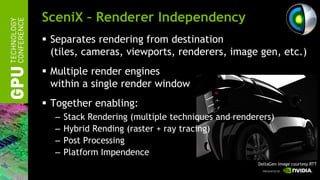
SceniX – Renderer Independency
 Separates rendering from destination
  (tiles, cameras, viewports, renderers, image gen, etc.)
 Multiple render engines
  within a single render window
 Together enabling:
  –   Stack Rendering (multiple techniques and renderers)
  –   Hybrid Rending (raster + ray tracing)
  –   Post Processing
  –   Platform Impendence
                                                     DeltaGen image courtesy RTT
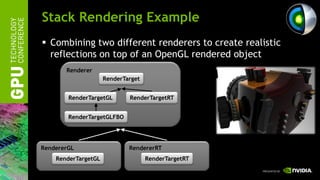
Stack Rendering Example
 Combining two different renderers to create realistic
  reflections on top of an OpenGL rendered object
       Renderer
                     RenderTarget


        RenderTargetGL       RenderTargetRT


        RenderTargetGLFBO


RendererGL                   RendererRT
    RenderTargetGL                  RenderTargetRT
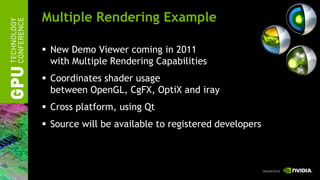
Multiple Rendering Example

 New Demo Viewer coming in 2011
  with Multiple Rendering Capabilities
 Coordinates shader usage
  between OpenGL, CgFX, OptiX and iray
 Cross platform, using Qt
 Source will be available to registered developers
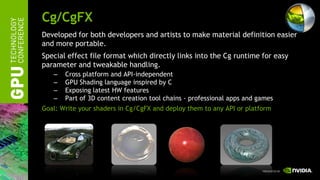
Cg/CgFX
Developed for both developers and artists to make material definition easier
and more portable.
Special effect file format which directly links into the Cg runtime for easy
parameter and tweakable handling.
   –   Cross platform and API-independent
   –   GPU Shading language inspired by C
   –   Exposing latest HW features
   –   Part of 3D content creation tool chains - professional apps and games
Goal: Write your shaders in Cg/CgFX and deploy them to any API or platform
Cg/CgFX – Example Companies/Products
+10k downloads/version           v3 in July


                         Maya

                         Catia
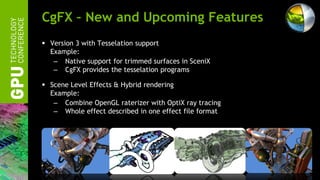
CgFX – New and Upcoming Features
 Version 3 with Tesselation support
  Example:
   – Native support for trimmed surfaces in SceniX
   – CgFX provides the tesselation programs

 Scene Level Effects & Hybrid rendering
  Example:
   – Combine OpenGL raterizer with OptiX ray tracing
   – Whole effect described in one effect file format
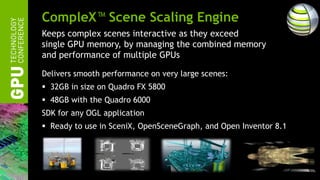
CompleX™ Scene Scaling Engine
Keeps complex scenes interactive as they exceed
single GPU memory, by managing the combined memory
and performance of multiple GPUs

Delivers smooth performance on very large scenes:
 32GB in size on Quadro FX 5800
 48GB with the Quadro 6000
SDK for any OGL application
 Ready to use in SceniX, OpenSceneGraph, and Open Inventor 8.1
CompleX™ Example Companies


 National Institute of Health

 VSG Open Inventor

 StormFjord & Statoil
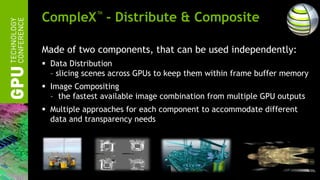
CompleX™ - Distribute & Composite

Made of two components, that can be used independently:
 Data Distribution
  – slicing scenes across GPUs to keep them within frame buffer memory
 Image Compositing
  – the fastest available image combination from multiple GPU outputs
 Multiple approaches for each component to accommodate different
  data and transparency needs
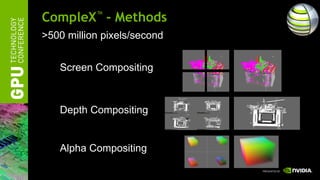
CompleX™ - Methods
>500 million pixels/second


   Screen Compositing


   Depth Compositing


   Alpha Compositing
CompleX™ - Composite
The industry’s fastest multi-GPU compositor (no SLI req’d)

 Uses unique NVIDIA hw/driver features
  copy_tex_image across multiple GPUs
 Highly optimized for GPU to GPU: multiple transfer paths optimized
  for a wide variety of multi-GPU and chipset configurations.
 Results in the best performance for given HW
 Resulting event loop typically needs +2 lines of code
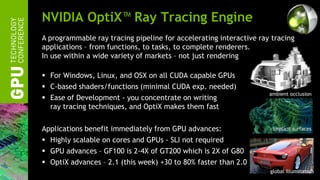
NVIDIA OptiX™ Ray Tracing Engine
A programmable ray tracing pipeline for accelerating interactive ray tracing
applications – from functions, to tasks, to complete renderers.
In use within a wide variety of markets – not just rendering

 For Windows, Linux, and OSX on all CUDA capable GPUs
 C-based shaders/functions (minimal CUDA exp. needed)
                                                                    ambient occlusion
 Ease of Development - you concentrate on writing
  ray tracing techniques, and OptiX makes them fast

Applications benefit immediately from GPU advances:                  implicit surfaces

 Highly scalable on cores and GPUs - SLI not required
 GPU advances – GF100 is 2-4X of GT200 which is 2X of G80
 OptiX advances – 2.1 (this week) +30 to 80% faster than 2.0
                                                                    global illumination
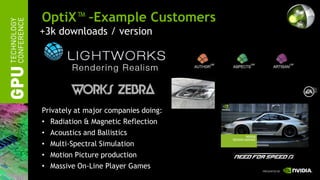
OptiX™ –Example Customers
+3k downloads / version


Privately at major companies doing:
• Radiation & Magnetic Reflection
• Acoustics and Ballistics
• Multi-Spectral Simulation
• Motion Picture production
• Massive On-Line Player Games
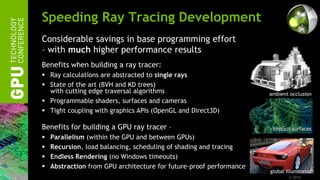
Speeding Ray Tracing Development
Considerable savings in base programming effort
– with much higher performance results
Benefits when building a ray tracer:
 Ray calculations are abstracted to single rays
 State of the art (BVH and KD trees)
  with cutting edge traversal algorithms                             ambient occlusion
 Programmable shaders, surfaces and cameras
 Tight coupling with graphics APIs (OpenGL and Direct3D)

Benefits for building a GPU ray tracer –                              implicit surfaces
   Parallelism (within the GPU and between GPUs)
   Recursion, load balancing, scheduling of shading and tracing
   Endless Rendering (no Windows timeouts)
   Abstraction from GPU architecture for future-proof performance
                                                                     global illumination
                                                                             © 2010
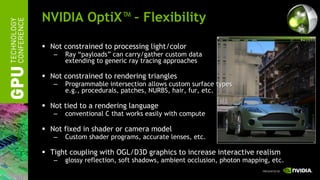
NVIDIA OptiX™ – Flexibility

 Not constrained to processing light/color
   –   Ray “payloads” can carry/gather custom data
       extending to generic ray tracing approaches

 Not constrained to rendering triangles
   –   Programmable intersection allows custom surface types
       e.g., procedurals, patches, NURBS, hair, fur, etc.

 Not tied to a rendering language
   –   conventional C that works easily with compute

 Not fixed in shader or camera model
   –   Custom shader programs, accurate lenses, etc.

 Tight coupling with OGL/D3D graphics to increase interactive realism
   –   glossy reflection, soft shadows, ambient occlusion, photon mapping, etc.
OptiX™ – SDK Examples

   Whitted
   Cook
   Photon Mapping
   Glass
   Fish Tank
   Collision Detection
   Modified SDK Example – MandleBulb
   Fast AO
                                        return
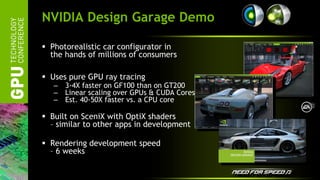
NVIDIA Design Garage Demo

 Photorealistic car configurator in
  the hands of millions of consumers

 Uses pure GPU ray tracing
   –   3-4X faster on GF100 than on GT200
   –   Linear scaling over GPUs & CUDA Cores
   –   Est. 40-50X faster vs. a CPU core

 Built on SceniX with OptiX shaders
  – similar to other apps in development

 Rendering development speed
  – 6 weeks
OptiX™ – Recent & Upcoming Work

 Version 2.1 releasing this weak:
   –   64-bit compilation
       allowing full 6GB on Quadro 6000 and Tesla 2070
   –   New traverser 30-80% performance over OptiX 2.0

 Work in progress:
   –   Out of core memory
       e.g., processing a 12 GB scene on a 3 GB GPU.


                                                         return
Application Engine Availability


                nvidia.com

                Developer Zone

[03 1][gpu용 개발자 도구 - parallel nsight 및 axe] miller axe

  • 1.
    NVIDIA Application AccelerationEngines | Seoul, Korea | December 15, 2010 | Phillip Miller Director, Workstation Software Product Management
  • 2.
    NVIDIA Application AccelerationEngines (AXE) A family of highly optimized software modules, enabling software developers to supercharge applications with high performance capabilities that exploit NVIDIA GPUs. Free to acquire, license and deploy Valuable features and superior performance are quick to add App’s can evolve quickly, as API’s abstract GPU advancements
  • 3.
    Application Acceleration Engines PhysX physics & dynamics engine – breathing life into real-time 3D; Apex enabling 3D animators Cg/CgFX programmable shading engine – enhancing realism across platforms and hardware SceniX scene management engine – the basis of a real-time 3D system CompleX scene scaling engine – giving a broader/faster view on massive data OptiX ray tracing engine – making ray tracing ultra fast to execute and develop include bridges to external solutions – OSG, OiV, Bullet, iray, etc.
  • 4.
    Accelerating Application Development AppExample: Auto Styling App Example: Seismic Interpretation 1. Establish the Scene 1. Establish the Scene = SceniX = SceniX 2. Maximize data visualization 2. Maximize interactive + quad buffered stereo quality + volume rendering + CgFX + OptiX + ambient occlusion 3. Maximize production 3. Maximize scene size quality + CompleX + iray (licensed)
  • 5.
    AXE – EngineRelationships: 2010 AXE Application AXE AXE Connections Building Engines Reach Non-Graphic Applications CgFX OptiX Custom Tessellation iray Scene Graphs licensed & Real-time QB SceniX PhysX Stereo (coming) 30-bit color Open Scene Graph GSync CompleX SDI VSG’s Open i/o Inventor
  • 6.
    SceniX™ Scene ManagementEngine The fastest start for building a real-time 3D app – wherever there’s a need to analyze 3D data, make decisions, and convey results in real-time Highly efficient scene graph for rapidly building real-time 3D app’s for any OpenGL GPU on Windows/Linux Integration interface for using GUI frameworks (QT, wxWidgets, etc.) Fast on-ramp to GPU capabilities & NVIDIA engines Quad Buffered Stereo, SDI i/o, 30-bit color, etc. CgFX, CompleX, OptiX, Tessellation Source Code license available (upon approval) Showcase images courtesy Autodesk Differentiator - Multiple Render Targets
  • 7.
    SceniX - ExampleCompanies/Products +5k downloads/version v6 in July DeltaGen Showcase
  • 8.
    SceniX – RendererIndependency  Separates rendering from destination (tiles, cameras, viewports, renderers, image gen, etc.)  Multiple render engines within a single render window  Together enabling: – Stack Rendering (multiple techniques and renderers) – Hybrid Rending (raster + ray tracing) – Post Processing – Platform Impendence DeltaGen image courtesy RTT
  • 9.
    Stack Rendering Example Combining two different renderers to create realistic reflections on top of an OpenGL rendered object Renderer RenderTarget RenderTargetGL RenderTargetRT RenderTargetGLFBO RendererGL RendererRT RenderTargetGL RenderTargetRT
  • 10.
    Multiple Rendering Example New Demo Viewer coming in 2011 with Multiple Rendering Capabilities  Coordinates shader usage between OpenGL, CgFX, OptiX and iray  Cross platform, using Qt  Source will be available to registered developers
  • 11.
    Cg/CgFX Developed for bothdevelopers and artists to make material definition easier and more portable. Special effect file format which directly links into the Cg runtime for easy parameter and tweakable handling. – Cross platform and API-independent – GPU Shading language inspired by C – Exposing latest HW features – Part of 3D content creation tool chains - professional apps and games Goal: Write your shaders in Cg/CgFX and deploy them to any API or platform
  • 12.
    Cg/CgFX – ExampleCompanies/Products +10k downloads/version v3 in July Maya Catia
  • 13.
    CgFX – Newand Upcoming Features  Version 3 with Tesselation support Example: – Native support for trimmed surfaces in SceniX – CgFX provides the tesselation programs  Scene Level Effects & Hybrid rendering Example: – Combine OpenGL raterizer with OptiX ray tracing – Whole effect described in one effect file format
  • 14.
    CompleX™ Scene ScalingEngine Keeps complex scenes interactive as they exceed single GPU memory, by managing the combined memory and performance of multiple GPUs Delivers smooth performance on very large scenes:  32GB in size on Quadro FX 5800  48GB with the Quadro 6000 SDK for any OGL application  Ready to use in SceniX, OpenSceneGraph, and Open Inventor 8.1
  • 15.
    CompleX™ Example Companies National Institute of Health VSG Open Inventor StormFjord & Statoil
  • 16.
    CompleX™ - Distribute& Composite Made of two components, that can be used independently:  Data Distribution – slicing scenes across GPUs to keep them within frame buffer memory  Image Compositing – the fastest available image combination from multiple GPU outputs  Multiple approaches for each component to accommodate different data and transparency needs
  • 17.
    CompleX™ - Methods >500million pixels/second Screen Compositing Depth Compositing Alpha Compositing
  • 18.
    CompleX™ - Composite Theindustry’s fastest multi-GPU compositor (no SLI req’d)  Uses unique NVIDIA hw/driver features copy_tex_image across multiple GPUs  Highly optimized for GPU to GPU: multiple transfer paths optimized for a wide variety of multi-GPU and chipset configurations.  Results in the best performance for given HW  Resulting event loop typically needs +2 lines of code
  • 19.
    NVIDIA OptiX™ RayTracing Engine A programmable ray tracing pipeline for accelerating interactive ray tracing applications – from functions, to tasks, to complete renderers. In use within a wide variety of markets – not just rendering  For Windows, Linux, and OSX on all CUDA capable GPUs  C-based shaders/functions (minimal CUDA exp. needed) ambient occlusion  Ease of Development - you concentrate on writing ray tracing techniques, and OptiX makes them fast Applications benefit immediately from GPU advances: implicit surfaces  Highly scalable on cores and GPUs - SLI not required  GPU advances – GF100 is 2-4X of GT200 which is 2X of G80  OptiX advances – 2.1 (this week) +30 to 80% faster than 2.0 global illumination
  • 20.
    OptiX™ –Example Customers +3kdownloads / version Privately at major companies doing: • Radiation & Magnetic Reflection • Acoustics and Ballistics • Multi-Spectral Simulation • Motion Picture production • Massive On-Line Player Games
  • 21.
    Speeding Ray TracingDevelopment Considerable savings in base programming effort – with much higher performance results Benefits when building a ray tracer:  Ray calculations are abstracted to single rays  State of the art (BVH and KD trees) with cutting edge traversal algorithms ambient occlusion  Programmable shaders, surfaces and cameras  Tight coupling with graphics APIs (OpenGL and Direct3D) Benefits for building a GPU ray tracer – implicit surfaces  Parallelism (within the GPU and between GPUs)  Recursion, load balancing, scheduling of shading and tracing  Endless Rendering (no Windows timeouts)  Abstraction from GPU architecture for future-proof performance global illumination © 2010
  • 22.
    NVIDIA OptiX™ –Flexibility  Not constrained to processing light/color – Ray “payloads” can carry/gather custom data extending to generic ray tracing approaches  Not constrained to rendering triangles – Programmable intersection allows custom surface types e.g., procedurals, patches, NURBS, hair, fur, etc.  Not tied to a rendering language – conventional C that works easily with compute  Not fixed in shader or camera model – Custom shader programs, accurate lenses, etc.  Tight coupling with OGL/D3D graphics to increase interactive realism – glossy reflection, soft shadows, ambient occlusion, photon mapping, etc.
  • 23.
    OptiX™ – SDKExamples  Whitted  Cook  Photon Mapping  Glass  Fish Tank  Collision Detection  Modified SDK Example – MandleBulb  Fast AO return
  • 24.
    NVIDIA Design GarageDemo  Photorealistic car configurator in the hands of millions of consumers  Uses pure GPU ray tracing – 3-4X faster on GF100 than on GT200 – Linear scaling over GPUs & CUDA Cores – Est. 40-50X faster vs. a CPU core  Built on SceniX with OptiX shaders – similar to other apps in development  Rendering development speed – 6 weeks
  • 25.
    OptiX™ – Recent& Upcoming Work  Version 2.1 releasing this weak: – 64-bit compilation allowing full 6GB on Quadro 6000 and Tesla 2070 – New traverser 30-80% performance over OptiX 2.0  Work in progress: – Out of core memory e.g., processing a 12 GB scene on a 3 GB GPU. return
  • 26.
    Application Engine Availability nvidia.com Developer Zone