Data Types and
                                   Variables
Doncho Minkov
Technical Trainer
http://minkov.it
Telerik Software Academy
http://academy.telerik.com
Table of Contents

1.   Data Types
         Integer
         Floating-Point
         Boolean
         String
1.   Declaring and Using Variables
       Identifiers
       Declaring Variables and Assigning Values


                                                     2
Data Types
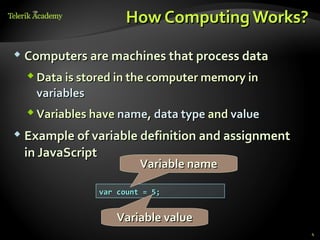
How Computing Works?
 Computers are machines that process data

   Data is stored in the computer memory in
    variables
   Variables have name, data type and value
 Example of variable definition and assignment

 in JavaScript
                          Variable name

                 var count = 5;


                    Variable value
                                                  4
What Is a Data Type?
 A data type:

   Is a domain of values of similar characteristics
   Defines the type of information stored in the
    computer memory (in a variable)
 Examples:

   Positive integers: 1, 2, 3, …
   Alphabetical characters: a, b, c, …


                                                       5
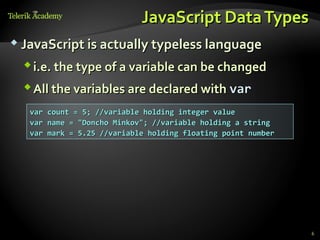
JavaScript Data Types
 JavaScript is actually typeless language

   i.e. the type of a variable can be changed
   All the variables are declared with var
   var count = 5; //variable holding integer value
   var name = "Doncho Minkov"; //variable holding a string
   var mark = 5.25 //variable holding floating point number


                                                              6
Integer Types
What are Integer Types?


 Integer types:

   Represent whole numbers
   Have range of values, depending on the size of
    memory used


                                                     8
Integer Types - Example


 Integer type can hold numbers from

 -9007199254740992 to 9007199254740992
 var studentsCount = 5;
 var maxInteger = 9007199254740992;
 var minInteger = -9007199254740992;


                                                    9
Integer Types
   Live Demo
Floating-Point
What are Floating-Point Types?
 Floating-point types:

   Represent real numbers
   Have range of values and precision
   Can behave abnormally in the calculations


                                                12
Floating-Point Types

 Floating-point size depend on the platform

   the browser and the OS
 32-bit OS and browser have 32 bits for number,

 while 64-bit have 64 bits
   It is good idea to use up to 32-bit numbers
    Will always work on all platforms


                                                   13
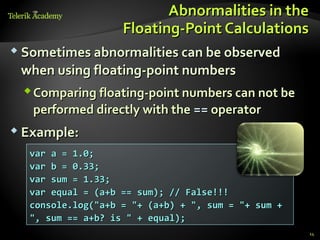
Abnormalities in the
                   Floating-Point Calculations
 Sometimes abnormalities can be observed

 when using floating-point numbers
  Comparing floating-point numbers can not be
   performed directly with the == operator
 Example:

  var a = 1.0;
  var b = 0.33;
  var sum = 1.33;
  var equal = (a+b == sum); // False!!!
  console.log("a+b = "+ (a+b) + ", sum = "+ sum +
  ", sum == a+b? is " + equal);
                                                    14
Floating-Point and Decimal
   Floating-Point Types
         Live Demo
Boolean Type
The Boolean Data Type


 The Boolean data type:

  Has two possible values:
    true and false
  Is useful in logical expressions


                                              17
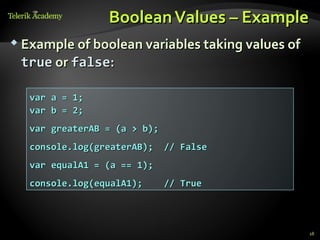
Boolean Values – Example
 Example of boolean variables taking values of

 true or false:

  var a = 1;
  var b = 2;
  var greaterAB = (a > b);
  console.log(greaterAB);    // False
  var equalA1 = (a == 1);
  console.log(equalA1);      // True


                                                  18
Boolean Type
   Live Demo
String Type
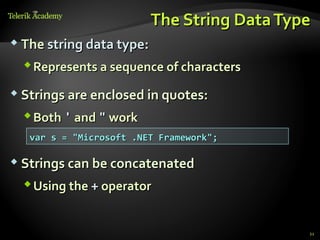
The String Data Type
 The string data type:

   Represents a sequence of characters

 Strings are enclosed in quotes:

   Both ' and " work
   var s = "Microsoft .NET Framework";

 Strings can be concatenated

   Using the + operator


                                             21
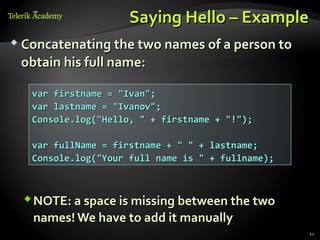
Saying Hello – Example
 Concatenating the two names of a person to

 obtain his full name:

   var firstname = "Ivan";
   var lastname = "Ivanov";
   Console.log("Hello, " + firstname + "!");

   var fullName = firstname + " " + lastname;
   Console.log("Your full name is " + fullname);


  NOTE: a space is missing between the two
   names! We have to add it manually
                                                   22
String Type
  Live Demo
p       q

                        i


Introducing Variables
What Is a Variable?
 A variable is a:

   Placeholder of information that can usually be
    changed at run-time
 Variables allow you to:

   Store information
   Retrieve the stored information
   Manipulate the stored information


                                                     25
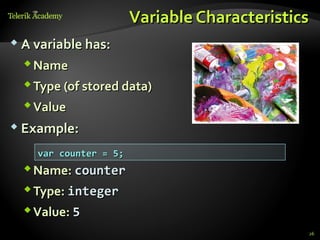
Variable Characteristics
 A variable has:

   Name
   Type (of stored data)
   Value
 Example:

    var counter = 5;
   Name: counter
   Type: integer
   Value: 5
                                              26
Declaring And Using
Variables
Declaring Variables
 When declaring a variable we:

   Specify its name (called identifier)
   May give it an initial value
   The type is identified by the value
 The syntax is the following:

  var <identifier> [= <initialization>];


 Example:

  var height = 200;

                                                  28
Identifiers
 Identifiers may consist of:

   Letters (Unicode)
   Digits [0-9]
   Underscore "_"
   Dollar '$'
 Identifiers

   Can begin only with a letter or an underscore
   Cannot be a JavaScript keyword

                                                    29
Identifiers (2)
 Identifiers

   Should have a descriptive name
   It is recommended to use only Latin letters
   Should be neither too long nor too short
 Note:

   In JavaScript small letters are considered
    different than the capital letters (case
    sensitivity)


                                                  30
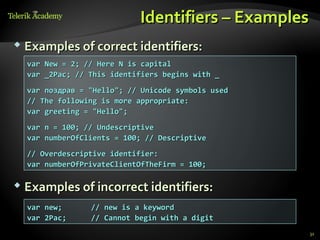
Identifiers – Examples
 Examples of correct identifiers:
  var New = 2; // Here N is capital
  var _2Pac; // This identifiers begins with _
  var поздрав = "Hello"; // Unicode symbols used
  // The following is more appropriate:
  var greeting = "Hello";
  var n = 100; // Undescriptive
  var numberOfClients = 100; // Descriptive
  // Overdescriptive identifier:
  var numberOfPrivateClientOfTheFirm = 100;

 Examples of incorrect identifiers:

  var new;      // new is a keyword
  var 2Pac;     // Cannot begin with a digit
                                                    31
Assigning Values
  To Variables
Assigning Values
 Assigning of values to variables

   Is achieved by the = operator
 The = operator has

   Variable identifier on the left
   Value of the corresponding data type on the
    right
   Could be used in a cascade calling, where
    assigning is done from right to left


                                                  33
Assigning Values – Examples
 Assigning values example:

  var firstValue = 5;
  var secondValue;
  var thirdValue;

  // Using an already declared variable:
  secondValue = firstValue;

  //   The following cascade calling assigns
  //   3 to firstValue and then firstValue
  //   to thirdValue, so both variables have
  //   the value 3 as a result:

  thirdValue = firstValue = 3; // Avoid this!

                                                34
Initializing Variables
 Initializing

   Is assigning of initial value
   Must be done before the variable is used!
 Several ways of initializing:

   By using a literal expression
   By referring to an already initialized variable


                                                      35
Initialization – Examples


 Example of some initializations:


   // This is how we use a literal expression:
   var heightInMeters = 1.74;

   // Here we use an already initialized variable:
   var greeting = "Hello World!";
   var message = greeting;


                                                     36
Assigning and
Initializing Variables
        Live Demo
Data Types and Variables


            http://academy.telerik.com

02. Data Type and Variables

  • 1.
    Data Types and Variables Doncho Minkov Technical Trainer http://minkov.it Telerik Software Academy http://academy.telerik.com
  • 2.
    Table of Contents 1. Data Types  Integer  Floating-Point  Boolean  String 1. Declaring and Using Variables  Identifiers  Declaring Variables and Assigning Values 2
  • 3.
  • 4.
    How Computing Works? Computers are machines that process data  Data is stored in the computer memory in variables  Variables have name, data type and value  Example of variable definition and assignment in JavaScript Variable name var count = 5; Variable value 4
  • 5.
    What Is aData Type?  A data type:  Is a domain of values of similar characteristics  Defines the type of information stored in the computer memory (in a variable)  Examples:  Positive integers: 1, 2, 3, …  Alphabetical characters: a, b, c, … 5
  • 6.
    JavaScript Data Types JavaScript is actually typeless language  i.e. the type of a variable can be changed  All the variables are declared with var var count = 5; //variable holding integer value var name = "Doncho Minkov"; //variable holding a string var mark = 5.25 //variable holding floating point number 6
  • 7.
  • 8.
    What are IntegerTypes?  Integer types:  Represent whole numbers  Have range of values, depending on the size of memory used 8
  • 9.
    Integer Types -Example  Integer type can hold numbers from -9007199254740992 to 9007199254740992 var studentsCount = 5; var maxInteger = 9007199254740992; var minInteger = -9007199254740992; 9
  • 10.
    Integer Types Live Demo
  • 11.
  • 12.
    What are Floating-PointTypes?  Floating-point types:  Represent real numbers  Have range of values and precision  Can behave abnormally in the calculations 12
  • 13.
    Floating-Point Types  Floating-pointsize depend on the platform  the browser and the OS  32-bit OS and browser have 32 bits for number, while 64-bit have 64 bits  It is good idea to use up to 32-bit numbers  Will always work on all platforms 13
  • 14.
    Abnormalities in the Floating-Point Calculations  Sometimes abnormalities can be observed when using floating-point numbers  Comparing floating-point numbers can not be performed directly with the == operator  Example: var a = 1.0; var b = 0.33; var sum = 1.33; var equal = (a+b == sum); // False!!! console.log("a+b = "+ (a+b) + ", sum = "+ sum + ", sum == a+b? is " + equal); 14
  • 15.
    Floating-Point and Decimal Floating-Point Types Live Demo
  • 16.
  • 17.
    The Boolean DataType  The Boolean data type:  Has two possible values:  true and false  Is useful in logical expressions 17
  • 18.
    Boolean Values –Example  Example of boolean variables taking values of true or false: var a = 1; var b = 2; var greaterAB = (a > b); console.log(greaterAB); // False var equalA1 = (a == 1); console.log(equalA1); // True 18
  • 19.
    Boolean Type Live Demo
  • 20.
  • 21.
    The String DataType  The string data type:  Represents a sequence of characters  Strings are enclosed in quotes:  Both ' and " work var s = "Microsoft .NET Framework";  Strings can be concatenated  Using the + operator 21
  • 22.
    Saying Hello –Example  Concatenating the two names of a person to obtain his full name: var firstname = "Ivan"; var lastname = "Ivanov"; Console.log("Hello, " + firstname + "!"); var fullName = firstname + " " + lastname; Console.log("Your full name is " + fullname);  NOTE: a space is missing between the two names! We have to add it manually 22
  • 23.
    String Type Live Demo
  • 24.
    p q i Introducing Variables
  • 25.
    What Is aVariable?  A variable is a:  Placeholder of information that can usually be changed at run-time  Variables allow you to:  Store information  Retrieve the stored information  Manipulate the stored information 25
  • 26.
    Variable Characteristics  Avariable has:  Name  Type (of stored data)  Value  Example: var counter = 5;  Name: counter  Type: integer  Value: 5 26
  • 27.
  • 28.
    Declaring Variables  Whendeclaring a variable we:  Specify its name (called identifier)  May give it an initial value  The type is identified by the value  The syntax is the following: var <identifier> [= <initialization>];  Example: var height = 200; 28
  • 29.
    Identifiers  Identifiers mayconsist of:  Letters (Unicode)  Digits [0-9]  Underscore "_"  Dollar '$'  Identifiers  Can begin only with a letter or an underscore  Cannot be a JavaScript keyword 29
  • 30.
    Identifiers (2)  Identifiers  Should have a descriptive name  It is recommended to use only Latin letters  Should be neither too long nor too short  Note:  In JavaScript small letters are considered different than the capital letters (case sensitivity) 30
  • 31.
    Identifiers – Examples Examples of correct identifiers: var New = 2; // Here N is capital var _2Pac; // This identifiers begins with _ var поздрав = "Hello"; // Unicode symbols used // The following is more appropriate: var greeting = "Hello"; var n = 100; // Undescriptive var numberOfClients = 100; // Descriptive // Overdescriptive identifier: var numberOfPrivateClientOfTheFirm = 100;  Examples of incorrect identifiers: var new; // new is a keyword var 2Pac; // Cannot begin with a digit 31
  • 32.
    Assigning Values To Variables
  • 33.
    Assigning Values  Assigningof values to variables  Is achieved by the = operator  The = operator has  Variable identifier on the left  Value of the corresponding data type on the right  Could be used in a cascade calling, where assigning is done from right to left 33
  • 34.
    Assigning Values –Examples  Assigning values example: var firstValue = 5; var secondValue; var thirdValue; // Using an already declared variable: secondValue = firstValue; // The following cascade calling assigns // 3 to firstValue and then firstValue // to thirdValue, so both variables have // the value 3 as a result: thirdValue = firstValue = 3; // Avoid this! 34
  • 35.
    Initializing Variables  Initializing  Is assigning of initial value  Must be done before the variable is used!  Several ways of initializing:  By using a literal expression  By referring to an already initialized variable 35
  • 36.
    Initialization – Examples Example of some initializations: // This is how we use a literal expression: var heightInMeters = 1.74; // Here we use an already initialized variable: var greeting = "Hello World!"; var message = greeting; 36
  • 37.
  • 38.
    Data Types andVariables http://academy.telerik.com

Editor's Notes

  • #3 * (c) 2007 National Academy for Software Development - http://academy.devbg.org. All rights reserved. Unauthorized copying or re-distribution is strictly prohibited.* ##
  • #4 * (c) 2007 National Academy for Software Development - http://academy.devbg.org. All rights reserved. Unauthorized copying or re-distribution is strictly prohibited.* ##
  • #8 * (c) 2007 National Academy for Software Development - http://academy.devbg.org. All rights reserved. Unauthorized copying or re-distribution is strictly prohibited.* ##
  • #12 * (c) 2007 National Academy for Software Development - http://academy.devbg.org. All rights reserved. Unauthorized copying or re-distribution is strictly prohibited.* ##
  • #17 * (c) 2007 National Academy for Software Development - http://academy.devbg.org. All rights reserved. Unauthorized copying or re-distribution is strictly prohibited.* ##
  • #21 * (c) 2007 National Academy for Software Development - http://academy.devbg.org. All rights reserved. Unauthorized copying or re-distribution is strictly prohibited.* ##
  • #25 * (c) 2007 National Academy for Software Development - http://academy.devbg.org. All rights reserved. Unauthorized copying or re-distribution is strictly prohibited.* ##
  • #28 * (c) 2007 National Academy for Software Development - http://academy.devbg.org. All rights reserved. Unauthorized copying or re-distribution is strictly prohibited.* ##
  • #29 * (c) 2007 National Academy for Software Development - http://academy.devbg.org. All rights reserved. Unauthorized copying or re-distribution is strictly prohibited.* ##
  • #33 * (c) 2007 National Academy for Software Development - http://academy.devbg.org. All rights reserved. Unauthorized copying or re-distribution is strictly prohibited.* ##