Liang, Introduction toJava Programming, Tenth Edition, (c) 2015 Pearson Education, Inc. All
rights reserved.
1
Chapter 1 Introduction to
Computers, Programs, and Java
2.
Liang, Introduction toJava Programming, Tenth Edition, (c) 2015 Pearson Education, Inc. All
rights reserved.
2
Objectives
To describe the relationship between Java and the World Wide Web (§1.5).
To understand the meaning of Java language specification, API, JDK, and IDE
(§1.6).
To write a simple Java program (§1.7).
To display output on the console (§1.7).
To explain the basic syntax of a Java program (§1.7).
To create, compile, and run Java programs (§1.8).
To use sound Java programming style and document programs properly (§1.9).
To explain the differences between syntax errors, runtime errors, and logic
errors (§1.10).
To develop Java programs using NetBeans (§1.11).
To develop Java programs using Eclipse (§1.12).
3.
Liang, Introduction toJava Programming, Tenth Edition, (c) 2015 Pearson Education, Inc. All
rights reserved.
3
Java, Web, and Beyond
Java can be used to develop standalone
applications.
Java can be used to develop applications
running from a browser.
Java can also be used to develop applications
for hand-held devices.
Java can be used to develop applications for
Web servers.
4.
Liang, Introduction toJava Programming, Tenth Edition, (c) 2015 Pearson Education, Inc. All
rights reserved.
4
Java’s History
James Gosling and Sun Microsystems
Oak
Java, May 20, 1995, Sun World
HotJava
– The first Java-enabled Web browser
Early History Website:
http://www.java.com/en/javahistory/
index.jsp
5.
Liang, Introduction toJava Programming, Tenth Edition, (c) 2015 Pearson Education, Inc. All
rights reserved.
5
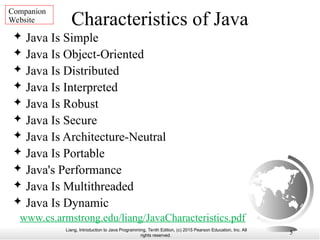
Characteristics of Java
Java Is Simple
Java Is Object-Oriented
Java Is Distributed
Java Is Interpreted
Java Is Robust
Java Is Secure
Java Is Architecture-Neutral
Java Is Portable
Java's Performance
Java Is Multithreaded
Java Is Dynamic
Companion
Website
www.cs.armstrong.edu/liang/JavaCharacteristics.pdf
6.
Liang, Introduction toJava Programming, Tenth Edition, (c) 2015 Pearson Education, Inc. All
rights reserved.
6
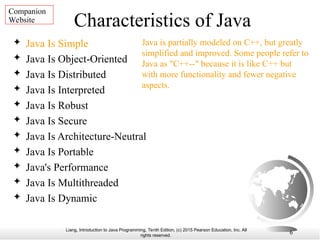
Characteristics of Java
Java Is Simple
Java Is Object-Oriented
Java Is Distributed
Java Is Interpreted
Java Is Robust
Java Is Secure
Java Is Architecture-Neutral
Java Is Portable
Java's Performance
Java Is Multithreaded
Java Is Dynamic
Java is partially modeled on C++, but greatly
simplified and improved. Some people refer to
Java as "C++--" because it is like C++ but
with more functionality and fewer negative
aspects.
Companion
Website
7.
Liang, Introduction toJava Programming, Tenth Edition, (c) 2015 Pearson Education, Inc. All
rights reserved.
7
Characteristics of Java
Java Is Simple
Java Is Object-Oriented
Java Is Distributed
Java Is Interpreted
Java Is Robust
Java Is Secure
Java Is Architecture-Neutral
Java Is Portable
Java's Performance
Java Is Multithreaded
Java Is Dynamic
Java is inherently object-oriented.
Although many object-oriented languages
began strictly as procedural languages,
Java was designed from the start to be
object-oriented. Object-oriented
programming (OOP) is a popular
programming approach that is replacing
traditional procedural programming
techniques.
One of the central issues in software
development is how to reuse code. Object-
oriented programming provides great
flexibility, modularity, clarity, and
reusability through encapsulation,
inheritance, and polymorphism.
Companion
Website
8.
Liang, Introduction toJava Programming, Tenth Edition, (c) 2015 Pearson Education, Inc. All
rights reserved.
8
Characteristics of Java
Java Is Simple
Java Is Object-Oriented
Java Is Distributed
Java Is Interpreted
Java Is Robust
Java Is Secure
Java Is Architecture-Neutral
Java Is Portable
Java's Performance
Java Is Multithreaded
Java Is Dynamic
Distributed computing involves several
computers working together on a network.
Java is designed to make distributed
computing easy. Since networking
capability is inherently integrated into
Java, writing network programs is like
sending and receiving data to and from a
file.
Companion
Website
9.
Liang, Introduction toJava Programming, Tenth Edition, (c) 2015 Pearson Education, Inc. All
rights reserved.
9
Characteristics of Java
Java Is Simple
Java Is Object-Oriented
Java Is Distributed
Java Is Interpreted
Java Is Robust
Java Is Secure
Java Is Architecture-Neutral
Java Is Portable
Java's Performance
Java Is Multithreaded
Java Is Dynamic
You need an interpreter to run Java
programs. The programs are compiled into
the Java Virtual Machine code called
bytecode. The bytecode is machine-
independent and can run on any machine
that has a Java interpreter, which is part of
the Java Virtual Machine (JVM).
Companion
Website
10.
Liang, Introduction toJava Programming, Tenth Edition, (c) 2015 Pearson Education, Inc. All
rights reserved.
10
Characteristics of Java
Java Is Simple
Java Is Object-Oriented
Java Is Distributed
Java Is Interpreted
Java Is Robust
Java Is Secure
Java Is Architecture-Neutral
Java Is Portable
Java's Performance
Java Is Multithreaded
Java Is Dynamic
Java compilers can detect many problems
that would first show up at execution time
in other languages.
Java has eliminated certain types of error-
prone programming constructs found in
other languages.
Java has a runtime exception-handling
feature to provide programming support
for robustness.
Companion
Website
11.
Liang, Introduction toJava Programming, Tenth Edition, (c) 2015 Pearson Education, Inc. All
rights reserved.
11
Characteristics of Java
Java Is Simple
Java Is Object-Oriented
Java Is Distributed
Java Is Interpreted
Java Is Robust
Java Is Secure
Java Is Architecture-Neutral
Java Is Portable
Java's Performance
Java Is Multithreaded
Java Is Dynamic
Java implements several security
mechanisms to protect your system against
harm caused by stray programs.
Companion
Website
12.
Liang, Introduction toJava Programming, Tenth Edition, (c) 2015 Pearson Education, Inc. All
rights reserved.
12
Characteristics of Java
Java Is Simple
Java Is Object-Oriented
Java Is Distributed
Java Is Interpreted
Java Is Robust
Java Is Secure
Java Is Architecture-Neutral
Java Is Portable
Java's Performance
Java Is Multithreaded
Java Is Dynamic
Write once, run anywhere
With a Java Virtual Machine (JVM),
you can write one program that will
run on any platform.
Companion
Website
13.
Liang, Introduction toJava Programming, Tenth Edition, (c) 2015 Pearson Education, Inc. All
rights reserved.
13
Characteristics of Java
Java Is Simple
Java Is Object-Oriented
Java Is Distributed
Java Is Interpreted
Java Is Robust
Java Is Secure
Java Is Architecture-Neutral
Java Is Portable
Java's Performance
Java Is Multithreaded
Java Is Dynamic
Because Java is architecture neutral,
Java programs are portable. They can
be run on any platform without being
recompiled.
Companion
Website
14.
Liang, Introduction toJava Programming, Tenth Edition, (c) 2015 Pearson Education, Inc. All
rights reserved.
14
Characteristics of Java
Java Is Simple
Java Is Object-Oriented
Java Is Distributed
Java Is Interpreted
Java Is Robust
Java Is Secure
Java Is Architecture-Neutral
Java Is Portable
Java's Performance
Java Is Multithreaded
Java Is Dynamic
Java’s performance Because Java is
architecture neutral, Java programs
are portable. They can be run on any
platform without being recompiled.
Companion
Website
15.
Liang, Introduction toJava Programming, Tenth Edition, (c) 2015 Pearson Education, Inc. All
rights reserved.
15
Characteristics of Java
Java Is Simple
Java Is Object-Oriented
Java Is Distributed
Java Is Interpreted
Java Is Robust
Java Is Secure
Java Is Architecture-Neutral
Java Is Portable
Java's Performance
Java Is Multithreaded
Java Is Dynamic
Multithread programming is smoothly
integrated in Java, whereas in other
languages you have to call procedures
specific to the operating system to enable
multithreading.
Companion
Website
16.
Liang, Introduction toJava Programming, Tenth Edition, (c) 2015 Pearson Education, Inc. All
rights reserved.
16
Characteristics of Java
Java Is Simple
Java Is Object-Oriented
Java Is Distributed
Java Is Interpreted
Java Is Robust
Java Is Secure
Java Is Architecture-Neutral
Java Is Portable
Java's Performance
Java Is Multithreaded
Java Is Dynamic
Java was designed to adapt to an evolving
environment. New code can be loaded on the
fly without recompilation. There is no need for
developers to create, and for users to install,
major new software versions. New features can
be incorporated transparently as needed.
Companion
Website
17.
Liang, Introduction toJava Programming, Tenth Edition, (c) 2015 Pearson Education, Inc. All
rights reserved.
17
JDK Versions
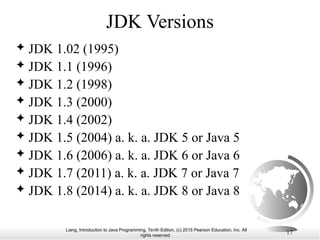
JDK 1.02 (1995)
JDK 1.1 (1996)
JDK 1.2 (1998)
JDK 1.3 (2000)
JDK 1.4 (2002)
JDK 1.5 (2004) a. k. a. JDK 5 or Java 5
JDK 1.6 (2006) a. k. a. JDK 6 or Java 6
JDK 1.7 (2011) a. k. a. JDK 7 or Java 7
JDK 1.8 (2014) a. k. a. JDK 8 or Java 8
18.
Liang, Introduction toJava Programming, Tenth Edition, (c) 2015 Pearson Education, Inc. All
rights reserved.
18
JDK Editions
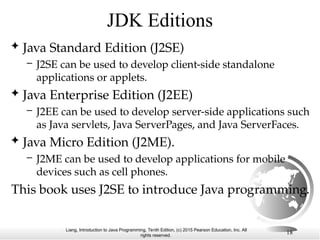
Java Standard Edition (J2SE)
– J2SE can be used to develop client-side standalone
applications or applets.
Java Enterprise Edition (J2EE)
– J2EE can be used to develop server-side applications such
as Java servlets, Java ServerPages, and Java ServerFaces.
Java Micro Edition (J2ME).
– J2ME can be used to develop applications for mobile
devices such as cell phones.
This book uses J2SE to introduce Java programming.
19.
Liang, Introduction toJava Programming, Tenth Edition, (c) 2015 Pearson Education, Inc. All
rights reserved.
19
Popular Java IDEs
NetBeans
Eclipse
20.
Liang, Introduction toJava Programming, Tenth Edition, (c) 2015 Pearson Education, Inc. All
rights reserved.
20
A Simple Java Program
// This program prints Welcome to Java!
public class Welcome {
public static void main(String[] args) {
System.out.println("Welcome to Java!");
}
}
Run
Welcome
Listing 1.1
IMPORTANT NOTE: If you cannot run the buttons, see
www.cs.armstrong.edu/liang/javaslidenote.doc.
21.
Liang, Introduction toJava Programming, Tenth Edition, (c) 2015 Pearson Education, Inc. All
rights reserved.
21
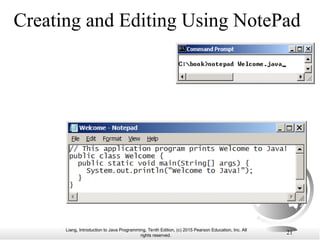
Creating and Editing Using NotePad
22.
Liang, Introduction toJava Programming, Tenth Edition, (c) 2015 Pearson Education, Inc. All
rights reserved.
22
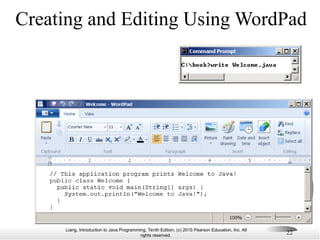
Creating and Editing Using WordPad
23.
Liang, Introduction toJava Programming, Tenth Edition, (c) 2015 Pearson Education, Inc. All
rights reserved.
23
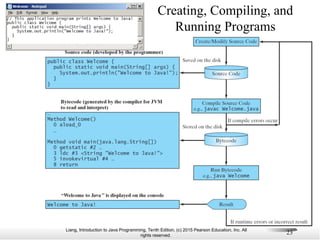
Creating, Compiling, and
Running Programs
24.
Liang, Introduction toJava Programming, Tenth Edition, (c) 2015 Pearson Education, Inc. All
rights reserved.
24
Compiling Java Source Code
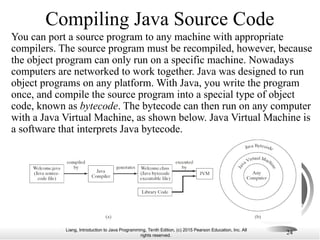
You can port a source program to any machine with appropriate
compilers. The source program must be recompiled, however, because
the object program can only run on a specific machine. Nowadays
computers are networked to work together. Java was designed to run
object programs on any platform. With Java, you write the program
once, and compile the source program into a special type of object
code, known as bytecode. The bytecode can then run on any computer
with a Java Virtual Machine, as shown below. Java Virtual Machine is
a software that interprets Java bytecode.
25.
Liang, Introduction toJava Programming, Tenth Edition, (c) 2015 Pearson Education, Inc. All
rights reserved.
Two More Simple Examples
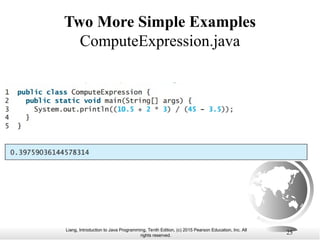
ComputeExpression.java
25
26.
Liang, Introduction toJava Programming, Tenth Edition, (c) 2015 Pearson Education, Inc. All
rights reserved.
Two More Simple Examples
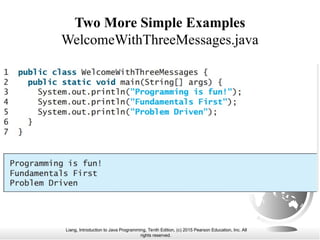
WelcomeWithThreeMessages.java
27.
Liang, Introduction toJava Programming, Tenth Edition, (c) 2015 Pearson Education, Inc. All
rights reserved.
27
Supplements on the
Companion Website
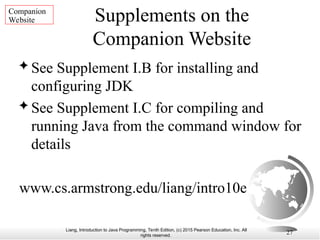
See Supplement I.B for installing and
configuring JDK
See Supplement I.C for compiling and
running Java from the command window for
details
www.cs.armstrong.edu/liang/intro10e
Companion
Website
28.
Liang, Introduction toJava Programming, Tenth Edition, (c) 2015 Pearson Education, Inc. All
rights reserved.
28
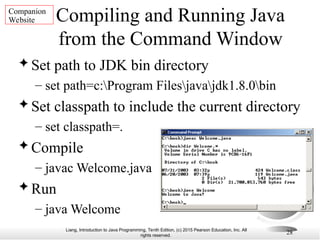
Compiling and Running Java
from the Command Window
Set path to JDK bin directory
– set path=c:Program Filesjavajdk1.8.0bin
Set classpath to include the current directory
– set classpath=.
Compile
– javac Welcome.java
Run
– java Welcome
Companion
Website
29.
Liang, Introduction toJava Programming, Tenth Edition, (c) 2015 Pearson Education, Inc. All
rights reserved.
29
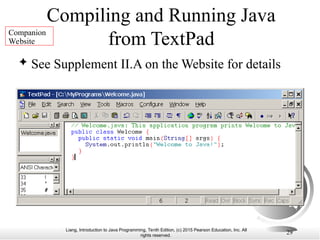
Compiling and Running Java
from TextPad
See Supplement II.A on the Website for details
Companion
Website
30.
Liang, Introduction toJava Programming, Tenth Edition, (c) 2015 Pearson Education, Inc. All
rights reserved.
30
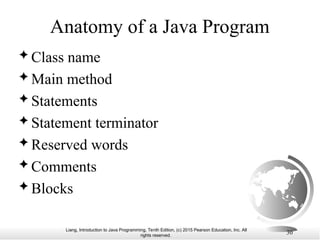
Anatomy of a Java Program
Class name
Main method
Statements
Statement terminator
Reserved words
Comments
Blocks
31.
Liang, Introduction toJava Programming, Tenth Edition, (c) 2015 Pearson Education, Inc. All
rights reserved.
31
// This program prints Welcome to Java!
public class Welcome {
public static void main(String[] args) {
System.out.println("Welcome to Java!");
}
}
Class Name
Every Java program must have at least one class.
Each class has a name. By convention, class names
start with an uppercase letter. In this example, the
class name is Welcome.
32.
Liang, Introduction toJava Programming, Tenth Edition, (c) 2015 Pearson Education, Inc. All
rights reserved.
32
// This program prints Welcome to Java!
public class Welcome {
public static void main(String[] args) {
System.out.println("Welcome to Java!");
}
}
Main Method
Line 2 defines the main method. In order to run a
class, the class must contain a method named main.
The program is executed from the main method.
33.
Liang, Introduction toJava Programming, Tenth Edition, (c) 2015 Pearson Education, Inc. All
rights reserved.
33
// This program prints Welcome to Java!
public class Welcome {
public static void main(String[] args) {
System.out.println("Welcome to Java!");
}
}
Statement
A statement represents an action or a sequence of actions.
The statement System.out.println("Welcome to Java!") in
the program in Listing 1.1 is a statement to display the
greeting "Welcome to Java!“.
34.
Liang, Introduction toJava Programming, Tenth Edition, (c) 2015 Pearson Education, Inc. All
rights reserved.
34
// This program prints Welcome to Java!
public class Welcome {
public static void main(String[] args) {
System.out.println("Welcome to Java!");
}
}
Statement Terminator
Every statement in Java ends with a semicolon (;).
35.
Liang, Introduction toJava Programming, Tenth Edition, (c) 2015 Pearson Education, Inc. All
rights reserved.
35
// This program prints Welcome to Java!
public class Welcome {
public static void main(String[] args) {
System.out.println("Welcome to Java!");
}
}
Reserved words
Reserved words or keywords are words that have a
specific meaning to the compiler and cannot be used for
other purposes in the program. For example, when the
compiler sees the word class, it understands that the word
after class is the name for the class.
36.
Liang, Introduction toJava Programming, Tenth Edition, (c) 2015 Pearson Education, Inc. All
rights reserved.
36
Blocks
A pair of braces in a program forms a block that groups
components of a program.
public class Test {
public static void main(String[] args) {
System.out.println("Welcome to Java!");
}
}
Class block
Method block
37.
Liang, Introduction toJava Programming, Tenth Edition, (c) 2015 Pearson Education, Inc. All
rights reserved.
37
Special Symbols
Character Name Description
{}
()
[]
//
" "
;
Opening and closing
braces
Opening and closing
parentheses
Opening and closing
brackets
Double slashes
Opening and closing
quotation marks
Semicolon
Denotes a block to enclose statements.
Used with methods.
Denotes an array.
Precedes a comment line.
Enclosing a string (i.e., sequence of characters).
Marks the end of a statement.
38.
Liang, Introduction toJava Programming, Tenth Edition, (c) 2015 Pearson Education, Inc. All
rights reserved.
38
// This program prints Welcome to Java!
public class Welcome {
public static void main(String[] args) {
System.out.println("Welcome to Java!");
}
}
{ … }
39.
Liang, Introduction toJava Programming, Tenth Edition, (c) 2015 Pearson Education, Inc. All
rights reserved.
39
// This program prints Welcome to Java!
public class Welcome {
public static void main(String[] args) {
System.out.println("Welcome to Java!");
}
}
( … )
40.
Liang, Introduction toJava Programming, Tenth Edition, (c) 2015 Pearson Education, Inc. All
rights reserved.
40
// This program prints Welcome to Java!
public class Welcome {
public static void main(String[] args) {
System.out.println("Welcome to Java!");
}
}
;
41.
Liang, Introduction toJava Programming, Tenth Edition, (c) 2015 Pearson Education, Inc. All
rights reserved.
41
// This program prints Welcome to Java!
public class Welcome {
public static void main(String[] args) {
System.out.println("Welcome to Java!");
}
}
// …
42.
Liang, Introduction toJava Programming, Tenth Edition, (c) 2015 Pearson Education, Inc. All
rights reserved.
42
// This program prints Welcome to Java!
public class Welcome {
public static void main(String[] args) {
System.out.println("Welcome to Java!");
}
}
" … "
43.
Liang, Introduction toJava Programming, Tenth Edition, (c) 2015 Pearson Education, Inc. All
rights reserved.
43
Programming Style and
Documentation
Appropriate Comments
Naming Conventions
Proper Indentation and Spacing Lines
Block Styles
44.
Liang, Introduction toJava Programming, Tenth Edition, (c) 2015 Pearson Education, Inc. All
rights reserved.
44
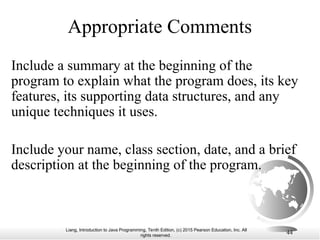
Appropriate Comments
Include a summary at the beginning of the
program to explain what the program does, its key
features, its supporting data structures, and any
unique techniques it uses.
Include your name, class section, date, and a brief
description at the beginning of the program.
45.
Liang, Introduction toJava Programming, Tenth Edition, (c) 2015 Pearson Education, Inc. All
rights reserved.
45
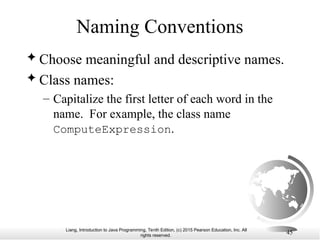
Naming Conventions
Choose meaningful and descriptive names.
Class names:
– Capitalize the first letter of each word in the
name. For example, the class name
ComputeExpression.
46.
Liang, Introduction toJava Programming, Tenth Edition, (c) 2015 Pearson Education, Inc. All
rights reserved.
46
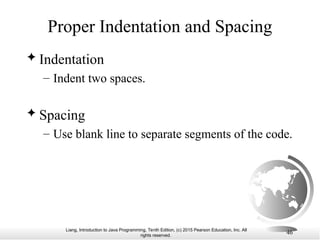
Proper Indentation and Spacing
Indentation
– Indent two spaces.
Spacing
– Use blank line to separate segments of the code.
47.
Liang, Introduction toJava Programming, Tenth Edition, (c) 2015 Pearson Education, Inc. All
rights reserved.
47
Block Styles
Use end-of-line style for braces.
public class Test
{
public static void main(String[] args)
{
System.out.println("Block Styles");
}
}
public class Test {
public static void main(String[] args) {
System.out.println("Block Styles");
}
}
End-of-line
style
Next-line
style
48.
Liang, Introduction toJava Programming, Tenth Edition, (c) 2015 Pearson Education, Inc. All
rights reserved.
48
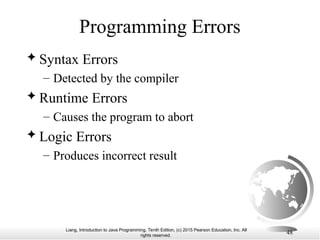
Programming Errors
Syntax Errors
– Detected by the compiler
Runtime Errors
– Causes the program to abort
Logic Errors
– Produces incorrect result
49.
Liang, Introduction toJava Programming, Tenth Edition, (c) 2015 Pearson Education, Inc. All
rights reserved.
49
Syntax Errors
public class ShowSyntaxErrors {
public static main(String[] args) {
System.out.println("Welcome to Java);
}
}
50.
Liang, Introduction toJava Programming, Tenth Edition, (c) 2015 Pearson Education, Inc. All
rights reserved.
50
Runtime Errors
public class ShowRuntimeErrors {
public static void main(String[] args) {
System.out.println(1 / 0);
}
}
51.
Liang, Introduction toJava Programming, Tenth Edition, (c) 2015 Pearson Education, Inc. All
rights reserved.
51
Logic Errors
public class ShowLogicErrors {
public static void main(String[] args) {
System.out.println("Celsius 35 is Fahrenheit degree ");
System.out.println((9 / 5) * 35 + 32);
}
}
52.
Liang, Introduction toJava Programming, Tenth Edition, (c) 2015 Pearson Education, Inc. All
rights reserved.
52
Compiling and Running
Java from NetBeans
See Supplement I.D on the Website for details
Companion
Website
53.
Liang, Introduction toJava Programming, Tenth Edition, (c) 2015 Pearson Education, Inc. All
rights reserved.
53
Compiling and Running Java
from Eclipse
See Supplement II.D on the Website for details
Companion
Website

![Liang, Introduction to Java Programming, Tenth Edition, (c) 2015 Pearson Education, Inc. All
rights reserved.
20
A Simple Java Program
// This program prints Welcome to Java!
public class Welcome {
public static void main(String[] args) {
System.out.println("Welcome to Java!");
}
}
Run
Welcome
Listing 1.1
IMPORTANT NOTE: If you cannot run the buttons, see
www.cs.armstrong.edu/liang/javaslidenote.doc.](https://image.slidesharecdn.com/01slide-250610151029-42765524/85/01Slide-ppt-java-indroduction-chapter1-aaaaaaaa-20-320.jpg)
![Liang, Introduction to Java Programming, Tenth Edition, (c) 2015 Pearson Education, Inc. All
rights reserved.
31
// This program prints Welcome to Java!
public class Welcome {
public static void main(String[] args) {
System.out.println("Welcome to Java!");
}
}
Class Name
Every Java program must have at least one class.
Each class has a name. By convention, class names
start with an uppercase letter. In this example, the
class name is Welcome.](https://image.slidesharecdn.com/01slide-250610151029-42765524/85/01Slide-ppt-java-indroduction-chapter1-aaaaaaaa-31-320.jpg)
![Liang, Introduction to Java Programming, Tenth Edition, (c) 2015 Pearson Education, Inc. All
rights reserved.
32
// This program prints Welcome to Java!
public class Welcome {
public static void main(String[] args) {
System.out.println("Welcome to Java!");
}
}
Main Method
Line 2 defines the main method. In order to run a
class, the class must contain a method named main.
The program is executed from the main method.](https://image.slidesharecdn.com/01slide-250610151029-42765524/85/01Slide-ppt-java-indroduction-chapter1-aaaaaaaa-32-320.jpg)
![Liang, Introduction to Java Programming, Tenth Edition, (c) 2015 Pearson Education, Inc. All
rights reserved.
33
// This program prints Welcome to Java!
public class Welcome {
public static void main(String[] args) {
System.out.println("Welcome to Java!");
}
}
Statement
A statement represents an action or a sequence of actions.
The statement System.out.println("Welcome to Java!") in
the program in Listing 1.1 is a statement to display the
greeting "Welcome to Java!“.](https://image.slidesharecdn.com/01slide-250610151029-42765524/85/01Slide-ppt-java-indroduction-chapter1-aaaaaaaa-33-320.jpg)
![Liang, Introduction to Java Programming, Tenth Edition, (c) 2015 Pearson Education, Inc. All
rights reserved.
34
// This program prints Welcome to Java!
public class Welcome {
public static void main(String[] args) {
System.out.println("Welcome to Java!");
}
}
Statement Terminator
Every statement in Java ends with a semicolon (;).](https://image.slidesharecdn.com/01slide-250610151029-42765524/85/01Slide-ppt-java-indroduction-chapter1-aaaaaaaa-34-320.jpg)
![Liang, Introduction to Java Programming, Tenth Edition, (c) 2015 Pearson Education, Inc. All
rights reserved.
35
// This program prints Welcome to Java!
public class Welcome {
public static void main(String[] args) {
System.out.println("Welcome to Java!");
}
}
Reserved words
Reserved words or keywords are words that have a
specific meaning to the compiler and cannot be used for
other purposes in the program. For example, when the
compiler sees the word class, it understands that the word
after class is the name for the class.](https://image.slidesharecdn.com/01slide-250610151029-42765524/85/01Slide-ppt-java-indroduction-chapter1-aaaaaaaa-35-320.jpg)
![Liang, Introduction to Java Programming, Tenth Edition, (c) 2015 Pearson Education, Inc. All
rights reserved.
36
Blocks
A pair of braces in a program forms a block that groups
components of a program.
public class Test {
public static void main(String[] args) {
System.out.println("Welcome to Java!");
}
}
Class block
Method block](https://image.slidesharecdn.com/01slide-250610151029-42765524/85/01Slide-ppt-java-indroduction-chapter1-aaaaaaaa-36-320.jpg)
![Liang, Introduction to Java Programming, Tenth Edition, (c) 2015 Pearson Education, Inc. All
rights reserved.
37
Special Symbols
Character Name Description
{}
()
[]
//
" "
;
Opening and closing
braces
Opening and closing
parentheses
Opening and closing
brackets
Double slashes
Opening and closing
quotation marks
Semicolon
Denotes a block to enclose statements.
Used with methods.
Denotes an array.
Precedes a comment line.
Enclosing a string (i.e., sequence of characters).
Marks the end of a statement.](https://image.slidesharecdn.com/01slide-250610151029-42765524/85/01Slide-ppt-java-indroduction-chapter1-aaaaaaaa-37-320.jpg)
![Liang, Introduction to Java Programming, Tenth Edition, (c) 2015 Pearson Education, Inc. All
rights reserved.
38
// This program prints Welcome to Java!
public class Welcome {
public static void main(String[] args) {
System.out.println("Welcome to Java!");
}
}
{ … }](https://image.slidesharecdn.com/01slide-250610151029-42765524/85/01Slide-ppt-java-indroduction-chapter1-aaaaaaaa-38-320.jpg)
![Liang, Introduction to Java Programming, Tenth Edition, (c) 2015 Pearson Education, Inc. All
rights reserved.
39
// This program prints Welcome to Java!
public class Welcome {
public static void main(String[] args) {
System.out.println("Welcome to Java!");
}
}
( … )](https://image.slidesharecdn.com/01slide-250610151029-42765524/85/01Slide-ppt-java-indroduction-chapter1-aaaaaaaa-39-320.jpg)
![Liang, Introduction to Java Programming, Tenth Edition, (c) 2015 Pearson Education, Inc. All
rights reserved.
40
// This program prints Welcome to Java!
public class Welcome {
public static void main(String[] args) {
System.out.println("Welcome to Java!");
}
}
;](https://image.slidesharecdn.com/01slide-250610151029-42765524/85/01Slide-ppt-java-indroduction-chapter1-aaaaaaaa-40-320.jpg)
![Liang, Introduction to Java Programming, Tenth Edition, (c) 2015 Pearson Education, Inc. All
rights reserved.
41
// This program prints Welcome to Java!
public class Welcome {
public static void main(String[] args) {
System.out.println("Welcome to Java!");
}
}
// …](https://image.slidesharecdn.com/01slide-250610151029-42765524/85/01Slide-ppt-java-indroduction-chapter1-aaaaaaaa-41-320.jpg)
![Liang, Introduction to Java Programming, Tenth Edition, (c) 2015 Pearson Education, Inc. All
rights reserved.
42
// This program prints Welcome to Java!
public class Welcome {
public static void main(String[] args) {
System.out.println("Welcome to Java!");
}
}
" … "](https://image.slidesharecdn.com/01slide-250610151029-42765524/85/01Slide-ppt-java-indroduction-chapter1-aaaaaaaa-42-320.jpg)
![Liang, Introduction to Java Programming, Tenth Edition, (c) 2015 Pearson Education, Inc. All
rights reserved.
47
Block Styles
Use end-of-line style for braces.
public class Test
{
public static void main(String[] args)
{
System.out.println("Block Styles");
}
}
public class Test {
public static void main(String[] args) {
System.out.println("Block Styles");
}
}
End-of-line
style
Next-line
style](https://image.slidesharecdn.com/01slide-250610151029-42765524/85/01Slide-ppt-java-indroduction-chapter1-aaaaaaaa-47-320.jpg)
![Liang, Introduction to Java Programming, Tenth Edition, (c) 2015 Pearson Education, Inc. All
rights reserved.
49
Syntax Errors
public class ShowSyntaxErrors {
public static main(String[] args) {
System.out.println("Welcome to Java);
}
}](https://image.slidesharecdn.com/01slide-250610151029-42765524/85/01Slide-ppt-java-indroduction-chapter1-aaaaaaaa-49-320.jpg)
![Liang, Introduction to Java Programming, Tenth Edition, (c) 2015 Pearson Education, Inc. All
rights reserved.
50
Runtime Errors
public class ShowRuntimeErrors {
public static void main(String[] args) {
System.out.println(1 / 0);
}
}](https://image.slidesharecdn.com/01slide-250610151029-42765524/85/01Slide-ppt-java-indroduction-chapter1-aaaaaaaa-50-320.jpg)
![Liang, Introduction to Java Programming, Tenth Edition, (c) 2015 Pearson Education, Inc. All
rights reserved.
51
Logic Errors
public class ShowLogicErrors {
public static void main(String[] args) {
System.out.println("Celsius 35 is Fahrenheit degree ");
System.out.println((9 / 5) * 35 + 32);
}
}](https://image.slidesharecdn.com/01slide-250610151029-42765524/85/01Slide-ppt-java-indroduction-chapter1-aaaaaaaa-51-320.jpg)