12
Python Variables
• Avariable stores a piece of data, and gives it a
specific name.
• The variable’s name can be anything but must
not begin with numbers or special characters.
• We store a number or a text or a list or any other
type to a variable by assigning a value to it.
• Every variable has a type, the type of a variable is
the type of the data assigned to it
13.
13
Python Variables
• Theprinciples of naming conventions are:
• Names must have one word, that is, with no spaces
• Names must only comprise of letters and numbers
also as underscores like (_)
• Multiword can be declared as “theMultiWord” or
“TheMultiWord”
• Reserved words must not ever be used as variable
names.
14.
14
Python Variables
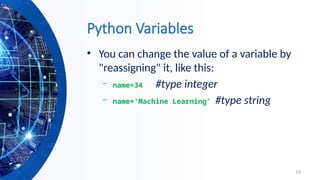
• Youcan change the value of a variable by
"reassigning" it, like this:
– name=34 #type integer
– name='Machine Learning' #type string
16
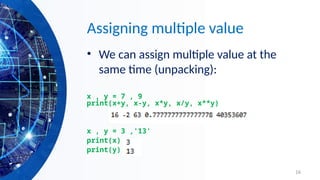
Assigning multiple value
•We can assign multiple value at the
same time (unpacking):
x , y = 7 , 9
print(x+y, x-y, x*y, x/y, x**y)
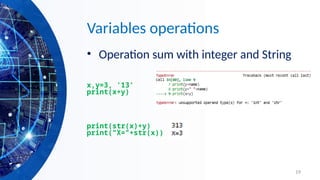
x , y = 3 ,'13'
print(x)
print(y)
18
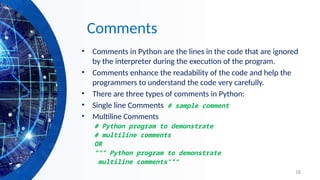
Comments
• Comments inPython are the lines in the code that are ignored
by the interpreter during the execution of the program.
• Comments enhance the readability of the code and help the
programmers to understand the code very carefully.
• There are three types of comments in Python:
• Single line Comments # sample comment
• Multiline Comments
# Python program to demonstrate
# multiline comments
OR
""" Python program to demonstrate
multiline comments"""
20
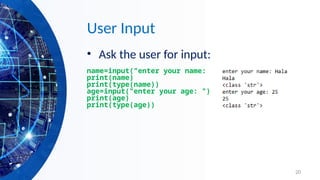
User Input
• Askthe user for input:
name=input("enter your name: ")
print(name)
print(type(name))
age=input("enter your age: ")
print(age)
print(type(age))
21.
21
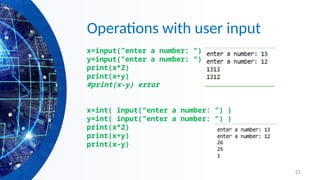
Operations with userinput
x=input("enter a number: ")
y=input("enter a number: ")
print(x*2)
print(x+y)
#print(x-y) error
x=int( input("enter a number: ") )
y=int( input("enter a number: ") )
print(x*2)
print(x+y)
print(x-y)
22.
22
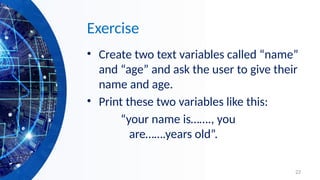
Exercise
• Create twotext variables called “name”
and “age” and ask the user to give their
name and age.
• Print these two variables like this:
“your name is……., you
are…….years old”.
23.
23
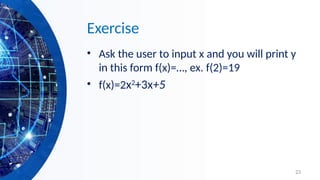
Exercise
• Ask theuser to input x and you will print y
in this form f(x)=…, ex. f(2)=19
• f(x)=2x2
+3x+5
24.
24
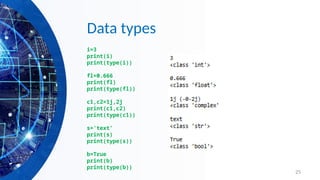
Data types
• Integers:2323, 3234L
• Floating Point: 32.3, 3.1E2
• Complex: 3 + 2j, 1j
• Boolean
• String
• Lists: l = [ 1,2,3]
• Tuples: t = (1,2,3)
• Dictionaries: d = {‘hello’ : ‘there’, 2 : 15}
– Lists, Tuples, and Dictionaries can store any
type (including other lists, tuples, and dictionaries!)
– Only lists and dictionaries are mutable
– All variables are references
26
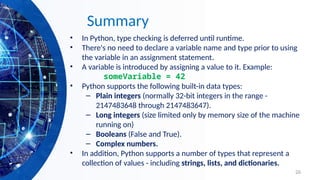
Summary
• In Python,type checking is deferred until runtime.
• There's no need to declare a variable name and type prior to using
the variable in an assignment statement.
• A variable is introduced by assigning a value to it. Example:
someVariable = 42
• Python supports the following built-in data types:
– Plain integers (normally 32-bit integers in the range -
2147483648 through 2147483647).
– Long integers (size limited only by memory size of the machine
running on)
– Booleans (False and True).
– Complex numbers.
• In addition, Python supports a number of types that represent a
collection of values - including strings, lists, and dictionaries.

![24
Data types
• Integers: 2323, 3234L
• Floating Point: 32.3, 3.1E2
• Complex: 3 + 2j, 1j
• Boolean
• String
• Lists: l = [ 1,2,3]
• Tuples: t = (1,2,3)
• Dictionaries: d = {‘hello’ : ‘there’, 2 : 15}
– Lists, Tuples, and Dictionaries can store any
type (including other lists, tuples, and dictionaries!)
– Only lists and dictionaries are mutable
– All variables are references](https://image.slidesharecdn.com/01-pythonsyntaxvariables-251221120831-f6f7d68b/85/01-Python-syntax-Variables-for-beginners-pptx-24-320.jpg)


![[DSC Europe 25] Egor Krasheninnikov - The Control Stack: Building Guardrails ...](https://cdn.slidesharecdn.com/ss_thumbnails/3lzcz7hxqmo51mtalv4u-the-control-stack-260119101520-ea90841a-thumbnail.jpg?width=640&height=640&fit=bounds)

![[DSC Europe 25] Mikhail Rozhkov - AI Product Canvas: From Business Goals to T...](https://cdn.slidesharecdn.com/ss_thumbnails/d53doddtpgfqivmzqel6-mikhail-rozhkov-ai-product-canvas-v1-260121115910-9dd517a7-thumbnail.jpg?width=640&height=640&fit=bounds)
![[DSC Europe 25] Marcos Heidemann - Beyond the Hype: Making AI Coding Assistan...](https://cdn.slidesharecdn.com/ss_thumbnails/eexkhvldrjsopspdjbur-marcos-heidemann-beyond-the-hype-getting-real-value-out-of-ai-assisted-coding-260121115910-7e9d41ec-thumbnail.jpg?width=640&height=640&fit=bounds)
![[DSC Europe 25] Milos Belcevic - Product Professional's Journey to Full-Stack...](https://cdn.slidesharecdn.com/ss_thumbnails/1zovd6fgsycdg4wvgvls-milos-belcevic-product-professionals-journey-to-full-stack-product-developer-260123083019-d993120d-thumbnail.jpg?width=640&height=640&fit=bounds)


![[DSC Europe 25] Josip Saban - Career building for data professionals.pptx](https://cdn.slidesharecdn.com/ss_thumbnails/zroflcttkm1vmli0txea-josip-saban-career-building-for-data-professionals-260123083019-587cdb8c-thumbnail.jpg?width=640&height=640&fit=bounds)
![[DSC Europe 25] Tali Fulman - Guild Meetings, Then What? Building Data Commun...](https://cdn.slidesharecdn.com/ss_thumbnails/fgohhi33rwmhqdowdj5k-tali-fulman-guild-meetings-then-what-building-data-communities-that-actually-ch-260120105855-528492c3-thumbnail.jpg?width=640&height=640&fit=bounds)
![[DSC Europe 25] Bojan Djuricic - Predictive Design Process.pdf](https://cdn.slidesharecdn.com/ss_thumbnails/5awdrbedqdek3gqu2ezy-4-the-predictive-design-bojan-djuricic-260120105856-6c399e9b-thumbnail.jpg?width=640&height=640&fit=bounds)
![[DSC Europe 25] Tamas Srancsik - How To Teach Your AI Football? An Argument f...](https://cdn.slidesharecdn.com/ss_thumbnails/bcjh1m9xtbosv20ucftb-tamas-srancsik-how-to-teach-your-ai-football-260121115910-08b53e9e-thumbnail.jpg?width=640&height=640&fit=bounds)
![[DSC Europe 25] Dubravko Culibrk - Deep Learning for Mammography.pptx](https://cdn.slidesharecdn.com/ss_thumbnails/yiscimuktacgqoiu4dkp-deep-learning-for-mammography-260119121559-aad59182-thumbnail.jpg?width=640&height=640&fit=bounds)


