A Guide to Twitter Chats
Megan Gerber, MD, MPH
Twitter @meggerber
What is a Twitter Chat?
• A series of comments or responses to a Tweet or thread organized
under a “@” i.e. @primarycarechat
• Every chat uses a standard “#” i.e. #primarycarechat and sometimes
adds additional ”#” to follow the topic, i.e. #pcptime
• Most 1 hour chats are broken into 4 questions that are released at
intervals. People respond in an asynchronous matter and some
participate after the fact.
• Don’t worry about time or speed to goal is to connect, learn and
enjoy.
How do I participate?
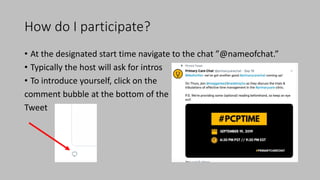
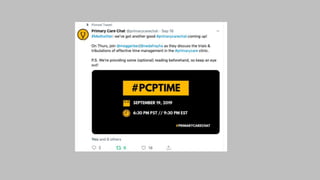
• At the designated start time navigate to the chat ”@nameofchat.”
• Typically the host will ask for intros
• To introduce yourself, click on the
comment bubble at the bottom of the
Tweet
Chat Responses
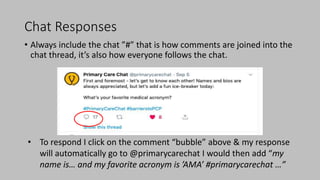
• Always include the chat ”#” that is how comments are joined into the
chat thread, it’s also how everyone follows the chat.
• To respond I click on the comment “bubble” above & my response
will automatically go to @primarycarechat I would then add “my
name is… and my favorite acronym is ’AMA’ #primarycarechat …”
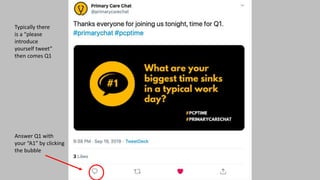
Typically there
is a “please
introduce
yourself tweet”
then comes Q1
Answer Q1 with
your “A1” by clicking
the bubble
Answering Questions
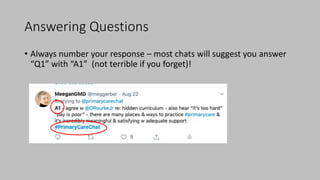
• Always number your response – most chats will suggest you answer
“Q1” with “A1” (not terrible if you forget)!
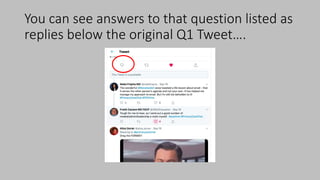
You can see answers to that question listed as
replies below the original Q1 Tweet….
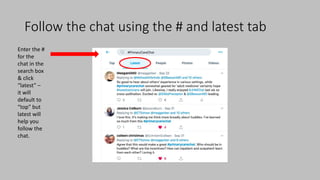
Follow the chat using the # and latest tab
Enter the #
for the
chat in the
search box
& click
“latest” –
it will
default to
“top” but
latest will
help you
follow the
chat.
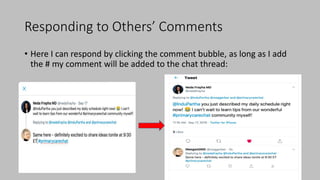
Responding to Others’ Comments
• Here I can respond by clicking the comment bubble, as long as I add
the # my comment will be added to the chat thread:
Summary
• Twitter Chats are great opportunities to collaborate and network
• They are aggregated threads of comments (tweets)
• Follow the “#”
• It’s hard to keep up but using the hashtag allows you to follow and
add to the chat even when it’s over.

Twitterchat tutorial

  • 1.
    A Guide toTwitter Chats Megan Gerber, MD, MPH Twitter @meggerber
  • 2.
    What is aTwitter Chat? • A series of comments or responses to a Tweet or thread organized under a “@” i.e. @primarycarechat • Every chat uses a standard “#” i.e. #primarycarechat and sometimes adds additional ”#” to follow the topic, i.e. #pcptime • Most 1 hour chats are broken into 4 questions that are released at intervals. People respond in an asynchronous matter and some participate after the fact. • Don’t worry about time or speed to goal is to connect, learn and enjoy.
  • 3.
    How do Iparticipate? • At the designated start time navigate to the chat ”@nameofchat.” • Typically the host will ask for intros • To introduce yourself, click on the comment bubble at the bottom of the Tweet
  • 5.
    Chat Responses • Alwaysinclude the chat ”#” that is how comments are joined into the chat thread, it’s also how everyone follows the chat. • To respond I click on the comment “bubble” above & my response will automatically go to @primarycarechat I would then add “my name is… and my favorite acronym is ’AMA’ #primarycarechat …”
  • 6.
    Typically there is a“please introduce yourself tweet” then comes Q1 Answer Q1 with your “A1” by clicking the bubble
  • 7.
    Answering Questions • Alwaysnumber your response – most chats will suggest you answer “Q1” with “A1” (not terrible if you forget)!
  • 8.
    You can seeanswers to that question listed as replies below the original Q1 Tweet….
  • 9.
    Follow the chatusing the # and latest tab Enter the # for the chat in the search box & click “latest” – it will default to “top” but latest will help you follow the chat.
  • 10.
    Responding to Others’Comments • Here I can respond by clicking the comment bubble, as long as I add the # my comment will be added to the chat thread:
  • 11.
    Summary • Twitter Chatsare great opportunities to collaborate and network • They are aggregated threads of comments (tweets) • Follow the “#” • It’s hard to keep up but using the hashtag allows you to follow and add to the chat even when it’s over.