Schema Design By Example

Emily Stolfo - twitter: @EmStolfo
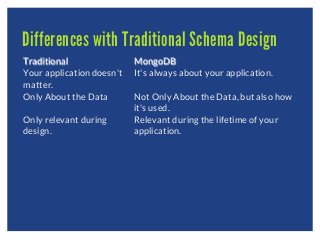
Differences with Traditional Schema Design
Traditional                MongoDB
Your application doesn't   It's always about your application.
matter.
Only About the Data        Not Only About the Data, but also how
                           it's used.
Only relevant during       Relevant during the lifetime of your
design.                    application.
Schema Design is Evolutionary
   Design and Development.
   Deployment and Monitoring.
   Iterative Modification.
3 Components to Schema Design
 1. The Data Your Application Needs.
 2. How Your Application Will Read the Data.
 3. How Your Application Will Write the Data.
What is a Document Database?
   Storage in json.
   Application-defined schema
   Opportunity for choice
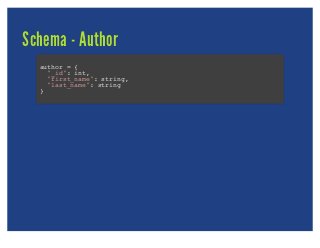
Schema - Author
  author = {
    "_id": int,
    "first_name": string,
    "last_name": string
  }
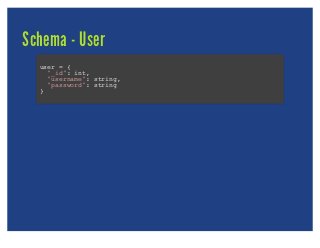
Schema - User
  user = {
    "_id": int,
    "username": string,
    "password": string
  }
Schema - Book
  book = {
    "_id": int,
    "title": string,
    "author": int,
    "isbn": string,
    "slug": string,
    "publisher": {
       "name": string,
       "date": timestamp,
       "city": string
    },
    "available": boolean,
    "pages": int,
    "summary": string,
    "subjects": [string, string]
    "notes": [{
           "user": int,
           "note": string
    }],
    "language": string
  }
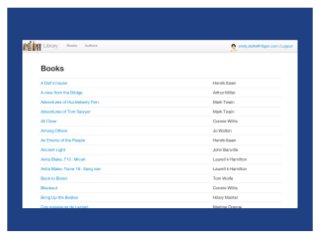
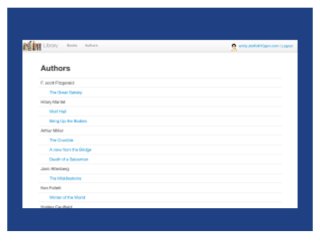
Example: Library Application
An application for saving a collection of books.
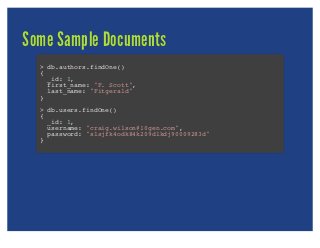
Some Sample Documents
  > db.authors.findOne()
  {
    _id: 1,
    first_name: "F. Scott",
    last_name: "Fitgerald"
  }
  > db.users.findOne()
  {
    _id: 1,
    username: "craig.wilson@10gen.com",
    password: "slsjfk4odk84k209dlkdj90009283d"
  }
> db.books.findOne()
{
  _id: 1,
  title: "The Great Gatsby",
  slug: "9781857150193-the-great-gatsby",
  author: 1,
  available: true,
  isbn: "9781857150193",
  pages: 176,
  publisher: {
     publisher_name: "Everyman’s Library",
     date: ISODate("1991-09-19T00:00:00Z"),
     publisher_city: "London"
  },
  summary: "Set in the post-Great War...",
  subjects: ["Love stories", "1920s", "Jazz Age"],
  notes: [
     { user: 1, note: "One of the best..."},
     { user: 2, note: "It’s hard to..."}
  ],
  language: "English"
}
Design and Development.
The Data Our Library Needs
   Embedded Documents
      book.publisher:
      {
        publisher_name: "Everyman’s Library",
        date: ISODate("1991-09-19T00:00:00Z"),
        city: "London"
      }

   Embedded Arrays
      book.subjects: ["Love stories", "1920s", "Jazz Age"],

   Embedded Arrays of Documents
      book.notes: [
         { user: 1, note: "One of the best..."},
         { user: 2, note: "It’s hard to..."}
      ],
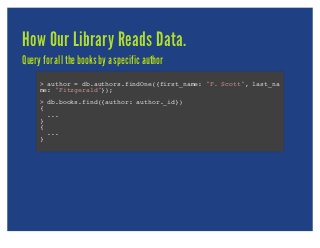
How Our Library Reads Data.
Query for all the books by a specific author
     > author = db.authors.findOne({first_name: "F. Scott", last_na
     me: "Fitzgerald"});
     > db.books.find({author: author._id})
     {
       ...
     }
     {
       ...
     }
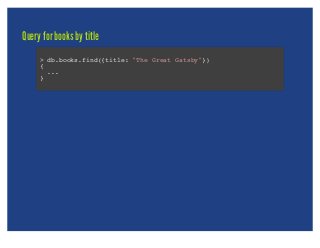
Query for books by title
     > db.books.find({title: "The Great Gatsby"})
     {
       ...
     }
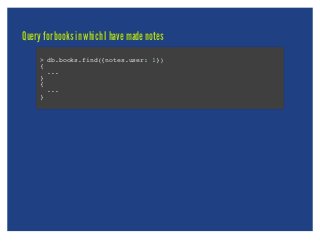
Query for books in which I have made notes
     > db.books.find({notes.user: 1})
     {
       ...
     }
     {
       ...
     }
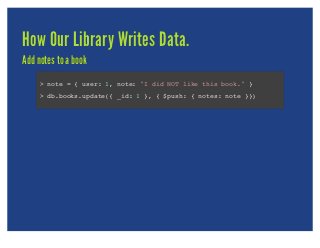
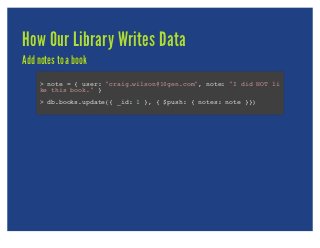
How Our Library Writes Data.
Add notes to a book
     > note = { user: 1, note: "I did NOT like this book." }
     > db.books.update({ _id: 1 }, { $push: { notes: note }})
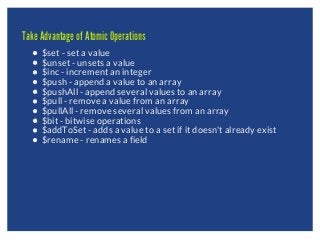
Take Advantage of Atomic Operations
     $set - set a value
     $unset - unsets a value
     $inc - increment an integer
     $push - append a value to an array
     $pushAll - append several values to an array
     $pull - remove a value from an array
     $pullAll - remove several values from an array
     $bit - bitwise operations
     $addToSet - adds a value to a set if it doesn't already exist
     $rename - renames a field
Deployment and Monitoring
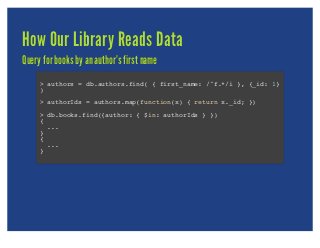
How Our Library Reads Data
Query for books by an author's first name
     > authors = db.authors.find( { first_name: /^f.*/i }, {_id: 1}
     )
     > authorIds = authors.map(function(x) { return x._id; })
     > db.books.find({author: { $in: authorIds } })
     {
       ...
     }
     {
       ...
     }
Documents Should Reflect Query Patterns
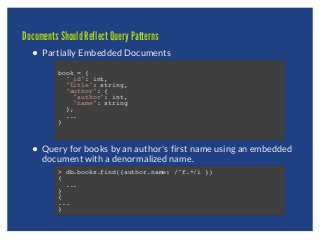
     Partially Embedded Documents
          book = {
            "_id": int,
            "title": string,
            "author": {
               "author": int,
               "name": string
            },
            ...
          }


     Query for books by an author's first name using an embedded
     document with a denormalized name.
          > db.books.find({author.name: /^f.*/i })
          {
            ...
          }
          {
          ...
          }
How Our Library Reads Data
Query for a book's notes and get user info
     > db.books.find({title: "The Great Gatsby"}, {_notes: 1})
     {
       _id: 1,
       notes: [
         { user: 1, note: "One of the best..."},
         { user: 2, note: "It’s hard to..."}
       ]
     }
Take Advantage of Immutable Data
     Username is the natural key and is immutable
         user = {
           "_id": string,
           "password": string
         }
         book = {
           //...
           "notes": [{
             "user": string,
             "note": string
           }],
         }

     Query for a book's notes
         > db.books.find({title: "The Great Gatsby"}, {notes: 1})
         {
           _id: 1,
           notes: [
             { user: "craig.wilson@10gen.com", note: "One of the b
         est..."},
             { user: "jmcjack@mcjack.com", note: "It’s hard to..."
         }
           ]
         }
How Our Library Writes Data
Add notes to a book
     > note = { user: "craig.wilson@10gen.com", note: "I did NOT li
     ke this book." }
     > db.books.update({ _id: 1 }, { $push: { notes: note }})
Anti-pattern: Continually Growing Documents
     Document Size Limit
     Storage Fragmentation
Linking: One-to-One relationship
     Move notes to another document, with one document per
     book id.

          book = {
            "_id": int,
            ... // remove the notes field
          }
          bookNotes = {
            "_id": int, // this will be the same as the book id...
            "notes": [{
               "user": string,
               "note": string
            }]
          }


     Keeps the books document size consistent.
     Queries for books don't return all the notes.
     Still suffers from a continually growing bookNotes document.
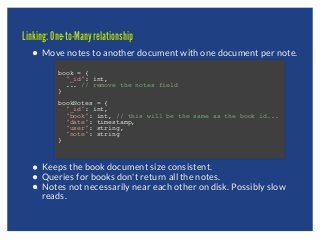
Linking: One-to-Many relationship
     Move notes to another document with one document per note.
          book = {
            "_id": int,
            ... // remove the notes field
          }
          bookNotes = {
            "_id": int,
            "book": int, // this will be the same as the book id...
            "date": timestamp,
            "user": string,
            "note": string
          }


     Keeps the book document size consistent.
     Queries for books don't return all the notes.
     Notes not necessarily near each other on disk. Possibly slow
     reads.
Bucketing
     bookNotes contains a maximum number of documents
            bookNotes = {
              "_id": int,
              "book": int, // this is the book id
              "note_count": int,
              "last_changed": datetime,
              "notes": [{
                 "user": string,
                 "note": string
              }]
            }

     Still use atomic operations to update or create a document
            > note = { user: "craig.wilson@10gen.com", note: "I did N
            OT like this book." }> db.bookNotes.update({
                    { book: 1, note_count { $lt: 10 } },
                    {
                            $inc: { note_count: 1 },
                            $push { notes: note },
                            $set: { last_changed: new Date() }
                    },
                    true // upsert
            })
Interative Modification
The Data Our Library Needs
Users want to comment on other people's notes
    bookNotes = {
      "_id": int,
      "book": int, // this is the book id
      "note_count": int,
      "last_changed": datetime,
      "notes": [{
         "user": string,
         "note": string,
         "comments": [{
            "user": string,
            "text": string,
            "replies": [{
               "user": string,
               "text": string,
               "replies": [{...}]
            }]
         }]
      }]
    }
What benefits does this provide?
     Single document for all comments on a note.
     Single location on disk for the whole tree.
     Legible tree structure.


What are the drawbacks of storing a tree in this way?
     Difficult to search.
     Difficult to get back partial results.
     Document can get large very quickly.
Alternative solution:
Store arrays of ancestors
     > t = db.mytree;
     >   t.find()
     {   _id: "a" }
     {   _id: "b", ancestors:   [   "a" ], parent: "a" }
     {   _id: "c", ancestors:   [   "a", "b" ], parent: "b" }
     {   _id: "d", ancestors:   [   "a", "b" ], parent: "b" }
     {   _id: "e", ancestors:   [   "a" ], parent: "a" }
     {   _id: "f", ancestors:   [   "a", "e" ], parent: "e" }
     {   _id: "g", ancestors:   [   "a", "b", "d" ], parent: "d" }


How would you do it?
General notes for read-heavy schemas
Think about indexes and sharding
     Multi-key indexes.
     Secondary indexes.
     Shard key choice.
Schema design in mongoDB
It's about your application.
It's about your data and how it's used.
It's about the entire lifetime of your application.

Schema Design By Example

  • 1.
    Schema Design ByExample Emily Stolfo - twitter: @EmStolfo
  • 2.
    Differences with TraditionalSchema Design Traditional MongoDB Your application doesn't It's always about your application. matter. Only About the Data Not Only About the Data, but also how it's used. Only relevant during Relevant during the lifetime of your design. application.
  • 3.
    Schema Design isEvolutionary Design and Development. Deployment and Monitoring. Iterative Modification.
  • 4.
    3 Components toSchema Design 1. The Data Your Application Needs. 2. How Your Application Will Read the Data. 3. How Your Application Will Write the Data.
  • 5.
    What is aDocument Database? Storage in json. Application-defined schema Opportunity for choice
  • 6.
    Schema - Author author = { "_id": int, "first_name": string, "last_name": string }
  • 7.
    Schema - User user = { "_id": int, "username": string, "password": string }
  • 8.
    Schema - Book book = { "_id": int, "title": string, "author": int, "isbn": string, "slug": string, "publisher": { "name": string, "date": timestamp, "city": string }, "available": boolean, "pages": int, "summary": string, "subjects": [string, string] "notes": [{ "user": int, "note": string }], "language": string }
  • 9.
    Example: Library Application Anapplication for saving a collection of books.
  • 12.
    Some Sample Documents > db.authors.findOne() { _id: 1, first_name: "F. Scott", last_name: "Fitgerald" } > db.users.findOne() { _id: 1, username: "craig.wilson@10gen.com", password: "slsjfk4odk84k209dlkdj90009283d" }
  • 13.
    > db.books.findOne() { _id: 1, title: "The Great Gatsby", slug: "9781857150193-the-great-gatsby", author: 1, available: true, isbn: "9781857150193", pages: 176, publisher: { publisher_name: "Everyman’s Library", date: ISODate("1991-09-19T00:00:00Z"), publisher_city: "London" }, summary: "Set in the post-Great War...", subjects: ["Love stories", "1920s", "Jazz Age"], notes: [ { user: 1, note: "One of the best..."}, { user: 2, note: "It’s hard to..."} ], language: "English" }
  • 14.
  • 15.
    The Data OurLibrary Needs Embedded Documents book.publisher: { publisher_name: "Everyman’s Library", date: ISODate("1991-09-19T00:00:00Z"), city: "London" } Embedded Arrays book.subjects: ["Love stories", "1920s", "Jazz Age"], Embedded Arrays of Documents book.notes: [ { user: 1, note: "One of the best..."}, { user: 2, note: "It’s hard to..."} ],
  • 16.
    How Our LibraryReads Data. Query for all the books by a specific author > author = db.authors.findOne({first_name: "F. Scott", last_na me: "Fitzgerald"}); > db.books.find({author: author._id}) { ... } { ... }
  • 17.
    Query for booksby title > db.books.find({title: "The Great Gatsby"}) { ... }
  • 18.
    Query for booksin which I have made notes > db.books.find({notes.user: 1}) { ... } { ... }
  • 19.
    How Our LibraryWrites Data. Add notes to a book > note = { user: 1, note: "I did NOT like this book." } > db.books.update({ _id: 1 }, { $push: { notes: note }})
  • 20.
    Take Advantage ofAtomic Operations $set - set a value $unset - unsets a value $inc - increment an integer $push - append a value to an array $pushAll - append several values to an array $pull - remove a value from an array $pullAll - remove several values from an array $bit - bitwise operations $addToSet - adds a value to a set if it doesn't already exist $rename - renames a field
  • 21.
  • 22.
    How Our LibraryReads Data Query for books by an author's first name > authors = db.authors.find( { first_name: /^f.*/i }, {_id: 1} ) > authorIds = authors.map(function(x) { return x._id; }) > db.books.find({author: { $in: authorIds } }) { ... } { ... }
  • 23.
    Documents Should ReflectQuery Patterns Partially Embedded Documents book = { "_id": int, "title": string, "author": { "author": int, "name": string }, ... } Query for books by an author's first name using an embedded document with a denormalized name. > db.books.find({author.name: /^f.*/i }) { ... } { ... }
  • 24.
    How Our LibraryReads Data Query for a book's notes and get user info > db.books.find({title: "The Great Gatsby"}, {_notes: 1}) { _id: 1, notes: [ { user: 1, note: "One of the best..."}, { user: 2, note: "It’s hard to..."} ] }
  • 25.
    Take Advantage ofImmutable Data Username is the natural key and is immutable user = { "_id": string, "password": string } book = { //... "notes": [{ "user": string, "note": string }], } Query for a book's notes > db.books.find({title: "The Great Gatsby"}, {notes: 1}) { _id: 1, notes: [ { user: "craig.wilson@10gen.com", note: "One of the b est..."}, { user: "jmcjack@mcjack.com", note: "It’s hard to..." } ] }
  • 26.
    How Our LibraryWrites Data Add notes to a book > note = { user: "craig.wilson@10gen.com", note: "I did NOT li ke this book." } > db.books.update({ _id: 1 }, { $push: { notes: note }})
  • 27.
    Anti-pattern: Continually GrowingDocuments Document Size Limit Storage Fragmentation
  • 28.
    Linking: One-to-One relationship Move notes to another document, with one document per book id. book = { "_id": int, ... // remove the notes field } bookNotes = { "_id": int, // this will be the same as the book id... "notes": [{ "user": string, "note": string }] } Keeps the books document size consistent. Queries for books don't return all the notes. Still suffers from a continually growing bookNotes document.
  • 29.
    Linking: One-to-Many relationship Move notes to another document with one document per note. book = { "_id": int, ... // remove the notes field } bookNotes = { "_id": int, "book": int, // this will be the same as the book id... "date": timestamp, "user": string, "note": string } Keeps the book document size consistent. Queries for books don't return all the notes. Notes not necessarily near each other on disk. Possibly slow reads.
  • 30.
    Bucketing bookNotes contains a maximum number of documents bookNotes = { "_id": int, "book": int, // this is the book id "note_count": int, "last_changed": datetime, "notes": [{ "user": string, "note": string }] } Still use atomic operations to update or create a document > note = { user: "craig.wilson@10gen.com", note: "I did N OT like this book." }> db.bookNotes.update({ { book: 1, note_count { $lt: 10 } }, { $inc: { note_count: 1 }, $push { notes: note }, $set: { last_changed: new Date() } }, true // upsert })
  • 31.
  • 32.
    The Data OurLibrary Needs Users want to comment on other people's notes bookNotes = { "_id": int, "book": int, // this is the book id "note_count": int, "last_changed": datetime, "notes": [{ "user": string, "note": string, "comments": [{ "user": string, "text": string, "replies": [{ "user": string, "text": string, "replies": [{...}] }] }] }] }
  • 33.
    What benefits doesthis provide? Single document for all comments on a note. Single location on disk for the whole tree. Legible tree structure. What are the drawbacks of storing a tree in this way? Difficult to search. Difficult to get back partial results. Document can get large very quickly.
  • 34.
    Alternative solution: Store arraysof ancestors > t = db.mytree; > t.find() { _id: "a" } { _id: "b", ancestors: [ "a" ], parent: "a" } { _id: "c", ancestors: [ "a", "b" ], parent: "b" } { _id: "d", ancestors: [ "a", "b" ], parent: "b" } { _id: "e", ancestors: [ "a" ], parent: "a" } { _id: "f", ancestors: [ "a", "e" ], parent: "e" } { _id: "g", ancestors: [ "a", "b", "d" ], parent: "d" } How would you do it?
  • 35.
    General notes forread-heavy schemas Think about indexes and sharding Multi-key indexes. Secondary indexes. Shard key choice.
  • 36.
    Schema design inmongoDB It's about your application. It's about your data and how it's used. It's about the entire lifetime of your application.