Intuit Confidential and Proprietary1
Micro Service Sandbox Test Automation
Neeraja R, Staff Engineer, Intuit
Apr-14-2016
Intuit Confidential and Proprietary2
• What is that we are solving here?
• How Sand box testing will be helpful in agile delivery/cloud?
• Why we need functional test automation?
• What is sand box testing?
• What is a Micro service
• How sandbox testing can be automated ?
Agenda
Intuit Confidential and Proprietary3
Problem Statement
• Developing a new Web Service and no test infra structure is ready
yet
• Modifying an existing web service
• Build deployment issues
• Had broken the existing functionality
• New check-in has introduced a defect etc..
Intuit Confidential and Proprietary4
Benefits offered by this solution
• Time to market
• Faster Delivery
• Easy to experiment with Customers
• Can do deployment testing
• Easily measure test coverage
• Measure the build quality with every check-in
• Faster identification of defects
• Enables business to be more agile
Intuit Confidential and Proprietary5
Why we need functional test automation
• Multiple releases can be done
• Easy to do Regression Testing
• Backward compatibility Testing
• No Manual intervention
• Error prone
• Visual results of test coverage
• Click of a button you can certify the Build
• You can focus more on the building new
features/enhancements
Intuit Confidential and Proprietary6
What is sand box testing?
• Sandbox Testing is an independent testing without having any
dependencies out of the box
• Works on a Single node
• No External Dependencies
• No need to have the test environments
Intuit Confidential and Proprietary7
What is a Micro Service
• A Micro service is a independently deployable service with a
specific functionality.
• A monolithic system can be broken in to many Micro services
• Can connect different micro services together to achieve a
business capability.
• Time to Market
Intuit Confidential and Proprietary8
How sandbox testing can be automated ?
Maven Cargo plugin allows you to easily do Sand Box
Testing, and in the remainder of the deck I will show
you how….
Intuit Confidential and Proprietary9
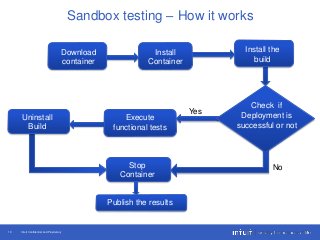
Sandbox testing - How it works
• Works with Maven build lifecycle
• Easy to debug the build
• Can deploy more than one web service
• Configure when to run cargo and disable if not needed
• Proceeds with regression only when deployment is
successful
• Automatically cleans up the machine
Intuit Confidential and Proprietary10
Sandbox testing – How it works
Install
Container
Download
container
Install the
build
Check if
Deployment is
successful or not
Execute
functional tests
Stop
Container
Uninstall
Build
Publish the results
No
Yes
Intuit Confidential and Proprietary11
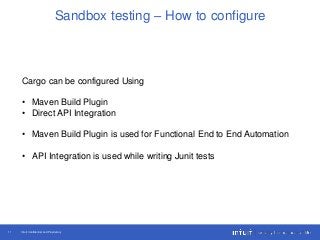
Sandbox testing – How to configure
Cargo can be configured Using
• Maven Build Plugin
• Direct API Integration
• Maven Build Plugin is used for Functional End to End Automation
• API Integration is used while writing Junit tests
Intuit Confidential and Proprietary12
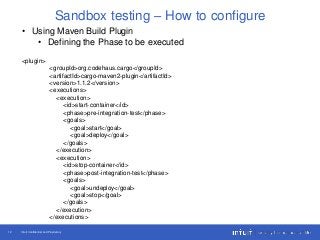
Sandbox testing – How to configure
• Using Maven Build Plugin
• Defining the Phase to be executed
<plugin>
<groupId>org.codehaus.cargo</groupId>
<artifactId>cargo-maven2-plugin</artifactId>
<version>1.1.2</version>
<executions>
<execution>
<id>start-container</id>
<phase>pre-integration-test</phase>
<goals>
<goal>start</goal>
<goal>deploy</goal>
</goals>
</execution>
<execution>
<id>stop-container</id>
<phase>post-integration-test</phase>
<goals>
<goal>undeploy</goal>
<goal>stop</goal>
</goals>
</execution>
</executions>
Intuit Confidential and Proprietary13
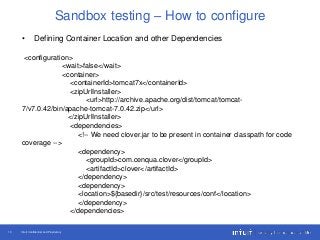
Sandbox testing – How to configure
• Defining Container Location and other Dependencies
<configuration>
<wait>false</wait>
<container>
<containerId>tomcat7x</containerId>
<zipUrlInstaller>
<url>http://archive.apache.org/dist/tomcat/tomcat-
7/v7.0.42/bin/apache-tomcat-7.0.42.zip</url>
</zipUrlInstaller>
<dependencies>
<!-- We need clover.jar to be present in container classpath for code
coverage -->
<dependency>
<groupId>com.cenqua.clover</groupId>
<artifactId>clover</artifactId>
</dependency>
<dependency>
<location>${basedir}/src/test/resources/conf</location>
</dependency>
</dependencies>
Intuit Confidential and Proprietary14
Sandbox testing – How to configure
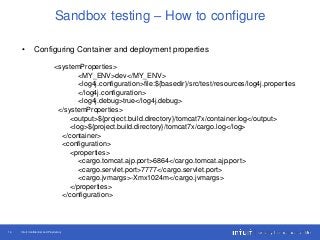
• Configuring Container and deployment properties
<systemProperties>
<MY_ENV>dev</MY_ENV>
<log4j.configuration>file:${basedir}/src/test/resources/log4j.properties
</log4j.configuration>
<log4j.debug>true</log4j.debug>
</systemProperties>
<output>${project.build.directory}/tomcat7x/container.log</output>
<log>${project.build.directory}/tomcat7x/cargo.log</log>
</container>
<configuration>
<properties>
<cargo.tomcat.ajp.port>6864</cargo.tomcat.ajp.port>
<cargo.servlet.port>7777</cargo.servlet.port>
<cargo.jvmargs>-Xmx1024m</cargo.jvmargs>
</properties>
</configuration>
Intuit Confidential and Proprietary15
Sandbox testing – How to configure
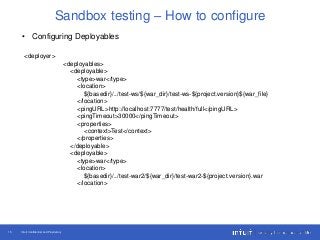
• Configuring Deployables
<deployer>
<deployables>
<deployable>
<type>war</type>
<location>
${basedir}/../test-ws/${war_dir}/test-ws-${project.version}${war_file}
</location>
<pingURL>http://localhost:7777/test/health/full</pingURL>
<pingTimeout>30000</pingTimeout>
<properties>
<context>Test</context>
</properties>
</deployable>
<deployable>
<type>war</type>
<location>
${basedir}/../test-war2/${war_dir}/test-war2-${project.version}.war
</location>
Intuit Confidential and Proprietary16
Sandbox testing – How to configure
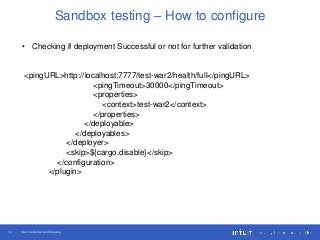
• Checking if deployment Successful or not for further validation
<pingURL>http://localhost:7777/test-war2/health/full</pingURL>
<pingTimeout>30000</pingTimeout>
<properties>
<context>test-war2</context>
</properties>
</deployable>
</deployables>
</deployer>
<skip>${cargo.disable}</skip>
</configuration>
</plugin>
Intuit Confidential and Proprietary17
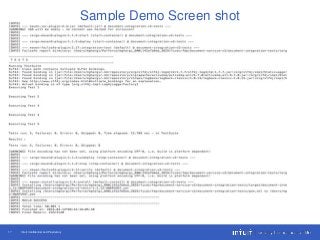
Sample Demo Screen shot
Intuit Confidential and Proprietary18
References
• https://codehaus-cargo.github.io/cargo/Maven2+plugin.html
Intuit Confidential and Proprietary19
Thank You

Micro Service Sandbox Test Automation

  • 1.
    Intuit Confidential andProprietary1 Micro Service Sandbox Test Automation Neeraja R, Staff Engineer, Intuit Apr-14-2016
  • 2.
    Intuit Confidential andProprietary2 • What is that we are solving here? • How Sand box testing will be helpful in agile delivery/cloud? • Why we need functional test automation? • What is sand box testing? • What is a Micro service • How sandbox testing can be automated ? Agenda
  • 3.
    Intuit Confidential andProprietary3 Problem Statement • Developing a new Web Service and no test infra structure is ready yet • Modifying an existing web service • Build deployment issues • Had broken the existing functionality • New check-in has introduced a defect etc..
  • 4.
    Intuit Confidential andProprietary4 Benefits offered by this solution • Time to market • Faster Delivery • Easy to experiment with Customers • Can do deployment testing • Easily measure test coverage • Measure the build quality with every check-in • Faster identification of defects • Enables business to be more agile
  • 5.
    Intuit Confidential andProprietary5 Why we need functional test automation • Multiple releases can be done • Easy to do Regression Testing • Backward compatibility Testing • No Manual intervention • Error prone • Visual results of test coverage • Click of a button you can certify the Build • You can focus more on the building new features/enhancements
  • 6.
    Intuit Confidential andProprietary6 What is sand box testing? • Sandbox Testing is an independent testing without having any dependencies out of the box • Works on a Single node • No External Dependencies • No need to have the test environments
  • 7.
    Intuit Confidential andProprietary7 What is a Micro Service • A Micro service is a independently deployable service with a specific functionality. • A monolithic system can be broken in to many Micro services • Can connect different micro services together to achieve a business capability. • Time to Market
  • 8.
    Intuit Confidential andProprietary8 How sandbox testing can be automated ? Maven Cargo plugin allows you to easily do Sand Box Testing, and in the remainder of the deck I will show you how….
  • 9.
    Intuit Confidential andProprietary9 Sandbox testing - How it works • Works with Maven build lifecycle • Easy to debug the build • Can deploy more than one web service • Configure when to run cargo and disable if not needed • Proceeds with regression only when deployment is successful • Automatically cleans up the machine
  • 10.
    Intuit Confidential andProprietary10 Sandbox testing – How it works Install Container Download container Install the build Check if Deployment is successful or not Execute functional tests Stop Container Uninstall Build Publish the results No Yes
  • 11.
    Intuit Confidential andProprietary11 Sandbox testing – How to configure Cargo can be configured Using • Maven Build Plugin • Direct API Integration • Maven Build Plugin is used for Functional End to End Automation • API Integration is used while writing Junit tests
  • 12.
    Intuit Confidential andProprietary12 Sandbox testing – How to configure • Using Maven Build Plugin • Defining the Phase to be executed <plugin> <groupId>org.codehaus.cargo</groupId> <artifactId>cargo-maven2-plugin</artifactId> <version>1.1.2</version> <executions> <execution> <id>start-container</id> <phase>pre-integration-test</phase> <goals> <goal>start</goal> <goal>deploy</goal> </goals> </execution> <execution> <id>stop-container</id> <phase>post-integration-test</phase> <goals> <goal>undeploy</goal> <goal>stop</goal> </goals> </execution> </executions>
  • 13.
    Intuit Confidential andProprietary13 Sandbox testing – How to configure • Defining Container Location and other Dependencies <configuration> <wait>false</wait> <container> <containerId>tomcat7x</containerId> <zipUrlInstaller> <url>http://archive.apache.org/dist/tomcat/tomcat- 7/v7.0.42/bin/apache-tomcat-7.0.42.zip</url> </zipUrlInstaller> <dependencies> <!-- We need clover.jar to be present in container classpath for code coverage --> <dependency> <groupId>com.cenqua.clover</groupId> <artifactId>clover</artifactId> </dependency> <dependency> <location>${basedir}/src/test/resources/conf</location> </dependency> </dependencies>
  • 14.
    Intuit Confidential andProprietary14 Sandbox testing – How to configure • Configuring Container and deployment properties <systemProperties> <MY_ENV>dev</MY_ENV> <log4j.configuration>file:${basedir}/src/test/resources/log4j.properties </log4j.configuration> <log4j.debug>true</log4j.debug> </systemProperties> <output>${project.build.directory}/tomcat7x/container.log</output> <log>${project.build.directory}/tomcat7x/cargo.log</log> </container> <configuration> <properties> <cargo.tomcat.ajp.port>6864</cargo.tomcat.ajp.port> <cargo.servlet.port>7777</cargo.servlet.port> <cargo.jvmargs>-Xmx1024m</cargo.jvmargs> </properties> </configuration>
  • 15.
    Intuit Confidential andProprietary15 Sandbox testing – How to configure • Configuring Deployables <deployer> <deployables> <deployable> <type>war</type> <location> ${basedir}/../test-ws/${war_dir}/test-ws-${project.version}${war_file} </location> <pingURL>http://localhost:7777/test/health/full</pingURL> <pingTimeout>30000</pingTimeout> <properties> <context>Test</context> </properties> </deployable> <deployable> <type>war</type> <location> ${basedir}/../test-war2/${war_dir}/test-war2-${project.version}.war </location>
  • 16.
    Intuit Confidential andProprietary16 Sandbox testing – How to configure • Checking if deployment Successful or not for further validation <pingURL>http://localhost:7777/test-war2/health/full</pingURL> <pingTimeout>30000</pingTimeout> <properties> <context>test-war2</context> </properties> </deployable> </deployables> </deployer> <skip>${cargo.disable}</skip> </configuration> </plugin>
  • 17.
    Intuit Confidential andProprietary17 Sample Demo Screen shot
  • 18.
    Intuit Confidential andProprietary18 References • https://codehaus-cargo.github.io/cargo/Maven2+plugin.html
  • 19.
    Intuit Confidential andProprietary19 Thank You