http://webwiser.nlm.nih.gov/getHomeData.do
• The Wireless Information System for Emergency Responders
  (WISER) is a system concept for providing First Responders at
  the scene of hazardous material incidents – chemical,
  biological, or radioactive – with integrated information, decision
  support, and communications

• Information available on stationary and mobile devices

• Substance information and identification properties come from
  the Hazardous Substances Data Bank (HSDB), developed and
  maintained by the National Library of Medicine.

• This guide focuses on the web application version

WISER: Introduction
• Developed by the National Library of Medicine (NLM), WISER
  provides a wide range of information on hazardous
  substances, including chemical identification support, physical
  characteristics, human health information, and containment
  and suppression information.
• WISER consist of the following primary screens:
   • Substance List Page: lists all available substances
   • Substance Data Page: displays substance data for a selected
     substance
   • Help Identify Page: identification of unknown chemicals
   • Tools Page: general tools and reference materials


WISER: Content Overview
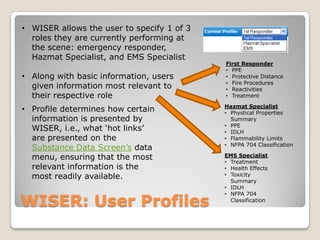
• WISER allows the user to specify 1 of 3
  roles they are currently performing at
  the scene: emergency responder,
  Hazmat Specialist, and EMS Specialist
                                            First Responder
                                            • PPE
• Along with basic information, users       • Protective Distance
                                            • Fire Procedures
  given information most relevant to        • Reactivities
  their respective role                     • Treatment

                                            Hazmat Specialist
• Profile determines how certain            • Phystical Properties
  information is presented by                 Summary
                                            • PPE
  WISER, i.e., what „hot links‟             • IDLH
  are presented on the                      • Flammability Limits
                                            • NFPA 704 Classification
  Substance Data Screen‟s data
  menu, ensuring that the most              EMS Specialist
                                            • Treatment
  relevant information is the               • Health Effects
  most readily available.                   • Toxicity
                                              Summary
                                            • IDLH


WISER: User Profiles
                                            • NFPA 704
                                              Classification
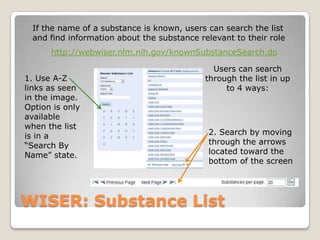
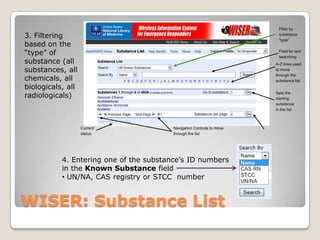
If the name of a substance is known, users can search the list
  and find information about the substance relevant to their role
      http://webwiser.nlm.nih.gov/knownSubstanceSearch.do

                                               Users can search
1. Use A-Z                                   through the list in up
links as seen                                     to 4 ways:
in the image.
Option is only
available
when the list
is in a                                      2. Search by moving
“Search By                                   through the arrows
Name” state.                                 located toward the
                                             bottom of the screen


WISER: Substance List
Filter by
3. Filtering                                                            substance
                                                                        “type”
based on the
“type” of                                                               Field for text
                                                                        searching
substance (all                                                         A-Z links used
substances, all                                                        to move

chemicals, all
                                                                       through the
                                                                       substance list
biologicals, all
radiologicals)                                                         Sets the
                                                                       starting
                                                                       substance
                                                                       in the list


                   Current               Navigation Controls to move
                   status                through the list


           4. Entering one of the substance‟s ID numbers
           in the Known Substance field
           • UN/NA, CAS registry or STCC number


WISER: Substance List
After locating the desired substance in the list, clicking it displays
            the Substance Data Screen for that compound.
Ex. Diethyl Ether (alias of Ether)


       Finish note section at bottom; Us.Gu.; perhaps include on next slide?
WISER: Substance List/Data Screen
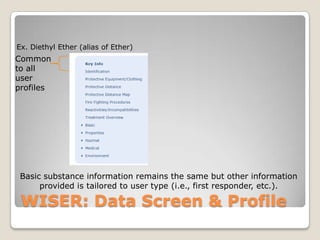
Ex. Diethyl Ether (alias of Ether)
Common
to all
user
profiles


 Basic substance information remains the same but other information
      provided is tailored to user type (i.e., first responder, etc.).

 WISER: Data Screen & Profile

Wiser

  • 1.
    http://webwiser.nlm.nih.gov/getHomeData.do • The WirelessInformation System for Emergency Responders (WISER) is a system concept for providing First Responders at the scene of hazardous material incidents – chemical, biological, or radioactive – with integrated information, decision support, and communications • Information available on stationary and mobile devices • Substance information and identification properties come from the Hazardous Substances Data Bank (HSDB), developed and maintained by the National Library of Medicine. • This guide focuses on the web application version WISER: Introduction
  • 2.
    • Developed bythe National Library of Medicine (NLM), WISER provides a wide range of information on hazardous substances, including chemical identification support, physical characteristics, human health information, and containment and suppression information. • WISER consist of the following primary screens: • Substance List Page: lists all available substances • Substance Data Page: displays substance data for a selected substance • Help Identify Page: identification of unknown chemicals • Tools Page: general tools and reference materials WISER: Content Overview
  • 3.
    • WISER allowsthe user to specify 1 of 3 roles they are currently performing at the scene: emergency responder, Hazmat Specialist, and EMS Specialist First Responder • PPE • Along with basic information, users • Protective Distance • Fire Procedures given information most relevant to • Reactivities their respective role • Treatment Hazmat Specialist • Profile determines how certain • Phystical Properties information is presented by Summary • PPE WISER, i.e., what „hot links‟ • IDLH are presented on the • Flammability Limits • NFPA 704 Classification Substance Data Screen‟s data menu, ensuring that the most EMS Specialist • Treatment relevant information is the • Health Effects most readily available. • Toxicity Summary • IDLH WISER: User Profiles • NFPA 704 Classification
  • 4.
    If the nameof a substance is known, users can search the list and find information about the substance relevant to their role http://webwiser.nlm.nih.gov/knownSubstanceSearch.do Users can search 1. Use A-Z through the list in up links as seen to 4 ways: in the image. Option is only available when the list is in a 2. Search by moving “Search By through the arrows Name” state. located toward the bottom of the screen WISER: Substance List
  • 5.
    Filter by 3. Filtering substance “type” based on the “type” of Field for text searching substance (all A-Z links used substances, all to move chemicals, all through the substance list biologicals, all radiologicals) Sets the starting substance in the list Current Navigation Controls to move status through the list 4. Entering one of the substance‟s ID numbers in the Known Substance field • UN/NA, CAS registry or STCC number WISER: Substance List
  • 6.
    After locating thedesired substance in the list, clicking it displays the Substance Data Screen for that compound. Ex. Diethyl Ether (alias of Ether) Finish note section at bottom; Us.Gu.; perhaps include on next slide? WISER: Substance List/Data Screen
  • 7.
    Ex. Diethyl Ether(alias of Ether) Common to all user profiles Basic substance information remains the same but other information provided is tailored to user type (i.e., first responder, etc.). WISER: Data Screen & Profile

Editor's Notes

  • #4 Profile tailors application to meet user type/specialtyThe Substance Data Screen will be talked about in an upcoming slide
  • #6 To use the Known Substance text field, click in the text field with your mouse and begin typing. When you have finish typing in the whole or partial value click on the Search button and the list will advance to the closest match to the supplied text. A ‘*’ character can be entered in the search text as a wildcard character (e.g. Entering “*fluoride” as the search text results in a list of substances whose name contains “fluoride”. A wildcard character at the end of the search text is always implied. The Search by drop-down menu selection controls whether the substance name or an identification number should be entered, and controls the ordering of the list. The options available are as follows:Name: list is ordered alphabetically by nameUN/NA: list is ordered by UN/NA numberCAS RN: list is ordered by CAS registry numberSTCC: list is ordered by STCC numberProbably good to include a small in class demo and/or mini question activity here so users can learn how to navigate this
  • #7 Included in the Data Screen is the name of the substance, its CAS registry number, aliases, applicable UN/NA and STCC numbers, and key info.Key info is the summary of the most immediate, critical aspects of a substance.‘Hot links’ provide information most specific and relevant to the selected user profile (1st responder, Hazmat Specialist, EMS). Data elements under Basic, Properties, Hazmat, Medical and Environment contents also vary according to profile. In addition to the WISER information, Substance Data Screen also provides links to HSDB, TOXMAP, TOXNET, and PubMed for the selected substance; provides complete and comprehensive information .**conduct a guided search using this feature as a class; and then give learners time to do it on their own with a set of prompts (i.e., guided and individual search questions/prompts should have own slides) **