Phone Small
Tablet
2-in-1s
(Tablet orLaptop)
Desktops
& All-in-Ones
Phablet Large
Tablet
Classic
Laptop
Xbox IoTSurface Hub
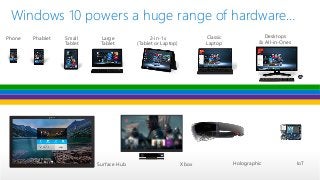
Windows 10 powers a huge range of hardware…
Holographic
4.
One Store +
OneDev Center
Full Support for
Existing Code
SDK +
Services
Adaptive
User Interface
Natural
User Inputs
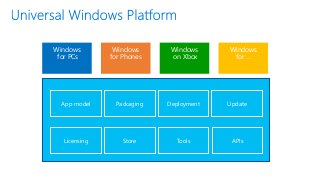
App model PackagingDeployment Update
APIsLicensing Store Tools
Windows
for PCs
Windows
for Phones
Windows
on Xbox
Windows
for …
7.
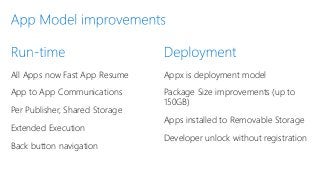
All Apps nowFast App Resume
App to App Communications
Per Publisher, Shared Storage
Extended Execution
Back button navigation
Appx is deployment model
Package Size improvements (up to
150GB)
Apps installed to Removable Storage
Developer unlock without registration
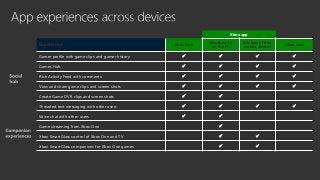
Xbox app
Experience XboxOne
Windows 10
on the PC
Windows 10 on
mobile devices
Xbox.com
Gamer profile with game clips and gamer history
Games Hub
Rich Activity Feed with comments
View and share game clips and screen shots
Create Game DVR clips and screen shots
Threaded text messaging with other users
Voice chat with other users
Game streaming from Xbox One
Xbox SmartGlass control of Xbox One and TV
Xbox SmartGlass companions for Xbox One games
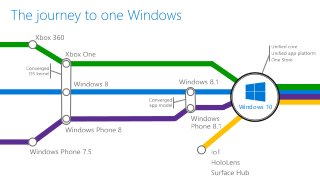
#3 Platform and OS convergence has been a journey which culminates with Windows 10
We started with Windows Phone 7.5 by using the same Internet Explorer code + engine on across Window, Windows Phone, and Xbox 360
In Windows 8, we converged the kernel which aligned the HAL and driver models. Windows Phone 8 took advantage of new lighter-weight kernel to enable multiple CPUs and other improvements, and the Xbox One was built on top of Windows 8.
Windows 8.1 and Windows Phone 8.1 shared runtimes, aligning the app models and API set. This brought 90%+ API convergence and unification of things like Windows Notification Services, back-stack behavior, sharing contracts, live tiles, etc.
At this point, apps running across Windows and Windows Phone could share a lot of code, but we still had separate binaries, separate dev centers, and separate stores. And Xbox was not yet fully integrated.
With Windows 10, we complete the unification of Windows families.
Background data:
9/15/11 Windows Phone 7.5
10/26/12 Windows 8
10/29/12 Windows Phone 8
10/18/13 Windows 8.1
11/22/13 Xbox One
4/8/14 Windows 8.1 Update
3/26/14 Windows Phone 8.1
#4 Now developers can target and the full range of devices you see here with one Windows 10 app.
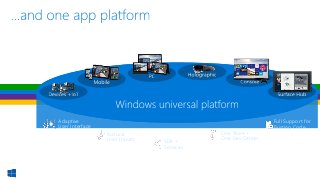
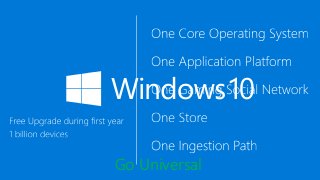
#5 The Windows 10 common core and unified app platform enables developers to build one app that runs across all Windows device families. Developers are able to provide end users with the consistency that they need and the tailored experiences that they desire.
This consistent Windows experience is enabled by a number of services:
Adaptive User Interface: User interface design that adapts and reacts to the device family it’s running on
Natural user inputs: Speech, natural ink, gesture and facial recognition
Cloud-based services: Cortana AI, personal hubs, OneDrive, Office 365, Windows notification services, credential locker
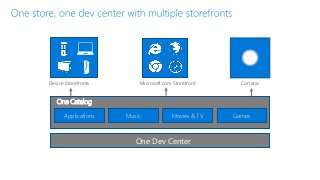
Windows Store: Universally available apps and games, digital media and a single dev center
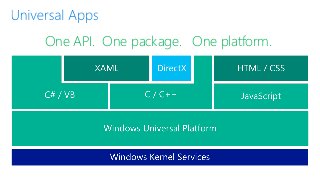
Apps that take advantage of this core and services and run across the Windows ecosystem are what we call Universal Apps or UAPs.
#7 How many of you have seen this block diagram before.. Maybe with a different name, such as WinRT..
[Pause].
If you have written a Windows Store, or Windows Phone app, then you are already very familiar with a the Universal App platform..
Think of the iteration as an “aggregation” or convergence of best features from all platforms: phone, Xbox and Windows into one platform..
This platform is extensible.. So HoloLens gets it.. And in the future if we create a new Windows SKU.. The platform is already refactored to possibly power that new SKU..
Let’s parse some of the changes for game developers..
#10 I showed you Xbox app on Windows.. There is also an Xbox app for Windows Phone.. This slide summarizes our Xbox experiences across all our form factors.. Of course our goal is to bring as many features to as many screens as we can.
If you want to learn more about the Xbox app and Game DVR, Bill Schiefflebein did a whole hour overview on these features at GDC.. You can watch that recording in Channel 9 ..
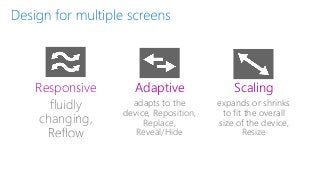
#11 As you handle windowing correctly, you need to come up with a strategy for handling multiple screens.. Windows devices range from your 5” phone to a 60” screen..
We are not going to dive deep into the strategies, but Todd Williams, a designer at Microsoft, did a great job at discussing the options and strategies at GDC… and you can watch his session online at Channel 9…
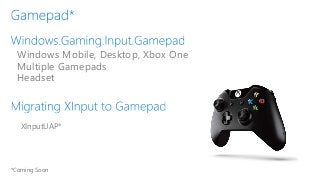
#12 Game controller support is a good example of “best of breed”. . We had Xinput on the desktop and we had Microsoft::Xbox::Input::Gamepad on console..
In this case, we are bringing the console APIs to UAP and there fore making them available on desktop and phone.. Everything you expect like support for multiple gamepads, headset, is there.. This is the API we are investing towards the future.. So if new controllers come up in the future, it is this API that will support them..
Xinput is still available on the desktop for classic apps, but for UAP we recommend you migrate.. To make it easier, there will be a wrapper library, called XInputUAP that exposes the same signatures as Xinput did.. But is implementing the methods using GamePad…
Because these are UAP APIs, everybody will benefit and have access to GamePad.. WinJS games in Javascript will get access to Game pad controller.. XAML controls will support gamepad too… etc…
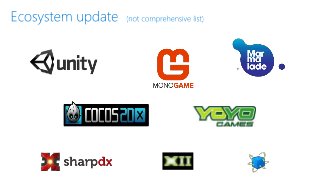
#13 Of course, we know how important the ecosystem is to you as a game developer..
You want the middleware, engines and libraries that help you develop cross-platform or that accelerate your development and allow you to create more immersive gameplay…
As such I am happy to announce that we are working with the partners you want, and ensuring they are Windows 10 ready…
This list is not all inclusive, but here is examples of partners you can see at our booths here at the conference… with progress on their apps…